ClickHouse on Kubernetes!
Intro to the Kubernetes ClickHouse Operator
Altinity Engineering Team
Altinity Background
● Premier provider of software and services for ClickHouse
● Incorporated in UK with distributed team in US/Canada/Europe
● Main US/Europe sponsor of ClickHouse community
● Offerings:
○ 24x7 support for ClickHouse deployments
○ Software (Kubernetes, cluster manager, tools & utilities)
○ POCs/Training
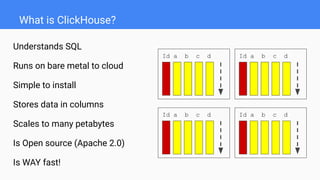
What is ClickHouse?
Understands SQL
Runs on bare metal to cloud
Simple to install
Stores data in columns
Scales to many petabytes
Is Open source (Apache 2.0)
Is WAY fast!
Id a b c d
Id a b c d
Id a b c d
Id a b c d
What is Kubernetes?
“Kubernetes is the new Linux”
Actually it’s an open-source platform to:
● manage container-based systems
● build distributed applications declaratively
● allocate machine resources efficiently
● automate application deployment
Why run ClickHouse on Kubernetes?
1. Other applications are already there
2. Portability
3. Bring up data warehouses quickly
4. Easier to manage than deployment on hosts
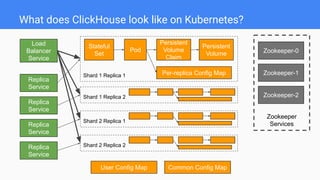
What does ClickHouse look like on Kubernetes?
Shard 1 Replica 1
Zookeeper
Services
Zookeeper-0
Zookeeper-2
Zookeeper-1
Replica
Service
Load
Balancer
Service
Shard 1 Replica 2
Shard 2 Replica 1
Shard 2 Replica 2
Replica
Service
Replica
Service
Replica
Service
User Config Map Common Config Map
Stateful
Set
Pod
Persistent
Volume
Claim
Persistent
Volume
Per-replica Config Map
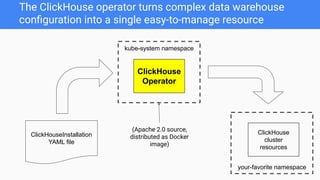
kube-system namespace
The ClickHouse operator turns complex data warehouse
configuration into a single easy-to-manage resource
ClickHouse
Operator
ClickHouseInstallation
YAML file
your-favorite namespace
ClickHouse
cluster
resources
(Apache 2.0 source,
distributed as Docker
image)
Installing and removing the ClickHouse operator
[Optional] Get sample files from github repo:
git clone https://github.com/Altinity/clickhouse-operator
Install the operator:
kubectl apply -f clickhouse-operator-install.yaml
Remove the operator:
kubectl delete -f clickhouse-operator-install.yaml
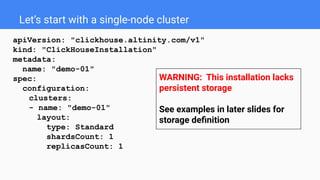
Let’s start with a single-node cluster
apiVersion: "clickhouse.altinity.com/v1"
kind: "ClickHouseInstallation"
metadata:
name: "demo-01"
spec:
configuration:
clusters:
- name: "demo-01"
layout:
type: Standard
shardsCount: 1
replicasCount: 1
WARNING: This installation lacks
persistent storage
See examples in later slides for
storage definition
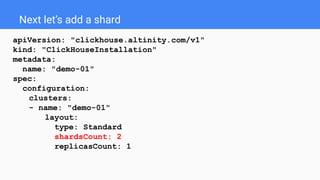
Next let’s add a shard
apiVersion: "clickhouse.altinity.com/v1"
kind: "ClickHouseInstallation"
metadata:
name: "demo-01"
spec:
configuration:
clusters:
- name: "demo-01"
layout:
type: Standard
shardsCount: 2
replicasCount: 1
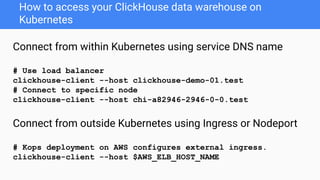
How to access your ClickHouse data warehouse on
Kubernetes
Connect from within Kubernetes using service DNS name
# Use load balancer
clickhouse-client --host clickhouse-demo-01.test
# Connect to specific node
clickhouse-client --host chi-a82946-2946-0-0.test
Connect from outside Kubernetes using Ingress or Nodeport
# Kops deployment on AWS configures external ingress.
clickhouse-client --host $AWS_ELB_HOST_NAME
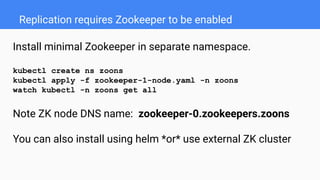
Replication requires Zookeeper to be enabled
Install minimal Zookeeper in separate namespace.
kubectl create ns zoons
kubectl apply -f zookeeper-1-node.yaml -n zoons
watch kubectl -n zoons get all
Note ZK node DNS name: zookeeper-0.zookeepers.zoons
You can also install using helm *or* use external ZK cluster
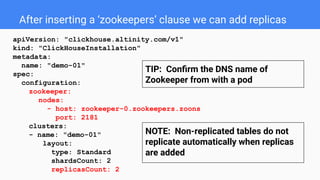
After inserting a ‘zookeepers’ clause we can add replicas
apiVersion: "clickhouse.altinity.com/v1"
kind: "ClickHouseInstallation"
metadata:
name: "demo-01"
spec:
configuration:
zookeeper:
nodes:
- host: zookeeper-0.zookeepers.zoons
port: 2181
clusters:
- name: "demo-01"
layout:
type: Standard
shardsCount: 2
replicasCount: 2
NOTE: Non-replicated tables do not
replicate automatically when replicas
are added
TIP: Confirm the DNS name of
Zookeeper from with a pod
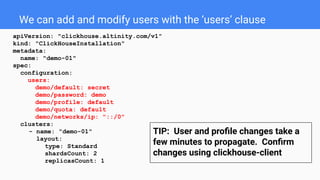
We can add and modify users with the ‘users’ clause
apiVersion: "clickhouse.altinity.com/v1"
kind: "ClickHouseInstallation"
metadata:
name: "demo-01"
spec:
configuration:
users:
demo/default: secret
demo/password: demo
demo/profile: default
demo/quota: default
demo/networks/ip: "::/0"
clusters:
- name: "demo-01"
layout:
type: Standard
shardsCount: 2
replicasCount: 1
TIP: User and profile changes take a
few minutes to propagate. Confirm
changes using clickhouse-client
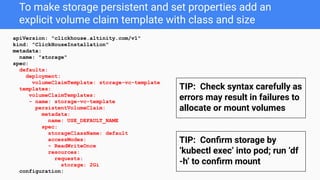
To make storage persistent and set properties add an
explicit volume claim template with class and size
apiVersion: "clickhouse.altinity.com/v1"
kind: "ClickHouseInstallation"
metadata:
name: "storage"
spec:
defaults:
deployment:
volumeClaimTemplate: storage-vc-template
templates:
volumeClaimTemplates:
- name: storage-vc-template
persistentVolumeClaim:
metadata:
name: USE_DEFAULT_NAME
spec:
storageClassName: default
accessModes:
- ReadWriteOnce
resources:
requests:
storage: 2Gi
configuration:
TIP: Check syntax carefully as
errors may result in failures to
allocate or mount volumes
TIP: Confirm storage by
‘kubectl exec’ into pod; run ‘df
-h’ to confirm mount
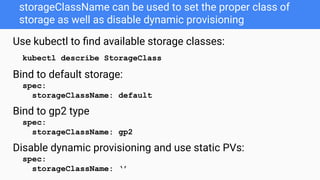
storageClassName can be used to set the proper class of
storage as well as disable dynamic provisioning
Use kubectl to find available storage classes:
kubectl describe StorageClass
Bind to default storage:
spec:
storageClassName: default
Bind to gp2 type
spec:
storageClassName: gp2
Disable dynamic provisioning and use static PVs:
spec:
storageClassName: ‘’
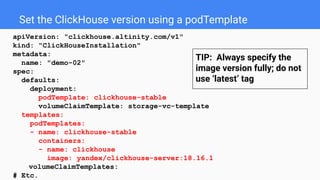
Set the ClickHouse version using a podTemplate
apiVersion: "clickhouse.altinity.com/v1"
kind: "ClickHouseInstallation"
metadata:
name: "demo-02"
spec:
defaults:
deployment:
podTemplate: clickhouse-stable
volumeClaimTemplate: storage-vc-template
templates:
podTemplates:
- name: clickhouse-stable
containers:
- name: clickhouse
image: yandex/clickhouse-server:18.16.1
volumeClaimTemplates:
# Etc.
TIP: Always specify the
image version fully; do not
use ‘latest’ tag
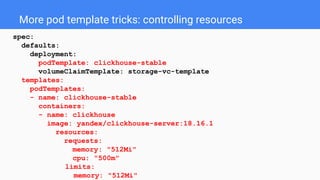
More pod template tricks: controlling resources
spec:
defaults:
deployment:
podTemplate: clickhouse-stable
volumeClaimTemplate: storage-vc-template
templates:
podTemplates:
- name: clickhouse-stable
containers:
- name: clickhouse
image: yandex/clickhouse-server:18.16.1
resources:
requests:
memory: "512Mi"
cpu: "500m"
limits:
memory: "512Mi"
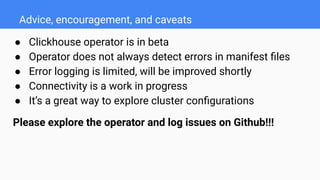
Advice, encouragement, and caveats
● Clickhouse operator is in beta
● Operator does not always detect errors in manifest files
● Error logging is limited, will be improved shortly
● Connectivity is a work in progress
● It’s a great way to explore cluster configurations
Please explore the operator and log issues on Github!!!
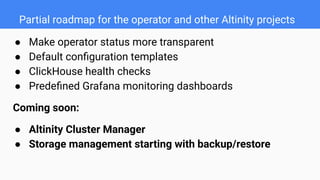
Partial roadmap for the operator and other Altinity projects
● Make operator status more transparent
● Default configuration templates
● ClickHouse health checks
● Predefined Grafana monitoring dashboards
Coming soon:
● Altinity Cluster Manager
● Storage management starting with backup/restore
More information on Altinity ClickHouse Operator...
ClickHouse Operator Github Project:
https://github.com/Altinity/clickhouse-operator
Altinity Blog -- https://www.altinity.com/blog
Webinars like this one!
Questions?
Thank you!
Contacts:
info@altinity.com
Visit us at:
https://www.altinity.com
Read Our Blog:
https://www.altinity.com/blog

ClickHouse on Kubernetes! By Robert Hodges, Altinity CEO

  • 1.
    ClickHouse on Kubernetes! Introto the Kubernetes ClickHouse Operator Altinity Engineering Team
  • 2.
    Altinity Background ● Premierprovider of software and services for ClickHouse ● Incorporated in UK with distributed team in US/Canada/Europe ● Main US/Europe sponsor of ClickHouse community ● Offerings: ○ 24x7 support for ClickHouse deployments ○ Software (Kubernetes, cluster manager, tools & utilities) ○ POCs/Training
  • 3.
    What is ClickHouse? UnderstandsSQL Runs on bare metal to cloud Simple to install Stores data in columns Scales to many petabytes Is Open source (Apache 2.0) Is WAY fast! Id a b c d Id a b c d Id a b c d Id a b c d
  • 4.
    What is Kubernetes? “Kubernetesis the new Linux” Actually it’s an open-source platform to: ● manage container-based systems ● build distributed applications declaratively ● allocate machine resources efficiently ● automate application deployment
  • 5.
    Why run ClickHouseon Kubernetes? 1. Other applications are already there 2. Portability 3. Bring up data warehouses quickly 4. Easier to manage than deployment on hosts
  • 6.
    What does ClickHouselook like on Kubernetes? Shard 1 Replica 1 Zookeeper Services Zookeeper-0 Zookeeper-2 Zookeeper-1 Replica Service Load Balancer Service Shard 1 Replica 2 Shard 2 Replica 1 Shard 2 Replica 2 Replica Service Replica Service Replica Service User Config Map Common Config Map Stateful Set Pod Persistent Volume Claim Persistent Volume Per-replica Config Map
  • 7.
    kube-system namespace The ClickHouseoperator turns complex data warehouse configuration into a single easy-to-manage resource ClickHouse Operator ClickHouseInstallation YAML file your-favorite namespace ClickHouse cluster resources (Apache 2.0 source, distributed as Docker image)
  • 8.
    Installing and removingthe ClickHouse operator [Optional] Get sample files from github repo: git clone https://github.com/Altinity/clickhouse-operator Install the operator: kubectl apply -f clickhouse-operator-install.yaml Remove the operator: kubectl delete -f clickhouse-operator-install.yaml
  • 9.
    Let’s start witha single-node cluster apiVersion: "clickhouse.altinity.com/v1" kind: "ClickHouseInstallation" metadata: name: "demo-01" spec: configuration: clusters: - name: "demo-01" layout: type: Standard shardsCount: 1 replicasCount: 1 WARNING: This installation lacks persistent storage See examples in later slides for storage definition
  • 10.
    Next let’s adda shard apiVersion: "clickhouse.altinity.com/v1" kind: "ClickHouseInstallation" metadata: name: "demo-01" spec: configuration: clusters: - name: "demo-01" layout: type: Standard shardsCount: 2 replicasCount: 1
  • 11.
    How to accessyour ClickHouse data warehouse on Kubernetes Connect from within Kubernetes using service DNS name # Use load balancer clickhouse-client --host clickhouse-demo-01.test # Connect to specific node clickhouse-client --host chi-a82946-2946-0-0.test Connect from outside Kubernetes using Ingress or Nodeport # Kops deployment on AWS configures external ingress. clickhouse-client --host $AWS_ELB_HOST_NAME
  • 12.
    Replication requires Zookeeperto be enabled Install minimal Zookeeper in separate namespace. kubectl create ns zoons kubectl apply -f zookeeper-1-node.yaml -n zoons watch kubectl -n zoons get all Note ZK node DNS name: zookeeper-0.zookeepers.zoons You can also install using helm *or* use external ZK cluster
  • 13.
    After inserting a‘zookeepers’ clause we can add replicas apiVersion: "clickhouse.altinity.com/v1" kind: "ClickHouseInstallation" metadata: name: "demo-01" spec: configuration: zookeeper: nodes: - host: zookeeper-0.zookeepers.zoons port: 2181 clusters: - name: "demo-01" layout: type: Standard shardsCount: 2 replicasCount: 2 NOTE: Non-replicated tables do not replicate automatically when replicas are added TIP: Confirm the DNS name of Zookeeper from with a pod
  • 14.
    We can addand modify users with the ‘users’ clause apiVersion: "clickhouse.altinity.com/v1" kind: "ClickHouseInstallation" metadata: name: "demo-01" spec: configuration: users: demo/default: secret demo/password: demo demo/profile: default demo/quota: default demo/networks/ip: "::/0" clusters: - name: "demo-01" layout: type: Standard shardsCount: 2 replicasCount: 1 TIP: User and profile changes take a few minutes to propagate. Confirm changes using clickhouse-client
  • 15.
    To make storagepersistent and set properties add an explicit volume claim template with class and size apiVersion: "clickhouse.altinity.com/v1" kind: "ClickHouseInstallation" metadata: name: "storage" spec: defaults: deployment: volumeClaimTemplate: storage-vc-template templates: volumeClaimTemplates: - name: storage-vc-template persistentVolumeClaim: metadata: name: USE_DEFAULT_NAME spec: storageClassName: default accessModes: - ReadWriteOnce resources: requests: storage: 2Gi configuration: TIP: Check syntax carefully as errors may result in failures to allocate or mount volumes TIP: Confirm storage by ‘kubectl exec’ into pod; run ‘df -h’ to confirm mount
  • 16.
    storageClassName can beused to set the proper class of storage as well as disable dynamic provisioning Use kubectl to find available storage classes: kubectl describe StorageClass Bind to default storage: spec: storageClassName: default Bind to gp2 type spec: storageClassName: gp2 Disable dynamic provisioning and use static PVs: spec: storageClassName: ‘’
  • 17.
    Set the ClickHouseversion using a podTemplate apiVersion: "clickhouse.altinity.com/v1" kind: "ClickHouseInstallation" metadata: name: "demo-02" spec: defaults: deployment: podTemplate: clickhouse-stable volumeClaimTemplate: storage-vc-template templates: podTemplates: - name: clickhouse-stable containers: - name: clickhouse image: yandex/clickhouse-server:18.16.1 volumeClaimTemplates: # Etc. TIP: Always specify the image version fully; do not use ‘latest’ tag
  • 18.
    More pod templatetricks: controlling resources spec: defaults: deployment: podTemplate: clickhouse-stable volumeClaimTemplate: storage-vc-template templates: podTemplates: - name: clickhouse-stable containers: - name: clickhouse image: yandex/clickhouse-server:18.16.1 resources: requests: memory: "512Mi" cpu: "500m" limits: memory: "512Mi"
  • 19.
    Advice, encouragement, andcaveats ● Clickhouse operator is in beta ● Operator does not always detect errors in manifest files ● Error logging is limited, will be improved shortly ● Connectivity is a work in progress ● It’s a great way to explore cluster configurations Please explore the operator and log issues on Github!!!
  • 20.
    Partial roadmap forthe operator and other Altinity projects ● Make operator status more transparent ● Default configuration templates ● ClickHouse health checks ● Predefined Grafana monitoring dashboards Coming soon: ● Altinity Cluster Manager ● Storage management starting with backup/restore
  • 21.
    More information onAltinity ClickHouse Operator... ClickHouse Operator Github Project: https://github.com/Altinity/clickhouse-operator Altinity Blog -- https://www.altinity.com/blog Webinars like this one!
  • 22.
    Questions? Thank you! Contacts: info@altinity.com Visit usat: https://www.altinity.com Read Our Blog: https://www.altinity.com/blog