Facility Management Made Easy Presents facili CAD   LLC
facili CAD  is a Computer Aided Facility Management software package, that is both  inexpensive  and  user friendly .
Brief Overview of  facili CAD facili CAD  Provides Database Structure Microsoft SQL (Open Database) Standard FM Structure CAD Link from database to AutoCAD DWGS Interface Enforces Standards for Data Entry Built In Report Viewer Crystal Reports Built In Query Builder
Traditional CAFM Solutions Cost Prohibitive  Massive Programs Cumbersome Interface Extremely Difficult to Implement   Proprietary Data Structure
facili CAD  Features Inexpensive Streamlined Intuitive, User Friendly Interface Simple Implementation Industry Standard Data Formats
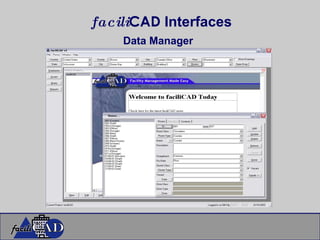
facili CAD  Interfaces Data Manager
Data Driven Interface Simple Form Based Data Entry Arranged Logically to guide you through the process Create Background Data (Space Location, Organizational Hierarchy, Cost Centers and Room Types Add and Edit Spaces, Employees and Assets Standard Reports, Complete Customization Possible Open Database!!!!!
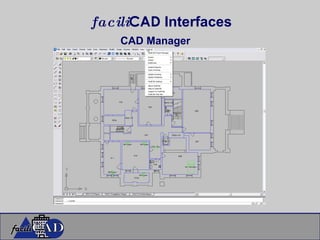
facili CAD  Interfaces CAD Manager
Graphical CAD Interface One Pull Down menu arranged Logically to guide you through the process All forms allow for Database Edits Create and Edit Background Data from the AutoCAD Application Add and Edit Spaces, Employees and Assets Update Database or CAD Drawing Create Graphic Reports and Queries
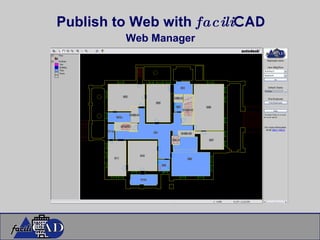
Publish to Web with  facili CAD Web Manager
Web Manager Virtually No Learning Curve Controlled Log-In Access Data From Any Location Intranet and Internet Access Graphic Reports (No CAD Required) Data Driver Reports Create Custom Queries and Display both Graphically and In Data View Export to Excel
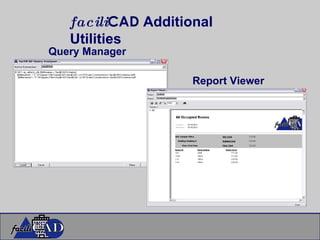
facili CAD  Additional Utilities Query Manager Report Viewer
Query Manager Interface Run Queries and Script files against database or Server without installing faciliCAD Intranet and Internet Access Report Viewer View Reports without faciliCAD Installed
Small Facilities Never Considered CAFM Solution Large Facilities Unhappy with Existing CAFM Solutions Architectural and Design Build Firms Building Life Cycle Management Extend Revenues Facility Management Consultants Looking for Alternative to Existing Solutions Typical faciliCAD User
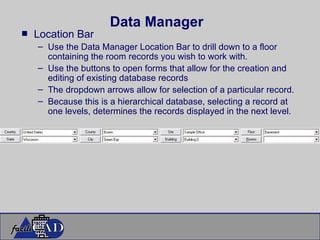
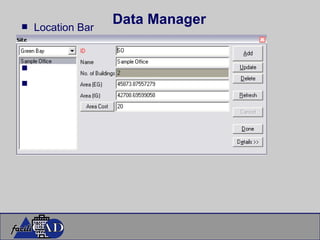
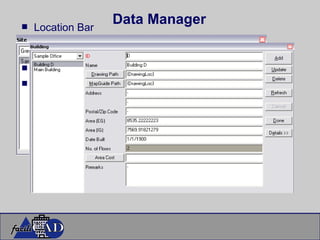
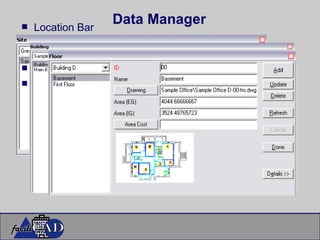
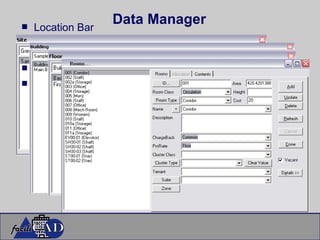
Data Manager Location Bar Use the Data Manager Location Bar to drill down to a floor containing the room records you wish to work with. Use the buttons to open forms that allow for the creation and editing of existing database records The dropdown arrows allow for selection of a particular record. Because this is a hierarchical database, selecting a record at one levels, determines the records displayed in the next level.
Data Manager Location Bar
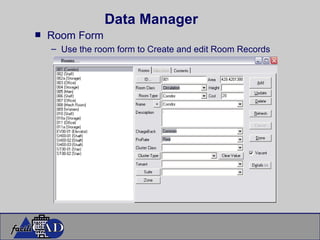
Data Manager Room Form Use the room form to Create and edit Room Records
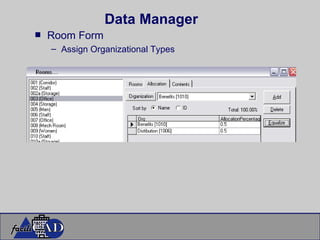
Data Manager Room Form Assign Organizational Types
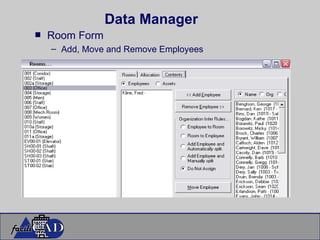
Data Manager Room Form Add, Move and Remove Employees
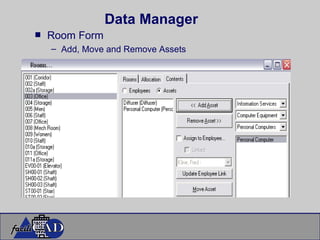
Data Manager Room Form Add, Move and Remove Assets
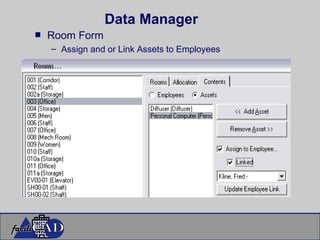
Data Manager Room Form Assign and or Link Assets to Employees
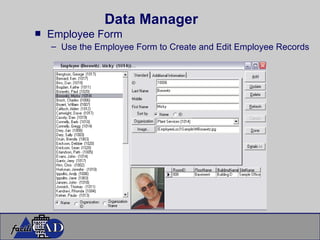
Data Manager Employee Form Use the Employee Form to Create and Edit Employee Records
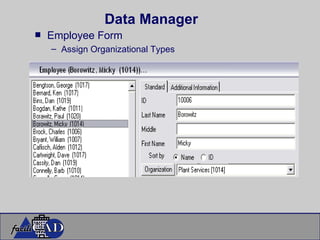
Data Manager Employee Form Assign Organizational Types
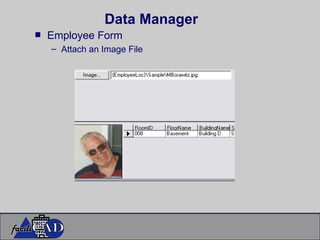
Data Manager Employee Form Attach an Image File
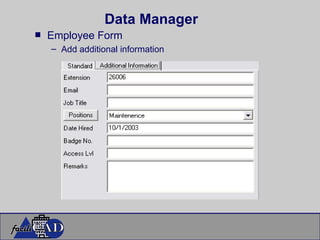
Data Manager Employee Form Add additional information
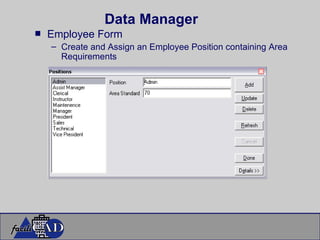
Data Manager Employee Form Create and Assign an Employee Position containing Area Requirements
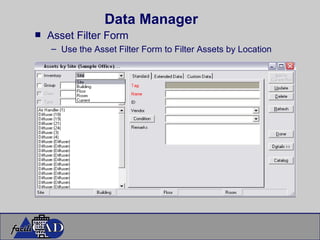
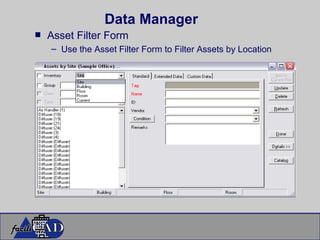
Data Manager Asset Filter Form Use the Asset Filter Form to Filter Assets by Location
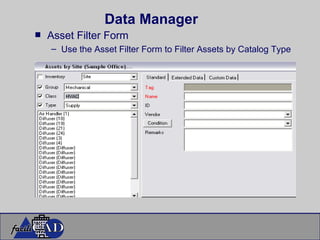
Data Manager Asset Filter Form Use the Asset Filter Form to Filter Assets by Catalog Type
Data Manager Asset Filter Form Use the Asset Filter Form to Filter Assets by Location
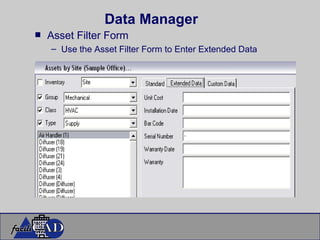
Data Manager Asset Filter Form Use the Asset Filter Form to Enter Extended Data
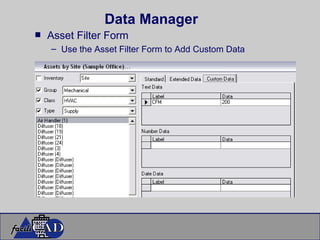
Data Manager Asset Filter Form Use the Asset Filter Form to Add Custom Data
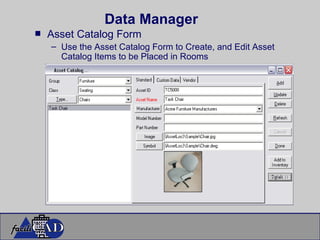
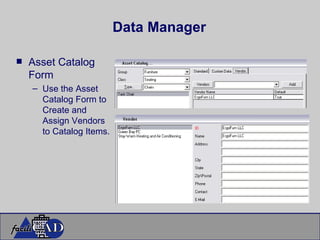
Data Manager Asset Catalog Form Use the Asset Catalog Form to Create, and Edit Asset Catalog Items to be Placed in Rooms
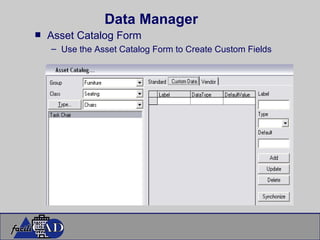
Data Manager Asset Catalog Form Use the Asset Catalog Form to Create Custom Fields
Data Manager Asset Catalog Form Use the Asset Catalog Form to Create and Assign Vendors to Catalog Items.
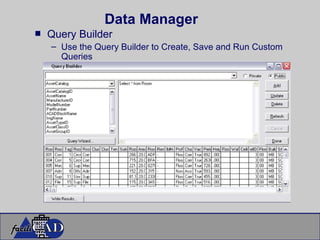
Data Manager Query Builder Use the Query Builder to Create, Save and Run Custom Queries
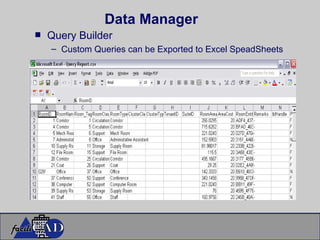
Data Manager Query Builder Custom Queries can be Exported to Excel SpeadSheets
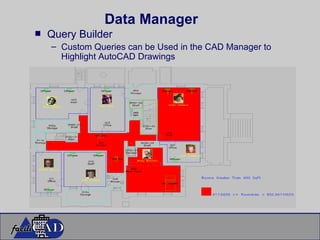
Data Manager Query Builder Custom Queries can be Used in the CAD Manager to Highlight AutoCAD Drawings
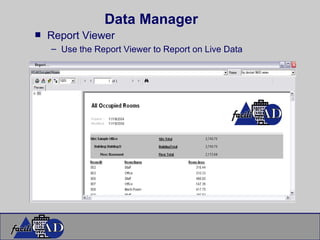
Data Manager Report Viewer Use the Report Viewer to Report on Live Data
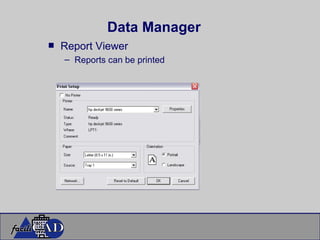
Data Manager Report Viewer Reports can be printed
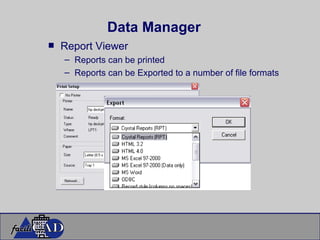
Data Manager Report Viewer Reports can be printed Reports can be Exported to a number of file formats
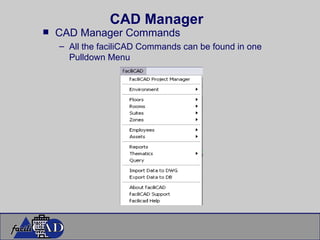
CAD Manager CAD Manager Commands All the faciliCAD Commands can be found in one Pulldown Menu
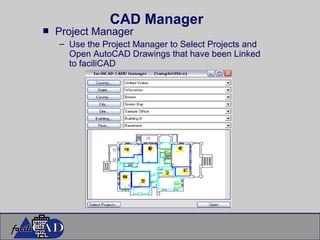
CAD Manager Project Manager Use the Project Manager to Select Projects and Open AutoCAD Drawings that have been Linked to faciliCAD
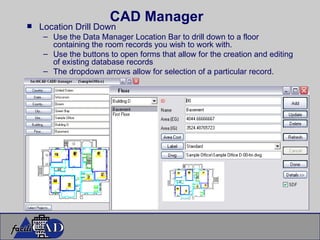
CAD Manager Location Drill Down Use the Data Manager Location Bar to drill down to a floor containing the room records you wish to work with. Use the buttons to open forms that allow for the creation and editing of existing database records The dropdown arrows allow for selection of a particular record.
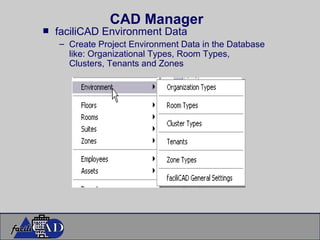
CAD Manager faciliCAD Environment Data Create Project Environment Data in the Database like: Organizational Types, Room Types, Clusters, Tenants and Zones
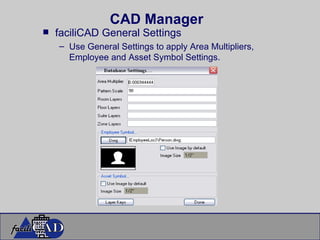
CAD Manager faciliCAD General Settings Use General Settings to apply Area Multipliers, Employee and Asset Symbol Settings.
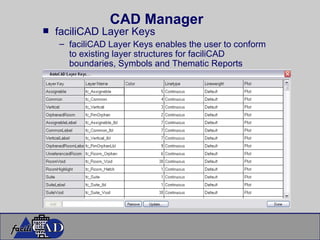
CAD Manager faciliCAD Layer Keys faciliCAD Layer Keys enables the user to conform to existing layer structures for faciliCAD boundaries, Symbols and Thematic Reports
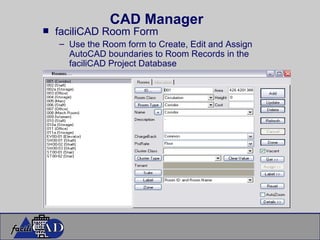
CAD Manager faciliCAD Room Form Use the Room form to Create, Edit and Assign AutoCAD boundaries to Room Records in the faciliCAD Project Database
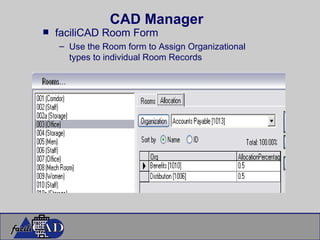
CAD Manager faciliCAD Room Form Use the Room form to Assign Organizational types to individual Room Records
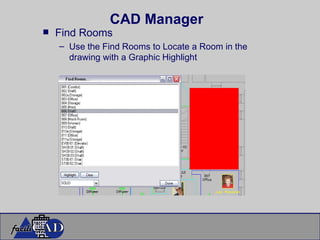
CAD Manager Find Rooms Use the Find Rooms to Locate a Room in the drawing with a Graphic Highlight
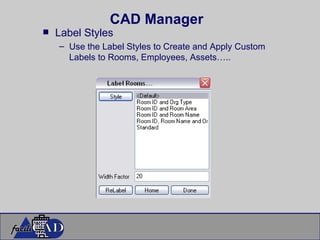
CAD Manager Label Styles Use the Label Styles to Create and Apply Custom Labels to Rooms, Employees, Assets…..
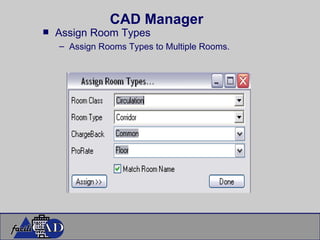
CAD Manager Assign Room Types Assign Rooms Types to Multiple Rooms.
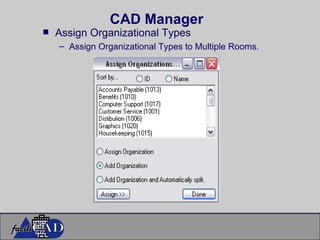
CAD Manager Assign Organizational Types Assign Organizational Types to Multiple Rooms.
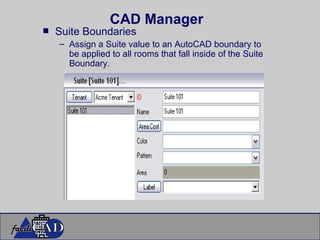
CAD Manager Suite Boundaries Assign a Suite value to an AutoCAD boundary to be applied to all rooms that fall inside of the Suite Boundary.
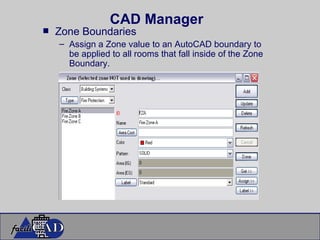
CAD Manager Zone Boundaries Assign a Zone value to an AutoCAD boundary to be applied to all rooms that fall inside of the Zone Boundary.
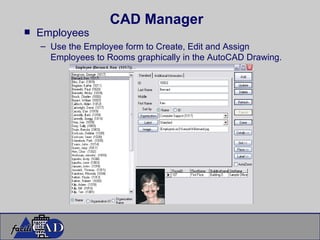
CAD Manager Employees Use the Employee form to Create, Edit and Assign Employees to Rooms graphically in the AutoCAD Drawing.
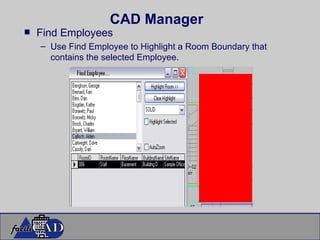
CAD Manager Find Employees Use Find Employee to Highlight a Room Boundary that contains the selected Employee.
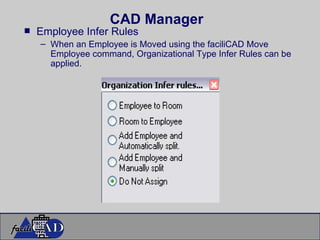
CAD Manager Employee Infer Rules When an Employee is Moved using the faciliCAD Move Employee command, Organizational Type Infer Rules can be applied.
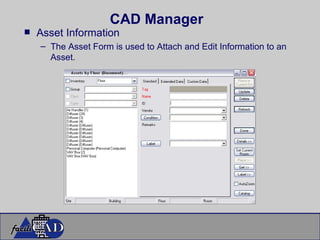
CAD Manager Asset Information The Asset Form is used to Attach and Edit Information to an Asset.
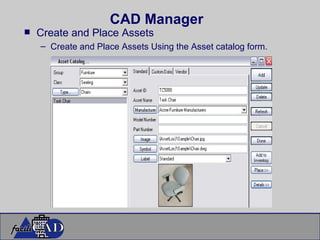
CAD Manager Create and Place Assets Create and Place Assets Using the Asset catalog form.
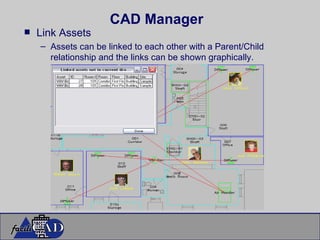
CAD Manager Link Assets Assets can be linked to each other with a Parent/Child relationship and the links can be shown graphically.
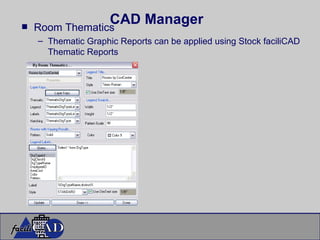
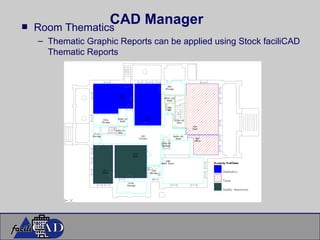
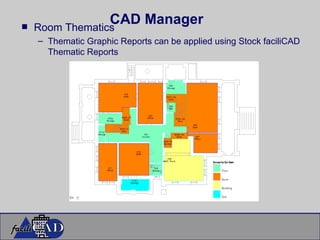
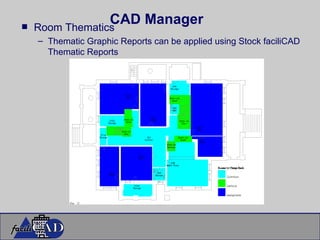
CAD Manager Room Thematics Thematic Graphic Reports can be applied using Stock faciliCAD Thematic Reports
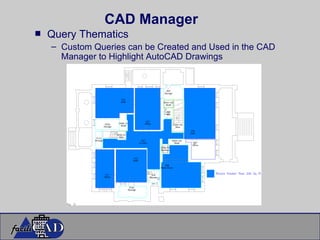
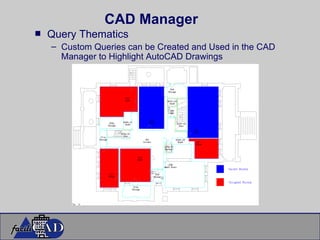
CAD Manager Query Thematics Custom Queries can be Created and Used in the CAD Manager to Highlight AutoCAD Drawings
Thank You! facili CAD   LLC

faciliCAD is Facility Management Made Easy

  • 1.
    Facility Management MadeEasy Presents facili CAD LLC
  • 2.
    facili CAD is a Computer Aided Facility Management software package, that is both inexpensive and user friendly .
  • 3.
    Brief Overview of facili CAD facili CAD Provides Database Structure Microsoft SQL (Open Database) Standard FM Structure CAD Link from database to AutoCAD DWGS Interface Enforces Standards for Data Entry Built In Report Viewer Crystal Reports Built In Query Builder
  • 4.
    Traditional CAFM SolutionsCost Prohibitive Massive Programs Cumbersome Interface Extremely Difficult to Implement  Proprietary Data Structure
  • 5.
    facili CAD Features Inexpensive Streamlined Intuitive, User Friendly Interface Simple Implementation Industry Standard Data Formats
  • 6.
    facili CAD Interfaces Data Manager
  • 7.
    Data Driven InterfaceSimple Form Based Data Entry Arranged Logically to guide you through the process Create Background Data (Space Location, Organizational Hierarchy, Cost Centers and Room Types Add and Edit Spaces, Employees and Assets Standard Reports, Complete Customization Possible Open Database!!!!!
  • 8.
    facili CAD Interfaces CAD Manager
  • 9.
    Graphical CAD InterfaceOne Pull Down menu arranged Logically to guide you through the process All forms allow for Database Edits Create and Edit Background Data from the AutoCAD Application Add and Edit Spaces, Employees and Assets Update Database or CAD Drawing Create Graphic Reports and Queries
  • 10.
    Publish to Webwith facili CAD Web Manager
  • 11.
    Web Manager VirtuallyNo Learning Curve Controlled Log-In Access Data From Any Location Intranet and Internet Access Graphic Reports (No CAD Required) Data Driver Reports Create Custom Queries and Display both Graphically and In Data View Export to Excel
  • 12.
    facili CAD Additional Utilities Query Manager Report Viewer
  • 13.
    Query Manager InterfaceRun Queries and Script files against database or Server without installing faciliCAD Intranet and Internet Access Report Viewer View Reports without faciliCAD Installed
  • 14.
    Small Facilities NeverConsidered CAFM Solution Large Facilities Unhappy with Existing CAFM Solutions Architectural and Design Build Firms Building Life Cycle Management Extend Revenues Facility Management Consultants Looking for Alternative to Existing Solutions Typical faciliCAD User
  • 15.
    Data Manager LocationBar Use the Data Manager Location Bar to drill down to a floor containing the room records you wish to work with. Use the buttons to open forms that allow for the creation and editing of existing database records The dropdown arrows allow for selection of a particular record. Because this is a hierarchical database, selecting a record at one levels, determines the records displayed in the next level.
  • 16.
  • 17.
  • 18.
  • 19.
  • 20.
    Data Manager RoomForm Use the room form to Create and edit Room Records
  • 21.
    Data Manager RoomForm Assign Organizational Types
  • 22.
    Data Manager RoomForm Add, Move and Remove Employees
  • 23.
    Data Manager RoomForm Add, Move and Remove Assets
  • 24.
    Data Manager RoomForm Assign and or Link Assets to Employees
  • 25.
    Data Manager EmployeeForm Use the Employee Form to Create and Edit Employee Records
  • 26.
    Data Manager EmployeeForm Assign Organizational Types
  • 27.
    Data Manager EmployeeForm Attach an Image File
  • 28.
    Data Manager EmployeeForm Add additional information
  • 29.
    Data Manager EmployeeForm Create and Assign an Employee Position containing Area Requirements
  • 30.
    Data Manager AssetFilter Form Use the Asset Filter Form to Filter Assets by Location
  • 31.
    Data Manager AssetFilter Form Use the Asset Filter Form to Filter Assets by Catalog Type
  • 32.
    Data Manager AssetFilter Form Use the Asset Filter Form to Filter Assets by Location
  • 33.
    Data Manager AssetFilter Form Use the Asset Filter Form to Enter Extended Data
  • 34.
    Data Manager AssetFilter Form Use the Asset Filter Form to Add Custom Data
  • 35.
    Data Manager AssetCatalog Form Use the Asset Catalog Form to Create, and Edit Asset Catalog Items to be Placed in Rooms
  • 36.
    Data Manager AssetCatalog Form Use the Asset Catalog Form to Create Custom Fields
  • 37.
    Data Manager AssetCatalog Form Use the Asset Catalog Form to Create and Assign Vendors to Catalog Items.
  • 38.
    Data Manager QueryBuilder Use the Query Builder to Create, Save and Run Custom Queries
  • 39.
    Data Manager QueryBuilder Custom Queries can be Exported to Excel SpeadSheets
  • 40.
    Data Manager QueryBuilder Custom Queries can be Used in the CAD Manager to Highlight AutoCAD Drawings
  • 41.
    Data Manager ReportViewer Use the Report Viewer to Report on Live Data
  • 42.
    Data Manager ReportViewer Reports can be printed
  • 43.
    Data Manager ReportViewer Reports can be printed Reports can be Exported to a number of file formats
  • 44.
    CAD Manager CADManager Commands All the faciliCAD Commands can be found in one Pulldown Menu
  • 45.
    CAD Manager ProjectManager Use the Project Manager to Select Projects and Open AutoCAD Drawings that have been Linked to faciliCAD
  • 46.
    CAD Manager LocationDrill Down Use the Data Manager Location Bar to drill down to a floor containing the room records you wish to work with. Use the buttons to open forms that allow for the creation and editing of existing database records The dropdown arrows allow for selection of a particular record.
  • 47.
    CAD Manager faciliCADEnvironment Data Create Project Environment Data in the Database like: Organizational Types, Room Types, Clusters, Tenants and Zones
  • 48.
    CAD Manager faciliCADGeneral Settings Use General Settings to apply Area Multipliers, Employee and Asset Symbol Settings.
  • 49.
    CAD Manager faciliCADLayer Keys faciliCAD Layer Keys enables the user to conform to existing layer structures for faciliCAD boundaries, Symbols and Thematic Reports
  • 50.
    CAD Manager faciliCADRoom Form Use the Room form to Create, Edit and Assign AutoCAD boundaries to Room Records in the faciliCAD Project Database
  • 51.
    CAD Manager faciliCADRoom Form Use the Room form to Assign Organizational types to individual Room Records
  • 52.
    CAD Manager FindRooms Use the Find Rooms to Locate a Room in the drawing with a Graphic Highlight
  • 53.
    CAD Manager LabelStyles Use the Label Styles to Create and Apply Custom Labels to Rooms, Employees, Assets…..
  • 54.
    CAD Manager AssignRoom Types Assign Rooms Types to Multiple Rooms.
  • 55.
    CAD Manager AssignOrganizational Types Assign Organizational Types to Multiple Rooms.
  • 56.
    CAD Manager SuiteBoundaries Assign a Suite value to an AutoCAD boundary to be applied to all rooms that fall inside of the Suite Boundary.
  • 57.
    CAD Manager ZoneBoundaries Assign a Zone value to an AutoCAD boundary to be applied to all rooms that fall inside of the Zone Boundary.
  • 58.
    CAD Manager EmployeesUse the Employee form to Create, Edit and Assign Employees to Rooms graphically in the AutoCAD Drawing.
  • 59.
    CAD Manager FindEmployees Use Find Employee to Highlight a Room Boundary that contains the selected Employee.
  • 60.
    CAD Manager EmployeeInfer Rules When an Employee is Moved using the faciliCAD Move Employee command, Organizational Type Infer Rules can be applied.
  • 61.
    CAD Manager AssetInformation The Asset Form is used to Attach and Edit Information to an Asset.
  • 62.
    CAD Manager Createand Place Assets Create and Place Assets Using the Asset catalog form.
  • 63.
    CAD Manager LinkAssets Assets can be linked to each other with a Parent/Child relationship and the links can be shown graphically.
  • 64.
    CAD Manager RoomThematics Thematic Graphic Reports can be applied using Stock faciliCAD Thematic Reports
  • 65.
    CAD Manager RoomThematics Thematic Graphic Reports can be applied using Stock faciliCAD Thematic Reports
  • 66.
    CAD Manager RoomThematics Thematic Graphic Reports can be applied using Stock faciliCAD Thematic Reports
  • 67.
    CAD Manager RoomThematics Thematic Graphic Reports can be applied using Stock faciliCAD Thematic Reports
  • 68.
    CAD Manager QueryThematics Custom Queries can be Created and Used in the CAD Manager to Highlight AutoCAD Drawings
  • 69.
    CAD Manager QueryThematics Custom Queries can be Created and Used in the CAD Manager to Highlight AutoCAD Drawings
  • 70.