Flipkart Advantage
Scheduling and Recalling Consignments – New Features
By completing this tutorial, you will be able to:
• Schedule the drop of your FA consignments directly from the seller portal
• Create a consolidated recall request for your sellable inventory on the seller portal
Learning Objectives
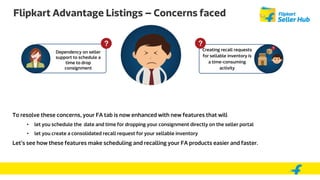
Flipkart Advantage Listings – Concerns faced
Dependency on seller
support to schedule a
time to drop
consignment
To resolve these concerns, your FA tab is now enhanced with new features that will
• let you schedule the date and time for dropping your consignment directly on the seller portal
• let you create a consolidated recall request for your sellable inventory
Let’s see how these features make scheduling and recalling your FA products easier and faster.
Creating recall requests
for sellable inventory is
a time-consuming
activity
Flipkart Advantage
Issue – Dependency on seller support to schedule a time to drop
consignment. No record for scheduled time
Solution -Schedule the date and time of dropping your consignment directly
on the seller portal
Schedule Consignment on the Seller portal (1 of 6)
This gives the status
of the consignment
Step 1 - Click on
‘Consignment Queue’
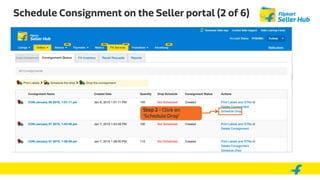
Schedule Consignment on the Seller portal (2 of 6)
Step 2 - Click on
‘Schedule Drop’
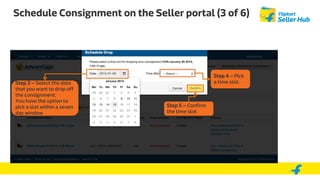
Schedule Consignment on the Seller portal (3 of 6)
Step 4 – Pick
a time slot.Step 3 – Select the date
that you want to drop off
the consignment.
You have the option to
pick a slot within a seven
day window
Step 5 – Confirm
the time slot
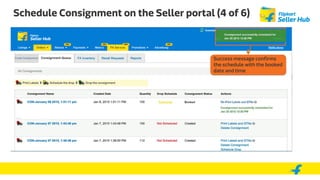
Schedule Consignment on the Seller portal (4 of 6)
Success message confirms
the schedule with the booked
date and time
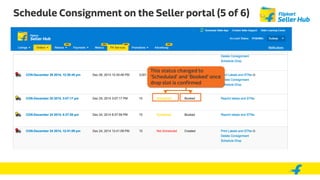
Schedule Consignment on the Seller portal (5 of 6)
This status changed to
‘Scheduled’ and ‘Booked’ once
drop slot is confirmed
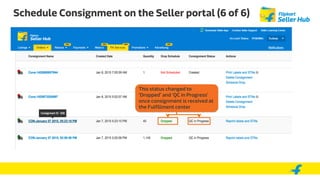
Schedule Consignment on the Seller portal (6 of 6)
This status changed to
‘Dropped’ and ‘QC in Progress’
once consignment is received at
the Fulfillment center
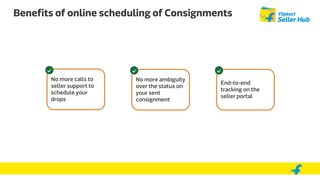
Benefits of online scheduling of Consignments
No more calls to
seller support to
schedule your
drops
No more ambiguity
over the status on
your sent
consignment
End-to-end
tracking on the
seller portal
Flipkart Advantage
Issue – Creating recall requests for sellable inventory is a time-
consuming activity
Solution –Create ‘Consolidated Sellable recall’ request from the FA
Inventory sub-tab
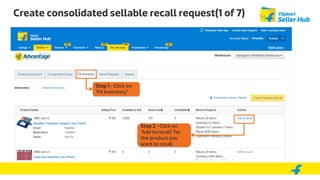
Create consolidated sellable recall request(1 of 7)
Step 1 - Click on
‘FA Inventory’
Step 2 - Click on
‘Add to recall’ for
the product you
want to recall
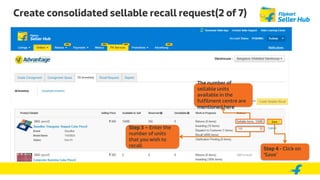
Create consolidated sellable recall request(2 of 7)
Step 3 – Enter the
number of units
that you wish to
recall
The number of
sellable units
available in the
fulfilment centre are
mentioned here
Step 4 - Click on
‘Save’
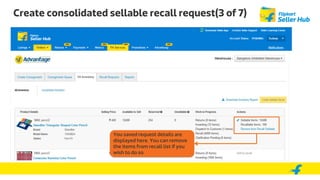
Create consolidated sellable recall request(3 of 7)
You saved request details are
displayed here. You can remove
the items from recall list if you
wish to do so
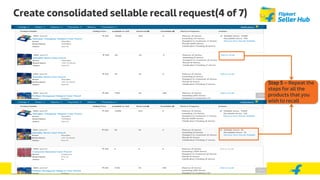
Create consolidated sellable recall request(4 of 7)
Step 5 – Repeat the
steps for all the
products that you
wish to recall
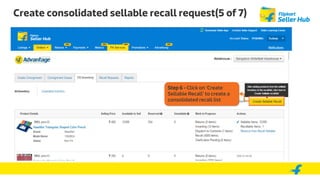
Create consolidated sellable recall request(5 of 7)
Step 6 - Click on ‘Create
Sellable Recall’ to create a
consolidated recall list
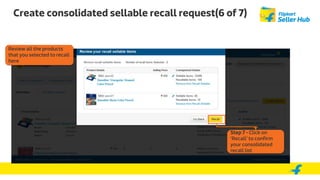
Create consolidated sellable recall request(6 of 7)
Step 7 - Click on
‘Recall’ to confirm
your consolidated
recall list
Review all the products
that you selected to recall
here
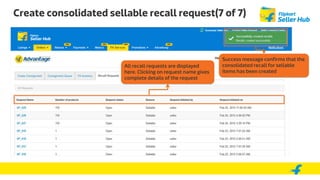
Create consolidated sellable recall request(7 of 7)
All recall requests are displayed
here. Clicking on request name gives
complete details of the request
Success message confirms that the
consolidated recall for sellable
items has been created
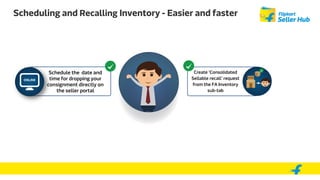
Scheduling and Recalling Inventory - Easier and faster
Schedule the date and
time for dropping your
consignment directly on
the seller portal
Create ‘Consolidated
Sellable recall’ request
from the FA Inventory
sub-tab
In this tutorial, you learnt about:
• Scheduling your consignment drops to the fulfilment centre on the seller portal
• Benefits on online scheduling of consignments
• Creating a consolidated recall request for your sellable inventory
Summary
Thank You

FA schedule consignment and consolidated recall

  • 1.
    Flipkart Advantage Scheduling andRecalling Consignments – New Features
  • 2.
    By completing thistutorial, you will be able to: • Schedule the drop of your FA consignments directly from the seller portal • Create a consolidated recall request for your sellable inventory on the seller portal Learning Objectives
  • 3.
    Flipkart Advantage Listings– Concerns faced Dependency on seller support to schedule a time to drop consignment To resolve these concerns, your FA tab is now enhanced with new features that will • let you schedule the date and time for dropping your consignment directly on the seller portal • let you create a consolidated recall request for your sellable inventory Let’s see how these features make scheduling and recalling your FA products easier and faster. Creating recall requests for sellable inventory is a time-consuming activity
  • 4.
    Flipkart Advantage Issue –Dependency on seller support to schedule a time to drop consignment. No record for scheduled time Solution -Schedule the date and time of dropping your consignment directly on the seller portal
  • 5.
    Schedule Consignment onthe Seller portal (1 of 6) This gives the status of the consignment Step 1 - Click on ‘Consignment Queue’
  • 6.
    Schedule Consignment onthe Seller portal (2 of 6) Step 2 - Click on ‘Schedule Drop’
  • 7.
    Schedule Consignment onthe Seller portal (3 of 6) Step 4 – Pick a time slot.Step 3 – Select the date that you want to drop off the consignment. You have the option to pick a slot within a seven day window Step 5 – Confirm the time slot
  • 8.
    Schedule Consignment onthe Seller portal (4 of 6) Success message confirms the schedule with the booked date and time
  • 9.
    Schedule Consignment onthe Seller portal (5 of 6) This status changed to ‘Scheduled’ and ‘Booked’ once drop slot is confirmed
  • 10.
    Schedule Consignment onthe Seller portal (6 of 6) This status changed to ‘Dropped’ and ‘QC in Progress’ once consignment is received at the Fulfillment center
  • 11.
    Benefits of onlinescheduling of Consignments No more calls to seller support to schedule your drops No more ambiguity over the status on your sent consignment End-to-end tracking on the seller portal
  • 12.
    Flipkart Advantage Issue –Creating recall requests for sellable inventory is a time- consuming activity Solution –Create ‘Consolidated Sellable recall’ request from the FA Inventory sub-tab
  • 13.
    Create consolidated sellablerecall request(1 of 7) Step 1 - Click on ‘FA Inventory’ Step 2 - Click on ‘Add to recall’ for the product you want to recall
  • 14.
    Create consolidated sellablerecall request(2 of 7) Step 3 – Enter the number of units that you wish to recall The number of sellable units available in the fulfilment centre are mentioned here Step 4 - Click on ‘Save’
  • 15.
    Create consolidated sellablerecall request(3 of 7) You saved request details are displayed here. You can remove the items from recall list if you wish to do so
  • 16.
    Create consolidated sellablerecall request(4 of 7) Step 5 – Repeat the steps for all the products that you wish to recall
  • 17.
    Create consolidated sellablerecall request(5 of 7) Step 6 - Click on ‘Create Sellable Recall’ to create a consolidated recall list
  • 18.
    Create consolidated sellablerecall request(6 of 7) Step 7 - Click on ‘Recall’ to confirm your consolidated recall list Review all the products that you selected to recall here
  • 19.
    Create consolidated sellablerecall request(7 of 7) All recall requests are displayed here. Clicking on request name gives complete details of the request Success message confirms that the consolidated recall for sellable items has been created
  • 20.
    Scheduling and RecallingInventory - Easier and faster Schedule the date and time for dropping your consignment directly on the seller portal Create ‘Consolidated Sellable recall’ request from the FA Inventory sub-tab
  • 21.
    In this tutorial,you learnt about: • Scheduling your consignment drops to the fulfilment centre on the seller portal • Benefits on online scheduling of consignments • Creating a consolidated recall request for your sellable inventory Summary
  • 22.