ENGL 317 Technical Writing Page 1 of 3
	
PROJECT 4 SCHEDULE Weeks 10-13
Usability Test
All homework and project deliverables are due by 11:59 PM on the date/day
indicated in this schedule.
Due Date Complete the Following
SPRING RECESS MONDAY 3/11 - FRIDAY 3/15
Week 10
Monday 3/18
Today, in class.
1. Read
• Assignment Sheet.
2. Study: slidedocs 1, 2, and 3.
3. Since you created a screencast for project 3, you will not
need to do a test recording unless you choose a
different screencasting tool.
4. Optional: use link on project page to sign up for
Evernote, download the web clipper to a browser, and
decide if you want to use it to take screenshots.
Wednesday
3/20
Today, in class.
Complete step 1 of designing the usability test and begin
working on step 2.
Thursday 3/21
Homework
Continue working on step 2.
Friday 3/22
Today, in class.
Complete step 2.
Sunday 3/24
Homework
Peer Review: White Paper Front Matter and Data Collection
Form. Go to the Peer Review Forum and follow the
directions to post your drafts.
If you need to learn how to create a table of contents in
Word, go to the link on the project page to watch a video
tutorial.
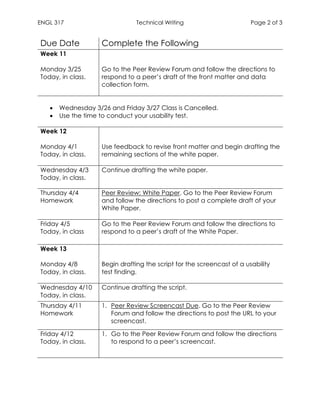
ENGL 317 Technical Writing Page 2 of 3
	
Due Date Complete the Following
Week 11
Monday 3/25
Today, in class.
Go to the Peer Review Forum and follow the directions to
respond to a peer’s draft of the front matter and data
collection form.
• Wednesday 3/26 and Friday 3/27 Class is Cancelled.
• Use the time to conduct your usability test.
Week 12
Monday 4/1
Today, in class.
Use feedback to revise front matter and begin drafting the
remaining sections of the white paper.
Wednesday 4/3
Today, in class.
Continue drafting the white paper.
Thursday 4/4
Homework
Peer Review: White Paper. Go to the Peer Review Forum
and follow the directions to post a complete draft of your
White Paper.
Friday 4/5
Today, in class
Go to the Peer Review Forum and follow the directions to
respond to a peer’s draft of the White Paper.
Week 13
Monday 4/8
Today, in class.
Begin drafting the script for the screencast of a usability
test finding.
Wednesday 4/10
Today, in class.
Continue drafting the script.
Thursday 4/11
Homework
1. Peer Review Screencast Due. Go to the Peer Review
Forum and follow the directions to post the URL to your
screencast.
Friday 4/12
Today, in class.
1. Go to the Peer Review Forum and follow the directions
to respond to a peer’s screencast.
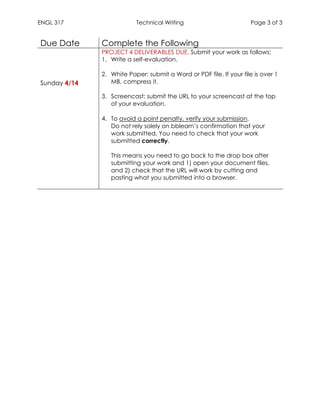
ENGL 317 Technical Writing Page 3 of 3
	
Due Date Complete the Following
Sunday 4/14
PROJECT 4 DELIVERABLES DUE. Submit your work as follows:
1. Write a self-evaluation.
2. White Paper: submit a Word or PDF file. If your file is over 1
MB, compress it.
3. Screencast: submit the URL to your screencast at the top
of your evaluation.
4. To avoid a point penalty, verify your submission.
Do not rely solely on bblearn’s confirmation that your
work submitted. You need to check that your work
submitted correctly.
This means you need to go back to the drop box after
submitting your work and 1) open your document files,
and 2) check that the URL will work by cutting and
pasting what you submitted into a browser.

F2 f project4_schedule_engl317_spring2019

  • 1.
    ENGL 317 TechnicalWriting Page 1 of 3 PROJECT 4 SCHEDULE Weeks 10-13 Usability Test All homework and project deliverables are due by 11:59 PM on the date/day indicated in this schedule. Due Date Complete the Following SPRING RECESS MONDAY 3/11 - FRIDAY 3/15 Week 10 Monday 3/18 Today, in class. 1. Read • Assignment Sheet. 2. Study: slidedocs 1, 2, and 3. 3. Since you created a screencast for project 3, you will not need to do a test recording unless you choose a different screencasting tool. 4. Optional: use link on project page to sign up for Evernote, download the web clipper to a browser, and decide if you want to use it to take screenshots. Wednesday 3/20 Today, in class. Complete step 1 of designing the usability test and begin working on step 2. Thursday 3/21 Homework Continue working on step 2. Friday 3/22 Today, in class. Complete step 2. Sunday 3/24 Homework Peer Review: White Paper Front Matter and Data Collection Form. Go to the Peer Review Forum and follow the directions to post your drafts. If you need to learn how to create a table of contents in Word, go to the link on the project page to watch a video tutorial.
  • 2.
    ENGL 317 TechnicalWriting Page 2 of 3 Due Date Complete the Following Week 11 Monday 3/25 Today, in class. Go to the Peer Review Forum and follow the directions to respond to a peer’s draft of the front matter and data collection form. • Wednesday 3/26 and Friday 3/27 Class is Cancelled. • Use the time to conduct your usability test. Week 12 Monday 4/1 Today, in class. Use feedback to revise front matter and begin drafting the remaining sections of the white paper. Wednesday 4/3 Today, in class. Continue drafting the white paper. Thursday 4/4 Homework Peer Review: White Paper. Go to the Peer Review Forum and follow the directions to post a complete draft of your White Paper. Friday 4/5 Today, in class Go to the Peer Review Forum and follow the directions to respond to a peer’s draft of the White Paper. Week 13 Monday 4/8 Today, in class. Begin drafting the script for the screencast of a usability test finding. Wednesday 4/10 Today, in class. Continue drafting the script. Thursday 4/11 Homework 1. Peer Review Screencast Due. Go to the Peer Review Forum and follow the directions to post the URL to your screencast. Friday 4/12 Today, in class. 1. Go to the Peer Review Forum and follow the directions to respond to a peer’s screencast.
  • 3.
    ENGL 317 TechnicalWriting Page 3 of 3 Due Date Complete the Following Sunday 4/14 PROJECT 4 DELIVERABLES DUE. Submit your work as follows: 1. Write a self-evaluation. 2. White Paper: submit a Word or PDF file. If your file is over 1 MB, compress it. 3. Screencast: submit the URL to your screencast at the top of your evaluation. 4. To avoid a point penalty, verify your submission. Do not rely solely on bblearn’s confirmation that your work submitted. You need to check that your work submitted correctly. This means you need to go back to the drop box after submitting your work and 1) open your document files, and 2) check that the URL will work by cutting and pasting what you submitted into a browser.