PayPal Express Checkoutfast, easy way for buyers to pay Recurring Payments
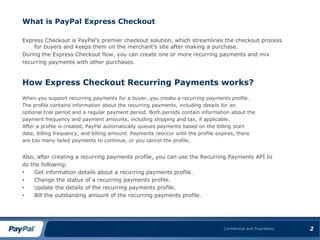
What is PayPal Express CheckoutExpress Checkout is PayPal’s premier checkout solution, which streamlines the checkout process for buyers and keeps them on the merchant’s site after making a purchase.During the Express Checkout flow, you can create one or more recurring payments and mixrecurring payments with other purchases.How Express Checkout Recurring Payments works?When you support recurring payments for a buyer, you create a recurring payments profile.The profile contains information about the recurring payments, including details for anoptional trial period and a regular payment period. Both periods contain information about thepayment frequency and payment amounts, including shipping and tax, if applicable.After a profile is created, PayPal automatically queues payments based on the billing startdate, billing frequency, and billing amount. Payments reoccur until the profile expires, thereare too many failed payments to continue, or you cancel the profile.Also, after creating a recurring payments profile, you can use the Recurring Payments API todo the following:Get information details about a recurring payments profile.
Change the status of a recurring payments profile.
Update the details of the recurring payments profile.
Bill the outstanding amount of the recurring payments profile.2
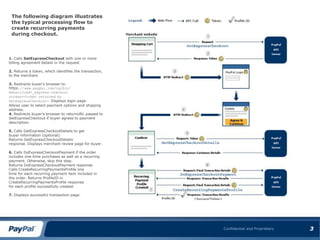
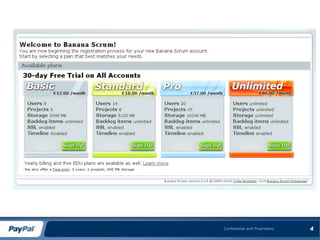
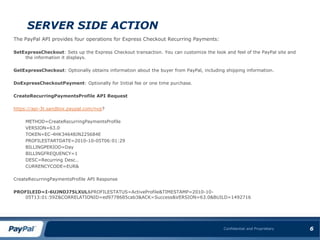
3The following diagram illustrates the typical processing flow to create recurring paymentsduring checkout.1.Calls SetExpressCheckout with one or morebilling agreement details in the request2. Returns a token, which identifies the transaction, tothe merchant.3. Redirects buyer’s browser to:https://www.paypal.com/cgibin/webscr?cmd=_express-checkout&token=<token returned bySetExpressCheckout>Displays login page.Allows user to select payment options and shippingaddress.4.Redirects buyer’s browser to returnURL passed toSetExpressCheckout if buyer agrees to paymentdescription.5. Calls GetExpressCheckoutDetails to getbuyer information (optional).Returns GetExpressCheckoutDetailsresponse.Displays merchant review page for buyer.6.Calls DoExpressCheckoutPayment if the orderincludes one-time purchases as well as a recurringpayment. Otherwise, skip this step.Returns DoExpressCheckoutPayment responseCalls CreateRecurringPaymentsProfile onetime for each recurring payment item included inthe order.Returns ProfileID inCreateRecurringPaymentsProfile responsefor each profile successfully created.7. Displays successful transaction page.
4
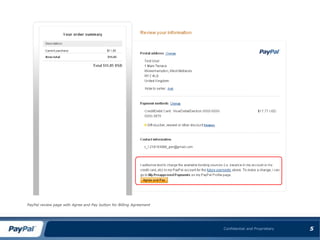
5PayPal review page with Agree and Pay button for Billing Agreement

Express checkout recurring payments

  • 1.
    PayPal Express Checkoutfast,easy way for buyers to pay Recurring Payments
  • 2.
    What is PayPalExpress CheckoutExpress Checkout is PayPal’s premier checkout solution, which streamlines the checkout process for buyers and keeps them on the merchant’s site after making a purchase.During the Express Checkout flow, you can create one or more recurring payments and mixrecurring payments with other purchases.How Express Checkout Recurring Payments works?When you support recurring payments for a buyer, you create a recurring payments profile.The profile contains information about the recurring payments, including details for anoptional trial period and a regular payment period. Both periods contain information about thepayment frequency and payment amounts, including shipping and tax, if applicable.After a profile is created, PayPal automatically queues payments based on the billing startdate, billing frequency, and billing amount. Payments reoccur until the profile expires, thereare too many failed payments to continue, or you cancel the profile.Also, after creating a recurring payments profile, you can use the Recurring Payments API todo the following:Get information details about a recurring payments profile.
  • 3.
    Change the statusof a recurring payments profile.
  • 4.
    Update the detailsof the recurring payments profile.
  • 5.
    Bill the outstandingamount of the recurring payments profile.2
  • 6.
    3The following diagramillustrates the typical processing flow to create recurring paymentsduring checkout.1.Calls SetExpressCheckout with one or morebilling agreement details in the request2. Returns a token, which identifies the transaction, tothe merchant.3. Redirects buyer’s browser to:https://www.paypal.com/cgibin/webscr?cmd=_express-checkout&token=<token returned bySetExpressCheckout>Displays login page.Allows user to select payment options and shippingaddress.4.Redirects buyer’s browser to returnURL passed toSetExpressCheckout if buyer agrees to paymentdescription.5. Calls GetExpressCheckoutDetails to getbuyer information (optional).Returns GetExpressCheckoutDetailsresponse.Displays merchant review page for buyer.6.Calls DoExpressCheckoutPayment if the orderincludes one-time purchases as well as a recurringpayment. Otherwise, skip this step.Returns DoExpressCheckoutPayment responseCalls CreateRecurringPaymentsProfile onetime for each recurring payment item included inthe order.Returns ProfileID inCreateRecurringPaymentsProfile responsefor each profile successfully created.7. Displays successful transaction page.
  • 7.
  • 8.
    5PayPal review pagewith Agree and Pay button for Billing Agreement