
7 Mischievous Adventures in Excel!
White Paper
by Wyn Hopkins & Jeff Robson
Introduction
Excel is such a powerful tool for so many things โ€ฆ but as Spidermanโ€™s dad says, โ€œWith great
power comes great responsibility!โ€
In this white paper, weโ€™ve put together a few ideas on how to cause great mischief in Excel.
Please โ€ฆ be nice,
donโ€™t turn to the dark side,
and only use your powers for good, not evil!

ยฉ ACCESS ANALYTIC SOLUTIONS PTY LTD

PAGE 2 OF 12

W:OPERATIONSEXCELWHITE PAPERS - AA7 MISCHIEVOUS ADVENTURES IN EXCEL.DOCX
LOCK UP YOUR DAUGHTERS SPREADSHEETS
For those of you with a mischievous side and colleagues who donโ€™t lock their computers when
leaving their desks here are 7 tricks to try out. All instructions based on Excel 2007.
We take no responsibility for the consequences!
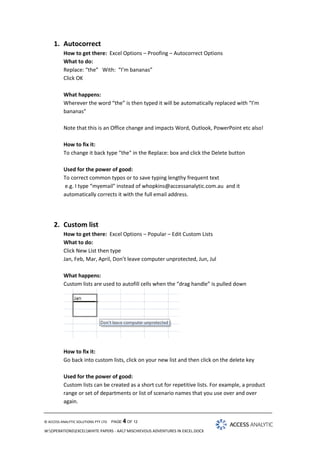
Within Excel Office Button โ€“ Excel Options thereโ€™s a whole range of customisations that can
wreak mayhem on an unsuspecting victim colleagueโ€ฆ.

ยฉ ACCESS ANALYTIC SOLUTIONS PTY LTD

PAGE 3 OF 12

W:OPERATIONSEXCELWHITE PAPERS - AA7 MISCHIEVOUS ADVENTURES IN EXCEL.DOCX
1. Autocorrect
How to get there: Excel Options โ€“ Proofing โ€“ Autocorrect Options
What to do:
Replace: โ€œtheโ€ With: โ€œIโ€™m bananasโ€
Click OK
What happens:
Wherever the word โ€œtheโ€ is then typed it will be automatically replaced with โ€œIโ€™m
bananasโ€
Note that this is an Office change and impacts Word, Outlook, PowerPoint etc also!
How to fix it:
To change it back type โ€œthe" in the Replace: box and click the Delete button
Used for the power of good:
To correct common typos or to save typing lengthy frequent text
e.g. I type โ€œmyemail" instead of whopkins@accessanalytic.com.au and it
automatically corrects it with the full email address.

2. Custom list
How to get there: Excel Options โ€“ Popular โ€“ Edit Custom Lists
What to do:
Click New List then type
Jan, Feb, Mar, April, Donโ€™t leave computer unprotected, Jun, Jul
What happens:
Custom lists are used to autofill cells when the โ€œdrag handleโ€ is pulled down

How to fix it:
Go back into custom lists, click on your new list and then click on the delete key
Used for the power of good:
Custom lists can be created as a short cut for repetitive lists. For example, a product
range or set of departments or list of scenario names that you use over and over
again.

ยฉ ACCESS ANALYTIC SOLUTIONS PTY LTD

PAGE 4 OF 12

W:OPERATIONSEXCELWHITE PAPERS - AA7 MISCHIEVOUS ADVENTURES IN EXCEL.DOCX
3. The Heart Stopper: Hide Objects / Sheets
Know someone who has a spreadsheet filled with wonderfully colourful charts or 101
sheets? Want to make them all disappear instantly โ€“ but not permanently?
How to get there: Excel options > Advanced > Display options for this workbook
section

What to do:

Un-tick โ€œShow sheet tabsโ€
and / or
click the button โ€œFor objects, show: Nothingโ€

What happens: Well, weโ€™ll leave you to work that one out.
How to fix it: Just re tick โ€œShow sheet tabsโ€ and / or click โ€œfor objects, show: Allโ€
Used for the power of good:
I canโ€™t think of a reason for hiding all objects in a workbook, but hiding all sheet tabs is
a quick way to present a single sheet view to someone while hiding all your workings
sheets. Itโ€™s not an obstacle to a determined โ€œsnooperโ€ but will deter the uninitiated
from focussing on things they donโ€™t need to see.

ยฉ ACCESS ANALYTIC SOLUTIONS PTY LTD

PAGE 5 OF 12

W:OPERATIONSEXCELWHITE PAPERS - AA7 MISCHIEVOUS ADVENTURES IN EXCEL.DOCX
4. Formulas R1C1 style
How to get there: Excel Options โ€“ Formulas โ€“ R1C1 reference style
What to do: Tick the box
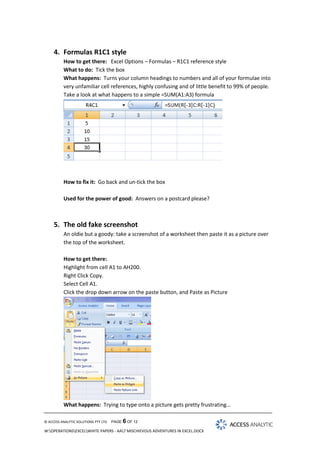
What happens: Turns your column headings to numbers and all of your formulae into
very unfamiliar cell references, highly confusing and of little benefit to 99% of people.
Take a look at what happens to a simple =SUM(A1:A3) formula

How to fix it: Go back and un-tick the box
Used for the power of good: Answers on a postcard please?

5. The old fake screenshot
An oldie but a goody: take a screenshot of a worksheet then paste it as a picture over
the top of the worksheet.
How to get there:
Highlight from cell A1 to AH200.
Right Click Copy.
Select Cell A1.
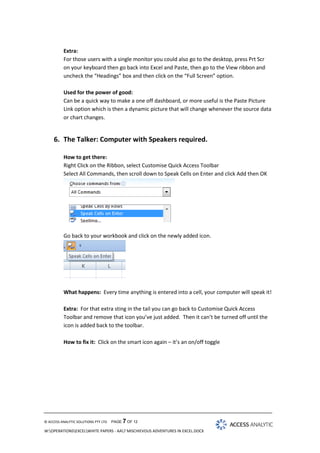
Click the drop down arrow on the paste button, and Paste as Picture

What happens: Trying to type onto a picture gets pretty frustratingโ€ฆ
ยฉ ACCESS ANALYTIC SOLUTIONS PTY LTD

PAGE 6 OF 12

W:OPERATIONSEXCELWHITE PAPERS - AA7 MISCHIEVOUS ADVENTURES IN EXCEL.DOCX
Extra:
For those users with a single monitor you could also go to the desktop, press Prt Scr
on your keyboard then go back into Excel and Paste, then go to the View ribbon and
uncheck the โ€œHeadingsโ€ box and then click on the โ€œFull Screenโ€ option.
Used for the power of good:
Can be a quick way to make a one off dashboard, or more useful is the Paste Picture
Link option which is then a dynamic picture that will change whenever the source data
or chart changes.

6. The Talker: Computer with Speakers required.
How to get there:
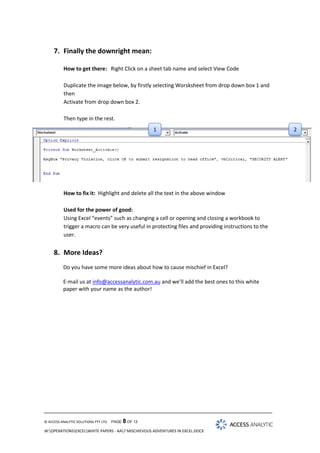
Right Click on the Ribbon, select Customise Quick Access Toolbar
Select All Commands, then scroll down to Speak Cells on Enter and click Add then OK

Go back to your workbook and click on the newly added icon.

What happens: Every time anything is entered into a cell, your computer will speak it!
Extra: For that extra sting in the tail you can go back to Customise Quick Access
Toolbar and remove that icon youโ€™ve just added. Then it canโ€™t be turned off until the
icon is added back to the toolbar.
How to fix it: Click on the smart icon again โ€“ itโ€™s an on/off toggle

ยฉ ACCESS ANALYTIC SOLUTIONS PTY LTD

PAGE 7 OF 12

W:OPERATIONSEXCELWHITE PAPERS - AA7 MISCHIEVOUS ADVENTURES IN EXCEL.DOCX
7. Finally the downright mean:
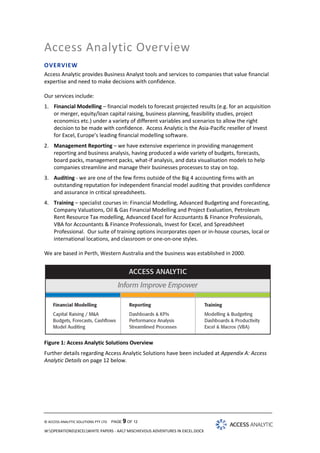
How to get there: Right Click on a sheet tab name and select View Code
Duplicate the image below, by firstly selecting Worsksheet from drop down box 1 and
then
Activate from drop down box 2.
Then type in the rest.

1

What happens: Every time the sheet is activated the message box appears
How to fix it: Highlight and delete all the text in the above window
Used for the power of good:
Using Excel โ€œeventsโ€ such as changing a cell or opening and closing a workbook to
trigger a macro can be very useful in protecting files and providing instructions to the
user.

8. More Ideas?
Do you have some more ideas about how to cause mischief in Excel?
E-mail us at info@accessanalytic.com.au and weโ€™ll add the best ones to this white
paper with your name as the author!

ยฉ ACCESS ANALYTIC SOLUTIONS PTY LTD

PAGE 8 OF 12

W:OPERATIONSEXCELWHITE PAPERS - AA7 MISCHIEVOUS ADVENTURES IN EXCEL.DOCX

2
Access Analytic Overview
OVERVIEW
Access Analytic provides Business Analyst tools and services to companies that value financial
expertise and need to make decisions with confidence.
Our services include:
1. Financial Modelling โ€“ financial models to forecast projected results (e.g. for an acquisition
or merger, equity/loan capital raising, business planning, feasibility studies, project
economics etc.) under a variety of different variables and scenarios to allow the right
decision to be made with confidence. Access Analytic is the Asia-Pacific reseller of Invest
for Excel, Europeโ€™s leading financial modelling software.
2. Management Reporting โ€“ we have extensive experience in providing management
reporting and business analysis, having produced a wide variety of budgets, forecasts,
board packs, management packs, what-if analysis, and data visualisation models to help
companies streamline and manage their businesses processes to stay on top.
3. Auditing - we are one of the few firms outside of the Big 4 accounting firms with an
outstanding reputation for independent financial model auditing that provides confidence
and assurance in critical spreadsheets.
4. Training โ€“ specialist courses in: Financial Modelling, Advanced Budgeting and Forecasting,
Company Valuations, Oil & Gas Financial Modelling and Project Evaluation, Petroleum
Rent Resource Tax modelling, Advanced Excel for Accountants & Finance Professionals,
VBA for Accountants & Finance Professionals, Invest for Excel, and Spreadsheet
Professional. Our suite of training options incorporates open or in-house courses, local or
international locations, and classroom or one-on-one styles.
We are based in Perth, Western Australia and the business was established in 2000.

Figure 1: Access Analytic Solutions Overview
Further details regarding Access Analytic Solutions have been included at Appendix A: Access
Analytic Details on page 12 below.

ยฉ ACCESS ANALYTIC SOLUTIONS PTY LTD

PAGE 9 OF 12

W:OPERATIONSEXCELWHITE PAPERS - AA7 MISCHIEVOUS ADVENTURES IN EXCEL.DOCX
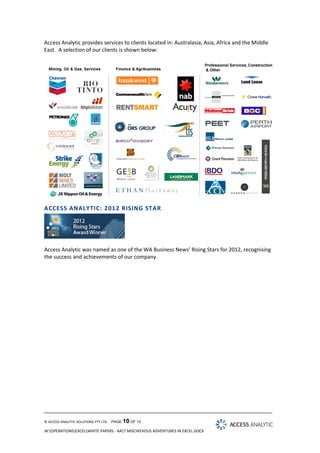
Access Analytic provides services to clients located in: Australasia, Asia, Africa and the Middle
East. A selection of our clients is shown below:

ACCESS ANALYTIC: 201 2 RISING STAR

Access Analytic was named as one of the WA Business Newsโ€™ Rising Stars for 2012, recognising
the success and achievements of our company.

ยฉ ACCESS ANALYTIC SOLUTIONS PTY LTD

PAGE 10 OF 12

W:OPERATIONSEXCELWHITE PAPERS - AA7 MISCHIEVOUS ADVENTURES IN EXCEL.DOCX
About the Authors
Jeff Robson, Principal Business Analyst
Masters (Applied Finance), BCom (Accounting & Information Systems), CISA,
MAICD, FAIM, F Fin, Microsoft Excel Expert

Jeff is the founding director and principal analyst at Access Analytic
Solutions. He has over 15 yearsโ€™ experience in chartered accounting,
business management and consulting.
Jeff holds a Masters in Applied Finance and is a Certified Information
Systems Auditor. He is highly regarded and recognised around the world as
an expert in the field of financial modelling.
His achievements have been recognised by his peers and he is a Fellow of
both the Financial Services Institute of Australasia and the Australian
Institute of Management.
Jeff has extensive experience in best practice financial modelling, management reporting,
business analysis, and spreadsheet auditing and is also an entertaining international presenter
and trainer on these subjects.

Wyn Hopkins, Senior Manager
B.Sc. (Hons) Accounting & Financial Management, CA, MS Excel Expert

Wyn gained his Chartered Accountant qualification at
PricewaterhouseCoopers in the UK in 2000.
He has extensive Business Analyst experience in FTSE 100 financial services
companies (HBOS and Barclays in the UK) as well as GESB in Perth and
telecommunications companies industry in Australia.
Wyn is skilled in financial analysis, strategic financial modelling,
management reporting and forecasting, and value-based management
techniques.

ยฉ ACCESS ANALYTIC SOLUTIONS PTY LTD

PAGE 11 OF 12

W:OPERATIONSEXCELWHITE PAPERS - AA7 MISCHIEVOUS ADVENTURES IN EXCEL.DOCX
Appendix A: Access Analytic Details
Access Analytic Solutions Details
Full Name:

Access Analytic Solutions Pty Ltd

Address:

Suite 143, Level 1, 580 Hay Street
Perth, Western Australia 6000

Phone:

+61 8 6210 8500

Fax:

+61 8 6210 8501

Web:

www.accessanalytic.com.au

ACN:

091 625 697

ABN:

64 091 625 697

Contact:

Jeff Robson
E: jrobson@accessanalytic.com.au
M: +61 4 1258 1486

ยฉ ACCESS ANALYTIC SOLUTIONS PTY LTD

PAGE 12 OF 12

W:OPERATIONSEXCELWHITE PAPERS - AA7 MISCHIEVOUS ADVENTURES IN EXCEL.DOCX

White Paper: Excel Mischief

  • 1.
    7 Mischievous Adventuresin Excel! White Paper by Wyn Hopkins & Jeff Robson
  • 2.
    Introduction Excel is sucha powerful tool for so many things โ€ฆ but as Spidermanโ€™s dad says, โ€œWith great power comes great responsibility!โ€ In this white paper, weโ€™ve put together a few ideas on how to cause great mischief in Excel. Please โ€ฆ be nice, donโ€™t turn to the dark side, and only use your powers for good, not evil! ยฉ ACCESS ANALYTIC SOLUTIONS PTY LTD PAGE 2 OF 12 W:OPERATIONSEXCELWHITE PAPERS - AA7 MISCHIEVOUS ADVENTURES IN EXCEL.DOCX
  • 3.
    LOCK UP YOURDAUGHTERS SPREADSHEETS For those of you with a mischievous side and colleagues who donโ€™t lock their computers when leaving their desks here are 7 tricks to try out. All instructions based on Excel 2007. We take no responsibility for the consequences! Within Excel Office Button โ€“ Excel Options thereโ€™s a whole range of customisations that can wreak mayhem on an unsuspecting victim colleagueโ€ฆ. ยฉ ACCESS ANALYTIC SOLUTIONS PTY LTD PAGE 3 OF 12 W:OPERATIONSEXCELWHITE PAPERS - AA7 MISCHIEVOUS ADVENTURES IN EXCEL.DOCX
  • 4.
    1. Autocorrect How toget there: Excel Options โ€“ Proofing โ€“ Autocorrect Options What to do: Replace: โ€œtheโ€ With: โ€œIโ€™m bananasโ€ Click OK What happens: Wherever the word โ€œtheโ€ is then typed it will be automatically replaced with โ€œIโ€™m bananasโ€ Note that this is an Office change and impacts Word, Outlook, PowerPoint etc also! How to fix it: To change it back type โ€œthe" in the Replace: box and click the Delete button Used for the power of good: To correct common typos or to save typing lengthy frequent text e.g. I type โ€œmyemail" instead of whopkins@accessanalytic.com.au and it automatically corrects it with the full email address. 2. Custom list How to get there: Excel Options โ€“ Popular โ€“ Edit Custom Lists What to do: Click New List then type Jan, Feb, Mar, April, Donโ€™t leave computer unprotected, Jun, Jul What happens: Custom lists are used to autofill cells when the โ€œdrag handleโ€ is pulled down How to fix it: Go back into custom lists, click on your new list and then click on the delete key Used for the power of good: Custom lists can be created as a short cut for repetitive lists. For example, a product range or set of departments or list of scenario names that you use over and over again. ยฉ ACCESS ANALYTIC SOLUTIONS PTY LTD PAGE 4 OF 12 W:OPERATIONSEXCELWHITE PAPERS - AA7 MISCHIEVOUS ADVENTURES IN EXCEL.DOCX
  • 5.
    3. The HeartStopper: Hide Objects / Sheets Know someone who has a spreadsheet filled with wonderfully colourful charts or 101 sheets? Want to make them all disappear instantly โ€“ but not permanently? How to get there: Excel options > Advanced > Display options for this workbook section What to do: Un-tick โ€œShow sheet tabsโ€ and / or click the button โ€œFor objects, show: Nothingโ€ What happens: Well, weโ€™ll leave you to work that one out. How to fix it: Just re tick โ€œShow sheet tabsโ€ and / or click โ€œfor objects, show: Allโ€ Used for the power of good: I canโ€™t think of a reason for hiding all objects in a workbook, but hiding all sheet tabs is a quick way to present a single sheet view to someone while hiding all your workings sheets. Itโ€™s not an obstacle to a determined โ€œsnooperโ€ but will deter the uninitiated from focussing on things they donโ€™t need to see. ยฉ ACCESS ANALYTIC SOLUTIONS PTY LTD PAGE 5 OF 12 W:OPERATIONSEXCELWHITE PAPERS - AA7 MISCHIEVOUS ADVENTURES IN EXCEL.DOCX
  • 6.
    4. Formulas R1C1style How to get there: Excel Options โ€“ Formulas โ€“ R1C1 reference style What to do: Tick the box What happens: Turns your column headings to numbers and all of your formulae into very unfamiliar cell references, highly confusing and of little benefit to 99% of people. Take a look at what happens to a simple =SUM(A1:A3) formula How to fix it: Go back and un-tick the box Used for the power of good: Answers on a postcard please? 5. The old fake screenshot An oldie but a goody: take a screenshot of a worksheet then paste it as a picture over the top of the worksheet. How to get there: Highlight from cell A1 to AH200. Right Click Copy. Select Cell A1. Click the drop down arrow on the paste button, and Paste as Picture What happens: Trying to type onto a picture gets pretty frustratingโ€ฆ ยฉ ACCESS ANALYTIC SOLUTIONS PTY LTD PAGE 6 OF 12 W:OPERATIONSEXCELWHITE PAPERS - AA7 MISCHIEVOUS ADVENTURES IN EXCEL.DOCX
  • 7.
    Extra: For those userswith a single monitor you could also go to the desktop, press Prt Scr on your keyboard then go back into Excel and Paste, then go to the View ribbon and uncheck the โ€œHeadingsโ€ box and then click on the โ€œFull Screenโ€ option. Used for the power of good: Can be a quick way to make a one off dashboard, or more useful is the Paste Picture Link option which is then a dynamic picture that will change whenever the source data or chart changes. 6. The Talker: Computer with Speakers required. How to get there: Right Click on the Ribbon, select Customise Quick Access Toolbar Select All Commands, then scroll down to Speak Cells on Enter and click Add then OK Go back to your workbook and click on the newly added icon. What happens: Every time anything is entered into a cell, your computer will speak it! Extra: For that extra sting in the tail you can go back to Customise Quick Access Toolbar and remove that icon youโ€™ve just added. Then it canโ€™t be turned off until the icon is added back to the toolbar. How to fix it: Click on the smart icon again โ€“ itโ€™s an on/off toggle ยฉ ACCESS ANALYTIC SOLUTIONS PTY LTD PAGE 7 OF 12 W:OPERATIONSEXCELWHITE PAPERS - AA7 MISCHIEVOUS ADVENTURES IN EXCEL.DOCX
  • 8.
    7. Finally thedownright mean: How to get there: Right Click on a sheet tab name and select View Code Duplicate the image below, by firstly selecting Worsksheet from drop down box 1 and then Activate from drop down box 2. Then type in the rest. 1 What happens: Every time the sheet is activated the message box appears How to fix it: Highlight and delete all the text in the above window Used for the power of good: Using Excel โ€œeventsโ€ such as changing a cell or opening and closing a workbook to trigger a macro can be very useful in protecting files and providing instructions to the user. 8. More Ideas? Do you have some more ideas about how to cause mischief in Excel? E-mail us at info@accessanalytic.com.au and weโ€™ll add the best ones to this white paper with your name as the author! ยฉ ACCESS ANALYTIC SOLUTIONS PTY LTD PAGE 8 OF 12 W:OPERATIONSEXCELWHITE PAPERS - AA7 MISCHIEVOUS ADVENTURES IN EXCEL.DOCX 2
  • 9.
    Access Analytic Overview OVERVIEW AccessAnalytic provides Business Analyst tools and services to companies that value financial expertise and need to make decisions with confidence. Our services include: 1. Financial Modelling โ€“ financial models to forecast projected results (e.g. for an acquisition or merger, equity/loan capital raising, business planning, feasibility studies, project economics etc.) under a variety of different variables and scenarios to allow the right decision to be made with confidence. Access Analytic is the Asia-Pacific reseller of Invest for Excel, Europeโ€™s leading financial modelling software. 2. Management Reporting โ€“ we have extensive experience in providing management reporting and business analysis, having produced a wide variety of budgets, forecasts, board packs, management packs, what-if analysis, and data visualisation models to help companies streamline and manage their businesses processes to stay on top. 3. Auditing - we are one of the few firms outside of the Big 4 accounting firms with an outstanding reputation for independent financial model auditing that provides confidence and assurance in critical spreadsheets. 4. Training โ€“ specialist courses in: Financial Modelling, Advanced Budgeting and Forecasting, Company Valuations, Oil & Gas Financial Modelling and Project Evaluation, Petroleum Rent Resource Tax modelling, Advanced Excel for Accountants & Finance Professionals, VBA for Accountants & Finance Professionals, Invest for Excel, and Spreadsheet Professional. Our suite of training options incorporates open or in-house courses, local or international locations, and classroom or one-on-one styles. We are based in Perth, Western Australia and the business was established in 2000. Figure 1: Access Analytic Solutions Overview Further details regarding Access Analytic Solutions have been included at Appendix A: Access Analytic Details on page 12 below. ยฉ ACCESS ANALYTIC SOLUTIONS PTY LTD PAGE 9 OF 12 W:OPERATIONSEXCELWHITE PAPERS - AA7 MISCHIEVOUS ADVENTURES IN EXCEL.DOCX
  • 10.
    Access Analytic providesservices to clients located in: Australasia, Asia, Africa and the Middle East. A selection of our clients is shown below: ACCESS ANALYTIC: 201 2 RISING STAR Access Analytic was named as one of the WA Business Newsโ€™ Rising Stars for 2012, recognising the success and achievements of our company. ยฉ ACCESS ANALYTIC SOLUTIONS PTY LTD PAGE 10 OF 12 W:OPERATIONSEXCELWHITE PAPERS - AA7 MISCHIEVOUS ADVENTURES IN EXCEL.DOCX
  • 11.
    About the Authors JeffRobson, Principal Business Analyst Masters (Applied Finance), BCom (Accounting & Information Systems), CISA, MAICD, FAIM, F Fin, Microsoft Excel Expert Jeff is the founding director and principal analyst at Access Analytic Solutions. He has over 15 yearsโ€™ experience in chartered accounting, business management and consulting. Jeff holds a Masters in Applied Finance and is a Certified Information Systems Auditor. He is highly regarded and recognised around the world as an expert in the field of financial modelling. His achievements have been recognised by his peers and he is a Fellow of both the Financial Services Institute of Australasia and the Australian Institute of Management. Jeff has extensive experience in best practice financial modelling, management reporting, business analysis, and spreadsheet auditing and is also an entertaining international presenter and trainer on these subjects. Wyn Hopkins, Senior Manager B.Sc. (Hons) Accounting & Financial Management, CA, MS Excel Expert Wyn gained his Chartered Accountant qualification at PricewaterhouseCoopers in the UK in 2000. He has extensive Business Analyst experience in FTSE 100 financial services companies (HBOS and Barclays in the UK) as well as GESB in Perth and telecommunications companies industry in Australia. Wyn is skilled in financial analysis, strategic financial modelling, management reporting and forecasting, and value-based management techniques. ยฉ ACCESS ANALYTIC SOLUTIONS PTY LTD PAGE 11 OF 12 W:OPERATIONSEXCELWHITE PAPERS - AA7 MISCHIEVOUS ADVENTURES IN EXCEL.DOCX
  • 12.
    Appendix A: AccessAnalytic Details Access Analytic Solutions Details Full Name: Access Analytic Solutions Pty Ltd Address: Suite 143, Level 1, 580 Hay Street Perth, Western Australia 6000 Phone: +61 8 6210 8500 Fax: +61 8 6210 8501 Web: www.accessanalytic.com.au ACN: 091 625 697 ABN: 64 091 625 697 Contact: Jeff Robson E: jrobson@accessanalytic.com.au M: +61 4 1258 1486 ยฉ ACCESS ANALYTIC SOLUTIONS PTY LTD PAGE 12 OF 12 W:OPERATIONSEXCELWHITE PAPERS - AA7 MISCHIEVOUS ADVENTURES IN EXCEL.DOCX