Exadata Implementation Strategy
BY UMAIR MANSOOB
1
Who Am I
• Work as Senior Principle Engineer for an Oracle Partner
• Oracle Certified Administrator from Oracle 7 – 12c
• Exadata Certified Implementation Specialist since 2011
• Oracle Database Performance Tuning Certified Expert
• Oracle Business Intelligence Foundation Suite 11g Certified Implementation Specialist
• Oracle Database Data Warehousing Certified Implementation Specialist
• Multiple Exadata Implementations / POC’s for large financial organizations
• Migrate / Upgrade databases between various versions of Oracle
• Database Consolidation to Exadata / 12c Platform
• Architect Databases for OLTP and OLAP applications
• Not an Oracle Employee or Nor I represent Oracle in any way
Exadata Implementation Strategy 2
Migration Vs Implementation
 Are you only looking to migrate database to Exadata Machine ?
There is difference between Database migration and Exadata
Implementation
Lift and shift databases to Exadata Machine without making any
significant change to databases
Sometime you don’t have a choice , if you are using 3rd party vender
application
3
Why do you need a Strategy
Understand that you need to use Exadata native features to achieve
extreme performance
You might not be able to take full advantages to Exadata machine if
you perform only Data migration
Even it’s a third party application like SAP , you should have strategy
in place to complete a successful migration
Mostly like to meet deadlines and avoid any loss of revenue because
of delays
4
Overview
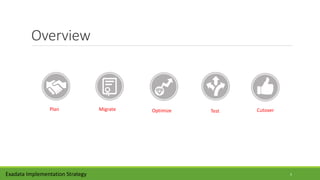
Plan CutoverOptimizeMigrate Test
Exadata Implementation Strategy 5
Plan
Exadata Implementation Strategy
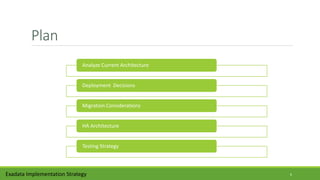
Analyze Current Architecture
Deployment Decisions
Migration Considerations
HA Architecture
Testing Strategy
6
Analyze Current Architecture
Analyze source database characteristic like database size and
parameter settings, especially hidden parameters
Analyze source host system characteristics like memory foot and IO
through put and resource utilization.
Is there a compliance requirement to encrypt or isolate database?
Gather baseline from existing application system to compare result
later.
Gather AWR, ASH and other statistics from current environment
Exadata Implementation Strategy 7
Deployment Decisions
 if you start your planning phase to late in the implementation , you might
not able to change any of the following
Do you need to virtualized Exadata machine to Isolate target database.
What type of redundancy level you need ( High or Normal ) , External is
not supported, depend on you application critically and DR
Do you need to implement resource management using DBRM or IORM
Do you need to isolate network using InfiniBand partitioning or Vlan
tagging for compliance reason.
Exadata Implementation Strategy 8
Migration Considerations
How big is your migration window ?
Will you be needing Golden Gate to replicate database for 0
downtime ?
Do you have access to Database backups from Exadata Machine ?
How is network bandwidth between source and target Exadata
System, 1GB or 10G it matters
Inform business user and other stake holders about upcoming
migration, so they can plan for outage
What is Recovery Time Objective (RTO)
Exadata Implementation Strategy 9
High Availability Architecture
What will be your backup strategy , Tape or Exadata Storage , ZFS
Depending on the database size , backing it up on Exadata storage can be very
expensive
Is Data Guard going to be part of your DR strategy ?
Can you offload backups or reporting services to DR site ?
Are migrating from Single instance to RAC database ?
How are you planning to use cluster services to manage your work load
Are you planning to enable flashback database, it can impact application
performance if you are not already using it
Exadata Implementation Strategy 10
Testing Strategy
Moving to Exadata is a significant architectural change for you application,
( OS , Storage , RAC )
How are you planning to test your application on Exadata ?
Do you need to develop additional test plans ?
Will you be introducing code or architecture changes during the migration
How are you planning to capture statistic during testing ?
Most of application see immediate performance improvement but …..
Exadata Implementation Strategy 11
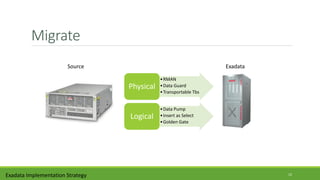
Migrate
Exadata Implementation Strategy
•RMAN
•Data Guard
•Transportable Tbs
Physical
•Data Pump
•Insert as Select
•Golden Gate
Logical
Source Exadata
12
Migrate
Each migration method has its own pros and cons, so analyze them
carefully based on your requirements
Data migration methods can be categorized as physical migration or
logical migration.
Physical migration is a block by block copy of data, popular methods are
data guard and RMAN.
Popular logical methods are data pump or insert as select.
Pick migration method based to migration window and network
bandwidth
Network bandwidth can major road block , figure this out early
Exadata Implementation Strategy 13
Physical Migration
Pro : Migrating data using physical methods can be very simple and
straight forward.
Pro : Support cross platform Migrations using RMAN transportable
database.
Con : Bring all the characteristics of target database, which might
not be optimal like hidden parameters
Con : Will require extra effort to implement Exadata best practices
and enable features like compression.
Exadata Implementation Strategy 14
Logical Migration
Pro : Exadata best practices will already be in place , if database was
created using DBCA utility.
Pro : Can optimize your workload for Exadata Machine using
features like compression and partitioning during migration
Con : Not simple , will require extra effort and time to bring data
over to Exadata machines, DB Size & Invalid Objects
Con : Since its not a block by block copy , execution plans can
change.
Exadata Implementation Strategy 15
Optimize
Exadata Implementation Strategy
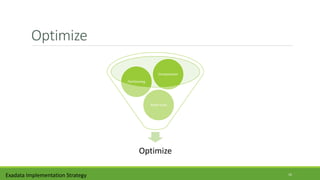
Optimize
Smart Scan
Partitioning
Compression
16
Optimize
You should look into testing following Exadata Features during your
implementation or even after the successful migration
Compression not only reduces your storage footprint but also
improve performance.
Even though offloading and smart scan are enabled by default but
make sure they are turned on and performing as expected.
Test Storage indexes by making but selected non primary key
indexes invisible.
Exadata Implementation Strategy 17
Compression
Regardless of Exadata, Oracle has two native compression types,
basic table compression and OLTP Compression
You can get reasonable compression ratio with OLTP compression
and it will also support DML operations.
Please note that there will be some overhead and you will need
advance compression license to use OLTP compression.
You can get extremely good compression ratio with Hybrid
Columnar compression but OLTP operations are not supported
OLTP Compression Vs HCC
Exadata Implementation Strategy 18
Smart Flash Cache
Exadata smart flash cache has an ability to move data in and out
from cache based on usage.
It is enabled by default, you don’t have to configure anything to
enable it.
If enable , Write back flash cache provides the ability to write I/Os
directly to PCI flash
Write-back cache can help reduce “"free buffer waits" waits for
write intensive applications.
Exadata Implementation Strategy 19
Offloading / Smart Scan
Exadata extreme performance is archive through offloading and smart
scan.
Offloading means some of Oracle processes are offloaded to Exadata
Storage node.
Some of the Oracle processes that can be offloaded to storage nodes are
incremental backups, Data File creation, decompression and decryption
There are some pre-requisites for smart scan like direct path read and full
table scan.
 Verify Offloading using OEM or v$SQL
Exadata Implementation Strategy 20
Storage Indexes
Storage indexes are memory structure at storage level.
Storage Indexes reduce Disk I/O by maintaining an entry for
minimum and maximum value for data per 1 MB by default.
You can drop most non-primary key indexes and force queries to use
Storage indexes.
Usually BITMAP indexes are ideal candidates for offloading queries
to Storage Indexes.
Exadata Implementation Strategy 21
Do you need Indexes on Exadata?
Following balance approach when it comes to use of indexes on
Exadata.
Don’t drop all the indexes
Keep primary key / unique indexes
You can drop bit map indexes
Use invisible index options when possible
Avoid indexes using SQL HINTS
Drop and rebuild indexes during ETL load
22
Partitioning
Partitioning pruning is the simplest and also the most substantial
means to improve performance.
Partitioning can also improve the performance of multi-table joins,
by using a technique known as partition-wise joins.
Partitioning Strategies Interval - Range , List , Hash , Composite, etc
Partitioned database objects provide partition independence , an
important part of a high-availability strategy.
Exadata Implementation Strategy 23
Parallelism
Utilized Exadata Machine power by executing your queries in
parallel to speed up your work load
You can enable parallel query execution at object level or you can
use SQL hint
AUTO DOP will automatically parallelize your queries based on a
threshold, I like to do it manually
The default of parallel_min_time_threshold parameter is 10
seconds
Exadata Implementation Strategy 24
Resource Management
Database consolidation might require some level of resource
management
Resource mgmt will help you get consistent performance across all
workload and databases
You can use Oracle native resource management tool called DBRM
to manage CPU utilization, parallel queueing and long running queries
You can use IORM Exadata native utility to manage I/O throughput
and latency.
Exadata Implementation Strategy 25
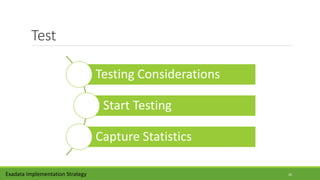
Test
Exadata Implementation Strategy
Testing Considerations
Start Testing
Capture Statistics
26
Testing Considerations
Remember you are moving your application to new hardware
You might be changing underline hardware system for your database
You might be moving from NON-RAC to RAC database system
Performance testing provides most important statistics for your
Migration
Some customer like to perform failover and break test for their
critical applications
Exadata Implementation Strategy 27
Start Testing
You can a test like for like, which means you are not planning to make any
changes to your database architecture like compression, partition or
encryption
 You can use your existing test plans for Exadata Migration testing.
Testing should include should include all the databases you have
introduced during the migration.
There are different types of testing you can perform during Exadata
Migration, like Performance test, load test, break test.
Don’t forget to capture statistics during the testing phase of Exadata
Migration.
Exadata Implementation Strategy 28
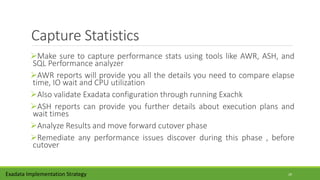
Capture Statistics
Make sure to capture performance stats using tools like AWR, ASH, and
SQL Performance analyzer
AWR reports will provide you all the details you need to compare elapse
time, IO wait and CPU utilization
Also validate Exadata configuration through running Exachk
ASH reports can provide you further details about execution plans and
wait times
Analyze Results and move forward cutover phase
Remediate any performance issues discover during this phase , before
cutover
Exadata Implementation Strategy 29
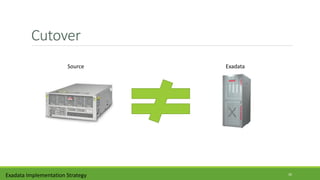
Cutover
Exadata Implementation Strategy
Source Exadata
30
Cutover
Make sure to backup both source and target databases
Have a fallback plan, just in case if you encounter any issues after
the cutover
You will probably have to sync your target database just before the
cutover ,if you are not using GoldenGate
 Based on the migration method, Database SCN number can play a
key role during this phase
You should be on guard for next 48 hours and ready to remediate
any issues.
Exadata Implementation Strategy 31
Thank You
Umair Mansoob
773-297-2061
umairmansoob@gmail.com
http://blog.umairmansoob.com/
Exadata Implementation Strategy 32

Exadata Implementation strategy

  • 1.
  • 2.
    Who Am I •Work as Senior Principle Engineer for an Oracle Partner • Oracle Certified Administrator from Oracle 7 – 12c • Exadata Certified Implementation Specialist since 2011 • Oracle Database Performance Tuning Certified Expert • Oracle Business Intelligence Foundation Suite 11g Certified Implementation Specialist • Oracle Database Data Warehousing Certified Implementation Specialist • Multiple Exadata Implementations / POC’s for large financial organizations • Migrate / Upgrade databases between various versions of Oracle • Database Consolidation to Exadata / 12c Platform • Architect Databases for OLTP and OLAP applications • Not an Oracle Employee or Nor I represent Oracle in any way Exadata Implementation Strategy 2
  • 3.
    Migration Vs Implementation Are you only looking to migrate database to Exadata Machine ? There is difference between Database migration and Exadata Implementation Lift and shift databases to Exadata Machine without making any significant change to databases Sometime you don’t have a choice , if you are using 3rd party vender application 3
  • 4.
    Why do youneed a Strategy Understand that you need to use Exadata native features to achieve extreme performance You might not be able to take full advantages to Exadata machine if you perform only Data migration Even it’s a third party application like SAP , you should have strategy in place to complete a successful migration Mostly like to meet deadlines and avoid any loss of revenue because of delays 4
  • 5.
  • 6.
    Plan Exadata Implementation Strategy AnalyzeCurrent Architecture Deployment Decisions Migration Considerations HA Architecture Testing Strategy 6
  • 7.
    Analyze Current Architecture Analyzesource database characteristic like database size and parameter settings, especially hidden parameters Analyze source host system characteristics like memory foot and IO through put and resource utilization. Is there a compliance requirement to encrypt or isolate database? Gather baseline from existing application system to compare result later. Gather AWR, ASH and other statistics from current environment Exadata Implementation Strategy 7
  • 8.
    Deployment Decisions  ifyou start your planning phase to late in the implementation , you might not able to change any of the following Do you need to virtualized Exadata machine to Isolate target database. What type of redundancy level you need ( High or Normal ) , External is not supported, depend on you application critically and DR Do you need to implement resource management using DBRM or IORM Do you need to isolate network using InfiniBand partitioning or Vlan tagging for compliance reason. Exadata Implementation Strategy 8
  • 9.
    Migration Considerations How bigis your migration window ? Will you be needing Golden Gate to replicate database for 0 downtime ? Do you have access to Database backups from Exadata Machine ? How is network bandwidth between source and target Exadata System, 1GB or 10G it matters Inform business user and other stake holders about upcoming migration, so they can plan for outage What is Recovery Time Objective (RTO) Exadata Implementation Strategy 9
  • 10.
    High Availability Architecture Whatwill be your backup strategy , Tape or Exadata Storage , ZFS Depending on the database size , backing it up on Exadata storage can be very expensive Is Data Guard going to be part of your DR strategy ? Can you offload backups or reporting services to DR site ? Are migrating from Single instance to RAC database ? How are you planning to use cluster services to manage your work load Are you planning to enable flashback database, it can impact application performance if you are not already using it Exadata Implementation Strategy 10
  • 11.
    Testing Strategy Moving toExadata is a significant architectural change for you application, ( OS , Storage , RAC ) How are you planning to test your application on Exadata ? Do you need to develop additional test plans ? Will you be introducing code or architecture changes during the migration How are you planning to capture statistic during testing ? Most of application see immediate performance improvement but ….. Exadata Implementation Strategy 11
  • 12.
    Migrate Exadata Implementation Strategy •RMAN •DataGuard •Transportable Tbs Physical •Data Pump •Insert as Select •Golden Gate Logical Source Exadata 12
  • 13.
    Migrate Each migration methodhas its own pros and cons, so analyze them carefully based on your requirements Data migration methods can be categorized as physical migration or logical migration. Physical migration is a block by block copy of data, popular methods are data guard and RMAN. Popular logical methods are data pump or insert as select. Pick migration method based to migration window and network bandwidth Network bandwidth can major road block , figure this out early Exadata Implementation Strategy 13
  • 14.
    Physical Migration Pro :Migrating data using physical methods can be very simple and straight forward. Pro : Support cross platform Migrations using RMAN transportable database. Con : Bring all the characteristics of target database, which might not be optimal like hidden parameters Con : Will require extra effort to implement Exadata best practices and enable features like compression. Exadata Implementation Strategy 14
  • 15.
    Logical Migration Pro :Exadata best practices will already be in place , if database was created using DBCA utility. Pro : Can optimize your workload for Exadata Machine using features like compression and partitioning during migration Con : Not simple , will require extra effort and time to bring data over to Exadata machines, DB Size & Invalid Objects Con : Since its not a block by block copy , execution plans can change. Exadata Implementation Strategy 15
  • 16.
  • 17.
    Optimize You should lookinto testing following Exadata Features during your implementation or even after the successful migration Compression not only reduces your storage footprint but also improve performance. Even though offloading and smart scan are enabled by default but make sure they are turned on and performing as expected. Test Storage indexes by making but selected non primary key indexes invisible. Exadata Implementation Strategy 17
  • 18.
    Compression Regardless of Exadata,Oracle has two native compression types, basic table compression and OLTP Compression You can get reasonable compression ratio with OLTP compression and it will also support DML operations. Please note that there will be some overhead and you will need advance compression license to use OLTP compression. You can get extremely good compression ratio with Hybrid Columnar compression but OLTP operations are not supported OLTP Compression Vs HCC Exadata Implementation Strategy 18
  • 19.
    Smart Flash Cache Exadatasmart flash cache has an ability to move data in and out from cache based on usage. It is enabled by default, you don’t have to configure anything to enable it. If enable , Write back flash cache provides the ability to write I/Os directly to PCI flash Write-back cache can help reduce “"free buffer waits" waits for write intensive applications. Exadata Implementation Strategy 19
  • 20.
    Offloading / SmartScan Exadata extreme performance is archive through offloading and smart scan. Offloading means some of Oracle processes are offloaded to Exadata Storage node. Some of the Oracle processes that can be offloaded to storage nodes are incremental backups, Data File creation, decompression and decryption There are some pre-requisites for smart scan like direct path read and full table scan.  Verify Offloading using OEM or v$SQL Exadata Implementation Strategy 20
  • 21.
    Storage Indexes Storage indexesare memory structure at storage level. Storage Indexes reduce Disk I/O by maintaining an entry for minimum and maximum value for data per 1 MB by default. You can drop most non-primary key indexes and force queries to use Storage indexes. Usually BITMAP indexes are ideal candidates for offloading queries to Storage Indexes. Exadata Implementation Strategy 21
  • 22.
    Do you needIndexes on Exadata? Following balance approach when it comes to use of indexes on Exadata. Don’t drop all the indexes Keep primary key / unique indexes You can drop bit map indexes Use invisible index options when possible Avoid indexes using SQL HINTS Drop and rebuild indexes during ETL load 22
  • 23.
    Partitioning Partitioning pruning isthe simplest and also the most substantial means to improve performance. Partitioning can also improve the performance of multi-table joins, by using a technique known as partition-wise joins. Partitioning Strategies Interval - Range , List , Hash , Composite, etc Partitioned database objects provide partition independence , an important part of a high-availability strategy. Exadata Implementation Strategy 23
  • 24.
    Parallelism Utilized Exadata Machinepower by executing your queries in parallel to speed up your work load You can enable parallel query execution at object level or you can use SQL hint AUTO DOP will automatically parallelize your queries based on a threshold, I like to do it manually The default of parallel_min_time_threshold parameter is 10 seconds Exadata Implementation Strategy 24
  • 25.
    Resource Management Database consolidationmight require some level of resource management Resource mgmt will help you get consistent performance across all workload and databases You can use Oracle native resource management tool called DBRM to manage CPU utilization, parallel queueing and long running queries You can use IORM Exadata native utility to manage I/O throughput and latency. Exadata Implementation Strategy 25
  • 26.
    Test Exadata Implementation Strategy TestingConsiderations Start Testing Capture Statistics 26
  • 27.
    Testing Considerations Remember youare moving your application to new hardware You might be changing underline hardware system for your database You might be moving from NON-RAC to RAC database system Performance testing provides most important statistics for your Migration Some customer like to perform failover and break test for their critical applications Exadata Implementation Strategy 27
  • 28.
    Start Testing You cana test like for like, which means you are not planning to make any changes to your database architecture like compression, partition or encryption  You can use your existing test plans for Exadata Migration testing. Testing should include should include all the databases you have introduced during the migration. There are different types of testing you can perform during Exadata Migration, like Performance test, load test, break test. Don’t forget to capture statistics during the testing phase of Exadata Migration. Exadata Implementation Strategy 28
  • 29.
    Capture Statistics Make sureto capture performance stats using tools like AWR, ASH, and SQL Performance analyzer AWR reports will provide you all the details you need to compare elapse time, IO wait and CPU utilization Also validate Exadata configuration through running Exachk ASH reports can provide you further details about execution plans and wait times Analyze Results and move forward cutover phase Remediate any performance issues discover during this phase , before cutover Exadata Implementation Strategy 29
  • 30.
  • 31.
    Cutover Make sure tobackup both source and target databases Have a fallback plan, just in case if you encounter any issues after the cutover You will probably have to sync your target database just before the cutover ,if you are not using GoldenGate  Based on the migration method, Database SCN number can play a key role during this phase You should be on guard for next 48 hours and ready to remediate any issues. Exadata Implementation Strategy 31
  • 32.