How did you use media technologies
 in the construction and research,
  planning and evaluation stages?

          Reshma Chitroda
Research and Planning.
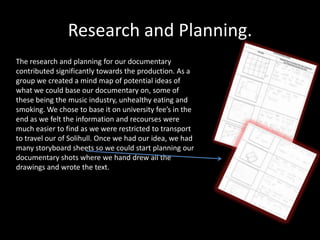
The research and planning for our documentary
contributed significantly towards the production. As a
group we created a mind map of potential ideas of
what we could base our documentary on, some of
these being the music industry, unhealthy eating and
smoking. We chose to base it on university fee’s in the
end as we felt the information and recourses were
much easier to find as we were restricted to transport
to travel our of Solihull. Once we had our idea, we had
many storyboard sheets so we could start planning our
documentary shots where we hand drew all the
drawings and wrote the text.
As part of the research we had to find our more information such as up
to date statistics about the topic and its current affects. We researched
on the BBC News website and went onto UCAS to find our university
fees and how much it would cost current A level students. By using
resource's such as books, internet and Connexions we were able to
make sure our research was very accurate to avoid false information.
We also looked at Panorama and the type of documentaries they
created so we had a potential documentary to follow as we had a
serious topic. We also researched the weekly listing all the channels to
see which would be suitable to broadcast our documentary, in this
case it was BBC1. All the research we carried out was uploaded onto
our group blog so to show that progress we were making each lesson
with regards to this task.
Filming
•   After doing our research and planning, we started to film our footage following the
    storyboard. With our professional, high quality camera, which we learned many
    things so we were able to carry out shots which consisted of focused and out of
    focus shots. As we had other equipment such as the tripod and the microphone,
    we were able to travel comfortably around to get the shots we wanted. For
    professional shots such as the vox pops and expert interviews we used the tripod
    to keep the shot stable and to keep the rule of thirds in mind along with the mise-
    en-scene. we sometimes had lighting difficulties in some expert interviews,
    however we were able to overcome them. Also, when we were asking questions,
    in order to check the sound was clear we had to plug our headphones into the
    camera and aim the microphone directly towards the direction of the speaker. To
    avoid the microphone from picking up any unwanted noises, especially in the
    expert interviews we used a quiet room which was available, and would arrange
    that before hand to avoid any time wasting. We also made sure all our interviews
    had been pre-arranged before the day and had a conformation that they were free
    to avoid rushing the interviews. We had planned the questions as a group and
    used whatever answers we felt contributed to the documentary.
The different technologies we used
         throughout the process.
•   Scribed
•   Slideshare
•   InDesign
•   Photoshop
•   Microsoft Powerpoint
•   Microsoft Word
•   Youtube
•   EdExcel
•   Recording studio
•   Final cut express
•   Garage band
The equipment used during the
                process
•   Camera
•   Microphone
•   Tripod
•   Headphones
•   Apple Mac computer
•   Mobile phones
•   Printer
Screenshots of Final Cut
    Express- Editing
     Documentary.
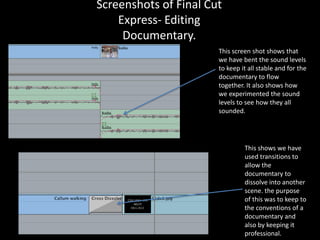
                       This screen shot shows that
                       we have bent the sound levels
                       to keep it all stable and for the
                       documentary to flow
                       together. It also shows how
                       we experimented the sound
                       levels to see how they all
                       sounded.


                                This shows we have
                                used transitions to
                                allow the
                                documentary to
                                dissolve into another
                                scene. the purpose
                                of this was to keep to
                                the conventions of a
                                documentary and
                                also by keeping it
                                professional.
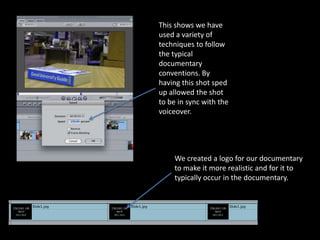
This shows we have
used a variety of
techniques to follow
the typical
documentary
conventions. By
having this shot sped
up allowed the shot
to be in sync with the
voiceover.


    We created a logo for our documentary
    to make it more realistic and for it to
    typically occur in the documentary.
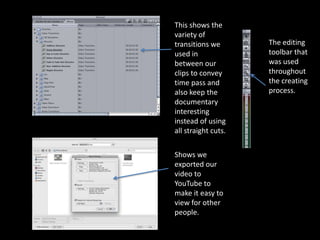
This shows the
variety of
transitions we       The editing
used in              toolbar that
between our          was used
clips to convey      throughout
time pass and        the creating
also keep the        process.
documentary
interesting
instead of using
all straight cuts.

Shows we
exported our
video to
YouTube to
make it easy to
view for other
people.
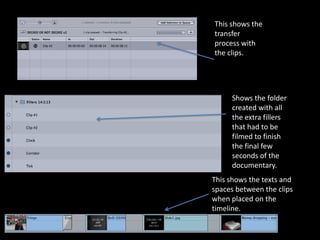
This shows the
transfer
process with
the clips.


     Shows the folder
     created with all
     the extra fillers
     that had to be
     filmed to finish
     the final few
     seconds of the
     documentary.
This shows the texts and
spaces between the clips
when placed on the
timeline.
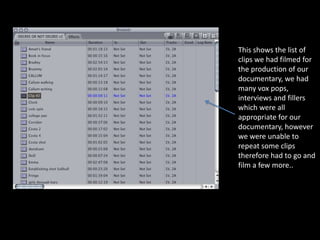
This shows the list of
clips we had filmed for
the production of our
documentary, we had
many vox pops,
interviews and fillers
which were all
appropriate for our
documentary, however
we were unable to
repeat some clips
therefore had to go and
film a few more..
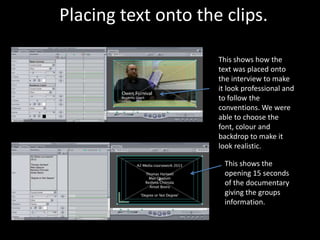
Placing text onto the clips.

                     This shows how the
                     text was placed onto
                     the interview to make
                     it look professional and
                     to follow the
                     conventions. We were
                     able to choose the
                     font, colour and
                     backdrop to make it
                     look realistic.

                      This shows the
                      opening 15 seconds
                      of the documentary
                      giving the groups
                      information.
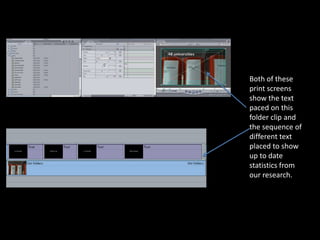
Both of these
print screens
show the text
paced on this
folder clip and
the sequence of
different text
placed to show
up to date
statistics from
our research.
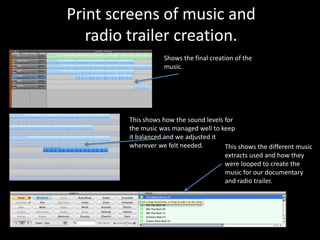
Print screens of music and
   radio trailer creation.
                   Shows the final creation of the
                   music.


        This shows how the sound levels for
        the music was managed well to keep
        it balanced and we adjusted it
        wherever we felt needed.        This shows the different music
                                        extracts used and how they
                                        were looped to create the
                                        music for our documentary
                                        and radio trailer.
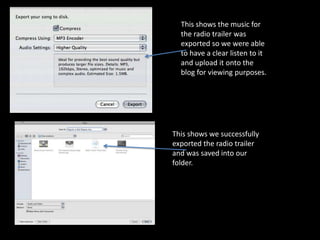
This shows the music for
  the radio trailer was
  exported so we were able
  to have a clear listen to it
  and upload it onto the
  blog for viewing purposes.


This shows we successfully
exported the radio trailer
and was saved into our
folder.
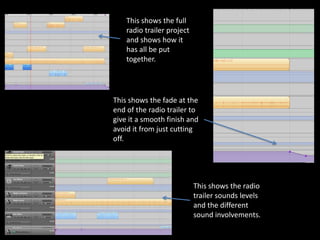
This shows the full
    radio trailer project
    and shows how it
    has all be put
    together.


This shows the fade at the
end of the radio trailer to
give it a smooth finish and
avoid it from just cutting
off.


                            This shows the radio
                            trailer sounds levels
                            and the different
                            sound involvements.
We completed our radio trailer in Final Cut Express which
allowed us to use extracts for our documentary. The
background music which was created in GarageBand was the
same as the documentary which we used for consistency
purposes. This was kept on a loop to keep it short and simple
and to avoid it from going off scale.

The radio trailer was simple to create as the majority of it was
extracts from the documentary, we decided to use a female
voice as we had a male voice for the documentary voiceover
and it would have clashed. We had the correct sound
adjustments for the music and voiceover which was created in
the music studio and ended with the date and time of the
broadcast. We chose to keep it simple for it to appeal to the
audience and for them to be intrigued to watch the
documentary.
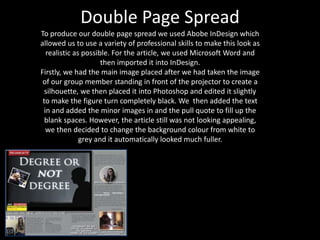
Double Page Spread
To produce our double page spread we used Abobe InDesign which
allowed us to use a variety of professional skills to make this look as
  realistic as possible. For the article, we used Microsoft Word and
                     then imported it into InDesign.
Firstly, we had the main image placed after we had taken the image
 of our group member standing in front of the projector to create a
  silhouette, we then placed it into Photoshop and edited it slightly
 to make the figure turn completely black. We then added the text
 in and added the minor images in and the pull quote to fill up the
  blank spaces. However, the article still was not looking appealing,
  we then decided to change the background colour from white to
              grey and it automatically looked much fuller.
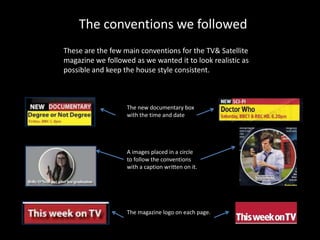
The conventions we followed
These are the few main conventions for the TV& Satellite
magazine we followed as we wanted it to look realistic as
possible and keep the house style consistent.


                   The new documentary box
                   with the time and date


                   A images placed in a circle
                   to follow the conventions
                   with a caption written on it.


                   The magazine logo on each page.

Evaluation question 4

  • 1.
    How did youuse media technologies in the construction and research, planning and evaluation stages? Reshma Chitroda
  • 2.
    Research and Planning. Theresearch and planning for our documentary contributed significantly towards the production. As a group we created a mind map of potential ideas of what we could base our documentary on, some of these being the music industry, unhealthy eating and smoking. We chose to base it on university fee’s in the end as we felt the information and recourses were much easier to find as we were restricted to transport to travel our of Solihull. Once we had our idea, we had many storyboard sheets so we could start planning our documentary shots where we hand drew all the drawings and wrote the text.
  • 3.
    As part ofthe research we had to find our more information such as up to date statistics about the topic and its current affects. We researched on the BBC News website and went onto UCAS to find our university fees and how much it would cost current A level students. By using resource's such as books, internet and Connexions we were able to make sure our research was very accurate to avoid false information. We also looked at Panorama and the type of documentaries they created so we had a potential documentary to follow as we had a serious topic. We also researched the weekly listing all the channels to see which would be suitable to broadcast our documentary, in this case it was BBC1. All the research we carried out was uploaded onto our group blog so to show that progress we were making each lesson with regards to this task.
  • 4.
    Filming • After doing our research and planning, we started to film our footage following the storyboard. With our professional, high quality camera, which we learned many things so we were able to carry out shots which consisted of focused and out of focus shots. As we had other equipment such as the tripod and the microphone, we were able to travel comfortably around to get the shots we wanted. For professional shots such as the vox pops and expert interviews we used the tripod to keep the shot stable and to keep the rule of thirds in mind along with the mise- en-scene. we sometimes had lighting difficulties in some expert interviews, however we were able to overcome them. Also, when we were asking questions, in order to check the sound was clear we had to plug our headphones into the camera and aim the microphone directly towards the direction of the speaker. To avoid the microphone from picking up any unwanted noises, especially in the expert interviews we used a quiet room which was available, and would arrange that before hand to avoid any time wasting. We also made sure all our interviews had been pre-arranged before the day and had a conformation that they were free to avoid rushing the interviews. We had planned the questions as a group and used whatever answers we felt contributed to the documentary.
  • 5.
    The different technologieswe used throughout the process. • Scribed • Slideshare • InDesign • Photoshop • Microsoft Powerpoint • Microsoft Word • Youtube • EdExcel • Recording studio • Final cut express • Garage band
  • 6.
    The equipment usedduring the process • Camera • Microphone • Tripod • Headphones • Apple Mac computer • Mobile phones • Printer
  • 7.
    Screenshots of FinalCut Express- Editing Documentary. This screen shot shows that we have bent the sound levels to keep it all stable and for the documentary to flow together. It also shows how we experimented the sound levels to see how they all sounded. This shows we have used transitions to allow the documentary to dissolve into another scene. the purpose of this was to keep to the conventions of a documentary and also by keeping it professional.
  • 8.
    This shows wehave used a variety of techniques to follow the typical documentary conventions. By having this shot sped up allowed the shot to be in sync with the voiceover. We created a logo for our documentary to make it more realistic and for it to typically occur in the documentary.
  • 9.
    This shows the varietyof transitions we The editing used in toolbar that between our was used clips to convey throughout time pass and the creating also keep the process. documentary interesting instead of using all straight cuts. Shows we exported our video to YouTube to make it easy to view for other people.
  • 10.
    This shows the transfer processwith the clips. Shows the folder created with all the extra fillers that had to be filmed to finish the final few seconds of the documentary. This shows the texts and spaces between the clips when placed on the timeline.
  • 11.
    This shows thelist of clips we had filmed for the production of our documentary, we had many vox pops, interviews and fillers which were all appropriate for our documentary, however we were unable to repeat some clips therefore had to go and film a few more..
  • 12.
    Placing text ontothe clips. This shows how the text was placed onto the interview to make it look professional and to follow the conventions. We were able to choose the font, colour and backdrop to make it look realistic. This shows the opening 15 seconds of the documentary giving the groups information.
  • 13.
    Both of these printscreens show the text paced on this folder clip and the sequence of different text placed to show up to date statistics from our research.
  • 14.
    Print screens ofmusic and radio trailer creation. Shows the final creation of the music. This shows how the sound levels for the music was managed well to keep it balanced and we adjusted it wherever we felt needed. This shows the different music extracts used and how they were looped to create the music for our documentary and radio trailer.
  • 15.
    This shows themusic for the radio trailer was exported so we were able to have a clear listen to it and upload it onto the blog for viewing purposes. This shows we successfully exported the radio trailer and was saved into our folder.
  • 16.
    This shows thefull radio trailer project and shows how it has all be put together. This shows the fade at the end of the radio trailer to give it a smooth finish and avoid it from just cutting off. This shows the radio trailer sounds levels and the different sound involvements.
  • 17.
    We completed ourradio trailer in Final Cut Express which allowed us to use extracts for our documentary. The background music which was created in GarageBand was the same as the documentary which we used for consistency purposes. This was kept on a loop to keep it short and simple and to avoid it from going off scale. The radio trailer was simple to create as the majority of it was extracts from the documentary, we decided to use a female voice as we had a male voice for the documentary voiceover and it would have clashed. We had the correct sound adjustments for the music and voiceover which was created in the music studio and ended with the date and time of the broadcast. We chose to keep it simple for it to appeal to the audience and for them to be intrigued to watch the documentary.
  • 18.
    Double Page Spread Toproduce our double page spread we used Abobe InDesign which allowed us to use a variety of professional skills to make this look as realistic as possible. For the article, we used Microsoft Word and then imported it into InDesign. Firstly, we had the main image placed after we had taken the image of our group member standing in front of the projector to create a silhouette, we then placed it into Photoshop and edited it slightly to make the figure turn completely black. We then added the text in and added the minor images in and the pull quote to fill up the blank spaces. However, the article still was not looking appealing, we then decided to change the background colour from white to grey and it automatically looked much fuller.
  • 19.
    The conventions wefollowed These are the few main conventions for the TV& Satellite magazine we followed as we wanted it to look realistic as possible and keep the house style consistent. The new documentary box with the time and date A images placed in a circle to follow the conventions with a caption written on it. The magazine logo on each page.