The research and planning element of our
                                           documentary was essential if we wanted to
                                           create a high level documentary. Not much
                                           media technology was used in this aspect of
                                           the documentary as most of it was done
                                           through     log     sheets,     storyboards,
                                           brainstorming and mind maps. However
                                           things likes questionnaires which were
                                           conducted were then presented through
                                           software such as Microsoft PowerPoint and
                                           Microsoft Excel to show results.
To research upon our chosen topic I used a
huge variety of websites to gather statistics
and data which were all useful as they gave
me a deeper insight into the topic as well as
being useful for the documentary.
Documentaries need to be current so I
looked through search engines and
websites for recent information. I used
websites such as: Google, BBC News, and
general articles found through different
search engines.
To enhance my research further, I thought it
would be valuable to watch other
documentaries of a similar style and topic. To
do so I used websites like iPlayer, 4od, and
YouTube to look at documentaries that may
have been made by people themselves. I
think this was definitely very useful because
not only did I get to learn about the codes
and conventions in documentaries but
watching the documentaries teaches you
what is really expected from a high level
documentary.

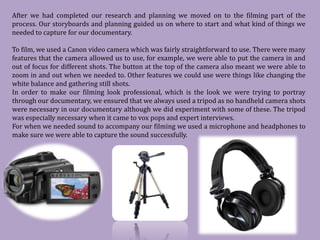
All of our research and planning was put on to our
blog as we were doing it. The blog allows us to
publish save and post at any time so throughout the
process of making our documentary we were always
uploading new research to our blog through the
internet.
After we had completed our research and planning we moved on to the filming part of the
process. Our storyboards and planning guided us on where to start and what kind of things we
needed to capture for our documentary.

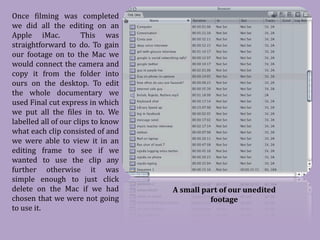
To film, we used a Canon video camera which was fairly straightforward to use. There were many
features that the camera allowed us to use, for example, we were able to put the camera in and
out of focus for different shots. The button at the top of the camera also meant we were able to
zoom in and out when we needed to. Other features we could use were things like changing the
white balance and gathering still shots.
In order to make our filming look professional, which is the look we were trying to portray
through our documentary, we ensured that we always used a tripod as no handheld camera shots
were necessary in our documentary although we did experiment with some of these. The tripod
was especially necessary when it came to vox pops and expert interviews.
For when we needed sound to accompany our filming we used a microphone and headphones to
make sure we were able to capture the sound successfully.
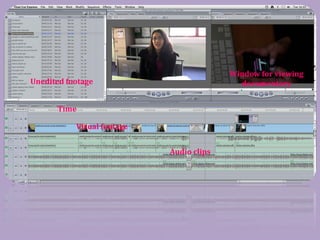
Once filming was completed
we did all the editing on an
Apple iMac.            This was
straightforward to do. To gain
our footage on to the Mac we
would connect the camera and
copy it from the folder into
ours on the desktop. To edit
the whole documentary we
used Final cut express in which
we put all the files in to. We
labelled all of our clips to know
what each clip consisted of and
we were able to view it in an
editing frame to see if we
wanted to use the clip any
further otherwise it was
simple enough to just click
delete on the Mac if we had
chosen that we were not going
                                    A small part of our unedited

to use it.
                                              footage
Window for viewing
Unedited footage                            documentary


      Time

           Visual footage


                            Audio clips
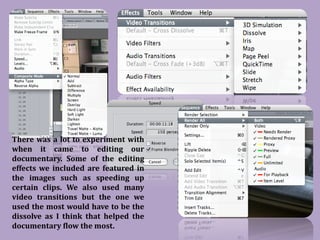
There was a lot to experiment with
when it came to editing our
documentary. Some of the editing
effects we included are featured in
the images such as speeding up
certain clips. We also used many
video transitions but the one we
used the most would have to be the
dissolve as I think that helped the
documentary flow the most.
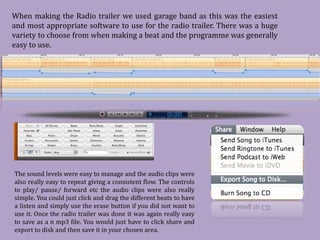
When making the Radio trailer we used garage band as this was the easiest
and most appropriate software to use for the radio trailer. There was a huge
variety to choose from when making a beat and the programme was generally
easy to use.


The sound levels were easy to manage and the audio clips were
also really easy to repeat giving a consistent flow. The controls
to play/ pause/ forward etc the audio clips were also really
simple. You could just click and drag the different beats to have
a listen and simply use the erase button if you did not want to
use it. Once the radio trailer was done it was again really easy
to save as a n mp3 file. You would just have to click share and
export to disk and then save it in your chosen area.
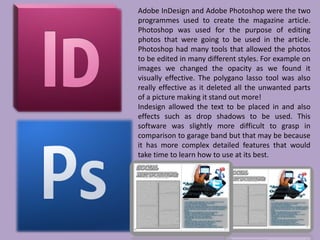
Adobe InDesign and Adobe Photoshop were the two
programmes used to create the magazine article.
Photoshop was used for the purpose of editing
photos that were going to be used in the article.
Photoshop had many tools that allowed the photos
to be edited in many different styles. For example on
images we changed the opacity as we found it
visually effective. The polygano lasso tool was also
really effective as it deleted all the unwanted parts
of a picture making it stand out more!
Indesign allowed the text to be placed in and also
effects such as drop shadows to be used. This
software was slightly more difficult to grasp in
comparison to garage band but that may be because
it has more complex detailed features that would
take time to learn how to use at its best.

Media evaluation question 4

  • 1.
    The research andplanning element of our documentary was essential if we wanted to create a high level documentary. Not much media technology was used in this aspect of the documentary as most of it was done through log sheets, storyboards, brainstorming and mind maps. However things likes questionnaires which were conducted were then presented through software such as Microsoft PowerPoint and Microsoft Excel to show results. To research upon our chosen topic I used a huge variety of websites to gather statistics and data which were all useful as they gave me a deeper insight into the topic as well as being useful for the documentary. Documentaries need to be current so I looked through search engines and websites for recent information. I used websites such as: Google, BBC News, and general articles found through different search engines.
  • 2.
    To enhance myresearch further, I thought it would be valuable to watch other documentaries of a similar style and topic. To do so I used websites like iPlayer, 4od, and YouTube to look at documentaries that may have been made by people themselves. I think this was definitely very useful because not only did I get to learn about the codes and conventions in documentaries but watching the documentaries teaches you what is really expected from a high level documentary. All of our research and planning was put on to our blog as we were doing it. The blog allows us to publish save and post at any time so throughout the process of making our documentary we were always uploading new research to our blog through the internet.
  • 3.
    After we hadcompleted our research and planning we moved on to the filming part of the process. Our storyboards and planning guided us on where to start and what kind of things we needed to capture for our documentary. To film, we used a Canon video camera which was fairly straightforward to use. There were many features that the camera allowed us to use, for example, we were able to put the camera in and out of focus for different shots. The button at the top of the camera also meant we were able to zoom in and out when we needed to. Other features we could use were things like changing the white balance and gathering still shots. In order to make our filming look professional, which is the look we were trying to portray through our documentary, we ensured that we always used a tripod as no handheld camera shots were necessary in our documentary although we did experiment with some of these. The tripod was especially necessary when it came to vox pops and expert interviews. For when we needed sound to accompany our filming we used a microphone and headphones to make sure we were able to capture the sound successfully.
  • 4.
    Once filming wascompleted we did all the editing on an Apple iMac. This was straightforward to do. To gain our footage on to the Mac we would connect the camera and copy it from the folder into ours on the desktop. To edit the whole documentary we used Final cut express in which we put all the files in to. We labelled all of our clips to know what each clip consisted of and we were able to view it in an editing frame to see if we wanted to use the clip any further otherwise it was simple enough to just click delete on the Mac if we had chosen that we were not going A small part of our unedited to use it. footage
  • 5.
    Window for viewing Uneditedfootage documentary Time Visual footage Audio clips
  • 6.
    There was alot to experiment with when it came to editing our documentary. Some of the editing effects we included are featured in the images such as speeding up certain clips. We also used many video transitions but the one we used the most would have to be the dissolve as I think that helped the documentary flow the most.
  • 7.
    When making theRadio trailer we used garage band as this was the easiest and most appropriate software to use for the radio trailer. There was a huge variety to choose from when making a beat and the programme was generally easy to use. The sound levels were easy to manage and the audio clips were also really easy to repeat giving a consistent flow. The controls to play/ pause/ forward etc the audio clips were also really simple. You could just click and drag the different beats to have a listen and simply use the erase button if you did not want to use it. Once the radio trailer was done it was again really easy to save as a n mp3 file. You would just have to click share and export to disk and then save it in your chosen area.
  • 8.
    Adobe InDesign andAdobe Photoshop were the two programmes used to create the magazine article. Photoshop was used for the purpose of editing photos that were going to be used in the article. Photoshop had many tools that allowed the photos to be edited in many different styles. For example on images we changed the opacity as we found it visually effective. The polygano lasso tool was also really effective as it deleted all the unwanted parts of a picture making it stand out more! Indesign allowed the text to be placed in and also effects such as drop shadows to be used. This software was slightly more difficult to grasp in comparison to garage band but that may be because it has more complex detailed features that would take time to learn how to use at its best.