Etsy Connector for Magento 2
This module is well equipped for your site if you are searching for some Magento Etsy
Connector. With variations and orders from etsy store to magento store, the module
provides easy sync of all the product.
INTRODUCTION
The extension of Etsy Connector enables merchants to map the Etsy store with the
online Magento 2 store. The store owners will now list and sell products in the product
and orders on both the site with the proper synchronisation.
The owners of the store will be able to map the Etsy and Magento store categories and
then the import and export will occur accordingly.
The extension enables the owners of the store to sell the products on multiple
platforms that will increase sales revenue and be delivered to different groups of
customers.
They can easily import the orders and the products from the Etsy store. Product
exports can also be carried out from Magento to the Etsy store.
Etsy is an American marketplace for e-commerce that focuses on handmade or
antique products and art supplies. Such products fall into a broad variety of categories,
including jewellery, bags, clothes, furniture and home décor, toys, and art.
Etsy is a worldwide auction platform that continues the tradition of open art fairs,
providing personal storefronts to vendors where they list their products for a small fee.
Features
● View mapping process result after execution.
● Delete record entries from the product and order sync list.
● Set default shipping template for exporting products.
Features
● Connect multiple Etsy seller accounts.
● The admin will decide whether to use Etsy credentials Globally or uniquely for
each Etsy account created.
● Import Etsy products – active and expired.
● Select the default order status for Etsy orders.
● Import Etsy orders according to selected dates.
● Select Attribute Set ID for each Etsy account.
● Assign imported products to the correct Magento category.
● Export all or selected Magento 2 products to Etsy listing.
● Supports mapping of products with variations and options.
● Map Etsy categories with Magento categories.
● Mention Etsy variation and specification in products.
● Select default web-site for importing products.
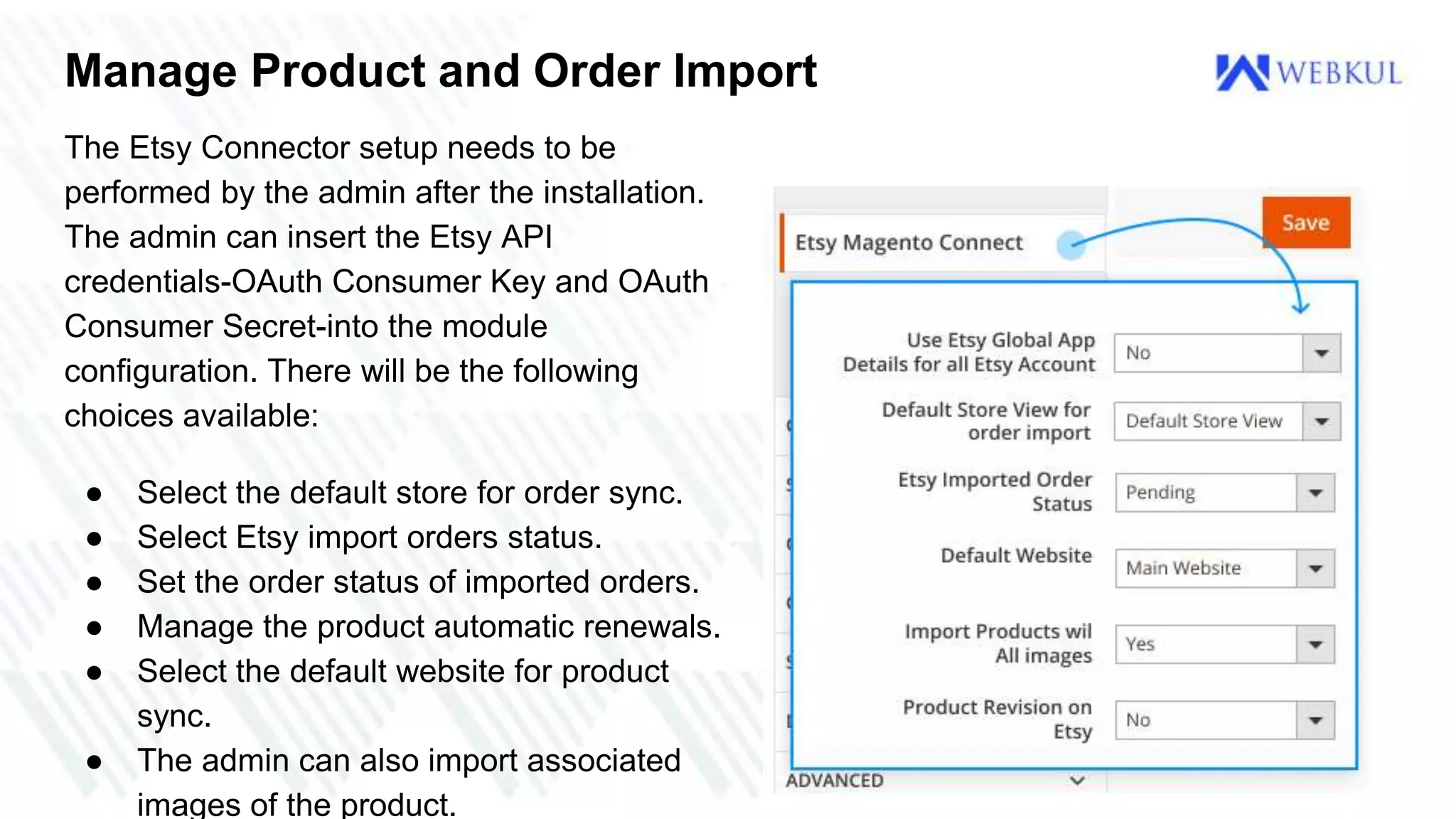
Manage Product and Order Import
The Etsy Connector setup needs to be
performed by the admin after the installation.
The admin can insert the Etsy API
credentials-OAuth Consumer Key and OAuth
Consumer Secret-into the module
configuration. There will be the following
choices available:
● Select the default store for order sync.
● Select Etsy import orders status.
● Set the order status of imported orders.
● Manage the product automatic renewals.
● Select the default website for product
sync.
● The admin can also import associated
images of the product.
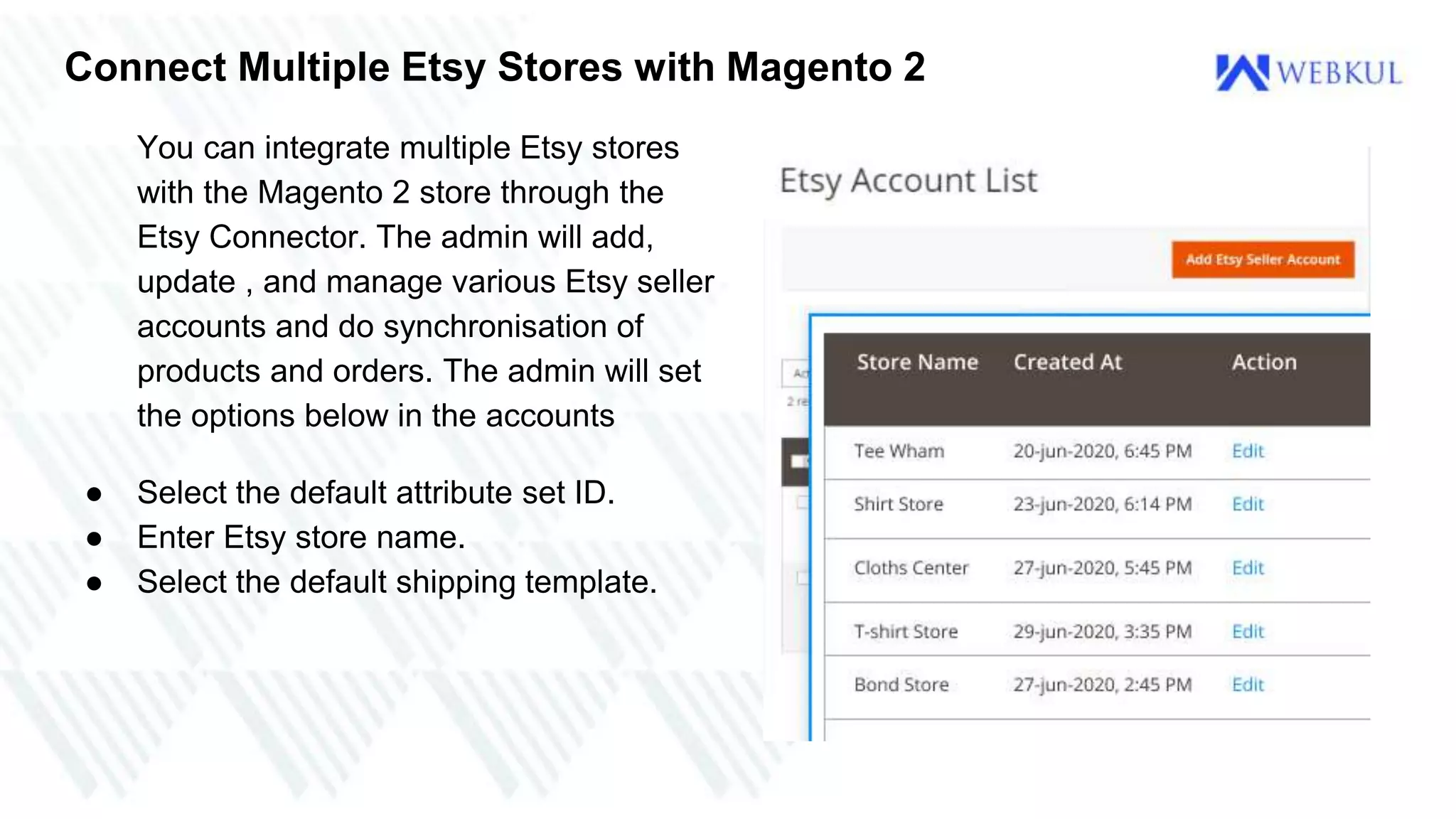
Connect Multiple Etsy Stores with Magento 2
You can integrate multiple Etsy stores
with the Magento 2 store through the
Etsy Connector. The admin will add,
update , and manage various Etsy seller
accounts and do synchronisation of
products and orders. The admin will set
the options below in the accounts
● Select the default attribute set ID.
● Enter Etsy store name.
● Select the default shipping template.
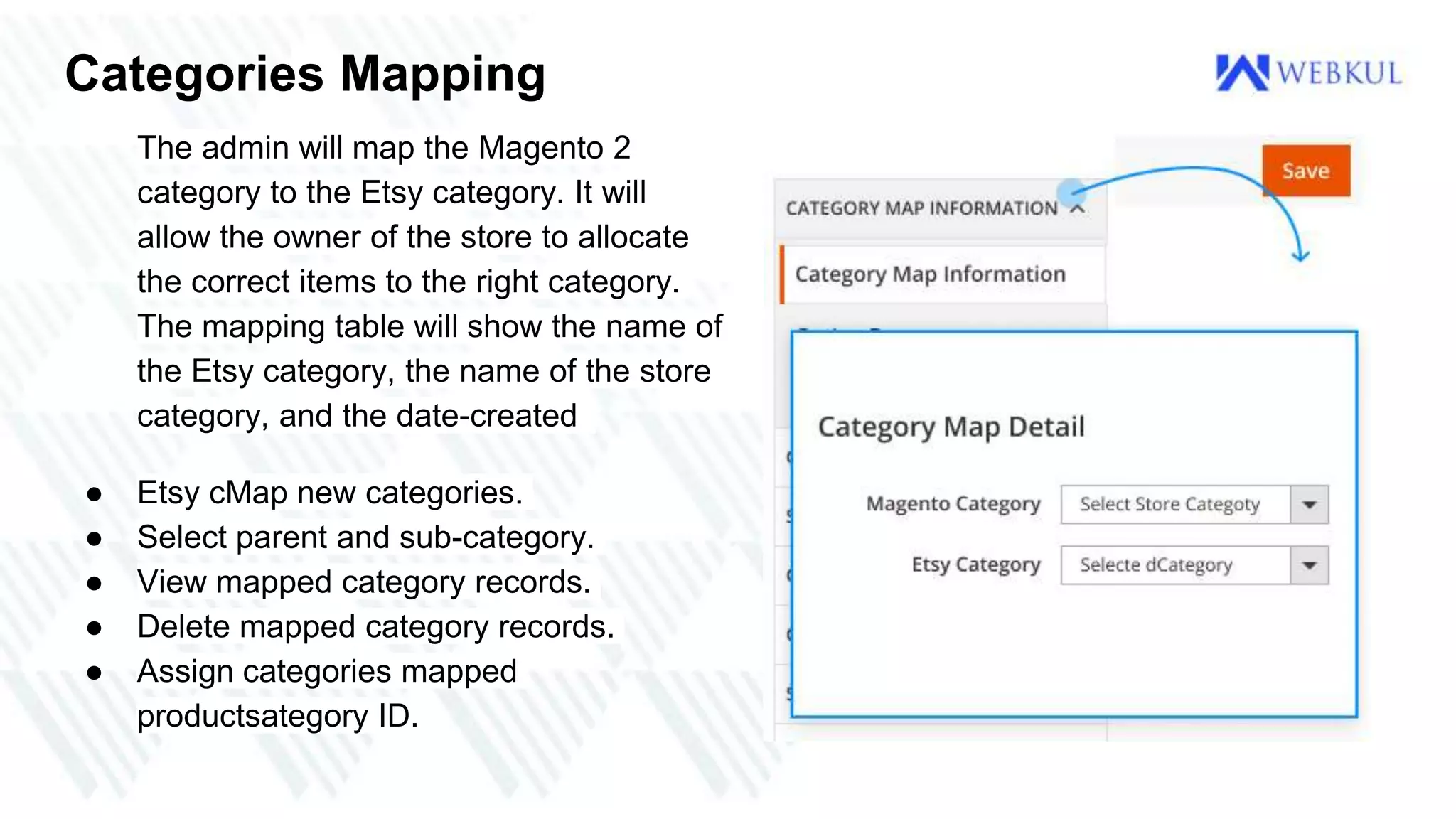
Categories Mapping
The admin will map the Magento 2
category to the Etsy category. It will
allow the owner of the store to allocate
the correct items to the right category.
The mapping table will show the name of
the Etsy category, the name of the store
category, and the date-created
● Etsy cMap new categories.
● Select parent and sub-category.
● View mapped category records.
● Delete mapped category records.
● Assign categories mapped
productsategory ID.
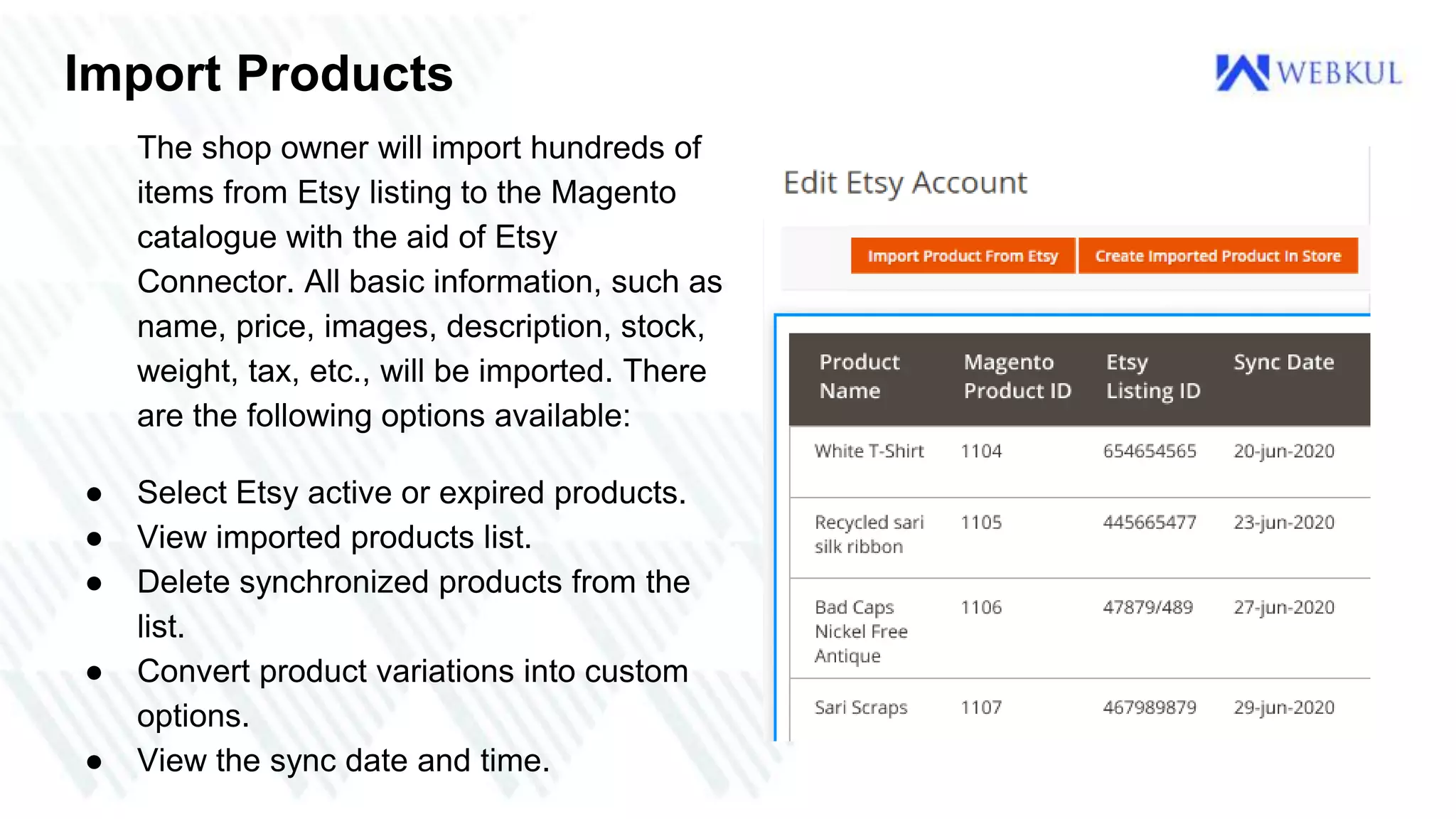
Import Products
The shop owner will import hundreds of
items from Etsy listing to the Magento
catalogue with the aid of Etsy
Connector. All basic information, such as
name, price, images, description, stock,
weight, tax, etc., will be imported. There
are the following options available:
● Select Etsy active or expired products.
● View imported products list.
● Delete synchronized products from the
list.
● Convert product variations into custom
options.
● View the sync date and time.
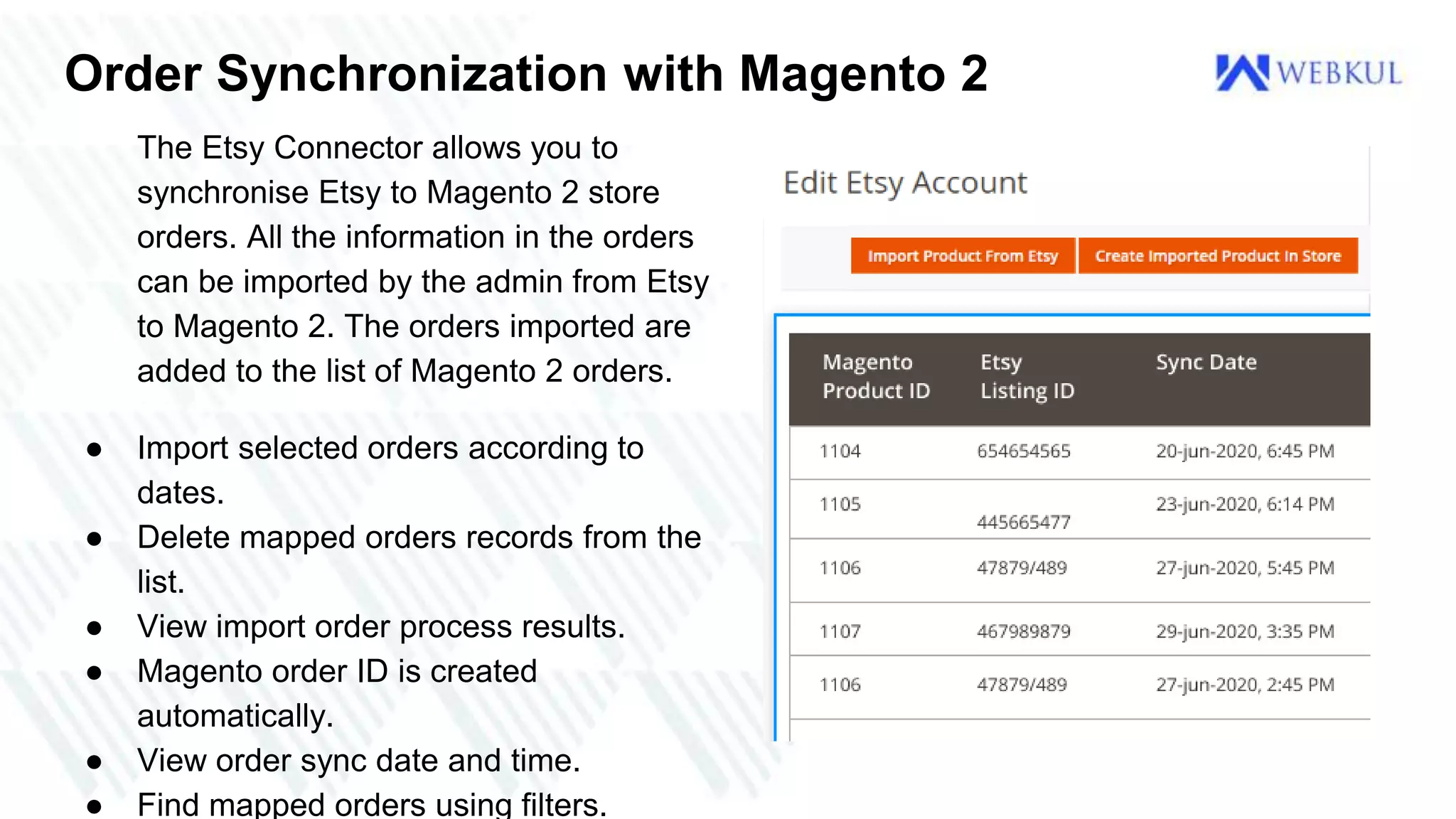
Order Synchronization with Magento 2
The Etsy Connector allows you to
synchronise Etsy to Magento 2 store
orders. All the information in the orders
can be imported by the admin from Etsy
to Magento 2. The orders imported are
added to the list of Magento 2 orders.
● Import selected orders according to
dates.
● Delete mapped orders records from the
list.
● View import order process results.
● Magento order ID is created
automatically.
● View order sync date and time.
● Find mapped orders using filters.
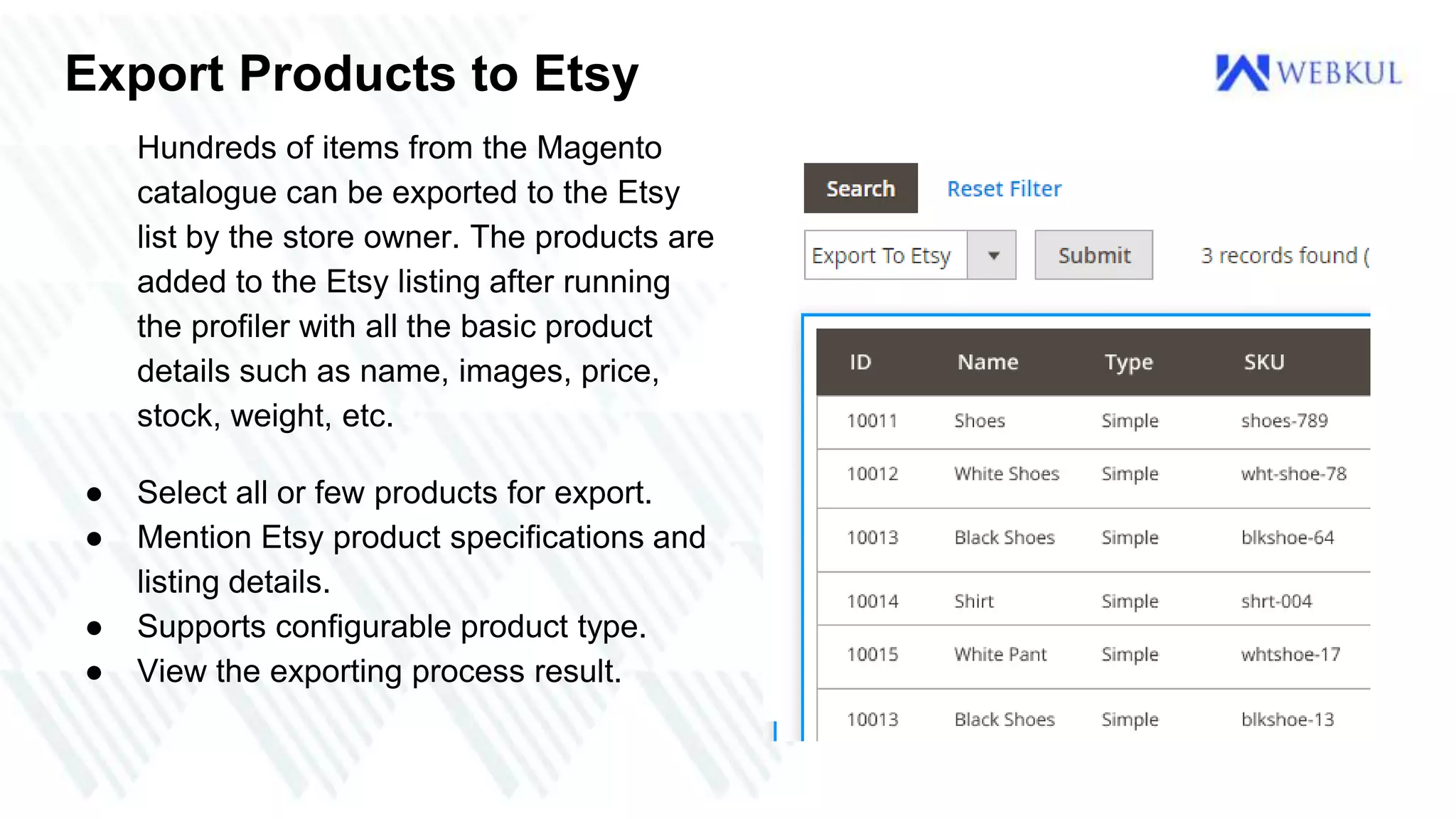
Export Products to Etsy
Hundreds of items from the Magento
catalogue can be exported to the Etsy
list by the store owner. The products are
added to the Etsy listing after running
the profiler with all the basic product
details such as name, images, price,
stock, weight, etc.
● Select all or few products for export.
● Mention Etsy product specifications and
listing details.
● Supports configurable product type.
● View the exporting process result.
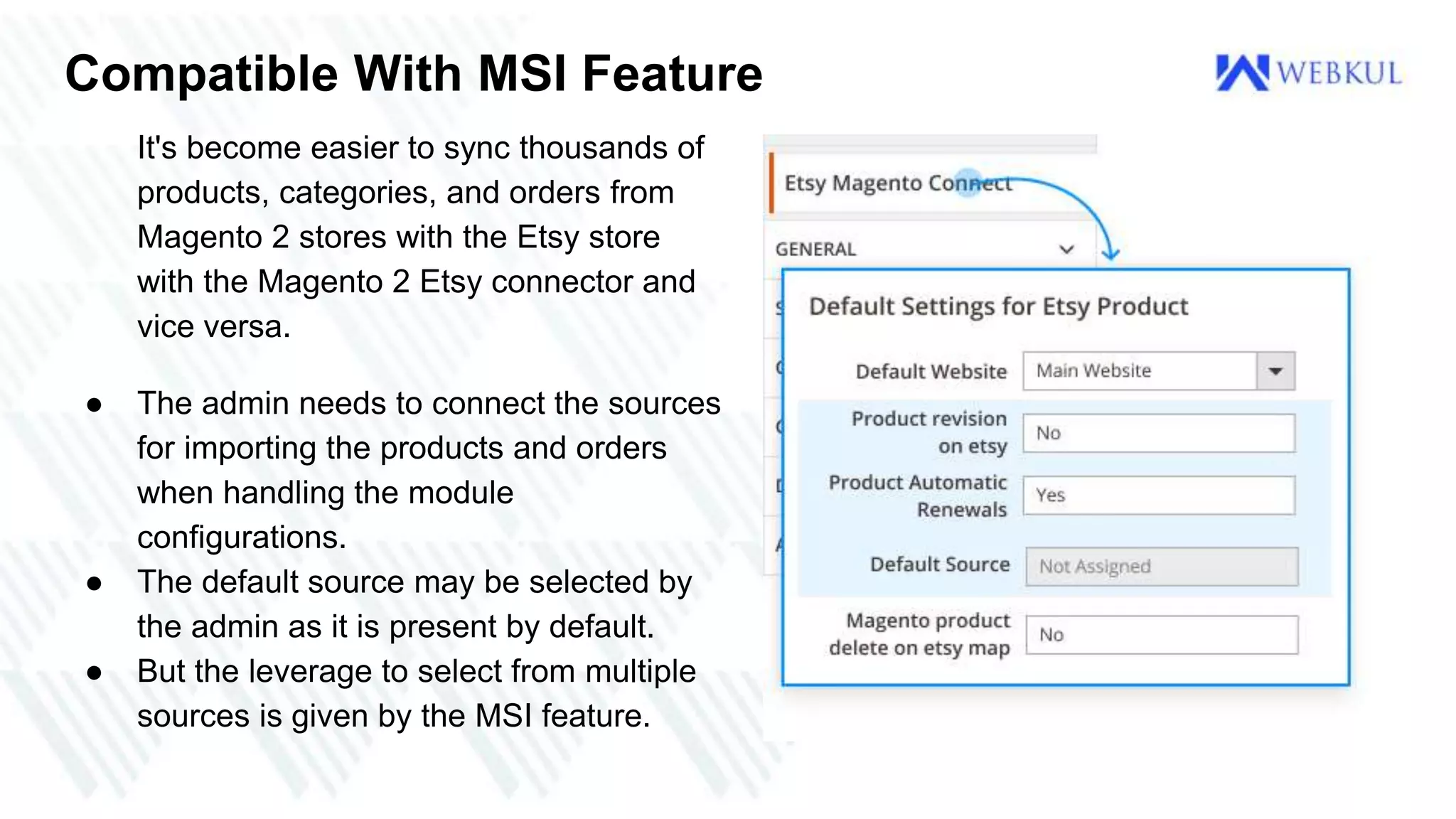
Compatible With MSI Feature
It's become easier to sync thousands of
products, categories, and orders from
Magento 2 stores with the Etsy store
with the Magento 2 Etsy connector and
vice versa.
● The admin needs to connect the sources
for importing the products and orders
when handling the module
configurations.
● The default source may be selected by
the admin as it is present by default.
● But the leverage to select from multiple
sources is given by the MSI feature.
Use Case
The principal objective of the Etsy connector module is to nurture a higher sales pace.
Currently, it combines the Etsy Store with the Magento 2 store. Since it is most
important to list the products on as many websites and stores as possible in today's
business era.
Through this, the owners of the store will synchronise different products, categories
and orders to the Magento 2 store from the Etsy store. The products can also be
exported to the Etsy store from the Magento store.
Benefits
● Add multiple Etsy vendor accounts and sync them.
● The export and import of products may clearly be handled.
● Orders can be imported from the Etsy store as well.
● For the products, the status and position of the products imported may be set.
● You can also map several Etsy stores with the Magento stores.
● Online shoppers can purchase goods from Etsy or Magento online stores via
multichannel transactions.
● If Etsy does not have a product available, customers can visit the Magento store,
and vice versa.
Feel Free to Contact Us
Buy Now - https://webkul.com/blog/etsy-connector-magento2/
User Guide - https://store.webkul.com/magento2-etsy-integration.html
For further queries or customization requirements, please send an email to :
support@webkul.com
Create a support ticket: https://webkul.uvdesk.com/en/customer/create-ticket/
Phone - India - (+91)-9650486699
US - (+1)-9143531684
THANK YOU

Etsy Connector for Magento 2

  • 1.
    Etsy Connector forMagento 2 This module is well equipped for your site if you are searching for some Magento Etsy Connector. With variations and orders from etsy store to magento store, the module provides easy sync of all the product.
  • 2.
    INTRODUCTION The extension ofEtsy Connector enables merchants to map the Etsy store with the online Magento 2 store. The store owners will now list and sell products in the product and orders on both the site with the proper synchronisation. The owners of the store will be able to map the Etsy and Magento store categories and then the import and export will occur accordingly. The extension enables the owners of the store to sell the products on multiple platforms that will increase sales revenue and be delivered to different groups of customers. They can easily import the orders and the products from the Etsy store. Product exports can also be carried out from Magento to the Etsy store.
  • 3.
    Etsy is anAmerican marketplace for e-commerce that focuses on handmade or antique products and art supplies. Such products fall into a broad variety of categories, including jewellery, bags, clothes, furniture and home décor, toys, and art. Etsy is a worldwide auction platform that continues the tradition of open art fairs, providing personal storefronts to vendors where they list their products for a small fee. Features ● View mapping process result after execution. ● Delete record entries from the product and order sync list. ● Set default shipping template for exporting products.
  • 4.
    Features ● Connect multipleEtsy seller accounts. ● The admin will decide whether to use Etsy credentials Globally or uniquely for each Etsy account created. ● Import Etsy products – active and expired. ● Select the default order status for Etsy orders. ● Import Etsy orders according to selected dates. ● Select Attribute Set ID for each Etsy account. ● Assign imported products to the correct Magento category. ● Export all or selected Magento 2 products to Etsy listing. ● Supports mapping of products with variations and options. ● Map Etsy categories with Magento categories. ● Mention Etsy variation and specification in products. ● Select default web-site for importing products.
  • 5.
    Manage Product andOrder Import The Etsy Connector setup needs to be performed by the admin after the installation. The admin can insert the Etsy API credentials-OAuth Consumer Key and OAuth Consumer Secret-into the module configuration. There will be the following choices available: ● Select the default store for order sync. ● Select Etsy import orders status. ● Set the order status of imported orders. ● Manage the product automatic renewals. ● Select the default website for product sync. ● The admin can also import associated images of the product.
  • 6.
    Connect Multiple EtsyStores with Magento 2 You can integrate multiple Etsy stores with the Magento 2 store through the Etsy Connector. The admin will add, update , and manage various Etsy seller accounts and do synchronisation of products and orders. The admin will set the options below in the accounts ● Select the default attribute set ID. ● Enter Etsy store name. ● Select the default shipping template.
  • 7.
    Categories Mapping The adminwill map the Magento 2 category to the Etsy category. It will allow the owner of the store to allocate the correct items to the right category. The mapping table will show the name of the Etsy category, the name of the store category, and the date-created ● Etsy cMap new categories. ● Select parent and sub-category. ● View mapped category records. ● Delete mapped category records. ● Assign categories mapped productsategory ID.
  • 8.
    Import Products The shopowner will import hundreds of items from Etsy listing to the Magento catalogue with the aid of Etsy Connector. All basic information, such as name, price, images, description, stock, weight, tax, etc., will be imported. There are the following options available: ● Select Etsy active or expired products. ● View imported products list. ● Delete synchronized products from the list. ● Convert product variations into custom options. ● View the sync date and time.
  • 9.
    Order Synchronization withMagento 2 The Etsy Connector allows you to synchronise Etsy to Magento 2 store orders. All the information in the orders can be imported by the admin from Etsy to Magento 2. The orders imported are added to the list of Magento 2 orders. ● Import selected orders according to dates. ● Delete mapped orders records from the list. ● View import order process results. ● Magento order ID is created automatically. ● View order sync date and time. ● Find mapped orders using filters.
  • 10.
    Export Products toEtsy Hundreds of items from the Magento catalogue can be exported to the Etsy list by the store owner. The products are added to the Etsy listing after running the profiler with all the basic product details such as name, images, price, stock, weight, etc. ● Select all or few products for export. ● Mention Etsy product specifications and listing details. ● Supports configurable product type. ● View the exporting process result.
  • 11.
    Compatible With MSIFeature It's become easier to sync thousands of products, categories, and orders from Magento 2 stores with the Etsy store with the Magento 2 Etsy connector and vice versa. ● The admin needs to connect the sources for importing the products and orders when handling the module configurations. ● The default source may be selected by the admin as it is present by default. ● But the leverage to select from multiple sources is given by the MSI feature.
  • 12.
    Use Case The principalobjective of the Etsy connector module is to nurture a higher sales pace. Currently, it combines the Etsy Store with the Magento 2 store. Since it is most important to list the products on as many websites and stores as possible in today's business era. Through this, the owners of the store will synchronise different products, categories and orders to the Magento 2 store from the Etsy store. The products can also be exported to the Etsy store from the Magento store.
  • 13.
    Benefits ● Add multipleEtsy vendor accounts and sync them. ● The export and import of products may clearly be handled. ● Orders can be imported from the Etsy store as well. ● For the products, the status and position of the products imported may be set. ● You can also map several Etsy stores with the Magento stores. ● Online shoppers can purchase goods from Etsy or Magento online stores via multichannel transactions. ● If Etsy does not have a product available, customers can visit the Magento store, and vice versa.
  • 14.
    Feel Free toContact Us Buy Now - https://webkul.com/blog/etsy-connector-magento2/ User Guide - https://store.webkul.com/magento2-etsy-integration.html For further queries or customization requirements, please send an email to : support@webkul.com Create a support ticket: https://webkul.uvdesk.com/en/customer/create-ticket/ Phone - India - (+91)-9650486699 US - (+1)-9143531684
  • 15.