Magento 2 Marketplace Flutterwave Payment
Introduction
❏ Magento 2 Marketplace Flutterwave Payment module allows the admin and
sellers to integrate the flutterwave payment method to receive payment for
their orders.
❏ This module supports split payment that will automatically split the payment
between sellers and admin for the seller orders.
❏ This payment method is supported by Nigeria, Ghana, Kenya, South Africa,
Uganda, Tanzania, the United Kingdom, America, and Europe.
Benefits
❏ Easy Checkout - The swift and seamless checkout experience is a must from a
customer’s point of view. Marketplace flutterwave payment enables these features
and make online shopping as easy as possible.
❏ Marketplace Flutterwave Payment
- Integrates with shopping cart.
- Provide faster payment processing.
- Provides fraud management.
❏ Security - Marketplace flutterwave payment are often compliant with security
standards like PCI. providing secure transactions.
List of Features
❏ Fully PCI Compliant, no card details submitted to the client-server.
❏ Enable/disable payment method from admin panel.
❏ Payment automatically splits to sellers at the time of checkout.
❏ The seller can become a sub-merchant by providing some details, to be able to
receive funds if payment is done by marketplace flutterwave payment method.
❏ The admin can refund the invoiced amount.
❏ The admin can refund invoiced amount partially.
Use Cases
❏ PCI Compliant - Fully PCI compliant, no card details submitted to the client servers.
❏ Secure to use - Using this module admin can allow their customers to pay securely.
❏ Split Payment - The module supports split payment that will automatically splits the
payment between sellers and admin for the seller orders.
❏ Better Customer Experience - Give your customers a tailored experience by
providing them with flexible options and billing frequencies.
❏ Designed to be customizable to fit your unique business processes.
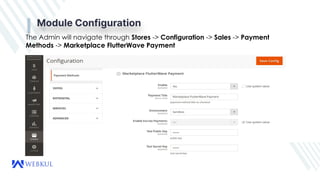
Module Configuration
The Admin will navigate through Stores -> Configuration -> Sales -> Payment
Methods -> Marketplace FlutterWave Payment
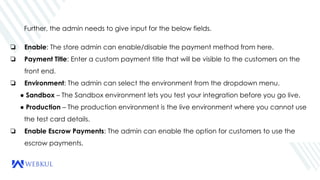
Further, the admin needs to give input for the below fields.
❏ Enable: The store admin can enable/disable the payment method from here.
❏ Payment Title: Enter a custom payment title that will be visible to the customers on the
front end.
❏ Environment: The admin can select the environment from the dropdown menu.
● Sandbox – The Sandbox environment lets you test your integration before you go live.
● Production – The production environment is the live environment where you cannot use
the test card details.
❏ Enable Escrow Payments: The admin can enable the option for customers to use the
escrow payments.
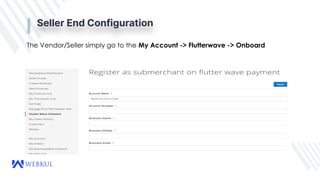
Seller End Configuration
The Vendor/Seller simply go to the My Account -> Flutterwave -> Onboard
❏ To Register as a sub - merchant on flutter wave payment firstly the seller needs to select the
country and click submit.
❏ Right After that, the seller is required to provide his/her account flutterwave account and
business details.
❏ At last click the Save button to complete the registration.
Buy Now - https://store.webkul.com/magento2-marketplace-flutterwave-payment.html
User Guide - https://webkul.com/blog/magento2-marketplace-flutterwave/
For further queries or customization requirements, please send an email to
support@webkul.com
Create a support ticket - https://webkul.uvdesk.com/en/customer/create-ticket/
Phone - India - (+91)-9650486699
US - (+1)-9143531684
Feel Free To Contact Us
THANK YOU

Magento 2 marketplace flutterwave payment

  • 1.
    Magento 2 MarketplaceFlutterwave Payment
  • 2.
    Introduction ❏ Magento 2Marketplace Flutterwave Payment module allows the admin and sellers to integrate the flutterwave payment method to receive payment for their orders. ❏ This module supports split payment that will automatically split the payment between sellers and admin for the seller orders. ❏ This payment method is supported by Nigeria, Ghana, Kenya, South Africa, Uganda, Tanzania, the United Kingdom, America, and Europe.
  • 3.
    Benefits ❏ Easy Checkout- The swift and seamless checkout experience is a must from a customer’s point of view. Marketplace flutterwave payment enables these features and make online shopping as easy as possible. ❏ Marketplace Flutterwave Payment - Integrates with shopping cart. - Provide faster payment processing. - Provides fraud management. ❏ Security - Marketplace flutterwave payment are often compliant with security standards like PCI. providing secure transactions.
  • 4.
    List of Features ❏Fully PCI Compliant, no card details submitted to the client-server. ❏ Enable/disable payment method from admin panel. ❏ Payment automatically splits to sellers at the time of checkout. ❏ The seller can become a sub-merchant by providing some details, to be able to receive funds if payment is done by marketplace flutterwave payment method. ❏ The admin can refund the invoiced amount. ❏ The admin can refund invoiced amount partially.
  • 5.
    Use Cases ❏ PCICompliant - Fully PCI compliant, no card details submitted to the client servers. ❏ Secure to use - Using this module admin can allow their customers to pay securely. ❏ Split Payment - The module supports split payment that will automatically splits the payment between sellers and admin for the seller orders. ❏ Better Customer Experience - Give your customers a tailored experience by providing them with flexible options and billing frequencies. ❏ Designed to be customizable to fit your unique business processes.
  • 6.
    Module Configuration The Adminwill navigate through Stores -> Configuration -> Sales -> Payment Methods -> Marketplace FlutterWave Payment
  • 7.
    Further, the adminneeds to give input for the below fields. ❏ Enable: The store admin can enable/disable the payment method from here. ❏ Payment Title: Enter a custom payment title that will be visible to the customers on the front end. ❏ Environment: The admin can select the environment from the dropdown menu. ● Sandbox – The Sandbox environment lets you test your integration before you go live. ● Production – The production environment is the live environment where you cannot use the test card details. ❏ Enable Escrow Payments: The admin can enable the option for customers to use the escrow payments.
  • 8.
    Seller End Configuration TheVendor/Seller simply go to the My Account -> Flutterwave -> Onboard
  • 9.
    ❏ To Registeras a sub - merchant on flutter wave payment firstly the seller needs to select the country and click submit. ❏ Right After that, the seller is required to provide his/her account flutterwave account and business details. ❏ At last click the Save button to complete the registration.
  • 10.
    Buy Now -https://store.webkul.com/magento2-marketplace-flutterwave-payment.html User Guide - https://webkul.com/blog/magento2-marketplace-flutterwave/ For further queries or customization requirements, please send an email to support@webkul.com Create a support ticket - https://webkul.uvdesk.com/en/customer/create-ticket/ Phone - India - (+91)-9650486699 US - (+1)-9143531684 Feel Free To Contact Us
  • 11.