Brown                                        This section is set up to provide a ready-made Brown Bag
                                                     Session for you to use with employees and/or managers. Use as

          Bagger                                     is, or adapt this information for a general employee group. You
                                                     may reproduce as many copies as needed.


     Ergonomics Needs to Play Greater
    Role in Workplace Wellness Programs
    By Diane M. Kaufman and                                     employee’s physical and mental well-being while
    Wendy McCubbin                                              holding down costs for healthcare premiums and
                                                                incentives for underutilized wellness programs.
             ccording to a 2008 report published by                 Unfortunately, the same Pricewaterhouse-

    A        Reuters, 57% of employers with 500 or
             more workers provide some sort of wellness
    program, such as smoking cessation, exercise plan-
                                                                Coopers’ study found that, of the 71% of
                                                                employers offering wellness programs, few said
                                                                they were effective at lowering costs. In fact, nearly
                                                                half of employers surveyed said they were ready
    ning or cancer screening. In addition, 4 out of 5
    employers with wellness programs add incentives             to push more of the costs of health insurance onto
    — with 40% offering gym memberships, 36%                    their employees.
    awarding gifts or prizes, and 27% offering a dis-               Just what can be done to engage employees to
    counted employee contribution to medical plans.             attain greater health and fitness if current wellness
       Given these statistics, you would think that we’d        initiatives aren’t addressing this need? Perhaps the
    have a nation full of lean, mean, healthy workers           costs for wellness programs should be shifted to
    whose high energy positively contributes to not only        where so much of an employee’s time is spent…the
    their own health — but also the financial well-being        workstations and workspaces where they’re sitting.
    of the companies they work for. The truth of the                According to a survey from the Microsoft Small
    matter is this isn’t the case. In fact, obesity is a sig-   Business Center, 9 out of 10 employees say that the
    nificant concern and one of our nation’s biggest            design set-up of their workstation directly affects
    health crises.                                              their ability to be productive at work. From a scien-
       Aside from the serious health complications that         tific perspective, ergonomically designed work-
    being overweight presents for employees — the               spaces have been proven to improve productivity
    worse we feel, the less we move, and the more likely        and comfort; and minimize common stresses, strains
    we are to become tired and less productive in the           and injuries associated with working at a computer.
    workplace. It’s easy to see the adverse impacts on          That knowledge, combined with employee percep-
    not only individuals, but on businesses as well.            tion, may be compelling to companies not finding
       If more than half of all large U.S employers             the success they are looking for through traditional
    offer wellness programs and incentives like gym             wellness programs. This creates a new reality in
    memberships and weight-loss assistance, why is our          which “ergonomic workspace design” is seen as an
    nation continuing to fight growing health concerns          essential component of an EAP.
    like obesity?                                                   If increased productivity isn’t compelling enough,
       The fact is, although many employers encourage           consider some of the other reasons why adopting
    health-and-wellness initiatives, the choice to partici-     ergonomic workstations makes sense in corporate
    pate in them is controlled by the employee. In a            wellness programs:
    recent PricewaterhouseCoopers’ Health Research
    Institute study, less than 40% of those surveyed actu-             Alleviating inherent risks to employee
    ally enrolled in wellness programs. The question is:        health: Dr. Alan Hedge, Professor of the Human
    Why aren’t they?                                            Factors Laboratory at Cornell University, warns that
       Providing significant Return on Investment (ROI)         the risk of musculoskeletal discomfort increases by
    for a company and its employees through effective           using the computer as little as one hour a day. Even
    wellness assistance programs is a constant challenge        worse, the risk of musculoskeletal injury is nine
    to HR and EA professionals alike. The underlying            times greater when you spend four hours a day at the
    issue is how to manage and contribute to an                 computer [than it is for a one hour-per-day user]

November 2010                                                                                 EA Report Brown Bagger 1
Brown
          Bagger                                             Ergonomics as a Preventative Measure
                                                                 Creating an environment that is ergonomically
                                                             safe and encourages healthy movement is important.
   increasing chances of death (Journal of the
                                                             In fact, the American Industrial Hygiene Association
   American Heart Association).
                                                             (AIHA) proposes that, “Ergonomic principles are
      A new study conducted by Ipsos Public Affairs
                                                             most effectively applied to workstations and new
   shows full-time employees of companies with 1,000
                                                             designs on a preventive basis, before injuries or ill-
   or more workers spend an average of 21 hours per
                                                             nesses occur. Good design with ergonomics provides
   week seated at a desk, nearly three hours per week
                                                             the greatest economic benefit for industry.”
   seated in meetings, and four hours per week seated
                                                                 A stressed body leaves itself open for attack,
   working at home.
                                                             leading to computer-related fatigue, pain, stiffness or
      This means that 70% of one’s time in a typical
                                                             injury, which then may result in lost time, reduced
   40-hour workweek is spent sitting! Moving more
                                                             focus, depleted morale and other negative effects.
   throughout the day with access to adjustable
                                                             However, by giving employees access to the
   workstations help offset the harmful effects of
                                                             right ergonomic equipment, tools, and education,
   sedentary workstyles.
                                                             companies will empower employees to proactively
          Costs of absenteeism to employers: The BLS
                                                             manage the stresses associated with their computing
   Survey of Occupational Injuries and Illnesses reports
                                                             workspace.
   that there were 1.1 million cases requiring days away
                                                                 Research has shown that even the simple act of
   from work in private industry out of 3.7 million total
                                                             just standing periodically throughout the day can
   cases. In addition, the percentage of musculoskeletal
                                                             dramatically improve health, comfort, and productiv-
   disorder cases out of total cases (29% in 2008) has
                                                             ity. One report in fact, suggests that an average
   not varied greatly since 2005.
                                                             person can burn an extra 60 calories an hour just by
      Similarly, the Bureau of Labor Statistics (2007),
                                                             standing. Yet, the fixed workstations that employees
   reported that musculoskeletal disorders led to 29%
                                                             are commonly provided do not facilitate the ability
   of all workplace injuries, of which more than
                                                             to stand while working. Moreover, companies are
   333,000 cases required an average of nine days away
                                                             generally not accustomed or equipped — either
   from work. Ipsos research reveals that a quarter
                                                             by tools, resources, or knowledge, to properly
   (24%) of employees report they have sought holistic
                                                             integrate ergonomics or encourage movement in
   or professional medical care (such as a doctor, chiro-
                                                             the workplace.
   practor, physical therapist, etc.) to alleviate discom-
                                                                 As a result, just how can a company inspire their
   fort related to their work environment. Providing
                                                             workers to move more? We suggest reallocating the
   ergonomic solutions to employees helps companies
                                                             money typically used for some underutilized well-
   manage workplace discomfort, improve morale, and
                                                             ness initiatives — and applying them to the
   may reduce absenteeism.
                                                             employee workspace instead. After all, “one size
          The cost to American business: After review-
                                                             does not fit all,” and yet that is exactly how most
   ing the 2008 Liberty Mutual Workplace Safety
                                                             fixed desktop workstation set-ups are designed.
   Index, Ergoweb puts the total cost for ergonomics-
                                                                 For some companies, the asset investment and
   related injuries at $30.9 billion, or 63.6%. The Index
                                                             upfront costs may be perceived as fiscally unrealis-
   captures only the direct worker’s compensation costs
                                                             tic. However, Return on Investment (ROI), when
   of these disabling injuries.
                                                             calculated over the long term can show a dramatic
      When indirect costs are considered (which are
                                                             and rapid payback. Dee Edington, a highly respected
   estimated by experts to be anywhere from two to
                                                             wellness program ROI expert at the University of
   five times direct costs, Ergoweb puts the true cost to
                                                             Michigan, claims that wellness programs can run,
   USA businesses at $61.8 to $154.5 billion. Providing
                                                             “about $300-$400 per employee if you expect good
   ergonomic solutions may help reduce the portion of
                                                             savings and a positive ROI.” However, if the
   healthcare claims associated with common condi-
                                                             employees are not taking advantage of the activities
   tions like back and neck pain according to the 2007
                                                             included in wellness programs, they can no longer
   OE Medicine Journal.
                                                             be calculated as a “cost” to the company, but instead
                                                             should be counted as a “loss.”


2 EA Report Brown Bagger                                                                                November 2010
Brown
      This is not the case with a properly designed
   workspace that utilizes an ergonomically adjustable
                                                                         Bagger
   workstation. Too often, however, companies inter-
   ested in creating change in the workspace avoid the        two-thirds (67%) of U.S. office workers wish their
   investment because of perceivable upfront costs.           employers offered them desks that could be adjusted
   Who can blame them when adjustable hydraulic               so they could work either seated or standing. Over
   desks, and “Treadmill desks” average roughly               half (about 60%) of employees surveyed were con-
   $4,000 per person? Even a good ergonomic chair             vinced they would be more productive if they had
   could run $700.                                            the option to work on their feet. Employers must ask
      However, WorkFit sit-stand workstations by              themselves it their wellness program is creating the
   Ergotron are less expensive — and still offer the          type of returns they desire. If not, where could
   choice of desired movement by the employee.                improvements be made?
      Moreover, there is a psychological as well as a            We believe that employers can realize
   physical benefit to feeling good at work that can ulti-    the greatest economic gain if ergonomic
   mately create a “domino effect”: that is, if employees     principles are applied on a preventive basis,
   are feeling better in their day-to-day work; and if they   before injuries or illnesses occurs. Everyone will
   regain energy and feel more positive, they will be         reap the benefits.
   more inclined to pursue other health options, such as      Diane M. Kaufman is senior vice president of global human
   smoking-cessation programs or gym memberships.             resources, and Wendy McCubbin is the marketing manager
                                                              of global training for Ergotron Inc. in St. Paul, MN.
      In addition, ergonomics is a choice that employ-
   ees appear to want. According to the Ipsos research,


              Energize Your Office Space!
      Q: Like a lot of people, I have an office job in        Never roll your head around your neck, as this could
   which I sit in front of a computer all day. I know it      damage the joints of your neck.
   isn’t good for me. My muscles get tight, and my               2) Roll your wrists regularly to help prevent
   posture is sometimes poor. What can I do about it?         carpal tunnel, especially if you do a lot of typing.
      A: First, let’s consider what improvements you             3) If you tend to hunch in front of the keyboard,
   can make that don’t involve exercise. First, be sure       open your arms wide as if you’re going to hug
   your workstation — including your computer                 someone, rotate your wrists — thumbs going up
   monitor, keyboard and chair are designed to work           and back, and pull your shoulders back. This is
   well for you. This is referred to as ergonomics.           moving your body in the opposite direction of
   Second, you may wish to occasionally sit on a              being hunched.
   balance ball while working at your desk. You’ll burn          4) Get up periodically, take a walk, and get some
   calories stabilizing your core and body on the ball.       fresh air.
   Third, your back should be straight, your shoulders           5) While sitting, lift up your legs on the balls of
   back, and the top of your monitor level with your          your feet, then on to our toes, and set them down.
   eyes. If you have to look down or up, you need to             6) Rest your eyes. Optometrists recommend the
   adjust the height of your screen. Fourth, maintain an      “20-20-20” rule — for every 20 minutes focusing on
   ergonomic body posture. Be sure your wrists are            your computer screen, spend 20 minutes focusing on
   slightly lower than your elbows. This will help            something else 20 feet away.
   prevent Carpal Tunnel Syndrome. Keep your legs                The bottom line is to sit perfectly still less and
   bent at the knees so the knees are only slightly           move more!
   higher than your hips.
   You feet should be flat on the floor. Next, try            Source: Tim Lencki, MS, CSCS, a strength and conditioning
   these exercises:                                           specialist, and author of Fitness One Day at a Time and a
                                                              new bookette® series for active lifestyles. Visit Tim’s website
     1) Stretch your neck; flex your head forward and         at www.thefitnesseducator.com.
   backward, side-to-side, and look right and left.
November 2010                                                                                     EA Report Brown Bagger 3
Brown
          Bagger H A N D O U T
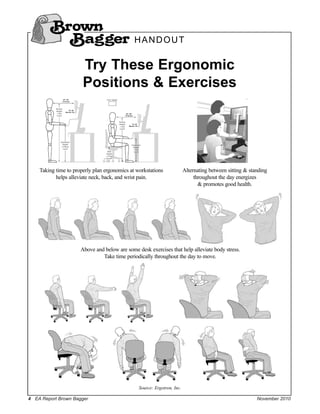
                       Try These Ergonomic
                       Positions & Exercises


    Taking time to properly plan ergonomics at workstations              Alternating between sitting & standing
           helps alleviate neck, back, and wrist pain.                        throughout the day energizes
                                                                                & promotes good health.


                      Above and below are some desk exercises that help alleviate body stress.
                               Take time periodically throughout the day to move.


                                                Source: Ergotron, Inc.

4 EA Report Brown Bagger                                                                                  November 2010

Ergonomics and Workplace Wellness_Brown Bagger_2010

  • 1.
    Brown This section is set up to provide a ready-made Brown Bag Session for you to use with employees and/or managers. Use as Bagger is, or adapt this information for a general employee group. You may reproduce as many copies as needed. Ergonomics Needs to Play Greater Role in Workplace Wellness Programs By Diane M. Kaufman and employee’s physical and mental well-being while Wendy McCubbin holding down costs for healthcare premiums and incentives for underutilized wellness programs. ccording to a 2008 report published by Unfortunately, the same Pricewaterhouse- A Reuters, 57% of employers with 500 or more workers provide some sort of wellness program, such as smoking cessation, exercise plan- Coopers’ study found that, of the 71% of employers offering wellness programs, few said they were effective at lowering costs. In fact, nearly half of employers surveyed said they were ready ning or cancer screening. In addition, 4 out of 5 employers with wellness programs add incentives to push more of the costs of health insurance onto — with 40% offering gym memberships, 36% their employees. awarding gifts or prizes, and 27% offering a dis- Just what can be done to engage employees to counted employee contribution to medical plans. attain greater health and fitness if current wellness Given these statistics, you would think that we’d initiatives aren’t addressing this need? Perhaps the have a nation full of lean, mean, healthy workers costs for wellness programs should be shifted to whose high energy positively contributes to not only where so much of an employee’s time is spent…the their own health — but also the financial well-being workstations and workspaces where they’re sitting. of the companies they work for. The truth of the According to a survey from the Microsoft Small matter is this isn’t the case. In fact, obesity is a sig- Business Center, 9 out of 10 employees say that the nificant concern and one of our nation’s biggest design set-up of their workstation directly affects health crises. their ability to be productive at work. From a scien- Aside from the serious health complications that tific perspective, ergonomically designed work- being overweight presents for employees — the spaces have been proven to improve productivity worse we feel, the less we move, and the more likely and comfort; and minimize common stresses, strains we are to become tired and less productive in the and injuries associated with working at a computer. workplace. It’s easy to see the adverse impacts on That knowledge, combined with employee percep- not only individuals, but on businesses as well. tion, may be compelling to companies not finding If more than half of all large U.S employers the success they are looking for through traditional offer wellness programs and incentives like gym wellness programs. This creates a new reality in memberships and weight-loss assistance, why is our which “ergonomic workspace design” is seen as an nation continuing to fight growing health concerns essential component of an EAP. like obesity? If increased productivity isn’t compelling enough, The fact is, although many employers encourage consider some of the other reasons why adopting health-and-wellness initiatives, the choice to partici- ergonomic workstations makes sense in corporate pate in them is controlled by the employee. In a wellness programs: recent PricewaterhouseCoopers’ Health Research Institute study, less than 40% of those surveyed actu- Alleviating inherent risks to employee ally enrolled in wellness programs. The question is: health: Dr. Alan Hedge, Professor of the Human Why aren’t they? Factors Laboratory at Cornell University, warns that Providing significant Return on Investment (ROI) the risk of musculoskeletal discomfort increases by for a company and its employees through effective using the computer as little as one hour a day. Even wellness assistance programs is a constant challenge worse, the risk of musculoskeletal injury is nine to HR and EA professionals alike. The underlying times greater when you spend four hours a day at the issue is how to manage and contribute to an computer [than it is for a one hour-per-day user] November 2010 EA Report Brown Bagger 1
  • 2.
    Brown Bagger Ergonomics as a Preventative Measure Creating an environment that is ergonomically safe and encourages healthy movement is important. increasing chances of death (Journal of the In fact, the American Industrial Hygiene Association American Heart Association). (AIHA) proposes that, “Ergonomic principles are A new study conducted by Ipsos Public Affairs most effectively applied to workstations and new shows full-time employees of companies with 1,000 designs on a preventive basis, before injuries or ill- or more workers spend an average of 21 hours per nesses occur. Good design with ergonomics provides week seated at a desk, nearly three hours per week the greatest economic benefit for industry.” seated in meetings, and four hours per week seated A stressed body leaves itself open for attack, working at home. leading to computer-related fatigue, pain, stiffness or This means that 70% of one’s time in a typical injury, which then may result in lost time, reduced 40-hour workweek is spent sitting! Moving more focus, depleted morale and other negative effects. throughout the day with access to adjustable However, by giving employees access to the workstations help offset the harmful effects of right ergonomic equipment, tools, and education, sedentary workstyles. companies will empower employees to proactively Costs of absenteeism to employers: The BLS manage the stresses associated with their computing Survey of Occupational Injuries and Illnesses reports workspace. that there were 1.1 million cases requiring days away Research has shown that even the simple act of from work in private industry out of 3.7 million total just standing periodically throughout the day can cases. In addition, the percentage of musculoskeletal dramatically improve health, comfort, and productiv- disorder cases out of total cases (29% in 2008) has ity. One report in fact, suggests that an average not varied greatly since 2005. person can burn an extra 60 calories an hour just by Similarly, the Bureau of Labor Statistics (2007), standing. Yet, the fixed workstations that employees reported that musculoskeletal disorders led to 29% are commonly provided do not facilitate the ability of all workplace injuries, of which more than to stand while working. Moreover, companies are 333,000 cases required an average of nine days away generally not accustomed or equipped — either from work. Ipsos research reveals that a quarter by tools, resources, or knowledge, to properly (24%) of employees report they have sought holistic integrate ergonomics or encourage movement in or professional medical care (such as a doctor, chiro- the workplace. practor, physical therapist, etc.) to alleviate discom- As a result, just how can a company inspire their fort related to their work environment. Providing workers to move more? We suggest reallocating the ergonomic solutions to employees helps companies money typically used for some underutilized well- manage workplace discomfort, improve morale, and ness initiatives — and applying them to the may reduce absenteeism. employee workspace instead. After all, “one size The cost to American business: After review- does not fit all,” and yet that is exactly how most ing the 2008 Liberty Mutual Workplace Safety fixed desktop workstation set-ups are designed. Index, Ergoweb puts the total cost for ergonomics- For some companies, the asset investment and related injuries at $30.9 billion, or 63.6%. The Index upfront costs may be perceived as fiscally unrealis- captures only the direct worker’s compensation costs tic. However, Return on Investment (ROI), when of these disabling injuries. calculated over the long term can show a dramatic When indirect costs are considered (which are and rapid payback. Dee Edington, a highly respected estimated by experts to be anywhere from two to wellness program ROI expert at the University of five times direct costs, Ergoweb puts the true cost to Michigan, claims that wellness programs can run, USA businesses at $61.8 to $154.5 billion. Providing “about $300-$400 per employee if you expect good ergonomic solutions may help reduce the portion of savings and a positive ROI.” However, if the healthcare claims associated with common condi- employees are not taking advantage of the activities tions like back and neck pain according to the 2007 included in wellness programs, they can no longer OE Medicine Journal. be calculated as a “cost” to the company, but instead should be counted as a “loss.” 2 EA Report Brown Bagger November 2010
  • 3.
    Brown This is not the case with a properly designed workspace that utilizes an ergonomically adjustable Bagger workstation. Too often, however, companies inter- ested in creating change in the workspace avoid the two-thirds (67%) of U.S. office workers wish their investment because of perceivable upfront costs. employers offered them desks that could be adjusted Who can blame them when adjustable hydraulic so they could work either seated or standing. Over desks, and “Treadmill desks” average roughly half (about 60%) of employees surveyed were con- $4,000 per person? Even a good ergonomic chair vinced they would be more productive if they had could run $700. the option to work on their feet. Employers must ask However, WorkFit sit-stand workstations by themselves it their wellness program is creating the Ergotron are less expensive — and still offer the type of returns they desire. If not, where could choice of desired movement by the employee. improvements be made? Moreover, there is a psychological as well as a We believe that employers can realize physical benefit to feeling good at work that can ulti- the greatest economic gain if ergonomic mately create a “domino effect”: that is, if employees principles are applied on a preventive basis, are feeling better in their day-to-day work; and if they before injuries or illnesses occurs. Everyone will regain energy and feel more positive, they will be reap the benefits. more inclined to pursue other health options, such as Diane M. Kaufman is senior vice president of global human smoking-cessation programs or gym memberships. resources, and Wendy McCubbin is the marketing manager of global training for Ergotron Inc. in St. Paul, MN. In addition, ergonomics is a choice that employ- ees appear to want. According to the Ipsos research, Energize Your Office Space! Q: Like a lot of people, I have an office job in Never roll your head around your neck, as this could which I sit in front of a computer all day. I know it damage the joints of your neck. isn’t good for me. My muscles get tight, and my 2) Roll your wrists regularly to help prevent posture is sometimes poor. What can I do about it? carpal tunnel, especially if you do a lot of typing. A: First, let’s consider what improvements you 3) If you tend to hunch in front of the keyboard, can make that don’t involve exercise. First, be sure open your arms wide as if you’re going to hug your workstation — including your computer someone, rotate your wrists — thumbs going up monitor, keyboard and chair are designed to work and back, and pull your shoulders back. This is well for you. This is referred to as ergonomics. moving your body in the opposite direction of Second, you may wish to occasionally sit on a being hunched. balance ball while working at your desk. You’ll burn 4) Get up periodically, take a walk, and get some calories stabilizing your core and body on the ball. fresh air. Third, your back should be straight, your shoulders 5) While sitting, lift up your legs on the balls of back, and the top of your monitor level with your your feet, then on to our toes, and set them down. eyes. If you have to look down or up, you need to 6) Rest your eyes. Optometrists recommend the adjust the height of your screen. Fourth, maintain an “20-20-20” rule — for every 20 minutes focusing on ergonomic body posture. Be sure your wrists are your computer screen, spend 20 minutes focusing on slightly lower than your elbows. This will help something else 20 feet away. prevent Carpal Tunnel Syndrome. Keep your legs The bottom line is to sit perfectly still less and bent at the knees so the knees are only slightly move more! higher than your hips. You feet should be flat on the floor. Next, try Source: Tim Lencki, MS, CSCS, a strength and conditioning these exercises: specialist, and author of Fitness One Day at a Time and a new bookette® series for active lifestyles. Visit Tim’s website 1) Stretch your neck; flex your head forward and at www.thefitnesseducator.com. backward, side-to-side, and look right and left. November 2010 EA Report Brown Bagger 3
  • 4.
    Brown Bagger H A N D O U T Try These Ergonomic Positions & Exercises Taking time to properly plan ergonomics at workstations Alternating between sitting & standing helps alleviate neck, back, and wrist pain. throughout the day energizes & promotes good health. Above and below are some desk exercises that help alleviate body stress. Take time periodically throughout the day to move. Source: Ergotron, Inc. 4 EA Report Brown Bagger November 2010