EPRCS Narrative Reporting: The Reporting
Swiss Army Knife
June 26, 2019
Geordan Drummond, Product Manager – Financial Close
AGENDA
>Introductions
>Product Overview
>Narrative Reporting
>Management Reporting
>Disclosure Management
>Application
>Q & A
ABOUT THE SPEAKER
> 20+ years of Oracle/Hyperion Experience
> Customer – Lincoln Financial Group
> Enterprise Administrator
> HFM Administrator
> Vendor – Hyperion / Oracle
> HFM Consultant
> Partner – Alithya
> Consultant (Consolidation, Account Recs, Tax, Reporting)
> Close and Consolidation Product Manager
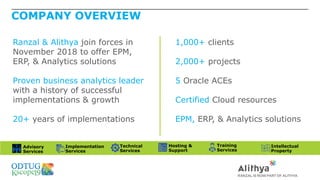
COMPANY OVERVIEW
Ranzal & Alithya join forces in
November 2018 to offer EPM,
ERP, & Analytics solutions
Proven business analytics leader
with a history of successful
implementations & growth
20+ years of implementations
1,000+ clients
2,000+ projects
5 Oracle ACEs
Certified Cloud resources
EPM, ERP, & Analytics solutions
Advisory
Services
Implementation
Services
Technical
Services
Hosting &
Support
Training
Services
Intellectual
Property
AGENDA
>Introductions
>Product Overview
>Narrative Reporting
>Management Reporting
>Disclosure Management
>Application
>Q & A
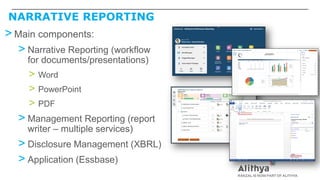
NARRATIVE REPORTING
> Main components:
> Narrative Reporting (workflow
for documents/presentations)
> Word
> PowerPoint
> PDF
> Management Reporting (report
writer – multiple services)
> Disclosure Management (XBRL)
> Application (Essbase)
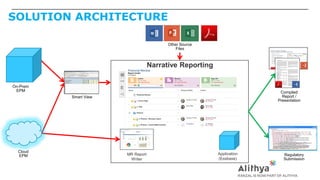
SOLUTION ARCHITECTURE
Narrative Reporting
Other Source
Files
Cloud
EPM
Compiled
Report /
Presentation
Regulatory
Submission
Application
(Essbase)
MR Report
Writer
Smart View
On-Prem
EPM
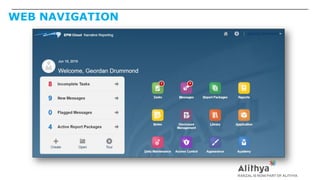
WEB NAVIGATION
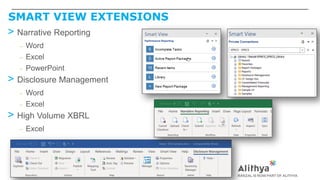
SMART VIEW EXTENSIONS
> Narrative Reporting
– Word
– Excel
– PowerPoint
> Disclosure Management
– Word
– Excel
> High Volume XBRL
– Excel
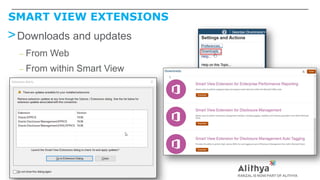
SMART VIEW EXTENSIONS
>Downloads and updates
– From Web
– From within Smart View
AGENDA
>Introductions
>Product Overview
>Narrative Reporting
>Management Reporting
>Disclosure Management
>Application
>Q & A
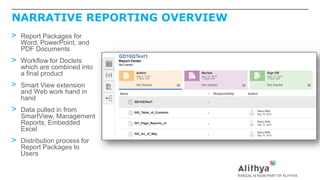
NARRATIVE REPORTING OVERVIEW
> Report Packages for
Word, PowerPoint, and
PDF Documents
> Workflow for Doclets
which are combined into
a final product
> Smart View extension
and Web work hand in
hand
> Data pulled in from
SmartView, Management
Reports, Embedded
Excel
> Distribution process for
Report Packages to
Users
NARRATIVE REPORTING TERMINOLOGY
> Report Package
> Narrative report consisting of Word, Power Point, or PDF
> Doclet
> Discrete portion of a report package for which responsibility is assigned
> Reference Doclet
> Component in a report package (e.g. Excel table or MR report) that is displayed as part of the report package
> Supplemental Doclet
> Additional supporting doclet (e.g. Excel workpaper) that is not displayed in the report output
> Section
> Grouping of Doclets (e.g. “MD&A”, “Footnotes”)
> Variable
> Placeholder for data values that can be substituted
> Check In/Out
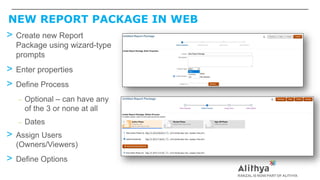
NEW REPORT PACKAGE IN WEB
> Create new Report
Package using wizard-type
prompts
> Enter properties
> Define Process
– Optional – can have any
of the 3 or none at all
– Dates
> Assign Users
(Owners/Viewers)
> Define Options
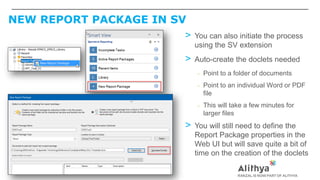
NEW REPORT PACKAGE IN SV
> You can also initiate the process
using the SV extension
> Auto-create the doclets needed
– Point to a folder of documents
– Point to an individual Word or PDF
file
– This will take a few minutes for
larger files
> You will still need to define the
Report Package properties in the
Web UI but will save quite a bit of
time on the creation of the doclets
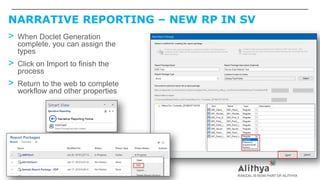
NARRATIVE REPORTING – NEW RP IN SV
> When Doclet Generation
complete, you can assign the
types
> Click on Import to finish the
process
> Return to the web to complete
workflow and other properties
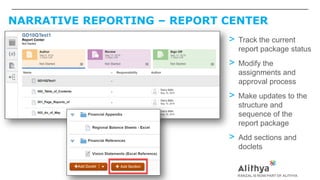
NARRATIVE REPORTING – REPORT CENTER
> Track the current
report package status
> Modify the
assignments and
approval process
> Make updates to the
structure and
sequence of the
report package
> Add sections and
doclets
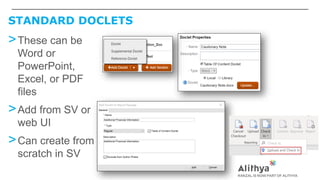
STANDARD DOCLETS
>These can be
Word or
PowerPoint,
Excel, or PDF
files
>Add from SV or
web UI
>Can create from
scratch in SV
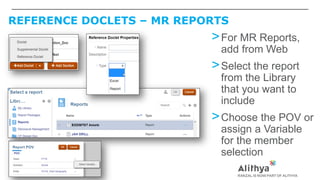
REFERENCE DOCLETS – MR REPORTS
>For MR Reports,
add from Web
>Select the report
from the Library
that you want to
include
>Choose the POV or
assign a Variable
for the member
selection
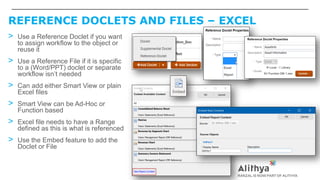
REFERENCE DOCLETS AND FILES – EXCEL
> Use a Reference Doclet if you want
to assign workflow to the object or
reuse it
> Use a Reference File if it is specific
to a (Word/PPT) doclet or separate
workflow isn’t needed
> Can add either Smart View or plain
Excel files
> Smart View can be Ad-Hoc or
Function based
> Excel file needs to have a Range
defined as this is what is referenced
> Use the Embed feature to add the
Doclet or File
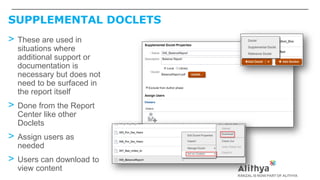
SUPPLEMENTAL DOCLETS
> These are used in
situations where
additional support or
documentation is
necessary but does not
need to be surfaced in
the report itself
> Done from the Report
Center like other
Doclets
> Assign users as
needed
> Users can download to
view content
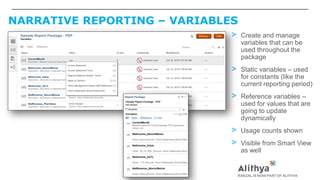
NARRATIVE REPORTING – VARIABLES
> Create and manage
variables that can be
used throughout the
package
> Static variables – used
for constants (like the
current reporting period)
> Reference variables –
used for values that are
going to update
dynamically
> Usage counts shown
> Visible from Smart View
as well
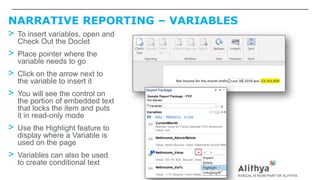
NARRATIVE REPORTING – VARIABLES
> To insert variables, open and
Check Out the Doclet
> Place pointer where the
variable needs to go
> Click on the arrow next to
the variable to insert it
> You will see the control on
the portion of embedded text
that locks the item and puts
it in read-only mode
> Use the Highlight feature to
display where a Variable is
used on the page
> Variables can also be used
to create conditional text
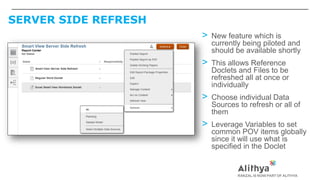
SERVER SIDE REFRESH
> New feature which is
currently being piloted and
should be available shortly
> This allows Reference
Doclets and Files to be
refreshed all at once or
individually
> Choose individual Data
Sources to refresh or all of
them
> Leverage Variables to set
common POV items globally
since it will use what is
specified in the Doclet
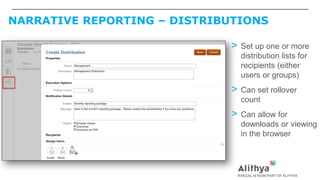
NARRATIVE REPORTING – DISTRIBUTIONS
> Set up one or more
distribution lists for
recipients (either
users or groups)
> Can set rollover
count
> Can allow for
downloads or viewing
in the browser
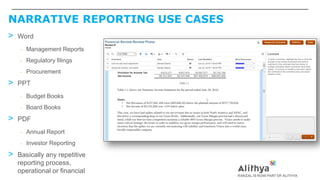
NARRATIVE REPORTING USE CASES
> Word
– Management Reports
– Regulatory filings
– Procurement
> PPT
– Budget Books
– Board Books
> PDF
– Annual Report
– Investor Reporting
> Basically any repetitive
reporting process,
operational or financial
AGENDA
>Introductions
>Product Overview
>Narrative Reporting
>Management Reporting
>Disclosure Management
>Application
>Q & A
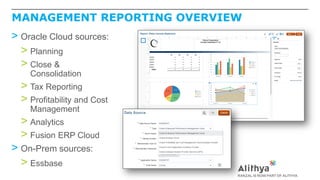
MANAGEMENT REPORTING OVERVIEW
> Oracle Cloud sources:
> Planning
> Close &
Consolidation
> Tax Reporting
> Profitability and Cost
Management
> Analytics
> Fusion ERP Cloud
> On-Prem sources:
> Essbase
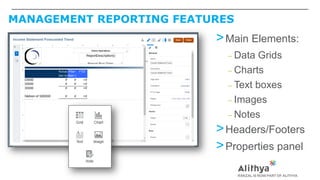
MANAGEMENT REPORTING FEATURES
>Main Elements:
– Data Grids
– Charts
– Text boxes
– Images
– Notes
>Headers/Footers
>Properties panel
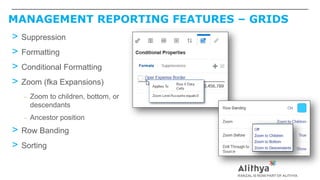
MANAGEMENT REPORTING FEATURES – GRIDS
> Suppression
> Formatting
> Conditional Formatting
> Zoom (fka Expansions)
– Zoom to children, bottom, or
descendants
– Ancestor position
> Row Banding
> Sorting
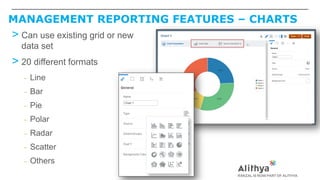
MANAGEMENT REPORTING FEATURES – CHARTS
> Can use existing grid or new
data set
> 20 different formats
– Line
– Bar
– Pie
– Polar
– Radar
– Scatter
– Others
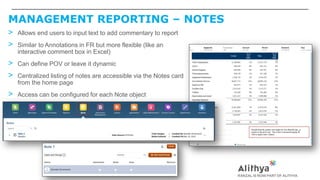
MANAGEMENT REPORTING – NOTES
> Allows end users to input text to add commentary to report
> Similar to Annotations in FR but more flexible (like an
interactive comment box in Excel)
> Can define POV or leave it dynamic
> Centralized listing of notes are accessible via the Notes card
from the home page
> Access can be configured for each Note object
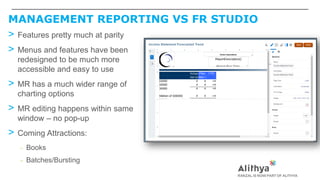
MANAGEMENT REPORTING VS FR STUDIO
> Features pretty much at parity
> Menus and features have been
redesigned to be much more
accessible and easy to use
> MR has a much wider range of
charting options
> MR editing happens within same
window – no pop-up
> Coming Attractions:
– Books
– Batches/Bursting
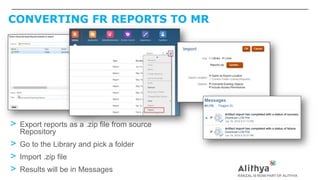
CONVERTING FR REPORTS TO MR
> Export reports as a .zip file from source
Repository
> Go to the Library and pick a folder
> Import .zip file
> Results will be in Messages
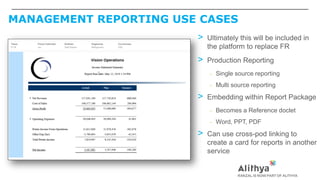
MANAGEMENT REPORTING USE CASES
> Ultimately this will be included in
the platform to replace FR
> Production Reporting
– Single source reporting
– Multi source reporting
> Embedding within Report Package
– Becomes a Reference doclet
– Word, PPT, PDF
> Can use cross-pod linking to
create a card for reports in another
service
AGENDA
>Introductions
>Product Overview
>Narrative Reporting
>Management Reporting
>Disclosure Management
>Application
>Q & A
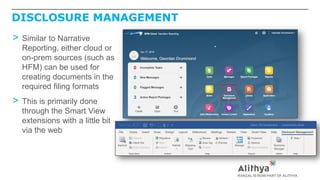
DISCLOSURE MANAGEMENT
> Similar to Narrative
Reporting, either cloud or
on-prem sources (such as
HFM) can be used for
creating documents in the
required filing formats
> This is primarily done
through the Smart View
extensions with a little bit
via the web
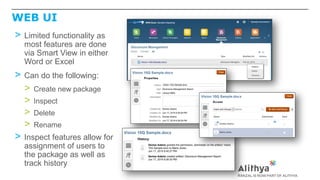
WEB UI
> Limited functionality as
most features are done
via Smart View in either
Word or Excel
> Can do the following:
> Create new package
> Inspect
> Delete
> Rename
> Inspect features allow for
assignment of users to
the package as well as
track history
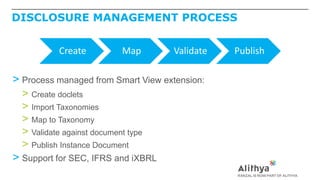
DISCLOSURE MANAGEMENT PROCESS
> Process managed from Smart View extension:
> Create doclets
> Import Taxonomies
> Map to Taxonomy
> Validate against document type
> Publish Instance Document
> Support for SEC, IFRS and iXBRL
Create Map Validate Publish
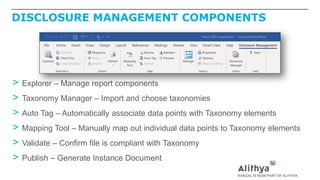
DISCLOSURE MANAGEMENT COMPONENTS
> Explorer – Manage report components
> Taxonomy Manager – Import and choose taxonomies
> Auto Tag – Automatically associate data points with Taxonomy elements
> Mapping Tool – Manually map out individual data points to Taxonomy elements
> Validate – Confirm file is compliant with Taxonomy
> Publish – Generate Instance Document
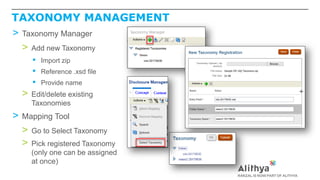
TAXONOMY MANAGEMENT
> Taxonomy Manager
> Add new Taxonomy
▪ Import zip
▪ Reference .xsd file
▪ Provide name
> Edit/delete existing
Taxonomies
> Mapping Tool
> Go to Select Taxonomy
> Pick registered Taxonomy
(only one can be assigned
at once)
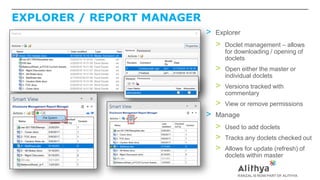
EXPLORER / REPORT MANAGER
> Explorer
> Doclet management – allows
for downloading / opening of
doclets
> Open either the master or
individual doclets
> Versions tracked with
commentary
> View or remove permissions
> Manage
> Used to add doclets
> Tracks any doclets checked out
> Allows for update (refresh) of
doclets within master
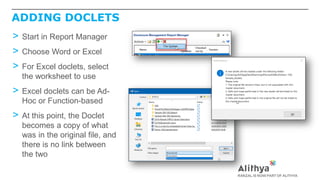
ADDING DOCLETS
> Start in Report Manager
> Choose Word or Excel
> For Excel doclets, select
the worksheet to use
> Excel doclets can be Ad-
Hoc or Function-based
> At this point, the Doclet
becomes a copy of what
was in the original file, and
there is no link between
the two
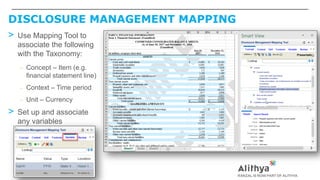
DISCLOSURE MANAGEMENT MAPPING
> Use Mapping Tool to
associate the following
with the Taxonomy:
– Concept – Item (e.g.
financial statement line)
– Context – Time period
– Unit – Currency
> Set up and associate
any variables
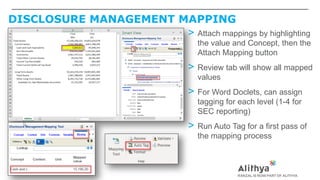
DISCLOSURE MANAGEMENT MAPPING
> Attach mappings by highlighting
the value and Concept, then the
Attach Mapping button
> Review tab will show all mapped
values
> For Word Doclets, can assign
tagging for each level (1-4 for
SEC reporting)
> Run Auto Tag for a first pass of
the mapping process
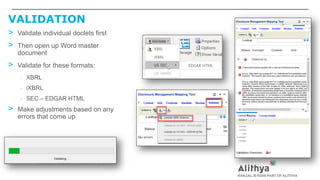
VALIDATION
> Validate individual doclets first
> Then open up Word master
document
> Validate for these formats:
– XBRL
– iXBRL
– SEC – EDGAR HTML
> Make adjustments based on any
errors that come up
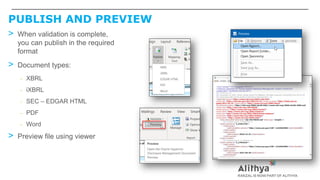
PUBLISH AND PREVIEW
> When validation is complete,
you can publish in the required
format
> Document types:
– XBRL
– iXBRL
– SEC – EDGAR HTML
– PDF
– Word
> Preview file using viewer
AGENDA
>Introductions
>Product Overview
>Narrative Reporting
>Management Reporting
>Disclosure Management
>Application
>Q & A
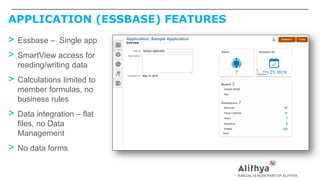
APPLICATION (ESSBASE) FEATURES
> Essbase – Single app
> SmartView access for
reading/writing data
> Calculations limited to
member formulas, no
business rules
> Data integration – flat
files, no Data
Management
> No data forms
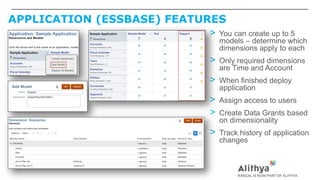
APPLICATION (ESSBASE) FEATURES
> You can create up to 5
models – determine which
dimensions apply to each
> Only required dimensions
are Time and Account
> When finished deploy
application
> Assign access to users
> Create Data Grants based
on dimensionality
> Track history of application
changes
APPLICATION (ESSBASE) FEATURES
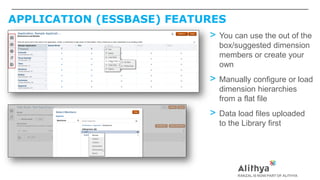
> You can use the out of the
box/suggested dimension
members or create your
own
> Manually configure or load
dimension hierarchies
from a flat file
> Data load files uploaded
to the Library first
APPLICATION (ESSBASE) USE CASES
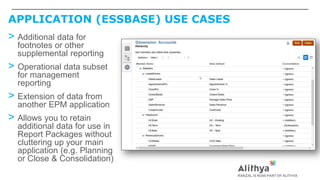
> Additional data for
footnotes or other
supplemental reporting
> Operational data subset
for management
reporting
> Extension of data from
another EPM application
> Allows you to retain
additional data for use in
Report Packages without
cluttering up your main
application (e.g. Planning
or Close & Consolidation)
IMPLEMENTATION CONSIDERATIONS
> How many reports are needed and what are their audiences?
> How many reporting users are there going to be in total?
> Who are the owners of the reports?
> What are all of the data sources?
> Does additional dimensionality need to be added to existing EPM
applications?
> Does the included Application need to be built out and populated?
> Project preparation – perform lower level analysis of each report
Q&A
infosolutions@alithya.com
You can email us
questions:
Read our blog for insight and
find answers to your questions:
ranzal.blog
Visit our website to find the
right solution and learn how we
can help you:
alithya.com/oracle
16 SPEAKER SESSIONS
Visit us at Booth # 113
Monday, 6/24:
• 11:00am – 11:30am (202): Become a RESTful Iron Man with ARC (the Application, Not the Reactor)
• 11:00am - 11:30am (204): Supplemental Data in the Cloud
• 2:15pm - 3:15pm (205): Best Practices for Designing and Building Integrations
• 3:45pm - 4:45pm (611): My Favorite Calc Code
Tuesday, 6/25:
• 8:50am - 9:50am (204): Keys to the Kingdom: Key Concepts to ARCS Application Design
• 10:00am - 11:00am (211): Client Success Story - Oracle FDMEE is the Cloud Data Hub at Legg Mason
• 11:45am - 12:45pm (611): I Can do WHAT with PCMCS? Features and Functions, Business Benefits, and Use Cases
• 2:15pm - 3:15pm (211): EPM Cloud Integration at CareFirst
• 2:15pm - 3:15pm (611): Empowering Users with Analytical MDX
Wednesday, 6/26:
• 10:15am - 11:15am (201): EPRCS: The reporting Swiss Army Knife
• 10:15am - 11:15am (602): Connected Planning Using EPM Cloud at Opus Group
• 11:45am - 12:45pm (211): Case Study: Using EDMCS to Solve Master Data Challenges
• 11:45am - 12:45pm (201): EPM Data Integration Panel
• 11:45am - 12:45pm (6A): Trend-Based Connected Planning at Vitamix
• 3:30pm - 4:30pm (204): A 2020 Vision for EPM Project Management
Thursday, 6/27:
• 9:30am – 11:00am (609): Deep Dive: Financial Close: The Best of Both Worlds - Welcome to the Hybrid Close
CONTACT INFORMATION
Alithya
1025 Westchester Avenue, Suite 108
White Plains, NY 10604
Tel (914) 253-6600
infosolutions@alithya.com
20 West Kinzie Street
Suite 13046
Chicago, IL 60610
200 Harvard Mill Square
Suite 320
Wakefield, MA 01880
Geordan Drummond
Product Manager – Financial Close
215.275.7715
geordan.drummond@alithya.com
EPRCS:  The Reporting Swiss Army Knife

EPRCS: The Reporting Swiss Army Knife

  • 2.
    EPRCS Narrative Reporting:The Reporting Swiss Army Knife June 26, 2019 Geordan Drummond, Product Manager – Financial Close
  • 3.
    AGENDA >Introductions >Product Overview >Narrative Reporting >ManagementReporting >Disclosure Management >Application >Q & A
  • 4.
    ABOUT THE SPEAKER >20+ years of Oracle/Hyperion Experience > Customer – Lincoln Financial Group > Enterprise Administrator > HFM Administrator > Vendor – Hyperion / Oracle > HFM Consultant > Partner – Alithya > Consultant (Consolidation, Account Recs, Tax, Reporting) > Close and Consolidation Product Manager
  • 5.
    COMPANY OVERVIEW Ranzal &Alithya join forces in November 2018 to offer EPM, ERP, & Analytics solutions Proven business analytics leader with a history of successful implementations & growth 20+ years of implementations 1,000+ clients 2,000+ projects 5 Oracle ACEs Certified Cloud resources EPM, ERP, & Analytics solutions Advisory Services Implementation Services Technical Services Hosting & Support Training Services Intellectual Property
  • 6.
    AGENDA >Introductions >Product Overview >Narrative Reporting >ManagementReporting >Disclosure Management >Application >Q & A
  • 7.
    NARRATIVE REPORTING > Maincomponents: > Narrative Reporting (workflow for documents/presentations) > Word > PowerPoint > PDF > Management Reporting (report writer – multiple services) > Disclosure Management (XBRL) > Application (Essbase)
  • 8.
    SOLUTION ARCHITECTURE Narrative Reporting OtherSource Files Cloud EPM Compiled Report / Presentation Regulatory Submission Application (Essbase) MR Report Writer Smart View On-Prem EPM
  • 9.
  • 10.
    SMART VIEW EXTENSIONS >Narrative Reporting – Word – Excel – PowerPoint > Disclosure Management – Word – Excel > High Volume XBRL – Excel
  • 11.
    SMART VIEW EXTENSIONS >Downloadsand updates – From Web – From within Smart View
  • 12.
    AGENDA >Introductions >Product Overview >Narrative Reporting >ManagementReporting >Disclosure Management >Application >Q & A
  • 13.
    NARRATIVE REPORTING OVERVIEW >Report Packages for Word, PowerPoint, and PDF Documents > Workflow for Doclets which are combined into a final product > Smart View extension and Web work hand in hand > Data pulled in from SmartView, Management Reports, Embedded Excel > Distribution process for Report Packages to Users
  • 14.
    NARRATIVE REPORTING TERMINOLOGY >Report Package > Narrative report consisting of Word, Power Point, or PDF > Doclet > Discrete portion of a report package for which responsibility is assigned > Reference Doclet > Component in a report package (e.g. Excel table or MR report) that is displayed as part of the report package > Supplemental Doclet > Additional supporting doclet (e.g. Excel workpaper) that is not displayed in the report output > Section > Grouping of Doclets (e.g. “MD&A”, “Footnotes”) > Variable > Placeholder for data values that can be substituted > Check In/Out
  • 15.
    NEW REPORT PACKAGEIN WEB > Create new Report Package using wizard-type prompts > Enter properties > Define Process – Optional – can have any of the 3 or none at all – Dates > Assign Users (Owners/Viewers) > Define Options
  • 16.
    NEW REPORT PACKAGEIN SV > You can also initiate the process using the SV extension > Auto-create the doclets needed – Point to a folder of documents – Point to an individual Word or PDF file – This will take a few minutes for larger files > You will still need to define the Report Package properties in the Web UI but will save quite a bit of time on the creation of the doclets
  • 17.
    NARRATIVE REPORTING –NEW RP IN SV > When Doclet Generation complete, you can assign the types > Click on Import to finish the process > Return to the web to complete workflow and other properties
  • 18.
    NARRATIVE REPORTING –REPORT CENTER > Track the current report package status > Modify the assignments and approval process > Make updates to the structure and sequence of the report package > Add sections and doclets
  • 19.
    STANDARD DOCLETS >These canbe Word or PowerPoint, Excel, or PDF files >Add from SV or web UI >Can create from scratch in SV
  • 20.
    REFERENCE DOCLETS –MR REPORTS >For MR Reports, add from Web >Select the report from the Library that you want to include >Choose the POV or assign a Variable for the member selection
  • 21.
    REFERENCE DOCLETS ANDFILES – EXCEL > Use a Reference Doclet if you want to assign workflow to the object or reuse it > Use a Reference File if it is specific to a (Word/PPT) doclet or separate workflow isn’t needed > Can add either Smart View or plain Excel files > Smart View can be Ad-Hoc or Function based > Excel file needs to have a Range defined as this is what is referenced > Use the Embed feature to add the Doclet or File
  • 22.
    SUPPLEMENTAL DOCLETS > Theseare used in situations where additional support or documentation is necessary but does not need to be surfaced in the report itself > Done from the Report Center like other Doclets > Assign users as needed > Users can download to view content
  • 23.
    NARRATIVE REPORTING –VARIABLES > Create and manage variables that can be used throughout the package > Static variables – used for constants (like the current reporting period) > Reference variables – used for values that are going to update dynamically > Usage counts shown > Visible from Smart View as well
  • 24.
    NARRATIVE REPORTING –VARIABLES > To insert variables, open and Check Out the Doclet > Place pointer where the variable needs to go > Click on the arrow next to the variable to insert it > You will see the control on the portion of embedded text that locks the item and puts it in read-only mode > Use the Highlight feature to display where a Variable is used on the page > Variables can also be used to create conditional text
  • 25.
    SERVER SIDE REFRESH >New feature which is currently being piloted and should be available shortly > This allows Reference Doclets and Files to be refreshed all at once or individually > Choose individual Data Sources to refresh or all of them > Leverage Variables to set common POV items globally since it will use what is specified in the Doclet
  • 26.
    NARRATIVE REPORTING –DISTRIBUTIONS > Set up one or more distribution lists for recipients (either users or groups) > Can set rollover count > Can allow for downloads or viewing in the browser
  • 27.
    NARRATIVE REPORTING USECASES > Word – Management Reports – Regulatory filings – Procurement > PPT – Budget Books – Board Books > PDF – Annual Report – Investor Reporting > Basically any repetitive reporting process, operational or financial
  • 28.
    AGENDA >Introductions >Product Overview >Narrative Reporting >ManagementReporting >Disclosure Management >Application >Q & A
  • 29.
    MANAGEMENT REPORTING OVERVIEW >Oracle Cloud sources: > Planning > Close & Consolidation > Tax Reporting > Profitability and Cost Management > Analytics > Fusion ERP Cloud > On-Prem sources: > Essbase
  • 30.
    MANAGEMENT REPORTING FEATURES >MainElements: – Data Grids – Charts – Text boxes – Images – Notes >Headers/Footers >Properties panel
  • 31.
    MANAGEMENT REPORTING FEATURES– GRIDS > Suppression > Formatting > Conditional Formatting > Zoom (fka Expansions) – Zoom to children, bottom, or descendants – Ancestor position > Row Banding > Sorting
  • 32.
    MANAGEMENT REPORTING FEATURES– CHARTS > Can use existing grid or new data set > 20 different formats – Line – Bar – Pie – Polar – Radar – Scatter – Others
  • 33.
    MANAGEMENT REPORTING –NOTES > Allows end users to input text to add commentary to report > Similar to Annotations in FR but more flexible (like an interactive comment box in Excel) > Can define POV or leave it dynamic > Centralized listing of notes are accessible via the Notes card from the home page > Access can be configured for each Note object
  • 34.
    MANAGEMENT REPORTING VSFR STUDIO > Features pretty much at parity > Menus and features have been redesigned to be much more accessible and easy to use > MR has a much wider range of charting options > MR editing happens within same window – no pop-up > Coming Attractions: – Books – Batches/Bursting
  • 35.
    CONVERTING FR REPORTSTO MR > Export reports as a .zip file from source Repository > Go to the Library and pick a folder > Import .zip file > Results will be in Messages
  • 36.
    MANAGEMENT REPORTING USECASES > Ultimately this will be included in the platform to replace FR > Production Reporting – Single source reporting – Multi source reporting > Embedding within Report Package – Becomes a Reference doclet – Word, PPT, PDF > Can use cross-pod linking to create a card for reports in another service
  • 37.
    AGENDA >Introductions >Product Overview >Narrative Reporting >ManagementReporting >Disclosure Management >Application >Q & A
  • 38.
    DISCLOSURE MANAGEMENT > Similarto Narrative Reporting, either cloud or on-prem sources (such as HFM) can be used for creating documents in the required filing formats > This is primarily done through the Smart View extensions with a little bit via the web
  • 39.
    WEB UI > Limitedfunctionality as most features are done via Smart View in either Word or Excel > Can do the following: > Create new package > Inspect > Delete > Rename > Inspect features allow for assignment of users to the package as well as track history
  • 40.
    DISCLOSURE MANAGEMENT PROCESS >Process managed from Smart View extension: > Create doclets > Import Taxonomies > Map to Taxonomy > Validate against document type > Publish Instance Document > Support for SEC, IFRS and iXBRL Create Map Validate Publish
  • 41.
    DISCLOSURE MANAGEMENT COMPONENTS >Explorer – Manage report components > Taxonomy Manager – Import and choose taxonomies > Auto Tag – Automatically associate data points with Taxonomy elements > Mapping Tool – Manually map out individual data points to Taxonomy elements > Validate – Confirm file is compliant with Taxonomy > Publish – Generate Instance Document
  • 42.
    TAXONOMY MANAGEMENT > TaxonomyManager > Add new Taxonomy ▪ Import zip ▪ Reference .xsd file ▪ Provide name > Edit/delete existing Taxonomies > Mapping Tool > Go to Select Taxonomy > Pick registered Taxonomy (only one can be assigned at once)
  • 43.
    EXPLORER / REPORTMANAGER > Explorer > Doclet management – allows for downloading / opening of doclets > Open either the master or individual doclets > Versions tracked with commentary > View or remove permissions > Manage > Used to add doclets > Tracks any doclets checked out > Allows for update (refresh) of doclets within master
  • 44.
    ADDING DOCLETS > Startin Report Manager > Choose Word or Excel > For Excel doclets, select the worksheet to use > Excel doclets can be Ad- Hoc or Function-based > At this point, the Doclet becomes a copy of what was in the original file, and there is no link between the two
  • 45.
    DISCLOSURE MANAGEMENT MAPPING >Use Mapping Tool to associate the following with the Taxonomy: – Concept – Item (e.g. financial statement line) – Context – Time period – Unit – Currency > Set up and associate any variables
  • 46.
    DISCLOSURE MANAGEMENT MAPPING >Attach mappings by highlighting the value and Concept, then the Attach Mapping button > Review tab will show all mapped values > For Word Doclets, can assign tagging for each level (1-4 for SEC reporting) > Run Auto Tag for a first pass of the mapping process
  • 47.
    VALIDATION > Validate individualdoclets first > Then open up Word master document > Validate for these formats: – XBRL – iXBRL – SEC – EDGAR HTML > Make adjustments based on any errors that come up
  • 48.
    PUBLISH AND PREVIEW >When validation is complete, you can publish in the required format > Document types: – XBRL – iXBRL – SEC – EDGAR HTML – PDF – Word > Preview file using viewer
  • 49.
    AGENDA >Introductions >Product Overview >Narrative Reporting >ManagementReporting >Disclosure Management >Application >Q & A
  • 50.
    APPLICATION (ESSBASE) FEATURES >Essbase – Single app > SmartView access for reading/writing data > Calculations limited to member formulas, no business rules > Data integration – flat files, no Data Management > No data forms
  • 51.
    APPLICATION (ESSBASE) FEATURES >You can create up to 5 models – determine which dimensions apply to each > Only required dimensions are Time and Account > When finished deploy application > Assign access to users > Create Data Grants based on dimensionality > Track history of application changes
  • 52.
    APPLICATION (ESSBASE) FEATURES >You can use the out of the box/suggested dimension members or create your own > Manually configure or load dimension hierarchies from a flat file > Data load files uploaded to the Library first
  • 53.
    APPLICATION (ESSBASE) USECASES > Additional data for footnotes or other supplemental reporting > Operational data subset for management reporting > Extension of data from another EPM application > Allows you to retain additional data for use in Report Packages without cluttering up your main application (e.g. Planning or Close & Consolidation)
  • 54.
    IMPLEMENTATION CONSIDERATIONS > Howmany reports are needed and what are their audiences? > How many reporting users are there going to be in total? > Who are the owners of the reports? > What are all of the data sources? > Does additional dimensionality need to be added to existing EPM applications? > Does the included Application need to be built out and populated? > Project preparation – perform lower level analysis of each report
  • 55.
    Q&A infosolutions@alithya.com You can emailus questions: Read our blog for insight and find answers to your questions: ranzal.blog Visit our website to find the right solution and learn how we can help you: alithya.com/oracle
  • 56.
    16 SPEAKER SESSIONS Visitus at Booth # 113 Monday, 6/24: • 11:00am – 11:30am (202): Become a RESTful Iron Man with ARC (the Application, Not the Reactor) • 11:00am - 11:30am (204): Supplemental Data in the Cloud • 2:15pm - 3:15pm (205): Best Practices for Designing and Building Integrations • 3:45pm - 4:45pm (611): My Favorite Calc Code Tuesday, 6/25: • 8:50am - 9:50am (204): Keys to the Kingdom: Key Concepts to ARCS Application Design • 10:00am - 11:00am (211): Client Success Story - Oracle FDMEE is the Cloud Data Hub at Legg Mason • 11:45am - 12:45pm (611): I Can do WHAT with PCMCS? Features and Functions, Business Benefits, and Use Cases • 2:15pm - 3:15pm (211): EPM Cloud Integration at CareFirst • 2:15pm - 3:15pm (611): Empowering Users with Analytical MDX Wednesday, 6/26: • 10:15am - 11:15am (201): EPRCS: The reporting Swiss Army Knife • 10:15am - 11:15am (602): Connected Planning Using EPM Cloud at Opus Group • 11:45am - 12:45pm (211): Case Study: Using EDMCS to Solve Master Data Challenges • 11:45am - 12:45pm (201): EPM Data Integration Panel • 11:45am - 12:45pm (6A): Trend-Based Connected Planning at Vitamix • 3:30pm - 4:30pm (204): A 2020 Vision for EPM Project Management Thursday, 6/27: • 9:30am – 11:00am (609): Deep Dive: Financial Close: The Best of Both Worlds - Welcome to the Hybrid Close
  • 57.
    CONTACT INFORMATION Alithya 1025 WestchesterAvenue, Suite 108 White Plains, NY 10604 Tel (914) 253-6600 infosolutions@alithya.com 20 West Kinzie Street Suite 13046 Chicago, IL 60610 200 Harvard Mill Square Suite 320 Wakefield, MA 01880 Geordan Drummond Product Manager – Financial Close 215.275.7715 geordan.drummond@alithya.com