




Path to Code
Begin Your Salesforce Coding Adventure
Episode 16
Introduction to Lightning Web Components
• Enterprise Solutions Architect
• Global Community Speaker
Jigar Shah
@jigarshah189
Agenda
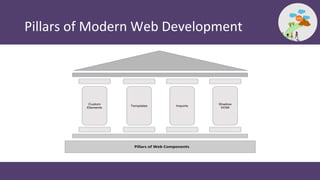
• Pillars of Modern Web Development
• Why LWC?
• Dev Tools for LWC development
• Anatomy of a LWC
• LWC Lifecycle
• LWC Decorators
• Q&A
Some Housekeeping Rules…
• Mute your mic
• Keep adding questions in Zoom Q&A Window
• No questions are silly!
• Questions will be answered in the last 15 mins of this session
Pillars of Modern Web Development
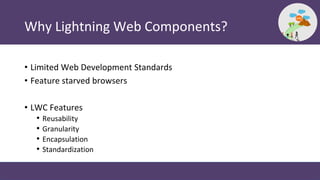
Why Lightning Web Components?
• Limited Web Development Standards
• Feature starved browsers
• LWC Features
• Reusability
• Granularity
• Encapsulation
• Standardization
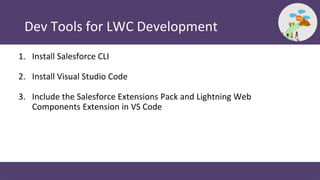
Dev Tools for LWC Development
1. Install Salesforce CLI
2. Install Visual Studio Code
3. Include the Salesforce Extensions Pack and Lightning Web
Components Extension in VS Code
Demo 1
Creating a Lighting Web Component
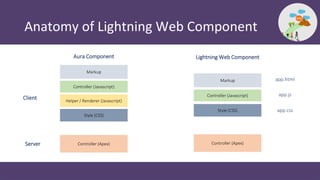
Anatomy of Lightning Web Component
Markup
Controller (Javascript)
Helper / Renderer (Javascript)
Controller (Apex) Controller (Apex)
Style (CSS)
Markup
Controller (Javascript)
Style (CSS)
Aura Component Lightning Web Component
Client
Server
app.html
app.css
app.js
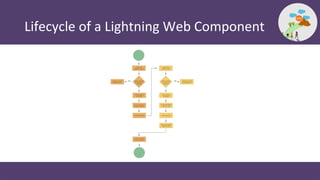
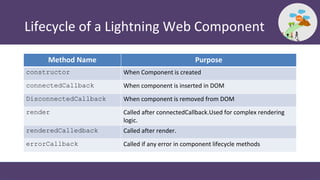
Lifecycle of a Lightning Web Component
Method Name Purpose
constructor When Component is created
connectedCallback When component is inserted in DOM
DisconnectedCallback When component is removed from DOM
render Called after connectedCallback.Used for complex rendering
logic.
renderedCalledback Called after render.
errorCallback Called if any error in component lifecycle methods
Understanding Decorators
• @api
• @track
• @wired
Demo 2
Building a Hello World Lightning Component
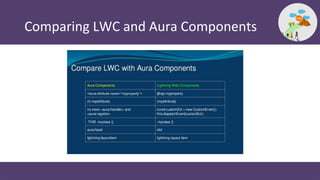
Comparing LWC and Aura Components
Resources
 Lightning Web Components Dev Guide
 Sample Gallery
 Lightning Web Component Recipe
 Lightning Web Component Playground
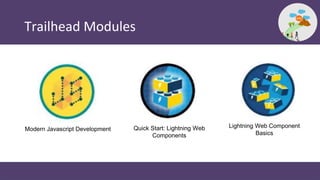
Trailhead Modules
Modern Javascript Development Quick Start: Lightning Web
Components
Lightning Web Component
Basics
Q & A
Thank You
Subscribe

Episode 16 - Introduction to LWC

  • 1.
    Path to Code BeginYour Salesforce Coding Adventure
  • 2.
    Episode 16 Introduction toLightning Web Components
  • 3.
    • Enterprise SolutionsArchitect • Global Community Speaker Jigar Shah @jigarshah189
  • 4.
    Agenda • Pillars ofModern Web Development • Why LWC? • Dev Tools for LWC development • Anatomy of a LWC • LWC Lifecycle • LWC Decorators • Q&A
  • 5.
    Some Housekeeping Rules… •Mute your mic • Keep adding questions in Zoom Q&A Window • No questions are silly! • Questions will be answered in the last 15 mins of this session
  • 6.
    Pillars of ModernWeb Development
  • 7.
    Why Lightning WebComponents? • Limited Web Development Standards • Feature starved browsers • LWC Features • Reusability • Granularity • Encapsulation • Standardization
  • 8.
    Dev Tools forLWC Development 1. Install Salesforce CLI 2. Install Visual Studio Code 3. Include the Salesforce Extensions Pack and Lightning Web Components Extension in VS Code
  • 9.
    Demo 1 Creating aLighting Web Component
  • 10.
    Anatomy of LightningWeb Component Markup Controller (Javascript) Helper / Renderer (Javascript) Controller (Apex) Controller (Apex) Style (CSS) Markup Controller (Javascript) Style (CSS) Aura Component Lightning Web Component Client Server app.html app.css app.js
  • 11.
    Lifecycle of aLightning Web Component
  • 12.
    Lifecycle of aLightning Web Component Method Name Purpose constructor When Component is created connectedCallback When component is inserted in DOM DisconnectedCallback When component is removed from DOM render Called after connectedCallback.Used for complex rendering logic. renderedCalledback Called after render. errorCallback Called if any error in component lifecycle methods
  • 13.
  • 14.
    Demo 2 Building aHello World Lightning Component
  • 15.
    Comparing LWC andAura Components
  • 16.
    Resources  Lightning WebComponents Dev Guide  Sample Gallery  Lightning Web Component Recipe  Lightning Web Component Playground
  • 17.
    Trailhead Modules Modern JavascriptDevelopment Quick Start: Lightning Web Components Lightning Web Component Basics
  • 18.
  • 19.
  • 20.