ENS/OCN-3911
Library Assignment: Citations
MARCH 22, 2023
The Assignment
1. Locate any peer-reviewed article from any journal in your field.
a. This will be your “primary article”.
2. Indicate whether each article in the bibliography of your primary article comes from a peer-
reviewed (PR) or non-peer reviewed (NPR) source.
3. Locate copies of 4 of the articles listed in the bibliography of your primary article
4. Submit:
a. Title page for your primary article.
b. Annotated Bibliography/References from your primary article.
c. Title pages for your 4 secondary articles.
Before we go any further…
Please take note of this website:
https://libguides.lib.fit.edu/OCN-ENS3911
(It contains all of the information and resources that I’m presenting
today)
Options for finding your “primary” article
Choosing between search options
• OneSearch (the “Google-like” search box on the library homepage)
• Very broad search.
• Initially pulls up books, journal articles, newpaper articles, maps, etc.
• Journals
• Very narrow search.
• Only pulls up results from a single journal title at a time.
• Databases
• The “Goldilocks” solution (for this assignment).
• Focused on journals but allows you to simultaneously search many journal titles.
Which database? Check a Reference Guide.
• The library has over 150 choices of databases.
• Which is the right one for you?
• On the library homepage, click on “Research Guides”
• Make sure you are on the “BY SUBJECT” tab (near the top of the page).
• From the subjects listed, select “Ocean Engineering and Marine Sciences”, followed by
“Ocean Engineering & Marine Sciences”.
• On the left side of the page, select the “Articles & Databases” tab.
• Refer to the “Key Databases for Ocean Engineering & Marine Sciences” box.
• Lists, describes, and provides links to databases best suited to this assignment.
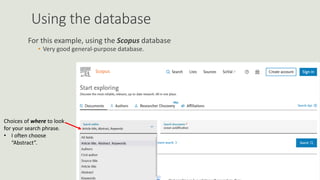
Using the database
For this example, using the Scopus database
• Very good general-purpose database.
Choices of where to look
for your search phrase.
• I often choose
“Abstract”.
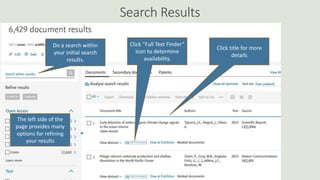
Search Results
Click title for more
details
Click “Full Text Finder”
icon to determine
availability.
Do a search within
your initial search
results.
The left side of the
page provides many
options for refining
your results
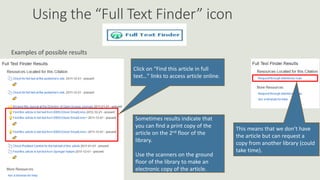
Using the “Full Text Finder” icon
Examples of possible results
Click on “Find this article in full
text…” links to access article online.
Sometimes results indicate that
you can find a print copy of the
article on the 2nd floor of the
library.
Use the scanners on the ground
floor of the library to make an
electronic copy of the article.
This means that we don’t have
the article but can request a
copy from another library (could
take time).
So…is this a peer-reviewed article?
Look for things that are characteristic of peer-reviewed papers
1. Title (tends to be detailed and often technical)
2. Authors (including their credentials and affiliations, possibly contact information)
3. Timeline for review of article
4. Certain standard sections, such as:
◦ Abstract
◦ Introduction
◦ Conclusion
◦ References
5. Additional sections may discuss literature reviews, experimental methods, analytical
methods, and results.
6. Charts, graphs, equations and relevant images
7. Bottom margins of pages indicate journal name and issue
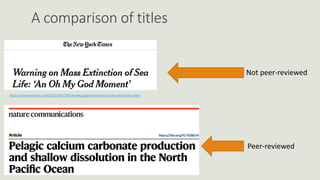
A comparison of titles
https://www.nytimes.com/2022/04/28/climate/global-warming-ocean-extinctions.html
Not peer-reviewed
Peer-reviewed
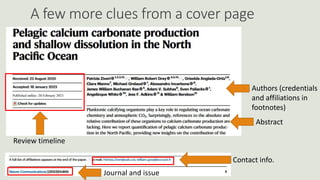
A few more clues from a cover page
Review timeline
Authors (credentials
and affiliations in
footnotes)
Abstract
Contact info.
Journal and issue
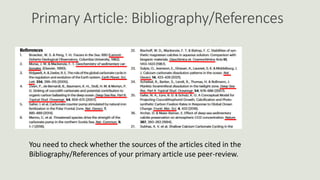
Primary Article: Bibliography/References
You need to check whether the sources of the articles cited in the
Bibliography/References of your primary article use peer-review.
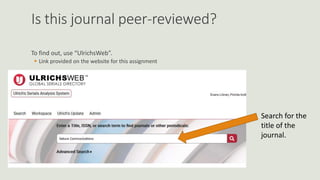
Is this journal peer-reviewed?
To find out, use “UlrichsWeb”.
 Link provided on the website for this assignment
Search for the
title of the
journal.
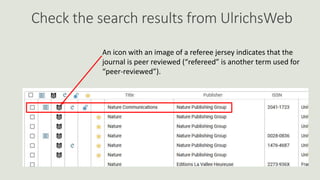
Check the search results from UlrichsWeb
An icon with an image of a referee jersey indicates that the
journal is peer reviewed (“refereed” is another term used for
“peer-reviewed”).
I’m unsure of the title of the journal.
The references say that the journal is “Quat. Sci. Rev.”.
What is that?
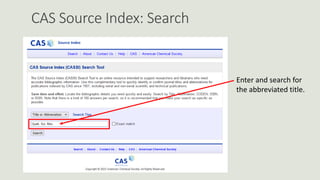
To find out, use “CAS Source Index”.
• Link provided on the website for this assignment.
CAS Source Index: Search
Enter and search for
the abbreviated title.
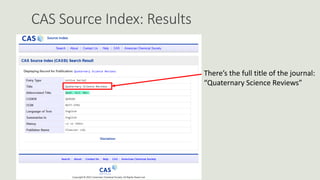
CAS Source Index: Results
There’s the full title of the journal:
“Quaternary Science Reviews”
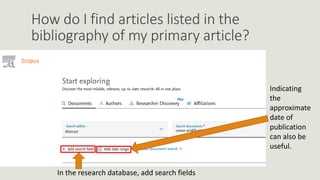
How do I find articles listed in the
bibliography of my primary article?
In the research database, add search fields
Indicating
the
approximate
date of
publication
can also be
useful.
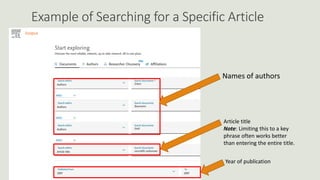
Example of Searching for a Specific Article
Names of authors
Article title
Note: Limiting this to a key
phrase often works better
than entering the entire title.
Year of publication
Questions?
Rob Sippel
Evans Library, Room No. 408
rsippel@fit.edu
321-674-7585

ENS-OCN 3911.pptx

  • 1.
  • 2.
    The Assignment 1. Locateany peer-reviewed article from any journal in your field. a. This will be your “primary article”. 2. Indicate whether each article in the bibliography of your primary article comes from a peer- reviewed (PR) or non-peer reviewed (NPR) source. 3. Locate copies of 4 of the articles listed in the bibliography of your primary article 4. Submit: a. Title page for your primary article. b. Annotated Bibliography/References from your primary article. c. Title pages for your 4 secondary articles.
  • 3.
    Before we goany further… Please take note of this website: https://libguides.lib.fit.edu/OCN-ENS3911 (It contains all of the information and resources that I’m presenting today)
  • 4.
    Options for findingyour “primary” article
  • 5.
    Choosing between searchoptions • OneSearch (the “Google-like” search box on the library homepage) • Very broad search. • Initially pulls up books, journal articles, newpaper articles, maps, etc. • Journals • Very narrow search. • Only pulls up results from a single journal title at a time. • Databases • The “Goldilocks” solution (for this assignment). • Focused on journals but allows you to simultaneously search many journal titles.
  • 6.
    Which database? Checka Reference Guide. • The library has over 150 choices of databases. • Which is the right one for you? • On the library homepage, click on “Research Guides” • Make sure you are on the “BY SUBJECT” tab (near the top of the page). • From the subjects listed, select “Ocean Engineering and Marine Sciences”, followed by “Ocean Engineering & Marine Sciences”. • On the left side of the page, select the “Articles & Databases” tab. • Refer to the “Key Databases for Ocean Engineering & Marine Sciences” box. • Lists, describes, and provides links to databases best suited to this assignment.
  • 7.
    Using the database Forthis example, using the Scopus database • Very good general-purpose database. Choices of where to look for your search phrase. • I often choose “Abstract”.
  • 8.
    Search Results Click titlefor more details Click “Full Text Finder” icon to determine availability. Do a search within your initial search results. The left side of the page provides many options for refining your results
  • 9.
    Using the “FullText Finder” icon Examples of possible results Click on “Find this article in full text…” links to access article online. Sometimes results indicate that you can find a print copy of the article on the 2nd floor of the library. Use the scanners on the ground floor of the library to make an electronic copy of the article. This means that we don’t have the article but can request a copy from another library (could take time).
  • 10.
    So…is this apeer-reviewed article? Look for things that are characteristic of peer-reviewed papers 1. Title (tends to be detailed and often technical) 2. Authors (including their credentials and affiliations, possibly contact information) 3. Timeline for review of article 4. Certain standard sections, such as: ◦ Abstract ◦ Introduction ◦ Conclusion ◦ References 5. Additional sections may discuss literature reviews, experimental methods, analytical methods, and results. 6. Charts, graphs, equations and relevant images 7. Bottom margins of pages indicate journal name and issue
  • 11.
    A comparison oftitles https://www.nytimes.com/2022/04/28/climate/global-warming-ocean-extinctions.html Not peer-reviewed Peer-reviewed
  • 12.
    A few moreclues from a cover page Review timeline Authors (credentials and affiliations in footnotes) Abstract Contact info. Journal and issue
  • 13.
    Primary Article: Bibliography/References Youneed to check whether the sources of the articles cited in the Bibliography/References of your primary article use peer-review.
  • 14.
    Is this journalpeer-reviewed? To find out, use “UlrichsWeb”.  Link provided on the website for this assignment Search for the title of the journal.
  • 15.
    Check the searchresults from UlrichsWeb An icon with an image of a referee jersey indicates that the journal is peer reviewed (“refereed” is another term used for “peer-reviewed”).
  • 16.
    I’m unsure ofthe title of the journal. The references say that the journal is “Quat. Sci. Rev.”. What is that? To find out, use “CAS Source Index”. • Link provided on the website for this assignment.
  • 17.
    CAS Source Index:Search Enter and search for the abbreviated title.
  • 18.
    CAS Source Index:Results There’s the full title of the journal: “Quaternary Science Reviews”
  • 19.
    How do Ifind articles listed in the bibliography of my primary article? In the research database, add search fields Indicating the approximate date of publication can also be useful.
  • 20.
    Example of Searchingfor a Specific Article Names of authors Article title Note: Limiting this to a key phrase often works better than entering the entire title. Year of publication
  • 21.
    Questions? Rob Sippel Evans Library,Room No. 408 rsippel@fit.edu 321-674-7585