May-30-2019
Enhancing the Default MongoDB Security
{"name": "Igor Donchovski",
"live_in": "Skopje",
"email": "donchovski@pythian.com",
"current_role": "Lead database consultant",
"education": [{"type": "College", "name": "FEIT", "graduated": "2008", "university": "UKIM"},
{"type": "Master", "name": "FINKI", "graduated": "2013", "university": "UKIM"}],
"work": [{"role": "Web developer", "start": "2007", "end": "2012", "company": "Gord Systems"},
{"role": "DBA", "start": "2012", "end": "2014", "company": "NOVP"},
{"role": "Database consultant", "start": "2014", "end": "2016", "company": "Pythian"},
{"role": "Lead database consultant", "start": "2016", "company": "Pythian"}],
"certificates": [{"name": "C100DBA", "year": "2016", "description": "MongoDB certified DBA"}],
"social": [{"network": "LinkedIn", "url": "https://mk.linkedin.com/in/igorle"},
{"network": "Twitter", "url": "https://twitter.com/igorle"}],
"interests": ["Hiking", "Biking", "Traveling"],
"hobbies": ["Painting", "Photography", "Cooking"],
"proud_of": ["Volunteering", "Helping the Community"]}
About Me
© 2019 Pythian. Confidential
Overview
• Default security
• Access control
• Authentication and Authorization
• Network hardening
• Encryption in Transit
• Encryption at REST
• Auditing
• QA
© 2019 Pythian. Confidential
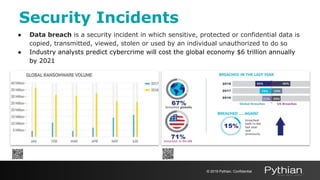
Security Incidents
● Data breach is a security incident in which sensitive, protected or confidential data is
copied, transmitted, viewed, stolen or used by an individual unauthorized to do so
● Industry analysts predict cybercrime will cost the global economy $6 trillion annually
by 2021
© 2019 Pythian. Confidential
Defaults
• sudo yum install -y mongodb-org
• sudo apt-get install -y mongodb-org
• sudo zypper -n install mongodb-org
sudo service mongod start
• sudo tar -zxvf mongodb-linux-*-4.0.9.tgz
sudo mongod --dbpath /data/db --logpath /log/mongod.log
• mongo (shell to interact with the database)
> use test
> db.foo.find()
Default Security
© 2019 Pythian. Confidential
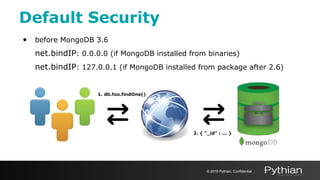
• before MongoDB 3.6
net.bindIP: 0.0.0.0 (if MongoDB installed from binaries)
net.bindIP: 127.0.0.1 (if MongoDB installed from package after 2.6)
Default Security
© 2019 Pythian. Confidential
1. db.foo.findOne()
2. { "_id" : ... }
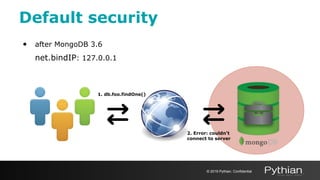
• after MongoDB 3.6
net.bindIP: 127.0.0.1
Default security
© 2019 Pythian. Confidential
1. db.foo.findOne()
2. Error: couldn't
connect to server
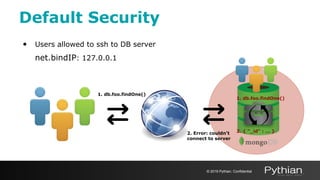
• Users allowed to ssh to DB server
net.bindIP: 127.0.0.1
Default Security
© 2019 Pythian. Confidential
1. db.foo.findOne()
2. { "_id" : ... }
1. db.foo.findOne()
2. Error: couldn't
connect to server
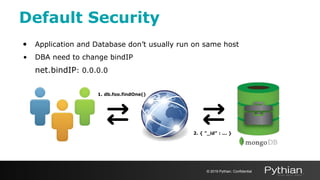
• Application and Database don’t usually run on same host
• DBA need to change bindIP
net.bindIP: 0.0.0.0
Default Security
© 2019 Pythian. Confidential
1. db.foo.findOne()
2. { "_id" : ... }
© 2019 Pythian. Confidential
Access Control
• security:authorization: enabled
use admin
db.createUser(
{
user: "UserAdmin",
pwd: "123456",
roles: [ { role: "userAdminAnyDatabase", db: "admin" }, "readWriteAnyDatabase" ]
}
)
Access Control
© 2019 Pythian. Confidential
2. Who are you?
1. db.foo.findOne()
mongo --port 27017 -u "UserAdmin" --authenticationDatabase "admin" -p
db.createUser(
{
user: "tester",
pwd: "qwerty",
roles: [ { role: "readWrite", db: "test" },
{ role: "read", db: "reporting" } ]
}
)
Access Control
© 2019 Pythian. Confidential
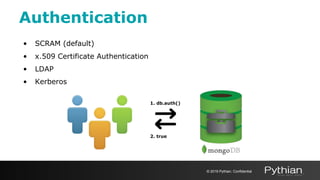
2. true
1. db.auth()
• SCRAM (default)
• x.509 Certificate Authentication
• LDAP
• Kerberos
Authentication
© 2019 Pythian. Confidential
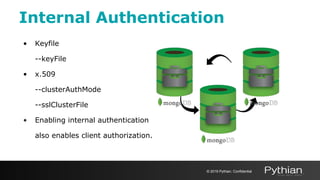
2. true
1. db.auth()
• Keyfile
--keyFile
• x.509
--clusterAuthMode
--sslClusterFile
• Enabling internal authentication
also enables client authorization.
Internal Authentication
© 2019 Pythian. Confidential
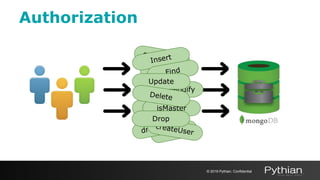
createUser
Drop
Drop
Drop
findAndModify
dropUser
isMaster
createUser
Insert
Find
Authorization
© 2019 Pythian. Confidential
Update
Delete
Drop
Drop
createUser
createUser
isMaster
Insert
Find
createUser
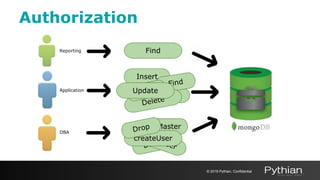
Find
Authorization
© 2019 Pythian. Confidential
Delete
Drop
DropUpdate
Reporting
Application
DBA
Authorization
● Role Based Access Control
○ Role - grants privileges to perform the specified actions on resource
○ Resource - database, collection, set of collections, or the cluster
○ Privilege - consists of a specified resource and the actions permitted
on the resource
○ Action specifies the operation allowed on the resource
● Built-In roles and User-Defined roles
● Limit data access with custom views
© 2019 Pythian. Confidential
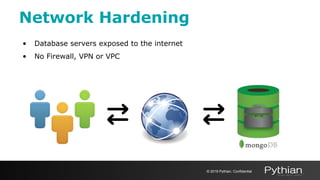
• Database servers exposed to the internet
• No Firewall, VPN or VPC
Network Hardening
© 2019 Pythian. Confidential
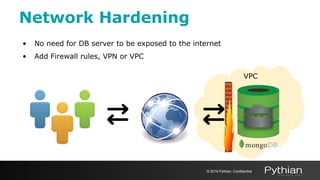
• No need for DB server to be exposed to the internet
• Add Firewall rules, VPN or VPC
Network Hardening
© 2019 Pythian. Confidential
VPC
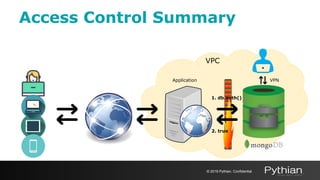
Access Control Summary
© 2019 Pythian. Confidential
VPC
VPNApplication
2. true
1. db.auth()
© 2019 Pythian. Confidential
Encryption
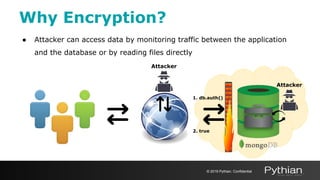
● Attacker can access data by monitoring traffic between the application
and the database or by reading files directly
Why Encryption?
Attacker
© 2019 Pythian. Confidential
2. true
1. db.auth()
Attacker
● Protect Personally Identifiable Information (PII)
○ PCI DSS for managing cardholder information
○ HIPAA standards for managing healthcare information
○ GDPR for the protection of EU citizen data privacy (May 2018)
○ FISMA to ensure the security of data in the federal government
○ FERPA to protect the privacy of student education records
○ The Asia Pacific Cross-border Privacy Enforcement Arrangement (CPEA)
○ Others
Why Encryption?
© 2019 Pythian. Confidential
Encryption with MongoDB
● Transport encryption
○ MongoDB network traffic is only readable by the intended client
● Encryption at REST
○ Application Level Encryption and Storage Encryption
○ Native encryption option for the WiredTiger storage engine*
* Available in MongoDB Enterprise only
© 2019 Pythian. Confidential
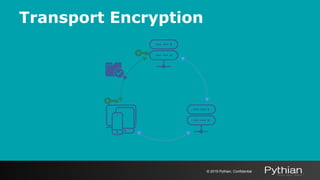
Transport Encryption
● TLS/SSL (Transport Layer Security/Secure Sockets Layer) to encrypt all of
MongoDB’s network traffic
● Certificate Authorities - valid certificates generated and signed by a single
certificate authority
○ PEMKeyfile with the name of the .pem file that contains the signed
TLS/SSL certificate and key
○ CAFile with the name of the .pem file that contains the root certificate
chain from the Certificate Authority
© 2019 Pythian. Confidential
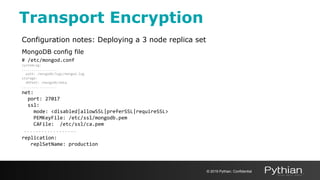
Transport Encryption
Configuration notes: Deploying a 3 node replica set
MongoDB config file
# /etc/mongod.conf
systemLog:
..................
path: /mongodb/logs/mongod.log
storage:
dbPath: /mongodb/data
..................
net:
port: 27017
ssl:
mode: <disabled|allowSSL|preferSSL|requireSSL>
PEMKeyFile: /etc/ssl/mongodb.pem
CAFile: /etc/ssl/ca.pem
..................
replication:
replSetName: production
© 2019 Pythian. Confidential
Transport Encryption
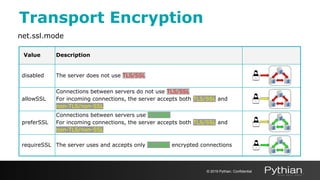
net.ssl.mode
Value Description
disabled The server does not use TLS/SSL
allowSSL
Connections between servers do not use TLS/SSL
For incoming connections, the server accepts both TLS/SSL and
non-TLS/non-SSL
preferSSL
Connections between servers use TLS/SSL
For incoming connections, the server accepts both TLS/SSL and
non-TLS/non-SSL
requireSSL The server uses and accepts only TLS/SSL encrypted connections
© 2019 Pythian. Confidential
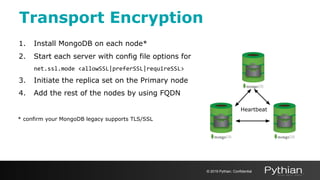
Transport Encryption
1. Install MongoDB on each node*
2. Start each server with config file options for
net.ssl.mode <allowSSL|preferSSL|requireSSL>
3. Initiate the replica set on the Primary node
4. Add the rest of the nodes by using FQDN
* confirm your MongoDB legacy supports TLS/SSL
Heartbeat
© 2019 Pythian. Confidential
Transport Encryption
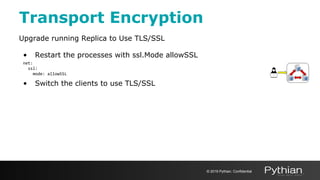
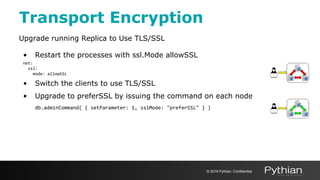
Upgrade running Replica to Use TLS/SSL
• Restart the processes with ssl.Mode allowSSL
net:
ssl:
mode: allowSSL
• Switch the clients to use TLS/SSL
© 2019 Pythian. Confidential
Transport Encryption
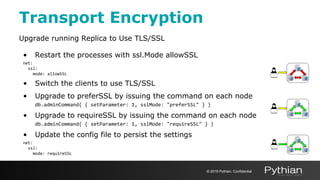
Upgrade running Replica to Use TLS/SSL
• Restart the processes with ssl.Mode allowSSL
net:
ssl:
mode: allowSSL
• Switch the clients to use TLS/SSL
• Upgrade to preferSSL by issuing the command on each node
db.adminCommand( { setParameter: 1, sslMode: "preferSSL" } )
© 2019 Pythian. Confidential
Transport Encryption
Upgrade running Replica to Use TLS/SSL
• Restart the processes with ssl.Mode allowSSL
net:
ssl:
mode: allowSSL
• Switch the clients to use TLS/SSL
• Upgrade to preferSSL by issuing the command on each node
db.adminCommand( { setParameter: 1, sslMode: "preferSSL" } )
• Upgrade to requireSSL by issuing the command on each node
db.adminCommand( { setParameter: 1, sslMode: "requireSSL" } )
• Update the config file to persist the settings
net:
ssl:
mode: requireSSL
© 2019 Pythian. Confidential
Encryption at REST
Application Level Encryption
● Encryption on a per-field or per-document basis within the application
layer
● Custom encryption and decryption routines to encrypt
○ Document
○ Field level data
© 2019 Pythian. Confidential
Storage Engine Encryption
• Native encryption option for the WiredTiger storage engine only
• AES256-CBC (or 256-bit Advanced Encryption Standard in Cipher Block
Chaining mode) via OpenSSL
• AES-256 uses a symmetric key; i.e. the same key to encrypt and decrypt
text
© 2019 Pythian. Confidential
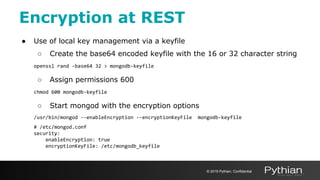
Encryption at REST
● Use of local key management via a keyfile
○ Create the base64 encoded keyfile with the 16 or 32 character string
openssl rand -base64 32 > mongodb-keyfile
○ Assign permissions 600
chmod 600 mongodb-keyfile
○ Start mongod with the encryption options
/usr/bin/mongod --enableEncryption --encryptionKeyFile mongodb-keyfile
# /etc/mongod.conf
security:
enableEncryption: true
encryptionKeyFile: /etc/mongodb_keyfile
© 2019 Pythian. Confidential
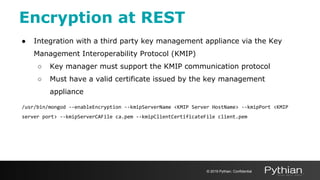
Encryption at REST
● Integration with a third party key management appliance via the Key
Management Interoperability Protocol (KMIP)
○ Key manager must support the KMIP communication protocol
○ Must have a valid certificate issued by the key management
appliance
/usr/bin/mongod --enableEncryption --kmipServerName <KMIP Server HostName> --kmipPort <KMIP
server port> --kmipServerCAFile ca.pem --kmipClientCertificateFile client.pem
© 2019 Pythian. Confidential
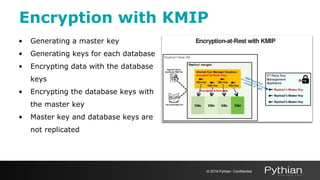
Encryption with KMIP
• Generating a master key
• Generating keys for each database
• Encrypting data with the database
keys
• Encrypting the database keys with
the master key
• Master key and database keys are
not replicated
© 2019 Pythian. Confidential
Disk Level Encryption
• Amazon EBS encryption
• Azure disk encryption
• Google Compute Engine encrypts all data at rest (by default)
• Linux hard disk encryption with LUKS
• BitLocker encryption for Windows server
© 2019 Pythian. Confidential
Auditing
Track System Activity
● schema (DDL)
● replica set and sharded cluster
● authentication and authorization
● CRUD operations
auditLog:
destination: <syslog>, <console>, <file>
format: <JSON>, <BSON>
path: data/db/auditLog.<json>,<bson>
filter: '{ atype: { $in: ["dropCollection"]}}'
* Available in MongoDB Enterprise only
© 2019 Pythian. Confidential
> bsondump auditLog.bson
{"atype":"authenticate","ts":{"$date":"2019-02-14T14:11:29.97
5+0100"},"local":{"ip":"127.0.1.1","port":27017},"remote":{"i
p":"127.0.0.1","port":42634},"users":[],"roles":[],"param":{"
user":"root","db":"admin","mechanism":"SCRAM-SHA-1"},"result"
:18}
{"atype":"authCheck","ts":{"$date":"2019-02-14T14:15:49.161+0
100"},"local":{"ip":"127.0.1.1","port":27017},"remote":{"ip":
"127.0.0.1","port":42636},"users":[{"user":"test","db":"admin
"}],"roles":[{"role":"read","db":"admin"}],"param":{"command"
:"insert","ns":"test.orders","args":{"insert":"orders","docum
ents":[{"_id":{"$oid":"58a3030507bd5e3486b1220d"},"id":1.0,"i
tem":"paper clips"}],"ordered":true}},"result":13}
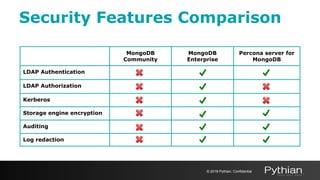
Security Features Comparison
© 2018 Pythian. Confidential
MongoDB
Community
MongoDB
Enterprise
Percona server for
MongoDB
LDAP Authentication
LDAP Authorization
Kerberos
Storage engine encryption
Auditing
Log redaction
Summary
• Security incidents and data breaches grow exponentially over the last 5
years
• Enable access control by turning on authentication
• Limit resources access by authorization and roles
• Harden your database by limiting network exposure
• Protect data in transit by using encryption with TLS/SSL
• Protect data at rest by using encrypted storage engine
• Track System activity with Auditing
• Keep your database version up to date
© 2019 Pythian. Confidential
Questions?
© 2019 Pythian. Confidential
We’re Hiring!
https://www.pythian.com/careers/
© 2019 Pythian. Confidential

Enhancing the default MongoDB Security

  • 1.
  • 2.
    {"name": "Igor Donchovski", "live_in":"Skopje", "email": "donchovski@pythian.com", "current_role": "Lead database consultant", "education": [{"type": "College", "name": "FEIT", "graduated": "2008", "university": "UKIM"}, {"type": "Master", "name": "FINKI", "graduated": "2013", "university": "UKIM"}], "work": [{"role": "Web developer", "start": "2007", "end": "2012", "company": "Gord Systems"}, {"role": "DBA", "start": "2012", "end": "2014", "company": "NOVP"}, {"role": "Database consultant", "start": "2014", "end": "2016", "company": "Pythian"}, {"role": "Lead database consultant", "start": "2016", "company": "Pythian"}], "certificates": [{"name": "C100DBA", "year": "2016", "description": "MongoDB certified DBA"}], "social": [{"network": "LinkedIn", "url": "https://mk.linkedin.com/in/igorle"}, {"network": "Twitter", "url": "https://twitter.com/igorle"}], "interests": ["Hiking", "Biking", "Traveling"], "hobbies": ["Painting", "Photography", "Cooking"], "proud_of": ["Volunteering", "Helping the Community"]} About Me © 2019 Pythian. Confidential
  • 3.
    Overview • Default security •Access control • Authentication and Authorization • Network hardening • Encryption in Transit • Encryption at REST • Auditing • QA © 2019 Pythian. Confidential
  • 4.
    Security Incidents ● Databreach is a security incident in which sensitive, protected or confidential data is copied, transmitted, viewed, stolen or used by an individual unauthorized to do so ● Industry analysts predict cybercrime will cost the global economy $6 trillion annually by 2021 © 2019 Pythian. Confidential
  • 5.
    © 2019 Pythian.Confidential Defaults
  • 6.
    • sudo yuminstall -y mongodb-org • sudo apt-get install -y mongodb-org • sudo zypper -n install mongodb-org sudo service mongod start • sudo tar -zxvf mongodb-linux-*-4.0.9.tgz sudo mongod --dbpath /data/db --logpath /log/mongod.log • mongo (shell to interact with the database) > use test > db.foo.find() Default Security © 2019 Pythian. Confidential
  • 7.
    • before MongoDB3.6 net.bindIP: 0.0.0.0 (if MongoDB installed from binaries) net.bindIP: 127.0.0.1 (if MongoDB installed from package after 2.6) Default Security © 2019 Pythian. Confidential 1. db.foo.findOne() 2. { "_id" : ... }
  • 8.
    • after MongoDB3.6 net.bindIP: 127.0.0.1 Default security © 2019 Pythian. Confidential 1. db.foo.findOne() 2. Error: couldn't connect to server
  • 9.
    • Users allowedto ssh to DB server net.bindIP: 127.0.0.1 Default Security © 2019 Pythian. Confidential 1. db.foo.findOne() 2. { "_id" : ... } 1. db.foo.findOne() 2. Error: couldn't connect to server
  • 10.
    • Application andDatabase don’t usually run on same host • DBA need to change bindIP net.bindIP: 0.0.0.0 Default Security © 2019 Pythian. Confidential 1. db.foo.findOne() 2. { "_id" : ... }
  • 11.
    © 2019 Pythian.Confidential Access Control
  • 12.
    • security:authorization: enabled useadmin db.createUser( { user: "UserAdmin", pwd: "123456", roles: [ { role: "userAdminAnyDatabase", db: "admin" }, "readWriteAnyDatabase" ] } ) Access Control © 2019 Pythian. Confidential 2. Who are you? 1. db.foo.findOne()
  • 13.
    mongo --port 27017-u "UserAdmin" --authenticationDatabase "admin" -p db.createUser( { user: "tester", pwd: "qwerty", roles: [ { role: "readWrite", db: "test" }, { role: "read", db: "reporting" } ] } ) Access Control © 2019 Pythian. Confidential 2. true 1. db.auth()
  • 14.
    • SCRAM (default) •x.509 Certificate Authentication • LDAP • Kerberos Authentication © 2019 Pythian. Confidential 2. true 1. db.auth()
  • 15.
    • Keyfile --keyFile • x.509 --clusterAuthMode --sslClusterFile •Enabling internal authentication also enables client authorization. Internal Authentication © 2019 Pythian. Confidential
  • 16.
  • 17.
  • 18.
    Authorization ● Role BasedAccess Control ○ Role - grants privileges to perform the specified actions on resource ○ Resource - database, collection, set of collections, or the cluster ○ Privilege - consists of a specified resource and the actions permitted on the resource ○ Action specifies the operation allowed on the resource ● Built-In roles and User-Defined roles ● Limit data access with custom views © 2019 Pythian. Confidential
  • 19.
    • Database serversexposed to the internet • No Firewall, VPN or VPC Network Hardening © 2019 Pythian. Confidential
  • 20.
    • No needfor DB server to be exposed to the internet • Add Firewall rules, VPN or VPC Network Hardening © 2019 Pythian. Confidential VPC
  • 21.
    Access Control Summary ©2019 Pythian. Confidential VPC VPNApplication 2. true 1. db.auth()
  • 22.
    © 2019 Pythian.Confidential Encryption
  • 23.
    ● Attacker canaccess data by monitoring traffic between the application and the database or by reading files directly Why Encryption? Attacker © 2019 Pythian. Confidential 2. true 1. db.auth() Attacker
  • 24.
    ● Protect PersonallyIdentifiable Information (PII) ○ PCI DSS for managing cardholder information ○ HIPAA standards for managing healthcare information ○ GDPR for the protection of EU citizen data privacy (May 2018) ○ FISMA to ensure the security of data in the federal government ○ FERPA to protect the privacy of student education records ○ The Asia Pacific Cross-border Privacy Enforcement Arrangement (CPEA) ○ Others Why Encryption? © 2019 Pythian. Confidential
  • 25.
    Encryption with MongoDB ●Transport encryption ○ MongoDB network traffic is only readable by the intended client ● Encryption at REST ○ Application Level Encryption and Storage Encryption ○ Native encryption option for the WiredTiger storage engine* * Available in MongoDB Enterprise only © 2019 Pythian. Confidential
  • 26.
    © 2019 Pythian.Confidential Transport Encryption
  • 27.
    Transport Encryption ● TLS/SSL(Transport Layer Security/Secure Sockets Layer) to encrypt all of MongoDB’s network traffic ● Certificate Authorities - valid certificates generated and signed by a single certificate authority ○ PEMKeyfile with the name of the .pem file that contains the signed TLS/SSL certificate and key ○ CAFile with the name of the .pem file that contains the root certificate chain from the Certificate Authority © 2019 Pythian. Confidential
  • 28.
    Transport Encryption Configuration notes:Deploying a 3 node replica set MongoDB config file # /etc/mongod.conf systemLog: .................. path: /mongodb/logs/mongod.log storage: dbPath: /mongodb/data .................. net: port: 27017 ssl: mode: <disabled|allowSSL|preferSSL|requireSSL> PEMKeyFile: /etc/ssl/mongodb.pem CAFile: /etc/ssl/ca.pem .................. replication: replSetName: production © 2019 Pythian. Confidential
  • 29.
    Transport Encryption net.ssl.mode Value Description disabledThe server does not use TLS/SSL allowSSL Connections between servers do not use TLS/SSL For incoming connections, the server accepts both TLS/SSL and non-TLS/non-SSL preferSSL Connections between servers use TLS/SSL For incoming connections, the server accepts both TLS/SSL and non-TLS/non-SSL requireSSL The server uses and accepts only TLS/SSL encrypted connections © 2019 Pythian. Confidential
  • 30.
    Transport Encryption 1. InstallMongoDB on each node* 2. Start each server with config file options for net.ssl.mode <allowSSL|preferSSL|requireSSL> 3. Initiate the replica set on the Primary node 4. Add the rest of the nodes by using FQDN * confirm your MongoDB legacy supports TLS/SSL Heartbeat © 2019 Pythian. Confidential
  • 31.
    Transport Encryption Upgrade runningReplica to Use TLS/SSL • Restart the processes with ssl.Mode allowSSL net: ssl: mode: allowSSL • Switch the clients to use TLS/SSL © 2019 Pythian. Confidential
  • 32.
    Transport Encryption Upgrade runningReplica to Use TLS/SSL • Restart the processes with ssl.Mode allowSSL net: ssl: mode: allowSSL • Switch the clients to use TLS/SSL • Upgrade to preferSSL by issuing the command on each node db.adminCommand( { setParameter: 1, sslMode: "preferSSL" } ) © 2019 Pythian. Confidential
  • 33.
    Transport Encryption Upgrade runningReplica to Use TLS/SSL • Restart the processes with ssl.Mode allowSSL net: ssl: mode: allowSSL • Switch the clients to use TLS/SSL • Upgrade to preferSSL by issuing the command on each node db.adminCommand( { setParameter: 1, sslMode: "preferSSL" } ) • Upgrade to requireSSL by issuing the command on each node db.adminCommand( { setParameter: 1, sslMode: "requireSSL" } ) • Update the config file to persist the settings net: ssl: mode: requireSSL © 2019 Pythian. Confidential
  • 34.
    © 2019 Pythian.Confidential Encryption at REST
  • 35.
    Application Level Encryption ●Encryption on a per-field or per-document basis within the application layer ● Custom encryption and decryption routines to encrypt ○ Document ○ Field level data © 2019 Pythian. Confidential
  • 36.
    Storage Engine Encryption •Native encryption option for the WiredTiger storage engine only • AES256-CBC (or 256-bit Advanced Encryption Standard in Cipher Block Chaining mode) via OpenSSL • AES-256 uses a symmetric key; i.e. the same key to encrypt and decrypt text © 2019 Pythian. Confidential
  • 37.
    Encryption at REST ●Use of local key management via a keyfile ○ Create the base64 encoded keyfile with the 16 or 32 character string openssl rand -base64 32 > mongodb-keyfile ○ Assign permissions 600 chmod 600 mongodb-keyfile ○ Start mongod with the encryption options /usr/bin/mongod --enableEncryption --encryptionKeyFile mongodb-keyfile # /etc/mongod.conf security: enableEncryption: true encryptionKeyFile: /etc/mongodb_keyfile © 2019 Pythian. Confidential
  • 38.
    Encryption at REST ●Integration with a third party key management appliance via the Key Management Interoperability Protocol (KMIP) ○ Key manager must support the KMIP communication protocol ○ Must have a valid certificate issued by the key management appliance /usr/bin/mongod --enableEncryption --kmipServerName <KMIP Server HostName> --kmipPort <KMIP server port> --kmipServerCAFile ca.pem --kmipClientCertificateFile client.pem © 2019 Pythian. Confidential
  • 39.
    Encryption with KMIP •Generating a master key • Generating keys for each database • Encrypting data with the database keys • Encrypting the database keys with the master key • Master key and database keys are not replicated © 2019 Pythian. Confidential
  • 40.
    Disk Level Encryption •Amazon EBS encryption • Azure disk encryption • Google Compute Engine encrypts all data at rest (by default) • Linux hard disk encryption with LUKS • BitLocker encryption for Windows server © 2019 Pythian. Confidential
  • 41.
    Auditing Track System Activity ●schema (DDL) ● replica set and sharded cluster ● authentication and authorization ● CRUD operations auditLog: destination: <syslog>, <console>, <file> format: <JSON>, <BSON> path: data/db/auditLog.<json>,<bson> filter: '{ atype: { $in: ["dropCollection"]}}' * Available in MongoDB Enterprise only © 2019 Pythian. Confidential > bsondump auditLog.bson {"atype":"authenticate","ts":{"$date":"2019-02-14T14:11:29.97 5+0100"},"local":{"ip":"127.0.1.1","port":27017},"remote":{"i p":"127.0.0.1","port":42634},"users":[],"roles":[],"param":{" user":"root","db":"admin","mechanism":"SCRAM-SHA-1"},"result" :18} {"atype":"authCheck","ts":{"$date":"2019-02-14T14:15:49.161+0 100"},"local":{"ip":"127.0.1.1","port":27017},"remote":{"ip": "127.0.0.1","port":42636},"users":[{"user":"test","db":"admin "}],"roles":[{"role":"read","db":"admin"}],"param":{"command" :"insert","ns":"test.orders","args":{"insert":"orders","docum ents":[{"_id":{"$oid":"58a3030507bd5e3486b1220d"},"id":1.0,"i tem":"paper clips"}],"ordered":true}},"result":13}
  • 42.
    Security Features Comparison ©2018 Pythian. Confidential MongoDB Community MongoDB Enterprise Percona server for MongoDB LDAP Authentication LDAP Authorization Kerberos Storage engine encryption Auditing Log redaction
  • 43.
    Summary • Security incidentsand data breaches grow exponentially over the last 5 years • Enable access control by turning on authentication • Limit resources access by authorization and roles • Harden your database by limiting network exposure • Protect data in transit by using encryption with TLS/SSL • Protect data at rest by using encrypted storage engine • Track System activity with Auditing • Keep your database version up to date © 2019 Pythian. Confidential
  • 44.
  • 45.