PRESENTED BY:
ANSAR BILAL (17EL32)
KHALID AKRAM
(17EL12)
MUHAMMAD FAHAD (16/17EL34)
Smart Electrical Energy
Consumption, Monitoring
and Control
Supervise by: Engr. Aoun Muhammad
Contents
 Introduction
 Objectives
 Block Diagram
 Flow Chart
 Electro Saving App(Android App View)
 Mathematical Modelling & Calculations
 Hardware Specifications
 Project Simulation
 Hardware Fabrication
Introduction
 An electricity meter or energy meter is a device that measures the
amount of electric energy consumed by a consumer.
 But sometimes the limited functionality of these meters. A possible
solution is a Smart Energy Meter (SEM).
 This measurement system is aimed to be used in measuring energy
related quantities such as units consumed, consumed power, active
load etc. of a house.
Objectives
The main objective of this project is to design and implement
an Android App (Electro Saving) to be used for an efficient
smart distribution load metering/monitoring system for both
consumer and provider perspectives. The main objectives
are:
 Consumer justified billing
 Real-Time monitoring & Control of electrical power
consumption
 Dynamic charges of tariffs
·
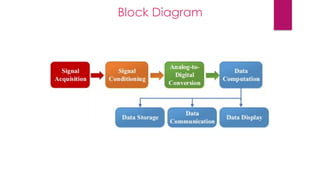
Block Diagram
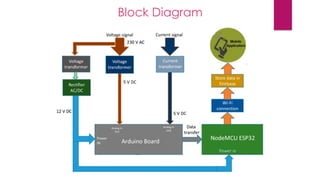
Block Diagram
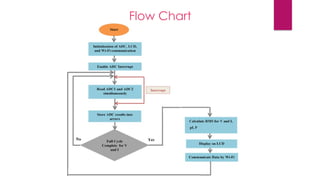
Flow Chart
Mathematical Modelling &
Calculations
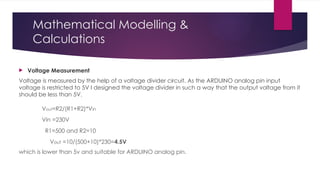
 Voltage Measurement
Voltage is measured by the help of a voltage divider circuit. As the ARDUINO analog pin input
voltage is restricted to 5V I designed the voltage divider in such a way that the output voltage from it
should be less than 5V.
Vout=R2/(R1+R2)*Vin
Vin =230V
R1=500 and R2=10
Vout =10/(500+10)*230=4.5V
which is lower than 5v and suitable for ARDUINO analog pin.
Continue…
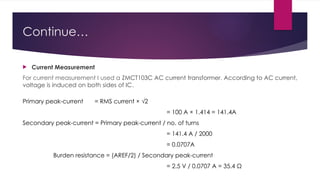
 Current Measurement
For current measurement I used a ZMCT103C AC current transformer. According to AC current,
voltage is induced on both sides of IC.
Primary peak-current = RMS current × √2
= 100 A × 1.414 = 141.4A
Secondary peak-current = Primary peak-current / no. of turns
= 141.4 A / 2000
= 0.0707A
Burden resistance = (AREF/2) / Secondary peak-current
= 2.5 V / 0.0707 A = 35.4 Ω
Continue….
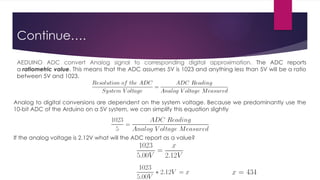
Analog to digital conversions are dependent on the system voltage. Because we predominantly use the
10-bit ADC of the Arduino on a 5V system, we can simplify this equation slightly
If the analog voltage is 2.12V what will the ADC report as a value?
AEDUINO ADC convert Analog signal to corresponding digital approximation. The ADC reports
a ratiometric value. This means that the ADC assumes 5V is 1023 and anything less than 5V will be a ratio
between 5V and 1023.
Continue…
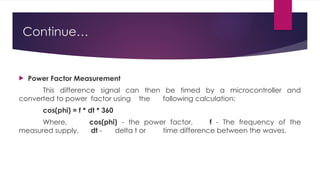
 Power Factor Measurement
This difference signal can then be timed by a microcontroller and
converted to power factor using the following calculation:
cos(phi) = f * dt * 360
Where, cos(phi) - the power factor, f - The frequency of the
measured supply, dt - delta t or time difference between the waves.
Continue…
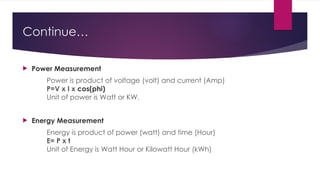
 Power Measurement
Power is product of voltage (volt) and current (Amp)
P=V x I x cos(phi)
Unit of power is Watt or KW.
 Energy Measurement
Energy is product of power (watt) and time (Hour)
E= P x t
Unit of Energy is Watt Hour or Kilowatt Hour (kWh)
Hardware Specifications
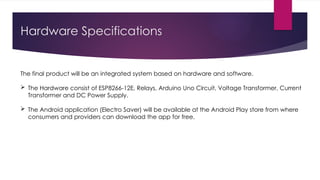
The final product will be an integrated system based on hardware and software.
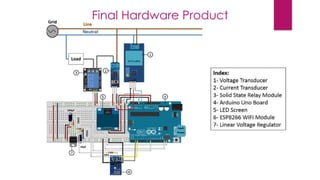
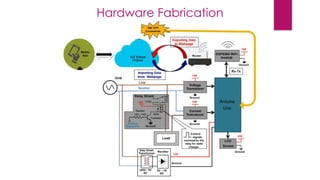
 The Hardware consist of ESP8266-12E, Relays, Arduino Uno Circuit, Voltage Transformer, Current
Transformer and DC Power Supply.
 The Android application (Electro Saver) will be available at the Android Play store from where
consumers and providers can download the app for free.
Continue…
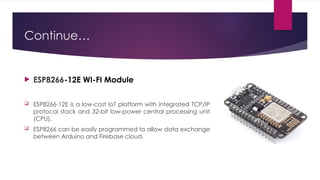
 ESP8266-12E WI-FI Module
 ESP8266-12E is a low-cost IoT platform with integrated TCP/IP
protocol stack and 32-bit low-power central processing unit
(CPU).
 ESP8266 can be easily programmed to allow data exchange
between Arduino and Firebase cloud.
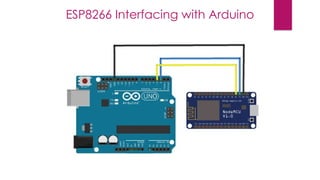
ESP8266 Interfacing with Arduino
Continue…
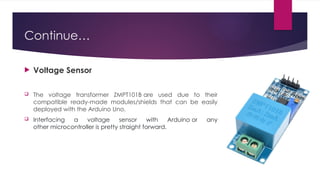
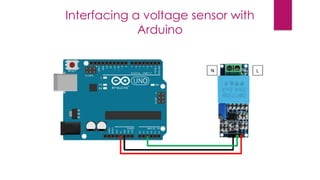
 Voltage Sensor
 The voltage transformer ZMPT101B are used due to their
compatible ready-made modules/shields that can be easily
deployed with the Arduino Uno.
 Interfacing a voltage sensor with Arduino or any
other microcontroller is pretty straight forward.
Interfacing a voltage sensor with
Arduino
Continue…
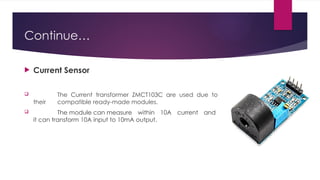
 Current Sensor
 The Current transformer ZMCT103C are used due to
their compatible ready-made modules.
 The module can measure within 10A current and
it can transform 10A input to 10mA output.
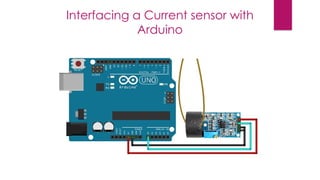
Interfacing a Current sensor with
Arduino
Continue…
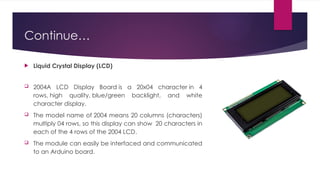
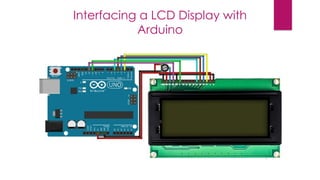
 Liquid Crystal Display (LCD)
 2004A LCD Display Board is a 20x04 character in 4
rows, high quality, blue/green backlight, and white
character display.
 The model name of 2004 means 20 columns (characters)
multiply 04 rows, so this display can show 20 characters in
each of the 4 rows of the 2004 LCD.
 The module can easily be interfaced and communicated
to an Arduino board.
Interfacing a LCD Display with
Arduino
Continue…
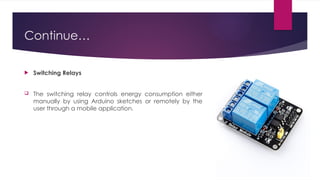
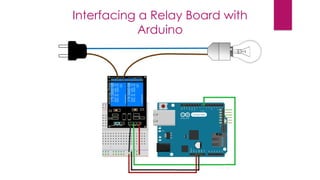
 Switching Relays
 The switching relay controls energy consumption either
manually by using Arduino sketches or remotely by the
user through a mobile application.
Interfacing a Relay Board with
Arduino
Continue…
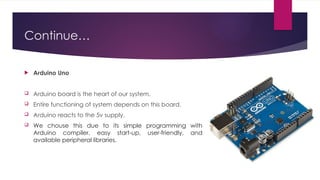
 Arduino Uno
 Arduino board is the heart of our system.
 Entire functioning of system depends on this board.
 Arduino reacts to the 5v supply.
 We chouse this due to its simple programming with
Arduino compiler, easy start up, user friendly, and
‐ ‐
available peripheral libraries.
Final Hardware Product
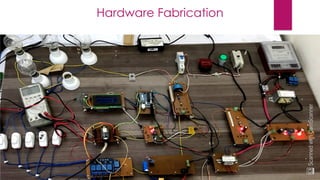
Hardware Fabrication
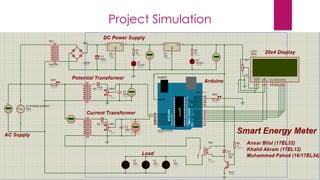
Project Simulation
Android Application
 Android Studio
 Firebase Database
Firebase
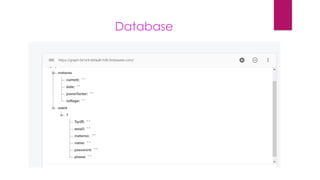
 Firebase Realtime Database (Firebase) is a cloud-based NoSQL database
that syncs and stores data between users in real-time.
 Firebase allows connected users collaborate across various devices and
create server less apps.
Database
Android STUDIO
Languages Used
 Java(JSON) for android activates back-end working.
 Xml for android Layout design.
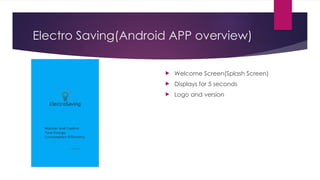
Electro Saving(Android APP overview)
 Welcome Screen(Splash Screen)
 Displays for 5 seconds
 Logo and version
Continue…
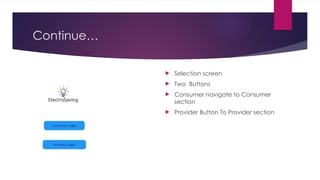
 Selection screen
 Two Buttons
 Consumer navigate to Consumer
section
 Provider Button To Provider section
Continue…
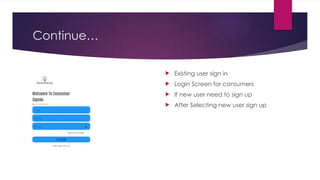
 Existing user sign in
 Login Screen for consumers
 If new user need to sign up
 After Selecting new user sign up
Continue…
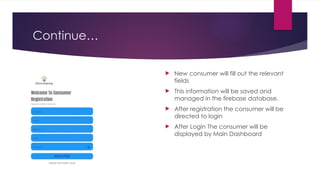
 New consumer will fill out the relevant
fields
 This information will be saved and
managed in the firebase database.
 After registration the consumer will be
directed to login
 After Login The consumer will be
displayed by Main Dashboard
Continue…
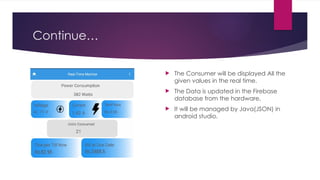
 The Consumer will be displayed All the
given values in the real time.
 The Data is updated in the Firebase
database from the hardware.
 It will be managed by Java(JSON) in
android studio.
Continue…
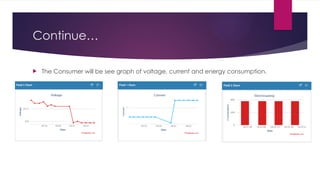
 The Consumer will be see graph of voltage, current and energy consumption.
Thanks!
Do you have any questions?

Engineering Presentation for final years

  • 2.
    PRESENTED BY: ANSAR BILAL(17EL32) KHALID AKRAM (17EL12) MUHAMMAD FAHAD (16/17EL34) Smart Electrical Energy Consumption, Monitoring and Control Supervise by: Engr. Aoun Muhammad
  • 3.
    Contents  Introduction  Objectives Block Diagram  Flow Chart  Electro Saving App(Android App View)  Mathematical Modelling & Calculations  Hardware Specifications  Project Simulation  Hardware Fabrication
  • 4.
    Introduction  An electricitymeter or energy meter is a device that measures the amount of electric energy consumed by a consumer.  But sometimes the limited functionality of these meters. A possible solution is a Smart Energy Meter (SEM).  This measurement system is aimed to be used in measuring energy related quantities such as units consumed, consumed power, active load etc. of a house.
  • 5.
    Objectives The main objectiveof this project is to design and implement an Android App (Electro Saving) to be used for an efficient smart distribution load metering/monitoring system for both consumer and provider perspectives. The main objectives are:  Consumer justified billing  Real-Time monitoring & Control of electrical power consumption  Dynamic charges of tariffs ·
  • 6.
  • 7.
  • 8.
  • 9.
    Mathematical Modelling & Calculations Voltage Measurement Voltage is measured by the help of a voltage divider circuit. As the ARDUINO analog pin input voltage is restricted to 5V I designed the voltage divider in such a way that the output voltage from it should be less than 5V. Vout=R2/(R1+R2)*Vin Vin =230V R1=500 and R2=10 Vout =10/(500+10)*230=4.5V which is lower than 5v and suitable for ARDUINO analog pin.
  • 10.
    Continue…  Current Measurement Forcurrent measurement I used a ZMCT103C AC current transformer. According to AC current, voltage is induced on both sides of IC. Primary peak-current = RMS current × √2 = 100 A × 1.414 = 141.4A Secondary peak-current = Primary peak-current / no. of turns = 141.4 A / 2000 = 0.0707A Burden resistance = (AREF/2) / Secondary peak-current = 2.5 V / 0.0707 A = 35.4 Ω
  • 11.
    Continue…. Analog to digitalconversions are dependent on the system voltage. Because we predominantly use the 10-bit ADC of the Arduino on a 5V system, we can simplify this equation slightly If the analog voltage is 2.12V what will the ADC report as a value? AEDUINO ADC convert Analog signal to corresponding digital approximation. The ADC reports a ratiometric value. This means that the ADC assumes 5V is 1023 and anything less than 5V will be a ratio between 5V and 1023.
  • 12.
    Continue…  Power FactorMeasurement This difference signal can then be timed by a microcontroller and converted to power factor using the following calculation: cos(phi) = f * dt * 360 Where, cos(phi) - the power factor, f - The frequency of the measured supply, dt - delta t or time difference between the waves.
  • 13.
    Continue…  Power Measurement Poweris product of voltage (volt) and current (Amp) P=V x I x cos(phi) Unit of power is Watt or KW.  Energy Measurement Energy is product of power (watt) and time (Hour) E= P x t Unit of Energy is Watt Hour or Kilowatt Hour (kWh)
  • 14.
    Hardware Specifications The finalproduct will be an integrated system based on hardware and software.  The Hardware consist of ESP8266-12E, Relays, Arduino Uno Circuit, Voltage Transformer, Current Transformer and DC Power Supply.  The Android application (Electro Saver) will be available at the Android Play store from where consumers and providers can download the app for free.
  • 15.
    Continue…  ESP8266-12E WI-FIModule  ESP8266-12E is a low-cost IoT platform with integrated TCP/IP protocol stack and 32-bit low-power central processing unit (CPU).  ESP8266 can be easily programmed to allow data exchange between Arduino and Firebase cloud.
  • 16.
  • 17.
    Continue…  Voltage Sensor The voltage transformer ZMPT101B are used due to their compatible ready-made modules/shields that can be easily deployed with the Arduino Uno.  Interfacing a voltage sensor with Arduino or any other microcontroller is pretty straight forward.
  • 18.
    Interfacing a voltagesensor with Arduino
  • 19.
    Continue…  Current Sensor The Current transformer ZMCT103C are used due to their compatible ready-made modules.  The module can measure within 10A current and it can transform 10A input to 10mA output.
  • 20.
    Interfacing a Currentsensor with Arduino
  • 21.
    Continue…  Liquid CrystalDisplay (LCD)  2004A LCD Display Board is a 20x04 character in 4 rows, high quality, blue/green backlight, and white character display.  The model name of 2004 means 20 columns (characters) multiply 04 rows, so this display can show 20 characters in each of the 4 rows of the 2004 LCD.  The module can easily be interfaced and communicated to an Arduino board.
  • 22.
    Interfacing a LCDDisplay with Arduino
  • 23.
    Continue…  Switching Relays The switching relay controls energy consumption either manually by using Arduino sketches or remotely by the user through a mobile application.
  • 24.
    Interfacing a RelayBoard with Arduino
  • 25.
    Continue…  Arduino Uno Arduino board is the heart of our system.  Entire functioning of system depends on this board.  Arduino reacts to the 5v supply.  We chouse this due to its simple programming with Arduino compiler, easy start up, user friendly, and ‐ ‐ available peripheral libraries.
  • 26.
  • 27.
  • 28.
  • 29.
  • 30.
    Android Application  AndroidStudio  Firebase Database
  • 31.
    Firebase  Firebase RealtimeDatabase (Firebase) is a cloud-based NoSQL database that syncs and stores data between users in real-time.  Firebase allows connected users collaborate across various devices and create server less apps.
  • 32.
  • 33.
    Android STUDIO Languages Used Java(JSON) for android activates back-end working.  Xml for android Layout design.
  • 34.
    Electro Saving(Android APPoverview)  Welcome Screen(Splash Screen)  Displays for 5 seconds  Logo and version
  • 35.
    Continue…  Selection screen Two Buttons  Consumer navigate to Consumer section  Provider Button To Provider section
  • 36.
    Continue…  Existing usersign in  Login Screen for consumers  If new user need to sign up  After Selecting new user sign up
  • 37.
    Continue…  New consumerwill fill out the relevant fields  This information will be saved and managed in the firebase database.  After registration the consumer will be directed to login  After Login The consumer will be displayed by Main Dashboard
  • 38.
    Continue…  The Consumerwill be displayed All the given values in the real time.  The Data is updated in the Firebase database from the hardware.  It will be managed by Java(JSON) in android studio.
  • 39.
    Continue…  The Consumerwill be see graph of voltage, current and energy consumption.
  • 40.
    Thanks! Do you haveany questions?