Photo by RichGrundy - Creative Commons Attribution-NonCommercial License https://www.flickr.com/photos/32888907@N03 Created with Haiku Deck
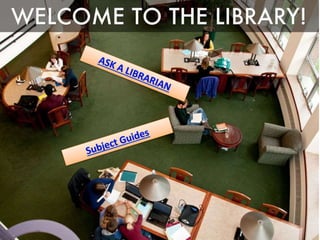
Photo by Yersinia - Creative Commons Attribution-NonCommercial-ShareAlike License https://www.flickr.com/photos/72429059@N00 Created with Haiku Deck
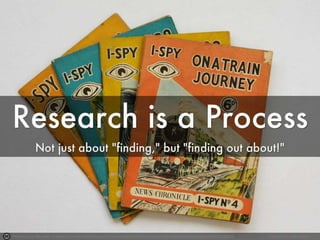
Photo by Leo Reynolds - Creative Commons Attribution-NonCommercial-ShareAlike License https://www.flickr.com/photos/49968232@N00 Created with Haiku Deck
6 
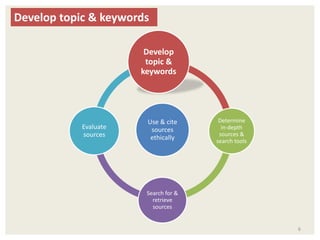
Develop topic & keywords 
Develop 
topic & 
keywords 
Use & cite 
sources 
ethically 
Determine 
in-depth 
sources & 
search tools 
Search for & 
retrieve 
sources 
Evaluate 
sources
Photo by Enokson - Creative Commons Attribution License https://www.flickr.com/photos/47823583@N03 Created with Haiku Deck
Photo by Esthr - Creative Commons Attribution-NonCommercial License https://www.flickr.com/photos/30866445@N00 Created with Haiku Deck
೦https://www.youtube.com/watch?v=Q0B3Gjl 
u-1o&feature=youtu.be 
9 
Picking your topic is research!
Photo by Scott Ingram Photography - Creative Commons Attribution-NonCommercial License https://www.flickr.com/photos/92366420@N00 Created with Haiku Deck
Photo by Cardboard Antlers - Creative Commons Attribution-NonCommercial-ShareAlike License https://www.flickr.com/photos/34659372@N08 Created with Haiku Deck
Photo by garryknight - Creative Commons Attribution-ShareAlike License https://www.flickr.com/photos/8176740@N05 Created with Haiku Deck
Photo by Dave77459 - Creative Commons Attribution-NonCommercial-ShareAlike License https://www.flickr.com/photos/25499247@N00 Created with Haiku Deck
14 
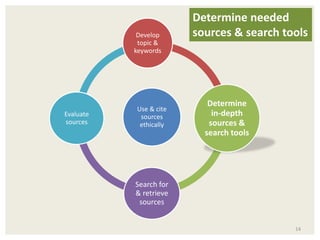
Develop 
topic & 
keywords 
Use & cite 
sources 
ethically 
Determine 
in-depth 
sources & 
search tools 
Search for 
& retrieve 
sources 
Evaluate 
sources 
Determine needed 
sources & search tools
Photo by Hudzen10 - Creative Commons Attribution License https://www.flickr.com/photos/74336052@N00 Created with Haiku Deck
Photo by Asher Isbrucker - Creative Commons Attribution License https://www.flickr.com/photos/93043572@N03 Created with Haiku Deck
Photo by scorpioprithu - Creative Commons Attribution-NonCommercial License https://www.flickr.com/photos/44981370@N07 Created with Haiku Deck
Photo by Zeusandhera - Creative Commons Attribution-ShareAlike License https://www.flickr.com/photos/55476234@N00 Created with Haiku Deck
19 
Develop 
topic & 
keywords 
Use & cite 
sources 
ethically 
Determine 
in-depth 
sources & 
search tools 
Search for & 
retrieve 
sources 
Evaluate 
sources 
Search for & 
retrieve sources
Photo by carterse - Creative Commons Attribution-ShareAlike License https://www.flickr.com/photos/81881849@N00 Created with Haiku Deck
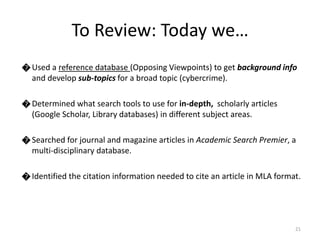
೦ Used a reference database (Opposing Viewpoints) to get background info 
and develop sub-topics for a broad topic (cybercrime). 
೦ Determined what search tools to use for in-depth, scholarly articles 
(Google Scholar, Library databases) in different subject areas. 
೦ Searched for journal and magazine articles in Academic Search Premier, a 
multi-disciplinary database. 
೦ Identified the citation information needed to cite an article in MLA format. 
21 
To Review: Today we…
Photo by Leo Reynolds - Creative Commons Attribution-NonCommercial-ShareAlike License https://www.flickr.com/photos/49968232@N00 Created with Haiku Deck

Eng 101 part 1 ppt image based

  • 1.
    Photo by RichGrundy- Creative Commons Attribution-NonCommercial License https://www.flickr.com/photos/32888907@N03 Created with Haiku Deck
  • 3.
    Photo by Yersinia- Creative Commons Attribution-NonCommercial-ShareAlike License https://www.flickr.com/photos/72429059@N00 Created with Haiku Deck
  • 5.
    Photo by LeoReynolds - Creative Commons Attribution-NonCommercial-ShareAlike License https://www.flickr.com/photos/49968232@N00 Created with Haiku Deck
  • 6.
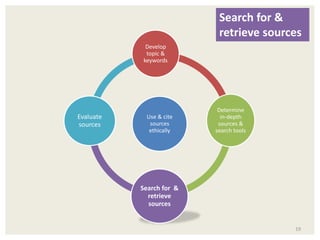
    6 Develop topic& keywords Develop topic & keywords Use & cite sources ethically Determine in-depth sources & search tools Search for & retrieve sources Evaluate sources
  • 7.
    Photo by Enokson- Creative Commons Attribution License https://www.flickr.com/photos/47823583@N03 Created with Haiku Deck
  • 8.
    Photo by Esthr- Creative Commons Attribution-NonCommercial License https://www.flickr.com/photos/30866445@N00 Created with Haiku Deck
  • 9.
  • 10.
    Photo by ScottIngram Photography - Creative Commons Attribution-NonCommercial License https://www.flickr.com/photos/92366420@N00 Created with Haiku Deck
  • 11.
    Photo by CardboardAntlers - Creative Commons Attribution-NonCommercial-ShareAlike License https://www.flickr.com/photos/34659372@N08 Created with Haiku Deck
  • 12.
    Photo by garryknight- Creative Commons Attribution-ShareAlike License https://www.flickr.com/photos/8176740@N05 Created with Haiku Deck
  • 13.
    Photo by Dave77459- Creative Commons Attribution-NonCommercial-ShareAlike License https://www.flickr.com/photos/25499247@N00 Created with Haiku Deck
  • 14.
    14 Develop topic& keywords Use & cite sources ethically Determine in-depth sources & search tools Search for & retrieve sources Evaluate sources Determine needed sources & search tools
  • 15.
    Photo by Hudzen10- Creative Commons Attribution License https://www.flickr.com/photos/74336052@N00 Created with Haiku Deck
  • 16.
    Photo by AsherIsbrucker - Creative Commons Attribution License https://www.flickr.com/photos/93043572@N03 Created with Haiku Deck
  • 17.
    Photo by scorpioprithu- Creative Commons Attribution-NonCommercial License https://www.flickr.com/photos/44981370@N07 Created with Haiku Deck
  • 18.
    Photo by Zeusandhera- Creative Commons Attribution-ShareAlike License https://www.flickr.com/photos/55476234@N00 Created with Haiku Deck
  • 19.
    19 Develop topic& keywords Use & cite sources ethically Determine in-depth sources & search tools Search for & retrieve sources Evaluate sources Search for & retrieve sources
  • 20.
    Photo by carterse- Creative Commons Attribution-ShareAlike License https://www.flickr.com/photos/81881849@N00 Created with Haiku Deck
  • 21.
    ೦ Used areference database (Opposing Viewpoints) to get background info and develop sub-topics for a broad topic (cybercrime). ೦ Determined what search tools to use for in-depth, scholarly articles (Google Scholar, Library databases) in different subject areas. ೦ Searched for journal and magazine articles in Academic Search Premier, a multi-disciplinary database. ೦ Identified the citation information needed to cite an article in MLA format. 21 To Review: Today we…
  • 22.
    Photo by LeoReynolds - Creative Commons Attribution-NonCommercial-ShareAlike License https://www.flickr.com/photos/49968232@N00 Created with Haiku Deck

Editor's Notes

  • #6 Research is iterative, an exploration of a topic that sometimes leads you to a different place than where you began. This is okay! In fact, that is exactly what research is all about. It is not just about having an opinion about something and then finding sources that say what you want them to say.
  • #8 Where do you go to get topic ideas? Personal interest. Newspapers, magazines, etc. Lists of hot topics, debate issues, etc. [suggested sites on English Subject Guide]
  • #10 “research is iterative and depends upon asking increasingly complex questions whose answers develop new questions or lines of inquiry in any field.” (ACRL Framework)
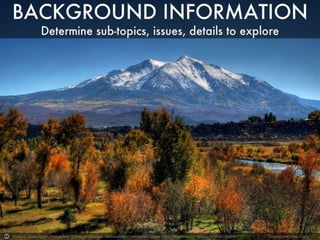
  • #11 Start with background information: Determines sub-topics (problems, causes, other aspects Where do you go for background info? Google? Wikipedia?
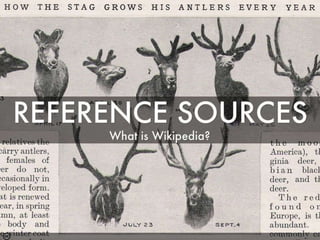
  • #12 What kind of source is Wikipedia? Reference sources/specialized encyclopedias – used as first step for background info. Let’s look at some reference sources that are a little more reliable than Wikipedia.
  • #16 What types of in-depth sources do I need to explore my topic? Have to move beyond “summary” or “reference” sources like Opposing Viewpoints. What kinds of information do you need to get more in-depth on a topic? (Statistics, studies, analysis of a topic)
  • #17 What sources are more “in-depth” and academic? Journal articles, some books, some magazines, some websites
  • #18 Can scholarly journal articles be found through Google? Let’s search Google for “cybercrime scholarly articles” Click on the link to “Scholarly articles for…” What do we find in Google Scholar? (note dates, accessibility)