Encrypting SMS with PGP
The reason for this?
Privacy.
What do we need?
●Android smartphone
●APG app (Android Privacy Guard application)
Why APG?
It handles every aspect of PGP encryption, providing a
simple to use interface and seamless integration with
other communication application as email, messaging
and file managers
July 2015, mail@angelparrales.com 1/8
Encrypting SMS with PGP
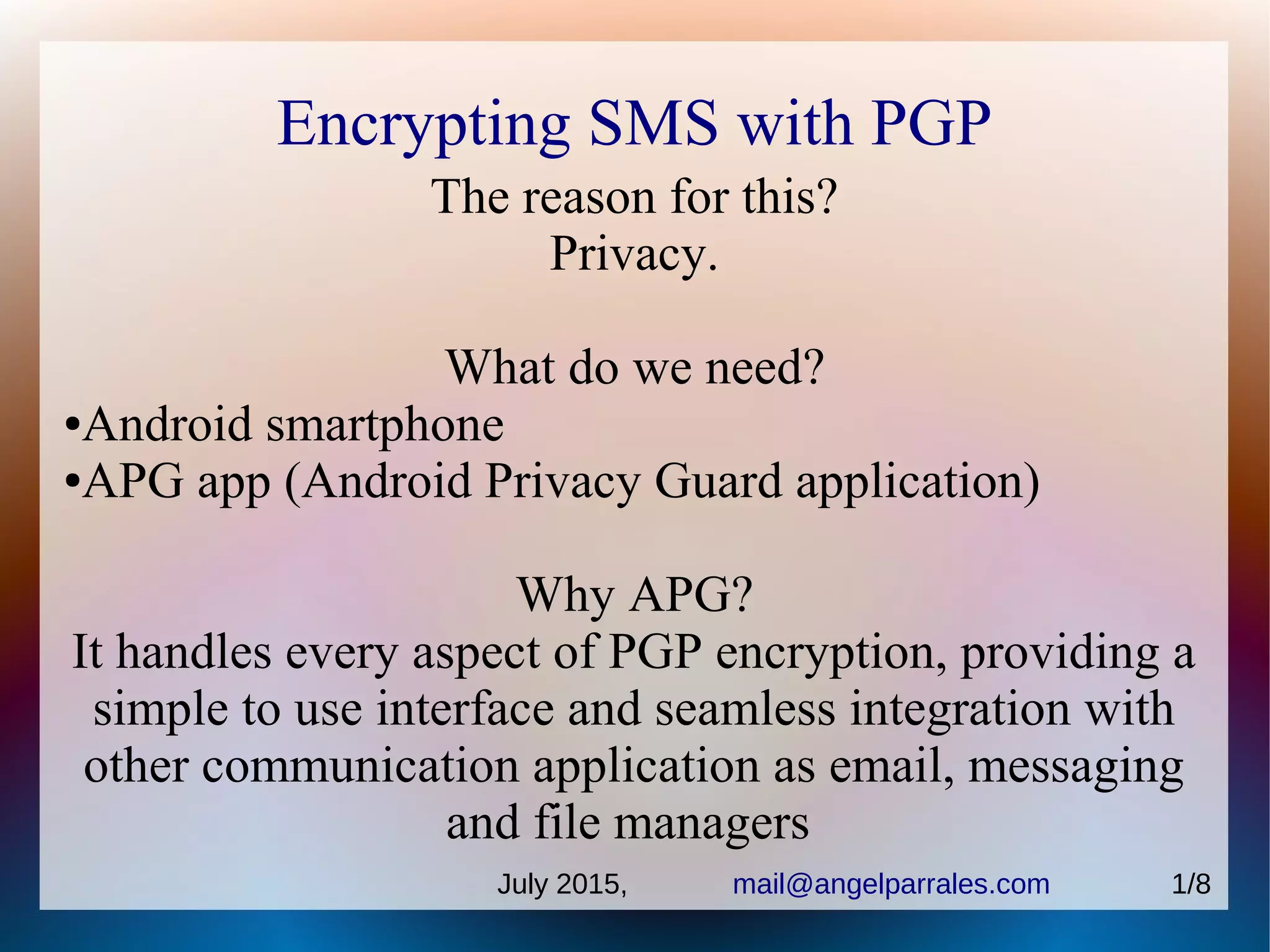
1) Adjust your device settings
so messages are not split every
160 characters, this is an SMS
inherent limitation easy to
override.
July 2015, mail@angelparrales.com 2/8
Encrypting SMS with PGP
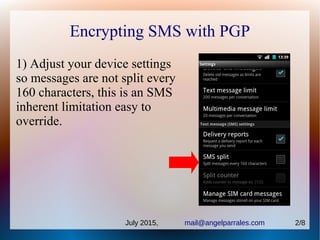
2) Install APG
https://play.google.com/store/apps/details?id=org.thialfihar.android.apg
3) Create your key, or import if you have them already.
NEVER forget your
passphrase
Save and backup your
keys in a safe place
like USB
July 2015, mail@angelparrales.com 3/8
Encrypting SMS with PGP
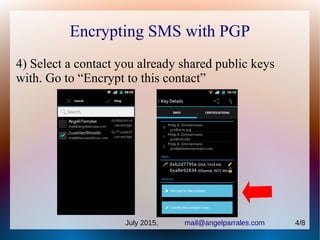
4) Select a contact you already shared public keys
with. Go to “Encrypt to this contact”
July 2015, mail@angelparrales.com 4/8
Encrypting SMS with PGP
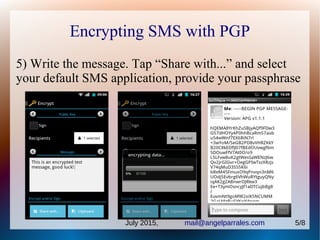
5) Write the message. Tap “Share with...” and select
your default SMS application, provide your passphrase
July 2015, mail@angelparrales.com 5/8
DEcrypting SMS with PGP
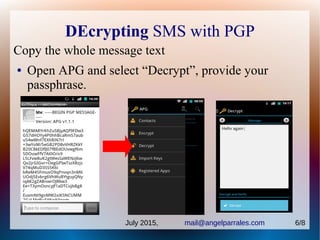
Copy the whole message text
● Open APG and select “Decrypt”, provide your
passphrase.
July 2015, mail@angelparrales.com 6/8
Encrypting SMS with PGP
Remarks:
● Public keys has to be previously exchanged with
your recipient by other means.
● Public keys can be exchanged by mail (unsafe),
downloaded from PGP servers given the key
fingerprint, or in person.
● Secret key is NEVER shared
● Passphrase has to be kept always safe
July 2015, mail@angelparrales.com 7/8
Encrypting SMS with PGP
RESOURCES:
Android Privacy Guard application
https://play.google.com/store/apps/details?id=org.thialfihar.android.apg
Android Privacy Guard (APG) project http://www.thialfihar.org/projects/apg/
OpenKeychain: Easy PGP application
https://play.google.com/store/apps/details?id=org.sufficientlysecure.keychain
The Enigmail Project, PC email clients plugin
https://www.enigmail.net/home/index.php
Phil Zimmermann, PGP creator https://www.philzimmermann.com
July 2015, mail@angelparrales.com 8/8

Encrypting SMS with PGP

  • 1.
    Encrypting SMS withPGP The reason for this? Privacy. What do we need? ●Android smartphone ●APG app (Android Privacy Guard application) Why APG? It handles every aspect of PGP encryption, providing a simple to use interface and seamless integration with other communication application as email, messaging and file managers July 2015, mail@angelparrales.com 1/8
  • 2.
    Encrypting SMS withPGP 1) Adjust your device settings so messages are not split every 160 characters, this is an SMS inherent limitation easy to override. July 2015, mail@angelparrales.com 2/8
  • 3.
    Encrypting SMS withPGP 2) Install APG https://play.google.com/store/apps/details?id=org.thialfihar.android.apg 3) Create your key, or import if you have them already. NEVER forget your passphrase Save and backup your keys in a safe place like USB July 2015, mail@angelparrales.com 3/8
  • 4.
    Encrypting SMS withPGP 4) Select a contact you already shared public keys with. Go to “Encrypt to this contact” July 2015, mail@angelparrales.com 4/8
  • 5.
    Encrypting SMS withPGP 5) Write the message. Tap “Share with...” and select your default SMS application, provide your passphrase July 2015, mail@angelparrales.com 5/8
  • 6.
    DEcrypting SMS withPGP Copy the whole message text ● Open APG and select “Decrypt”, provide your passphrase. July 2015, mail@angelparrales.com 6/8
  • 7.
    Encrypting SMS withPGP Remarks: ● Public keys has to be previously exchanged with your recipient by other means. ● Public keys can be exchanged by mail (unsafe), downloaded from PGP servers given the key fingerprint, or in person. ● Secret key is NEVER shared ● Passphrase has to be kept always safe July 2015, mail@angelparrales.com 7/8
  • 8.
    Encrypting SMS withPGP RESOURCES: Android Privacy Guard application https://play.google.com/store/apps/details?id=org.thialfihar.android.apg Android Privacy Guard (APG) project http://www.thialfihar.org/projects/apg/ OpenKeychain: Easy PGP application https://play.google.com/store/apps/details?id=org.sufficientlysecure.keychain The Enigmail Project, PC email clients plugin https://www.enigmail.net/home/index.php Phil Zimmermann, PGP creator https://www.philzimmermann.com July 2015, mail@angelparrales.com 8/8