Lesson Objectives
2. Applyinternet online
safety, security ethics and
etiquette standards and
practice in the use of ICTs.
1. Identify what constitutes
appropriate and
inappropriate online
behaviors.
At the end of the lesson, the
student must be able to:
information at
risk
• CompleteName
• Parents’ or Guardian’s Name
• Siblings’ Name
• Complete Address
• Home and Cellphone Number
• Birthday
• Email Address
• Current and Previous Schools
12.
What are thepossible ways
that you can think of to protect
yourself from different online
threats?
PASSWORD
• a combinationof texts,
numbers, and/or special
characters to secure accounts.
• can be weak (e.g. names,
common words, birthdates, etc.)
or strong (combination of all
characters)
VIRUS
• a maliciousprogram
designed to replicate itself
and transfer from one
computer to another
(internet, local networks,
FDs, CDs, etc.)
35.
worm
• a maliciousprogram that
transfers from one computer
to another by any type of
means. Often, it uses a
computer network to spread
itself.
36.
trojan
• a maliciousprogram that
disguise as a useful program
but once downloaded or
installed, leaves your PC
unprotected and allows
hackers to get your
information.
37.
spyware
• a programthat runs in the background without knowing it
(thus called “spy”). It has the ability to monitor what you
are currently doing or typing through keylogging.
*keyloggers
• used to record the keystroke done by the users.
This is done to steal their password or any
other sensitive information.
38.
adware
• a programdesigned to send
you advertisements, mostly
as pop-ups.
39.
spam
• unwanted emailmostly
from bots or advertisers. It
can be used to send
malware.
40.
PHISHING
• its goalis to acquire sensitive personal
information like passwords and credit card
details.
*pharming
• It is more complicated way of
phishing where it exploits the DNS
(Domain Name Service) system.
41.
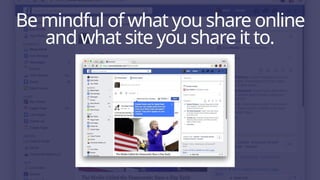
protecting reputationsonline
THINK BEFORE YOU CLICK
copyright infringement
SOME TIPS TO AVOID COPYRIGHT INFRINGEMENT
UNDERSTAND
BE RESPONSIBLE
BE CREATIVE
KNOW THE LAW
ONLINE RESEARCH
GROUP 1
A strangeradded you on Facebook. He claimed
that you are schoolmates. Upon checking his
profile, you saw that you knew that person and
that he was a year older than you. He then
asked to meet you and added that you should
wear a pretty short dress when the two of you
meet.
44.
GROUP 2
Your bankemailed you to reset your password
as soon as possible because there was a
breach in their system. The email seemed legit
but the link was shortened and the email
address was not the name of your bank.
45.
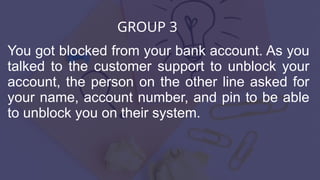
GROUP 3
You gotblocked from your bank account. As you
talked to the customer support to unblock your
account, the person on the other line asked for
your name, account number, and pin to be able
to unblock you on their system.
46.
GROUP 4
One ofyour classmates was spreading rumors
that you had a bad attitude and that you called
her a liar in front of her friends. She even edited
your awkward photo to become funny and
shared it on Facebook. People started calling
you funny names in school and online since she
posted the photo.
47.
GROUP 5
An advertisementjust popped up on your
browser saying that you won a flat screen TV,
and you just need to confirm your identity on the
link provided to claim the prize.
About the dangersand threats
you may encounter in
cyberspace, can you think of
any ways to avoid these
threats?
57.
STAY
refers to theability to recognize,
comprehend, analyze, develop, convey,
and compute using printed and written
materials related to various contexts.