The Nikon COOLPIX Using Your Digital Camera
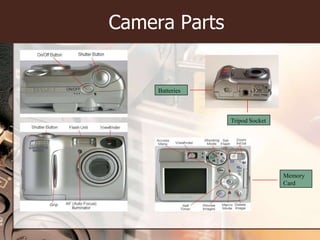
Camera PartsBatteriesTripod SocketMemory Card
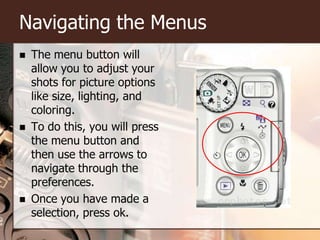
Navigating the MenusThe menu button will allow you to adjust your shots for picture options like size, lighting, and coloring. To do this, you will press the menu button and then use the arrows to navigate through the preferences.Once you have made a selection, press ok.
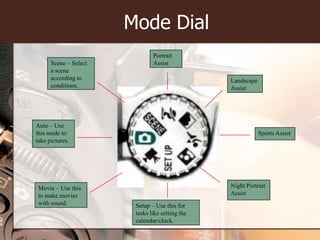
Mode DialPortrait AssistScene – Select a scene according to conditions.Landscape AssistAuto – Use this mode to take pictures.Sports AssistNight Portrait AssistMovie – Use this to make movies with sound.Setup – Use this for tasks like setting the calendar/clock.
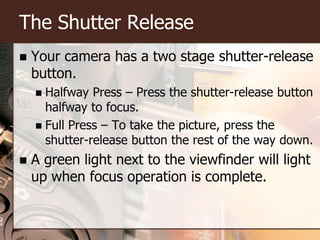
The Shutter ReleaseYour camera has a two stage shutter-release button.Halfway Press – Press the shutter-release button halfway to focus.Full Press – To take the picture, press the shutter-release button the rest of the way down.A green light next to the viewfinder will light up when focus operation is complete.
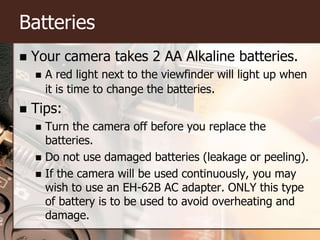
BatteriesYour camera takes 2 AA Alkaline batteries.A red light next to the viewfinder will light up when it is time to change the batteries.Tips:Turn the camera off before you replace the batteries.Do not use damaged batteries (leakage or peeling).If the camera will be used continuously, you may wish to use an EH-62B AC adapter. ONLY this type of battery is to be used to avoid overheating and damage.
Saving Your PicturesYou can save pictures in one of two ways:Internal MemoryIf no card has been inserted, the camera will automatically save your pictures to its internal memory.The internal memory is about 14 MB.Memory CardIf a card has been inserted, the camera will automatically save pictures to the card.Memory cards come in all different sizes, choose the one that best fits your needs.
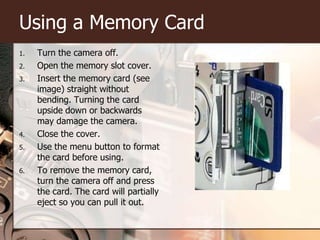
Using a Memory CardTurn the camera off.Open the memory slot cover.Insert the memory card (see image) straight without bending.Turning the card upside down or backwards may damage the camera.Close the cover.Use the menu button to format the card before using.To remove the memory card, turn the camera off and press the card. The card will partially eject so you can pull it out.

Eme 6205 Creating A Teaching Tool

  • 1.
    The Nikon COOLPIXUsing Your Digital Camera
  • 2.
  • 3.
    Navigating the MenusThemenu button will allow you to adjust your shots for picture options like size, lighting, and coloring. To do this, you will press the menu button and then use the arrows to navigate through the preferences.Once you have made a selection, press ok.
  • 4.
    Mode DialPortrait AssistScene– Select a scene according to conditions.Landscape AssistAuto – Use this mode to take pictures.Sports AssistNight Portrait AssistMovie – Use this to make movies with sound.Setup – Use this for tasks like setting the calendar/clock.
  • 5.
    The Shutter ReleaseYourcamera has a two stage shutter-release button.Halfway Press – Press the shutter-release button halfway to focus.Full Press – To take the picture, press the shutter-release button the rest of the way down.A green light next to the viewfinder will light up when focus operation is complete.
  • 6.
    BatteriesYour camera takes2 AA Alkaline batteries.A red light next to the viewfinder will light up when it is time to change the batteries.Tips:Turn the camera off before you replace the batteries.Do not use damaged batteries (leakage or peeling).If the camera will be used continuously, you may wish to use an EH-62B AC adapter. ONLY this type of battery is to be used to avoid overheating and damage.
  • 7.
    Saving Your PicturesYoucan save pictures in one of two ways:Internal MemoryIf no card has been inserted, the camera will automatically save your pictures to its internal memory.The internal memory is about 14 MB.Memory CardIf a card has been inserted, the camera will automatically save pictures to the card.Memory cards come in all different sizes, choose the one that best fits your needs.
  • 8.
    Using a MemoryCardTurn the camera off.Open the memory slot cover.Insert the memory card (see image) straight without bending.Turning the card upside down or backwards may damage the camera.Close the cover.Use the menu button to format the card before using.To remove the memory card, turn the camera off and press the card. The card will partially eject so you can pull it out.

Editor's Notes

  • #2 This presentation can be used to help students familiarize themselves with the digital camera they will be using in class.
  • #3 Photo Credits: Camera View – Topcameras.co.uk/details/nikon-coolpix-5600.cfmCamera View – Frontcameras.co.uk/details/nikon-coolpix-5600.cfmCamera View – Backcameras.co.uk/details/nikon-coolpix-5600.cfmCamera View - Bottomwww.flickr.com/photos/tbenedict/2519675664/
  • #5 Photo Credits:Mode Dialwww.photographyblog.com/reviews_n...600_5.php
  • #9 Photo Credit:www.photographyblog.com/reviews_n...600_5.php