Memory Card Parameter Error http://www.freephotorecovery.org
 
Why do ‘memory card parameter error’ comes with your SD card? Are you facing memory card parameter error after inserting memory card in your digital camera? If the memory card is not formatted correctly then this type of error occurs with your card. In this case the memory card becomes inaccessible. The stored photos and information can be inaccessible and you have to face photo loss situation with your memory card. Your photos can be memorable and want to restore all the lost photos, this task can be done using standard photo recovery tool.
Reasons of ‘Memory card parameter’ error The memory card is not formatted properly in the camera.  If the using memory card is corrupt or damaged. Faulty memory card can be the cause of this parameter error.  If the disk structure of the card is corrupt.
Resolution of Memory card parameter error 1. Clean the surface of the card and re-insert it again.  2. Use the different card reader to read the card and access the data on a computer.  3. To solve the corruption of the card, you should reformat the card. Restore lost data from backup.  4. If nothing works, the card needs formatting.
User Guide to Use Photo Recovery Software  To resolve the photo loss situation and to fix memory card parameter error you just need third party photo recovery tool. By following steps of the given User Guide you can easily recover your lost files and photos.
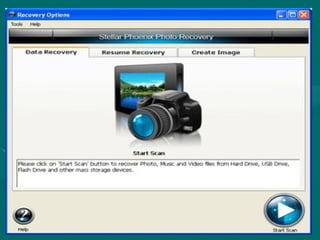
Step1.   Launch the Photo recovery Software on the your current location of the system and click on Start button.
 
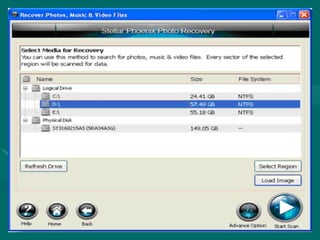
Step2.   Select the location or media from where you have to recover the photos. Here you can search for the photos, music and video files. After selecting click on the Start button to scan the location.
 
Step3.   After scanning all the recoverable files is displayed on the screen. Select the files that you want to recover and then click on the Recover Button.
 
Step 4.  Using this dialog box you can select the specific region of the selected media. With the help of pointer set the starting and ending sector region. And Click on the  Scan button.
 
Step5.  Select the File types of the recoverable files. Here you can also edit the format of the file.
 
Step 6.  By the use of this dialog box you can create image sector by sector of selected media.
 
Step7.  By the use of this dialog box you can select by sector image of the selected region. It is useful when your media has bad sector. This image can used later to recover the lost data.
 
Step8.  Using this dialog box you can select the previous saved scan information or image file to resume recovery from last saved point.
 
Step9. Saved the Recovered files at the desired location and get your lost files again on your system.
 
System Requirements   Processor :  Pentium Class Operating System :  Microsoft Windows 7/Vista/2003/XP/2000/NT4 (SP6) Operating System :  Macintosh OS X 10.6 snow leopard, 10.5 leopard, 10.4 tiger, 10.3.9 panther Memory :  Minimum 256 MB (512 MB recommended) Hard Disk :  50 MB of free disk space Internet Explorer :  Version 5 or later
Thanks  For More Info Visit   http://www.freephotorecovery.org

Memory Card Parameter Error

  • 1.
    Memory Card ParameterError http://www.freephotorecovery.org
  • 2.
  • 3.
    Why do ‘memorycard parameter error’ comes with your SD card? Are you facing memory card parameter error after inserting memory card in your digital camera? If the memory card is not formatted correctly then this type of error occurs with your card. In this case the memory card becomes inaccessible. The stored photos and information can be inaccessible and you have to face photo loss situation with your memory card. Your photos can be memorable and want to restore all the lost photos, this task can be done using standard photo recovery tool.
  • 4.
    Reasons of ‘Memorycard parameter’ error The memory card is not formatted properly in the camera. If the using memory card is corrupt or damaged. Faulty memory card can be the cause of this parameter error. If the disk structure of the card is corrupt.
  • 5.
    Resolution of Memorycard parameter error 1. Clean the surface of the card and re-insert it again. 2. Use the different card reader to read the card and access the data on a computer. 3. To solve the corruption of the card, you should reformat the card. Restore lost data from backup. 4. If nothing works, the card needs formatting.
  • 6.
    User Guide toUse Photo Recovery Software To resolve the photo loss situation and to fix memory card parameter error you just need third party photo recovery tool. By following steps of the given User Guide you can easily recover your lost files and photos.
  • 7.
    Step1. Launch the Photo recovery Software on the your current location of the system and click on Start button.
  • 8.
  • 9.
    Step2. Select the location or media from where you have to recover the photos. Here you can search for the photos, music and video files. After selecting click on the Start button to scan the location.
  • 10.
  • 11.
    Step3. After scanning all the recoverable files is displayed on the screen. Select the files that you want to recover and then click on the Recover Button.
  • 12.
  • 13.
    Step 4. Using this dialog box you can select the specific region of the selected media. With the help of pointer set the starting and ending sector region. And Click on the Scan button.
  • 14.
  • 15.
    Step5. Selectthe File types of the recoverable files. Here you can also edit the format of the file.
  • 16.
  • 17.
    Step 6. By the use of this dialog box you can create image sector by sector of selected media.
  • 18.
  • 19.
    Step7. Bythe use of this dialog box you can select by sector image of the selected region. It is useful when your media has bad sector. This image can used later to recover the lost data.
  • 20.
  • 21.
    Step8. Usingthis dialog box you can select the previous saved scan information or image file to resume recovery from last saved point.
  • 22.
  • 23.
    Step9. Saved theRecovered files at the desired location and get your lost files again on your system.
  • 24.
  • 25.
    System Requirements Processor : Pentium Class Operating System : Microsoft Windows 7/Vista/2003/XP/2000/NT4 (SP6) Operating System : Macintosh OS X 10.6 snow leopard, 10.5 leopard, 10.4 tiger, 10.3.9 panther Memory : Minimum 256 MB (512 MB recommended) Hard Disk : 50 MB of free disk space Internet Explorer : Version 5 or later
  • 26.
    Thanks ForMore Info Visit http://www.freephotorecovery.org