Data Sheet

EMC LifeLine
The simplest way to store, protect, access, and
share digital content for small and home offices
and networked home consumers

The Big Picture

Software to help you manage your digital life

• Network-attached storage
(NAS) OEM software

The EMC LifeLine™ OEM software enables you to store and manage all of your digital
content—business records, photos, music downloads, movies, backups, any digital file—
safely and securely on one, centralized, affordable storage appliance.

• Easy to use and set up
• Out-of-the-box RAID data
protection and security
• Integrated control of EMC
Retrospect backup for
connected computers
• Content indexing and
searching
• Supports Windows and
Macintosh computers and
networked multimedia
devices
• Advanced media and
network services

The EMC LifeLine OEM software enables
original equipment manufacturers
to deliver low-cost, yet powerful NAS
appliances for the consumer and small
office/home office markets.

EMC LifeLine delivers powerful network-based storage and backup functionality, along
with out-of-the-box data protection, file management, and media serving capabilities. It
includes an integrated version of EMC® Retrospect® Express (award-winning backup software) with support for an unlimited number of client machines. It also supports multiple
languages (English, Spanish, Portuguese, French, Italian, Japanese, Korean, Traditional
and Simple Chinese, German, and Russian) for worldwide deployment.
A storage appliance running EMC LifeLine is particularly appropriate for small office,
home office, or personal home use where multiple PCs or other digital devices are present on a network, where multiple users share files, where robust protection for those
files is required, or simply where increased storage capacity is desired. EMC LifeLine
makes it all possible—and a simple, low-touch installation and four-step set-up wizard
make it accessible to anyone.

Connect, access, and share your entire digital universe
A storage appliance running EMC LifeLine can store all your files in one centralized place.
It’s an always-on appliance for instant retrieval of any file from any networked device at
any time. The software supports specialized media streaming, such as iTunes and game
console features, for home/media users. It also supports specialized features for business users, such as a print server, e-mail fault notification, and support for Microsoft
Active Directory.
Simple to set up, easy to use
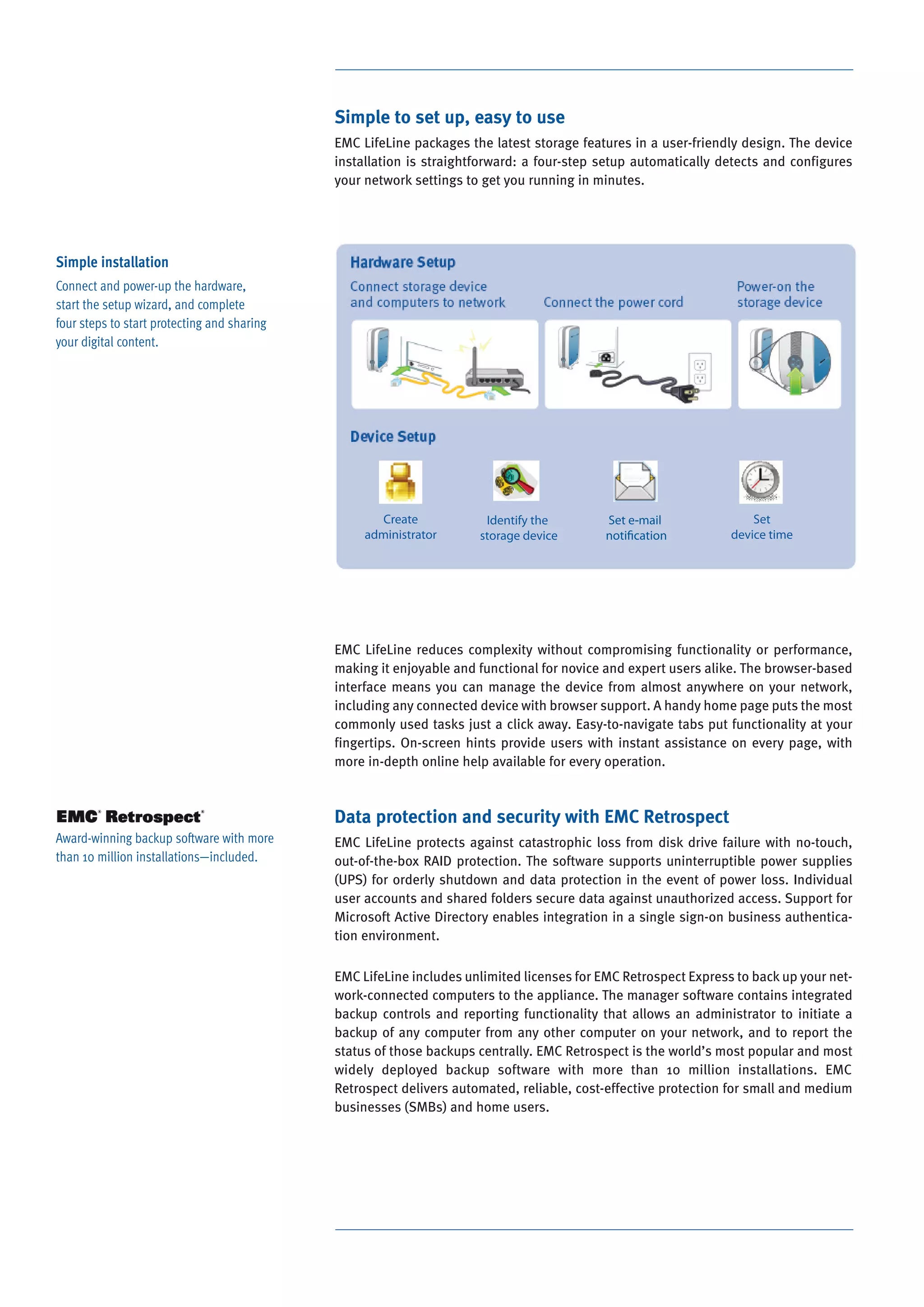
EMC LifeLine packages the latest storage features in a user-friendly design. The device
installation is straightforward: a four-step setup automatically detects and configures
your network settings to get you running in minutes.

Simple installation
Connect and power-up the hardware,
start the setup wizard, and complete
four steps to start protecting and sharing
your digital content.

EMC LifeLine reduces complexity without compromising functionality or performance,
making it enjoyable and functional for novice and expert users alike. The browser-based
interface means you can manage the device from almost anywhere on your network,
including any connected device with browser support. A handy home page puts the most
commonly used tasks just a click away. Easy-to-navigate tabs put functionality at your
fingertips. On-screen hints provide users with instant assistance on every page, with
more in-depth online help available for every operation.

Data protection and security with EMC Retrospect
Award-winning backup software with more
than 10 million installations—included.

EMC LifeLine protects against catastrophic loss from disk drive failure with no-touch,
out-of-the-box RAID protection. The software supports uninterruptible power supplies
(UPS) for orderly shutdown and data protection in the event of power loss. Individual
user accounts and shared folders secure data against unauthorized access. Support for
Microsoft Active Directory enables integration in a single sign-on business authentication environment.
EMC LifeLine includes unlimited licenses for EMC Retrospect Express to back up your network-connected computers to the appliance. The manager software contains integrated
backup controls and reporting functionality that allows an administrator to initiate a
backup of any computer from any other computer on your network, and to report the
status of those backups centrally. EMC Retrospect is the world’s most popular and most
widely deployed backup software with more than 10 million installations. EMC
Retrospect delivers automated, reliable, cost-effective protection for small and medium
businesses (SMBs) and home users.
Multi-language support for worldwide deployment
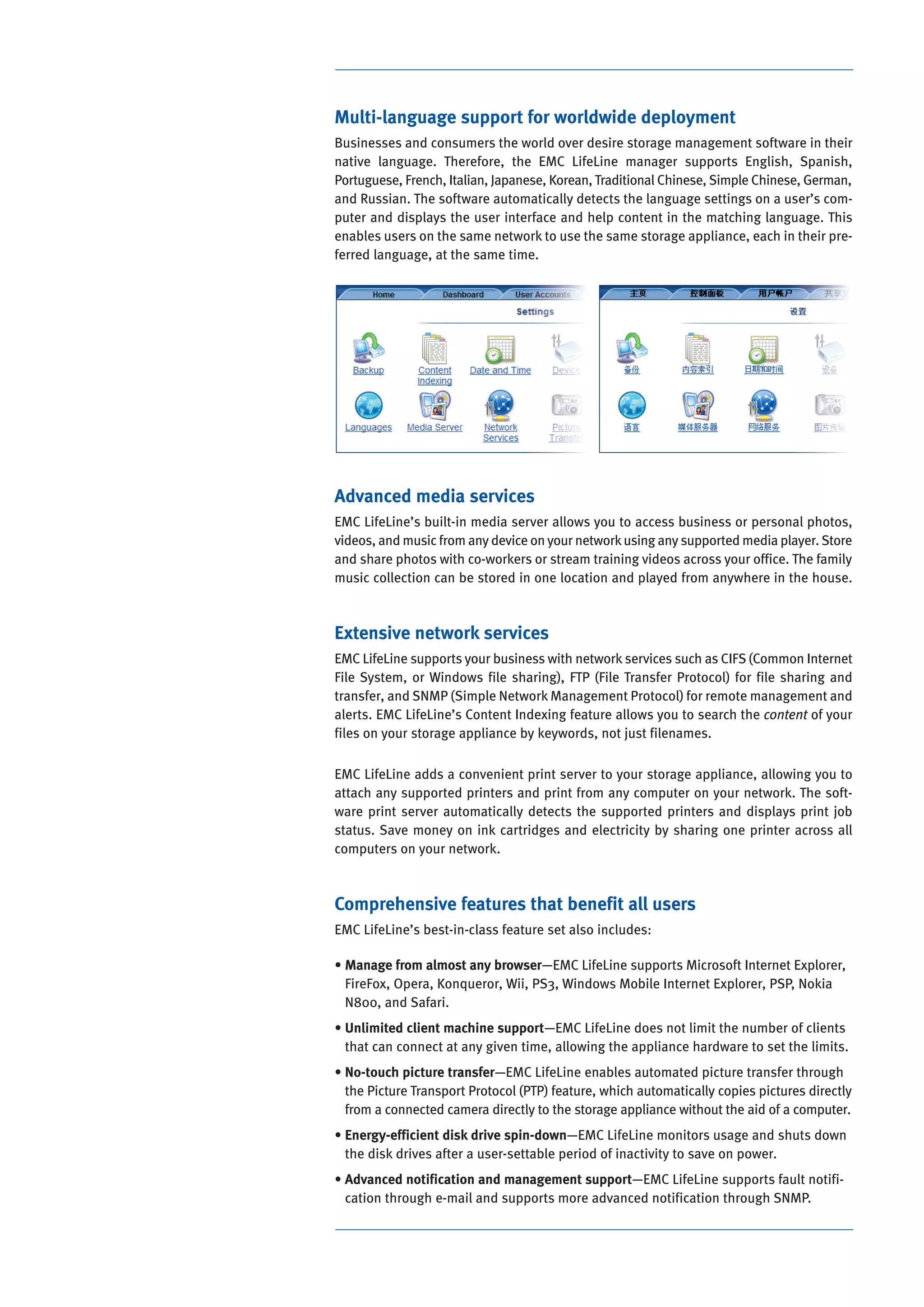
Businesses and consumers the world over desire storage management software in their
native language. Therefore, the EMC LifeLine manager supports English, Spanish,
Portuguese, French, Italian, Japanese, Korean, Traditional Chinese, Simple Chinese, German,
and Russian. The software automatically detects the language settings on a user’s computer and displays the user interface and help content in the matching language. This
enables users on the same network to use the same storage appliance, each in their preferred language, at the same time.

Advanced media services
EMC LifeLine’s built-in media server allows you to access business or personal photos,
videos, and music from any device on your network using any supported media player. Store
and share photos with co-workers or stream training videos across your office. The family
music collection can be stored in one location and played from anywhere in the house.

Extensive network services
EMC LifeLine supports your business with network services such as CIFS (Common Internet
File System, or Windows file sharing), FTP (File Transfer Protocol) for file sharing and
transfer, and SNMP (Simple Network Management Protocol) for remote management and
alerts. EMC LifeLine’s Content Indexing feature allows you to search the content of your
files on your storage appliance by keywords, not just filenames.
EMC LifeLine adds a convenient print server to your storage appliance, allowing you to
attach any supported printers and print from any computer on your network. The software print server automatically detects the supported printers and displays print job
status. Save money on ink cartridges and electricity by sharing one printer across all
computers on your network.

Comprehensive features that benefit all users
EMC LifeLine’s best-in-class feature set also includes:
• Manage from almost any browser—EMC LifeLine supports Microsoft Internet Explorer,
FireFox, Opera, Konqueror, Wii, PS3, Windows Mobile Internet Explorer, PSP, Nokia
N800, and Safari.
• Unlimited client machine support—EMC LifeLine does not limit the number of clients
that can connect at any given time, allowing the appliance hardware to set the limits.
• No-touch picture transfer—EMC LifeLine enables automated picture transfer through
the Picture Transport Protocol (PTP) feature, which automatically copies pictures directly
from a connected camera directly to the storage appliance without the aid of a computer.
• Energy-efficient disk drive spin-down—EMC LifeLine monitors usage and shuts down
the disk drives after a user-settable period of inactivity to save on power.
• Advanced notification and management support—EMC LifeLine supports fault notification through e-mail and supports more advanced notification through SNMP.
Highlights
Feature

Details

Network Connection

Wired Ethernet, 802.11 b/g/n as supported by the
appliance

Peripheral Connection

USB 2.0, eSATA as supported by the appliance

Client Count

Unlimited

Client OS Supported

Windows, Mac

User Interface

Browser-based user interface, low-touch setup,
automatic configuration

Choose EMC
EMC Corporation is the world’s leading developer and provider of information management
solutions that enable organizations of all sizes
to transform the way they compete and create
value. Information about the EMC LifeLine OEM
software can be found at www.EMC.com/LifeLine.

SSL for Browser-based Interface

Self-generated certificate, 128-bit encryption key

Administrator Access

Multiple simultaneous administrator user accounts

Auto-update Service

Firmware support

Integrated Backup Software

EMC Retrospect Express for Windows and Apple
Macintosh clients

Browsers Supported

Windows Internet Explorer, FireFox, Opera,
Konqueror, Wii, PS3, Windows Mobile Internet
Explorer, PSP, Nokia N800, Safari

Media Services Supported

uPnP AV/DLNA, enabling support for Xbox 360, PS3,
iTunes, FrontRow, Roku, PSP, and others

Network Print Server

Index and search document contents in the
following MIME formats: Text (.txt/.text), HTML
(.html/.htm/.shtml/.php), MS Word (.doc/.dot),
MS Excel (.xls), MS PowerPoint (.ppt), Adobe PDF
(.pdf)

Peripheral Support

USB, eSATA, Print Server, PTP

Active Directory Support

AD Member Server, Single Sign-On, Authentication
by Domain Controller, Automatic Private Share
Creation, Automatic Time Synchronization with
Domain Controller

Protection Level

No-touch, out-of-the-box RAID 5, RAID 1/0, or
two-drive RAID 1

Power Handling

Power-saving mode, UPS support, drive spin-down

Supported Network Services

Picture Transfer Protocol (PTP), File Transfer Protocol
(FTP), Simple Network Management Protocol
(SNMP), Common Internet File System (CIFS)

Physical Device Monitoring,
Error Notification

CPU temperature, fan status, disk status, voltage
monitoring; e-mail notification

Localization

EMC Corporation
Hopkinton
Massachusetts
01748-9103
1-508-435-1000
In North America 1-866-464-7381

Yes

Built-in Content Indexing

Language support for English, Spanish, Portuguese,
French, Italian, Japanese, Korean, Traditional
Chinese, Simple Chinese, German, and Russian

The EMC LifeLine OEM software is a product available for volume licensing to original
equipment manufacturers (OEMs) only. If you are an OEM and want to inquire about EMC
LifeLine, please send an e-mail to emclifeline@EMC.com.

EMC2, EMC, Retrospect, and where information
lives are registered trademarks and EMC LifeLine
is a trademark of EMC Corporation. All other
trademarks used herein are the property of
their respective owners.
© Copyright 2007 EMC Corporation.
All rights reserved. Published in the USA. 11/07
Data Sheet
H2889.1

www.EMC.com/LifeLine

Emc lifeline

  • 1.
    Data Sheet EMC LifeLine Thesimplest way to store, protect, access, and share digital content for small and home offices and networked home consumers The Big Picture Software to help you manage your digital life • Network-attached storage (NAS) OEM software The EMC LifeLine™ OEM software enables you to store and manage all of your digital content—business records, photos, music downloads, movies, backups, any digital file— safely and securely on one, centralized, affordable storage appliance. • Easy to use and set up • Out-of-the-box RAID data protection and security • Integrated control of EMC Retrospect backup for connected computers • Content indexing and searching • Supports Windows and Macintosh computers and networked multimedia devices • Advanced media and network services The EMC LifeLine OEM software enables original equipment manufacturers to deliver low-cost, yet powerful NAS appliances for the consumer and small office/home office markets. EMC LifeLine delivers powerful network-based storage and backup functionality, along with out-of-the-box data protection, file management, and media serving capabilities. It includes an integrated version of EMC® Retrospect® Express (award-winning backup software) with support for an unlimited number of client machines. It also supports multiple languages (English, Spanish, Portuguese, French, Italian, Japanese, Korean, Traditional and Simple Chinese, German, and Russian) for worldwide deployment. A storage appliance running EMC LifeLine is particularly appropriate for small office, home office, or personal home use where multiple PCs or other digital devices are present on a network, where multiple users share files, where robust protection for those files is required, or simply where increased storage capacity is desired. EMC LifeLine makes it all possible—and a simple, low-touch installation and four-step set-up wizard make it accessible to anyone. Connect, access, and share your entire digital universe A storage appliance running EMC LifeLine can store all your files in one centralized place. It’s an always-on appliance for instant retrieval of any file from any networked device at any time. The software supports specialized media streaming, such as iTunes and game console features, for home/media users. It also supports specialized features for business users, such as a print server, e-mail fault notification, and support for Microsoft Active Directory.
  • 2.
    Simple to setup, easy to use EMC LifeLine packages the latest storage features in a user-friendly design. The device installation is straightforward: a four-step setup automatically detects and configures your network settings to get you running in minutes. Simple installation Connect and power-up the hardware, start the setup wizard, and complete four steps to start protecting and sharing your digital content. EMC LifeLine reduces complexity without compromising functionality or performance, making it enjoyable and functional for novice and expert users alike. The browser-based interface means you can manage the device from almost anywhere on your network, including any connected device with browser support. A handy home page puts the most commonly used tasks just a click away. Easy-to-navigate tabs put functionality at your fingertips. On-screen hints provide users with instant assistance on every page, with more in-depth online help available for every operation. Data protection and security with EMC Retrospect Award-winning backup software with more than 10 million installations—included. EMC LifeLine protects against catastrophic loss from disk drive failure with no-touch, out-of-the-box RAID protection. The software supports uninterruptible power supplies (UPS) for orderly shutdown and data protection in the event of power loss. Individual user accounts and shared folders secure data against unauthorized access. Support for Microsoft Active Directory enables integration in a single sign-on business authentication environment. EMC LifeLine includes unlimited licenses for EMC Retrospect Express to back up your network-connected computers to the appliance. The manager software contains integrated backup controls and reporting functionality that allows an administrator to initiate a backup of any computer from any other computer on your network, and to report the status of those backups centrally. EMC Retrospect is the world’s most popular and most widely deployed backup software with more than 10 million installations. EMC Retrospect delivers automated, reliable, cost-effective protection for small and medium businesses (SMBs) and home users.
  • 3.
    Multi-language support forworldwide deployment Businesses and consumers the world over desire storage management software in their native language. Therefore, the EMC LifeLine manager supports English, Spanish, Portuguese, French, Italian, Japanese, Korean, Traditional Chinese, Simple Chinese, German, and Russian. The software automatically detects the language settings on a user’s computer and displays the user interface and help content in the matching language. This enables users on the same network to use the same storage appliance, each in their preferred language, at the same time. Advanced media services EMC LifeLine’s built-in media server allows you to access business or personal photos, videos, and music from any device on your network using any supported media player. Store and share photos with co-workers or stream training videos across your office. The family music collection can be stored in one location and played from anywhere in the house. Extensive network services EMC LifeLine supports your business with network services such as CIFS (Common Internet File System, or Windows file sharing), FTP (File Transfer Protocol) for file sharing and transfer, and SNMP (Simple Network Management Protocol) for remote management and alerts. EMC LifeLine’s Content Indexing feature allows you to search the content of your files on your storage appliance by keywords, not just filenames. EMC LifeLine adds a convenient print server to your storage appliance, allowing you to attach any supported printers and print from any computer on your network. The software print server automatically detects the supported printers and displays print job status. Save money on ink cartridges and electricity by sharing one printer across all computers on your network. Comprehensive features that benefit all users EMC LifeLine’s best-in-class feature set also includes: • Manage from almost any browser—EMC LifeLine supports Microsoft Internet Explorer, FireFox, Opera, Konqueror, Wii, PS3, Windows Mobile Internet Explorer, PSP, Nokia N800, and Safari. • Unlimited client machine support—EMC LifeLine does not limit the number of clients that can connect at any given time, allowing the appliance hardware to set the limits. • No-touch picture transfer—EMC LifeLine enables automated picture transfer through the Picture Transport Protocol (PTP) feature, which automatically copies pictures directly from a connected camera directly to the storage appliance without the aid of a computer. • Energy-efficient disk drive spin-down—EMC LifeLine monitors usage and shuts down the disk drives after a user-settable period of inactivity to save on power. • Advanced notification and management support—EMC LifeLine supports fault notification through e-mail and supports more advanced notification through SNMP.
  • 4.
    Highlights Feature Details Network Connection Wired Ethernet,802.11 b/g/n as supported by the appliance Peripheral Connection USB 2.0, eSATA as supported by the appliance Client Count Unlimited Client OS Supported Windows, Mac User Interface Browser-based user interface, low-touch setup, automatic configuration Choose EMC EMC Corporation is the world’s leading developer and provider of information management solutions that enable organizations of all sizes to transform the way they compete and create value. Information about the EMC LifeLine OEM software can be found at www.EMC.com/LifeLine. SSL for Browser-based Interface Self-generated certificate, 128-bit encryption key Administrator Access Multiple simultaneous administrator user accounts Auto-update Service Firmware support Integrated Backup Software EMC Retrospect Express for Windows and Apple Macintosh clients Browsers Supported Windows Internet Explorer, FireFox, Opera, Konqueror, Wii, PS3, Windows Mobile Internet Explorer, PSP, Nokia N800, Safari Media Services Supported uPnP AV/DLNA, enabling support for Xbox 360, PS3, iTunes, FrontRow, Roku, PSP, and others Network Print Server Index and search document contents in the following MIME formats: Text (.txt/.text), HTML (.html/.htm/.shtml/.php), MS Word (.doc/.dot), MS Excel (.xls), MS PowerPoint (.ppt), Adobe PDF (.pdf) Peripheral Support USB, eSATA, Print Server, PTP Active Directory Support AD Member Server, Single Sign-On, Authentication by Domain Controller, Automatic Private Share Creation, Automatic Time Synchronization with Domain Controller Protection Level No-touch, out-of-the-box RAID 5, RAID 1/0, or two-drive RAID 1 Power Handling Power-saving mode, UPS support, drive spin-down Supported Network Services Picture Transfer Protocol (PTP), File Transfer Protocol (FTP), Simple Network Management Protocol (SNMP), Common Internet File System (CIFS) Physical Device Monitoring, Error Notification CPU temperature, fan status, disk status, voltage monitoring; e-mail notification Localization EMC Corporation Hopkinton Massachusetts 01748-9103 1-508-435-1000 In North America 1-866-464-7381 Yes Built-in Content Indexing Language support for English, Spanish, Portuguese, French, Italian, Japanese, Korean, Traditional Chinese, Simple Chinese, German, and Russian The EMC LifeLine OEM software is a product available for volume licensing to original equipment manufacturers (OEMs) only. If you are an OEM and want to inquire about EMC LifeLine, please send an e-mail to emclifeline@EMC.com. EMC2, EMC, Retrospect, and where information lives are registered trademarks and EMC LifeLine is a trademark of EMC Corporation. All other trademarks used herein are the property of their respective owners. © Copyright 2007 EMC Corporation. All rights reserved. Published in the USA. 11/07 Data Sheet H2889.1 www.EMC.com/LifeLine