Dell EMC Unity™ Family
Configuration Worksheet
Part Number: 302-002-558 Rev 03
Use this worksheet to collect and record information for configuring the system with the following:
• Online Support
• Connection Utility
• Unisphere Initial Configuration wizard
This worksheet should be used in conjunction with the Connection Utility, Unity Quick Start guide, and Unisphere Online Help for
an installation overview and additional guidance for setting up the Unity system.
Note: Sites with restricted Internet access must download the Connection Utility software and obtain product license keys in advance
of configuring the system. Go to the Unity Info Hub at http://bit.ly/unityinfohub for detailed instructions.
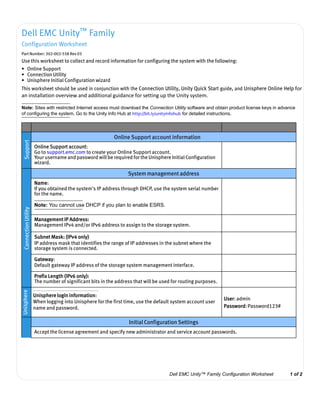
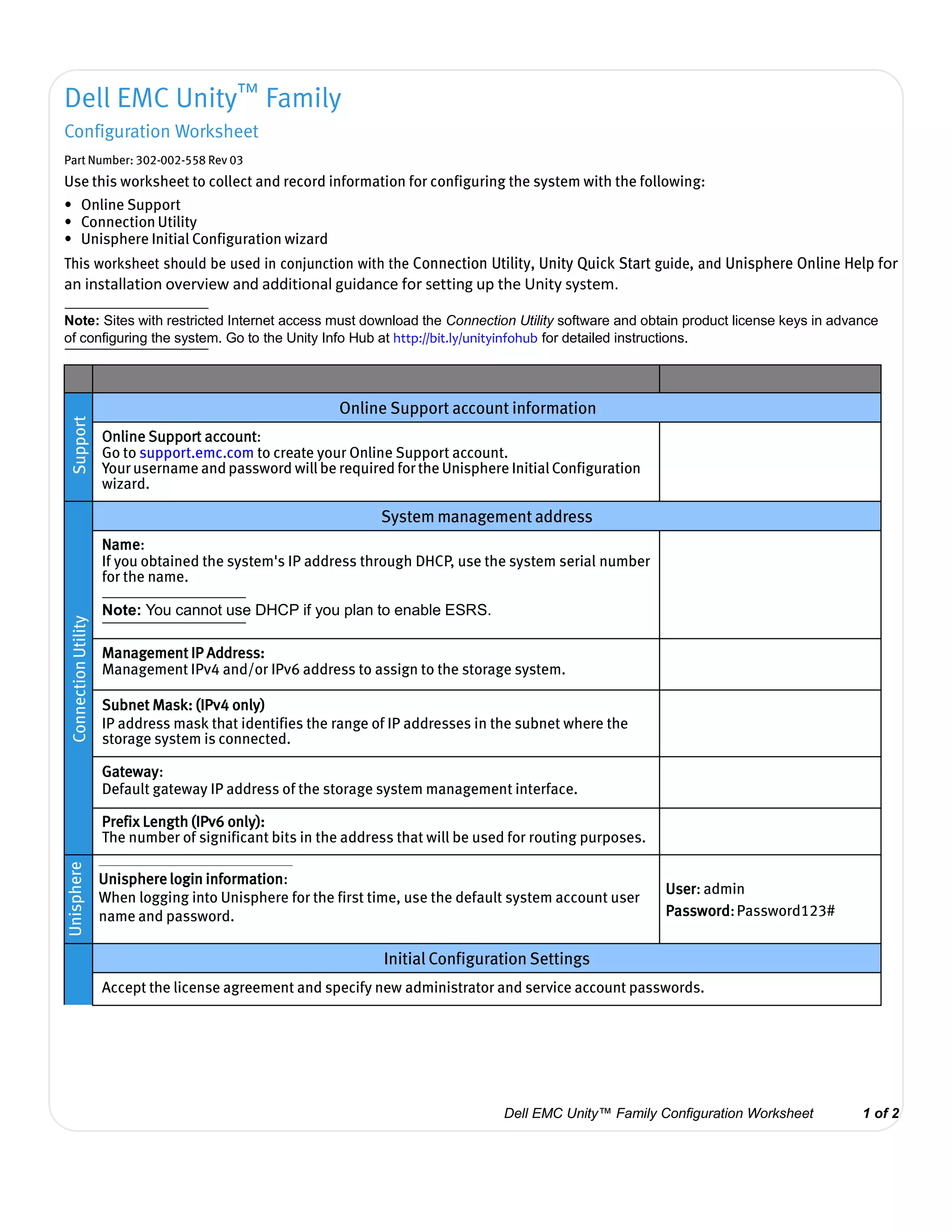
Support
Online Support account information
Online Support account:
Go to support.emc.com to create your Online Support account.
Your username and password will be required for the Unisphere Initial Configuration
wizard.
ConnectionUtility
System management address
Name:
If you obtained the system's IP address through DHCP, use the system serial number
for the name.
Note: You cannot use DHCP if you plan to enable ESRS.
Management IP Address:
Management IPv4 and/or IPv6 address to assign to the storage system.
Subnet Mask: (IPv4 only)
IP address mask that identifies the range of IP addresses in the subnet where the
storage system is connected.
Gateway:
Default gateway IP address of the storage system management interface.
Prefix Length (IPv6 only):
The number of significant bits in the address that will be used for routing purposes.
Unisphere
Unisphere login information:
When logging into Unisphere for the first time, use the default system account user
name and password.
User: admin
Password:Password123#
Initial Configuration Settings
Accept the license agreement and specify new administrator and service account passwords.
Dell EMC Unity™ Family Configuration Worksheet 1 of 2
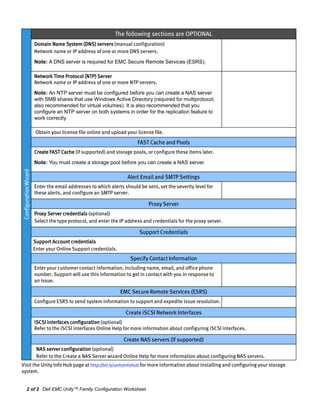
ConfigurationWizard
The following sections are OPTIONAL
Domain Name System (DNS) servers (manual configuration)
Network name or IP address of one or more DNS servers.
Note: A DNS server is required for EMC Secure Remote Services (ESRS).
Network Time Protocol (NTP) Server
Network name or IP address of one or more NTP servers.
Note: An NTP server must be configured before you can create a NAS server
with SMB shares that use Windows Active Directory (required for multiprotocol,
also recommended for virtual volumes). It is also recommended that you
configure an NTP server on both systems in order for the replication feature to
work correctly.
Obtain your license file online and upload your license file.
FAST Cache and Pools
Create FAST Cache (if supported) and storage pools, or configure these items later.
Note: You must create a storage pool before you can create a NAS server.
Alert Email and SMTP Settings
Enter the email addresses to which alerts should be sent, set the severity level for
these alerts, and configure an SMTP server.
Proxy Server
Proxy Server credentials (optional)
Select the type protocol, and enter the IP address and credentials for the proxy server.
Support Credentials
Support Account credentials
Enter your Online Support credentials.
Specify Contact Information
Enter your customer contact information, including name, email, and office phone
number. Support will use this information to get in contact with you in response to
an issue.
EMC Secure Remote Services (ESRS)
Configure ESRS to send system information to support and expedite issue resolution.
Create iSCSI Network Interfaces
iSCSI interfaces configuration (optional)
Refer to the iSCSI interfaces Online Help for more information about configuring iSCSI interfaces.
Create NAS servers (if supported)
NAS server configuration (optional)
Refer to the Create a NAS Server wizard Online Help for more information about configuring NAS servers.
Visit the Unity Info Hub page at http://bit.ly/unityinfohub for more information about installing and configuring your storage
system.
2 of 2 Dell EMC Unity™ Family Configuration Worksheet

Dell emc unity configuration worksheet

  • 1.
    Dell EMC Unity™Family Configuration Worksheet Part Number: 302-002-558 Rev 03 Use this worksheet to collect and record information for configuring the system with the following: • Online Support • Connection Utility • Unisphere Initial Configuration wizard This worksheet should be used in conjunction with the Connection Utility, Unity Quick Start guide, and Unisphere Online Help for an installation overview and additional guidance for setting up the Unity system. Note: Sites with restricted Internet access must download the Connection Utility software and obtain product license keys in advance of configuring the system. Go to the Unity Info Hub at http://bit.ly/unityinfohub for detailed instructions. Support Online Support account information Online Support account: Go to support.emc.com to create your Online Support account. Your username and password will be required for the Unisphere Initial Configuration wizard. ConnectionUtility System management address Name: If you obtained the system's IP address through DHCP, use the system serial number for the name. Note: You cannot use DHCP if you plan to enable ESRS. Management IP Address: Management IPv4 and/or IPv6 address to assign to the storage system. Subnet Mask: (IPv4 only) IP address mask that identifies the range of IP addresses in the subnet where the storage system is connected. Gateway: Default gateway IP address of the storage system management interface. Prefix Length (IPv6 only): The number of significant bits in the address that will be used for routing purposes. Unisphere Unisphere login information: When logging into Unisphere for the first time, use the default system account user name and password. User: admin Password:Password123# Initial Configuration Settings Accept the license agreement and specify new administrator and service account passwords. Dell EMC Unity™ Family Configuration Worksheet 1 of 2
  • 2.
    ConfigurationWizard The following sectionsare OPTIONAL Domain Name System (DNS) servers (manual configuration) Network name or IP address of one or more DNS servers. Note: A DNS server is required for EMC Secure Remote Services (ESRS). Network Time Protocol (NTP) Server Network name or IP address of one or more NTP servers. Note: An NTP server must be configured before you can create a NAS server with SMB shares that use Windows Active Directory (required for multiprotocol, also recommended for virtual volumes). It is also recommended that you configure an NTP server on both systems in order for the replication feature to work correctly. Obtain your license file online and upload your license file. FAST Cache and Pools Create FAST Cache (if supported) and storage pools, or configure these items later. Note: You must create a storage pool before you can create a NAS server. Alert Email and SMTP Settings Enter the email addresses to which alerts should be sent, set the severity level for these alerts, and configure an SMTP server. Proxy Server Proxy Server credentials (optional) Select the type protocol, and enter the IP address and credentials for the proxy server. Support Credentials Support Account credentials Enter your Online Support credentials. Specify Contact Information Enter your customer contact information, including name, email, and office phone number. Support will use this information to get in contact with you in response to an issue. EMC Secure Remote Services (ESRS) Configure ESRS to send system information to support and expedite issue resolution. Create iSCSI Network Interfaces iSCSI interfaces configuration (optional) Refer to the iSCSI interfaces Online Help for more information about configuring iSCSI interfaces. Create NAS servers (if supported) NAS server configuration (optional) Refer to the Create a NAS Server wizard Online Help for more information about configuring NAS servers. Visit the Unity Info Hub page at http://bit.ly/unityinfohub for more information about installing and configuring your storage system. 2 of 2 Dell EMC Unity™ Family Configuration Worksheet