HOME AUTOMATION SYSTEM USING IOT TECHNOLOGY
CHAPTER-1
INTRODUCTION TO EMBEDDED SYSTEM
EMBEDDED SYSTEM: An embedded system is a computer system designed to perform
one or a few dedicated functions often with real-time computing constraints. It is embedded as
part of a complete device often including hardware and mechanical parts. By contrast, a
general-purpose computer, such as a personal computer (PC), is designed to be flexible and to
meet a wide range of end-user needs. Embedded systems control many devices in common
use today.
Embedded systems are controlled by one or more main processing cores that are typically
either microcontrollers or digital signal processors (DSP). The key characteristic, however, is
being dedicated to handle a particular task, which may require very powerful processors.
Since the embedded system is dedicated to specific tasks, design engineers can optimize it to
reduce the size and cost of the product and increase the reliability and performance. Some
embedded systems are mass-produced, benefiting from economies of scale.
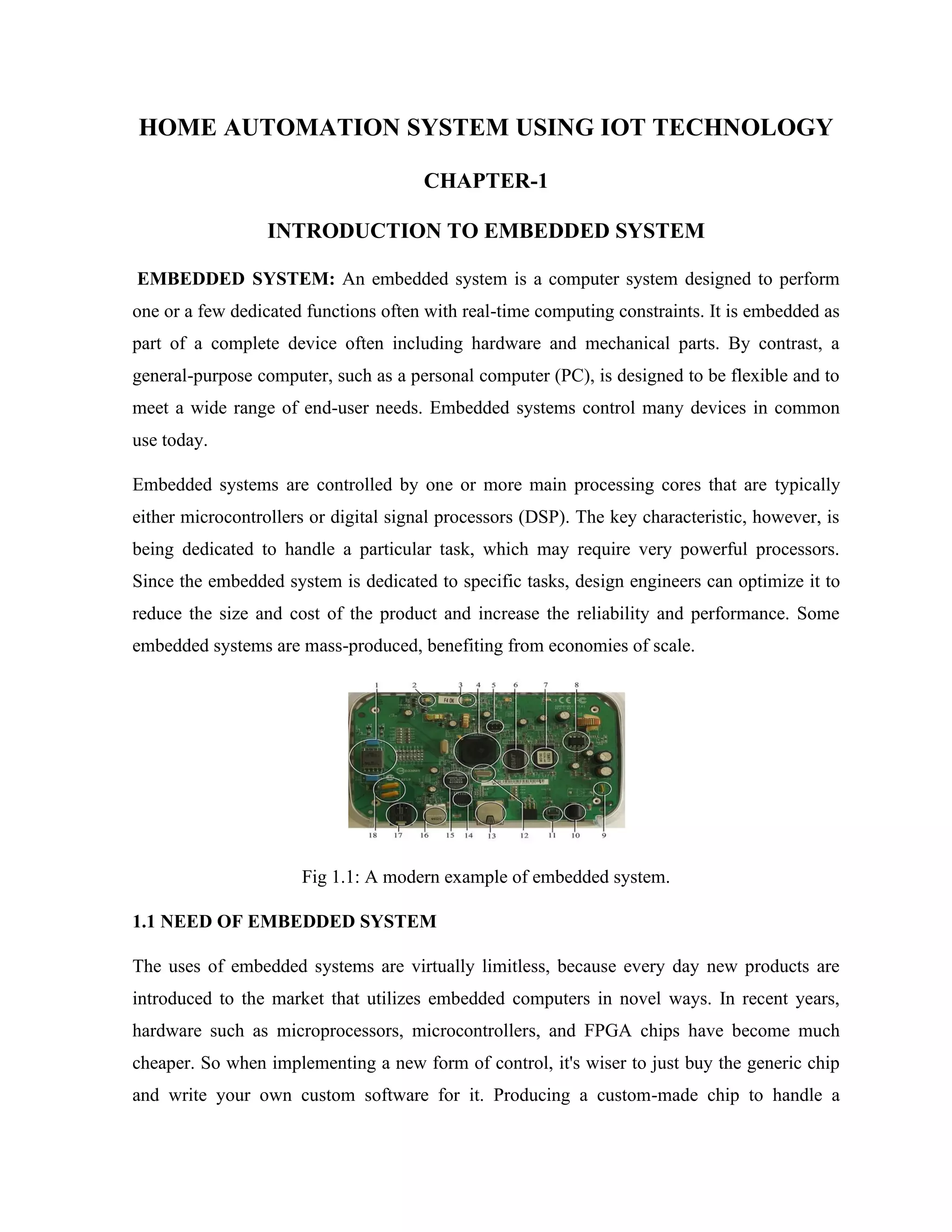
Fig 1.1: A modern example of embedded system.
1.1 NEED OF EMBEDDED SYSTEM
The uses of embedded systems are virtually limitless, because every day new products are
introduced to the market that utilizes embedded computers in novel ways. In recent years,
hardware such as microprocessors, microcontrollers, and FPGA chips have become much
cheaper. So when implementing a new form of control, it's wiser to just buy the generic chip
and write your own custom software for it. Producing a custom-made chip to handle a
particular task or set of tasks costs far more time and money. Many embedded computers even
come with extensive libraries, so that "writing your own software" becomes a very trivial task
indeed.
1.2 CLASSIFICATIONS OF EMBEDDED SYSTEM
Stand Alone Embedded System: These systems takes the input in the form of electrical
signals from transducers or commands from human beings such as pressing of a button etc..,
process them and produces desired output. This entire process of taking input, processing it
and giving output is done in standalone mode.
E.g.: microwave oven, air conditioner etc.
Real-Time Embedded Systems: Embedded systems which are used to perform a specific
task or operation in a specific time period those systems are called as real-time embedded
systems. There are two types of real-time embedded systems.
Soft Real Time Embedded Systems: These embedded systems follow a relative dead line
time period i.e.., if the task is not done in a particular time that will not cause damage to the
equipment.
E.g.: Consider a TV remote control system, if the remote control takes a few milliseconds

delay it will not cause damage either to the TV or to the remote control.
Network Communication Embedded System: A wide range network interfacing
communication is provided by using embedded systems. Consider a web camera that is
connected to the computer with internet can be used to spread communication like sending
pictures, images, videos etc.., to another computer with internet connection throughout
anywhere in the world.
Consider a web camera that is connected at the door lock.Whenever a person comes near the
door, it captures the image of a person and sends to the desktop of your computer which is
connected to internet. This gives an alerting message with image on to the desktop of your
computer, and then you can open the door lock just by clicking the mouse.
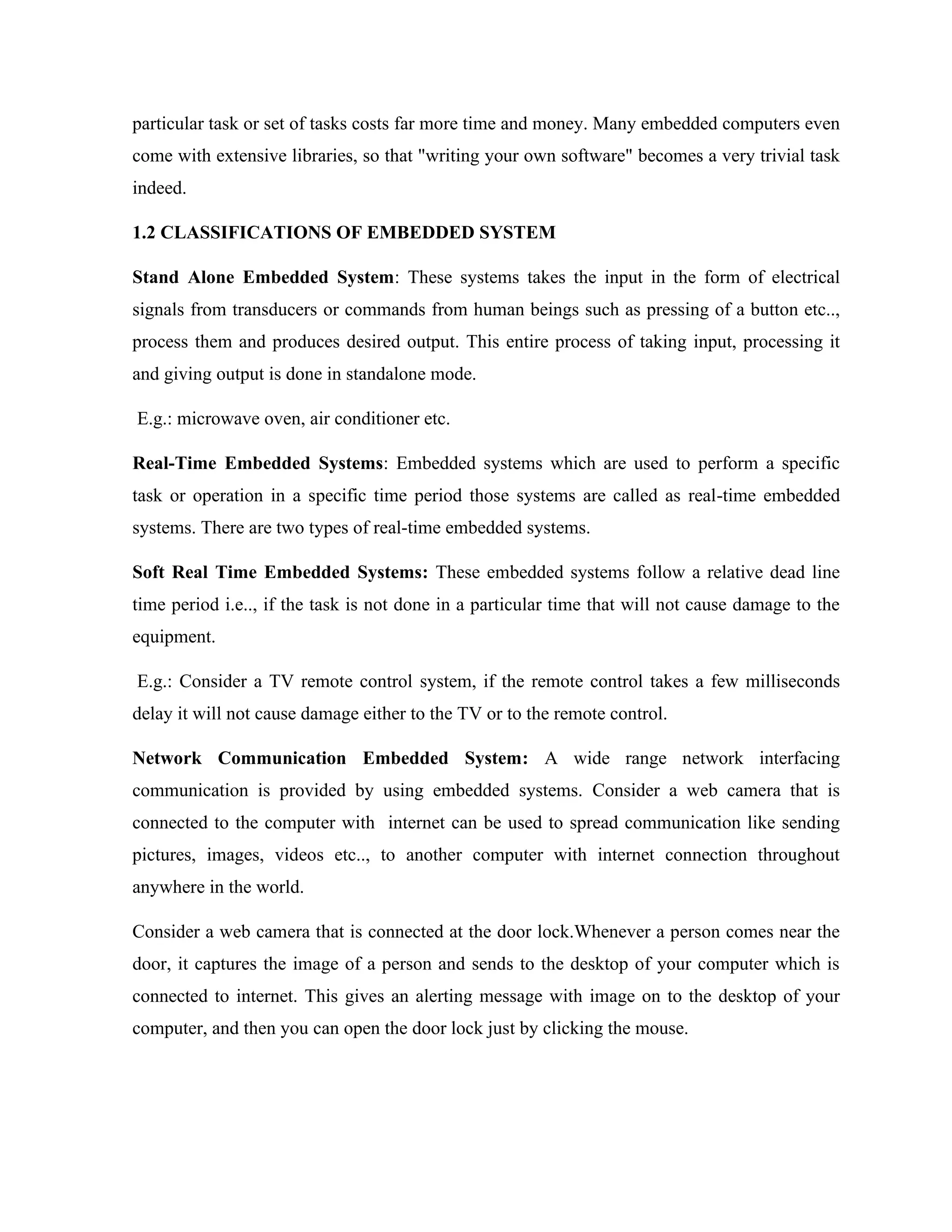
Fig 1.2: Network communication embedded systems
1.3 APPLICATIONS OF EMBEDDED SYSTEMS
Consumer applications: At home we use a number of embedded systems which include
microwave oven, remote control, VCD players, DVD players, camera etc….
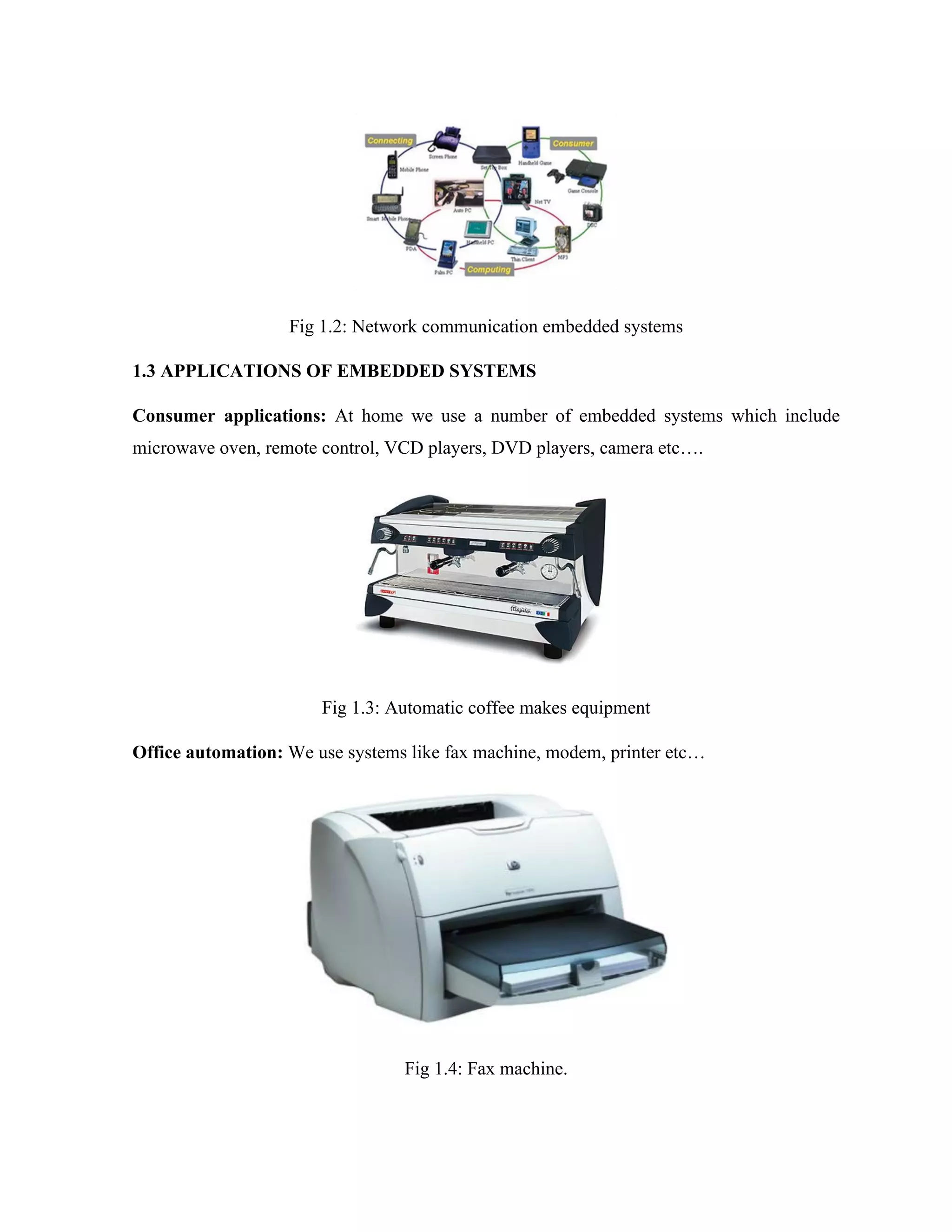
Fig 1.3: Automatic coffee makes equipment
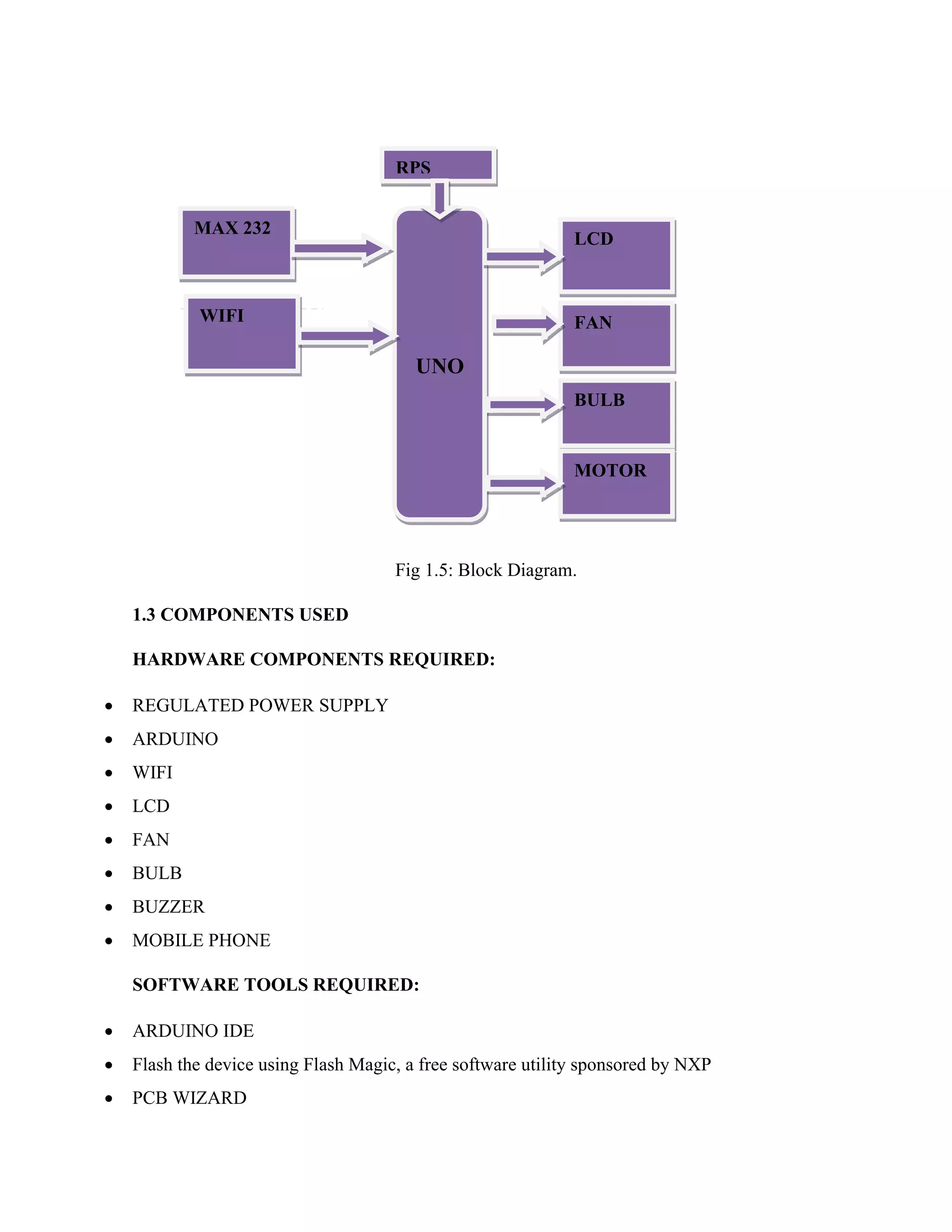
Office automation: We use systems like fax machine, modem, printer etc…
Fig 1.4: Fax machine.
Fig 1.5: Block Diagram.
1.3 COMPONENTS USED
HARDWARE COMPONENTS REQUIRED:
• REGULATED POWER SUPPLY
• ARDUINO
• WIFI
• LCD
• FAN
• BULB
• BUZZER
• MOBILE PHONE
SOFTWARE TOOLS REQUIRED:
• ARDUINO IDE
• Flash the device using Flash Magic, a free software utility sponsored by NXP
• PCB WIZARD
UNO
RPS
LCD
FAN
WIFI
MAX 232
BULB
MOTOR
CHAPTER-2
LITERATURE SURVEY
Design and Realization of Home Appliances Control System Based on The Android
Smartphone present the information about the remote appliances control system based on the
Android smart phone is designed and realized. A user logs into the smart phone interface, and
clicks the buttons gently to send message commands which will be transmitted to home
information Centre through the GSM network. Then the PIC processor recognizes the
specified command, and controls the home appliance switches in the wireless radio frequency
manner to achieve remote control of appliances ultimately. Exploiting Bluetooth on android
mobile devices for home security application present the information about mobile devoice
has been integrated into our everyday life. Home automation and security are becoming
increasingly prominent features on mobile devoices the mobile devoice and security system
communicates via Bluetooth because a short-range-only communication system was desired.
With the help of android mobile we can control task such as locking the doors, turning on/off
lights remotely. According to kaue, home automation can be useful to those who need to
access home appliances while away from their home and can improve the lives of the
disabled.
CHAPTER-3
PROBLEM IDENTIFICATION
Existing system based on with the GSM Module & Bluetooth Module only. The recent
developments in technology which permit the Use of Bluetooth and Wi-Fi have enabled
different devices to have capabilities of connecting with each other. Using a WIFI shield to act
as a Micro web server for the Arduino eliminates the need for wired connections between
the Arduino board and computer which reduces cost and enables it to work as a standalone
device. The Wi-Fi shield needs connection to the internet from a wireless router or wireless
hotspot and this would act as the gateway for the Arduino to communicate with the internet.
With this in mind, an internet based home automation system for remote control of home
appliances is designed.
CHAPTER-4
IMPLEMENTATION DETAILS
4.1 ARDUINO UNO:
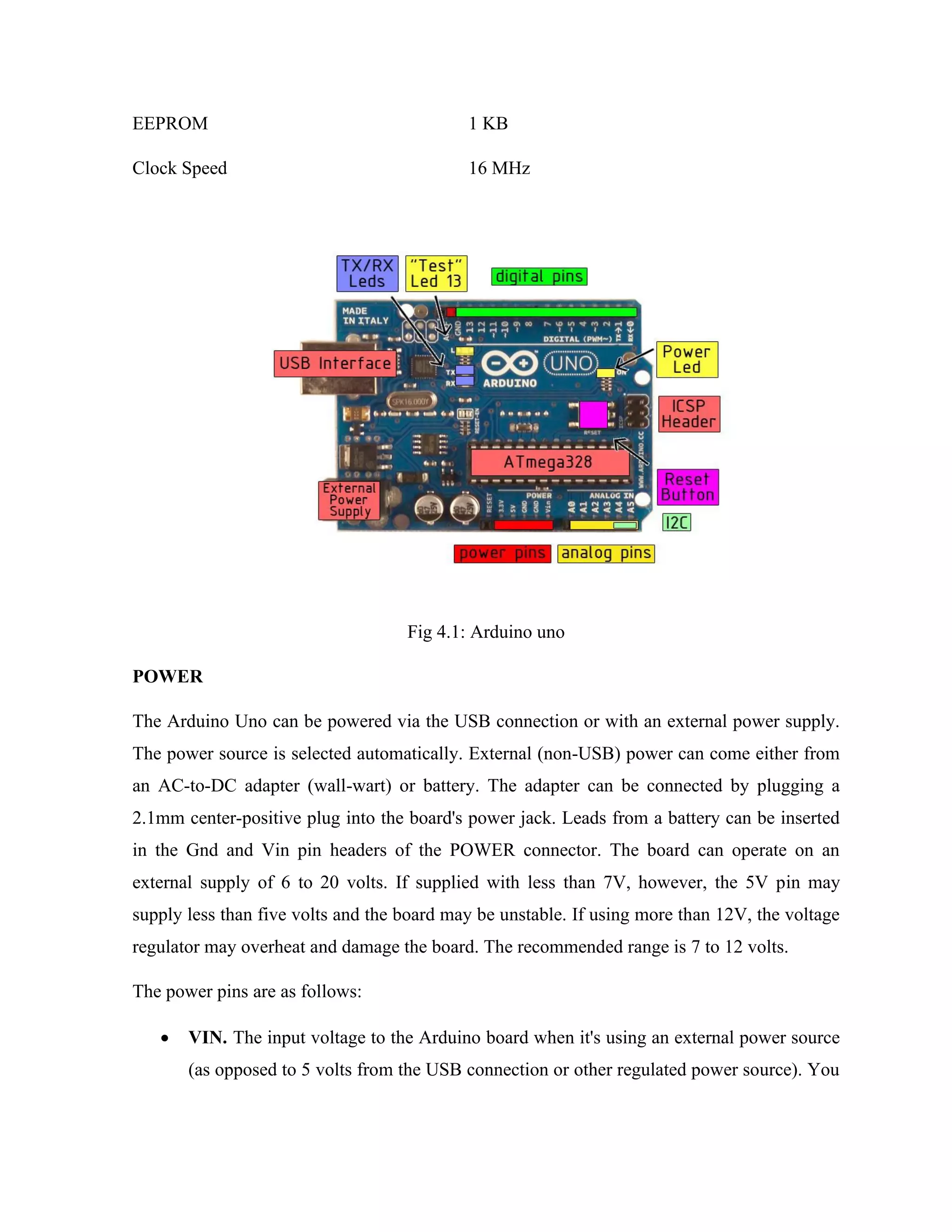
The Arduino Uno is a microcontroller board based on the ATmega328 (datasheet). It has 14
digital input/output pins (of which 6 can be used as PWM outputs), 6 analog inputs, a 16 MHz
crystal oscillator, a USB connection, a power jack, an ICSP header, and a reset button. It
contains everything needed to support the microcontroller; simply connect it to a computer
with a USB cable or power it with a AC-to-DC adapter or battery to get started. The Uno
differs from all preceding boards in that it does not use the FTDI USB-to-serial driver chip.
Instead, it features the Atmega8U2 programmed as a USB-to-serial converter. "Uno" means
one in Italian and is named to mark the upcoming release of Arduino 1.0. The Uno and
version 1.0 will be the reference versions of Arduno, moving forward. The Uno is the latest in
a series of USB Arduino boards, and the reference model for the Arduino platform; for a
comparison with previous versions, see the index of Arduino boards.
TECHNICAL SPECIFICATIONS
Microcontroller ATmega328
Operating Voltage 5V
Input Voltage (recommended) 7-12V
Input Voltage (limits) 6-20V
Digital I/O Pins 14 (of which 6 provide PWM output)
Analog Input Pins 6
DC Current per I/O Pin 40 mA
DC Current for 3.3V Pin 50 mA
Flash Memory 32 KB of which 0.5 KB used by bootloader
SRAM 2 KB
EEPROM 1 KB
Clock Speed 16 MHz
Fig 4.1: Arduino uno
POWER
The Arduino Uno can be powered via the USB connection or with an external power supply.
The power source is selected automatically. External (non-USB) power can come either from
an AC-to-DC adapter (wall-wart) or battery. The adapter can be connected by plugging a
2.1mm center-positive plug into the board's power jack. Leads from a battery can be inserted
in the Gnd and Vin pin headers of the POWER connector. The board can operate on an
external supply of 6 to 20 volts. If supplied with less than 7V, however, the 5V pin may
supply less than five volts and the board may be unstable. If using more than 12V, the voltage
regulator may overheat and damage the board. The recommended range is 7 to 12 volts.
The power pins are as follows:
• VIN. The input voltage to the Arduino board when it's using an external power source
(as opposed to 5 volts from the USB connection or other regulated power source). You
can supply voltage through this pin, or, if supplying voltage via the power jack, access
it through this pin.
• 5V. The regulated power supply used to power the microcontroller and other
components on the board. This can come either from VIN via an on-board regulator, or
be supplied by USB or another regulated 5V supply.
• 3V3. A 3.3 volt supply generated by the on-board regulator. Maximum current draw is
50 mA.
• GND. Ground pins.
MEMORY
The Atmega328 has 32 KB of flash memory for storing code (of which 0,5 KB is used for the
bootloader); It has also 2 KB of SRAM and 1 KB of EEPROM (which can be read and written
with the EEPROM library.
INPUT OUTPUT
Each of the 14 digital pins on the Uno can be used as an input or output, using pinMode(),
digitalWrite(), and digitalRead() functions. They operate at 5 volts. Each pin can provide or
receive a maximum of 40 mA and has an internal pull-up resistor (disconnected by default) of
20-50 kOhms. In addition, some pins have specialized functions
• Serial: 0 (RX) and 1 (TX). Used to receive (RX) and transmit (TX) TTL serial data.
TThese pins are connected to the corresponding pins of the ATmega8U2 USB-to-TTL
Serial chip .
• External Interrupts: 2 and 3. These pins can be configured to trigger an interrupt on
a low value, a rising or falling edge, or a change in value. See the attachInterrupt()
function for details·
• PWM: 3, 5, 6, 9, 10, and 11. Provide 8-bit PWM output with the analogWrite()
function.
• SPI: 10 (SS), 11 (MOSI), 12 (MISO), 13 (SCK). These pins support SPI
communication, which,although provided by the underlying hardware, is not currently
included in the Arduino language.
• LED: 13. There is a built-in LED connected to digital pin 13. When the pin is HIGH
value, the LED is on, when the pin is LOW, it's off.
The Uno has 6 analog inputs, each of which provide 10 bits of resolution (i.e. 1024 different
values). By default they measure from ground to 5 volts, though is it possible to change the
upper end of their range using the AREF pin and the analogReference() function.
Additionally, some pins have specialized functionality.
• I2C: 4 (SDA) and 5 (SCL). Support I2C (TWI) communication using the Wire library.
There are a couple of other pins on the board:
AREF. Reference voltage for the analog inputs. Used with analogReference().
Reset. Bring this line LOW to reset the microcontroller. Typically used to add a reset
button to shields which block the one on the board.
COMMUNICATION
The Arduino Uno has a number of facilities for communicating with a computer, another
Arduino, or other microcontrollers. The ATmega328 provides UART TTL (5V) serial
communication, which is available on digital pins 0 (RX) and 1 (TX). An ATmega8U2 on the
board channels this serial communication over USB and appears as a virtual com port to
software on the computer. The '8U2 firmware uses the standard USB COM drivers, and no
external driver is needed. However, on Windows, an *.inf file is required..
The Arduino software includes a serial monitor which allows simple textual data to be sent to
and from the Arduino board. The RX and TX LEDs on the board will flash when data is being
transmitted via the USB-toserial chip and USB connection to the computer (but not for serial
communication on pins 0 and 1).
A SoftwareSerial library allows for serial communication on any of the Uno's digital pins.The
ATmega328 also support I2C (TWI) and SPI communication. The Arduino software includes
a Wire library to simplify use of the I2C bus; see the documentation for details. To use the SPI
communication,
PROGRAMMING
Arduino Uno can be programmed with the Arduino software (download). Select "Arduino
Uno w/ATmega328" from the Tools > Board menu (according to the microcontroller on your
board). For details, see the reference and tutorials.
The ATmega328 on the Arduino Uno comes preburned with a bootloader that allows you to
upload new code to it without the use of an external hardware programmer. It communicates
using the original STK500 protocol (reference, C header files).
You can also bypass the bootloader and program the microcontroller through the ICSP (In-
Circuit Serial Programming) header; see these instructions for details.
The ATmega8U2 firmware source code is available. The ATmega8U2 is loaded with a DFU
bootloader, which can be activated by connecting the solder jumper on the back of the board
(near the map of Italy) and then resetting the 8U2. You can then use Atmel's FLIP software
(Windows) or the DFU programmer (Mac OS X and Linux) to load a new firmware. Or you
can use the ISP header with an external programmer (overwriting the DFU bootloader).
AUTOMATIC SOFTWARE RESET
Rather than requiring a physical press of the reset button before an upload, the Arduino Uno is
designed in a way that allows it to be reset by software running on a connected computer. One
of the hardware flow control lines (DTR) of the ATmega8U2 is connected to the reset line of
the ATmega328 via a 100 nanofarad capacitor. When this line is asserted (taken low), the
reset line drops long enough to reset the chip. The Arduino software uses this capability to
allow you to upload code by simply pressing the upload button in the Arduino environment.
This means that the bootloader can have a shorter timeout, as the lowering of DTR can be
well-coordinated with the start of the upload.
This setup has other implications. When the Uno is connected to either a computer running
Mac OS X or Linux, it resets each time a connection is made to it from software (via USB).
For the following half second or so, the bootloader is running on the Uno. While it is
programmed to ignore malformed data (i.e. anything besides an upload of new code), it will
intercept the first few bytes of data sent to the board after a connection is opened. If a sketch
running on the board receives one-time configuration or other data when it first starts, make
sure that the software with which it communicates waits a second after opening the connection
and before sending this data.
The Uno contains a trace that can be cut to disable the auto-reset. The pads on either side of
the trace can be soldered together to re-enable it. It's labeled "RESET-EN". You may also be
able to disable the auto-reset by connecting a 110 ohm resistor from 5V to the reset line.
USB OVER CURRENT PROTECTION
The Arduino Uno has a resettable polyfuse that protects your computer's USB ports from
shorts and overcurrent. Although most computers provide their own internal protection, the
fuse provides an extra layer of protection. If more than 500 mA is applied to the USB port, the
fuse will automatically break the connection until the short or overload is removed.
PHYSICAL CHARECTERISTICS
The maximum length and width of the Uno PCB are 2.7 and 2.1 inches respectively, with the
USB connector and power jack extending beyond the former dimension. Three screw holes
allow the board to be attached to a surface or case. Note that the distance between digital pins
7 and 8 is 160 mil (0.16"), not an even multiple of the 100 mil spacing of the other pins.
4.2 REGULATED POWER SUPPLY
A variable regulated power supply, also called a variable bench power supply, is one
where you can continuously adjust the output voltage to your requirements. Varying
the output of the power supply is the recommended way to test a project after having
double checked parts placement against circuit drawings and the parts placement guide.
This type of regulation is ideal for having a simple variable bench power supply.
Actually this is quite important because one of the first projects a hobbyist should
undertake is the construction of a variable regulated power supply. While a dedicated
supply is quite handy e.g. 5V or 12V, it's much handier to have a variable supply on
hand, especially for testing.
Most digital logic circuits and processors need a 5 volt power supply. To use these
parts we need to build a regulated 5 volt source. Usually you start with an unregulated
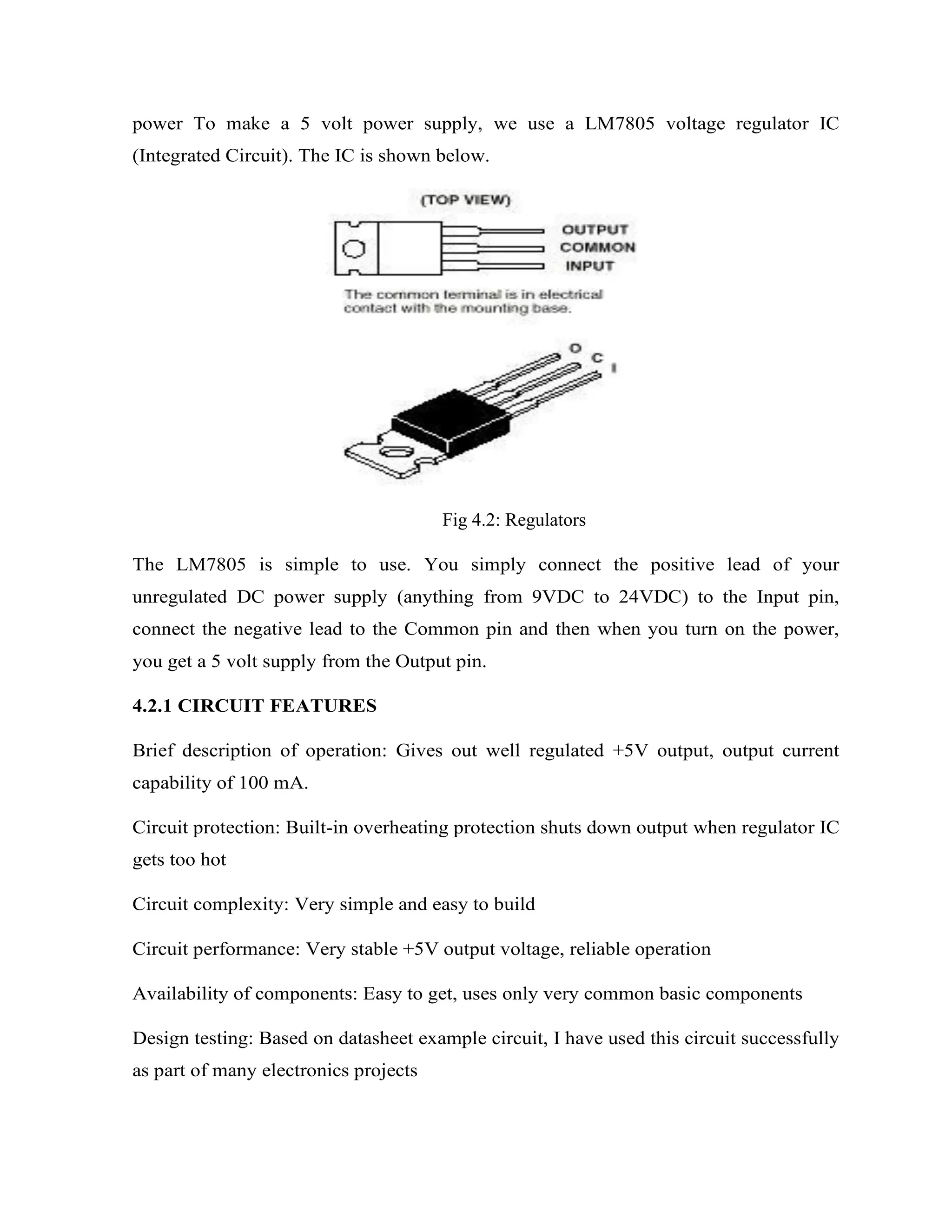
power To make a 5 volt power supply, we use a LM7805 voltage regulator IC
(Integrated Circuit). The IC is shown below.
Fig 4.2: Regulators
The LM7805 is simple to use. You simply connect the positive lead of your
unregulated DC power supply (anything from 9VDC to 24VDC) to the Input pin,
connect the negative lead to the Common pin and then when you turn on the power,
you get a 5 volt supply from the Output pin.
4.2.1 CIRCUIT FEATURES
Brief description of operation: Gives out well regulated +5V output, output current
capability of 100 mA.
Circuit protection: Built-in overheating protection shuts down output when regulator IC
gets too hot
Circuit complexity: Very simple and easy to build
Circuit performance: Very stable +5V output voltage, reliable operation
Availability of components: Easy to get, uses only very common basic components
Design testing: Based on datasheet example circuit, I have used this circuit successfully
as part of many electronics projects
Applications: Part of electronics devices, small laboratory power supply
Power supply voltage: Unregulated DC 8-18V power supply
Power supply current: Needed output current + 5 mA
Component costs: Few dollars for the electronics component plus the input
t.ransformer cost
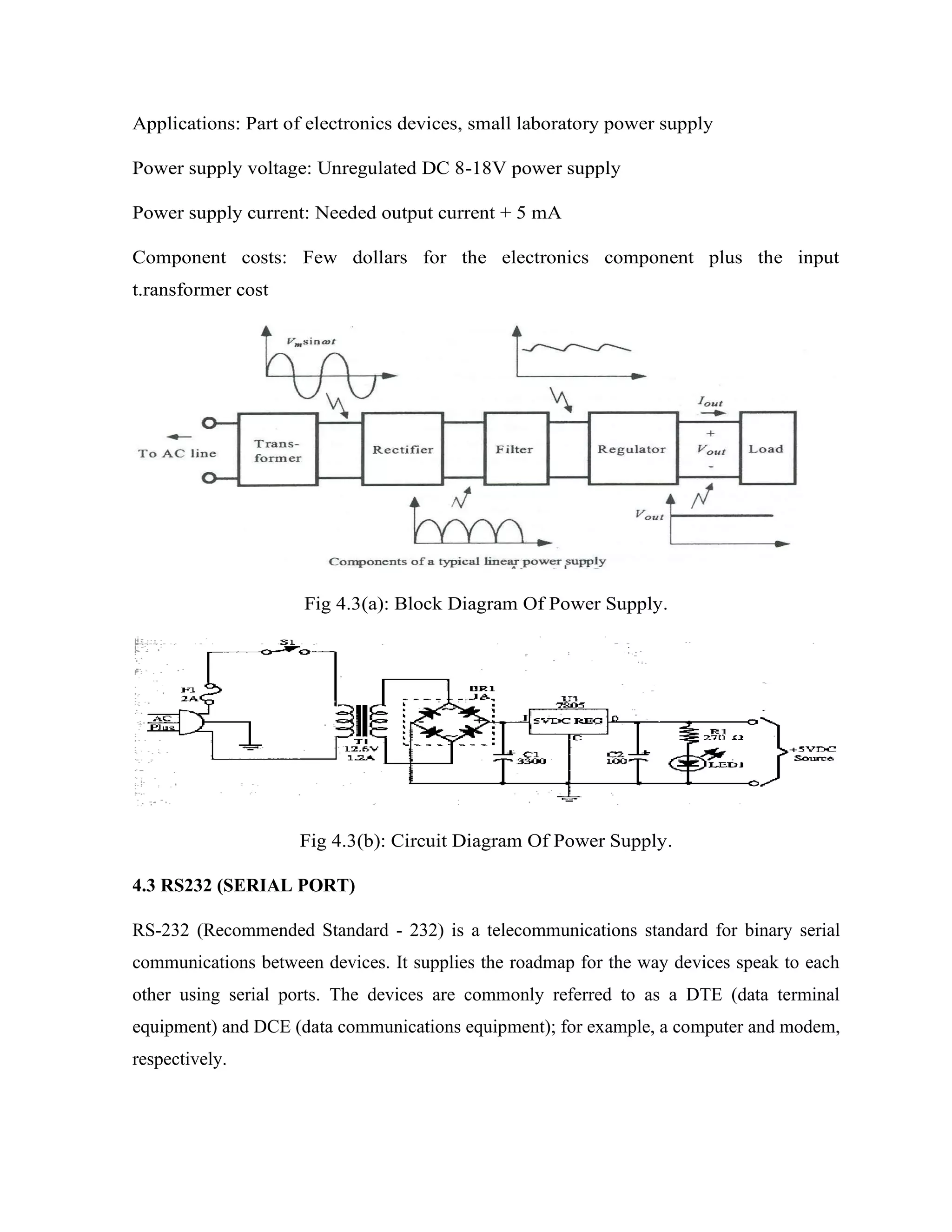
Fig 4.3(a): Block Diagram Of Power Supply.
Fig 4.3(b): Circuit Diagram Of Power Supply.
4.3 RS232 (SERIAL PORT)
RS-232 (Recommended Standard - 232) is a telecommunications standard for binary serial
communications between devices. It supplies the roadmap for the way devices speak to each
other using serial ports. The devices are commonly referred to as a DTE (data terminal
equipment) and DCE (data communications equipment); for example, a computer and modem,
respectively.
RS232 is the most known serial port used in transmitting the data in communication and
interface. Even though serial port is harder to program than the parallel port, this is the most
effective method in which the data transmission requires less wires that yields to the less cost.
The RS232 is the communication line which enables the data transmission by only using three
wire links. The three links provides ‘transmit’, ‘receive’ and common ground...
The ‘transmit’ and ‘receive’ line on this connecter send and receive data between the
computers. As the name indicates, the data is transmitted serially. The two pins are TXD &
RXD. There are other lines on this port as RTS, CTS, DSR, DTR, and RTS, RI. The ‘1’ and
‘0’ are the data which defines a voltage level of 3V to 25V and -3V to -25V respectively.
The electrical characteristics of the serial port as per the EIA (Electronics Industry
Association) RS232C Standard specifies a maximum baud rate of 20,000bps, which is slow
compared to today’s standard speed. For this reason, we have chosen the new RS-232D
Standard, which was recently released.
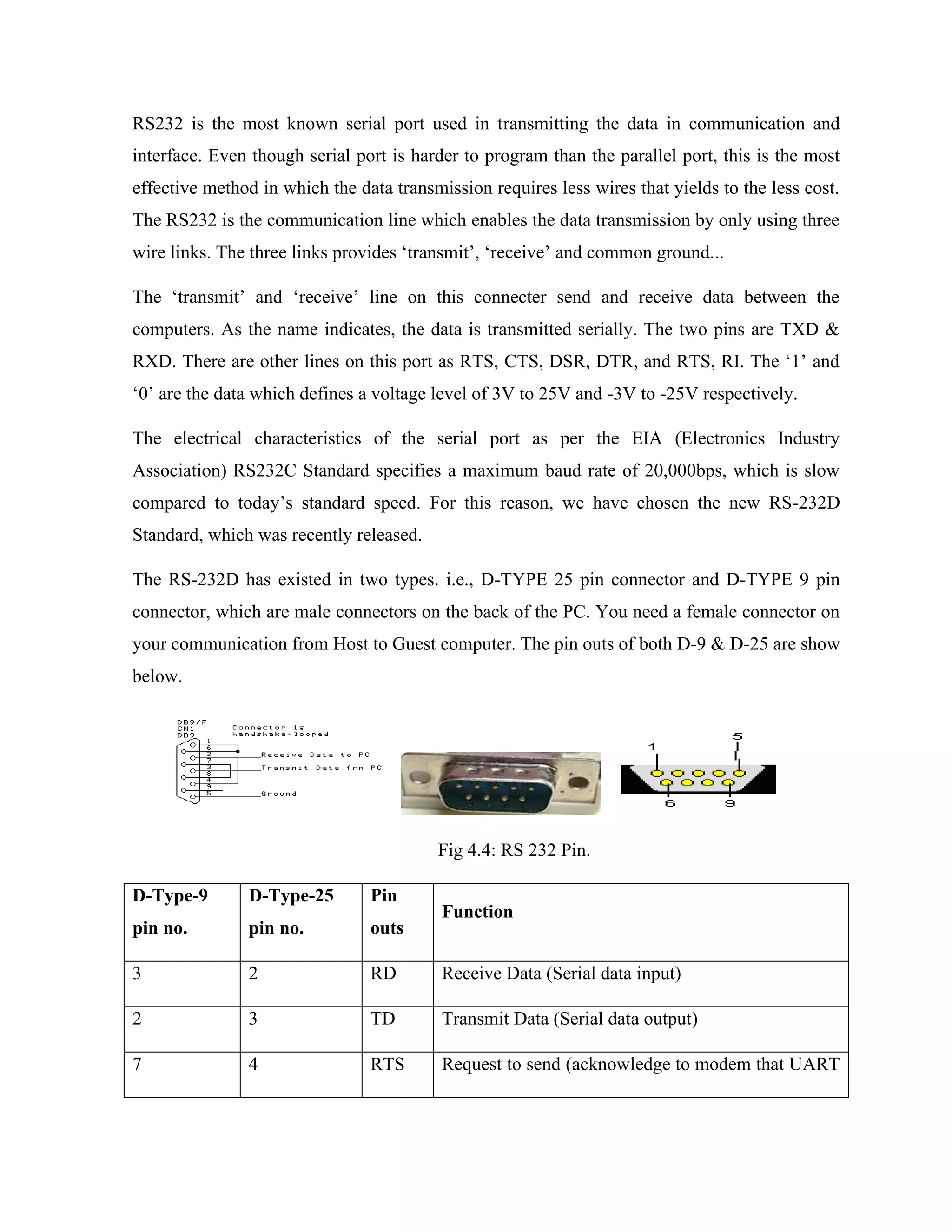
The RS-232D has existed in two types. i.e., D-TYPE 25 pin connector and D-TYPE 9 pin
connector, which are male connectors on the back of the PC. You need a female connector on
your communication from Host to Guest computer. The pin outs of both D-9 & D-25 are show
below.
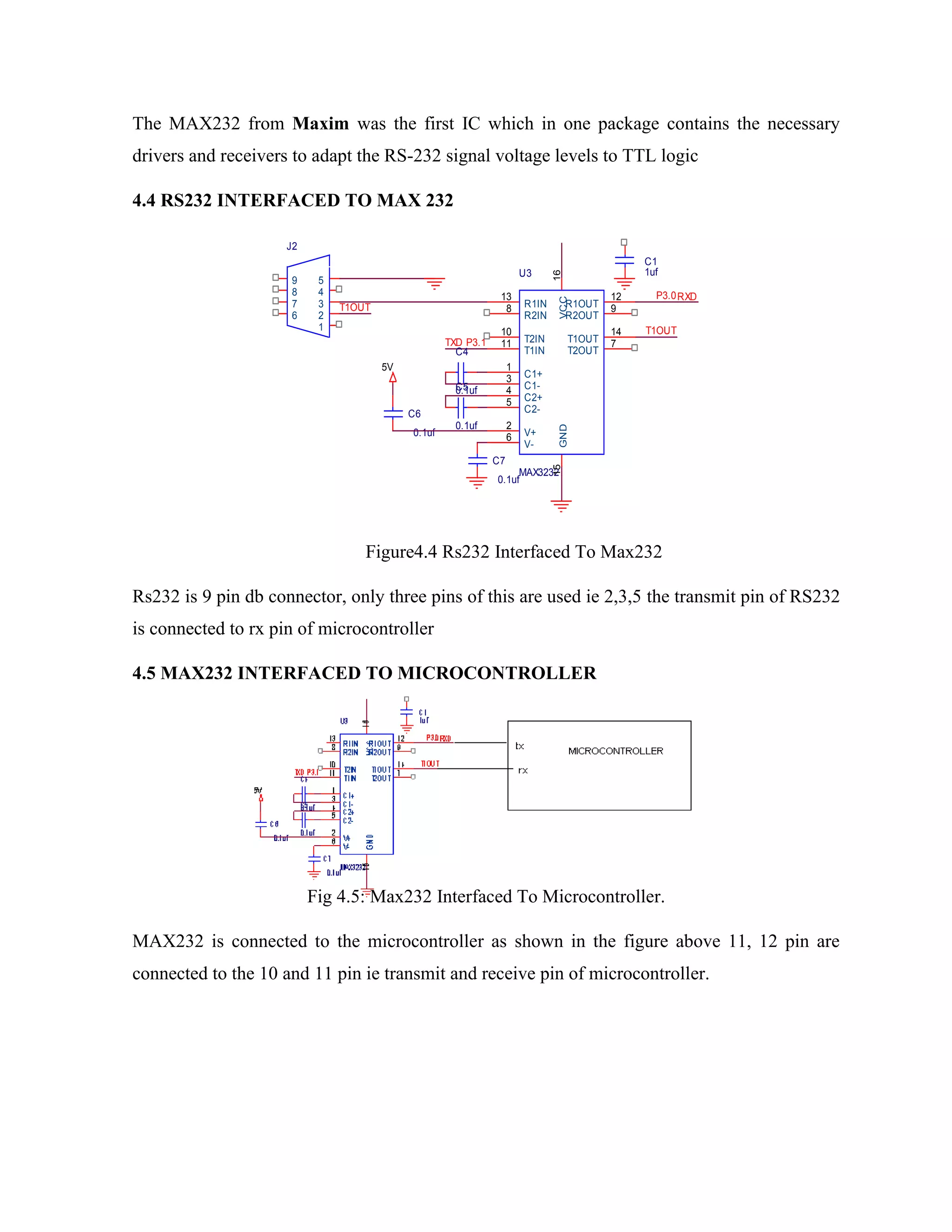
Fig 4.4: RS 232 Pin.
D-Type-9
pin no.
D-Type-25
pin no.
Pin
outs
Function
3 2 RD Receive Data (Serial data input)
2 3 TD Transmit Data (Serial data output)
7 4 RTS Request to send (acknowledge to modem that UART
is ready to exchange data
8 5 CTS Clear to send (i.e.; modem is ready to exchange data)
6 6 DSR Data ready state (UART establishes a link)
5 7 SG Signal ground
1 8 DCD
Data Carrier detect (This line is active when modem
detects a carrier
4 20 DTR Data Terminal Ready.
9 22 RI
Ring Indicator (Becomes active when modem
detects ringing signal from PSTN
Table 3: Pin Outs Of D-9 And D-25
When communicating with various micro processors one needs to convert the RS232 levels
down to lower levels, typically 3.3 or 5.0 Volts. Here is a cheap and simple way to do that.
Serial RS-232 (V.24) communication works with voltages -15V to +15V for high and low.
On the other hand, TTL logic operates between 0V and +5V. Modern low power consumption
logic operates in the range of 0V and +3.3V or even lower.
RS-232 TTL Logic
-15V … -3V +2V … +5V High
+3V … +15V 0V … +0.8V Low
Table 4: Logic Levels Of TTL & Rs232
Thus the RS-232 signal levels are far too high TTL electronics, and the negative RS-232
voltage for high can’t be handled at all by computer logic. To receive serial data from an RS-
232 interface the voltage has to be reduced. Also the low and high voltage level has to be
inverted. This level converter uses a Max232 and five capacitors. The max232 is
quite cheap (less than 5 dollars) or if you’re lucky you can get a free sample from Maxim.
The MAX232 from Maxim was the first IC which in one package contains the necessary
drivers and receivers to adapt the RS-232 signal voltage levels to TTL logic
4.4 RS232 INTERFACED TO MAX 232
Figure4.4 Rs232 Interfaced To Max232
Rs232 is 9 pin db connector, only three pins of this are used ie 2,3,5 the transmit pin of RS232
is connected to rx pin of microcontroller
4.5 MAX232 INTERFACED TO MICROCONTROLLER
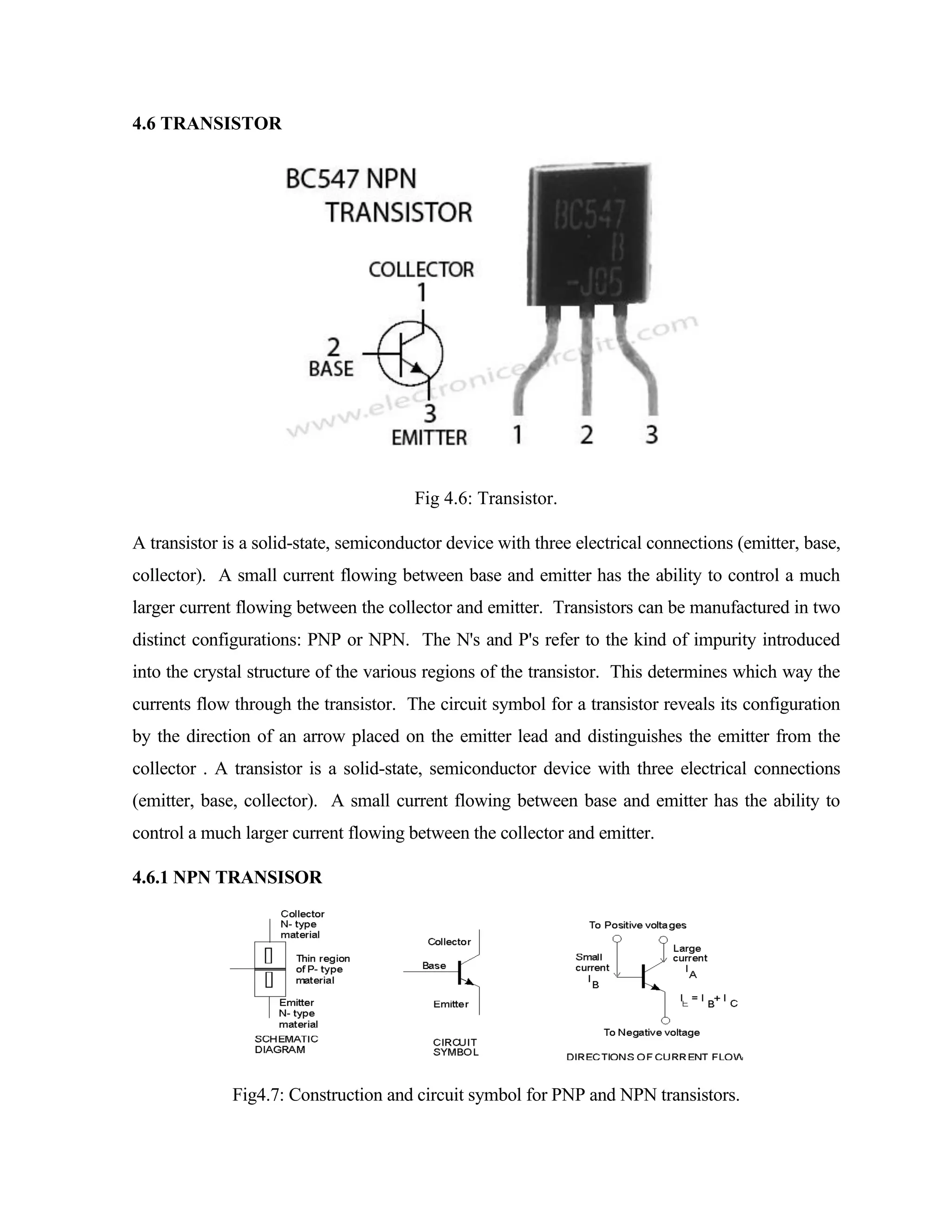
Fig 4.5: Max232 Interfaced To Microcontroller.
MAX232 is connected to the microcontroller as shown in the figure above 11, 12 pin are
connected to the 10 and 11 pin ie transmit and receive pin of microcontroller.
J2
1
2
3
4
5
6
7
8
9
P3.0
5V
C4
0.1uf
C7
0.1uf
TXD
C6
0.1uf
P3.1
T1OUT
C1
1uf
T1OUT
U3
MAX3232
15
16
13
8
10
11
1
3
4
5
2
6
12
9
14
7
GND
VCC
R1IN
R2IN
T2IN
T1IN
C1+
C1-
C2+
C2-
V+
V-
R1OUT
R2OUT
T1OUT
T2OUT
C5
0.1uf
RXD
4.6 TRANSISTOR
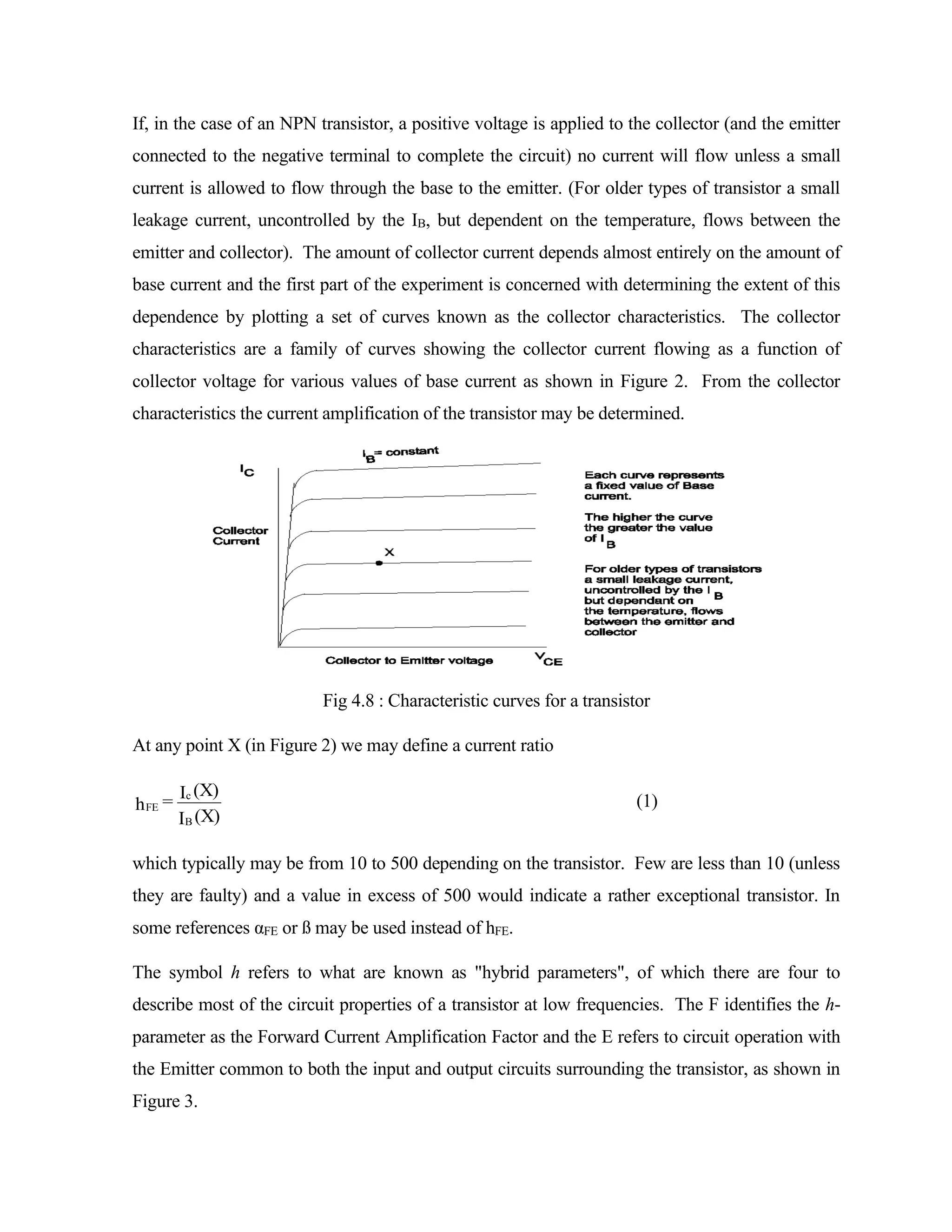
Fig 4.6: Transistor.
A transistor is a solid-state, semiconductor device with three electrical connections (emitter, base,
collector). A small current flowing between base and emitter has the ability to control a much
larger current flowing between the collector and emitter. Transistors can be manufactured in two
distinct configurations: PNP or NPN. The N's and P's refer to the kind of impurity introduced
into the crystal structure of the various regions of the transistor. This determines which way the
currents flow through the transistor. The circuit symbol for a transistor reveals its configuration
by the direction of an arrow placed on the emitter lead and distinguishes the emitter from the
collector . A transistor is a solid-state, semiconductor device with three electrical connections
(emitter, base, collector). A small current flowing between base and emitter has the ability to
control a much larger current flowing between the collector and emitter.
4.6.1 NPN TRANSISOR
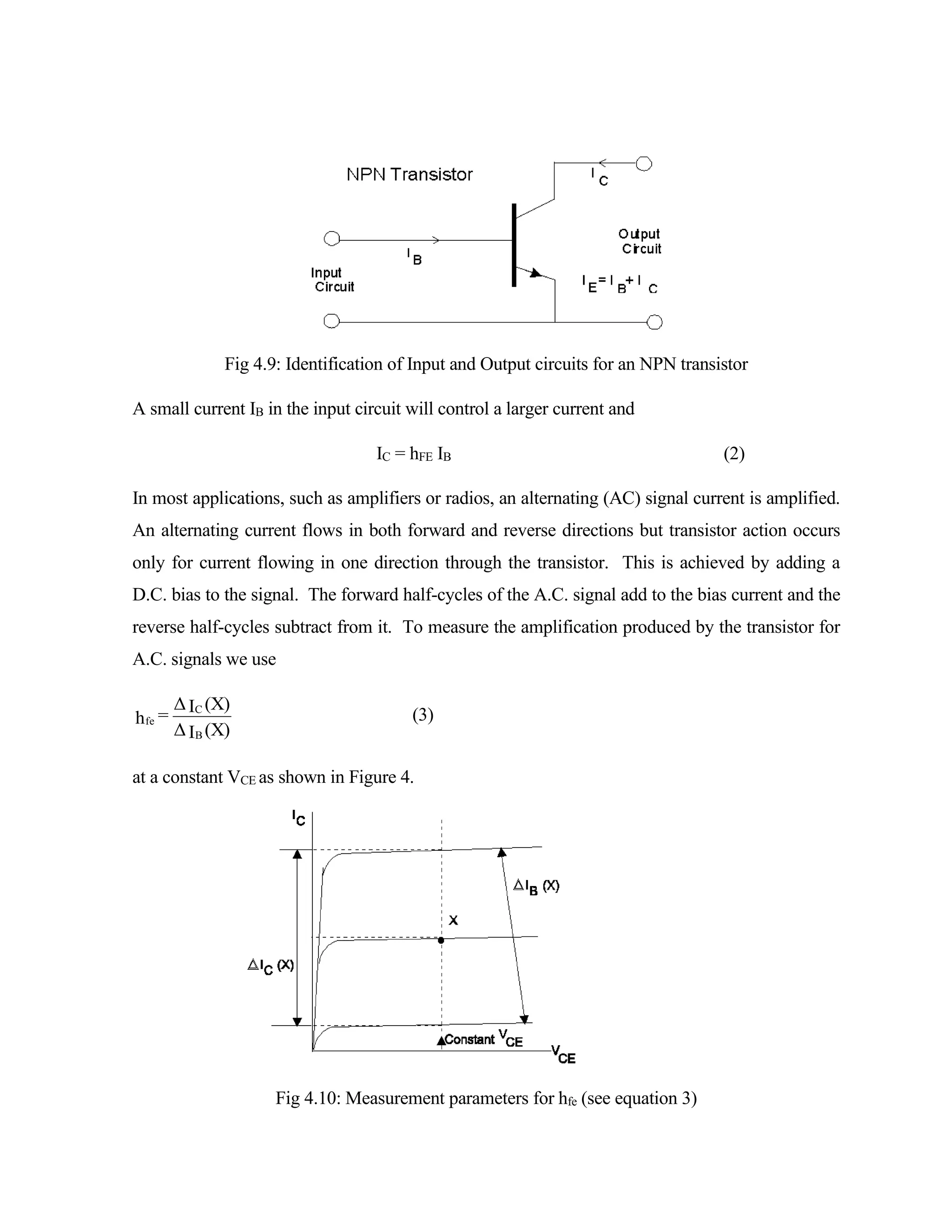
Fig4.7: Construction and circuit symbol for PNP and NPN transistors.
If, in the case of an NPN transistor, a positive voltage is applied to the collector (and the emitter
connected to the negative terminal to complete the circuit) no current will flow unless a small
current is allowed to flow through the base to the emitter. (For older types of transistor a small
leakage current, uncontrolled by the IB, but dependent on the temperature, flows between the
emitter and collector). The amount of collector current depends almost entirely on the amount of
base current and the first part of the experiment is concerned with determining the extent of this
dependence by plotting a set of curves known as the collector characteristics. The collector
characteristics are a family of curves showing the collector current flowing as a function of
collector voltage for various values of base current as shown in Figure 2. From the collector
characteristics the current amplification of the transistor may be determined.
Fig 4.8 : Characteristic curves for a transistor
At any point X (in Figure 2) we may define a current ratio
(X)
I
(X)
I
h
B
c
FE = (1)
which typically may be from 10 to 500 depending on the transistor. Few are less than 10 (unless
they are faulty) and a value in excess of 500 would indicate a rather exceptional transistor. In
some references αFE or ß may be used instead of hFE.
The symbol h refers to what are known as "hybrid parameters", of which there are four to
describe most of the circuit properties of a transistor at low frequencies. The F identifies the h-
parameter as the Forward Current Amplification Factor and the E refers to circuit operation with
the Emitter common to both the input and output circuits surrounding the transistor, as shown in
Figure 3.
Fig 4.9: Identification of Input and Output circuits for an NPN transistor
A small current IB in the input circuit will control a larger current and
IC = hFE IB (2)
In most applications, such as amplifiers or radios, an alternating (AC) signal current is amplified.
An alternating current flows in both forward and reverse directions but transistor action occurs
only for current flowing in one direction through the transistor. This is achieved by adding a
D.C. bias to the signal. The forward half-cycles of the A.C. signal add to the bias current and the
reverse half-cycles subtract from it. To measure the amplification produced by the transistor for
A.C. signals we use
(X)
I
Δ
(X)
I
Δ
=
h
B
C
fe (3)
at a constant VCE as shown in Figure 4.
Fig 4.10: Measurement parameters for hfe (see equation 3)
4.7 WiFi module:
Wifi, is a mechanism for wirelessly connecting electronic devices. A device enabled
with Ethernet, such as a personal computer, video game console, Smartphone, or digital audio
player, can connect to the Internet via a wireless network access point. An access point (or
hotspot) has a range of about 20 meters (65 ft) indoors and a greater range outdoors. Multiple
overlapping access points can cover large areas.
A Ethernet enabled device such as a PC, video game console, mobile phone, MP3
player or PDA can connect to the Internet when within range of a wireless network connected
to the Internet. The coverage of one or more interconnected access points — called a hotspot
— can comprise an area as small as a single room with wireless-opaque walls or as large as
many square miles covered by overlapping access points. "Ethernet" is a trademark of the
Ethernet Alliance and the brand name for products using the IEEE 802.11 family of standards.
Ethernet is used by over 700 million people. There are over four million hotspots (places with
Ethernet Internet connectivity) around the world, and about 800 million new Ethernet devices
are sold every year. Ethernet products that complete Ethernet Alliance interoperability
certification testing successfully may use the "Ethernet CERTIFIED" designation and
trademark.
The name of a popular wireless networking technology that uses radio waves to provide
wireless high-speed Internet and network connections. The Ethernet Alliance, the organization
that owns the Ethernet (registered trademark) term specifically defines Ethernet as any
"wireless local area network (WLAN) products that are based on the Institute of Electrical and
Electronics Engineers' (IEEE) 802.11 standards."
WiFi is a popular term that is used referring to wireless communications between computers
and other computer related devices. Regular radio waves are use to broadcast and receive just
like a pair of walkie talkies, but on a much higher frequency.
These days you will find many areas around town that offer free WiFi internet access, but the
most common use for WiFi is in the home. If you have high speed Internet (DSL, Cable,
Satellite, etc) and have a piece of equipment that is called a wireless router, then you have
WiFi.
Initially, Ethernet was used in place of only the 2.4GHz 802.11b standard, however the
Ethernet Alliance has expanded the generic use of the Ethernet term to include any type of
network or WLAN product based on any of the 802.11 standards, including 802.11b, 802.11a,
dual-band, and so on, in an attempt to stop confusion about wireless LAN interoperability.
Ethernet works with no physical wired connection between sender and receiver by using radio
frequency technology, a frequency within the electromagnetic spectrum associated with radio
wave propagation. When an RF current is supplied to an antenna, an electromagnetic field is
created that then is able to propagate through space. The cornerstone of any wireless network
is an access point. The primary job of an access point is to broadcast a wireless signal that
computers can detect and "tune" into. In order to connect to an access point and join a wireless
network, computers and devices must be equipped with wireless network adapters.
Ethernet is supported by many applications and devices including video game consoles, home
networks, PDAs, mobile phones, major operating systems, and other types of consumer
electronics. Any products that are tested and approved as "Ethernet Certified" (a registered
trademark) by the Ethernet Alliance are certified as interoperable with each other, even if they
are from different manufacturers. For example, a user with a Ethernet Certified product can
use any brand of access point with any other brand of client hardware that also is also
"Ethernet Certified". Products that pass this certification are required to carry an identifying
seal on their packaging that states "Ethernet Certified" and indicates the radio frequency band
used (2.5GHz for 802.11b, 802.11g, or 802.11n, and 5GHz for 802.11a).
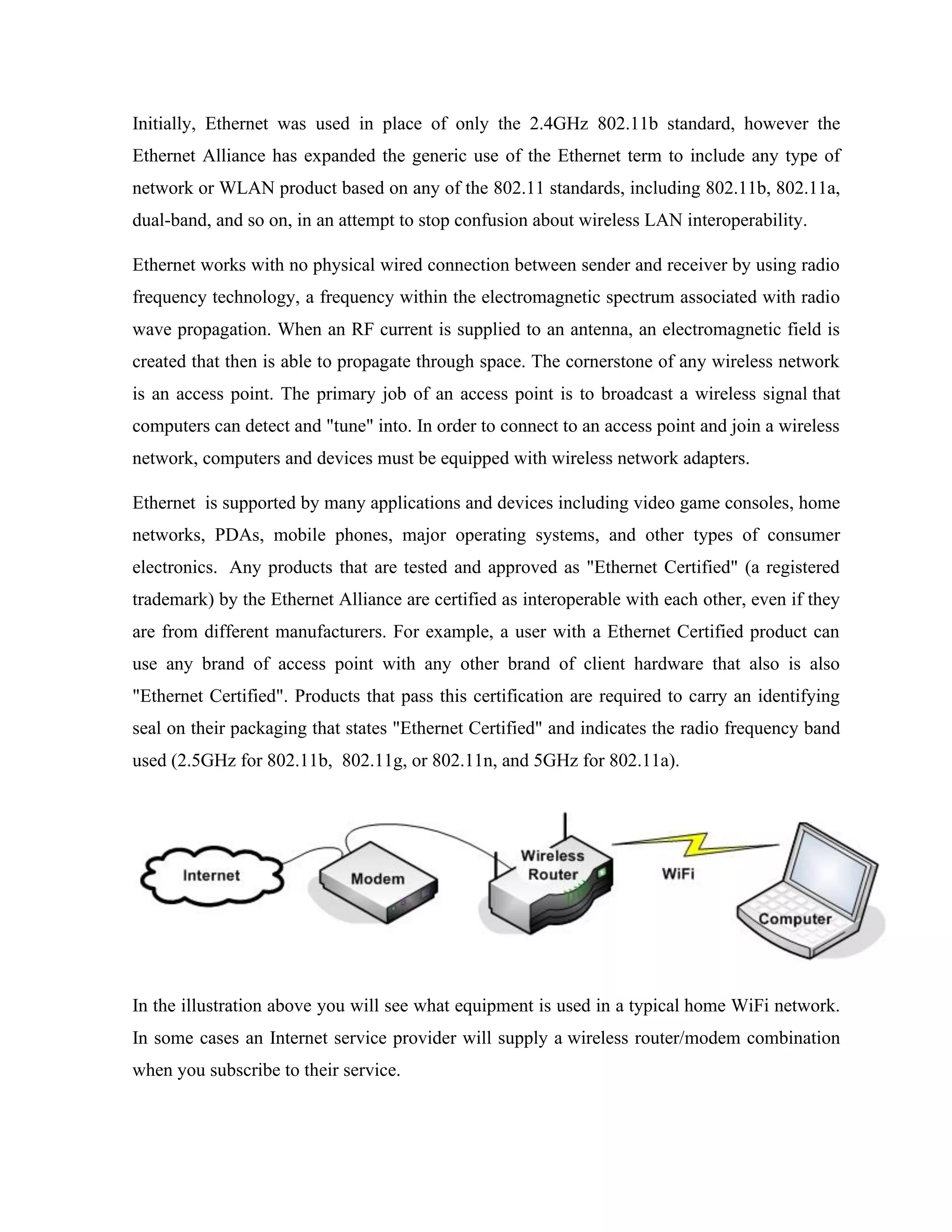
In the illustration above you will see what equipment is used in a typical home WiFi network.
In some cases an Internet service provider will supply a wireless router/modem combination
when you subscribe to their service.
The main benefit of WiFi is cordless internet access. Many electronic devices have WiFi built-
in and can access the internet anywhere within range of your wireless router. This means that
while using a WiFi laptop computer you can browse the internet from your couch. If you own
a WiFi Internet Radio you can listen to over 14,000 stations in your bedroom, kitchen, or
bathroom. Some cell phones have WiFi internet access also.
An electronic device cannot communicate with a WiFi router unless it has a WiFi
receiver/transmitter (otherwise called a WiFi card or module) built-in. Most newer laptops
have a built-in WiFi card which can communicate with nearby wireless routers. If your
computer does not have built-in WiFi then you can purchase a USB WiFi Antenna for it.
Modern USB WiFi antennas can be connected to almost any computer to enable or improve
WiFi communication.
WiFi works using two-way communication between devices. For example: When you type
"CCrane" into the Google search bar and press "Go", you are sending a request from your
computer to your router using WiFi. The router uses it's WiFi to receive your request and
forward it over the internet to Google. When Google replies, they send you the results of your
request back over the internet to your router. Your router then forwards the results via WiFi
back to your laptop computer. In this scenario the use of WiFi communication takes place
only between your computer and the router.
There are several different types of WiFi, but the end result is still the same, wireless
communication. In the technical world WiFi is translated to 802.11, which is a group of
standards created by the Institute of Electrical and Electronics Engineers (IEEE). Listed below
are several different types of WiFi.
A common misconception is that the term Ethernet is short for "wireless fidelity," however
this is not the case. Ethernet is simply a trademarked term meaning IEEE 802.11x.
The fast paced technology has changed the world as well as its habitants. In Today’s global
village there is no need to grab the telephone receiver and dial a specific number to transmit
voice through cables merely to hear the voice of a beloved. Now each of us carries our own
handsets with a built-in phonebook and text messages. The facilities like Ethernet have further
improved the standard of communications by cutting down expenditure and increasing
availability.
No matter where you are, you can access the world of web through your handsets and your
laptops and your iPads. You might not have noticed what it is but the technology that enables
you to plug in internet without any wires whether you are in a cafe, a library, a shopping mall
or an airport is Ethernet – the wireless network also known as 802.11. The circumference
where wireless technology is present and available to the users is known as Hotspot. The
inexpensive, user-friendly WiFi networks are also obtrusive; if you do not need one you
would not know there exists any. Ethernet could be also installed in home or offices in order
to transmit information over the air without the aid of wires. In near future you would find
wireless networking available in every nook and corner.
Ethernet is derived from the decades old term Hi-Fi that stands for the output’s type produced
by quality music hardware. WiFi Technology is WIRELESS FIDELITY and stands for all
those technologies that fall under the specifications of IEEE 802.11 including 802.11a,
802.11b and 802.11g. The association of the term Ethernet with various technologies is
merely because of the promotions made by the Ethernet Alliance.
For those whose laptops and cell phones do not have a built-in wireless transmitter then you
could purchase a wireless adaptor and inject it into USB port. A Ethernet hotspot is
automatically discovered and connected by the transmitters. The presence of Ethernet in
public places makes it convenient to stay connected to your official tasks or to the social
networking.
Ethernet is also associated with 802.11 networking. The reference is derived from IEEE –
Institute of Electrical and Electronics Engineers uses the numbering system for classifying a
range of technological protocols.
Ethernet steps into the boots of TV and radio in order to transmit data through radio waves.
The two-way radio communication: the wireless adapter translates data into a radio signal then
transmits it via antenna; and the signal is received and decoded by the wireless router that uses
a tangible wired Ethernet connection to send information to the internet. The equation is
reversed when wireless router receives data from the internet and translates it into a signal
where the wireless adaptor receives the signal and decodes it.
Ethernet communication devices are extended forms of radios used for cell phones and
walkie-talkies: they simultaneously transmit and receive radio waves and convert 1s to 0s into
the radio waves along with reconverting the radio waves into 1s and 0s, however the Ethernet
radios enjoy some exceptional features.
Technology has developed far more than our expectations – none of us could perceive the
developments in approaching future. With features like Ethernet, earth would turn into a world
wide web where every user is omnipresent and active.
Wifinotes.com is constructed with the intention of educating the tech-savvy community on the
pros and cons of not only WiFi but many other wireless networking technologies. We hope
that the elaborated posts and references would taste like cookies.
Wireless technology has change the way for us to connect to internet, local and remote
computers, it has enabled the implementation of imagination beyond the limits. There are two
most common modes by which we connect to Ethernet for connectivity for accessing internet
or other computer for file sharing etc.
Infrastructure mode:
Infrastructure mode is one of the two methods for connecting to wireless networks
with Ethernet enabled devices such as laptops, Pda’s I-phone etc. These devices are connected
to wireless network with the help of Access point (AP). Wireless Access Points are usually
routers or switches which are connected to internet by Ethernet port.
Wireless Access points are always required for infrastructure mode of wireless networking. It
is necessary to use SSID while configuring AP, this SSID should be known to clients for their
computers to connect WLAN. SSID is basically security key which help prevent UN
authorized access to WLAN. The Access point is then connected to wire network (Internet) to
provide wireless internet connectivity to clients. Multiple access points can be added in the
WLAN, this increases the reach of infrastructure for supporting many number of wireless
clients.
The most common modes for Ethernet connectivity are as follow:
- Infrastructure mode
- Ad hoc Mode
Infrastructure mode:
Infrastructure mode is one of the two methods for connecting to wireless networks
with Ethernet enabled devices such as laptops, Pda’s I-phone etc. These devices are connected
to wireless network with the help of Access point (AP). Wireless Access Points are usually
routers or switches which are connected to internet by Ethernet port.
Wireless Access points are always required for infrastructure mode of wireless
networking. It is necessary to use SSID while configuring AP, this SSID should be known to
clients for their computers to connect WLAN. SSID is basically security key which help
prevent UN authorized access to WLAN. The Access point is then connected to wire network
(Internet) to provide wireless internet connectivity to clients. Multiple access points can be
added in the WLAN, this increases the reach of infrastructure for supporting many number of
wireless clients.
Setting Up Infrastructure Mode:
Setting up infrastructure mode for wireless connectivity is not that hard, all we are require
follow number of steps which will do the job.
We need to make sure that Internet cable is plugged in Ethernet port, second step is to
configure AP (Access point). http://192.168.1.1 is usually the access panel address. Write this
URL at your Internet browser, username and password window will appear, default settings
are usually, admin username and admin password. We name the connection name which will
appear to all wireless devices, then we enable infrastructure mode and also assign SSID in the
switch/router for it broadcast
Now we scan wireless adaptor to see if any wireless network is available to connect,
when configured network is appear, click and connect and provide SSID information, here
you should be able to connect to the network for internet browsing and file sharing.
Ad hoc Mode
There is another mode of connectivity available for Ethernet connectivity. This mode is
known to be ad hoc mode. By using ad hoc mode, devices are capable for communicating
directly with each other. No Access point (routers / switches) is required for communication
between devices and all devices in the range connect in peer to peer communication mode.
Setting up Ad hoc Mode
For setting up ad hoc mode, wireless adaptors of all devices are required to be configured
manually at ad hoc mode instead of infrastructure mode. It is also important to use same
channel name and configuring all wireless adaptors using same SSID for making connection
live.
Limitation of Ad hoc mode
Ad hoc mode is best used for small number of devices which are physically present in close
proximity with each other and as the number of devices grows performance of network
suffers. Disconnections of random device may occur time to time and managing the network
can be difficult task for administrator. There is another limitation associated with ad hoc mode
that is, ad hoc mode networks cannot bridge to wire LANs and cannot access internet without
installing special gateways.
Advantages of Ad hoc network mode
Ad hoc mode networks works fine in small environment, like building, homes etc. No extra
hardware (Access point) is required to use ad hoc mode, therefore it reduces the cost. If
devices have wireless network adapters in them already then that will do the job as far as
building ad hoc networks is concern. Ad hoc can be useful as back up option for time being if
network based on infrastructure mode and access points are malfunctioning.
Advantages of Infrastructure mode (comparison between Ad hoc and infrastructure)
If we are to compare ad hoc with infrastructure mode then infrastructure mode provide much
more stability, scalability, ease of management and improved security. Ad hoc on the other
hand does not provide security to that level and managing can be difficult incase of network
growth. Performance suffers as we increase devices as well.
The only disadvantage associated with infrastructure mode is extra cost to for Access points
(routers and switches).Compared to the alternative, ad-hoc wireless networks, infrastructure
mode networks offer the advantage of scalability, centralized security management and
improved reach. The disadvantage of infrastructure wireless networks is simply the additional
cost to purchase AP hardware.
4.8 Step by step instructions for installing Wifi
1) First of al you need to list the equipment and hardware thetas is required for installing
Wifi uh as router or compatible gateway different models are available one of the
common is DI version 624 and Extreme G 802, 802.11 routers which are highly
compatible with the Wifi at present. Second is the wireless adapter that is required or
connecting the network. wireless adapters also comes in many specification such as
DWL G650 is card adapter that is compatible with the windows operating system and
note books and Personal computers ,it is also equally reliable for the windows Xp
home based systems.
2) Next you need a connection like broad band to access the internet which comes
typically with the dialing modem or DSL modems.
3) In case of static IP address Ethernet cable is also required.
4) if your connection is DSL then you must require provide username and password by
the service providers more specifically ISP
5) Another requirement is the usable Mac address that will support all the connected
wireless network adapters.
6) It is recommended to keep a notebook and pen to write down the MAC and IP setting s
and addressee because you may need it further during Wifi configuration.
4.9 Installation of Wireless Adapters
Now install the wireless adapters by following the provide instructions.
1) Install wireless adapter in the system that are required to be connected to the attached
router.
2) if you are using the Card adapter you may require to install the software for support
before starting hardware installation. This require complete shutdown of the system,
install adapter and reboot the complete computer to make it ready for installing
wireless. To avoid the computer reboot it is recommended to use wireless adapters
which are independent of additional software installations.
3) When system is restarted automatically new hardware wizard will run which will
atomically activate the adapter and it become ready to use.
4.10 Configuring Wifi
If the system doesn’t automatically detect the Wifi network you may need to perform few
more steps.
1) For configuring click networking icon that is available in the system tab
2) From appeared dialog box of Wireless Network Connection click “advanced” and
choose the Wireless network tab.
3) Select my wireless network setting ok system will be restarted.
4) now set security parameters to activate the secure connection by accessing IP address
to the browser
5) Configure the network for changing the name SSID by simply clicking wireless button
present in the network setting in control panel.
6) Enable the Wifi network encryption to stay protected from hackers and data stealers,
wireless adapter offers WPA protected access encryption technique for the Wifi
security through the wired Equivalent Privacy encryption algorithms.
7) next step is the Mac address filtration .for extra safety apply the limit the Mac address
by fix the router routines .enter Mac address in Wifi adapter and save it
8) For improving the performance choose 802.11 for all the available wireless system in
the network. This mode will help you speed up the communication.
9) Next step is saving and exit the step the wireless network is activated.
4.11 Features of “WiFi” Technology - A new aspect in networking
WiFi has brought a new aspect in the ground of networking. The broadcast of data is
completed via radio waves and the cost of cables for network lying down.Ethernet enable a
user to get access to internet anywhere in the given location. Now you can make a network in
Hotels, Libraries, colleges, universities, campus, private institutes, and coffee shops and even
on a public place to make your business more profitable and connect with their client any
time. WiFi makes waves for business with their highly effective cable less media.
WIFI technology supports two types, one is called “infrastructure” other one is “Ad hoc” In ad
hoc Ethernet network can be connected without central device known as router or access point
Ad hoc mode is always preferred over infrastructure mode, however ad hoc networks have
following issues Ethernet devices configure on Ad hoc mode offers nominal security against
network intruders. Ad hock WiFi configured devices cannot disable SSID broadcast in
contrast to infrastructure mode. Network attackers will not required much of effort to prevail
in Ad hoc Network.
4.12 WiF Limitations - Wireless network limitations
WIFI technology supports two types, one is called “infrastructure” other one is “Ad hoc” In ad
hoc Ethernet network can be connected without central device known as router or access point
Ad hoc mode is always preferred over infrastructure mode, however ad hoc networks have
following issues Ethernet devices configure on Ad hoc mode offers nominal security against
network intruders. Ad hock WiFi configured devices cannot disable SSID broadcast in
contrast to infrastructure mode. Network attackers will not required much of effort to prevail
in Ad hoc Network.
Using Ad hoc mode signals issues can experienced where as using alternative infrastructure
mode will provide full strength singles.Ethernet networking standard including 802.11g
requires ad hoc mode of communication supports which 11Mbps bandwidth.Ethernet devices
when configured to infrastructure mode can transfer data up to 54 Mbps, where as using ad
hoc mode only 11 mbps can be achieved. Ad hoc mode is considered slower in comparison to
infrastructure for this reason.
Security concerns: It is simple to set Ethernet network but keeping it secure takes much
more effort, Access points of Ethernet do not deploy encryption methods. It is required to be
done as network is enabled. Secure Ethernet network can be easily attacked by hackers to steal
private information. Guests who are not potentially harmful can still utilize the network
resources and minimize the performance.
Interference from other devices: Ethernet transmits data at 2.4 GHz making susceptible to
interfere Bluetooth enabled devices, mobile phones, cordless, Microwaves and other
communication devices, closer the interfering devices are the poor communication will be and
vice versa.
Lacking high-quality media streaming : Today’s fastest Ethernet standards are pushed
beyond their limit when trying to view high end media.High definition video and audios
cannot be viewed flawlessly because of lower transfer rate; things can be much more worst if
other clients are accessing the same access points.
Even the fastest current Ethernet standards are pushed beyond their limit when trying to
handle some of today's high-end media. High-definition audio and video files are timely-
delivery-intensive, and typical wireless networks have neither the transfer speeds nor the
consistency to transfer them flawlessly. This problem is further compounded if there are
multiple devices connected to the same because the bandwidth must be divided between all of
the equipment.
Types: WIFI technology supports two types, one is called “infrastructure” other one is “Ad
hoc” In ad hoc Ethernet network can be connected without central device known as router or
access point Ad hoc mode is always preferred over infrastructure mode, however ad hoc
networks have following issues Ethernet devices configure on Ad hoc mode offers nominal
security against network intruders. Ad hock WiFi configured devices cannot disable SSID
broadcast in contrast to infrastructure mode. Network attackers will not required much of
effort to prevail in Ad hoc Network
Using Ad hoc mode signals issues can experienced where as using alternative infrastructure
mode will provide full strength singles.Ethernet networking standard including 802.11g
requires ad hoc mode of communication supports which 11Mbps bandwidth.Ethernet devices
when configured to infrastructure mode can transfer data up to 54 Mbps, where as using ad
hoc mode only 11 mbps can be achieved. Ad hoc mode is considered slower in comparison to
infrastructure for this reason.
Security concerns: It is simple to set Ethernet network but keeping it secure takes much
more effort, Access points of Ethernet do not deploy encryption methods. It is required to be
done as network is enabled. Secure Ethernet network can be easily attacked by hackers to steal
private information.
Guests who are not potentially harmful can still utilize the network resources and minimize
the performance.
Interference from other devices: Ethernet transmits data at 2.4 GHz making susceptible to
interfere Bluetooth enabled devices, mobile phones, cordless, Microwaves and other
communication devices, closer the interfering devices are the poor communication will be and
vice versa.
Lacking high-quality media streaming
Today’s fastest Ethernet standards are pushed beyond their limit when trying to view high end
media.High definition video and audios cannot be viewed flawlessly because of lower transfer
rate; things can be much more worst if other clients are accessing the same access points.
Even the fastest current Ethernet standards are pushed beyond their limit when trying to
handle some of today's high-end media. High-definition audio and video files are timely-
delivery-intensive, and typical wireless networks have neither the transfer speeds nor the
consistency to transfer them flawlessly. This problem is further compounded if there are
multiple devices connected to the same because the bandwidth must be divided between all of
the equipment.
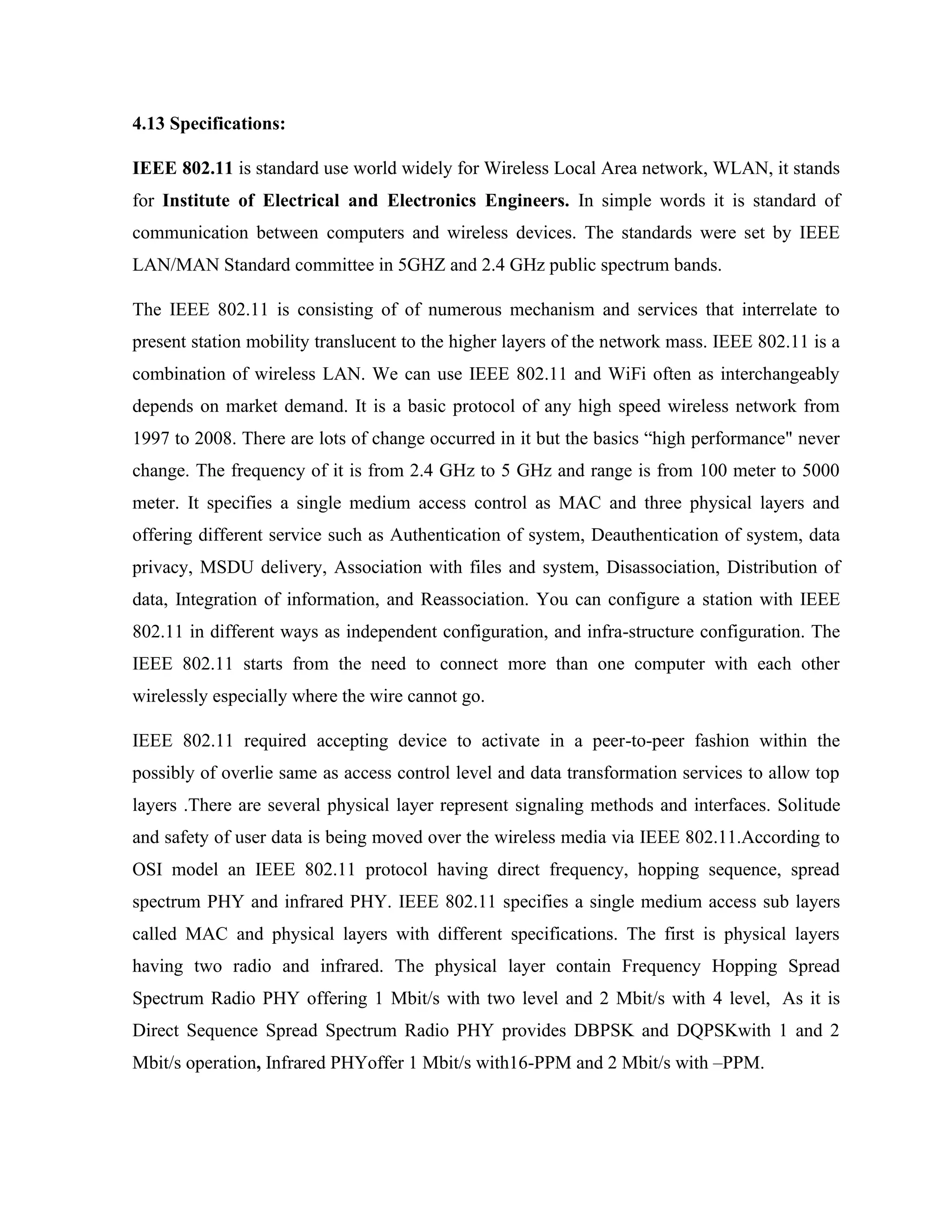
4.13 Specifications:
IEEE 802.11 is standard use world widely for Wireless Local Area network, WLAN, it stands
for Institute of Electrical and Electronics Engineers. In simple words it is standard of
communication between computers and wireless devices. The standards were set by IEEE
LAN/MAN Standard committee in 5GHZ and 2.4 GHz public spectrum bands.
The IEEE 802.11 is consisting of of numerous mechanism and services that interrelate to
present station mobility translucent to the higher layers of the network mass. IEEE 802.11 is a
combination of wireless LAN. We can use IEEE 802.11 and WiFi often as interchangeably
depends on market demand. It is a basic protocol of any high speed wireless network from
1997 to 2008. There are lots of change occurred in it but the basics “high performance" never
change. The frequency of it is from 2.4 GHz to 5 GHz and range is from 100 meter to 5000
meter. It specifies a single medium access control as MAC and three physical layers and
offering different service such as Authentication of system, Deauthentication of system, data
privacy, MSDU delivery, Association with files and system, Disassociation, Distribution of
data, Integration of information, and Reassociation. You can configure a station with IEEE
802.11 in different ways as independent configuration, and infra-structure configuration. The
IEEE 802.11 starts from the need to connect more than one computer with each other
wirelessly especially where the wire cannot go.
IEEE 802.11 required accepting device to activate in a peer-to-peer fashion within the
possibly of overlie same as access control level and data transformation services to allow top
layers .There are several physical layer represent signaling methods and interfaces. Solitude
and safety of user data is being moved over the wireless media via IEEE 802.11.According to
OSI model an IEEE 802.11 protocol having direct frequency, hopping sequence, spread
spectrum PHY and infrared PHY. IEEE 802.11 specifies a single medium access sub layers
called MAC and physical layers with different specifications. The first is physical layers
having two radio and infrared. The physical layer contain Frequency Hopping Spread
Spectrum Radio PHY offering 1 Mbit/s with two level and 2 Mbit/s with 4 level, As it is
Direct Sequence Spread Spectrum Radio PHY provides DBPSK and DQPSKwith 1 and 2
Mbit/s operation, Infrared PHYoffer 1 Mbit/s with16-PPM and 2 Mbit/s with –PPM.
These days 802.11a, 802.11b, and 802.11g are mostly in use to create a network home, offices
and commercial locations. The architecture of IEEE 802.11 consists of 802.1X for
verification, RSN for maintenance track of links, and AES-based CCMP to provide privacy,
veracity and basis. IEEE 802.11with the propagation of modems and DSL services makes it
reliable. People always desire to set up small networks in their homes to distribute their
elevated rate Internet connection. There are many free networks commonly permit anyone
within specific range, counting passersby outer, to connect to the Internet. There is also hard
work by unpaid helper groups to launch wireless community networks to provide free wireless
connectivity to the public. Networking without wire has a talented prospect with 802.11.The
dynamic nature of IEEE 802.11 increasing radically in the near future.
4.14 Description and working of Wi- Fi module:
There are three most important items which makes Ethernet working in your laptop or
desktop. These are:
• Radio Signals
• Ethernet Card which fits in your laptop or computer.
• Hotspots which create Ethernet Network.
Radio Signals: Radio Signals are the keys which make WiFi networking possible. These
radio signals transmitted from Ethernet antennas are picked up by WiFi receivers such as
computers and cell phones that are equipped with WiFi cards. Whenever a computer receives
any of the signals within the range of a WiFi network which is usually 300 - 500 feet for
antennas, the WiFi card will read the signals and thus create an internet connection between
the user and the network without the use of a cord.
Access points which consist of antennas and routers are the main source which transmit and
receive radio waves. Antennas work stronger and have a longer radio transmission with a
radius of 300-500 feet which are used in public areas while the weaker yet effective router is
more suitable for homes with a radio transmission of 100-150 feet.
Ethernet Cards:You can think WiFi card as being an invisible cord that connects your
computer to the antenna for a direct connection to the internet.
WiFi cards can be external or internal, meaning that if a WiFi card is not installed in your
computer, you may purchase a USB antenna attachment and have it externally connect to your
USB port, or have an antenna-equipped expansion card installed directly to the computer. For
laptops, this card will be a PCMCIA card in which you insert to the PCMCIA slot on the
laptop.
Ethernet Hotspots: A Ethernet hotspot is created by installing an access point to an internet
connection. The access point transmits a wireless signal over a short distance typically
covering around 300 feet. When a Ethernet .enabled device, such as a Pocket PC, encounters a
hotspot, the device can then connect to that network wirelessly.
Most hotspots are located in places that are readily accessible to the public, like airports,
coffee shops, hotels, book stores and campus environments. 802.11b is the most common
specification for hotspots worldwide. The 802.11g standard is backwards compatible with
.11b but .11a uses a different frequency range and requires separate hardware such as an a,
a/g, or a/b/g adapter. The largest public Ethernet networks are provided by private internet
service providers (ISPs) that charge a fee for users to connect to the internet.
Hotspots are increasingly developing around the world. In fact, T-mobile USA controls more
than 4,100 hotspots located in public locations such as Starbucks, Borders, Kinko.s, and the
airline clubs of Delta, United, and US Airways. Even select McDonald.s restaurants now
feature Ethernet hotspot access.
Any notebook computer with integrated wireless, a wireless adapter attached to the
motherboard by the manufacturer, or a wireless adapter such as a PCMCIA card can access a
wireless network. Furthermore, all Pocket PCs or Palm units with Compact Flash, SD I/O
support, or built-in Ethernet, can access hotspots.
Some Hotspots require WEP key to connect that is the connection is considered to be private
or secure. As for open connections, anyone with a WiFi card can gain access to that hotspot.
So in order for a user to gain access to the internet under WEP, the user must input the WEP
key code.
4.15 Differences between Bluetooth and Wifi:
Wifi and Bluetooth are the most famous wireless technology that creates and managed
wireless network with the of radio frequency waves. both them have the same mechanisms
through which they develop the wireless networks for the organizations adopting but still there
are some differences which make them different in use.
Coverage difference: The major purpose of the Bluetooth technology is to create the
connection between the user device and network over the short distances. Their ranges are
limited to the one meter or 2 meter hardly. The device outside this renege cannot be connected
with the help of Bluetooth where as Wifi has no such small distance limitation as compared to
Bluetooth devices. Wifi has the ability to create and provide its users and wireless internet
facility over the long distances, they can link multiple computer at the time. Although
Bluetooth can also connect multiple device at a time but coverage area difference is huge
which makes wifi a better approach than Bluetooth?
4.16 Creation of network
Bluetooth Technology: Both Wifi and Bluetooth are the network creation technologies PAN
Personal Area Networks are created by the Bluetooth by utilizing radio wave so flow
frequency which lows the Bluetooth device to instantly connect the c0onntion device in the
specific are to develop a pair. For instant cell phone with blue tooth technology , ipods and
PDAs.
Most frequency Bluetooth is used for immediately sending files for m laptop to laptop
desktop, hand set to hand set, and hand set to Desktop from the source like printer .when the
device that you are using for the communication does not contain the Bluetooth feature then it
contains the built in adapters to support the transfer feature. Most common of thee adapters
are the USB’s Universal Serial Buses that are extensive in use for carrying data.
Wifi Technology: Wifi use the same radio frequency technology. But it has one main
advantage over Bluetooth which is the dynamic protocol which can connect various
computers over long distance through wireless. Wifi permit the computer within the wireless
network to communicate and send message without any plugged cable. It just matches the
radio frequency omitted by the service provider boosters which ultimately save money and
time effort. Because huge installation are not required Computer that uses Local area
Networks Wifi can share, send files, codes and document over the Wifi network and can also
share the resource like printers, fax machines and scanning devices .internet facility and also
be shared and no specific type of LAN is required for this purpose too.
File swapping: File swapping is enjoyable task when using Wifi Bluetooth or button devices
both of them can easily transfer the related files to your near by computer system any time by
activating wireless connection. No complex installation and configuration is required for this
purpose. Both of them only require some allocation of resource for sharing the files.
Protocol specification: There is no extensive protocol specification for the Wifi and
Bluetooth, both of them follow the typical standards designed by the manufacturer to become
compatible with the hardware and to communicate with interoperable products the current
protocol standard for the Bluetooth is 2.0 and for Wifi standard for networking protocol is
802.extension to 802 , 802.11 is also in great fame these days.
Support difference: Another important difference between Wifi and Bluetooth is the support.
Wifi is supported by the modem because it has to cover the wider area n sense of range and
Bluetooth is supported by the router that is available in the small carrying communications.
4.17 Advantages
One of the most prevalent advantages of WiFi wireless LAN technologies is that it is
completely wire-free. Now, if you want to sit in one of your comfort zones in you house, such
as a couch or in your yard, you can carry your laptop with you and still be able to access the
internet. These days, if you buy a new laptop, a built-in WiFi card will allow you automatic
allowance of use. (Brain) A second advantage is becoming increasingly popular: hotspots.
Instead of having to be constricted to your home wired/wireless Local Area Network (LAN),
you can now enjoy the advantages of the Internet in public places such as lobbies, cafes,
universities, hotels, airports, and many other common areas.
WiFi also supports roaming: you can walk around a building from one access point to another.
A third advantage of WiFi is the ability for 802.11b and 802.11g to frequency hop. This
process allows the 802.11b and 802.11g cards to transmit themselves on any of three bands, or
splitting the radio bandwidth into channels and 'hop' between them. (Brain) This enables the
WiFi cards to talk at the same time without interference. The fourth advantage I know of is the
development of the Ethernet Alliance (formerly WECA). This association is formed with
more than 200 member companies whose business it is to test and certify the interoperability
of WLAN products, making sure they are based solely on the IEEE 802.11 specifications.
(EthernetAlliance, What) You also must remember that WiFi products are widely distributed,
and an easy technology to use.
4.18 Advantages of WiFi:
• Many Ethernet networks support roaming, in which a mobile client station such as a laptop
computer can move from one access point to another as the user moves around a building
or area. Many access points and network interfaces support various degrees of encryption
to protect traffic from interception. Ethernet is a global set of standards. Unlike cellular
carriers, the same Ethernet client works in different countries around the world.
• Allows LANs to be deployed without cabling, potentially reducing the costs of network
deployment and expansion. Spaces where cables cannot be run, such as outdoor areas and
historical buildings, can host wireless LANs.
• Ethernet silicon pricing continues to come down, making Ethernet a very economical
networking option and driving inclusion of Ethernet in an ever-widening array of
devices.Ethernet products are widely available in the market. Different brands of access
points and client network interfaces are interoperable at a basic level of service. Products
designated as Ethernet CERTIFIED by the Ethernet Alliance are interoperable and include
WPA2 security. Widely available in more than 100 thousand public hot spots and millions
of homes and corporate campuses worldwide.
• Ethernet networks support roaming, in which a mobile client station such as a laptop
computer can move from one access point to another as the user moves around a building
or area.Ethernet is a global set of standards. Unlike cellular carriers, the same Ethernet
client works in different countries around the world.
• WiFi uses unlicensed radio spectrum and does not require regulatory approval for
individual deployers.
• It allows local area networks (LANs) to be setup with cabling. The can reduce associated
costs of network connection and expansions. Places where cables cannot be run, such as
outdoor areas and historical buildings can use wireless LANs.
• WiFi products are extensively available in the market. There are different brands of access
points and user's network interfaces are able to inter-operate at a very basic service level.
• Prices are considerably lower as competition amongst vendors' increases.
• WiFi networks can support roaming. This allows mobile users with laptop computer to be
able to move from one access point to another.
• Numerous access points and network interfaces support various degrees of encryption to
protect traffic from interception.
• WiFi has a set of global standards. Not like the cellular carriers, the same WiFi users can
work in different countries around the world at all time.
4.19 Disadvantages:
Even though WiFi products are useful, there are still some downfalls that must be stated in
order to get a firm grasp on exactly what WiFi wireless LAN technologies are composed of.
As Morely points out, "Ethernet is designed for medium-range data transfers, and most
versions of 802.11 works up to about 250-300 feet away from the access point indoors, and
about 1,000 feet away outdoors."(341) yes, and with more distance between your
computer/laptop and the access point, the speed and the quality falters tremendously.
It also doesn't help when there is interference from microwaves or cordless phones which use
the same frequency that 802.11g and 802.11b use: 2.4 GHz. Another disadvantage for WiFi
products is their security system. The Wired Equivalent Privacy (WEP) is the common
wireless encryption standard which is easily broken even when configured accurately.
(Wikipedia, WiFi) To counteract this problem, however, Ethernet Protected Access (WPA)
has been established.
Due the fact that WiFi are still relatively new, there are considerably more disadvantages to
users. Let's have a look at them:
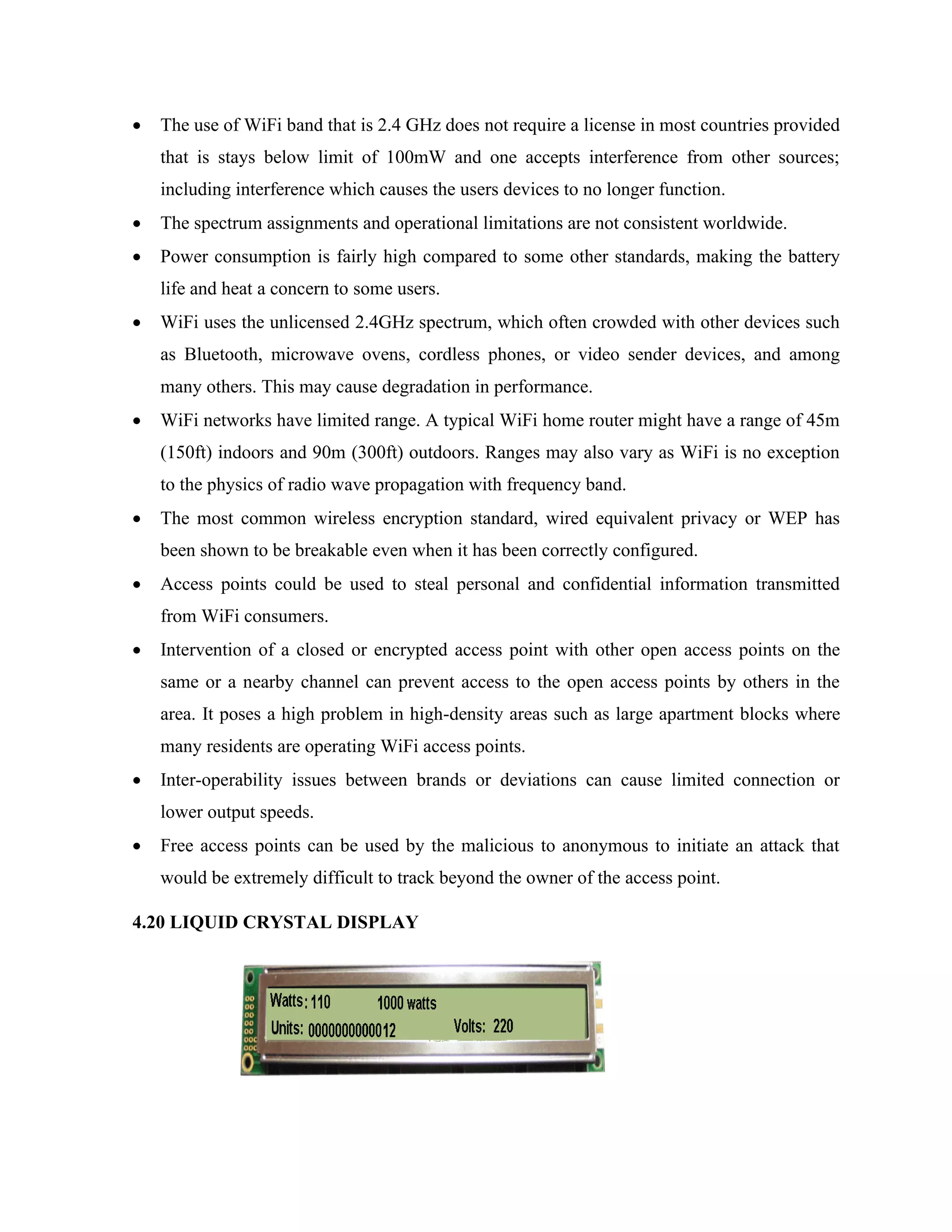
• The use of WiFi band that is 2.4 GHz does not require a license in most countries provided
that is stays below limit of 100mW and one accepts interference from other sources;
including interference which causes the users devices to no longer function.
• The spectrum assignments and operational limitations are not consistent worldwide.
• Power consumption is fairly high compared to some other standards, making the battery
life and heat a concern to some users.
• WiFi uses the unlicensed 2.4GHz spectrum, which often crowded with other devices such
as Bluetooth, microwave ovens, cordless phones, or video sender devices, and among
many others. This may cause degradation in performance.
• WiFi networks have limited range. A typical WiFi home router might have a range of 45m
(150ft) indoors and 90m (300ft) outdoors. Ranges may also vary as WiFi is no exception
to the physics of radio wave propagation with frequency band.
• The most common wireless encryption standard, wired equivalent privacy or WEP has
been shown to be breakable even when it has been correctly configured.
• Access points could be used to steal personal and confidential information transmitted
from WiFi consumers.
• Intervention of a closed or encrypted access point with other open access points on the
same or a nearby channel can prevent access to the open access points by others in the
area. It poses a high problem in high-density areas such as large apartment blocks where
many residents are operating WiFi access points.
• Inter-operability issues between brands or deviations can cause limited connection or
lower output speeds.
• Free access points can be used by the malicious to anonymous to initiate an attack that
would be extremely difficult to track beyond the owner of the access point.
4.20 LIQUID CRYSTAL DISPLAY
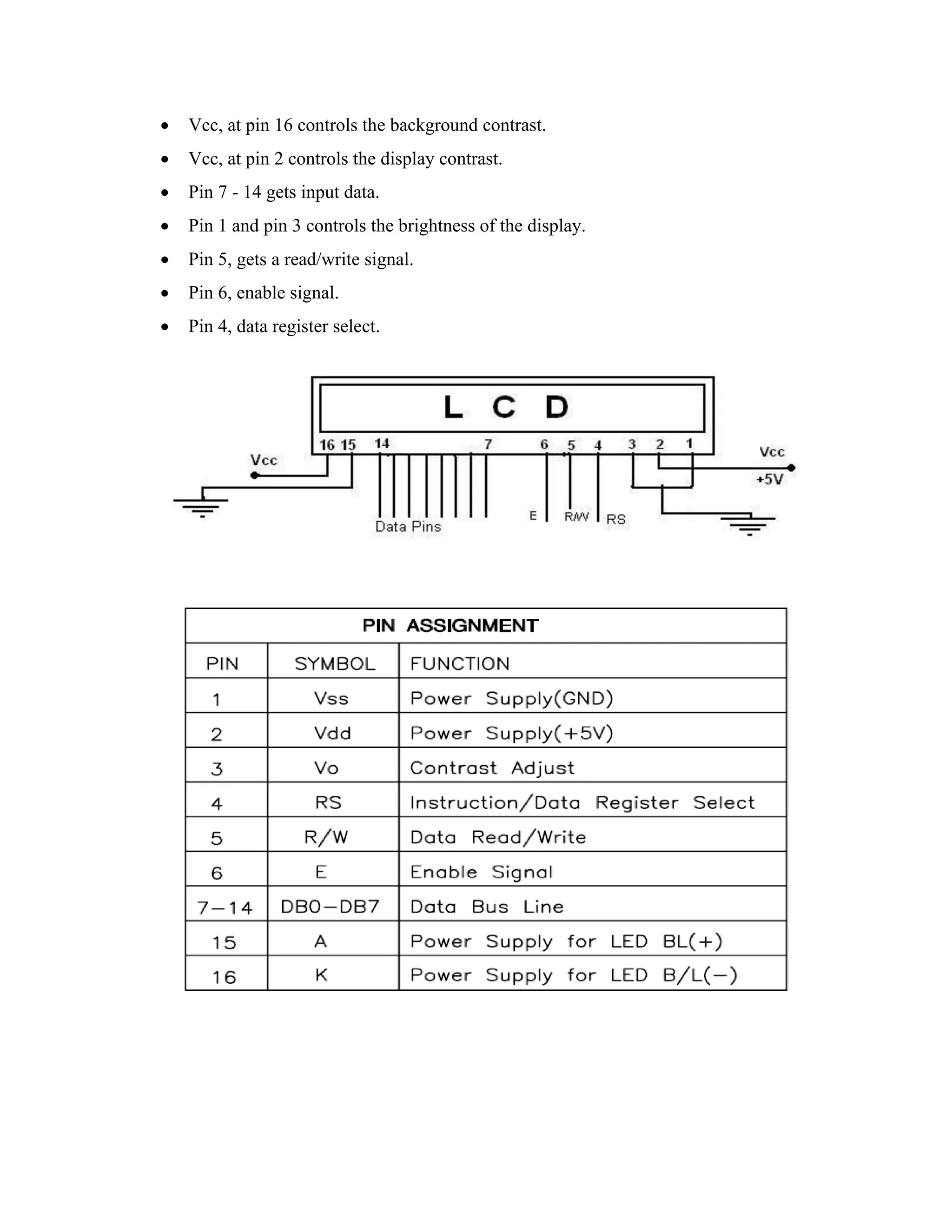
• Vcc, at pin 16 controls the background contrast.
• Vcc, at pin 2 controls the display contrast.
• Pin 7 - 14 gets input data.
• Pin 1 and pin 3 controls the brightness of the display.
• Pin 5, gets a read/write signal.
• Pin 6, enable signal.
• Pin 4, data register select.
Interfacing Example - 16 Character x 2 Line LCD
Description:
This is the first interfacing example for the Parallel Port. We will start with something
simple. This example doesn't use the Bi-directional feature found on newer ports, thus it
should work with most, if no all Parallel Ports. It however doesn't show the use of the Status
Port as an input. So what are we interfacing? A 16 Character x 2 Line LCD Module to the
Parallel Port. These LCD Modules are very common these days, and are quite simple to work
with, as all the logic required running them is on board.
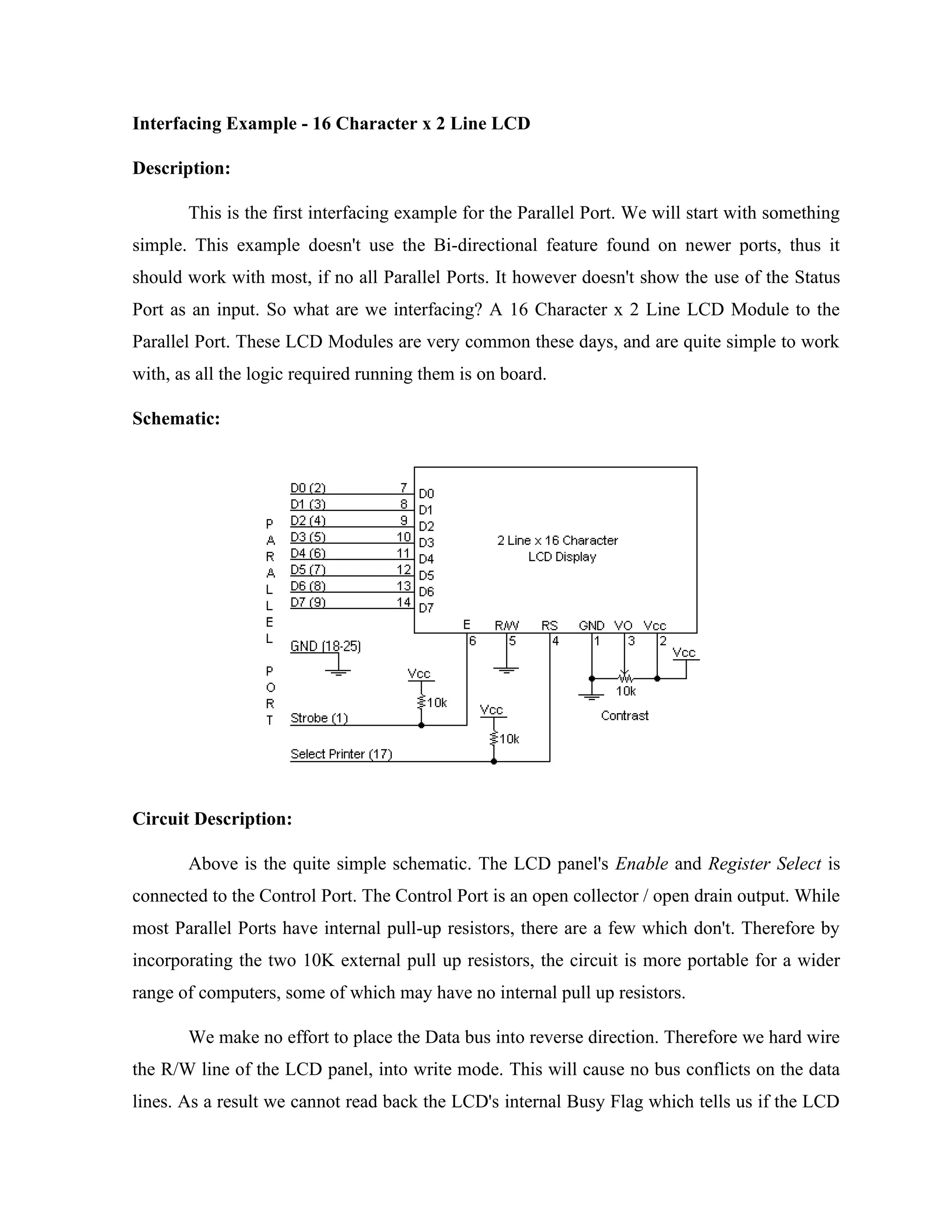
Schematic:
Circuit Description:
Above is the quite simple schematic. The LCD panel's Enable and Register Select is
connected to the Control Port. The Control Port is an open collector / open drain output. While
most Parallel Ports have internal pull-up resistors, there are a few which don't. Therefore by
incorporating the two 10K external pull up resistors, the circuit is more portable for a wider
range of computers, some of which may have no internal pull up resistors.
We make no effort to place the Data bus into reverse direction. Therefore we hard wire
the R/W line of the LCD panel, into write mode. This will cause no bus conflicts on the data
lines. As a result we cannot read back the LCD's internal Busy Flag which tells us if the LCD
has accepted and finished processing the last instruction. This problem is overcome by
inserting known delays into our program.
The 10k Potentiometer controls the contrast of the LCD panel. Nothing fancy here. As
with all the examples, I've left the power supply out. You can use a bench power supply set to
5v or use a onboard +5 regulator. Remember a few de-coupling capacitors, especially if you
have trouble with the circuit working properly. The 2 line x 16 character LCD modules are
available from a wide range of manufacturers and should all be compatible with the HD44780.
The one I used to test this circuit was a Power trip PC-1602F and an old Philips LTN211F-10
which was extracted from a Poker Machine! The diagram to the right shows the pin numbers
for these devices. When viewed from the front, the left pin is pin 14 and the right pin is pin
The LCD panel requires a few instructions to be sent, to order to turn on the display
and initialize it. This is what the first for loop does. These instructions must be sent to the
LCD's Instruction Register which is controlled by the Register Select (Pin 4). When pin 4 is
low the instruction register is selected, thus when high the data register must be selected. We
connect this to the Parallel Port's Select Printer line which happens to be hardware inverted.
Therefore if we write a '1' to bit 3 of the Control Register the Select Printer line goes low.
We want to first send instructions to the LCD module. Therefore the Register Select
line must be low. As it is hardware inverted, we will want to set bit 3 of the Control Register
to '1'. However we don't want to upset any other bits on the Control Port. We achieve this by
reading the Control Port and Oaring 0x80 to it. E.g. out port (CONTROL, in port b
(CONTROL) | 0x08); this will only set bit 3.
After we place a data byte on the data lines, we must then signal to the LCD module to
read the data. This is done using the Enable line. Data is clocked into the LCD module on the
high to low transition. The Strobe is hardware inverted, thus by setting bit 0 of the Control
Register we get a high to low transition on the Strobe line. We then wait for a delay, and
return the line to a high state ready for the next byte.
After we initialize the LCD Module, we want to send text to it. Characters are sent to
the LCD's Data Port, thus we want to clear bit 3. Once again we must only change the one bit,
thus we use out port b (CONTROL, in port b(CONTROL) & 0xF7);. Then we set up another
for loop to read a byte from the string and send it to the LCD panel. This is repeated for the
length of the string.
The delays should be suitable for most machines. If the LCD panel is not initializing
properly, you can try increasing the delays. Likewise if the panel is skipping characters, e.g.
Test, 2. On the other hand, if the LCD module is repeating characters e.g. testing then you
may have a faulting Enable connection. Check your Enable to Strobe connection
CHAPTER 5
EXCECUTION DETAILS
The Arduino is a family of microcontroller boards to simplify electronic design, prototyping
and experimenting for artists, hackers, hobbyists, but also many professionals. People use it as
brains for their robots, to build new digital music instruments, or to build a system that lets
your house plants tweet you when they’re dry. Arduinos (we use the standard Arduino Uno)
are built around an ATmega microcontroller — essentially a complete computer with CPU,
RAM, Flash memory, and input/output
What you will need:
A computer (Windows, Mac, or Linux)
An Arduino-compatible microcontroller (anything from this guide should work)
A USB A-to-B cable, or another appropriate way to connect your Arduino-compatible
microcontroller to your computer
(check out this USB buying guide if you’re not sure which cable to get.
Windows 7, Vista, and XP
Installing the Drivers for the Arduino Uno (from Arduino.cc)
Plug in your board and wait for Windows to begin it’s driver installation process After a few
moments,
the process will fail, despite its best efforts
Click on the Start Menu, and open up the Control Panel
While in the Control Panel, navigate to System and Security. Next, click on System Once the
System window is up, open the Device Manager
Look under Ports (COM & LPT). You should see an open port named “Arduino UNO
(COMxx)”.
If there is no COM & LPT section, look under ‘Other Devices’ for ‘Unknown Device’
Right click on the “Arduino UNO (COMxx)” or “Unknown Device” port and choose the
“Update Driver Software” opti Next, choose the “Browse my computer for Driver software”
option
Finally, navigate to and select the Uno’s driver file, named “ArduinoUNO.inf”, located in the
“Drivers” folder of the Arduino Software download (not the “FTDI USB Drivers” sub-
directory). If you cannot see the .inf file, it is probably just hidden. You can select the
‘drivers’ folder with the ‘search sub-folders’ option selected instead.
Select the serial/COM port that your Arduino is attached to: Tools > Port >COMxx
If you’re not sure which serial device is your Arduino, take a look at the available ports, then
unplug your Arduino and look again. The one that disappeared is your Arduino.
With your Arduino board connected, and the Blink sketch open, press the ‘Upload’ button
After a second, you should see some LEDs flashing on your Arduino, followed by the
message ‘Done Uploading’ in the status bar of the Blink sketch.
If everything worked, the onboard LED on your Arduino should now be blinking! You just
programmed your first Arduino
Launch and Blink!
After following the appropriate steps for your software install, we are now ready to test your
first program with your Arduino board!
Launch the Arduino application
If you disconnected your board, plug it back in
Open the Blink example sketch by going to: File > Examples > 1.Basics > Blin
• Select the type of Arduino board you’re using: Tools > Board > your board type Select the
serial port that your Arduino is attached to: Tools > Port >xxxxxx (it’ll probably look
something like “/dev/tty.usbmodemfd131” or “/dev/tty.usbserial-131” but probably with a
different number)
49
o If you’re not sure which serial device is your Arduino, take a look at the available ports, then
unplug your Arduino and look again. The one that disappeared is your Arduino.
o With your Arduino board connected and the Blink sketch open, press the ‘Upload’ button
o After a second, you should see some LEDs flashing on your Arduino, followed by the
message ‘Done Uploading’ in the status bar of the Blink sketch.
SOURCE CODE
/*************************************************************
This is a simple demo of sending and receiving some data.
Be sure to check out other examples!
*************************************************************/
// Template ID, Device Name and Auth Token are provided by the Blynk.Cloud
// See the Device Info tab, or Template settings
#define BLYNK_TEMPLATE_ID "TMPLR9J9xMqA"
#define BLYNK_DEVICE_NAME "home automation"
#define BLYNK_AUTH_TOKEN "8Vdr7cAIwvJYjIQ0FeuAlSv8dpnHaE7v"
#define BLYNK_PRINT Serial
#include <ESP8266WiFi.h>
50
#include <BlynkSimpleEsp8266.h>
char auth[] = BLYNK_AUTH_TOKEN;
char ssid[] = "ints";
char pass[] = "1234567890";
#define r1 D1
#define r2 D2
#define r3 D3
#define r4 D4
BLYNK_WRITE(V0)
{
int value = param.asInt();
Serial.println(value);
if(value == 1)
{
Serial.println("Relay 1 ON");
digitalWrite(D1,HIGH);
}
if(value == 0)
{
Serial.println("Realy 1 OFF");
digitalWrite(D1,LOW);
51
}
}
BLYNK_WRITE(V1)
{
int value = param.asInt();
Serial.println(value);
if(value == 1)
{
Serial.println("Realy 2 ON");
digitalWrite(D2,HIGH);
}
if(value == 0)
{
Serial.println("Realy 2 OFF");
digitalWrite(D2,LOW);
}
}
BLYNK_WRITE(V2)
{
int value = param.asInt();
Serial.println(value);
if(value == 1)
{
52
Serial.println("Light 2 ON");
digitalWrite(D3,HIGH);
}
if(value == 0)
{
Serial.println("Light 2 OFF");
digitalWrite(D3,LOW);
}
}
BLYNK_WRITE(V3)
{
int value = param.asInt();
Serial.println(value);
if(value == 1)
{
Serial.println("Fan 2 ON");
digitalWrite(D4,HIGH);
}
if(value == 0)
{
Serial.println("Fan 2 OFF");
digitalWrite(D4,LOW);
}
53
}
void setup()
{
Serial.begin(115200);
Blynk.begin(auth, ssid, pass);
pinMode(D4,OUTPUT);
//pinMode(D1,OUTPUT);
pinMode(D2,OUTPUT); pinMode(D3,OUTPUT);
analogWrite(D1,0);
}
void loop()
{
Blynk.run();
}
54
CHAPTER-6
ADVANTAGES & APPLICATIONS
Lighting appliance control subsystem
Lighting appliance control subsystem Household appliances also don‟t need to transmit large
amounts of data, and it‟s real-time requirement is not high, so take a combination of wired
and wireless ways to make wiring easy. Alarm subsystem with landline phone alarm and GSM
alarm has multiple protections. It can still alarm normally when the line of the landline phone
is cut off. The entire system takes modular design thinking which contributes to the design
clear and facilitates the user to select a different combination of modules to meet the needs of
individual users. Humanized operation interface allows users to use them more conveniently.
Dimming control, a more comfortable environment and a certain scene was creating.
Appliance control function is not only our commonly household appliances such as
microwave ovens, water dispensers, rice cookers, television sets, but also includes garden
automatic irrigation systems, fountains and other equipment. Lighting appliance control
subsystem can be achieved not only a variety of romantic scenes, but also for the whole family
safe. When you go out, just one lobby button, you can complete power outage, which
significantly reduces the risk of fire and saves energy.
Curtain control subsystem control all electric curtains including blinds, sunshades and
skylights. It can automatically open and close in a particular time or at the intensity of light.
You can control it by panel, remote control, and even the Internet and smart phones
55
CHAPTER-7
FUTURE SCOPE
This project can be further developed by integrating it with the internet to monitor your home
while sitting in a remote area. By doing this, one can keep an eye on his or her home through
an internet connected to the user’s mobile phone or PC or laptop. This will not only improve
the security of your home in this modern day world but will also assist in conservation of
energy like if you left any home appliance switched on by mistake, then you can check the
status of the appliance on the graphical interface made on your mobile and can switch it off
using the internet connectivity.
56
CHAPTER-8
CONCLUSION
In this project, a novel architecture for low cost and flexible home control and monitoring
system using Android based Smart phone is proposed and implemented. The proposed
architecture utilizes a micro web server and Bluetooth communication as an
interoperable application layer for communicating between the remote user and the home
devices. Any Android based Smart phone with built in support for Wi-Fi can be used to
access and control the devices at home. When a Wi-Fi connection is not available, mobile
cellular networks such as 3G or 4G can engine thus eliminating the need for an external voice
recognition module.
57
Reference
[1]. Jianjun Lv, Zhishu Li, Mingyi Mao. "A new USB home appliances based on PC and
infrared remote control protocol".2010 International Conferences on Computer and
Communication Technologies in Agriculture Engineering.2010, pp.572 -575.
[2]. Shengwen Chen, Chunghuang Yang, Chung-Huang Yang.“Design and Implementation of
Live SD Acquisition Tool in Android Smart Phone". 2011 Fifth International Conference on
Genetic and Evolutionary Computing. 2011, pp. 157-162.
[3]. Xiao Yuan, Yuliang Pan, Zaiying Ling. "The Application of Infrared Remote Controlled
Code Lock in the Management of Industrial Machine Parameters” .Electrical and Control
Engineering (ICECE), 2011 International Conference on.2011, pp. 418-421.
[4]. Feng Xun, Ye Zhi-xia."Sunplus SPCE061A MCU Simulation PT2262 Coding". Journal
of Yunnan Normal University (Natural Sciences Edition), 2010. 30(4) . pp. 40-42.
[5]. Ki-Cheol Son, Jong-Yeol Lee. "The methods of android application speed up by using
NDK". Awareness Science and Technology (iCAST), 2011 3rd International Conference on.
Sept 2011, pp.382- 385.

HOME AUTOMATION SYSTEM USING IOT TECHNOLOGY.pdf

  • 1.
    HOME AUTOMATION SYSTEMUSING IOT TECHNOLOGY CHAPTER-1 INTRODUCTION TO EMBEDDED SYSTEM EMBEDDED SYSTEM: An embedded system is a computer system designed to perform one or a few dedicated functions often with real-time computing constraints. It is embedded as part of a complete device often including hardware and mechanical parts. By contrast, a general-purpose computer, such as a personal computer (PC), is designed to be flexible and to meet a wide range of end-user needs. Embedded systems control many devices in common use today. Embedded systems are controlled by one or more main processing cores that are typically either microcontrollers or digital signal processors (DSP). The key characteristic, however, is being dedicated to handle a particular task, which may require very powerful processors. Since the embedded system is dedicated to specific tasks, design engineers can optimize it to reduce the size and cost of the product and increase the reliability and performance. Some embedded systems are mass-produced, benefiting from economies of scale. Fig 1.1: A modern example of embedded system. 1.1 NEED OF EMBEDDED SYSTEM The uses of embedded systems are virtually limitless, because every day new products are introduced to the market that utilizes embedded computers in novel ways. In recent years, hardware such as microprocessors, microcontrollers, and FPGA chips have become much cheaper. So when implementing a new form of control, it's wiser to just buy the generic chip and write your own custom software for it. Producing a custom-made chip to handle a
  • 2.
    particular task orset of tasks costs far more time and money. Many embedded computers even come with extensive libraries, so that "writing your own software" becomes a very trivial task indeed. 1.2 CLASSIFICATIONS OF EMBEDDED SYSTEM Stand Alone Embedded System: These systems takes the input in the form of electrical signals from transducers or commands from human beings such as pressing of a button etc.., process them and produces desired output. This entire process of taking input, processing it and giving output is done in standalone mode. E.g.: microwave oven, air conditioner etc. Real-Time Embedded Systems: Embedded systems which are used to perform a specific task or operation in a specific time period those systems are called as real-time embedded systems. There are two types of real-time embedded systems. Soft Real Time Embedded Systems: These embedded systems follow a relative dead line time period i.e.., if the task is not done in a particular time that will not cause damage to the equipment. E.g.: Consider a TV remote control system, if the remote control takes a few milliseconds delay it will not cause damage either to the TV or to the remote control. Network Communication Embedded System: A wide range network interfacing communication is provided by using embedded systems. Consider a web camera that is connected to the computer with internet can be used to spread communication like sending pictures, images, videos etc.., to another computer with internet connection throughout anywhere in the world. Consider a web camera that is connected at the door lock.Whenever a person comes near the door, it captures the image of a person and sends to the desktop of your computer which is connected to internet. This gives an alerting message with image on to the desktop of your computer, and then you can open the door lock just by clicking the mouse.
  • 3.
    Fig 1.2: Networkcommunication embedded systems 1.3 APPLICATIONS OF EMBEDDED SYSTEMS Consumer applications: At home we use a number of embedded systems which include microwave oven, remote control, VCD players, DVD players, camera etc…. Fig 1.3: Automatic coffee makes equipment Office automation: We use systems like fax machine, modem, printer etc… Fig 1.4: Fax machine.
  • 4.
    Fig 1.5: BlockDiagram. 1.3 COMPONENTS USED HARDWARE COMPONENTS REQUIRED: • REGULATED POWER SUPPLY • ARDUINO • WIFI • LCD • FAN • BULB • BUZZER • MOBILE PHONE SOFTWARE TOOLS REQUIRED: • ARDUINO IDE • Flash the device using Flash Magic, a free software utility sponsored by NXP • PCB WIZARD UNO RPS LCD FAN WIFI MAX 232 BULB MOTOR
  • 5.
    CHAPTER-2 LITERATURE SURVEY Design andRealization of Home Appliances Control System Based on The Android Smartphone present the information about the remote appliances control system based on the Android smart phone is designed and realized. A user logs into the smart phone interface, and clicks the buttons gently to send message commands which will be transmitted to home information Centre through the GSM network. Then the PIC processor recognizes the specified command, and controls the home appliance switches in the wireless radio frequency manner to achieve remote control of appliances ultimately. Exploiting Bluetooth on android mobile devices for home security application present the information about mobile devoice has been integrated into our everyday life. Home automation and security are becoming increasingly prominent features on mobile devoices the mobile devoice and security system communicates via Bluetooth because a short-range-only communication system was desired. With the help of android mobile we can control task such as locking the doors, turning on/off lights remotely. According to kaue, home automation can be useful to those who need to access home appliances while away from their home and can improve the lives of the disabled.
  • 6.
    CHAPTER-3 PROBLEM IDENTIFICATION Existing systembased on with the GSM Module & Bluetooth Module only. The recent developments in technology which permit the Use of Bluetooth and Wi-Fi have enabled different devices to have capabilities of connecting with each other. Using a WIFI shield to act as a Micro web server for the Arduino eliminates the need for wired connections between the Arduino board and computer which reduces cost and enables it to work as a standalone device. The Wi-Fi shield needs connection to the internet from a wireless router or wireless hotspot and this would act as the gateway for the Arduino to communicate with the internet. With this in mind, an internet based home automation system for remote control of home appliances is designed.
  • 7.
    CHAPTER-4 IMPLEMENTATION DETAILS 4.1 ARDUINOUNO: The Arduino Uno is a microcontroller board based on the ATmega328 (datasheet). It has 14 digital input/output pins (of which 6 can be used as PWM outputs), 6 analog inputs, a 16 MHz crystal oscillator, a USB connection, a power jack, an ICSP header, and a reset button. It contains everything needed to support the microcontroller; simply connect it to a computer with a USB cable or power it with a AC-to-DC adapter or battery to get started. The Uno differs from all preceding boards in that it does not use the FTDI USB-to-serial driver chip. Instead, it features the Atmega8U2 programmed as a USB-to-serial converter. "Uno" means one in Italian and is named to mark the upcoming release of Arduino 1.0. The Uno and version 1.0 will be the reference versions of Arduno, moving forward. The Uno is the latest in a series of USB Arduino boards, and the reference model for the Arduino platform; for a comparison with previous versions, see the index of Arduino boards. TECHNICAL SPECIFICATIONS Microcontroller ATmega328 Operating Voltage 5V Input Voltage (recommended) 7-12V Input Voltage (limits) 6-20V Digital I/O Pins 14 (of which 6 provide PWM output) Analog Input Pins 6 DC Current per I/O Pin 40 mA DC Current for 3.3V Pin 50 mA Flash Memory 32 KB of which 0.5 KB used by bootloader SRAM 2 KB
  • 8.
    EEPROM 1 KB ClockSpeed 16 MHz Fig 4.1: Arduino uno POWER The Arduino Uno can be powered via the USB connection or with an external power supply. The power source is selected automatically. External (non-USB) power can come either from an AC-to-DC adapter (wall-wart) or battery. The adapter can be connected by plugging a 2.1mm center-positive plug into the board's power jack. Leads from a battery can be inserted in the Gnd and Vin pin headers of the POWER connector. The board can operate on an external supply of 6 to 20 volts. If supplied with less than 7V, however, the 5V pin may supply less than five volts and the board may be unstable. If using more than 12V, the voltage regulator may overheat and damage the board. The recommended range is 7 to 12 volts. The power pins are as follows: • VIN. The input voltage to the Arduino board when it's using an external power source (as opposed to 5 volts from the USB connection or other regulated power source). You
  • 9.
    can supply voltagethrough this pin, or, if supplying voltage via the power jack, access it through this pin. • 5V. The regulated power supply used to power the microcontroller and other components on the board. This can come either from VIN via an on-board regulator, or be supplied by USB or another regulated 5V supply. • 3V3. A 3.3 volt supply generated by the on-board regulator. Maximum current draw is 50 mA. • GND. Ground pins. MEMORY The Atmega328 has 32 KB of flash memory for storing code (of which 0,5 KB is used for the bootloader); It has also 2 KB of SRAM and 1 KB of EEPROM (which can be read and written with the EEPROM library. INPUT OUTPUT Each of the 14 digital pins on the Uno can be used as an input or output, using pinMode(), digitalWrite(), and digitalRead() functions. They operate at 5 volts. Each pin can provide or receive a maximum of 40 mA and has an internal pull-up resistor (disconnected by default) of 20-50 kOhms. In addition, some pins have specialized functions • Serial: 0 (RX) and 1 (TX). Used to receive (RX) and transmit (TX) TTL serial data. TThese pins are connected to the corresponding pins of the ATmega8U2 USB-to-TTL Serial chip . • External Interrupts: 2 and 3. These pins can be configured to trigger an interrupt on a low value, a rising or falling edge, or a change in value. See the attachInterrupt() function for details· • PWM: 3, 5, 6, 9, 10, and 11. Provide 8-bit PWM output with the analogWrite() function. • SPI: 10 (SS), 11 (MOSI), 12 (MISO), 13 (SCK). These pins support SPI communication, which,although provided by the underlying hardware, is not currently included in the Arduino language.
  • 10.
    • LED: 13.There is a built-in LED connected to digital pin 13. When the pin is HIGH value, the LED is on, when the pin is LOW, it's off. The Uno has 6 analog inputs, each of which provide 10 bits of resolution (i.e. 1024 different values). By default they measure from ground to 5 volts, though is it possible to change the upper end of their range using the AREF pin and the analogReference() function. Additionally, some pins have specialized functionality. • I2C: 4 (SDA) and 5 (SCL). Support I2C (TWI) communication using the Wire library. There are a couple of other pins on the board: AREF. Reference voltage for the analog inputs. Used with analogReference(). Reset. Bring this line LOW to reset the microcontroller. Typically used to add a reset button to shields which block the one on the board. COMMUNICATION The Arduino Uno has a number of facilities for communicating with a computer, another Arduino, or other microcontrollers. The ATmega328 provides UART TTL (5V) serial communication, which is available on digital pins 0 (RX) and 1 (TX). An ATmega8U2 on the board channels this serial communication over USB and appears as a virtual com port to software on the computer. The '8U2 firmware uses the standard USB COM drivers, and no external driver is needed. However, on Windows, an *.inf file is required.. The Arduino software includes a serial monitor which allows simple textual data to be sent to and from the Arduino board. The RX and TX LEDs on the board will flash when data is being transmitted via the USB-toserial chip and USB connection to the computer (but not for serial communication on pins 0 and 1). A SoftwareSerial library allows for serial communication on any of the Uno's digital pins.The ATmega328 also support I2C (TWI) and SPI communication. The Arduino software includes a Wire library to simplify use of the I2C bus; see the documentation for details. To use the SPI communication,
  • 11.
    PROGRAMMING Arduino Uno canbe programmed with the Arduino software (download). Select "Arduino Uno w/ATmega328" from the Tools > Board menu (according to the microcontroller on your board). For details, see the reference and tutorials. The ATmega328 on the Arduino Uno comes preburned with a bootloader that allows you to upload new code to it without the use of an external hardware programmer. It communicates using the original STK500 protocol (reference, C header files). You can also bypass the bootloader and program the microcontroller through the ICSP (In- Circuit Serial Programming) header; see these instructions for details. The ATmega8U2 firmware source code is available. The ATmega8U2 is loaded with a DFU bootloader, which can be activated by connecting the solder jumper on the back of the board (near the map of Italy) and then resetting the 8U2. You can then use Atmel's FLIP software (Windows) or the DFU programmer (Mac OS X and Linux) to load a new firmware. Or you can use the ISP header with an external programmer (overwriting the DFU bootloader). AUTOMATIC SOFTWARE RESET Rather than requiring a physical press of the reset button before an upload, the Arduino Uno is designed in a way that allows it to be reset by software running on a connected computer. One of the hardware flow control lines (DTR) of the ATmega8U2 is connected to the reset line of the ATmega328 via a 100 nanofarad capacitor. When this line is asserted (taken low), the reset line drops long enough to reset the chip. The Arduino software uses this capability to allow you to upload code by simply pressing the upload button in the Arduino environment. This means that the bootloader can have a shorter timeout, as the lowering of DTR can be well-coordinated with the start of the upload. This setup has other implications. When the Uno is connected to either a computer running Mac OS X or Linux, it resets each time a connection is made to it from software (via USB). For the following half second or so, the bootloader is running on the Uno. While it is programmed to ignore malformed data (i.e. anything besides an upload of new code), it will intercept the first few bytes of data sent to the board after a connection is opened. If a sketch
  • 12.
    running on theboard receives one-time configuration or other data when it first starts, make sure that the software with which it communicates waits a second after opening the connection and before sending this data. The Uno contains a trace that can be cut to disable the auto-reset. The pads on either side of the trace can be soldered together to re-enable it. It's labeled "RESET-EN". You may also be able to disable the auto-reset by connecting a 110 ohm resistor from 5V to the reset line. USB OVER CURRENT PROTECTION The Arduino Uno has a resettable polyfuse that protects your computer's USB ports from shorts and overcurrent. Although most computers provide their own internal protection, the fuse provides an extra layer of protection. If more than 500 mA is applied to the USB port, the fuse will automatically break the connection until the short or overload is removed. PHYSICAL CHARECTERISTICS The maximum length and width of the Uno PCB are 2.7 and 2.1 inches respectively, with the USB connector and power jack extending beyond the former dimension. Three screw holes allow the board to be attached to a surface or case. Note that the distance between digital pins 7 and 8 is 160 mil (0.16"), not an even multiple of the 100 mil spacing of the other pins. 4.2 REGULATED POWER SUPPLY A variable regulated power supply, also called a variable bench power supply, is one where you can continuously adjust the output voltage to your requirements. Varying the output of the power supply is the recommended way to test a project after having double checked parts placement against circuit drawings and the parts placement guide. This type of regulation is ideal for having a simple variable bench power supply. Actually this is quite important because one of the first projects a hobbyist should undertake is the construction of a variable regulated power supply. While a dedicated supply is quite handy e.g. 5V or 12V, it's much handier to have a variable supply on hand, especially for testing. Most digital logic circuits and processors need a 5 volt power supply. To use these parts we need to build a regulated 5 volt source. Usually you start with an unregulated
  • 13.
    power To makea 5 volt power supply, we use a LM7805 voltage regulator IC (Integrated Circuit). The IC is shown below. Fig 4.2: Regulators The LM7805 is simple to use. You simply connect the positive lead of your unregulated DC power supply (anything from 9VDC to 24VDC) to the Input pin, connect the negative lead to the Common pin and then when you turn on the power, you get a 5 volt supply from the Output pin. 4.2.1 CIRCUIT FEATURES Brief description of operation: Gives out well regulated +5V output, output current capability of 100 mA. Circuit protection: Built-in overheating protection shuts down output when regulator IC gets too hot Circuit complexity: Very simple and easy to build Circuit performance: Very stable +5V output voltage, reliable operation Availability of components: Easy to get, uses only very common basic components Design testing: Based on datasheet example circuit, I have used this circuit successfully as part of many electronics projects
  • 14.
    Applications: Part ofelectronics devices, small laboratory power supply Power supply voltage: Unregulated DC 8-18V power supply Power supply current: Needed output current + 5 mA Component costs: Few dollars for the electronics component plus the input t.ransformer cost Fig 4.3(a): Block Diagram Of Power Supply. Fig 4.3(b): Circuit Diagram Of Power Supply. 4.3 RS232 (SERIAL PORT) RS-232 (Recommended Standard - 232) is a telecommunications standard for binary serial communications between devices. It supplies the roadmap for the way devices speak to each other using serial ports. The devices are commonly referred to as a DTE (data terminal equipment) and DCE (data communications equipment); for example, a computer and modem, respectively.
  • 15.
    RS232 is themost known serial port used in transmitting the data in communication and interface. Even though serial port is harder to program than the parallel port, this is the most effective method in which the data transmission requires less wires that yields to the less cost. The RS232 is the communication line which enables the data transmission by only using three wire links. The three links provides ‘transmit’, ‘receive’ and common ground... The ‘transmit’ and ‘receive’ line on this connecter send and receive data between the computers. As the name indicates, the data is transmitted serially. The two pins are TXD & RXD. There are other lines on this port as RTS, CTS, DSR, DTR, and RTS, RI. The ‘1’ and ‘0’ are the data which defines a voltage level of 3V to 25V and -3V to -25V respectively. The electrical characteristics of the serial port as per the EIA (Electronics Industry Association) RS232C Standard specifies a maximum baud rate of 20,000bps, which is slow compared to today’s standard speed. For this reason, we have chosen the new RS-232D Standard, which was recently released. The RS-232D has existed in two types. i.e., D-TYPE 25 pin connector and D-TYPE 9 pin connector, which are male connectors on the back of the PC. You need a female connector on your communication from Host to Guest computer. The pin outs of both D-9 & D-25 are show below. Fig 4.4: RS 232 Pin. D-Type-9 pin no. D-Type-25 pin no. Pin outs Function 3 2 RD Receive Data (Serial data input) 2 3 TD Transmit Data (Serial data output) 7 4 RTS Request to send (acknowledge to modem that UART
  • 16.
    is ready toexchange data 8 5 CTS Clear to send (i.e.; modem is ready to exchange data) 6 6 DSR Data ready state (UART establishes a link) 5 7 SG Signal ground 1 8 DCD Data Carrier detect (This line is active when modem detects a carrier 4 20 DTR Data Terminal Ready. 9 22 RI Ring Indicator (Becomes active when modem detects ringing signal from PSTN Table 3: Pin Outs Of D-9 And D-25 When communicating with various micro processors one needs to convert the RS232 levels down to lower levels, typically 3.3 or 5.0 Volts. Here is a cheap and simple way to do that. Serial RS-232 (V.24) communication works with voltages -15V to +15V for high and low. On the other hand, TTL logic operates between 0V and +5V. Modern low power consumption logic operates in the range of 0V and +3.3V or even lower. RS-232 TTL Logic -15V … -3V +2V … +5V High +3V … +15V 0V … +0.8V Low Table 4: Logic Levels Of TTL & Rs232 Thus the RS-232 signal levels are far too high TTL electronics, and the negative RS-232 voltage for high can’t be handled at all by computer logic. To receive serial data from an RS- 232 interface the voltage has to be reduced. Also the low and high voltage level has to be inverted. This level converter uses a Max232 and five capacitors. The max232 is quite cheap (less than 5 dollars) or if you’re lucky you can get a free sample from Maxim.
  • 17.
    The MAX232 fromMaxim was the first IC which in one package contains the necessary drivers and receivers to adapt the RS-232 signal voltage levels to TTL logic 4.4 RS232 INTERFACED TO MAX 232 Figure4.4 Rs232 Interfaced To Max232 Rs232 is 9 pin db connector, only three pins of this are used ie 2,3,5 the transmit pin of RS232 is connected to rx pin of microcontroller 4.5 MAX232 INTERFACED TO MICROCONTROLLER Fig 4.5: Max232 Interfaced To Microcontroller. MAX232 is connected to the microcontroller as shown in the figure above 11, 12 pin are connected to the 10 and 11 pin ie transmit and receive pin of microcontroller. J2 1 2 3 4 5 6 7 8 9 P3.0 5V C4 0.1uf C7 0.1uf TXD C6 0.1uf P3.1 T1OUT C1 1uf T1OUT U3 MAX3232 15 16 13 8 10 11 1 3 4 5 2 6 12 9 14 7 GND VCC R1IN R2IN T2IN T1IN C1+ C1- C2+ C2- V+ V- R1OUT R2OUT T1OUT T2OUT C5 0.1uf RXD
  • 18.
    4.6 TRANSISTOR Fig 4.6:Transistor. A transistor is a solid-state, semiconductor device with three electrical connections (emitter, base, collector). A small current flowing between base and emitter has the ability to control a much larger current flowing between the collector and emitter. Transistors can be manufactured in two distinct configurations: PNP or NPN. The N's and P's refer to the kind of impurity introduced into the crystal structure of the various regions of the transistor. This determines which way the currents flow through the transistor. The circuit symbol for a transistor reveals its configuration by the direction of an arrow placed on the emitter lead and distinguishes the emitter from the collector . A transistor is a solid-state, semiconductor device with three electrical connections (emitter, base, collector). A small current flowing between base and emitter has the ability to control a much larger current flowing between the collector and emitter. 4.6.1 NPN TRANSISOR Fig4.7: Construction and circuit symbol for PNP and NPN transistors.
  • 19.
    If, in thecase of an NPN transistor, a positive voltage is applied to the collector (and the emitter connected to the negative terminal to complete the circuit) no current will flow unless a small current is allowed to flow through the base to the emitter. (For older types of transistor a small leakage current, uncontrolled by the IB, but dependent on the temperature, flows between the emitter and collector). The amount of collector current depends almost entirely on the amount of base current and the first part of the experiment is concerned with determining the extent of this dependence by plotting a set of curves known as the collector characteristics. The collector characteristics are a family of curves showing the collector current flowing as a function of collector voltage for various values of base current as shown in Figure 2. From the collector characteristics the current amplification of the transistor may be determined. Fig 4.8 : Characteristic curves for a transistor At any point X (in Figure 2) we may define a current ratio (X) I (X) I h B c FE = (1) which typically may be from 10 to 500 depending on the transistor. Few are less than 10 (unless they are faulty) and a value in excess of 500 would indicate a rather exceptional transistor. In some references αFE or ß may be used instead of hFE. The symbol h refers to what are known as "hybrid parameters", of which there are four to describe most of the circuit properties of a transistor at low frequencies. The F identifies the h- parameter as the Forward Current Amplification Factor and the E refers to circuit operation with the Emitter common to both the input and output circuits surrounding the transistor, as shown in Figure 3.
  • 20.
    Fig 4.9: Identificationof Input and Output circuits for an NPN transistor A small current IB in the input circuit will control a larger current and IC = hFE IB (2) In most applications, such as amplifiers or radios, an alternating (AC) signal current is amplified. An alternating current flows in both forward and reverse directions but transistor action occurs only for current flowing in one direction through the transistor. This is achieved by adding a D.C. bias to the signal. The forward half-cycles of the A.C. signal add to the bias current and the reverse half-cycles subtract from it. To measure the amplification produced by the transistor for A.C. signals we use (X) I Δ (X) I Δ = h B C fe (3) at a constant VCE as shown in Figure 4. Fig 4.10: Measurement parameters for hfe (see equation 3)
  • 21.
    4.7 WiFi module: Wifi,is a mechanism for wirelessly connecting electronic devices. A device enabled with Ethernet, such as a personal computer, video game console, Smartphone, or digital audio player, can connect to the Internet via a wireless network access point. An access point (or hotspot) has a range of about 20 meters (65 ft) indoors and a greater range outdoors. Multiple overlapping access points can cover large areas. A Ethernet enabled device such as a PC, video game console, mobile phone, MP3 player or PDA can connect to the Internet when within range of a wireless network connected to the Internet. The coverage of one or more interconnected access points — called a hotspot — can comprise an area as small as a single room with wireless-opaque walls or as large as many square miles covered by overlapping access points. "Ethernet" is a trademark of the Ethernet Alliance and the brand name for products using the IEEE 802.11 family of standards. Ethernet is used by over 700 million people. There are over four million hotspots (places with Ethernet Internet connectivity) around the world, and about 800 million new Ethernet devices are sold every year. Ethernet products that complete Ethernet Alliance interoperability certification testing successfully may use the "Ethernet CERTIFIED" designation and trademark. The name of a popular wireless networking technology that uses radio waves to provide wireless high-speed Internet and network connections. The Ethernet Alliance, the organization that owns the Ethernet (registered trademark) term specifically defines Ethernet as any "wireless local area network (WLAN) products that are based on the Institute of Electrical and Electronics Engineers' (IEEE) 802.11 standards." WiFi is a popular term that is used referring to wireless communications between computers and other computer related devices. Regular radio waves are use to broadcast and receive just like a pair of walkie talkies, but on a much higher frequency. These days you will find many areas around town that offer free WiFi internet access, but the most common use for WiFi is in the home. If you have high speed Internet (DSL, Cable, Satellite, etc) and have a piece of equipment that is called a wireless router, then you have WiFi.
  • 22.
    Initially, Ethernet wasused in place of only the 2.4GHz 802.11b standard, however the Ethernet Alliance has expanded the generic use of the Ethernet term to include any type of network or WLAN product based on any of the 802.11 standards, including 802.11b, 802.11a, dual-band, and so on, in an attempt to stop confusion about wireless LAN interoperability. Ethernet works with no physical wired connection between sender and receiver by using radio frequency technology, a frequency within the electromagnetic spectrum associated with radio wave propagation. When an RF current is supplied to an antenna, an electromagnetic field is created that then is able to propagate through space. The cornerstone of any wireless network is an access point. The primary job of an access point is to broadcast a wireless signal that computers can detect and "tune" into. In order to connect to an access point and join a wireless network, computers and devices must be equipped with wireless network adapters. Ethernet is supported by many applications and devices including video game consoles, home networks, PDAs, mobile phones, major operating systems, and other types of consumer electronics. Any products that are tested and approved as "Ethernet Certified" (a registered trademark) by the Ethernet Alliance are certified as interoperable with each other, even if they are from different manufacturers. For example, a user with a Ethernet Certified product can use any brand of access point with any other brand of client hardware that also is also "Ethernet Certified". Products that pass this certification are required to carry an identifying seal on their packaging that states "Ethernet Certified" and indicates the radio frequency band used (2.5GHz for 802.11b, 802.11g, or 802.11n, and 5GHz for 802.11a). In the illustration above you will see what equipment is used in a typical home WiFi network. In some cases an Internet service provider will supply a wireless router/modem combination when you subscribe to their service.
  • 23.
    The main benefitof WiFi is cordless internet access. Many electronic devices have WiFi built- in and can access the internet anywhere within range of your wireless router. This means that while using a WiFi laptop computer you can browse the internet from your couch. If you own a WiFi Internet Radio you can listen to over 14,000 stations in your bedroom, kitchen, or bathroom. Some cell phones have WiFi internet access also. An electronic device cannot communicate with a WiFi router unless it has a WiFi receiver/transmitter (otherwise called a WiFi card or module) built-in. Most newer laptops have a built-in WiFi card which can communicate with nearby wireless routers. If your computer does not have built-in WiFi then you can purchase a USB WiFi Antenna for it. Modern USB WiFi antennas can be connected to almost any computer to enable or improve WiFi communication. WiFi works using two-way communication between devices. For example: When you type "CCrane" into the Google search bar and press "Go", you are sending a request from your computer to your router using WiFi. The router uses it's WiFi to receive your request and forward it over the internet to Google. When Google replies, they send you the results of your request back over the internet to your router. Your router then forwards the results via WiFi back to your laptop computer. In this scenario the use of WiFi communication takes place only between your computer and the router. There are several different types of WiFi, but the end result is still the same, wireless communication. In the technical world WiFi is translated to 802.11, which is a group of standards created by the Institute of Electrical and Electronics Engineers (IEEE). Listed below are several different types of WiFi. A common misconception is that the term Ethernet is short for "wireless fidelity," however this is not the case. Ethernet is simply a trademarked term meaning IEEE 802.11x. The fast paced technology has changed the world as well as its habitants. In Today’s global village there is no need to grab the telephone receiver and dial a specific number to transmit voice through cables merely to hear the voice of a beloved. Now each of us carries our own handsets with a built-in phonebook and text messages. The facilities like Ethernet have further
  • 24.
    improved the standardof communications by cutting down expenditure and increasing availability. No matter where you are, you can access the world of web through your handsets and your laptops and your iPads. You might not have noticed what it is but the technology that enables you to plug in internet without any wires whether you are in a cafe, a library, a shopping mall or an airport is Ethernet – the wireless network also known as 802.11. The circumference where wireless technology is present and available to the users is known as Hotspot. The inexpensive, user-friendly WiFi networks are also obtrusive; if you do not need one you would not know there exists any. Ethernet could be also installed in home or offices in order to transmit information over the air without the aid of wires. In near future you would find wireless networking available in every nook and corner. Ethernet is derived from the decades old term Hi-Fi that stands for the output’s type produced by quality music hardware. WiFi Technology is WIRELESS FIDELITY and stands for all those technologies that fall under the specifications of IEEE 802.11 including 802.11a, 802.11b and 802.11g. The association of the term Ethernet with various technologies is merely because of the promotions made by the Ethernet Alliance. For those whose laptops and cell phones do not have a built-in wireless transmitter then you could purchase a wireless adaptor and inject it into USB port. A Ethernet hotspot is automatically discovered and connected by the transmitters. The presence of Ethernet in public places makes it convenient to stay connected to your official tasks or to the social networking. Ethernet is also associated with 802.11 networking. The reference is derived from IEEE – Institute of Electrical and Electronics Engineers uses the numbering system for classifying a range of technological protocols. Ethernet steps into the boots of TV and radio in order to transmit data through radio waves. The two-way radio communication: the wireless adapter translates data into a radio signal then transmits it via antenna; and the signal is received and decoded by the wireless router that uses a tangible wired Ethernet connection to send information to the internet. The equation is
  • 25.
    reversed when wirelessrouter receives data from the internet and translates it into a signal where the wireless adaptor receives the signal and decodes it. Ethernet communication devices are extended forms of radios used for cell phones and walkie-talkies: they simultaneously transmit and receive radio waves and convert 1s to 0s into the radio waves along with reconverting the radio waves into 1s and 0s, however the Ethernet radios enjoy some exceptional features. Technology has developed far more than our expectations – none of us could perceive the developments in approaching future. With features like Ethernet, earth would turn into a world wide web where every user is omnipresent and active. Wifinotes.com is constructed with the intention of educating the tech-savvy community on the pros and cons of not only WiFi but many other wireless networking technologies. We hope that the elaborated posts and references would taste like cookies. Wireless technology has change the way for us to connect to internet, local and remote computers, it has enabled the implementation of imagination beyond the limits. There are two most common modes by which we connect to Ethernet for connectivity for accessing internet or other computer for file sharing etc. Infrastructure mode: Infrastructure mode is one of the two methods for connecting to wireless networks with Ethernet enabled devices such as laptops, Pda’s I-phone etc. These devices are connected to wireless network with the help of Access point (AP). Wireless Access Points are usually routers or switches which are connected to internet by Ethernet port. Wireless Access points are always required for infrastructure mode of wireless networking. It is necessary to use SSID while configuring AP, this SSID should be known to clients for their computers to connect WLAN. SSID is basically security key which help prevent UN authorized access to WLAN. The Access point is then connected to wire network (Internet) to provide wireless internet connectivity to clients. Multiple access points can be added in the WLAN, this increases the reach of infrastructure for supporting many number of wireless clients.
  • 26.
    The most commonmodes for Ethernet connectivity are as follow: - Infrastructure mode - Ad hoc Mode Infrastructure mode: Infrastructure mode is one of the two methods for connecting to wireless networks with Ethernet enabled devices such as laptops, Pda’s I-phone etc. These devices are connected to wireless network with the help of Access point (AP). Wireless Access Points are usually routers or switches which are connected to internet by Ethernet port. Wireless Access points are always required for infrastructure mode of wireless networking. It is necessary to use SSID while configuring AP, this SSID should be known to clients for their computers to connect WLAN. SSID is basically security key which help prevent UN authorized access to WLAN. The Access point is then connected to wire network (Internet) to provide wireless internet connectivity to clients. Multiple access points can be added in the WLAN, this increases the reach of infrastructure for supporting many number of wireless clients. Setting Up Infrastructure Mode: Setting up infrastructure mode for wireless connectivity is not that hard, all we are require follow number of steps which will do the job. We need to make sure that Internet cable is plugged in Ethernet port, second step is to configure AP (Access point). http://192.168.1.1 is usually the access panel address. Write this URL at your Internet browser, username and password window will appear, default settings are usually, admin username and admin password. We name the connection name which will appear to all wireless devices, then we enable infrastructure mode and also assign SSID in the switch/router for it broadcast
  • 27.
    Now we scanwireless adaptor to see if any wireless network is available to connect, when configured network is appear, click and connect and provide SSID information, here you should be able to connect to the network for internet browsing and file sharing. Ad hoc Mode There is another mode of connectivity available for Ethernet connectivity. This mode is known to be ad hoc mode. By using ad hoc mode, devices are capable for communicating directly with each other. No Access point (routers / switches) is required for communication between devices and all devices in the range connect in peer to peer communication mode. Setting up Ad hoc Mode For setting up ad hoc mode, wireless adaptors of all devices are required to be configured manually at ad hoc mode instead of infrastructure mode. It is also important to use same channel name and configuring all wireless adaptors using same SSID for making connection live. Limitation of Ad hoc mode Ad hoc mode is best used for small number of devices which are physically present in close proximity with each other and as the number of devices grows performance of network suffers. Disconnections of random device may occur time to time and managing the network can be difficult task for administrator. There is another limitation associated with ad hoc mode that is, ad hoc mode networks cannot bridge to wire LANs and cannot access internet without installing special gateways. Advantages of Ad hoc network mode Ad hoc mode networks works fine in small environment, like building, homes etc. No extra hardware (Access point) is required to use ad hoc mode, therefore it reduces the cost. If devices have wireless network adapters in them already then that will do the job as far as
  • 28.
    building ad hocnetworks is concern. Ad hoc can be useful as back up option for time being if network based on infrastructure mode and access points are malfunctioning. Advantages of Infrastructure mode (comparison between Ad hoc and infrastructure) If we are to compare ad hoc with infrastructure mode then infrastructure mode provide much more stability, scalability, ease of management and improved security. Ad hoc on the other hand does not provide security to that level and managing can be difficult incase of network growth. Performance suffers as we increase devices as well. The only disadvantage associated with infrastructure mode is extra cost to for Access points (routers and switches).Compared to the alternative, ad-hoc wireless networks, infrastructure mode networks offer the advantage of scalability, centralized security management and improved reach. The disadvantage of infrastructure wireless networks is simply the additional cost to purchase AP hardware. 4.8 Step by step instructions for installing Wifi 1) First of al you need to list the equipment and hardware thetas is required for installing Wifi uh as router or compatible gateway different models are available one of the common is DI version 624 and Extreme G 802, 802.11 routers which are highly compatible with the Wifi at present. Second is the wireless adapter that is required or connecting the network. wireless adapters also comes in many specification such as DWL G650 is card adapter that is compatible with the windows operating system and note books and Personal computers ,it is also equally reliable for the windows Xp home based systems. 2) Next you need a connection like broad band to access the internet which comes typically with the dialing modem or DSL modems. 3) In case of static IP address Ethernet cable is also required. 4) if your connection is DSL then you must require provide username and password by the service providers more specifically ISP 5) Another requirement is the usable Mac address that will support all the connected wireless network adapters.
  • 29.
    6) It isrecommended to keep a notebook and pen to write down the MAC and IP setting s and addressee because you may need it further during Wifi configuration. 4.9 Installation of Wireless Adapters Now install the wireless adapters by following the provide instructions. 1) Install wireless adapter in the system that are required to be connected to the attached router. 2) if you are using the Card adapter you may require to install the software for support before starting hardware installation. This require complete shutdown of the system, install adapter and reboot the complete computer to make it ready for installing wireless. To avoid the computer reboot it is recommended to use wireless adapters which are independent of additional software installations. 3) When system is restarted automatically new hardware wizard will run which will atomically activate the adapter and it become ready to use. 4.10 Configuring Wifi If the system doesn’t automatically detect the Wifi network you may need to perform few more steps. 1) For configuring click networking icon that is available in the system tab 2) From appeared dialog box of Wireless Network Connection click “advanced” and choose the Wireless network tab. 3) Select my wireless network setting ok system will be restarted. 4) now set security parameters to activate the secure connection by accessing IP address to the browser 5) Configure the network for changing the name SSID by simply clicking wireless button present in the network setting in control panel. 6) Enable the Wifi network encryption to stay protected from hackers and data stealers, wireless adapter offers WPA protected access encryption technique for the Wifi security through the wired Equivalent Privacy encryption algorithms. 7) next step is the Mac address filtration .for extra safety apply the limit the Mac address by fix the router routines .enter Mac address in Wifi adapter and save it
  • 30.
    8) For improvingthe performance choose 802.11 for all the available wireless system in the network. This mode will help you speed up the communication. 9) Next step is saving and exit the step the wireless network is activated. 4.11 Features of “WiFi” Technology - A new aspect in networking WiFi has brought a new aspect in the ground of networking. The broadcast of data is completed via radio waves and the cost of cables for network lying down.Ethernet enable a user to get access to internet anywhere in the given location. Now you can make a network in Hotels, Libraries, colleges, universities, campus, private institutes, and coffee shops and even on a public place to make your business more profitable and connect with their client any time. WiFi makes waves for business with their highly effective cable less media. WIFI technology supports two types, one is called “infrastructure” other one is “Ad hoc” In ad hoc Ethernet network can be connected without central device known as router or access point Ad hoc mode is always preferred over infrastructure mode, however ad hoc networks have following issues Ethernet devices configure on Ad hoc mode offers nominal security against network intruders. Ad hock WiFi configured devices cannot disable SSID broadcast in contrast to infrastructure mode. Network attackers will not required much of effort to prevail in Ad hoc Network. 4.12 WiF Limitations - Wireless network limitations WIFI technology supports two types, one is called “infrastructure” other one is “Ad hoc” In ad hoc Ethernet network can be connected without central device known as router or access point Ad hoc mode is always preferred over infrastructure mode, however ad hoc networks have following issues Ethernet devices configure on Ad hoc mode offers nominal security against network intruders. Ad hock WiFi configured devices cannot disable SSID broadcast in contrast to infrastructure mode. Network attackers will not required much of effort to prevail in Ad hoc Network. Using Ad hoc mode signals issues can experienced where as using alternative infrastructure mode will provide full strength singles.Ethernet networking standard including 802.11g requires ad hoc mode of communication supports which 11Mbps bandwidth.Ethernet devices when configured to infrastructure mode can transfer data up to 54 Mbps, where as using ad
  • 31.
    hoc mode only11 mbps can be achieved. Ad hoc mode is considered slower in comparison to infrastructure for this reason. Security concerns: It is simple to set Ethernet network but keeping it secure takes much more effort, Access points of Ethernet do not deploy encryption methods. It is required to be done as network is enabled. Secure Ethernet network can be easily attacked by hackers to steal private information. Guests who are not potentially harmful can still utilize the network resources and minimize the performance. Interference from other devices: Ethernet transmits data at 2.4 GHz making susceptible to interfere Bluetooth enabled devices, mobile phones, cordless, Microwaves and other communication devices, closer the interfering devices are the poor communication will be and vice versa. Lacking high-quality media streaming : Today’s fastest Ethernet standards are pushed beyond their limit when trying to view high end media.High definition video and audios cannot be viewed flawlessly because of lower transfer rate; things can be much more worst if other clients are accessing the same access points. Even the fastest current Ethernet standards are pushed beyond their limit when trying to handle some of today's high-end media. High-definition audio and video files are timely- delivery-intensive, and typical wireless networks have neither the transfer speeds nor the consistency to transfer them flawlessly. This problem is further compounded if there are multiple devices connected to the same because the bandwidth must be divided between all of the equipment. Types: WIFI technology supports two types, one is called “infrastructure” other one is “Ad hoc” In ad hoc Ethernet network can be connected without central device known as router or access point Ad hoc mode is always preferred over infrastructure mode, however ad hoc networks have following issues Ethernet devices configure on Ad hoc mode offers nominal security against network intruders. Ad hock WiFi configured devices cannot disable SSID broadcast in contrast to infrastructure mode. Network attackers will not required much of effort to prevail in Ad hoc Network
  • 32.
    Using Ad hocmode signals issues can experienced where as using alternative infrastructure mode will provide full strength singles.Ethernet networking standard including 802.11g requires ad hoc mode of communication supports which 11Mbps bandwidth.Ethernet devices when configured to infrastructure mode can transfer data up to 54 Mbps, where as using ad hoc mode only 11 mbps can be achieved. Ad hoc mode is considered slower in comparison to infrastructure for this reason. Security concerns: It is simple to set Ethernet network but keeping it secure takes much more effort, Access points of Ethernet do not deploy encryption methods. It is required to be done as network is enabled. Secure Ethernet network can be easily attacked by hackers to steal private information. Guests who are not potentially harmful can still utilize the network resources and minimize the performance. Interference from other devices: Ethernet transmits data at 2.4 GHz making susceptible to interfere Bluetooth enabled devices, mobile phones, cordless, Microwaves and other communication devices, closer the interfering devices are the poor communication will be and vice versa. Lacking high-quality media streaming Today’s fastest Ethernet standards are pushed beyond their limit when trying to view high end media.High definition video and audios cannot be viewed flawlessly because of lower transfer rate; things can be much more worst if other clients are accessing the same access points. Even the fastest current Ethernet standards are pushed beyond their limit when trying to handle some of today's high-end media. High-definition audio and video files are timely- delivery-intensive, and typical wireless networks have neither the transfer speeds nor the consistency to transfer them flawlessly. This problem is further compounded if there are multiple devices connected to the same because the bandwidth must be divided between all of the equipment.
  • 33.
    4.13 Specifications: IEEE 802.11is standard use world widely for Wireless Local Area network, WLAN, it stands for Institute of Electrical and Electronics Engineers. In simple words it is standard of communication between computers and wireless devices. The standards were set by IEEE LAN/MAN Standard committee in 5GHZ and 2.4 GHz public spectrum bands. The IEEE 802.11 is consisting of of numerous mechanism and services that interrelate to present station mobility translucent to the higher layers of the network mass. IEEE 802.11 is a combination of wireless LAN. We can use IEEE 802.11 and WiFi often as interchangeably depends on market demand. It is a basic protocol of any high speed wireless network from 1997 to 2008. There are lots of change occurred in it but the basics “high performance" never change. The frequency of it is from 2.4 GHz to 5 GHz and range is from 100 meter to 5000 meter. It specifies a single medium access control as MAC and three physical layers and offering different service such as Authentication of system, Deauthentication of system, data privacy, MSDU delivery, Association with files and system, Disassociation, Distribution of data, Integration of information, and Reassociation. You can configure a station with IEEE 802.11 in different ways as independent configuration, and infra-structure configuration. The IEEE 802.11 starts from the need to connect more than one computer with each other wirelessly especially where the wire cannot go. IEEE 802.11 required accepting device to activate in a peer-to-peer fashion within the possibly of overlie same as access control level and data transformation services to allow top layers .There are several physical layer represent signaling methods and interfaces. Solitude and safety of user data is being moved over the wireless media via IEEE 802.11.According to OSI model an IEEE 802.11 protocol having direct frequency, hopping sequence, spread spectrum PHY and infrared PHY. IEEE 802.11 specifies a single medium access sub layers called MAC and physical layers with different specifications. The first is physical layers having two radio and infrared. The physical layer contain Frequency Hopping Spread Spectrum Radio PHY offering 1 Mbit/s with two level and 2 Mbit/s with 4 level, As it is Direct Sequence Spread Spectrum Radio PHY provides DBPSK and DQPSKwith 1 and 2 Mbit/s operation, Infrared PHYoffer 1 Mbit/s with16-PPM and 2 Mbit/s with –PPM.
  • 34.
    These days 802.11a,802.11b, and 802.11g are mostly in use to create a network home, offices and commercial locations. The architecture of IEEE 802.11 consists of 802.1X for verification, RSN for maintenance track of links, and AES-based CCMP to provide privacy, veracity and basis. IEEE 802.11with the propagation of modems and DSL services makes it reliable. People always desire to set up small networks in their homes to distribute their elevated rate Internet connection. There are many free networks commonly permit anyone within specific range, counting passersby outer, to connect to the Internet. There is also hard work by unpaid helper groups to launch wireless community networks to provide free wireless connectivity to the public. Networking without wire has a talented prospect with 802.11.The dynamic nature of IEEE 802.11 increasing radically in the near future. 4.14 Description and working of Wi- Fi module: There are three most important items which makes Ethernet working in your laptop or desktop. These are: • Radio Signals • Ethernet Card which fits in your laptop or computer. • Hotspots which create Ethernet Network. Radio Signals: Radio Signals are the keys which make WiFi networking possible. These radio signals transmitted from Ethernet antennas are picked up by WiFi receivers such as computers and cell phones that are equipped with WiFi cards. Whenever a computer receives any of the signals within the range of a WiFi network which is usually 300 - 500 feet for antennas, the WiFi card will read the signals and thus create an internet connection between the user and the network without the use of a cord. Access points which consist of antennas and routers are the main source which transmit and receive radio waves. Antennas work stronger and have a longer radio transmission with a radius of 300-500 feet which are used in public areas while the weaker yet effective router is more suitable for homes with a radio transmission of 100-150 feet. Ethernet Cards:You can think WiFi card as being an invisible cord that connects your computer to the antenna for a direct connection to the internet.
  • 35.
    WiFi cards canbe external or internal, meaning that if a WiFi card is not installed in your computer, you may purchase a USB antenna attachment and have it externally connect to your USB port, or have an antenna-equipped expansion card installed directly to the computer. For laptops, this card will be a PCMCIA card in which you insert to the PCMCIA slot on the laptop. Ethernet Hotspots: A Ethernet hotspot is created by installing an access point to an internet connection. The access point transmits a wireless signal over a short distance typically covering around 300 feet. When a Ethernet .enabled device, such as a Pocket PC, encounters a hotspot, the device can then connect to that network wirelessly. Most hotspots are located in places that are readily accessible to the public, like airports, coffee shops, hotels, book stores and campus environments. 802.11b is the most common specification for hotspots worldwide. The 802.11g standard is backwards compatible with .11b but .11a uses a different frequency range and requires separate hardware such as an a, a/g, or a/b/g adapter. The largest public Ethernet networks are provided by private internet service providers (ISPs) that charge a fee for users to connect to the internet. Hotspots are increasingly developing around the world. In fact, T-mobile USA controls more than 4,100 hotspots located in public locations such as Starbucks, Borders, Kinko.s, and the airline clubs of Delta, United, and US Airways. Even select McDonald.s restaurants now feature Ethernet hotspot access. Any notebook computer with integrated wireless, a wireless adapter attached to the motherboard by the manufacturer, or a wireless adapter such as a PCMCIA card can access a wireless network. Furthermore, all Pocket PCs or Palm units with Compact Flash, SD I/O support, or built-in Ethernet, can access hotspots. Some Hotspots require WEP key to connect that is the connection is considered to be private or secure. As for open connections, anyone with a WiFi card can gain access to that hotspot. So in order for a user to gain access to the internet under WEP, the user must input the WEP key code.
  • 36.
    4.15 Differences betweenBluetooth and Wifi: Wifi and Bluetooth are the most famous wireless technology that creates and managed wireless network with the of radio frequency waves. both them have the same mechanisms through which they develop the wireless networks for the organizations adopting but still there are some differences which make them different in use. Coverage difference: The major purpose of the Bluetooth technology is to create the connection between the user device and network over the short distances. Their ranges are limited to the one meter or 2 meter hardly. The device outside this renege cannot be connected with the help of Bluetooth where as Wifi has no such small distance limitation as compared to Bluetooth devices. Wifi has the ability to create and provide its users and wireless internet facility over the long distances, they can link multiple computer at the time. Although Bluetooth can also connect multiple device at a time but coverage area difference is huge which makes wifi a better approach than Bluetooth? 4.16 Creation of network Bluetooth Technology: Both Wifi and Bluetooth are the network creation technologies PAN Personal Area Networks are created by the Bluetooth by utilizing radio wave so flow frequency which lows the Bluetooth device to instantly connect the c0onntion device in the specific are to develop a pair. For instant cell phone with blue tooth technology , ipods and PDAs. Most frequency Bluetooth is used for immediately sending files for m laptop to laptop desktop, hand set to hand set, and hand set to Desktop from the source like printer .when the device that you are using for the communication does not contain the Bluetooth feature then it contains the built in adapters to support the transfer feature. Most common of thee adapters are the USB’s Universal Serial Buses that are extensive in use for carrying data. Wifi Technology: Wifi use the same radio frequency technology. But it has one main advantage over Bluetooth which is the dynamic protocol which can connect various computers over long distance through wireless. Wifi permit the computer within the wireless network to communicate and send message without any plugged cable. It just matches the
  • 37.
    radio frequency omittedby the service provider boosters which ultimately save money and time effort. Because huge installation are not required Computer that uses Local area Networks Wifi can share, send files, codes and document over the Wifi network and can also share the resource like printers, fax machines and scanning devices .internet facility and also be shared and no specific type of LAN is required for this purpose too. File swapping: File swapping is enjoyable task when using Wifi Bluetooth or button devices both of them can easily transfer the related files to your near by computer system any time by activating wireless connection. No complex installation and configuration is required for this purpose. Both of them only require some allocation of resource for sharing the files. Protocol specification: There is no extensive protocol specification for the Wifi and Bluetooth, both of them follow the typical standards designed by the manufacturer to become compatible with the hardware and to communicate with interoperable products the current protocol standard for the Bluetooth is 2.0 and for Wifi standard for networking protocol is 802.extension to 802 , 802.11 is also in great fame these days. Support difference: Another important difference between Wifi and Bluetooth is the support. Wifi is supported by the modem because it has to cover the wider area n sense of range and Bluetooth is supported by the router that is available in the small carrying communications. 4.17 Advantages One of the most prevalent advantages of WiFi wireless LAN technologies is that it is completely wire-free. Now, if you want to sit in one of your comfort zones in you house, such as a couch or in your yard, you can carry your laptop with you and still be able to access the internet. These days, if you buy a new laptop, a built-in WiFi card will allow you automatic allowance of use. (Brain) A second advantage is becoming increasingly popular: hotspots. Instead of having to be constricted to your home wired/wireless Local Area Network (LAN), you can now enjoy the advantages of the Internet in public places such as lobbies, cafes, universities, hotels, airports, and many other common areas. WiFi also supports roaming: you can walk around a building from one access point to another. A third advantage of WiFi is the ability for 802.11b and 802.11g to frequency hop. This process allows the 802.11b and 802.11g cards to transmit themselves on any of three bands, or
  • 38.
    splitting the radiobandwidth into channels and 'hop' between them. (Brain) This enables the WiFi cards to talk at the same time without interference. The fourth advantage I know of is the development of the Ethernet Alliance (formerly WECA). This association is formed with more than 200 member companies whose business it is to test and certify the interoperability of WLAN products, making sure they are based solely on the IEEE 802.11 specifications. (EthernetAlliance, What) You also must remember that WiFi products are widely distributed, and an easy technology to use. 4.18 Advantages of WiFi: • Many Ethernet networks support roaming, in which a mobile client station such as a laptop computer can move from one access point to another as the user moves around a building or area. Many access points and network interfaces support various degrees of encryption to protect traffic from interception. Ethernet is a global set of standards. Unlike cellular carriers, the same Ethernet client works in different countries around the world. • Allows LANs to be deployed without cabling, potentially reducing the costs of network deployment and expansion. Spaces where cables cannot be run, such as outdoor areas and historical buildings, can host wireless LANs. • Ethernet silicon pricing continues to come down, making Ethernet a very economical networking option and driving inclusion of Ethernet in an ever-widening array of devices.Ethernet products are widely available in the market. Different brands of access points and client network interfaces are interoperable at a basic level of service. Products designated as Ethernet CERTIFIED by the Ethernet Alliance are interoperable and include WPA2 security. Widely available in more than 100 thousand public hot spots and millions of homes and corporate campuses worldwide. • Ethernet networks support roaming, in which a mobile client station such as a laptop computer can move from one access point to another as the user moves around a building or area.Ethernet is a global set of standards. Unlike cellular carriers, the same Ethernet client works in different countries around the world. • WiFi uses unlicensed radio spectrum and does not require regulatory approval for individual deployers.
  • 39.
    • It allowslocal area networks (LANs) to be setup with cabling. The can reduce associated costs of network connection and expansions. Places where cables cannot be run, such as outdoor areas and historical buildings can use wireless LANs. • WiFi products are extensively available in the market. There are different brands of access points and user's network interfaces are able to inter-operate at a very basic service level. • Prices are considerably lower as competition amongst vendors' increases. • WiFi networks can support roaming. This allows mobile users with laptop computer to be able to move from one access point to another. • Numerous access points and network interfaces support various degrees of encryption to protect traffic from interception. • WiFi has a set of global standards. Not like the cellular carriers, the same WiFi users can work in different countries around the world at all time. 4.19 Disadvantages: Even though WiFi products are useful, there are still some downfalls that must be stated in order to get a firm grasp on exactly what WiFi wireless LAN technologies are composed of. As Morely points out, "Ethernet is designed for medium-range data transfers, and most versions of 802.11 works up to about 250-300 feet away from the access point indoors, and about 1,000 feet away outdoors."(341) yes, and with more distance between your computer/laptop and the access point, the speed and the quality falters tremendously. It also doesn't help when there is interference from microwaves or cordless phones which use the same frequency that 802.11g and 802.11b use: 2.4 GHz. Another disadvantage for WiFi products is their security system. The Wired Equivalent Privacy (WEP) is the common wireless encryption standard which is easily broken even when configured accurately. (Wikipedia, WiFi) To counteract this problem, however, Ethernet Protected Access (WPA) has been established. Due the fact that WiFi are still relatively new, there are considerably more disadvantages to users. Let's have a look at them:
  • 40.
    • The useof WiFi band that is 2.4 GHz does not require a license in most countries provided that is stays below limit of 100mW and one accepts interference from other sources; including interference which causes the users devices to no longer function. • The spectrum assignments and operational limitations are not consistent worldwide. • Power consumption is fairly high compared to some other standards, making the battery life and heat a concern to some users. • WiFi uses the unlicensed 2.4GHz spectrum, which often crowded with other devices such as Bluetooth, microwave ovens, cordless phones, or video sender devices, and among many others. This may cause degradation in performance. • WiFi networks have limited range. A typical WiFi home router might have a range of 45m (150ft) indoors and 90m (300ft) outdoors. Ranges may also vary as WiFi is no exception to the physics of radio wave propagation with frequency band. • The most common wireless encryption standard, wired equivalent privacy or WEP has been shown to be breakable even when it has been correctly configured. • Access points could be used to steal personal and confidential information transmitted from WiFi consumers. • Intervention of a closed or encrypted access point with other open access points on the same or a nearby channel can prevent access to the open access points by others in the area. It poses a high problem in high-density areas such as large apartment blocks where many residents are operating WiFi access points. • Inter-operability issues between brands or deviations can cause limited connection or lower output speeds. • Free access points can be used by the malicious to anonymous to initiate an attack that would be extremely difficult to track beyond the owner of the access point. 4.20 LIQUID CRYSTAL DISPLAY
  • 41.
    • Vcc, atpin 16 controls the background contrast. • Vcc, at pin 2 controls the display contrast. • Pin 7 - 14 gets input data. • Pin 1 and pin 3 controls the brightness of the display. • Pin 5, gets a read/write signal. • Pin 6, enable signal. • Pin 4, data register select.
  • 42.
    Interfacing Example -16 Character x 2 Line LCD Description: This is the first interfacing example for the Parallel Port. We will start with something simple. This example doesn't use the Bi-directional feature found on newer ports, thus it should work with most, if no all Parallel Ports. It however doesn't show the use of the Status Port as an input. So what are we interfacing? A 16 Character x 2 Line LCD Module to the Parallel Port. These LCD Modules are very common these days, and are quite simple to work with, as all the logic required running them is on board. Schematic: Circuit Description: Above is the quite simple schematic. The LCD panel's Enable and Register Select is connected to the Control Port. The Control Port is an open collector / open drain output. While most Parallel Ports have internal pull-up resistors, there are a few which don't. Therefore by incorporating the two 10K external pull up resistors, the circuit is more portable for a wider range of computers, some of which may have no internal pull up resistors. We make no effort to place the Data bus into reverse direction. Therefore we hard wire the R/W line of the LCD panel, into write mode. This will cause no bus conflicts on the data lines. As a result we cannot read back the LCD's internal Busy Flag which tells us if the LCD
  • 43.
    has accepted andfinished processing the last instruction. This problem is overcome by inserting known delays into our program. The 10k Potentiometer controls the contrast of the LCD panel. Nothing fancy here. As with all the examples, I've left the power supply out. You can use a bench power supply set to 5v or use a onboard +5 regulator. Remember a few de-coupling capacitors, especially if you have trouble with the circuit working properly. The 2 line x 16 character LCD modules are available from a wide range of manufacturers and should all be compatible with the HD44780. The one I used to test this circuit was a Power trip PC-1602F and an old Philips LTN211F-10 which was extracted from a Poker Machine! The diagram to the right shows the pin numbers for these devices. When viewed from the front, the left pin is pin 14 and the right pin is pin The LCD panel requires a few instructions to be sent, to order to turn on the display and initialize it. This is what the first for loop does. These instructions must be sent to the LCD's Instruction Register which is controlled by the Register Select (Pin 4). When pin 4 is low the instruction register is selected, thus when high the data register must be selected. We connect this to the Parallel Port's Select Printer line which happens to be hardware inverted. Therefore if we write a '1' to bit 3 of the Control Register the Select Printer line goes low. We want to first send instructions to the LCD module. Therefore the Register Select line must be low. As it is hardware inverted, we will want to set bit 3 of the Control Register to '1'. However we don't want to upset any other bits on the Control Port. We achieve this by reading the Control Port and Oaring 0x80 to it. E.g. out port (CONTROL, in port b (CONTROL) | 0x08); this will only set bit 3. After we place a data byte on the data lines, we must then signal to the LCD module to read the data. This is done using the Enable line. Data is clocked into the LCD module on the high to low transition. The Strobe is hardware inverted, thus by setting bit 0 of the Control Register we get a high to low transition on the Strobe line. We then wait for a delay, and return the line to a high state ready for the next byte. After we initialize the LCD Module, we want to send text to it. Characters are sent to the LCD's Data Port, thus we want to clear bit 3. Once again we must only change the one bit, thus we use out port b (CONTROL, in port b(CONTROL) & 0xF7);. Then we set up another
  • 44.
    for loop toread a byte from the string and send it to the LCD panel. This is repeated for the length of the string. The delays should be suitable for most machines. If the LCD panel is not initializing properly, you can try increasing the delays. Likewise if the panel is skipping characters, e.g. Test, 2. On the other hand, if the LCD module is repeating characters e.g. testing then you may have a faulting Enable connection. Check your Enable to Strobe connection
  • 45.
    CHAPTER 5 EXCECUTION DETAILS TheArduino is a family of microcontroller boards to simplify electronic design, prototyping and experimenting for artists, hackers, hobbyists, but also many professionals. People use it as brains for their robots, to build new digital music instruments, or to build a system that lets your house plants tweet you when they’re dry. Arduinos (we use the standard Arduino Uno) are built around an ATmega microcontroller — essentially a complete computer with CPU, RAM, Flash memory, and input/output What you will need: A computer (Windows, Mac, or Linux) An Arduino-compatible microcontroller (anything from this guide should work) A USB A-to-B cable, or another appropriate way to connect your Arduino-compatible microcontroller to your computer (check out this USB buying guide if you’re not sure which cable to get. Windows 7, Vista, and XP Installing the Drivers for the Arduino Uno (from Arduino.cc) Plug in your board and wait for Windows to begin it’s driver installation process After a few moments, the process will fail, despite its best efforts Click on the Start Menu, and open up the Control Panel While in the Control Panel, navigate to System and Security. Next, click on System Once the System window is up, open the Device Manager
  • 46.
    Look under Ports(COM & LPT). You should see an open port named “Arduino UNO (COMxx)”. If there is no COM & LPT section, look under ‘Other Devices’ for ‘Unknown Device’ Right click on the “Arduino UNO (COMxx)” or “Unknown Device” port and choose the “Update Driver Software” opti Next, choose the “Browse my computer for Driver software” option Finally, navigate to and select the Uno’s driver file, named “ArduinoUNO.inf”, located in the “Drivers” folder of the Arduino Software download (not the “FTDI USB Drivers” sub- directory). If you cannot see the .inf file, it is probably just hidden. You can select the ‘drivers’ folder with the ‘search sub-folders’ option selected instead. Select the serial/COM port that your Arduino is attached to: Tools > Port >COMxx
  • 47.
    If you’re notsure which serial device is your Arduino, take a look at the available ports, then unplug your Arduino and look again. The one that disappeared is your Arduino. With your Arduino board connected, and the Blink sketch open, press the ‘Upload’ button After a second, you should see some LEDs flashing on your Arduino, followed by the message ‘Done Uploading’ in the status bar of the Blink sketch. If everything worked, the onboard LED on your Arduino should now be blinking! You just programmed your first Arduino Launch and Blink! After following the appropriate steps for your software install, we are now ready to test your first program with your Arduino board! Launch the Arduino application If you disconnected your board, plug it back in Open the Blink example sketch by going to: File > Examples > 1.Basics > Blin
  • 48.
    • Select thetype of Arduino board you’re using: Tools > Board > your board type Select the serial port that your Arduino is attached to: Tools > Port >xxxxxx (it’ll probably look something like “/dev/tty.usbmodemfd131” or “/dev/tty.usbserial-131” but probably with a different number)
  • 49.
    49 o If you’renot sure which serial device is your Arduino, take a look at the available ports, then unplug your Arduino and look again. The one that disappeared is your Arduino. o With your Arduino board connected and the Blink sketch open, press the ‘Upload’ button o After a second, you should see some LEDs flashing on your Arduino, followed by the message ‘Done Uploading’ in the status bar of the Blink sketch. SOURCE CODE /************************************************************* This is a simple demo of sending and receiving some data. Be sure to check out other examples! *************************************************************/ // Template ID, Device Name and Auth Token are provided by the Blynk.Cloud // See the Device Info tab, or Template settings #define BLYNK_TEMPLATE_ID "TMPLR9J9xMqA" #define BLYNK_DEVICE_NAME "home automation" #define BLYNK_AUTH_TOKEN "8Vdr7cAIwvJYjIQ0FeuAlSv8dpnHaE7v" #define BLYNK_PRINT Serial #include <ESP8266WiFi.h>
  • 50.
    50 #include <BlynkSimpleEsp8266.h> char auth[]= BLYNK_AUTH_TOKEN; char ssid[] = "ints"; char pass[] = "1234567890"; #define r1 D1 #define r2 D2 #define r3 D3 #define r4 D4 BLYNK_WRITE(V0) { int value = param.asInt(); Serial.println(value); if(value == 1) { Serial.println("Relay 1 ON"); digitalWrite(D1,HIGH); } if(value == 0) { Serial.println("Realy 1 OFF"); digitalWrite(D1,LOW);
  • 51.
    51 } } BLYNK_WRITE(V1) { int value =param.asInt(); Serial.println(value); if(value == 1) { Serial.println("Realy 2 ON"); digitalWrite(D2,HIGH); } if(value == 0) { Serial.println("Realy 2 OFF"); digitalWrite(D2,LOW); } } BLYNK_WRITE(V2) { int value = param.asInt(); Serial.println(value); if(value == 1) {
  • 52.
    52 Serial.println("Light 2 ON"); digitalWrite(D3,HIGH); } if(value== 0) { Serial.println("Light 2 OFF"); digitalWrite(D3,LOW); } } BLYNK_WRITE(V3) { int value = param.asInt(); Serial.println(value); if(value == 1) { Serial.println("Fan 2 ON"); digitalWrite(D4,HIGH); } if(value == 0) { Serial.println("Fan 2 OFF"); digitalWrite(D4,LOW); }
  • 53.
    53 } void setup() { Serial.begin(115200); Blynk.begin(auth, ssid,pass); pinMode(D4,OUTPUT); //pinMode(D1,OUTPUT); pinMode(D2,OUTPUT); pinMode(D3,OUTPUT); analogWrite(D1,0); } void loop() { Blynk.run(); }
  • 54.
    54 CHAPTER-6 ADVANTAGES & APPLICATIONS Lightingappliance control subsystem Lighting appliance control subsystem Household appliances also don‟t need to transmit large amounts of data, and it‟s real-time requirement is not high, so take a combination of wired and wireless ways to make wiring easy. Alarm subsystem with landline phone alarm and GSM alarm has multiple protections. It can still alarm normally when the line of the landline phone is cut off. The entire system takes modular design thinking which contributes to the design clear and facilitates the user to select a different combination of modules to meet the needs of individual users. Humanized operation interface allows users to use them more conveniently. Dimming control, a more comfortable environment and a certain scene was creating. Appliance control function is not only our commonly household appliances such as microwave ovens, water dispensers, rice cookers, television sets, but also includes garden automatic irrigation systems, fountains and other equipment. Lighting appliance control subsystem can be achieved not only a variety of romantic scenes, but also for the whole family safe. When you go out, just one lobby button, you can complete power outage, which significantly reduces the risk of fire and saves energy. Curtain control subsystem control all electric curtains including blinds, sunshades and skylights. It can automatically open and close in a particular time or at the intensity of light. You can control it by panel, remote control, and even the Internet and smart phones
  • 55.
    55 CHAPTER-7 FUTURE SCOPE This projectcan be further developed by integrating it with the internet to monitor your home while sitting in a remote area. By doing this, one can keep an eye on his or her home through an internet connected to the user’s mobile phone or PC or laptop. This will not only improve the security of your home in this modern day world but will also assist in conservation of energy like if you left any home appliance switched on by mistake, then you can check the status of the appliance on the graphical interface made on your mobile and can switch it off using the internet connectivity.
  • 56.
    56 CHAPTER-8 CONCLUSION In this project,a novel architecture for low cost and flexible home control and monitoring system using Android based Smart phone is proposed and implemented. The proposed architecture utilizes a micro web server and Bluetooth communication as an interoperable application layer for communicating between the remote user and the home devices. Any Android based Smart phone with built in support for Wi-Fi can be used to access and control the devices at home. When a Wi-Fi connection is not available, mobile cellular networks such as 3G or 4G can engine thus eliminating the need for an external voice recognition module.
  • 57.
    57 Reference [1]. Jianjun Lv,Zhishu Li, Mingyi Mao. "A new USB home appliances based on PC and infrared remote control protocol".2010 International Conferences on Computer and Communication Technologies in Agriculture Engineering.2010, pp.572 -575. [2]. Shengwen Chen, Chunghuang Yang, Chung-Huang Yang.“Design and Implementation of Live SD Acquisition Tool in Android Smart Phone". 2011 Fifth International Conference on Genetic and Evolutionary Computing. 2011, pp. 157-162. [3]. Xiao Yuan, Yuliang Pan, Zaiying Ling. "The Application of Infrared Remote Controlled Code Lock in the Management of Industrial Machine Parameters” .Electrical and Control Engineering (ICECE), 2011 International Conference on.2011, pp. 418-421. [4]. Feng Xun, Ye Zhi-xia."Sunplus SPCE061A MCU Simulation PT2262 Coding". Journal of Yunnan Normal University (Natural Sciences Edition), 2010. 30(4) . pp. 40-42. [5]. Ki-Cheol Son, Jong-Yeol Lee. "The methods of android application speed up by using NDK". Awareness Science and Technology (iCAST), 2011 3rd International Conference on. Sept 2011, pp.382- 385.