Email Etiquette Workshop
Brought to you by the
Purdue University Writing
Lab
Why is email etiquette important?
 We all interact with the printed word as though
it has a personality and that personality makes
positive and negative impressions upon us.
 Without immediate feedback your document
can easily be misinterpreted by your reader, so
it is crucial that you follow the basic rules of
etiquette to construct an appropriate tone.
The elements of email etiquette
 General format
 Writing long messages
 Attachments
 The curse of surprises
 Flaming
 Delivering information
 Delivering bad news
 Electronic Mailing Lists
General Format: The Basics
 Write a salutation for
each new subject email.
 Try to keep the email
brief (one screen length).
 Return emails within the
same time you would a
phone call.
 Check for punctuation,
spelling, and grammatical
errors
 Use caps when
appropriate.
 Format your email for
plain text rather than
HTML.
 Use a font that has a
professional or neutral
look.
General Format: Character Spacing
 Try to keep your line length at 80 characters or
less.
 If your message is likely to be forwarded, keep
it to 60 characters or less.
 Set your email preferences to automatically
wrap outgoing plain text messages.
General Format: Lists and Bullets
When you are writing
directions or want to
emphasize important
points, number your
directions or bullet your
main points.
For example,
2) Place the paper in
drawer A.
3) Click the green “start”
button.
Another example,
• Improve customer
satisfaction.
• Empower employees.
General Format: Tone
• Write in a positive tone
“When you complete the
report.” instead of “If you
complete the report.”
• Avoid negative words
that begin with “un, non,
ex” or that end with “less”
(useless, non-existent,
ex-employee,
undecided).
• Use smiles , winks ;),
and other graphical
symbols only when
appropriate.
• Use contractions to add a
friendly tone.
(don’t, won’t, can’t).
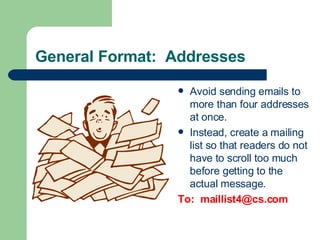
General Format: Addresses
 Avoid sending emails to
more than four addresses
at once.
 Instead, create a mailing
list so that readers do not
have to scroll too much
before getting to the
actual message.
To: maillist4@cs.com
Attachments
 When you are sending an
attachment tell your
respondent what the
name of the file is, what
program it is saved in,
and the version of the
program.
 “This file is in MSWord
2000 under the name
“LabFile.”
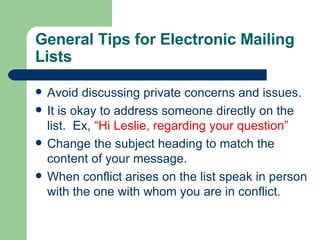
General Tips for Electronic Mailing
Lists
 Avoid discussing private concerns and issues.
 It is okay to address someone directly on the
list. Ex, “Hi Leslie, regarding your question”
 Change the subject heading to match the
content of your message.
 When conflict arises on the list speak in person
with the one with whom you are in conflict.
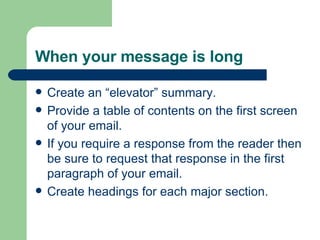
When your message is long
 Create an “elevator” summary.
 Provide a table of contents on the first screen
of your email.
 If you require a response from the reader then
be sure to request that response in the first
paragraph of your email.
 Create headings for each major section.
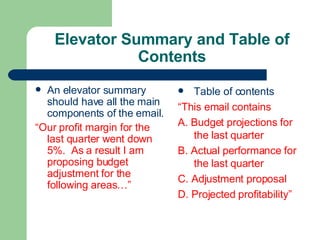
Elevator Summary and Table of
Contents
 An elevator summary
should have all the main
components of the email.
“Our profit margin for the
last quarter went down
5%. As a result I am
proposing budget
adjustment for the
following areas…”
 Table of contents
“This email contains
A. Budget projections for
the last quarter
B. Actual performance for
the last quarter
C. Adjustment proposal
D. Projected profitability”
Delivering Information About
Meetings, Orientations, Processes
 Include an elevator
summary and table of
contents with headings.
 Provide as much
information as possible.
 Offer the reader an
opportunity to receive the
information via mail if the
email is too confusing.
Delivering Bad News
 Deliver the news up front.
 Avoid blaming
statements.
 Avoid hedging words or
words that sound
ambiguous.
 Maintain a positive
resolve.
Delivering Bad News
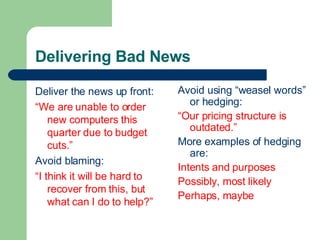
Deliver the news up front:
“We are unable to order
new computers this
quarter due to budget
cuts.”
Avoid blaming:
“I think it will be hard to
recover from this, but
what can I do to help?”
Avoid using “weasel words”
or hedging:
“Our pricing structure is
outdated.”
More examples of hedging
are:
Intents and purposes
Possibly, most likely
Perhaps, maybe
Writing a complaint
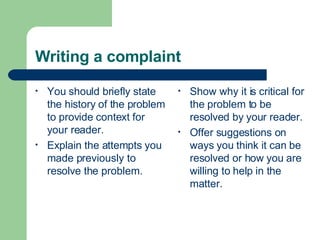
• You should briefly state
the history of the problem
to provide context for
your reader.
• Explain the attempts you
made previously to
resolve the problem.
• Show why it is critical for
the problem to be
resolved by your reader.
• Offer suggestions on
ways you think it can be
resolved or how you are
willing to help in the
matter.
Writing a complaint
Briefly state the history:
“The current way we
choose officers for our
organization is not
democratic. As a result,
we have a popularity
contest that does not
always get us the best
candidates.”
Show attempts made by
you thus far to resolve
the issue:
“I have offered two
alternatives for officer
selection that still
involves the votes of the
members but both have
been rejected by the
executive board.”
Writing a complaint
Show why it is important for your reader to get involved:
“This is a problem for two reasons. First, I am concerned
that the executive board no longer protects the interests
of the organization and that their actions are not in
keeping with the constitution of the organization.
Second, there have been a number of complaints from the
members who feel that their concerns and preferences
are not being addressed by the executive board, which
decreases morale and productivity.”
Writing a complaint
Ask for help and offer a resolution:
“Please let me know what other options I may have
overlooked. I am willing to meet with the department
head and the executive board to seek out a solution that
is fair to the members and is good for the business of
the organization. ”
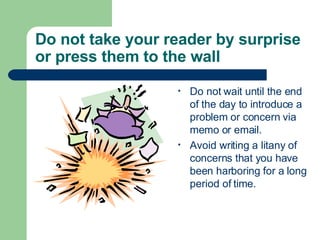
Do not take your reader by surprise
or press them to the wall
• Do not wait until the end
of the day to introduce a
problem or concern via
memo or email.
• Avoid writing a litany of
concerns that you have
been harboring for a long
period of time.
Taking Professors and TAs By
Surprise
 Be sure you have
permission to
communicate with your
professors via email.
 Complaints about grades
and projects should
generally be discussed in
person.
 Post your concerns or
questions in a timely
manner.
If you are a professor or instructor
 Be clear with your
students about whether
they can contact you via
email.
 Tell them what kinds of
subjects you are willing
to deal with via email in
case you have some
restrictions.
 If you have cut off times
for when you will respond
to email, inform your
students about those
times.
 Seek consent from
students before
discussing their emails in
the classroom.
Flaming in emails
• Flaming is a virtual term
for venting or sending
inflammatory messages
in email.
• Avoid flaming because it
tends to create a great
deal of conflict that
spirals out of control.
• Flame fights are the
equivalent of food fights
and tend to affect
observers in a very
negative way.
• What you say cannot be
taken back; it is in black
and white.
Keep flaming under control
• Before you send an email
message, ask yourself,
“would I say this to this
person’s face?”
• Calm down before
responding to a message
that offends you. Once
you send the message it
is gone.
 Read your message
twice before you send it
and assume that you
may be misinterpreted
when proofreading.
When you need to flame
 There are times when
you may need to blow off
some steam.
 Remember your
audience and your
situation before sending
the email.
Here’s a way to flame:
Flame On
Your message
Flame Off
Responding to a flame
 Empathize with the
sender’s frustration and
tell them they are right if
that is true
 If you feel you are right,
thank them for bringing
the matter to your
attention
 Explain what led to the
problem in question
 Avoid getting bogged
down by details and
minor arguments
 If you are aware that the
situation is in the process
of being resolved let the
reader know at the top of
the response
 Apologize if necessary
When Email Won’t Work
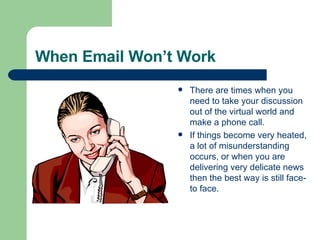
 There are times when you
need to take your discussion
out of the virtual world and
make a phone call.
 If things become very heated,
a lot of misunderstanding
occurs, or when you are
delivering very delicate news
then the best way is still face-
to face.
For more information
 Contact the Purdue University
Writing Lab with questions
about audience and
organization in writing email.
– Drop In: Heavilon 226
– Call: 43723
– Email:
– owl@owl.english.purdue.edu
– On the web:
http://owl.english.purdue.edu

email-etiquette3537.pdf

  • 1.
    Email Etiquette Workshop Broughtto you by the Purdue University Writing Lab
  • 2.
    Why is emailetiquette important?  We all interact with the printed word as though it has a personality and that personality makes positive and negative impressions upon us.  Without immediate feedback your document can easily be misinterpreted by your reader, so it is crucial that you follow the basic rules of etiquette to construct an appropriate tone.
  • 3.
    The elements ofemail etiquette  General format  Writing long messages  Attachments  The curse of surprises  Flaming  Delivering information  Delivering bad news  Electronic Mailing Lists
  • 4.
    General Format: TheBasics  Write a salutation for each new subject email.  Try to keep the email brief (one screen length).  Return emails within the same time you would a phone call.  Check for punctuation, spelling, and grammatical errors  Use caps when appropriate.  Format your email for plain text rather than HTML.  Use a font that has a professional or neutral look.
  • 5.
    General Format: CharacterSpacing  Try to keep your line length at 80 characters or less.  If your message is likely to be forwarded, keep it to 60 characters or less.  Set your email preferences to automatically wrap outgoing plain text messages.
  • 6.
    General Format: Listsand Bullets When you are writing directions or want to emphasize important points, number your directions or bullet your main points. For example, 2) Place the paper in drawer A. 3) Click the green “start” button. Another example, • Improve customer satisfaction. • Empower employees.
  • 7.
    General Format: Tone •Write in a positive tone “When you complete the report.” instead of “If you complete the report.” • Avoid negative words that begin with “un, non, ex” or that end with “less” (useless, non-existent, ex-employee, undecided). • Use smiles , winks ;), and other graphical symbols only when appropriate. • Use contractions to add a friendly tone. (don’t, won’t, can’t).
  • 8.
    General Format: Addresses Avoid sending emails to more than four addresses at once.  Instead, create a mailing list so that readers do not have to scroll too much before getting to the actual message. To: maillist4@cs.com
  • 9.
    Attachments  When youare sending an attachment tell your respondent what the name of the file is, what program it is saved in, and the version of the program.  “This file is in MSWord 2000 under the name “LabFile.”
  • 10.
    General Tips forElectronic Mailing Lists  Avoid discussing private concerns and issues.  It is okay to address someone directly on the list. Ex, “Hi Leslie, regarding your question”  Change the subject heading to match the content of your message.  When conflict arises on the list speak in person with the one with whom you are in conflict.
  • 11.
    When your messageis long  Create an “elevator” summary.  Provide a table of contents on the first screen of your email.  If you require a response from the reader then be sure to request that response in the first paragraph of your email.  Create headings for each major section.
  • 12.
    Elevator Summary andTable of Contents  An elevator summary should have all the main components of the email. “Our profit margin for the last quarter went down 5%. As a result I am proposing budget adjustment for the following areas…”  Table of contents “This email contains A. Budget projections for the last quarter B. Actual performance for the last quarter C. Adjustment proposal D. Projected profitability”
  • 13.
    Delivering Information About Meetings,Orientations, Processes  Include an elevator summary and table of contents with headings.  Provide as much information as possible.  Offer the reader an opportunity to receive the information via mail if the email is too confusing.
  • 14.
    Delivering Bad News Deliver the news up front.  Avoid blaming statements.  Avoid hedging words or words that sound ambiguous.  Maintain a positive resolve.
  • 15.
    Delivering Bad News Deliverthe news up front: “We are unable to order new computers this quarter due to budget cuts.” Avoid blaming: “I think it will be hard to recover from this, but what can I do to help?” Avoid using “weasel words” or hedging: “Our pricing structure is outdated.” More examples of hedging are: Intents and purposes Possibly, most likely Perhaps, maybe
  • 16.
    Writing a complaint •You should briefly state the history of the problem to provide context for your reader. • Explain the attempts you made previously to resolve the problem. • Show why it is critical for the problem to be resolved by your reader. • Offer suggestions on ways you think it can be resolved or how you are willing to help in the matter.
  • 17.
    Writing a complaint Brieflystate the history: “The current way we choose officers for our organization is not democratic. As a result, we have a popularity contest that does not always get us the best candidates.” Show attempts made by you thus far to resolve the issue: “I have offered two alternatives for officer selection that still involves the votes of the members but both have been rejected by the executive board.”
  • 18.
    Writing a complaint Showwhy it is important for your reader to get involved: “This is a problem for two reasons. First, I am concerned that the executive board no longer protects the interests of the organization and that their actions are not in keeping with the constitution of the organization. Second, there have been a number of complaints from the members who feel that their concerns and preferences are not being addressed by the executive board, which decreases morale and productivity.”
  • 19.
    Writing a complaint Askfor help and offer a resolution: “Please let me know what other options I may have overlooked. I am willing to meet with the department head and the executive board to seek out a solution that is fair to the members and is good for the business of the organization. ”
  • 20.
    Do not takeyour reader by surprise or press them to the wall • Do not wait until the end of the day to introduce a problem or concern via memo or email. • Avoid writing a litany of concerns that you have been harboring for a long period of time.
  • 21.
    Taking Professors andTAs By Surprise  Be sure you have permission to communicate with your professors via email.  Complaints about grades and projects should generally be discussed in person.  Post your concerns or questions in a timely manner.
  • 22.
    If you area professor or instructor  Be clear with your students about whether they can contact you via email.  Tell them what kinds of subjects you are willing to deal with via email in case you have some restrictions.  If you have cut off times for when you will respond to email, inform your students about those times.  Seek consent from students before discussing their emails in the classroom.
  • 23.
    Flaming in emails •Flaming is a virtual term for venting or sending inflammatory messages in email. • Avoid flaming because it tends to create a great deal of conflict that spirals out of control. • Flame fights are the equivalent of food fights and tend to affect observers in a very negative way. • What you say cannot be taken back; it is in black and white.
  • 24.
    Keep flaming undercontrol • Before you send an email message, ask yourself, “would I say this to this person’s face?” • Calm down before responding to a message that offends you. Once you send the message it is gone.  Read your message twice before you send it and assume that you may be misinterpreted when proofreading.
  • 25.
    When you needto flame  There are times when you may need to blow off some steam.  Remember your audience and your situation before sending the email. Here’s a way to flame: Flame On Your message Flame Off
  • 26.
    Responding to aflame  Empathize with the sender’s frustration and tell them they are right if that is true  If you feel you are right, thank them for bringing the matter to your attention  Explain what led to the problem in question  Avoid getting bogged down by details and minor arguments  If you are aware that the situation is in the process of being resolved let the reader know at the top of the response  Apologize if necessary
  • 27.
    When Email Won’tWork  There are times when you need to take your discussion out of the virtual world and make a phone call.  If things become very heated, a lot of misunderstanding occurs, or when you are delivering very delicate news then the best way is still face- to face.
  • 28.
    For more information Contact the Purdue University Writing Lab with questions about audience and organization in writing email. – Drop In: Heavilon 226 – Call: 43723 – Email: – owl@owl.english.purdue.edu – On the web: http://owl.english.purdue.edu