Email Capture
             at the
Radical Archives of Philadelphia
Introduction
  (To the Radical Archives of Philadelphia)
• Collect the material history of progressive
  organizations, activists and events in Philadelphia
• Housed at the Wooden Shoe Bookstore & Info
  Shop
• Collections Include: RNC Protest Material; Philly
  National Lawyers Guild Papers; Books Through
  Bars Records
• Works with organizations to promote causes of
  both the organization and the RAP
• Works with other independent collections to pool
  resources: Community Archives Consortium
Introduction To Email Capture
             (In General)
• Identification


• Preservation

• Access
Introduction To Email Capture
             (at the RAP)
• Identification
  – Listserv ; Mailing list of organization
  – Outward – pointing communication
• Preservation
  – Messages downloaded and reformatted
• Access
  – Saved copies for us and dispersal
Today’s Examples:
   RAP Emails
Specific Steps: Identification
• Download Mozilla Thunderbird
• Link to an email account
  – In our case, radicalarchivesofphila@gmail.com
  – Use IMAP (This creates an open portal to the
    Gmail server. There might be benefits to using
    POP, buy me a drink to hear more)
• Use this email address to sign up for mailing
  lists
  – Create appropriate labels for each
    organization/mailing list
Specific Steps: Preservation
• Find the location of your locally saved email
  messages
  – Note: it will look something like this:
    “C:Users[username]AppDataRoamingThunderbirdProfiles[name].de
    faultImapMail”

• Labels/folders created in gmail account will be
  represented here:
Specific Steps: Preservation
• Find the location of your locally saved email
  messages
  – Note: it will look something like this:
    “C:Users[username]AppDataRoamingThunderbirdProfiles[name].de
    faultImapMail”

• Labels/folders created in gmail account will be
  represented here:
Specific Steps: Preservation
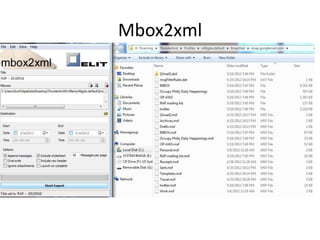
• Download Mbox2xml
  – http://tools.elit.nl/mbox2xml.php
• Convert mbox files to xml
  – Simple interface, can make decisions about what
    to include.
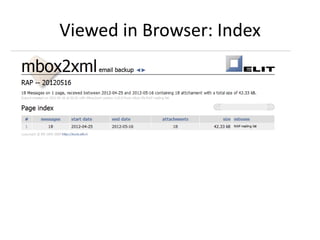
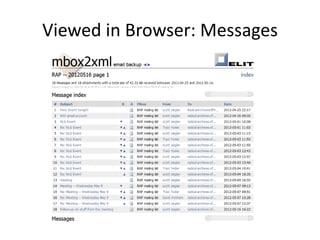
  – Includes style sheets so that messages can be
    viewed in browser of choice.
Mbox2xml
Viewed in Browser: Index
Viewed in Browser: Messages
Specific Steps: Access
• XML messages are saved on thumb drives
• Researchers are invited to use
  messages, viewed through browser
• In terms of out-ward pointing
  communication, researchers are welcome to
  have copies of messages. We copy messages
  to their drive.
Issues & Considerations
• RAP, to date, does not have an electronic
  workstation (please make checks out to me)
• Message fixity
  – One option to simply show messages through
    Thunderbird (skip several steps).
  – This would allow the researcher to make changes
    to the messages.
  – Having the messages available through a browser
    keeps researchers from making changes.
Radical Archives Contact


• Website: www.philllyradicalarchives.org
• Email: info@phillyradicalarchives.org
• Contact me: scott@phillyradicalarchives.org

Email Capture at the Radical Archives of Philadelphia

  • 1.
    Email Capture at the Radical Archives of Philadelphia
  • 2.
    Introduction (Tothe Radical Archives of Philadelphia) • Collect the material history of progressive organizations, activists and events in Philadelphia • Housed at the Wooden Shoe Bookstore & Info Shop • Collections Include: RNC Protest Material; Philly National Lawyers Guild Papers; Books Through Bars Records • Works with organizations to promote causes of both the organization and the RAP • Works with other independent collections to pool resources: Community Archives Consortium
  • 3.
    Introduction To EmailCapture (In General) • Identification • Preservation • Access
  • 4.
    Introduction To EmailCapture (at the RAP) • Identification – Listserv ; Mailing list of organization – Outward – pointing communication • Preservation – Messages downloaded and reformatted • Access – Saved copies for us and dispersal
  • 5.
  • 6.
    Specific Steps: Identification •Download Mozilla Thunderbird • Link to an email account – In our case, radicalarchivesofphila@gmail.com – Use IMAP (This creates an open portal to the Gmail server. There might be benefits to using POP, buy me a drink to hear more) • Use this email address to sign up for mailing lists – Create appropriate labels for each organization/mailing list
  • 7.
    Specific Steps: Preservation •Find the location of your locally saved email messages – Note: it will look something like this: “C:Users[username]AppDataRoamingThunderbirdProfiles[name].de faultImapMail” • Labels/folders created in gmail account will be represented here:
  • 8.
    Specific Steps: Preservation •Find the location of your locally saved email messages – Note: it will look something like this: “C:Users[username]AppDataRoamingThunderbirdProfiles[name].de faultImapMail” • Labels/folders created in gmail account will be represented here:
  • 9.
    Specific Steps: Preservation •Download Mbox2xml – http://tools.elit.nl/mbox2xml.php • Convert mbox files to xml – Simple interface, can make decisions about what to include. – Includes style sheets so that messages can be viewed in browser of choice.
  • 10.
  • 11.
  • 12.
  • 13.
    Specific Steps: Access •XML messages are saved on thumb drives • Researchers are invited to use messages, viewed through browser • In terms of out-ward pointing communication, researchers are welcome to have copies of messages. We copy messages to their drive.
  • 14.
    Issues & Considerations •RAP, to date, does not have an electronic workstation (please make checks out to me) • Message fixity – One option to simply show messages through Thunderbird (skip several steps). – This would allow the researcher to make changes to the messages. – Having the messages available through a browser keeps researchers from making changes.
  • 15.
    Radical Archives Contact •Website: www.philllyradicalarchives.org • Email: info@phillyradicalarchives.org • Contact me: scott@phillyradicalarchives.org