









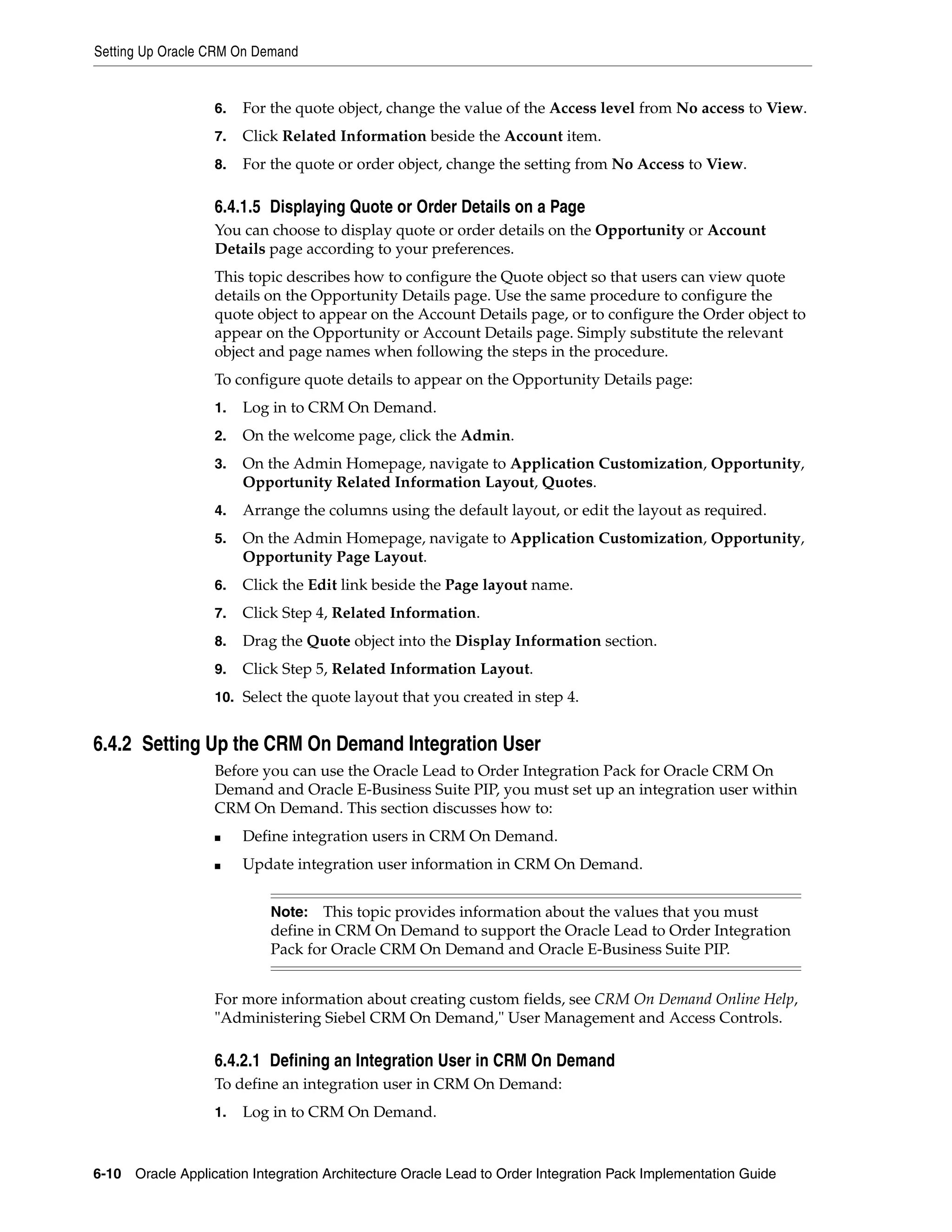
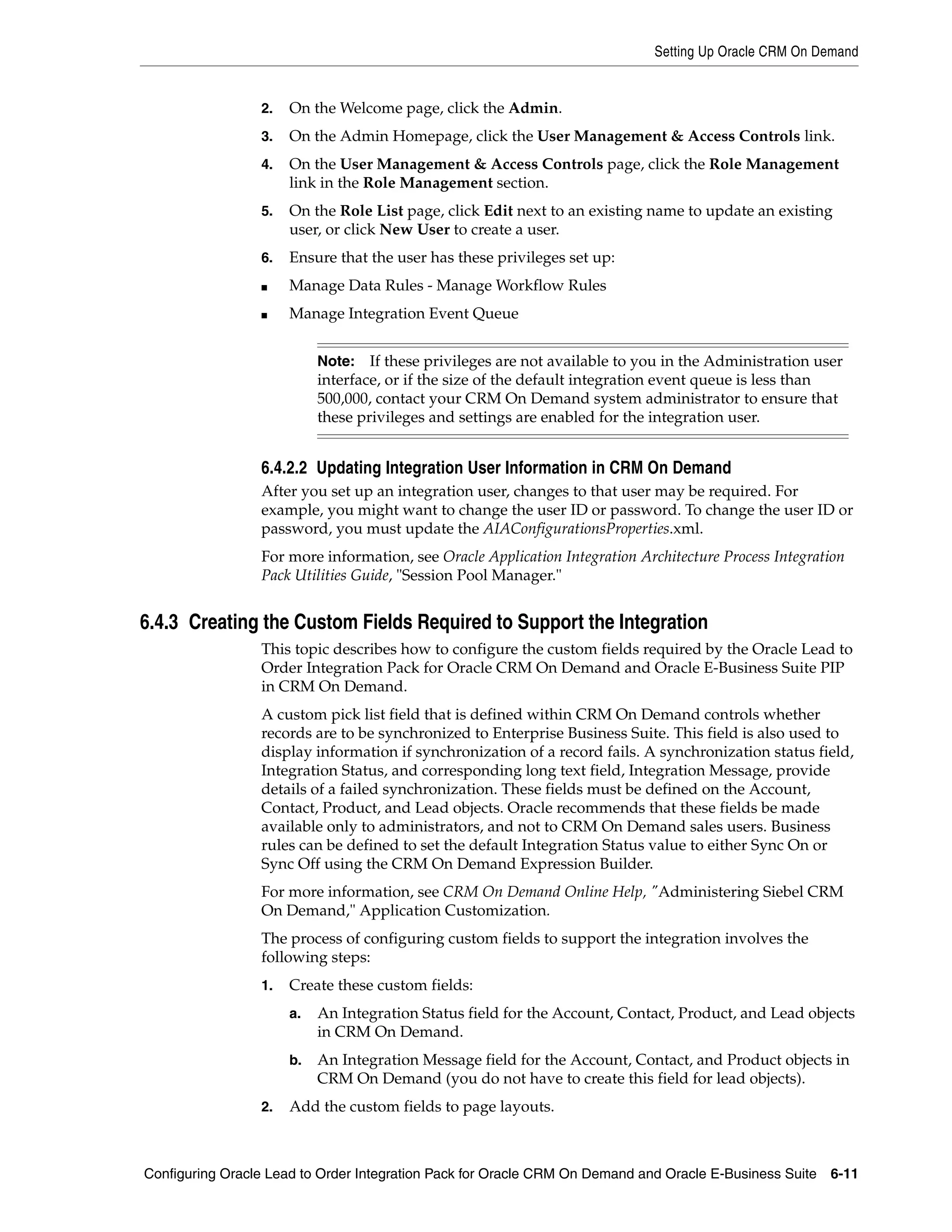
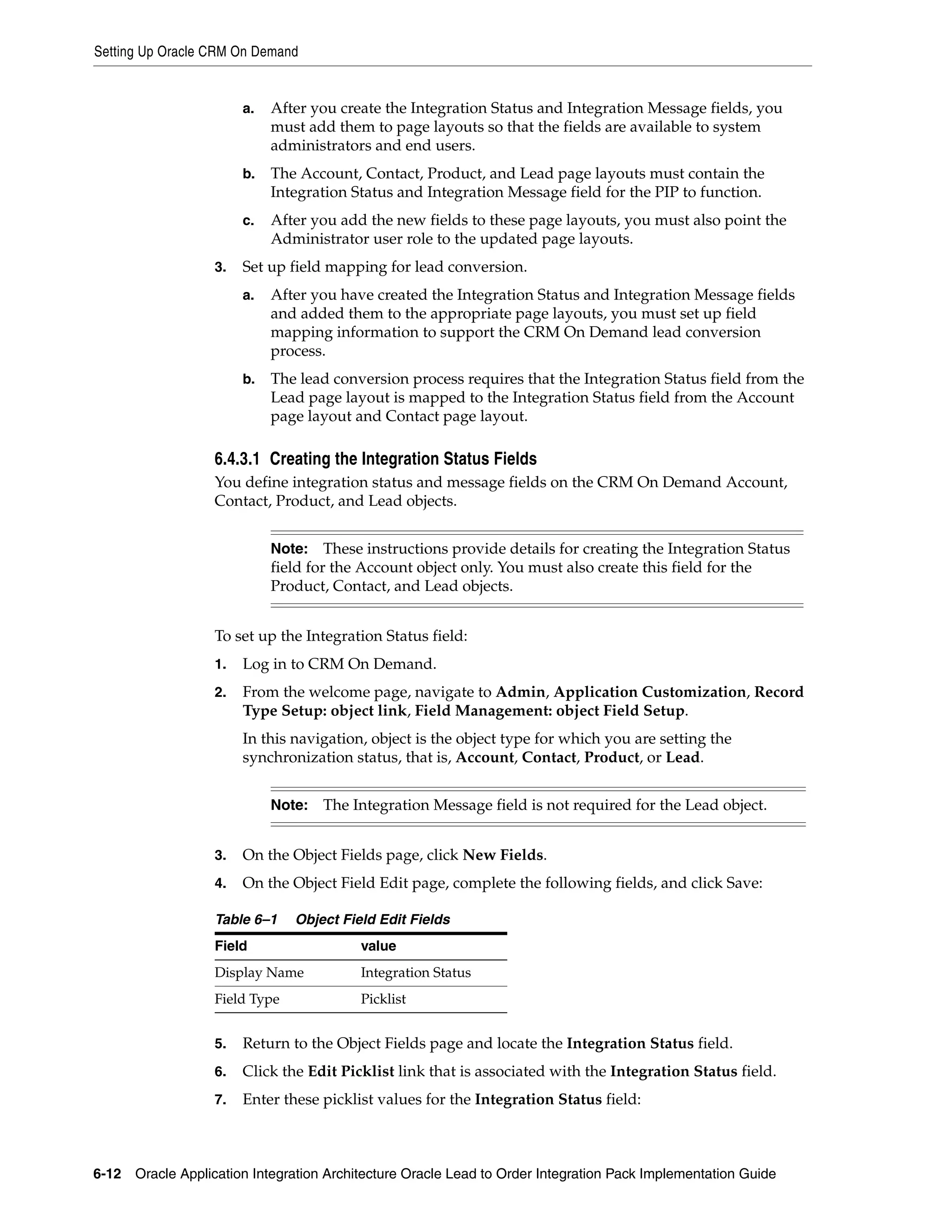
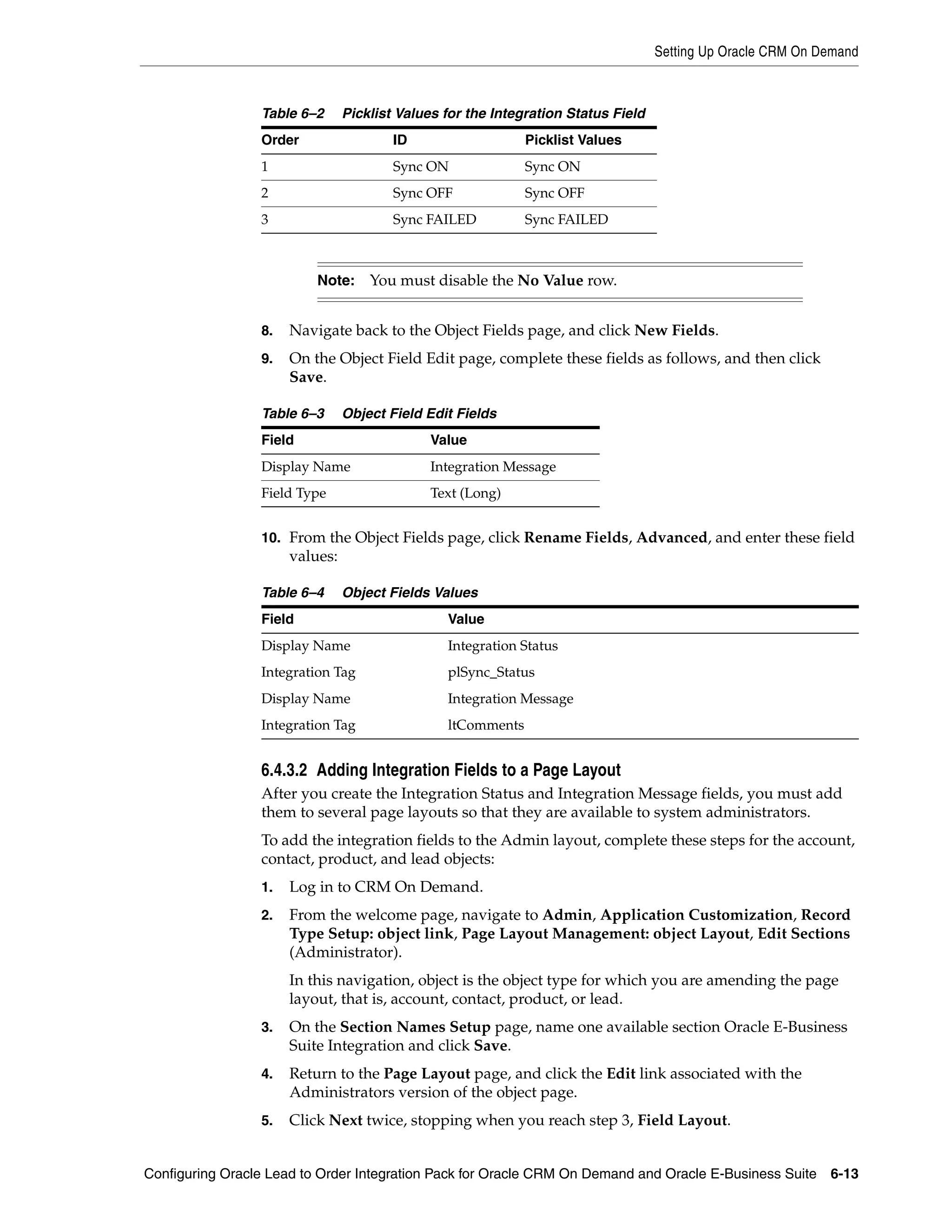
Oracle® Application Integration Architecture
Oracle Lead to Order Integration Pack for Oracle CRM On
Demand and Oracle E-Business Suite Implementation Guide
Release 3.1.1
E22284-02


May 2012
Oracle Application Integration Architecture Oracle Lead to Order Integration Pack for Oracle CRM On
Demand and Oracle E-Business Suite Implementation Guide, Release 3.1.1
E22284-02

Copyright © 2001, 2012, Oracle and/or its affiliates. All rights reserved.

Primary Author:     Oracle Corporation

This software and related documentation are provided under a license agreement containing restrictions on
use and disclosure and are protected by intellectual property laws. Except as expressly permitted in your
license agreement or allowed by law, you may not use, copy, reproduce, translate, broadcast, modify, license,
transmit, distribute, exhibit, perform, publish, or display any part, in any form, or by any means. Reverse
engineering, disassembly, or decompilation of this software, unless required by law for interoperability, is
prohibited.

The information contained herein is subject to change without notice and is not warranted to be error-free. If
you find any errors, please report them to us in writing.

If this is software or related documentation that is delivered to the U.S. Government or anyone licensing it
on behalf of the U.S. Government, the following notice is applicable:

U.S. GOVERNMENT END USERS: Oracle programs, including any operating system, integrated software,
any programs installed on the hardware, and/or documentation, delivered to U.S. Government end users
are "commercial computer software" pursuant to the applicable Federal Acquisition Regulation and
agency-specific supplemental regulations. As such, use, duplication, disclosure, modification, and
adaptation of the programs, including any operating system, integrated software, any programs installed on
the hardware, and/or documentation, shall be subject to license terms and license restrictions applicable to
the programs. No other rights are granted to the U.S. Government.

This software or hardware is developed for general use in a variety of information management
applications. It is not developed or intended for use in any inherently dangerous applications, including
applications that may create a risk of personal injury. If you use this software or hardware in dangerous
applications, then you shall be responsible to take all appropriate fail-safe, backup, redundancy, and other
measures to ensure its safe use. Oracle Corporation and its affiliates disclaim any liability for any damages
caused by use of this software or hardware in dangerous applications.

Oracle and Java are registered trademarks of Oracle and/or its affiliates. Other names may be trademarks of
their respective owners.

Intel and Intel Xeon are trademarks or registered trademarks of Intel Corporation. All SPARC trademarks
are used under license and are trademarks or registered trademarks of SPARC International, Inc. AMD,
Opteron, the AMD logo, and the AMD Opteron logo are trademarks or registered trademarks of Advanced
Micro Devices. UNIX is a registered trademark of The Open Group.
This software or hardware and documentation may provide access to or information on content, products,
and services from third parties. Oracle Corporation and its affiliates are not responsible for and expressly
disclaim all warranties of any kind with respect to third-party content, products, and services. Oracle
Corporation and its affiliates will not be responsible for any loss, costs, or damages incurred due to your
access to or use of third-party content, products, or services.
Contents

Preface ............................................................................................................................................................... xv
        Common Oracle AIA Pre-Built Integration Guides .............................................................................                                   xv
        Documentation Accessibility ...................................................................................................................                xv
        Additional Resources................................................................................................................................           xvi

Part I         Understanding the Delivered Integrations

1 Oracle Lead to Order Integration Pack for Oracle CRM On Demand and Oracle
E-Business Suite
        Overview.................................................................................................................................................... 1-1
        Business Process Flows ........................................................................................................................... 1-2
        Solution Assumptions and Constraints............................................................................................... 1-5

2 Initial Loading and Synchronization of Data
        Overview....................................................................................................................................................   2-1
        Batch Loading of Data PL/SQL Script ..................................................................................................                         2-2
            GENERATE_EVENTS Procedure....................................................................................................                              2-2
            PURGE_EVENTLOG Procedure......................................................................................................                             2-3
            REGENERATE_EVENT Procedure.................................................................................................                                2-3
        Batch Loading Customer Data ...............................................................................................................                    2-3
            Understanding the Customer Account Batch Flow Process........................................................                                              2-4
            Solution Assumptions and Constraints ..........................................................................................                            2-5
            Running the Account Batch Load Process......................................................................................                               2-5
        Batch Loading Product Data...................................................................................................................                  2-6
            Understanding the Product Batch Flow Process ...........................................................................                                   2-7
            Solution Assumptions and Constraints ..........................................................................................                            2-8
            Running the Product Batch Load Process ......................................................................................                              2-8

3 Process Integration for Customer Management
        Overview....................................................................................................................................................   3-1
           Solution Assumptions and Constraints ..........................................................................................                             3-2
        Customer Data Synchronization ...........................................................................................................                      3-5
           Enabling Account Synchronization in CRM On Demand ...........................................................                                               3-5
        Synchronizing Accounts from CRM On Demand to Oracle E-Business Suite............................                                                               3-7


                                                                                                                                                                        iii
Synchronizing New Accounts from CRM On Demand to Oracle E-Business Suite ................ 3-7
         Synchronizing New Account Integration Flow............................................................................. 3-7
         Updating and Synchronizing Accounts from CRM On Demand to Oracle E-Business Suite 3-8
         Updating and Synchronizing Account Integration Flow............................................................. 3-8
         Deleting Accounts in CRM On Demand ........................................................................................ 3-8
         Synchronizing New Account-Contacts from CRM On Demand to Oracle E-Business Suite . 3-8
         Synchronizing New Account-Contact Integration Flow.............................................................. 3-9
         Updating and Synchronizing Account-Contacts from CRM On Demand to Oracle E-Business
         Suite 3-9
         Update and Synchronize Account-Contact Integration Flow ..................................................... 3-9
         Deleting Account-Contacts in CRM On Demand ......................................................................... 3-9
     Synchronizing Accounts from Oracle E-Business Suite to CRM On Demand......................... 3-10
         Batch Loading Accounts from Oracle E-Business Suite to CRM On Demand....................... 3-10
         Synchronizing New Accounts from Oracle E-Business Suite to CRM On Demand ............. 3-10
         Synchronize Customer Account Integration Flow..................................................................... 3-11
         Merging Accounts from Oracle E-Business Suite to CRM On Demand ................................. 3-13
         Merge Account Integration Flow.................................................................................................. 3-14
         Merging Parties from Oracle E-Business Suite to CRM On Demand...................................... 3-16
         Merge Party Integration Flow ....................................................................................................... 3-18
     Oracle CRM On Demand Interfaces.................................................................................................. 3-19
     Oracle E-Business Suite Interfaces .................................................................................................... 3-19
     Core AIA Components ......................................................................................................................... 3-20
     Integration Services .............................................................................................................................. 3-21
         CustomerPartyEBSV2..................................................................................................................... 3-22
         CustomerPartyResponseEBSV2 .................................................................................................... 3-22
         InterfaceCustomerToFulfillmentEBF ........................................................................................... 3-23
         SyncCustomerCRMODProvABCSImpl....................................................................................... 3-23
         SyncCustomerPartyListEbizReqABCSImpl ................................................................................ 3-24
         SyncCustomerPartyListEbizProvABCSImpl .............................................................................. 3-24
         MergeAccountEbizReqABCSImpl................................................................................................ 3-24
         MergePartyEbizReqABCSImpl ..................................................................................................... 3-24
         SyncCustomerPartyListEbizEventConsumer ............................................................................. 3-24
         MergeAccountEbizEventConsumer............................................................................................. 3-24
         MergePartyEbizEventConsumer .................................................................................................. 3-25
         SyncCustomerPartyListEbizAdapter ........................................................................................... 3-25
         CreateCustomerCRMODReqABCSImpl ..................................................................................... 3-25
         UpdateCustomerCRMODReqABCSImpl.................................................................................... 3-25
         DeleteCustomerCRMODReqABCSImpl...................................................................................... 3-26
         CreateCustomerAddressCRMODReqABCSImpl ...................................................................... 3-26
         UpdateCustomerAddressCRMODReqABCSImpl..................................................................... 3-26
         DeleteCustomerAddressCRMODReqABCSImpl....................................................................... 3-27
         QueryCustomerPartyListCRMODProvABCSImpl .................................................................... 3-27
         ProcessContactCRMODReqABCSImpl ....................................................................................... 3-27
         CreateCustomerPartyEbizProvABCSImpl .................................................................................. 3-28
         UpdateCustomerPartyEbizProvABCSImpl ................................................................................ 3-28
         TransformAppContextEbizService............................................................................................... 3-28
         QueryResponsibilityEbizAdapter................................................................................................. 3-28
         AIACompositeScheduler ............................................................................................................... 3-28

iv
CRMOnDemandIntegrationEventProcessor............................................................................... 3-29

4 Process Integration for Product Management
   Overview....................................................................................................................................................   4-1
       Solution Assumptions and Constraints ..........................................................................................                            4-2
   Product Synchronization ........................................................................................................................               4-2
       Create Items Flow ..............................................................................................................................           4-3
       Update Items Integration Flow ........................................................................................................                     4-4
       Batchload Items Integration Flow....................................................................................................                       4-6
   Oracle CRM On Demand Interfaces.....................................................................................................                           4-6
   Oracle E-Business Suite Interfaces .......................................................................................................                     4-6
   Core AIA Components ............................................................................................................................               4-6
   Integration Services .................................................................................................................................         4-7
       ItemEBSV2...........................................................................................................................................       4-7
       CreateProductEbizReqABCSImpl ...................................................................................................                           4-8
       UpdateProductEbizReqABCSImpl..................................................................................................                             4-8
       BatchLoadProductEbizReqABCSImpl ............................................................................................                               4-8
       CreateItemEbizEventConsumer ......................................................................................................                         4-9
       UpdateItemEbizEventConsumer.....................................................................................................                           4-9
       BatchloadItemEbizEventConsumer ................................................................................................                            4-9

5 Process Integration for Opportunity to Quote and Order Management
   Overview.................................................................................................................................................... 5-1
       Solution Assumptions and Constraints .......................................................................................... 5-3
   Create Sales Quote Integration Flow.................................................................................................... 5-4
   Create Sales Order Integration Flow .................................................................................................... 5-7
   Oracle CRM On Demand Interfaces..................................................................................................... 5-9
   Oracle E-Business Suite Interfaces ....................................................................................................... 5-9
   Core AIA Components ......................................................................................................................... 5-10
   Integration Services .............................................................................................................................. 5-10
       SalesQuoteEBS................................................................................................................................. 5-11
       SalesQuoteResponseEBS ................................................................................................................ 5-11
       SalesQuoteOrchestrationEBS......................................................................................................... 5-12
       SalesQuoteOrchestrationResponseEBS........................................................................................ 5-12
       InterfaceSalesQuoteToFulfillmentEBF......................................................................................... 5-12
       InterfaceSalesQuoteToCustomerEBF ........................................................................................... 5-13
       CreateSalesQuoteEbizProvABCSImpl ......................................................................................... 5-13
       ProcessSalesQuoteCRMODReqABCSImpl ................................................................................. 5-13
       CRMOnDemandPriorityIntegrationEventProcessor ................................................................. 5-13
       SalesOrderEBSV2 ............................................................................................................................ 5-14
       SalesOrderResponseEBSV2 ........................................................................................................... 5-14
       SalesOrderOrchestrationEBSV2 .................................................................................................... 5-14
       CustomerPartyOrchestrationEBSV2............................................................................................. 5-15
       InterfaceSalesOrderToFulfillmentEBF ......................................................................................... 5-15
       InterfaceSalesOrderToCustomerEBF ........................................................................................... 5-15
       InterfaceCustomerToFulfillmentEBF ........................................................................................... 5-16


                                                                                                                                                                    v
SyncCustomerPartyListEbizProvABCSImpl ..............................................................................                             5-16
           QueryCustomerPartyListCRMODProvABCSImpl ....................................................................                                     5-16
           CreateSalesOrderEbizProvABCSImpl .........................................................................................                       5-16
           ProcessSalesOrderCRMODReqABCSImpl..................................................................................                              5-17

Part II Implementing the Delivered Integrations

6 Configuring Oracle Lead to Order Integration Pack for Oracle CRM On
Demand and Oracle E-Business Suite
     Prerequisites.............................................................................................................................................. 6-1
         Customer Management Prerequisites ............................................................................................. 6-1
         Product Management Prerequisites ................................................................................................ 6-2
         Opportunity to Quote and Order Prerequisites ............................................................................ 6-2
     Data Requirements .................................................................................................................................. 6-2
         Data Requirements for Customer Management............................................................................ 6-2
         Data Requirements for Product Management ............................................................................... 6-3
         Data Requirements for Opportunity to Quote and Order ........................................................... 6-3
     Setting Up Oracle E-Business Suite...................................................................................................... 6-3
         Changing the Email Address............................................................................................................ 6-3
         Granting Access to the 360 Degree View in Oracle E-Business Suite......................................... 6-4
         Changing the Default Status of New Orders in Oracle E-Business Suite .................................. 6-4
         Assigning Sales Rep........................................................................................................................... 6-5
         Creating Oracle E-Business Suite System Profiles ........................................................................ 6-5
     Setting Up Oracle CRM On Demand ................................................................................................... 6-6
         Implementing the Opportunity to Quote or Order Business Process ........................................ 6-6
             Enabling the Order Management Quoting Module .............................................................. 6-6
             Enabling the Order or Quote Object in CRM On Demand................................................... 6-7
             Create the Web Link to View Orders or Quotes in Oracle E-Business Suite ..................... 6-7
             Granting Access to the Quote or Order Applet to User Roles and Users........................... 6-9
             Displaying Quote or Order Details on a Page ..................................................................... 6-10
         Setting Up the CRM On Demand Integration User ................................................................... 6-10
             Defining an Integration User in CRM On Demand ............................................................ 6-10
             Updating Integration User Information in CRM On Demand.......................................... 6-11
         Creating the Custom Fields Required to Support the Integration........................................... 6-11
             Creating the Integration Status Fields .................................................................................. 6-12
             Adding Integration Fields to a Page Layout........................................................................ 6-13
             Configuring the Account-Contact Field ............................................................................... 6-14
             Mapping Integration Fields for the Lead Conversion ........................................................ 6-14
         Creating the Web Link for the 360 Degree View........................................................................ 6-15
             About Using the Web Link for the 360 Degree View ......................................................... 6-15
             Configuring the Web Link for the 360 Degree View .......................................................... 6-16
         Configuring AIACompositeScheduler Service........................................................................... 6-17
         Configuring the Integration Event Queues ................................................................................. 6-17
         Configuring Integration and Workflow Events in CRM On Demand .................................... 6-18
             Understanding Integration and Workflow Event Configuration..................................... 6-18
             Defining Workflow Rule Conditions .................................................................................... 6-22
             Creating and Configuring Integration Events ..................................................................... 6-23


vi
Setting Up Synchronization Failure Lists .................................................................................... 6-23
      Setting Up Synchronization Failure Alerts.................................................................................. 6-24
      Session Management ...................................................................................................................... 6-25
   Working with Domain Value Maps ................................................................................................... 6-25
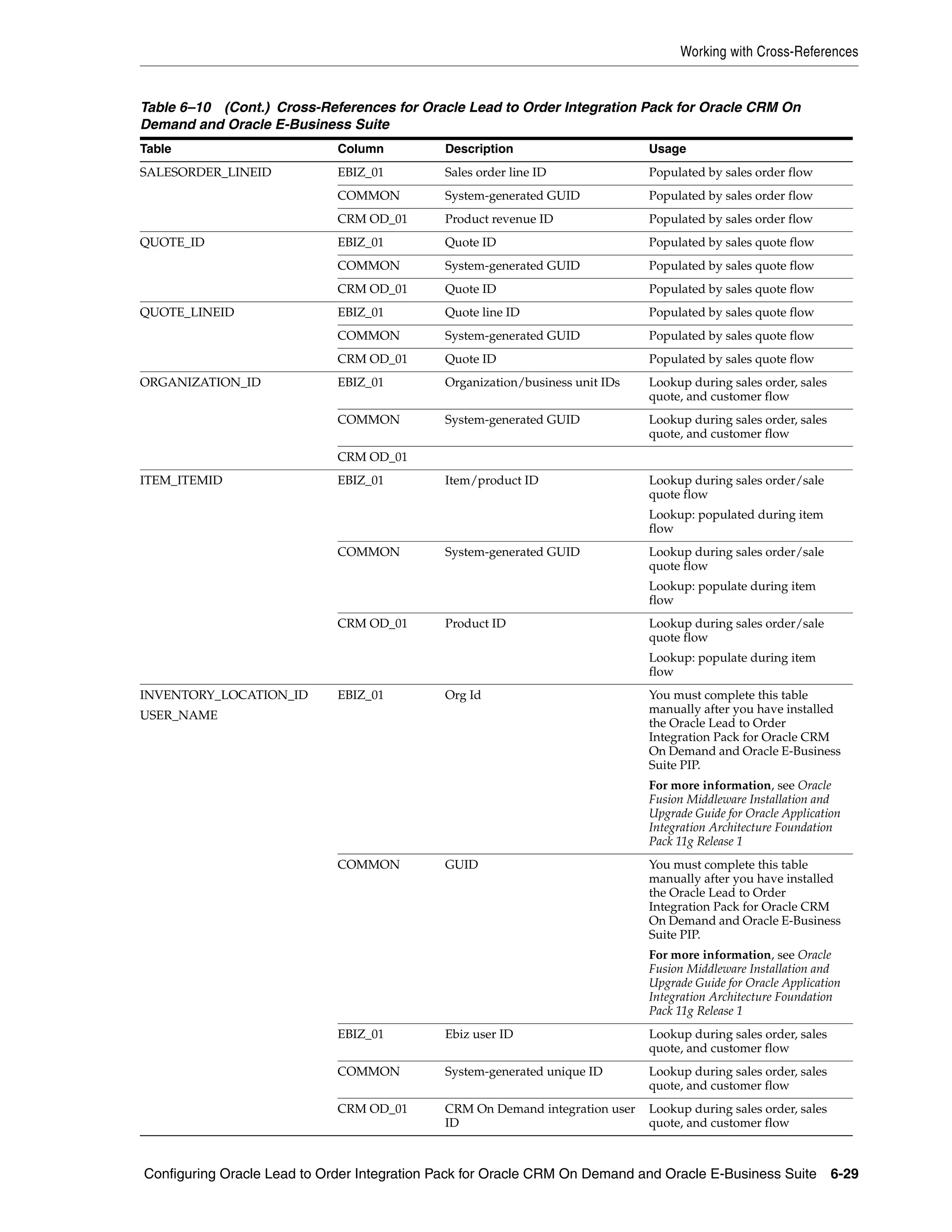
   Working with Cross-References ......................................................................................................... 6-26
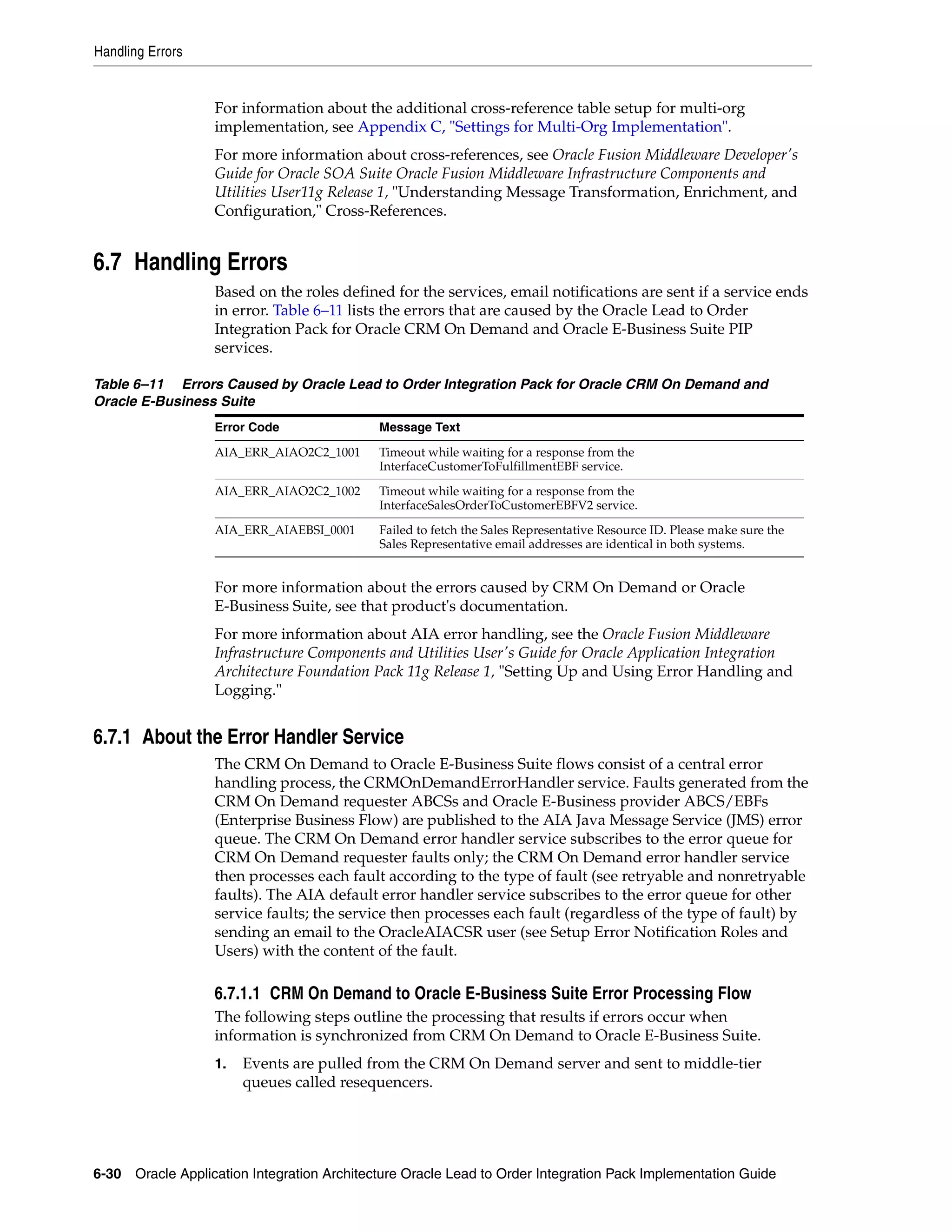
   Handling Errors ..................................................................................................................................... 6-30
      About the Error Handler Service .................................................................................................. 6-30
          CRM On Demand to Oracle E-Business Suite Error Processing Flow ............................. 6-30
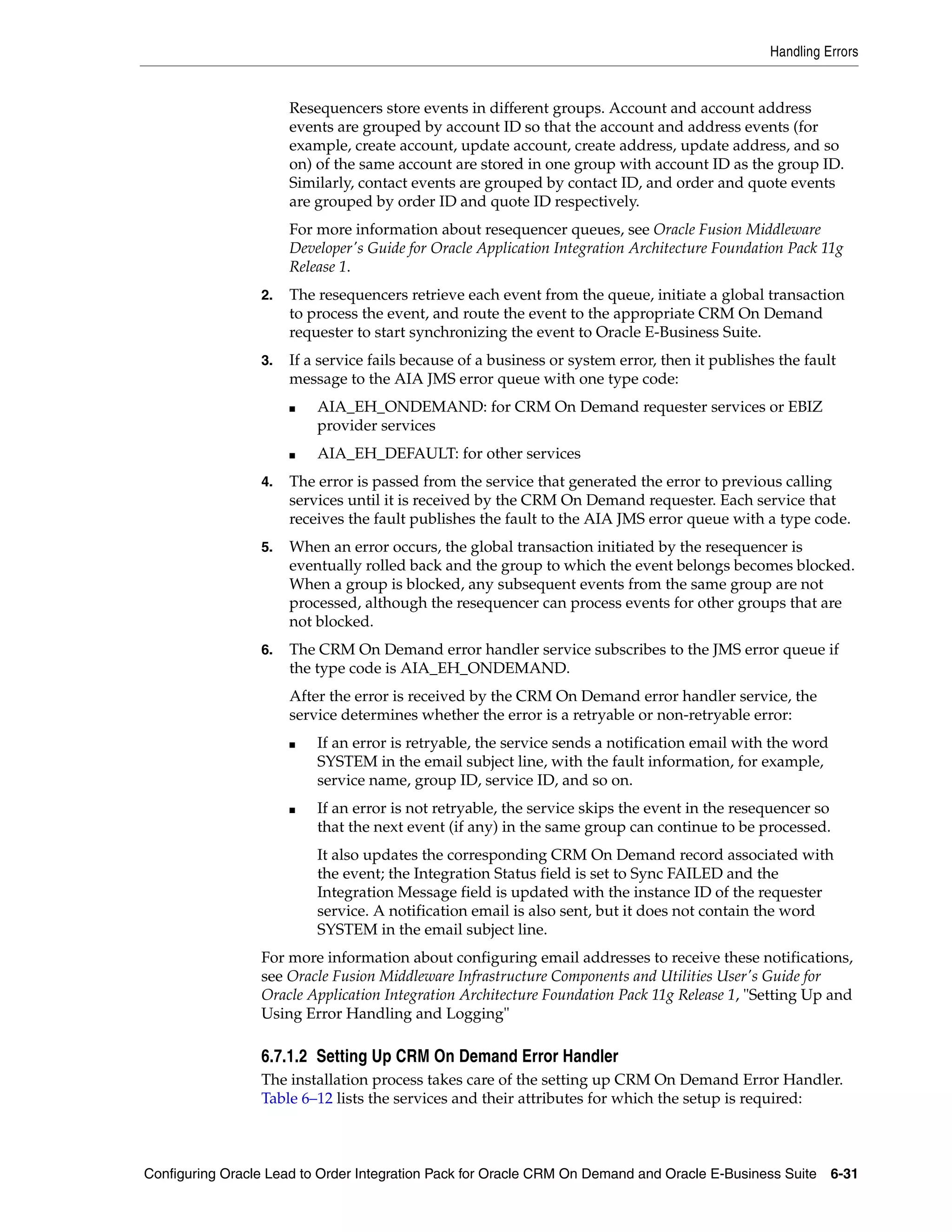
          Setting Up CRM On Demand Error Handler ...................................................................... 6-31
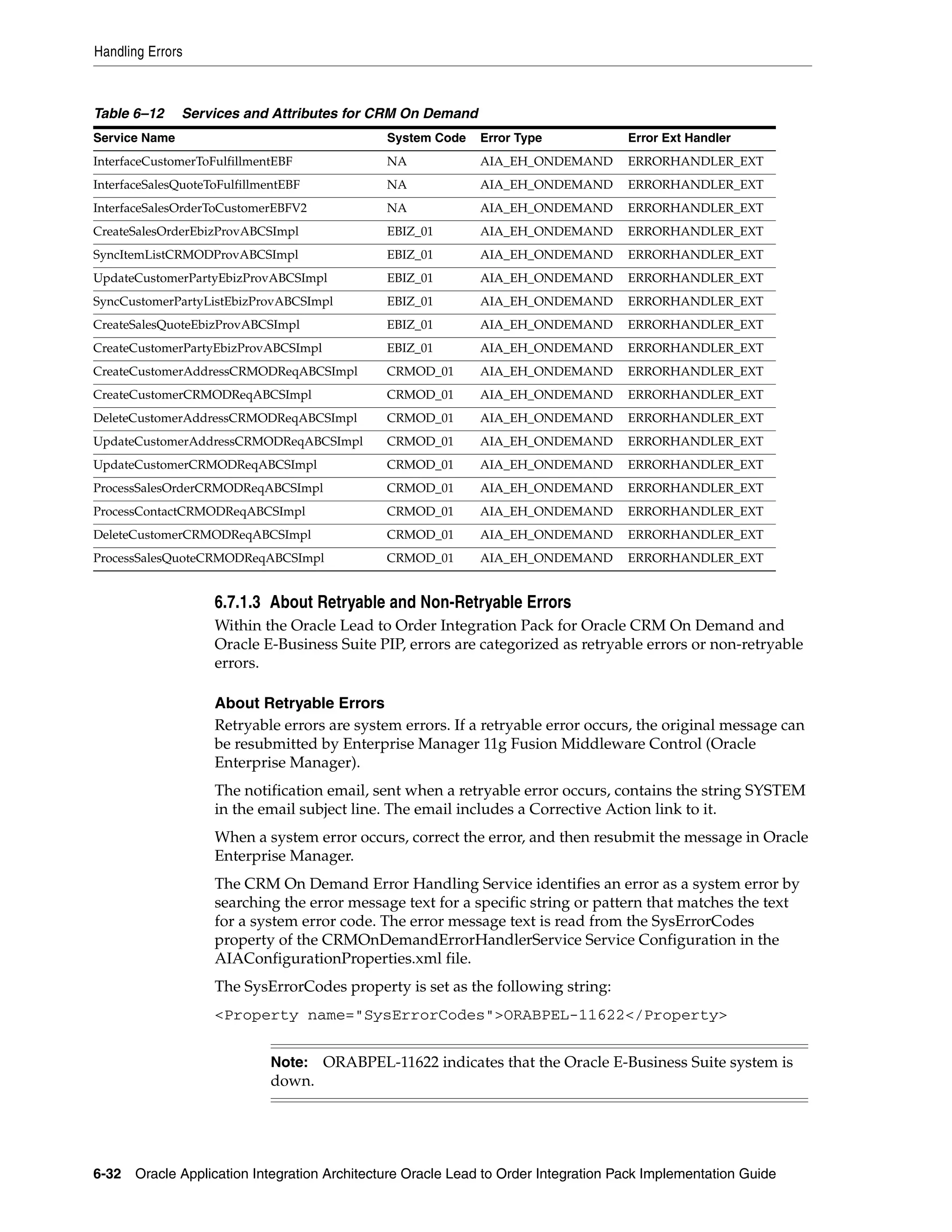
          About Retryable and Non-Retryable Errors ........................................................................ 6-32
      Setup Error Notification Roles and Users.................................................................................... 6-33
      Resubmitting Failed Messages in Oracle E-Business Suite....................................................... 6-33
      Throttling Oracle E-Business Suite Messages in the 11G Fusion Middleware ...................... 6-35
   Viewing EIMs......................................................................................................................................... 6-35
   Configuring the Oracle Lead to Order Integration Pack for Oracle CRM On Demand and Oracle
   E-Business Suite PIP............................................................................................................................. 6-35

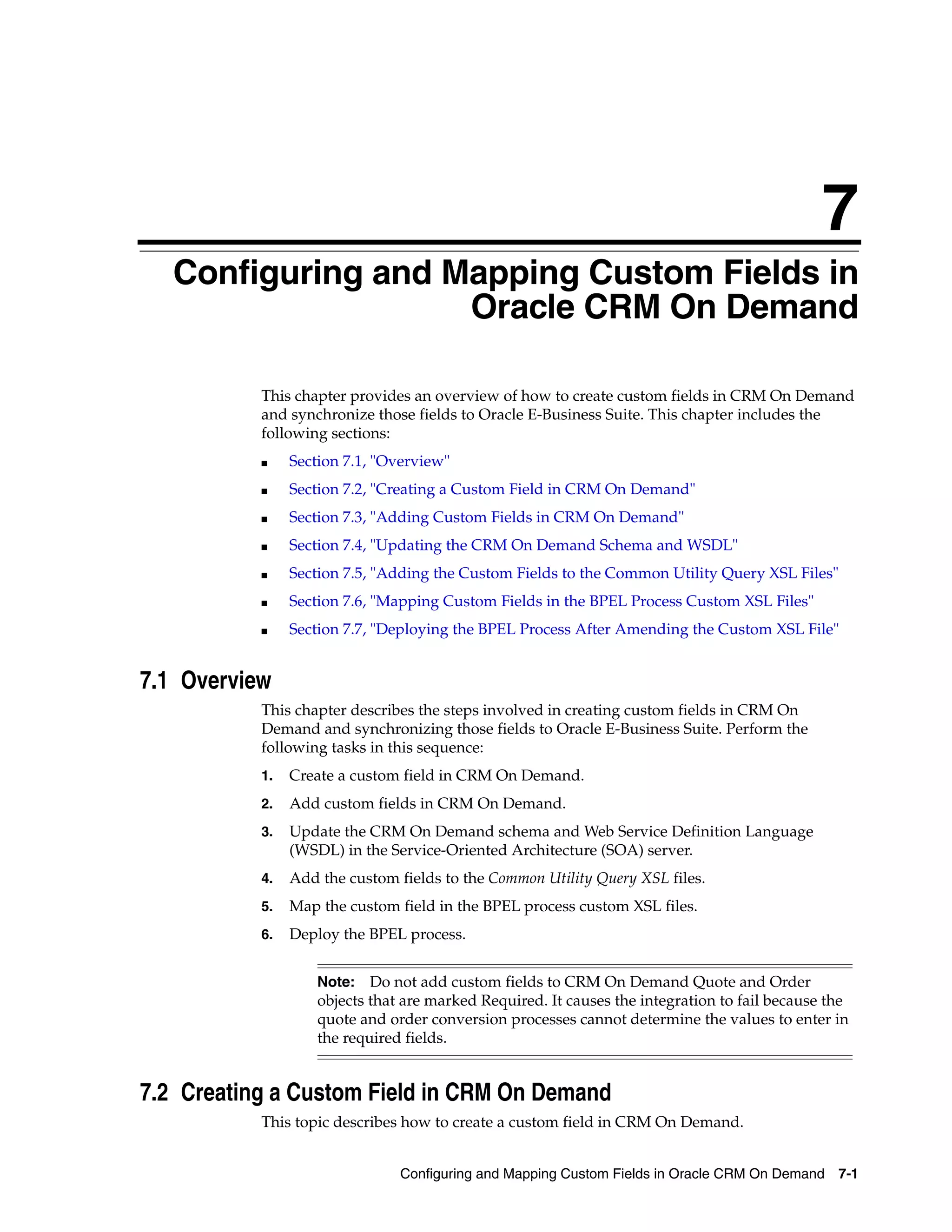
7 Configuring and Mapping Custom Fields in Oracle CRM On Demand
   Overview....................................................................................................................................................    7-1
   Creating a Custom Field in CRM On Demand ..................................................................................                                     7-1
   Adding Custom Fields in CRM On Demand .....................................................................................                                     7-2
   Updating the CRM On Demand Schema and WSDL .......................................................................                                              7-2
   Adding the Custom Fields to the Common Utility Query XSL Files.............................................                                                     7-3
   Mapping Custom Fields in the BPEL Process Custom XSL Files ...................................................                                                  7-4
      Mapping the Custom Field in a Provider BPEL Process ..............................................................                                           7-4
      Mapping the Custom Field in a Requester BPEL Process............................................................                                             7-6
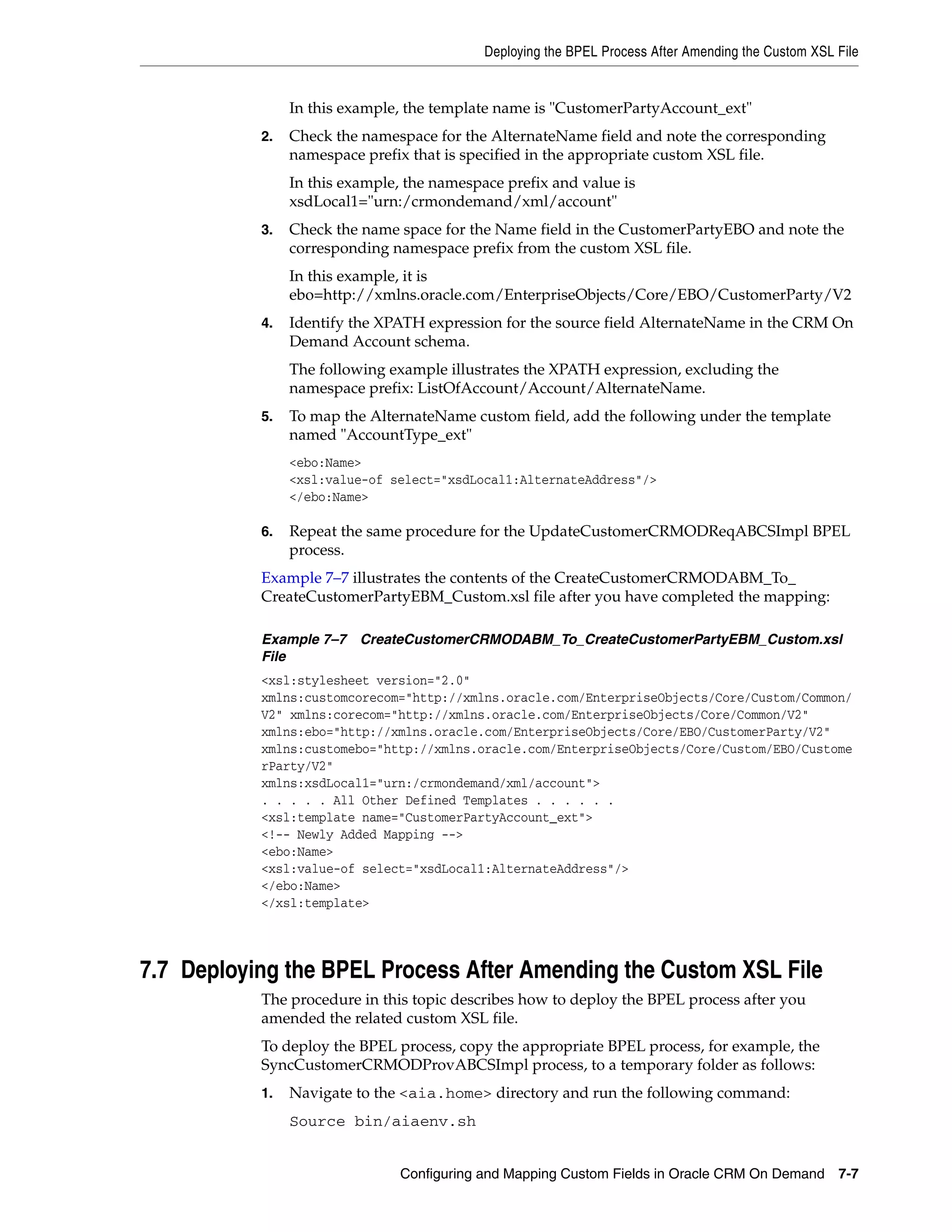
   Deploying the BPEL Process After Amending the Custom XSL File ............................................                                                      7-7

A Order and Quote Object Definitions
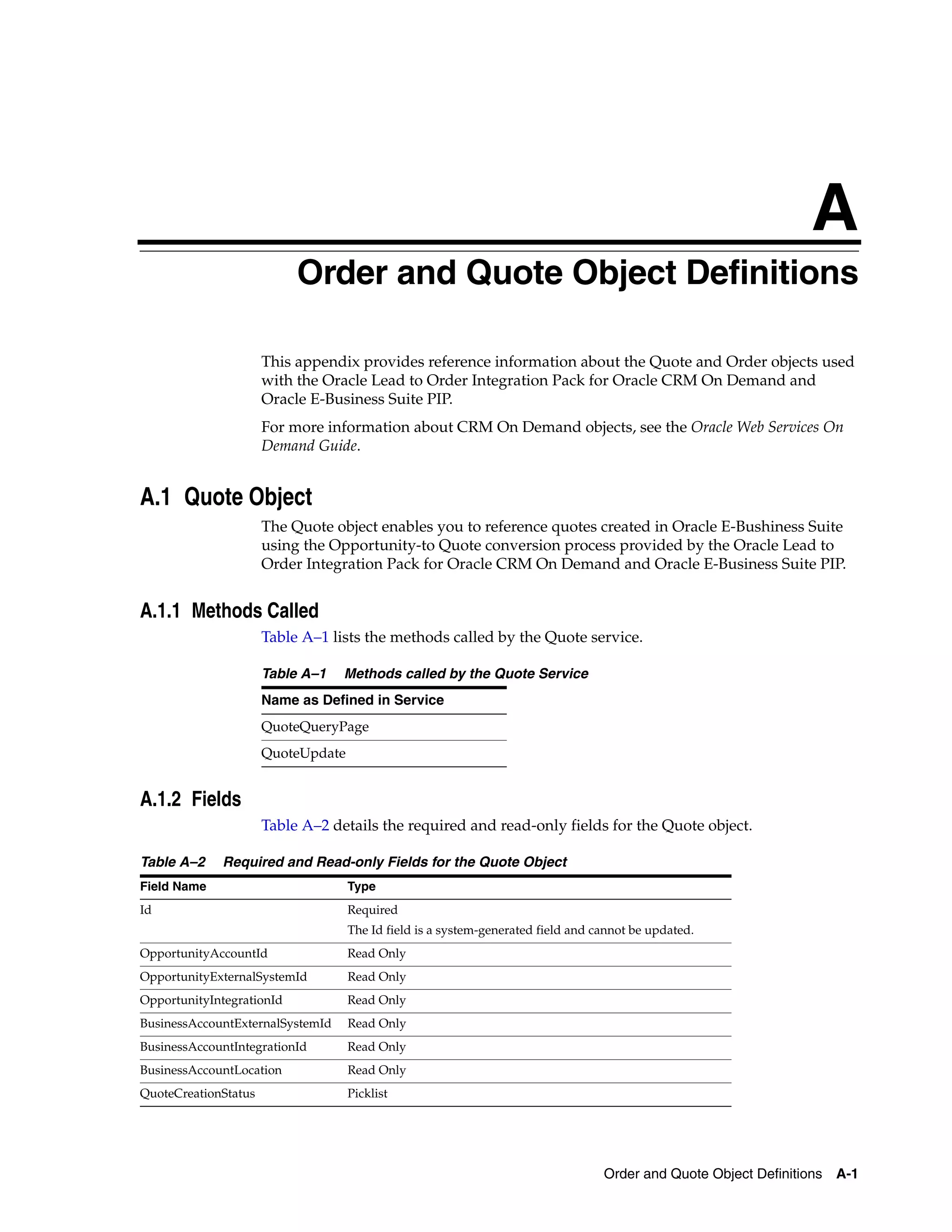
   Quote Object ............................................................................................................................................       A-1
      Methods Called .................................................................................................................................             A-1
      Fields ...................................................................................................................................................   A-1
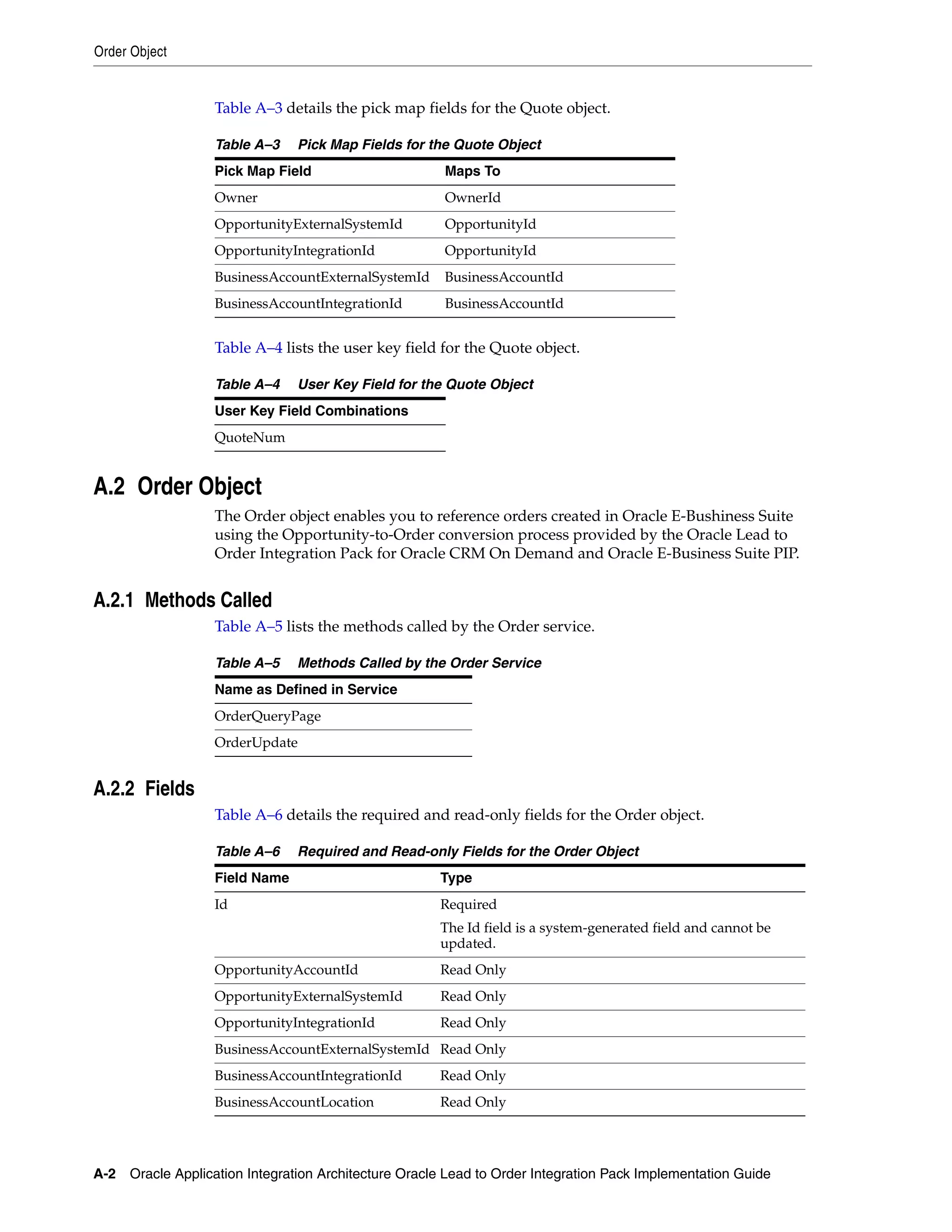
   Order Object.............................................................................................................................................       A-2
      Methods Called .................................................................................................................................             A-2
      Fields ...................................................................................................................................................   A-2

B Attribute Mapping Information
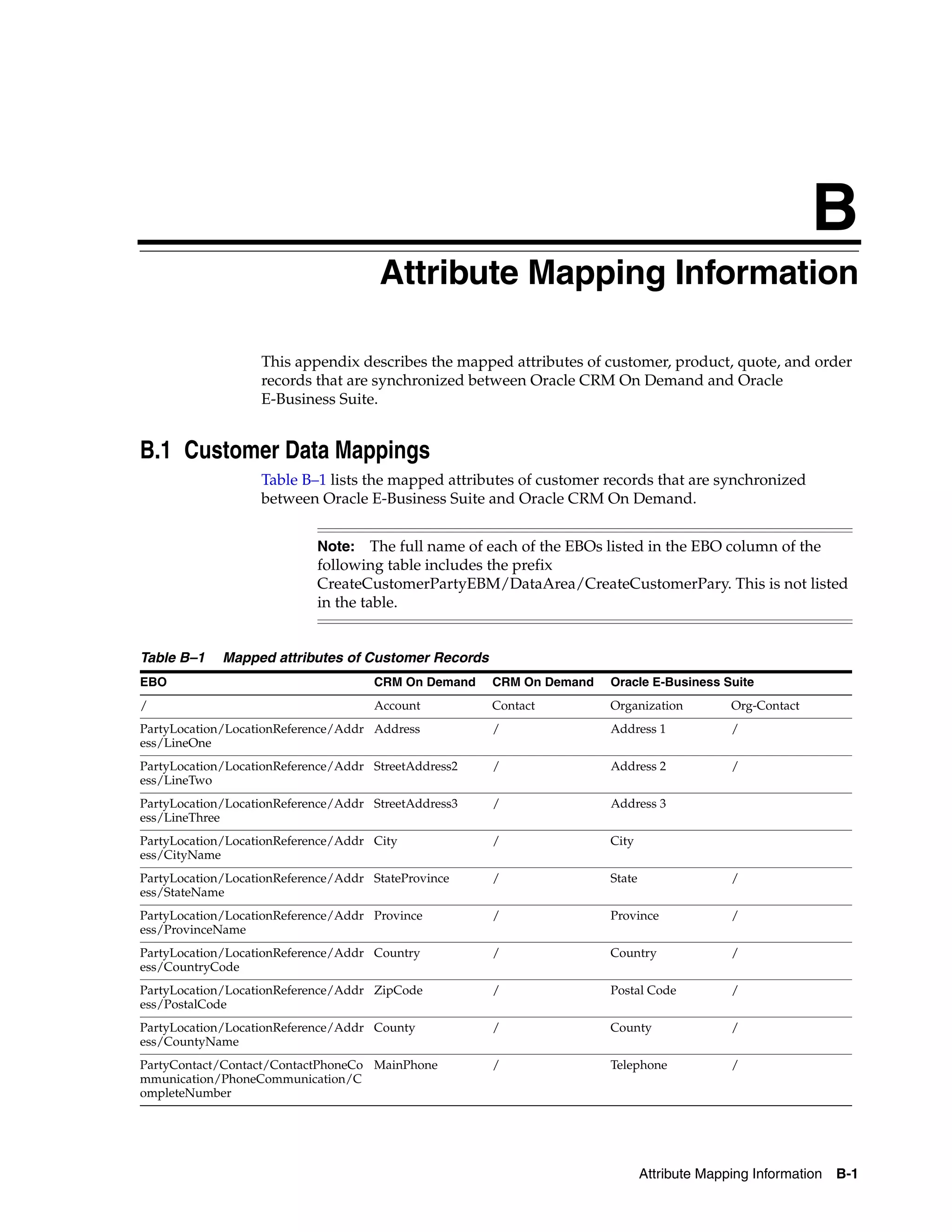
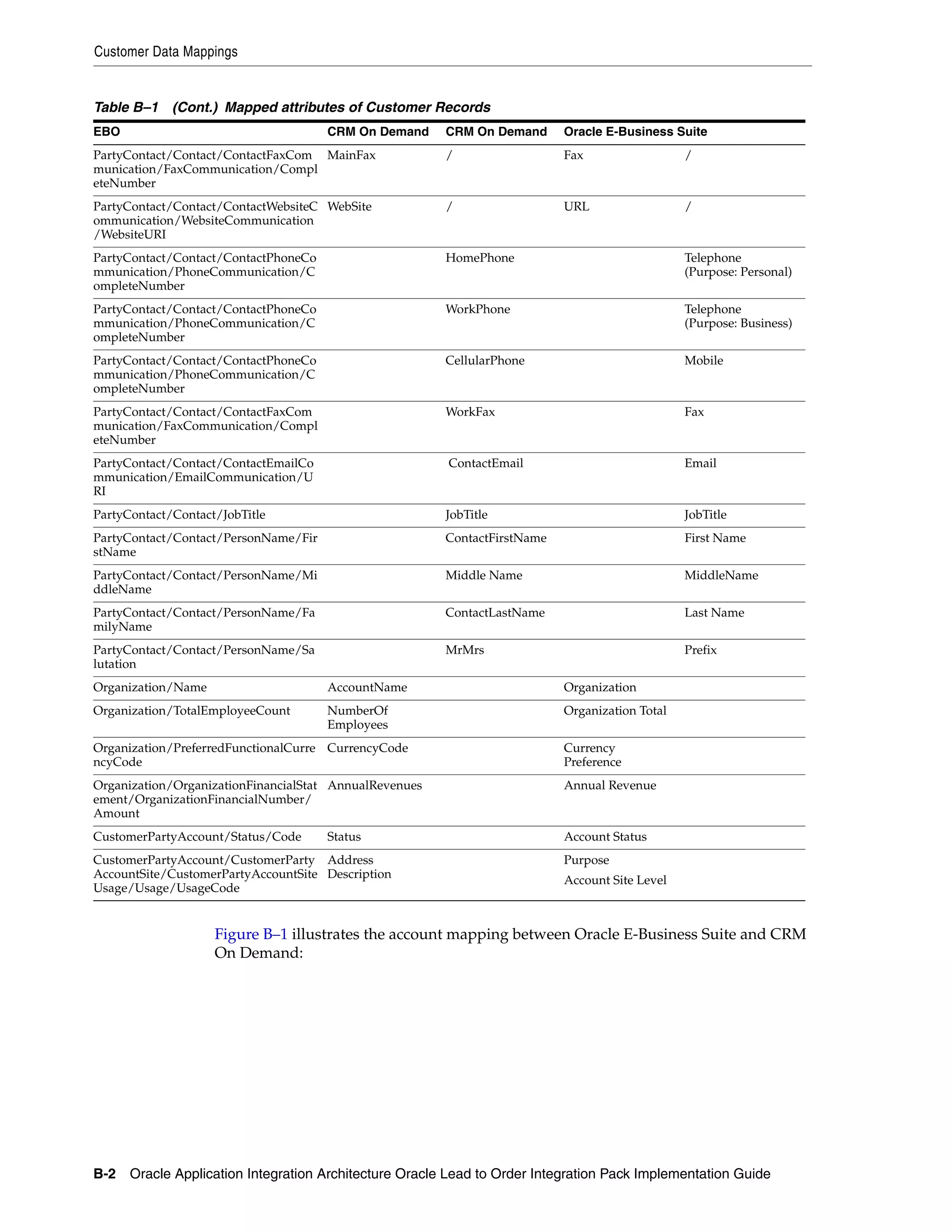
   Customer Data Mappings......................................................................................................................                    B-1
   Product Data Mappings .........................................................................................................................                 B-3
   Quote Data Mappings ............................................................................................................................                B-4
   Order Data Mappings.............................................................................................................................                B-5

C Settings for Multi-Org Implementation
   Multi-Org Usage at Account Level in CRM On Demand ............................................................... C-1
      When Multi-Org is not Implemented in CRM On Demand at Account Level ........................ C-1


                                                                                                                                                                    vii
Use Cases for Multi-Org not Implemented in CRM On Demand at Account Level...............                                                          C-1
           When Multi-Org is Implemented in CRM On Demand at Account Level...............................                                                    C-3
           Use Cases for Multi-Org Implemented in CRM On Demand at Account level.......................                                                      C-3
           Customization for Multi-Org Implementation in CRM On Demand at Account Level ........                                                             C-5
       Populating Initial Data for Cross-References....................................................................................                      C-5
       Setting Up Domain Value Maps...........................................................................................................               C-5
       Adding Custom Fields in CRM On Demand ....................................................................................                            C-7
       Assigning Sales Rep ...............................................................................................................................   C-9

D Additional Business Event Subscription Setup for Product Sync Events
       Setting Up Subscription......................................................................................................................... D-1


viii
ix
List of Examples
    2–1   Query for Account Batch Load .................................................................................................                      2-6
    2–2   Script for Account Batch Load Process ....................................................................................                          2-6
    2–3   PL/SQL Filter Clause .................................................................................................................              2-9
    2–4   Script to Load Batches of Product Data ...................................................................................                          2-9
    6–1   Query for JFT Resource profile .................................................................................................                    6-4
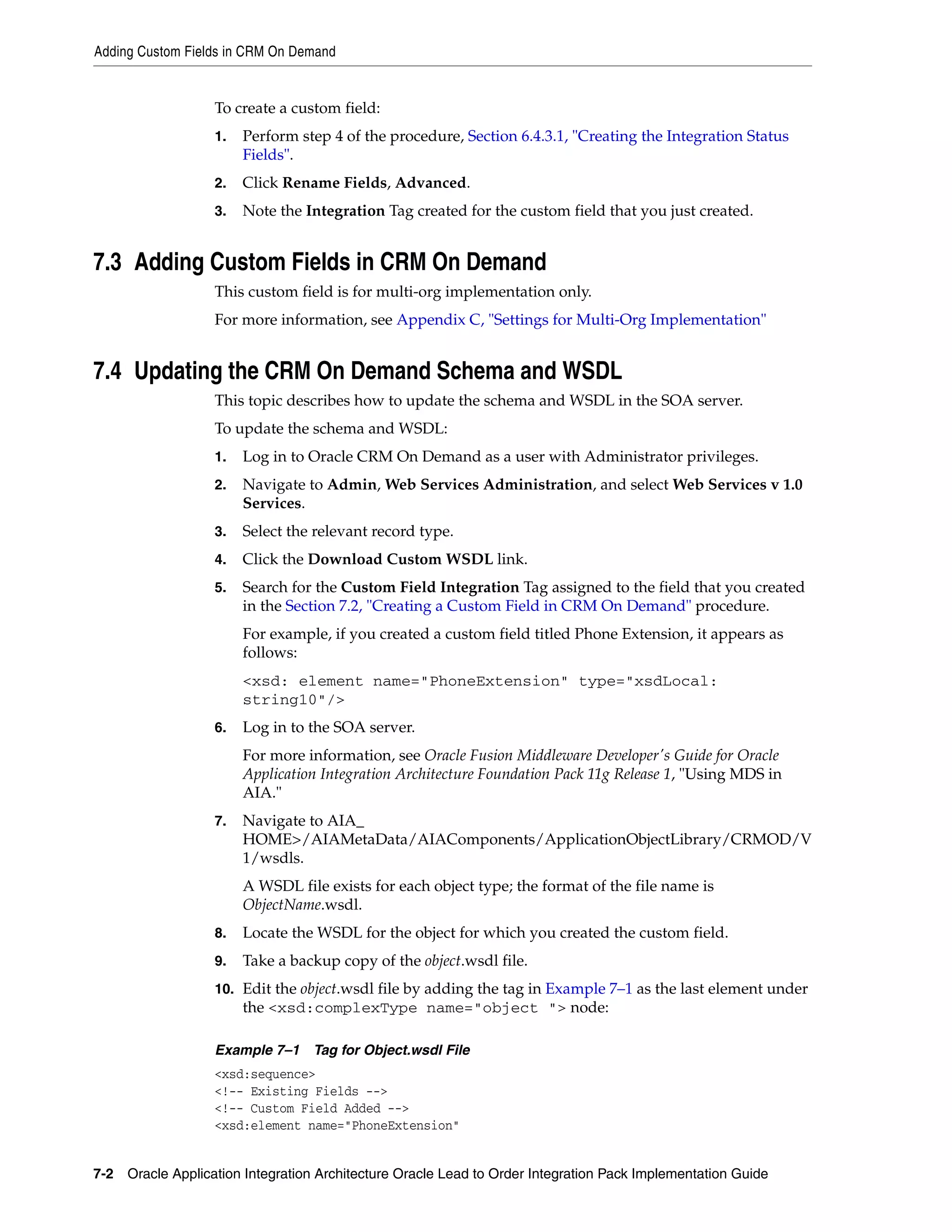
    7–1   Tag for Object.wsdl File .............................................................................................................              7-2
    7–2   Account Object Entry .................................................................................................................              7-3
    7–3   XSL File.........................................................................................................................................   7-3
    7–4   Contents for the CustomerEBM_to_AccountABM_Custom.xsl File...................................                                                       7-4
    7–5   CustomerEBM_to_AccountABM_Customer.xsl ....................................................................                                         7-5
    7–6   CreateCustomerCRMODABM_To_CreateCustomerPartyEBM_Custom.xsl File ............                                                                       7-6
    7–7   CreateCustomerCRMODABM_To_CreateCustomerPartyEBM_Custom.xsl File ............                                                                       7-7


x
xi
List of Figures
      1–1   High-level Process Integrations ................................................................................................ 1-2
      1–2   Business Process Flow for the Oracle Lead to Order Integration Pack for Oracle CRM On
            Demand and Oracle E-Business Suite PIP 1-3
      2–1   Batchload Customer Account Flow Sequence Diagram ....................................................... 2-4
      2–2   Batch Load Item Flow Sequence Diagram .............................................................................. 2-7
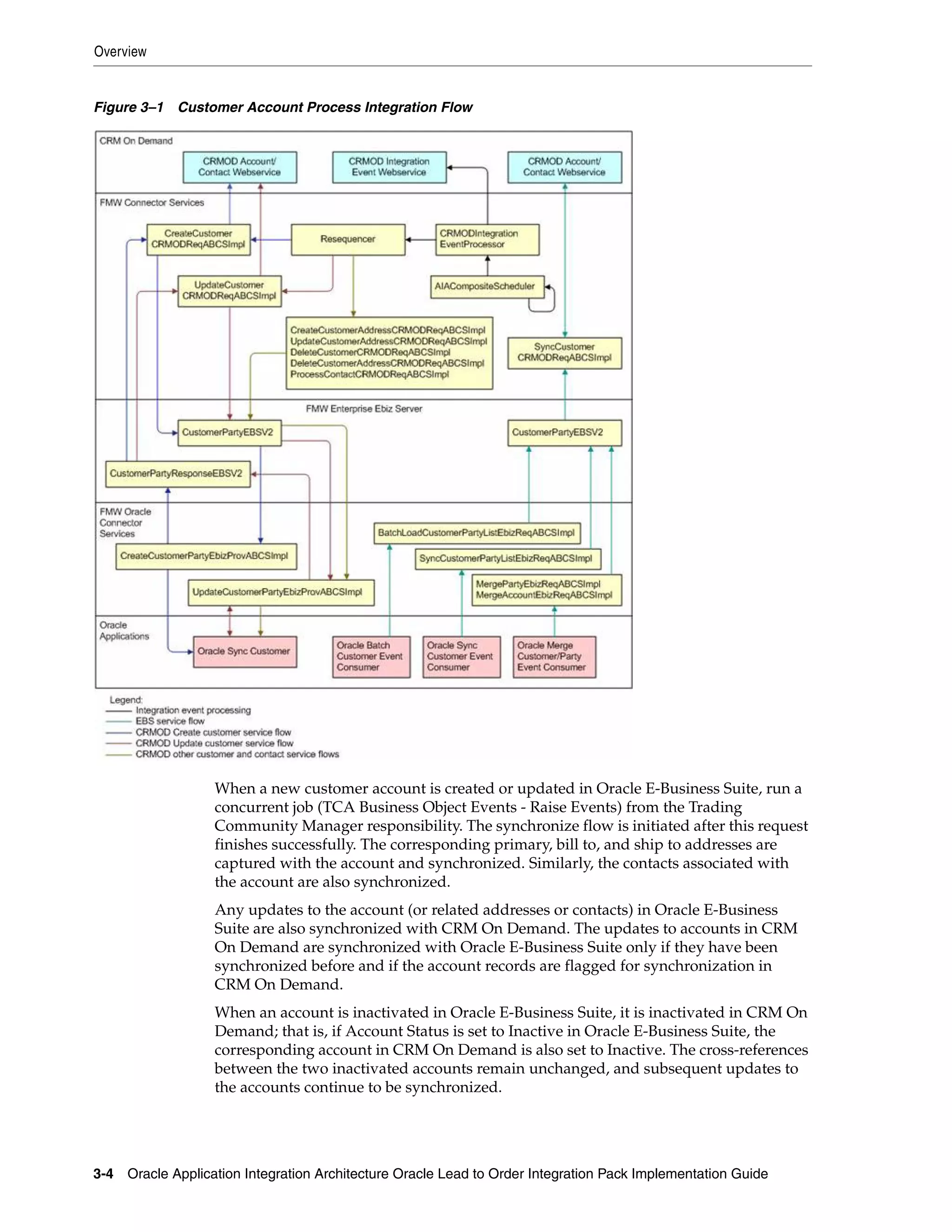
      3–1   Customer Account Process Integration Flow ......................................................................... 3-4
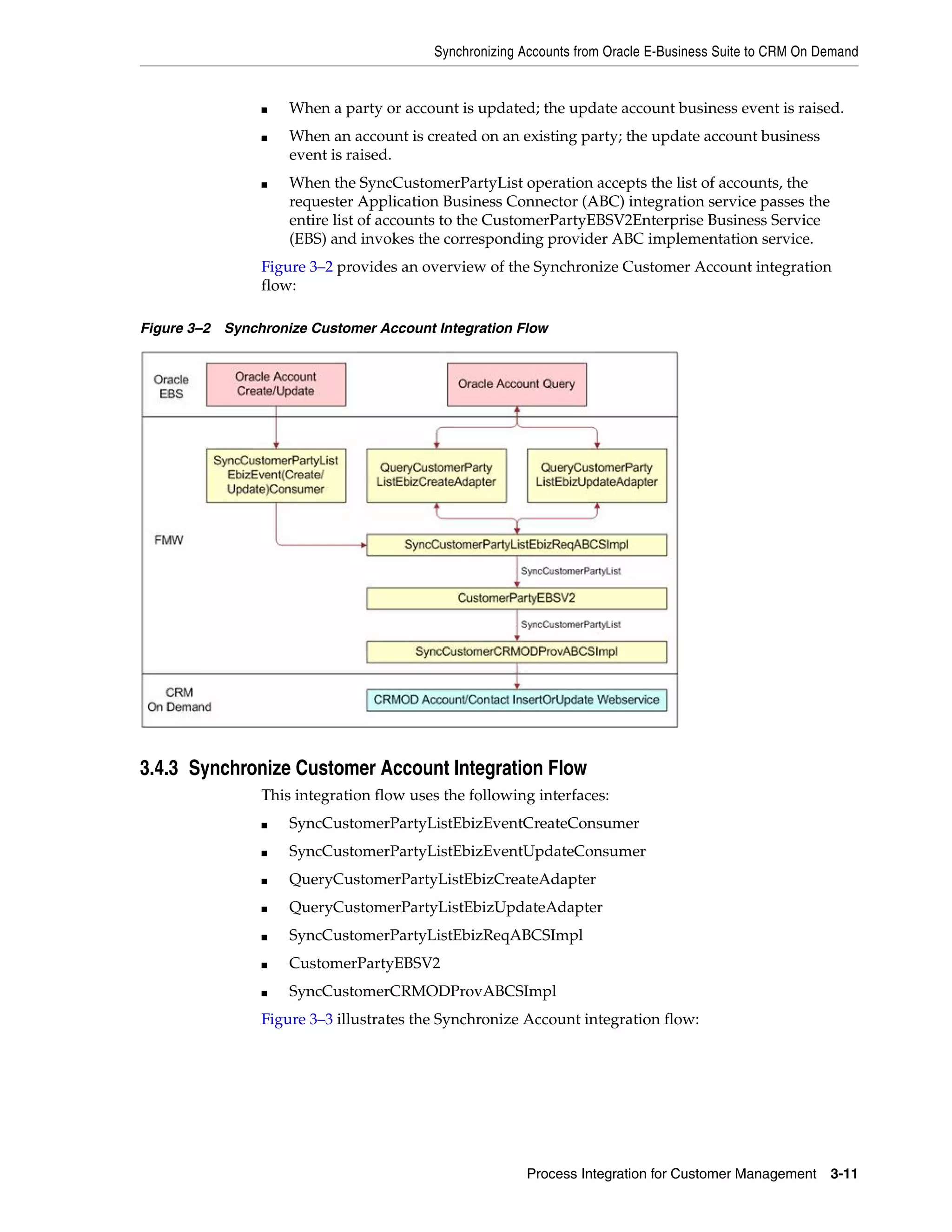
      3–2   Synchronize Customer Account Integration Flow.............................................................. 3-11
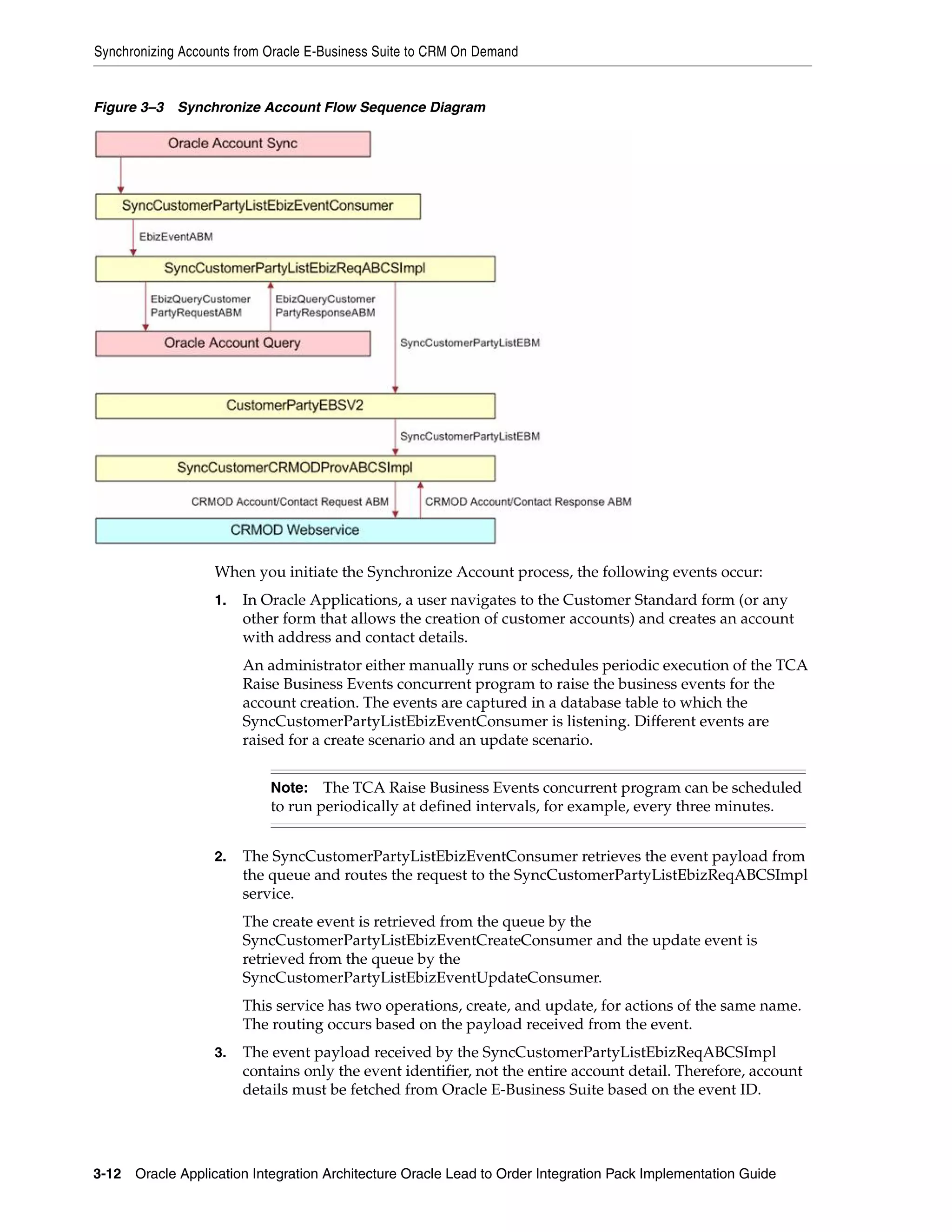
      3–3   Synchronize Account Flow Sequence Diagram................................................................... 3-12
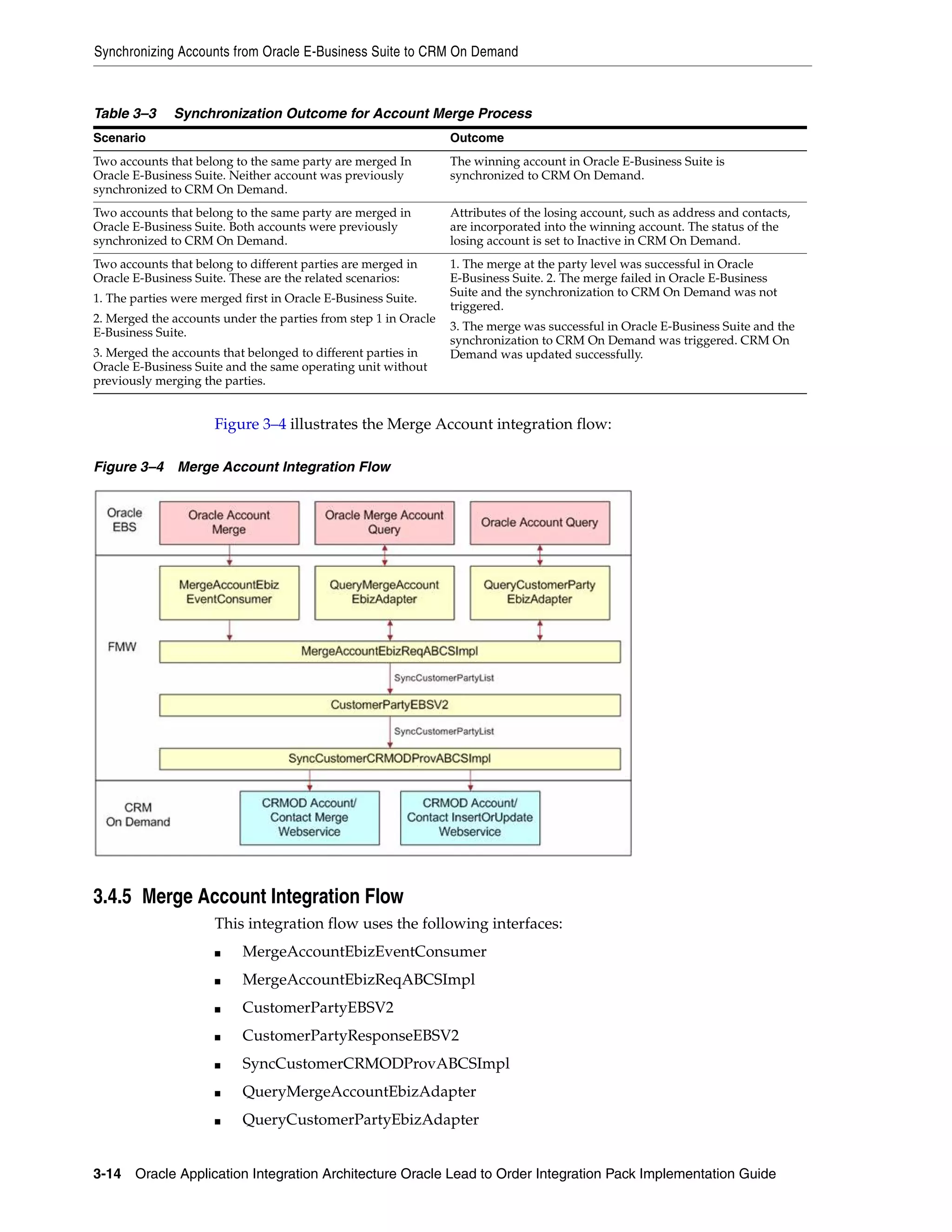
      3–4   Merge Account Integration Flow........................................................................................... 3-14
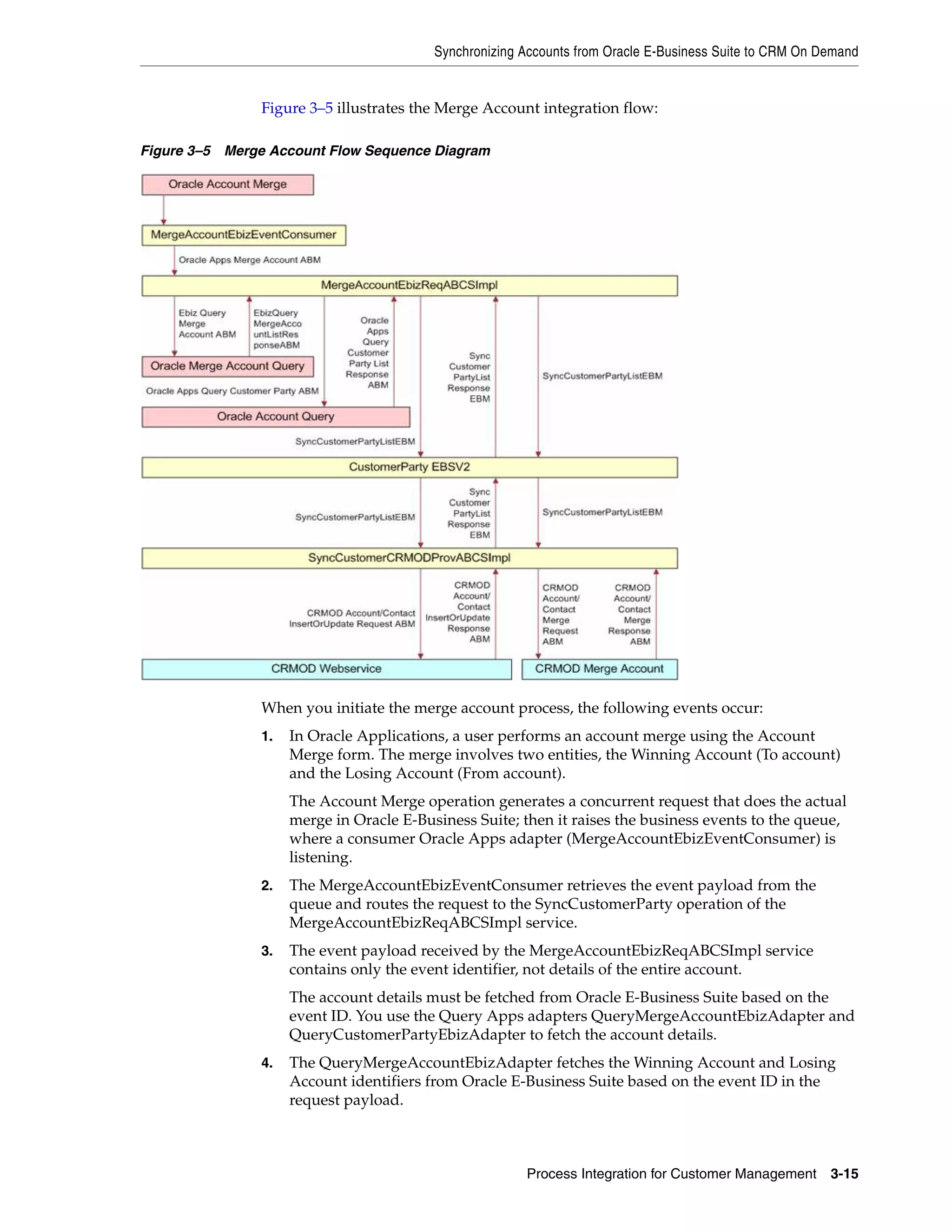
      3–5   Merge Account Flow Sequence Diagram ............................................................................. 3-15
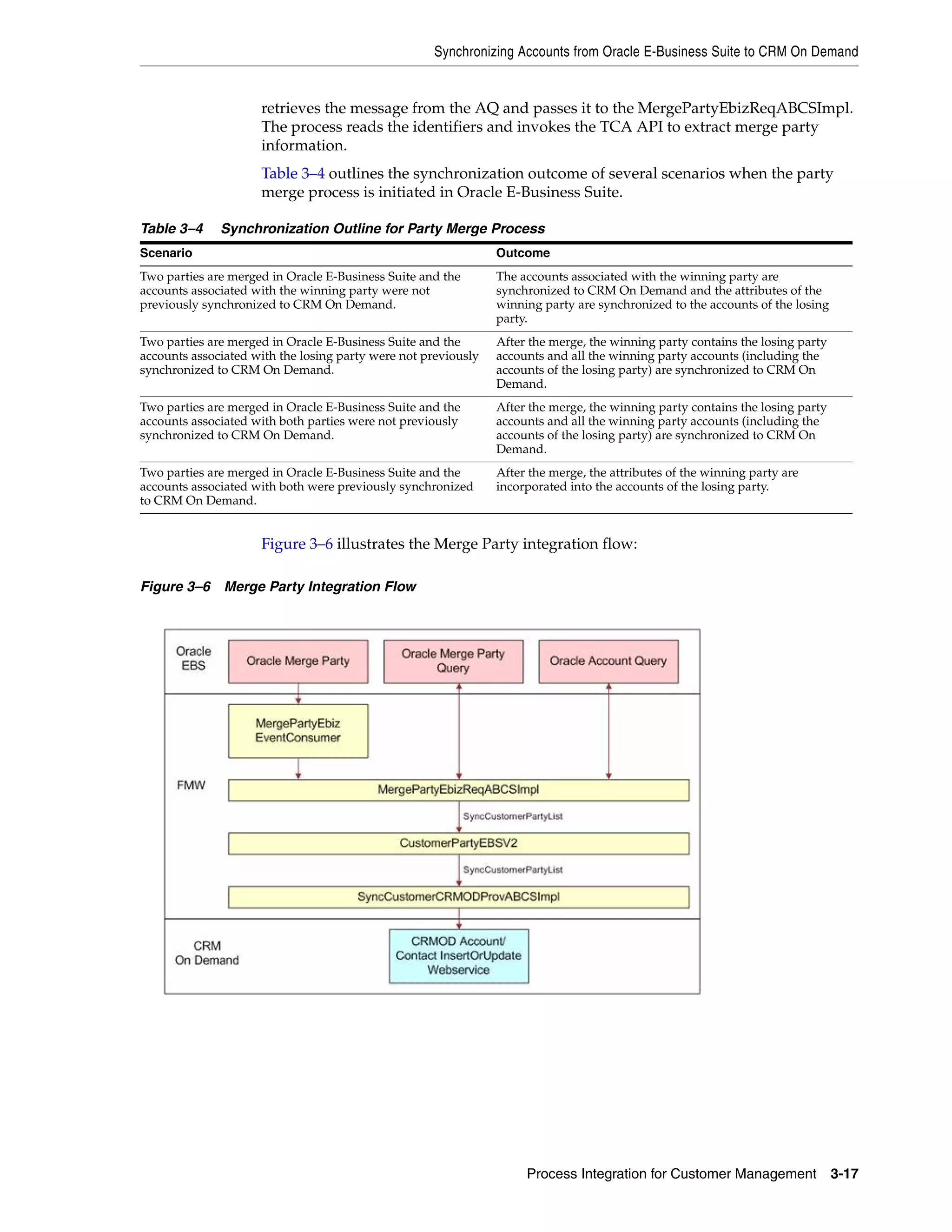
      3–6   Merge Party Integration Flow ................................................................................................ 3-17
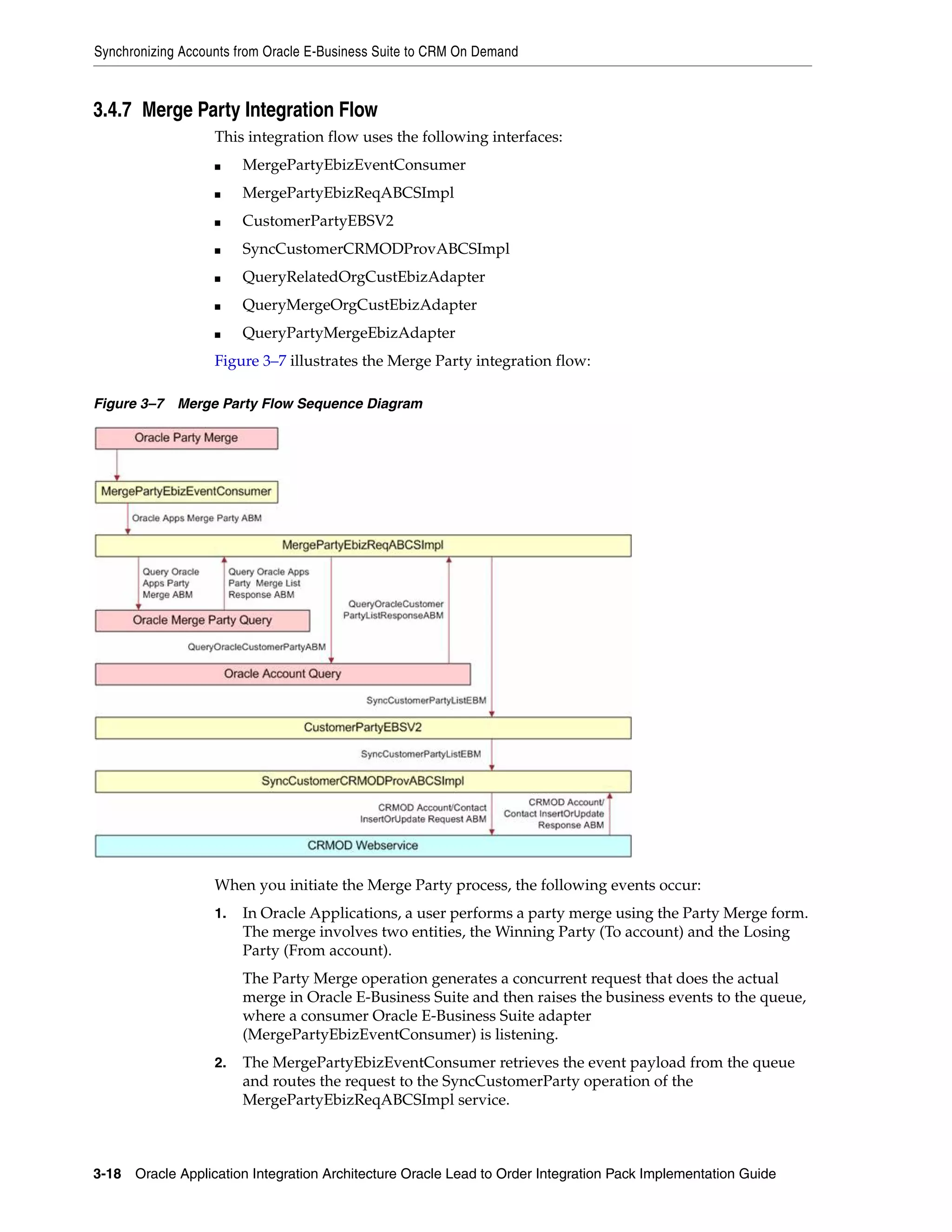
      3–7   Merge Party Flow Sequence Diagram .................................................................................. 3-18
      4–1   Product Management Integration Flow .................................................................................. 4-1
      4–2   Create Item Flow Sequence Diagram....................................................................................... 4-3
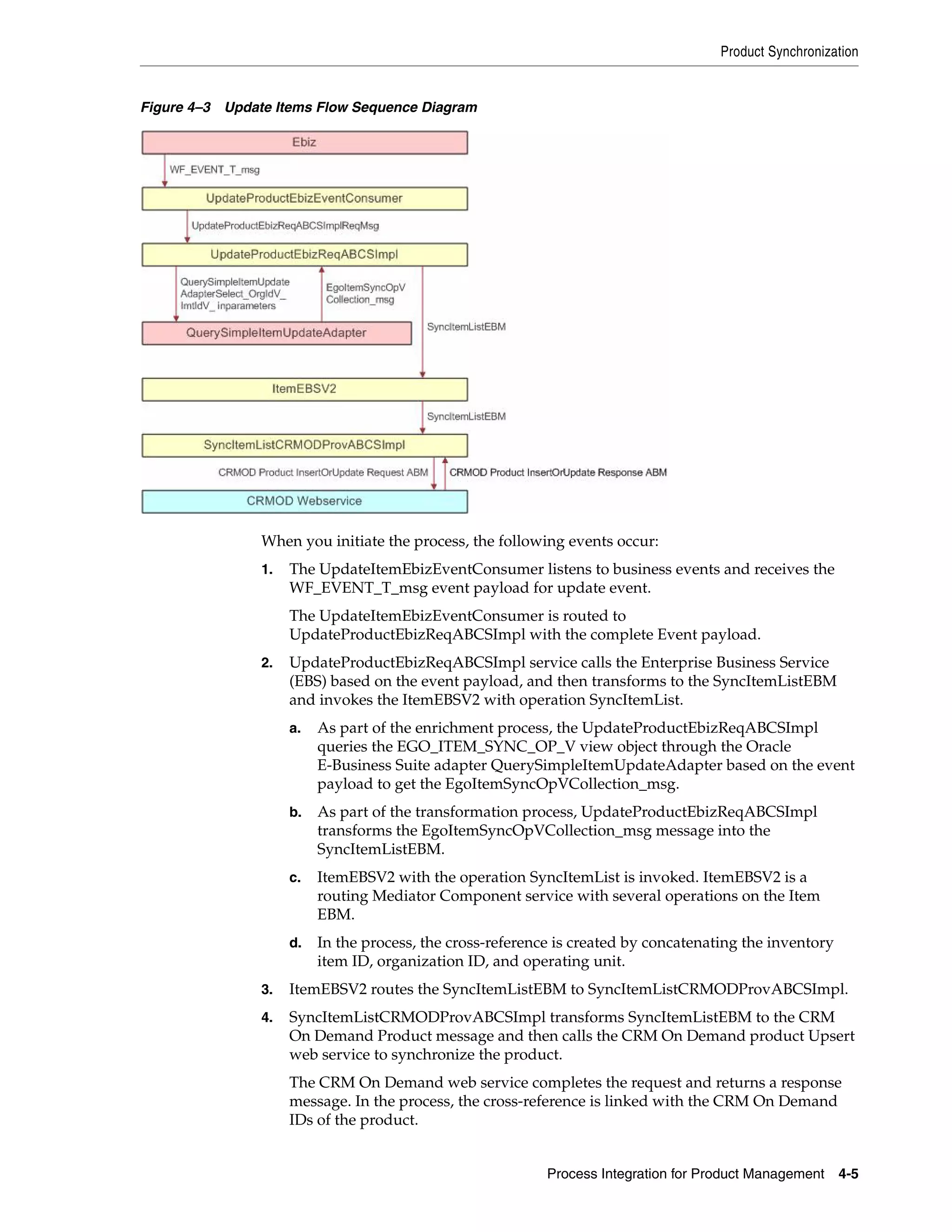
      4–3   Update Items Flow Sequence Diagram ................................................................................... 4-5
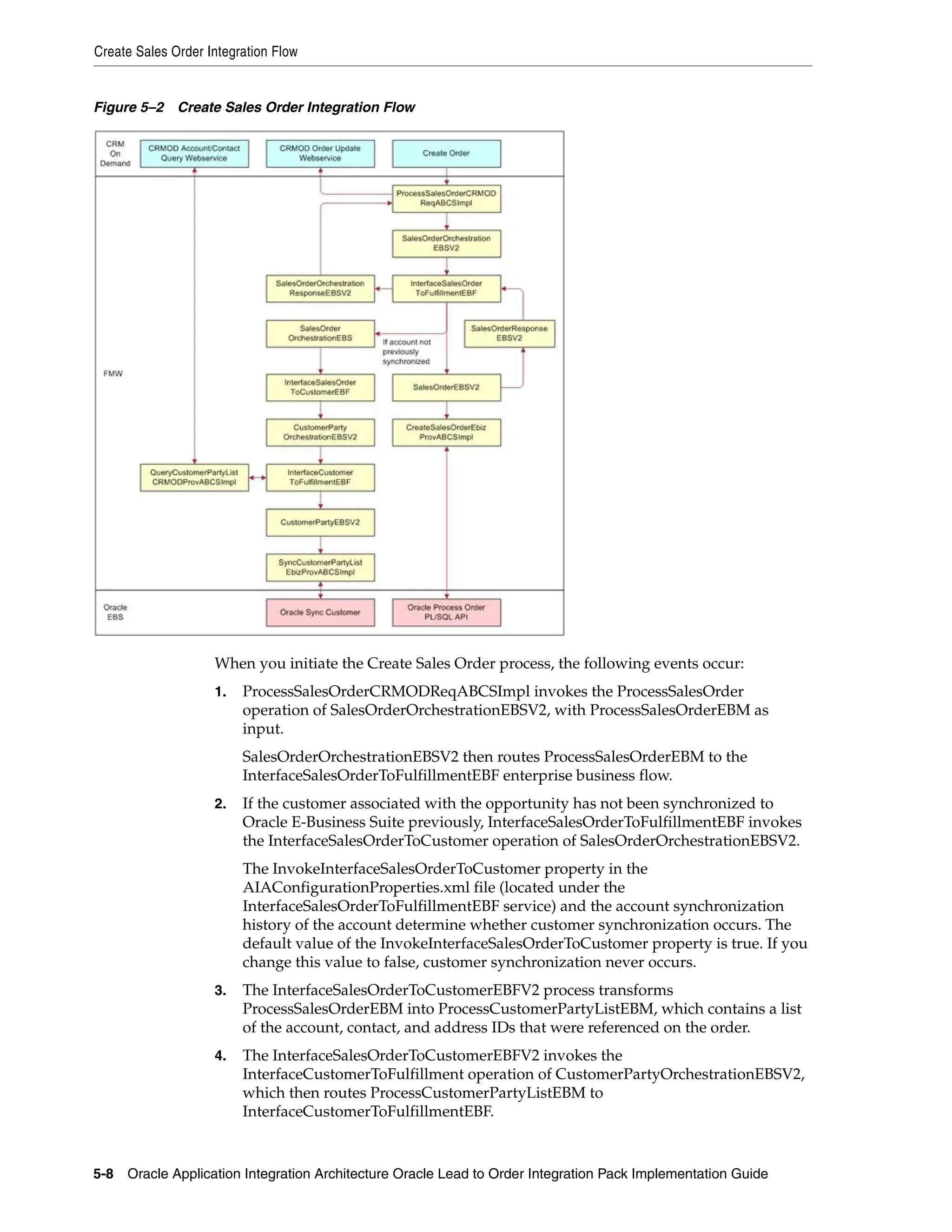
      5–1   Create Sales Quote Integration Flow ....................................................................................... 5-5
      5–2   Create Sales Order Integration Flow........................................................................................ 5-8
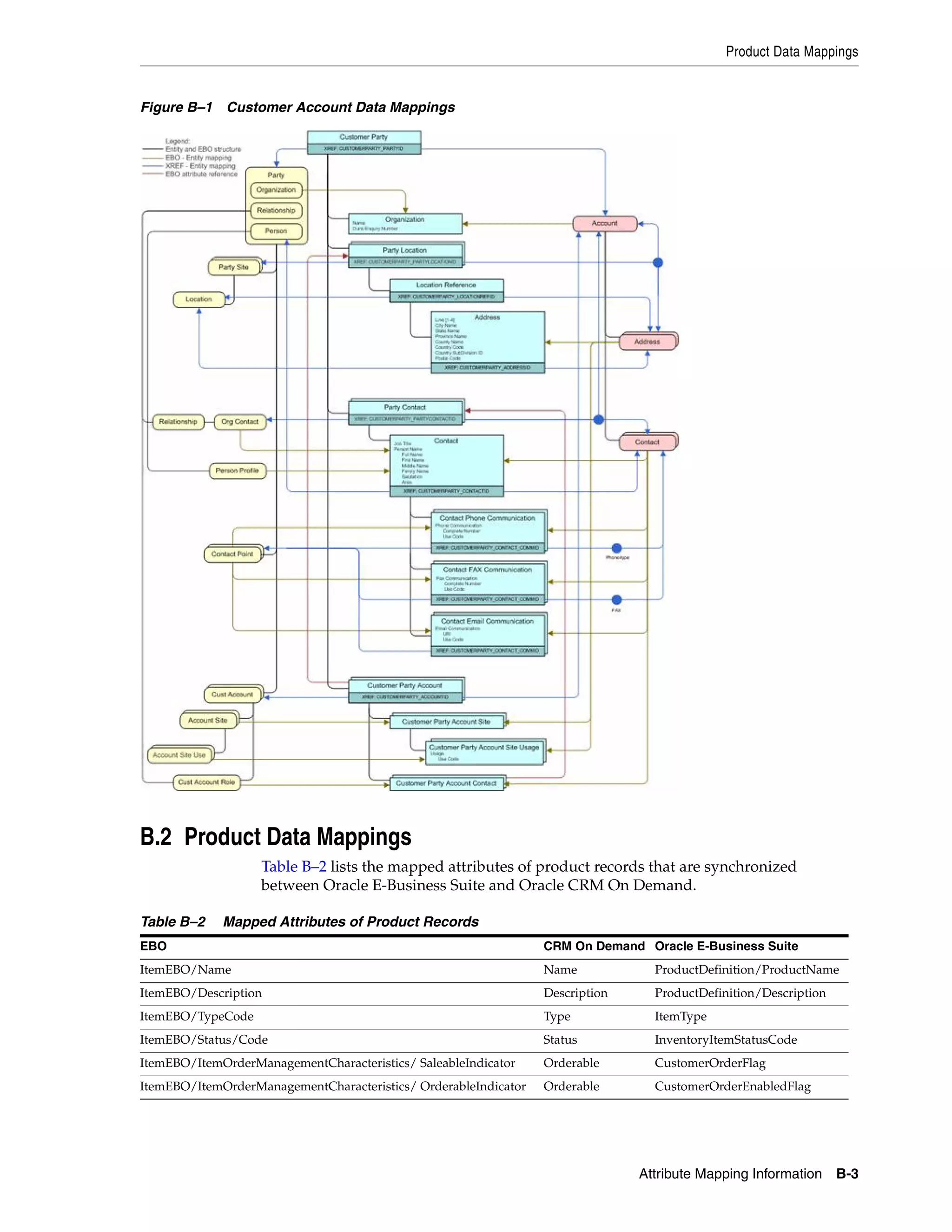
      B–1   Customer Account Data Mappings......................................................................................... B-3
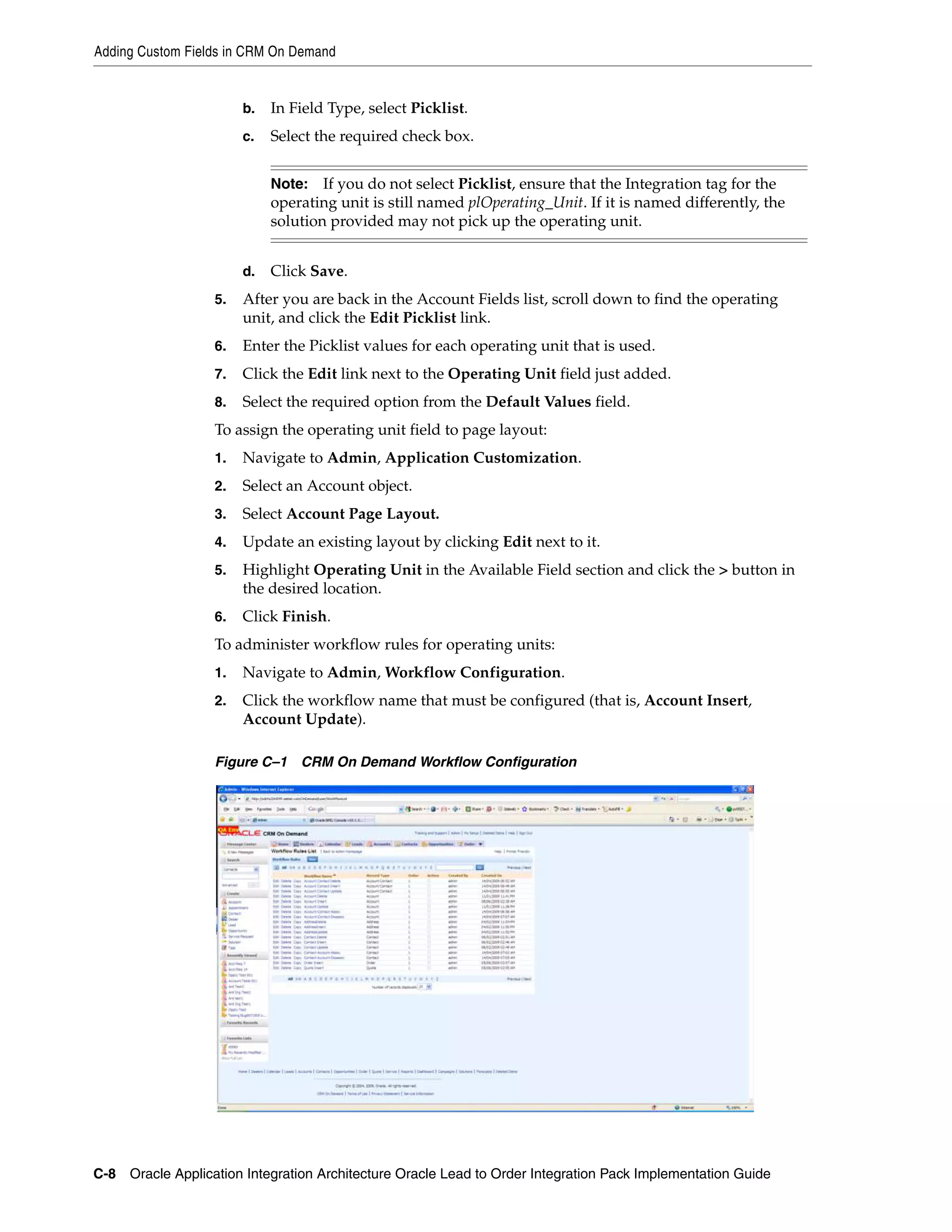
      C–1   CRM On Demand Workflow Configuration ......................................................................... C-8
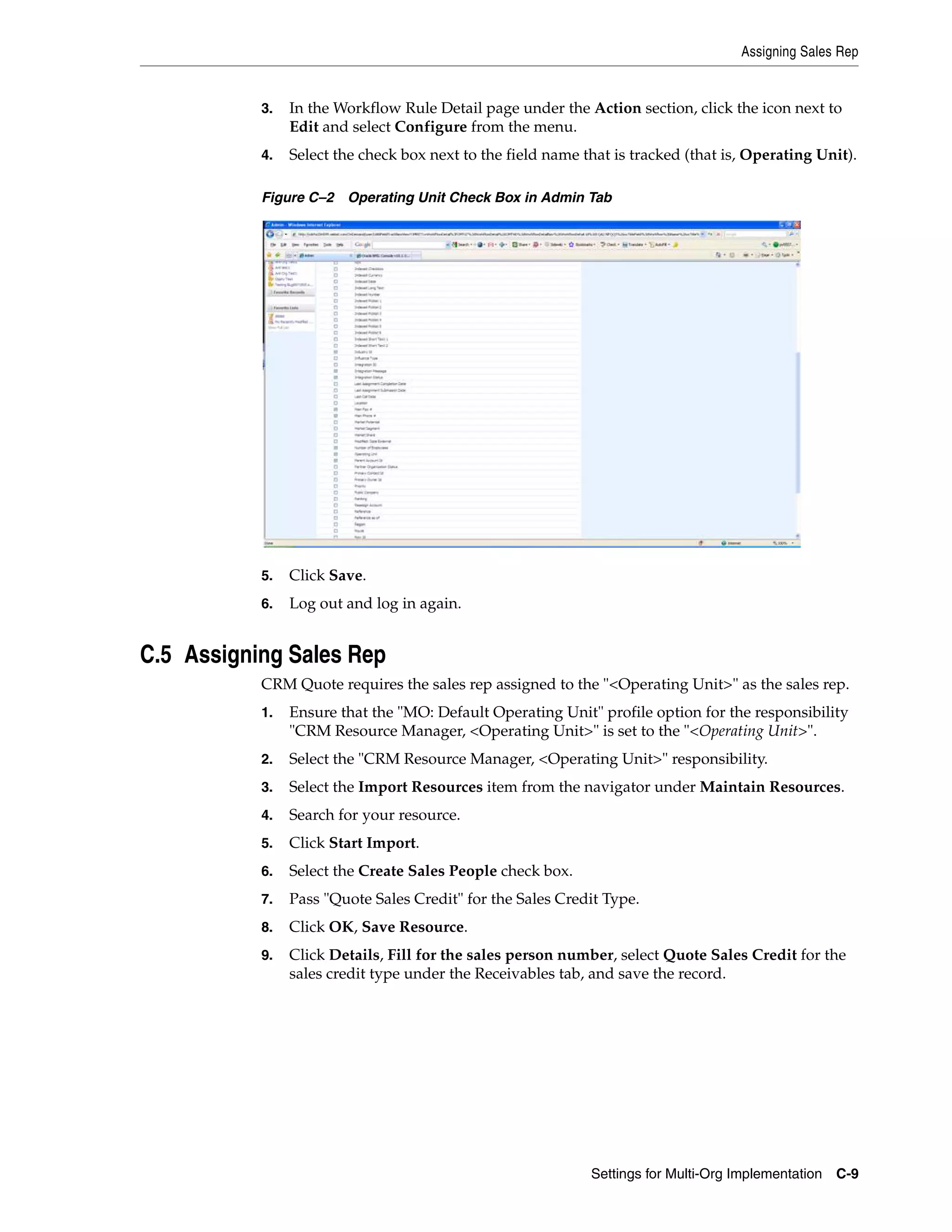
      C–2   Operating Unit Check Box in Admin Tab .............................................................................. C-9


xii
List of Tables
    2–1     GENERATE_EVENTS Procedure Parameters....................................................................... 2-2
    2–2     Structure of the Log Table ........................................................................................................ 2-3
    3–1     Communication Type and Purpose for CRM On Demand Telephone Mapping ............ 3-3
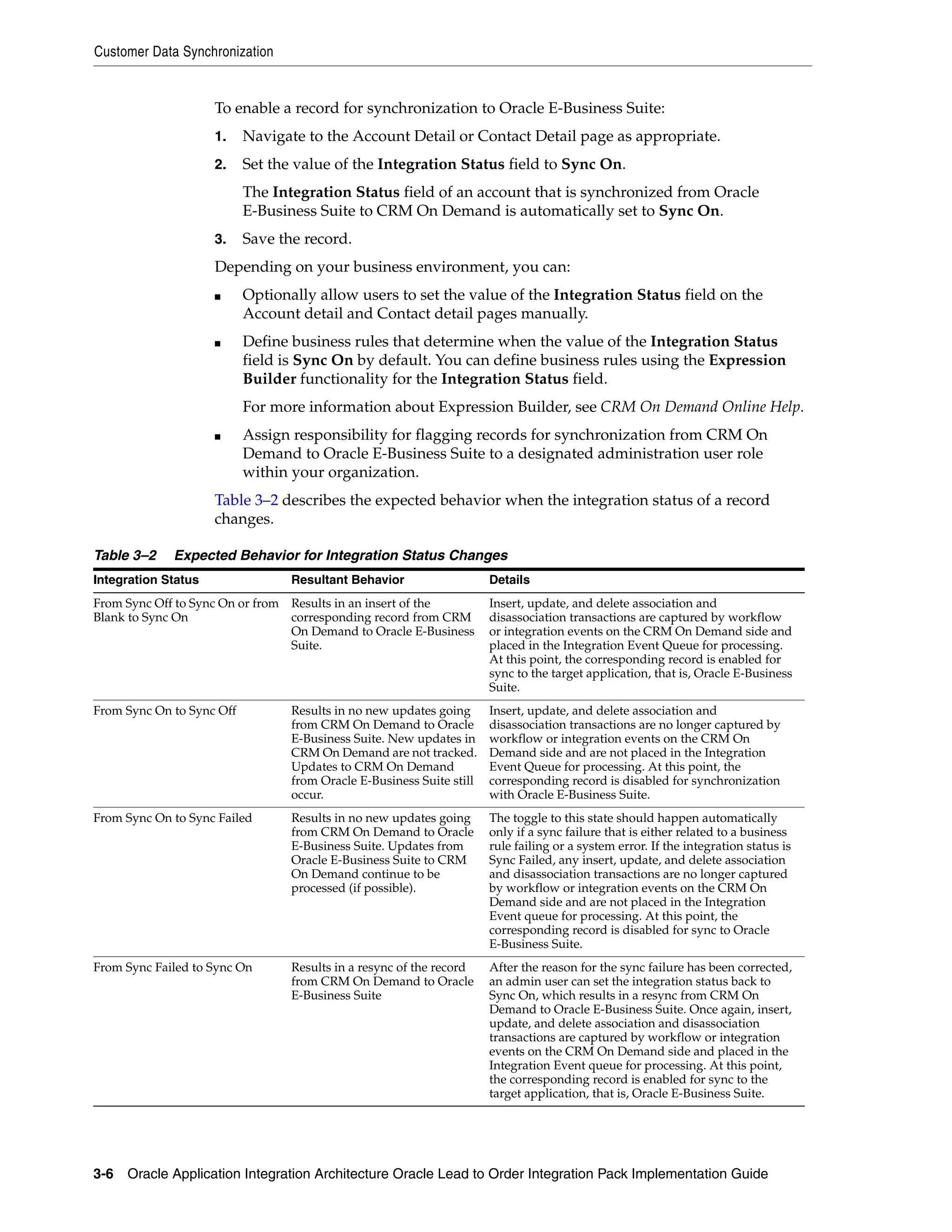
    3–2     Expected Behavior for Integration Status Changes .............................................................. 3-6
    3–3     Synchronization Outcome for Account Merge Process..................................................... 3-14
    3–4     Synchronization Outline for Party Merge Process............................................................. 3-17
    6–1     Object Field Edit Fields .......................................................................................................... 6-12
    6–2     Picklist Values for the Integration Status Field .................................................................. 6-13
    6–3     Object Field Edit Fields .......................................................................................................... 6-13
    6–4     Object Fields Values ............................................................................................................... 6-13
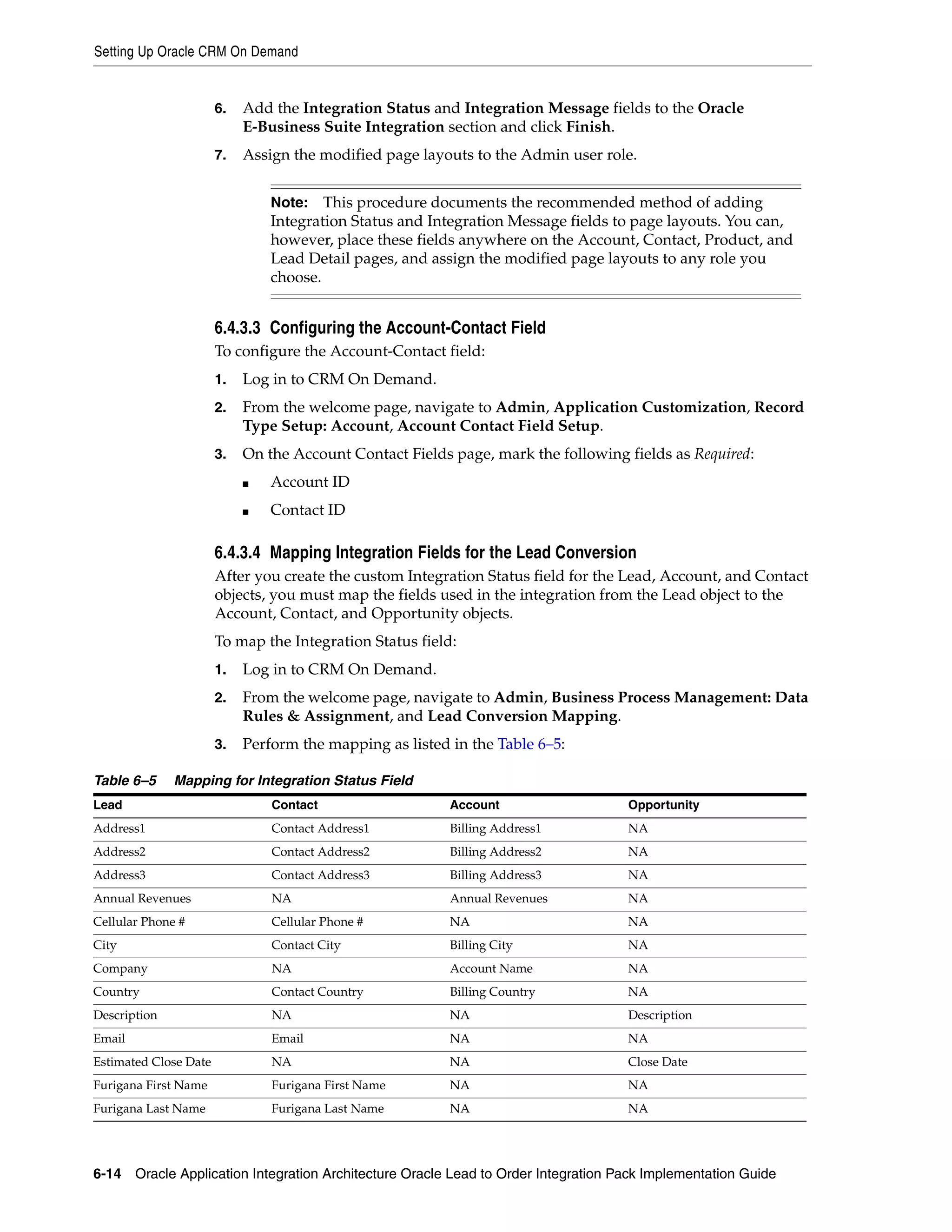
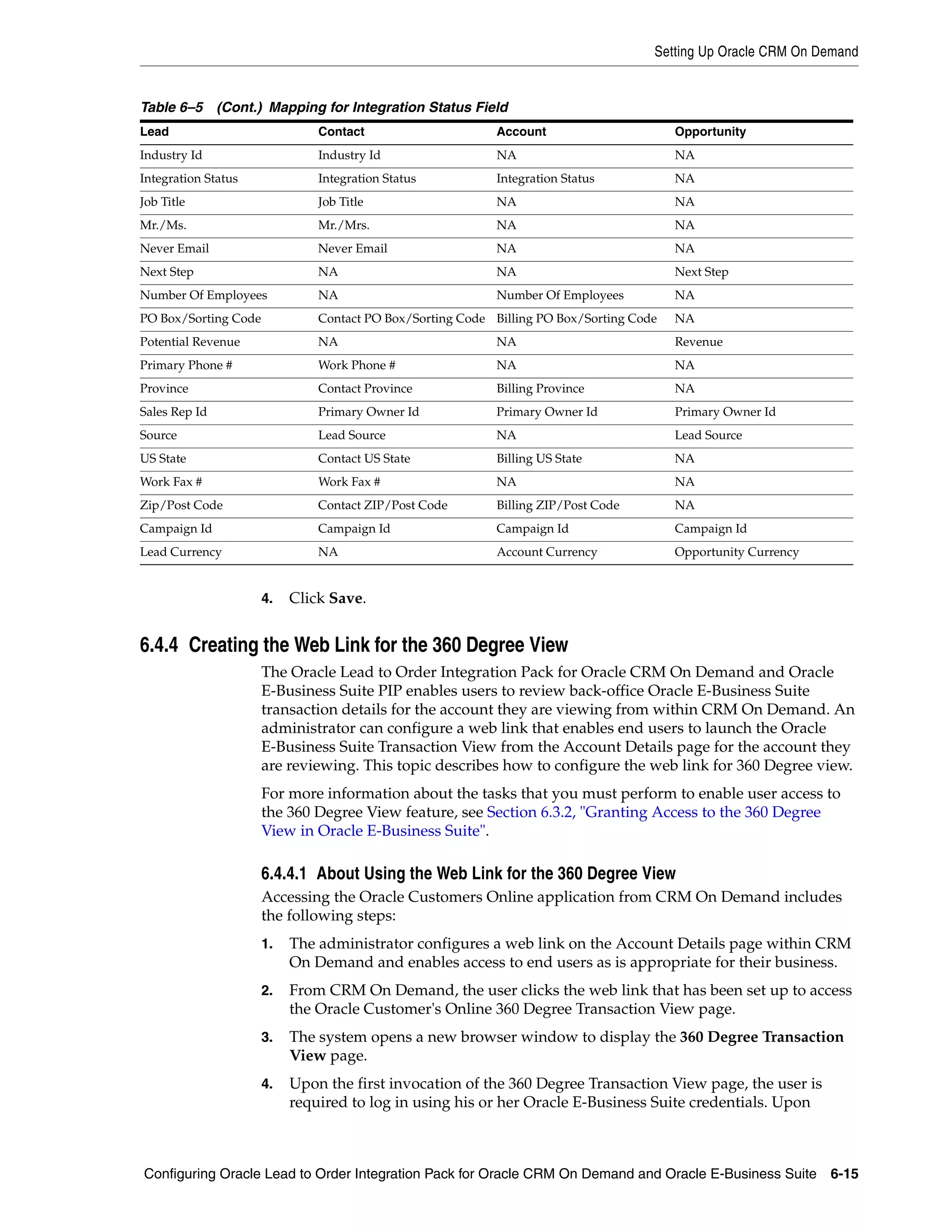
    6–5     Mapping for Integration Status Field................................................................................... 6-14
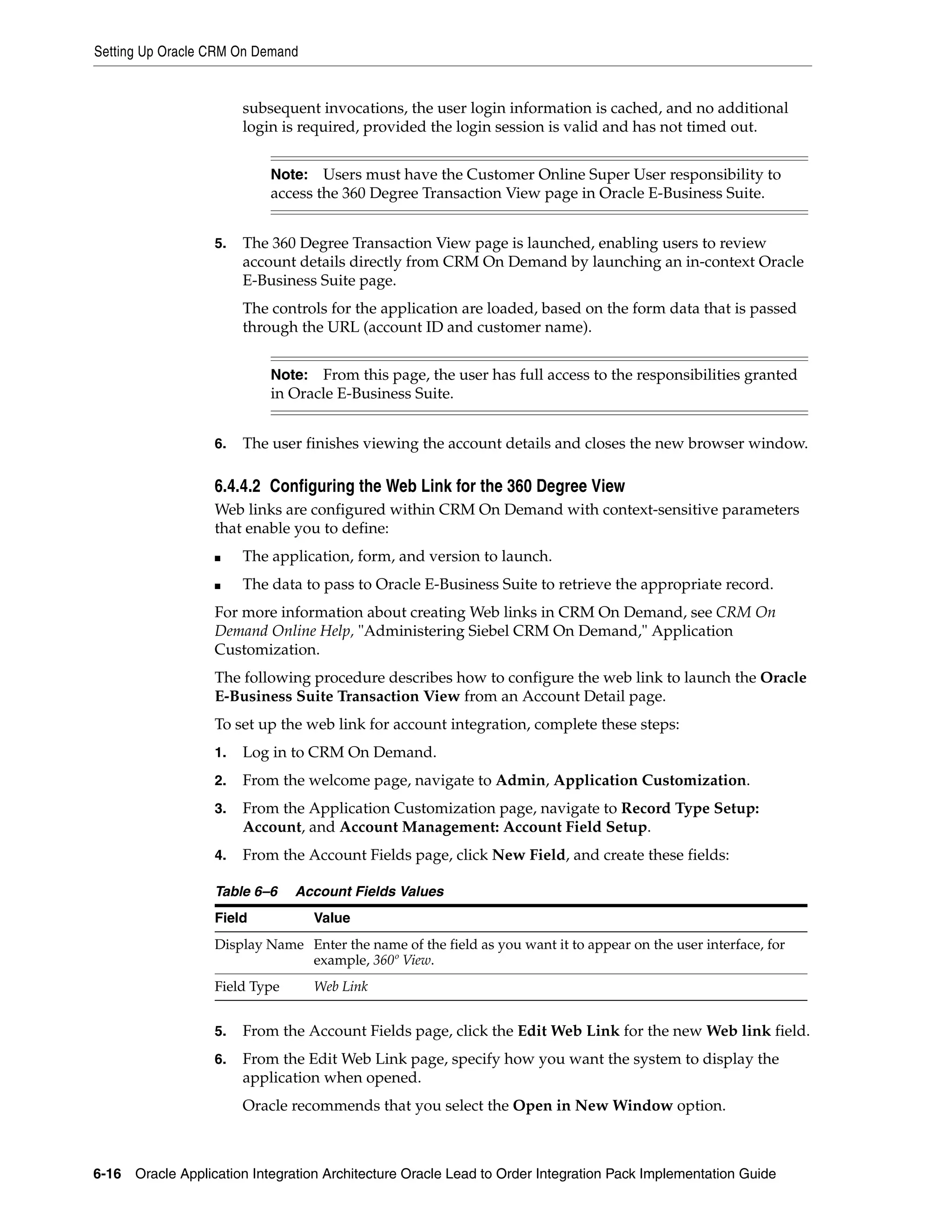
    6–6     Account Fields Values............................................................................................................ 6-16
    6–7     Workflow Events and Rule Conditions Configuration Fields ......................................... 6-18
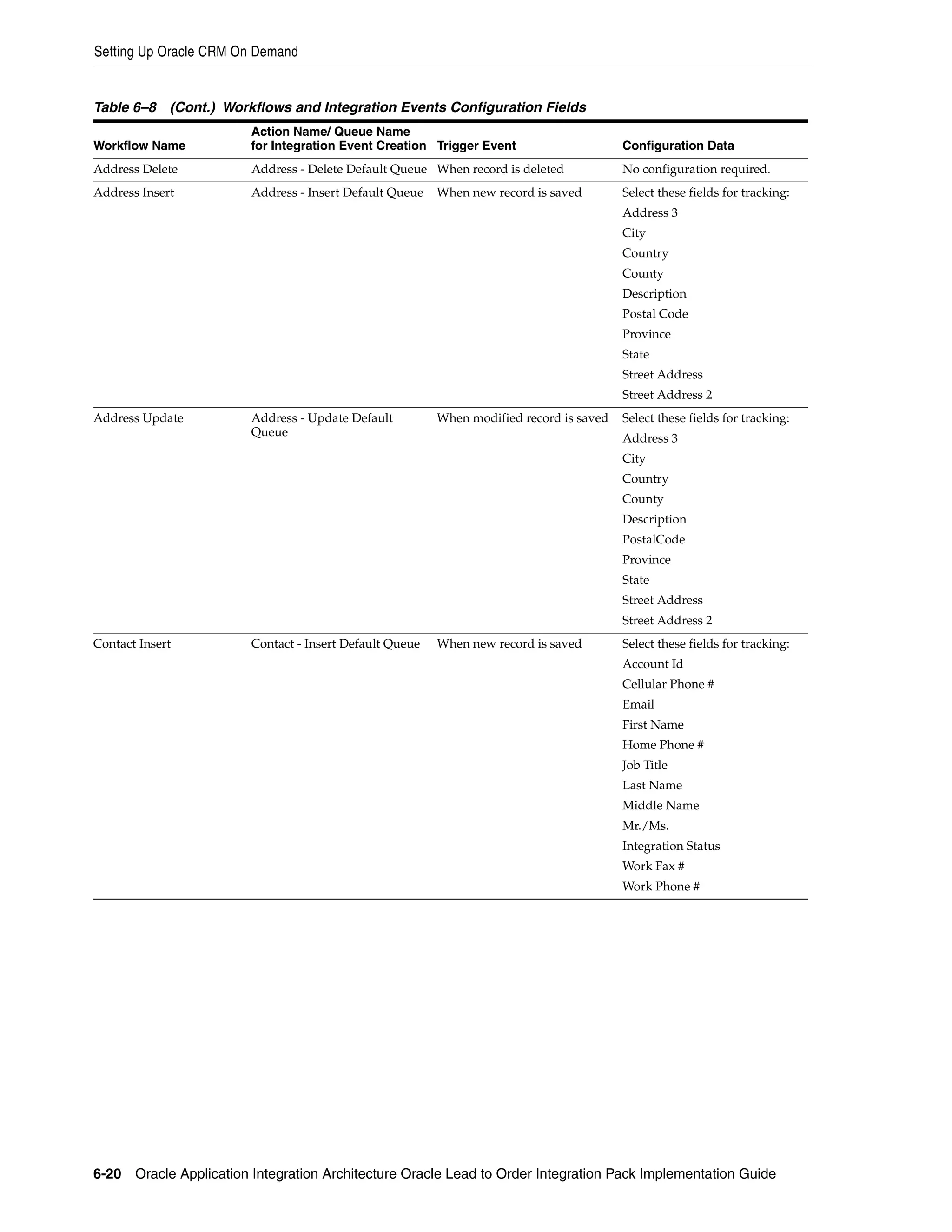
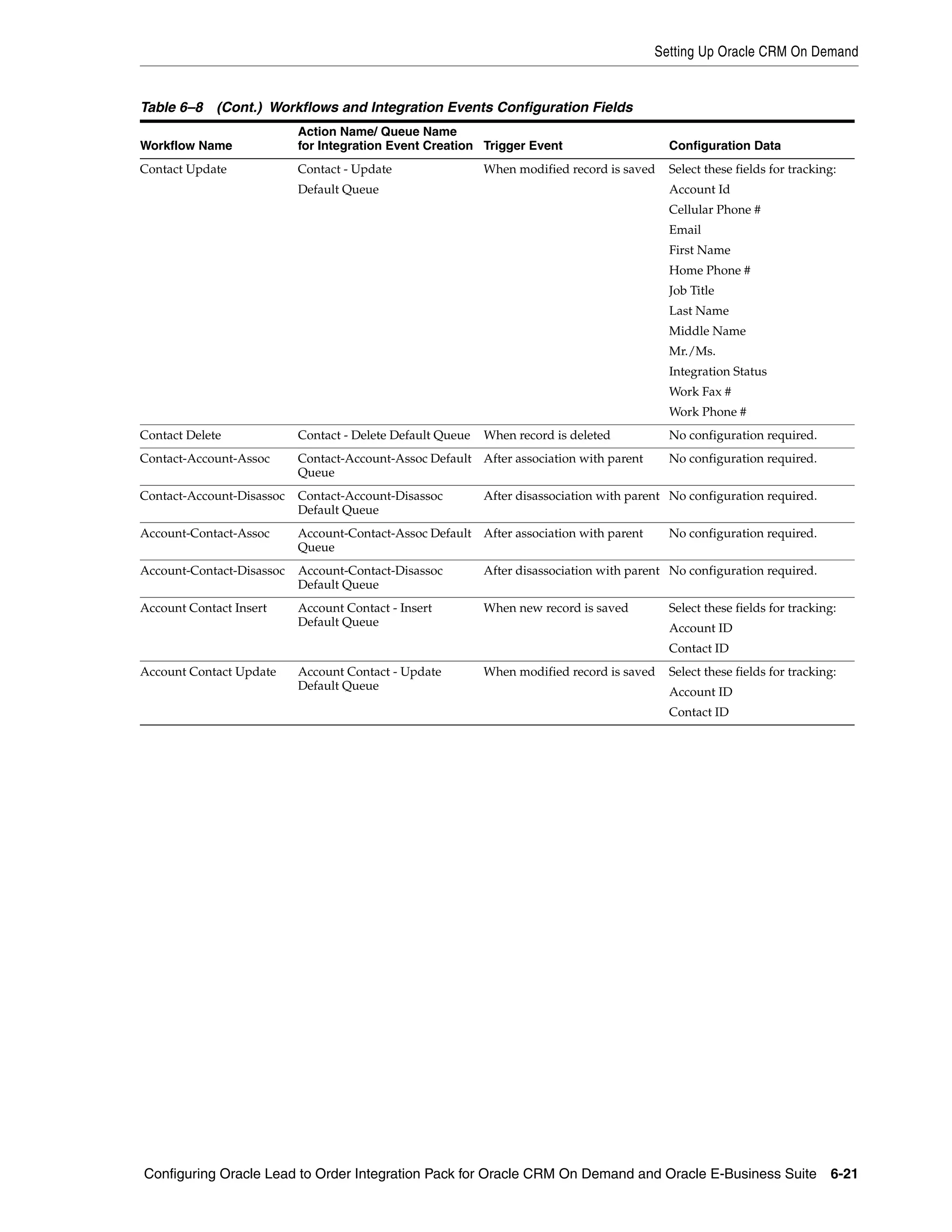
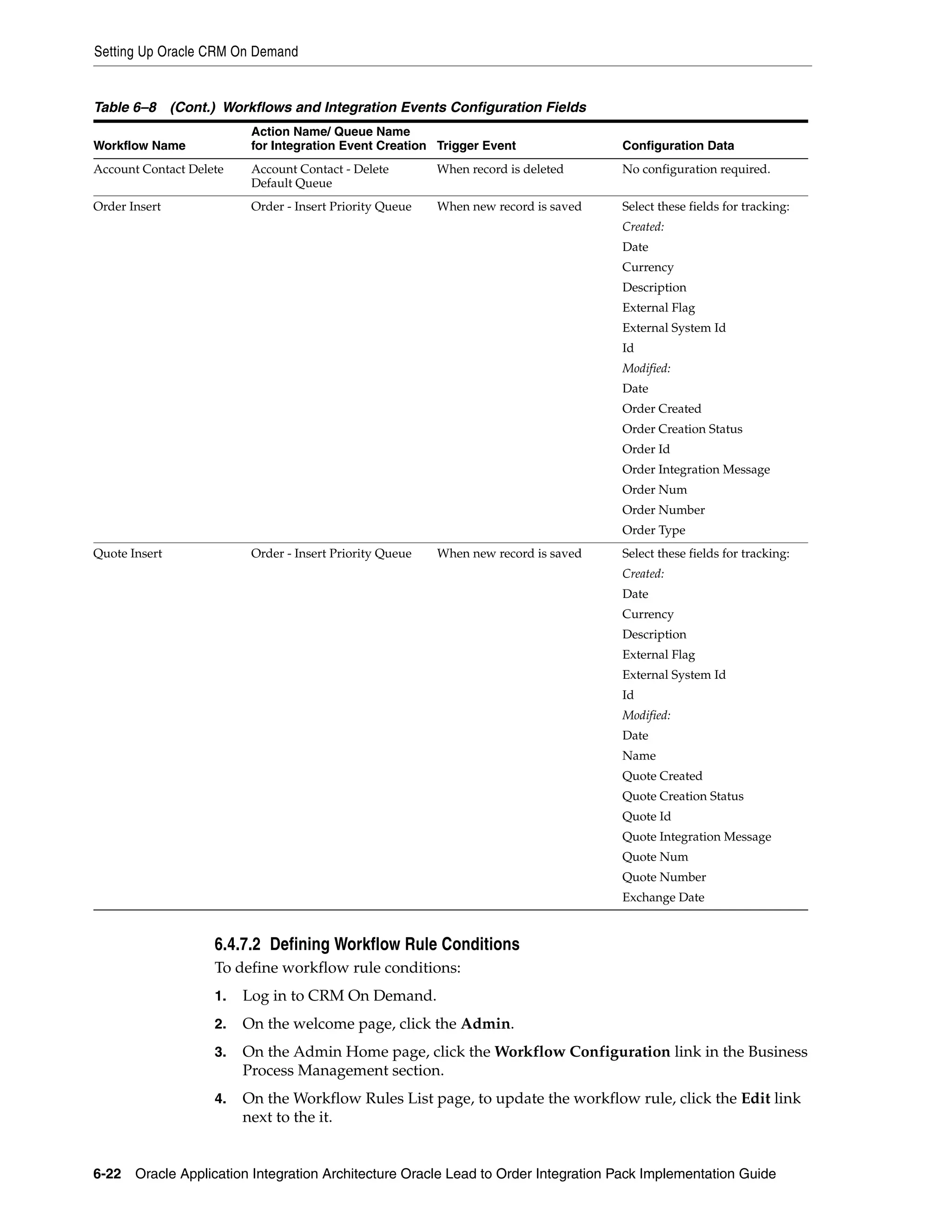
    6–8     Workflows and Integration Events Configuration Fields................................................. 6-19
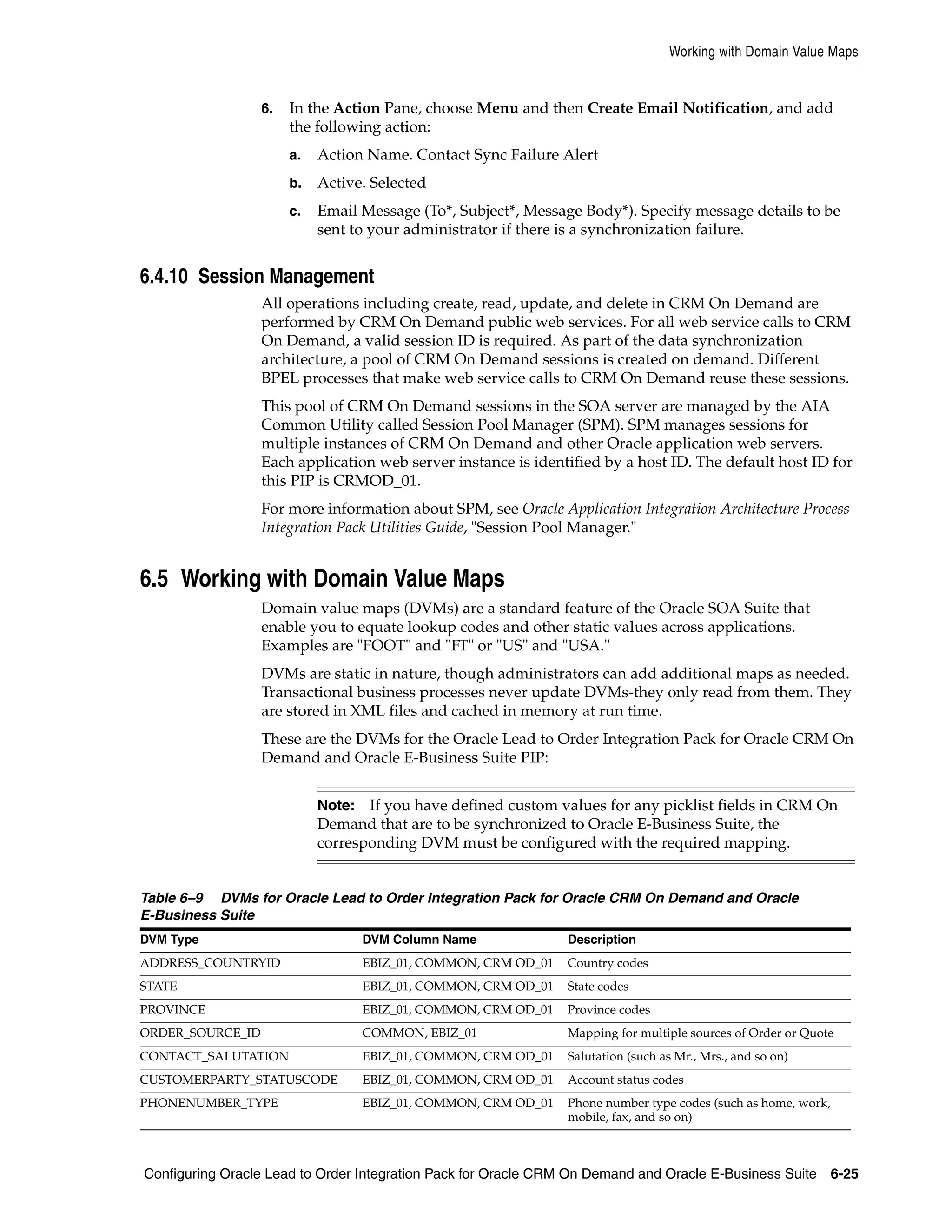
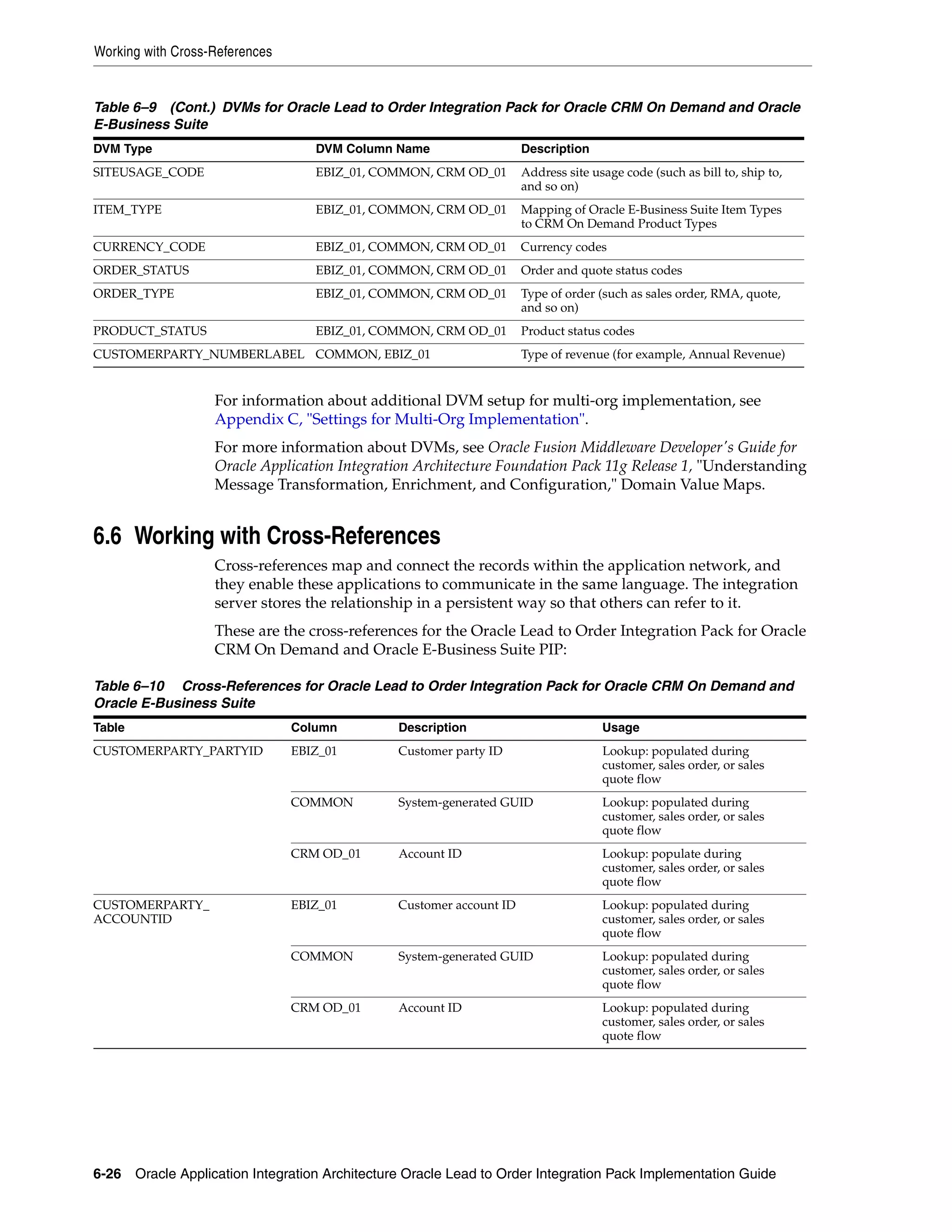
    6–9     DVMs for Oracle Lead to Order Integration Pack for Oracle CRM On Demand and Oracle
           E-Business Suite 6-25
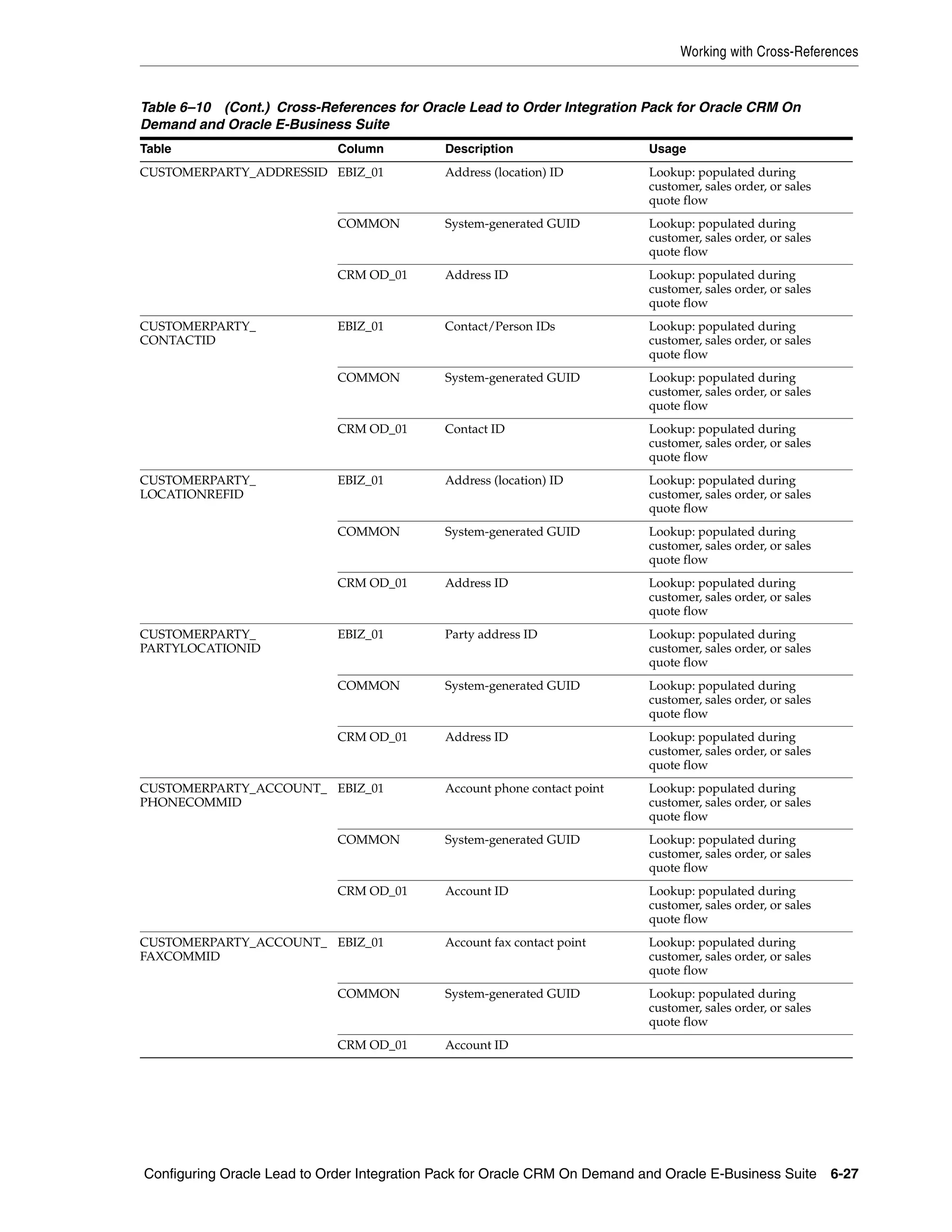
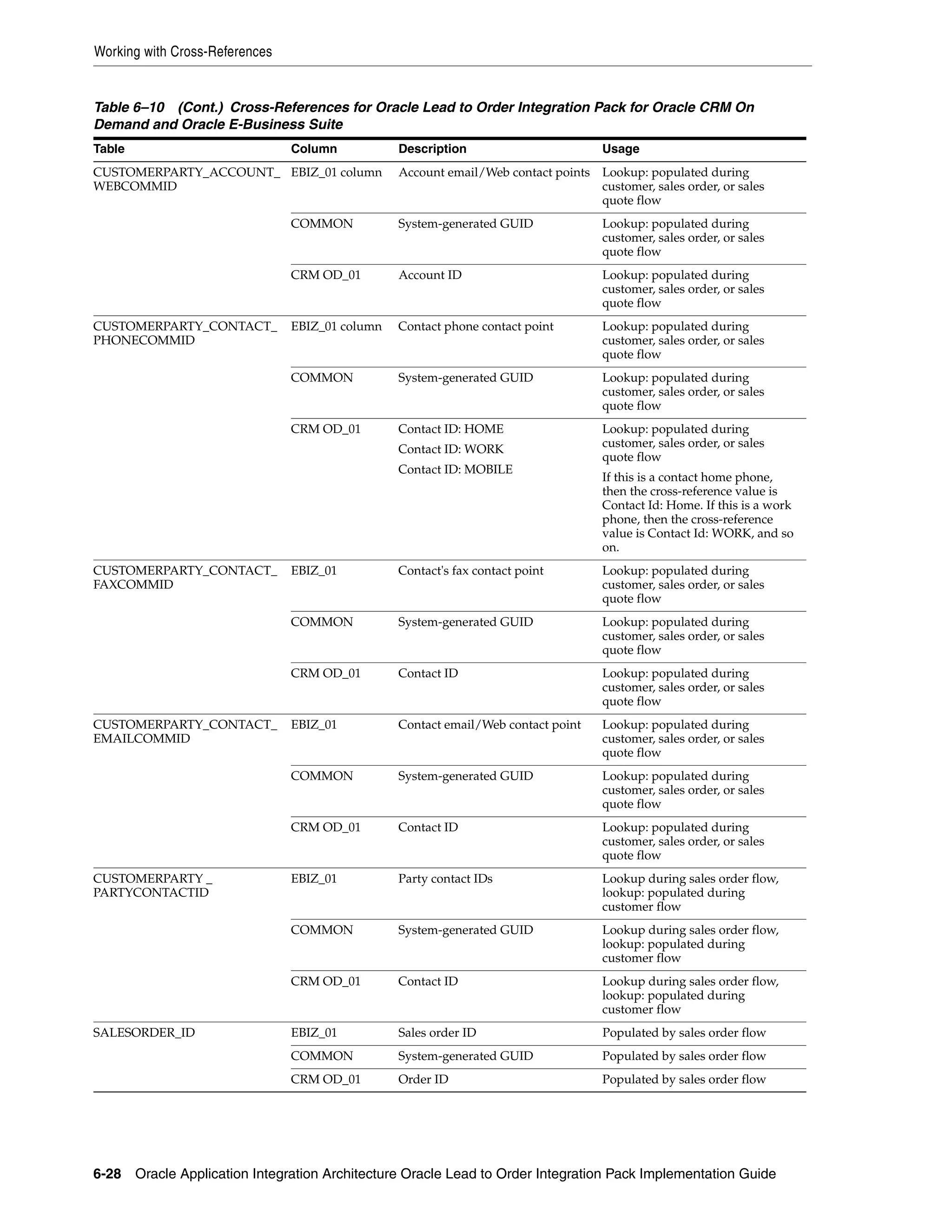
    6–10    Cross-References for Oracle Lead to Order Integration Pack for Oracle CRM On Demand
           and Oracle E-Business Suite 6-26
    6–11    Errors Caused by Oracle Lead to Order Integration Pack for Oracle CRM On Demand and
           Oracle E-Business Suite 6-30
    6–12    Services and Attributes for CRM On Demand ................................................................... 6-32
    6–13    Properties for ResubmitBuild.properties field.................................................................... 6-34
    6–14    System Properties.................................................................................................................... 6-36
    6–15    Properties for the TransformAppContexEbizService Service .......................................... 6-36
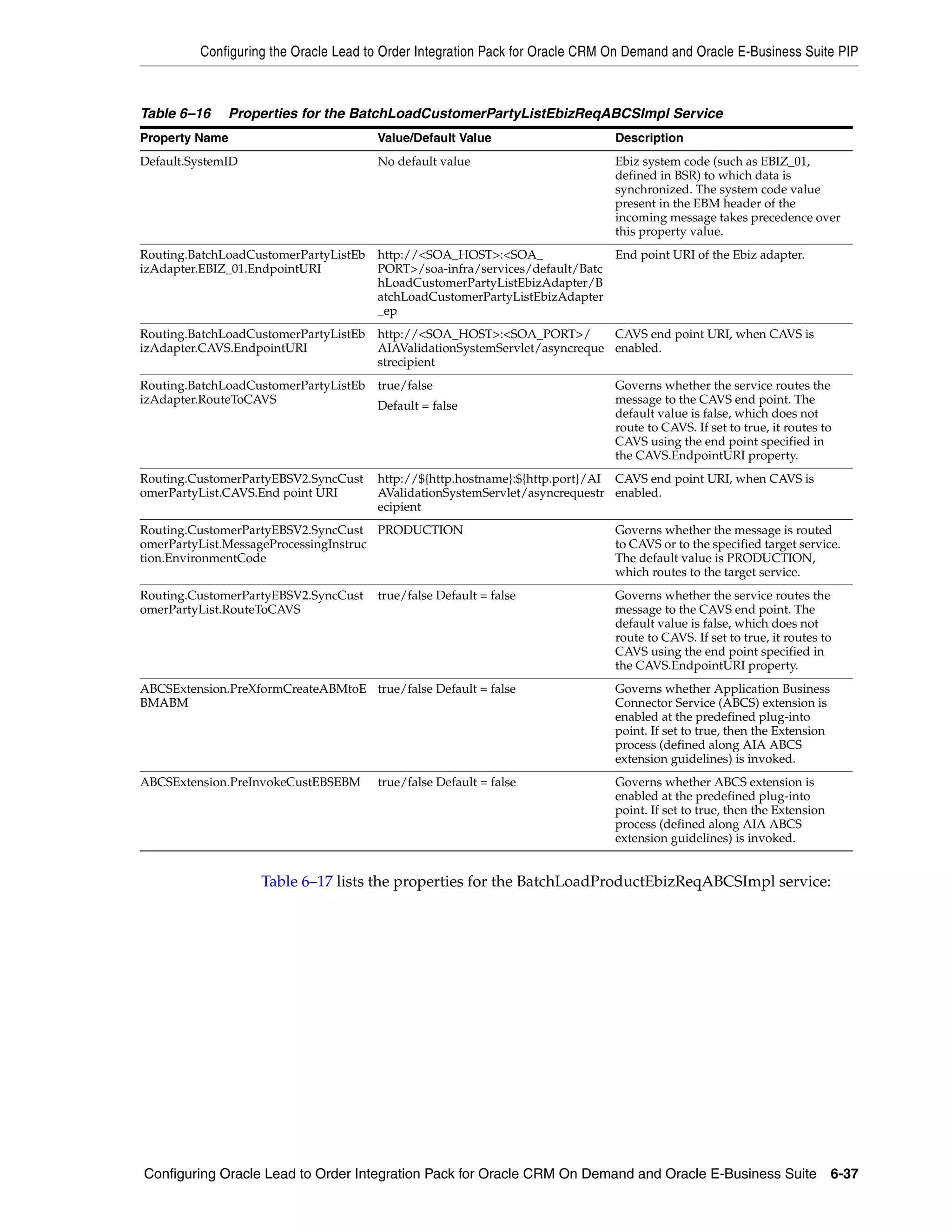
    6–16    Properties for the BatchLoadCustomerPartyListEbizReqABCSImpl Service................ 6-37
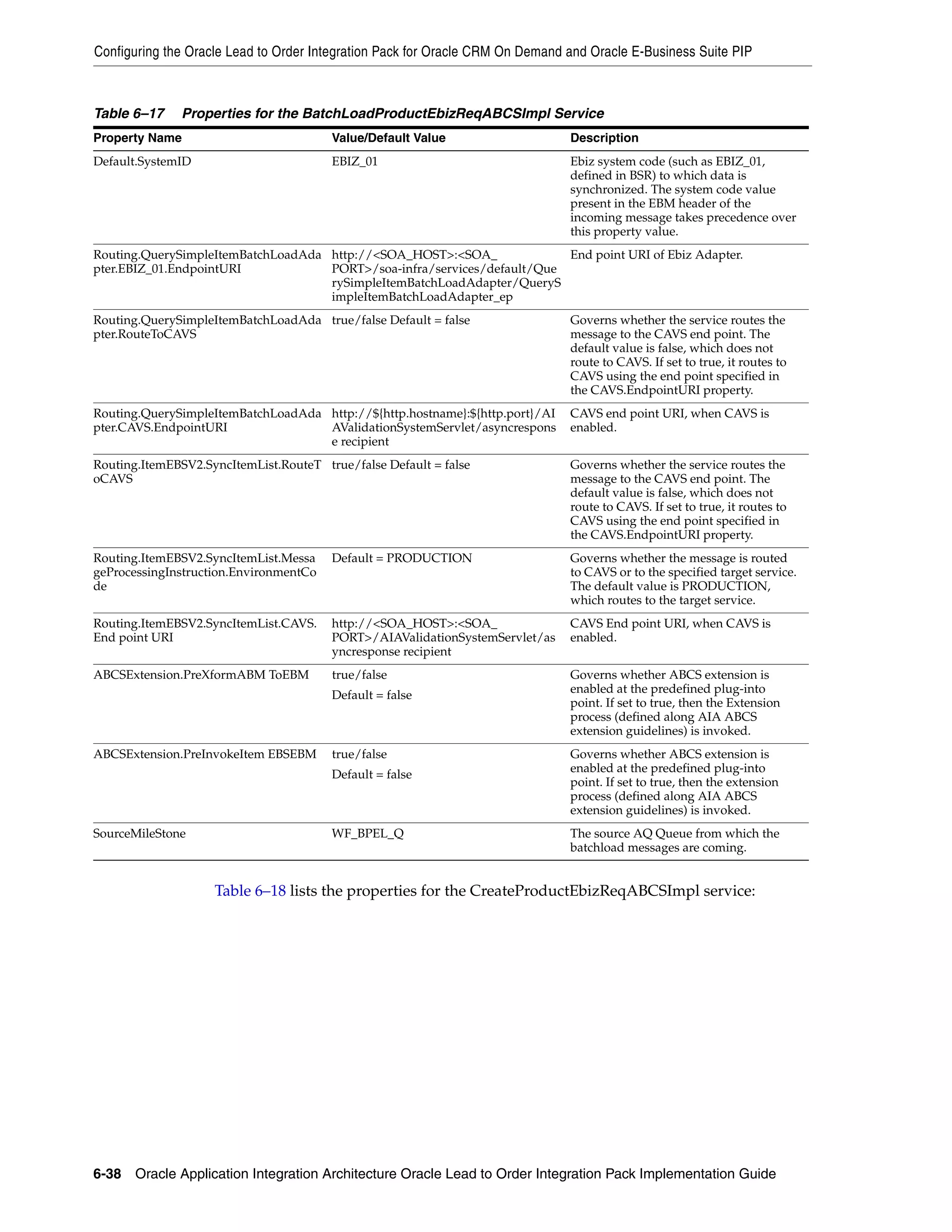
    6–17    Properties for the BatchLoadProductEbizReqABCSImpl Service ................................... 6-38
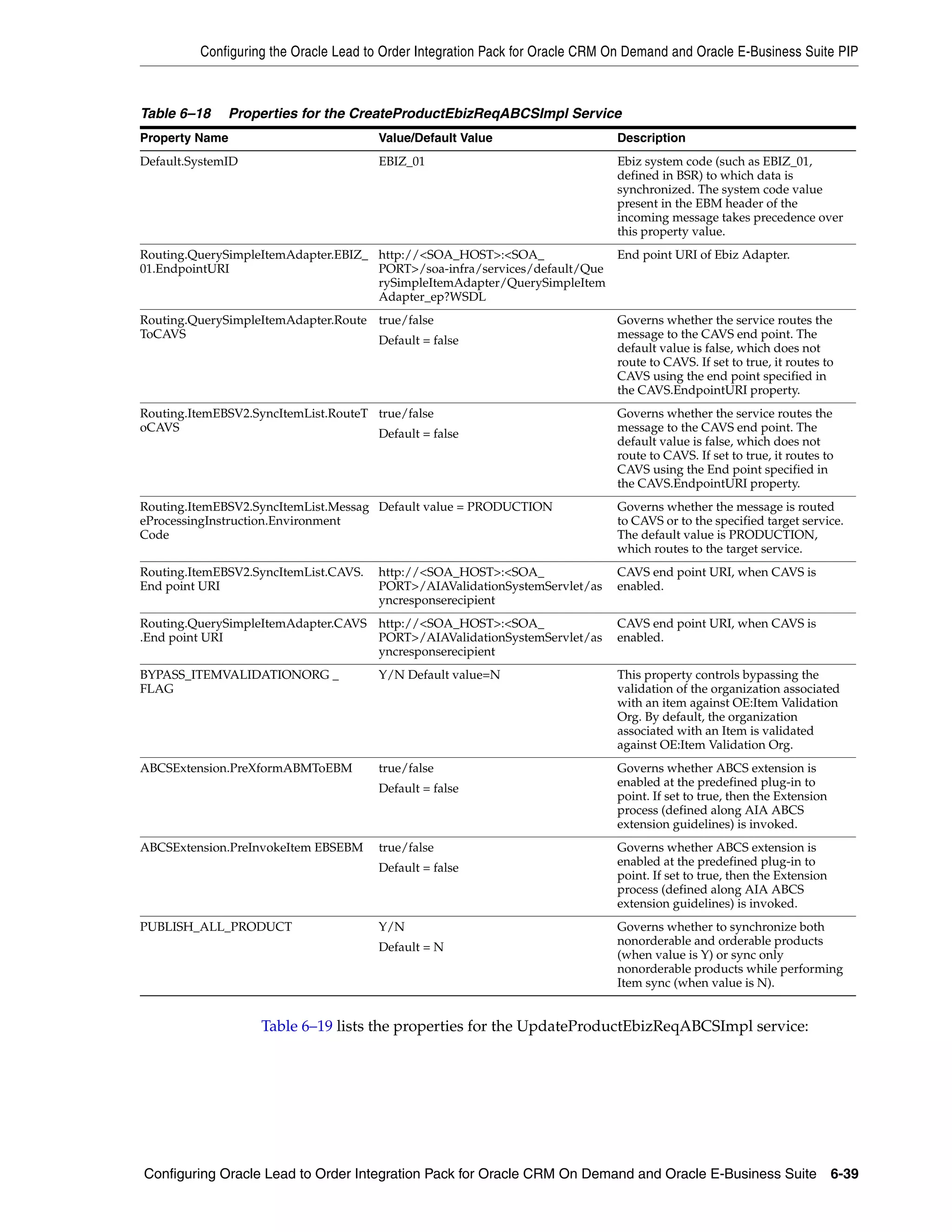
    6–18    Properties for the CreateProductEbizReqABCSImpl Service........................................... 6-39
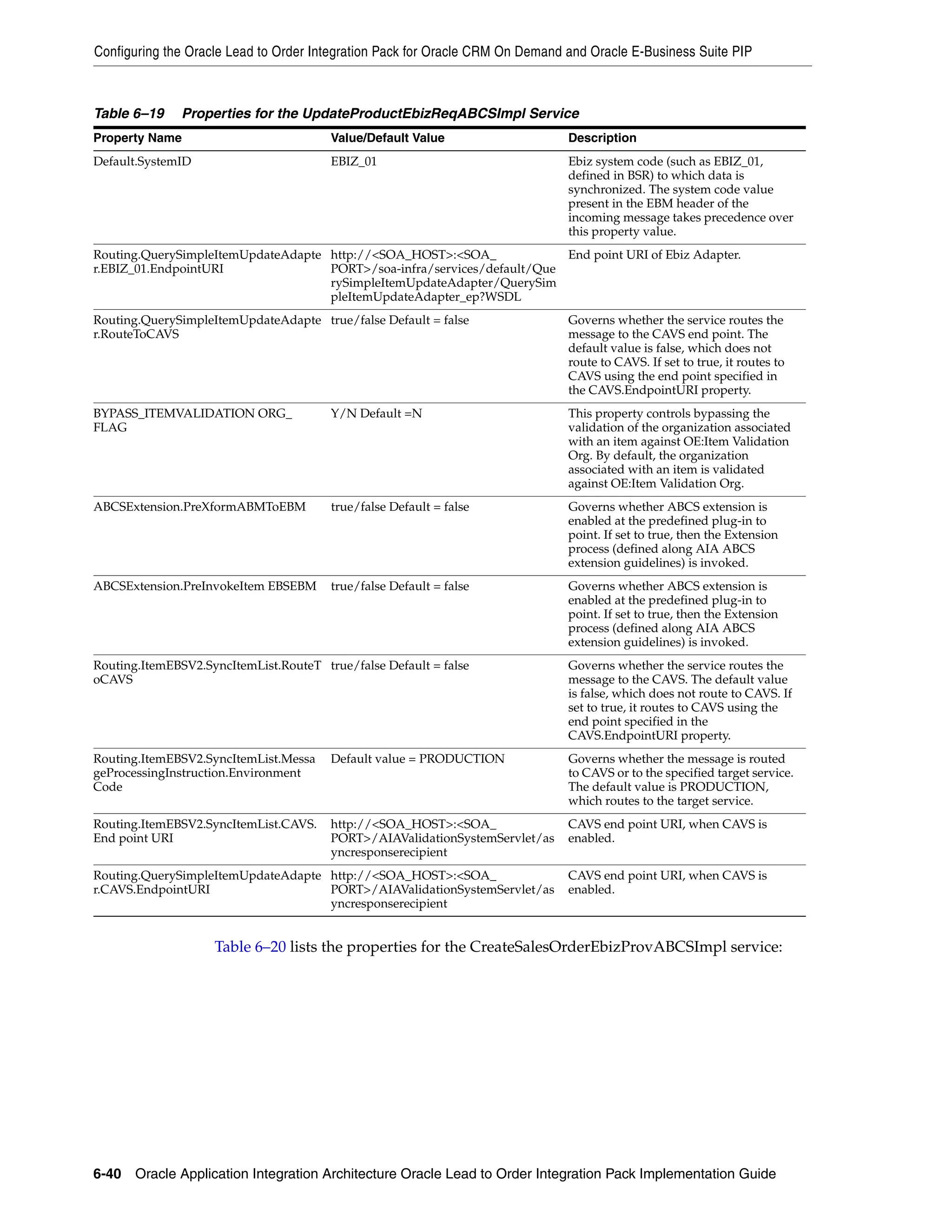
    6–19    Properties for the UpdateProductEbizReqABCSImpl Service ......................................... 6-40
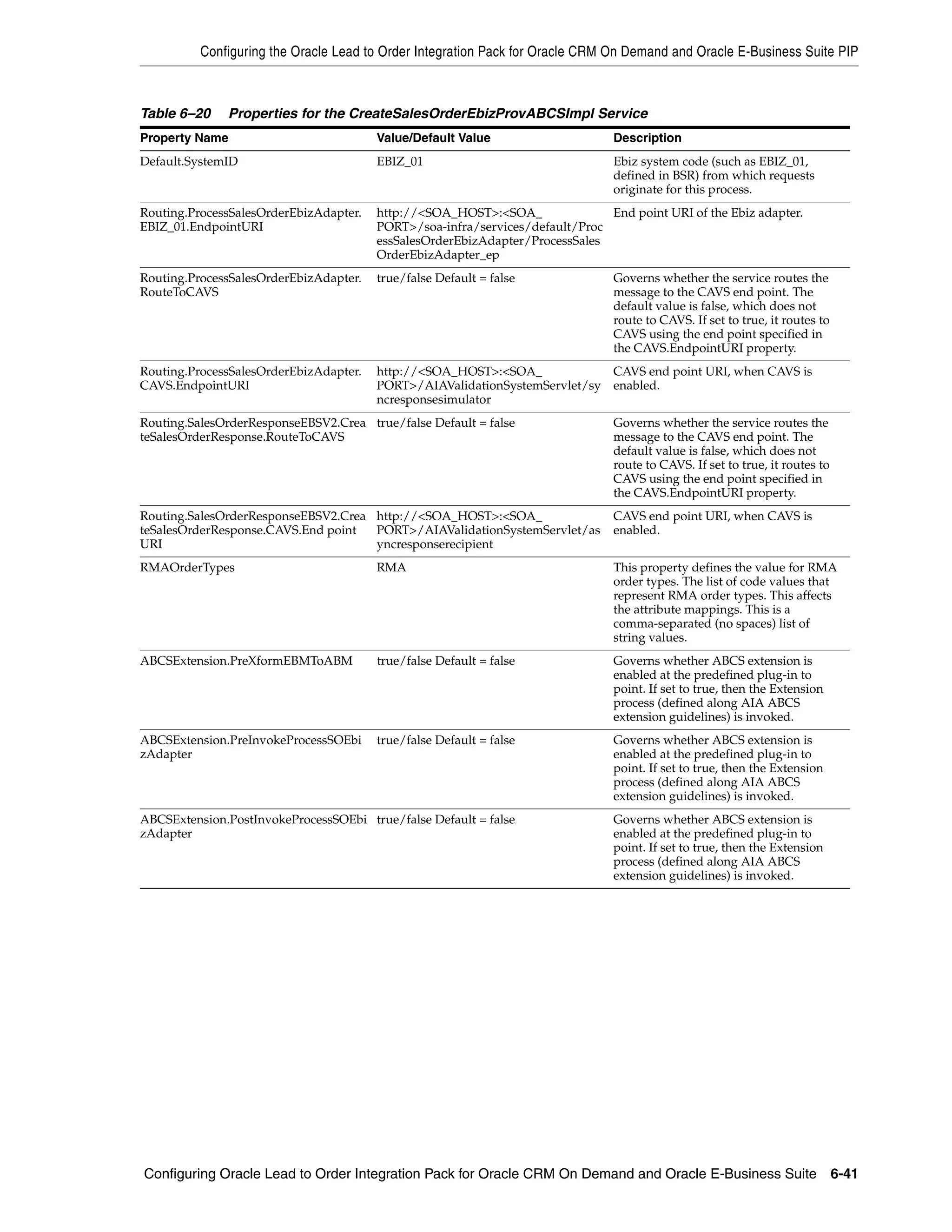
    6–20    Properties for the CreateSalesOrderEbizProvABCSImpl Service.................................... 6-41
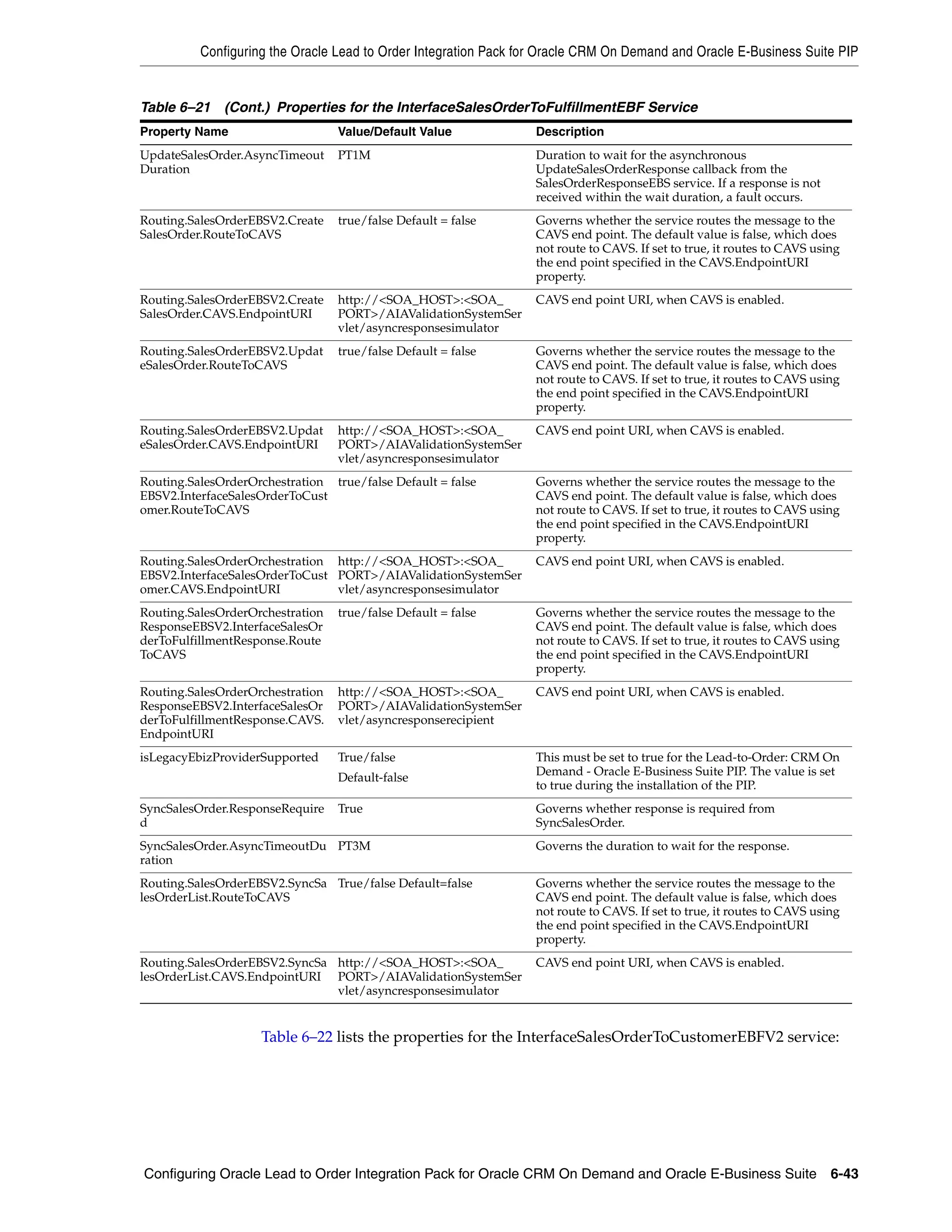
    6–21    Properties for the InterfaceSalesOrderToFulfillmentEBF Service ................................... 6-42
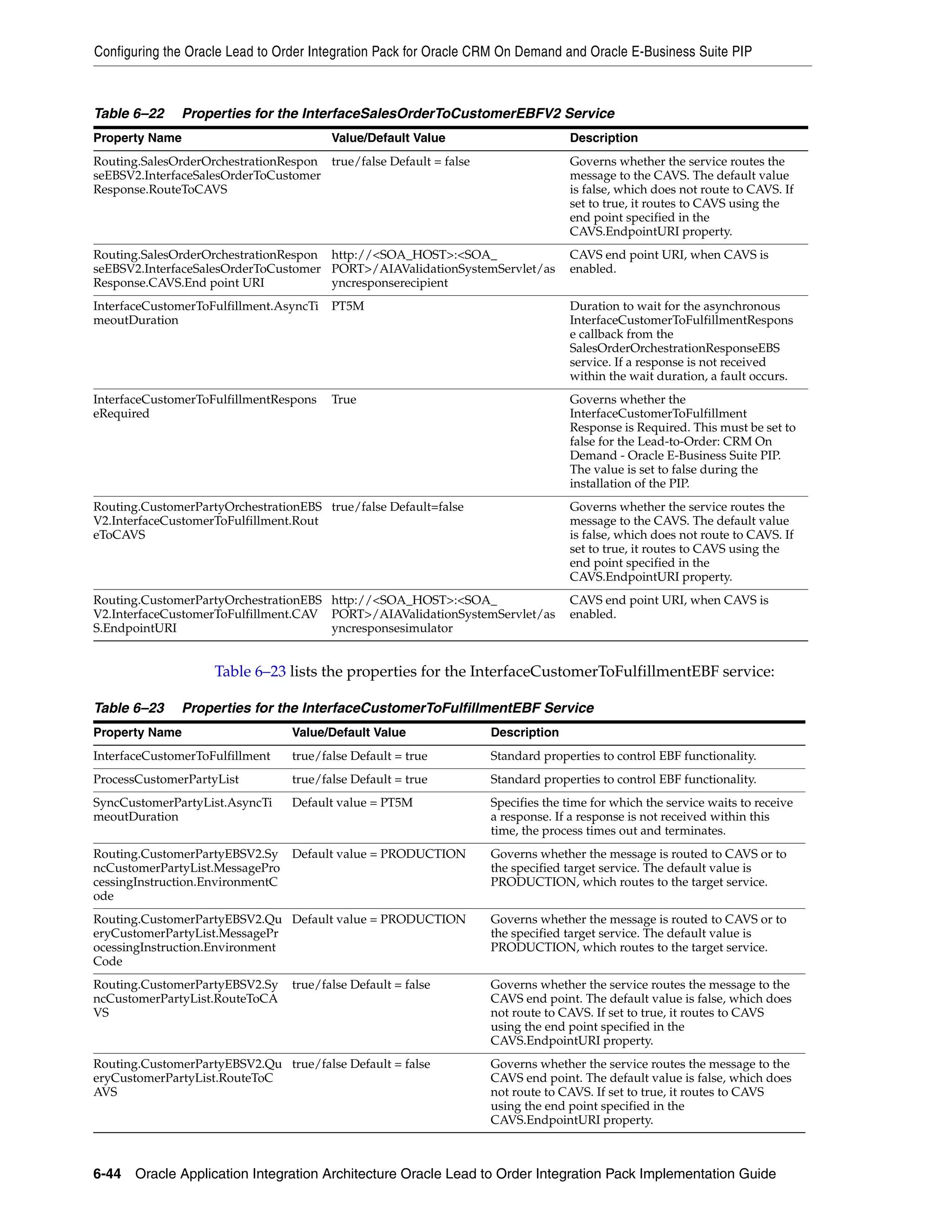
    6–22    Properties for the InterfaceSalesOrderToCustomerEBFV2 Service................................. 6-44
    6–23    Properties for the InterfaceCustomerToFulfillmentEBF Service...................................... 6-44
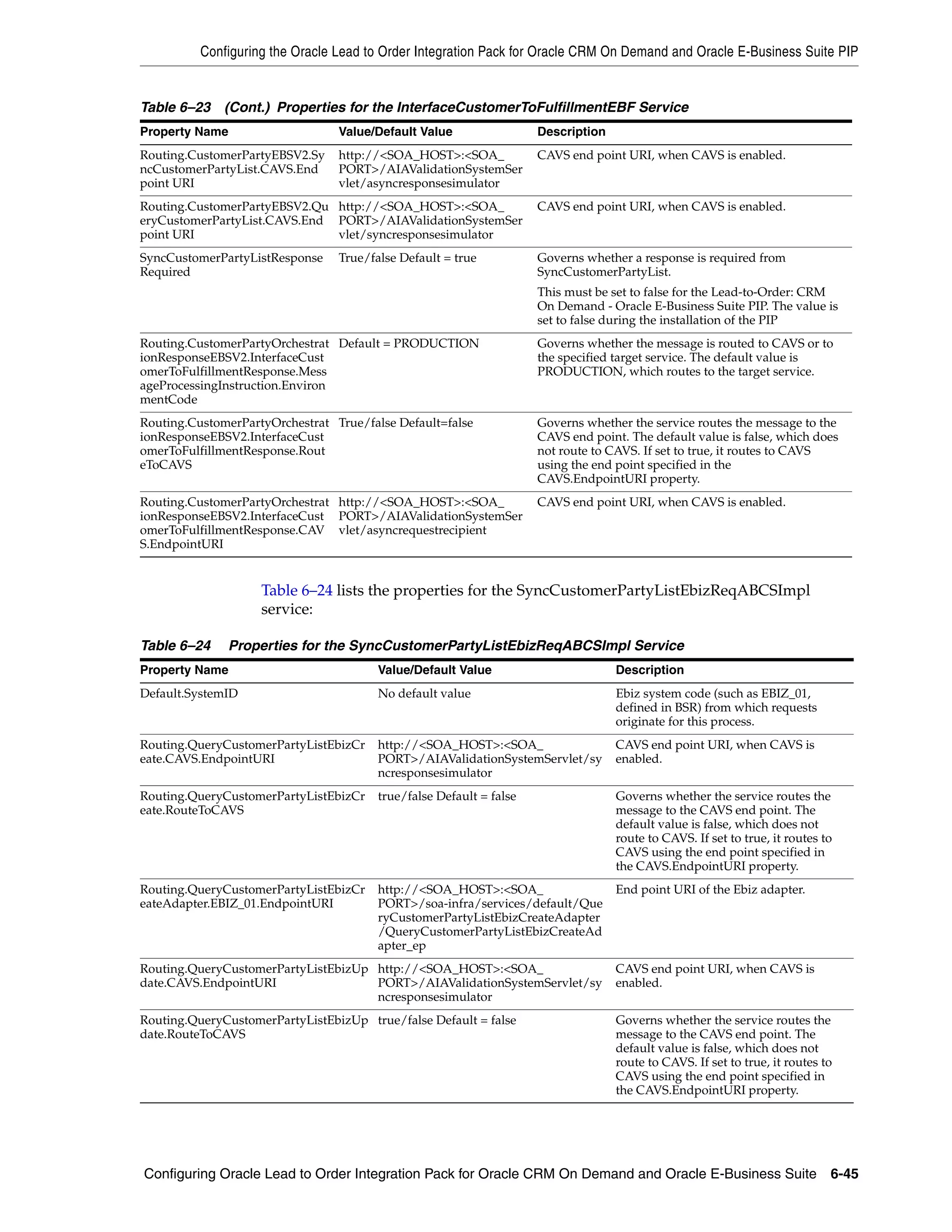
    6–24    Properties for the SyncCustomerPartyListEbizReqABCSImpl Service .......................... 6-45
    6–25    Properties for the MergeAccountEbizReqABCSImpl Service .......................................... 6-46
    6–26    Properties for the MergePartyEbizReqABCSImpl Service ............................................... 6-48
    6–27    Properties for the SyncCustomerPartyListEbizProvABCSImpl Service......................... 6-49
    6–28    Properties for the InterfaceSalesQuoteToFulfillmentEBF Service ................................... 6-50
    6–29    Properties for the CreateCustomerPartyEbizProvABCSImpl Service ............................ 6-51
    6–30    Properties for the UpdateCustomerPartyEbizProvABCSImpl Service........................... 6-52
    6–31    Properties for the InterfaceSalesQuoteToCustomerEBF Service ..................................... 6-53
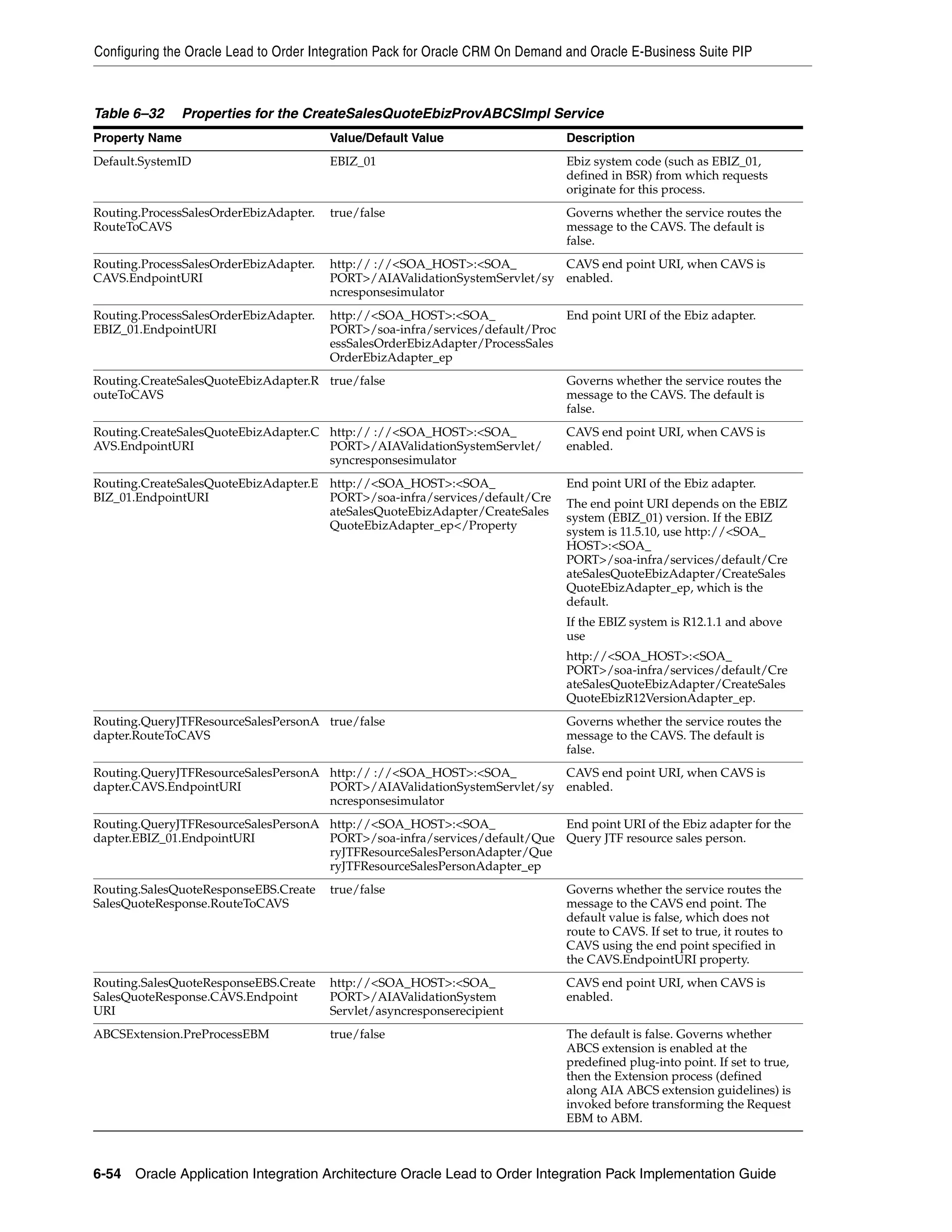
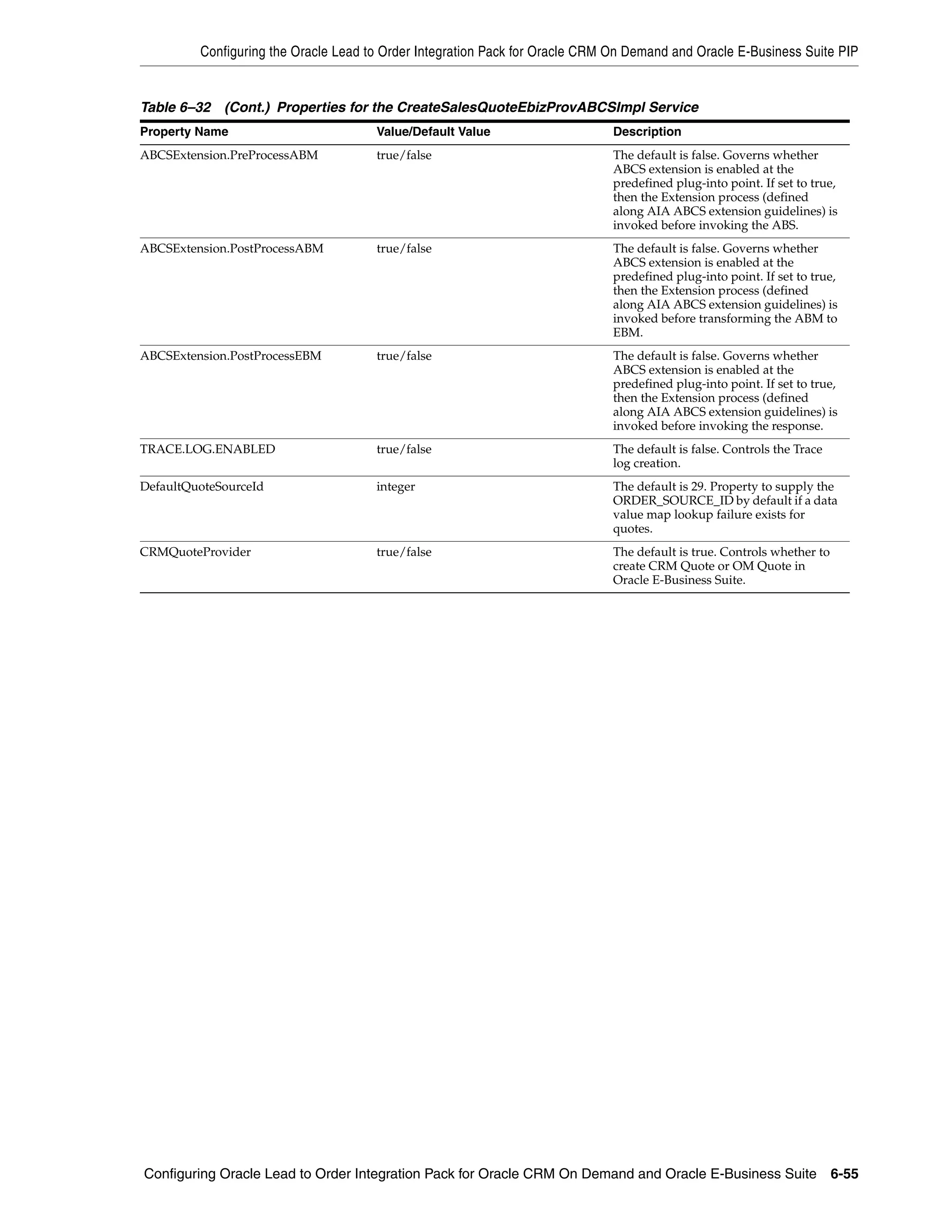
    6–32    Properties for the CreateSalesQuoteEbizProvABCSImpl Service ................................... 6-54
    7–1     BPEL Processes and XSL Files for Objects.............................................................................. 7-4
    A–1     Methods called by the Quote Service..................................................................................... A-1
    A–2     Required and Read-only Fields for the Quote Object.......................................................... A-1
    A–3     Pick Map Fields for the Quote Object .................................................................................... A-2
    A–4     User Key Field for the Quote Object ...................................................................................... A-2
    A–5     Methods Called by the Order Service .................................................................................... A-2
    A–6     Required and Read-only Fields for the Order Object.......................................................... A-2
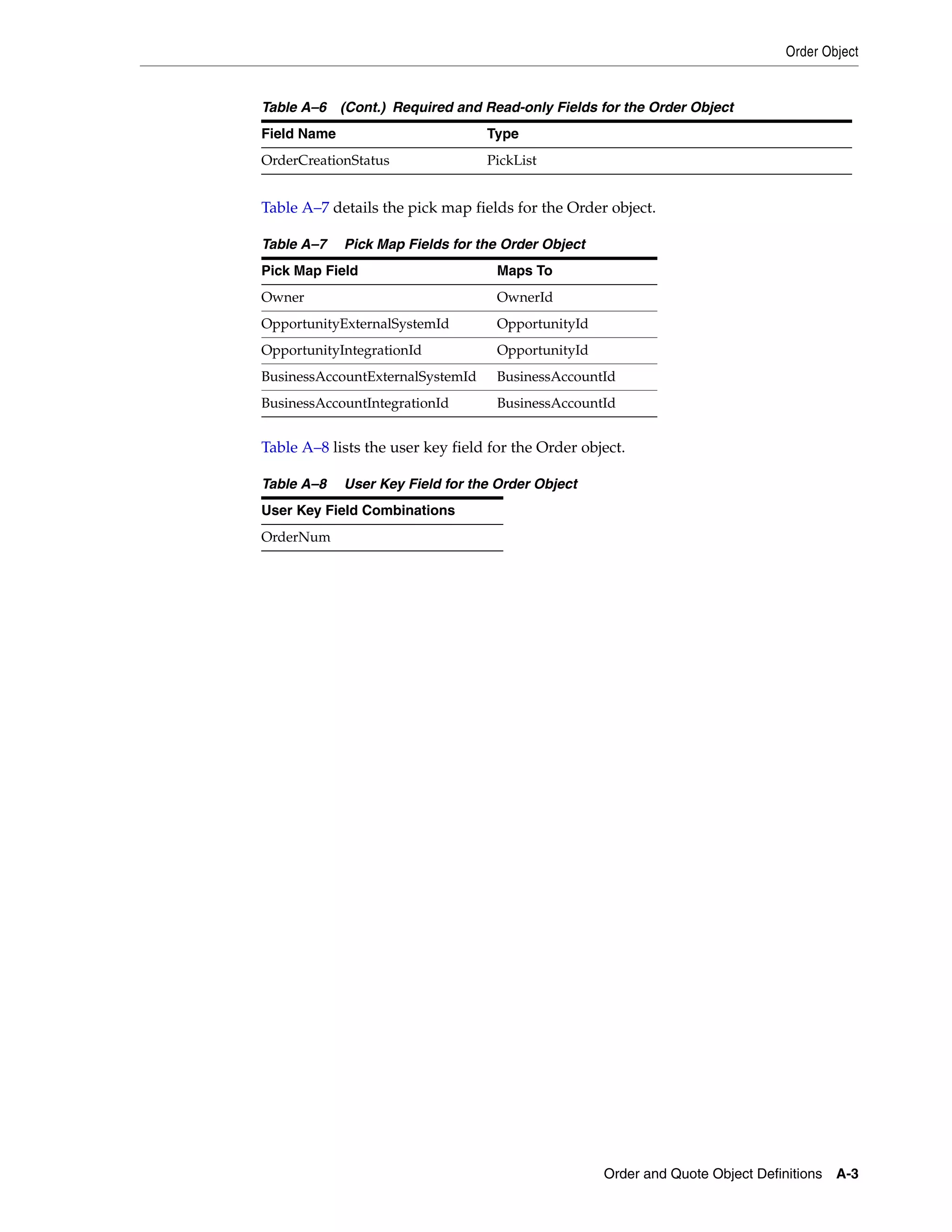
    A–7     Pick Map Fields for the Order Object .................................................................................... A-3
    A–8     User Key Field for the Order Object....................................................................................... A-3
    B–1     Mapped attributes of Customer Records .............................................................................. B-1
    B–2     Mapped Attributes of Product Records................................................................................. B-3
    B–3     Mapped Attributes of Quote Records.................................................................................... B-4


                                                                                                                                                  xiii
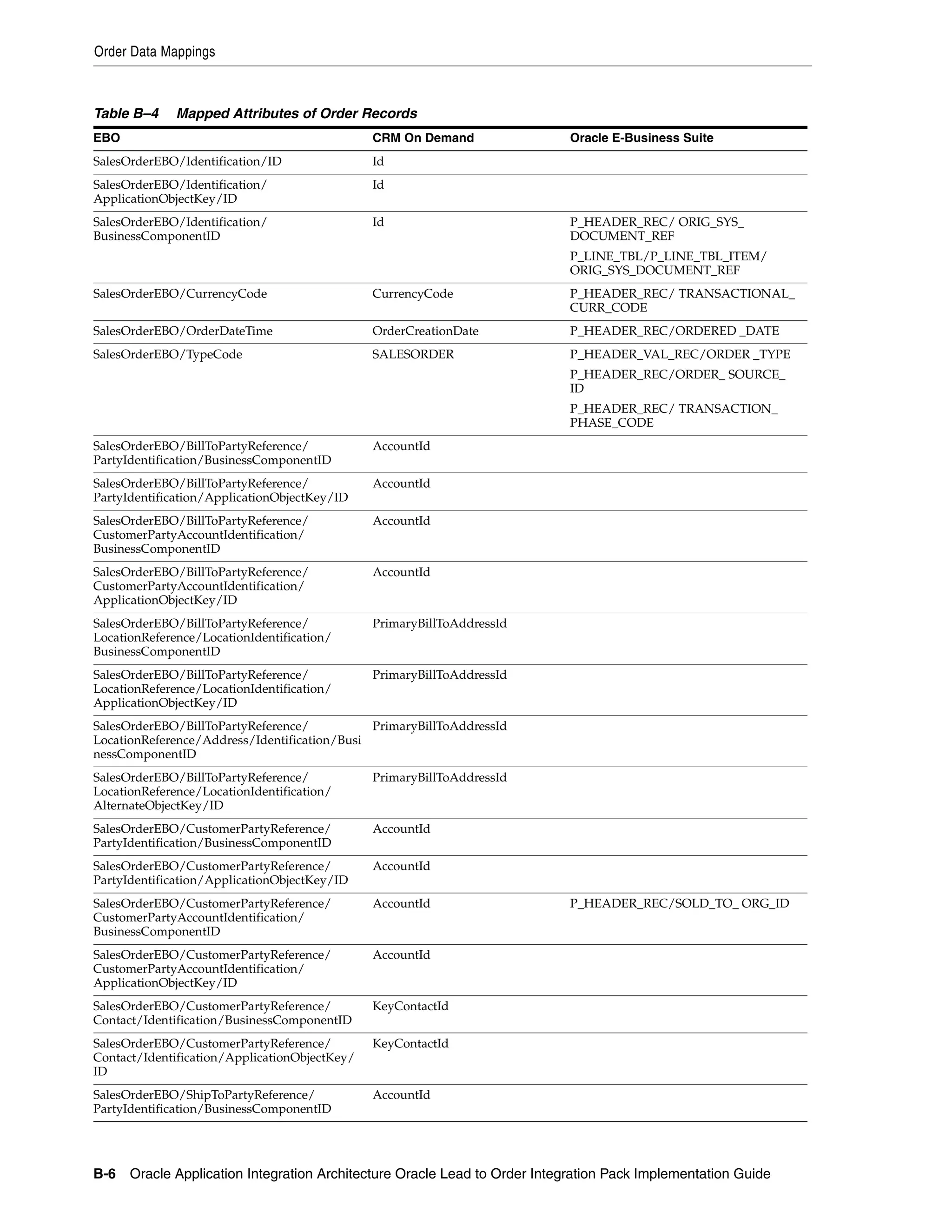
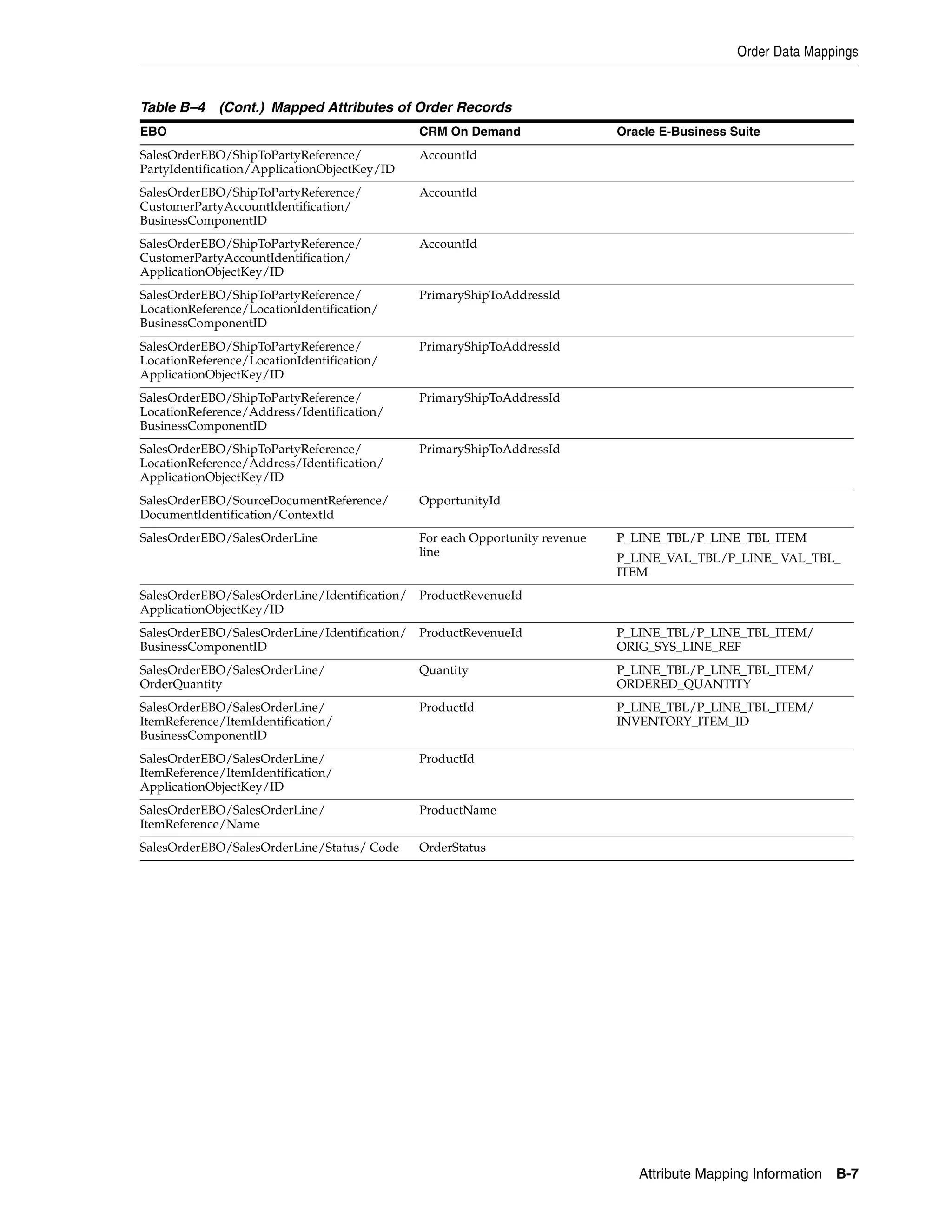
B–4   Mapped Attributes of Order Records ....................................................................................   B-6
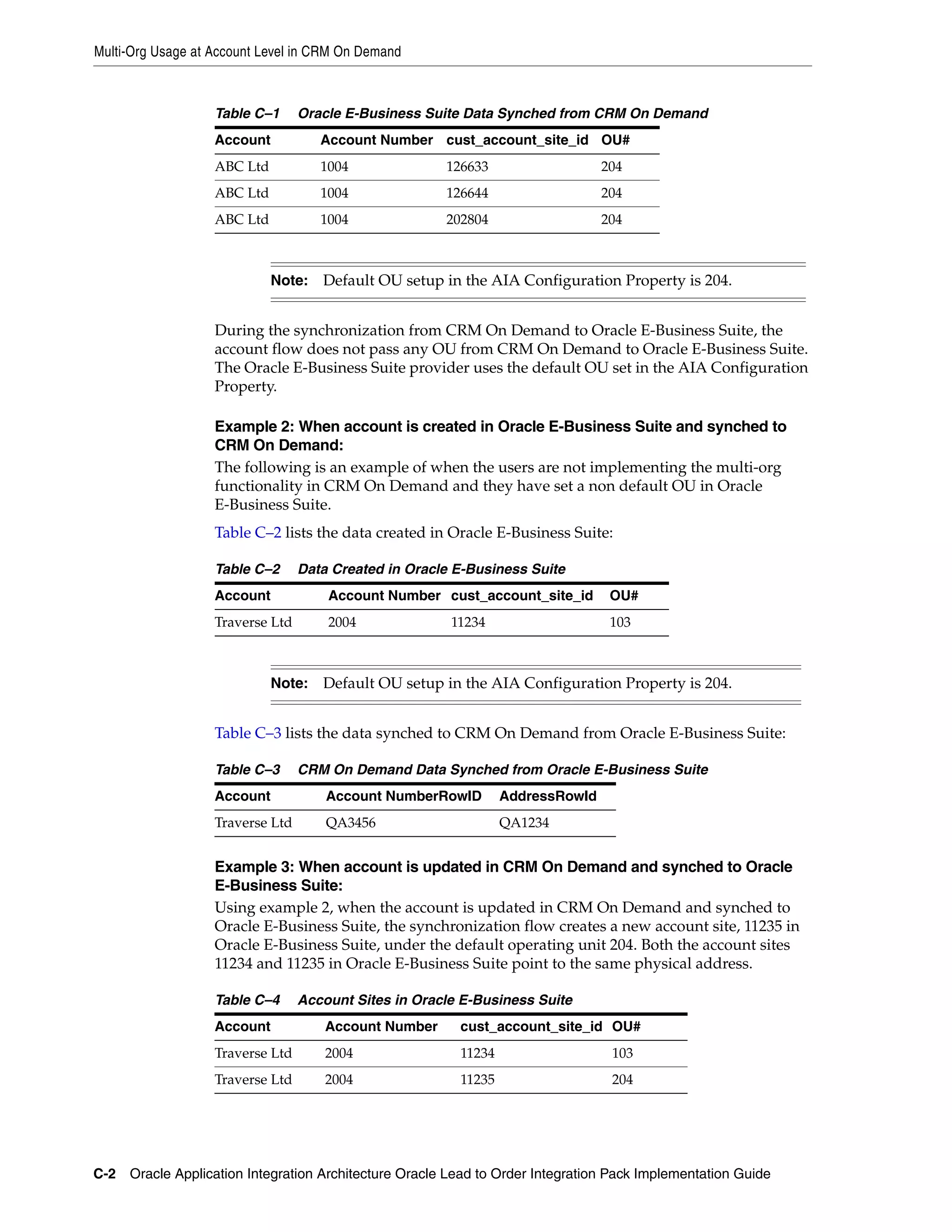
      C–1   Oracle E-Business Suite Data Synched from CRM On Demand........................................                           C-2
      C–2   Data Created in Oracle E-Business Suite ...............................................................................   C-2
      C–3   CRM On Demand Data Synched from Oracle E-Business Suite........................................                           C-2
      C–4   Account Sites in Oracle E-Business Suite ..............................................................................   C-2
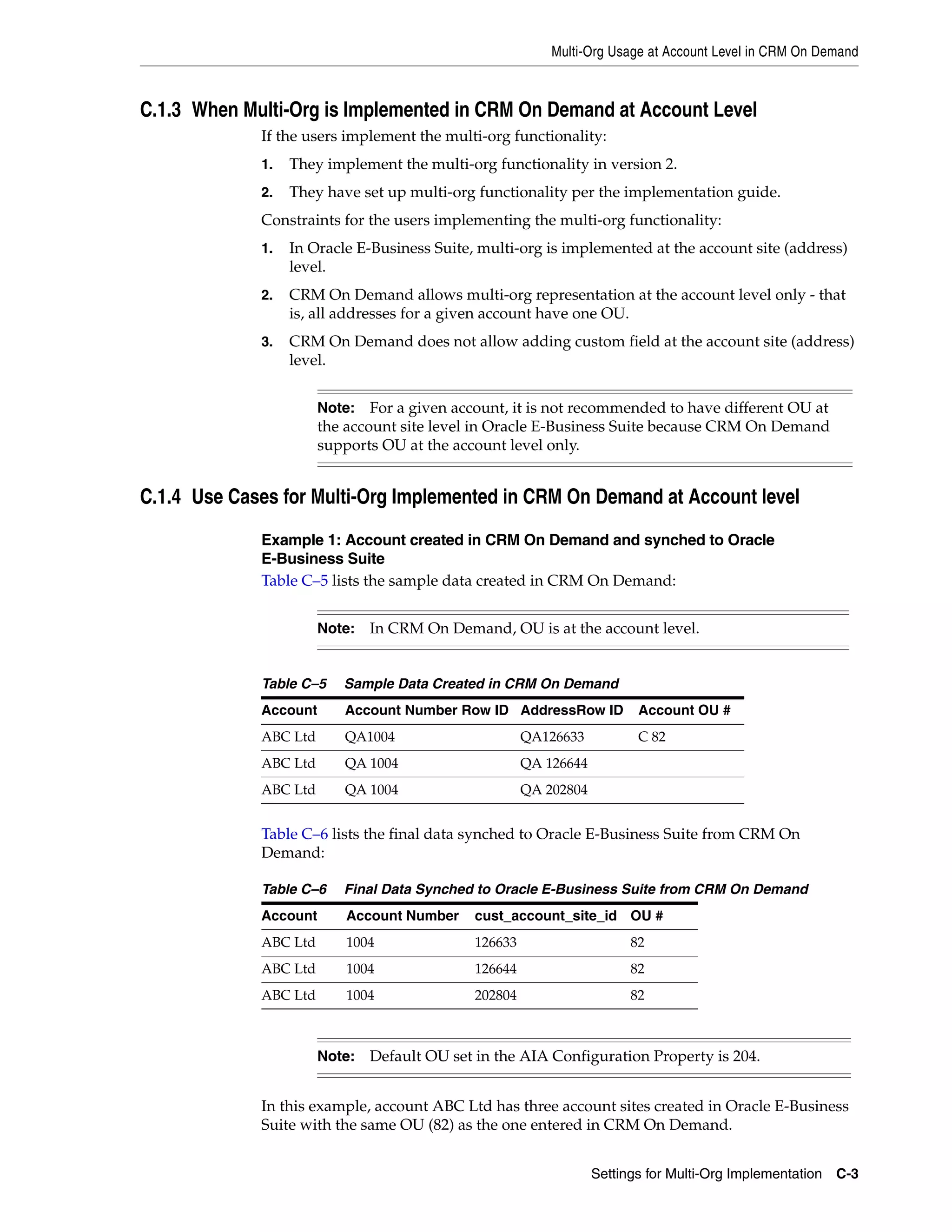
      C–5   Sample Data Created in CRM On Demand ..........................................................................           C-3
      C–6   Final Data Synched to Oracle E-Business Suite from CRM On Demand .........................                                C-3
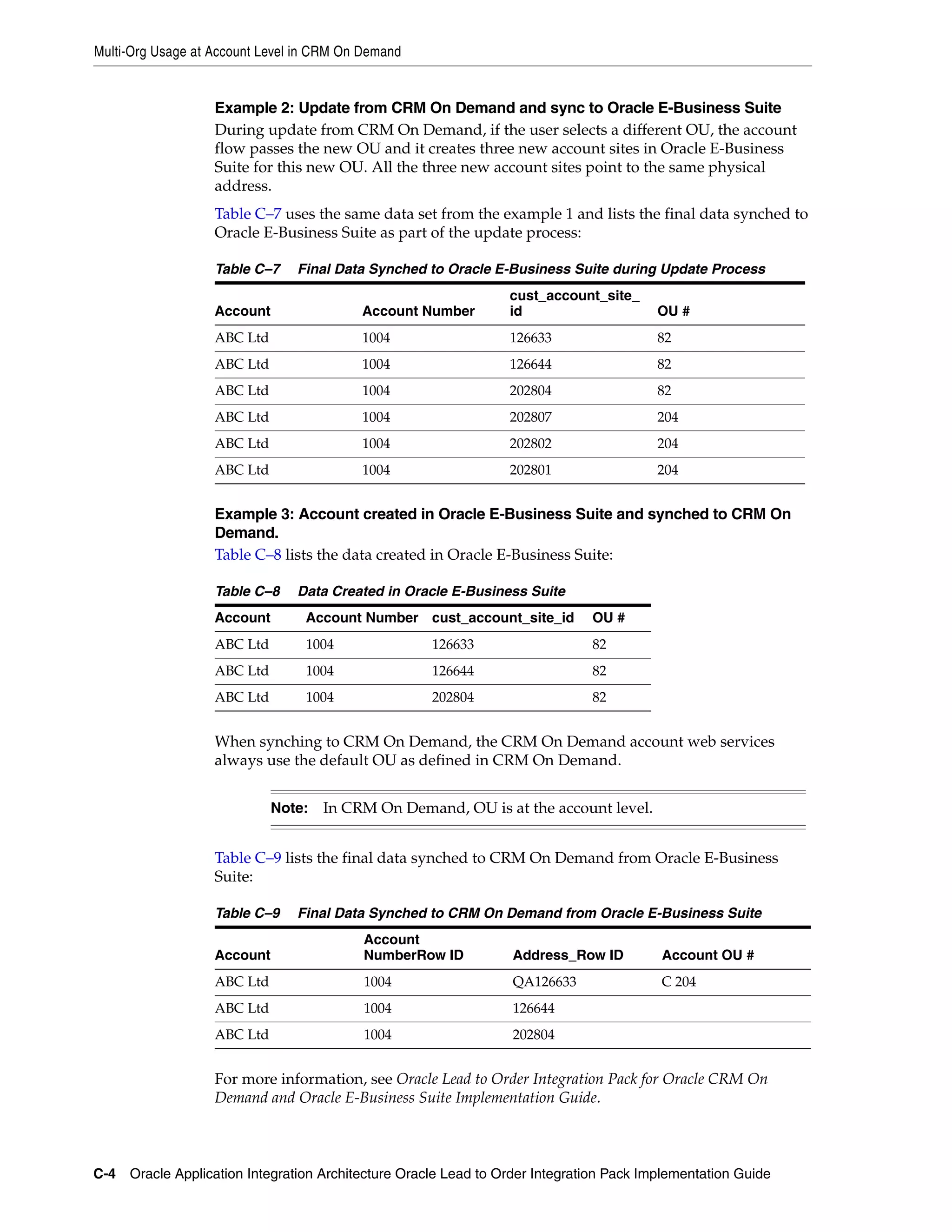
      C–7   Final Data Synched to Oracle E-Business Suite during Update Process ..........................                            C-4
      C–8   Data Created in Oracle E-Business Suite ...............................................................................   C-4
      C–9   Final Data Synched to CRM On Demand from Oracle E-Business Suite .........................                                C-4


xiv
Preface

           Welcome to Oracle Application Integration Architecture Oracle Lead to Order Integration
           Pack Implementation Guide for Oracle CRM On Demand and Oracle E-Business Suite 3.1.1
           Implementation Guide.


Common Oracle AIA Pre-Built Integration Guides
           Oracle Application Integration Architecture Pre-Built Integrations 11.1 includes the
           following guides shared by all products delivered with this release:
           ■   Oracle Application Integration Architecture Installation and Upgrade Guide for
               Pre-Built Integrations Release 11.1
               This guide provides an overview of the installation process, including how to
               install, configure, and deploy your pre-built integrations. The steps required to
               upgrade your pre-built integrations to the latest release are also provided.
           ■   Oracle Application Integration Architecture Pre-Built Integrations 11.1: Utilities
               Guide
               This guide describes:
               –   How to work with and configure Session Pool Manager (SPM), which is a
                   service in the Oracle SOA Suite web server whose primary function is to
                   manage a pool of web server session tokens that can be reused by BPEL flows.
               –   How to deploy and configure the AIACompositeScheduler. This is a utility
                   component that is used by pre-built integrations to schedule a service-oriented
                   architecture (SOA) composite to be invoked at the specified time interval.
           ■   Oracle Application Integration Architecture Pre-Built Integrations 11.1:
               Product-to-Guide Index
               The Product-to-Guide index lists the guides that provide information for each
               product delivered in this release.


Documentation Accessibility
           For information about Oracle's commitment to accessibility, visit the Oracle
           Accessibility Program website at
           http://www.oracle.com/pls/topic/lookup?ctx=acc&id=docacc.

           Access to Oracle Support
           Oracle customers have access to electronic support through My Oracle Support. For
           information, visit


                                                                                                    xv
http://www.oracle.com/pls/topic/lookup?ctx=acc&id=info or visit
           http://www.oracle.com/pls/topic/lookup?ctx=acc&id=trs if you are
           hearing impaired.


Additional Resources
           The following resources are also available:
           ■   Oracle Application Integration Architecture Foundation Pack:
               Oracle AIA Pre-Built integrations require Foundation Pack 11.1.1.5.0 to be
               installed. Refer to the Foundation Pack documentation library on OTN to
               download the Foundation Pack guides at
               http://download.oracle.com/docs/cd/E21764_01/aia.htm.
           ■   Oracle Application Integration Architecture: Product-to-Guide Index:
               Oracle Technology Network:
               http://www.oracle.com/technetwork/index.html
           ■   Known Issues and Workarounds:
               My Oracle Support: https://support.oracle.com/
           ■   Release Notes:
               Oracle Technology Network:
               http://www.oracle.com/technetwork/index.html
           ■   Documentation updates:
               Oracle Technology Network:
               http://www.oracle.com/technetwork/index.html


xvi
Part I
Part I   Understanding the Delivered Integrations

             This part contains the following chapters:
             ■   Chapter 1, "Oracle Lead to Order Integration Pack for Oracle CRM On Demand
                 and Oracle E-Business Suite"
             ■   Chapter 2, "Initial Loading and Synchronization of Data"
             ■   Chapter 3, "Process Integration for Customer Management"
             ■   Chapter 4, "Process Integration for Product Management"
             ■   Chapter 5, "Process Integration for Opportunity to Quote and Order Management"
1
     Oracle Lead to Order Integration Pack for
     1


          Oracle CRM On Demand and Oracle
                             E-Business Suite

              This chapter provides an overview of the Oracle Lead to Order Integration Pack for
              Oracle CRM On Demand and Oracle E-Business Suite Process Integration Pack (PIP)
              and includes the following sections:
              ■   Section 1.1, "Overview"
              ■   Section 1.2, "Business Process Flows"
              ■   Section 1.3, "Solution Assumptions and Constraints"


1.1 Overview
              The Oracle Lead to Order Integration Pack for Oracle CRM On Demand and Oracle
              E-Business Suite integrates the Oracle CRM On Demand and Oracle E-Business Suite
              applications. CRM On Demand provides sales campaign management, mobile sales,
              and sales analytical features. Oracle E-Business Suite provides inventory, pricing,
              quoting, and order processing functionality. Integrating these applications provides
              support for a comprehensive lead-to-order business process across the front and back
              office.
              Users can enter or update account, account-contact, and product information in Oracle
              E-Business Suite and synchronize that information to CRM On Demand. Users can use
              this data within CRM On Demand to manage sales leads and opportunities. When the
              sales cycle progresses to the point at which quotes or sales orders are required, users
              can initiate either quote or sales order creation from CRM On Demand. These quotes
              or sales orders are then created and maintained within Oracle E-Business Suite. From
              CRM On Demand, users can view all of the quote and sales orders that are associated
              with an account or opportunity that have been created through the integration.
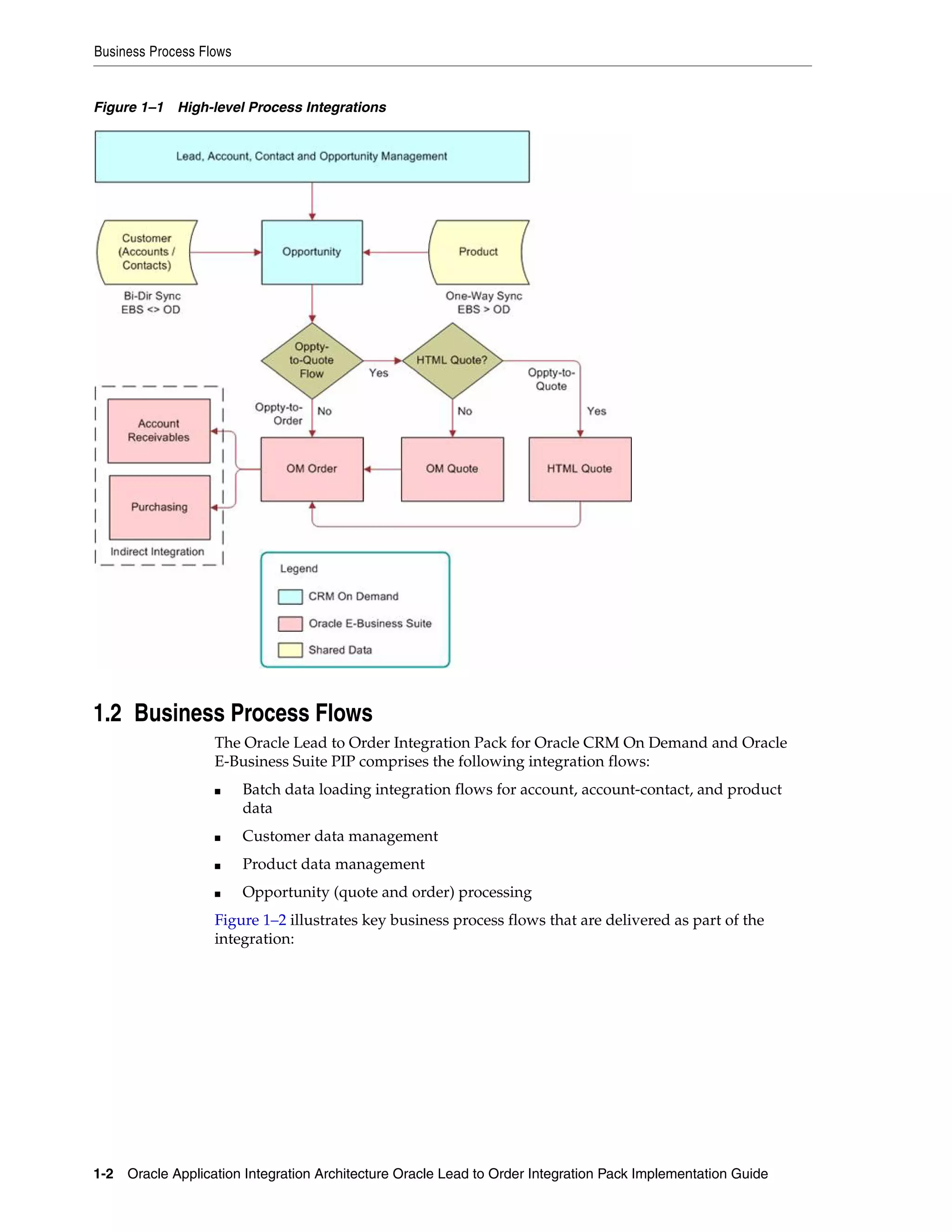
              Figure 1–1 illustrates the application that is responsible for each element in the Oracle
              Lead to Order Integration Pack for Oracle CRM On Demand and Oracle E-Business
              Suite PIP and illustrates the integration points between the systems:


         Oracle Lead to Order Integration Pack for Oracle CRM On Demand and Oracle E-Business Suite 1-1
Business Process Flows


Figure 1–1 High-level Process Integrations


1.2 Business Process Flows
                   The Oracle Lead to Order Integration Pack for Oracle CRM On Demand and Oracle
                   E-Business Suite PIP comprises the following integration flows:
                   ■     Batch data loading integration flows for account, account-contact, and product
                         data
                   ■     Customer data management
                   ■     Product data management
                   ■     Opportunity (quote and order) processing
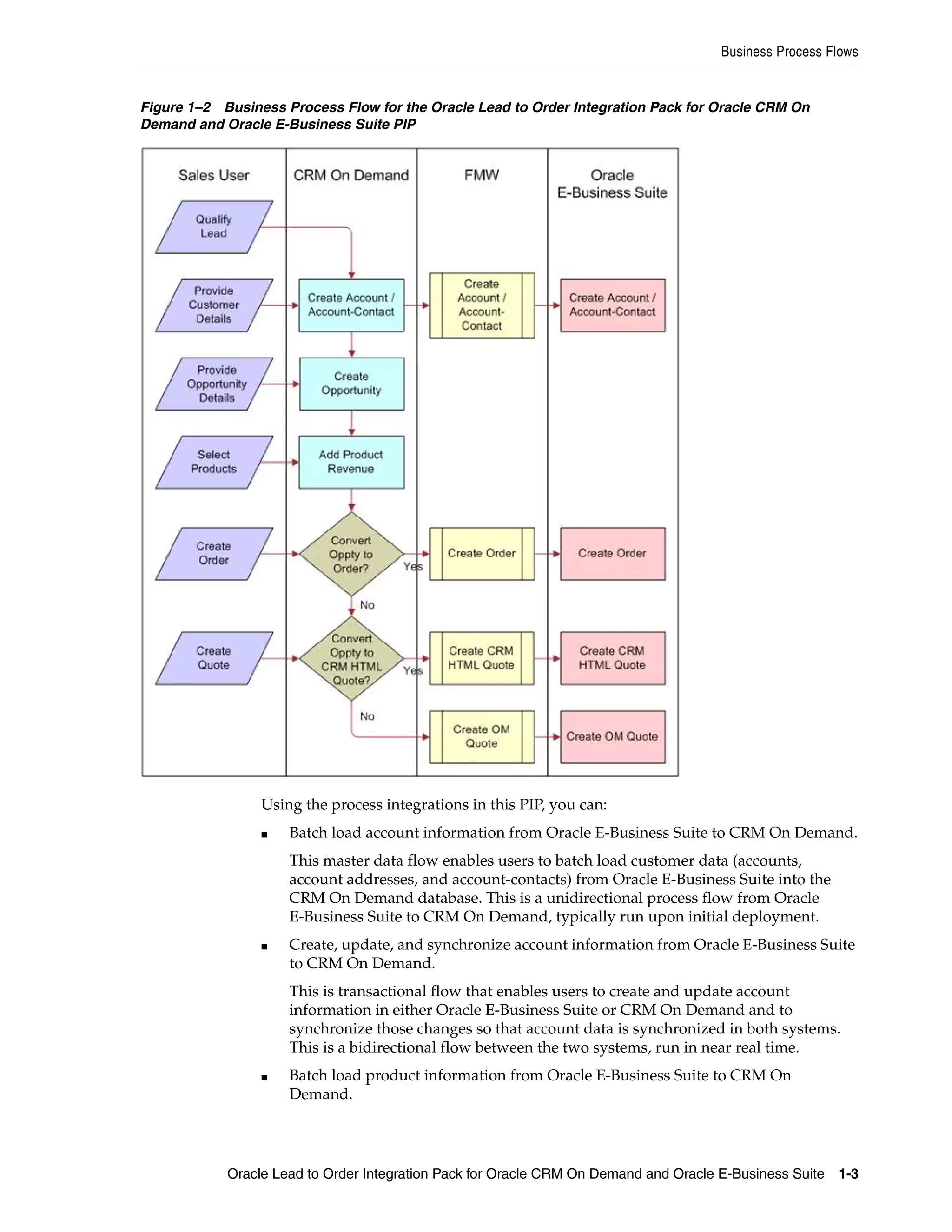
                   Figure 1–2 illustrates key business process flows that are delivered as part of the
                   integration:


1-2 Oracle Application Integration Architecture Oracle Lead to Order Integration Pack Implementation Guide
Business Process Flows


Figure 1–2 Business Process Flow for the Oracle Lead to Order Integration Pack for Oracle CRM On
Demand and Oracle E-Business Suite PIP


                 Using the process integrations in this PIP, you can:
                 ■   Batch load account information from Oracle E-Business Suite to CRM On Demand.
                     This master data flow enables users to batch load customer data (accounts,
                     account addresses, and account-contacts) from Oracle E-Business Suite into the
                     CRM On Demand database. This is a unidirectional process flow from Oracle
                     E-Business Suite to CRM On Demand, typically run upon initial deployment.
                 ■   Create, update, and synchronize account information from Oracle E-Business Suite
                     to CRM On Demand.
                     This is transactional flow that enables users to create and update account
                     information in either Oracle E-Business Suite or CRM On Demand and to
                     synchronize those changes so that account data is synchronized in both systems.
                     This is a bidirectional flow between the two systems, run in near real time.
                 ■   Batch load product information from Oracle E-Business Suite to CRM On
                     Demand.


            Oracle Lead to Order Integration Pack for Oracle CRM On Demand and Oracle E-Business Suite 1-3
Business Process Flows


                         This is a master data flow that enables users to batch load product data from the
                         Oracle E-Business Suite database into the CRM On Demand database. This is a
                         unidirectional process flow from Oracle E-Business Suite to CRM On Demand,
                         typically run upon initial deployment.
                   ■     Create, update, and synchronize product information in Oracle E-Business Suite
                         and synchronize the data with CRM On Demand.
                         This transactional flow enables users to create and update product information in
                         Oracle E-Business Suite and synchronize those changes to CRM On Demand. This
                         is a unidirectional process flow from Oracle E-Business Suite to CRM On Demand.
                         Changes to product information in CRM On Demand are not synchronized with
                         Oracle E-Business Suite.
                   ■     Generate sales quotes or sales orders in Oracle E-Business Suite that are based on
                         sales opportunities in CRM On Demand.
                         This transactional flow enables users to create either a sales quote, based on the
                         Oracle CRM HTML Quoting Module or the Order Management Sales Quote
                         module, or an Order Management sales order based on the details within a CRM
                         on Demand opportunity.
                   These are the typical business scenarios that are related to the integration flows
                   provided in the Oracle Lead to Order Integration Pack for Oracle CRM On Demand
                   and Oracle E-Business Suite PIP:


                             Note:  Actual business processes vary for each implementation according to
                             your specific business requirements.


                   1.    The user enters a lead into CRM On Demand.
                         Users can enter leads manually, or the leads are created as the result of a campaign
                         in CRM On Demand.
                   2.    The lead is qualified and converted to an opportunity in CRM On Demand and an
                         account and account-contact is created.
                         When a user converts a lead to an opportunity, an account record must exist in
                         CRM On Demand. If the account record does not exist, CRM On Demand creates
                         the record. If the account is created at this point and the record is enabled for
                         synchronization, the details associated with that account are created in both CRM
                         On Demand and in Oracle E-Business Suite. Changes made to the account records
                         in either system are synchronized bidirectionally to ensure that the two systems
                         are accurate from this point forward.


                             Note:   Only CRM On Demand contacts that are associated with an account
                             that has been synchronized previously are eligible for synchronization to
                             Oracle E-Business Suite.


                   3.    As the sales cycle continues, users can associate products with a sales opportunity.
                         Users can select from a list of orderable products that have been loaded or
                         synchronized from Oracle E-Business Suite into CRM On Demand to be added as
                         product revenue lines on the opportunity. Product information is maintained in
                         Oracle E-Business Suite and synchronized to CRM On Demand.


1-4 Oracle Application Integration Architecture Oracle Lead to Order Integration Pack Implementation Guide
Solution Assumptions and Constraints


             4.   Users can generate either a quote or a sales order in the Oracle E-Business Suite
                  directly from the CRM On Demand sales opportunity. (The quote in Oracle
                  E-Business Suite can later be converted into a sales order.)


                      Note: You can deploy either the Opportunity-to-Quote or the
                      Opportunity-to-Order business flow in a single deployment, but not both.


                  Users create the quote or order using the account and product information that is
                  stored in the CRM On Demand opportunity record. The relevant quote or order
                  details are stored and maintained in Oracle E-Business Suite. Product details for
                  the quote or order, such as product pricing and availability, are determined by the
                  respective Oracle E-Business Suite modules.
             5.   Users can view quotes and orders associated with an account or opportunity and
                  their details from within CRM On Demand. The quote and order details are made
                  available to the users through a web link that takes them to the related Oracle
                  E-Business Suite page.
             6.   Users can access a 360-degree view of an account from within CRM On Demand
                  using a web link that the administrator defines on the Account detail page. The
                  web link launches the Oracle E-Business Suite Customers Online Transaction View
                  page, which displays several Oracle E-Business Suite back-office transactions for
                  an account, for example, invoices, orders, quotes, service requests, and so on.
             For more information about creating web links in CRM On Demand, see the CRM On
             Demand Online Help. For information about configuring the web link for the 360
             Degree view, see "Creating the Web Link for the 360 Degree View."


1.3 Solution Assumptions and Constraints
             These are the solution assumptions and constraints:
             1.   Oracle E-Business Suite and the interfacing modules within it, that is, Oracle Order
                  Management, Oracle CRM HTML Quoting, Oracle Inventory, and Customer
                  modules, are operational and configured before you deploy the Oracle Lead to
                  Order Integration Pack for Oracle CRM On Demand and Oracle E-Business Suite
                  PIP.


                      Note:    References in this guide to the Oracle CRM HTML Quoting module
                      refer to the Oracle CRM Quoting module. The Oracle CRM Quoting module
                      supports a form and an HTML user interface. In the Oracle Lead to Order
                      Integration Pack for Oracle CRM On Demand and Oracle E-Business Suite
                      PIP, only the HTML user interface is supported.


             2.   Customer and product data that is to be loaded into Oracle CRM On Demand
                  must be rationalized with existing data. Ensure duplicate data is consolidated; this
                  might require a manual review of the data before the initial loading of data.


        Oracle Lead to Order Integration Pack for Oracle CRM On Demand and Oracle E-Business Suite 1-5
Solution Assumptions and Constraints


1-6 Oracle Application Integration Architecture Oracle Lead to Order Integration Pack Implementation Guide
2
  Initial Loading and Synchronization of Data
  2


           This chapter provides an overview of batch data loads and synchronization and
           includes the following sections:
           ■   Section 2.1, "Overview"
           ■   Section 2.2, "Batch Loading of Data PL/SQL Script"
           ■   Section 2.3, "Batch Loading Customer Data"
           ■   Section 2.4, "Batch Loading Product Data"


2.1 Overview
           The Oracle CRM On Demand Integration Pack for Oracle E-Business Suite Process
           Integration Pack (PIP) integrates customer data (account, account-address, and
           account-contact) and product information between Oracle CRM On Demand and
           Oracle E-Business Suite. This requires that you initially load data from Oracle
           E-Business Suite into CRM On-Demand, and that the data in the two systems is
           continuously synchronized. The Oracle Lead to Order Integration Pack for Oracle
           CRM On Demand and Oracle E-Business Suite PIP enables you to:
           ■   Load the Oracle E-Business Suite customer and product data to be synchronized
               between Oracle E-Business Suite and CRM On Demand.
           ■   Establish a cross-reference between the synchronized entities.
           ■   Synchronize changes to the data that exists in both databases after the initial load
               is complete.
           Batch loading of business data is a one-way process that loads data from Oracle
           E-Business Suite into CRM On Demand. To make use of customer and product data
           that exists in your Oracle E-Business Suite, Oracle recommends that you plan an initial
           data load strategy.
           To load large amounts of data, Oracle recommends that you identify and load the data
           that is to be used by the integration in priority sequence. Extract and load the data into
           CRM On Demand in several batches, based on the time allotted for initial data loads.
           To batch load data from Oracle E-Business Suite to CRM On Demand, you must run a
           batch load PL/SQL script supplied with the PIP to generate batch load events. These
           events are then processed by the integration flows for batch loading account data and
           batch loading product data.


                                                        Initial Loading and Synchronization of Data 2-1
Batch Loading of Data PL/SQL Script


2.2 Batch Loading of Data PL/SQL Script
                    This topic describes the PL/SQL script that you use to perform the initial batch load of
                    data from Oracle E-Business Suite to CRM On Demand. You must run a separate script
                    for the batch load of customer and product data.
                    The PL/SQL script includes these procedures:
                    ■    GENERATE_EVENTS
                    ■    PURGE_ EVENTLOG
                    ■    REGENERATE_EVENT


2.2.1 GENERATE_EVENTS Procedure
                    Two GENERATE_EVENTS procedures are provided with the Oracle Lead to Order
                    Integration Pack for Oracle CRM On Demand and Oracle E-Business Suite PIP:
                    ■    HZ_EBI_CUST_LOAD.GENERATE_EVENTS
                         Use to perform the batch load and synchronization of account and account-contact
                         data from Oracle E-Business Suite to CRM On Demand.
                    ■    EGO_EBI_ITEM_LOAD.GENERATE_EVENTS
                         Use to perform the batch load and synchronization of product data from Oracle
                         E-Business Suite to CRM On Demand.
                    You must run the GENERATE_EVENTS procedure to generate events for the customer
                    or product data to be loaded during the initial batch load. The script uses filter criteria
                    (which can be customized) to identify the records to be loaded, then generates a
                    business event for each set of records as determined by the batch size. When each
                    event is generated, the event ID and the primary keys of the processed records are
                    logged to a log table. The subscriber, created during the installation of the Oracle Lead
                    to Order Integration Pack for Oracle CRM On Demand and Oracle E-Business Suite
                    PIP, retrieves the records using the provided Application Program Interface (API) or
                    view using the event ID. The log table is also used to filter out records that are
                    processed in case the script must be restarted.
                    The GENERATE_EVENTS procedure accepts the parameters listed in Section 2–1,
                    " GENERATE_EVENTS Procedure Parameters":

Table 2–1    GENERATE_EVENTS Procedure Parameters
Parameter        Value      Description
BatchSize        Number     Specify the number of records to include in each batch event. Because CRM On Demand can
                            process a maximum of 20 records in a batch, do not specify a batch size greater than 20. The
                            default batch size is also 20.
MaxEvents        Number     Specify the maximum number of batch events to generate. If a value is not specified, events are
number                      raised until all records returned by the query are processed.


                    When you run the GENERATE_EVENTS procedure for the first time, all the eligible
                    item IDs are entered into a log file (EGO_EBI_ITEM_LOAD_LOG for products or HZ_
                    EBI_CUST_LOAD_LOG for accounts) and the number of events specified in the Max_
                    Events parameter are generated. Each event contains the number of items specified by
                    the Batch_Size parameter. If you limit the number of events generated by specifying a
                    value for the Max_Events parameter, the X_ERR_MSG indicates the number of events
                    raised and whether any items are pending in the log file. If records are pending in the
                    event table, run the appropriate GENERATE_EVENTS procedure again after allowing
                    sufficient time for the raised events to be consumed successfully.


2-2 Oracle Application Integration Architecture Oracle Lead to Order Integration Pack Implementation Guide
Batch Loading Customer Data


2.2.2 PURGE_EVENTLOG Procedure
                      A separate log table is created the first time the initial load script is run for the
                      accounts or products batch load. The table can be deleted after the initial load is
                      complete. However, to use the batch load process for any future bulk load of account
                      or product data, do not delete the log table; instead, run the PURGE_EVENTLOG
                      procedure after the initial batch load is completed. You can also run this procedure to
                      restart the batch load from the beginning.
                      Table 2–2 lists the structure of the log table:

Table 2–2     Structure of the Log Table
Name            Description
Key column(s) It stores the primary key of the top-level entity. The column names match the name of the entity. A unique
              index is created for these columns.
Event-Id        It is ID of the event that was raised for this entity. Because multiple entities are included in each event, this is
                not unique.


                      Each row in the log table represents one entity record. The keys for all the records
                      included in an initial load are inserted at the front of the log table. As each event is
                      raised, the event ID column is populated for the processed records.


2.2.3 REGENERATE_EVENT Procedure
                      The REGENERATE_EVENT procedure is provided for error handling. Each event
                      contains a batch of product or account records. CRM On Demand synchronizes all the
                      records in each batch or none. If a batch fails to synchronize to CRM On Demand,
                      either because of a record-level error or because of a system error, use the
                      REGENERATE_EVENT procedure to resubmit the event and synchronize all the
                      records again. To modify the batch, for example, by removing a product or account
                      record that is causing an error, inactivate the record before running the
                      REGENERATE_EVENT procedure. A new event is created that does not include the
                      inactivated record.


2.3 Batch Loading Customer Data
                      This section provides an overview of customer data load and synchronization and
                      discusses how to batch load and synchronize customer data.
                      The Oracle Lead to Order Integration Pack for Oracle CRM On Demand and Oracle
                      E-Business Suite PIP provides a single, consistent, and accurate view of a customer
                      account across the CRM On Demand and Oracle E-Business Suite applications.
                      Because customer data is entered, managed, and maintained in both CRM On Demand
                      and Oracle E-Business Suite, you must initially load and synchronize existing
                      customer data from Oracle E-Business Suite to CRM On Demand; subsequent updates
                      to mapped attributes are then synchronized in near real time, bidirectionally.
                      The integration supports the initial load of customer data from Oracle E-Business Suite
                      to CRM On Demand, but not the other way around. When you begin to deploy the
                      integration, you must evaluate whether to load your existing customer data from
                      within your Oracle E-Business Suite deployment to your CRM On Demand
                      deployment. You might require only that a subset of your customer data that exists in
                      Oracle E-Business Suite is represented in CRM On Demand, or you might choose to
                      have all of your customer data represented in both systems.


                                                                               Initial Loading and Synchronization of Data 2-3
Batch Loading Customer Data


                   The Oracle Lead to Order Integration Pack for Oracle CRM On Demand and Oracle
                   E-Business Suite PIP enables you to define and extract a specific set of customer data,
                   which includes accounts, account-contacts, and account-addresses, from Oracle
                   E-Business Suite and to load that subset of data into CRM On Demand. You can review
                   the number of records to be loaded before performing the load into CRM On Demand.
                   Organize and load data based on the priority in which the data is used by end users
                   and the time available for data load.


2.3.1 Understanding the Customer Account Batch Flow Process
                   The Batchload Customer Account Integration flow uses these interfaces:
                   ■    BatchLoadCustomerPartyListEbizEventConsumer
                   ■    BatchLoadCustomerPartyListEbizAdapter
                   ■    BatchLoadCustomerPartyListEbizReqABCSImpl
                   ■    CustomerPartyOracleEBSV2
                   ■    SyncCustomerCRMODProvABCSImpl
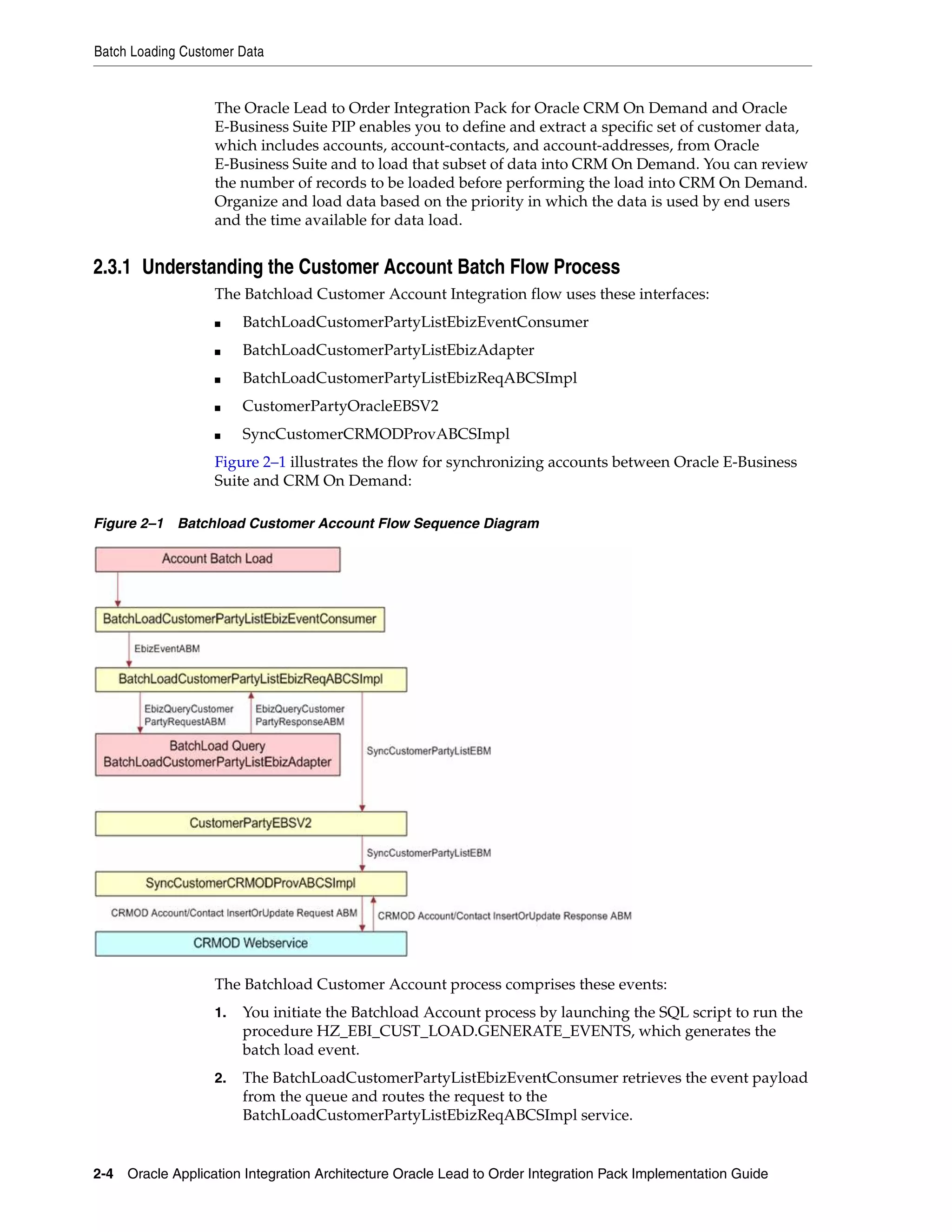
                   Figure 2–1 illustrates the flow for synchronizing accounts between Oracle E-Business
                   Suite and CRM On Demand:

Figure 2–1 Batchload Customer Account Flow Sequence Diagram


                   The Batchload Customer Account process comprises these events:
                   1.   You initiate the Batchload Account process by launching the SQL script to run the
                        procedure HZ_EBI_CUST_LOAD.GENERATE_EVENTS, which generates the
                        batch load event.
                   2.   The BatchLoadCustomerPartyListEbizEventConsumer retrieves the event payload
                        from the queue and routes the request to the
                        BatchLoadCustomerPartyListEbizReqABCSImpl service.


2-4 Oracle Application Integration Architecture Oracle Lead to Order Integration Pack Implementation Guide
Batch Loading Customer Data


             3.   The event payload received by the
                  BatchLoadCustomerPartyListEbizReqABCSImpl contains only the event identifier,
                  not the entire account detail.
                  Therefore, account details must be fetched from Oracle E-Business Suite based on
                  the event ID using the Query Apps adapters,
                  BatchLoadCustomerPartyListEbizAdapter.
             4.   The Query adapters BatchLoadCustomerPartyListEbizAdapter query the Oracle
                  E-Business Suite database with the EbizQueryCustomerPartyRequestABM and
                  fetch the account payload corresponding to the event ID, which is the
                  EbizQueryCustomerPartyResponseABM.
             5.   In the BatchLoadCustomerPartyListEbizReqABCSImpl, the QueryResponseABM
                  is transformed into the SyncCustomerPartyListEBM, and the
                  SyncCustomerPartyList operation of the CustomerPartyEBSV2 is invoked with
                  this Enterprise Business Message (EBM).
             6.   The CustomerPartyEBSV2 routes the SyncCustomerPartyListEBM to the
                  SyncCustomerCRMODProvABCSImpl.
                  In this service, the SyncCustomerPartyListEBM is transformed into the
                  SiebelAccountUpsertRequestABM, and the Siebel web service for account creation
                  or update is invoked.
             7.   The CRM On Demand Account/Contact InsertOrUpdate web service does the
                  actual creation or update of the account, address, and account-contact in CRM On
                  Demand and returns the appropriate response,
                  CRMODAccount/ContactInsertOrUpdateResponseABM.
                  This response is received by the SyncCustomerCRMODProvABCSImpl service.
             8.   In the SyncCustomerCRMODProvABCSImpl service, the
                  CRMODAccount/ContactInsertOrUpdateResponseABM is transformed into the
                  SyncCustomerPartyListResponseEBM, during which the cross-reference data is
                  updated with the CRM On Demand identifiers, and then the flow ends without
                  sending a response back to Oracle E-Business Suite.


2.3.2 Solution Assumptions and Constraints
             1.   A customer in Oracle E-Business Suite is defined as an organization party with an
                  associated account.
             2.   Before running the batch data loads, you must run the HZ_EBI_CUST_
                  LOAD.GENERATE_EVENTS procedure to generate the batch load events.
                  The procedure selects all active accounts. To select only a subset of the accounts for
                  batch data load, you must modify the PL/SQL filter clause in the HZ_EBI_CUST_
                  LOAD.GENERATE_EVENTS PL SQL procedure.
             3.   The batch size specified for the HZ_EBI_CUST_LOAD.GENERATE_EVENTS
                  procedure must not be greater than 20, a limitation imposed by the batch size
                  supported within CRM On Demand.


2.3.3 Running the Account Batch Load Process
             To run the account batch load:
             1.   Run the HZ_EBI_CUST_LOAD.GENERATE_EVENTS procedure, specifying
                  values for the Batch_Size and Max_Events parameters.
                  All active accounts are selected by default.


                                                          Initial Loading and Synchronization of Data 2-5
Batch Loading Product Data


                        To select a subset of accounts for the account batch load, modify the query in
                        Example 2–1 within the procedure, then recompile the procedure before running
                        it:

                   Example 2–1 Query for Account Batch Load
                   Select distinct party.PARTY_ID, NULL
                   from HZ_PARTIES party, HZ_CUST_ACCOUNTS accnt
                   where accnt.status='A' and party.PARTY_ID = accnt.party_id;

                        When you run the HZ_EBI_CUST_LOAD.GENERATE_EVENTS procedure for the
                        first time, all the active party_id (customer_id) records are loaded into the HZ_
                        EBI_CUST_LOAD_LOG file and the number of events specified by the Max_
                        Events parameter is generated. Each event contains the number of account records
                        specified by the Batch_Size parameter.
                   2.   After all the events are raised and consumed successfully, you can run the HZ_
                        EBI_CUST_LOAD.PURGE_EVENTLOG to purge all the records from the HZ_
                        EBI_CUST_LOAD_LOG safely.
                        Example 2–2 illustrates the script provided with the Oracle Lead to Order
                        Integration Pack for Oracle CRM On Demand and Oracle E-Business Suite PIP for
                        the account batch load process:

                   Example 2–2 Script for Account Batch Load Process
                   DECLARE
                   l_BATCH_SIZE NUMBER;
                   l_MAX_EVENTS NUMBER;
                   X_ERR_MSG VARCHAR2 (200);
                   BEGIN
                   l_BATCH_SIZE := 20;
                   l_MAX_EVENTS := 50;
                   X_ERR_MSG := NULL;
                   HZ_EBI_CUST_LOAD.GENERATE_EVENTS(
                   p_batch_size => l_BATCH_SIZE,
                   p_max_events => l_MAX_EVENTS,
                   X_ERR_MSG => X_ERR_MSG
                   );
                   END;


2.4 Batch Loading Product Data
                   This topic provides an overview of product data load and synchronization and
                   discusses how to perform the initial batch load of product data.
                   The Oracle Lead to Order Integration Pack for Oracle CRM On Demand and Oracle
                   E-Business Suite PIP provides product data integration between Oracle E-Business
                   Suite and Oracle CRM On Demand to facilitate the Opportunity to Quote and
                   Opportunity to Order business processes and to enable users to view available
                   products from within CRM On Demand. After the product data is loaded into CRM
                   On Demand, subsequent updates to mapped product attributes made within Oracle
                   E-Business Suite propagate to CRM On Demand, but not the other way around from
                   CRM On Demand to Oracle E-Business Suite.
                   If you plan to enable the Opportunity-to-Quote or Opportunity-to-Order integration
                   business flows, having the product data from Oracle E-Business Suite represented
                   within CRM On Demand is a required step. You might require that only a subset of the


2-6 Oracle Application Integration Architecture Oracle Lead to Order Integration Pack Implementation Guide
Batch Loading Product Data


                product data that exists in Oracle E-Business Suite be represented in CRM On
                Demand, or you might want to represent all your product data in both systems.
                This PIP enables you to define and extract a specific set of product data from Oracle
                E-Business Suite and provide a means to have that data loaded into CRM On Demand.
                If you have large data volumes to be extracted and loaded from Oracle E-Business
                Suite to CRM On Demand, you can analyze the data to be loaded and can segment the
                data to be loaded in batches, depending on the time you have allocated to complete
                the load. Data should be organized and loaded based on the priority in which the data
                is used by end users.


2.4.1 Understanding the Product Batch Flow Process
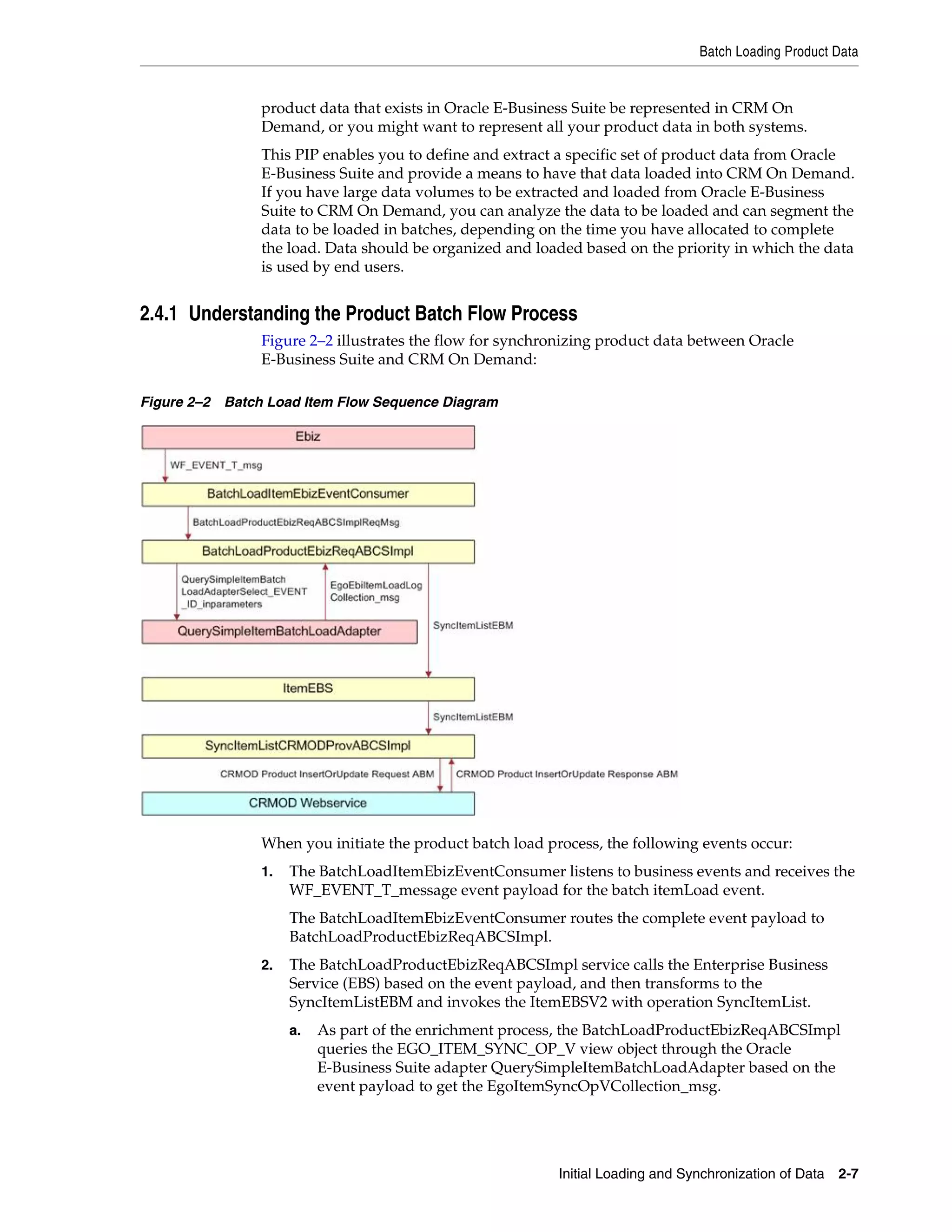
                Figure 2–2 illustrates the flow for synchronizing product data between Oracle
                E-Business Suite and CRM On Demand:

Figure 2–2 Batch Load Item Flow Sequence Diagram


                When you initiate the product batch load process, the following events occur:
                1.   The BatchLoadItemEbizEventConsumer listens to business events and receives the
                     WF_EVENT_T_message event payload for the batch itemLoad event.
                     The BatchLoadItemEbizEventConsumer routes the complete event payload to
                     BatchLoadProductEbizReqABCSImpl.
                2.   The BatchLoadProductEbizReqABCSImpl service calls the Enterprise Business
                     Service (EBS) based on the event payload, and then transforms to the
                     SyncItemListEBM and invokes the ItemEBSV2 with operation SyncItemList.
                     a.   As part of the enrichment process, the BatchLoadProductEbizReqABCSImpl
                          queries the EGO_ITEM_SYNC_OP_V view object through the Oracle
                          E-Business Suite adapter QuerySimpleItemBatchLoadAdapter based on the
                          event payload to get the EgoItemSyncOpVCollection_msg.


                                                           Initial Loading and Synchronization of Data 2-7
Batch Loading Product Data


                        b.   As part of the transformation process, the
                             BatchLoadProductEbizReqABCSImpl transforms the
                             EgoItemSyncOpVCollection_msg message into the SyncItemListEBM.
                        c.   SyncItemListEBM invokes the ItemEBSV2 with the operation SyncItemList.
                             The ItemEBSV2 is a routing service with several operations on the Item
                             Enterprise Business Message (EBM).
                        d.   In the process, the cross-reference is created by concatenation of the inventory
                             item ID, organization ID, and operating unit.
                   3.   The ItemEBSV2 routes the SyncItemListEBM to the
                        SyncItemListCRMODProvABCSImpl.
                   4.   The SyncItemListCRMODProvABCSImpl transforms the SyncItemListEBM to the
                        CRM On Demand product message and then calls the CRM On Demand product
                        Upsert web service to synchronize the product.
                        The CRM On Demand web service completes the request and returns a response
                        message. In the process, the cross-reference is linked to the CRM On Demand IDs
                        of the product.


2.4.2 Solution Assumptions and Constraints
                   1.   Before running the batch data loads, you must run the EGO_EBI_ITEM_
                        LOAD.GENERATE_EVENTS procedure to generate the batchload events.
                        The procedure selects all active products for a given organization from Oracle
                        E-Business Suite. To select only a subset of the products in Oracle E-Business Suite
                        for batch data load, you must modify the PL/SQL filter clause in the GENERATE_
                        EVENTs procedure.
                   2.   To synchronize products from multiple organizations, you must run the procedure
                        for each organization individually.
                        You must run the EGO_EBI_ITEM_LOAD.PURGE_EVENTLOG procedure after
                        synchronizing all the products from one organization and before synchronizing
                        the next organization.
                   3.   The batch size specified for the EGO_EBI_ITEM_LOAD.GENERATE_EVENTS
                        procedure must not be greater than 20.
                   4.   Only orderable products from the Inventory Validation organization are
                        synchronized.


2.4.3 Running the Product Batch Load Process
                   This topic describes how to perform the product batch load.

                   To run the product batch load:
                   1. Run the EGO_EBI_ITEM_LOAD.GENERATE_EVENTS procedure once for each
                       organization for which you want to synchronize product data from Oracle
                       E-Business Suite to CRM On Demand, specifying values for the BatchSize and
                       MaxEvents parameters.
                        All active products for a given organization from Oracle E-Business Suite are
                        selected.
                   2.   To select a subset of the products in an organization for batch data load, modify
                        the PL/SQL filter clause shown in Example 2–3 in the EGO_EBI_ITEM_
                        LOAD.GENERATE_EVENTS procedure:


2-8 Oracle Application Integration Architecture Oracle Lead to Order Integration Pack Implementation Guide
Batch Loading Product Data


Example 2–3 PL/SQL Filter Clause
SELECT INVENTORY_ITEM_ID, ORGANIZATION_ID, NULL
FROM MTL_SYSTEM_ITEMS_B
WHERE ORGANIZATION_ID = p_organization_id
AND bom_item_type in (1, 2, 4)
AND customer_order_flag = 'Y'
AND customer_order_enabled_flag = 'Y';

     The procedure publishes items from the organization provided in the parameter
     p_organization_id. The p_organization_id is the ID of the inventory validation
     organization.
     When you run the EGO_EBI_ITEM_LOAD.GENERATE_EVENTS procedure for
     the first time, all the eligible item IDs are entered into the EGO_EBI_ITEM_LOAD_
     LOG file and the number of events specified in the Max_Events parameter are
     generated. Each event contains the number of items specified by the Batch_Size
     parameter.
3.   After all the events are raised and consumed successfully, run the EGO_EBI_
     ITEM_LOAD.PURGE_EVENTLOG procedure to purge all the records from the
     EGO_EBI_ITEM_LOAD_LOG.
4.   To publish items from another organization, repeat steps 1 through 3.
     You can use the script in Example 2–4 for loading batches of product data. Copy
     the script and edit as appropriate for your implementation:

Example 2–4 Script to Load Batches of Product Data
DECLARE
l_BATCH_SIZE NUMBER; l_MAX_EVENTS NUMBER; l_ERR_MSG VARCHAR2(200); p_org_id
NUMBER;
BEGIN
l_BATCH_SIZE := 20; l_MAX_EVENTS := 50; l_ERR_MSG := NULL; p_org_id := 204;
EGO_EBI_ITEM_LOAD.GENERATE_EVENTS(
p_organization_id=> p_org_id, p_batch_size => l_BATCH_SIZE, p_max_events => l_MAX_
EVENTS, X_ERR_MSG => l_ERR_MSG
); END;


                                            Initial Loading and Synchronization of Data 2-9
Batch Loading Product Data


2-10 Oracle Application Integration Architecture Oracle Lead to Order Integration Pack Implementation Guide
3
                    Process Integration for Customer
                    3


                                        Management

           This chapter provides an overview of customer management process integration and
           includes the following sections:
           ■   Section 3.1, "Overview"
           ■   Section 3.2, "Customer Data Synchronization"
           ■   Section 3.3, "Synchronizing Accounts from CRM On Demand to Oracle E-Business
               Suite"
           ■   Section 3.4, "Synchronizing Accounts from Oracle E-Business Suite to CRM On
               Demand"
           ■   Section 3.5, "Oracle CRM On Demand Interfaces"
           ■   Section 3.6, "Oracle E-Business Suite Interfaces"
           ■   Section 3.7, "Core AIA Components"
           ■   Section 3.8, "Integration Services"


3.1 Overview
           The process integration for customer account management between Oracle E-Business
           Suite and CRM On Demand supports these integration flows:
           ■   Batch load account data
               This flow enables the extract, transformation, and initial load of account data from
               Oracle E-Business Suite to CRM On Demand. This process also establishes the
               cross-reference of account data between Oracle E-Business Suite and CRM On
               Demand.
           ■   Synchronize accounts from Oracle E-Business Suite to CRM On Demand
               This flow enables the synchronization of accounts from Oracle E-Business Suite to
               CRM On Demand. When an account is created or updated in Oracle E-Business
               Suite, the account details, such as addresses, contacts, and phone and fax
               information, are synchronized to CRM On Demand.
           ■   Synchronize accounts from CRM On Demand to Oracle E-Business Suite
               This flow enables the synchronization of customer accounts from CRM On
               Demand to Oracle E-Business Suite. When a new account is created in CRM On
               Demand that is marked for synchronization, that is, the Integration Status field is
               set to Sync ON, a real-time synchronization flow is initiated to synchronize the


                                                     Process Integration for Customer Management   3-1
Overview


                        CRM On Demand account to the related party and account in Oracle E-Business
                        Suite.
                   ■    Update and synchronize accounts from CRM On Demand to Oracle E-Business
                        Suite
                        This flow enables the synchronization of account updates from CRM On Demand
                        to Oracle E-Business Suite for account records that have been flagged for
                        synchronization within CRM On Demand, that is, for records in which the
                        Integration Status field is set to Sync ON.
                   ■    Merge accounts
                        This flow is initiated in Oracle E-Business Suite when an account is merged into
                        another account. The corresponding merge operation is then performed in CRM
                        On Demand on the related accounts. Upon merge completion, the child records of
                        the losing account record point to the winning account record.
                   ■    Merge parties
                        This flow is initiated in Oracle E-Business Suite when an organization party is
                        merged into another party. All of the child records that belong to the surviving
                        party are synchronized to CRM On Demand after the merge.
                   For more information about initial batch loading of data, see Chapter 2, "Initial
                   Loading and Synchronization of Data".


3.1.1 Solution Assumptions and Constraints
                   These are the integration solution assumptions and constraints:
                   1.   The synchronization of account hierarchies across systems, that is,
                        account-to-account relationships, is not in the scope of this release.
                   2.   To initiate the account synchronization, you must run a concurrent job in Oracle
                        E-Business Suite after any creates or updates to accounts or parties.
                        A concurrent job is a batch job that raises events for creates or updates since the
                        last concurrent job.
                   3.   Bill-To and Ship-To usage on the same account address record in Oracle E-Business
                        Suite is not supported. If the same address (Account-Site) is to be designated as
                        Bill-To and Ship-To address in Oracle E-Business Suite, create two addresses with
                        the different Site Usage Types associate to each. If you do not create addresses
                        with the different Site Usage Types, unpredictable results occur while syncing
                        from CRM On Demand to Oracle E-Business Suite.
                   4.   As part of this integration, the customer number and the site number are
                        autogenerated.
                        In Oracle E-Business Suite, the system parameters Auto Generate Customer
                        Number and Auto Generate Site Number are set at the Operating Unit level. The
                        value for these parameters is set to Y so that customer number and site number are
                        autogenerated in Oracle E-Business Suite.
                   5.   The account integration in version 3.1 of the Process Integration Pack (PIP) does
                        not include a mapping of the CRM On Demand Account Description or Furigana
                        name because the CustomerParty Enterprise Business Object (EBO) does not
                        support these attributes.
                   6.   Within Oracle E-Business Suite, you can create multiple phone numbers for an
                        account or account-contact with an associated type (main, fax, and so on), but can
                        specify only one primary phone number across types.


3-2 Oracle Application Integration Architecture Oracle Lead to Order Integration Pack Implementation Guide
Overview


     Within CRM On Demand, separate fields capture the main phone number, fax
     number, and so on, and only one of each. From CRM On Demand to Oracle
     E-Business Suite, the mapping is straightforward, that is, the main phone number
     in CRM On Demand is mapped to the telephone number in Oracle E-Business
     Suite. From Oracle E-Business Suite to CRM On Demand, the first active phone
     number that appears in the CustomerParty Enterprise Business message (EBM)
     message is synchronized with CRM On Demand.
7.   When synching account-contact telephone numbers from Oracle E-Business Suite
     to CRM On Demand, the Communication Type and Purpose fields must be set as
     follows if the telephone number entered in Oracle E-Business Suite is to
     successfully synchronize to CRM On Demand:

Table 3–1   Communication Type and Purpose for CRM On Demand Telephone Mapping
Oracle E-Business Suite       Oracle E-Business Suite       CRM On Demand Telephone
Communication Type            Communication Purpose         Mapping
Telephone                     Personal                      HomePhone
Telephone                     Business                      WorkPhone
Mobile                        not applicable                Cellular


8.   Within Oracle E-Business Suite, Party_Site (address) assignments across multiple
     accounts are not supported, that is, a Party_Site associated with an Organization
     party can be assigned only to one account.
     If a single Party_Site is assigned to multiple accounts, updates to the address
     information within CRM On Demand may not propagate across the accounts for
     which the address is shared.
Figure 3–1 illustrates the overall flow for the account process integration:


                                          Process Integration for Customer Management   3-3
Overview


Figure 3–1 Customer Account Process Integration Flow


                   When a new customer account is created or updated in Oracle E-Business Suite, run a
                   concurrent job (TCA Business Object Events - Raise Events) from the Trading
                   Community Manager responsibility. The synchronize flow is initiated after this request
                   finishes successfully. The corresponding primary, bill to, and ship to addresses are
                   captured with the account and synchronized. Similarly, the contacts associated with
                   the account are also synchronized.
                   Any updates to the account (or related addresses or contacts) in Oracle E-Business
                   Suite are also synchronized with CRM On Demand. The updates to accounts in CRM
                   On Demand are synchronized with Oracle E-Business Suite only if they have been
                   synchronized before and if the account records are flagged for synchronization in
                   CRM On Demand.
                   When an account is inactivated in Oracle E-Business Suite, it is inactivated in CRM On
                   Demand; that is, if Account Status is set to Inactive in Oracle E-Business Suite, the
                   corresponding account in CRM On Demand is also set to Inactive. The cross-references
                   between the two inactivated accounts remain unchanged, and subsequent updates to
                   the accounts continue to be synchronized.


3-4 Oracle Application Integration Architecture Oracle Lead to Order Integration Pack Implementation Guide
Customer Data Synchronization


                     Note: An account that is set to Inactive in Oracle E-Business Suite is set to
                     Inactive at the account level, not at the organization or party level.


3.2 Customer Data Synchronization
             After the initial load of customer account data from Oracle E-Business Suite to CRM
             On Demand is complete, mapped attributes of account and account-contact records
             that exist in both applications are synchronized bidirectionally when accounts and
             account-contacts are created or updated so that data integrity is maintained.
             Account data is synchronized when a new account is created, or whenever an existing
             account record that exists in both applications and that is flagged for synchronization
             in CRM On Demand is changed in either application.
             The Oracle Lead to Order Integration Pack for Oracle CRM On Demand and Oracle
             E-Business Suite PIP enables you to designate the specific account and account-contact
             records that are to be enabled for synchronization from CRM On Demand to Oracle
             E-Business Suite. All newly created or updated accounts are synchronized from Oracle
             E-Business Suite to CRM On Demand.
             These synchronization rules apply:
             ■   New customer accounts and account-contacts created in CRM On Demand that
                 are flagged for synchronization propagate to Oracle E-Business Suite.
             ■   In Oracle E-Business Suite, you cannot flag a specific account for synchronization
                 to CRM On Demand. All customer accounts (that is, all Organization parties with
                 an associated account number) created or updated in Oracle E-Business Suite
                 initiate synchronization to CRM On Demand.
                 –   Data associated with accounts that are updated in CRM On Demand and that
                     are flagged for synchronization propagate to Oracle E-Business Suite.
                 –   Account data updated in Oracle E-Business Suite propagates to CRM On
                     Demand.
                 –   If the account in Oracle E-Business Suite has not previously been synchronized
                     and an update is made in Oracle E-Business Suite, the account is created in
                     CRM On Demand.
             ■   Accounts and account-contacts created in CRM On Demand that have not been
                 flagged for synchronization are synchronized to Oracle E-Business Suite when the
                 associated CRM On Demand opportunity is converted to an Oracle E-Business
                 Suite quote or order.


3.2.1 Enabling Account Synchronization in CRM On Demand
             In CRM On Demand, the Integration Status field on the Account detail, Contact detail,
             or Product detail page indicates whether:
             ■   A record is enabled for synchronization (Sync On)
             ■   A record is not enabled for synchronization (Sync Off)
             ■   A record has failed to synchronize (Sync Failed)
                 If a record fails to synchronize, an error message is logged to the Integration
                 Message field on the record.
             You can set the value of the Integration Status field using the following procedure.


                                                      Process Integration for Customer Management    3-5
Customer Data Synchronization


                     To enable a record for synchronization to Oracle E-Business Suite:
                     1.    Navigate to the Account Detail or Contact Detail page as appropriate.
                     2.    Set the value of the Integration Status field to Sync On.
                           The Integration Status field of an account that is synchronized from Oracle
                           E-Business Suite to CRM On Demand is automatically set to Sync On.
                     3.    Save the record.
                     Depending on your business environment, you can:
                     ■     Optionally allow users to set the value of the Integration Status field on the
                           Account detail and Contact detail pages manually.
                     ■     Define business rules that determine when the value of the Integration Status
                           field is Sync On by default. You can define business rules using the Expression
                           Builder functionality for the Integration Status field.
                           For more information about Expression Builder, see CRM On Demand Online Help.
                     ■     Assign responsibility for flagging records for synchronization from CRM On
                           Demand to Oracle E-Business Suite to a designated administration user role
                           within your organization.
                     Table 3–2 describes the expected behavior when the integration status of a record
                     changes.

Table 3–2    Expected Behavior for Integration Status Changes
Integration Status                Resultant Behavior                   Details
From Sync Off to Sync On or from Results in an insert of the           Insert, update, and delete association and
Blank to Sync On                 corresponding record from CRM         disassociation transactions are captured by workflow
                                 On Demand to Oracle E-Business        or integration events on the CRM On Demand side and
                                 Suite.                                placed in the Integration Event Queue for processing.
                                                                       At this point, the corresponding record is enabled for
                                                                       sync to the target application, that is, Oracle E-Business
                                                                       Suite.
From Sync On to Sync Off          Results in no new updates going      Insert, update, and delete association and
                                  from CRM On Demand to Oracle         disassociation transactions are no longer captured by
                                  E-Business Suite. New updates in     workflow or integration events on the CRM On
                                  CRM On Demand are not tracked.       Demand side and are not placed in the Integration
                                  Updates to CRM On Demand             Event Queue for processing. At this point, the
                                  from Oracle E-Business Suite still   corresponding record is disabled for synchronization
                                  occur.                               with Oracle E-Business Suite.
From Sync On to Sync Failed       Results in no new updates going      The toggle to this state should happen automatically
                                  from CRM On Demand to Oracle         only if a sync failure that is either related to a business
                                  E-Business Suite. Updates from       rule failing or a system error. If the integration status is
                                  Oracle E-Business Suite to CRM       Sync Failed, any insert, update, and delete association
                                  On Demand continue to be             and disassociation transactions are no longer captured
                                  processed (if possible).             by workflow or integration events on the CRM On
                                                                       Demand side and are not placed in the Integration
                                                                       Event queue for processing. At this point, the
                                                                       corresponding record is disabled for sync to Oracle
                                                                       E-Business Suite.
From Sync Failed to Sync On       Results in a resync of the record    After the reason for the sync failure has been corrected,
                                  from CRM On Demand to Oracle         an admin user can set the integration status back to
                                  E-Business Suite                     Sync On, which results in a resync from CRM On
                                                                       Demand to Oracle E-Business Suite. Once again, insert,
                                                                       update, and delete association and disassociation
                                                                       transactions are captured by workflow or integration
                                                                       events on the CRM On Demand side and placed in the
                                                                       Integration Event queue for processing. At this point,
                                                                       the corresponding record is enabled for sync to the
                                                                       target application, that is, Oracle E-Business Suite.


3-6 Oracle Application Integration Architecture Oracle Lead to Order Integration Pack Implementation Guide
Synchronizing Accounts from CRM On Demand to Oracle E-Business Suite


                     Note:  When the Sync flag for an account is set to Off, changes to the
                     account-addresses continue to be synchronized. Synchronization status is
                     maintained only for parent-level objects, such as the Account object.
                     Because synchronization status is not maintained for child-level objects, such
                     as for account-addresses, the address continues to be synchronized even if the
                     status of the parent object is set to Sync Off. If the Account Sync flag is set to
                     off and any associated contact is set to Sync On, the contact changes
                     propagate. If you do not want these changes to be synchronized, set the Sync
                     flag to Off for both the account and the contact.


3.3 Synchronizing Accounts from CRM On Demand to Oracle E-Business
Suite
             Synchronizing accounts from CRM On Demand to Oracle E-Business Suite includes
             the following process integrations:
             ■   Synchronizing new accounts from CRM On Demand to Oracle E-Business Suite
             ■   Synchronize new account integration flow
             ■   Updating and synchronizing accounts from CRM On Demand to Oracle
                 E-Business Suite
             ■   Update and synchronize account integration flow
             ■   Deleting accounts in CRM On Demand
             ■   Synchronizing new account-contacts
             ■   Synchronize new account-contacts integration flow
             ■   Updating and synchronizing account-contacts
             ■   Update and synchronize account-contact integration flow
             ■   Deleting account-contacts in CRM On Demand


3.3.1 Synchronizing New Accounts from CRM On Demand to Oracle E-Business Suite
             The Create Customer Account integration flow is initiated in CRM On Demand when
             a new account is created that has been flagged for synchronization. Within CRM On
             Demand, a workflow that has been defined triggers an integration event that captures
             the details associated with the creation of the account and places a message in the
             CRM On Demand integration event queue. The
             CRMOnDemandIntegrationEventProcessor process in the middle tier polls the CRM
             On Demand integration event queue at configurable intervals, picks up the account
             creation message, and makes the appropriate call to Oracle E-Business Suite to create
             the corresponding account and cross-reference entry in the SOA XREF DB. From this
             point forward, the account is considered synchronized and subsequent updates to the
             account in either system are propagated between the two.
             During the Opportunity to Quote or Opportunity to Sales Order conversion process, if
             the account associated with the opportunity has not been synchronized previously to
             Oracle E-Business Suite, it is synchronized during the conversion process.


3.3.2 Synchronizing New Account Integration Flow
             This integration uses the following interfaces:


                                                      Process Integration for Customer Management     3-7
Synchronizing Accounts from CRM On Demand to Oracle E-Business Suite


                   ■   CreateCustomerCRMODReqABCSImpl
                   ■   CreateCustomerPartyEbizProvABCSImpl


3.3.3 Updating and Synchronizing Accounts from CRM On Demand to Oracle
E-Business Suite
                   When an existing account record that has been flagged for synchronization is updated
                   in CRM On Demand, the corresponding account record in Oracle E-Business Suite is
                   updated with the changes that were made in CRM On Demand for the mapped
                   attributes.
                   Account-contact records created or updated in CRM On Demand that are flagged for
                   synchronization and that are also associated with an account that has been
                   synchronized to Oracle E-Business Suite are also synchronized.


3.3.4 Updating and Synchronizing Account Integration Flow
                   This integration flow uses the following interfaces:
                   ■   CreateCustomerAddressCRMODReqABCSImpl
                   ■   UpdateCustomerAddressCRMODReqABCSImpl
                   ■   UpdateCustomerCRMODReqABCSImpl
                   ■   ProcessContactCRMODReqABCSImpl
                   ■   UpdateCustomerPartyEbizProvABCSImpl


3.3.5 Deleting Accounts in CRM On Demand
                   The delete account integration flow is initiated in CRM On Demand when an existing
                   integrated account record is deleted from the database.
                   The deletion of the integrated account record from CRM On Demand initiates a
                   process that deletes cross-reference records to the corresponding data in Oracle
                   E-Business Suite in the SOA XREF database but does not delete the account data in
                   Oracle E-Business Suite.
                   When an account is deleted in CRM On Demand, the cross-reference records related to
                   the account are deleted, that is, the account ID, phone, and fax records. The
                   cross-reference records for the address-related information, such as the shipping
                   address, the billing address, and the alternate address, are not deleted.


3.3.6 Synchronizing New Account-Contacts from CRM On Demand to Oracle
E-Business Suite
                   The Create Account-Contact integration flow is initiated in CRM On Demand when a
                   new account-contact is created that has been flagged for synchronization. An
                   account-contact that is flagged for synchronization is synchronized only if the primary
                   account with which it is associated has been successfully synchronized to Oracle
                   E-Business Suite. Contacts that are not associated with an account are not
                   synchronized to Oracle E-Business Suite. Synchronizing a contact, which is associated
                   with several accounts, is not supported.
                   New account-contacts created in CRM On Demand create a corresponding
                   account-contact in Oracle E-Business Suite. Cross-reference entries for the
                   synchronized account-contacts are made in the SOA XREF database.


3-8 Oracle Application Integration Architecture Oracle Lead to Order Integration Pack Implementation Guide
Synchronizing Accounts from CRM On Demand to Oracle E-Business Suite


3.3.7 Synchronizing New Account-Contact Integration Flow
             This integration uses the following interfaces:
             ■   ProcessContactCRMODReqABCSImpl
             ■   UpdateCustomerPartyEbizProvABCSImpl


3.3.8 Updating and Synchronizing Account-Contacts from CRM On Demand to Oracle
E-Business Suite
             When an existing account-contact record that has been flagged for synchronization is
             updated in CRM On Demand, the corresponding account-contact record in Oracle
             E-Business Suite is updated with the changes that were made in CRM On Demand.
             The synchronization of account-contact record updates is bidirectional across CRM On
             Demand and Oracle E-Business Suite.
             When the account-contact work phone number, cellular phone number, work fax
             number, or email address is deleted in CRM On Demand, the corresponding entries in
             Oracle E-Business Suite are set to Inactive.
             When the primary active account-contact telephone number, mobile number, fax
             number, and email address are set to inactive in Oracle E-Business Suite, the
             corresponding entries in CRM On Demand are deleted.
             For account-contact records, only the primary email address in Oracle E-Business Suite
             is synchronized to the Email field in CRM On Demand.
             For accounts, the primary web site is synchronized to the CRM On Demand web field.
             The first phone, fax, or mobile number that appears in the CustomerParty EBM that is
             active is synchronized to CRM On Demand.


3.3.9 Update and Synchronize Account-Contact Integration Flow
             This integration flow uses the following interfaces:
             ■   ProcessContactCRMODReqABCSImpl
             ■   UpdateCustomerPartyEbizProvABCSImpl


3.3.10 Deleting Account-Contacts in CRM On Demand
             CRM On Demand users who have the appropriate privileges can delete an
             account-contact. Within Oracle E-Business Suite, users cannot delete an
             account-contact, but they can inactivate it.
             When an integrated account-contact is deleted in CRM On Demand, the corresponding
             cross-reference in the SOA XREF DB is removed, but the status of the account-contact
             in Oracle E-Business Suite does not change; it is not deleted or inactivated.
             When the status of an integrated account-contact is set to Inactive in Oracle E-Business
             Suite, the corresponding account-contact in CRM On Demand remains unchanged.
             The cross-reference between the two entities is also unchanged, and subsequent
             updates to the entities continue to synchronize even though the status of the
             account-contact in Oracle E-Business Suite is Inactive.
             The integration does not support the restoration of deleted accounts or
             accounts-contacts; that is, if you delete and then restore a synchronized
             account-contact, the results are unpredictable; for example, duplicate data may be
             generated in Oracle E-Business Suite.


                                                      Process Integration for Customer Management     3-9
Synchronizing Accounts from Oracle E-Business Suite to CRM On Demand


                   When an integrated account-contact is disassociated from its parent account in CRM
                   On Demand, the corresponding account-contact in Oracle E-Business Suite is set to
                   Inactive status. If the status of the account-contact is subsequently set to Active in
                   Oracle E-Business Suite, the association between the records is again established in
                   CRM On Demand, and the account-contact is synchronized from Oracle E-Business
                   Suite to CRM On Demand. If the account-contact is again associated with the account
                   in CRM On Demand, the account-contact in Oracle E-Business Suite is reset to Active
                   status and the record is synchronized from CRM On Demand to Oracle E-Business
                   Suite without a duplicate record being created in Oracle E-Business Suite.


3.4 Synchronizing Accounts from Oracle E-Business Suite to CRM On
Demand
                   Synchronizing accounts from Oracle E-Business Suite to CRM On Demand includes
                   the following process integrations:
                   ■   Batch Loading Accounts from Oracle E-Business Suite to CRM On Demand
                   ■   Synchronizing New Accounts from Oracle E-Business Suite to CRM On Demand
                   ■   Synchronize Customer Account Integration Flow
                   ■   Merging Accounts from Oracle E-Business Suite to CRM On Demand
                   ■   Merge Account Integration Flow
                   ■   Merging Parties from Oracle E-Business Suite to CRM On Demand
                   ■   Merge Party Integration Flow


3.4.1 Batch Loading Accounts from Oracle E-Business Suite to CRM On Demand
                   You initiate the Batchload Customer Account integration flow in Oracle E-Business
                   Suite when performing the initial data load from Oracle E-Business Suite to CRM On
                   Demand. Details related to the account (account number, addresses, contacts, phone
                   number, fax number, email address, web address, and so on) are synchronized to CRM
                   On Demand; this includes associated account-contacts and account-addresses.
                   For information about the initial batch loading of customer account data, see
                   Chapter 2, "Initial Loading and Synchronization of Data".


3.4.2 Synchronizing New Accounts from Oracle E-Business Suite to CRM On Demand
                   You initiate the Synchronize Customer Account integration flow in Oracle E-Business
                   Suite when you create a new account or update an existing account. Details related to
                   the account (account number, addresses, contacts, phone number, fax number, email
                   address, web address, and so on) are synchronized to CRM On Demand.
                   When an account is created or updated in Oracle E-Business Suite, a record is written
                   to a tracking table. Raising a Trading Community Architecture (TCA) business event
                   causes all of the account records in the tracking table to be stamped with an event
                   identifier and queue event message to be sent to the Oracle Advanced Queue (AQ).
                   The synchronize account process retrieves the message from the AQ, reads the event
                   identifier, and invokes the TCA Application Programming Interface (API) to extract all
                   of the created or updated account information.
                   A create or update event is tracked in the following situations:
                   ■   When a new party and account is created; the create account business event is
                       raised.


3-10 Oracle Application Integration Architecture Oracle Lead to Order Integration Pack Implementation Guide
Synchronizing Accounts from Oracle E-Business Suite to CRM On Demand


                ■   When a party or account is updated; the update account business event is raised.
                ■   When an account is created on an existing party; the update account business
                    event is raised.
                ■   When the SyncCustomerPartyList operation accepts the list of accounts, the
                    requester Application Business Connector (ABC) integration service passes the
                    entire list of accounts to the CustomerPartyEBSV2Enterprise Business Service
                    (EBS) and invokes the corresponding provider ABC implementation service.
                Figure 3–2 provides an overview of the Synchronize Customer Account integration
                flow:

Figure 3–2 Synchronize Customer Account Integration Flow


3.4.3 Synchronize Customer Account Integration Flow
                This integration flow uses the following interfaces:
                ■   SyncCustomerPartyListEbizEventCreateConsumer
                ■   SyncCustomerPartyListEbizEventUpdateConsumer
                ■   QueryCustomerPartyListEbizCreateAdapter
                ■   QueryCustomerPartyListEbizUpdateAdapter
                ■   SyncCustomerPartyListEbizReqABCSImpl
                ■   CustomerPartyEBSV2
                ■   SyncCustomerCRMODProvABCSImpl
                Figure 3–3 illustrates the Synchronize Account integration flow:


                                                       Process Integration for Customer Management      3-11
Synchronizing Accounts from Oracle E-Business Suite to CRM On Demand


Figure 3–3 Synchronize Account Flow Sequence Diagram


                   When you initiate the Synchronize Account process, the following events occur:
                   1.   In Oracle Applications, a user navigates to the Customer Standard form (or any
                        other form that allows the creation of customer accounts) and creates an account
                        with address and contact details.
                        An administrator either manually runs or schedules periodic execution of the TCA
                        Raise Business Events concurrent program to raise the business events for the
                        account creation. The events are captured in a database table to which the
                        SyncCustomerPartyListEbizEventConsumer is listening. Different events are
                        raised for a create scenario and an update scenario.


                            Note:   The TCA Raise Business Events concurrent program can be scheduled
                            to run periodically at defined intervals, for example, every three minutes.


                   2.   The SyncCustomerPartyListEbizEventConsumer retrieves the event payload from
                        the queue and routes the request to the SyncCustomerPartyListEbizReqABCSImpl
                        service.
                        The create event is retrieved from the queue by the
                        SyncCustomerPartyListEbizEventCreateConsumer and the update event is
                        retrieved from the queue by the
                        SyncCustomerPartyListEbizEventUpdateConsumer.
                        This service has two operations, create, and update, for actions of the same name.
                        The routing occurs based on the payload received from the event.
                   3.   The event payload received by the SyncCustomerPartyListEbizReqABCSImpl
                        contains only the event identifier, not the entire account detail. Therefore, account
                        details must be fetched from Oracle E-Business Suite based on the event ID.


3-12 Oracle Application Integration Architecture Oracle Lead to Order Integration Pack Implementation Guide
Synchronizing Accounts from Oracle E-Business Suite to CRM On Demand


                  When you use the Query Apps adapters
                  QueryCustomerPartyListEbizCreateAdapter and
                  QueryCustomerPartyListEbizUpdateAdapter, the account details are fetched
                  based on the kind of action, update, or create.
             4.   The Query adapters (QueryCustomerPartyListEbizCreateAdapter and
                  QueryCustomerPartyListEbizUpdateAdapter) query the Oracle E-Business Suite
                  database with the EbizQueryCustomerPartyRequestABM and fetch the account
                  payload corresponding to the event ID, which is the
                  EbizQueryCustomerPartyResponseABM.
             5.   In the SyncCustomerPartyListEbizReqABCSImpl, the QueryResponseABM is
                  transformed into the SyncCustomerPartyListEBM, and the SyncCustomerPartyList
                  operation of the CustomerPartyEBSV2 is invoked with this EBM.
             6.   The CustomerPartyEBSV2 service routes the SyncCustomerPartyListEBM to the
                  SyncCustomerCRMODProvABCSImpl.
                  In this service, the SyncCustomerPartyListEBM is transformed into the CRM On
                  Demand Account/Contact Request Application Business Message (ABM), and the
                  CRM On Demand web service for account creation or update is invoked.
             7.   The CRMODCustomer Upsert web service actually creates or updates the account,
                  address, and contact in CRM On Demand and returns the appropriate response,
                  CRM On Demand Account/Contact Response ABM.
                  This response is received by the SyncCustomerCRMODProvABCSImpl service.
             8.   In the SyncCustomerCRMODProvABCSImplservice, the CRM On Demand
                  Account/Contact Response ABM is transformed into the
                  SyncCustomerPartyListResponseEBM, during which the cross-reference data is
                  updated with the CRM On Demand identifiers.
                  The Account Update flow ends at this point; no response is sent back to Oracle
                  E-Business Suite.


3.4.4 Merging Accounts from Oracle E-Business Suite to CRM On Demand
             You initiate the Merge Account integration flow in Oracle E-Business Suite when you
             merge an account into another account in Oracle E-Business Suite. A corresponding
             account merge operation is performed in the target CRM On Demand system.
             When accounts are merged in Oracle E-Business Suite, a business event is raised in
             Oracle E-Business Suite. The event message contains an account merge header
             identifier. The message is added to the AQ queue. The
             MergeAccountEbizEventAdapter retrieves the message from the queue and passes it
             to the MergeAccountEbizReqABCSImpl. The process reads the identifier and invokes
             the TCA API to extract account merge information.
             Table 3–3 outlines the synchronization outcome of several scenarios when the account
             merge process is initiated in Oracle E-Business Suite.


                                                    Process Integration for Customer Management      3-13
Synchronizing Accounts from Oracle E-Business Suite to CRM On Demand


Table 3–3     Synchronization Outcome for Account Merge Process
Scenario                                                         Outcome
Two accounts that belong to the same party are merged In         The winning account in Oracle E-Business Suite is
Oracle E-Business Suite. Neither account was previously          synchronized to CRM On Demand.
synchronized to CRM On Demand.
Two accounts that belong to the same party are merged in         Attributes of the losing account, such as address and contacts,
Oracle E-Business Suite. Both accounts were previously           are incorporated into the winning account. The status of the
synchronized to CRM On Demand.                                   losing account is set to Inactive in CRM On Demand.
Two accounts that belong to different parties are merged in      1. The merge at the party level was successful in Oracle
Oracle E-Business Suite. These are the related scenarios:        E-Business Suite. 2. The merge failed in Oracle E-Business
                                                                 Suite and the synchronization to CRM On Demand was not
1. The parties were merged first in Oracle E-Business Suite.
                                                                 triggered.
2. Merged the accounts under the parties from step 1 in Oracle
E-Business Suite.                                                3. The merge was successful in Oracle E-Business Suite and the
                                                                 synchronization to CRM On Demand was triggered. CRM On
3. Merged the accounts that belonged to different parties in     Demand was updated successfully.
Oracle E-Business Suite and the same operating unit without
previously merging the parties.


                      Figure 3–4 illustrates the Merge Account integration flow:

Figure 3–4 Merge Account Integration Flow


3.4.5 Merge Account Integration Flow
                      This integration flow uses the following interfaces:
                      ■    MergeAccountEbizEventConsumer
                      ■    MergeAccountEbizReqABCSImpl
                      ■    CustomerPartyEBSV2
                      ■    CustomerPartyResponseEBSV2
                      ■    SyncCustomerCRMODProvABCSImpl
                      ■    QueryMergeAccountEbizAdapter
                      ■    QueryCustomerPartyEbizAdapter


3-14 Oracle Application Integration Architecture Oracle Lead to Order Integration Pack Implementation Guide
Synchronizing Accounts from Oracle E-Business Suite to CRM On Demand


               Figure 3–5 illustrates the Merge Account integration flow:

Figure 3–5 Merge Account Flow Sequence Diagram


               When you initiate the merge account process, the following events occur:
               1.   In Oracle Applications, a user performs an account merge using the Account
                    Merge form. The merge involves two entities, the Winning Account (To account)
                    and the Losing Account (From account).
                    The Account Merge operation generates a concurrent request that does the actual
                    merge in Oracle E-Business Suite; then it raises the business events to the queue,
                    where a consumer Oracle Apps adapter (MergeAccountEbizEventConsumer) is
                    listening.
               2.   The MergeAccountEbizEventConsumer retrieves the event payload from the
                    queue and routes the request to the SyncCustomerParty operation of the
                    MergeAccountEbizReqABCSImpl service.
               3.   The event payload received by the MergeAccountEbizReqABCSImpl service
                    contains only the event identifier, not details of the entire account.
                    The account details must be fetched from Oracle E-Business Suite based on the
                    event ID. You use the Query Apps adapters QueryMergeAccountEbizAdapter and
                    QueryCustomerPartyEbizAdapter to fetch the account details.
               4.   The QueryMergeAccountEbizAdapter fetches the Winning Account and Losing
                    Account identifiers from Oracle E-Business Suite based on the event ID in the
                    request payload.


                                                       Process Integration for Customer Management      3-15
Synchronizing Accounts from Oracle E-Business Suite to CRM On Demand


                        This response is then used to build the QueryCustomerPartyABM message, which
                        is then used to fetch the individual account details.
                   5.   The QueryCustomerPartyEbizAdapter service fetches the account details
                        (addresses, contact points, contacts, and so on) from Oracle E-Business Suite and
                        sends the response back as QueryAppsCustomerPartyListResponseABM.
                   6.   The response from the QueryCustomerPartyEbizAdapter is transformed into the
                        SyncCustomerPartyListEBM by the MergeAccountEbizReqABCSImpl service.
                        Then the SyncCustomerPartyList operation of the CustomerPartyEBSV2 service is
                        invoked.
                   7.   The CustomerPartyEBSV2 service routes the SyncCustomerPartyListEBM to the
                        SyncCustomerCRMODProvABCSImpl, which then transforms the EBM to the
                        CRMODSyncAccountRequestABM and invokes the Upsert CRM On Demand web
                        service.
                        The response sent by the Upsert CRM On Demand web service is then
                        transformed into the SyncCustomerPartyListResponseEBM, during which the
                        cross-reference data is updated.
                        The response is sent back to the MergeAccountEbizReqABCSImpl using the
                        CustomerPartyResponseEBSV2 service.
                   8.   The account merge into CRM On Demand occurs in two stages.
                        a.   The losing account data is synchronized to the winning account (based on an
                             option selected during the merge that specifies whether to create the same
                             address) using the Upsert CRM On Demand web service.
                        b.   The Update CRM On Demand web service is used to update the losing
                             account status to Inactive in CRM On Demand.
                   9.   As the second part of the merge, the MergeAccountEbizReqABCSImpl invokes the
                        SyncCustomerPartyList operation of the CustomerPartyEBSV2 service, which in
                        turn routes the EBM to the SyncCustomerCRMODProvABCSImpl.
                   10. Based on a flag in the EBM, the SyncCustomerCRMODProvABCSImpl transforms
                        the SyncCustomerPartyListEBM to the CRMODUpdateAccountReqABM and
                        invokes the Update CRM On Demand Account web service to update the losing
                        account status to Inactive in CRM On Demand.
                   11. The response received from the web service is then used to update the
                        cross-reference data while being transformed to the
                        SyncCustomerPartyListResponseEBM.
                   12. The Merge Account flow ends with no further responses sent back to Oracle
                        E-Business Suite.


3.4.6 Merging Parties from Oracle E-Business Suite to CRM On Demand
                   You initiate the Merge Party integration flow in Oracle E-Business Suite when you
                   merge an organization party into another party in Oracle E-Business Suite. Because the
                   party ID is part of the Oracle ID in the cross-reference ID, the Merge Party flow
                   updates the corresponding Oracle ID value in the cross-reference ID. In addition, all
                   accounts of the surviving party in Oracle E-Business Suite are synchronized to CRM
                   On Demand after the merge.
                   When parties are merged in Oracle E-Business Suite, a business event is raised in
                   Oracle E-Business Suite. The event message contains the batch and winning party
                   identifier. The message is added to the AQ. The MergePartyEbizEventAdapter


3-16 Oracle Application Integration Architecture Oracle Lead to Order Integration Pack Implementation Guide
Synchronizing Accounts from Oracle E-Business Suite to CRM On Demand


                     retrieves the message from the AQ and passes it to the MergePartyEbizReqABCSImpl.
                     The process reads the identifiers and invokes the TCA API to extract merge party
                     information.
                     Table 3–4 outlines the synchronization outcome of several scenarios when the party
                     merge process is initiated in Oracle E-Business Suite.

Table 3–4     Synchronization Outline for Party Merge Process
Scenario                                                        Outcome
Two parties are merged in Oracle E-Business Suite and the       The accounts associated with the winning party are
accounts associated with the winning party were not             synchronized to CRM On Demand and the attributes of the
previously synchronized to CRM On Demand.                       winning party are synchronized to the accounts of the losing
                                                                party.
Two parties are merged in Oracle E-Business Suite and the       After the merge, the winning party contains the losing party
accounts associated with the losing party were not previously   accounts and all the winning party accounts (including the
synchronized to CRM On Demand.                                  accounts of the losing party) are synchronized to CRM On
                                                                Demand.
Two parties are merged in Oracle E-Business Suite and the       After the merge, the winning party contains the losing party
accounts associated with both parties were not previously       accounts and all the winning party accounts (including the
synchronized to CRM On Demand.                                  accounts of the losing party) are synchronized to CRM On
                                                                Demand.
Two parties are merged in Oracle E-Business Suite and the       After the merge, the attributes of the winning party are
accounts associated with both were previously synchronized      incorporated into the accounts of the losing party.
to CRM On Demand.


                     Figure 3–6 illustrates the Merge Party integration flow:

Figure 3–6 Merge Party Integration Flow


                                                                     Process Integration for Customer Management               3-17
Synchronizing Accounts from Oracle E-Business Suite to CRM On Demand


3.4.7 Merge Party Integration Flow
                   This integration flow uses the following interfaces:
                   ■    MergePartyEbizEventConsumer
                   ■    MergePartyEbizReqABCSImpl
                   ■    CustomerPartyEBSV2
                   ■    SyncCustomerCRMODProvABCSImpl
                   ■    QueryRelatedOrgCustEbizAdapter
                   ■    QueryMergeOrgCustEbizAdapter
                   ■    QueryPartyMergeEbizAdapter
                   Figure 3–7 illustrates the Merge Party integration flow:

Figure 3–7 Merge Party Flow Sequence Diagram


                   When you initiate the Merge Party process, the following events occur:
                   1.   In Oracle Applications, a user performs a party merge using the Party Merge form.
                        The merge involves two entities, the Winning Party (To account) and the Losing
                        Party (From account).
                        The Party Merge operation generates a concurrent request that does the actual
                        merge in Oracle E-Business Suite and then raises the business events to the queue,
                        where a consumer Oracle E-Business Suite adapter
                        (MergePartyEbizEventConsumer) is listening.
                   2.   The MergePartyEbizEventConsumer retrieves the event payload from the queue
                        and routes the request to the SyncCustomerParty operation of the
                        MergePartyEbizReqABCSImpl service.


3-18 Oracle Application Integration Architecture Oracle Lead to Order Integration Pack Implementation Guide
Oracle E-Business Suite Interfaces


            3.   The event payload received by the MergePartyEbizReqABCSImpl contains only
                 the event identifier, not details of the entire account.
                 Therefore, account details must be fetched from Oracle E-Business Suite based on
                 the event ID. Use the Query Apps adapters QueryPartyMergeEbizAdapter,
                 QueryMergeOrgCustEbizAdapter, and QueryRelatedOrgCustEbizAdapter to fetch
                 the account details. When the parties being merged are of type Organization, use
                 QueryMergeOrgCustEbizAdapter. When the parties being merged are not of type
                 Organization, use QueryRelatedOrgCustEbizAdapter.
            4.   The QueryPartyMergeEbizAdapter fetches the Winning Account and Losing
                 Account identifiers from Oracle E-Business Suite based on the event ID in the
                 request payload.
                 This response is then used to build the QueryCustomerPartyABM message, which
                 is then used to fetch the individual account details.
            5.   The QueryMergeOrgCustEbizAdapter service fetches account details for the
                 Organization type parties (addresses, contact points, contacts, and so on) from
                 Oracle E-Business Suite and sends the response back as
                 QueryAppsCustomerPartyListResponseABM.
                 The QueryRelatedOrgCustEbizAdapter service fetches account details for parties
                 being merged that are not of type Organization.
            6.   The response from the QueryMergeOrgCustEbizAdapter (or
                 QueryRelatedOrgCustEbizAdapter) is transformed into the
                 SyncCustomerPartyListEBM by the MergePartyEbizReqABCSImpl service, which
                 then invokes the SyncCustomerPartyList operation of the CustomerPartyEBSV2
                 service.
            7.   The CustomerPartyEBSV2 service routes the SyncCustomerPartyListEBM to the
                 SyncCustomerCRMODProvABCSImpl, which then transforms the EBM into the
                 CRMODSyncAccountRequestABM and invokes the Upsert CRM On Demand web
                 service.
                 Because no parties are available in CRM On Demand, the Merge service is not
                 used in this flow. Instead, the Sync service is used to synchronize the accounts of
                 the parties being merged in Oracle E-Business Suite.
            8.   The response sent by the Upsert CRM On Demand web service is then
                 transformed into the SyncCutomerPartyListResponseEBM, during which the
                 cross-reference data is updated.
                 The Merge Party flow ends at this point, and no further responses are sent back to
                 Oracle E-Business Suite.


3.5 Oracle CRM On Demand Interfaces
            The CRM On Demand web service provided for the Customer Management flow
            integration is
            document/urn:crmondemand/ws/account/10/2004:AccountInsertOrUpdat
            e.


3.6 Oracle E-Business Suite Interfaces
            These Oracle E-Business Suite web services are available for the Customer
            Management flow integration:


                                                    Process Integration for Customer Management      3-19
Core AIA Components


                   Inbound to Oracle E-Business Suite Web Services
                   This integration uses these Oracle artifacts:
                   ■   Service Name: HZ_ORG_CUST_BO_PUB.GET_ORG_CUSTS_CREATED
                   ■   Service Name: HZ_ORG_CUST_BO_PUB.GET_ORG_CUSTS_UPDATED
                   ■   Service Name: HZ_AIA_CUSTOM_PKG. SYNC_ACCT_ORDER
                   ■   Service Name: HZ_AIA_CUSTOM_PKG.get_acct_merge_obj
                   ■   Service Name: HZ_AIA_CUSTOM_PKG.get_party_merge_objs
                   ■   Service Name: HZ_AIA_CUSTOM_PKG.get_merge_org_custs
                   ■   Service Name: HZ_AIA_CUSTOM_PKG.get_related_org_cust_objs

                   Outbound from Oracle E-Business Suite Event Interfaces
                   These events are raised in Oracle and are consumed by this integration:
                   ■   oracle.apps.ar.hz.OrgCustBO.create
                   ■   oracle.apps.ar.hz.OrgCustBO.update
                   ■   oracle.apps.ar.hz.CustAccount.merge
                   ■   oracle.apps.ar.hz.Party.merge
                   ■   oracle.apps.ar.hz.ebi.custLoad
                   ■   HZ_EBI_CUST_LOAD.GENERATE_EVENTS
                   ■   HZ_EBI_CUST_LOAD.Get_Org_Custs_BO
                   ■   HZ_EBI_CUST_LOAD.PURGE_EVENTLOG
                   ■   HZ_EBI_CUST_LOAD.REGENERATE_FAILED_EVENT
                   For more information about Oracle E-Business Suite web services and documentation
                   prior to Release 12.1.3, see the library on Oracle Technology Network:
                   http://www.oracle.com/technetwork/documentation/applications-167
                   706.html?. For Oracle E-Business Suite documentation for R12.1.3 and beyond, see
                   this library: http://download.oracle.com/docs/cd/E18727_01/index.htm.


3.7 Core AIA Components
                   The Customer Management integration uses the following horizontal components:
                   ■   CustomerPartyEBO
                   ■   InterfaceCustomerToFulfillmentEBF
                   ■   QueryCustomerPartyListEBM
                   ■   QueryCustomerPartyListResponseEBM
                   ■   SyncCustomerPartyListEBM
                   ■   SyncCustomerPartyListResponseEBM
                   ■   CustomerPartyEBSV2
                   ■   CreateCustomerPartyEBM
                   ■   CreateCustomerPartyResponseEBM
                   ■   UpdateCustomerPartyEBM


3-20 Oracle Application Integration Architecture Oracle Lead to Order Integration Pack Implementation Guide
Integration Services


            ■   UpdateCustomerPartyResponseEBM
            ■   CustomerPartyResponseEBS
            The core EBO and EBM XML Schema Definition (XSD) files can be located by EBO
            within this parent folder: $AIA_
            HOME/AIAMetaData/AIAComponents/EnterpriseObjectLibrary/Core/EBO/.
            The core Oracle E-Business Suite Web Service Definition Language (WSDL) files can be
            located by EBO within this parent folder: $AIA_
            HOME/AIAMetaData/AIAComponents/EnterpriseBusinessServiceLibrary/Core/EB
            O/.
            For detailed information about individual EBOs and EBMs, click the AIA Reference
            Doc link on EBO and EBM detail pages in Oracle Enterprise Repository.
            For more information about using the Oracle Enterprise Repository and configuring it
            to provide the AIA Reference Doc link, see Oracle Fusion Middleware Developer's Guide
            for Oracle Application Integration Architecture Foundation Pack 11g Release 1, "Configuring
            and Using Oracle Enterprise Repository as the Oracle AIA SOA Repository."
            EBOs can be extended, for instance, to add new data elements. These extensions are
            protected and remain intact after a patch or an upgrade if AIA guidelines are adhered
            to.
            For more information, see Oracle Fusion Middleware Concepts and Technologies Guide for
            Oracle Application Integration Architecture Foundation Pack 11g Release 1, "Understanding
            Extensibility."


3.8 Integration Services
            These services are delivered with this integration:
            ■   CustomerPartyEBSV2
            ■   CustomerPartyResponseEBSV2
            ■   InterfaceCustomerToFulfillmentEBF
            ■   SyncCustomerCRMODProvABCSImpl
            ■   SyncCustomerPartyListEbizReqABCSImpl
            ■   SyncCustomerPartyListEbizReqABCSImpl
            ■   SyncCustomerPartyListEbizReqABCSImpl
            ■   MergeAccountEbizReqABCSImpl
            ■   MergePartyEbizReqABCSImpl
            ■   SyncCustomerPartyListEbizEventConsumer
            ■   MergeAccountEbizEventConsumer
            ■   MergePartyEbizEventConsumer
            ■   SyncCustomerPartyListEbizAdapter
            ■   CreateCustomerCRMODReqABCSImpl
            ■   UpdateCustomerCRMODReqABCSImpl
            ■   DeleteCustomerCRMODReqABCSImpl
            ■   CreateCustomerAddressCRMODReqABCSImpl


                                                    Process Integration for Customer Management      3-21
Integration Services


                       ■   UpdateCustomerAddressCRMODReqABCSImpl
                       ■   DeleteCustomerAddressCRMODReqABCSImpl
                       ■   QueryCustomerPartyListCRMODProvABCSImpl
                       ■   ProcessContactCRMODReqABCSImpl
                       ■   CreateCustomerPartyEbizProvABCSImpl
                       ■   UpdateCustomerPartyEbizProvABCSImpl
                       ■   TransformAppContextEbizService
                       ■   QueryResponsibilityEbizAdapter
                       ■   AIACompositeScheduler
                       ■   CRMOnDemandIntegrationEventProcessor
                       For more information, see Oracle Fusion Middleware Developer's Guide for Oracle
                       Application Integration Architecture Foundation Pack 11g Release 1, "Configuring and
                       Using Oracle Enterprise Repository as the Oracle AIA SOA Repository."


3.8.1 CustomerPartyEBSV2
                       The CustomerPartyEBSV2 exposes all of the enterprise operations that can be
                       performed with a CustomerParty enterprise object. All of the Customer Management
                       integration flows use the operations provided by this enterprise business service.
                       The CustomerPartyEBSV2 service uses these operations:
                       ■   QueryCustomerPartyList
                       ■   SyncCustomerPartyList
                       ■   CreateCustomerParty
                       ■   UpdateCustomerParty
                       For more information about this enterprise business flow, see Oracle Fusion Middleware
                       Developer's Guide for Oracle Application Integration Architecture Foundation Pack 11g
                       Release 1, "Designing and Developing Enterprise Business Services" and Oracle Fusion
                       Middleware Concepts and Technologies Guide for Oracle Application Integration Architecture
                       Foundation Pack 11g Release 1, "Understanding Enterprise Business Services."


3.8.2 CustomerPartyResponseEBSV2
                       The CustomerPartyResponseEBSV2 exposes all of the enterprise response operations
                       that can be performed with a CustomerParty enterprise object. All of the Customer
                       Management integration flows use the response operations provided by this enterprise
                       business service.
                       The CustomerPartyResponseEBSV2 enterprise business service uses these operations:
                       ■   SyncCustomerPartyListResponse
                       ■   CreateCustomerPartyResponse
                       ■   UpdateCustomerPartyResponse
                       For more information about this enterprise business flow, see Oracle Fusion Middleware
                       Developer's Guide for Oracle Application Integration Architecture Foundation Pack 11g
                       Release 1, "Designing and Developing Enterprise Business Services" and Oracle Fusion
                       Middleware Concepts and Technologies Guide for Oracle Application Integration Architecture
                       Foundation Pack 11g Release 1, "Understanding Enterprise Business Services."


3-22 Oracle Application Integration Architecture Oracle Lead to Order Integration Pack Implementation Guide
Integration Services


3.8.3 InterfaceCustomerToFulfillmentEBF
             The InterfaceCustomerToFulfillmentEBF enterprise business flow is implemented as
             an asynchronous Business Process Execution Language (BPEL) process by using the
             asynchronous message exchange pattern (with delayed response) framework of AIA.
             This enterprise business flow creates or synchronizes all the customer accounts and
             related components (such as address and contacts) to the appropriate fulfillment
             system. This service is invoked from the Order integration flow with a list of customer
             account IDs, address IDs, contact IDs, and the target system ID. When the process is
             complete, a response is sent back to the Order flow confirming that all accounts,
             addresses, and contacts have been set up in the target fulfillment system and that
             Order processing can continue. In case of an error, an error code is returned, signaling
             that Order processing cannot continue.
             For Assumption and Constraint: a single target back-office system is identified within
             the Order flow, and this information is passed to this service through the EBM header.
             The source CRM system must also be passed through the EBM header.
             This service involves a single operation, and the input is an instance of the
             ProcessCustomerPartyListEBM message containing the target fulfillment system
             identifier in the EBM header. The data area of the message contains one or more
             account IDs and, for each account, one or more address and contact IDs that must be
             synchronized to the target fulfillment system. Also, enough identifying information
             must be available to support querying back to the proper CRM source system for the
             detailed account, customer, and contact data. The service looks up the cross-reference
             values for organization ID. If any of the IDs are not present in the source CRM system,
             the processes end due to error.
             The service also establishes the cross-reference for account ID, contact ID, and address
             ID between common values and corresponding Oracle Apps IDs.
             The return message contains the same list of account IDs that were passed in the
             request, with additional flags to indicate success or failure and appropriate error
             messages for each account.
             The service also assumes that before the Order process is called, invoking this service
             would have established the cross-reference for the CRM On Demand to common ID
             for all new accounts, addresses, and contacts that are part of the CRM On Demand
             sales order or quote.


3.8.4 SyncCustomerCRMODProvABCSImpl
             The SyncCustomerCRMODProvABCSImpl service transforms the
             SyncCustomerPartyListEBM messages into the appropriate CRM On Demand
             AccountABM format and invokes the CRM On Demand Account Upsert web service
             operation. If the input SyncCustomerPartyListEBM contains contact-related details,
             then it transforms to CRM On Demand Contact ABM format and invokes the CRM On
             Demand Contact Upsert web service operation. It also includes compensation
             handlers.
             These preprocesses are included in the SyncCustomerCRMODProvABCSImpl to
             ensure that ABC services are extensible:
             ■   PreprocessABM
             ■   PreprocessEBM


                                                    Process Integration for Customer Management     3-23
Integration Services


3.8.5 SyncCustomerPartyListEbizReqABCSImpl
                       The SyncCustomerPartyListEbizReqABCSImpl service is responsible for transforming
                       the Oracle E-Business Suite account, contact, or address created or updated event
                       message into the appropriate SyncCustomerPartyListEBM format and invoking the
                       SyncCustomerPartyList operation of the CustomerPartyEBSV2.
                       This service has two asynchronous operations: create and update.


3.8.6 SyncCustomerPartyListEbizProvABCSImpl
                       The CustomerPartyEBSV2 invokes the SyncCustomerPartyListEbizProvABCSImpl
                       service when the routing rules determine that Oracle Apps is to be the service provider
                       of the SyncCustomerPartyList Oracle E-Business Suite operation. This determination
                       occurs during the integration flow that is initiated by the account create processing
                       portion of the Sales Order flow.
                       This service has one synchronous request and reply operation SyncCustomerPartyList.


3.8.7 MergeAccountEbizReqABCSImpl
                       The MergeAccountEbizReqABCSImpl service is responsible for transforming the
                       Oracle Apps account, contact, or address merge event message into the appropriate
                       SyncCustomerPartyListEBM format and invoking the CustomerPartyEBSV2.
                       This service has one asynchronous request operation: SyncCustomerParty.


3.8.8 MergePartyEbizReqABCSImpl
                       The MergePartyEbizReqABCSImpl service is responsible for transforming the Oracle
                       Apps account, contact, or address merge event message into the appropriate
                       SyncCustomerPartyEBM format.
                       This service has one asynchronous request and reply operation SyncCustomerParty.


3.8.9 SyncCustomerPartyListEbizEventConsumer
                       The SyncCustomerPartyListEbizEventConsumer service is responsible for retrieving
                       the Oracle create or update account business event payloads from the AQ and
                       invoking the appropriate operation of the requester Application Business Connector
                       Service (ABCS) SyncCustomerPartyEbizReqABCSImpl.
                       Two business events, each with one operation, are available for reading each of the
                       three types of Oracle E-Business Suite messages from the AQ:
                       ■   oracle.apps.ar.hz.OrgCustBO.create
                       ■   oracle.apps.ar.hz.OrgCustBO.update
                       The retrieval of the event from the queue is performed according to the correlation ID
                       of the event in the AQ. For customer account create events, the correlation ID is
                       oracle.apps.ar.hz.OrgCustBO.create. For customer account update events, the
                       correlation ID is oracle.apps.ar.hz.OrgCustBO.update.


3.8.10 MergeAccountEbizEventConsumer
                       The MergeAccountEbizEventConsumer service is responsible for retrieving the Oracle
                       account merge business event payloads from the AQ and invoking the appropriate
                       operation of the requester ABCS. For the account merge, the correlation ID is
                       oracle.apps.ar.hz.CustAccount.merge and the event adapter is


3-24 Oracle Application Integration Architecture Oracle Lead to Order Integration Pack Implementation Guide
Integration Services


             MergeAccountEbizEventAdapter. The process of retrieving the event from the queue
             depends on the correlation ID of the event in the AQ.
             One business event with one operation is available for reading each of the three types
             of Oracle Apps messages from the AQ: oracle.apps.ar.hz.CustAccount.merge.


3.8.11 MergePartyEbizEventConsumer
             The MergePartyEbizEventConsumer service is responsible for retrieving the Oracle
             party merge business event payloads from the AQ and invoking the appropriate
             operation of the Requester ABCS. For the party merge, the correlation ID is
             oracle.apps.ar.hz.Party.merge and the event adapter is MergePartyEbizEventAdapter.
             The event retrieval operation is performed according to the event correlation ID in AQ.
             One business event with one operation is available for reading each of the three types
             of Oracle Apps messages from the AQ: oracle.apps.ar.hz.Party.merge.


3.8.12 SyncCustomerPartyListEbizAdapter
             The SyncCustomerPartyListEbizAdapter service is an Oracle E-Business Suite Adapter
             service registered in mediator. This adapter service exposes the HZ_AIA_CUSTOM_
             PUB.sync_acct_order PL/SQL API.
             This wrapper API is delivered as part of Oracle E-Business Suite HZ.N.
             This service is the interface through which an order is created in Oracle E-Business
             Suite, and it is invoked by the SyncCustomerPartyListEbizProvABCSImpl as part of
             the Update Customer and Create Order integration flow.
             The SyncCustomerPartyListEbizAdapter service exposes the Sync customer party
             operation of the PL/SQL wrapper API. This operation is a synchronous request and
             reply operation. By registering this adapter service in Mediator Component, Mediator
             Component exposes a Simple Object Access Protocol (SOAP) binding that is used in
             this integration to invoke the service from the
             SyncCustomerPartyListEbizProvABCSImpl service.


3.8.13 CreateCustomerCRMODReqABCSImpl
             The CreateCustomerCRMODReqABCSImpl service receives the account insert
             integration event from CRM On Demand. It then queries CRM On Demand to
             determine whether multiple addresses exist for the customer, whether any contacts are
             associated with the account, and whether its status is set to Sync On. If multiple
             addresses exist, the service combines the information into one single message event
             before transforming the message from CRM On Demand format into the
             CreateCustomerPartyEBM format. After transforming the message, this service
             invokes the CustomerPartyEBSV2. After it receives a response from the
             CreateCustomerPartyEbizProvABCSImpl service, it updates the On Demand Account
             external system ID with the Oracle E-Business Suite account ID.


3.8.14 UpdateCustomerCRMODReqABCSImpl
             The UpdateCustomerCRMODReqABCSImpl receives an account update integration
             event from CRM On Demand. The service converts the event message from CRM On
             Demand format to UpdateCustomerPartyEBM format and invokes the
             UpdateCustomerPartyEBS.
             In cases in which the account has not been synchronized to Oracle E-Business Suite,
             the service queries CRM On Demand to fetch full information about the account,


                                                   Process Integration for Customer Management     3-25
Integration Services


                       including account addresses and contacts that are associated with it and flagged for
                       synchronization. The service then converts the message to UpdateCustomerPartyEBM
                       format and invokes the CreateCustomerPartyEBS to enable the Oracle E-Business Suite
                       application to create an account, including addresses and contacts if necessary.
                       After UpdateCustomerCRMODReqABCSImpl gets a response from
                       CreateCustomerPartyEbizProvABCSImpl or
                       UpdateCustomerPartyEbizProvABCSImpl, it updates the On Demand Account
                       external system ID with the Oracle E-Business Suite account ID.


3.8.15 DeleteCustomerCRMODReqABCSImpl
                       The DeleteCustomerCRMODReqABCSImpl service receives an account delete
                       integration event from CRM On Demand. The service converts the message from CRM
                       On Demand format to UpdateCustomerPartyEBM format and deletes account-related
                       cross-reference details, and the process ends.
                       For this service to function properly, these criteria must be met:
                       ■   The account ID must exist in the CRM On Demand message.
                       ■   The host ID must exist in the CRM On Demand message.
                       ■   The CRM On Demand input message can contain only one account.
                       ■   The CRM On Demand input message contains only delete account information.
                           Account addresses are not included in the message. If address information exists
                           in the message, it is ignored and not transformed.
                       One asynchronous one-way operation is provided:
                       DeleteCustomerCRMODReqABCSImpl interface.


3.8.16 CreateCustomerAddressCRMODReqABCSImpl
                       The CreateCustomerAddressCRMODReqABCSImpl service receives an address insert
                       integration event from CRM On Demand. The service checks whether the address has
                       a cross-reference ID. If so, the address has been processed during account creation and
                       no further processing is required. If the cross-reference ID does not exist, the service
                       transforms the event message from CRM On Demand format to
                       UpdateCustomerPartyEBM format and invokes the UpdateCustomerPartyEBS.
                       One asynchronous one-way operation is provided by the
                       CreateCustomerAddressCRMODReqABCSImpl interface service.


3.8.17 UpdateCustomerAddressCRMODReqABCSImpl
                       The UpdateCustomerAddressCRMODReqABCSImpl service receives an address
                       update integration event from CRM On Demand. The service converts the event
                       message from CRM On Demand format to UpdateCustomerPartyEBM format and
                       invokes the UpdateCustomerPartyEBS.
                       For this service to function properly, these criteria must be met:
                       ■   The account ID must exist in the CRM On Demand message.
                       ■   The host ID must exist in the CRM On Demand message.
                       ■   The CRM On Demand input message can contain only one address.
                       ■   The CRM On Demand input message must contain some information about the
                           address account.


3-26 Oracle Application Integration Architecture Oracle Lead to Order Integration Pack Implementation Guide
Integration Services


            Only the account ID is used during transforming to supply account identification. All
            other information about the account is discarded because the purpose of this service is
            to update an address, not an account.
            One asynchronous one-way operation is provided by the
            UpdateCustomerAddressCRMODReqABCSImpl interface service.


3.8.18 DeleteCustomerAddressCRMODReqABCSImpl
            The DeleteCustomerAddressCRMODReqABCSImpl service receives an address delete
            integration event from CRM On Demand. The service converts the message from CRM
            On Demand format to UpdateCustomerPartyEBM format, deletes On Demand
            address-related cross-reference details, and invokes UpdateCustomerPartyEBS.
            The Address Delete integration event occurs only when a CRM On Demand user
            deletes an individual address. The Address Delete integration event is not generated
            automatically when a CRM On Demand user deletes an account that is associated with
            addresses.
            For this service to function properly, these criteria must be met:
            ■   The account ID must exist in the CRM On Demand message.
            ■   The host ID must exist in the CRM On Demand message.
            ■   The CRM On Demand input message can contain only one address.
            ■   The CRM On Demand input message contains the deleted address information
                and some information about the address account.
            Only the account ID is used during transforming to supply account identification. All
            other information about the account is discarded because the purpose of this service is
            to update an address, not an account.
            One asynchronous one-way operation is provided by the
            DeleteCustomerAddressCRMODReqABCSImpl interface service.


3.8.19 QueryCustomerPartyListCRMODProvABCSImpl
            The QueryCustomerPartyListCRMODProvABCSImpl service receives the
            QueryCustomerPartyListEBM as the input message and transforms it to a CRM On
            Demand Account Query request message.
            The CRM On Demand Account Query request message queries all the account-related
            details, including the address and contacts associated with the account, then filters the
            details that are not required according to the query criteria specified in the input EBM
            message. The data is then transformed into a QueryCustomerPartyListResponseEBM
            message.
            The QueryCustomerPartyListCRMODProvABCSImpl service is invoked during the
            Opportunity-to-Order or the /Quotes conversion process Opportunity-to-Quote
            conversion process when the account and contact associated with an opportunity have
            not synchronized to Oracle E-Business Suite.


3.8.20 ProcessContactCRMODReqABCSImpl
            ProcessContactCRMODReqABCSImpl receives contact create, update, association, and
            disassociation values with the account and delete integration event from CRM On
            Demand. Then the service converts the message from CRM On Demand format to the
            UpdateCustomerPartyEBM format and invokes UpdateCustomerPartyEBS.


                                                    Process Integration for Customer Management    3-27
Integration Services


                       For this service to function properly, these criteria must be met:
                       ■   The contact ID must exist in the CRM On Demand message.
                       ■   The host ID must exist in the CRM On Demand message


3.8.21 CreateCustomerPartyEbizProvABCSImpl
                       The CustomerPartyEBSV2 service invokes the
                       CreateCustomerPartyEbizProvABCSImpl service when the routing rules determine
                       that Oracle E-Business Suite is to be the service provider of the CreateCustomerParty
                       Oracle E-Business Suite operation. This determination occurs during the integration
                       flow that is initiated by the create account processing in CRM On Demand.


3.8.22 UpdateCustomerPartyEbizProvABCSImpl
                       The CustomerPartyEBSV2 service invokes the
                       UpdateCustomerPartyEbizProvABCSImpl service when the routing rules determine
                       that Oracle E-Business Suite is to be the service provider of the UpdateCustomerParty
                       Oracle E-Business Suite operation. This flow is initiated when an address or contact
                       associated with an account is created or updated, or when an account is updated in
                       CRM On Demand.


3.8.23 TransformAppContextEbizService
                       TransformAppContextEbizService is invoked by the Oracle E-Business Suite providers
                       to obtain the application context information that is required to invoke the Oracle
                       E-Business Suite APIs through the Oracle E-Business Suite adapter service. The
                       TransformAppContextEbizService service obtains details such as the Oracle
                       E-Business Suite responsibility ID and the organization ID from the configuration
                       properties.
                       For more information about the service properties for the
                       TransformAppContextEbizService service, see Configuring the Oracle Lead to Order
                       Integration Pack for Oracle CRM On Demand and.


3.8.24 QueryResponsibilityEbizAdapter
                       The QueryResponsibilityEbizAdapter service makes sure that the Oracle E-Business
                       Suite responsibility exists in the Oracle E-Business Suite database by running a query.
                       The query is invoked from the TransformAppContextEbizService service.


3.8.25 AIACompositeScheduler
                       AIACompositeScheduler invokes the CRMOnDemandActivationAgent service.
                       AIACompositeScheduler is a utility component that is used by Process Integration
                       Packs (PIP) to schedule a Service-Oriented Architecture (SOA) composite to be
                       invoked at the specified time interval. For example, it can schedule a SOA composite
                       to be invoked every 30 seconds. It supports scheduling composites in cluster
                       environment as well.
                       Properties of AIACompositeScheduler are specified in web.xml. Administrators can
                       change these properties dynamically through a deployment plan.
                       For more information about how to modify and how to deploy
                       AIACompositeScheduler, see Oracle Application Integration Architecture Process
                       Integration Pack Utilities Guide, "AIACompositeScheduler," Modifying
                       AIACompositeScheduler Properties.


3-28 Oracle Application Integration Architecture Oracle Lead to Order Integration Pack Implementation Guide
Integration Services


3.8.26 CRMOnDemandIntegrationEventProcessor
            The CRMOnDemandIntegrationEventProcessor service is invoked by the
            CRMOnDemandActivationAgent; the CRM On Demand host ID is provided as input
            to the process. The CRMOnDemandIntegrationEventProcessor service queries up to a
            maximum of 100 integration events in the default queue using CRM On Demand
            integration event web services. The messages are then sent to the appropriate
            resequencers (CustomerCRMODRoutingService and ContactCRMODRoutingService),
            which act as middle-tier queues. Resequencers then route events one by one to the
            appropriate CRM OnDemand requesters.
            Also, import the CRM On Demand certificate to Web Logic. If you do not import the
            certificate, you might encounter the following error:
            sun.security.provider.certpath.SunCertPathBuilderException: unable to find valid
            certification path to requested target.


                                                 Process Integration for Customer Management    3-29
Integration Services


3-30 Oracle Application Integration Architecture Oracle Lead to Order Integration Pack Implementation Guide
4
Process Integration for Product Management
4


                This chapter provides an overview of the product management process integration
                and includes the following sections:
                ■   Section 4.1, "Overview"
                ■   Section 4.2, "Product Synchronization"
                ■   Section 4.3, "Oracle CRM On Demand Interfaces"
                ■   Section 4.4, "Oracle E-Business Suite Interfaces"
                ■   Section 4.5, "Core AIA Components"
                ■   Section 4.6, "Integration Services"


4.1 Overview
                The process integration for product management supports the Synchronize Items
                Integration flow, which enables the synchronization of simple products from Oracle
                E-Business Suite to CRM On Demand. This one-way flow of data from Oracle
                E-Business Suite to CRM On Demand is initiated when simple products are created or
                updated in Oracle E-Business Suite.
                Figure 4–1 illustrates the overall flow for the process integration:

Figure 4–1 Product Management Integration Flow


                                                           Process Integration for Product Management   4-1
Product Synchronization


4.1.1 Solution Assumptions and Constraints
                    The integration design assumes that the following statements are true:
                    1.    Product data integration is a one-way flow from Oracle E-Business Suite to CRM
                          On Demand. After items are synchronized to CRM On Demand, modifications
                          made to the products in CRM On Demand are not synchronized back to Oracle
                          E-Business Suite.
                    2.    Only selected item attributes are synchronized to CRM On Demand, as follows:
                          ■   Item Name (part of the Key Flex Field structure)
                          ■   Item Description
                          ■   Item Type
                          ■   Item Status
                          ■   Order Management-related attributes (orderable flag, customer ordered flag)
                    3.    Nonorderable items are not loaded into CRM On Demand as simple products.
                          Only products in Oracle E-Business Suite that are marked as both Customer
                          Ordered and Customer Order Enabled are synchronized to CRM On Demand
                          except in the following circumstances:
                          ■   The service configuration flag PUBLISH_ALL_PRODUCT is set to N by
                              default, which means that only products that are marked as Customer Order
                              Enabled are synchronized to Oracle E-Business Suite. You can change the
                              value of this property to Y, in which case all products, whether orderable or
                              not, are synchronized to CRM On Demand.
                          ■   If you change the Customer Order Enabled status of a product from Y
                              (orderable) to N (nonorderable), the product continues to synchronize to CRM
                              On Demand.
                    4.    Item Name in Oracle E-Business Suite comprises concatenated key flex field
                          segments. It cannot exceed 50 characters in length.
                    5.    Special characters such as '&' should not be used in the Oracle E-Business Suite
                          Item Name definition.
                    6.    If a product is updated in Oracle E-Business Suite, and if the product is
                          synchronized to CRM On Demand, the update is also synchronized to CRM On
                          Demand.
                    7.    Products cannot be deleted in Oracle E-Business Suite or CRM On Demand.
                    8.    Products that are part of the product batch load into Oracle E-Business Suite are
                          not synchronized to CRM On Demand.


4.2 Product Synchronization
                    The Synchronize Items integration flow enables the synchronization of items from
                    Oracle E-Business Suite to CRM On Demand. This synchronization is a one-way feed
                    from Oracle E-Business Suite to CRM On Demand. After items are created or updated
                    in Oracle E-Business Suite, a business event is triggered that enables the
                    synchronization of items from Oracle E-Business Suite to CRM On Demand. This flow
                    is used for incremental loads (manual creation of products) or run-time updates. For
                    high-volume product data loads from Oracle E-Business Suite to CRM On Demand,
                    use the Batch Data Load integration flow that is supported by this Process Integration
                    Pack (PIP).


4-2 Oracle Application Integration Architecture Oracle Lead to Order Integration Pack Implementation Guide
Product Synchronization


                Only customer-orderable items are synchronized as part of this flow. The following
                attributes of an item are synchronized and passed to CRM On Demand:
                ■    Item Name (part of the Key Flex Field structure)
                ■    Item Description
                ■    Item Type
                ■    Item Status
                ■    Order Management-related attributes (orderable flag, customer ordered flag)


4.2.1 Create Items Flow
                This integration flow uses the following interfaces:
                ■    CreateItemEbizEventConsumer
                ■    CreateProductEbizReqABCSImpl
                ■    ItemEBSV2
                ■    SyncItemListCRMODProvABCSImpl
                Figure 4–2 illustrates the Create Item integration flow:

Figure 4–2 Create Item Flow Sequence Diagram


                When you initiate the process, the following events occur:
                1.   The CreateItemEbizEventConsumer listens to business events and receives the
                     WF_EVENT_T_msg event payload for the Create event. The
                     CreateItemEbizEventConsumer is routed to the CreateProductEbizReqABCSImpl
                     with the complete event payload.
                2.   The CreateProductEbizReqABCSImpl invokes the ItemEBSV2 with the operation
                     SyncItemList.


                                                           Process Integration for Product Management   4-3
Product Synchronization


                          ■   As part of the enrichment process, the CreateProductEbizReqABCSImpl
                              queries the EGO_ITEM_SYNC_OP_V view object through the Oracle
                              E-Business Suite adapter QuerySimpleItemAdapter based on event payload to
                              get the EgoItemSyncOpVCollection_msg.
                          ■   As part of the transformation process, the CreateProductEbizReqABCSImpl
                              transforms the EgoItemSyncOpVCollection_msg message into the
                              SyncItemListEBM. Invoke the ItemEBSV2 with the operation SyncItemList.
                              The ItemEBSV2 is a routing service with several operations on the Item
                              enterprise business message (EBM). In the process, the cross-reference is
                              created by concatenating the inventory item ID, organization ID, and
                              operating unit.
                    3.    The ItemEBSV2 routes the SyncItemListEBM to the
                          SyncProductCRMODProvABCSImpl.
                    4.    The SyncItemListCRMODProvABCSImpl transforms the SyncItemListEBM to the
                          CRM On Demand product message and then calls a CRM On Demand product
                          Upsert web service to synchronize the product.
                          The CRM On Demand web service completes the request and returns a response
                          message. In the process, the cross-reference is linked to the CRM On Demand IDs
                          of the product.


4.2.2 Update Items Integration Flow
                    This integration flow uses the following interfaces:
                    ■     UpdateItemEbizEventConsumer
                    ■     UpdateProductEbizReqABCSImpl
                    ■     ItemEBSV2
                    ■     SyncItemListCRMODProvABCSImpl
                    Figure 4–3 illustrates the Update Items integration flow:


4-4 Oracle Application Integration Architecture Oracle Lead to Order Integration Pack Implementation Guide
Product Synchronization


Figure 4–3 Update Items Flow Sequence Diagram


                When you initiate the process, the following events occur:
                1.   The UpdateItemEbizEventConsumer listens to business events and receives the
                     WF_EVENT_T_msg event payload for update event.
                     The UpdateItemEbizEventConsumer is routed to
                     UpdateProductEbizReqABCSImpl with the complete Event payload.
                2.   UpdateProductEbizReqABCSImpl service calls the Enterprise Business Service
                     (EBS) based on the event payload, and then transforms to the SyncItemListEBM
                     and invokes the ItemEBSV2 with operation SyncItemList.
                     a.   As part of the enrichment process, the UpdateProductEbizReqABCSImpl
                          queries the EGO_ITEM_SYNC_OP_V view object through the Oracle
                          E-Business Suite adapter QuerySimpleItemUpdateAdapter based on the event
                          payload to get the EgoItemSyncOpVCollection_msg.
                     b.   As part of the transformation process, UpdateProductEbizReqABCSImpl
                          transforms the EgoItemSyncOpVCollection_msg message into the
                          SyncItemListEBM.
                     c.   ItemEBSV2 with the operation SyncItemList is invoked. ItemEBSV2 is a
                          routing Mediator Component service with several operations on the Item
                          EBM.
                     d.   In the process, the cross-reference is created by concatenating the inventory
                          item ID, organization ID, and operating unit.
                3.   ItemEBSV2 routes the SyncItemListEBM to SyncItemListCRMODProvABCSImpl.
                4.   SyncItemListCRMODProvABCSImpl transforms SyncItemListEBM to the CRM
                     On Demand Product message and then calls the CRM On Demand product Upsert
                     web service to synchronize the product.
                     The CRM On Demand web service completes the request and returns a response
                     message. In the process, the cross-reference is linked with the CRM On Demand
                     IDs of the product.


                                                            Process Integration for Product Management    4-5
Oracle CRM On Demand Interfaces


4.2.3 Batchload Items Integration Flow
                   This integration flow uses the following interfaces:
                   ■   BatchLoadItemEbizEventConsumer
                   ■   BatchLoadProductEbizReqABCSImpl
                   ■   ItemEBSV2
                   ■   SyncItemListCRMODProvABCSImpl
                   You initiate the Batchload Items integration flow in Oracle E-Business Suite when
                   performing the initial data load from Oracle E-Business Suite to CRM On Demand.
                   Details related to the item are synchronized to CRM On Demand.
                   For information about the initial batch loading of customer account data, see
                   Chapter 2, "Initial Loading and Synchronization of Data".


4.3 Oracle CRM On Demand Interfaces
                   The CRM On Demand web service provided for the Product Management integration
                   flow is the
                   document/urn:crmondemand/ws/product/10/2004:ProductInsertOrUpdat
                   e service.


4.4 Oracle E-Business Suite Interfaces
                   These are the Oracle E-Business Suite web services provided for the Product
                   Management integration flow.

                   Outbound from Oracle E-Business Suite Event Interfaces
                   ■  oracle.apps.ego.item.postItemCreate
                   ■   oracle.apps.ego.item.postItemUpdate
                   ■   oracle.apps.ego.ebi.itemLoad

                   Oracle E-Business Suite View Interfaces
                   EGO_ITEM_SYNC_OP_V
                   For more information about Oracle E-Business Suite web services and documentation
                   prior to Release 12.1.3, see the library on Oracle Technology Network:
                   http://www.oracle.com/technetwork/documentation/applications-167
                   706.html?. For Oracle E-Business Suite documentation for R12.1.3 and beyond, see
                   this library: http://download.oracle.com/docs/cd/E18727_01/index.htm.


4.5 Core AIA Components
                   The Product Management integration flow uses the following delivered core
                   components:
                   ■   ItemCompositionEBO
                   ■   ItemEBO
                   ■   ItemListEBM
                   ■   ItemEBSV2


4-6 Oracle Application Integration Architecture Oracle Lead to Order Integration Pack Implementation Guide
Integration Services


            The core EBO and EBM XML Schema Definition files can be located by Enterprise
            Business Object (EBO) within this parent folder: $AIA_
            HOME/AIAMetaData/AIAComponents/EnterpriseObjectLibrary/Core/EBO/.
            The core Oracle E-Business Suite Web Service Definition Language (WSDL) files can be
            located by EBO within this parent folder: $AIA_
            HOME/AIAMetaData/AIAComponents/EnterpriseBusinessServiceLibrary/Core/EB
            O/.
            For detailed documentation of individual EBOs and EBMs, click the AIA Reference
            Doc link on EBO and EBM detail pages in Oracle Enterprise Repository.
            For more information about using the Oracle Enterprise Repository and configuring it
            to provide the AIA Reference Doc link, see Oracle Fusion Middleware Developer's Guide
            for Oracle Application Integration Architecture Foundation Pack 11g Release 1, "Configuring
            and Using Oracle Enterprise Repository as the Oracle AIA SOA Repository."
            EBOs can be extended, for instance, to add new data elements. These extensions are
            protected and remain intact after a patch or an upgrade.
            For more information, see Oracle Fusion Middleware Concepts and Technologies Guide for
            Oracle Application Integration Architecture Foundation Pack 11g Release 1, "Understanding
            Extensibility."


4.6 Integration Services
            These services are delivered with this integration:
            ■     ItemEBSV2
            ■     CreateProductEbizReqABCSImpl
            ■     UpdateProductEbizReqABCSImpl
            ■     BatchLoadProductEbizReqABCSImpl
            ■     SyncItemListCRMODProvABCSImpl
            ■     CreateItemEbizEventConsumer
            ■     UpdateItemEbizEventConsumer
            ■     BatchloadItemEbizEventConsumer
            For more information, see Oracle Fusion Middleware Developer's Guide for Oracle
            Application Integration Architecture Foundation Pack 11g Release 1, "Configuring and
            Using Oracle Enterprise Repository as the Oracle AIA SOA Repository."


4.6.1 ItemEBSV2
            ItemEBSV2 is a lightweight mediator routing service that exposes all of the enterprise
            operations that can be performed on an Item EBO.
            The SyncItemList operation is provided by ItemEBSV2.
            For SyncItem (Simple Product), whenever an item is created or updated in the Item
            master in Oracle E-Business Suite, a business event is raised to synchronize the item to
            CRM On Demand.
            Synchronization is required only for items that belong to OE Item Validation Org that
            are customer orderable and have Item Type = {Model, Option Class, and Standard}.
            The business event does not discriminate between items based on this mentioned
            constraint-the event is triggered regardless of these constraints.


                                                       Process Integration for Product Management     4-7
Integration Services


                       The ItemEBSV2 service uses these operations:
                       ■   Post Item Create: oracle.apps.ego.item.postItemCreate
                       ■   Post Item Update: oracle.apps.ego.item.postItemUpdate
                       ■   Item BatchLoad: oracle.apps.ego.ebi.itemLoad
                       For more information about this Oracle E-Business Suite, see Oracle Fusion Middleware
                       Developer's Guide for Oracle Application Integration Architecture Foundation Pack 11g
                       Release 1, "Designing and Developing EBSs" and Oracle Fusion Middleware Concepts and
                       Technologies Guide for Oracle Application Integration Architecture Foundation Pack 11g
                       Release 1, "Understanding EBSs."


4.6.2 CreateProductEbizReqABCSImpl
                       The CreateProductEbizReqABCSImpl service is a Business Process Execution
                       Language (BPEL) process. It is responsible for calling the Oracle E-Business Suite
                       Product web service based on the event payload to get the Oracle E-Business Suite
                       Product Application Business Message (ABM) and for transforming the Oracle
                       E-Business Suite Product ABM messages into the appropriate item EBM format and
                       invoking the SyncItem Oracle E-Business Suite operation.
                       By default, an orderable product associated with the OE:Item Validation Org is
                       synchronized to CRM On Demand. To bypass validation against the OE:Item
                       Validation Org, the configuration property BYPASS_ITEMVALIDATIONORG_FLAG
                       must be set to Y. The INVENTORY_LOCATION_ID XREF must be set up with all the
                       OE:Item Validation Org. To synchronize nonorderable products, set the configuration
                       property PUBLISH_ALL_PRODUCT to Y.
                       This is a single operation service. It accepts an Oracle E-Business Suite Product
                       message as a request and does not return a response.


4.6.3 UpdateProductEbizReqABCSImpl
                       The UpdateProductEbizReqABCSImpl is a BPEL process that is responsible for calling
                       the Oracle E-Business Suite Product web service based on the event payload to get the
                       Oracle E-Business Suite Product ABM and transforming the Oracle E-Business Suite
                       Product ABM messages into the appropriate Item EBM format and invoking the
                       SyncItemList Oracle E-Business Suite operation. By default, an orderable product
                       associated with the OE:Item validation organization is synchronized to CRM On
                       Demand. To bypass validation against the OE:Item Validation Org, the configuration
                       property BYPASS_ITEMVALIDATIONORG_FLAG must be set to Y. The
                       INVENTORY_LOCATION_ID XREF must be set up with all the OE:Item Validation
                       Org.
                       This is a single operation service. It accepts an Oracle E-Business Suite Product
                       message as a request and does not return a response.


4.6.4 BatchLoadProductEbizReqABCSImpl
                       The BatchLoadProductEbizReqABCSImpl is a BPEL process that is responsible for
                       calling the Oracle E-Business Suite Product web service based on the event payload to
                       get the Oracle E-Business Suite Product ABM and transforming the Oracle E-Business
                       Suite Product ABM messages into the appropriate Item EBM format and invoking the
                       SyncItemList Oracle E-Business Suite operation. This service does not do any filtering
                       of product; any product part of the event is published in the SyncItemList Oracle
                       E-Business Suite operation.


4-8 Oracle Application Integration Architecture Oracle Lead to Order Integration Pack Implementation Guide
Integration Services


             This is a single operation service. It accepts an Oracle E-Business Suite product
             message as a request and does not return a response.


4.6.5 CreateItemEbizEventConsumer
             The CreateItemEbizEventConsumer has an Oracle Apps adapter configured to listen
             for create business events with routing services.
             One service with one operation is available to read the Oracle E-Business Suite
             message EbizSyncProductReqMsg from the Oracle AQ "WF_BPEL_Q":
             CreateItemEbizEventConsumer.
             This service is implemented as a Mediator Component process with an Oracle Apps
             adapter for listening to business event and routing services.


4.6.6 UpdateItemEbizEventConsumer
             The UpdateItemEbizEventConsumer has an Oracle Apps adapter configured to listen
             for update business events with routing services.
             One service with one operation is available to read the Oracle E-Business Suite
             message EbizSyncProductReqMsg from the Oracle Advanced Queue (AQ) "WF_
             BPEL_Q": UpdateItemEbizEventConsumer.
             This service is implemented as a Mediator Component process with an Oracle Apps
             adapter for listening to business events and routing services.


4.6.7 BatchloadItemEbizEventConsumer
             The BatchloadItemEbizEventConsumer has an Oracle Apps adapter configured to
             listen for Batchload business events with routing services.
             One service with one operation is available to read the Oracle E-Business Suite
             message EbizSyncProductReqMsg from the Oracle AQ "WF_BPEL_Q":
             BatchloadItemEbizEventConsumer
             This service is implemented as a Mediator Component process with an Oracle Apps
             adapter for listening to business events and routing services.


                                                       Process Integration for Product Management    4-9
Integration Services


4-10 Oracle Application Integration Architecture Oracle Lead to Order Integration Pack Implementation Guide
5
Process Integration for Opportunity to Quote
5


                     and Order Management

           This chapter provides an overview of the process integration for quote and order
           management and includes the following sections:
           ■   Section 5.1, "Overview"
           ■   Section 5.2, "Create Sales Quote Integration Flow"
           ■   Section 5.3, "Create Sales Order Integration Flow"
           ■   Section 5.4, "Oracle CRM On Demand Interfaces"
           ■   Section 5.5, "Oracle E-Business Suite Interfaces"
           ■   Section 5.6, "Core AIA Components"
           ■   Section 5.7, "Integration Services"


5.1 Overview
           The Oracle Lead to Order Integration Pack for Oracle CRM On Demand and Oracle
           E-Business Suite PIP enables users within CRM On Demand to directly convert an
           opportunity in CRM On Demand to a quote in the Oracle CRM HTML Quoting
           module or to a quote or order within the Oracle Order Management (OM) module,
           passing specific details of the CRM On Demand opportunity to the CRM HTML quote,
           the Order Management quote, or the Order Management order.
           Multiple quotes or orders can be associated with a single opportunity. After an
           opportunity has been converted to a quote or order, CRM On Demand users can
           navigate to a read-only view of the OM quote or order, or to a transactional view of the
           Oracle CRM HTML quote.


                   Note: You can implement only one quote or order management business
                   process in each deployment: CRM On Demand Opportunity-to-HTML Quote
                   or CRM On Demand Opportunity-to-OM Order or CRM On Demand
                   Opportunity-to-OM Quote.


           The process integration for order and quote management between Oracle E-Business
           Suite and CRM On Demand supports the following integration flows:
           ■   Create Sales Quote (CRM HTML quote or Order Management quote)
               Enables the creation of quotes from CRM On Demand to Oracle E-Business Suite.
           ■   Create Sales Order


                               Process Integration for Opportunity to Quote and Order Management   5-1
Overview


                        Enables the creation of orders from CRM On Demand to Oracle E-Business Suite.
                   When the Opportunity-to-Quote or Opportunity-to-Order conversion process is
                   initiated, the following events occur:
                   1.   The Opportunity-to-Quote or Opportunity-to-Order conversion process is initiated
                        when a sales user clicks the New Quote or New Order button on the Opportunity
                        Detail page in the respective Quote or Order applet.
                   2.   A new record is inserted in the corresponding quote or order applet with a quote
                        or order creation status of In Progress. The quote or order integration message,
                        quote or order number values, quote or order created date, and quote or order ID
                        are null at this point.
                   3.   A configured workflow invokes an integration event and a transaction is placed in
                        the CRM On Demand integration event Priority Queue.
                   4.   A Business Process Execution Language (BPEL) process polls the CRM On
                        Demand integration event Priority Queue at prescribed intervals and adds the
                        event to the resequencer queue. The resequencer then dispatches each event to the
                        appropriate services to create the quote or order within Oracle E-Business Suite.
                   5.   A message is sent back to CRM On Demand indicating either that the quote or
                        order creation process finished successfully, that is, the quote or order is created
                        with a quote or order number, or that the quote or order creation process has
                        failed, that is, the quote or order creation status is set to Failed with the reason
                        noted in the quote or order Integration Message field.
                        When a quote or order is successfully created, the quote or order Creation Status
                        value is set to Created. The quote or order created date and the quote or order ID
                        are sent to CRM On Demand.
                        By default, orders are created in Oracle E-Business Suite with a status of Entered.
                        However, if you require that an order be created under a different default status,
                        you can set an alternate default order status in the Enterprise Business message
                        (EBM).
                        For more information about setting the default status of orders, see Section 6.3.3,
                        "Changing the Default Status of New Orders in Oracle E-Business Suite".
                   6.   The quote or order creation process is asynchronous; sales users must query the
                        Opportunity detail page again to review the status of the quote or order creation
                        process.
                   7.   After the quote or order is successfully created, sales users can review the OM
                        quote or order details by clicking the order number, then clicking a configured
                        web link that displays the Oracle E-Business Suite OM Quote or Order Details
                        page.
                        Customers who have enabled the Preview object in CRM On Demand can access
                        the OM Quote or Order Details page directly from the Preview dialog box by
                        clicking the Preview button beside the Order number or placing their cursor on
                        the order number in CRM On Demand, then clicking the configured web link in
                        the Details page. Users are prompted for their Oracle E-Business Suite user
                        credentials if no session to Oracle E-Business Suite is active.
                   For more information about configuring the web link, seeSection 6.4.1.3, "Create the
                   Web Link to View Orders or Quotes in Oracle E-Business Suite"
                   The following opportunity attributes are synchronized and passed to Oracle
                   E-Business Suite:
                   ■    Opportunity Name


5-2 Oracle Application Integration Architecture Oracle Lead to Order Integration Pack Implementation Guide
Overview


             ■    Account
             ■    Primary Contact
             ■    Bill/Ship-To Address details
             ■    CRM OD-Opportunity-Revenue Lines (optional)


5.1.1 Solution Assumptions and Constraints
             These are the assumptions and constraints for the quote and order management
             integration:
             1.   Only quotes and orders created through the integration are represented within
                  CRM On Demand. Users cannot view quotes or orders created outside of the
                  integration from within the CRM On Demand quote and order object views.
             2.   Orders created from a quote are not represented within CRM On Demand. Only
                  quotes and orders directly created from a CRM On Demand opportunity are
                  represented within CRM On Demand.
             3.   Oracle recommends that the Delete privilege in CRM On Demand be granted only
                  to administrative users and not to sales users.
                  If a quote or order conversion from an opportunity fails, the administrator or sales
                  user must address the cause of the failure and resubmit the quote or order for
                  creation. Quotes or orders that have failed to convert can be deleted by a user who
                  has been granted the appropriate privileges.
             4.   Oracle E-Business Suite sales users who are assigned the Quoting responsibility
                  must be configured as resources of type Employee or Partner to enable the
                  Opportunity-to-HTML Quote conversion process.
                  Other resource types are not supported.
             5.   The following Order statuses from Oracle E-Business Suite are supported:
                  ■   Entered
                  ■   Booked
                  Orders are submitted with a status of Entered by default. Creating an order in
                  Booked status requires more data validation.
             6.   Products on the CRM On Demand Opportunity must be synchronized from Oracle
                  E-Business Suite to CRM On Demand before order or quote creation is attempted;
                  otherwise, the order or quote creation process fails if product data is not passed to
                  the quote or order.
             7.   Oracle E-Business Suite pricing is not integrated to CRM On Demand and is not
                  used to price products that are associated with a CRM On Demand opportunity.
                  When you create an opportunity in CRM On Demand, you can manually enter
                  pricing information. When you convert that opportunity to a quote or sales order,
                  which is created in Oracle E-Business Suite, the quote or sales order uses the
                  pricing information that is defined and configured in Oracle E-Business Suite.
             8.   The Opportunity field in the Oracle CRM HTML quoting module does not refer to
                  the CRM On Demand opportunity.
             9.   The Quote and Order objects within CRM On Demand were introduced for the
                  Oracle Lead to Order Integration Pack for Oracle CRM on Demand and Oracle
                  E-Business Suite Process Integration Pack (PIP).
                  Extensions or additional integration to these objects is not supported.


                                  Process Integration for Opportunity to Quote and Order Management   5-3
Create Sales Quote Integration Flow


                    10. Orders originating from a CRM On Demand opportunity are marked as such, that
                         is, a CRM On Demand opportunity is converted to an Oracle E-Business Suite
                         quote, and the Oracle E-Business Suite quote is converted to a sales order in Order
                         Management.
                         The Order Source Reference field for the sales order form within Order
                         Management is populated with the CRM On Demand opportunity ID.


5.2 Create Sales Quote Integration Flow
                    This integration flow uses the following interfaces:
                    ■    SalesQuoteEBS
                    ■    SalesQuoteResponseEBS
                    ■    SalesQuoteOrchestrationEBS
                    ■    SalesQuoteOrchestrationResponseEBS
                    ■    InterfaceSalesQuoteToFulfillmentEBF
                    ■    InterfaceSalesQuoteToCustomerEBF
                    ■    CreateSalesQuoteEbizProvABCSImpl
                    ■    ProcessSalesQuoteCRMODReqABCSImpl
                    ■    ProcessSalesOrderCRMODReqABCSImpl
                    ■    CRMOnDemandPriorityIntegrationEventProcessor
                    Figure 5–1 illustrates the Create Sales Quote integration flow:


5-4 Oracle Application Integration Architecture Oracle Lead to Order Integration Pack Implementation Guide
Create Sales Quote Integration Flow


Figure 5–1 Create Sales Quote Integration Flow


                 When you initiate the Create Sales Quote process, the following events occur:
                 1.   The ProcessSalesQuoteCRMODReqABCSImpl service invokes the
                      ProcessSalesQuote operation of SalesQuoteOrchestrationEBS, with
                      ProcessSalesQuoteEBM as input.
                      The SalesQuoteOrchestrationEBS then routes ProcessSalesQuoteEBM to the
                      InterfaceSalesQuoteToFulfillmentEBF enterprise business flow.
                 2.   If the customer associated with the opportunity has not been synchronized to
                      Oracle E-Business Suite previously, then InterfaceSalesQuoteToFulfillmentEBF
                      invokes InterfaceSalesQuoteToCustomer of SalesQuoteOrchestrationEBS.
                      The InvokeInterfaceSalesQuoteToCustomer property in the
                      AIAConfigurationProperties.xml file (located under the
                      InterfaceSalesQuoteToFulfillmentEBF service) and the account synchronization
                      history determine whether customer synchronization occurs. If you change the
                      InvokeInterfaceSalesOrderToCustomer property value to false, customer
                      synchronization does not occur.
                 3.   The InterfaceSalesQuoteToCustomerEBF process transforms
                      ProcessSalesQuoteEBM into ProcessCustomerPartyListEBM, which contains a list
                      of the account, contact, and address IDs that were referenced on the quote.


                                     Process Integration for Opportunity to Quote and Order Management    5-5
Create Sales Quote Integration Flow


                    4.   InterfaceSalesQuoteToCustomerEBF invokes InterfaceCustomerToFulfillment of
                         CustomerPartyOrchestrationEBSV2, which then routes
                         ProcessCustomerPartyListEBM to InterfaceCustomerToFulfillmentEBF.
                    5.   InterfaceCustomerToFulfillmentEBF invokes
                         QueryCustomerPartyListCRMODProvABCSImpl using CustomerPartyEBSV2 to
                         query CRM On Demand for the values of the account, account billing, and
                         shipping address and the opportunity primary contact fields.
                    6.   Upon receiving a response from the
                         QueryCustomerPartyListCRMODProvABCSImpl service,
                         InterfaceCustomerToFulfillmentEBF invokes
                         SyncCustomerPartyListEbizProvABCSImpl using CustomerPartyEBSV2 to
                         synchronize the account, opportunity primary contact, primary billing, and
                         shipping address values to Oracle E-Business Suite.
                    7.   InterfaceSalesQuoteToFulfillmentEBF performs a transformation to generate
                         CreateSalesQuoteEBM, which is used to invoke CreateSalesQuote of
                         SalesQuoteEBS.
                    8.   SalesQuoteEBS routes CreateSalesQuote invocation to
                         CreateSalesQuoteEbizProvABCSImpl.
                         CreateSalesQuoteEbizProvABCSImpl transforms CreateSalesQuoteEBM into the
                         Oracle Process Order Application Business Message (ABM) to create an Order
                         Management quote or into the Oracle Create Sales Quote ABM to create an Oracle
                         CRM HTML quote, depending on the value specified for the CRMQuoteProvider
                         property in the AIA_HOME/aia_
                         instance/instancename/AIAMetaData/config/AIAConfigurationProperties.xml
                         file.
                         For more information about configuring the CRMQuoteProvider property, see
                         Section 6.4.1.1, "Enabling the Order Management Quoting Module".
                    9.   If an Order Management quote is created:
                         a.   CreateSalesQuoteEbizProvABCSImpl invokes the ProcessOrder operation of
                              ProcessSalesOrderEbizAdapter.
                              ProcessSalesOrderEbizAdapter invokes the appropriate Oracle Process Order
                              PL/SQL Application Program Interface (API), which results in the creation of
                              an OM quote in Oracle E-Business Suite. The OM Quote creation uses the OM
                              Order creation API.
                         b.   Upon completion and response from ProcessSalesOrderEbizAdapter,
                              CreateSalesQuoteEbizProvABCSImpl generates the response EBM (during
                              which the Oracle IDs are added to the XREF table) and replies to
                              SalesQuoteResponseEBS, which in turn is routed back to
                              InterfaceSalesQuoteToFulfillmentEBF.
                         c.   InterfaceSalesQuoteToFulfillmentEBF sends a response to
                              SalesQuoteOrchestrationResponseEBS, which in turn routes a response to
                              ProcessSalesQuoteCRMODReqABCSImpl so that it can update the quote
                              created date, ID, and number values on the CRM On Demand quote record.
                    10. If an Oracle CRM HTML quote is created:

                         ■    CreateSalesQuoteEbizProvABCSImpl invokes the Create Quote operation of
                              the CreateSalesQuoteEbizAdapter service. This service invokes the
                              appropriate Oracle Create Quote PL/SQL API, which results in the creation of
                              a CRM quote in Oracle E-Business Suite. The PL/SQL API for R12 version has
                              a different number of parameters than in 11.5.10, so the R12 service name is


5-6 Oracle Application Integration Architecture Oracle Lead to Order Integration Pack Implementation Guide
Create Sales Order Integration Flow


                    CreateSalesQuoteEbizR12VersionAdapter. The service configuration
                    parameter Routing.CreateSalesQuoteEbizAdapter.EBIZ_01.EndpointURL
                    must be set accordingly.
                    For more information about setting up
                    Routing.CreateSalesQuoteEbizAdapter.EBIZ_01.EndpointURL, see Oracle
                    Fusion Middleware Concepts and Technologies Guide for Oracle Application
                    Integration Architecture Foundation Pack 11g Release 1, "Installing the Lead to
                    Order: CRM OD - EBS PIP," Updating the AIA Configuration Properties.
                ■   Upon completion and response from CreateSalesQuoteEbizAdapter,
                    CreateSalesQuoteEbizProvABCSImpl generates the response EBM (during
                    which the Oracle IDs are added to the cross-reference table) and replies to
                    SalesQuoteResponseEBS, which in turn is routed back to
                    InterfaceSalesQuoteToFulfillmentEBF. InterfaceSalesQuoteToFulfillmentEBF
                    sends a response back to SalesQuoteOrchestrationResponseEBS, which in turn
                    routes a response EBM back to ProcessSalesQuoteCRMODReqABCSImpl so
                    that it can update the quote created date, ID, and number values to the On
                    Demand Quote record.


5.3 Create Sales Order Integration Flow
            The Create Sales Order integration flow enables sales users to convert an opportunity
            in CRM On Demand to an order in the Order Management (OM) module, taking
            context from the CRM On Demand opportunity and passing specific details to the
            Oracle E-Business Suite order.
            After sales orders are submitted to Oracle E-Business Suite, they are frozen in CRM On
            Demand. When the order has been successfully submitted to Oracle E-Business Suite,
            the order creation status is updated in CRM On Demand. The order submission
            initiates the synchronization of accounts from CRM On Demand to Oracle E-Business
            Suite if the accounts were not synchronized to Oracle E-Business Suite previously.
            This integration flow uses the following interfaces:
            ■   SalesOrderEBSV2
            ■   SalesOrderResponseEBSV2
            ■   SalesOrderOrchestrationEBSV2
            ■   SalesOrderOrchestrationResponseEBSV2
            ■   InterfaceSalesOrderToFulfillmentEBF
            ■   InterfaceSalesOrderToCustomerEBF
            ■   InterfaceCustomerToFulfillmentEBF
            ■   SyncCustomerPartyListEbizProvABCSImpl
            ■   QueryCustomerPartyListCRMODProvABCSImpl
            ■   CreateSalesOrderEbizProvABCSImpl
            ■   ProcessSalesOrderCRMODReqABCSImpl
            ■   CRMODPriorityIntegrationEventProcessor
            Figure 5–2 illustrates the Create Sales Order integration flow:


                                Process Integration for Opportunity to Quote and Order Management      5-7
Create Sales Order Integration Flow


Figure 5–2 Create Sales Order Integration Flow


                    When you initiate the Create Sales Order process, the following events occur:
                    1.   ProcessSalesOrderCRMODReqABCSImpl invokes the ProcessSalesOrder
                         operation of SalesOrderOrchestrationEBSV2, with ProcessSalesOrderEBM as
                         input.
                         SalesOrderOrchestrationEBSV2 then routes ProcessSalesOrderEBM to the
                         InterfaceSalesOrderToFulfillmentEBF enterprise business flow.
                    2.   If the customer associated with the opportunity has not been synchronized to
                         Oracle E-Business Suite previously, InterfaceSalesOrderToFulfillmentEBF invokes
                         the InterfaceSalesOrderToCustomer operation of SalesOrderOrchestrationEBSV2.
                         The InvokeInterfaceSalesOrderToCustomer property in the
                         AIAConfigurationProperties.xml file (located under the
                         InterfaceSalesOrderToFulfillmentEBF service) and the account synchronization
                         history of the account determine whether customer synchronization occurs. The
                         default value of the InvokeInterfaceSalesOrderToCustomer property is true. If you
                         change this value to false, customer synchronization never occurs.
                    3.   The InterfaceSalesOrderToCustomerEBFV2 process transforms
                         ProcessSalesOrderEBM into ProcessCustomerPartyListEBM, which contains a list
                         of the account, contact, and address IDs that were referenced on the order.
                    4.   The InterfaceSalesOrderToCustomerEBFV2 invokes the
                         InterfaceCustomerToFulfillment operation of CustomerPartyOrchestrationEBSV2,
                         which then routes ProcessCustomerPartyListEBM to
                         InterfaceCustomerToFulfillmentEBF.


5-8 Oracle Application Integration Architecture Oracle Lead to Order Integration Pack Implementation Guide
Oracle E-Business Suite Interfaces


            5.   InterfaceCustomerToFulfillmentEBF invokes
                 QueryCustomerPartyListCRMODProvABCSImpl using CustomerPartyEBSV2 to
                 query CRM On Demand for the values of the account, account billing and
                 shipping address, and opportunity primary contact fields.
            6.   Upon receiving a response from QueryCustomerPartyListCRMODProvABCSImpl,
                 InterfaceCustomerToFulfillmentEBF invokes
                 SyncCustomerPartyListEbizProvABCSImpl using CustomerPartyEBSV2 to
                 synchronize the account, opportunity primary contact, and primary billing and
                 shipping address values to Oracle E-Business Suite.
            7.   InterfaceSalesOrderToFulfillmentEBF performs a transformation to generate
                 CreateSalesOrderEBM, which is used to invoke the Create Sales Order operation
                 of SalesOrderEBSV2.
            8.   SalesOrderEBSV2 routes Create Sales Order invocation to
                 CreateSalesOrderEbizProvABCSImpl.
                 CreateSalesOrderEbizProvABCSImpl transforms CreateSalesOrderEBM into the
                 Oracle Process Order Application Business message (ABM) to create an Order
                 Management order.
                 a.   CreateSalesOrderEbizProvABCSImpl invokes the ProcessOrder operation of
                      ProcessSalesOrderEbizAdapter.
                 b.   Upon completion and response from ProcessSalesOrderEbizAdapter,
                      CreateSalesOrderEbizProvABCSImpl generates the response EBM (during
                      which the Oracle IDs are added to the cross-reference table) and replies to
                      SalesOrderResponseEBSV2, which in turn is routed back to
                      InterfaceSalesOrderToFulfillmentEBF.
                      InterfaceSalesOrderToFulfillmentEBF sends a response to
                      SalesOrderOrchestrationResponseEBSV2, which in turn routes a response
                      EBM back to ProcessSalesOrderCRMODReqABCSImpl so that it can update
                      the order created date, order ID, and order number values to the CRM On
                      Demand order record.


5.4 Oracle CRM On Demand Interfaces
            These CRM On Demand web services are available for the Opportunity-to-Quote and
            Opportunity-to-Order process integration flows:
            ■    document/urn:crmondemand/ws/ecbs/order/10/2004:OrderUpdate
            ■    document/urn:crmondemand/ws/ecbs/order/10/2004:OrderQueryPage
            ■    document/urn:crmondemand/ws/ecbs/quote/10/2004:QuoteUpdate
            ■    document/urn:crmondemand/ws/ecbs/quote/10/2004:QuoteQueryPage


5.5 Oracle E-Business Suite Interfaces
            The Oracle E-Business Suite inbound web services are available for the
            Opportunity-to-Quote and Opportunity-to-Order process integration flows:
            ■    Process Sales Order service (OE_INBOUND_INT.PROCESS_ORDER_25)
            ■    CreateSalesQuoteService (ASO_QUOTE_EBIZAD.CREATE_QUOTE_SERVICE)


                                 Process Integration for Opportunity to Quote and Order Management     5-9
Core AIA Components


5.6 Core AIA Components
                   The Quote and Order Management integration flow uses the following delivered core
                   components:
                   ■   SalesQuoteEBO
                   ■   ProcessSalesQuoteEBM
                   ■   ProcessSalesQuoteResponseEBM
                   ■   CreateSalesQuoteEBM
                   ■   CreateSalesQuoteResponseEBM
                   ■   CustomerPartyEBO
                   ■   ProcessCustomerPartyListEBM
                   ■   ProcessCustomerPartyListResponseEBM
                   ■   QueryCustomerPartyListEBM
                   ■   SyncCustomerPartyListEBM
                   ■   SalesOrderEBO
                   ■   ProcessSalesOrderEBM
                   ■   ProcessSalesOrderResponseEBM
                   ■   CreateSalesOrderEBM
                   ■   CreateSalesOrderResponseEBM
                   The core Enterprise Business Object (EBO) and EBM XML Schema Definition (XSD)
                   files can be located by EBO within this parent folder: $AIA_
                   HOME/AIAMetaData/AIAComponents/EnterpriseObjectLibrary/Core/EBO/.
                   The core Oracle E-Business Suite Web Service Definition Language (WSDL) files can be
                   located by EBO within this parent folder: $AIA_
                   HOME/AIAMetaData/AIAComponents/EnterpriseBusinessServiceLibrary/Core/EB
                   O/.
                   For detailed documentation of individual EBOs and EBMs, click the AIA Reference
                   Doc link on EBO and EBM detail pages in Oracle Enterprise Repository.
                   For more information about using the Oracle Enterprise Repository and configuring it
                   to provide the AIA Reference Doc link, see Oracle Fusion Middleware Developer's Guide
                   for Oracle Application Integration Architecture Foundation Pack 11g Release 1, "Configuring
                   and Using Oracle Enterprise Repository as the Oracle AIA SOA Repository."
                   EBOs can be extended, for instance, to add new data elements. These extensions are
                   protected and remain intact after a patch or an upgrade.
                   For more information, see Oracle Fusion Middleware Concepts and Technologies Guide for
                   Oracle Application Integration Architecture Foundation Pack 11g Release 1, "Understanding
                   Extensibility."


5.7 Integration Services
                   These services are delivered with this integration:
                   ■   SalesQuoteEBS
                   ■   SalesQuoteResponseEBS


5-10 Oracle Application Integration Architecture Oracle Lead to Order Integration Pack Implementation Guide
Integration Services


            ■   SalesQuoteOrchestrationEBS
            ■   SalesQuoteOrchestrationResponseEBS
            ■   InterfaceSalesQuoteToFulfillmentEBF
            ■   InterfaceSalesQuoteToCustomerEBF
            ■   CreateSalesQuoteEbizProvABCSImpl
            ■   ProcessSalesQuoteCRMODReqABCSImpl
            ■   CRMOnDemandPriorityIntegrationEventProcessor
            ■   SalesOrderEBSV2
            ■   SalesOrderResponseEBSV2
            ■   SalesOrderOrchestrationEBSV2
            ■   SalesOrderOrchestrationResponseEBSV2
            ■   InterfaceSalesOrderToFulfillmentEBF
            ■   InterfaceSalesOrderToCustomerEBF
            ■   InterfaceCustomerToFulfillmentEBF
            ■   SyncCustomerPartyListEbizProvABCSImpl
            ■   QueryCustomerPartyListCRMODProvABCSImpl
            ■   CreateSalesOrderEbizProvABCSImpl
            ■   ProcessSalesOrderCRMODReqABCSImpl
            ■   ProcessSalesOrderCRMODReqABCSImpl
            ■   CustomerPartyOrchestrationEBSV2
            ■   ProcessSalesOrderEbizAdapter
            For more information, see Oracle Fusion Middleware Developer's Guide for Oracle
            Application Integration Architecture Foundation Pack 11g Release 1, "Configuring and
            Using Oracle Enterprise Repository as the Oracle AIA SOA Repository."


5.7.1 SalesQuoteEBS
            The SalesQuoteEBS service provides the basic request operations that can be
            performed against the SalesQuote EBO. This service is invoked for both the CRM
            HTML and the Order Management Create Quote integration flows.
            The SalesQuoteEBS service uses the CreateSalesQuote operation.


5.7.2 SalesQuoteResponseEBS
            The SalesQuoteEBS and SalesQuoteResponseEBS services provide the basic request
            and response operations that can be performed against the SalesQuote EBO. These
            services are invoked for both the CRM HTML and the Order Management Create
            Quote integration flows.
            The SalesQuoteEBS service uses the CreateSalesQuoteResponse operation.


                               Process Integration for Opportunity to Quote and Order Management    5-11
Integration Services


5.7.3 SalesQuoteOrchestrationEBS
                       The SalesQuoteOrchestrationEBS provides request operation routing to process a sales
                       quote through a business process flow. This service is invoked as part of the Create
                       Quote integration flow.
                       The SalesQuoteOrchestrationEBS service uses these operations:
                       ■   ProcessSalesQuote
                           This operation is routed to the InterfaceSalesQuoteToFulfillment operation of the
                           same Oracle E-Business Suite. To insert a custom orchestration process into the
                           integration flow, define a routing rule to route the ProcessSalesQuote operation to
                           the custom orchestration process instead of to the
                           InterfaceSalesQuoteToFulfillment.
                       ■   InterfaceSalesQuoteToFulfillment
                           This operation is routed to the InterfaceSalesQuoteToFulfillmentEBF.
                       ■   InterfaceSalesQuoteToCustomer
                           This operation is routed to the InterfaceSalesQuoteToCustomerEBF.


5.7.4 SalesQuoteOrchestrationResponseEBS
                       SalesQuoteOrchestrationResponseEBS provides response operation routing to process
                       a sales quote through a business process flow. This service is invoked as part of the
                       Create Quote integration flow. SalesQuoteOrchestrationResponseEBS exposes the
                       asynchronous response and fault operations for each of the request operations.
                       SalesQuoteOrchestrationResponseEBS uses these operations:
                       ■   InterfaceSalesQuoteToFulfillmentResponse
                           This operation is routed to the caller of the ProcessSalesQuote operation
                           (ProcessSalesQuoteCRMODReqABCSImpl).
                       ■   InterfaceSalesQuoteToCustomerResponse
                           This operation is routed to the caller of the InterfaceSalesQuoteToCustomer
                           operation (InterfaceSalesQuoteToFulfillmentEBF).


5.7.5 InterfaceSalesQuoteToFulfillmentEBF
                       InterfaceSalesQuoteToFulfillmentEBF interfaces a sales quote to a back-office
                       fulfillment system. This service is invoked as part of the Create Quote integration flow.
                       At a high level, the InterfaceSalesQuoteToFulfillmentEBF business process flow
                       performs two actions:
                       ■   Interfaces the customer accounts from the quote to the fulfillment system by
                           invoking the InterfaceSalesQuoteToCustomerEBF service
                       ■   Creates the quote in the fulfillment system using the SalesQuoteEBS Create
                           operation
                       The InterfaceSalesQuoteToFulfillmentEBF business process is an asynchronous
                       process. Upon completion, it invokes the InterfaceSalesQuoteToFulfillmentResponse
                       operation of the SalesQuoteOrchestrationResponseEBS.
                       Two inbound operations are in the InterfaceSalesQuoteToFulfillmentEBF process:
                       ■   The InterfaceSalesQuoteToFulfillment operation initiates the
                           InterfaceSalesQuoteToFulfillmentEBF process.


5-12 Oracle Application Integration Architecture Oracle Lead to Order Integration Pack Implementation Guide
Integration Services


             ■   The CreateSalesQuoteResponse operation receives the asynchronous callbacks
                 from the other service operations that the InterfaceSalesQuoteToFulfillmentEBF
                 process invokes.


5.7.6 InterfaceSalesQuoteToCustomerEBF
             The InterfaceSalesQuoteToCustomerEBF service is responsible for extracting the list of
             distinct customer accounts, addresses, and contacts from the quote and invoking the
             InterfaceCustomerToFulfillmentEBF service. This service is invoked as part of the
             Create Quote integration flow.
             The InterfaceSalesQuoteToCustomerEBF enterprise business flow is implemented as
             an asynchronous request and callback BPEL process.


5.7.7 CreateSalesQuoteEbizProvABCSImpl
             The CreateSalesQuoteEbizProvABCSImpl service is a provider Application Business
             Connector Service (ABCS) implementation that creates either an Oracle E-Business
             Suite Order Management quote or an Oracle CRM HTMLQuoting module quote. This
             service is invoked as part of the Create Quote integration flow.
             The CreateSalesQuoteEbizProvABCSImpl business process is an asynchronous
             process. Upon completion, the CreateSalesQuoteEbizProvABCSImpl service invokes
             the CreateSalesQuoteResponse operation of the SalesQuoteResponseEBS service.


5.7.8 ProcessSalesQuoteCRMODReqABCSImpl
             The ProcessSalesQuoteCRMODReqABCSImpl service receives the Quote Create
             Integration event from CRM On Demand and then queries CRM On Demand to obtain
             the opportunity, associated accounts, and contact details. The message is transformed
             into a ProcessSalesQuoteEBM service and the SalesQuoteOrchestrationEBS service is
             invoked.
             After the ProcessSalesQuoteCRMODReqABCSImpl service receives the response from
             the CreateSalesQuoteEbizProvABCSImpl service, the process updates the CRM On
             Demand quote details with the Oracle E-Business Suite Quote ID and the quote
             creation date and sets the status to Created.
             If the Opportunity-to-Quote conversion fails, the CRM On Demand Error Handler is
             invoked and it updates the quote status in CRM On Demand to Failed.
             For this service to function properly, these criteria must be met:
             ■   The quote ID must exist in the CRM On Demand message.
             ■   The host ID must exist in the CRM On Demand message.


5.7.9 CRMOnDemandPriorityIntegrationEventProcessor
             The CRMOnDemandPriorityIntegrationEventProcessor service is invoked by the
             CRMOnDemandActivationAgent service. The inputs to
             CRMOnDemandPriorityIntegrationEventProcessor are 'EventCount' and
             'QueueName'.
             The CRMOnDemandPriorityIntegrationEventProcessor service then sends the event
             messages to the PriorityCRMODRoutingService, the resequencer that acts as the
             middle-tier queue. The resequencer then routes events one by one to either the
             ProcessSalesQuoteCRMODReqABCSImpl or the
             ProcessSalesOrderCRMODReqABCSImpl service for processing.


                                Process Integration for Opportunity to Quote and Order Management    5-13
Integration Services


5.7.10 SalesOrderEBSV2
                       The SalesOrderEBSV2 service provides basic request and response operations that can
                       be performed against the SalesOrderEBO. This service is invoked as part of the create
                       order integration flow.
                       ■   The SalesOrderEBSV2 services use the CreateSalesOrder operation.
                       ■   The SalesOrderEBSV2 service is implemented as a Mediator Component routing
                           service.


5.7.11 SalesOrderResponseEBSV2
                       The SalesOrderResponseEBSV2 service provides the basic response operations that can
                       be performed against the SalesOrderEBO. This service is invoked as part of the create
                       order integration flow.
                       The SalesOrderResponseEBSV2 service uses the CreateSalesOrderResponse operation.
                       The SalesOrderResponseEBSV2 service is implemented as a Mediator Component
                       routing service.


5.7.12 SalesOrderOrchestrationEBSV2
                       The SalesOrderOrchestrationEBSV2 and SalesOrderOrchestrationResponseEBSV2
                       provides request and response operation routing to process a sales order through a
                       business process flow. These services are invoked as part of the create order
                       integration flow.
                       The SalesOrderOrchestrationResponseEBSV2 service exposes the asynchronous
                       response operations for each of the request operations.
                       These are the SalesOrderOrchestrationEBSV2 operations:
                       ■   ProcessSalesOrder
                           This operation is routed to the InterfaceSalesOrderToFulfillment operation of the
                           same Oracle E-Business Suite.
                           You can insert a custom orchestration process into the flow by defining a routing
                           rule that is routed to the custom orchestration process rather than the
                           InterfaceSalesOrderToFulfillment operation.
                       ■   InterfaceSalesOrderToFulfillment
                           This operation routes to the InterfaceSalesOrderToFulfillmentEBF.
                       ■   InterfaceSalesOrderToCustomer
                           This operation routes to the InterfaceSalesOrderToCustomerEBFV2.
                       These are the SalesOrderOrchestrationResponseEBSV2 operations:
                       ■   ProcessSalesOrderResponse
                           This operation is intended to route to the caller of the ProcessSalesOrder operation
                           as indicated in the EBM header. However, no routing targets are provided because
                           the ProcessSalesOrderCRMODReqABCSImpl does not expect to receive a
                           response.
                       ■   InterfaceSalesOrderToFulfillmentResponse
                           This operation routes to the ProcessSalesOrderResponse operation as indicated in
                           the EBM header.


5-14 Oracle Application Integration Architecture Oracle Lead to Order Integration Pack Implementation Guide
Integration Services


              ■    InterfaceSalesOrderToCustomerResponse
                   This operation routes to the caller of the InterfaceSalesOrderToCustomer operation
                   (InterfaceSalesOrderToFulfillmentEBF) as indicated in the EBM header.


5.7.13 CustomerPartyOrchestrationEBSV2
              The CustomerPartyOrchestrationEBSV2 service provides a request operation that can
              be performed against the order to synchronize the customer information by invoking
              InterfaceCustomerToFulfillmentEBF. This service is invoked as part of the Create
              Order process.
              The CustomerPartyOrchestrationEBSV2 service uses the
              InterfaceCustomerToFulfillment operation.


5.7.14 InterfaceSalesOrderToFulfillmentEBF
              The InterfaceSalesOrderToFulfillmentEBF service is an Enterprise Business Flow (EBF)
              that interfaces a sales order to a back-office fulfillment system. This service is invoked
              as part of the create order integration flows.
              This process performs the following high-level actions:
              1.   Interfaces customer accounts from the order to the fulfillment system.
                   The InterfaceSalesOrderToCustomerEBFV2 is invoked for this. This step can be
                   configured so that it can be suppressed.
              2.   Creates the order in the fulfillment system using the SalesOrderEBSV2 Create
                   operation.
              The InterfaceSalesOrderToFulfillmentEBF is an asynchronous BPEL process. Upon
              completion, it invokes the InterfaceSalesOrderToFulfillmentResponse operation of the
              SalesOrderOrchestrationResponseEBSV2.
              This EBF has five inbound operations. The first initiates the process, and the remaining
              operations receive the asynchronous callbacks from the other service operations that
              this process invokes:
              ■    InterfaceSalesOrderToFulfillment
              ■    InterfaceSalesOrderToCustomerResponse
              ■    CreateSalesOrderResponse
              ■    UpdateSalesOrderResponse
              ■    SyncSalesOrderListResponse
              These are the transformations carried out by the service:
              ■    ProcessSalesOrderEBM to CreateSalesOrderEBM
              ■    ProcessSalesOrderEBM and CreateSalesOrderResponseEBM to
                   UpdateSalesOrderEBM


5.7.15 InterfaceSalesOrderToCustomerEBF
              The InterfaceSalesOrderToCustomerEBFV2 service extracts the list of distinct customer
              accounts, addresses, and contacts from the order and invokes the
              InterfaceCustomerToFulfillmentEBF service. This service is invoked as part of the
              Create Order or Sync Revised Order integration flow.


                                 Process Integration for Opportunity to Quote and Order Management    5-15
Integration Services


                       The InterfaceSalesOrderToCustomerEBFV2 enterprise business flow is implemented as
                       an asynchronous request+callback BPEL process.
                       These are the transformations carried out by the InterfaceSalesOrderToCustomerEBF:
                       ■   ProcessSalesOrderEBM to ProcessCustomerPartyListEBM
                           This transformation must pass a list of accounts referenced in the order (for
                           example, the order header-level and line-level accounts) and the bill-to and ship-to
                           addresses referenced for each account. This list must not contain duplicates.
                       ■   ProcessSalesOrderEBM + ProcessCustomerPartyListResponseEBM to
                           ProcessSalesOrderResponseEBM
                           This transformation passes through success or error messages.


5.7.16 InterfaceCustomerToFulfillmentEBF
                       For a description of this service, see Section 3.8.3,
                       "InterfaceCustomerToFulfillmentEBF".


5.7.17 SyncCustomerPartyListEbizProvABCSImpl
                       For a description of this service, see Section 3.8.6,
                       "SyncCustomerPartyListEbizProvABCSImpl".


5.7.18 QueryCustomerPartyListCRMODProvABCSImpl
                       For a description of this service, see Section 3.8.19,
                       "QueryCustomerPartyListCRMODProvABCSImpl".


5.7.19 CreateSalesOrderEbizProvABCSImpl
                       The CreateSalesOrderEbizProvABCSImpl service provides the Oracle E-Business Suite
                       implementation for the CreateSalesOrder operation of the SalesOrderEBSV2. This
                       service is invoked as part of the create order integration flow using the
                       CreateSalesOrder operation of the SalesOrderEBSV2.
                       This service invokes the Process Sales Order PL/SQL API in Oracle E-Business Suite
                       using the ProcessSalesOrderEbizAdapter service registered in Mediator Component.
                       When complete, the CreateSalesOrderEbizProvABCSImpl service invokes the
                       CreateSalesOrderResponse operation of the SalesOrderResponseEBSV2.
                       These are the transformations:
                       ■   CreateSalesOrderEBM to ProcessSalesOrder ABM.
                       ■   ProcessSalesOrderResponse ABM to CreateSalesOrderResponseEBM.
                       The CreateSalesOrderEbizProvABCSImpl application business connector service is
                       implemented as an asynchronous BPEL process.
                       The ORDER_HOLD_ID service is an inbound Advanced Queue (AQ) adapter service;
                       it does not have a public interface. The service is initiated by Mediator Component
                       when the subscription event occurs.


5-16 Oracle Application Integration Architecture Oracle Lead to Order Integration Pack Implementation Guide
Integration Services


5.7.20 ProcessSalesOrderCRMODReqABCSImpl
            The ProcessSalesOrderCRMODReqABCSImpl service receives the Order Create
            Integration event from CRM On Demand and then queries CRM On Demand to obtain
            the opportunity and associated account and contact details.
            The ProcessSalesOrderCRMODReqABCSImpl service then transforms the message to
            a ProcessSalesOrderEBM service and invokes the SalesOrderOrchestrationEBS service.
            After it receives a response from the CreateSalesOrderEbizProvABCSImpl process, it
            updates the CRM On Demand order details with the Oracle E-Business Suite order ID,
            order creation date, and status. If the Opportunity-to-Order conversion fails, the CRM
            On Demand Error Handler is invoked and it updates the order status in CRM On
            Demand to Failed.
            For this service to function properly, these criteria must be met:
            ■   The order ID must exist in the CRM On Demand message.
            ■   The host ID must exist in the CRM On Demand message.


                               Process Integration for Opportunity to Quote and Order Management    5-17
Integration Services


5-18 Oracle Application Integration Architecture Oracle Lead to Order Integration Pack Implementation Guide
Part II
Part II   Implementing the Delivered Integrations

             This part contains the following chapters:
             ■   Chapter 6, "Configuring Oracle Lead to Order Integration Pack for Oracle CRM
                 On Demand and Oracle E-Business Suite"
             ■   Chapter 7, "Configuring and Mapping Custom Fields in Oracle CRM On Demand"
6
Configuring Oracle Lead to Order Integration
6


Pack for Oracle CRM On Demand and Oracle
                           E-Business Suite

                    This chapter includes the following sections:
                    ■   Section 6.1, "Prerequisites"
                    ■   Section 6.2, "Data Requirements"
                    ■   Section 6.3, "Setting Up Oracle E-Business Suite"
                    ■   Section 6.4, "Setting Up Oracle CRM On Demand"
                    ■   Section 6.5, "Working with Domain Value Maps"
                    ■   Section 6.6, "Working with Cross-References"
                    ■   Section 6.7, "Handling Errors"
                    ■   Section 6.8, "Viewing EIMs"
                    ■   Section 6.9, "Configuring the Oracle Lead to Order Integration Pack for Oracle
                        CRM On Demand and Oracle E-Business Suite PIP"


6.1 Prerequisites
                    This section discusses prerequisites and includes the following topics:
                    ■   Section 6.1.1, "Customer Management Prerequisites"
                    ■   Section 6.1.2, "Product Management Prerequisites"
                    ■   Section 6.1.3, "Opportunity to Quote and Order Prerequisites"


6.1.1 Customer Management Prerequisites
                    The prerequisites include:
                    ■   The customer management process integration does not have a dependency on
                        other processes being run; however, the Organization cross-reference must be set
                        up first.
                        For more information about setting up cross-references, see Appendix C, "Settings
                        for Multi-Org Implementation"
                        You do not have to perform this step if you are using Oracle E-Business Suite
                        Release 11.5.10.2.


    Configuring Oracle Lead to Order Integration Pack for Oracle CRM On Demand and Oracle E-Business Suite   6-1
Data Requirements


                    ■   If account synchronization is to occur in near real time, you must schedule the
                        TCA Raise Business Event concurrent program to run at specified intervals.


6.1.2 Product Management Prerequisites
                    The process integration for product management has no prerequisites.


6.1.3 Opportunity to Quote and Order Prerequisites
                    The prerequisites include:
                    ■   In CRM On Demand, you must enable the Opportunity-to-Quote or the
                        Opportunity-to-Order business process as described in "Implementing the
                        Opportunity to Quote or Order Business Process."
                    ■   Products are synchronized from Oracle E-Business Suite to CRM On Demand.
                    ■   Customer information is synchronized between Oracle E-Business Suite and CRM
                        On Demand.


6.2 Data Requirements
                    Data requirements indicate the mandatory data that must be provided to make the
                    integration flows successful.
                    This section includes the following topics:
                    ■   Section 6.2.1, "Data Requirements for Customer Management"
                    ■   Section 6.2.2, "Data Requirements for Product Management"
                    ■   Section 6.2.3, "Data Requirements for Opportunity to Quote and Order"


6.2.1 Data Requirements for Customer Management
                    The data requirements include:
                    ■   Oracle E-Business Suite profile options must be specified.
                        –   For Oracle E-Business Suite Release 12.1.1 or later, you must specify the MO:
                            Operating Unit profile option.
                        –   For Oracle E-Business Suite Release 11.5.10CU2 and Release 12.1.1 or later, the
                            values of the Auto Generate Customer Number and Auto Generate Site
                            Number EBS profile parameters are set to Y at the operating unit level so that
                            customer number and site number are automatically generated in EBS.
                    ■   Address data to be synchronized must have address line 1, city, state, and zip
                        code.
                    ■   Locations cannot be shared by different organization parties in Oracle E-Business
                        Suite, and addresses cannot be shared between accounts in CRM On Demand.
                    ■   In Oracle E-Business Suite, the contact should be associated at the account level
                        only.
                        For the Order Management Application Programming Interface (API) to process
                        the contact, it should not be associated at multiple levels of an account, for
                        example, not at the account site (address) level.
                        If the contact used in CRM On Demand during Order submit is associated with
                        several accounts and contact points (phone numbers or email address) are present,


6-2 Oracle Application Integration Architecture Oracle Lead to Order Integration Pack Implementation Guide
Setting Up Oracle E-Business Suite


                     then order submission is not supported because the Oracle E-Business Suite API
                     for contact update or create does not support shared contact points.


6.2.2 Data Requirements for Product Management
                 Only items associated with an Oracle E-Business Suite OE Item Validation
                 Organization are synchronized from Oracle E-Business Suite to CRM. You must add
                 the IDs of the validation organizations to the INVENTORY_LOCATION_ID
                 cross-reference table.
                 For more information about adding organization IDs to the INVENTORY_
                 LOCATION_ID cross-reference table, see Oracle Fusion Middleware Installation and
                 Upgrade Guide for Oracle Application Integration Architecture Foundation Pack 11g Release
                 1.


6.2.3 Data Requirements for Opportunity to Quote and Order
                 The data requirements include:
                 ■   To convert an opportunity to a quote or order, you must supply the account details
                     with the opportunity.
                     Primary contact and product revenue line details are optional.
                 ■   If you have implemented Oracle CRM HTML quoting, you must set the value of
                     the ASO: Automatic Sales Team Assignment profile option to NONE.


6.3 Setting Up Oracle E-Business Suite
                 This section describes the tasks that you must perform in Oracle E-Business Suite
                 (Oracle E-Business Suite) to implement the Oracle Lead to Order Integration Pack for
                 Oracle CRM On Demand and Oracle E-Business Suite PIP and discusses how to:
                 ■   Change the email address.
                 ■   Grant access to the 360 Degree view in Oracle E-Business Suite.
                 ■   Change the default status of new orders in Oracle E-Business Suite.
                 ■   Assign sales rep.


                          Note:   Ensure that you have applied all of the Oracle E-Business Suite
                          patches listed in Oracle Fusion Middleware Concepts and Technologies Guide for
                          Oracle Application Integration Architecture Foundation Pack 11g Release 1,
                          "Software and Hardware Requirements."


6.3.1 Changing the Email Address
                 When CRM On Demand is configured to implement the CRM HTML quoting
                 integration, the sales user email ID in CRM On Demand must match the sales person's
                 email ID in his or her JFT Resource profile in Oracle E-Business Suite (specifically, it
                 must match the source_email value in the jtf_rs_resource_extns table in Oracle
                 E-Business Suite). This topic describes how to identify the email resource ID of a sales
                 person in Oracle E-Business Suite so that you can ensure that it matches the sales
                 user's email address within CRM On Demand.
                 CRM HTML quoting requires that the sales person resource ID be used to create a
                 quote in Oracle E-Business Suite. The quote that is created is associated with the ID of


 Configuring Oracle Lead to Order Integration Pack for Oracle CRM On Demand and Oracle E-Business Suite    6-3
Setting Up Oracle E-Business Suite


                    the sales person, and to view the quote in Oracle E-Business Suite, the sales person's
                    login ID must be used.
                    CRM On Demand sends the sales person's email address in the request to create the
                    quote. The email address is used by the CreateSalesQuoteEbizProvABCSImpl Business
                    Process Execution Language (BPEL) process to obtain the sales person's email resource
                    ID from Oracle E-Business Suite using the Service
                    QueryJTFResourceSalesPersonAdapter.
                    To change the email address:
                    1.   Log in to Oracle E-Business Suite.
                    2.   Select the Human Resources responsibilities for your organization.
                    3.   Click Enter and Maintain under People.
                    4.   Search for the employee.
                    5.   Update the email under Office Details.
                    6.   Select the CRM Administrator, <organization> responsibility.
                    7.   Click Run under Resource Manager : Others : Requests to run Synchronize
                         Employee Concurrent Requests.
                         Use the default parameters to run the request.
                    8.   Verify the email address in the JFT Resource profile by issuing the query in
                         Example 6–1:

                    Example 6–1 Query for JFT Resource profile
                    Select resource_id, source_email, decode (category, 'EMPLOYEE', 1, 'PARTNER', 2,
                    'PARTY', 3,'SUPPLIER_CONTACT', 4, 'OTHER', 5, 'TBH', 6) preference from jtf_rs_
                    resource_extns RS where source_email like '&email_id_form_CRMOD' and user_id is
                    not null and exists (select salesrep_id from jtf_rs_salesreps where resource_id =
                    RS. resource_id) and rownum = 1 order by preference.

                         Where email_id_form_CRM OD is the email in the request EBM


                             Note: You must replace email_id_from_CRMOD text with either email from
                             the request EBM or the value passed for step 5.


                    For more information about JFT resource and sales person information, see Oracle
                    Common Application Components User's Guide in 11i. In R12, use the Oracle Trading
                    Community Architecture User Guide: B25893-01


6.3.2 Granting Access to the 360 Degree View in Oracle E-Business Suite
                    To enable users to launch the Oracle E-Business Suite Transaction View from CRM On
                    Demand, you must grant users the Oracle Customers Online User or Super user
                    responsibilities.


6.3.3 Changing the Default Status of New Orders in Oracle E-Business Suite
                    When a new order is created, the default status of the new order in Oracle E-Business
                    Suite is ENTERED. This default value is determined by the value of the OrderStatus
                    property in the AIA Configuration file for the
                    ProcessSalesOrderCRMODReqABCSImpl service.


6-4 Oracle Application Integration Architecture Oracle Lead to Order Integration Pack Implementation Guide
Setting Up Oracle E-Business Suite


                 To change the default status value of new orders in Oracle E-Business Suite, you must
                 change the value of the OrderStatus property in the AIA configuration file.
                 To change the default status of new orders in Oracle E-Business Suite:
                 1.   Locate the following file:
                      AIA_HOME/aia_
                      instance/instancename/AIAMetaData/config/AIAConfigurationProperties.xml
                 2.   Search for the ProcessSalesOrderCRMODReqABCSImpl service.
                 3.   Update the OrderStatus property with the new default status value.
                      The possible values for the OrderStatus property are configured in the ORDER_
                      STATUS domain value map (DVM) in the COMMON value.
                 4.   Log in to the AIA Console http://<server name>:<port number>/AIA/
                      with the server administrator user name.
                 5.   In the AIA Console, navigate to Setup, Configuration.
                 6.   Click Reload to save the changes that you have made.


6.3.4 Assigning Sales Rep
                 CRM Quote requires that the sales rep assigned to the "<Operating Unit>" be the sales
                 rep.
                 For more information, see Appendix C, "Settings for Multi-Org Implementation".


6.3.5 Creating Oracle E-Business Suite System Profiles
                 You must set the following profile options in Oracle EBS:
                 1.   Log in to Oracle E-Business Suite using the System Administrator responsibility.
                 2.   Open the System Profile Values form.
                 3.   Query these profile options E-Business Suite 11.5.10.2 and set the indicated values
                      at the site level:
                      ■   HZ: Execute API Callouts to 'All Events Enabled' or 'Only Business Object
                          Events Enabled'
                      ■   HZ: Format Business Object Business Events as Bulk to 'N'
                      ■   HZ: Generate Party Number to 'Yes'
                      ■   HZ: Generate Party Site Number to 'Yes'
                 4.   Query these profile options E-Business Suite 12.1.x. and set the indicated values at
                      the site level:
                      ■   HZ: Raise API Events to 'All Events Enabled' or 'Only Business Object Events
                          Enabled'
                      ■   HZ: Format Business Object Business Events as Bulk to 'N'
                      ■   HZ: Generate Party Number to 'Yes'
                      ■   HZ: Generate Party Site Number to 'Yes'


 Configuring Oracle Lead to Order Integration Pack for Oracle CRM On Demand and Oracle E-Business Suite    6-5
Setting Up Oracle CRM On Demand


6.4 Setting Up Oracle CRM On Demand
                   This section describes the tasks that you must perform in CRM On Demand to
                   implement the Oracle Lead to Order Integration Pack for Oracle CRM On Demand
                   and Oracle E-Business Suite PIP and includes the following topics:
                   ■    Section 6.4.1, "Implementing the Opportunity to Quote or Order Business Process"
                   ■    Section 6.4.2, "Setting Up the CRM On Demand Integration User"
                   ■    Section 6.4.3, "Creating the Custom Fields Required to Support the Integration"
                   ■    Section 6.4.4, "Creating the Web Link for the 360 Degree View"
                   ■    Section 6.4.5, "Configuring AIACompositeScheduler Service"
                   ■    Section 6.4.6, "Configuring the Integration Event Queues"
                   ■    Section 6.4.7, "Configuring Integration and Workflow Events in CRM On Demand"
                   ■    Section 6.4.8, "Setting Up Synchronization Failure Lists"
                   ■    Section 6.4.9, "Setting Up Synchronization Failure Alerts"
                   ■    Section 6.4.10, "Session Management"


6.4.1 Implementing the Opportunity to Quote or Order Business Process
                   To implement the Opportunity-to-Quote or Opportunity-to-Order functionality
                   provided by the Oracle Lead to Order Integration Pack for Oracle CRM On Demand
                   and Oracle E-Business Suite PIP, you must perform several tasks:
                   1.   (Optional) Enable the Order Management Quoting module.
                   2.   Enable the order and quote object in CRM On Demand.
                   3.   Create the web link to enable CRM On Demand users to view orders and quotes in
                        Oracle E-Business Suite.
                   4.   Display quote or order details on a page, for example, the Opportunity Details
                        page.
                   5.   Grant users access to the Quote or Order applet on a page.
                   6.   Ensure that the sales user's email address in CRM On Demand equals the
                        corresponding sales user's email address in Oracle E-Business Suite.
                   For more information about verifying a sales user's email address in Oracle E-Business
                   Suite, see Section 6.3.1, "Changing the Email Address".

                   6.4.1.1 Enabling the Order Management Quoting Module
                   If you choose to implement the Opportunity-to-Quote process integration, you can use
                   the functionality provided by either of the following modules:
                   ■    CRM On Demand Opportunity to Oracle CRM HTML Quoting
                   ■    CRM On Demand Opportunity to Order Management Quoting
                   The Oracle CRM HTML Quoting module is enabled by default. If you prefer to use the
                   Order Management quoting module, you must update the CRMQuoteProvider service
                   configuration property in the AIAConfigurationProperties.xml file as described in the
                   following procedure.
                   To enable the Order Management Quoting module:
                   1.   Locate the following file:


6-6 Oracle Application Integration Architecture Oracle Lead to Order Integration Pack Implementation Guide
Setting Up Oracle CRM On Demand


                     AIA_HOME/aia_
                     instance/instancename/AIAMetaData/config/AIAConfigurationProperties.xml.
                2.   Search for the CreateSalesQuoteEbizProvABCSImpl service.
                3.   Change the value of the CRMQuoteProvider property to False.
                     The CRMQuoteProvider property is set to true by default, which means that
                     Oracle CRM HTML Quoting is enabled. To enable the Order Management
                     Quoting module, change the value to false.
                4.   Log in to the AIA Console http://<server name>:<port number>/AIA/
                     with the server administrator user name.
                5.   In the AIA Console, navigate to Setup, Configuration.
                6.   Click Reload to save the changes that you have made.
                7.   Restart the SOA server.

                6.4.1.2 Enabling the Order or Quote Object in CRM On Demand
                To implement the Opportunity-to-Quote or Opportunity-to-Order business processes,
                you must enable the Order and Quote objects in CRM On Demand.
                To enable the Order or Quote objects in CRM On Demand:
                1.   Log in to CRM On Demand.
                2.   On the welcome page, click the Admin link.
                3.   On the Admin Homepage, navigate to Role Management & Access Profiles, and
                     then Role Management.
                4.   In the Role Management wizard, perform the following steps:
                     a.   Select the role name for which you want to enable the Quote or Order objects.
                     b.   In Step 2, Record Type Access, select the Can Access, Can Read, and Can
                          Create check boxes for the Order or Quote objects.
                     c.   In Step 5, Tab Access & Order, move the Order or Quote items from the Not
                          Available to the Selected Tab section.
                     d.   Click Finish.
                5.   Click Admin, User Management and Access Controls, Access Profiles.
                6.   In the Access Profiles wizard, perform the following steps:
                     a.   Click Edit Link beside the role name for which you want to enable the Quote
                          or Order objects.
                     b.   For step 2, Specify Access Levels, change the value of the Default Access field
                          for the Order or Quote objects from No Access to Read/Edit for Sales Users.
                          Set to Read/Edit/Delete for the appropriate administrative users.
                7.   Click Finish.

                6.4.1.3 Create the Web Link to View Orders or Quotes in Oracle E-Business Suite
                A web link is used to enable CRM On Demand users to view the orders and quotes in
                Oracle E-Business Suite that are associated with a CRM On Demand opportunity.
                This topic describes how to create the web link for the Order object, and how to add
                the web link to the Order Details page. Use the same procedure to create a web link
                for the Quote object and to add it to the Quote Details page.


Configuring Oracle Lead to Order Integration Pack for Oracle CRM On Demand and Oracle E-Business Suite   6-7
Setting Up Oracle CRM On Demand


                   To create the web link to enable CRM On Demand users to view orders in Oracle
                   E-Business Suite:
                   1.   Log in to CRM On Demand
                   2.   On the welcome page, click the Admin link.
                   3.   On the Admin Homepage, navigate to Application Customization, Order, and
                        click Order Field setup.
                   4.   Click the New Field button and enter the following values:
                        a.   In the Name field, enter the name for the web link you are creating.
                        b.   In the Field Type field, select Web link.
                        c.   Save the record.
                   5.   On the Order Fields page, click Edit Web Link beside the Web link field that you
                        created in the previous step.
                        The Edit Web Link page appears.
                   6.   In the Edit Web Link page, set the focus on the Display Text field, and then select
                        Order Number from the Order field.
                        The value of the Display Text field is similar to Order: %%%Order_Number%%%.
                        The value "%%%Order_Number%%%" is displayed in the Link Properties URL
                        column.
                   7.   In the Web Link Target field, select Open in New Window.
                   8.   Configure one URL as appropriate:
                        a.   For Order Management orders, specify the following URL:
                             http://Oracle E-Business Suite Host:port/OA_
                             HTML/OA.jsp?OAFunc=ONT_PORTAL_ORDERDETAILS
                             &HeaderId=%%%Order_Id%%%&&addBreadCrumb=Y
                        b.   For Order Management quotes, specify the following URL:
                             http://Oracle E-Business Suite Host:port/OA_
                             HTML/OA.jsp?OAFunc=ONT_PORTAL_ORDERDETAILS
                             &HeaderId=%%%Quote_Id%%%&&addBreadCrumb=Y
                        c.   For Oracle CRM HTML quotes on release 11.5.10.2:
                             i. Specify this URL to get the JFN token, , where ebusinesssuiteserver:port is your
                             E-Business Suite server name and port name.:
                             http://<<ebusinesssuiteserver:port>>/OA_
                             HTML/qotSSbcJfnToken.jsp?qotRespKey=HTML_QUOTING_SALES_
                             AGENT
                             ii. Replace HTML_QUOTING_SALES_AGENT with the responsibility that
                             you are using. If you are using several responsibilities, you must get this token
                             for each one. Example: Responsibility Key: HTML_QUOTING_SALES_
                             AGENT JFN Token:
                             jfn=ZG2CEA6CEBABDF177950927FE65D4DBFD2DF1FACE827272872EE91FA
                             689615D43B44DFB00D207A89882A640D55DEB2E24836
                             iii. Append the JFN token to this URL:
                             http://<<ebusinesssuiteserver:port>>/OA_
                             HTML/qotSZzpAppsLink.jsp?qotHdrId=%%%Quote_
                             Id%%%&qotReqSetCookie=Y&qotDetCode=QUOTE&qotFrmMainFile=qo
                             tSZzdContainer.jsp&<<JFN token calculated in the step i>>


6-8 Oracle Application Integration Architecture Oracle Lead to Order Integration Pack Implementation Guide
Setting Up Oracle CRM On Demand


                     d.   For Oracle CRM HTML quotes on release 12, specify the following URL,
                          where Oracle E-Business Suite Host:port is your Oracle E-Business Suite host
                          name and port name: http://Oracle E-Business Suite
                          Host:port/OA_HTML/OA.jsp?OAFunc=QOT_OAUI_QUOTE_DETAILS&
                          QotIntgEvtSrc=CRMOD&QotIntgEvt=Event.QuoteDet&QotIntgEvtVa
                          l=%%%Quote_Id%%%&addBreadCrumb=Y
                9.   To add the web link to the Order Details page, perform the following steps.
                     a.   Navigate to Admin, Application Customization.
                     b.   Click Order, Order Page Layout.
                     c.   Select the Copy Link against Order Page Standard Layout option.
                          The page layout wizard is displayed.
                     d.   In Step 1, Layout Name, specify Oracle E-Business Suite Order Layout as the
                          layout name.
                     e.   In Step 3, Field Layout, move the web Link field that you created from the
                          Available Order Fields section to the Key Order Information section.
                     f.   Click Finish.
                     g.   Navigate to Admin, User Management & Access control, and Role
                          Management.
                     h.   Click the Edit link beside the role to which you want to assign the page layout.
                     i.   In Step 6, Page Layout Assignment, select Oracle E-Business Suite Order
                          Layout as the Order page layout.
                          The default value is Order Page Standard layout.

                6.4.1.4 Granting Access to the Quote or Order Applet to User Roles and Users
                To enable users to view the quote or order information on a page, you must configure
                the Quote or Order object to appear as an applet on the relevant page, then grant
                specific users or user roles access to the relevant applet on the page.


                          Note:  Ensure that you have completed the steps in Enabling the
                          Order or Quote Object in CRM On Demand before performing the
                          procedure in this topic.


                This topic describes how to grant users access to the Quote applet on the Opportunity
                Details page. Use the same procedure to grant users access to the Quote applet on the
                Account Details page, or to grant users access to the Order applet on the Opportunity
                or Account Details page. Simply substitute the relevant object and page names when
                following the steps in the procedure.
                To grant access to the Quote applet on the Opportunity Details page:
                1.   Log in to CRM On Demand.
                2.   On the welcome page, click the Admin.
                3.   On the Admin Homepage, navigate to User Management & Access Profiles, and
                     Access Profiles.
                4.   Select the role for which you want to grant access to the Quote applet.
                5.   Click step 2, Specify Access Levels, and then Opportunity related information.


Configuring Oracle Lead to Order Integration Pack for Oracle CRM On Demand and Oracle E-Business Suite   6-9
Setting Up Oracle CRM On Demand


                   6.   For the quote object, change the value of the Access level from No access to View.
                   7.   Click Related Information beside the Account item.
                   8.   For the quote or order object, change the setting from No Access to View.

                   6.4.1.5 Displaying Quote or Order Details on a Page
                   You can choose to display quote or order details on the Opportunity or Account
                   Details page according to your preferences.
                   This topic describes how to configure the Quote object so that users can view quote
                   details on the Opportunity Details page. Use the same procedure to configure the
                   quote object to appear on the Account Details page, or to configure the Order object to
                   appear on the Opportunity or Account Details page. Simply substitute the relevant
                   object and page names when following the steps in the procedure.
                   To configure quote details to appear on the Opportunity Details page:
                   1.   Log in to CRM On Demand.
                   2.   On the welcome page, click the Admin.
                   3.   On the Admin Homepage, navigate to Application Customization, Opportunity,
                        Opportunity Related Information Layout, Quotes.
                   4.   Arrange the columns using the default layout, or edit the layout as required.
                   5.   On the Admin Homepage, navigate to Application Customization, Opportunity,
                        Opportunity Page Layout.
                   6.   Click the Edit link beside the Page layout name.
                   7.   Click Step 4, Related Information.
                   8.   Drag the Quote object into the Display Information section.
                   9.   Click Step 5, Related Information Layout.
                   10. Select the quote layout that you created in step 4.


6.4.2 Setting Up the CRM On Demand Integration User
                   Before you can use the Oracle Lead to Order Integration Pack for Oracle CRM On
                   Demand and Oracle E-Business Suite PIP, you must set up an integration user within
                   CRM On Demand. This section discusses how to:
                   ■    Define integration users in CRM On Demand.
                   ■    Update integration user information in CRM On Demand.


                            Note:   This topic provides information about the values that you must
                            define in CRM On Demand to support the Oracle Lead to Order Integration
                            Pack for Oracle CRM On Demand and Oracle E-Business Suite PIP.


                   For more information about creating custom fields, see CRM On Demand Online Help,
                   "Administering Siebel CRM On Demand," User Management and Access Controls.

                   6.4.2.1 Defining an Integration User in CRM On Demand
                   To define an integration user in CRM On Demand:
                   1.   Log in to CRM On Demand.


6-10 Oracle Application Integration Architecture Oracle Lead to Order Integration Pack Implementation Guide
Setting Up Oracle CRM On Demand


                 2.   On the Welcome page, click the Admin.
                 3.   On the Admin Homepage, click the User Management & Access Controls link.
                 4.   On the User Management & Access Controls page, click the Role Management
                      link in the Role Management section.
                 5.   On the Role List page, click Edit next to an existing name to update an existing
                      user, or click New User to create a user.
                 6.   Ensure that the user has these privileges set up:
                 ■    Manage Data Rules - Manage Workflow Rules
                 ■    Manage Integration Event Queue


                           Note:   If these privileges are not available to you in the Administration user
                           interface, or if the size of the default integration event queue is less than
                           500,000, contact your CRM On Demand system administrator to ensure that
                           these privileges and settings are enabled for the integration user.


                 6.4.2.2 Updating Integration User Information in CRM On Demand
                 After you set up an integration user, changes to that user may be required. For
                 example, you might want to change the user ID or password. To change the user ID or
                 password, you must update the AIAConfigurationsProperties.xml.
                 For more information, see Oracle Application Integration Architecture Process Integration
                 Pack Utilities Guide, "Session Pool Manager."


6.4.3 Creating the Custom Fields Required to Support the Integration
                 This topic describes how to configure the custom fields required by the Oracle Lead to
                 Order Integration Pack for Oracle CRM On Demand and Oracle E-Business Suite PIP
                 in CRM On Demand.
                 A custom pick list field that is defined within CRM On Demand controls whether
                 records are to be synchronized to Enterprise Business Suite. This field is also used to
                 display information if synchronization of a record fails. A synchronization status field,
                 Integration Status, and corresponding long text field, Integration Message, provide
                 details of a failed synchronization. These fields must be defined on the Account,
                 Contact, Product, and Lead objects. Oracle recommends that these fields be made
                 available only to administrators, and not to CRM On Demand sales users. Business
                 rules can be defined to set the default Integration Status value to either Sync On or
                 Sync Off using the CRM On Demand Expression Builder.
                 For more information, see CRM On Demand Online Help, "Administering Siebel CRM
                 On Demand," Application Customization.
                 The process of configuring custom fields to support the integration involves the
                 following steps:
                 1.   Create these custom fields:
                      a.   An Integration Status field for the Account, Contact, Product, and Lead objects
                           in CRM On Demand.
                      b.   An Integration Message field for the Account, Contact, and Product objects in
                           CRM On Demand (you do not have to create this field for lead objects).
                 2.   Add the custom fields to page layouts.


Configuring Oracle Lead to Order Integration Pack for Oracle CRM On Demand and Oracle E-Business Suite 6-11
Setting Up Oracle CRM On Demand


                        a.   After you create the Integration Status and Integration Message fields, you
                             must add them to page layouts so that the fields are available to system
                             administrators and end users.
                        b.   The Account, Contact, Product, and Lead page layouts must contain the
                             Integration Status and Integration Message field for the PIP to function.
                        c.   After you add the new fields to these page layouts, you must also point the
                             Administrator user role to the updated page layouts.
                   3.   Set up field mapping for lead conversion.
                        a.   After you have created the Integration Status and Integration Message fields
                             and added them to the appropriate page layouts, you must set up field
                             mapping information to support the CRM On Demand lead conversion
                             process.
                        b.   The lead conversion process requires that the Integration Status field from the
                             Lead page layout is mapped to the Integration Status field from the Account
                             page layout and Contact page layout.

                   6.4.3.1 Creating the Integration Status Fields
                   You define integration status and message fields on the CRM On Demand Account,
                   Contact, Product, and Lead objects.


                             Note:    These instructions provide details for creating the Integration Status
                             field for the Account object only. You must also create this field for the
                             Product, Contact, and Lead objects.


                   To set up the Integration Status field:
                   1.   Log in to CRM On Demand.
                   2.   From the welcome page, navigate to Admin, Application Customization, Record
                        Type Setup: object link, Field Management: object Field Setup.
                        In this navigation, object is the object type for which you are setting the
                        synchronization status, that is, Account, Contact, Product, or Lead.


                             Note:   The Integration Message field is not required for the Lead object.


                   3.   On the Object Fields page, click New Fields.
                   4.   On the Object Field Edit page, complete the following fields, and click Save:

                   Table 6–1    Object Field Edit Fields
                   Field                  value
                   Display Name           Integration Status
                   Field Type             Picklist


                   5.   Return to the Object Fields page and locate the Integration Status field.
                   6.   Click the Edit Picklist link that is associated with the Integration Status field.
                   7.   Enter these picklist values for the Integration Status field:


6-12 Oracle Application Integration Architecture Oracle Lead to Order Integration Pack Implementation Guide
Setting Up Oracle CRM On Demand


                 Table 6–2      Picklist Values for the Integration Status Field
                 Order                  ID                   Picklist Values
                 1                      Sync ON              Sync ON
                 2                      Sync OFF             Sync OFF
                 3                      Sync FAILED          Sync FAILED


                          Note:     You must disable the No Value row.


                 8.   Navigate back to the Object Fields page, and click New Fields.
                 9.   On the Object Field Edit page, complete these fields as follows, and then click
                      Save.

                 Table 6–3      Object Field Edit Fields
                 Field                        Value
                 Display Name                 Integration Message
                 Field Type                   Text (Long)


                 10. From the Object Fields page, click Rename Fields, Advanced, and enter these field
                      values:

                 Table 6–4      Object Fields Values
                 Field                          Value
                 Display Name                   Integration Status
                 Integration Tag                plSync_Status
                 Display Name                   Integration Message
                 Integration Tag                ltComments


                 6.4.3.2 Adding Integration Fields to a Page Layout
                 After you create the Integration Status and Integration Message fields, you must add
                 them to several page layouts so that they are available to system administrators.
                 To add the integration fields to the Admin layout, complete these steps for the account,
                 contact, product, and lead objects:
                 1.   Log in to CRM On Demand.
                 2.   From the welcome page, navigate to Admin, Application Customization, Record
                      Type Setup: object link, Page Layout Management: object Layout, Edit Sections
                      (Administrator).
                      In this navigation, object is the object type for which you are amending the page
                      layout, that is, account, contact, product, or lead.
                 3.   On the Section Names Setup page, name one available section Oracle E-Business
                      Suite Integration and click Save.
                 4.   Return to the Page Layout page, and click the Edit link associated with the
                      Administrators version of the object page.
                 5.   Click Next twice, stopping when you reach step 3, Field Layout.


Configuring Oracle Lead to Order Integration Pack for Oracle CRM On Demand and Oracle E-Business Suite 6-13
Setting Up Oracle CRM On Demand


                       6.   Add the Integration Status and Integration Message fields to the Oracle
                            E-Business Suite Integration section and click Finish.
                       7.   Assign the modified page layouts to the Admin user role.


                                Note:   This procedure documents the recommended method of adding
                                Integration Status and Integration Message fields to page layouts. You can,
                                however, place these fields anywhere on the Account, Contact, Product, and
                                Lead Detail pages, and assign the modified page layouts to any role you
                                choose.


                       6.4.3.3 Configuring the Account-Contact Field
                       To configure the Account-Contact field:
                       1.   Log in to CRM On Demand.
                       2.   From the welcome page, navigate to Admin, Application Customization, Record
                            Type Setup: Account, Account Contact Field Setup.
                       3.   On the Account Contact Fields page, mark the following fields as Required:
                            ■   Account ID
                            ■   Contact ID

                       6.4.3.4 Mapping Integration Fields for the Lead Conversion
                       After you create the custom Integration Status field for the Lead, Account, and Contact
                       objects, you must map the fields used in the integration from the Lead object to the
                       Account, Contact, and Opportunity objects.
                       To map the Integration Status field:
                       1.   Log in to CRM On Demand.
                       2.   From the welcome page, navigate to Admin, Business Process Management: Data
                            Rules & Assignment, and Lead Conversion Mapping.
                       3.   Perform the mapping as listed in the Table 6–5:

Table 6–5     Mapping for Integration Status Field
Lead                            Contact                   Account                  Opportunity
Address1                        Contact Address1          Billing Address1         NA
Address2                        Contact Address2          Billing Address2         NA
Address3                        Contact Address3          Billing Address3         NA
Annual Revenues                 NA                        Annual Revenues          NA
Cellular Phone #                Cellular Phone #          NA                       NA
City                            Contact City              Billing City             NA
Company                         NA                        Account Name             NA
Country                         Contact Country           Billing Country          NA
Description                     NA                        NA                       Description
Email                           Email                     NA                       NA
Estimated Close Date            NA                        NA                       Close Date
Furigana First Name             Furigana First Name       NA                       NA
Furigana Last Name              Furigana Last Name        NA                       NA


6-14 Oracle Application Integration Architecture Oracle Lead to Order Integration Pack Implementation Guide
Setting Up Oracle CRM On Demand


Table 6–5 (Cont.) Mapping for Integration Status Field
Lead                           Contact                     Account                       Opportunity
Industry Id                    Industry Id                 NA                            NA
Integration Status             Integration Status          Integration Status            NA
Job Title                      Job Title                   NA                            NA
Mr./Ms.                        Mr./Mrs.                    NA                            NA
Never Email                    Never Email                 NA                            NA
Next Step                      NA                          NA                            Next Step
Number Of Employees            NA                          Number Of Employees           NA
PO Box/Sorting Code            Contact PO Box/Sorting Code Billing PO Box/Sorting Code   NA
Potential Revenue              NA                          NA                            Revenue
Primary Phone #                Work Phone #                NA                            NA
Province                       Contact Province            Billing Province              NA
Sales Rep Id                   Primary Owner Id            Primary Owner Id              Primary Owner Id
Source                         Lead Source                 NA                            Lead Source
US State                       Contact US State            Billing US State              NA
Work Fax #                     Work Fax #                  NA                            NA
Zip/Post Code                  Contact ZIP/Post Code       Billing ZIP/Post Code         NA
Campaign Id                    Campaign Id                 Campaign Id                   Campaign Id
Lead Currency                  NA                          Account Currency              Opportunity Currency


                      4.   Click Save.


6.4.4 Creating the Web Link for the 360 Degree View
                      The Oracle Lead to Order Integration Pack for Oracle CRM On Demand and Oracle
                      E-Business Suite PIP enables users to review back-office Oracle E-Business Suite
                      transaction details for the account they are viewing from within CRM On Demand. An
                      administrator can configure a web link that enables end users to launch the Oracle
                      E-Business Suite Transaction View from the Account Details page for the account they
                      are reviewing. This topic describes how to configure the web link for 360 Degree view.
                      For more information about the tasks that you must perform to enable user access to
                      the 360 Degree View feature, see Section 6.3.2, "Granting Access to the 360 Degree
                      View in Oracle E-Business Suite".

                      6.4.4.1 About Using the Web Link for the 360 Degree View
                      Accessing the Oracle Customers Online application from CRM On Demand includes
                      the following steps:
                      1.   The administrator configures a web link on the Account Details page within CRM
                           On Demand and enables access to end users as is appropriate for their business.
                      2.   From CRM On Demand, the user clicks the web link that has been set up to access
                           the Oracle Customer's Online 360 Degree Transaction View page.
                      3.   The system opens a new browser window to display the 360 Degree Transaction
                           View page.
                      4.   Upon the first invocation of the 360 Degree Transaction View page, the user is
                           required to log in using his or her Oracle E-Business Suite credentials. Upon


Configuring Oracle Lead to Order Integration Pack for Oracle CRM On Demand and Oracle E-Business Suite 6-15
Setting Up Oracle CRM On Demand


                        subsequent invocations, the user login information is cached, and no additional
                        login is required, provided the login session is valid and has not timed out.


                            Note:   Users must have the Customer Online Super User responsibility to
                            access the 360 Degree Transaction View page in Oracle E-Business Suite.


                   5.   The 360 Degree Transaction View page is launched, enabling users to review
                        account details directly from CRM On Demand by launching an in-context Oracle
                        E-Business Suite page.
                        The controls for the application are loaded, based on the form data that is passed
                        through the URL (account ID and customer name).


                            Note:  From this page, the user has full access to the responsibilities granted
                            in Oracle E-Business Suite.


                   6.   The user finishes viewing the account details and closes the new browser window.

                   6.4.4.2 Configuring the Web Link for the 360 Degree View
                   Web links are configured within CRM On Demand with context-sensitive parameters
                   that enable you to define:
                   ■    The application, form, and version to launch.
                   ■    The data to pass to Oracle E-Business Suite to retrieve the appropriate record.
                   For more information about creating Web links in CRM On Demand, see CRM On
                   Demand Online Help, "Administering Siebel CRM On Demand," Application
                   Customization.
                   The following procedure describes how to configure the web link to launch the Oracle
                   E-Business Suite Transaction View from an Account Detail page.
                   To set up the web link for account integration, complete these steps:
                   1.   Log in to CRM On Demand.
                   2.   From the welcome page, navigate to Admin, Application Customization.
                   3.   From the Application Customization page, navigate to Record Type Setup:
                        Account, and Account Management: Account Field Setup.
                   4.   From the Account Fields page, click New Field, and create these fields:

                   Table 6–6    Account Fields Values
                   Field            Value
                   Display Name Enter the name of the field as you want it to appear on the user interface, for
                                example, 360º View.
                   Field Type       Web Link


                   5.   From the Account Fields page, click the Edit Web Link for the new Web link field.
                   6.   From the Edit Web Link page, specify how you want the system to display the
                        application when opened.
                        Oracle recommends that you select the Open in New Window option.


6-16 Oracle Application Integration Architecture Oracle Lead to Order Integration Pack Implementation Guide
Setting Up Oracle CRM On Demand


                 7.   Specify the URL of Oracle E-Business Suite as follows:
                      http://Oracle E-Business Suite_Host:Port/OA_
                      HTML/OA.jsp?OAFunc=IMC_NG_360_VIEW_FUNC&
                      ImcEBIAccountId=%%%External_System_
                      Id%%%&ImcPartyName=%%%Name%%%
                      In this URL, Oracle E-Business Suite_Host:Port is the name and port of your
                      Oracle E-Business Suite host server.
                 8.   Complete the steps, as defined by CRM On Demand, to finish the web link setup.
                 9.   After you create the web link, you must add the web link to the Account Page
                      Layout, and then assign the updated page layout to the appropriate user roles.


                          Note: Detailed instructions regarding the Page Layout Wizard are included
                          in CRM On Demand Online Help.


6.4.5 Configuring AIACompositeScheduler Service
                 For a cluster install, refer to Oracle Application Integration Architecture Process Integration
                 Pack Utilities Guide, "Deploying AIACompositeScheduler on Weblogic Cluster" and
                 note ID 1348907.1 on My Oracle Support.
                 For more information about how to modify AIACompositeScheduler, see Oracle
                 Application Integration Architecture Process Integration Pack Utilities Guide,
                 “AIACompositeScheduler,” Modifying AIACompositeScheduler Properties.


6.4.6 Configuring the Integration Event Queues
                 Within CRM On Demand, integration events are stored as XML files and are placed in
                 integration event queues for processing. Two queues must exist to process the
                 integration events:
                 ■    The default queue, which is available by default
                 ■    The priority queue, which you must create.
                 Each company has an integration event file limit that specifies the maximum number
                 of integration event files that can exist in CRM On Demand for that company. The
                 recommended limit is 500,000. A company can create multiple queues and specify
                 different queue sizes for each, but the total combined size of all the queues cannot
                 exceed the maximum limit specified for the company. The recommended queue size
                 for the default queue is 450,000. The recommended size of the Priority Queue is 50,000.
                 In addition to creating the Priority Queue, you must configure the time zone and
                 picklist format for the integration event default queue. Use the following procedures
                 to perform each of these tasks.
                 To create the Priority Queue:
                 1.   Log in to CRM On Demand.
                 2.   From the welcome page, navigate to Admin, Integration Event Administration.
                 3.   Click Integration Event Queue Management.
                 4.   Click New Queue.
                 5.   For the Queue Name field, enter PriorityQueue.
                 6.   Enter a value for the Queue Size field, for example, 50,000, and save the record.


Configuring Oracle Lead to Order Integration Pack for Oracle CRM On Demand and Oracle E-Business Suite 6-17
Setting Up Oracle CRM On Demand


                            Configure the integration event default queue as described in the following
                            procedure.
                      To configure the time zone and picklist format for the default queue:
                      1.    Log in to CRM On Demand.
                      2.    From the welcome page, navigate to Admin, Integration Event Administration.
                      3.    Edit the Default Queue.
                      4.    In the Time Zone field, select UTC.
                      5.    In the Picklist Format field, select Language Independent Value.


6.4.7 Configuring Integration and Workflow Events in CRM On Demand
                      This section provides an overview of integration and workflow event configuration
                      and discusses how to:
                      ■     Define workflow rule conditions.
                      ■     Create and configure integration events.


                                 Note:   The documentation in this section provides information and examples
                                 that are specific to the Oracle Lead to Order Integration Pack for Oracle CRM
                                 On Demand and Oracle E-Business Suite PIP.


                      For more information, see CRM On Demand Online Help, "Administering Siebel CRM
                      On Demand," Data Management Tools and CRM On Demand Online Help,
                      "Administering Siebel CRM On Demand," Business Process Management.

                      6.4.7.1 Understanding Integration and Workflow Event Configuration
                      To enable the synchronization of account and account address data between CRM On
                      Demand and Oracle E-Business Suite, you must first define workflow rule conditions
                      for several workflow events in CRM On Demand. Table 6–7 lists the workflow events
                      that you must configure, and specifies the workflow rule condition that you must use:

Table 6–7        Workflow Events and Rule Conditions Configuration Fields
Workflow Name              Record Type         Trigger Event                   Workflow Rule Condition
Account Delete             Account             When record is deleted          ([<plSync_Status_
                                                                               ITAG>]=LookupValue("OCC_CUST_
                                                                               LOV_ACCOUNT_0", "Sync ON")) OR
                                                                               ([<plSync_Status_
                                                                               ITAG>]=LookupValue("OCC_CUST_
                                                                               LOV_ACCOUNT_0", "Sync FAILED"))
Account Insert             Account             When new record is saved        [<plSync_Status_ITAG>] =
                                                                               LookupValue("OCC_CUST_LOV_
                                                                               ACCOUNT_0", "Sync ON" )
Account Update             Account             When modified record is saved   ([<plSync_Status_ITAG>] =
                                                                               LookupValue("OCC_CUST_LOV_
                                                                               ACCOUNT_0", "Sync ON"))
Contact Insert             Contact             When new record is saved        ([<plSync_Status_
                                                                               ITAG>]=LookupValue("OCC_CUST_
                                                                               LOV_CONTACT_0", "Sync ON"))
Contact Update             Contact             When modified record is saved   ([<plSync_Status_
                                                                               ITAG>]=LookupValue("OCC_CUST_
                                                                               LOV_CONTACT_0", "Sync ON"))


6-18 Oracle Application Integration Architecture Oracle Lead to Order Integration Pack Implementation Guide
Setting Up Oracle CRM On Demand


Table 6–7 (Cont.) Workflow Events and Rule Conditions Configuration Fields
Workflow Name           Record Type            Trigger Event                      Workflow Rule Condition
Contact Delete          Contact                When record is deleted             ([<plSync_Status_
                                                                                  ITAG>]=LookupValue("OCC_CUST_
                                                                                  LOV_CONTACT_0", "Sync ON")) OR
                                                                                  ([<plSync_Status_
                                                                                  ITAG>]=LookupValue("OCC_CUST_
                                                                                  LOV_CONTACT_0", "Sync FAILED"))
Contact-Account-Assoc Contact                  After association with parent      ([<plSync_Status_
                                                                                  ITAG>]=LookupValue("OCC_CUST_
                                                                                  LOV_CONTACT_0", "Sync ON"))
Contact-Account-Disas   Contact                After disassociation with parent   ([<plSync_Status_
soc                                                                               ITAG>]=LookupValue("OCC_CUST_
                                                                                  LOV_CONTACT_0", "Sync ON"))
Account-Contact-Assoc Account                  After association with parent      ([<plSync_Status_
                                                                                  ITAG>]=LookupValue("OCC_CUST_
                                                                                  LOV_ACCOUNT_0", "Sync ON"))
Account-Contact-Disas   Account                After disassociation with parent   ([<plSync_Status_
soc                                                                               ITAG>]=LookupValue("OCC_CUST_
                                                                                  LOV_ACCOUNT_0", "Sync ON"))


                    After you define workflow rule conditions, you must create and configure an
                    integration event for several account, address, contact, order, and quote workflows.
                    Table 6–8 lists the workflows for which you must create integration events and
                    includes the configuration data that you must use:

Table 6–8    Workflows and Integration Events Configuration Fields
                          Action Name/ Queue Name
Workflow Name             for Integration Event Creation Trigger Event                     Configuration Data
Account Delete            Account - Delete Default Queue When record is deleted            No configuration required.
Account Insert            Account - Insert Default Queue   When new record is saved        Select these fields for tracking:
                                                                                           Account Currency
                                                                                           Account Name
                                                                                           Account Type
                                                                                           Annual Revenues
                                                                                           Main Fax #
                                                                                           Main Phone #
                                                                                           Number of Employees
                                                                                           Public Company
                                                                                           Status
                                                                                           Integration Status
                                                                                           Web Site
Account Update            Account - Update Default         When modified record is saved   Select these fields for tracking:
                          Queue
                                                                                           Account Currency
                                                                                           Account Name
                                                                                           Account Type
                                                                                           Annual Revenues
                                                                                           Main Fax #
                                                                                           Main Phone #
                                                                                           Number of Employees
                                                                                           Public Company
                                                                                           Status
                                                                                           Integration Status
                                                                                           Web Site


Configuring Oracle Lead to Order Integration Pack for Oracle CRM On Demand and Oracle E-Business Suite 6-19
Setting Up Oracle CRM On Demand


Table 6–8 (Cont.) Workflows and Integration Events Configuration Fields
                        Action Name/ Queue Name
Workflow Name           for Integration Event Creation Trigger Event                     Configuration Data
Address Delete          Address - Delete Default Queue When record is deleted            No configuration required.
Address Insert          Address - Insert Default Queue   When new record is saved        Select these fields for tracking:
                                                                                         Address 3
                                                                                         City
                                                                                         Country
                                                                                         County
                                                                                         Description
                                                                                         Postal Code
                                                                                         Province
                                                                                         State
                                                                                         Street Address
                                                                                         Street Address 2
Address Update          Address - Update Default         When modified record is saved   Select these fields for tracking:
                        Queue
                                                                                         Address 3
                                                                                         City
                                                                                         Country
                                                                                         County
                                                                                         Description
                                                                                         PostalCode
                                                                                         Province
                                                                                         State
                                                                                         Street Address
                                                                                         Street Address 2
Contact Insert          Contact - Insert Default Queue   When new record is saved        Select these fields for tracking:
                                                                                         Account Id
                                                                                         Cellular Phone #
                                                                                         Email
                                                                                         First Name
                                                                                         Home Phone #
                                                                                         Job Title
                                                                                         Last Name
                                                                                         Middle Name
                                                                                         Mr./Ms.
                                                                                         Integration Status
                                                                                         Work Fax #
                                                                                         Work Phone #


6-20 Oracle Application Integration Architecture Oracle Lead to Order Integration Pack Implementation Guide
Setting Up Oracle CRM On Demand


Table 6–8 (Cont.) Workflows and Integration Events Configuration Fields
                           Action Name/ Queue Name
Workflow Name              for Integration Event Creation Trigger Event                     Configuration Data
Contact Update             Contact - Update                 When modified record is saved   Select these fields for tracking:
                           Default Queue                                                    Account Id
                                                                                            Cellular Phone #
                                                                                            Email
                                                                                            First Name
                                                                                            Home Phone #
                                                                                            Job Title
                                                                                            Last Name
                                                                                            Middle Name
                                                                                            Mr./Ms.
                                                                                            Integration Status
                                                                                            Work Fax #
                                                                                            Work Phone #
Contact Delete             Contact - Delete Default Queue   When record is deleted          No configuration required.
Contact-Account-Assoc      Contact-Account-Assoc Default After association with parent      No configuration required.
                           Queue
Contact-Account-Disassoc   Contact-Account-Disassoc         After disassociation with parent No configuration required.
                           Default Queue
Account-Contact-Assoc      Account-Contact-Assoc Default After association with parent      No configuration required.
                           Queue
Account-Contact-Disassoc   Account-Contact-Disassoc         After disassociation with parent No configuration required.
                           Default Queue
Account Contact Insert     Account Contact - Insert         When new record is saved        Select these fields for tracking:
                           Default Queue                                                    Account ID
                                                                                            Contact ID
Account Contact Update     Account Contact - Update         When modified record is saved   Select these fields for tracking:
                           Default Queue
                                                                                            Account ID
                                                                                            Contact ID


Configuring Oracle Lead to Order Integration Pack for Oracle CRM On Demand and Oracle E-Business Suite 6-21
Setting Up Oracle CRM On Demand


Table 6–8 (Cont.) Workflows and Integration Events Configuration Fields
                          Action Name/ Queue Name
Workflow Name             for Integration Event Creation Trigger Event               Configuration Data
Account Contact Delete    Account Contact - Delete        When record is deleted     No configuration required.
                          Default Queue
Order Insert              Order - Insert Priority Queue   When new record is saved   Select these fields for tracking:
                                                                                     Created:
                                                                                     Date
                                                                                     Currency
                                                                                     Description
                                                                                     External Flag
                                                                                     External System Id
                                                                                     Id
                                                                                     Modified:
                                                                                     Date
                                                                                     Order Created
                                                                                     Order Creation Status
                                                                                     Order Id
                                                                                     Order Integration Message
                                                                                     Order Num
                                                                                     Order Number
                                                                                     Order Type
Quote Insert              Order - Insert Priority Queue   When new record is saved   Select these fields for tracking:
                                                                                     Created:
                                                                                     Date
                                                                                     Currency
                                                                                     Description
                                                                                     External Flag
                                                                                     External System Id
                                                                                     Id
                                                                                     Modified:
                                                                                     Date
                                                                                     Name
                                                                                     Quote Created
                                                                                     Quote Creation Status
                                                                                     Quote Id
                                                                                     Quote Integration Message
                                                                                     Quote Num
                                                                                     Quote Number
                                                                                     Exchange Date


                    6.4.7.2 Defining Workflow Rule Conditions
                    To define workflow rule conditions:
                    1.   Log in to CRM On Demand.
                    2.   On the welcome page, click the Admin.
                    3.   On the Admin Home page, click the Workflow Configuration link in the Business
                         Process Management section.
                    4.   On the Workflow Rules List page, to update the workflow rule, click the Edit link
                         next to the it.


6-22 Oracle Application Integration Architecture Oracle Lead to Order Integration Pack Implementation Guide
Setting Up Oracle CRM On Demand


                 5.   On the Workflow Rule Edit page, use the Expression Builder to update the
                      workflow rule condition.
                 6.   Complete the steps 1 to 5 for the Account - Delete, Account - Insert, and Account
                      - Update workflows.

                 6.4.7.3 Creating and Configuring Integration Events
                 To create integration events:
                 1.   Log in to CRM On Demand.
                 2.   On the welcome page, click the Admin.
                 3.   On the Admin Homepage, click the Workflow Configuration link in the Business
                      Process Management section.
                 4.   On the Workflow Rules List page, to update the workflow rule, click it.
                 5.   On the Workflow Rule Detail page, select Create Integration Event from the
                      Action menu.
                 6.   On the Workflow Action Edit page, specify the appropriate values for the Action
                      Name field and the Queue Name field, select the Active option and click Save.
                 7.   Configure the integration event as described in the following procedure:
                      a.   Access the Workflow Rule Details page for the selected workflow item.
                      b.   Click the Configure link for the integration event you must configure.
                      c.   Select the specified fields for tracking, and then click Save.


6.4.8 Setting Up Synchronization Failure Lists
                 Administrators require a simple way to review records that have failed to synchronize
                 and take the appropriate corrective action. The List feature for accounts and contacts
                 provides a means for an administrator to generate a list of records for which
                 synchronization has failed.
                 To set up synchronization failure lists
                 1.   Log in as an administrator.
                 2.   For the account and contact objects, complete steps a through f.
                      a.   Navigate to Object Homepage, Object Lists, and then New.
                           Replace Object with the name of an object, for example, Contact Homepage.
                      b.   Set the following criteria:
                           Field. Integration Status
                           Condition. Equal to
                           Filter Value(s). Sync FAILED
                      c.   Select the following fields for display in the list:
                           Integration Status
                           Integration Message
                           Other fields relevant to the object
                      d.   Click Save.
                      e.   Set the following fields:


Configuring Oracle Lead to Order Integration Pack for Oracle CRM On Demand and Oracle E-Business Suite 6-23
Setting Up Oracle CRM On Demand


                             List Name. Object Sync Failures
                             List Accessibility. Private
                        f.   Click Save and Run.


6.4.9 Setting Up Synchronization Failure Alerts
                   Alerts can be configured within Oracle CRM On Demand such that when a record has
                   failed to synchronize, a designated user receives a failure alert by email that can
                   indicate the record that has failed to synchronize and the reason for failure.
                   To set up synchronization failure alerts:
                   1.   Navigate to Admin, Workflow Configuration.
                   2.   Click New and add the following workflow rule:
                        In the Action Pane, choose Menu and then Create Email Notification, and then
                        add the following action:
                        a.   Action Name. Opportunity Sync Failure Alert
                        b.   Active. Selected
                        c.   Email Message (To*, Subject*, Message Body*). Specify message details to be
                             sent to your administrator if there is a synchronization failure.
                   3.   Click New and add the following workflow rule:
                        a.   Workflow Name. Account Sync Failure Alert
                        b.   Active. Selected
                        c.   Record Type. Account
                        d.   Trigger Event. When Modified Record Saved
                        e.   Workflow Rule Condition.
                             [<plSync_Status_ITAG>]=LookupValue("OCC_CUST_LOV_ACCOUNT_
                             0", "Sync FAILED")
                   4.   In the Action Pane, choose Menu and then Create Email Notification, and add
                        the following action:
                        a.   Action Name. Account Sync Failure Alert
                        b.   Active. Selected
                        c.   Email Message (To*, Subject*, Message Body*). Specify message details to be
                             sent to your administrator if there is a synchronization failure.
                   5.   Click New and add the following workflow rule:
                        a.   Workflow Name. Contact Sync Failure Alert
                        b.   Active. Selected
                        c.   Record Type. Contact
                        d.   Trigger Event. When Modified Record Saved
                        e.   Workflow Rule Condition.
                             [<plSync_Status_ITAG>]=LookupValue("OCC_CUST_LOV_CONTACT_
                             0", "Sync FAILED")


6-24 Oracle Application Integration Architecture Oracle Lead to Order Integration Pack Implementation Guide
Working with Domain Value Maps


                  6.   In the Action Pane, choose Menu and then Create Email Notification, and add
                       the following action:
                       a.   Action Name. Contact Sync Failure Alert
                       b.   Active. Selected
                       c.   Email Message (To*, Subject*, Message Body*). Specify message details to be
                            sent to your administrator if there is a synchronization failure.


6.4.10 Session Management
                  All operations including create, read, update, and delete in CRM On Demand are
                  performed by CRM On Demand public web services. For all web service calls to CRM
                  On Demand, a valid session ID is required. As part of the data synchronization
                  architecture, a pool of CRM On Demand sessions is created on demand. Different
                  BPEL processes that make web service calls to CRM On Demand reuse these sessions.
                  This pool of CRM On Demand sessions in the SOA server are managed by the AIA
                  Common Utility called Session Pool Manager (SPM). SPM manages sessions for
                  multiple instances of CRM On Demand and other Oracle application web servers.
                  Each application web server instance is identified by a host ID. The default host ID for
                  this PIP is CRMOD_01.
                  For more information about SPM, see Oracle Application Integration Architecture Process
                  Integration Pack Utilities Guide, "Session Pool Manager."


6.5 Working with Domain Value Maps
                  Domain value maps (DVMs) are a standard feature of the Oracle SOA Suite that
                  enable you to equate lookup codes and other static values across applications.
                  Examples are "FOOT" and "FT" or "US" and "USA."
                  DVMs are static in nature, though administrators can add additional maps as needed.
                  Transactional business processes never update DVMs-they only read from them. They
                  are stored in XML files and cached in memory at run time.
                  These are the DVMs for the Oracle Lead to Order Integration Pack for Oracle CRM On
                  Demand and Oracle E-Business Suite PIP:


                            Note:  If you have defined custom values for any picklist fields in CRM On
                            Demand that are to be synchronized to Oracle E-Business Suite, the
                            corresponding DVM must be configured with the required mapping.


Table 6–9 DVMs for Oracle Lead to Order Integration Pack for Oracle CRM On Demand and Oracle
E-Business Suite
DVM Type                            DVM Column Name              Description
ADDRESS_COUNTRYID                   EBIZ_01, COMMON, CRM OD_01   Country codes
STATE                               EBIZ_01, COMMON, CRM OD_01   State codes
PROVINCE                            EBIZ_01, COMMON, CRM OD_01   Province codes
ORDER_SOURCE_ID                     COMMON, EBIZ_01              Mapping for multiple sources of Order or Quote
CONTACT_SALUTATION                  EBIZ_01, COMMON, CRM OD_01   Salutation (such as Mr., Mrs., and so on)
CUSTOMERPARTY_STATUSCODE            EBIZ_01, COMMON, CRM OD_01   Account status codes
PHONENUMBER_TYPE                    EBIZ_01, COMMON, CRM OD_01   Phone number type codes (such as home, work,
                                                                 mobile, fax, and so on)


Configuring Oracle Lead to Order Integration Pack for Oracle CRM On Demand and Oracle E-Business Suite 6-25
Working with Cross-References


Table 6–9 (Cont.) DVMs for Oracle Lead to Order Integration Pack for Oracle CRM On Demand and Oracle
E-Business Suite
DVM Type                           DVM Column Name                   Description
SITEUSAGE_CODE                     EBIZ_01, COMMON, CRM OD_01        Address site usage code (such as bill to, ship to,
                                                                     and so on)
ITEM_TYPE                          EBIZ_01, COMMON, CRM OD_01        Mapping of Oracle E-Business Suite Item Types
                                                                     to CRM On Demand Product Types
CURRENCY_CODE                      EBIZ_01, COMMON, CRM OD_01        Currency codes
ORDER_STATUS                       EBIZ_01, COMMON, CRM OD_01        Order and quote status codes
ORDER_TYPE                         EBIZ_01, COMMON, CRM OD_01        Type of order (such as sales order, RMA, quote,
                                                                     and so on)
PRODUCT_STATUS                     EBIZ_01, COMMON, CRM OD_01        Product status codes
CUSTOMERPARTY_NUMBERLABEL COMMON, EBIZ_01                            Type of revenue (for example, Annual Revenue)


                   For information about additional DVM setup for multi-org implementation, see
                   Appendix C, "Settings for Multi-Org Implementation".
                   For more information about DVMs, see Oracle Fusion Middleware Developer's Guide for
                   Oracle Application Integration Architecture Foundation Pack 11g Release 1, "Understanding
                   Message Transformation, Enrichment, and Configuration," Domain Value Maps.


6.6 Working with Cross-References
                   Cross-references map and connect the records within the application network, and
                   they enable these applications to communicate in the same language. The integration
                   server stores the relationship in a persistent way so that others can refer to it.
                   These are the cross-references for the Oracle Lead to Order Integration Pack for Oracle
                   CRM On Demand and Oracle E-Business Suite PIP:

Table 6–10 Cross-References for Oracle Lead to Order Integration Pack for Oracle CRM On Demand and
Oracle E-Business Suite
Table                           Column         Description                          Usage
CUSTOMERPARTY_PARTYID           EBIZ_01        Customer party ID                    Lookup: populated during
                                                                                    customer, sales order, or sales
                                                                                    quote flow
                                COMMON         System-generated GUID                Lookup: populated during
                                                                                    customer, sales order, or sales
                                                                                    quote flow
                                CRM OD_01      Account ID                           Lookup: populate during
                                                                                    customer, sales order, or sales
                                                                                    quote flow
CUSTOMERPARTY_                  EBIZ_01        Customer account ID                  Lookup: populated during
ACCOUNTID                                                                           customer, sales order, or sales
                                                                                    quote flow
                                COMMON         System-generated GUID                Lookup: populated during
                                                                                    customer, sales order, or sales
                                                                                    quote flow
                                CRM OD_01      Account ID                           Lookup: populated during
                                                                                    customer, sales order, or sales
                                                                                    quote flow


6-26 Oracle Application Integration Architecture Oracle Lead to Order Integration Pack Implementation Guide
Working with Cross-References


Table 6–10 (Cont.) Cross-References for Oracle Lead to Order Integration Pack for Oracle CRM On
Demand and Oracle E-Business Suite
Table                       Column           Description                   Usage
CUSTOMERPARTY_ADDRESSID EBIZ_01              Address (location) ID         Lookup: populated during
                                                                           customer, sales order, or sales
                                                                           quote flow
                            COMMON           System-generated GUID         Lookup: populated during
                                                                           customer, sales order, or sales
                                                                           quote flow
                            CRM OD_01        Address ID                    Lookup: populated during
                                                                           customer, sales order, or sales
                                                                           quote flow
CUSTOMERPARTY_              EBIZ_01          Contact/Person IDs            Lookup: populated during
CONTACTID                                                                  customer, sales order, or sales
                                                                           quote flow
                            COMMON           System-generated GUID         Lookup: populated during
                                                                           customer, sales order, or sales
                                                                           quote flow
                            CRM OD_01        Contact ID                    Lookup: populated during
                                                                           customer, sales order, or sales
                                                                           quote flow
CUSTOMERPARTY_              EBIZ_01          Address (location) ID         Lookup: populated during
LOCATIONREFID                                                              customer, sales order, or sales
                                                                           quote flow
                            COMMON           System-generated GUID         Lookup: populated during
                                                                           customer, sales order, or sales
                                                                           quote flow
                            CRM OD_01        Address ID                    Lookup: populated during
                                                                           customer, sales order, or sales
                                                                           quote flow
CUSTOMERPARTY_              EBIZ_01          Party address ID              Lookup: populated during
PARTYLOCATIONID                                                            customer, sales order, or sales
                                                                           quote flow
                            COMMON           System-generated GUID         Lookup: populated during
                                                                           customer, sales order, or sales
                                                                           quote flow
                            CRM OD_01        Address ID                    Lookup: populated during
                                                                           customer, sales order, or sales
                                                                           quote flow
CUSTOMERPARTY_ACCOUNT_ EBIZ_01               Account phone contact point   Lookup: populated during
PHONECOMMID                                                                customer, sales order, or sales
                                                                           quote flow
                            COMMON           System-generated GUID         Lookup: populated during
                                                                           customer, sales order, or sales
                                                                           quote flow
                            CRM OD_01        Account ID                    Lookup: populated during
                                                                           customer, sales order, or sales
                                                                           quote flow
CUSTOMERPARTY_ACCOUNT_ EBIZ_01               Account fax contact point     Lookup: populated during
FAXCOMMID                                                                  customer, sales order, or sales
                                                                           quote flow
                            COMMON           System-generated GUID         Lookup: populated during
                                                                           customer, sales order, or sales
                                                                           quote flow
                            CRM OD_01        Account ID


Configuring Oracle Lead to Order Integration Pack for Oracle CRM On Demand and Oracle E-Business Suite 6-27
Working with Cross-References


Table 6–10 (Cont.) Cross-References for Oracle Lead to Order Integration Pack for Oracle CRM On
Demand and Oracle E-Business Suite
Table                           Column           Description                        Usage
CUSTOMERPARTY_ACCOUNT_ EBIZ_01 column            Account email/Web contact points Lookup: populated during
WEBCOMMID                                                                         customer, sales order, or sales
                                                                                  quote flow
                                COMMON           System-generated GUID              Lookup: populated during
                                                                                    customer, sales order, or sales
                                                                                    quote flow
                                CRM OD_01        Account ID                         Lookup: populated during
                                                                                    customer, sales order, or sales
                                                                                    quote flow
CUSTOMERPARTY_CONTACT_          EBIZ_01 column   Contact phone contact point        Lookup: populated during
PHONECOMMID                                                                         customer, sales order, or sales
                                                                                    quote flow
                                COMMON           System-generated GUID              Lookup: populated during
                                                                                    customer, sales order, or sales
                                                                                    quote flow
                                CRM OD_01        Contact ID: HOME                   Lookup: populated during
                                                 Contact ID: WORK                   customer, sales order, or sales
                                                                                    quote flow
                                                 Contact ID: MOBILE
                                                                                    If this is a contact home phone,
                                                                                    then the cross-reference value is
                                                                                    Contact Id: Home. If this is a work
                                                                                    phone, then the cross-reference
                                                                                    value is Contact Id: WORK, and so
                                                                                    on.
CUSTOMERPARTY_CONTACT_          EBIZ_01          Contact's fax contact point        Lookup: populated during
FAXCOMMID                                                                           customer, sales order, or sales
                                                                                    quote flow
                                COMMON           System-generated GUID              Lookup: populated during
                                                                                    customer, sales order, or sales
                                                                                    quote flow
                                CRM OD_01        Contact ID                         Lookup: populated during
                                                                                    customer, sales order, or sales
                                                                                    quote flow
CUSTOMERPARTY_CONTACT_          EBIZ_01          Contact email/Web contact point    Lookup: populated during
EMAILCOMMID                                                                         customer, sales order, or sales
                                                                                    quote flow
                                COMMON           System-generated GUID              Lookup: populated during
                                                                                    customer, sales order, or sales
                                                                                    quote flow
                                CRM OD_01        Contact ID                         Lookup: populated during
                                                                                    customer, sales order, or sales
                                                                                    quote flow
CUSTOMERPARTY _                 EBIZ_01          Party contact IDs                  Lookup during sales order flow,
PARTYCONTACTID                                                                      lookup: populated during
                                                                                    customer flow
                                COMMON           System-generated GUID              Lookup during sales order flow,
                                                                                    lookup: populated during
                                                                                    customer flow
                                CRM OD_01        Contact ID                         Lookup during sales order flow,
                                                                                    lookup: populated during
                                                                                    customer flow
SALESORDER_ID                   EBIZ_01          Sales order ID                     Populated by sales order flow
                                COMMON           System-generated GUID              Populated by sales order flow
                                CRM OD_01        Order ID                           Populated by sales order flow


6-28 Oracle Application Integration Architecture Oracle Lead to Order Integration Pack Implementation Guide
Working with Cross-References


Table 6–10 (Cont.) Cross-References for Oracle Lead to Order Integration Pack for Oracle CRM On
Demand and Oracle E-Business Suite
Table                       Column           Description                      Usage
SALESORDER_LINEID           EBIZ_01          Sales order line ID              Populated by sales order flow
                            COMMON           System-generated GUID            Populated by sales order flow
                            CRM OD_01        Product revenue ID               Populated by sales order flow
QUOTE_ID                    EBIZ_01          Quote ID                         Populated by sales quote flow
                            COMMON           System-generated GUID            Populated by sales quote flow
                            CRM OD_01        Quote ID                         Populated by sales quote flow
QUOTE_LINEID                EBIZ_01          Quote line ID                    Populated by sales quote flow
                            COMMON           System-generated GUID            Populated by sales quote flow
                            CRM OD_01        Quote ID                         Populated by sales quote flow
ORGANIZATION_ID             EBIZ_01          Organization/business unit IDs   Lookup during sales order, sales
                                                                              quote, and customer flow
                            COMMON           System-generated GUID            Lookup during sales order, sales
                                                                              quote, and customer flow
                            CRM OD_01
ITEM_ITEMID                 EBIZ_01          Item/product ID                  Lookup during sales order/sale
                                                                              quote flow
                                                                              Lookup: populated during item
                                                                              flow
                            COMMON           System-generated GUID            Lookup during sales order/sale
                                                                              quote flow
                                                                              Lookup: populate during item
                                                                              flow
                            CRM OD_01        Product ID                       Lookup during sales order/sale
                                                                              quote flow
                                                                              Lookup: populate during item
                                                                              flow
INVENTORY_LOCATION_ID       EBIZ_01          Org Id                           You must complete this table
                                                                              manually after you have installed
USER_NAME
                                                                              the Oracle Lead to Order
                                                                              Integration Pack for Oracle CRM
                                                                              On Demand and Oracle E-Business
                                                                              Suite PIP.
                                                                              For more information, see Oracle
                                                                              Fusion Middleware Installation and
                                                                              Upgrade Guide for Oracle Application
                                                                              Integration Architecture Foundation
                                                                              Pack 11g Release 1
                            COMMON           GUID                             You must complete this table
                                                                              manually after you have installed
                                                                              the Oracle Lead to Order
                                                                              Integration Pack for Oracle CRM
                                                                              On Demand and Oracle E-Business
                                                                              Suite PIP.
                                                                              For more information, see Oracle
                                                                              Fusion Middleware Installation and
                                                                              Upgrade Guide for Oracle Application
                                                                              Integration Architecture Foundation
                                                                              Pack 11g Release 1
                            EBIZ_01          Ebiz user ID                     Lookup during sales order, sales
                                                                              quote, and customer flow
                            COMMON           System-generated unique ID       Lookup during sales order, sales
                                                                              quote, and customer flow
                            CRM OD_01        CRM On Demand integration user   Lookup during sales order, sales
                                             ID                               quote, and customer flow


Configuring Oracle Lead to Order Integration Pack for Oracle CRM On Demand and Oracle E-Business Suite 6-29
Handling Errors


                   For information about the additional cross-reference table setup for multi-org
                   implementation, see Appendix C, "Settings for Multi-Org Implementation".
                   For more information about cross-references, see Oracle Fusion Middleware Developer's
                   Guide for Oracle SOA Suite Oracle Fusion Middleware Infrastructure Components and
                   Utilities User11g Release 1, "Understanding Message Transformation, Enrichment, and
                   Configuration," Cross-References.


6.7 Handling Errors
                   Based on the roles defined for the services, email notifications are sent if a service ends
                   in error. Table 6–11 lists the errors that are caused by the Oracle Lead to Order
                   Integration Pack for Oracle CRM On Demand and Oracle E-Business Suite PIP
                   services.

Table 6–11 Errors Caused by Oracle Lead to Order Integration Pack for Oracle CRM On Demand and
Oracle E-Business Suite
                   Error Code               Message Text

                   AIA_ERR_AIAO2C2_1001     Timeout while waiting for a response from the
                                            InterfaceCustomerToFulfillmentEBF service.
                   AIA_ERR_AIAO2C2_1002     Timeout while waiting for a response from the
                                            InterfaceSalesOrderToCustomerEBFV2 service.

                   AIA_ERR_AIAEBSI_0001     Failed to fetch the Sales Representative Resource ID. Please make sure the
                                            Sales Representative email addresses are identical in both systems.


                   For more information about the errors caused by CRM On Demand or Oracle
                   E-Business Suite, see that product's documentation.
                   For more information about AIA error handling, see the Oracle Fusion Middleware
                   Infrastructure Components and Utilities User's Guide for Oracle Application Integration
                   Architecture Foundation Pack 11g Release 1, "Setting Up and Using Error Handling and
                   Logging."


6.7.1 About the Error Handler Service
                   The CRM On Demand to Oracle E-Business Suite flows consist of a central error
                   handling process, the CRMOnDemandErrorHandler service. Faults generated from the
                   CRM On Demand requester ABCSs and Oracle E-Business provider ABCS/EBFs
                   (Enterprise Business Flow) are published to the AIA Java Message Service (JMS) error
                   queue. The CRM On Demand error handler service subscribes to the error queue for
                   CRM On Demand requester faults only; the CRM On Demand error handler service
                   then processes each fault according to the type of fault (see retryable and nonretryable
                   faults). The AIA default error handler service subscribes to the error queue for other
                   service faults; the service then processes each fault (regardless of the type of fault) by
                   sending an email to the OracleAIACSR user (see Setup Error Notification Roles and
                   Users) with the content of the fault.

                   6.7.1.1 CRM On Demand to Oracle E-Business Suite Error Processing Flow
                   The following steps outline the processing that results if errors occur when
                   information is synchronized from CRM On Demand to Oracle E-Business Suite.
                   1.   Events are pulled from the CRM On Demand server and sent to middle-tier
                        queues called resequencers.


6-30 Oracle Application Integration Architecture Oracle Lead to Order Integration Pack Implementation Guide
Handling Errors


                      Resequencers store events in different groups. Account and account address
                      events are grouped by account ID so that the account and address events (for
                      example, create account, update account, create address, update address, and so
                      on) of the same account are stored in one group with account ID as the group ID.
                      Similarly, contact events are grouped by contact ID, and order and quote events
                      are grouped by order ID and quote ID respectively.
                      For more information about resequencer queues, see Oracle Fusion Middleware
                      Developer's Guide for Oracle Application Integration Architecture Foundation Pack 11g
                      Release 1.
                 2.   The resequencers retrieve each event from the queue, initiate a global transaction
                      to process the event, and route the event to the appropriate CRM On Demand
                      requester to start synchronizing the event to Oracle E-Business Suite.
                 3.   If a service fails because of a business or system error, then it publishes the fault
                      message to the AIA JMS error queue with one type code:
                      ■   AIA_EH_ONDEMAND: for CRM On Demand requester services or EBIZ
                          provider services
                      ■   AIA_EH_DEFAULT: for other services
                 4.   The error is passed from the service that generated the error to previous calling
                      services until it is received by the CRM On Demand requester. Each service that
                      receives the fault publishes the fault to the AIA JMS error queue with a type code.
                 5.   When an error occurs, the global transaction initiated by the resequencer is
                      eventually rolled back and the group to which the event belongs becomes blocked.
                      When a group is blocked, any subsequent events from the same group are not
                      processed, although the resequencer can process events for other groups that are
                      not blocked.
                 6.   The CRM On Demand error handler service subscribes to the JMS error queue if
                      the type code is AIA_EH_ONDEMAND.
                      After the error is received by the CRM On Demand error handler service, the
                      service determines whether the error is a retryable or non-retryable error:
                      ■   If an error is retryable, the service sends a notification email with the word
                          SYSTEM in the email subject line, with the fault information, for example,
                          service name, group ID, service ID, and so on.
                      ■   If an error is not retryable, the service skips the event in the resequencer so
                          that the next event (if any) in the same group can continue to be processed.
                          It also updates the corresponding CRM On Demand record associated with
                          the event; the Integration Status field is set to Sync FAILED and the
                          Integration Message field is updated with the instance ID of the requester
                          service. A notification email is also sent, but it does not contain the word
                          SYSTEM in the email subject line.
                 For more information about configuring email addresses to receive these notifications,
                 see Oracle Fusion Middleware Infrastructure Components and Utilities User's Guide for
                 Oracle Application Integration Architecture Foundation Pack 11g Release 1, "Setting Up and
                 Using Error Handling and Logging"

                 6.7.1.2 Setting Up CRM On Demand Error Handler
                 The installation process takes care of the setting up CRM On Demand Error Handler.
                 Table 6–12 lists the services and their attributes for which the setup is required:


Configuring Oracle Lead to Order Integration Pack for Oracle CRM On Demand and Oracle E-Business Suite 6-31
Handling Errors


Table 6–12     Services and Attributes for CRM On Demand
Service Name                                  System Code   Error Type             Error Ext Handler
InterfaceCustomerToFulfillmentEBF             NA            AIA_EH_ONDEMAND        ERRORHANDLER_EXT
InterfaceSalesQuoteToFulfillmentEBF           NA            AIA_EH_ONDEMAND        ERRORHANDLER_EXT
InterfaceSalesOrderToCustomerEBFV2            NA            AIA_EH_ONDEMAND        ERRORHANDLER_EXT
CreateSalesOrderEbizProvABCSImpl              EBIZ_01       AIA_EH_ONDEMAND        ERRORHANDLER_EXT
SyncItemListCRMODProvABCSImpl                 EBIZ_01       AIA_EH_ONDEMAND        ERRORHANDLER_EXT
UpdateCustomerPartyEbizProvABCSImpl           EBIZ_01       AIA_EH_ONDEMAND        ERRORHANDLER_EXT
SyncCustomerPartyListEbizProvABCSImpl         EBIZ_01       AIA_EH_ONDEMAND        ERRORHANDLER_EXT
CreateSalesQuoteEbizProvABCSImpl              EBIZ_01       AIA_EH_ONDEMAND        ERRORHANDLER_EXT
CreateCustomerPartyEbizProvABCSImpl           EBIZ_01       AIA_EH_ONDEMAND        ERRORHANDLER_EXT
CreateCustomerAddressCRMODReqABCSImpl         CRMOD_01      AIA_EH_ONDEMAND        ERRORHANDLER_EXT
CreateCustomerCRMODReqABCSImpl                CRMOD_01      AIA_EH_ONDEMAND        ERRORHANDLER_EXT
DeleteCustomerAddressCRMODReqABCSImpl         CRMOD_01      AIA_EH_ONDEMAND        ERRORHANDLER_EXT
UpdateCustomerAddressCRMODReqABCSImpl         CRMOD_01      AIA_EH_ONDEMAND        ERRORHANDLER_EXT
UpdateCustomerCRMODReqABCSImpl                CRMOD_01      AIA_EH_ONDEMAND        ERRORHANDLER_EXT
ProcessSalesOrderCRMODReqABCSImpl             CRMOD_01      AIA_EH_ONDEMAND        ERRORHANDLER_EXT
ProcessContactCRMODReqABCSImpl                CRMOD_01      AIA_EH_ONDEMAND        ERRORHANDLER_EXT
DeleteCustomerCRMODReqABCSImpl                CRMOD_01      AIA_EH_ONDEMAND        ERRORHANDLER_EXT
ProcessSalesQuoteCRMODReqABCSImpl             CRMOD_01      AIA_EH_ONDEMAND        ERRORHANDLER_EXT


                    6.7.1.3 About Retryable and Non-Retryable Errors
                    Within the Oracle Lead to Order Integration Pack for Oracle CRM On Demand and
                    Oracle E-Business Suite PIP, errors are categorized as retryable errors or non-retryable
                    errors.

                    About Retryable Errors
                    Retryable errors are system errors. If a retryable error occurs, the original message can
                    be resubmitted by Enterprise Manager 11g Fusion Middleware Control (Oracle
                    Enterprise Manager).
                    The notification email, sent when a retryable error occurs, contains the string SYSTEM
                    in the email subject line. The email includes a Corrective Action link to it.
                    When a system error occurs, correct the error, and then resubmit the message in Oracle
                    Enterprise Manager.
                    The CRM On Demand Error Handling Service identifies an error as a system error by
                    searching the error message text for a specific string or pattern that matches the text
                    for a system error code. The error message text is read from the SysErrorCodes
                    property of the CRMOnDemandErrorHandlerService Service Configuration in the
                    AIAConfigurationProperties.xml file.
                    The SysErrorCodes property is set as the following string:
                    <Property name="SysErrorCodes">ORABPEL-11622</Property>


                              Note: ORABPEL-11622 indicates that the Oracle E-Business Suite system is
                              down.


6-32 Oracle Application Integration Architecture Oracle Lead to Order Integration Pack Implementation Guide
Handling Errors


                 The SysErrorCodes property accepts regular expressions (regex). You can edit the
                 regex string by changing the regex pattern to locate system errors that are specific to
                 your environment. For example, if you edit the regex string as follows, any error
                 message that contains the text ORABPEL-02181, ORA320, or any string beginning with
                 SIEBEL-11* is identified as a system error.
                 <Property
                 name="SysErrorCodes">ORABPEL-11622|ORA320|SIEBEL-11*</Property>

                 About Non-Retryable Errors
                 Non-retryable errors (business errors) are generally the result of user errors, for
                 example, incorrect or missing data in a record. These types of error messages are
                 skipped in the resequencer queue, and processing moves to the next message. You
                 should not resubmit non-retryable messages using Oracle Enterprise Manager. You
                 must correct the CRM On Demand record causing the error, and then set the
                 Integration Status field to Sync On. The record is then synchronized again to Oracle
                 E-Business Suite.

                 About Enterprise Manager for Resubmitting Failed Messages
                 If a message fails due to a system error (retryable error), it remains in the resequencer
                 and blocks any subsequent messages that belong to the same group. Oracle Enterprise
                 Manager provides means to unlock the locked group and resubmit (or terminate) a
                 failed message.
                 After fixing the system error, to resubmit a failed message follow these steps:
                 1.   Log in to Oracle Enterprise Manager Fusion Middleware Control.
                 2.   Locate the resequencer containing the faulted message and click it.
                 3.   Select Faults and Rejected Messages.
                 4.   Click Recovery for the faulted message.
                      A window appears with the message ID and Recovery state.
                 5.   Click Recoverable.
                 6.   Click Retry.
                      The message is resubmitted.


6.7.2 Setup Error Notification Roles and Users
                 For more information about AIA error handling, see Oracle Fusion Middleware
                 Infrastructure Components and Utilities User's Guide for Oracle Application Integration
                 Architecture Foundation Pack 11g Release 1, "Setting Up and Using Error Handling and
                 Logging."


6.7.3 Resubmitting Failed Messages in Oracle E-Business Suite
                 Events that are initiated in Oracle E-Business Suite are placed in the Oracle Advanced
                 Queue (AQ) in the Oracle E-Business Suite database under the queue name WF_
                 BPEL_Q. The WF_BPEL_Q queue is located in the WF_BPEL_QTAB queue table. The
                 WF_BPEL_QTAB queue table also maintains a queue, AQ$_WF_BPEL_QTAB_E, for
                 holding messages that have failed due to errors.
                 Messages that are processed successfully are removed from the WF_BPEL_Q queue. If
                 an error occurs during the message processing, the transaction is rolled back and the


Configuring Oracle Lead to Order Integration Pack for Oracle CRM On Demand and Oracle E-Business Suite 6-33
Handling Errors


                    AQ messaging system moves the message from the WF_BPEL_Q queue to the AQ$_
                    WF_BPEL_QTAB_E queue.
                    The PIP installation process creates several consumer adapter services, for example,
                    CreateItemEbizEventConsumer. The consumer services create a subscription to the
                    main business events that are processed in the Oracle E-Business Suite database and
                    these subscriptions add messages to the WF_BPEL_Q queue. The consumer services
                    then read the messages from the WF_BPEL_Q queue.
                    Administrators can use the message submit utility provided by the AIA Foundation
                    Pack to resubmit failed messages after taking corrective action to resolve the error that
                    caused the message to fail. Resubmitting a message moves the message from the AQ$_
                    WF_BPEL_QTAB_E queue to the WF_BPEL_Q queue so that the message can be
                    reprocessed.
                    The following procedure describes how to resubmit a message that has failed.
                    To resubmit a message:
                    1.   Obtain the message ID for the event that failed from the BPEL Instance:
                         a.   Open the Error Notification email, which has a subject line similar to this:
                              Error in AIA UpdateProductEbizReqABCSImpl Process
                         b.   Open the attachment, which contains the Faulting Service Instance ID.
                         c.   In the BPEL console, open the BPEL instance for the Faulting Service Instance
                              ID.
                         d.   In the receiveInput step, note the value of the EVENT_DATA field in the
                              message, for example:
                              <EVENT_DATA>7342C2350EDEA30DE040B98B97154924<EVENT_DATA>
                    2.   Log in to the SOA server.
                    3.   If you are using a Microsoft Windows environment, run the $AIA_
                         HOMEbinaiaenv.bat file.
                    4.   If you are using a Linux environment, perform the following steps:
                         a.   Source $AIA_HOME/bin/aiaenv.sh.
                         b.   Navigate to the $AIA_HOME/util/AIAMessageResubmissionUtil directory.
                         c.   Edit the ResubmitBuild.properties file and set the properties listed in Table 6–13
                              to the respective values:

Table 6–13    Properties for ResubmitBuild.properties field
Property                             Value
jdbc_url                             For the jdbc_url, specify the Oracle E-Business Suite database name using a format
                                     similar to this: jdbc:oracle:thin:@<dbhostname>:<dbport>:dbSID
Username                             The Oracle E-Business Suite database schema user name.
Password                             Password. The Oracle E-Business Suite database schema password.
IntermediateSenderResourceTypeCode 1
Set IntermediateSenderResourceID     WF_BPEL_Q
IntermediateSenderMessageID          The value of the EVENT_DATA field obtained in step 1d.
TableName                            WF_BPEL_QTAB


                    5.   Run the following command:


6-34 Oracle Application Integration Architecture Oracle Lead to Order Integration Pack Implementation Guide
Configuring the Oracle Lead to Order Integration Pack for Oracle CRM On Demand and Oracle E-Business Suite PIP


                       ant -buildfile MessageResubmit.xml

                  For more information, see the Oracle Fusion Middleware Infrastructure Components and
                  Utilities User's Guide for Oracle Application Integration Architecture Foundation Pack,
                  "Using the Message Resubmission Utility".


6.7.4 Throttling Oracle E-Business Suite Messages in the 11G Fusion Middleware
                  If a large number of events are generated at a time in Oracle E-Business Suite, Oracle
                  Advanced Queue can contain many messages, which can lead to a decrease in
                  performance. To avoid this situation, you can configure the number of messages that
                  are processed at a time by Oracle Advanced Queue by setting the JAVA VM system
                  property called adapter.aq.dequeue.threads for the server to more than 1 (default).
                  Oracle recommends that you set the value of the adapter.aq.dequeue.threads property
                  to 5 during the initial batch loading of account and product data.
                  For more information, see Oracle Fusion Middleware User's Guide for Technology Adapters,
                  11g, Release 1, "Oracle JCA Adapter for AQ".
                  To set the Java VM system property:
                  1.   Log in to the console.
                  2.   Navigate to Environment, Servers.
                  3.   In the Servers table, click the name of the Managed Server (for example, soa_
                       server1) to configure.
                  4.   Select Configuration, Server Start.
                  5.   Set Dadapter.aq.dequeue.threads=3 for the argument.
                  6.   Save and restart the Managed Server.


6.8 Viewing EIMs
                  For more information about using XSL Mapping Analyzer (XMAN), see Oracle Fusion
                  Middleware Infrastructure Components and Utilities User's Guide for Oracle Application
                  Integration Architecture Foundation Pack 11g Release 1, Using the XSL Mapping Analyzer.
                  For more information about how services are mapped, see the My Oracle Support
                  document: EBO Implementation Maps (EIMs) 881022.1.


6.9 Configuring the Oracle Lead to Order Integration Pack for Oracle CRM
On Demand and Oracle E-Business Suite PIP
                  Configure these properties in the AIAConfigurationProperties.xml file. The file is
                  located in AIA_HOME>/aia_instances/$INSTANCE_NAME/AIAMetaData/config/.
                  Entries in the AIAConfigurationProperties.xml file are case-sensitive.
                  For more information about requirements for working with
                  AIAConfigurationProperties.xml, see Oracle Fusion Middleware Developer's Guide for
                  Oracle Application Integration Architecture Foundation Pack 11g Release 1, "Building AIA
                  Integration Flows," How to Set Up AIA Workstation.
                  Table 6–14 lists the settings for the system properties:


Configuring Oracle Lead to Order Integration Pack for Oracle CRM On Demand and Oracle E-Business Suite 6-35
Configuring the Oracle Lead to Order Integration Pack for Oracle CRM On Demand and Oracle E-Business Suite PIP


Table 6–14    System Properties
Property Name                 Value/Default Value Description
EBIZ_01.SERVER_TIMEZONE GMT-08:00                   This is the Oracle E-Business Suite server time zone. Change this value
                                                    as appropriate.


                    Table 6–15 lists the properties for the TransformAppContextEbizService service:

Table 6–15    Properties for the TransformAppContexEbizService Service
Property Name                           Value/Default Value                        Description
TransformAppContextEbizService.Soap.    http://<SOA_HOST>:<SOA_               End point URI of the Ebiz adapter.
EndpointURL                             PORT>/soa-infra/services/default/Tran
                                        sformAppContextEbizService/Transfor
                                        mAppContextEbizService
TransformAppContextEbizService.EBIZ_ ORACLE_RESPONSIBILITY
01.ResponsibilityDVM
TransformAppContextEbizService.Defau OPERATIONS                                    Default integration user in Oracle
ltUser                                                                             E-Business Suite. This user should be
                                                                                   able to create the customer, order, and
                                                                                   quote in Oracle E-Business Suite.
TransformAppContextEbizService.Defau 204                                           Default operating unit in Oracle
ltOperatingUnit                                                                    E-Business Suite in which the quote or
                                                                                   order is created. This should be set to the
                                                                                   correct operating unit.
TransformAppContextEbizService.Defau Order Management Super User                   Default responsibility for creating the
ltResponsibility                                                                   order or quote in Oracle E-Business
                                                                                   Suite. This is set in the DefaultUser. This
                                                                                   responsibility should be in Oracle
                                                                                   E-Business Suite.
Routing.QueryResponsibilityEbizAdapte true/false Default = false                   Governs whether the service routes the
r.RouteToCAVS                                                                      message to the Composite Application
                                                                                   Validation System (CAVS) end point. The
                                                                                   default value is false, which does not
                                                                                   route to CAVS. If set to true, it is routed
                                                                                   to CAVS using the end point specified in
                                                                                   the CAVS.EndpointURI property.
Routing.QueryRespEbizAdapter.CAVS.E http://${http.hostname}:${http.port}/AI        CAVS end point URI, when CAVS is
ndpointURI                          AValidationSystemServlet/syncresponse          enabled.
                                    simulator
Default.SystemID                        EBIZ_01                                    Ebiz system code such as EBIZ_01,
                                                                                   defined in Business Service Repository
                                                                                   (BSR) to which data is synced. The
                                                                                   system code value present in the
                                                                                   Enterprise Business Message (EBM)
                                                                                   header of the incoming message takes
                                                                                   precedence over this property value.
Routing.QueryRespEbizAdapter.EBIZ_      http://<SOA_HOST>:<SOA_
01.EndpointURI                          PORT>/soa-infra/services/default/Que
                                        ryResponsibilityEbizAdapter/QueryRes
                                        ponsibilityEbizAdapter_ep


                    Table 6–16 lists the properties for the BatchLoadCustomerPartyListEbizReqABCSImpl
                    service:


6-36 Oracle Application Integration Architecture Oracle Lead to Order Integration Pack Implementation Guide
Configuring the Oracle Lead to Order Integration Pack for Oracle CRM On Demand and Oracle E-Business Suite PIP


Table 6–16    Properties for the BatchLoadCustomerPartyListEbizReqABCSImpl Service
Property Name                         Value/Default Value                     Description
Default.SystemID                      No default value                        Ebiz system code (such as EBIZ_01,
                                                                              defined in BSR) to which data is
                                                                              synchronized. The system code value
                                                                              present in the EBM header of the
                                                                              incoming message takes precedence over
                                                                              this property value.
Routing.BatchLoadCustomerPartyListEb http://<SOA_HOST>:<SOA_               End point URI of the Ebiz adapter.
izAdapter.EBIZ_01.EndpointURI        PORT>/soa-infra/services/default/Batc
                                     hLoadCustomerPartyListEbizAdapter/B
                                     atchLoadCustomerPartyListEbizAdapter
                                     _ep
Routing.BatchLoadCustomerPartyListEb http://<SOA_HOST>:<SOA_PORT>/         CAVS end point URI, when CAVS is
izAdapter.CAVS.EndpointURI           AIAValidationSystemServlet/asyncreque enabled.
                                     strecipient
Routing.BatchLoadCustomerPartyListEb true/false                               Governs whether the service routes the
izAdapter.RouteToCAVS                                                         message to the CAVS end point. The
                                     Default = false
                                                                              default value is false, which does not
                                                                              route to CAVS. If set to true, it routes to
                                                                              CAVS using the end point specified in
                                                                              the CAVS.EndpointURI property.
Routing.CustomerPartyEBSV2.SyncCust   http://${http.hostname}:${http.port}/AI CAVS end point URI, when CAVS is
omerPartyList.CAVS.End point URI      AValidationSystemServlet/asyncrequestr enabled.
                                      ecipient
Routing.CustomerPartyEBSV2.SyncCust PRODUCTION                                Governs whether the message is routed
omerPartyList.MessageProcessingInstruc                                        to CAVS or to the specified target service.
tion.EnvironmentCode                                                          The default value is PRODUCTION,
                                                                              which routes to the target service.
Routing.CustomerPartyEBSV2.SyncCust   true/false Default = false              Governs whether the service routes the
omerPartyList.RouteToCAVS                                                     message to the CAVS end point. The
                                                                              default value is false, which does not
                                                                              route to CAVS. If set to true, it routes to
                                                                              CAVS using the end point specified in
                                                                              the CAVS.EndpointURI property.
ABCSExtension.PreXformCreateABMtoE true/false Default = false                 Governs whether Application Business
BMABM                                                                         Connector Service (ABCS) extension is
                                                                              enabled at the predefined plug-into
                                                                              point. If set to true, then the Extension
                                                                              process (defined along AIA ABCS
                                                                              extension guidelines) is invoked.
ABCSExtension.PreInvokeCustEBSEBM     true/false Default = false              Governs whether ABCS extension is
                                                                              enabled at the predefined plug-into
                                                                              point. If set to true, then the Extension
                                                                              process (defined along AIA ABCS
                                                                              extension guidelines) is invoked.


                   Table 6–17 lists the properties for the BatchLoadProductEbizReqABCSImpl service:


Configuring Oracle Lead to Order Integration Pack for Oracle CRM On Demand and Oracle E-Business Suite 6-37
Configuring the Oracle Lead to Order Integration Pack for Oracle CRM On Demand and Oracle E-Business Suite PIP


Table 6–17    Properties for the BatchLoadProductEbizReqABCSImpl Service
Property Name                           Value/Default Value                    Description
Default.SystemID                        EBIZ_01                                Ebiz system code (such as EBIZ_01,
                                                                               defined in BSR) to which data is
                                                                               synchronized. The system code value
                                                                               present in the EBM header of the
                                                                               incoming message takes precedence over
                                                                               this property value.
Routing.QuerySimpleItemBatchLoadAda http://<SOA_HOST>:<SOA_              End point URI of Ebiz Adapter.
pter.EBIZ_01.EndpointURI            PORT>/soa-infra/services/default/Que
                                    rySimpleItemBatchLoadAdapter/QueryS
                                    impleItemBatchLoadAdapter_ep
Routing.QuerySimpleItemBatchLoadAda true/false Default = false                 Governs whether the service routes the
pter.RouteToCAVS                                                               message to the CAVS end point. The
                                                                               default value is false, which does not
                                                                               route to CAVS. If set to true, it routes to
                                                                               CAVS using the end point specified in
                                                                               the CAVS.EndpointURI property.
Routing.QuerySimpleItemBatchLoadAda http://${http.hostname}:${http.port}/AI    CAVS end point URI, when CAVS is
pter.CAVS.EndpointURI               AValidationSystemServlet/asyncrespons      enabled.
                                    e recipient
Routing.ItemEBSV2.SyncItemList.RouteT true/false Default = false               Governs whether the service routes the
oCAVS                                                                          message to the CAVS end point. The
                                                                               default value is false, which does not
                                                                               route to CAVS. If set to true, it routes to
                                                                               CAVS using the end point specified in
                                                                               the CAVS.EndpointURI property.
Routing.ItemEBSV2.SyncItemList.Messa    Default = PRODUCTION                   Governs whether the message is routed
geProcessingInstruction.EnvironmentCo                                          to CAVS or to the specified target service.
de                                                                             The default value is PRODUCTION,
                                                                               which routes to the target service.
Routing.ItemEBSV2.SyncItemList.CAVS.    http://<SOA_HOST>:<SOA_                CAVS End point URI, when CAVS is
End point URI                           PORT>/AIAValidationSystemServlet/as    enabled.
                                        yncresponse recipient
ABCSExtension.PreXformABM ToEBM         true/false                             Governs whether ABCS extension is
                                                                               enabled at the predefined plug-into
                                        Default = false
                                                                               point. If set to true, then the Extension
                                                                               process (defined along AIA ABCS
                                                                               extension guidelines) is invoked.
ABCSExtension.PreInvokeItem EBSEBM      true/false                             Governs whether ABCS extension is
                                                                               enabled at the predefined plug-into
                                        Default = false
                                                                               point. If set to true, then the extension
                                                                               process (defined along AIA ABCS
                                                                               extension guidelines) is invoked.
SourceMileStone                         WF_BPEL_Q                              The source AQ Queue from which the
                                                                               batchload messages are coming.


                    Table 6–18 lists the properties for the CreateProductEbizReqABCSImpl service:


6-38 Oracle Application Integration Architecture Oracle Lead to Order Integration Pack Implementation Guide
Configuring the Oracle Lead to Order Integration Pack for Oracle CRM On Demand and Oracle E-Business Suite PIP


Table 6–18    Properties for the CreateProductEbizReqABCSImpl Service
Property Name                          Value/Default Value                     Description
Default.SystemID                       EBIZ_01                                 Ebiz system code (such as EBIZ_01,
                                                                               defined in BSR) to which data is
                                                                               synchronized. The system code value
                                                                               present in the EBM header of the
                                                                               incoming message takes precedence over
                                                                               this property value.
Routing.QuerySimpleItemAdapter.EBIZ_ http://<SOA_HOST>:<SOA_              End point URI of Ebiz Adapter.
01.EndpointURI                       PORT>/soa-infra/services/default/Que
                                     rySimpleItemAdapter/QuerySimpleItem
                                     Adapter_ep?WSDL
Routing.QuerySimpleItemAdapter.Route true/false                                Governs whether the service routes the
ToCAVS                                                                         message to the CAVS end point. The
                                     Default = false
                                                                               default value is false, which does not
                                                                               route to CAVS. If set to true, it routes to
                                                                               CAVS using the end point specified in
                                                                               the CAVS.EndpointURI property.
Routing.ItemEBSV2.SyncItemList.RouteT true/false                               Governs whether the service routes the
oCAVS                                                                          message to the CAVS end point. The
                                      Default = false
                                                                               default value is false, which does not
                                                                               route to CAVS. If set to true, it routes to
                                                                               CAVS using the End point specified in
                                                                               the CAVS.EndpointURI property.
Routing.ItemEBSV2.SyncItemList.Messag Default value = PRODUCTION               Governs whether the message is routed
eProcessingInstruction.Environment                                             to CAVS or to the specified target service.
Code                                                                           The default value is PRODUCTION,
                                                                               which routes to the target service.
Routing.ItemEBSV2.SyncItemList.CAVS.   http://<SOA_HOST>:<SOA_                 CAVS end point URI, when CAVS is
End point URI                          PORT>/AIAValidationSystemServlet/as     enabled.
                                       yncresponserecipient
Routing.QuerySimpleItemAdapter.CAVS http://<SOA_HOST>:<SOA_                    CAVS end point URI, when CAVS is
.End point URI                      PORT>/AIAValidationSystemServlet/as        enabled.
                                    yncresponserecipient
BYPASS_ITEMVALIDATIONORG _             Y/N Default value=N                     This property controls bypassing the
FLAG                                                                           validation of the organization associated
                                                                               with an item against OE:Item Validation
                                                                               Org. By default, the organization
                                                                               associated with an Item is validated
                                                                               against OE:Item Validation Org.
ABCSExtension.PreXformABMToEBM         true/false                              Governs whether ABCS extension is
                                                                               enabled at the predefined plug-in to
                                       Default = false
                                                                               point. If set to true, then the Extension
                                                                               process (defined along AIA ABCS
                                                                               extension guidelines) is invoked.
ABCSExtension.PreInvokeItem EBSEBM     true/false                              Governs whether ABCS extension is
                                                                               enabled at the predefined plug-in to
                                       Default = false
                                                                               point. If set to true, then the Extension
                                                                               process (defined along AIA ABCS
                                                                               extension guidelines) is invoked.
PUBLISH_ALL_PRODUCT                    Y/N                                     Governs whether to synchronize both
                                                                               nonorderable and orderable products
                                       Default = N
                                                                               (when value is Y) or sync only
                                                                               nonorderable products while performing
                                                                               Item sync (when value is N).


                    Table 6–19 lists the properties for the UpdateProductEbizReqABCSImpl service:


Configuring Oracle Lead to Order Integration Pack for Oracle CRM On Demand and Oracle E-Business Suite 6-39
Configuring the Oracle Lead to Order Integration Pack for Oracle CRM On Demand and Oracle E-Business Suite PIP


Table 6–19     Properties for the UpdateProductEbizReqABCSImpl Service
Property Name                           Value/Default Value                    Description
Default.SystemID                        EBIZ_01                                Ebiz system code (such as EBIZ_01,
                                                                               defined in BSR) to which data is
                                                                               synchronized. The system code value
                                                                               present in the EBM header of the
                                                                               incoming message takes precedence over
                                                                               this property value.
Routing.QuerySimpleItemUpdateAdapte http://<SOA_HOST>:<SOA_              End point URI of Ebiz Adapter.
r.EBIZ_01.EndpointURI               PORT>/soa-infra/services/default/Que
                                    rySimpleItemUpdateAdapter/QuerySim
                                    pleItemUpdateAdapter_ep?WSDL
Routing.QuerySimpleItemUpdateAdapte true/false Default = false                 Governs whether the service routes the
r.RouteToCAVS                                                                  message to the CAVS end point. The
                                                                               default value is false, which does not
                                                                               route to CAVS. If set to true, it routes to
                                                                               CAVS using the end point specified in
                                                                               the CAVS.EndpointURI property.
BYPASS_ITEMVALIDATION ORG_              Y/N Default =N                         This property controls bypassing the
FLAG                                                                           validation of the organization associated
                                                                               with an item against OE:Item Validation
                                                                               Org. By default, the organization
                                                                               associated with an item is validated
                                                                               against OE:Item Validation Org.
ABCSExtension.PreXformABMToEBM          true/false Default = false             Governs whether ABCS extension is
                                                                               enabled at the predefined plug-in to
                                                                               point. If set to true, then the Extension
                                                                               process (defined along AIA ABCS
                                                                               extension guidelines) is invoked.
ABCSExtension.PreInvokeItem EBSEBM      true/false Default = false             Governs whether ABCS extension is
                                                                               enabled at the predefined plug-in to
                                                                               point. If set to true, then the Extension
                                                                               process (defined along AIA ABCS
                                                                               extension guidelines) is invoked.
Routing.ItemEBSV2.SyncItemList.RouteT true/false Default = false               Governs whether the service routes the
oCAVS                                                                          message to the CAVS. The default value
                                                                               is false, which does not route to CAVS. If
                                                                               set to true, it routes to CAVS using the
                                                                               end point specified in the
                                                                               CAVS.EndpointURI property.
Routing.ItemEBSV2.SyncItemList.Messa    Default value = PRODUCTION             Governs whether the message is routed
geProcessingInstruction.Environment                                            to CAVS or to the specified target service.
Code                                                                           The default value is PRODUCTION,
                                                                               which routes to the target service.
Routing.ItemEBSV2.SyncItemList.CAVS.    http://<SOA_HOST>:<SOA_                CAVS end point URI, when CAVS is
End point URI                           PORT>/AIAValidationSystemServlet/as    enabled.
                                        yncresponserecipient
Routing.QuerySimpleItemUpdateAdapte http://<SOA_HOST>:<SOA_                    CAVS end point URI, when CAVS is
r.CAVS.EndpointURI                  PORT>/AIAValidationSystemServlet/as        enabled.
                                    yncresponserecipient


                    Table 6–20 lists the properties for the CreateSalesOrderEbizProvABCSImpl service:


6-40 Oracle Application Integration Architecture Oracle Lead to Order Integration Pack Implementation Guide
Configuring the Oracle Lead to Order Integration Pack for Oracle CRM On Demand and Oracle E-Business Suite PIP


Table 6–20    Properties for the CreateSalesOrderEbizProvABCSImpl Service
Property Name                           Value/Default Value                    Description
Default.SystemID                        EBIZ_01                                Ebiz system code (such as EBIZ_01,
                                                                               defined in BSR) from which requests
                                                                               originate for this process.
Routing.ProcessSalesOrderEbizAdapter.   http://<SOA_HOST>:<SOA_               End point URI of the Ebiz adapter.
EBIZ_01.EndpointURI                     PORT>/soa-infra/services/default/Proc
                                        essSalesOrderEbizAdapter/ProcessSales
                                        OrderEbizAdapter_ep
Routing.ProcessSalesOrderEbizAdapter.   true/false Default = false             Governs whether the service routes the
RouteToCAVS                                                                    message to the CAVS end point. The
                                                                               default value is false, which does not
                                                                               route to CAVS. If set to true, it routes to
                                                                               CAVS using the end point specified in
                                                                               the CAVS.EndpointURI property.
Routing.ProcessSalesOrderEbizAdapter.   http://<SOA_HOST>:<SOA_             CAVS end point URI, when CAVS is
CAVS.EndpointURI                        PORT>/AIAValidationSystemServlet/sy enabled.
                                        ncresponsesimulator
Routing.SalesOrderResponseEBSV2.Crea true/false Default = false                Governs whether the service routes the
teSalesOrderResponse.RouteToCAVS                                               message to the CAVS end point. The
                                                                               default value is false, which does not
                                                                               route to CAVS. If set to true, it routes to
                                                                               CAVS using the end point specified in
                                                                               the CAVS.EndpointURI property.
Routing.SalesOrderResponseEBSV2.Crea http://<SOA_HOST>:<SOA_                   CAVS end point URI, when CAVS is
teSalesOrderResponse.CAVS.End point  PORT>/AIAValidationSystemServlet/as       enabled.
URI                                  yncresponserecipient
RMAOrderTypes                           RMA                                    This property defines the value for RMA
                                                                               order types. The list of code values that
                                                                               represent RMA order types. This affects
                                                                               the attribute mappings. This is a
                                                                               comma-separated (no spaces) list of
                                                                               string values.
ABCSExtension.PreXformEBMToABM          true/false Default = false             Governs whether ABCS extension is
                                                                               enabled at the predefined plug-in to
                                                                               point. If set to true, then the Extension
                                                                               process (defined along AIA ABCS
                                                                               extension guidelines) is invoked.
ABCSExtension.PreInvokeProcessSOEbi     true/false Default = false             Governs whether ABCS extension is
zAdapter                                                                       enabled at the predefined plug-in to
                                                                               point. If set to true, then the Extension
                                                                               process (defined along AIA ABCS
                                                                               extension guidelines) is invoked.
ABCSExtension.PostInvokeProcessSOEbi true/false Default = false                Governs whether ABCS extension is
zAdapter                                                                       enabled at the predefined plug-in to
                                                                               point. If set to true, then the Extension
                                                                               process (defined along AIA ABCS
                                                                               extension guidelines) is invoked.


Configuring Oracle Lead to Order Integration Pack for Oracle CRM On Demand and Oracle E-Business Suite 6-41
Configuring the Oracle Lead to Order Integration Pack for Oracle CRM On Demand and Oracle E-Business Suite PIP


Table 6–20 (Cont.) Properties for the CreateSalesOrderEbizProvABCSImpl Service
Property Name                           Value/Default Value                        Description
ABCSExtension.PostXformABMToEBM         true/false Default = false                 Governs whether ABCS extension is
                                                                                   enabled at the predefined plug-in to
                                                                                   point. If set to true, then the Extension
                                                                                   process (defined along AIA ABCS
                                                                                   extension guidelines) is invoked.
OrderSourceReference                    COMMON/SourceSystemIdentifier              Property to decide whether OSR holds
                                        Default=COMMON                             the common ID or source system
                                                                                   identifier.
                                        Change this property to
                                        OrderSourceReference so that the Oracle
                                        E-Business Suite OSR field contains the
                                        value of the opportunity ID from the
                                        EBM field as follows:
                                        corecom:SourceDocumentReference/cor
                                        ecom:DocumentIdentification/corecom:
                                        ContextID[@schemeID="OrderSource
                                        Reference"]
DefaultOrderSourceId                    28                                         Property to supply the ORDER_
                                                                                   SOURCE_ID by default if a data value
                                                                                   map lookup failure occurs for quotes.


                    Table 6–21 lists the properties for the InterfaceSalesOrderToFulfillmentEBF service:

Table 6–21    Properties for the InterfaceSalesOrderToFulfillmentEBF Service
Property Name                    Value/Default Value                 Description
InterfaceSalesOrderToCustomer    True                                Controls whether the
                                                                     InterfaceSalesOrderToCustomerEBF is invoked during
                                                                     order processing.
InterfaceSalesOrderToCustomerR   True                                Controls whether the
esponseRequired                                                      InterfaceSalesOrderToCustomerEBF Response is
                                                                     Required during order processing.
                                                                     This must be set to false for the Lead-to-Order: CRM
                                                                     On Demand - Oracle E-Business Suite PIP. The value is
                                                                     set to false during the installation of the PIP.
UpdateSalesOrder                 True                                Governs whether the Update Order operation has to
                                                                     perform to update the sales order in the source system
                                                                     during order processing.
                                                                     This must be set to false for the Lead-to-Order: CRM
                                                                     On Demand - Oracle E-Business Suite PIP. The value is
                                                                     set to false during the installation of the PIP.
UpdateSalesOrder.ResponseRequi False                                 Governs whether a response is required from
red                                                                  UpdateSalesOrder.
RMAOrderTypes                    RMA                                 This property defines the value for RMA order types
                                                                     and comprises a list of code values that represent RMA
                                                                     order types. During processing of orders with this type,
                                                                     customer synchronization does not occur. This is a
                                                                     comma-separated (no spaces) list of string values.
InterfaceSalesOrderToCustomer.A PT5M30S                              Duration to wait for the asynchronous callback from
sync TimeoutDuration                                                 the InterfaceSalesOrderToCustomer service. If a
                                                                     response is not received within the wait duration, a
                                                                     fault occurs.
CreateSalesOrder.AsyncTimeout    PT3M                                Duration to wait for the asynchronous
Duration                                                             CreateSalesOrderResponse callback from the
                                                                     SalesOrderResponseEBS service. If a response is not
                                                                     received within the wait duration, a fault occurs.
CreateSalesOrder.ResponseRequir True                                 Governs whether response is required from
ed                                                                   CreateSalesOrder.


6-42 Oracle Application Integration Architecture Oracle Lead to Order Integration Pack Implementation Guide
Configuring the Oracle Lead to Order Integration Pack for Oracle CRM On Demand and Oracle E-Business Suite PIP


Table 6–21 (Cont.) Properties for the InterfaceSalesOrderToFulfillmentEBF Service
Property Name                     Value/Default Value             Description
UpdateSalesOrder.AsyncTimeout     PT1M                            Duration to wait for the asynchronous
Duration                                                          UpdateSalesOrderResponse callback from the
                                                                  SalesOrderResponseEBS service. If a response is not
                                                                  received within the wait duration, a fault occurs.
Routing.SalesOrderEBSV2.Create    true/false Default = false      Governs whether the service routes the message to the
SalesOrder.RouteToCAVS                                            CAVS end point. The default value is false, which does
                                                                  not route to CAVS. If set to true, it routes to CAVS using
                                                                  the end point specified in the CAVS.EndpointURI
                                                                  property.
Routing.SalesOrderEBSV2.Create    http://<SOA_HOST>:<SOA_         CAVS end point URI, when CAVS is enabled.
SalesOrder.CAVS.EndpointURI       PORT>/AIAValidationSystemSer
                                  vlet/asyncresponsesimulator
Routing.SalesOrderEBSV2.Updat     true/false Default = false      Governs whether the service routes the message to the
eSalesOrder.RouteToCAVS                                           CAVS end point. The default value is false, which does
                                                                  not route to CAVS. If set to true, it routes to CAVS using
                                                                  the end point specified in the CAVS.EndpointURI
                                                                  property.
Routing.SalesOrderEBSV2.Updat     http://<SOA_HOST>:<SOA_         CAVS end point URI, when CAVS is enabled.
eSalesOrder.CAVS.EndpointURI      PORT>/AIAValidationSystemSer
                                  vlet/asyncresponsesimulator
Routing.SalesOrderOrchestration true/false Default = false        Governs whether the service routes the message to the
EBSV2.InterfaceSalesOrderToCust                                   CAVS end point. The default value is false, which does
omer.RouteToCAVS                                                  not route to CAVS. If set to true, it routes to CAVS using
                                                                  the end point specified in the CAVS.EndpointURI
                                                                  property.
Routing.SalesOrderOrchestration http://<SOA_HOST>:<SOA_           CAVS end point URI, when CAVS is enabled.
EBSV2.InterfaceSalesOrderToCust PORT>/AIAValidationSystemSer
omer.CAVS.EndpointURI           vlet/asyncresponsesimulator
Routing.SalesOrderOrchestration   true/false Default = false      Governs whether the service routes the message to the
ResponseEBSV2.InterfaceSalesOr                                    CAVS end point. The default value is false, which does
derToFulfillmentResponse.Route                                    not route to CAVS. If set to true, it routes to CAVS using
ToCAVS                                                            the end point specified in the CAVS.EndpointURI
                                                                  property.
Routing.SalesOrderOrchestration   http://<SOA_HOST>:<SOA_         CAVS end point URI, when CAVS is enabled.
ResponseEBSV2.InterfaceSalesOr    PORT>/AIAValidationSystemSer
derToFulfillmentResponse.CAVS.    vlet/asyncresponserecipient
EndpointURI
isLegacyEbizProviderSupported     True/false                      This must be set to true for the Lead-to-Order: CRM On
                                  Default-false                   Demand - Oracle E-Business Suite PIP. The value is set
                                                                  to true during the installation of the PIP.
SyncSalesOrder.ResponseRequire    True                            Governs whether response is required from
d                                                                 SyncSalesOrder.
SyncSalesOrder.AsyncTimeoutDu PT3M                                Governs the duration to wait for the response.
ration
Routing.SalesOrderEBSV2.SyncSa True/false Default=false           Governs whether the service routes the message to the
lesOrderList.RouteToCAVS                                          CAVS end point. The default value is false, which does
                                                                  not route to CAVS. If set to true, it routes to CAVS using
                                                                  the end point specified in the CAVS.EndpointURI
                                                                  property.
Routing.SalesOrderEBSV2.SyncSa http://<SOA_HOST>:<SOA_            CAVS end point URI, when CAVS is enabled.
lesOrderList.CAVS.EndpointURI PORT>/AIAValidationSystemSer
                               vlet/asyncresponsesimulator


                    Table 6–22 lists the properties for the InterfaceSalesOrderToCustomerEBFV2 service:


Configuring Oracle Lead to Order Integration Pack for Oracle CRM On Demand and Oracle E-Business Suite 6-43
Configuring the Oracle Lead to Order Integration Pack for Oracle CRM On Demand and Oracle E-Business Suite PIP


Table 6–22    Properties for the InterfaceSalesOrderToCustomerEBFV2 Service
Property Name                            Value/Default Value                     Description
Routing.SalesOrderOrchestrationRespon true/false Default = false                 Governs whether the service routes the
seEBSV2.InterfaceSalesOrderToCustomer                                            message to the CAVS. The default value
Response.RouteToCAVS                                                             is false, which does not route to CAVS. If
                                                                                 set to true, it routes to CAVS using the
                                                                                 end point specified in the
                                                                                 CAVS.EndpointURI property.
Routing.SalesOrderOrchestrationRespon http://<SOA_HOST>:<SOA_                    CAVS end point URI, when CAVS is
seEBSV2.InterfaceSalesOrderToCustomer PORT>/AIAValidationSystemServlet/as        enabled.
Response.CAVS.End point URI           yncresponserecipient
InterfaceCustomerToFulfillment.AsyncTi   PT5M                                    Duration to wait for the asynchronous
meoutDuration                                                                    InterfaceCustomerToFulfillmentRespons
                                                                                 e callback from the
                                                                                 SalesOrderOrchestrationResponseEBS
                                                                                 service. If a response is not received
                                                                                 within the wait duration, a fault occurs.
InterfaceCustomerToFulfillmentRespons    True                                    Governs whether the
eRequired                                                                        InterfaceCustomerToFulfillment
                                                                                 Response is Required. This must be set to
                                                                                 false for the Lead-to-Order: CRM On
                                                                                 Demand - Oracle E-Business Suite PIP.
                                                                                 The value is set to false during the
                                                                                 installation of the PIP.
Routing.CustomerPartyOrchestrationEBS true/false Default=false                   Governs whether the service routes the
V2.InterfaceCustomerToFulfillment.Rout                                           message to the CAVS. The default value
eToCAVS                                                                          is false, which does not route to CAVS. If
                                                                                 set to true, it routes to CAVS using the
                                                                                 end point specified in the
                                                                                 CAVS.EndpointURI property.
Routing.CustomerPartyOrchestrationEBS http://<SOA_HOST>:<SOA_                    CAVS end point URI, when CAVS is
V2.InterfaceCustomerToFulfillment.CAV PORT>/AIAValidationSystemServlet/as        enabled.
S.EndpointURI                         yncresponsesimulator


                    Table 6–23 lists the properties for the InterfaceCustomerToFulfillmentEBF service:

Table 6–23    Properties for the InterfaceCustomerToFulfillmentEBF Service
Property Name                    Value/Default Value               Description
InterfaceCustomerToFulfillment   true/false Default = true         Standard properties to control EBF functionality.
ProcessCustomerPartyList         true/false Default = true         Standard properties to control EBF functionality.
SyncCustomerPartyList.AsyncTi    Default value = PT5M              Specifies the time for which the service waits to receive
meoutDuration                                                      a response. If a response is not received within this
                                                                   time, the process times out and terminates.
Routing.CustomerPartyEBSV2.Sy Default value = PRODUCTION           Governs whether the message is routed to CAVS or to
ncCustomerPartyList.MessagePro                                     the specified target service. The default value is
cessingInstruction.EnvironmentC                                    PRODUCTION, which routes to the target service.
ode
Routing.CustomerPartyEBSV2.Qu Default value = PRODUCTION           Governs whether the message is routed to CAVS or to
eryCustomerPartyList.MessagePr                                     the specified target service. The default value is
ocessingInstruction.Environment                                    PRODUCTION, which routes to the target service.
Code
Routing.CustomerPartyEBSV2.Sy    true/false Default = false        Governs whether the service routes the message to the
ncCustomerPartyList.RouteToCA                                      CAVS end point. The default value is false, which does
VS                                                                 not route to CAVS. If set to true, it routes to CAVS
                                                                   using the end point specified in the
                                                                   CAVS.EndpointURI property.
Routing.CustomerPartyEBSV2.Qu true/false Default = false           Governs whether the service routes the message to the
eryCustomerPartyList.RouteToC                                      CAVS end point. The default value is false, which does
AVS                                                                not route to CAVS. If set to true, it routes to CAVS
                                                                   using the end point specified in the
                                                                   CAVS.EndpointURI property.


6-44 Oracle Application Integration Architecture Oracle Lead to Order Integration Pack Implementation Guide
Configuring the Oracle Lead to Order Integration Pack for Oracle CRM On Demand and Oracle E-Business Suite PIP


Table 6–23 (Cont.) Properties for the InterfaceCustomerToFulfillmentEBF Service
Property Name                    Value/Default Value                 Description
Routing.CustomerPartyEBSV2.Sy    http://<SOA_HOST>:<SOA_             CAVS end point URI, when CAVS is enabled.
ncCustomerPartyList.CAVS.End     PORT>/AIAValidationSystemSer
point URI                        vlet/asyncresponsesimulator
Routing.CustomerPartyEBSV2.Qu http://<SOA_HOST>:<SOA_                CAVS end point URI, when CAVS is enabled.
eryCustomerPartyList.CAVS.End PORT>/AIAValidationSystemSer
point URI                     vlet/syncresponsesimulator
SyncCustomerPartyListResponse    True/false Default = true           Governs whether a response is required from
Required                                                             SyncCustomerPartyList.
                                                                     This must be set to false for the Lead-to-Order: CRM
                                                                     On Demand - Oracle E-Business Suite PIP. The value is
                                                                     set to false during the installation of the PIP
Routing.CustomerPartyOrchestrat Default = PRODUCTION                 Governs whether the message is routed to CAVS or to
ionResponseEBSV2.InterfaceCust                                       the specified target service. The default value is
omerToFulfillmentResponse.Mess                                       PRODUCTION, which routes to the target service.
ageProcessingInstruction.Environ
mentCode
Routing.CustomerPartyOrchestrat True/false Default=false             Governs whether the service routes the message to the
ionResponseEBSV2.InterfaceCust                                       CAVS end point. The default value is false, which does
omerToFulfillmentResponse.Rout                                       not route to CAVS. If set to true, it routes to CAVS
eToCAVS                                                              using the end point specified in the
                                                                     CAVS.EndpointURI property.
Routing.CustomerPartyOrchestrat http://<SOA_HOST>:<SOA_              CAVS end point URI, when CAVS is enabled.
ionResponseEBSV2.InterfaceCust PORT>/AIAValidationSystemSer
omerToFulfillmentResponse.CAV vlet/asyncrequestrecipient
S.EndpointURI


                    Table 6–24 lists the properties for the SyncCustomerPartyListEbizReqABCSImpl
                    service:

Table 6–24    Properties for the SyncCustomerPartyListEbizReqABCSImpl Service
Property Name                           Value/Default Value                        Description
Default.SystemID                        No default value                           Ebiz system code (such as EBIZ_01,
                                                                                   defined in BSR) from which requests
                                                                                   originate for this process.
Routing.QueryCustomerPartyListEbizCr    http://<SOA_HOST>:<SOA_                    CAVS end point URI, when CAVS is
eate.CAVS.EndpointURI                   PORT>/AIAValidationSystemServlet/sy        enabled.
                                        ncresponsesimulator
Routing.QueryCustomerPartyListEbizCr    true/false Default = false                 Governs whether the service routes the
eate.RouteToCAVS                                                                   message to the CAVS end point. The
                                                                                   default value is false, which does not
                                                                                   route to CAVS. If set to true, it routes to
                                                                                   CAVS using the end point specified in
                                                                                   the CAVS.EndpointURI property.
Routing.QueryCustomerPartyListEbizCr    http://<SOA_HOST>:<SOA_                    End point URI of the Ebiz adapter.
eateAdapter.EBIZ_01.EndpointURI         PORT>/soa-infra/services/default/Que
                                        ryCustomerPartyListEbizCreateAdapter
                                        /QueryCustomerPartyListEbizCreateAd
                                        apter_ep
Routing.QueryCustomerPartyListEbizUp http://<SOA_HOST>:<SOA_                       CAVS end point URI, when CAVS is
date.CAVS.EndpointURI                PORT>/AIAValidationSystemServlet/sy           enabled.
                                     ncresponsesimulator
Routing.QueryCustomerPartyListEbizUp true/false Default = false                    Governs whether the service routes the
date.RouteToCAVS                                                                   message to the CAVS end point. The
                                                                                   default value is false, which does not
                                                                                   route to CAVS. If set to true, it routes to
                                                                                   CAVS using the end point specified in
                                                                                   the CAVS.EndpointURI property.


Configuring Oracle Lead to Order Integration Pack for Oracle CRM On Demand and Oracle E-Business Suite 6-45
Configuring the Oracle Lead to Order Integration Pack for Oracle CRM On Demand and Oracle E-Business Suite PIP


Table 6–24 (Cont.) Properties for the SyncCustomerPartyListEbizReqABCSImpl Service
Property Name                          Value/Default Value                     Description
Routing.QueryCustomerPartyListEbizUp http://<SOA_HOST>:<SOA_              End point URI of the Ebiz adapter.
dateAdapter.EBIZ_01.EndpointURI      PORT>/soa-infra/services/default/Que
                                     ryCustomerPartyListEbizUpdateAdapter
                                     /QueryCustomerPartyListEbizUpdateA
                                     dapter_ep
Routing.CustomerPartyEBSV2.SyncCust    true/false Default = false              Governs whether the service routes the
omerPartyList.RouteToCAVS                                                      message to the CAVS end point. The
                                                                               default value is false, which does not
                                                                               route to CAVS. If set to true, it routes to
                                                                               CAVS using the end point specified in
                                                                               the CAVS.EndpointURI property.
Routing.CustomerPartyEBSV2.SyncCust Default value = PRODUCTION                 Governs whether the message is routed
omerPartyList.MessageProcessingInstruc                                         to CAVS or to the specified target service.
tion.EnvironmentCode                                                           The default value is PRODUCTION,
                                                                               which routes to the target service.
Routing.CustomerPartyEBSV2.SyncCust    http://<SOA_HOST>:<SOA_                 CAVS end point URI, when CAVS is
omerPartyList.CAVS.End point URI       PORT>/AIAValidationSystemServlet/as     enabled.
                                       yncrequestrecipient
ABCSExtension.PreXformCreateABMtoE true/false Default = false                  Governs whether ABCS extension is
BMABM                                                                          enabled at the predefined plug-into
                                                                               point. If set to true, then the Extension
                                                                               process (defined along AIA ABCS
                                                                               extension guidelines) is invoked.
ABCSExtension.PreXformUpdateABMto      true/false Default = false              Governs whether ABCS extension is
EBMABM                                                                         enabled at the predefined plug-into
                                                                               point. If set to true, then the Extension
                                                                               process (defined along AIA ABCS
                                                                               extension guidelines) is invoked.
ABCSExtension.PreInvokeCustEBSEBM      true/false Default = false              Governs whether ABCS extension is
                                                                               enabled at the predefined plug-into
                                                                               point. If set to true, then the Extension
                                                                               process (defined along AIA ABCS
                                                                               extension guidelines) is invoked.
SyncAllContactRelationshipTypes        true/false Default = false. Recommended Allows the integration to synchronize
                                       value = true                            "account contacts" created for
                                                                               relationships when the RELATIONSHIP_
                                                                               TYPE is different to
                                                                               Organization-Contact. For example,
                                                                               "Employment".
                                                                               Set this property to true if you have or
                                                                               use account contacts with a relationship
                                                                               that is not of Organization-Contact type.


                    Table 6–25 lists the properties for the MergeAccountEbizReqABCSImpl service:

Table 6–25    Properties for the MergeAccountEbizReqABCSImpl Service
Property Name                          Value/Default Value                     Description
Default.SystemID                       No default value                        Ebiz system code (such as EBIZ_01,
                                                                               defined in BSR) from which requests
                                                                               originate for this process.
Routing.QueryMergeAccountEbizAdapt     http://<SOA_HOST>:<SOA_                 End point URI of the Ebiz adapter.
er.EBIZ_01.EndpointURI                 PORT>/soa-infra/services/default/Que
                                       ryMergeAccountEbizAdapter/QueryMe
                                       rgeAccountEbizAdapter_ep
Routing.QueryMergeAccountEbizAdapt     http://<SOA_HOST>:<SOA_                 CAVS end point URI, when CAVS is
er.CAVS.EndpointURI                    PORT>/AIAValidationSystemServlet/sy     enabled.
                                       ncresponsesimulator


6-46 Oracle Application Integration Architecture Oracle Lead to Order Integration Pack Implementation Guide
Configuring the Oracle Lead to Order Integration Pack for Oracle CRM On Demand and Oracle E-Business Suite PIP


Table 6–25 (Cont.) Properties for the MergeAccountEbizReqABCSImpl Service
Property Name                          Value/Default Value                    Description
Routing.QueryMergeAccountEbizAdapt     true/false Default = false             Governs whether the service routes the
er.RouteToCAVS                                                                message to the CAVS end point. The
                                                                              default value is false, which does not
                                                                              route to CAVS. If set to true, it routes to
                                                                              CAVS using the end point specified in
                                                                              the CAVS.EndpointURI property.
Routing.QueryCustomerPartyEbizAdapt http://<SOA_HOST>:<SOA_                   End point URI of the Ebiz adapter.
er.EBIZ_01.EndpointURI              PORT>/soa-infra/services/default/Que
                                    ryCustomerPartyEbizAdapter/QueryCu
                                    stomerPartyEbizAdapter_ep
Routing.QueryCustomerPartyEbizAdapt http://<SOA_HOST>:<SOA_                   CAVS end point URI, when CAVS is
er.CAVS.EndpointURI                 PORT>/AIAValidationSystemServlet/sy       enabled.
                                    ncresponsesimulator
Routing.QueryCustomerPartyEbizAdapt true/false Default = false                Governs whether the service routes the
er.RouteToCAVS                                                                message to the CAVS end point. The
                                                                              default value is false, which does not
                                                                              route to CAVS. If set to true, it routes to
                                                                              CAVS using the end point specified in
                                                                              the CAVS.EndpointURI property.
Routing.CustomerPartyEBS.SyncCustom http://<SOA_HOST>:<SOA_                   CAVS end point URI, when CAVS is
erPartyList.CAVS.EndpointURI        PORT>/AIAValidationSystemServlet/as       enabled.
                                    yncrequestrecipient
Routing.CustomerPartyEBS.SyncCustom true/false Default = false                Governs whether the service routes the
erPartyList.RouteToCAVS                                                       message to the CAVS end point. The
                                                                              default value is false, which does not
                                                                              route to CAVS. If set to true, it routes to
                                                                              CAVS using the end point specified in
                                                                              the CAVS.EndpointURI property.
Routing.CustomerPartyEBS.SyncCustom Default value = PRODUCTION                Governs whether the message is routed
erPartyList.MessageProcessingInstructio                                       to CAVS or to the specified target service.
n.EnvironmentCode                                                             The default value is PRODUCTION,
                                                                              which routes to the target service.
ABCSExtension.PreXformSyncAcctABM      true/false Default = false             Governs whether ABCS extension is
ToEBMABM                                                                      enabled at the predefined plug-into
                                                                              point. If set to true, then the Extension
                                                                              process defined along AIA ABCS
                                                                              extension guidelines) is invoked.
ABCSExtension.PreXformMergeAcctAB      true/false Default = false             Governs whether ABCS extension is
MToEBMABM                                                                     enabled at the predefined plug-into
                                                                              point. If set to true, then the Extension
                                                                              process (defined along AIA ABCS
                                                                              extension guidelines) is invoked.
ABCSExtension.PreInvokeCustPartyEBS    true/false Default = false             Governs whether ABCS extension is
EBM                                                                           enabled at the predefined plug-into
                                                                              point. If set to true, then the Extension
                                                                              process (defined along AIA ABCS
                                                                              extension guidelines) is invoked.


                   Table 6–26 lists the properties for the MergePartyEbizReqABCSImpl service:


Configuring Oracle Lead to Order Integration Pack for Oracle CRM On Demand and Oracle E-Business Suite 6-47
Configuring the Oracle Lead to Order Integration Pack for Oracle CRM On Demand and Oracle E-Business Suite PIP


Table 6–26    Properties for the MergePartyEbizReqABCSImpl Service
Property Name                          Value/Default Value                     Description
Default.SystemID                       No default value                        Ebiz system code (such as EBIZ_01,
                                                                               defined in BSR) from which requests
                                                                               originate for this process.
Routing.QueryPartyMergeEbizAdapter.E http://<SOA_HOST>:<SOA_                   End point URI of the Ebiz adapter.
BIZ_01.EndpointURI                   PORT>/soa-infra/services/default/Que
                                     ryPartyMergeEbizAdapter/QueryParty
                                     MergeEbizAdapter_ep
Routing.QueryPartyMergeEbizAdapter.    http://<SOA_HOST>:<SOA_                 CAVS end point URI, when CAVS is
CAVS.EndpointURI                       PORT>/AIAValidationSystemServlet/sy     enabled.
                                       ncresponsesimulator
Routing.QueryPartyMergeEbizAdapter.R true/false Default = false                Governs whether the service routes the
outeToCAVS                                                                     message to the CAVS end point. The
                                                                               default value is false, which does not
                                                                               route to CAVS. If set to true, it routes to
                                                                               CAVS using the end point specified in
                                                                               the CAVS.EndpointURI property.
Routing.QueryMergeOrgCustEbizAdapt     http://<SOA_HOST>:<SOA_                 End point URI of the Ebiz adapter.
er.EBIZ_01.EndpointURI                 PORT>/soa-infra/services/default/Que
                                       ryMergeOrgCustEbizAdapter/QueryMe
                                       rgeOrgCustEbizAdapter_ep
Routing.QueryMergeOrgCustEbizAdapt     http://<SOA_HOST>:<SOA_                 CAVS end point URI, when CAVS is
er.CAVS.EndpointURI                    PORT>/AIAValidationSystemServlet/sy     enabled.
                                       ncresponsesimulator
Routing.QueryMergeOrgCustEbizAdapt     true/false Default = false              Governs whether the service routes the
er.RouteToCAVS                                                                 message to the CAVS end point. The
                                                                               default value is false, which does not
                                                                               route to CAVS. If set to true, it routes to
                                                                               CAVS using the end point specified in
                                                                               the CAVS.EndpointURI property.
Routing.QueryRelatedOrgCustEbizAdap http://<SOA_HOST>:<SOA_              End point URI of the Ebiz adapter.
ter.EBIZ_01.EndpointURI             PORT>/soa-infra/services/default/Que
                                    ryRelatedOrgCustEbizAdapter/QueryRe
                                    latedOrgCustEbizAdapter_ep
Routing.QueryRelatedOrgCustEbizAdap http://<SOA_HOST>:<SOA_                    CAVS end point URI, when CAVS is
ter.CAVS.EndpointURI                PORT>/AIAValidationSystemServlet/sy        enabled.
                                    ncresponsesimulator
Routing.QueryRelatedOrgCustEbizAdap true/false Default = false                 Governs whether the service routes the
ter.RouteToCAVS                                                                message to the CAVS end point. The
                                                                               default value is false, which does not
                                                                               route to CAVS. If set to true, it routes to
                                                                               CAVS using the end point specified in
                                                                               the CAVS.EndpointURI property.
Routing.CustomerPartyEBS.SyncCustom http://<SOA_HOST>:<SOA_                    CAVS end point URI, when CAVS is
erPartyList.CAVS.EndpointURI        PORT>/AIAValidationSystemServlet/as        enabled.
                                    yncrequestrecipient
Routing.CustomerPartyEBS.SyncCustom Default value = PRODUCTION                 Governs whether the message is routed
erPartyList.MessageProcessingInstructio                                        to CAVS or to the specified target service.
n.EnvironmentCode                                                              The default value is PRODUCTION,
                                                                               which routes to the target service.
Routing.CustomerPartyEBS.SyncCustom true/false Default = false                 Governs whether the service routes the
erPartyList.RouteToCAVS                                                        message to the CAVS end point. The
                                                                               default value is false, which does not
                                                                               route to CAVS. If set to true, it routes to
                                                                               CAVS using the end point specified in
                                                                               the CAVS.EndpointURI property.


6-48 Oracle Application Integration Architecture Oracle Lead to Order Integration Pack Implementation Guide
Configuring the Oracle Lead to Order Integration Pack for Oracle CRM On Demand and Oracle E-Business Suite PIP


Table 6–26 (Cont.) Properties for the MergePartyEbizReqABCSImpl Service
Property Name                          Value/Default Value                     Description
ABCSExtension.PreXformABMTo            true/false Default = false              Governs whether ABCS extension is
EBMABM                                                                         enabled at the predefined plug-into
                                                                               point. If set to true, then the Extension
                                                                               process (defined along AIA ABCS
                                                                               extension guidelines) is invoked.
ABCSExtension.PreXformRelatedABM       true/false Default = false              Governs whether ABCS extension is
ToEBMABM                                                                       enabled at the predefined plug-into
                                                                               point. If set to true, then the Extension
                                                                               process (defined along AIA ABCS
                                                                               extension guidelines) is invoked.
ABCSExtension.PreInvokeSync            true/false Default = false              Governs whether ABCS extension is
CustomerPartyEBSEBM                                                            enabled at the predefined plug-into
                                                                               point. If set to true, then the Extension
                                                                               process (defined along AIA ABCS
                                                                               extension guidelines) is invoked.


                    Table 6–27 lists the properties for the SyncCustomerPartyListEbizProvABCSImpl
                    service:

Table 6–27    Properties for the SyncCustomerPartyListEbizProvABCSImpl Service
Property Name                          Value/Default Value                     Description
Routing.SyncCustomerPartyListPersonE   http://<SOA_HOST>:<SOA_               End point URI of the Ebiz adapter.
bizAdapter.EBIZ_01.EndpointURI         PORT>/soa-infra/services/default/Sync
                                       CustomerPartyListPersonEbizAdapter/S
                                       yncCustomerPartyListPersonEbizAdapte
                                       r_ep
Routing.SyncCustomerPartyListPersonE   http://<SOA_HOST>:<SOA_                 CAVS end point URI, when CAVS is
bizAdapter.CAVS.EndpointURI            PORT>/AIAValidationSystemServlet/sy     enabled.
                                       ncresponsesimulator
Default.SystemID                       No default value                        Ebiz system code (such as EBIZ_01,
                                                                               defined in BSR) to which data is synced.
                                                                               The system code value present in the
                                                                               EBM header of the incoming message
                                                                               takes precedence over this property
                                                                               value.
Routing.SyncCustomerPartyListEbizAda http://<SOA_HOST>:<SOA_               End point URI of the Ebiz adapter.
pter.EBIZ_01.EndpointURI             PORT>/soa-infra/services/default/Sync
                                     CustomerPartyListEbizAdapter/SyncCu
                                     stomerPartyListEbizAdapter_ep
Routing.SyncCustomerPartyListEbizAda http://<SOA_HOST>:<SOA_                   CAVS end point URI, when CAVS is
pter.CAVS.EndpointURI                PORT>/AIAValidationSystemServlet/sy       enabled.
                                     ncresponsesimulator
Routing.SyncCustomerPartyListEbizAda true/false Default = false                Governs whether the service routes the
pter.RouteToCAVS                                                               message to the CAVS end point. The
                                                                               default value is false, which does not
                                                                               route to CAVS. If set to true, it routes to
                                                                               CAVS using the end point specified in
                                                                               the CAVS.EndpointURI property.
Routing.SyncCustomerPartyListPersonE   False                                   Governs whether the service routes the
bizAdapter.RouteToCAVS                                                         message to the CAVS end point. The
                                                                               default value is false, which does not
                                                                               route to CAVS. If set to true, it routes to
                                                                               CAVS using the end point specified in
                                                                               the CAVS.EndpointURI property.
Routing.CustomerPartyResponseEBSV2. Default value = PRODUCTION                 Governs whether the message is routed
SyncCustomerPartyListResponse.Messag                                           to CAVS or to the specified target service.
eProcessingInstruction.Environment                                             The default value is PRODUCTION,
Code                                                                           which routes to the target service.


Configuring Oracle Lead to Order Integration Pack for Oracle CRM On Demand and Oracle E-Business Suite 6-49
Configuring the Oracle Lead to Order Integration Pack for Oracle CRM On Demand and Oracle E-Business Suite PIP


Table 6–27 (Cont.) Properties for the SyncCustomerPartyListEbizProvABCSImpl Service
Property Name                           Value/Default Value                    Description
Routing.CustomerPartyResponseEBSV2. true/false Default = false                 Governs whether the service routes the
SyncCustomerPartyListResponse.RouteT                                           message to the CAVS end point. The
oCAVS                                                                          default value is false, which does not
                                                                               route to CAVS. If set to true, it routes to
                                                                               CAVS using the end point specified in
                                                                               the CAVS.EndpointURI property.
Routing.CustomerPartyResponseEBSV2.     http://<SOA_HOST>:<SOA_                CAVS end point URI, when CAVS is
SyncCustomerPartyListResponse.CAVS.     PORT>/AIAValidationSystemServlet/as    enabled.
End point URI                           yncrequestrecipient
ABCSExtension.PreXformEBMto             true/false Default = false             Governs whether ABCS extension is
ABMEBM                                                                         enabled at the predefined plug-into
                                                                               point. If set to true, then the Extension
                                                                               process (defined along AIA ABCS
                                                                               extension guidelines) is invoked.
ABCSExtension.PreInvokeEbizAdapter      true/false Default = false             Governs whether ABCS extension is
ABM                                                                            enabled at the predefined plug-into
                                                                               point. If set to true, then the Extension
                                                                               process (defined along AIA ABCS
                                                                               extension guidelines) is invoked.
ABCSExtension.PostInvokeEbizAdapter     true/false Default = false             Governs whether ABCS extension is
ABM                                                                            enabled at the predefined plug-into
                                                                               point. If set to true, then the Extension
                                                                               process (defined along AIA ABCS
                                                                               extension guidelines) is invoked.
ABCSExtension.PostXformABMto            true/false Default = false             Governs whether ABCS extension is
EBMEBM                                                                         enabled at the predefined plug-into
                                                                               point. If set to true, then the Extension
                                                                               process (defined along AIA ABCS
                                                                               extension guidelines) is invoked.


                    Table 6–28 lists the properties for the InterfaceSalesQuoteToFulfillmentEBF service:

Table 6–28    Properties for the InterfaceSalesQuoteToFulfillmentEBF Service
Property Name                           Value/Default Value                    Description
InterfaceSalesQuoteToCustomer           true/false                             The default value is true. Controls
                                                                               whether the
                                                                               InterfaceQuoteToCustomerEBF is
                                                                               invoked during Quote processing.
InterfaceSalesQuoteToCustomer           true/false                             The default value is false. Controls
ResponseReq                                                                    whether to wait for a response from the
                                                                               InterfaceQuoteToCustomerEBF. If set to
                                                                               true, then the global transaction commits
                                                                               at the point.
InterfaceSalesQuoteToCustomer.Async     Duration (for example, 'PT5M30S'       Duration to wait for the asynchronous
TimeoutDuration                         represents 5 min, 30 seconds)          callback from the
                                                                               InterfaceSalesQuoteToCustomer service.
                                                                               If a response is not received within the
                                                                               wait duration, a fault occurs.
CreateSalesQuote.AsyncTimeoutDuratio    Duration (for example, 'PT5M30S'       Duration to wait for the asynchronous
n                                       represents 5 min, 30 seconds)          CreateSalesQuoteResponse callback from
                                                                               the SalesQuoteResponseEBS service. If a
                                                                               response is not received within the wait
                                                                               duration, a fault occurs.
Routing.SalesQuoteEBS.CreateSalesQuot   true/false                             Enable/disable CAVS.
e.RouteToCAVS
Routing.SalesQuoteEBS.CreateSalesQuot   http://<SOA_HOST>:<SOA_                CAVS End point URL with optional
e.CAVS.EndpointURI                      PORT>/AIAValidationSystemServlet/as    simulator ID included in the query
                                        yncresponsesimulator                   string.


6-50 Oracle Application Integration Architecture Oracle Lead to Order Integration Pack Implementation Guide
Configuring the Oracle Lead to Order Integration Pack for Oracle CRM On Demand and Oracle E-Business Suite PIP


Table 6–28 (Cont.) Properties for the InterfaceSalesQuoteToFulfillmentEBF Service
Property Name                            Value/Default Value                   Description
Routing.SalesQuoteOrchestrationEBS.Int true/false                              Enable/disable CAVS.
erfaceSalesQuoteToCustomer.RouteToCA
VS
Routing.SalesQuoteOrchestrationEBS.Int   http://<SOA_HOST>:<SOA_               CAVS End point URL with optional
erfaceSalesQuoteToCustomer.CAVS.End      PORT>/AIAValidationSystemServlet/as   simulator ID included in the query
point URI                                yncresponsesimulator                  string.
Routing.SalesQuoteOrchestrationRespon true/false                               Enable/disable CAVS.
seEBS.InterfaceSalesQuoteToFulfillmentR
esponse.RouteToCAVS
Routing.SalesQuoteOrchestrationRespon http://<SOA_HOST>:<SOA_                  CAVS End point URL with optional
seEBS.InterfaceSalesQuoteToFulfillmentR PORT>/AIAValidationSystemServlet/as    simulator ID included in the query
esponse.CAVS.End point URI              yncresponserecipient                   string.


                    Table 6–29 lists the properties for the CreateCustomerPartyEbizProvABCSImpl service:

Table 6–29    Properties for the CreateCustomerPartyEbizProvABCSImpl Service
Property Name                            Value/Default Value                   Description
Default.SystemID                         No default value                      Ebiz system code (such as EBIZ_01,
                                                                               defined in BSR) to which data is synced.
                                                                               The system code value present in the
                                                                               EBM header of the incoming message
                                                                               takes precedence over this property
                                                                               value.
Routing.CreateCustomerPartyEbizAdapt http://<SOA_HOST>:<SOA_                   End point URI of the Ebiz adapter.
er.EBIZ_01.EndpointURI               PORT>/soa-infra/services/default/Syn
                                     cCustomerPartyListEbizAdapter/SyncC
                                     ustomerPartyListEbizAdapter_ep
Routing.CreateCustomerPartyEbizAdapt http://<SOA_HOST>:<SOA_                   CAVS end point URI, when CAVS is
er.CAVS.EndpointURI                  PORT>/AIAValidationSystemServlet/sy       enabled.
                                     ncresponsesimulator
Routing.CreateCustomerPartyEbizAdapt true/false Default = false                Governs whether the service routes the
er.RouteToCAVS                                                                 message to the CAVS end point. The
                                                                               default value is false, which does not
                                                                               route to CAVS. If set to true, it routes to
                                                                               CAVS using the end point specified in
                                                                               the CAVS.EndpointURI property.
Routing.CustomerPartyResponseEBSV2.      Default value = PRODUCTION            Governs whether the message is routed
CreateCustomerPartyResponse.Message                                            to CAVS or to the specified target service.
ProcessingInstruction.EnvironmentCode                                          The default value is PRODUCTION,
                                                                               which routes to the target service.
Routing.CustomerPartyResponseEBSV2.      true/false Default = false            Governs whether the service routes the
CreateCustomerPartyResponse.RouteTo                                            message to the CAVS end point. The
CAVS                                                                           default value is false, which does not
                                                                               route to CAVS. If set to true, it routes to
                                                                               CAVS using the end point specified in
                                                                               the CAVS.EndpointURI property.
Routing.CustomerPartyResponseEBSV2. http://<SOA_HOST>:<SOA_                    CAVS end point URI, when CAVS is
CreateCustomerPartyResponse.CAVS.En PORT>/AIAValidationSystemServlet/as        enabled.
dpointURI                           yncrequestrecipient
ABCSExtension.PreXformEBMtoABMEB true/false Default = false                    Governs whether ABCS extension is
M                                                                              enabled at the predefined plug-into
                                                                               point. If set to true, then the Extension
                                                                               process (defined along AIA ABCS
                                                                               extension guidelines) is invoked.
ABCSExtension.PreInvokeEbizAdapterA true/false Default = false                 Governs whether ABCS extension is
BM                                                                             enabled at the predefined plug-into
                                                                               point. If set to true, then the Extension
                                                                               process (defined along AIA ABCS
                                                                               extension guidelines) is invoked.


Configuring Oracle Lead to Order Integration Pack for Oracle CRM On Demand and Oracle E-Business Suite 6-51
Configuring the Oracle Lead to Order Integration Pack for Oracle CRM On Demand and Oracle E-Business Suite PIP


Table 6–29 (Cont.) Properties for the CreateCustomerPartyEbizProvABCSImpl Service
Property Name                          Value/Default Value                     Description
ABCSExtension.PostInvokeEbizAdapter    true/false Default = false              Governs whether ABCS extension is
ABM                                                                            enabled at the predefined plug-into
                                                                               point. If set to true, then the Extension
                                                                               process (defined along AIA ABCS
                                                                               extension guidelines) is invoked.
ABCSExtension.PostXformABMtoEBME       true/false Default = false              Governs whether ABCS extension is
BM                                                                             enabled at the predefined plug-into
                                                                               point. If set to true, then the Extension
                                                                               process (defined along AIA ABCS
                                                                               extension guidelines) is invoked.
ABCSExtension.PreXformEBMtoPerson      true/false Default = false              Governs whether ABCS extension is
ABMEBM                                                                         enabled at the predefined plug-into
                                                                               point. If set to true, then the Extension
                                                                               process (defined along AIA ABCS
                                                                               extension guidelines) is invoked.
ABCSExtension.PostXformPersonABMto true/false Default = false                  Governs whether ABCS extension is
EBMEBM                                                                         enabled at the predefined plug-into
                                                                               point. If set to true, then the Extension
                                                                               process (defined along AIA ABCS
                                                                               extension guidelines) is invoked.


                    Table 6–30 lists the properties for the UpdateCustomerPartyEbizProvABCSImpl
                    service:

Table 6–30    Properties for the UpdateCustomerPartyEbizProvABCSImpl Service
Property Name                          Value/Default Value                     Description
Default.SystemID                       No default value                        Ebiz system code (such as EBIZ_01,
                                                                               defined in BSR) to which data is synced.
                                                                               The system code value present in the
                                                                               EBM header of the incoming message
                                                                               takes precedence over this property
                                                                               value.
Routing.SyncCustomerPartyListEbizAda http://<SOA_HOST>:<SOA_               End point URI of the Ebiz adapter.
pter.EBIZ_01.EndpointURI             PORT>/soa-infra/services/default/Sync
                                     CustomerPartyListEbizAdapter/SyncCu
                                     stomerPartyListEbizAdapter_ep
Routing.SyncCustomerPartyListEbizAda http://<SOA_HOST>:<SOA_                   CAVS end point URI, when CAVS is
pter.CAVS.EndpointURI                PORT>/AIAValidationSystemServlet/sy       enabled.
                                     ncresponsesimulator
Routing.SyncCustomerPartyListEbizAda true/false Default = false                Governs whether the service routes the
pter.RouteToCAVS                                                               message to the CAVS end point. The
                                                                               default value is false, which does not
                                                                               route to CAVS. If set to true, it routes to
                                                                               CAVS using the end point specified in
                                                                               the CAVS.EndpointURI property.
Routing.CustomerPartyResponseEBSV2. Default value = PRODUCTION                 Governs whether the message is routed
UpdateCustomerPartyResponse.Message                                            to CAVS or to the specified target service.
ProcessingInstruction.EnvironmentCode                                          The default value is PRODUCTION,
                                                                               which routes to the target service.
Routing.CustomerPartyResponseEBSV2. true/false Default = false                 Governs whether the service routes the
UpdateCustomerPartyResponse.RouteTo                                            message to the CAVS end point. The
CAVS                                                                           default value is false, which does not
                                                                               route to CAVS. If set to true, it routes to
                                                                               CAVS using the end point specified in
                                                                               the CAVS.EndpointURI property.
Routing.CustomerPartyResponseEBSV2.    http://<SOA_HOST>:<SOA_                 CAVS end point URI, when CAVS is
UpdateCustomerPartyResponse.CAVS.E     PORT>/AIAValidationSystemServlet/as     enabled.
ndpointURI                             yncrequestrecipient


6-52 Oracle Application Integration Architecture Oracle Lead to Order Integration Pack Implementation Guide
Configuring the Oracle Lead to Order Integration Pack for Oracle CRM On Demand and Oracle E-Business Suite PIP


Table 6–30 (Cont.) Properties for the UpdateCustomerPartyEbizProvABCSImpl Service
Property Name                          Value/Default Value                     Description
ABCSExtension.PreXformEBMtoABMEB true/false Default = false                    Governs whether ABCS extension is
M                                                                              enabled at the predefined plug-into
                                                                               point. If set to true, then the Extension
                                                                               process (defined along AIA ABCS
                                                                               extension guidelines) is invoked.
ABCSExtension.PreInvokeEbizAdapterA true/false Default = false                 Governs whether ABCS extension is
BM                                                                             enabled at the predefined plug-into
                                                                               point. If set to true, then the Extension
                                                                               process (defined along AIA ABCS
                                                                               extension guidelines) is invoked.
ABCSExtension.PostInvokeEbizAdapter    true/false Default = false              Governs whether ABCS extension is
ABM                                                                            enabled at the predefined plug-into
                                                                               point. If set to true, then the Extension
                                                                               process (defined along AIA ABCS
                                                                               extension guidelines) is invoked.
ABCSExtension.PostXformABMtoEBME       true/false Default = false              Governs whether ABCS extension is
BM                                                                             enabled at the predefined plug-into
                                                                               point. If set to true, then the Extension
                                                                               process (defined along AIA ABCS
                                                                               extension guidelines) is invoked.
ABCSExtension.PreXformEBMtoPerson      true/false Default = false              Governs whether ABCS extension is
ABMEBM                                                                         enabled at the predefined plug-into
                                                                               point. If set to true, then the Extension
                                                                               process (defined along AIA ABCS
                                                                               extension guidelines) is invoked.
ABCSExtension.PostXformPersonABMto true/false Default = false                  Governs whether ABCS extension is
EBMEBM                                                                         enabled at the predefined plug-into
                                                                               point. If set to true, then the Extension
                                                                               process (defined along AIA ABCS
                                                                               extension guidelines) is invoked.


                    Table 6–31 lists the properties for the InterfaceSalesQuoteToCustomerEBF service:

Table 6–31    Properties for the InterfaceSalesQuoteToCustomerEBF Service
Property Name                          Value/Default Value                     Description
Routing.SalesOrderOrchestrationEBSV2.I true/false                              Enable/disable CAVS.
nterfaceCustomerToFulfillment.RouteTo
CAVS
Routing.SalesOrderOrchestrationEBSV2.I http://<SOA_HOST>:<SOA_                 CAVS End point URL with optional
nterfaceCustomerToFulfillment.CAVS.En PORT>/AIAValidationSystemServlet/as      simulator ID included in the query
dpointURI                              yncresponsesimulator                    string.
Routing.SalesQuoteOrchestrationRespon true/false                               Enable/disable CAVS.
seEBS.InterfaceSalesQuoteToCustomerRe
sponse.RouteToCAVS
Routing.SalesQuoteOrchestrationRespon http://<SOA_HOST>:<SOA_                  CAVS End point URL with optional
seEBS.InterfaceSalesQuoteToCustomerRe PORT>/AIAValidationSystemServlet/as      simulator ID included in the query
sponse.CAVS.End point URI             yncresponserecipient                     string.
InterfaceCustomerToFulfillment.AsyncTi Duration (for example, 'PT5M30S'        Duration to wait for the asynchronous
meoutDuration                          represents 5 min, 30 seconds)           InterfaceCustomerToFulfillmentRespons
                                                                               e callback from the
                                                                               SalesQuoteOrchestrationResponseEBS
                                                                               service. If a response is not received
                                                                               within the wait duration, a fault occurs.


                    Table 6–32 lists the properties for the CreateSalesQuoteEbizProvABCSImpl service:


Configuring Oracle Lead to Order Integration Pack for Oracle CRM On Demand and Oracle E-Business Suite 6-53
Configuring the Oracle Lead to Order Integration Pack for Oracle CRM On Demand and Oracle E-Business Suite PIP


Table 6–32    Properties for the CreateSalesQuoteEbizProvABCSImpl Service
Property Name                           Value/Default Value                    Description
Default.SystemID                        EBIZ_01                                Ebiz system code (such as EBIZ_01,
                                                                               defined in BSR) from which requests
                                                                               originate for this process.
Routing.ProcessSalesOrderEbizAdapter.   true/false                             Governs whether the service routes the
RouteToCAVS                                                                    message to the CAVS. The default is
                                                                               false.
Routing.ProcessSalesOrderEbizAdapter.   http:// ://<SOA_HOST>:<SOA_         CAVS end point URI, when CAVS is
CAVS.EndpointURI                        PORT>/AIAValidationSystemServlet/sy enabled.
                                        ncresponsesimulator
Routing.ProcessSalesOrderEbizAdapter.   http://<SOA_HOST>:<SOA_               End point URI of the Ebiz adapter.
EBIZ_01.EndpointURI                     PORT>/soa-infra/services/default/Proc
                                        essSalesOrderEbizAdapter/ProcessSales
                                        OrderEbizAdapter_ep
Routing.CreateSalesQuoteEbizAdapter.R true/false                               Governs whether the service routes the
outeToCAVS                                                                     message to the CAVS. The default is
                                                                               false.
Routing.CreateSalesQuoteEbizAdapter.C http:// ://<SOA_HOST>:<SOA_              CAVS end point URI, when CAVS is
AVS.EndpointURI                       PORT>/AIAValidationSystemServlet/        enabled.
                                      syncresponsesimulator
Routing.CreateSalesQuoteEbizAdapter.E http://<SOA_HOST>:<SOA_                  End point URI of the Ebiz adapter.
BIZ_01.EndpointURI                    PORT>/soa-infra/services/default/Cre
                                                                               The end point URI depends on the EBIZ
                                      ateSalesQuoteEbizAdapter/CreateSales
                                                                               system (EBIZ_01) version. If the EBIZ
                                      QuoteEbizAdapter_ep</Property
                                                                               system is 11.5.10, use http://<SOA_
                                                                               HOST>:<SOA_
                                                                               PORT>/soa-infra/services/default/Cre
                                                                               ateSalesQuoteEbizAdapter/CreateSales
                                                                               QuoteEbizAdapter_ep, which is the
                                                                               default.
                                                                               If the EBIZ system is R12.1.1 and above
                                                                               use
                                                                               http://<SOA_HOST>:<SOA_
                                                                               PORT>/soa-infra/services/default/Cre
                                                                               ateSalesQuoteEbizAdapter/CreateSales
                                                                               QuoteEbizR12VersionAdapter_ep.
Routing.QueryJTFResourceSalesPersonA true/false                                Governs whether the service routes the
dapter.RouteToCAVS                                                             message to the CAVS. The default is
                                                                               false.
Routing.QueryJTFResourceSalesPersonA http:// ://<SOA_HOST>:<SOA_         CAVS end point URI, when CAVS is
dapter.CAVS.EndpointURI              PORT>/AIAValidationSystemServlet/sy enabled.
                                     ncresponsesimulator
Routing.QueryJTFResourceSalesPersonA http://<SOA_HOST>:<SOA_              End point URI of the Ebiz adapter for the
dapter.EBIZ_01.EndpointURI           PORT>/soa-infra/services/default/Que Query JTF resource sales person.
                                     ryJTFResourceSalesPersonAdapter/Que
                                     ryJTFResourceSalesPersonAdapter_ep
Routing.SalesQuoteResponseEBS.Create    true/false                             Governs whether the service routes the
SalesQuoteResponse.RouteToCAVS                                                 message to the CAVS end point. The
                                                                               default value is false, which does not
                                                                               route to CAVS. If set to true, it routes to
                                                                               CAVS using the end point specified in
                                                                               the CAVS.EndpointURI property.
Routing.SalesQuoteResponseEBS.Create    http://<SOA_HOST>:<SOA_                CAVS end point URI, when CAVS is
SalesQuoteResponse.CAVS.Endpoint        PORT>/AIAValidationSystem              enabled.
URI                                     Servlet/asyncresponserecipient
ABCSExtension.PreProcessEBM             true/false                             The default is false. Governs whether
                                                                               ABCS extension is enabled at the
                                                                               predefined plug-into point. If set to true,
                                                                               then the Extension process (defined
                                                                               along AIA ABCS extension guidelines) is
                                                                               invoked before transforming the Request
                                                                               EBM to ABM.


6-54 Oracle Application Integration Architecture Oracle Lead to Order Integration Pack Implementation Guide
Configuring the Oracle Lead to Order Integration Pack for Oracle CRM On Demand and Oracle E-Business Suite PIP


Table 6–32 (Cont.) Properties for the CreateSalesQuoteEbizProvABCSImpl Service
Property Name                         Value/Default Value                     Description
ABCSExtension.PreProcessABM           true/false                              The default is false. Governs whether
                                                                              ABCS extension is enabled at the
                                                                              predefined plug-into point. If set to true,
                                                                              then the Extension process (defined
                                                                              along AIA ABCS extension guidelines) is
                                                                              invoked before invoking the ABS.
ABCSExtension.PostProcessABM          true/false                              The default is false. Governs whether
                                                                              ABCS extension is enabled at the
                                                                              predefined plug-into point. If set to true,
                                                                              then the Extension process (defined
                                                                              along AIA ABCS extension guidelines) is
                                                                              invoked before transforming the ABM to
                                                                              EBM.
ABCSExtension.PostProcessEBM          true/false                              The default is false. Governs whether
                                                                              ABCS extension is enabled at the
                                                                              predefined plug-into point. If set to true,
                                                                              then the Extension process (defined
                                                                              along AIA ABCS extension guidelines) is
                                                                              invoked before invoking the response.
TRACE.LOG.ENABLED                     true/false                              The default is false. Controls the Trace
                                                                              log creation.
DefaultQuoteSourceId                  integer                                 The default is 29. Property to supply the
                                                                              ORDER_SOURCE_ID by default if a data
                                                                              value map lookup failure exists for
                                                                              quotes.
CRMQuoteProvider                      true/false                              The default is true. Controls whether to
                                                                              create CRM Quote or OM Quote in
                                                                              Oracle E-Business Suite.


Configuring Oracle Lead to Order Integration Pack for Oracle CRM On Demand and Oracle E-Business Suite 6-55
Configuring the Oracle Lead to Order Integration Pack for Oracle CRM On Demand and Oracle E-Business Suite PIP


6-56 Oracle Application Integration Architecture Oracle Lead to Order Integration Pack Implementation Guide
7
  7Configuring and Mapping Custom Fields in
                    Oracle CRM On Demand

           This chapter provides an overview of how to create custom fields in CRM On Demand
           and synchronize those fields to Oracle E-Business Suite. This chapter includes the
           following sections:
           ■    Section 7.1, "Overview"
           ■    Section 7.2, "Creating a Custom Field in CRM On Demand"
           ■    Section 7.3, "Adding Custom Fields in CRM On Demand"
           ■    Section 7.4, "Updating the CRM On Demand Schema and WSDL"
           ■    Section 7.5, "Adding the Custom Fields to the Common Utility Query XSL Files"
           ■    Section 7.6, "Mapping Custom Fields in the BPEL Process Custom XSL Files"
           ■    Section 7.7, "Deploying the BPEL Process After Amending the Custom XSL File"


7.1 Overview
           This chapter describes the steps involved in creating custom fields in CRM On
           Demand and synchronizing those fields to Oracle E-Business Suite. Perform the
           following tasks in this sequence:
           1.   Create a custom field in CRM On Demand.
           2.   Add custom fields in CRM On Demand.
           3.   Update the CRM On Demand schema and Web Service Definition Language
                (WSDL) in the Service-Oriented Architecture (SOA) server.
           4.   Add the custom fields to the Common Utility Query XSL files.
           5.   Map the custom field in the BPEL process custom XSL files.
           6.   Deploy the BPEL process.


                    Note:   Do not add custom fields to CRM On Demand Quote and Order
                    objects that are marked Required. It causes the integration to fail because the
                    quote and order conversion processes cannot determine the values to enter in
                    the required fields.


7.2 Creating a Custom Field in CRM On Demand
           This topic describes how to create a custom field in CRM On Demand.


                                Configuring and Mapping Custom Fields in Oracle CRM On Demand 7-1
Adding Custom Fields in CRM On Demand


                   To create a custom field:
                   1.   Perform step 4 of the procedure, Section 6.4.3.1, "Creating the Integration Status
                        Fields".
                   2.   Click Rename Fields, Advanced.
                   3.   Note the Integration Tag created for the custom field that you just created.


7.3 Adding Custom Fields in CRM On Demand
                   This custom field is for multi-org implementation only.
                   For more information, see Appendix C, "Settings for Multi-Org Implementation"


7.4 Updating the CRM On Demand Schema and WSDL
                   This topic describes how to update the schema and WSDL in the SOA server.
                   To update the schema and WSDL:
                   1.   Log in to Oracle CRM On Demand as a user with Administrator privileges.
                   2.   Navigate to Admin, Web Services Administration, and select Web Services v 1.0
                        Services.
                   3.   Select the relevant record type.
                   4.   Click the Download Custom WSDL link.
                   5.   Search for the Custom Field Integration Tag assigned to the field that you created
                        in the Section 7.2, "Creating a Custom Field in CRM On Demand" procedure.
                        For example, if you created a custom field titled Phone Extension, it appears as
                        follows:
                        <xsd: element name="PhoneExtension" type="xsdLocal:
                        string10"/>
                   6.   Log in to the SOA server.
                        For more information, see Oracle Fusion Middleware Developer's Guide for Oracle
                        Application Integration Architecture Foundation Pack 11g Release 1, "Using MDS in
                        AIA."
                   7.   Navigate to AIA_
                        HOME>/AIAMetaData/AIAComponents/ApplicationObjectLibrary/CRMOD/V
                        1/wsdls.
                        A WSDL file exists for each object type; the format of the file name is
                        ObjectName.wsdl.
                   8.   Locate the WSDL for the object for which you created the custom field.
                   9.   Take a backup copy of the object.wsdl file.
                   10. Edit the object.wsdl file by adding the tag in Example 7–1 as the last element under
                        the <xsd:complexType name="object "> node:

                   Example 7–1 Tag for Object.wsdl File
                   <xsd:sequence>
                   <!-- Existing Fields -->
                   <!-- Custom Field Added -->
                   <xsd:element name="PhoneExtension"


7-2 Oracle Application Integration Architecture Oracle Lead to Order Integration Pack Implementation Guide
Adding the Custom Fields to the Common Utility Query XSL Files


           type="xsdLocal1:string10"/>
           </xsd:sequence>
           </ xsd:complexType>

                Example 7–2 shows the entry for the Account object:

           Example 7–2 Account Object Entry
           <xsd:complexType name="Account">
           <xsd:sequence>
           <!-- Existing Fields -->
           <!-- Custom Field Added -->
           <xsd:element name="PhoneExtension"
           type="xsdLocal1:string10"/>
           </xsd:sequence>
           </ xsd:complexType>

           11. Repeat the same procedure for the schema file for the relevant object.
                On Demand object schema files are located in the <AIA_
                HOME>/AIAMetaData/AIAComponents/ApplicationObjectLibrary/CRM
                OD/V1/schemas directory.
                Ensure that the WSDL and schema files are edited correctly. If they are not, the
                relevant BPEL processes do not deploy successfully.


7.5 Adding the Custom Fields to the Common Utility Query XSL Files
           A query XSL file exists for every parent object, such as an Account or Contact object.
           You must add details relating to the custom fields that you create to the XSL file of the
           object for which you created the custom field. This topic describes the mentioned task.


                    Note:    If an XSL file does not exist for an object, for example, for the Product
                    object, you do not have to perform the steps in this procedure.


           To add custom fields to the Common Utility Query XSL files:
           1.   Locate the XSL files by navigating to <AIA_
                HOME>/AIAMetaData/AIAComponents/ApplicationObjectLibrary/CRM
                OD/V1/utils.
                The format of the name of each XSL file is XFormCRMODObjectNametQuery.xsl.
           2.   Take a backup copy of the XSL file for the relevant object.
           3.   Edit the XSL file by adding the Integration tag assigned to each custom field that
                you created to the XSL file for the object.
                Add the Integration tag after the plSync_Status element. For example, if a custom
                field named Alternate Name is created for the Account object, and if it has an
                Integration tag of lt_AlternateName, the XSL file looks like Example 7–3:

           Example 7–3 XSL File
           <xsl:if test="$QueryChildrenOnly != 'Y'">
           <od:ParentAccountId/>
           <!-Already Defined Mappings „
           <od:Status/>
           <od:plSync_Status/>
           <od:lt_AlternateName/>


                                Configuring and Mapping Custom Fields in Oracle CRM On Demand 7-3
Mapping Custom Fields in the BPEL Process Custom XSL Files


                   </xsl:if>


7.6 Mapping Custom Fields in the BPEL Process Custom XSL Files
                   To ensure that the custom fields you create in CRM On Demand can be synchronized
                   to Oracle E-Business Suite, you must add details relating to the custom fields to the
                   custom XSL files of the BPEL processes associated with the relevant object.
                   Table 7–1 lists the BPEL processes and the associated custom XSL files that must be
                   edited whenever a custom field has to be mapped, for each object type.

Table 7–1    BPEL Processes and XSL Files for Objects
Object      BPEL Process                        Custom XSL file
Account     SyncCustomerCRMODProvABCSImpl       CustomerEBM_to_AccountABM_Custom.xsl
            CreateCustomerCRMODReqABCSImpl      CreateCustomerCRMODABM_To_CreateCustomerPartyEBM_
                                                Custom.xsl
            UpdateCustomerCRMODReqABCSImpl
                                                UpdateCustomerCRMODABM_To_UpdateCustomerPartyEBM_
                                                Custom.xsl
Contact     SyncCustomerCRMODProvABCSImpl       CustomerEBMList_To_ContactABMList_Custom.xsl
            ProcessContactCRMODReqABCSImpl      Xform_ContactABMReqMsg_to_CustomerPartyEBMReqMsg_
                                                Custom.xsl
Product     SyncItemListCRMODProvABCSImpl       ItemEBMList_to_ProductABMList_Custom.xsl


                   You can locate the BPEL processes for which an XSL file must be changed on the SOA
                   server at AIA_HOME/services/Core/CRMOD.
                   This topic describes procedures to map the custom field Account AlternateName,
                   which has an Integration Tag of lt_AlternateName, in a provider BPEL process and a
                   requester BPEL process. The Account object AlternateName field is a custom field to
                   the CustomerPartyAccount/Name Element in the CustomerPartyEBO.


                            Note: Do not change existing field mappings defined for the Oracle Lead to
                            Order Integration Pack for Oracle CRM On Demand and Oracle E-Business
                            Suite PIP. Amending these field mappings can cause the integration to
                            function incorrectly.


7.6.1 Mapping the Custom Field in a Provider BPEL Process
                   This topic describes how to map the custom field Account AlternateName in a
                   provider BPEL process.
                   For account objects, field mappings have to be defined in the CustomerEBM_to_
                   AccountABM_Custom.xsl file of the SyncCustomerCRMODProvABCSImpl BPEL
                   process.
                   Example 7–4 illustrates the contents of the CustomerEBM_to_AccountABM_Custom.xsl
                   file.

                   Example 7–4 Contents for the CustomerEBM_to_AccountABM_Custom.xsl File
                   <xsl:stylesheet version="1.0" namespacedeclarations >
                   <!-- User Defined Templates -->
                   <xsl:template name="AddressType_ext"/>
                   <xsl:template name="AccountType_ext"/>
                   </xsl:stylesheet>


7-4 Oracle Application Integration Architecture Oracle Lead to Order Integration Pack Implementation Guide
Mapping Custom Fields in the BPEL Process Custom XSL Files


Two templates are defined: one for the account and another for addresses. When a new
custom field is created that represents parent or top-level account details, the
corresponding mappings must be defined within the template named AccountType_
ext.
The following steps are used to map the Name field from the CustomerPartyAccount
node in the CustomerPartyEBM to the AlternateName custom field created in CRM
On Demand.
To map the Name field to the AlternateName field in the Provider BPEL process:
1.   Identify the template in which the field has to be mapped.
2.   Check the name space of the Name field in the CustomerPartyEBO and note the
     corresponding namespace prefix from the custom XSL file.
     In this example, the prefix is
     custebo=http://xmlns.oracle.com/EnterpriseObjects/Core/EBO/CustomerParty
     /V2
3.   Check the name space of the AlternateName field in the CustomerPartyEBO and
     note the corresponding namespace prefix from the custom XSL file.
     In this example, the namespace prefix and value is
     xsdLocal1="urn:/crmondemand/xml/account"
4.   Identify the XPATH expression for the Name source field in the
     CustomerPartyEBO.
     The following example illustrates the XPATH expression, excluding the
     namespace prefix:
     SyncCustomerPartyListEBM/DataArea/SyncCustomerPartyList/
     CustomerPartyAccount/Name
5.   To map the custom field, AltenateName, add the following under the template
     AccoutnType_ext:
     <xsdLocal1:lt_AlternateName>
     <xsl:value-of select="custebo:Name"/>
     </xsdLocal1:lt_AlternateName>

     By default, the main XSL file that performs the mapping between Enterprise
     Business Message (EBM) and the Account CRM On Demand Application Business
     Message ABM loops through each CustomerPartyAccountNode. If any field under
     this node must be mapped, then just specifying the Name field is sufficient.
     For example, if the Name field exists in the Organization node, which is a child of
     SyncCustomerPartyList, then the XPATH is similar to the following:
     <xsl:value-of select="../corecom:Organization/custebo:Name"/>
     where "../" indicates to move the control out of CustomerPartyAccount and refer
     the Name field under the Organization node.
Example 7–5 illustrates the CustomerEBM_to_AccountABM_Custom.xsl after you have
completed the mapping:

Example 7–5 CustomerEBM_to_AccountABM_Customer.xsl
<xsl:stylesheet version="1.0"
xmlns:xsdLocal1="urn:/crmondemand/xml/account"
xmlns:corecom="http://xmlns.oracle.com/EnterpriseObjects/Core/Common/V2
xmlns:custebo="http://xmlns.oracle.com/EnterpriseObjects/Core/EBO/CustomerParty/V2


                     Configuring and Mapping Custom Fields in Oracle CRM On Demand 7-5
Mapping Custom Fields in the BPEL Process Custom XSL Files


                   " >
                   <xsl:template name="AddressType_ext"/>
                   <xsl:template name="AccountType_ext"/>
                   <!--Map Name Field in CustomerPartyAccount Node to AlternateName -->
                   <xsdLocal1:lt_AlternateName>
                   <xsl:value-of select="custebo:Name"/>
                   </xsdLocal1:lt_AlternateName>
                   <!--Map Organization/MissionStatement to Custom AccountStmt Field -->
                   <xsdLocal1:lt_AccountStatement>
                   <xsl:value-of select="corecom:Organization/corecom:MissionStatement"/>
                   </xsdLocal1: lt_AccountStatement >
                   </ xsl:template >
                   </xsl:stylesheet>


7.6.2 Mapping the Custom Field in a Requester BPEL Process
                   This topic describes how to map the custom field Account AlternateName in a
                   requester BPEL process.
                   In the topic Mapping the Custom Field in a Provider BPEL Process, the AlternateName
                   field from CRM On Demand was mapped to the Name field in the
                   CustomerPartyAccount node of the CustomerPartyEBO for the Account object. The
                   flows affected by this mapping are:
                   ■    CreateCustomerCRMODReqABCSImpl
                   ■    UpdateCustomerCRMODReqABCSImpl
                   For the CreateCustomerCRMODReqABCSImpl BPEL, the custom XSL file is
                   CreateCustomerCRMODABM_To_CreateCustomerPartyEBM_Custom.xsl.
                   Example 7–6 describes the contents of the CreateCustomerCRMODABM_To_
                   CreateCustomerPartyEBM_Custom.xsl file:

                   Example 7–6 CreateCustomerCRMODABM_To_CreateCustomerPartyEBM_Custom.xsl
                   File
                   <xsl:stylesheet version="2.0"
                   xmlns:customcorecom="http://xmlns.oracle.com/EnterpriseObjects/Core/Custom/Common/
                   V2"
                   xmlns:corecom="http://xmlns.oracle.com/EnterpriseObjects/Core/Common/V2"
                   xmlns:customebo="http://xmlns.oracle.com/EnterpriseObjects/Core/Custom/EBO/Custome
                   rParty/V2">
                   <xsl:template name="CreateCustomerParty_ext">
                   <!-- Customers add transformations here -->
                   </xsl:template>
                   . . . . . . . . . . . . . . . . . . . . . . .
                   <xsl:template name="PartyContact_ext">
                   <!-- Customers add transformations here -->
                   </xsl:template>
                   </xsl:stylesheet>

                   The following steps are used to map the custom field in the Requester BPEL process.
                   To map the Name field to the AlternateName field in the Requester BPEL process:
                   1.   The CreateCustomerCRMODABM_To_CreateCustomerPartyEBM_Custom.xsl file has
                        extension templates defined for each node that is available in the
                        CustomerPartyEBO. Identify the Extension Template in which the CRM On
                        Demand custom field must be mapped.


7-6 Oracle Application Integration Architecture Oracle Lead to Order Integration Pack Implementation Guide
Deploying the BPEL Process After Amending the Custom XSL File


                In this example, the template name is "CustomerPartyAccount_ext"
           2.   Check the namespace for the AlternateName field and note the corresponding
                namespace prefix that is specified in the appropriate custom XSL file.
                In this example, the namespace prefix and value is
                xsdLocal1="urn:/crmondemand/xml/account"
           3.   Check the name space for the Name field in the CustomerPartyEBO and note the
                corresponding namespace prefix from the custom XSL file.
                In this example, it is
                ebo=http://xmlns.oracle.com/EnterpriseObjects/Core/EBO/CustomerParty/V2
           4.   Identify the XPATH expression for the source field AlternateName in the CRM On
                Demand Account schema.
                The following example illustrates the XPATH expression, excluding the
                namespace prefix: ListOfAccount/Account/AlternateName.
           5.   To map the AlternateName custom field, add the following under the template
                named "AccountType_ext"
                <ebo:Name>
                <xsl:value-of select="xsdLocal1:AlternateAddress"/>
                </ebo:Name>

           6.   Repeat the same procedure for the UpdateCustomerCRMODReqABCSImpl BPEL
                process.
           Example 7–7 illustrates the contents of the CreateCustomerCRMODABM_To_
           CreateCustomerPartyEBM_Custom.xsl file after you have completed the mapping:

           Example 7–7 CreateCustomerCRMODABM_To_CreateCustomerPartyEBM_Custom.xsl
           File
           <xsl:stylesheet version="2.0"
           xmlns:customcorecom="http://xmlns.oracle.com/EnterpriseObjects/Core/Custom/Common/
           V2" xmlns:corecom="http://xmlns.oracle.com/EnterpriseObjects/Core/Common/V2"
           xmlns:ebo="http://xmlns.oracle.com/EnterpriseObjects/Core/EBO/CustomerParty/V2"
           xmlns:customebo="http://xmlns.oracle.com/EnterpriseObjects/Core/Custom/EBO/Custome
           rParty/V2"
           xmlns:xsdLocal1="urn:/crmondemand/xml/account">
           . . . . . All Other Defined Templates . . . . . .
           <xsl:template name="CustomerPartyAccount_ext">
           <!-- Newly Added Mapping -->
           <ebo:Name>
           <xsl:value-of select="xsdLocal1:AlternateAddress"/>
           </ebo:Name>
           </xsl:template>


7.7 Deploying the BPEL Process After Amending the Custom XSL File
           The procedure in this topic describes how to deploy the BPEL process after you
           amended the related custom XSL file.
           To deploy the BPEL process, copy the appropriate BPEL process, for example, the
           SyncCustomerCRMODProvABCSImpl process, to a temporary folder as follows:
           1.   Navigate to the <aia.home> directory and run the following command:
                Source bin/aiaenv.sh


                                Configuring and Mapping Custom Fields in Oracle CRM On Demand 7-7
Deploying the BPEL Process After Amending the Custom XSL File


                   2.   Go to the appropriate process directory folder on the SOA server by running the
                        following command:
                        cd BPEL Process Name
                   3.   Run the following command:
                        (ant -f build.xml)
                   4.   Verify that the process was deployed.
                   5.   Restart the SOA server.


7-8 Oracle Application Integration Architecture Oracle Lead to Order Integration Pack Implementation Guide
A
                           Order and Quote Object Definitions
                           A


                      This appendix provides reference information about the Quote and Order objects used
                      with the Oracle Lead to Order Integration Pack for Oracle CRM On Demand and
                      Oracle E-Business Suite PIP.
                      For more information about CRM On Demand objects, see the Oracle Web Services On
                      Demand Guide.


A.1 Quote Object
                      The Quote object enables you to reference quotes created in Oracle E-Bushiness Suite
                      using the Opportunity-to Quote conversion process provided by the Oracle Lead to
                      Order Integration Pack for Oracle CRM On Demand and Oracle E-Business Suite PIP.


A.1.1 Methods Called
                      Table A–1 lists the methods called by the Quote service.

                      Table A–1   Methods called by the Quote Service
                      Name as Defined in Service
                      QuoteQueryPage
                      QuoteUpdate


A.1.2 Fields
                      Table A–2 details the required and read-only fields for the Quote object.

Table A–2    Required and Read-only Fields for the Quote Object
Field Name                          Type
Id                                  Required
                                    The Id field is a system-generated field and cannot be updated.
OpportunityAccountId                Read Only
OpportunityExternalSystemId         Read Only
OpportunityIntegrationId            Read Only
BusinessAccountExternalSystemId     Read Only
BusinessAccountIntegrationId        Read Only
BusinessAccountLocation             Read Only
QuoteCreationStatus                 Picklist


                                                                                  Order and Quote Object Definitions A-1
Order Object


                  Table A–3 details the pick map fields for the Quote object.

                  Table A–3    Pick Map Fields for the Quote Object
                  Pick Map Field                       Maps To
                  Owner                                OwnerId
                  OpportunityExternalSystemId          OpportunityId
                  OpportunityIntegrationId             OpportunityId
                  BusinessAccountExternalSystemId     BusinessAccountId
                  BusinessAccountIntegrationId         BusinessAccountId


                  Table A–4 lists the user key field for the Quote object.

                  Table A–4    User Key Field for the Quote Object
                  User Key Field Combinations
                  QuoteNum


A.2 Order Object
                  The Order object enables you to reference orders created in Oracle E-Bushiness Suite
                  using the Opportunity-to-Order conversion process provided by the Oracle Lead to
                  Order Integration Pack for Oracle CRM On Demand and Oracle E-Business Suite PIP.


A.2.1 Methods Called
                  Table A–5 lists the methods called by the Order service.

                  Table A–5    Methods Called by the Order Service
                  Name as Defined in Service
                  OrderQueryPage
                  OrderUpdate


A.2.2 Fields
                  Table A–6 details the required and read-only fields for the Order object.

                  Table A–6    Required and Read-only Fields for the Order Object
                  Field Name                          Type
                  Id                                  Required
                                                      The Id field is a system-generated field and cannot be
                                                      updated.
                  OpportunityAccountId                Read Only
                  OpportunityExternalSystemId         Read Only
                  OpportunityIntegrationId            Read Only
                  BusinessAccountExternalSystemId Read Only
                  BusinessAccountIntegrationId        Read Only
                  BusinessAccountLocation             Read Only


A-2 Oracle Application Integration Architecture Oracle Lead to Order Integration Pack Implementation Guide
Order Object


Table A–6 (Cont.) Required and Read-only Fields for the Order Object
Field Name                        Type
OrderCreationStatus               PickList


Table A–7 details the pick map fields for the Order object.

Table A–7    Pick Map Fields for the Order Object
Pick Map Field                      Maps To
Owner                               OwnerId
OpportunityExternalSystemId         OpportunityId
OpportunityIntegrationId            OpportunityId
BusinessAccountExternalSystemId     BusinessAccountId
BusinessAccountIntegrationId        BusinessAccountId


Table A–8 lists the user key field for the Order object.

Table A–8    User Key Field for the Order Object
User Key Field Combinations
OrderNum


                                                    Order and Quote Object Definitions A-3
Order Object


A-4 Oracle Application Integration Architecture Oracle Lead to Order Integration Pack Implementation Guide
B
                                     BAttribute Mapping Information

                   This appendix describes the mapped attributes of customer, product, quote, and order
                   records that are synchronized between Oracle CRM On Demand and Oracle
                   E-Business Suite.


B.1 Customer Data Mappings
                   Table B–1 lists the mapped attributes of customer records that are synchronized
                   between Oracle E-Business Suite and Oracle CRM On Demand.


                            Note:    The full name of each of the EBOs listed in the EBO column of the
                            following table includes the prefix
                            CreateCustomerPartyEBM/DataArea/CreateCustomerPary. This is not listed
                            in the table.


Table B–1    Mapped attributes of Customer Records
EBO                                  CRM On Demand    CRM On Demand   Oracle E-Business Suite
/                                    Account          Contact         Organization         Org-Contact
PartyLocation/LocationReference/Addr Address          /               Address 1            /
ess/LineOne
PartyLocation/LocationReference/Addr StreetAddress2   /               Address 2            /
ess/LineTwo
PartyLocation/LocationReference/Addr StreetAddress3   /               Address 3
ess/LineThree
PartyLocation/LocationReference/Addr City             /               City
ess/CityName
PartyLocation/LocationReference/Addr StateProvince    /               State                /
ess/StateName
PartyLocation/LocationReference/Addr Province         /               Province             /
ess/ProvinceName
PartyLocation/LocationReference/Addr Country          /               Country              /
ess/CountryCode
PartyLocation/LocationReference/Addr ZipCode          /               Postal Code          /
ess/PostalCode
PartyLocation/LocationReference/Addr County           /               County               /
ess/CountyName
PartyContact/Contact/ContactPhoneCo MainPhone         /               Telephone            /
mmunication/PhoneCommunication/C
ompleteNumber


                                                                              Attribute Mapping Information B-1
Customer Data Mappings


Table B–1 (Cont.) Mapped attributes of Customer Records
EBO                                   CRM On Demand     CRM On Demand      Oracle E-Business Suite
PartyContact/Contact/ContactFaxCom MainFax              /                  Fax                  /
munication/FaxCommunication/Compl
eteNumber
PartyContact/Contact/ContactWebsiteC WebSite            /                  URL                  /
ommunication/WebsiteCommunication
/WebsiteURI
PartyContact/Contact/ContactPhoneCo                     HomePhone                               Telephone
mmunication/PhoneCommunication/C                                                                (Purpose: Personal)
ompleteNumber
PartyContact/Contact/ContactPhoneCo                     WorkPhone                               Telephone
mmunication/PhoneCommunication/C                                                                (Purpose: Business)
ompleteNumber
PartyContact/Contact/ContactPhoneCo                     CellularPhone                           Mobile
mmunication/PhoneCommunication/C
ompleteNumber
PartyContact/Contact/ContactFaxCom                      WorkFax                                 Fax
munication/FaxCommunication/Compl
eteNumber
PartyContact/Contact/ContactEmailCo                     ContactEmail                            Email
mmunication/EmailCommunication/U
RI
PartyContact/Contact/JobTitle                           JobTitle                                JobTitle
PartyContact/Contact/PersonName/Fir                     ContactFirstName                        First Name
stName
PartyContact/Contact/PersonName/Mi                      Middle Name                             MiddleName
ddleName
PartyContact/Contact/PersonName/Fa                      ContactLastName                         Last Name
milyName
PartyContact/Contact/PersonName/Sa                      MrMrs                                   Prefix
lutation
Organization/Name                     AccountName                          Organization
Organization/TotalEmployeeCount       NumberOf                             Organization Total
                                      Employees
Organization/PreferredFunctionalCurre CurrencyCode                         Currency
ncyCode                                                                    Preference
Organization/OrganizationFinancialStat AnnualRevenues                      Annual Revenue
ement/OrganizationFinancialNumber/
Amount
CustomerPartyAccount/Status/Code      Status                               Account Status
CustomerPartyAccount/CustomerParty Address                                 Purpose
AccountSite/CustomerPartyAccountSite Description                           Account Site Level
Usage/Usage/UsageCode


                    Figure B–1 illustrates the account mapping between Oracle E-Business Suite and CRM
                    On Demand:


B-2 Oracle Application Integration Architecture Oracle Lead to Order Integration Pack Implementation Guide
Product Data Mappings


Figure B–1 Customer Account Data Mappings


B.2 Product Data Mappings
                   Table B–2 lists the mapped attributes of product records that are synchronized
                   between Oracle E-Business Suite and Oracle CRM On Demand.

Table B–2    Mapped Attributes of Product Records
EBO                                                              CRM On Demand Oracle E-Business Suite
ItemEBO/Name                                                     Name            ProductDefinition/ProductName
ItemEBO/Description                                              Description     ProductDefinition/Description
ItemEBO/TypeCode                                                 Type            ItemType
ItemEBO/Status/Code                                              Status          InventoryItemStatusCode
ItemEBO/ItemOrderManagementCharacteristics/ SaleableIndicator    Orderable       CustomerOrderFlag
ItemEBO/ItemOrderManagementCharacteristics/ OrderableIndicator   Orderable       CustomerOrderEnabledFlag


                                                                               Attribute Mapping Information B-3
Quote Data Mappings


B.3 Quote Data Mappings
                     Table B–3 describes the mapped attributes of quote records that are synchronized
                     between Oracle E-Business Suite and Oracle CRM On Demand.

Table B–3     Mapped Attributes of Quote Records
                                                         Oracle E-Business Suite    Oracle E-Business Suite
EBO                                  CRM On Demand       (OM Quote)                 (CRM Quote)
SalesQuoteEBO/Identification/        QuoteId
BusinessComponentID
SalesQuoteEBO/Identification/        QuoteId             P_HEADER_REC/ ORIG_        P_QTE_HEADER_REC/
ApplicationObjectKey/ID                                  SYS_DOCUMENT_REF           ORIGINAL_SYSTEM_
                                                                                    REFERENCE
                                                         P_LINE_TBL/P_LINE_TBL_
                                                         ITEM/ ORIG_SYS_
                                                         DOCUMENT_REF
SalesQuoteEBO/Identification/ID      QuoteId
SalesQuoteEBO/Identification/
Revision/Number
SalesQuoteEBO/                                           P_HEADER_REC/ORG_ID        P_QTE_HEADER_REC/
BusinessUnitReference/                                                              ORG_ID
BusinessUnitIdentification/
BusinessComponentID
SalesQuoteEBO/Name                   Opportunity Name    P_HEADER_REC/ SALES_       P_QTE_HEADER_REC/
                                                         DOCUMENT_NAME              QUOTE_NAME
SalesQuoteEBO/CurrencyCode           CurrencyCode        P_HEADER_REC/              P_QTE_HEADER_REC/
                                                         TRANSACTIONAL_CURR_        CURRENCY_CODE
                                                         CODE
SalesQuoteEBO/                       OpportunityId       P_HEADER_REC/ ORIG_        P_QTE_HEADER_REC/
SalesOpportunityReference/                               SYS_DOCUMENT_REF           ORIGINAL_SYSTEM_
SalesOpportunityIdentification/                                                     REFERENCE
ApplicationObjectKey/ID
SalesQuoteEBO/                       AccountId                                      P_QTE_HEADER_REC/
CustomerPartyReference/                                                             PARTY_ID
PartyIdentification/
                                                                                    P_QTE_HEADER_REC/
BusinessComponentID
                                                                                    CUST_PARTY_ID
SalesQuoteEBO/                      AccountId            P_HEADER_REC/ SOLD_        P_QTE_HEADER_REC/
CustomerPartyReference/                                  TO_ORG_ID                  CUST_ACCOUNT_ID
CustomerPartyAccountIdentification/
BusinessComponentID
SalesQuoteEBO/                       ContactId
CustomerPartyReference/
Contact/Identification/
BusinessComponentID
SalesQuoteEBO/                       ContactId           P_HEADER_REC/ SOLD_        P_QTE_HEADER_REC/
CustomerPartyReference/Contact/                          TO_ORG_CONTACT_ID          ORG_CONTACT_ID
Identification/AlternateObjectKey/
ID[@schemeID='CUSTOMERPARTY_
PARTYCONTACTID_GUID']
SalesQuoteEBO/                       AccountId           P_HEADER_REC/              P_QTE_HEADER_REC/
BillToPartyReference/                                    INVOICE_TO_PARTY_ID        INVOICE_TO_PARTY _ID
PartyIdentification/
BusinessComponentID
SalesQuoteEBO/                      AccountId            P_HEADER_REC/              P_QTE_HEADER_REC/
BillToPartyReference/                                    INVOICE_TO_CUSTOMER_       INVOICE_TO_CUST_
CustomerPartyAccountIdentification/                      ID                         ACCOUNT_ID
BusinessComponentID


B-4 Oracle Application Integration Architecture Oracle Lead to Order Integration Pack Implementation Guide
Order Data Mappings


Table B–3 (Cont.) Mapped Attributes of Quote Records
                                                               Oracle E-Business Suite   Oracle E-Business Suite
EBO                                  CRM On Demand             (OM Quote)                (CRM Quote)
SalesQuoteEBO/                       PrimaryBillTo AddressId
BillToPartyReference/
LocationReference/
LocationIdentification/
BusinessComponentID
SalesQuoteEBO/                       PrimaryBillTo AddressId P_HEADER_REC/          P_QTE_HEADER_REC/
BillToPartyReference/                                        INVOICE_TO_PARTY_SITE_ INVOICE_TO_PARTY_
LocationReference/                                           ID                     SITE_ID
LocationIdentification/
AlternateObjectKey/ ID[@schemeID=
'CUSTOMERPARTY_
PARTYLOCATIONID_GUID']
SalesQuoteEBO/ShipToPartyReferenc AccountId                    P_HEADER_REC/ SHIP_       P_HD_SHIPMENT_
e/PartyIdentification/BusinessComp                             TO_PARTY_ID               REC/SHIP_TO_PARTY _ID
onentID
SalesQuoteEBO/ShipToPartyReferenc AccountId                    P_HEADER_REC/ SHIP_       P_HD_SHIPMENT_
e/CustomerPartyAccountIdentificatio                            TO_CUSTOMER_ID            REC/SHIP_TO_CUST_
n/BusinessComponentID                                                                    ACCOUNT_ID
SalesQuoteEBO/ShipToPartyReferenc PrimaryShipTo
e/LocationReference/LocationIdentifi AddressId
cation/BusinessComponentID
SalesQuoteEBO/                       PrimaryShipTo             P_HEADER_REC/ SHIP_       P_HD_SHIPMENT_
ShipToPartyReference/                AddressId                 TO_PARTY_SITE_ID          REC/SHIP_TO_PARTY_
LocationReference/                                                                       SITE_ID
LocationIdentification/
AlternateObjectKey/ ID[@schemeID=
'CUSTOMERPARTY_
PARTYLOCATIONID_GUID']
SalesQuoteEBO/                      EMailAddr                                            P_QTE_HEADER_REC/
SalesPersonPartyReference/ Contact/                                                      RESOURCE_ID
ContactEmailCommunication/
EmailCommunication
SalesQuoteEBO/SalesQuoteLine         Product                   P_LINE_TBL/P_LINE_TBL _ P_QTE_LINE_TBL/ P_QTE_
                                                               ITEM                    LINE_REC
SalesQuoteEBO/SalesQuoteLine/        ProductRevenueId
Identification/BusinessComponentID
SalesQuoteEBO/SalesQuoteLine/        ProductRevenueId          P_LINE_TBL/P_LINE_TBL _
Identification/ApplicationObjectKey/                           ITEM/ORIG_SYS_LINE_REF
ID
SalesQuoteEBO/SalesQuoteLine/        ProductPart Number
Identificaton/ID
SalesQuoteEBO/SalesQuoteLine/        Quantity                  P_LINE_TBL/P_LINE_TBL_    P_QTE_LINE_TBL/ P_QTE_
Quantity                                                       ITEM/ORDERED_             LINE_REC/ QUANTITY
                                                               QUANTITY
SalesQuoteEBO/SalesQuoteLine/                                  P_LINE_TBL/P_LINE_TBL_ P_QTE_LINE_TBL/ P_QTE_
Quantity/@unitCode                                             ITEM/ORDER_QUANTITY_ LINE_REC/ UOM_CODE
                                                               UOM
SalesQuoteEBO/SalesQuoteLine/        ProductId                 P_LINE_TBL/P_LINE_TBL_    P_QTE_LINE_TBL/ P_QTE_
                                                               ITEM/INVENTORY_ITEM_      LINE_REC/
                                                               ID
ItemReference/ItemIdentification/                                                        INVENTORY_ITEM_ID
BusinessComponentID


B.4 Order Data Mappings
                     Table B–4 lists the mapped attributes of order records that are synchronized between
                     Oracle E-Business Suite and Oracle CRM On Demand.


                                                                                   Attribute Mapping Information B-5
Order Data Mappings


Table B–4     Mapped Attributes of Order Records
EBO                                            CRM On Demand              Oracle E-Business Suite
SalesOrderEBO/Identification/ID                Id
SalesOrderEBO/Identification/                  Id
ApplicationObjectKey/ID
SalesOrderEBO/Identification/                  Id                         P_HEADER_REC/ ORIG_SYS_
BusinessComponentID                                                       DOCUMENT_REF
                                                                          P_LINE_TBL/P_LINE_TBL_ITEM/
                                                                          ORIG_SYS_DOCUMENT_REF
SalesOrderEBO/CurrencyCode                     CurrencyCode               P_HEADER_REC/ TRANSACTIONAL_
                                                                          CURR_CODE
SalesOrderEBO/OrderDateTime                    OrderCreationDate          P_HEADER_REC/ORDERED _DATE
SalesOrderEBO/TypeCode                         SALESORDER                 P_HEADER_VAL_REC/ORDER _TYPE
                                                                          P_HEADER_REC/ORDER_ SOURCE_
                                                                          ID
                                                                          P_HEADER_REC/ TRANSACTION_
                                                                          PHASE_CODE
SalesOrderEBO/BillToPartyReference/            AccountId
PartyIdentification/BusinessComponentID
SalesOrderEBO/BillToPartyReference/            AccountId
PartyIdentification/ApplicationObjectKey/ID
SalesOrderEBO/BillToPartyReference/            AccountId
CustomerPartyAccountIdentification/
BusinessComponentID
SalesOrderEBO/BillToPartyReference/            AccountId
CustomerPartyAccountIdentification/
ApplicationObjectKey/ID
SalesOrderEBO/BillToPartyReference/            PrimaryBillToAddressId
LocationReference/LocationIdentification/
BusinessComponentID
SalesOrderEBO/BillToPartyReference/            PrimaryBillToAddressId
LocationReference/LocationIdentification/
ApplicationObjectKey/ID
SalesOrderEBO/BillToPartyReference/           PrimaryBillToAddressId
LocationReference/Address/Identification/Busi
nessComponentID
SalesOrderEBO/BillToPartyReference/            PrimaryBillToAddressId
LocationReference/LocationIdentification/
AlternateObjectKey/ID
SalesOrderEBO/CustomerPartyReference/          AccountId
PartyIdentification/BusinessComponentID
SalesOrderEBO/CustomerPartyReference/          AccountId
PartyIdentification/ApplicationObjectKey/ID
SalesOrderEBO/CustomerPartyReference/          AccountId                  P_HEADER_REC/SOLD_TO_ ORG_ID
CustomerPartyAccountIdentification/
BusinessComponentID
SalesOrderEBO/CustomerPartyReference/          AccountId
CustomerPartyAccountIdentification/
ApplicationObjectKey/ID
SalesOrderEBO/CustomerPartyReference/          KeyContactId
Contact/Identification/BusinessComponentID
SalesOrderEBO/CustomerPartyReference/          KeyContactId
Contact/Identification/ApplicationObjectKey/
ID
SalesOrderEBO/ShipToPartyReference/            AccountId
PartyIdentification/BusinessComponentID


B-6 Oracle Application Integration Architecture Oracle Lead to Order Integration Pack Implementation Guide
Order Data Mappings


Table B–4 (Cont.) Mapped Attributes of Order Records
EBO                                           CRM On Demand                  Oracle E-Business Suite
SalesOrderEBO/ShipToPartyReference/           AccountId
PartyIdentification/ApplicationObjectKey/ID
SalesOrderEBO/ShipToPartyReference/           AccountId
CustomerPartyAccountIdentification/
BusinessComponentID
SalesOrderEBO/ShipToPartyReference/           AccountId
CustomerPartyAccountIdentification/
ApplicationObjectKey/ID
SalesOrderEBO/ShipToPartyReference/           PrimaryShipToAddressId
LocationReference/LocationIdentification/
BusinessComponentID
SalesOrderEBO/ShipToPartyReference/           PrimaryShipToAddressId
LocationReference/LocationIdentification/
ApplicationObjectKey/ID
SalesOrderEBO/ShipToPartyReference/           PrimaryShipToAddressId
LocationReference/Address/Identification/
BusinessComponentID
SalesOrderEBO/ShipToPartyReference/           PrimaryShipToAddressId
LocationReference/Address/Identification/
ApplicationObjectKey/ID
SalesOrderEBO/SourceDocumentReference/        OpportunityId
DocumentIdentification/ContextId
SalesOrderEBO/SalesOrderLine                  For each Opportunity revenue   P_LINE_TBL/P_LINE_TBL_ITEM
                                              line                           P_LINE_VAL_TBL/P_LINE_ VAL_TBL_
                                                                             ITEM
SalesOrderEBO/SalesOrderLine/Identification/ ProductRevenueId
ApplicationObjectKey/ID
SalesOrderEBO/SalesOrderLine/Identification/ ProductRevenueId                P_LINE_TBL/P_LINE_TBL_ITEM/
BusinessComponentID                                                          ORIG_SYS_LINE_REF
SalesOrderEBO/SalesOrderLine/                 Quantity                       P_LINE_TBL/P_LINE_TBL_ITEM/
OrderQuantity                                                                ORDERED_QUANTITY
SalesOrderEBO/SalesOrderLine/                 ProductId                      P_LINE_TBL/P_LINE_TBL_ITEM/
ItemReference/ItemIdentification/                                            INVENTORY_ITEM_ID
BusinessComponentID
SalesOrderEBO/SalesOrderLine/                 ProductId
ItemReference/ItemIdentification/
ApplicationObjectKey/ID
SalesOrderEBO/SalesOrderLine/                 ProductName
ItemReference/Name
SalesOrderEBO/SalesOrderLine/Status/ Code     OrderStatus


                                                                                Attribute Mapping Information B-7
Order Data Mappings


B-8 Oracle Application Integration Architecture Oracle Lead to Order Integration Pack Implementation Guide
C
            CSettings for Multi-Org Implementation

                This appendix describes usage of the multi-org feature and various setups required for
                its implementation.


                        Note:   Multi-org is implemented in CRM On Demand at the account level
                        only. Usage of the multi-org feature in CRM On Demand is optional.


C.1 Multi-Org Usage at Account Level in CRM On Demand
                The section includes the following topics:
                ■   Section C.1.1, "When Multi-Org is not Implemented in CRM On Demand at
                    Account Level"
                ■   Section C.1.2, "Use Cases for Multi-Org not Implemented in CRM On Demand at
                    Account Level"
                ■   Section C.1.3, "When Multi-Org is Implemented in CRM On Demand at Account
                    Level"
                ■   Section C.1.4, "Use Cases for Multi-Org Implemented in CRM On Demand at
                    Account level"
                ■   Section C.1.5, "Customization for Multi-Org Implementation in CRM On Demand
                    at Account Level"


C.1.1 When Multi-Org is not Implemented in CRM On Demand at Account Level
                If the users do not implement the multi-org functionality, the synchronization flow
                does not pass any operating unit (OU) between CRM On Demand and Oracle
                E-Business Suite. The account site in Oracle E-Business Suite uses the default OU set in
                the AIA Configuration Property.
                For more information, see Oracle Fusion Middleware Concepts and Technologies Guide for
                Oracle Application Integration Architecture Foundation Pack 11g Release 1, Defining the
                Application Context for E-Business Suite Service Calls.


C.1.2 Use Cases for Multi-Org not Implemented in CRM On Demand at Account Level
                Example 1: When account is created in CRM On Demand and synched to Oracle
                E-Business Suite
                Table C–1 lists the final representation of the data in Oracle E-Business Suite that is
                synched from CRM On Demand:


                                                                  Settings for Multi-Org Implementation C-1
Multi-Org Usage at Account Level in CRM On Demand


                   Table C–1      Oracle E-Business Suite Data Synched from CRM On Demand
                   Account           Account Number cust_account_site_id OU#
                   ABC Ltd           1004              126633                   204
                   ABC Ltd           1004              126644                   204
                   ABC Ltd           1004              202804                   204


                             Note:   Default OU setup in the AIA Configuration Property is 204.


                   During the synchronization from CRM On Demand to Oracle E-Business Suite, the
                   account flow does not pass any OU from CRM On Demand to Oracle E-Business Suite.
                   The Oracle E-Business Suite provider uses the default OU set in the AIA Configuration
                   Property.

                   Example 2: When account is created in Oracle E-Business Suite and synched to
                   CRM On Demand:
                   The following is an example of when the users are not implementing the multi-org
                   functionality in CRM On Demand and they have set a non default OU in Oracle
                   E-Business Suite.
                   Table C–2 lists the data created in Oracle E-Business Suite:

                   Table C–2      Data Created in Oracle E-Business Suite
                   Account            Account Number cust_account_site_id        OU#
                   Traverse Ltd       2004              11234                    103


                             Note:   Default OU setup in the AIA Configuration Property is 204.


                   Table C–3 lists the data synched to CRM On Demand from Oracle E-Business Suite:

                   Table C–3      CRM On Demand Data Synched from Oracle E-Business Suite
                   Account            Account NumberRowID        AddressRowId
                   Traverse Ltd       QA3456                     QA1234


                   Example 3: When account is updated in CRM On Demand and synched to Oracle
                   E-Business Suite:
                   Using example 2, when the account is updated in CRM On Demand and synched to
                   Oracle E-Business Suite, the synchronization flow creates a new account site, 11235 in
                   Oracle E-Business Suite, under the default operating unit 204. Both the account sites
                   11234 and 11235 in Oracle E-Business Suite point to the same physical address.

                   Table C–4      Account Sites in Oracle E-Business Suite
                   Account            Account Number     cust_account_site_id OU#
                   Traverse Ltd       2004               11234                   103
                   Traverse Ltd       2004               11235                   204


C-2 Oracle Application Integration Architecture Oracle Lead to Order Integration Pack Implementation Guide
Multi-Org Usage at Account Level in CRM On Demand


C.1.3 When Multi-Org is Implemented in CRM On Demand at Account Level
             If the users implement the multi-org functionality:
             1.   They implement the multi-org functionality in version 2.
             2.   They have set up multi-org functionality per the implementation guide.
             Constraints for the users implementing the multi-org functionality:
             1.   In Oracle E-Business Suite, multi-org is implemented at the account site (address)
                  level.
             2.   CRM On Demand allows multi-org representation at the account level only - that
                  is, all addresses for a given account have one OU.
             3.   CRM On Demand does not allow adding custom field at the account site (address)
                  level.


                       Note:   For a given account, it is not recommended to have different OU at
                       the account site level in Oracle E-Business Suite because CRM On Demand
                       supports OU at the account level only.


C.1.4 Use Cases for Multi-Org Implemented in CRM On Demand at Account level
             Example 1: Account created in CRM On Demand and synched to Oracle
             E-Business Suite
             Table C–5 lists the sample data created in CRM On Demand:


                       Note:   In CRM On Demand, OU is at the account level.


             Table C–5    Sample Data Created in CRM On Demand
             Account      Account Number Row ID AddressRow ID             Account OU #
             ABC Ltd       QA1004                      QA126633           C 82
             ABC Ltd       QA 1004                     QA 126644
             ABC Ltd       QA 1004                     QA 202804


             Table C–6 lists the final data synched to Oracle E-Business Suite from CRM On
             Demand:

             Table C–6    Final Data Synched to Oracle E-Business Suite from CRM On Demand
             Account       Account Number     cust_account_site_id OU #
             ABC Ltd       1004               126633                     82
             ABC Ltd       1004               126644                     82
             ABC Ltd       1004               202804                     82


                       Note:   Default OU set in the AIA Configuration Property is 204.


             In this example, account ABC Ltd has three account sites created in Oracle E-Business
             Suite with the same OU (82) as the one entered in CRM On Demand.


                                                                   Settings for Multi-Org Implementation C-3
Multi-Org Usage at Account Level in CRM On Demand


                   Example 2: Update from CRM On Demand and sync to Oracle E-Business Suite
                   During update from CRM On Demand, if the user selects a different OU, the account
                   flow passes the new OU and it creates three new account sites in Oracle E-Business
                   Suite for this new OU. All the three new account sites point to the same physical
                   address.
                   Table C–7 uses the same data set from the example 1 and lists the final data synched to
                   Oracle E-Business Suite as part of the update process:

                   Table C–7    Final Data Synched to Oracle E-Business Suite during Update Process
                                                                 cust_account_site_
                   Account                Account Number         id                     OU #
                   ABC Ltd                1004                   126633                 82
                   ABC Ltd                1004                   126644                 82
                   ABC Ltd                1004                   202804                 82
                   ABC Ltd                1004                   202807                 204
                   ABC Ltd                1004                   202802                 204
                   ABC Ltd                1004                   202801                 204


                   Example 3: Account created in Oracle E-Business Suite and synched to CRM On
                   Demand.
                   Table C–8 lists the data created in Oracle E-Business Suite:

                   Table C–8    Data Created in Oracle E-Business Suite
                   Account       Account Number cust_account_site_id          OU #
                   ABC Ltd       1004                126633                   82
                   ABC Ltd       1004                126644                   82
                   ABC Ltd       1004                202804                   82


                   When synching to CRM On Demand, the CRM On Demand account web services
                   always use the default OU as defined in CRM On Demand.


                             Note:   In CRM On Demand, OU is at the account level.


                   Table C–9 lists the final data synched to CRM On Demand from Oracle E-Business
                   Suite:

                   Table C–9    Final Data Synched to CRM On Demand from Oracle E-Business Suite
                                           Account
                   Account                 NumberRow ID          Address_Row ID         Account OU #
                   ABC Ltd                 1004                  QA126633               C 204
                   ABC Ltd                 1004                  126644
                   ABC Ltd                 1004                  202804


                   For more information, see Oracle Lead to Order Integration Pack for Oracle CRM On
                   Demand and Oracle E-Business Suite Implementation Guide.


C-4 Oracle Application Integration Architecture Oracle Lead to Order Integration Pack Implementation Guide
Setting Up Domain Value Maps


C.1.5 Customization for Multi-Org Implementation in CRM On Demand at Account Level
             If the user wants to bring back the OU from Oracle E-Business Suite to CRM On
             Demand, the user has to customize the CRM On Demand provider flow and Oracle
             E-Business Suite requester flow to receive the OU from Oracle E-Business Suite and
             sync it to CRM On Demand, else, the flow creates the account with the default OU.
             For more information about how to implement the multi-org feature, see these
             sections: Section C.2, "Populating Initial Data for Cross-References", Section C.3,
             "Setting Up Domain Value Maps", Section C.4, "Adding Custom Fields in CRM On
             Demand", and Section C.5, "Assigning Sales Rep".


C.2 Populating Initial Data for Cross-References
             To populate initial data for cross-references:
             You must manually populate the ORGANIZATION_ID and USER_NAME
             cross-reference table after the install because no process flow exists for this
             synchronization. Manually add the data into this table using the sql insert statements.
             The ORGANIZATION_ID table holds the information for business units among the
             edge applications and the common value.
             Sample sql statement (for ORGANIZATION_ID table):
             EBIZ_01
             INSERT INTO XREF_DATA (XREF_TABLE_NAME,XREF_COLUMN_NAME, ROW_
             NUMBER, VALUE, IS_DELETED, LAST_MODIFIED) VALUES
             (oramds:/apps/AIAMetaData/xref/ORGANIZATION_ID.xref, 'EBIZ_01',
             'ROWNUM_ORG_1', '204', 'OPERATIONS', SYSTIMESTAMP)
             CRM OD_01
             INSERT INTO XREF_DATA (XREF_TABLE_NAME,XREF_COLUMN_NAME, ROW_
             NUMBER, VALUE, IS_DELETED, LAST_MODIFIED) VALUES
             (oramds:/apps/AIAMetaData/xref/ORGANIZATION_ID.xref, 'CRM OD_
             01', 'ROWNUM_ORG_1', '204', 'N', SYSTIMESTAMP)
             COMMON
             INSERT INTO XREF_DATA (XREF_TABLE_NAME,XREF_COLUMN_NAME, ROW_
             NUMBER, VALUE, IS_DELETED, LAST_MODIFIED) VALUES
             (oramds:/apps/AIAMetaData/xref/ORGANIZATION_ID.xref, 'COMMON',
             'ROWNUM_ORG_1', '1001001', 'N', SYSTIMESTAMP)
             For each set, which includes EBIZ_01, CRM OD_01, and COMMON, the row numbers
             must be identical to link these records to each other.
             For more information on populating cross-references, see the Oracle Fusion Middleware
             Developer's Guide for Oracle SOA Suite, "Working with Cross References".


C.3 Setting Up Domain Value Maps
             This setup is required only for multi-org implementation.
             1.   Using your web browser, log in to the SOA Composer (http://<machine
                  name>:<soa-infra port>/soa/composer).
             2.   Click Open and select Open DVM.
             3.   Scroll down to find ORACLE_RESPONSIBILITY.dvm. Highlight it and click Open.


                                                             Settings for Multi-Org Implementation C-5
Setting Up Domain Value Maps


                   4.   Click Edit.
                   5.   Click Add to add new DVM rows.
                   6.   Set ORACLE_RESPONSIBILITY.
                        You must specify a valid responsibility that is assigned privileges to operate in the
                        operating unit, and the responsibility must be assigned to the specified user. The
                        default responsibility is set in the AIA Service configuration file
                        "TransformAppContextEbizService.DefaultResponsibility" property for the service
                        name "TransformAppcontextEbizService"
                   7.   Insert rows for:
                        a.     EBIZ_USER_OU
                               Enter the user name and organization ID in a format such as USER_
                               NAME:ORGANIZATION_ID. (Example: OPERATIONS:204)
                        b.     EBIZ_RESP
                               Enter the responsibility to be used for the user and organization specified.
                               (Example: EBIZ_RESP - Order Management Super User, Vision Operations (USA))
                        c.     Setting ORDER_TYPE
                               This must be set up if you are implementing the Opportunity to OM order
                               flow. The ORDER_TYPE DVM must have EBS order type ID for each
                               operating unit set in the ORGANIZATION_ID cross-reference.
                   8.   To find the EBS ORDER_TYPE ID:
                        a.     Log in to Oracle E-Business Suite.
                        b.     Select the "Order Management Super User <OU>" responsibility for the
                               operating unit.
                        c.     Click Assign under Setup: Transaction Types.
                        d.     Find the transaction type <Transaction Type> for the operating unit for which
                               you want the orders to be created. The integration supports only one
                               transaction type for all the orders created through the integration.
                        e.     Connect to the Oracle E-Business Suite DB and run the following query:
                               select ta.transaction_type_id
                               from oe_transaction_types_all ta, oe_transaction_types_tl t1
                               where ta.transaction_type_id = t1.transaction_type_id and t1.language =
                               'US'
                               and t1.name like '<Transaction Type> ' and ta.org_id = <ORGANIZATION_ID>

                   9.   Insert rows in ORDER_TYPE.dvm:
                        a.     COMMON
                               Insert one for each operating unit. It can be any desired value if it is unique for
                               each operating unit.
                        b.     EBIZ_01
                               Insert one for each EBS operating unit.
                        c.     CRM OD_01
                               Insert one each for the operating unit that can be entered in CRM On Demand,
                               concatenated with '::SALESORDER'. For example, 204 is an operating unit that


C-6 Oracle Application Integration Architecture Oracle Lead to Order Integration Pack Implementation Guide
Adding Custom Fields in CRM On Demand


                    can be entered in the CRM On Demand Account Details UI. So the value
                    entered here should be: 204::SALESORDER.
          10. Set QUOTE_TYPE
               This must be set up if you are implementing the opportunity to OM Quote Flow.
               The QUOTE_TYPE DVM must have EBS quote type ID for each operating unit set
               in the ORGANIZATION_ID cross-reference. The CRM quote takes the quote type
               from the EBS profile option ASO: Default Order Type. This should be set at the
               correct responsibility level.
          11. To find the EBS ORDER_TYPE ID:

               a.   Log in to Oracle E-Business Suite.
               b.   Select the "Order Management Super User <OU>" responsibility for the
                    operating unit.
               c.   Click Assign under Setup: Transaction Types.
               d.   Find the transaction type <Transaction Type> for the operating unit for which
                    you want the orders to be created. The integration supports only one
                    transaction type for all the orders created through the integration.
               e.   Connect to the Oracle E-Business Suite DB and run the following query:
                    select ta.transaction_type_id
                    from oe_transaction_types_all ta, oe_transaction_types_tl t1
                    where ta.transaction_type_id = t1.transaction_type_id and t1.language =
                    'US'
                    and t1.name like '<Transaction Type> ' and ta.org_id = =<ORGANIZATION_ID>

          12. Insert rows in QUOTE_TYPE.dvm:

               a.   COMMON
                    Insert one for each operating unit. It can be any desired value if it is unique for
                    each operating unit.
               b.   EBIZ_01
                    Insert one for each EBS operating unit
               c.   CRM OD_01
                    Insert one each for the operating unit that can be entered in CRM On Demand,
                    concatenated with '::QUOTE'. For example, 204 is an operating unit that can be
                    entered in the CRM On Demand Account Details UI. So the value entered here
                    should be 204::QUOTE.


C.4 Adding Custom Fields in CRM On Demand
          This custom field is for multi-org implementation only.
          To add operating units in the Account fields:
          1.   Log in to CRM On Demand.
          2.   Navigate to Admin, Application Customization.
          3.   Select the Account object.
          4.   Select Account Field Setup and click New Field.
               a.   Enter Operating Unit for the display name.


                                                              Settings for Multi-Org Implementation C-7
Adding Custom Fields in CRM On Demand


                       b.   In Field Type, select Picklist.
                       c.   Select the required check box.


                            Note: If you do not select Picklist, ensure that the Integration tag for the
                            operating unit is still named plOperating_Unit. If it is named differently, the
                            solution provided may not pick up the operating unit.


                       d.   Click Save.
                  5.   After you are back in the Account Fields list, scroll down to find the operating
                       unit, and click the Edit Picklist link.
                  6.   Enter the Picklist values for each operating unit that is used.
                  7.   Click the Edit link next to the Operating Unit field just added.
                  8.   Select the required option from the Default Values field.
                  To assign the operating unit field to page layout:
                  1.   Navigate to Admin, Application Customization.
                  2.   Select an Account object.
                  3.   Select Account Page Layout.
                  4.   Update an existing layout by clicking Edit next to it.
                  5.   Highlight Operating Unit in the Available Field section and click the > button in
                       the desired location.
                  6.   Click Finish.
                  To administer workflow rules for operating units:
                  1.   Navigate to Admin, Workflow Configuration.
                  2.   Click the workflow name that must be configured (that is, Account Insert,
                       Account Update).

                  Figure C–1 CRM On Demand Workflow Configuration


C-8 Oracle Application Integration Architecture Oracle Lead to Order Integration Pack Implementation Guide
Assigning Sales Rep


           3.   In the Workflow Rule Detail page under the Action section, click the icon next to
                Edit and select Configure from the menu.
           4.   Select the check box next to the field name that is tracked (that is, Operating Unit).

           Figure C–2 Operating Unit Check Box in Admin Tab


           5.   Click Save.
           6.   Log out and log in again.


C.5 Assigning Sales Rep
           CRM Quote requires the sales rep assigned to the "<Operating Unit>" as the sales rep.
           1.   Ensure that the "MO: Default Operating Unit" profile option for the responsibility
                "CRM Resource Manager, <Operating Unit>" is set to the "<Operating Unit>".
           2.   Select the "CRM Resource Manager, <Operating Unit>" responsibility.
           3.   Select the Import Resources item from the navigator under Maintain Resources.
           4.   Search for your resource.
           5.   Click Start Import.
           6.   Select the Create Sales People check box.
           7.   Pass "Quote Sales Credit" for the Sales Credit Type.
           8.   Click OK, Save Resource.
           9.   Click Details, Fill for the sales person number, select Quote Sales Credit for the
                sales credit type under the Receivables tab, and save the record.


                                                             Settings for Multi-Org Implementation C-9
Assigning Sales Rep


C-10 Oracle Application Integration Architecture Oracle Lead to Order Integration Pack Implementation Guide
D
       DAdditional Business Event Subscription
                 Setup for Product Sync Events

           In Oracle E-Business Suite, items are created in the Master Organization, and assigned
           to Inventory Organizations from the Item Master Org. In the delivered Process
           Integration Pack (PIP), default subscriptions are created for two events raised for item
           create and update: oracle.apps.ego.item.postItemUpdate, and
           oracle.apps.ego.item.postItemCreate. These subscriptions trigger the item sync flow
           for every item created or updated in any inventory organization. The integration flows
           propagate the item create and update to CRM On Demand, if the inventory
           organization is mapped in the INVENTORY_LOCATIONS XREF table.
           It is recommended to optimize the default subscriptions to only trigger the item create
           and update flows for the subset of inventory organizations relevant for order
           processing in the PIP. This is the set of item validation organizations.


D.1 Setting Up Subscription
           By default, the subscription for the oracle.apps.ego.item.postItemUpdate and
           oracle.apps.ego.item.postItemCreate events is processed by the PLSQL function aia_
           custom_subscription_pkg.aia_item_subscription. This package is created in Oracle
           E-Business Suite at the time of the PIP deployment.
           In addition, a PLSQL package called aia_item_subscrpt_params_pkg is applied to
           specify the parameters used in the PLSQL package subscription. The default source for
           this package is available in the following file: "$AIA_
           HOME/services/core/Ebiz/AdapterServices/CreateItemEbizEventConsumer/aia_
           item_subscription_params_pkg.sql"
           The following three variables must be modified as follows:
           ■   g_validate_subscription
               Values for this should be Y or N.
               –   N (default): This value implements the delivered behavior. That is,
                   subscription triggers the item sync flow for every item created or updated in
                   any inventory organization
               –   Y: This value triggers the item sync flow for item created or updated in the
                   master or item validation orgs specified in the g_master_organization_id and
                   g_itemValidationOrgs variables.
           ■   g_master_organization_id
               Set to the ID of the item master org. Example: g_master_organization_id
               Number:=204.


                             Additional Business Event Subscription Setup for Product Sync Events D-1
Setting Up Subscription


                    ■     g_itemValidationOrgs
                          Set to list of Ids of Item Validation Orgs. This list should include all the
                          organizations from the INVENTORY_LOCATIONS XREF table Example: g_
                          itemValidationOrgs NumberList:= NumberList(204,911).
                    ■     When setup is completed, item creates and updates are synced for organizations
                          listed in g_itemValidationOrgs (204 and 911).
                    After making these changes, recompile the aia_item_subscrpt_params_pkg package
                    against the Oracle E-Business Suite database (Apps Schema).


D-2 Oracle Application Integration Architecture Oracle Lead to Order Integration Pack Implementation Guide

Oracle Lead to Order Integration Pack for Oracle CRM On Demand and Oracle E-Business Suite Implementation Guide

  • 1.
    Oracle® Application IntegrationArchitecture Oracle Lead to Order Integration Pack for Oracle CRM On Demand and Oracle E-Business Suite Implementation Guide Release 3.1.1 E22284-02 May 2012
  • 2.
    Oracle Application IntegrationArchitecture Oracle Lead to Order Integration Pack for Oracle CRM On Demand and Oracle E-Business Suite Implementation Guide, Release 3.1.1 E22284-02 Copyright © 2001, 2012, Oracle and/or its affiliates. All rights reserved. Primary Author: Oracle Corporation This software and related documentation are provided under a license agreement containing restrictions on use and disclosure and are protected by intellectual property laws. Except as expressly permitted in your license agreement or allowed by law, you may not use, copy, reproduce, translate, broadcast, modify, license, transmit, distribute, exhibit, perform, publish, or display any part, in any form, or by any means. Reverse engineering, disassembly, or decompilation of this software, unless required by law for interoperability, is prohibited. The information contained herein is subject to change without notice and is not warranted to be error-free. If you find any errors, please report them to us in writing. If this is software or related documentation that is delivered to the U.S. Government or anyone licensing it on behalf of the U.S. Government, the following notice is applicable: U.S. GOVERNMENT END USERS: Oracle programs, including any operating system, integrated software, any programs installed on the hardware, and/or documentation, delivered to U.S. Government end users are "commercial computer software" pursuant to the applicable Federal Acquisition Regulation and agency-specific supplemental regulations. As such, use, duplication, disclosure, modification, and adaptation of the programs, including any operating system, integrated software, any programs installed on the hardware, and/or documentation, shall be subject to license terms and license restrictions applicable to the programs. No other rights are granted to the U.S. Government. This software or hardware is developed for general use in a variety of information management applications. It is not developed or intended for use in any inherently dangerous applications, including applications that may create a risk of personal injury. If you use this software or hardware in dangerous applications, then you shall be responsible to take all appropriate fail-safe, backup, redundancy, and other measures to ensure its safe use. Oracle Corporation and its affiliates disclaim any liability for any damages caused by use of this software or hardware in dangerous applications. Oracle and Java are registered trademarks of Oracle and/or its affiliates. Other names may be trademarks of their respective owners. Intel and Intel Xeon are trademarks or registered trademarks of Intel Corporation. All SPARC trademarks are used under license and are trademarks or registered trademarks of SPARC International, Inc. AMD, Opteron, the AMD logo, and the AMD Opteron logo are trademarks or registered trademarks of Advanced Micro Devices. UNIX is a registered trademark of The Open Group. This software or hardware and documentation may provide access to or information on content, products, and services from third parties. Oracle Corporation and its affiliates are not responsible for and expressly disclaim all warranties of any kind with respect to third-party content, products, and services. Oracle Corporation and its affiliates will not be responsible for any loss, costs, or damages incurred due to your access to or use of third-party content, products, or services.
  • 3.
    Contents Preface ............................................................................................................................................................... xv Common Oracle AIA Pre-Built Integration Guides ............................................................................. xv Documentation Accessibility ................................................................................................................... xv Additional Resources................................................................................................................................ xvi Part I Understanding the Delivered Integrations 1 Oracle Lead to Order Integration Pack for Oracle CRM On Demand and Oracle E-Business Suite Overview.................................................................................................................................................... 1-1 Business Process Flows ........................................................................................................................... 1-2 Solution Assumptions and Constraints............................................................................................... 1-5 2 Initial Loading and Synchronization of Data Overview.................................................................................................................................................... 2-1 Batch Loading of Data PL/SQL Script .................................................................................................. 2-2 GENERATE_EVENTS Procedure.................................................................................................... 2-2 PURGE_EVENTLOG Procedure...................................................................................................... 2-3 REGENERATE_EVENT Procedure................................................................................................. 2-3 Batch Loading Customer Data ............................................................................................................... 2-3 Understanding the Customer Account Batch Flow Process........................................................ 2-4 Solution Assumptions and Constraints .......................................................................................... 2-5 Running the Account Batch Load Process...................................................................................... 2-5 Batch Loading Product Data................................................................................................................... 2-6 Understanding the Product Batch Flow Process ........................................................................... 2-7 Solution Assumptions and Constraints .......................................................................................... 2-8 Running the Product Batch Load Process ...................................................................................... 2-8 3 Process Integration for Customer Management Overview.................................................................................................................................................... 3-1 Solution Assumptions and Constraints .......................................................................................... 3-2 Customer Data Synchronization ........................................................................................................... 3-5 Enabling Account Synchronization in CRM On Demand ........................................................... 3-5 Synchronizing Accounts from CRM On Demand to Oracle E-Business Suite............................ 3-7 iii
  • 4.
    Synchronizing New Accountsfrom CRM On Demand to Oracle E-Business Suite ................ 3-7 Synchronizing New Account Integration Flow............................................................................. 3-7 Updating and Synchronizing Accounts from CRM On Demand to Oracle E-Business Suite 3-8 Updating and Synchronizing Account Integration Flow............................................................. 3-8 Deleting Accounts in CRM On Demand ........................................................................................ 3-8 Synchronizing New Account-Contacts from CRM On Demand to Oracle E-Business Suite . 3-8 Synchronizing New Account-Contact Integration Flow.............................................................. 3-9 Updating and Synchronizing Account-Contacts from CRM On Demand to Oracle E-Business Suite 3-9 Update and Synchronize Account-Contact Integration Flow ..................................................... 3-9 Deleting Account-Contacts in CRM On Demand ......................................................................... 3-9 Synchronizing Accounts from Oracle E-Business Suite to CRM On Demand......................... 3-10 Batch Loading Accounts from Oracle E-Business Suite to CRM On Demand....................... 3-10 Synchronizing New Accounts from Oracle E-Business Suite to CRM On Demand ............. 3-10 Synchronize Customer Account Integration Flow..................................................................... 3-11 Merging Accounts from Oracle E-Business Suite to CRM On Demand ................................. 3-13 Merge Account Integration Flow.................................................................................................. 3-14 Merging Parties from Oracle E-Business Suite to CRM On Demand...................................... 3-16 Merge Party Integration Flow ....................................................................................................... 3-18 Oracle CRM On Demand Interfaces.................................................................................................. 3-19 Oracle E-Business Suite Interfaces .................................................................................................... 3-19 Core AIA Components ......................................................................................................................... 3-20 Integration Services .............................................................................................................................. 3-21 CustomerPartyEBSV2..................................................................................................................... 3-22 CustomerPartyResponseEBSV2 .................................................................................................... 3-22 InterfaceCustomerToFulfillmentEBF ........................................................................................... 3-23 SyncCustomerCRMODProvABCSImpl....................................................................................... 3-23 SyncCustomerPartyListEbizReqABCSImpl ................................................................................ 3-24 SyncCustomerPartyListEbizProvABCSImpl .............................................................................. 3-24 MergeAccountEbizReqABCSImpl................................................................................................ 3-24 MergePartyEbizReqABCSImpl ..................................................................................................... 3-24 SyncCustomerPartyListEbizEventConsumer ............................................................................. 3-24 MergeAccountEbizEventConsumer............................................................................................. 3-24 MergePartyEbizEventConsumer .................................................................................................. 3-25 SyncCustomerPartyListEbizAdapter ........................................................................................... 3-25 CreateCustomerCRMODReqABCSImpl ..................................................................................... 3-25 UpdateCustomerCRMODReqABCSImpl.................................................................................... 3-25 DeleteCustomerCRMODReqABCSImpl...................................................................................... 3-26 CreateCustomerAddressCRMODReqABCSImpl ...................................................................... 3-26 UpdateCustomerAddressCRMODReqABCSImpl..................................................................... 3-26 DeleteCustomerAddressCRMODReqABCSImpl....................................................................... 3-27 QueryCustomerPartyListCRMODProvABCSImpl .................................................................... 3-27 ProcessContactCRMODReqABCSImpl ....................................................................................... 3-27 CreateCustomerPartyEbizProvABCSImpl .................................................................................. 3-28 UpdateCustomerPartyEbizProvABCSImpl ................................................................................ 3-28 TransformAppContextEbizService............................................................................................... 3-28 QueryResponsibilityEbizAdapter................................................................................................. 3-28 AIACompositeScheduler ............................................................................................................... 3-28 iv
  • 5.
    CRMOnDemandIntegrationEventProcessor............................................................................... 3-29 4 ProcessIntegration for Product Management Overview.................................................................................................................................................... 4-1 Solution Assumptions and Constraints .......................................................................................... 4-2 Product Synchronization ........................................................................................................................ 4-2 Create Items Flow .............................................................................................................................. 4-3 Update Items Integration Flow ........................................................................................................ 4-4 Batchload Items Integration Flow.................................................................................................... 4-6 Oracle CRM On Demand Interfaces..................................................................................................... 4-6 Oracle E-Business Suite Interfaces ....................................................................................................... 4-6 Core AIA Components ............................................................................................................................ 4-6 Integration Services ................................................................................................................................. 4-7 ItemEBSV2........................................................................................................................................... 4-7 CreateProductEbizReqABCSImpl ................................................................................................... 4-8 UpdateProductEbizReqABCSImpl.................................................................................................. 4-8 BatchLoadProductEbizReqABCSImpl ............................................................................................ 4-8 CreateItemEbizEventConsumer ...................................................................................................... 4-9 UpdateItemEbizEventConsumer..................................................................................................... 4-9 BatchloadItemEbizEventConsumer ................................................................................................ 4-9 5 Process Integration for Opportunity to Quote and Order Management Overview.................................................................................................................................................... 5-1 Solution Assumptions and Constraints .......................................................................................... 5-3 Create Sales Quote Integration Flow.................................................................................................... 5-4 Create Sales Order Integration Flow .................................................................................................... 5-7 Oracle CRM On Demand Interfaces..................................................................................................... 5-9 Oracle E-Business Suite Interfaces ....................................................................................................... 5-9 Core AIA Components ......................................................................................................................... 5-10 Integration Services .............................................................................................................................. 5-10 SalesQuoteEBS................................................................................................................................. 5-11 SalesQuoteResponseEBS ................................................................................................................ 5-11 SalesQuoteOrchestrationEBS......................................................................................................... 5-12 SalesQuoteOrchestrationResponseEBS........................................................................................ 5-12 InterfaceSalesQuoteToFulfillmentEBF......................................................................................... 5-12 InterfaceSalesQuoteToCustomerEBF ........................................................................................... 5-13 CreateSalesQuoteEbizProvABCSImpl ......................................................................................... 5-13 ProcessSalesQuoteCRMODReqABCSImpl ................................................................................. 5-13 CRMOnDemandPriorityIntegrationEventProcessor ................................................................. 5-13 SalesOrderEBSV2 ............................................................................................................................ 5-14 SalesOrderResponseEBSV2 ........................................................................................................... 5-14 SalesOrderOrchestrationEBSV2 .................................................................................................... 5-14 CustomerPartyOrchestrationEBSV2............................................................................................. 5-15 InterfaceSalesOrderToFulfillmentEBF ......................................................................................... 5-15 InterfaceSalesOrderToCustomerEBF ........................................................................................... 5-15 InterfaceCustomerToFulfillmentEBF ........................................................................................... 5-16 v
  • 6.
    SyncCustomerPartyListEbizProvABCSImpl .............................................................................. 5-16 QueryCustomerPartyListCRMODProvABCSImpl .................................................................... 5-16 CreateSalesOrderEbizProvABCSImpl ......................................................................................... 5-16 ProcessSalesOrderCRMODReqABCSImpl.................................................................................. 5-17 Part II Implementing the Delivered Integrations 6 Configuring Oracle Lead to Order Integration Pack for Oracle CRM On Demand and Oracle E-Business Suite Prerequisites.............................................................................................................................................. 6-1 Customer Management Prerequisites ............................................................................................. 6-1 Product Management Prerequisites ................................................................................................ 6-2 Opportunity to Quote and Order Prerequisites ............................................................................ 6-2 Data Requirements .................................................................................................................................. 6-2 Data Requirements for Customer Management............................................................................ 6-2 Data Requirements for Product Management ............................................................................... 6-3 Data Requirements for Opportunity to Quote and Order ........................................................... 6-3 Setting Up Oracle E-Business Suite...................................................................................................... 6-3 Changing the Email Address............................................................................................................ 6-3 Granting Access to the 360 Degree View in Oracle E-Business Suite......................................... 6-4 Changing the Default Status of New Orders in Oracle E-Business Suite .................................. 6-4 Assigning Sales Rep........................................................................................................................... 6-5 Creating Oracle E-Business Suite System Profiles ........................................................................ 6-5 Setting Up Oracle CRM On Demand ................................................................................................... 6-6 Implementing the Opportunity to Quote or Order Business Process ........................................ 6-6 Enabling the Order Management Quoting Module .............................................................. 6-6 Enabling the Order or Quote Object in CRM On Demand................................................... 6-7 Create the Web Link to View Orders or Quotes in Oracle E-Business Suite ..................... 6-7 Granting Access to the Quote or Order Applet to User Roles and Users........................... 6-9 Displaying Quote or Order Details on a Page ..................................................................... 6-10 Setting Up the CRM On Demand Integration User ................................................................... 6-10 Defining an Integration User in CRM On Demand ............................................................ 6-10 Updating Integration User Information in CRM On Demand.......................................... 6-11 Creating the Custom Fields Required to Support the Integration........................................... 6-11 Creating the Integration Status Fields .................................................................................. 6-12 Adding Integration Fields to a Page Layout........................................................................ 6-13 Configuring the Account-Contact Field ............................................................................... 6-14 Mapping Integration Fields for the Lead Conversion ........................................................ 6-14 Creating the Web Link for the 360 Degree View........................................................................ 6-15 About Using the Web Link for the 360 Degree View ......................................................... 6-15 Configuring the Web Link for the 360 Degree View .......................................................... 6-16 Configuring AIACompositeScheduler Service........................................................................... 6-17 Configuring the Integration Event Queues ................................................................................. 6-17 Configuring Integration and Workflow Events in CRM On Demand .................................... 6-18 Understanding Integration and Workflow Event Configuration..................................... 6-18 Defining Workflow Rule Conditions .................................................................................... 6-22 Creating and Configuring Integration Events ..................................................................... 6-23 vi
  • 7.
    Setting Up SynchronizationFailure Lists .................................................................................... 6-23 Setting Up Synchronization Failure Alerts.................................................................................. 6-24 Session Management ...................................................................................................................... 6-25 Working with Domain Value Maps ................................................................................................... 6-25 Working with Cross-References ......................................................................................................... 6-26 Handling Errors ..................................................................................................................................... 6-30 About the Error Handler Service .................................................................................................. 6-30 CRM On Demand to Oracle E-Business Suite Error Processing Flow ............................. 6-30 Setting Up CRM On Demand Error Handler ...................................................................... 6-31 About Retryable and Non-Retryable Errors ........................................................................ 6-32 Setup Error Notification Roles and Users.................................................................................... 6-33 Resubmitting Failed Messages in Oracle E-Business Suite....................................................... 6-33 Throttling Oracle E-Business Suite Messages in the 11G Fusion Middleware ...................... 6-35 Viewing EIMs......................................................................................................................................... 6-35 Configuring the Oracle Lead to Order Integration Pack for Oracle CRM On Demand and Oracle E-Business Suite PIP............................................................................................................................. 6-35 7 Configuring and Mapping Custom Fields in Oracle CRM On Demand Overview.................................................................................................................................................... 7-1 Creating a Custom Field in CRM On Demand .................................................................................. 7-1 Adding Custom Fields in CRM On Demand ..................................................................................... 7-2 Updating the CRM On Demand Schema and WSDL ....................................................................... 7-2 Adding the Custom Fields to the Common Utility Query XSL Files............................................. 7-3 Mapping Custom Fields in the BPEL Process Custom XSL Files ................................................... 7-4 Mapping the Custom Field in a Provider BPEL Process .............................................................. 7-4 Mapping the Custom Field in a Requester BPEL Process............................................................ 7-6 Deploying the BPEL Process After Amending the Custom XSL File ............................................ 7-7 A Order and Quote Object Definitions Quote Object ............................................................................................................................................ A-1 Methods Called ................................................................................................................................. A-1 Fields ................................................................................................................................................... A-1 Order Object............................................................................................................................................. A-2 Methods Called ................................................................................................................................. A-2 Fields ................................................................................................................................................... A-2 B Attribute Mapping Information Customer Data Mappings...................................................................................................................... B-1 Product Data Mappings ......................................................................................................................... B-3 Quote Data Mappings ............................................................................................................................ B-4 Order Data Mappings............................................................................................................................. B-5 C Settings for Multi-Org Implementation Multi-Org Usage at Account Level in CRM On Demand ............................................................... C-1 When Multi-Org is not Implemented in CRM On Demand at Account Level ........................ C-1 vii
  • 8.
    Use Cases forMulti-Org not Implemented in CRM On Demand at Account Level............... C-1 When Multi-Org is Implemented in CRM On Demand at Account Level............................... C-3 Use Cases for Multi-Org Implemented in CRM On Demand at Account level....................... C-3 Customization for Multi-Org Implementation in CRM On Demand at Account Level ........ C-5 Populating Initial Data for Cross-References.................................................................................... C-5 Setting Up Domain Value Maps........................................................................................................... C-5 Adding Custom Fields in CRM On Demand .................................................................................... C-7 Assigning Sales Rep ............................................................................................................................... C-9 D Additional Business Event Subscription Setup for Product Sync Events Setting Up Subscription......................................................................................................................... D-1 viii
  • 9.
  • 10.
    List of Examples 2–1 Query for Account Batch Load ................................................................................................. 2-6 2–2 Script for Account Batch Load Process .................................................................................... 2-6 2–3 PL/SQL Filter Clause ................................................................................................................. 2-9 2–4 Script to Load Batches of Product Data ................................................................................... 2-9 6–1 Query for JFT Resource profile ................................................................................................. 6-4 7–1 Tag for Object.wsdl File ............................................................................................................. 7-2 7–2 Account Object Entry ................................................................................................................. 7-3 7–3 XSL File......................................................................................................................................... 7-3 7–4 Contents for the CustomerEBM_to_AccountABM_Custom.xsl File................................... 7-4 7–5 CustomerEBM_to_AccountABM_Customer.xsl .................................................................... 7-5 7–6 CreateCustomerCRMODABM_To_CreateCustomerPartyEBM_Custom.xsl File ............ 7-6 7–7 CreateCustomerCRMODABM_To_CreateCustomerPartyEBM_Custom.xsl File ............ 7-7 x
  • 11.
  • 12.
    List of Figures 1–1 High-level Process Integrations ................................................................................................ 1-2 1–2 Business Process Flow for the Oracle Lead to Order Integration Pack for Oracle CRM On Demand and Oracle E-Business Suite PIP 1-3 2–1 Batchload Customer Account Flow Sequence Diagram ....................................................... 2-4 2–2 Batch Load Item Flow Sequence Diagram .............................................................................. 2-7 3–1 Customer Account Process Integration Flow ......................................................................... 3-4 3–2 Synchronize Customer Account Integration Flow.............................................................. 3-11 3–3 Synchronize Account Flow Sequence Diagram................................................................... 3-12 3–4 Merge Account Integration Flow........................................................................................... 3-14 3–5 Merge Account Flow Sequence Diagram ............................................................................. 3-15 3–6 Merge Party Integration Flow ................................................................................................ 3-17 3–7 Merge Party Flow Sequence Diagram .................................................................................. 3-18 4–1 Product Management Integration Flow .................................................................................. 4-1 4–2 Create Item Flow Sequence Diagram....................................................................................... 4-3 4–3 Update Items Flow Sequence Diagram ................................................................................... 4-5 5–1 Create Sales Quote Integration Flow ....................................................................................... 5-5 5–2 Create Sales Order Integration Flow........................................................................................ 5-8 B–1 Customer Account Data Mappings......................................................................................... B-3 C–1 CRM On Demand Workflow Configuration ......................................................................... C-8 C–2 Operating Unit Check Box in Admin Tab .............................................................................. C-9 xii
  • 13.
    List of Tables 2–1 GENERATE_EVENTS Procedure Parameters....................................................................... 2-2 2–2 Structure of the Log Table ........................................................................................................ 2-3 3–1 Communication Type and Purpose for CRM On Demand Telephone Mapping ............ 3-3 3–2 Expected Behavior for Integration Status Changes .............................................................. 3-6 3–3 Synchronization Outcome for Account Merge Process..................................................... 3-14 3–4 Synchronization Outline for Party Merge Process............................................................. 3-17 6–1 Object Field Edit Fields .......................................................................................................... 6-12 6–2 Picklist Values for the Integration Status Field .................................................................. 6-13 6–3 Object Field Edit Fields .......................................................................................................... 6-13 6–4 Object Fields Values ............................................................................................................... 6-13 6–5 Mapping for Integration Status Field................................................................................... 6-14 6–6 Account Fields Values............................................................................................................ 6-16 6–7 Workflow Events and Rule Conditions Configuration Fields ......................................... 6-18 6–8 Workflows and Integration Events Configuration Fields................................................. 6-19 6–9 DVMs for Oracle Lead to Order Integration Pack for Oracle CRM On Demand and Oracle E-Business Suite 6-25 6–10 Cross-References for Oracle Lead to Order Integration Pack for Oracle CRM On Demand and Oracle E-Business Suite 6-26 6–11 Errors Caused by Oracle Lead to Order Integration Pack for Oracle CRM On Demand and Oracle E-Business Suite 6-30 6–12 Services and Attributes for CRM On Demand ................................................................... 6-32 6–13 Properties for ResubmitBuild.properties field.................................................................... 6-34 6–14 System Properties.................................................................................................................... 6-36 6–15 Properties for the TransformAppContexEbizService Service .......................................... 6-36 6–16 Properties for the BatchLoadCustomerPartyListEbizReqABCSImpl Service................ 6-37 6–17 Properties for the BatchLoadProductEbizReqABCSImpl Service ................................... 6-38 6–18 Properties for the CreateProductEbizReqABCSImpl Service........................................... 6-39 6–19 Properties for the UpdateProductEbizReqABCSImpl Service ......................................... 6-40 6–20 Properties for the CreateSalesOrderEbizProvABCSImpl Service.................................... 6-41 6–21 Properties for the InterfaceSalesOrderToFulfillmentEBF Service ................................... 6-42 6–22 Properties for the InterfaceSalesOrderToCustomerEBFV2 Service................................. 6-44 6–23 Properties for the InterfaceCustomerToFulfillmentEBF Service...................................... 6-44 6–24 Properties for the SyncCustomerPartyListEbizReqABCSImpl Service .......................... 6-45 6–25 Properties for the MergeAccountEbizReqABCSImpl Service .......................................... 6-46 6–26 Properties for the MergePartyEbizReqABCSImpl Service ............................................... 6-48 6–27 Properties for the SyncCustomerPartyListEbizProvABCSImpl Service......................... 6-49 6–28 Properties for the InterfaceSalesQuoteToFulfillmentEBF Service ................................... 6-50 6–29 Properties for the CreateCustomerPartyEbizProvABCSImpl Service ............................ 6-51 6–30 Properties for the UpdateCustomerPartyEbizProvABCSImpl Service........................... 6-52 6–31 Properties for the InterfaceSalesQuoteToCustomerEBF Service ..................................... 6-53 6–32 Properties for the CreateSalesQuoteEbizProvABCSImpl Service ................................... 6-54 7–1 BPEL Processes and XSL Files for Objects.............................................................................. 7-4 A–1 Methods called by the Quote Service..................................................................................... A-1 A–2 Required and Read-only Fields for the Quote Object.......................................................... A-1 A–3 Pick Map Fields for the Quote Object .................................................................................... A-2 A–4 User Key Field for the Quote Object ...................................................................................... A-2 A–5 Methods Called by the Order Service .................................................................................... A-2 A–6 Required and Read-only Fields for the Order Object.......................................................... A-2 A–7 Pick Map Fields for the Order Object .................................................................................... A-3 A–8 User Key Field for the Order Object....................................................................................... A-3 B–1 Mapped attributes of Customer Records .............................................................................. B-1 B–2 Mapped Attributes of Product Records................................................................................. B-3 B–3 Mapped Attributes of Quote Records.................................................................................... B-4 xiii
  • 14.
    B–4 Mapped Attributes of Order Records .................................................................................... B-6 C–1 Oracle E-Business Suite Data Synched from CRM On Demand........................................ C-2 C–2 Data Created in Oracle E-Business Suite ............................................................................... C-2 C–3 CRM On Demand Data Synched from Oracle E-Business Suite........................................ C-2 C–4 Account Sites in Oracle E-Business Suite .............................................................................. C-2 C–5 Sample Data Created in CRM On Demand .......................................................................... C-3 C–6 Final Data Synched to Oracle E-Business Suite from CRM On Demand ......................... C-3 C–7 Final Data Synched to Oracle E-Business Suite during Update Process .......................... C-4 C–8 Data Created in Oracle E-Business Suite ............................................................................... C-4 C–9 Final Data Synched to CRM On Demand from Oracle E-Business Suite ......................... C-4 xiv
  • 15.
    Preface Welcome to Oracle Application Integration Architecture Oracle Lead to Order Integration Pack Implementation Guide for Oracle CRM On Demand and Oracle E-Business Suite 3.1.1 Implementation Guide. Common Oracle AIA Pre-Built Integration Guides Oracle Application Integration Architecture Pre-Built Integrations 11.1 includes the following guides shared by all products delivered with this release: ■ Oracle Application Integration Architecture Installation and Upgrade Guide for Pre-Built Integrations Release 11.1 This guide provides an overview of the installation process, including how to install, configure, and deploy your pre-built integrations. The steps required to upgrade your pre-built integrations to the latest release are also provided. ■ Oracle Application Integration Architecture Pre-Built Integrations 11.1: Utilities Guide This guide describes: – How to work with and configure Session Pool Manager (SPM), which is a service in the Oracle SOA Suite web server whose primary function is to manage a pool of web server session tokens that can be reused by BPEL flows. – How to deploy and configure the AIACompositeScheduler. This is a utility component that is used by pre-built integrations to schedule a service-oriented architecture (SOA) composite to be invoked at the specified time interval. ■ Oracle Application Integration Architecture Pre-Built Integrations 11.1: Product-to-Guide Index The Product-to-Guide index lists the guides that provide information for each product delivered in this release. Documentation Accessibility For information about Oracle's commitment to accessibility, visit the Oracle Accessibility Program website at http://www.oracle.com/pls/topic/lookup?ctx=acc&id=docacc. Access to Oracle Support Oracle customers have access to electronic support through My Oracle Support. For information, visit xv
  • 16.
    http://www.oracle.com/pls/topic/lookup?ctx=acc&id=info or visit http://www.oracle.com/pls/topic/lookup?ctx=acc&id=trs if you are hearing impaired. Additional Resources The following resources are also available: ■ Oracle Application Integration Architecture Foundation Pack: Oracle AIA Pre-Built integrations require Foundation Pack 11.1.1.5.0 to be installed. Refer to the Foundation Pack documentation library on OTN to download the Foundation Pack guides at http://download.oracle.com/docs/cd/E21764_01/aia.htm. ■ Oracle Application Integration Architecture: Product-to-Guide Index: Oracle Technology Network: http://www.oracle.com/technetwork/index.html ■ Known Issues and Workarounds: My Oracle Support: https://support.oracle.com/ ■ Release Notes: Oracle Technology Network: http://www.oracle.com/technetwork/index.html ■ Documentation updates: Oracle Technology Network: http://www.oracle.com/technetwork/index.html xvi
  • 17.
    Part I Part I Understanding the Delivered Integrations This part contains the following chapters: ■ Chapter 1, "Oracle Lead to Order Integration Pack for Oracle CRM On Demand and Oracle E-Business Suite" ■ Chapter 2, "Initial Loading and Synchronization of Data" ■ Chapter 3, "Process Integration for Customer Management" ■ Chapter 4, "Process Integration for Product Management" ■ Chapter 5, "Process Integration for Opportunity to Quote and Order Management"
  • 19.
    1 Oracle Lead to Order Integration Pack for 1 Oracle CRM On Demand and Oracle E-Business Suite This chapter provides an overview of the Oracle Lead to Order Integration Pack for Oracle CRM On Demand and Oracle E-Business Suite Process Integration Pack (PIP) and includes the following sections: ■ Section 1.1, "Overview" ■ Section 1.2, "Business Process Flows" ■ Section 1.3, "Solution Assumptions and Constraints" 1.1 Overview The Oracle Lead to Order Integration Pack for Oracle CRM On Demand and Oracle E-Business Suite integrates the Oracle CRM On Demand and Oracle E-Business Suite applications. CRM On Demand provides sales campaign management, mobile sales, and sales analytical features. Oracle E-Business Suite provides inventory, pricing, quoting, and order processing functionality. Integrating these applications provides support for a comprehensive lead-to-order business process across the front and back office. Users can enter or update account, account-contact, and product information in Oracle E-Business Suite and synchronize that information to CRM On Demand. Users can use this data within CRM On Demand to manage sales leads and opportunities. When the sales cycle progresses to the point at which quotes or sales orders are required, users can initiate either quote or sales order creation from CRM On Demand. These quotes or sales orders are then created and maintained within Oracle E-Business Suite. From CRM On Demand, users can view all of the quote and sales orders that are associated with an account or opportunity that have been created through the integration. Figure 1–1 illustrates the application that is responsible for each element in the Oracle Lead to Order Integration Pack for Oracle CRM On Demand and Oracle E-Business Suite PIP and illustrates the integration points between the systems: Oracle Lead to Order Integration Pack for Oracle CRM On Demand and Oracle E-Business Suite 1-1
  • 20.
    Business Process Flows Figure1–1 High-level Process Integrations 1.2 Business Process Flows The Oracle Lead to Order Integration Pack for Oracle CRM On Demand and Oracle E-Business Suite PIP comprises the following integration flows: ■ Batch data loading integration flows for account, account-contact, and product data ■ Customer data management ■ Product data management ■ Opportunity (quote and order) processing Figure 1–2 illustrates key business process flows that are delivered as part of the integration: 1-2 Oracle Application Integration Architecture Oracle Lead to Order Integration Pack Implementation Guide
  • 21.
    Business Process Flows Figure1–2 Business Process Flow for the Oracle Lead to Order Integration Pack for Oracle CRM On Demand and Oracle E-Business Suite PIP Using the process integrations in this PIP, you can: ■ Batch load account information from Oracle E-Business Suite to CRM On Demand. This master data flow enables users to batch load customer data (accounts, account addresses, and account-contacts) from Oracle E-Business Suite into the CRM On Demand database. This is a unidirectional process flow from Oracle E-Business Suite to CRM On Demand, typically run upon initial deployment. ■ Create, update, and synchronize account information from Oracle E-Business Suite to CRM On Demand. This is transactional flow that enables users to create and update account information in either Oracle E-Business Suite or CRM On Demand and to synchronize those changes so that account data is synchronized in both systems. This is a bidirectional flow between the two systems, run in near real time. ■ Batch load product information from Oracle E-Business Suite to CRM On Demand. Oracle Lead to Order Integration Pack for Oracle CRM On Demand and Oracle E-Business Suite 1-3
  • 22.
    Business Process Flows This is a master data flow that enables users to batch load product data from the Oracle E-Business Suite database into the CRM On Demand database. This is a unidirectional process flow from Oracle E-Business Suite to CRM On Demand, typically run upon initial deployment. ■ Create, update, and synchronize product information in Oracle E-Business Suite and synchronize the data with CRM On Demand. This transactional flow enables users to create and update product information in Oracle E-Business Suite and synchronize those changes to CRM On Demand. This is a unidirectional process flow from Oracle E-Business Suite to CRM On Demand. Changes to product information in CRM On Demand are not synchronized with Oracle E-Business Suite. ■ Generate sales quotes or sales orders in Oracle E-Business Suite that are based on sales opportunities in CRM On Demand. This transactional flow enables users to create either a sales quote, based on the Oracle CRM HTML Quoting Module or the Order Management Sales Quote module, or an Order Management sales order based on the details within a CRM on Demand opportunity. These are the typical business scenarios that are related to the integration flows provided in the Oracle Lead to Order Integration Pack for Oracle CRM On Demand and Oracle E-Business Suite PIP: Note: Actual business processes vary for each implementation according to your specific business requirements. 1. The user enters a lead into CRM On Demand. Users can enter leads manually, or the leads are created as the result of a campaign in CRM On Demand. 2. The lead is qualified and converted to an opportunity in CRM On Demand and an account and account-contact is created. When a user converts a lead to an opportunity, an account record must exist in CRM On Demand. If the account record does not exist, CRM On Demand creates the record. If the account is created at this point and the record is enabled for synchronization, the details associated with that account are created in both CRM On Demand and in Oracle E-Business Suite. Changes made to the account records in either system are synchronized bidirectionally to ensure that the two systems are accurate from this point forward. Note: Only CRM On Demand contacts that are associated with an account that has been synchronized previously are eligible for synchronization to Oracle E-Business Suite. 3. As the sales cycle continues, users can associate products with a sales opportunity. Users can select from a list of orderable products that have been loaded or synchronized from Oracle E-Business Suite into CRM On Demand to be added as product revenue lines on the opportunity. Product information is maintained in Oracle E-Business Suite and synchronized to CRM On Demand. 1-4 Oracle Application Integration Architecture Oracle Lead to Order Integration Pack Implementation Guide
  • 23.
    Solution Assumptions andConstraints 4. Users can generate either a quote or a sales order in the Oracle E-Business Suite directly from the CRM On Demand sales opportunity. (The quote in Oracle E-Business Suite can later be converted into a sales order.) Note: You can deploy either the Opportunity-to-Quote or the Opportunity-to-Order business flow in a single deployment, but not both. Users create the quote or order using the account and product information that is stored in the CRM On Demand opportunity record. The relevant quote or order details are stored and maintained in Oracle E-Business Suite. Product details for the quote or order, such as product pricing and availability, are determined by the respective Oracle E-Business Suite modules. 5. Users can view quotes and orders associated with an account or opportunity and their details from within CRM On Demand. The quote and order details are made available to the users through a web link that takes them to the related Oracle E-Business Suite page. 6. Users can access a 360-degree view of an account from within CRM On Demand using a web link that the administrator defines on the Account detail page. The web link launches the Oracle E-Business Suite Customers Online Transaction View page, which displays several Oracle E-Business Suite back-office transactions for an account, for example, invoices, orders, quotes, service requests, and so on. For more information about creating web links in CRM On Demand, see the CRM On Demand Online Help. For information about configuring the web link for the 360 Degree view, see "Creating the Web Link for the 360 Degree View." 1.3 Solution Assumptions and Constraints These are the solution assumptions and constraints: 1. Oracle E-Business Suite and the interfacing modules within it, that is, Oracle Order Management, Oracle CRM HTML Quoting, Oracle Inventory, and Customer modules, are operational and configured before you deploy the Oracle Lead to Order Integration Pack for Oracle CRM On Demand and Oracle E-Business Suite PIP. Note: References in this guide to the Oracle CRM HTML Quoting module refer to the Oracle CRM Quoting module. The Oracle CRM Quoting module supports a form and an HTML user interface. In the Oracle Lead to Order Integration Pack for Oracle CRM On Demand and Oracle E-Business Suite PIP, only the HTML user interface is supported. 2. Customer and product data that is to be loaded into Oracle CRM On Demand must be rationalized with existing data. Ensure duplicate data is consolidated; this might require a manual review of the data before the initial loading of data. Oracle Lead to Order Integration Pack for Oracle CRM On Demand and Oracle E-Business Suite 1-5
  • 24.
    Solution Assumptions andConstraints 1-6 Oracle Application Integration Architecture Oracle Lead to Order Integration Pack Implementation Guide
  • 25.
    2 InitialLoading and Synchronization of Data 2 This chapter provides an overview of batch data loads and synchronization and includes the following sections: ■ Section 2.1, "Overview" ■ Section 2.2, "Batch Loading of Data PL/SQL Script" ■ Section 2.3, "Batch Loading Customer Data" ■ Section 2.4, "Batch Loading Product Data" 2.1 Overview The Oracle CRM On Demand Integration Pack for Oracle E-Business Suite Process Integration Pack (PIP) integrates customer data (account, account-address, and account-contact) and product information between Oracle CRM On Demand and Oracle E-Business Suite. This requires that you initially load data from Oracle E-Business Suite into CRM On-Demand, and that the data in the two systems is continuously synchronized. The Oracle Lead to Order Integration Pack for Oracle CRM On Demand and Oracle E-Business Suite PIP enables you to: ■ Load the Oracle E-Business Suite customer and product data to be synchronized between Oracle E-Business Suite and CRM On Demand. ■ Establish a cross-reference between the synchronized entities. ■ Synchronize changes to the data that exists in both databases after the initial load is complete. Batch loading of business data is a one-way process that loads data from Oracle E-Business Suite into CRM On Demand. To make use of customer and product data that exists in your Oracle E-Business Suite, Oracle recommends that you plan an initial data load strategy. To load large amounts of data, Oracle recommends that you identify and load the data that is to be used by the integration in priority sequence. Extract and load the data into CRM On Demand in several batches, based on the time allotted for initial data loads. To batch load data from Oracle E-Business Suite to CRM On Demand, you must run a batch load PL/SQL script supplied with the PIP to generate batch load events. These events are then processed by the integration flows for batch loading account data and batch loading product data. Initial Loading and Synchronization of Data 2-1
  • 26.
    Batch Loading ofData PL/SQL Script 2.2 Batch Loading of Data PL/SQL Script This topic describes the PL/SQL script that you use to perform the initial batch load of data from Oracle E-Business Suite to CRM On Demand. You must run a separate script for the batch load of customer and product data. The PL/SQL script includes these procedures: ■ GENERATE_EVENTS ■ PURGE_ EVENTLOG ■ REGENERATE_EVENT 2.2.1 GENERATE_EVENTS Procedure Two GENERATE_EVENTS procedures are provided with the Oracle Lead to Order Integration Pack for Oracle CRM On Demand and Oracle E-Business Suite PIP: ■ HZ_EBI_CUST_LOAD.GENERATE_EVENTS Use to perform the batch load and synchronization of account and account-contact data from Oracle E-Business Suite to CRM On Demand. ■ EGO_EBI_ITEM_LOAD.GENERATE_EVENTS Use to perform the batch load and synchronization of product data from Oracle E-Business Suite to CRM On Demand. You must run the GENERATE_EVENTS procedure to generate events for the customer or product data to be loaded during the initial batch load. The script uses filter criteria (which can be customized) to identify the records to be loaded, then generates a business event for each set of records as determined by the batch size. When each event is generated, the event ID and the primary keys of the processed records are logged to a log table. The subscriber, created during the installation of the Oracle Lead to Order Integration Pack for Oracle CRM On Demand and Oracle E-Business Suite PIP, retrieves the records using the provided Application Program Interface (API) or view using the event ID. The log table is also used to filter out records that are processed in case the script must be restarted. The GENERATE_EVENTS procedure accepts the parameters listed in Section 2–1, " GENERATE_EVENTS Procedure Parameters": Table 2–1 GENERATE_EVENTS Procedure Parameters Parameter Value Description BatchSize Number Specify the number of records to include in each batch event. Because CRM On Demand can process a maximum of 20 records in a batch, do not specify a batch size greater than 20. The default batch size is also 20. MaxEvents Number Specify the maximum number of batch events to generate. If a value is not specified, events are number raised until all records returned by the query are processed. When you run the GENERATE_EVENTS procedure for the first time, all the eligible item IDs are entered into a log file (EGO_EBI_ITEM_LOAD_LOG for products or HZ_ EBI_CUST_LOAD_LOG for accounts) and the number of events specified in the Max_ Events parameter are generated. Each event contains the number of items specified by the Batch_Size parameter. If you limit the number of events generated by specifying a value for the Max_Events parameter, the X_ERR_MSG indicates the number of events raised and whether any items are pending in the log file. If records are pending in the event table, run the appropriate GENERATE_EVENTS procedure again after allowing sufficient time for the raised events to be consumed successfully. 2-2 Oracle Application Integration Architecture Oracle Lead to Order Integration Pack Implementation Guide
  • 27.
    Batch Loading CustomerData 2.2.2 PURGE_EVENTLOG Procedure A separate log table is created the first time the initial load script is run for the accounts or products batch load. The table can be deleted after the initial load is complete. However, to use the batch load process for any future bulk load of account or product data, do not delete the log table; instead, run the PURGE_EVENTLOG procedure after the initial batch load is completed. You can also run this procedure to restart the batch load from the beginning. Table 2–2 lists the structure of the log table: Table 2–2 Structure of the Log Table Name Description Key column(s) It stores the primary key of the top-level entity. The column names match the name of the entity. A unique index is created for these columns. Event-Id It is ID of the event that was raised for this entity. Because multiple entities are included in each event, this is not unique. Each row in the log table represents one entity record. The keys for all the records included in an initial load are inserted at the front of the log table. As each event is raised, the event ID column is populated for the processed records. 2.2.3 REGENERATE_EVENT Procedure The REGENERATE_EVENT procedure is provided for error handling. Each event contains a batch of product or account records. CRM On Demand synchronizes all the records in each batch or none. If a batch fails to synchronize to CRM On Demand, either because of a record-level error or because of a system error, use the REGENERATE_EVENT procedure to resubmit the event and synchronize all the records again. To modify the batch, for example, by removing a product or account record that is causing an error, inactivate the record before running the REGENERATE_EVENT procedure. A new event is created that does not include the inactivated record. 2.3 Batch Loading Customer Data This section provides an overview of customer data load and synchronization and discusses how to batch load and synchronize customer data. The Oracle Lead to Order Integration Pack for Oracle CRM On Demand and Oracle E-Business Suite PIP provides a single, consistent, and accurate view of a customer account across the CRM On Demand and Oracle E-Business Suite applications. Because customer data is entered, managed, and maintained in both CRM On Demand and Oracle E-Business Suite, you must initially load and synchronize existing customer data from Oracle E-Business Suite to CRM On Demand; subsequent updates to mapped attributes are then synchronized in near real time, bidirectionally. The integration supports the initial load of customer data from Oracle E-Business Suite to CRM On Demand, but not the other way around. When you begin to deploy the integration, you must evaluate whether to load your existing customer data from within your Oracle E-Business Suite deployment to your CRM On Demand deployment. You might require only that a subset of your customer data that exists in Oracle E-Business Suite is represented in CRM On Demand, or you might choose to have all of your customer data represented in both systems. Initial Loading and Synchronization of Data 2-3
  • 28.
    Batch Loading CustomerData The Oracle Lead to Order Integration Pack for Oracle CRM On Demand and Oracle E-Business Suite PIP enables you to define and extract a specific set of customer data, which includes accounts, account-contacts, and account-addresses, from Oracle E-Business Suite and to load that subset of data into CRM On Demand. You can review the number of records to be loaded before performing the load into CRM On Demand. Organize and load data based on the priority in which the data is used by end users and the time available for data load. 2.3.1 Understanding the Customer Account Batch Flow Process The Batchload Customer Account Integration flow uses these interfaces: ■ BatchLoadCustomerPartyListEbizEventConsumer ■ BatchLoadCustomerPartyListEbizAdapter ■ BatchLoadCustomerPartyListEbizReqABCSImpl ■ CustomerPartyOracleEBSV2 ■ SyncCustomerCRMODProvABCSImpl Figure 2–1 illustrates the flow for synchronizing accounts between Oracle E-Business Suite and CRM On Demand: Figure 2–1 Batchload Customer Account Flow Sequence Diagram The Batchload Customer Account process comprises these events: 1. You initiate the Batchload Account process by launching the SQL script to run the procedure HZ_EBI_CUST_LOAD.GENERATE_EVENTS, which generates the batch load event. 2. The BatchLoadCustomerPartyListEbizEventConsumer retrieves the event payload from the queue and routes the request to the BatchLoadCustomerPartyListEbizReqABCSImpl service. 2-4 Oracle Application Integration Architecture Oracle Lead to Order Integration Pack Implementation Guide
  • 29.
    Batch Loading CustomerData 3. The event payload received by the BatchLoadCustomerPartyListEbizReqABCSImpl contains only the event identifier, not the entire account detail. Therefore, account details must be fetched from Oracle E-Business Suite based on the event ID using the Query Apps adapters, BatchLoadCustomerPartyListEbizAdapter. 4. The Query adapters BatchLoadCustomerPartyListEbizAdapter query the Oracle E-Business Suite database with the EbizQueryCustomerPartyRequestABM and fetch the account payload corresponding to the event ID, which is the EbizQueryCustomerPartyResponseABM. 5. In the BatchLoadCustomerPartyListEbizReqABCSImpl, the QueryResponseABM is transformed into the SyncCustomerPartyListEBM, and the SyncCustomerPartyList operation of the CustomerPartyEBSV2 is invoked with this Enterprise Business Message (EBM). 6. The CustomerPartyEBSV2 routes the SyncCustomerPartyListEBM to the SyncCustomerCRMODProvABCSImpl. In this service, the SyncCustomerPartyListEBM is transformed into the SiebelAccountUpsertRequestABM, and the Siebel web service for account creation or update is invoked. 7. The CRM On Demand Account/Contact InsertOrUpdate web service does the actual creation or update of the account, address, and account-contact in CRM On Demand and returns the appropriate response, CRMODAccount/ContactInsertOrUpdateResponseABM. This response is received by the SyncCustomerCRMODProvABCSImpl service. 8. In the SyncCustomerCRMODProvABCSImpl service, the CRMODAccount/ContactInsertOrUpdateResponseABM is transformed into the SyncCustomerPartyListResponseEBM, during which the cross-reference data is updated with the CRM On Demand identifiers, and then the flow ends without sending a response back to Oracle E-Business Suite. 2.3.2 Solution Assumptions and Constraints 1. A customer in Oracle E-Business Suite is defined as an organization party with an associated account. 2. Before running the batch data loads, you must run the HZ_EBI_CUST_ LOAD.GENERATE_EVENTS procedure to generate the batch load events. The procedure selects all active accounts. To select only a subset of the accounts for batch data load, you must modify the PL/SQL filter clause in the HZ_EBI_CUST_ LOAD.GENERATE_EVENTS PL SQL procedure. 3. The batch size specified for the HZ_EBI_CUST_LOAD.GENERATE_EVENTS procedure must not be greater than 20, a limitation imposed by the batch size supported within CRM On Demand. 2.3.3 Running the Account Batch Load Process To run the account batch load: 1. Run the HZ_EBI_CUST_LOAD.GENERATE_EVENTS procedure, specifying values for the Batch_Size and Max_Events parameters. All active accounts are selected by default. Initial Loading and Synchronization of Data 2-5
  • 30.
    Batch Loading ProductData To select a subset of accounts for the account batch load, modify the query in Example 2–1 within the procedure, then recompile the procedure before running it: Example 2–1 Query for Account Batch Load Select distinct party.PARTY_ID, NULL from HZ_PARTIES party, HZ_CUST_ACCOUNTS accnt where accnt.status='A' and party.PARTY_ID = accnt.party_id; When you run the HZ_EBI_CUST_LOAD.GENERATE_EVENTS procedure for the first time, all the active party_id (customer_id) records are loaded into the HZ_ EBI_CUST_LOAD_LOG file and the number of events specified by the Max_ Events parameter is generated. Each event contains the number of account records specified by the Batch_Size parameter. 2. After all the events are raised and consumed successfully, you can run the HZ_ EBI_CUST_LOAD.PURGE_EVENTLOG to purge all the records from the HZ_ EBI_CUST_LOAD_LOG safely. Example 2–2 illustrates the script provided with the Oracle Lead to Order Integration Pack for Oracle CRM On Demand and Oracle E-Business Suite PIP for the account batch load process: Example 2–2 Script for Account Batch Load Process DECLARE l_BATCH_SIZE NUMBER; l_MAX_EVENTS NUMBER; X_ERR_MSG VARCHAR2 (200); BEGIN l_BATCH_SIZE := 20; l_MAX_EVENTS := 50; X_ERR_MSG := NULL; HZ_EBI_CUST_LOAD.GENERATE_EVENTS( p_batch_size => l_BATCH_SIZE, p_max_events => l_MAX_EVENTS, X_ERR_MSG => X_ERR_MSG ); END; 2.4 Batch Loading Product Data This topic provides an overview of product data load and synchronization and discusses how to perform the initial batch load of product data. The Oracle Lead to Order Integration Pack for Oracle CRM On Demand and Oracle E-Business Suite PIP provides product data integration between Oracle E-Business Suite and Oracle CRM On Demand to facilitate the Opportunity to Quote and Opportunity to Order business processes and to enable users to view available products from within CRM On Demand. After the product data is loaded into CRM On Demand, subsequent updates to mapped product attributes made within Oracle E-Business Suite propagate to CRM On Demand, but not the other way around from CRM On Demand to Oracle E-Business Suite. If you plan to enable the Opportunity-to-Quote or Opportunity-to-Order integration business flows, having the product data from Oracle E-Business Suite represented within CRM On Demand is a required step. You might require that only a subset of the 2-6 Oracle Application Integration Architecture Oracle Lead to Order Integration Pack Implementation Guide
  • 31.
    Batch Loading ProductData product data that exists in Oracle E-Business Suite be represented in CRM On Demand, or you might want to represent all your product data in both systems. This PIP enables you to define and extract a specific set of product data from Oracle E-Business Suite and provide a means to have that data loaded into CRM On Demand. If you have large data volumes to be extracted and loaded from Oracle E-Business Suite to CRM On Demand, you can analyze the data to be loaded and can segment the data to be loaded in batches, depending on the time you have allocated to complete the load. Data should be organized and loaded based on the priority in which the data is used by end users. 2.4.1 Understanding the Product Batch Flow Process Figure 2–2 illustrates the flow for synchronizing product data between Oracle E-Business Suite and CRM On Demand: Figure 2–2 Batch Load Item Flow Sequence Diagram When you initiate the product batch load process, the following events occur: 1. The BatchLoadItemEbizEventConsumer listens to business events and receives the WF_EVENT_T_message event payload for the batch itemLoad event. The BatchLoadItemEbizEventConsumer routes the complete event payload to BatchLoadProductEbizReqABCSImpl. 2. The BatchLoadProductEbizReqABCSImpl service calls the Enterprise Business Service (EBS) based on the event payload, and then transforms to the SyncItemListEBM and invokes the ItemEBSV2 with operation SyncItemList. a. As part of the enrichment process, the BatchLoadProductEbizReqABCSImpl queries the EGO_ITEM_SYNC_OP_V view object through the Oracle E-Business Suite adapter QuerySimpleItemBatchLoadAdapter based on the event payload to get the EgoItemSyncOpVCollection_msg. Initial Loading and Synchronization of Data 2-7
  • 32.
    Batch Loading ProductData b. As part of the transformation process, the BatchLoadProductEbizReqABCSImpl transforms the EgoItemSyncOpVCollection_msg message into the SyncItemListEBM. c. SyncItemListEBM invokes the ItemEBSV2 with the operation SyncItemList. The ItemEBSV2 is a routing service with several operations on the Item Enterprise Business Message (EBM). d. In the process, the cross-reference is created by concatenation of the inventory item ID, organization ID, and operating unit. 3. The ItemEBSV2 routes the SyncItemListEBM to the SyncItemListCRMODProvABCSImpl. 4. The SyncItemListCRMODProvABCSImpl transforms the SyncItemListEBM to the CRM On Demand product message and then calls the CRM On Demand product Upsert web service to synchronize the product. The CRM On Demand web service completes the request and returns a response message. In the process, the cross-reference is linked to the CRM On Demand IDs of the product. 2.4.2 Solution Assumptions and Constraints 1. Before running the batch data loads, you must run the EGO_EBI_ITEM_ LOAD.GENERATE_EVENTS procedure to generate the batchload events. The procedure selects all active products for a given organization from Oracle E-Business Suite. To select only a subset of the products in Oracle E-Business Suite for batch data load, you must modify the PL/SQL filter clause in the GENERATE_ EVENTs procedure. 2. To synchronize products from multiple organizations, you must run the procedure for each organization individually. You must run the EGO_EBI_ITEM_LOAD.PURGE_EVENTLOG procedure after synchronizing all the products from one organization and before synchronizing the next organization. 3. The batch size specified for the EGO_EBI_ITEM_LOAD.GENERATE_EVENTS procedure must not be greater than 20. 4. Only orderable products from the Inventory Validation organization are synchronized. 2.4.3 Running the Product Batch Load Process This topic describes how to perform the product batch load. To run the product batch load: 1. Run the EGO_EBI_ITEM_LOAD.GENERATE_EVENTS procedure once for each organization for which you want to synchronize product data from Oracle E-Business Suite to CRM On Demand, specifying values for the BatchSize and MaxEvents parameters. All active products for a given organization from Oracle E-Business Suite are selected. 2. To select a subset of the products in an organization for batch data load, modify the PL/SQL filter clause shown in Example 2–3 in the EGO_EBI_ITEM_ LOAD.GENERATE_EVENTS procedure: 2-8 Oracle Application Integration Architecture Oracle Lead to Order Integration Pack Implementation Guide
  • 33.
    Batch Loading ProductData Example 2–3 PL/SQL Filter Clause SELECT INVENTORY_ITEM_ID, ORGANIZATION_ID, NULL FROM MTL_SYSTEM_ITEMS_B WHERE ORGANIZATION_ID = p_organization_id AND bom_item_type in (1, 2, 4) AND customer_order_flag = 'Y' AND customer_order_enabled_flag = 'Y'; The procedure publishes items from the organization provided in the parameter p_organization_id. The p_organization_id is the ID of the inventory validation organization. When you run the EGO_EBI_ITEM_LOAD.GENERATE_EVENTS procedure for the first time, all the eligible item IDs are entered into the EGO_EBI_ITEM_LOAD_ LOG file and the number of events specified in the Max_Events parameter are generated. Each event contains the number of items specified by the Batch_Size parameter. 3. After all the events are raised and consumed successfully, run the EGO_EBI_ ITEM_LOAD.PURGE_EVENTLOG procedure to purge all the records from the EGO_EBI_ITEM_LOAD_LOG. 4. To publish items from another organization, repeat steps 1 through 3. You can use the script in Example 2–4 for loading batches of product data. Copy the script and edit as appropriate for your implementation: Example 2–4 Script to Load Batches of Product Data DECLARE l_BATCH_SIZE NUMBER; l_MAX_EVENTS NUMBER; l_ERR_MSG VARCHAR2(200); p_org_id NUMBER; BEGIN l_BATCH_SIZE := 20; l_MAX_EVENTS := 50; l_ERR_MSG := NULL; p_org_id := 204; EGO_EBI_ITEM_LOAD.GENERATE_EVENTS( p_organization_id=> p_org_id, p_batch_size => l_BATCH_SIZE, p_max_events => l_MAX_ EVENTS, X_ERR_MSG => l_ERR_MSG ); END; Initial Loading and Synchronization of Data 2-9
  • 34.
    Batch Loading ProductData 2-10 Oracle Application Integration Architecture Oracle Lead to Order Integration Pack Implementation Guide
  • 35.
    3 Process Integration for Customer 3 Management This chapter provides an overview of customer management process integration and includes the following sections: ■ Section 3.1, "Overview" ■ Section 3.2, "Customer Data Synchronization" ■ Section 3.3, "Synchronizing Accounts from CRM On Demand to Oracle E-Business Suite" ■ Section 3.4, "Synchronizing Accounts from Oracle E-Business Suite to CRM On Demand" ■ Section 3.5, "Oracle CRM On Demand Interfaces" ■ Section 3.6, "Oracle E-Business Suite Interfaces" ■ Section 3.7, "Core AIA Components" ■ Section 3.8, "Integration Services" 3.1 Overview The process integration for customer account management between Oracle E-Business Suite and CRM On Demand supports these integration flows: ■ Batch load account data This flow enables the extract, transformation, and initial load of account data from Oracle E-Business Suite to CRM On Demand. This process also establishes the cross-reference of account data between Oracle E-Business Suite and CRM On Demand. ■ Synchronize accounts from Oracle E-Business Suite to CRM On Demand This flow enables the synchronization of accounts from Oracle E-Business Suite to CRM On Demand. When an account is created or updated in Oracle E-Business Suite, the account details, such as addresses, contacts, and phone and fax information, are synchronized to CRM On Demand. ■ Synchronize accounts from CRM On Demand to Oracle E-Business Suite This flow enables the synchronization of customer accounts from CRM On Demand to Oracle E-Business Suite. When a new account is created in CRM On Demand that is marked for synchronization, that is, the Integration Status field is set to Sync ON, a real-time synchronization flow is initiated to synchronize the Process Integration for Customer Management 3-1
  • 36.
    Overview CRM On Demand account to the related party and account in Oracle E-Business Suite. ■ Update and synchronize accounts from CRM On Demand to Oracle E-Business Suite This flow enables the synchronization of account updates from CRM On Demand to Oracle E-Business Suite for account records that have been flagged for synchronization within CRM On Demand, that is, for records in which the Integration Status field is set to Sync ON. ■ Merge accounts This flow is initiated in Oracle E-Business Suite when an account is merged into another account. The corresponding merge operation is then performed in CRM On Demand on the related accounts. Upon merge completion, the child records of the losing account record point to the winning account record. ■ Merge parties This flow is initiated in Oracle E-Business Suite when an organization party is merged into another party. All of the child records that belong to the surviving party are synchronized to CRM On Demand after the merge. For more information about initial batch loading of data, see Chapter 2, "Initial Loading and Synchronization of Data". 3.1.1 Solution Assumptions and Constraints These are the integration solution assumptions and constraints: 1. The synchronization of account hierarchies across systems, that is, account-to-account relationships, is not in the scope of this release. 2. To initiate the account synchronization, you must run a concurrent job in Oracle E-Business Suite after any creates or updates to accounts or parties. A concurrent job is a batch job that raises events for creates or updates since the last concurrent job. 3. Bill-To and Ship-To usage on the same account address record in Oracle E-Business Suite is not supported. If the same address (Account-Site) is to be designated as Bill-To and Ship-To address in Oracle E-Business Suite, create two addresses with the different Site Usage Types associate to each. If you do not create addresses with the different Site Usage Types, unpredictable results occur while syncing from CRM On Demand to Oracle E-Business Suite. 4. As part of this integration, the customer number and the site number are autogenerated. In Oracle E-Business Suite, the system parameters Auto Generate Customer Number and Auto Generate Site Number are set at the Operating Unit level. The value for these parameters is set to Y so that customer number and site number are autogenerated in Oracle E-Business Suite. 5. The account integration in version 3.1 of the Process Integration Pack (PIP) does not include a mapping of the CRM On Demand Account Description or Furigana name because the CustomerParty Enterprise Business Object (EBO) does not support these attributes. 6. Within Oracle E-Business Suite, you can create multiple phone numbers for an account or account-contact with an associated type (main, fax, and so on), but can specify only one primary phone number across types. 3-2 Oracle Application Integration Architecture Oracle Lead to Order Integration Pack Implementation Guide
  • 37.
    Overview Within CRM On Demand, separate fields capture the main phone number, fax number, and so on, and only one of each. From CRM On Demand to Oracle E-Business Suite, the mapping is straightforward, that is, the main phone number in CRM On Demand is mapped to the telephone number in Oracle E-Business Suite. From Oracle E-Business Suite to CRM On Demand, the first active phone number that appears in the CustomerParty Enterprise Business message (EBM) message is synchronized with CRM On Demand. 7. When synching account-contact telephone numbers from Oracle E-Business Suite to CRM On Demand, the Communication Type and Purpose fields must be set as follows if the telephone number entered in Oracle E-Business Suite is to successfully synchronize to CRM On Demand: Table 3–1 Communication Type and Purpose for CRM On Demand Telephone Mapping Oracle E-Business Suite Oracle E-Business Suite CRM On Demand Telephone Communication Type Communication Purpose Mapping Telephone Personal HomePhone Telephone Business WorkPhone Mobile not applicable Cellular 8. Within Oracle E-Business Suite, Party_Site (address) assignments across multiple accounts are not supported, that is, a Party_Site associated with an Organization party can be assigned only to one account. If a single Party_Site is assigned to multiple accounts, updates to the address information within CRM On Demand may not propagate across the accounts for which the address is shared. Figure 3–1 illustrates the overall flow for the account process integration: Process Integration for Customer Management 3-3
  • 38.
    Overview Figure 3–1 CustomerAccount Process Integration Flow When a new customer account is created or updated in Oracle E-Business Suite, run a concurrent job (TCA Business Object Events - Raise Events) from the Trading Community Manager responsibility. The synchronize flow is initiated after this request finishes successfully. The corresponding primary, bill to, and ship to addresses are captured with the account and synchronized. Similarly, the contacts associated with the account are also synchronized. Any updates to the account (or related addresses or contacts) in Oracle E-Business Suite are also synchronized with CRM On Demand. The updates to accounts in CRM On Demand are synchronized with Oracle E-Business Suite only if they have been synchronized before and if the account records are flagged for synchronization in CRM On Demand. When an account is inactivated in Oracle E-Business Suite, it is inactivated in CRM On Demand; that is, if Account Status is set to Inactive in Oracle E-Business Suite, the corresponding account in CRM On Demand is also set to Inactive. The cross-references between the two inactivated accounts remain unchanged, and subsequent updates to the accounts continue to be synchronized. 3-4 Oracle Application Integration Architecture Oracle Lead to Order Integration Pack Implementation Guide
  • 39.
    Customer Data Synchronization Note: An account that is set to Inactive in Oracle E-Business Suite is set to Inactive at the account level, not at the organization or party level. 3.2 Customer Data Synchronization After the initial load of customer account data from Oracle E-Business Suite to CRM On Demand is complete, mapped attributes of account and account-contact records that exist in both applications are synchronized bidirectionally when accounts and account-contacts are created or updated so that data integrity is maintained. Account data is synchronized when a new account is created, or whenever an existing account record that exists in both applications and that is flagged for synchronization in CRM On Demand is changed in either application. The Oracle Lead to Order Integration Pack for Oracle CRM On Demand and Oracle E-Business Suite PIP enables you to designate the specific account and account-contact records that are to be enabled for synchronization from CRM On Demand to Oracle E-Business Suite. All newly created or updated accounts are synchronized from Oracle E-Business Suite to CRM On Demand. These synchronization rules apply: ■ New customer accounts and account-contacts created in CRM On Demand that are flagged for synchronization propagate to Oracle E-Business Suite. ■ In Oracle E-Business Suite, you cannot flag a specific account for synchronization to CRM On Demand. All customer accounts (that is, all Organization parties with an associated account number) created or updated in Oracle E-Business Suite initiate synchronization to CRM On Demand. – Data associated with accounts that are updated in CRM On Demand and that are flagged for synchronization propagate to Oracle E-Business Suite. – Account data updated in Oracle E-Business Suite propagates to CRM On Demand. – If the account in Oracle E-Business Suite has not previously been synchronized and an update is made in Oracle E-Business Suite, the account is created in CRM On Demand. ■ Accounts and account-contacts created in CRM On Demand that have not been flagged for synchronization are synchronized to Oracle E-Business Suite when the associated CRM On Demand opportunity is converted to an Oracle E-Business Suite quote or order. 3.2.1 Enabling Account Synchronization in CRM On Demand In CRM On Demand, the Integration Status field on the Account detail, Contact detail, or Product detail page indicates whether: ■ A record is enabled for synchronization (Sync On) ■ A record is not enabled for synchronization (Sync Off) ■ A record has failed to synchronize (Sync Failed) If a record fails to synchronize, an error message is logged to the Integration Message field on the record. You can set the value of the Integration Status field using the following procedure. Process Integration for Customer Management 3-5
  • 40.
    Customer Data Synchronization To enable a record for synchronization to Oracle E-Business Suite: 1. Navigate to the Account Detail or Contact Detail page as appropriate. 2. Set the value of the Integration Status field to Sync On. The Integration Status field of an account that is synchronized from Oracle E-Business Suite to CRM On Demand is automatically set to Sync On. 3. Save the record. Depending on your business environment, you can: ■ Optionally allow users to set the value of the Integration Status field on the Account detail and Contact detail pages manually. ■ Define business rules that determine when the value of the Integration Status field is Sync On by default. You can define business rules using the Expression Builder functionality for the Integration Status field. For more information about Expression Builder, see CRM On Demand Online Help. ■ Assign responsibility for flagging records for synchronization from CRM On Demand to Oracle E-Business Suite to a designated administration user role within your organization. Table 3–2 describes the expected behavior when the integration status of a record changes. Table 3–2 Expected Behavior for Integration Status Changes Integration Status Resultant Behavior Details From Sync Off to Sync On or from Results in an insert of the Insert, update, and delete association and Blank to Sync On corresponding record from CRM disassociation transactions are captured by workflow On Demand to Oracle E-Business or integration events on the CRM On Demand side and Suite. placed in the Integration Event Queue for processing. At this point, the corresponding record is enabled for sync to the target application, that is, Oracle E-Business Suite. From Sync On to Sync Off Results in no new updates going Insert, update, and delete association and from CRM On Demand to Oracle disassociation transactions are no longer captured by E-Business Suite. New updates in workflow or integration events on the CRM On CRM On Demand are not tracked. Demand side and are not placed in the Integration Updates to CRM On Demand Event Queue for processing. At this point, the from Oracle E-Business Suite still corresponding record is disabled for synchronization occur. with Oracle E-Business Suite. From Sync On to Sync Failed Results in no new updates going The toggle to this state should happen automatically from CRM On Demand to Oracle only if a sync failure that is either related to a business E-Business Suite. Updates from rule failing or a system error. If the integration status is Oracle E-Business Suite to CRM Sync Failed, any insert, update, and delete association On Demand continue to be and disassociation transactions are no longer captured processed (if possible). by workflow or integration events on the CRM On Demand side and are not placed in the Integration Event queue for processing. At this point, the corresponding record is disabled for sync to Oracle E-Business Suite. From Sync Failed to Sync On Results in a resync of the record After the reason for the sync failure has been corrected, from CRM On Demand to Oracle an admin user can set the integration status back to E-Business Suite Sync On, which results in a resync from CRM On Demand to Oracle E-Business Suite. Once again, insert, update, and delete association and disassociation transactions are captured by workflow or integration events on the CRM On Demand side and placed in the Integration Event queue for processing. At this point, the corresponding record is enabled for sync to the target application, that is, Oracle E-Business Suite. 3-6 Oracle Application Integration Architecture Oracle Lead to Order Integration Pack Implementation Guide
  • 41.
    Synchronizing Accounts fromCRM On Demand to Oracle E-Business Suite Note: When the Sync flag for an account is set to Off, changes to the account-addresses continue to be synchronized. Synchronization status is maintained only for parent-level objects, such as the Account object. Because synchronization status is not maintained for child-level objects, such as for account-addresses, the address continues to be synchronized even if the status of the parent object is set to Sync Off. If the Account Sync flag is set to off and any associated contact is set to Sync On, the contact changes propagate. If you do not want these changes to be synchronized, set the Sync flag to Off for both the account and the contact. 3.3 Synchronizing Accounts from CRM On Demand to Oracle E-Business Suite Synchronizing accounts from CRM On Demand to Oracle E-Business Suite includes the following process integrations: ■ Synchronizing new accounts from CRM On Demand to Oracle E-Business Suite ■ Synchronize new account integration flow ■ Updating and synchronizing accounts from CRM On Demand to Oracle E-Business Suite ■ Update and synchronize account integration flow ■ Deleting accounts in CRM On Demand ■ Synchronizing new account-contacts ■ Synchronize new account-contacts integration flow ■ Updating and synchronizing account-contacts ■ Update and synchronize account-contact integration flow ■ Deleting account-contacts in CRM On Demand 3.3.1 Synchronizing New Accounts from CRM On Demand to Oracle E-Business Suite The Create Customer Account integration flow is initiated in CRM On Demand when a new account is created that has been flagged for synchronization. Within CRM On Demand, a workflow that has been defined triggers an integration event that captures the details associated with the creation of the account and places a message in the CRM On Demand integration event queue. The CRMOnDemandIntegrationEventProcessor process in the middle tier polls the CRM On Demand integration event queue at configurable intervals, picks up the account creation message, and makes the appropriate call to Oracle E-Business Suite to create the corresponding account and cross-reference entry in the SOA XREF DB. From this point forward, the account is considered synchronized and subsequent updates to the account in either system are propagated between the two. During the Opportunity to Quote or Opportunity to Sales Order conversion process, if the account associated with the opportunity has not been synchronized previously to Oracle E-Business Suite, it is synchronized during the conversion process. 3.3.2 Synchronizing New Account Integration Flow This integration uses the following interfaces: Process Integration for Customer Management 3-7
  • 42.
    Synchronizing Accounts fromCRM On Demand to Oracle E-Business Suite ■ CreateCustomerCRMODReqABCSImpl ■ CreateCustomerPartyEbizProvABCSImpl 3.3.3 Updating and Synchronizing Accounts from CRM On Demand to Oracle E-Business Suite When an existing account record that has been flagged for synchronization is updated in CRM On Demand, the corresponding account record in Oracle E-Business Suite is updated with the changes that were made in CRM On Demand for the mapped attributes. Account-contact records created or updated in CRM On Demand that are flagged for synchronization and that are also associated with an account that has been synchronized to Oracle E-Business Suite are also synchronized. 3.3.4 Updating and Synchronizing Account Integration Flow This integration flow uses the following interfaces: ■ CreateCustomerAddressCRMODReqABCSImpl ■ UpdateCustomerAddressCRMODReqABCSImpl ■ UpdateCustomerCRMODReqABCSImpl ■ ProcessContactCRMODReqABCSImpl ■ UpdateCustomerPartyEbizProvABCSImpl 3.3.5 Deleting Accounts in CRM On Demand The delete account integration flow is initiated in CRM On Demand when an existing integrated account record is deleted from the database. The deletion of the integrated account record from CRM On Demand initiates a process that deletes cross-reference records to the corresponding data in Oracle E-Business Suite in the SOA XREF database but does not delete the account data in Oracle E-Business Suite. When an account is deleted in CRM On Demand, the cross-reference records related to the account are deleted, that is, the account ID, phone, and fax records. The cross-reference records for the address-related information, such as the shipping address, the billing address, and the alternate address, are not deleted. 3.3.6 Synchronizing New Account-Contacts from CRM On Demand to Oracle E-Business Suite The Create Account-Contact integration flow is initiated in CRM On Demand when a new account-contact is created that has been flagged for synchronization. An account-contact that is flagged for synchronization is synchronized only if the primary account with which it is associated has been successfully synchronized to Oracle E-Business Suite. Contacts that are not associated with an account are not synchronized to Oracle E-Business Suite. Synchronizing a contact, which is associated with several accounts, is not supported. New account-contacts created in CRM On Demand create a corresponding account-contact in Oracle E-Business Suite. Cross-reference entries for the synchronized account-contacts are made in the SOA XREF database. 3-8 Oracle Application Integration Architecture Oracle Lead to Order Integration Pack Implementation Guide
  • 43.
    Synchronizing Accounts fromCRM On Demand to Oracle E-Business Suite 3.3.7 Synchronizing New Account-Contact Integration Flow This integration uses the following interfaces: ■ ProcessContactCRMODReqABCSImpl ■ UpdateCustomerPartyEbizProvABCSImpl 3.3.8 Updating and Synchronizing Account-Contacts from CRM On Demand to Oracle E-Business Suite When an existing account-contact record that has been flagged for synchronization is updated in CRM On Demand, the corresponding account-contact record in Oracle E-Business Suite is updated with the changes that were made in CRM On Demand. The synchronization of account-contact record updates is bidirectional across CRM On Demand and Oracle E-Business Suite. When the account-contact work phone number, cellular phone number, work fax number, or email address is deleted in CRM On Demand, the corresponding entries in Oracle E-Business Suite are set to Inactive. When the primary active account-contact telephone number, mobile number, fax number, and email address are set to inactive in Oracle E-Business Suite, the corresponding entries in CRM On Demand are deleted. For account-contact records, only the primary email address in Oracle E-Business Suite is synchronized to the Email field in CRM On Demand. For accounts, the primary web site is synchronized to the CRM On Demand web field. The first phone, fax, or mobile number that appears in the CustomerParty EBM that is active is synchronized to CRM On Demand. 3.3.9 Update and Synchronize Account-Contact Integration Flow This integration flow uses the following interfaces: ■ ProcessContactCRMODReqABCSImpl ■ UpdateCustomerPartyEbizProvABCSImpl 3.3.10 Deleting Account-Contacts in CRM On Demand CRM On Demand users who have the appropriate privileges can delete an account-contact. Within Oracle E-Business Suite, users cannot delete an account-contact, but they can inactivate it. When an integrated account-contact is deleted in CRM On Demand, the corresponding cross-reference in the SOA XREF DB is removed, but the status of the account-contact in Oracle E-Business Suite does not change; it is not deleted or inactivated. When the status of an integrated account-contact is set to Inactive in Oracle E-Business Suite, the corresponding account-contact in CRM On Demand remains unchanged. The cross-reference between the two entities is also unchanged, and subsequent updates to the entities continue to synchronize even though the status of the account-contact in Oracle E-Business Suite is Inactive. The integration does not support the restoration of deleted accounts or accounts-contacts; that is, if you delete and then restore a synchronized account-contact, the results are unpredictable; for example, duplicate data may be generated in Oracle E-Business Suite. Process Integration for Customer Management 3-9
  • 44.
    Synchronizing Accounts fromOracle E-Business Suite to CRM On Demand When an integrated account-contact is disassociated from its parent account in CRM On Demand, the corresponding account-contact in Oracle E-Business Suite is set to Inactive status. If the status of the account-contact is subsequently set to Active in Oracle E-Business Suite, the association between the records is again established in CRM On Demand, and the account-contact is synchronized from Oracle E-Business Suite to CRM On Demand. If the account-contact is again associated with the account in CRM On Demand, the account-contact in Oracle E-Business Suite is reset to Active status and the record is synchronized from CRM On Demand to Oracle E-Business Suite without a duplicate record being created in Oracle E-Business Suite. 3.4 Synchronizing Accounts from Oracle E-Business Suite to CRM On Demand Synchronizing accounts from Oracle E-Business Suite to CRM On Demand includes the following process integrations: ■ Batch Loading Accounts from Oracle E-Business Suite to CRM On Demand ■ Synchronizing New Accounts from Oracle E-Business Suite to CRM On Demand ■ Synchronize Customer Account Integration Flow ■ Merging Accounts from Oracle E-Business Suite to CRM On Demand ■ Merge Account Integration Flow ■ Merging Parties from Oracle E-Business Suite to CRM On Demand ■ Merge Party Integration Flow 3.4.1 Batch Loading Accounts from Oracle E-Business Suite to CRM On Demand You initiate the Batchload Customer Account integration flow in Oracle E-Business Suite when performing the initial data load from Oracle E-Business Suite to CRM On Demand. Details related to the account (account number, addresses, contacts, phone number, fax number, email address, web address, and so on) are synchronized to CRM On Demand; this includes associated account-contacts and account-addresses. For information about the initial batch loading of customer account data, see Chapter 2, "Initial Loading and Synchronization of Data". 3.4.2 Synchronizing New Accounts from Oracle E-Business Suite to CRM On Demand You initiate the Synchronize Customer Account integration flow in Oracle E-Business Suite when you create a new account or update an existing account. Details related to the account (account number, addresses, contacts, phone number, fax number, email address, web address, and so on) are synchronized to CRM On Demand. When an account is created or updated in Oracle E-Business Suite, a record is written to a tracking table. Raising a Trading Community Architecture (TCA) business event causes all of the account records in the tracking table to be stamped with an event identifier and queue event message to be sent to the Oracle Advanced Queue (AQ). The synchronize account process retrieves the message from the AQ, reads the event identifier, and invokes the TCA Application Programming Interface (API) to extract all of the created or updated account information. A create or update event is tracked in the following situations: ■ When a new party and account is created; the create account business event is raised. 3-10 Oracle Application Integration Architecture Oracle Lead to Order Integration Pack Implementation Guide
  • 45.
    Synchronizing Accounts fromOracle E-Business Suite to CRM On Demand ■ When a party or account is updated; the update account business event is raised. ■ When an account is created on an existing party; the update account business event is raised. ■ When the SyncCustomerPartyList operation accepts the list of accounts, the requester Application Business Connector (ABC) integration service passes the entire list of accounts to the CustomerPartyEBSV2Enterprise Business Service (EBS) and invokes the corresponding provider ABC implementation service. Figure 3–2 provides an overview of the Synchronize Customer Account integration flow: Figure 3–2 Synchronize Customer Account Integration Flow 3.4.3 Synchronize Customer Account Integration Flow This integration flow uses the following interfaces: ■ SyncCustomerPartyListEbizEventCreateConsumer ■ SyncCustomerPartyListEbizEventUpdateConsumer ■ QueryCustomerPartyListEbizCreateAdapter ■ QueryCustomerPartyListEbizUpdateAdapter ■ SyncCustomerPartyListEbizReqABCSImpl ■ CustomerPartyEBSV2 ■ SyncCustomerCRMODProvABCSImpl Figure 3–3 illustrates the Synchronize Account integration flow: Process Integration for Customer Management 3-11
  • 46.
    Synchronizing Accounts fromOracle E-Business Suite to CRM On Demand Figure 3–3 Synchronize Account Flow Sequence Diagram When you initiate the Synchronize Account process, the following events occur: 1. In Oracle Applications, a user navigates to the Customer Standard form (or any other form that allows the creation of customer accounts) and creates an account with address and contact details. An administrator either manually runs or schedules periodic execution of the TCA Raise Business Events concurrent program to raise the business events for the account creation. The events are captured in a database table to which the SyncCustomerPartyListEbizEventConsumer is listening. Different events are raised for a create scenario and an update scenario. Note: The TCA Raise Business Events concurrent program can be scheduled to run periodically at defined intervals, for example, every three minutes. 2. The SyncCustomerPartyListEbizEventConsumer retrieves the event payload from the queue and routes the request to the SyncCustomerPartyListEbizReqABCSImpl service. The create event is retrieved from the queue by the SyncCustomerPartyListEbizEventCreateConsumer and the update event is retrieved from the queue by the SyncCustomerPartyListEbizEventUpdateConsumer. This service has two operations, create, and update, for actions of the same name. The routing occurs based on the payload received from the event. 3. The event payload received by the SyncCustomerPartyListEbizReqABCSImpl contains only the event identifier, not the entire account detail. Therefore, account details must be fetched from Oracle E-Business Suite based on the event ID. 3-12 Oracle Application Integration Architecture Oracle Lead to Order Integration Pack Implementation Guide
  • 47.
    Synchronizing Accounts fromOracle E-Business Suite to CRM On Demand When you use the Query Apps adapters QueryCustomerPartyListEbizCreateAdapter and QueryCustomerPartyListEbizUpdateAdapter, the account details are fetched based on the kind of action, update, or create. 4. The Query adapters (QueryCustomerPartyListEbizCreateAdapter and QueryCustomerPartyListEbizUpdateAdapter) query the Oracle E-Business Suite database with the EbizQueryCustomerPartyRequestABM and fetch the account payload corresponding to the event ID, which is the EbizQueryCustomerPartyResponseABM. 5. In the SyncCustomerPartyListEbizReqABCSImpl, the QueryResponseABM is transformed into the SyncCustomerPartyListEBM, and the SyncCustomerPartyList operation of the CustomerPartyEBSV2 is invoked with this EBM. 6. The CustomerPartyEBSV2 service routes the SyncCustomerPartyListEBM to the SyncCustomerCRMODProvABCSImpl. In this service, the SyncCustomerPartyListEBM is transformed into the CRM On Demand Account/Contact Request Application Business Message (ABM), and the CRM On Demand web service for account creation or update is invoked. 7. The CRMODCustomer Upsert web service actually creates or updates the account, address, and contact in CRM On Demand and returns the appropriate response, CRM On Demand Account/Contact Response ABM. This response is received by the SyncCustomerCRMODProvABCSImpl service. 8. In the SyncCustomerCRMODProvABCSImplservice, the CRM On Demand Account/Contact Response ABM is transformed into the SyncCustomerPartyListResponseEBM, during which the cross-reference data is updated with the CRM On Demand identifiers. The Account Update flow ends at this point; no response is sent back to Oracle E-Business Suite. 3.4.4 Merging Accounts from Oracle E-Business Suite to CRM On Demand You initiate the Merge Account integration flow in Oracle E-Business Suite when you merge an account into another account in Oracle E-Business Suite. A corresponding account merge operation is performed in the target CRM On Demand system. When accounts are merged in Oracle E-Business Suite, a business event is raised in Oracle E-Business Suite. The event message contains an account merge header identifier. The message is added to the AQ queue. The MergeAccountEbizEventAdapter retrieves the message from the queue and passes it to the MergeAccountEbizReqABCSImpl. The process reads the identifier and invokes the TCA API to extract account merge information. Table 3–3 outlines the synchronization outcome of several scenarios when the account merge process is initiated in Oracle E-Business Suite. Process Integration for Customer Management 3-13
  • 48.
    Synchronizing Accounts fromOracle E-Business Suite to CRM On Demand Table 3–3 Synchronization Outcome for Account Merge Process Scenario Outcome Two accounts that belong to the same party are merged In The winning account in Oracle E-Business Suite is Oracle E-Business Suite. Neither account was previously synchronized to CRM On Demand. synchronized to CRM On Demand. Two accounts that belong to the same party are merged in Attributes of the losing account, such as address and contacts, Oracle E-Business Suite. Both accounts were previously are incorporated into the winning account. The status of the synchronized to CRM On Demand. losing account is set to Inactive in CRM On Demand. Two accounts that belong to different parties are merged in 1. The merge at the party level was successful in Oracle Oracle E-Business Suite. These are the related scenarios: E-Business Suite. 2. The merge failed in Oracle E-Business Suite and the synchronization to CRM On Demand was not 1. The parties were merged first in Oracle E-Business Suite. triggered. 2. Merged the accounts under the parties from step 1 in Oracle E-Business Suite. 3. The merge was successful in Oracle E-Business Suite and the synchronization to CRM On Demand was triggered. CRM On 3. Merged the accounts that belonged to different parties in Demand was updated successfully. Oracle E-Business Suite and the same operating unit without previously merging the parties. Figure 3–4 illustrates the Merge Account integration flow: Figure 3–4 Merge Account Integration Flow 3.4.5 Merge Account Integration Flow This integration flow uses the following interfaces: ■ MergeAccountEbizEventConsumer ■ MergeAccountEbizReqABCSImpl ■ CustomerPartyEBSV2 ■ CustomerPartyResponseEBSV2 ■ SyncCustomerCRMODProvABCSImpl ■ QueryMergeAccountEbizAdapter ■ QueryCustomerPartyEbizAdapter 3-14 Oracle Application Integration Architecture Oracle Lead to Order Integration Pack Implementation Guide
  • 49.
    Synchronizing Accounts fromOracle E-Business Suite to CRM On Demand Figure 3–5 illustrates the Merge Account integration flow: Figure 3–5 Merge Account Flow Sequence Diagram When you initiate the merge account process, the following events occur: 1. In Oracle Applications, a user performs an account merge using the Account Merge form. The merge involves two entities, the Winning Account (To account) and the Losing Account (From account). The Account Merge operation generates a concurrent request that does the actual merge in Oracle E-Business Suite; then it raises the business events to the queue, where a consumer Oracle Apps adapter (MergeAccountEbizEventConsumer) is listening. 2. The MergeAccountEbizEventConsumer retrieves the event payload from the queue and routes the request to the SyncCustomerParty operation of the MergeAccountEbizReqABCSImpl service. 3. The event payload received by the MergeAccountEbizReqABCSImpl service contains only the event identifier, not details of the entire account. The account details must be fetched from Oracle E-Business Suite based on the event ID. You use the Query Apps adapters QueryMergeAccountEbizAdapter and QueryCustomerPartyEbizAdapter to fetch the account details. 4. The QueryMergeAccountEbizAdapter fetches the Winning Account and Losing Account identifiers from Oracle E-Business Suite based on the event ID in the request payload. Process Integration for Customer Management 3-15
  • 50.
    Synchronizing Accounts fromOracle E-Business Suite to CRM On Demand This response is then used to build the QueryCustomerPartyABM message, which is then used to fetch the individual account details. 5. The QueryCustomerPartyEbizAdapter service fetches the account details (addresses, contact points, contacts, and so on) from Oracle E-Business Suite and sends the response back as QueryAppsCustomerPartyListResponseABM. 6. The response from the QueryCustomerPartyEbizAdapter is transformed into the SyncCustomerPartyListEBM by the MergeAccountEbizReqABCSImpl service. Then the SyncCustomerPartyList operation of the CustomerPartyEBSV2 service is invoked. 7. The CustomerPartyEBSV2 service routes the SyncCustomerPartyListEBM to the SyncCustomerCRMODProvABCSImpl, which then transforms the EBM to the CRMODSyncAccountRequestABM and invokes the Upsert CRM On Demand web service. The response sent by the Upsert CRM On Demand web service is then transformed into the SyncCustomerPartyListResponseEBM, during which the cross-reference data is updated. The response is sent back to the MergeAccountEbizReqABCSImpl using the CustomerPartyResponseEBSV2 service. 8. The account merge into CRM On Demand occurs in two stages. a. The losing account data is synchronized to the winning account (based on an option selected during the merge that specifies whether to create the same address) using the Upsert CRM On Demand web service. b. The Update CRM On Demand web service is used to update the losing account status to Inactive in CRM On Demand. 9. As the second part of the merge, the MergeAccountEbizReqABCSImpl invokes the SyncCustomerPartyList operation of the CustomerPartyEBSV2 service, which in turn routes the EBM to the SyncCustomerCRMODProvABCSImpl. 10. Based on a flag in the EBM, the SyncCustomerCRMODProvABCSImpl transforms the SyncCustomerPartyListEBM to the CRMODUpdateAccountReqABM and invokes the Update CRM On Demand Account web service to update the losing account status to Inactive in CRM On Demand. 11. The response received from the web service is then used to update the cross-reference data while being transformed to the SyncCustomerPartyListResponseEBM. 12. The Merge Account flow ends with no further responses sent back to Oracle E-Business Suite. 3.4.6 Merging Parties from Oracle E-Business Suite to CRM On Demand You initiate the Merge Party integration flow in Oracle E-Business Suite when you merge an organization party into another party in Oracle E-Business Suite. Because the party ID is part of the Oracle ID in the cross-reference ID, the Merge Party flow updates the corresponding Oracle ID value in the cross-reference ID. In addition, all accounts of the surviving party in Oracle E-Business Suite are synchronized to CRM On Demand after the merge. When parties are merged in Oracle E-Business Suite, a business event is raised in Oracle E-Business Suite. The event message contains the batch and winning party identifier. The message is added to the AQ. The MergePartyEbizEventAdapter 3-16 Oracle Application Integration Architecture Oracle Lead to Order Integration Pack Implementation Guide
  • 51.
    Synchronizing Accounts fromOracle E-Business Suite to CRM On Demand retrieves the message from the AQ and passes it to the MergePartyEbizReqABCSImpl. The process reads the identifiers and invokes the TCA API to extract merge party information. Table 3–4 outlines the synchronization outcome of several scenarios when the party merge process is initiated in Oracle E-Business Suite. Table 3–4 Synchronization Outline for Party Merge Process Scenario Outcome Two parties are merged in Oracle E-Business Suite and the The accounts associated with the winning party are accounts associated with the winning party were not synchronized to CRM On Demand and the attributes of the previously synchronized to CRM On Demand. winning party are synchronized to the accounts of the losing party. Two parties are merged in Oracle E-Business Suite and the After the merge, the winning party contains the losing party accounts associated with the losing party were not previously accounts and all the winning party accounts (including the synchronized to CRM On Demand. accounts of the losing party) are synchronized to CRM On Demand. Two parties are merged in Oracle E-Business Suite and the After the merge, the winning party contains the losing party accounts associated with both parties were not previously accounts and all the winning party accounts (including the synchronized to CRM On Demand. accounts of the losing party) are synchronized to CRM On Demand. Two parties are merged in Oracle E-Business Suite and the After the merge, the attributes of the winning party are accounts associated with both were previously synchronized incorporated into the accounts of the losing party. to CRM On Demand. Figure 3–6 illustrates the Merge Party integration flow: Figure 3–6 Merge Party Integration Flow Process Integration for Customer Management 3-17
  • 52.
    Synchronizing Accounts fromOracle E-Business Suite to CRM On Demand 3.4.7 Merge Party Integration Flow This integration flow uses the following interfaces: ■ MergePartyEbizEventConsumer ■ MergePartyEbizReqABCSImpl ■ CustomerPartyEBSV2 ■ SyncCustomerCRMODProvABCSImpl ■ QueryRelatedOrgCustEbizAdapter ■ QueryMergeOrgCustEbizAdapter ■ QueryPartyMergeEbizAdapter Figure 3–7 illustrates the Merge Party integration flow: Figure 3–7 Merge Party Flow Sequence Diagram When you initiate the Merge Party process, the following events occur: 1. In Oracle Applications, a user performs a party merge using the Party Merge form. The merge involves two entities, the Winning Party (To account) and the Losing Party (From account). The Party Merge operation generates a concurrent request that does the actual merge in Oracle E-Business Suite and then raises the business events to the queue, where a consumer Oracle E-Business Suite adapter (MergePartyEbizEventConsumer) is listening. 2. The MergePartyEbizEventConsumer retrieves the event payload from the queue and routes the request to the SyncCustomerParty operation of the MergePartyEbizReqABCSImpl service. 3-18 Oracle Application Integration Architecture Oracle Lead to Order Integration Pack Implementation Guide
  • 53.
    Oracle E-Business SuiteInterfaces 3. The event payload received by the MergePartyEbizReqABCSImpl contains only the event identifier, not details of the entire account. Therefore, account details must be fetched from Oracle E-Business Suite based on the event ID. Use the Query Apps adapters QueryPartyMergeEbizAdapter, QueryMergeOrgCustEbizAdapter, and QueryRelatedOrgCustEbizAdapter to fetch the account details. When the parties being merged are of type Organization, use QueryMergeOrgCustEbizAdapter. When the parties being merged are not of type Organization, use QueryRelatedOrgCustEbizAdapter. 4. The QueryPartyMergeEbizAdapter fetches the Winning Account and Losing Account identifiers from Oracle E-Business Suite based on the event ID in the request payload. This response is then used to build the QueryCustomerPartyABM message, which is then used to fetch the individual account details. 5. The QueryMergeOrgCustEbizAdapter service fetches account details for the Organization type parties (addresses, contact points, contacts, and so on) from Oracle E-Business Suite and sends the response back as QueryAppsCustomerPartyListResponseABM. The QueryRelatedOrgCustEbizAdapter service fetches account details for parties being merged that are not of type Organization. 6. The response from the QueryMergeOrgCustEbizAdapter (or QueryRelatedOrgCustEbizAdapter) is transformed into the SyncCustomerPartyListEBM by the MergePartyEbizReqABCSImpl service, which then invokes the SyncCustomerPartyList operation of the CustomerPartyEBSV2 service. 7. The CustomerPartyEBSV2 service routes the SyncCustomerPartyListEBM to the SyncCustomerCRMODProvABCSImpl, which then transforms the EBM into the CRMODSyncAccountRequestABM and invokes the Upsert CRM On Demand web service. Because no parties are available in CRM On Demand, the Merge service is not used in this flow. Instead, the Sync service is used to synchronize the accounts of the parties being merged in Oracle E-Business Suite. 8. The response sent by the Upsert CRM On Demand web service is then transformed into the SyncCutomerPartyListResponseEBM, during which the cross-reference data is updated. The Merge Party flow ends at this point, and no further responses are sent back to Oracle E-Business Suite. 3.5 Oracle CRM On Demand Interfaces The CRM On Demand web service provided for the Customer Management flow integration is document/urn:crmondemand/ws/account/10/2004:AccountInsertOrUpdat e. 3.6 Oracle E-Business Suite Interfaces These Oracle E-Business Suite web services are available for the Customer Management flow integration: Process Integration for Customer Management 3-19
  • 54.
    Core AIA Components Inbound to Oracle E-Business Suite Web Services This integration uses these Oracle artifacts: ■ Service Name: HZ_ORG_CUST_BO_PUB.GET_ORG_CUSTS_CREATED ■ Service Name: HZ_ORG_CUST_BO_PUB.GET_ORG_CUSTS_UPDATED ■ Service Name: HZ_AIA_CUSTOM_PKG. SYNC_ACCT_ORDER ■ Service Name: HZ_AIA_CUSTOM_PKG.get_acct_merge_obj ■ Service Name: HZ_AIA_CUSTOM_PKG.get_party_merge_objs ■ Service Name: HZ_AIA_CUSTOM_PKG.get_merge_org_custs ■ Service Name: HZ_AIA_CUSTOM_PKG.get_related_org_cust_objs Outbound from Oracle E-Business Suite Event Interfaces These events are raised in Oracle and are consumed by this integration: ■ oracle.apps.ar.hz.OrgCustBO.create ■ oracle.apps.ar.hz.OrgCustBO.update ■ oracle.apps.ar.hz.CustAccount.merge ■ oracle.apps.ar.hz.Party.merge ■ oracle.apps.ar.hz.ebi.custLoad ■ HZ_EBI_CUST_LOAD.GENERATE_EVENTS ■ HZ_EBI_CUST_LOAD.Get_Org_Custs_BO ■ HZ_EBI_CUST_LOAD.PURGE_EVENTLOG ■ HZ_EBI_CUST_LOAD.REGENERATE_FAILED_EVENT For more information about Oracle E-Business Suite web services and documentation prior to Release 12.1.3, see the library on Oracle Technology Network: http://www.oracle.com/technetwork/documentation/applications-167 706.html?. For Oracle E-Business Suite documentation for R12.1.3 and beyond, see this library: http://download.oracle.com/docs/cd/E18727_01/index.htm. 3.7 Core AIA Components The Customer Management integration uses the following horizontal components: ■ CustomerPartyEBO ■ InterfaceCustomerToFulfillmentEBF ■ QueryCustomerPartyListEBM ■ QueryCustomerPartyListResponseEBM ■ SyncCustomerPartyListEBM ■ SyncCustomerPartyListResponseEBM ■ CustomerPartyEBSV2 ■ CreateCustomerPartyEBM ■ CreateCustomerPartyResponseEBM ■ UpdateCustomerPartyEBM 3-20 Oracle Application Integration Architecture Oracle Lead to Order Integration Pack Implementation Guide
  • 55.
    Integration Services ■ UpdateCustomerPartyResponseEBM ■ CustomerPartyResponseEBS The core EBO and EBM XML Schema Definition (XSD) files can be located by EBO within this parent folder: $AIA_ HOME/AIAMetaData/AIAComponents/EnterpriseObjectLibrary/Core/EBO/. The core Oracle E-Business Suite Web Service Definition Language (WSDL) files can be located by EBO within this parent folder: $AIA_ HOME/AIAMetaData/AIAComponents/EnterpriseBusinessServiceLibrary/Core/EB O/. For detailed information about individual EBOs and EBMs, click the AIA Reference Doc link on EBO and EBM detail pages in Oracle Enterprise Repository. For more information about using the Oracle Enterprise Repository and configuring it to provide the AIA Reference Doc link, see Oracle Fusion Middleware Developer's Guide for Oracle Application Integration Architecture Foundation Pack 11g Release 1, "Configuring and Using Oracle Enterprise Repository as the Oracle AIA SOA Repository." EBOs can be extended, for instance, to add new data elements. These extensions are protected and remain intact after a patch or an upgrade if AIA guidelines are adhered to. For more information, see Oracle Fusion Middleware Concepts and Technologies Guide for Oracle Application Integration Architecture Foundation Pack 11g Release 1, "Understanding Extensibility." 3.8 Integration Services These services are delivered with this integration: ■ CustomerPartyEBSV2 ■ CustomerPartyResponseEBSV2 ■ InterfaceCustomerToFulfillmentEBF ■ SyncCustomerCRMODProvABCSImpl ■ SyncCustomerPartyListEbizReqABCSImpl ■ SyncCustomerPartyListEbizReqABCSImpl ■ SyncCustomerPartyListEbizReqABCSImpl ■ MergeAccountEbizReqABCSImpl ■ MergePartyEbizReqABCSImpl ■ SyncCustomerPartyListEbizEventConsumer ■ MergeAccountEbizEventConsumer ■ MergePartyEbizEventConsumer ■ SyncCustomerPartyListEbizAdapter ■ CreateCustomerCRMODReqABCSImpl ■ UpdateCustomerCRMODReqABCSImpl ■ DeleteCustomerCRMODReqABCSImpl ■ CreateCustomerAddressCRMODReqABCSImpl Process Integration for Customer Management 3-21
  • 56.
    Integration Services ■ UpdateCustomerAddressCRMODReqABCSImpl ■ DeleteCustomerAddressCRMODReqABCSImpl ■ QueryCustomerPartyListCRMODProvABCSImpl ■ ProcessContactCRMODReqABCSImpl ■ CreateCustomerPartyEbizProvABCSImpl ■ UpdateCustomerPartyEbizProvABCSImpl ■ TransformAppContextEbizService ■ QueryResponsibilityEbizAdapter ■ AIACompositeScheduler ■ CRMOnDemandIntegrationEventProcessor For more information, see Oracle Fusion Middleware Developer's Guide for Oracle Application Integration Architecture Foundation Pack 11g Release 1, "Configuring and Using Oracle Enterprise Repository as the Oracle AIA SOA Repository." 3.8.1 CustomerPartyEBSV2 The CustomerPartyEBSV2 exposes all of the enterprise operations that can be performed with a CustomerParty enterprise object. All of the Customer Management integration flows use the operations provided by this enterprise business service. The CustomerPartyEBSV2 service uses these operations: ■ QueryCustomerPartyList ■ SyncCustomerPartyList ■ CreateCustomerParty ■ UpdateCustomerParty For more information about this enterprise business flow, see Oracle Fusion Middleware Developer's Guide for Oracle Application Integration Architecture Foundation Pack 11g Release 1, "Designing and Developing Enterprise Business Services" and Oracle Fusion Middleware Concepts and Technologies Guide for Oracle Application Integration Architecture Foundation Pack 11g Release 1, "Understanding Enterprise Business Services." 3.8.2 CustomerPartyResponseEBSV2 The CustomerPartyResponseEBSV2 exposes all of the enterprise response operations that can be performed with a CustomerParty enterprise object. All of the Customer Management integration flows use the response operations provided by this enterprise business service. The CustomerPartyResponseEBSV2 enterprise business service uses these operations: ■ SyncCustomerPartyListResponse ■ CreateCustomerPartyResponse ■ UpdateCustomerPartyResponse For more information about this enterprise business flow, see Oracle Fusion Middleware Developer's Guide for Oracle Application Integration Architecture Foundation Pack 11g Release 1, "Designing and Developing Enterprise Business Services" and Oracle Fusion Middleware Concepts and Technologies Guide for Oracle Application Integration Architecture Foundation Pack 11g Release 1, "Understanding Enterprise Business Services." 3-22 Oracle Application Integration Architecture Oracle Lead to Order Integration Pack Implementation Guide
  • 57.
    Integration Services 3.8.3 InterfaceCustomerToFulfillmentEBF The InterfaceCustomerToFulfillmentEBF enterprise business flow is implemented as an asynchronous Business Process Execution Language (BPEL) process by using the asynchronous message exchange pattern (with delayed response) framework of AIA. This enterprise business flow creates or synchronizes all the customer accounts and related components (such as address and contacts) to the appropriate fulfillment system. This service is invoked from the Order integration flow with a list of customer account IDs, address IDs, contact IDs, and the target system ID. When the process is complete, a response is sent back to the Order flow confirming that all accounts, addresses, and contacts have been set up in the target fulfillment system and that Order processing can continue. In case of an error, an error code is returned, signaling that Order processing cannot continue. For Assumption and Constraint: a single target back-office system is identified within the Order flow, and this information is passed to this service through the EBM header. The source CRM system must also be passed through the EBM header. This service involves a single operation, and the input is an instance of the ProcessCustomerPartyListEBM message containing the target fulfillment system identifier in the EBM header. The data area of the message contains one or more account IDs and, for each account, one or more address and contact IDs that must be synchronized to the target fulfillment system. Also, enough identifying information must be available to support querying back to the proper CRM source system for the detailed account, customer, and contact data. The service looks up the cross-reference values for organization ID. If any of the IDs are not present in the source CRM system, the processes end due to error. The service also establishes the cross-reference for account ID, contact ID, and address ID between common values and corresponding Oracle Apps IDs. The return message contains the same list of account IDs that were passed in the request, with additional flags to indicate success or failure and appropriate error messages for each account. The service also assumes that before the Order process is called, invoking this service would have established the cross-reference for the CRM On Demand to common ID for all new accounts, addresses, and contacts that are part of the CRM On Demand sales order or quote. 3.8.4 SyncCustomerCRMODProvABCSImpl The SyncCustomerCRMODProvABCSImpl service transforms the SyncCustomerPartyListEBM messages into the appropriate CRM On Demand AccountABM format and invokes the CRM On Demand Account Upsert web service operation. If the input SyncCustomerPartyListEBM contains contact-related details, then it transforms to CRM On Demand Contact ABM format and invokes the CRM On Demand Contact Upsert web service operation. It also includes compensation handlers. These preprocesses are included in the SyncCustomerCRMODProvABCSImpl to ensure that ABC services are extensible: ■ PreprocessABM ■ PreprocessEBM Process Integration for Customer Management 3-23
  • 58.
    Integration Services 3.8.5 SyncCustomerPartyListEbizReqABCSImpl The SyncCustomerPartyListEbizReqABCSImpl service is responsible for transforming the Oracle E-Business Suite account, contact, or address created or updated event message into the appropriate SyncCustomerPartyListEBM format and invoking the SyncCustomerPartyList operation of the CustomerPartyEBSV2. This service has two asynchronous operations: create and update. 3.8.6 SyncCustomerPartyListEbizProvABCSImpl The CustomerPartyEBSV2 invokes the SyncCustomerPartyListEbizProvABCSImpl service when the routing rules determine that Oracle Apps is to be the service provider of the SyncCustomerPartyList Oracle E-Business Suite operation. This determination occurs during the integration flow that is initiated by the account create processing portion of the Sales Order flow. This service has one synchronous request and reply operation SyncCustomerPartyList. 3.8.7 MergeAccountEbizReqABCSImpl The MergeAccountEbizReqABCSImpl service is responsible for transforming the Oracle Apps account, contact, or address merge event message into the appropriate SyncCustomerPartyListEBM format and invoking the CustomerPartyEBSV2. This service has one asynchronous request operation: SyncCustomerParty. 3.8.8 MergePartyEbizReqABCSImpl The MergePartyEbizReqABCSImpl service is responsible for transforming the Oracle Apps account, contact, or address merge event message into the appropriate SyncCustomerPartyEBM format. This service has one asynchronous request and reply operation SyncCustomerParty. 3.8.9 SyncCustomerPartyListEbizEventConsumer The SyncCustomerPartyListEbizEventConsumer service is responsible for retrieving the Oracle create or update account business event payloads from the AQ and invoking the appropriate operation of the requester Application Business Connector Service (ABCS) SyncCustomerPartyEbizReqABCSImpl. Two business events, each with one operation, are available for reading each of the three types of Oracle E-Business Suite messages from the AQ: ■ oracle.apps.ar.hz.OrgCustBO.create ■ oracle.apps.ar.hz.OrgCustBO.update The retrieval of the event from the queue is performed according to the correlation ID of the event in the AQ. For customer account create events, the correlation ID is oracle.apps.ar.hz.OrgCustBO.create. For customer account update events, the correlation ID is oracle.apps.ar.hz.OrgCustBO.update. 3.8.10 MergeAccountEbizEventConsumer The MergeAccountEbizEventConsumer service is responsible for retrieving the Oracle account merge business event payloads from the AQ and invoking the appropriate operation of the requester ABCS. For the account merge, the correlation ID is oracle.apps.ar.hz.CustAccount.merge and the event adapter is 3-24 Oracle Application Integration Architecture Oracle Lead to Order Integration Pack Implementation Guide
  • 59.
    Integration Services MergeAccountEbizEventAdapter. The process of retrieving the event from the queue depends on the correlation ID of the event in the AQ. One business event with one operation is available for reading each of the three types of Oracle Apps messages from the AQ: oracle.apps.ar.hz.CustAccount.merge. 3.8.11 MergePartyEbizEventConsumer The MergePartyEbizEventConsumer service is responsible for retrieving the Oracle party merge business event payloads from the AQ and invoking the appropriate operation of the Requester ABCS. For the party merge, the correlation ID is oracle.apps.ar.hz.Party.merge and the event adapter is MergePartyEbizEventAdapter. The event retrieval operation is performed according to the event correlation ID in AQ. One business event with one operation is available for reading each of the three types of Oracle Apps messages from the AQ: oracle.apps.ar.hz.Party.merge. 3.8.12 SyncCustomerPartyListEbizAdapter The SyncCustomerPartyListEbizAdapter service is an Oracle E-Business Suite Adapter service registered in mediator. This adapter service exposes the HZ_AIA_CUSTOM_ PUB.sync_acct_order PL/SQL API. This wrapper API is delivered as part of Oracle E-Business Suite HZ.N. This service is the interface through which an order is created in Oracle E-Business Suite, and it is invoked by the SyncCustomerPartyListEbizProvABCSImpl as part of the Update Customer and Create Order integration flow. The SyncCustomerPartyListEbizAdapter service exposes the Sync customer party operation of the PL/SQL wrapper API. This operation is a synchronous request and reply operation. By registering this adapter service in Mediator Component, Mediator Component exposes a Simple Object Access Protocol (SOAP) binding that is used in this integration to invoke the service from the SyncCustomerPartyListEbizProvABCSImpl service. 3.8.13 CreateCustomerCRMODReqABCSImpl The CreateCustomerCRMODReqABCSImpl service receives the account insert integration event from CRM On Demand. It then queries CRM On Demand to determine whether multiple addresses exist for the customer, whether any contacts are associated with the account, and whether its status is set to Sync On. If multiple addresses exist, the service combines the information into one single message event before transforming the message from CRM On Demand format into the CreateCustomerPartyEBM format. After transforming the message, this service invokes the CustomerPartyEBSV2. After it receives a response from the CreateCustomerPartyEbizProvABCSImpl service, it updates the On Demand Account external system ID with the Oracle E-Business Suite account ID. 3.8.14 UpdateCustomerCRMODReqABCSImpl The UpdateCustomerCRMODReqABCSImpl receives an account update integration event from CRM On Demand. The service converts the event message from CRM On Demand format to UpdateCustomerPartyEBM format and invokes the UpdateCustomerPartyEBS. In cases in which the account has not been synchronized to Oracle E-Business Suite, the service queries CRM On Demand to fetch full information about the account, Process Integration for Customer Management 3-25
  • 60.
    Integration Services including account addresses and contacts that are associated with it and flagged for synchronization. The service then converts the message to UpdateCustomerPartyEBM format and invokes the CreateCustomerPartyEBS to enable the Oracle E-Business Suite application to create an account, including addresses and contacts if necessary. After UpdateCustomerCRMODReqABCSImpl gets a response from CreateCustomerPartyEbizProvABCSImpl or UpdateCustomerPartyEbizProvABCSImpl, it updates the On Demand Account external system ID with the Oracle E-Business Suite account ID. 3.8.15 DeleteCustomerCRMODReqABCSImpl The DeleteCustomerCRMODReqABCSImpl service receives an account delete integration event from CRM On Demand. The service converts the message from CRM On Demand format to UpdateCustomerPartyEBM format and deletes account-related cross-reference details, and the process ends. For this service to function properly, these criteria must be met: ■ The account ID must exist in the CRM On Demand message. ■ The host ID must exist in the CRM On Demand message. ■ The CRM On Demand input message can contain only one account. ■ The CRM On Demand input message contains only delete account information. Account addresses are not included in the message. If address information exists in the message, it is ignored and not transformed. One asynchronous one-way operation is provided: DeleteCustomerCRMODReqABCSImpl interface. 3.8.16 CreateCustomerAddressCRMODReqABCSImpl The CreateCustomerAddressCRMODReqABCSImpl service receives an address insert integration event from CRM On Demand. The service checks whether the address has a cross-reference ID. If so, the address has been processed during account creation and no further processing is required. If the cross-reference ID does not exist, the service transforms the event message from CRM On Demand format to UpdateCustomerPartyEBM format and invokes the UpdateCustomerPartyEBS. One asynchronous one-way operation is provided by the CreateCustomerAddressCRMODReqABCSImpl interface service. 3.8.17 UpdateCustomerAddressCRMODReqABCSImpl The UpdateCustomerAddressCRMODReqABCSImpl service receives an address update integration event from CRM On Demand. The service converts the event message from CRM On Demand format to UpdateCustomerPartyEBM format and invokes the UpdateCustomerPartyEBS. For this service to function properly, these criteria must be met: ■ The account ID must exist in the CRM On Demand message. ■ The host ID must exist in the CRM On Demand message. ■ The CRM On Demand input message can contain only one address. ■ The CRM On Demand input message must contain some information about the address account. 3-26 Oracle Application Integration Architecture Oracle Lead to Order Integration Pack Implementation Guide
  • 61.
    Integration Services Only the account ID is used during transforming to supply account identification. All other information about the account is discarded because the purpose of this service is to update an address, not an account. One asynchronous one-way operation is provided by the UpdateCustomerAddressCRMODReqABCSImpl interface service. 3.8.18 DeleteCustomerAddressCRMODReqABCSImpl The DeleteCustomerAddressCRMODReqABCSImpl service receives an address delete integration event from CRM On Demand. The service converts the message from CRM On Demand format to UpdateCustomerPartyEBM format, deletes On Demand address-related cross-reference details, and invokes UpdateCustomerPartyEBS. The Address Delete integration event occurs only when a CRM On Demand user deletes an individual address. The Address Delete integration event is not generated automatically when a CRM On Demand user deletes an account that is associated with addresses. For this service to function properly, these criteria must be met: ■ The account ID must exist in the CRM On Demand message. ■ The host ID must exist in the CRM On Demand message. ■ The CRM On Demand input message can contain only one address. ■ The CRM On Demand input message contains the deleted address information and some information about the address account. Only the account ID is used during transforming to supply account identification. All other information about the account is discarded because the purpose of this service is to update an address, not an account. One asynchronous one-way operation is provided by the DeleteCustomerAddressCRMODReqABCSImpl interface service. 3.8.19 QueryCustomerPartyListCRMODProvABCSImpl The QueryCustomerPartyListCRMODProvABCSImpl service receives the QueryCustomerPartyListEBM as the input message and transforms it to a CRM On Demand Account Query request message. The CRM On Demand Account Query request message queries all the account-related details, including the address and contacts associated with the account, then filters the details that are not required according to the query criteria specified in the input EBM message. The data is then transformed into a QueryCustomerPartyListResponseEBM message. The QueryCustomerPartyListCRMODProvABCSImpl service is invoked during the Opportunity-to-Order or the /Quotes conversion process Opportunity-to-Quote conversion process when the account and contact associated with an opportunity have not synchronized to Oracle E-Business Suite. 3.8.20 ProcessContactCRMODReqABCSImpl ProcessContactCRMODReqABCSImpl receives contact create, update, association, and disassociation values with the account and delete integration event from CRM On Demand. Then the service converts the message from CRM On Demand format to the UpdateCustomerPartyEBM format and invokes UpdateCustomerPartyEBS. Process Integration for Customer Management 3-27
  • 62.
    Integration Services For this service to function properly, these criteria must be met: ■ The contact ID must exist in the CRM On Demand message. ■ The host ID must exist in the CRM On Demand message 3.8.21 CreateCustomerPartyEbizProvABCSImpl The CustomerPartyEBSV2 service invokes the CreateCustomerPartyEbizProvABCSImpl service when the routing rules determine that Oracle E-Business Suite is to be the service provider of the CreateCustomerParty Oracle E-Business Suite operation. This determination occurs during the integration flow that is initiated by the create account processing in CRM On Demand. 3.8.22 UpdateCustomerPartyEbizProvABCSImpl The CustomerPartyEBSV2 service invokes the UpdateCustomerPartyEbizProvABCSImpl service when the routing rules determine that Oracle E-Business Suite is to be the service provider of the UpdateCustomerParty Oracle E-Business Suite operation. This flow is initiated when an address or contact associated with an account is created or updated, or when an account is updated in CRM On Demand. 3.8.23 TransformAppContextEbizService TransformAppContextEbizService is invoked by the Oracle E-Business Suite providers to obtain the application context information that is required to invoke the Oracle E-Business Suite APIs through the Oracle E-Business Suite adapter service. The TransformAppContextEbizService service obtains details such as the Oracle E-Business Suite responsibility ID and the organization ID from the configuration properties. For more information about the service properties for the TransformAppContextEbizService service, see Configuring the Oracle Lead to Order Integration Pack for Oracle CRM On Demand and. 3.8.24 QueryResponsibilityEbizAdapter The QueryResponsibilityEbizAdapter service makes sure that the Oracle E-Business Suite responsibility exists in the Oracle E-Business Suite database by running a query. The query is invoked from the TransformAppContextEbizService service. 3.8.25 AIACompositeScheduler AIACompositeScheduler invokes the CRMOnDemandActivationAgent service. AIACompositeScheduler is a utility component that is used by Process Integration Packs (PIP) to schedule a Service-Oriented Architecture (SOA) composite to be invoked at the specified time interval. For example, it can schedule a SOA composite to be invoked every 30 seconds. It supports scheduling composites in cluster environment as well. Properties of AIACompositeScheduler are specified in web.xml. Administrators can change these properties dynamically through a deployment plan. For more information about how to modify and how to deploy AIACompositeScheduler, see Oracle Application Integration Architecture Process Integration Pack Utilities Guide, "AIACompositeScheduler," Modifying AIACompositeScheduler Properties. 3-28 Oracle Application Integration Architecture Oracle Lead to Order Integration Pack Implementation Guide
  • 63.
    Integration Services 3.8.26 CRMOnDemandIntegrationEventProcessor The CRMOnDemandIntegrationEventProcessor service is invoked by the CRMOnDemandActivationAgent; the CRM On Demand host ID is provided as input to the process. The CRMOnDemandIntegrationEventProcessor service queries up to a maximum of 100 integration events in the default queue using CRM On Demand integration event web services. The messages are then sent to the appropriate resequencers (CustomerCRMODRoutingService and ContactCRMODRoutingService), which act as middle-tier queues. Resequencers then route events one by one to the appropriate CRM OnDemand requesters. Also, import the CRM On Demand certificate to Web Logic. If you do not import the certificate, you might encounter the following error: sun.security.provider.certpath.SunCertPathBuilderException: unable to find valid certification path to requested target. Process Integration for Customer Management 3-29
  • 64.
    Integration Services 3-30 OracleApplication Integration Architecture Oracle Lead to Order Integration Pack Implementation Guide
  • 65.
    4 Process Integration forProduct Management 4 This chapter provides an overview of the product management process integration and includes the following sections: ■ Section 4.1, "Overview" ■ Section 4.2, "Product Synchronization" ■ Section 4.3, "Oracle CRM On Demand Interfaces" ■ Section 4.4, "Oracle E-Business Suite Interfaces" ■ Section 4.5, "Core AIA Components" ■ Section 4.6, "Integration Services" 4.1 Overview The process integration for product management supports the Synchronize Items Integration flow, which enables the synchronization of simple products from Oracle E-Business Suite to CRM On Demand. This one-way flow of data from Oracle E-Business Suite to CRM On Demand is initiated when simple products are created or updated in Oracle E-Business Suite. Figure 4–1 illustrates the overall flow for the process integration: Figure 4–1 Product Management Integration Flow Process Integration for Product Management 4-1
  • 66.
    Product Synchronization 4.1.1 SolutionAssumptions and Constraints The integration design assumes that the following statements are true: 1. Product data integration is a one-way flow from Oracle E-Business Suite to CRM On Demand. After items are synchronized to CRM On Demand, modifications made to the products in CRM On Demand are not synchronized back to Oracle E-Business Suite. 2. Only selected item attributes are synchronized to CRM On Demand, as follows: ■ Item Name (part of the Key Flex Field structure) ■ Item Description ■ Item Type ■ Item Status ■ Order Management-related attributes (orderable flag, customer ordered flag) 3. Nonorderable items are not loaded into CRM On Demand as simple products. Only products in Oracle E-Business Suite that are marked as both Customer Ordered and Customer Order Enabled are synchronized to CRM On Demand except in the following circumstances: ■ The service configuration flag PUBLISH_ALL_PRODUCT is set to N by default, which means that only products that are marked as Customer Order Enabled are synchronized to Oracle E-Business Suite. You can change the value of this property to Y, in which case all products, whether orderable or not, are synchronized to CRM On Demand. ■ If you change the Customer Order Enabled status of a product from Y (orderable) to N (nonorderable), the product continues to synchronize to CRM On Demand. 4. Item Name in Oracle E-Business Suite comprises concatenated key flex field segments. It cannot exceed 50 characters in length. 5. Special characters such as '&' should not be used in the Oracle E-Business Suite Item Name definition. 6. If a product is updated in Oracle E-Business Suite, and if the product is synchronized to CRM On Demand, the update is also synchronized to CRM On Demand. 7. Products cannot be deleted in Oracle E-Business Suite or CRM On Demand. 8. Products that are part of the product batch load into Oracle E-Business Suite are not synchronized to CRM On Demand. 4.2 Product Synchronization The Synchronize Items integration flow enables the synchronization of items from Oracle E-Business Suite to CRM On Demand. This synchronization is a one-way feed from Oracle E-Business Suite to CRM On Demand. After items are created or updated in Oracle E-Business Suite, a business event is triggered that enables the synchronization of items from Oracle E-Business Suite to CRM On Demand. This flow is used for incremental loads (manual creation of products) or run-time updates. For high-volume product data loads from Oracle E-Business Suite to CRM On Demand, use the Batch Data Load integration flow that is supported by this Process Integration Pack (PIP). 4-2 Oracle Application Integration Architecture Oracle Lead to Order Integration Pack Implementation Guide
  • 67.
    Product Synchronization Only customer-orderable items are synchronized as part of this flow. The following attributes of an item are synchronized and passed to CRM On Demand: ■ Item Name (part of the Key Flex Field structure) ■ Item Description ■ Item Type ■ Item Status ■ Order Management-related attributes (orderable flag, customer ordered flag) 4.2.1 Create Items Flow This integration flow uses the following interfaces: ■ CreateItemEbizEventConsumer ■ CreateProductEbizReqABCSImpl ■ ItemEBSV2 ■ SyncItemListCRMODProvABCSImpl Figure 4–2 illustrates the Create Item integration flow: Figure 4–2 Create Item Flow Sequence Diagram When you initiate the process, the following events occur: 1. The CreateItemEbizEventConsumer listens to business events and receives the WF_EVENT_T_msg event payload for the Create event. The CreateItemEbizEventConsumer is routed to the CreateProductEbizReqABCSImpl with the complete event payload. 2. The CreateProductEbizReqABCSImpl invokes the ItemEBSV2 with the operation SyncItemList. Process Integration for Product Management 4-3
  • 68.
    Product Synchronization ■ As part of the enrichment process, the CreateProductEbizReqABCSImpl queries the EGO_ITEM_SYNC_OP_V view object through the Oracle E-Business Suite adapter QuerySimpleItemAdapter based on event payload to get the EgoItemSyncOpVCollection_msg. ■ As part of the transformation process, the CreateProductEbizReqABCSImpl transforms the EgoItemSyncOpVCollection_msg message into the SyncItemListEBM. Invoke the ItemEBSV2 with the operation SyncItemList. The ItemEBSV2 is a routing service with several operations on the Item enterprise business message (EBM). In the process, the cross-reference is created by concatenating the inventory item ID, organization ID, and operating unit. 3. The ItemEBSV2 routes the SyncItemListEBM to the SyncProductCRMODProvABCSImpl. 4. The SyncItemListCRMODProvABCSImpl transforms the SyncItemListEBM to the CRM On Demand product message and then calls a CRM On Demand product Upsert web service to synchronize the product. The CRM On Demand web service completes the request and returns a response message. In the process, the cross-reference is linked to the CRM On Demand IDs of the product. 4.2.2 Update Items Integration Flow This integration flow uses the following interfaces: ■ UpdateItemEbizEventConsumer ■ UpdateProductEbizReqABCSImpl ■ ItemEBSV2 ■ SyncItemListCRMODProvABCSImpl Figure 4–3 illustrates the Update Items integration flow: 4-4 Oracle Application Integration Architecture Oracle Lead to Order Integration Pack Implementation Guide
  • 69.
    Product Synchronization Figure 4–3Update Items Flow Sequence Diagram When you initiate the process, the following events occur: 1. The UpdateItemEbizEventConsumer listens to business events and receives the WF_EVENT_T_msg event payload for update event. The UpdateItemEbizEventConsumer is routed to UpdateProductEbizReqABCSImpl with the complete Event payload. 2. UpdateProductEbizReqABCSImpl service calls the Enterprise Business Service (EBS) based on the event payload, and then transforms to the SyncItemListEBM and invokes the ItemEBSV2 with operation SyncItemList. a. As part of the enrichment process, the UpdateProductEbizReqABCSImpl queries the EGO_ITEM_SYNC_OP_V view object through the Oracle E-Business Suite adapter QuerySimpleItemUpdateAdapter based on the event payload to get the EgoItemSyncOpVCollection_msg. b. As part of the transformation process, UpdateProductEbizReqABCSImpl transforms the EgoItemSyncOpVCollection_msg message into the SyncItemListEBM. c. ItemEBSV2 with the operation SyncItemList is invoked. ItemEBSV2 is a routing Mediator Component service with several operations on the Item EBM. d. In the process, the cross-reference is created by concatenating the inventory item ID, organization ID, and operating unit. 3. ItemEBSV2 routes the SyncItemListEBM to SyncItemListCRMODProvABCSImpl. 4. SyncItemListCRMODProvABCSImpl transforms SyncItemListEBM to the CRM On Demand Product message and then calls the CRM On Demand product Upsert web service to synchronize the product. The CRM On Demand web service completes the request and returns a response message. In the process, the cross-reference is linked with the CRM On Demand IDs of the product. Process Integration for Product Management 4-5
  • 70.
    Oracle CRM OnDemand Interfaces 4.2.3 Batchload Items Integration Flow This integration flow uses the following interfaces: ■ BatchLoadItemEbizEventConsumer ■ BatchLoadProductEbizReqABCSImpl ■ ItemEBSV2 ■ SyncItemListCRMODProvABCSImpl You initiate the Batchload Items integration flow in Oracle E-Business Suite when performing the initial data load from Oracle E-Business Suite to CRM On Demand. Details related to the item are synchronized to CRM On Demand. For information about the initial batch loading of customer account data, see Chapter 2, "Initial Loading and Synchronization of Data". 4.3 Oracle CRM On Demand Interfaces The CRM On Demand web service provided for the Product Management integration flow is the document/urn:crmondemand/ws/product/10/2004:ProductInsertOrUpdat e service. 4.4 Oracle E-Business Suite Interfaces These are the Oracle E-Business Suite web services provided for the Product Management integration flow. Outbound from Oracle E-Business Suite Event Interfaces ■ oracle.apps.ego.item.postItemCreate ■ oracle.apps.ego.item.postItemUpdate ■ oracle.apps.ego.ebi.itemLoad Oracle E-Business Suite View Interfaces EGO_ITEM_SYNC_OP_V For more information about Oracle E-Business Suite web services and documentation prior to Release 12.1.3, see the library on Oracle Technology Network: http://www.oracle.com/technetwork/documentation/applications-167 706.html?. For Oracle E-Business Suite documentation for R12.1.3 and beyond, see this library: http://download.oracle.com/docs/cd/E18727_01/index.htm. 4.5 Core AIA Components The Product Management integration flow uses the following delivered core components: ■ ItemCompositionEBO ■ ItemEBO ■ ItemListEBM ■ ItemEBSV2 4-6 Oracle Application Integration Architecture Oracle Lead to Order Integration Pack Implementation Guide
  • 71.
    Integration Services The core EBO and EBM XML Schema Definition files can be located by Enterprise Business Object (EBO) within this parent folder: $AIA_ HOME/AIAMetaData/AIAComponents/EnterpriseObjectLibrary/Core/EBO/. The core Oracle E-Business Suite Web Service Definition Language (WSDL) files can be located by EBO within this parent folder: $AIA_ HOME/AIAMetaData/AIAComponents/EnterpriseBusinessServiceLibrary/Core/EB O/. For detailed documentation of individual EBOs and EBMs, click the AIA Reference Doc link on EBO and EBM detail pages in Oracle Enterprise Repository. For more information about using the Oracle Enterprise Repository and configuring it to provide the AIA Reference Doc link, see Oracle Fusion Middleware Developer's Guide for Oracle Application Integration Architecture Foundation Pack 11g Release 1, "Configuring and Using Oracle Enterprise Repository as the Oracle AIA SOA Repository." EBOs can be extended, for instance, to add new data elements. These extensions are protected and remain intact after a patch or an upgrade. For more information, see Oracle Fusion Middleware Concepts and Technologies Guide for Oracle Application Integration Architecture Foundation Pack 11g Release 1, "Understanding Extensibility." 4.6 Integration Services These services are delivered with this integration: ■ ItemEBSV2 ■ CreateProductEbizReqABCSImpl ■ UpdateProductEbizReqABCSImpl ■ BatchLoadProductEbizReqABCSImpl ■ SyncItemListCRMODProvABCSImpl ■ CreateItemEbizEventConsumer ■ UpdateItemEbizEventConsumer ■ BatchloadItemEbizEventConsumer For more information, see Oracle Fusion Middleware Developer's Guide for Oracle Application Integration Architecture Foundation Pack 11g Release 1, "Configuring and Using Oracle Enterprise Repository as the Oracle AIA SOA Repository." 4.6.1 ItemEBSV2 ItemEBSV2 is a lightweight mediator routing service that exposes all of the enterprise operations that can be performed on an Item EBO. The SyncItemList operation is provided by ItemEBSV2. For SyncItem (Simple Product), whenever an item is created or updated in the Item master in Oracle E-Business Suite, a business event is raised to synchronize the item to CRM On Demand. Synchronization is required only for items that belong to OE Item Validation Org that are customer orderable and have Item Type = {Model, Option Class, and Standard}. The business event does not discriminate between items based on this mentioned constraint-the event is triggered regardless of these constraints. Process Integration for Product Management 4-7
  • 72.
    Integration Services The ItemEBSV2 service uses these operations: ■ Post Item Create: oracle.apps.ego.item.postItemCreate ■ Post Item Update: oracle.apps.ego.item.postItemUpdate ■ Item BatchLoad: oracle.apps.ego.ebi.itemLoad For more information about this Oracle E-Business Suite, see Oracle Fusion Middleware Developer's Guide for Oracle Application Integration Architecture Foundation Pack 11g Release 1, "Designing and Developing EBSs" and Oracle Fusion Middleware Concepts and Technologies Guide for Oracle Application Integration Architecture Foundation Pack 11g Release 1, "Understanding EBSs." 4.6.2 CreateProductEbizReqABCSImpl The CreateProductEbizReqABCSImpl service is a Business Process Execution Language (BPEL) process. It is responsible for calling the Oracle E-Business Suite Product web service based on the event payload to get the Oracle E-Business Suite Product Application Business Message (ABM) and for transforming the Oracle E-Business Suite Product ABM messages into the appropriate item EBM format and invoking the SyncItem Oracle E-Business Suite operation. By default, an orderable product associated with the OE:Item Validation Org is synchronized to CRM On Demand. To bypass validation against the OE:Item Validation Org, the configuration property BYPASS_ITEMVALIDATIONORG_FLAG must be set to Y. The INVENTORY_LOCATION_ID XREF must be set up with all the OE:Item Validation Org. To synchronize nonorderable products, set the configuration property PUBLISH_ALL_PRODUCT to Y. This is a single operation service. It accepts an Oracle E-Business Suite Product message as a request and does not return a response. 4.6.3 UpdateProductEbizReqABCSImpl The UpdateProductEbizReqABCSImpl is a BPEL process that is responsible for calling the Oracle E-Business Suite Product web service based on the event payload to get the Oracle E-Business Suite Product ABM and transforming the Oracle E-Business Suite Product ABM messages into the appropriate Item EBM format and invoking the SyncItemList Oracle E-Business Suite operation. By default, an orderable product associated with the OE:Item validation organization is synchronized to CRM On Demand. To bypass validation against the OE:Item Validation Org, the configuration property BYPASS_ITEMVALIDATIONORG_FLAG must be set to Y. The INVENTORY_LOCATION_ID XREF must be set up with all the OE:Item Validation Org. This is a single operation service. It accepts an Oracle E-Business Suite Product message as a request and does not return a response. 4.6.4 BatchLoadProductEbizReqABCSImpl The BatchLoadProductEbizReqABCSImpl is a BPEL process that is responsible for calling the Oracle E-Business Suite Product web service based on the event payload to get the Oracle E-Business Suite Product ABM and transforming the Oracle E-Business Suite Product ABM messages into the appropriate Item EBM format and invoking the SyncItemList Oracle E-Business Suite operation. This service does not do any filtering of product; any product part of the event is published in the SyncItemList Oracle E-Business Suite operation. 4-8 Oracle Application Integration Architecture Oracle Lead to Order Integration Pack Implementation Guide
  • 73.
    Integration Services This is a single operation service. It accepts an Oracle E-Business Suite product message as a request and does not return a response. 4.6.5 CreateItemEbizEventConsumer The CreateItemEbizEventConsumer has an Oracle Apps adapter configured to listen for create business events with routing services. One service with one operation is available to read the Oracle E-Business Suite message EbizSyncProductReqMsg from the Oracle AQ "WF_BPEL_Q": CreateItemEbizEventConsumer. This service is implemented as a Mediator Component process with an Oracle Apps adapter for listening to business event and routing services. 4.6.6 UpdateItemEbizEventConsumer The UpdateItemEbizEventConsumer has an Oracle Apps adapter configured to listen for update business events with routing services. One service with one operation is available to read the Oracle E-Business Suite message EbizSyncProductReqMsg from the Oracle Advanced Queue (AQ) "WF_ BPEL_Q": UpdateItemEbizEventConsumer. This service is implemented as a Mediator Component process with an Oracle Apps adapter for listening to business events and routing services. 4.6.7 BatchloadItemEbizEventConsumer The BatchloadItemEbizEventConsumer has an Oracle Apps adapter configured to listen for Batchload business events with routing services. One service with one operation is available to read the Oracle E-Business Suite message EbizSyncProductReqMsg from the Oracle AQ "WF_BPEL_Q": BatchloadItemEbizEventConsumer This service is implemented as a Mediator Component process with an Oracle Apps adapter for listening to business events and routing services. Process Integration for Product Management 4-9
  • 74.
    Integration Services 4-10 OracleApplication Integration Architecture Oracle Lead to Order Integration Pack Implementation Guide
  • 75.
    5 Process Integration forOpportunity to Quote 5 and Order Management This chapter provides an overview of the process integration for quote and order management and includes the following sections: ■ Section 5.1, "Overview" ■ Section 5.2, "Create Sales Quote Integration Flow" ■ Section 5.3, "Create Sales Order Integration Flow" ■ Section 5.4, "Oracle CRM On Demand Interfaces" ■ Section 5.5, "Oracle E-Business Suite Interfaces" ■ Section 5.6, "Core AIA Components" ■ Section 5.7, "Integration Services" 5.1 Overview The Oracle Lead to Order Integration Pack for Oracle CRM On Demand and Oracle E-Business Suite PIP enables users within CRM On Demand to directly convert an opportunity in CRM On Demand to a quote in the Oracle CRM HTML Quoting module or to a quote or order within the Oracle Order Management (OM) module, passing specific details of the CRM On Demand opportunity to the CRM HTML quote, the Order Management quote, or the Order Management order. Multiple quotes or orders can be associated with a single opportunity. After an opportunity has been converted to a quote or order, CRM On Demand users can navigate to a read-only view of the OM quote or order, or to a transactional view of the Oracle CRM HTML quote. Note: You can implement only one quote or order management business process in each deployment: CRM On Demand Opportunity-to-HTML Quote or CRM On Demand Opportunity-to-OM Order or CRM On Demand Opportunity-to-OM Quote. The process integration for order and quote management between Oracle E-Business Suite and CRM On Demand supports the following integration flows: ■ Create Sales Quote (CRM HTML quote or Order Management quote) Enables the creation of quotes from CRM On Demand to Oracle E-Business Suite. ■ Create Sales Order Process Integration for Opportunity to Quote and Order Management 5-1
  • 76.
    Overview Enables the creation of orders from CRM On Demand to Oracle E-Business Suite. When the Opportunity-to-Quote or Opportunity-to-Order conversion process is initiated, the following events occur: 1. The Opportunity-to-Quote or Opportunity-to-Order conversion process is initiated when a sales user clicks the New Quote or New Order button on the Opportunity Detail page in the respective Quote or Order applet. 2. A new record is inserted in the corresponding quote or order applet with a quote or order creation status of In Progress. The quote or order integration message, quote or order number values, quote or order created date, and quote or order ID are null at this point. 3. A configured workflow invokes an integration event and a transaction is placed in the CRM On Demand integration event Priority Queue. 4. A Business Process Execution Language (BPEL) process polls the CRM On Demand integration event Priority Queue at prescribed intervals and adds the event to the resequencer queue. The resequencer then dispatches each event to the appropriate services to create the quote or order within Oracle E-Business Suite. 5. A message is sent back to CRM On Demand indicating either that the quote or order creation process finished successfully, that is, the quote or order is created with a quote or order number, or that the quote or order creation process has failed, that is, the quote or order creation status is set to Failed with the reason noted in the quote or order Integration Message field. When a quote or order is successfully created, the quote or order Creation Status value is set to Created. The quote or order created date and the quote or order ID are sent to CRM On Demand. By default, orders are created in Oracle E-Business Suite with a status of Entered. However, if you require that an order be created under a different default status, you can set an alternate default order status in the Enterprise Business message (EBM). For more information about setting the default status of orders, see Section 6.3.3, "Changing the Default Status of New Orders in Oracle E-Business Suite". 6. The quote or order creation process is asynchronous; sales users must query the Opportunity detail page again to review the status of the quote or order creation process. 7. After the quote or order is successfully created, sales users can review the OM quote or order details by clicking the order number, then clicking a configured web link that displays the Oracle E-Business Suite OM Quote or Order Details page. Customers who have enabled the Preview object in CRM On Demand can access the OM Quote or Order Details page directly from the Preview dialog box by clicking the Preview button beside the Order number or placing their cursor on the order number in CRM On Demand, then clicking the configured web link in the Details page. Users are prompted for their Oracle E-Business Suite user credentials if no session to Oracle E-Business Suite is active. For more information about configuring the web link, seeSection 6.4.1.3, "Create the Web Link to View Orders or Quotes in Oracle E-Business Suite" The following opportunity attributes are synchronized and passed to Oracle E-Business Suite: ■ Opportunity Name 5-2 Oracle Application Integration Architecture Oracle Lead to Order Integration Pack Implementation Guide
  • 77.
    Overview ■ Account ■ Primary Contact ■ Bill/Ship-To Address details ■ CRM OD-Opportunity-Revenue Lines (optional) 5.1.1 Solution Assumptions and Constraints These are the assumptions and constraints for the quote and order management integration: 1. Only quotes and orders created through the integration are represented within CRM On Demand. Users cannot view quotes or orders created outside of the integration from within the CRM On Demand quote and order object views. 2. Orders created from a quote are not represented within CRM On Demand. Only quotes and orders directly created from a CRM On Demand opportunity are represented within CRM On Demand. 3. Oracle recommends that the Delete privilege in CRM On Demand be granted only to administrative users and not to sales users. If a quote or order conversion from an opportunity fails, the administrator or sales user must address the cause of the failure and resubmit the quote or order for creation. Quotes or orders that have failed to convert can be deleted by a user who has been granted the appropriate privileges. 4. Oracle E-Business Suite sales users who are assigned the Quoting responsibility must be configured as resources of type Employee or Partner to enable the Opportunity-to-HTML Quote conversion process. Other resource types are not supported. 5. The following Order statuses from Oracle E-Business Suite are supported: ■ Entered ■ Booked Orders are submitted with a status of Entered by default. Creating an order in Booked status requires more data validation. 6. Products on the CRM On Demand Opportunity must be synchronized from Oracle E-Business Suite to CRM On Demand before order or quote creation is attempted; otherwise, the order or quote creation process fails if product data is not passed to the quote or order. 7. Oracle E-Business Suite pricing is not integrated to CRM On Demand and is not used to price products that are associated with a CRM On Demand opportunity. When you create an opportunity in CRM On Demand, you can manually enter pricing information. When you convert that opportunity to a quote or sales order, which is created in Oracle E-Business Suite, the quote or sales order uses the pricing information that is defined and configured in Oracle E-Business Suite. 8. The Opportunity field in the Oracle CRM HTML quoting module does not refer to the CRM On Demand opportunity. 9. The Quote and Order objects within CRM On Demand were introduced for the Oracle Lead to Order Integration Pack for Oracle CRM on Demand and Oracle E-Business Suite Process Integration Pack (PIP). Extensions or additional integration to these objects is not supported. Process Integration for Opportunity to Quote and Order Management 5-3
  • 78.
    Create Sales QuoteIntegration Flow 10. Orders originating from a CRM On Demand opportunity are marked as such, that is, a CRM On Demand opportunity is converted to an Oracle E-Business Suite quote, and the Oracle E-Business Suite quote is converted to a sales order in Order Management. The Order Source Reference field for the sales order form within Order Management is populated with the CRM On Demand opportunity ID. 5.2 Create Sales Quote Integration Flow This integration flow uses the following interfaces: ■ SalesQuoteEBS ■ SalesQuoteResponseEBS ■ SalesQuoteOrchestrationEBS ■ SalesQuoteOrchestrationResponseEBS ■ InterfaceSalesQuoteToFulfillmentEBF ■ InterfaceSalesQuoteToCustomerEBF ■ CreateSalesQuoteEbizProvABCSImpl ■ ProcessSalesQuoteCRMODReqABCSImpl ■ ProcessSalesOrderCRMODReqABCSImpl ■ CRMOnDemandPriorityIntegrationEventProcessor Figure 5–1 illustrates the Create Sales Quote integration flow: 5-4 Oracle Application Integration Architecture Oracle Lead to Order Integration Pack Implementation Guide
  • 79.
    Create Sales QuoteIntegration Flow Figure 5–1 Create Sales Quote Integration Flow When you initiate the Create Sales Quote process, the following events occur: 1. The ProcessSalesQuoteCRMODReqABCSImpl service invokes the ProcessSalesQuote operation of SalesQuoteOrchestrationEBS, with ProcessSalesQuoteEBM as input. The SalesQuoteOrchestrationEBS then routes ProcessSalesQuoteEBM to the InterfaceSalesQuoteToFulfillmentEBF enterprise business flow. 2. If the customer associated with the opportunity has not been synchronized to Oracle E-Business Suite previously, then InterfaceSalesQuoteToFulfillmentEBF invokes InterfaceSalesQuoteToCustomer of SalesQuoteOrchestrationEBS. The InvokeInterfaceSalesQuoteToCustomer property in the AIAConfigurationProperties.xml file (located under the InterfaceSalesQuoteToFulfillmentEBF service) and the account synchronization history determine whether customer synchronization occurs. If you change the InvokeInterfaceSalesOrderToCustomer property value to false, customer synchronization does not occur. 3. The InterfaceSalesQuoteToCustomerEBF process transforms ProcessSalesQuoteEBM into ProcessCustomerPartyListEBM, which contains a list of the account, contact, and address IDs that were referenced on the quote. Process Integration for Opportunity to Quote and Order Management 5-5
  • 80.
    Create Sales QuoteIntegration Flow 4. InterfaceSalesQuoteToCustomerEBF invokes InterfaceCustomerToFulfillment of CustomerPartyOrchestrationEBSV2, which then routes ProcessCustomerPartyListEBM to InterfaceCustomerToFulfillmentEBF. 5. InterfaceCustomerToFulfillmentEBF invokes QueryCustomerPartyListCRMODProvABCSImpl using CustomerPartyEBSV2 to query CRM On Demand for the values of the account, account billing, and shipping address and the opportunity primary contact fields. 6. Upon receiving a response from the QueryCustomerPartyListCRMODProvABCSImpl service, InterfaceCustomerToFulfillmentEBF invokes SyncCustomerPartyListEbizProvABCSImpl using CustomerPartyEBSV2 to synchronize the account, opportunity primary contact, primary billing, and shipping address values to Oracle E-Business Suite. 7. InterfaceSalesQuoteToFulfillmentEBF performs a transformation to generate CreateSalesQuoteEBM, which is used to invoke CreateSalesQuote of SalesQuoteEBS. 8. SalesQuoteEBS routes CreateSalesQuote invocation to CreateSalesQuoteEbizProvABCSImpl. CreateSalesQuoteEbizProvABCSImpl transforms CreateSalesQuoteEBM into the Oracle Process Order Application Business Message (ABM) to create an Order Management quote or into the Oracle Create Sales Quote ABM to create an Oracle CRM HTML quote, depending on the value specified for the CRMQuoteProvider property in the AIA_HOME/aia_ instance/instancename/AIAMetaData/config/AIAConfigurationProperties.xml file. For more information about configuring the CRMQuoteProvider property, see Section 6.4.1.1, "Enabling the Order Management Quoting Module". 9. If an Order Management quote is created: a. CreateSalesQuoteEbizProvABCSImpl invokes the ProcessOrder operation of ProcessSalesOrderEbizAdapter. ProcessSalesOrderEbizAdapter invokes the appropriate Oracle Process Order PL/SQL Application Program Interface (API), which results in the creation of an OM quote in Oracle E-Business Suite. The OM Quote creation uses the OM Order creation API. b. Upon completion and response from ProcessSalesOrderEbizAdapter, CreateSalesQuoteEbizProvABCSImpl generates the response EBM (during which the Oracle IDs are added to the XREF table) and replies to SalesQuoteResponseEBS, which in turn is routed back to InterfaceSalesQuoteToFulfillmentEBF. c. InterfaceSalesQuoteToFulfillmentEBF sends a response to SalesQuoteOrchestrationResponseEBS, which in turn routes a response to ProcessSalesQuoteCRMODReqABCSImpl so that it can update the quote created date, ID, and number values on the CRM On Demand quote record. 10. If an Oracle CRM HTML quote is created: ■ CreateSalesQuoteEbizProvABCSImpl invokes the Create Quote operation of the CreateSalesQuoteEbizAdapter service. This service invokes the appropriate Oracle Create Quote PL/SQL API, which results in the creation of a CRM quote in Oracle E-Business Suite. The PL/SQL API for R12 version has a different number of parameters than in 11.5.10, so the R12 service name is 5-6 Oracle Application Integration Architecture Oracle Lead to Order Integration Pack Implementation Guide
  • 81.
    Create Sales OrderIntegration Flow CreateSalesQuoteEbizR12VersionAdapter. The service configuration parameter Routing.CreateSalesQuoteEbizAdapter.EBIZ_01.EndpointURL must be set accordingly. For more information about setting up Routing.CreateSalesQuoteEbizAdapter.EBIZ_01.EndpointURL, see Oracle Fusion Middleware Concepts and Technologies Guide for Oracle Application Integration Architecture Foundation Pack 11g Release 1, "Installing the Lead to Order: CRM OD - EBS PIP," Updating the AIA Configuration Properties. ■ Upon completion and response from CreateSalesQuoteEbizAdapter, CreateSalesQuoteEbizProvABCSImpl generates the response EBM (during which the Oracle IDs are added to the cross-reference table) and replies to SalesQuoteResponseEBS, which in turn is routed back to InterfaceSalesQuoteToFulfillmentEBF. InterfaceSalesQuoteToFulfillmentEBF sends a response back to SalesQuoteOrchestrationResponseEBS, which in turn routes a response EBM back to ProcessSalesQuoteCRMODReqABCSImpl so that it can update the quote created date, ID, and number values to the On Demand Quote record. 5.3 Create Sales Order Integration Flow The Create Sales Order integration flow enables sales users to convert an opportunity in CRM On Demand to an order in the Order Management (OM) module, taking context from the CRM On Demand opportunity and passing specific details to the Oracle E-Business Suite order. After sales orders are submitted to Oracle E-Business Suite, they are frozen in CRM On Demand. When the order has been successfully submitted to Oracle E-Business Suite, the order creation status is updated in CRM On Demand. The order submission initiates the synchronization of accounts from CRM On Demand to Oracle E-Business Suite if the accounts were not synchronized to Oracle E-Business Suite previously. This integration flow uses the following interfaces: ■ SalesOrderEBSV2 ■ SalesOrderResponseEBSV2 ■ SalesOrderOrchestrationEBSV2 ■ SalesOrderOrchestrationResponseEBSV2 ■ InterfaceSalesOrderToFulfillmentEBF ■ InterfaceSalesOrderToCustomerEBF ■ InterfaceCustomerToFulfillmentEBF ■ SyncCustomerPartyListEbizProvABCSImpl ■ QueryCustomerPartyListCRMODProvABCSImpl ■ CreateSalesOrderEbizProvABCSImpl ■ ProcessSalesOrderCRMODReqABCSImpl ■ CRMODPriorityIntegrationEventProcessor Figure 5–2 illustrates the Create Sales Order integration flow: Process Integration for Opportunity to Quote and Order Management 5-7
  • 82.
    Create Sales OrderIntegration Flow Figure 5–2 Create Sales Order Integration Flow When you initiate the Create Sales Order process, the following events occur: 1. ProcessSalesOrderCRMODReqABCSImpl invokes the ProcessSalesOrder operation of SalesOrderOrchestrationEBSV2, with ProcessSalesOrderEBM as input. SalesOrderOrchestrationEBSV2 then routes ProcessSalesOrderEBM to the InterfaceSalesOrderToFulfillmentEBF enterprise business flow. 2. If the customer associated with the opportunity has not been synchronized to Oracle E-Business Suite previously, InterfaceSalesOrderToFulfillmentEBF invokes the InterfaceSalesOrderToCustomer operation of SalesOrderOrchestrationEBSV2. The InvokeInterfaceSalesOrderToCustomer property in the AIAConfigurationProperties.xml file (located under the InterfaceSalesOrderToFulfillmentEBF service) and the account synchronization history of the account determine whether customer synchronization occurs. The default value of the InvokeInterfaceSalesOrderToCustomer property is true. If you change this value to false, customer synchronization never occurs. 3. The InterfaceSalesOrderToCustomerEBFV2 process transforms ProcessSalesOrderEBM into ProcessCustomerPartyListEBM, which contains a list of the account, contact, and address IDs that were referenced on the order. 4. The InterfaceSalesOrderToCustomerEBFV2 invokes the InterfaceCustomerToFulfillment operation of CustomerPartyOrchestrationEBSV2, which then routes ProcessCustomerPartyListEBM to InterfaceCustomerToFulfillmentEBF. 5-8 Oracle Application Integration Architecture Oracle Lead to Order Integration Pack Implementation Guide
  • 83.
    Oracle E-Business SuiteInterfaces 5. InterfaceCustomerToFulfillmentEBF invokes QueryCustomerPartyListCRMODProvABCSImpl using CustomerPartyEBSV2 to query CRM On Demand for the values of the account, account billing and shipping address, and opportunity primary contact fields. 6. Upon receiving a response from QueryCustomerPartyListCRMODProvABCSImpl, InterfaceCustomerToFulfillmentEBF invokes SyncCustomerPartyListEbizProvABCSImpl using CustomerPartyEBSV2 to synchronize the account, opportunity primary contact, and primary billing and shipping address values to Oracle E-Business Suite. 7. InterfaceSalesOrderToFulfillmentEBF performs a transformation to generate CreateSalesOrderEBM, which is used to invoke the Create Sales Order operation of SalesOrderEBSV2. 8. SalesOrderEBSV2 routes Create Sales Order invocation to CreateSalesOrderEbizProvABCSImpl. CreateSalesOrderEbizProvABCSImpl transforms CreateSalesOrderEBM into the Oracle Process Order Application Business message (ABM) to create an Order Management order. a. CreateSalesOrderEbizProvABCSImpl invokes the ProcessOrder operation of ProcessSalesOrderEbizAdapter. b. Upon completion and response from ProcessSalesOrderEbizAdapter, CreateSalesOrderEbizProvABCSImpl generates the response EBM (during which the Oracle IDs are added to the cross-reference table) and replies to SalesOrderResponseEBSV2, which in turn is routed back to InterfaceSalesOrderToFulfillmentEBF. InterfaceSalesOrderToFulfillmentEBF sends a response to SalesOrderOrchestrationResponseEBSV2, which in turn routes a response EBM back to ProcessSalesOrderCRMODReqABCSImpl so that it can update the order created date, order ID, and order number values to the CRM On Demand order record. 5.4 Oracle CRM On Demand Interfaces These CRM On Demand web services are available for the Opportunity-to-Quote and Opportunity-to-Order process integration flows: ■ document/urn:crmondemand/ws/ecbs/order/10/2004:OrderUpdate ■ document/urn:crmondemand/ws/ecbs/order/10/2004:OrderQueryPage ■ document/urn:crmondemand/ws/ecbs/quote/10/2004:QuoteUpdate ■ document/urn:crmondemand/ws/ecbs/quote/10/2004:QuoteQueryPage 5.5 Oracle E-Business Suite Interfaces The Oracle E-Business Suite inbound web services are available for the Opportunity-to-Quote and Opportunity-to-Order process integration flows: ■ Process Sales Order service (OE_INBOUND_INT.PROCESS_ORDER_25) ■ CreateSalesQuoteService (ASO_QUOTE_EBIZAD.CREATE_QUOTE_SERVICE) Process Integration for Opportunity to Quote and Order Management 5-9
  • 84.
    Core AIA Components 5.6Core AIA Components The Quote and Order Management integration flow uses the following delivered core components: ■ SalesQuoteEBO ■ ProcessSalesQuoteEBM ■ ProcessSalesQuoteResponseEBM ■ CreateSalesQuoteEBM ■ CreateSalesQuoteResponseEBM ■ CustomerPartyEBO ■ ProcessCustomerPartyListEBM ■ ProcessCustomerPartyListResponseEBM ■ QueryCustomerPartyListEBM ■ SyncCustomerPartyListEBM ■ SalesOrderEBO ■ ProcessSalesOrderEBM ■ ProcessSalesOrderResponseEBM ■ CreateSalesOrderEBM ■ CreateSalesOrderResponseEBM The core Enterprise Business Object (EBO) and EBM XML Schema Definition (XSD) files can be located by EBO within this parent folder: $AIA_ HOME/AIAMetaData/AIAComponents/EnterpriseObjectLibrary/Core/EBO/. The core Oracle E-Business Suite Web Service Definition Language (WSDL) files can be located by EBO within this parent folder: $AIA_ HOME/AIAMetaData/AIAComponents/EnterpriseBusinessServiceLibrary/Core/EB O/. For detailed documentation of individual EBOs and EBMs, click the AIA Reference Doc link on EBO and EBM detail pages in Oracle Enterprise Repository. For more information about using the Oracle Enterprise Repository and configuring it to provide the AIA Reference Doc link, see Oracle Fusion Middleware Developer's Guide for Oracle Application Integration Architecture Foundation Pack 11g Release 1, "Configuring and Using Oracle Enterprise Repository as the Oracle AIA SOA Repository." EBOs can be extended, for instance, to add new data elements. These extensions are protected and remain intact after a patch or an upgrade. For more information, see Oracle Fusion Middleware Concepts and Technologies Guide for Oracle Application Integration Architecture Foundation Pack 11g Release 1, "Understanding Extensibility." 5.7 Integration Services These services are delivered with this integration: ■ SalesQuoteEBS ■ SalesQuoteResponseEBS 5-10 Oracle Application Integration Architecture Oracle Lead to Order Integration Pack Implementation Guide
  • 85.
    Integration Services ■ SalesQuoteOrchestrationEBS ■ SalesQuoteOrchestrationResponseEBS ■ InterfaceSalesQuoteToFulfillmentEBF ■ InterfaceSalesQuoteToCustomerEBF ■ CreateSalesQuoteEbizProvABCSImpl ■ ProcessSalesQuoteCRMODReqABCSImpl ■ CRMOnDemandPriorityIntegrationEventProcessor ■ SalesOrderEBSV2 ■ SalesOrderResponseEBSV2 ■ SalesOrderOrchestrationEBSV2 ■ SalesOrderOrchestrationResponseEBSV2 ■ InterfaceSalesOrderToFulfillmentEBF ■ InterfaceSalesOrderToCustomerEBF ■ InterfaceCustomerToFulfillmentEBF ■ SyncCustomerPartyListEbizProvABCSImpl ■ QueryCustomerPartyListCRMODProvABCSImpl ■ CreateSalesOrderEbizProvABCSImpl ■ ProcessSalesOrderCRMODReqABCSImpl ■ ProcessSalesOrderCRMODReqABCSImpl ■ CustomerPartyOrchestrationEBSV2 ■ ProcessSalesOrderEbizAdapter For more information, see Oracle Fusion Middleware Developer's Guide for Oracle Application Integration Architecture Foundation Pack 11g Release 1, "Configuring and Using Oracle Enterprise Repository as the Oracle AIA SOA Repository." 5.7.1 SalesQuoteEBS The SalesQuoteEBS service provides the basic request operations that can be performed against the SalesQuote EBO. This service is invoked for both the CRM HTML and the Order Management Create Quote integration flows. The SalesQuoteEBS service uses the CreateSalesQuote operation. 5.7.2 SalesQuoteResponseEBS The SalesQuoteEBS and SalesQuoteResponseEBS services provide the basic request and response operations that can be performed against the SalesQuote EBO. These services are invoked for both the CRM HTML and the Order Management Create Quote integration flows. The SalesQuoteEBS service uses the CreateSalesQuoteResponse operation. Process Integration for Opportunity to Quote and Order Management 5-11
  • 86.
    Integration Services 5.7.3 SalesQuoteOrchestrationEBS The SalesQuoteOrchestrationEBS provides request operation routing to process a sales quote through a business process flow. This service is invoked as part of the Create Quote integration flow. The SalesQuoteOrchestrationEBS service uses these operations: ■ ProcessSalesQuote This operation is routed to the InterfaceSalesQuoteToFulfillment operation of the same Oracle E-Business Suite. To insert a custom orchestration process into the integration flow, define a routing rule to route the ProcessSalesQuote operation to the custom orchestration process instead of to the InterfaceSalesQuoteToFulfillment. ■ InterfaceSalesQuoteToFulfillment This operation is routed to the InterfaceSalesQuoteToFulfillmentEBF. ■ InterfaceSalesQuoteToCustomer This operation is routed to the InterfaceSalesQuoteToCustomerEBF. 5.7.4 SalesQuoteOrchestrationResponseEBS SalesQuoteOrchestrationResponseEBS provides response operation routing to process a sales quote through a business process flow. This service is invoked as part of the Create Quote integration flow. SalesQuoteOrchestrationResponseEBS exposes the asynchronous response and fault operations for each of the request operations. SalesQuoteOrchestrationResponseEBS uses these operations: ■ InterfaceSalesQuoteToFulfillmentResponse This operation is routed to the caller of the ProcessSalesQuote operation (ProcessSalesQuoteCRMODReqABCSImpl). ■ InterfaceSalesQuoteToCustomerResponse This operation is routed to the caller of the InterfaceSalesQuoteToCustomer operation (InterfaceSalesQuoteToFulfillmentEBF). 5.7.5 InterfaceSalesQuoteToFulfillmentEBF InterfaceSalesQuoteToFulfillmentEBF interfaces a sales quote to a back-office fulfillment system. This service is invoked as part of the Create Quote integration flow. At a high level, the InterfaceSalesQuoteToFulfillmentEBF business process flow performs two actions: ■ Interfaces the customer accounts from the quote to the fulfillment system by invoking the InterfaceSalesQuoteToCustomerEBF service ■ Creates the quote in the fulfillment system using the SalesQuoteEBS Create operation The InterfaceSalesQuoteToFulfillmentEBF business process is an asynchronous process. Upon completion, it invokes the InterfaceSalesQuoteToFulfillmentResponse operation of the SalesQuoteOrchestrationResponseEBS. Two inbound operations are in the InterfaceSalesQuoteToFulfillmentEBF process: ■ The InterfaceSalesQuoteToFulfillment operation initiates the InterfaceSalesQuoteToFulfillmentEBF process. 5-12 Oracle Application Integration Architecture Oracle Lead to Order Integration Pack Implementation Guide
  • 87.
    Integration Services ■ The CreateSalesQuoteResponse operation receives the asynchronous callbacks from the other service operations that the InterfaceSalesQuoteToFulfillmentEBF process invokes. 5.7.6 InterfaceSalesQuoteToCustomerEBF The InterfaceSalesQuoteToCustomerEBF service is responsible for extracting the list of distinct customer accounts, addresses, and contacts from the quote and invoking the InterfaceCustomerToFulfillmentEBF service. This service is invoked as part of the Create Quote integration flow. The InterfaceSalesQuoteToCustomerEBF enterprise business flow is implemented as an asynchronous request and callback BPEL process. 5.7.7 CreateSalesQuoteEbizProvABCSImpl The CreateSalesQuoteEbizProvABCSImpl service is a provider Application Business Connector Service (ABCS) implementation that creates either an Oracle E-Business Suite Order Management quote or an Oracle CRM HTMLQuoting module quote. This service is invoked as part of the Create Quote integration flow. The CreateSalesQuoteEbizProvABCSImpl business process is an asynchronous process. Upon completion, the CreateSalesQuoteEbizProvABCSImpl service invokes the CreateSalesQuoteResponse operation of the SalesQuoteResponseEBS service. 5.7.8 ProcessSalesQuoteCRMODReqABCSImpl The ProcessSalesQuoteCRMODReqABCSImpl service receives the Quote Create Integration event from CRM On Demand and then queries CRM On Demand to obtain the opportunity, associated accounts, and contact details. The message is transformed into a ProcessSalesQuoteEBM service and the SalesQuoteOrchestrationEBS service is invoked. After the ProcessSalesQuoteCRMODReqABCSImpl service receives the response from the CreateSalesQuoteEbizProvABCSImpl service, the process updates the CRM On Demand quote details with the Oracle E-Business Suite Quote ID and the quote creation date and sets the status to Created. If the Opportunity-to-Quote conversion fails, the CRM On Demand Error Handler is invoked and it updates the quote status in CRM On Demand to Failed. For this service to function properly, these criteria must be met: ■ The quote ID must exist in the CRM On Demand message. ■ The host ID must exist in the CRM On Demand message. 5.7.9 CRMOnDemandPriorityIntegrationEventProcessor The CRMOnDemandPriorityIntegrationEventProcessor service is invoked by the CRMOnDemandActivationAgent service. The inputs to CRMOnDemandPriorityIntegrationEventProcessor are 'EventCount' and 'QueueName'. The CRMOnDemandPriorityIntegrationEventProcessor service then sends the event messages to the PriorityCRMODRoutingService, the resequencer that acts as the middle-tier queue. The resequencer then routes events one by one to either the ProcessSalesQuoteCRMODReqABCSImpl or the ProcessSalesOrderCRMODReqABCSImpl service for processing. Process Integration for Opportunity to Quote and Order Management 5-13
  • 88.
    Integration Services 5.7.10 SalesOrderEBSV2 The SalesOrderEBSV2 service provides basic request and response operations that can be performed against the SalesOrderEBO. This service is invoked as part of the create order integration flow. ■ The SalesOrderEBSV2 services use the CreateSalesOrder operation. ■ The SalesOrderEBSV2 service is implemented as a Mediator Component routing service. 5.7.11 SalesOrderResponseEBSV2 The SalesOrderResponseEBSV2 service provides the basic response operations that can be performed against the SalesOrderEBO. This service is invoked as part of the create order integration flow. The SalesOrderResponseEBSV2 service uses the CreateSalesOrderResponse operation. The SalesOrderResponseEBSV2 service is implemented as a Mediator Component routing service. 5.7.12 SalesOrderOrchestrationEBSV2 The SalesOrderOrchestrationEBSV2 and SalesOrderOrchestrationResponseEBSV2 provides request and response operation routing to process a sales order through a business process flow. These services are invoked as part of the create order integration flow. The SalesOrderOrchestrationResponseEBSV2 service exposes the asynchronous response operations for each of the request operations. These are the SalesOrderOrchestrationEBSV2 operations: ■ ProcessSalesOrder This operation is routed to the InterfaceSalesOrderToFulfillment operation of the same Oracle E-Business Suite. You can insert a custom orchestration process into the flow by defining a routing rule that is routed to the custom orchestration process rather than the InterfaceSalesOrderToFulfillment operation. ■ InterfaceSalesOrderToFulfillment This operation routes to the InterfaceSalesOrderToFulfillmentEBF. ■ InterfaceSalesOrderToCustomer This operation routes to the InterfaceSalesOrderToCustomerEBFV2. These are the SalesOrderOrchestrationResponseEBSV2 operations: ■ ProcessSalesOrderResponse This operation is intended to route to the caller of the ProcessSalesOrder operation as indicated in the EBM header. However, no routing targets are provided because the ProcessSalesOrderCRMODReqABCSImpl does not expect to receive a response. ■ InterfaceSalesOrderToFulfillmentResponse This operation routes to the ProcessSalesOrderResponse operation as indicated in the EBM header. 5-14 Oracle Application Integration Architecture Oracle Lead to Order Integration Pack Implementation Guide
  • 89.
    Integration Services ■ InterfaceSalesOrderToCustomerResponse This operation routes to the caller of the InterfaceSalesOrderToCustomer operation (InterfaceSalesOrderToFulfillmentEBF) as indicated in the EBM header. 5.7.13 CustomerPartyOrchestrationEBSV2 The CustomerPartyOrchestrationEBSV2 service provides a request operation that can be performed against the order to synchronize the customer information by invoking InterfaceCustomerToFulfillmentEBF. This service is invoked as part of the Create Order process. The CustomerPartyOrchestrationEBSV2 service uses the InterfaceCustomerToFulfillment operation. 5.7.14 InterfaceSalesOrderToFulfillmentEBF The InterfaceSalesOrderToFulfillmentEBF service is an Enterprise Business Flow (EBF) that interfaces a sales order to a back-office fulfillment system. This service is invoked as part of the create order integration flows. This process performs the following high-level actions: 1. Interfaces customer accounts from the order to the fulfillment system. The InterfaceSalesOrderToCustomerEBFV2 is invoked for this. This step can be configured so that it can be suppressed. 2. Creates the order in the fulfillment system using the SalesOrderEBSV2 Create operation. The InterfaceSalesOrderToFulfillmentEBF is an asynchronous BPEL process. Upon completion, it invokes the InterfaceSalesOrderToFulfillmentResponse operation of the SalesOrderOrchestrationResponseEBSV2. This EBF has five inbound operations. The first initiates the process, and the remaining operations receive the asynchronous callbacks from the other service operations that this process invokes: ■ InterfaceSalesOrderToFulfillment ■ InterfaceSalesOrderToCustomerResponse ■ CreateSalesOrderResponse ■ UpdateSalesOrderResponse ■ SyncSalesOrderListResponse These are the transformations carried out by the service: ■ ProcessSalesOrderEBM to CreateSalesOrderEBM ■ ProcessSalesOrderEBM and CreateSalesOrderResponseEBM to UpdateSalesOrderEBM 5.7.15 InterfaceSalesOrderToCustomerEBF The InterfaceSalesOrderToCustomerEBFV2 service extracts the list of distinct customer accounts, addresses, and contacts from the order and invokes the InterfaceCustomerToFulfillmentEBF service. This service is invoked as part of the Create Order or Sync Revised Order integration flow. Process Integration for Opportunity to Quote and Order Management 5-15
  • 90.
    Integration Services The InterfaceSalesOrderToCustomerEBFV2 enterprise business flow is implemented as an asynchronous request+callback BPEL process. These are the transformations carried out by the InterfaceSalesOrderToCustomerEBF: ■ ProcessSalesOrderEBM to ProcessCustomerPartyListEBM This transformation must pass a list of accounts referenced in the order (for example, the order header-level and line-level accounts) and the bill-to and ship-to addresses referenced for each account. This list must not contain duplicates. ■ ProcessSalesOrderEBM + ProcessCustomerPartyListResponseEBM to ProcessSalesOrderResponseEBM This transformation passes through success or error messages. 5.7.16 InterfaceCustomerToFulfillmentEBF For a description of this service, see Section 3.8.3, "InterfaceCustomerToFulfillmentEBF". 5.7.17 SyncCustomerPartyListEbizProvABCSImpl For a description of this service, see Section 3.8.6, "SyncCustomerPartyListEbizProvABCSImpl". 5.7.18 QueryCustomerPartyListCRMODProvABCSImpl For a description of this service, see Section 3.8.19, "QueryCustomerPartyListCRMODProvABCSImpl". 5.7.19 CreateSalesOrderEbizProvABCSImpl The CreateSalesOrderEbizProvABCSImpl service provides the Oracle E-Business Suite implementation for the CreateSalesOrder operation of the SalesOrderEBSV2. This service is invoked as part of the create order integration flow using the CreateSalesOrder operation of the SalesOrderEBSV2. This service invokes the Process Sales Order PL/SQL API in Oracle E-Business Suite using the ProcessSalesOrderEbizAdapter service registered in Mediator Component. When complete, the CreateSalesOrderEbizProvABCSImpl service invokes the CreateSalesOrderResponse operation of the SalesOrderResponseEBSV2. These are the transformations: ■ CreateSalesOrderEBM to ProcessSalesOrder ABM. ■ ProcessSalesOrderResponse ABM to CreateSalesOrderResponseEBM. The CreateSalesOrderEbizProvABCSImpl application business connector service is implemented as an asynchronous BPEL process. The ORDER_HOLD_ID service is an inbound Advanced Queue (AQ) adapter service; it does not have a public interface. The service is initiated by Mediator Component when the subscription event occurs. 5-16 Oracle Application Integration Architecture Oracle Lead to Order Integration Pack Implementation Guide
  • 91.
    Integration Services 5.7.20 ProcessSalesOrderCRMODReqABCSImpl The ProcessSalesOrderCRMODReqABCSImpl service receives the Order Create Integration event from CRM On Demand and then queries CRM On Demand to obtain the opportunity and associated account and contact details. The ProcessSalesOrderCRMODReqABCSImpl service then transforms the message to a ProcessSalesOrderEBM service and invokes the SalesOrderOrchestrationEBS service. After it receives a response from the CreateSalesOrderEbizProvABCSImpl process, it updates the CRM On Demand order details with the Oracle E-Business Suite order ID, order creation date, and status. If the Opportunity-to-Order conversion fails, the CRM On Demand Error Handler is invoked and it updates the order status in CRM On Demand to Failed. For this service to function properly, these criteria must be met: ■ The order ID must exist in the CRM On Demand message. ■ The host ID must exist in the CRM On Demand message. Process Integration for Opportunity to Quote and Order Management 5-17
  • 92.
    Integration Services 5-18 OracleApplication Integration Architecture Oracle Lead to Order Integration Pack Implementation Guide
  • 93.
    Part II Part II Implementing the Delivered Integrations This part contains the following chapters: ■ Chapter 6, "Configuring Oracle Lead to Order Integration Pack for Oracle CRM On Demand and Oracle E-Business Suite" ■ Chapter 7, "Configuring and Mapping Custom Fields in Oracle CRM On Demand"
  • 95.
    6 Configuring Oracle Leadto Order Integration 6 Pack for Oracle CRM On Demand and Oracle E-Business Suite This chapter includes the following sections: ■ Section 6.1, "Prerequisites" ■ Section 6.2, "Data Requirements" ■ Section 6.3, "Setting Up Oracle E-Business Suite" ■ Section 6.4, "Setting Up Oracle CRM On Demand" ■ Section 6.5, "Working with Domain Value Maps" ■ Section 6.6, "Working with Cross-References" ■ Section 6.7, "Handling Errors" ■ Section 6.8, "Viewing EIMs" ■ Section 6.9, "Configuring the Oracle Lead to Order Integration Pack for Oracle CRM On Demand and Oracle E-Business Suite PIP" 6.1 Prerequisites This section discusses prerequisites and includes the following topics: ■ Section 6.1.1, "Customer Management Prerequisites" ■ Section 6.1.2, "Product Management Prerequisites" ■ Section 6.1.3, "Opportunity to Quote and Order Prerequisites" 6.1.1 Customer Management Prerequisites The prerequisites include: ■ The customer management process integration does not have a dependency on other processes being run; however, the Organization cross-reference must be set up first. For more information about setting up cross-references, see Appendix C, "Settings for Multi-Org Implementation" You do not have to perform this step if you are using Oracle E-Business Suite Release 11.5.10.2. Configuring Oracle Lead to Order Integration Pack for Oracle CRM On Demand and Oracle E-Business Suite 6-1
  • 96.
    Data Requirements ■ If account synchronization is to occur in near real time, you must schedule the TCA Raise Business Event concurrent program to run at specified intervals. 6.1.2 Product Management Prerequisites The process integration for product management has no prerequisites. 6.1.3 Opportunity to Quote and Order Prerequisites The prerequisites include: ■ In CRM On Demand, you must enable the Opportunity-to-Quote or the Opportunity-to-Order business process as described in "Implementing the Opportunity to Quote or Order Business Process." ■ Products are synchronized from Oracle E-Business Suite to CRM On Demand. ■ Customer information is synchronized between Oracle E-Business Suite and CRM On Demand. 6.2 Data Requirements Data requirements indicate the mandatory data that must be provided to make the integration flows successful. This section includes the following topics: ■ Section 6.2.1, "Data Requirements for Customer Management" ■ Section 6.2.2, "Data Requirements for Product Management" ■ Section 6.2.3, "Data Requirements for Opportunity to Quote and Order" 6.2.1 Data Requirements for Customer Management The data requirements include: ■ Oracle E-Business Suite profile options must be specified. – For Oracle E-Business Suite Release 12.1.1 or later, you must specify the MO: Operating Unit profile option. – For Oracle E-Business Suite Release 11.5.10CU2 and Release 12.1.1 or later, the values of the Auto Generate Customer Number and Auto Generate Site Number EBS profile parameters are set to Y at the operating unit level so that customer number and site number are automatically generated in EBS. ■ Address data to be synchronized must have address line 1, city, state, and zip code. ■ Locations cannot be shared by different organization parties in Oracle E-Business Suite, and addresses cannot be shared between accounts in CRM On Demand. ■ In Oracle E-Business Suite, the contact should be associated at the account level only. For the Order Management Application Programming Interface (API) to process the contact, it should not be associated at multiple levels of an account, for example, not at the account site (address) level. If the contact used in CRM On Demand during Order submit is associated with several accounts and contact points (phone numbers or email address) are present, 6-2 Oracle Application Integration Architecture Oracle Lead to Order Integration Pack Implementation Guide
  • 97.
    Setting Up OracleE-Business Suite then order submission is not supported because the Oracle E-Business Suite API for contact update or create does not support shared contact points. 6.2.2 Data Requirements for Product Management Only items associated with an Oracle E-Business Suite OE Item Validation Organization are synchronized from Oracle E-Business Suite to CRM. You must add the IDs of the validation organizations to the INVENTORY_LOCATION_ID cross-reference table. For more information about adding organization IDs to the INVENTORY_ LOCATION_ID cross-reference table, see Oracle Fusion Middleware Installation and Upgrade Guide for Oracle Application Integration Architecture Foundation Pack 11g Release 1. 6.2.3 Data Requirements for Opportunity to Quote and Order The data requirements include: ■ To convert an opportunity to a quote or order, you must supply the account details with the opportunity. Primary contact and product revenue line details are optional. ■ If you have implemented Oracle CRM HTML quoting, you must set the value of the ASO: Automatic Sales Team Assignment profile option to NONE. 6.3 Setting Up Oracle E-Business Suite This section describes the tasks that you must perform in Oracle E-Business Suite (Oracle E-Business Suite) to implement the Oracle Lead to Order Integration Pack for Oracle CRM On Demand and Oracle E-Business Suite PIP and discusses how to: ■ Change the email address. ■ Grant access to the 360 Degree view in Oracle E-Business Suite. ■ Change the default status of new orders in Oracle E-Business Suite. ■ Assign sales rep. Note: Ensure that you have applied all of the Oracle E-Business Suite patches listed in Oracle Fusion Middleware Concepts and Technologies Guide for Oracle Application Integration Architecture Foundation Pack 11g Release 1, "Software and Hardware Requirements." 6.3.1 Changing the Email Address When CRM On Demand is configured to implement the CRM HTML quoting integration, the sales user email ID in CRM On Demand must match the sales person's email ID in his or her JFT Resource profile in Oracle E-Business Suite (specifically, it must match the source_email value in the jtf_rs_resource_extns table in Oracle E-Business Suite). This topic describes how to identify the email resource ID of a sales person in Oracle E-Business Suite so that you can ensure that it matches the sales user's email address within CRM On Demand. CRM HTML quoting requires that the sales person resource ID be used to create a quote in Oracle E-Business Suite. The quote that is created is associated with the ID of Configuring Oracle Lead to Order Integration Pack for Oracle CRM On Demand and Oracle E-Business Suite 6-3
  • 98.
    Setting Up OracleE-Business Suite the sales person, and to view the quote in Oracle E-Business Suite, the sales person's login ID must be used. CRM On Demand sends the sales person's email address in the request to create the quote. The email address is used by the CreateSalesQuoteEbizProvABCSImpl Business Process Execution Language (BPEL) process to obtain the sales person's email resource ID from Oracle E-Business Suite using the Service QueryJTFResourceSalesPersonAdapter. To change the email address: 1. Log in to Oracle E-Business Suite. 2. Select the Human Resources responsibilities for your organization. 3. Click Enter and Maintain under People. 4. Search for the employee. 5. Update the email under Office Details. 6. Select the CRM Administrator, <organization> responsibility. 7. Click Run under Resource Manager : Others : Requests to run Synchronize Employee Concurrent Requests. Use the default parameters to run the request. 8. Verify the email address in the JFT Resource profile by issuing the query in Example 6–1: Example 6–1 Query for JFT Resource profile Select resource_id, source_email, decode (category, 'EMPLOYEE', 1, 'PARTNER', 2, 'PARTY', 3,'SUPPLIER_CONTACT', 4, 'OTHER', 5, 'TBH', 6) preference from jtf_rs_ resource_extns RS where source_email like '&email_id_form_CRMOD' and user_id is not null and exists (select salesrep_id from jtf_rs_salesreps where resource_id = RS. resource_id) and rownum = 1 order by preference. Where email_id_form_CRM OD is the email in the request EBM Note: You must replace email_id_from_CRMOD text with either email from the request EBM or the value passed for step 5. For more information about JFT resource and sales person information, see Oracle Common Application Components User's Guide in 11i. In R12, use the Oracle Trading Community Architecture User Guide: B25893-01 6.3.2 Granting Access to the 360 Degree View in Oracle E-Business Suite To enable users to launch the Oracle E-Business Suite Transaction View from CRM On Demand, you must grant users the Oracle Customers Online User or Super user responsibilities. 6.3.3 Changing the Default Status of New Orders in Oracle E-Business Suite When a new order is created, the default status of the new order in Oracle E-Business Suite is ENTERED. This default value is determined by the value of the OrderStatus property in the AIA Configuration file for the ProcessSalesOrderCRMODReqABCSImpl service. 6-4 Oracle Application Integration Architecture Oracle Lead to Order Integration Pack Implementation Guide
  • 99.
    Setting Up OracleE-Business Suite To change the default status value of new orders in Oracle E-Business Suite, you must change the value of the OrderStatus property in the AIA configuration file. To change the default status of new orders in Oracle E-Business Suite: 1. Locate the following file: AIA_HOME/aia_ instance/instancename/AIAMetaData/config/AIAConfigurationProperties.xml 2. Search for the ProcessSalesOrderCRMODReqABCSImpl service. 3. Update the OrderStatus property with the new default status value. The possible values for the OrderStatus property are configured in the ORDER_ STATUS domain value map (DVM) in the COMMON value. 4. Log in to the AIA Console http://<server name>:<port number>/AIA/ with the server administrator user name. 5. In the AIA Console, navigate to Setup, Configuration. 6. Click Reload to save the changes that you have made. 6.3.4 Assigning Sales Rep CRM Quote requires that the sales rep assigned to the "<Operating Unit>" be the sales rep. For more information, see Appendix C, "Settings for Multi-Org Implementation". 6.3.5 Creating Oracle E-Business Suite System Profiles You must set the following profile options in Oracle EBS: 1. Log in to Oracle E-Business Suite using the System Administrator responsibility. 2. Open the System Profile Values form. 3. Query these profile options E-Business Suite 11.5.10.2 and set the indicated values at the site level: ■ HZ: Execute API Callouts to 'All Events Enabled' or 'Only Business Object Events Enabled' ■ HZ: Format Business Object Business Events as Bulk to 'N' ■ HZ: Generate Party Number to 'Yes' ■ HZ: Generate Party Site Number to 'Yes' 4. Query these profile options E-Business Suite 12.1.x. and set the indicated values at the site level: ■ HZ: Raise API Events to 'All Events Enabled' or 'Only Business Object Events Enabled' ■ HZ: Format Business Object Business Events as Bulk to 'N' ■ HZ: Generate Party Number to 'Yes' ■ HZ: Generate Party Site Number to 'Yes' Configuring Oracle Lead to Order Integration Pack for Oracle CRM On Demand and Oracle E-Business Suite 6-5
  • 100.
    Setting Up OracleCRM On Demand 6.4 Setting Up Oracle CRM On Demand This section describes the tasks that you must perform in CRM On Demand to implement the Oracle Lead to Order Integration Pack for Oracle CRM On Demand and Oracle E-Business Suite PIP and includes the following topics: ■ Section 6.4.1, "Implementing the Opportunity to Quote or Order Business Process" ■ Section 6.4.2, "Setting Up the CRM On Demand Integration User" ■ Section 6.4.3, "Creating the Custom Fields Required to Support the Integration" ■ Section 6.4.4, "Creating the Web Link for the 360 Degree View" ■ Section 6.4.5, "Configuring AIACompositeScheduler Service" ■ Section 6.4.6, "Configuring the Integration Event Queues" ■ Section 6.4.7, "Configuring Integration and Workflow Events in CRM On Demand" ■ Section 6.4.8, "Setting Up Synchronization Failure Lists" ■ Section 6.4.9, "Setting Up Synchronization Failure Alerts" ■ Section 6.4.10, "Session Management" 6.4.1 Implementing the Opportunity to Quote or Order Business Process To implement the Opportunity-to-Quote or Opportunity-to-Order functionality provided by the Oracle Lead to Order Integration Pack for Oracle CRM On Demand and Oracle E-Business Suite PIP, you must perform several tasks: 1. (Optional) Enable the Order Management Quoting module. 2. Enable the order and quote object in CRM On Demand. 3. Create the web link to enable CRM On Demand users to view orders and quotes in Oracle E-Business Suite. 4. Display quote or order details on a page, for example, the Opportunity Details page. 5. Grant users access to the Quote or Order applet on a page. 6. Ensure that the sales user's email address in CRM On Demand equals the corresponding sales user's email address in Oracle E-Business Suite. For more information about verifying a sales user's email address in Oracle E-Business Suite, see Section 6.3.1, "Changing the Email Address". 6.4.1.1 Enabling the Order Management Quoting Module If you choose to implement the Opportunity-to-Quote process integration, you can use the functionality provided by either of the following modules: ■ CRM On Demand Opportunity to Oracle CRM HTML Quoting ■ CRM On Demand Opportunity to Order Management Quoting The Oracle CRM HTML Quoting module is enabled by default. If you prefer to use the Order Management quoting module, you must update the CRMQuoteProvider service configuration property in the AIAConfigurationProperties.xml file as described in the following procedure. To enable the Order Management Quoting module: 1. Locate the following file: 6-6 Oracle Application Integration Architecture Oracle Lead to Order Integration Pack Implementation Guide
  • 101.
    Setting Up OracleCRM On Demand AIA_HOME/aia_ instance/instancename/AIAMetaData/config/AIAConfigurationProperties.xml. 2. Search for the CreateSalesQuoteEbizProvABCSImpl service. 3. Change the value of the CRMQuoteProvider property to False. The CRMQuoteProvider property is set to true by default, which means that Oracle CRM HTML Quoting is enabled. To enable the Order Management Quoting module, change the value to false. 4. Log in to the AIA Console http://<server name>:<port number>/AIA/ with the server administrator user name. 5. In the AIA Console, navigate to Setup, Configuration. 6. Click Reload to save the changes that you have made. 7. Restart the SOA server. 6.4.1.2 Enabling the Order or Quote Object in CRM On Demand To implement the Opportunity-to-Quote or Opportunity-to-Order business processes, you must enable the Order and Quote objects in CRM On Demand. To enable the Order or Quote objects in CRM On Demand: 1. Log in to CRM On Demand. 2. On the welcome page, click the Admin link. 3. On the Admin Homepage, navigate to Role Management & Access Profiles, and then Role Management. 4. In the Role Management wizard, perform the following steps: a. Select the role name for which you want to enable the Quote or Order objects. b. In Step 2, Record Type Access, select the Can Access, Can Read, and Can Create check boxes for the Order or Quote objects. c. In Step 5, Tab Access & Order, move the Order or Quote items from the Not Available to the Selected Tab section. d. Click Finish. 5. Click Admin, User Management and Access Controls, Access Profiles. 6. In the Access Profiles wizard, perform the following steps: a. Click Edit Link beside the role name for which you want to enable the Quote or Order objects. b. For step 2, Specify Access Levels, change the value of the Default Access field for the Order or Quote objects from No Access to Read/Edit for Sales Users. Set to Read/Edit/Delete for the appropriate administrative users. 7. Click Finish. 6.4.1.3 Create the Web Link to View Orders or Quotes in Oracle E-Business Suite A web link is used to enable CRM On Demand users to view the orders and quotes in Oracle E-Business Suite that are associated with a CRM On Demand opportunity. This topic describes how to create the web link for the Order object, and how to add the web link to the Order Details page. Use the same procedure to create a web link for the Quote object and to add it to the Quote Details page. Configuring Oracle Lead to Order Integration Pack for Oracle CRM On Demand and Oracle E-Business Suite 6-7
  • 102.
    Setting Up OracleCRM On Demand To create the web link to enable CRM On Demand users to view orders in Oracle E-Business Suite: 1. Log in to CRM On Demand 2. On the welcome page, click the Admin link. 3. On the Admin Homepage, navigate to Application Customization, Order, and click Order Field setup. 4. Click the New Field button and enter the following values: a. In the Name field, enter the name for the web link you are creating. b. In the Field Type field, select Web link. c. Save the record. 5. On the Order Fields page, click Edit Web Link beside the Web link field that you created in the previous step. The Edit Web Link page appears. 6. In the Edit Web Link page, set the focus on the Display Text field, and then select Order Number from the Order field. The value of the Display Text field is similar to Order: %%%Order_Number%%%. The value "%%%Order_Number%%%" is displayed in the Link Properties URL column. 7. In the Web Link Target field, select Open in New Window. 8. Configure one URL as appropriate: a. For Order Management orders, specify the following URL: http://Oracle E-Business Suite Host:port/OA_ HTML/OA.jsp?OAFunc=ONT_PORTAL_ORDERDETAILS &HeaderId=%%%Order_Id%%%&&addBreadCrumb=Y b. For Order Management quotes, specify the following URL: http://Oracle E-Business Suite Host:port/OA_ HTML/OA.jsp?OAFunc=ONT_PORTAL_ORDERDETAILS &HeaderId=%%%Quote_Id%%%&&addBreadCrumb=Y c. For Oracle CRM HTML quotes on release 11.5.10.2: i. Specify this URL to get the JFN token, , where ebusinesssuiteserver:port is your E-Business Suite server name and port name.: http://<<ebusinesssuiteserver:port>>/OA_ HTML/qotSSbcJfnToken.jsp?qotRespKey=HTML_QUOTING_SALES_ AGENT ii. Replace HTML_QUOTING_SALES_AGENT with the responsibility that you are using. If you are using several responsibilities, you must get this token for each one. Example: Responsibility Key: HTML_QUOTING_SALES_ AGENT JFN Token: jfn=ZG2CEA6CEBABDF177950927FE65D4DBFD2DF1FACE827272872EE91FA 689615D43B44DFB00D207A89882A640D55DEB2E24836 iii. Append the JFN token to this URL: http://<<ebusinesssuiteserver:port>>/OA_ HTML/qotSZzpAppsLink.jsp?qotHdrId=%%%Quote_ Id%%%&qotReqSetCookie=Y&qotDetCode=QUOTE&qotFrmMainFile=qo tSZzdContainer.jsp&<<JFN token calculated in the step i>> 6-8 Oracle Application Integration Architecture Oracle Lead to Order Integration Pack Implementation Guide
  • 103.
    Setting Up OracleCRM On Demand d. For Oracle CRM HTML quotes on release 12, specify the following URL, where Oracle E-Business Suite Host:port is your Oracle E-Business Suite host name and port name: http://Oracle E-Business Suite Host:port/OA_HTML/OA.jsp?OAFunc=QOT_OAUI_QUOTE_DETAILS& QotIntgEvtSrc=CRMOD&QotIntgEvt=Event.QuoteDet&QotIntgEvtVa l=%%%Quote_Id%%%&addBreadCrumb=Y 9. To add the web link to the Order Details page, perform the following steps. a. Navigate to Admin, Application Customization. b. Click Order, Order Page Layout. c. Select the Copy Link against Order Page Standard Layout option. The page layout wizard is displayed. d. In Step 1, Layout Name, specify Oracle E-Business Suite Order Layout as the layout name. e. In Step 3, Field Layout, move the web Link field that you created from the Available Order Fields section to the Key Order Information section. f. Click Finish. g. Navigate to Admin, User Management & Access control, and Role Management. h. Click the Edit link beside the role to which you want to assign the page layout. i. In Step 6, Page Layout Assignment, select Oracle E-Business Suite Order Layout as the Order page layout. The default value is Order Page Standard layout. 6.4.1.4 Granting Access to the Quote or Order Applet to User Roles and Users To enable users to view the quote or order information on a page, you must configure the Quote or Order object to appear as an applet on the relevant page, then grant specific users or user roles access to the relevant applet on the page. Note: Ensure that you have completed the steps in Enabling the Order or Quote Object in CRM On Demand before performing the procedure in this topic. This topic describes how to grant users access to the Quote applet on the Opportunity Details page. Use the same procedure to grant users access to the Quote applet on the Account Details page, or to grant users access to the Order applet on the Opportunity or Account Details page. Simply substitute the relevant object and page names when following the steps in the procedure. To grant access to the Quote applet on the Opportunity Details page: 1. Log in to CRM On Demand. 2. On the welcome page, click the Admin. 3. On the Admin Homepage, navigate to User Management & Access Profiles, and Access Profiles. 4. Select the role for which you want to grant access to the Quote applet. 5. Click step 2, Specify Access Levels, and then Opportunity related information. Configuring Oracle Lead to Order Integration Pack for Oracle CRM On Demand and Oracle E-Business Suite 6-9
  • 104.
    Setting Up OracleCRM On Demand 6. For the quote object, change the value of the Access level from No access to View. 7. Click Related Information beside the Account item. 8. For the quote or order object, change the setting from No Access to View. 6.4.1.5 Displaying Quote or Order Details on a Page You can choose to display quote or order details on the Opportunity or Account Details page according to your preferences. This topic describes how to configure the Quote object so that users can view quote details on the Opportunity Details page. Use the same procedure to configure the quote object to appear on the Account Details page, or to configure the Order object to appear on the Opportunity or Account Details page. Simply substitute the relevant object and page names when following the steps in the procedure. To configure quote details to appear on the Opportunity Details page: 1. Log in to CRM On Demand. 2. On the welcome page, click the Admin. 3. On the Admin Homepage, navigate to Application Customization, Opportunity, Opportunity Related Information Layout, Quotes. 4. Arrange the columns using the default layout, or edit the layout as required. 5. On the Admin Homepage, navigate to Application Customization, Opportunity, Opportunity Page Layout. 6. Click the Edit link beside the Page layout name. 7. Click Step 4, Related Information. 8. Drag the Quote object into the Display Information section. 9. Click Step 5, Related Information Layout. 10. Select the quote layout that you created in step 4. 6.4.2 Setting Up the CRM On Demand Integration User Before you can use the Oracle Lead to Order Integration Pack for Oracle CRM On Demand and Oracle E-Business Suite PIP, you must set up an integration user within CRM On Demand. This section discusses how to: ■ Define integration users in CRM On Demand. ■ Update integration user information in CRM On Demand. Note: This topic provides information about the values that you must define in CRM On Demand to support the Oracle Lead to Order Integration Pack for Oracle CRM On Demand and Oracle E-Business Suite PIP. For more information about creating custom fields, see CRM On Demand Online Help, "Administering Siebel CRM On Demand," User Management and Access Controls. 6.4.2.1 Defining an Integration User in CRM On Demand To define an integration user in CRM On Demand: 1. Log in to CRM On Demand. 6-10 Oracle Application Integration Architecture Oracle Lead to Order Integration Pack Implementation Guide
  • 105.
    Setting Up OracleCRM On Demand 2. On the Welcome page, click the Admin. 3. On the Admin Homepage, click the User Management & Access Controls link. 4. On the User Management & Access Controls page, click the Role Management link in the Role Management section. 5. On the Role List page, click Edit next to an existing name to update an existing user, or click New User to create a user. 6. Ensure that the user has these privileges set up: ■ Manage Data Rules - Manage Workflow Rules ■ Manage Integration Event Queue Note: If these privileges are not available to you in the Administration user interface, or if the size of the default integration event queue is less than 500,000, contact your CRM On Demand system administrator to ensure that these privileges and settings are enabled for the integration user. 6.4.2.2 Updating Integration User Information in CRM On Demand After you set up an integration user, changes to that user may be required. For example, you might want to change the user ID or password. To change the user ID or password, you must update the AIAConfigurationsProperties.xml. For more information, see Oracle Application Integration Architecture Process Integration Pack Utilities Guide, "Session Pool Manager." 6.4.3 Creating the Custom Fields Required to Support the Integration This topic describes how to configure the custom fields required by the Oracle Lead to Order Integration Pack for Oracle CRM On Demand and Oracle E-Business Suite PIP in CRM On Demand. A custom pick list field that is defined within CRM On Demand controls whether records are to be synchronized to Enterprise Business Suite. This field is also used to display information if synchronization of a record fails. A synchronization status field, Integration Status, and corresponding long text field, Integration Message, provide details of a failed synchronization. These fields must be defined on the Account, Contact, Product, and Lead objects. Oracle recommends that these fields be made available only to administrators, and not to CRM On Demand sales users. Business rules can be defined to set the default Integration Status value to either Sync On or Sync Off using the CRM On Demand Expression Builder. For more information, see CRM On Demand Online Help, "Administering Siebel CRM On Demand," Application Customization. The process of configuring custom fields to support the integration involves the following steps: 1. Create these custom fields: a. An Integration Status field for the Account, Contact, Product, and Lead objects in CRM On Demand. b. An Integration Message field for the Account, Contact, and Product objects in CRM On Demand (you do not have to create this field for lead objects). 2. Add the custom fields to page layouts. Configuring Oracle Lead to Order Integration Pack for Oracle CRM On Demand and Oracle E-Business Suite 6-11
  • 106.
    Setting Up OracleCRM On Demand a. After you create the Integration Status and Integration Message fields, you must add them to page layouts so that the fields are available to system administrators and end users. b. The Account, Contact, Product, and Lead page layouts must contain the Integration Status and Integration Message field for the PIP to function. c. After you add the new fields to these page layouts, you must also point the Administrator user role to the updated page layouts. 3. Set up field mapping for lead conversion. a. After you have created the Integration Status and Integration Message fields and added them to the appropriate page layouts, you must set up field mapping information to support the CRM On Demand lead conversion process. b. The lead conversion process requires that the Integration Status field from the Lead page layout is mapped to the Integration Status field from the Account page layout and Contact page layout. 6.4.3.1 Creating the Integration Status Fields You define integration status and message fields on the CRM On Demand Account, Contact, Product, and Lead objects. Note: These instructions provide details for creating the Integration Status field for the Account object only. You must also create this field for the Product, Contact, and Lead objects. To set up the Integration Status field: 1. Log in to CRM On Demand. 2. From the welcome page, navigate to Admin, Application Customization, Record Type Setup: object link, Field Management: object Field Setup. In this navigation, object is the object type for which you are setting the synchronization status, that is, Account, Contact, Product, or Lead. Note: The Integration Message field is not required for the Lead object. 3. On the Object Fields page, click New Fields. 4. On the Object Field Edit page, complete the following fields, and click Save: Table 6–1 Object Field Edit Fields Field value Display Name Integration Status Field Type Picklist 5. Return to the Object Fields page and locate the Integration Status field. 6. Click the Edit Picklist link that is associated with the Integration Status field. 7. Enter these picklist values for the Integration Status field: 6-12 Oracle Application Integration Architecture Oracle Lead to Order Integration Pack Implementation Guide
  • 107.
    Setting Up OracleCRM On Demand Table 6–2 Picklist Values for the Integration Status Field Order ID Picklist Values 1 Sync ON Sync ON 2 Sync OFF Sync OFF 3 Sync FAILED Sync FAILED Note: You must disable the No Value row. 8. Navigate back to the Object Fields page, and click New Fields. 9. On the Object Field Edit page, complete these fields as follows, and then click Save. Table 6–3 Object Field Edit Fields Field Value Display Name Integration Message Field Type Text (Long) 10. From the Object Fields page, click Rename Fields, Advanced, and enter these field values: Table 6–4 Object Fields Values Field Value Display Name Integration Status Integration Tag plSync_Status Display Name Integration Message Integration Tag ltComments 6.4.3.2 Adding Integration Fields to a Page Layout After you create the Integration Status and Integration Message fields, you must add them to several page layouts so that they are available to system administrators. To add the integration fields to the Admin layout, complete these steps for the account, contact, product, and lead objects: 1. Log in to CRM On Demand. 2. From the welcome page, navigate to Admin, Application Customization, Record Type Setup: object link, Page Layout Management: object Layout, Edit Sections (Administrator). In this navigation, object is the object type for which you are amending the page layout, that is, account, contact, product, or lead. 3. On the Section Names Setup page, name one available section Oracle E-Business Suite Integration and click Save. 4. Return to the Page Layout page, and click the Edit link associated with the Administrators version of the object page. 5. Click Next twice, stopping when you reach step 3, Field Layout. Configuring Oracle Lead to Order Integration Pack for Oracle CRM On Demand and Oracle E-Business Suite 6-13
  • 108.
    Setting Up OracleCRM On Demand 6. Add the Integration Status and Integration Message fields to the Oracle E-Business Suite Integration section and click Finish. 7. Assign the modified page layouts to the Admin user role. Note: This procedure documents the recommended method of adding Integration Status and Integration Message fields to page layouts. You can, however, place these fields anywhere on the Account, Contact, Product, and Lead Detail pages, and assign the modified page layouts to any role you choose. 6.4.3.3 Configuring the Account-Contact Field To configure the Account-Contact field: 1. Log in to CRM On Demand. 2. From the welcome page, navigate to Admin, Application Customization, Record Type Setup: Account, Account Contact Field Setup. 3. On the Account Contact Fields page, mark the following fields as Required: ■ Account ID ■ Contact ID 6.4.3.4 Mapping Integration Fields for the Lead Conversion After you create the custom Integration Status field for the Lead, Account, and Contact objects, you must map the fields used in the integration from the Lead object to the Account, Contact, and Opportunity objects. To map the Integration Status field: 1. Log in to CRM On Demand. 2. From the welcome page, navigate to Admin, Business Process Management: Data Rules & Assignment, and Lead Conversion Mapping. 3. Perform the mapping as listed in the Table 6–5: Table 6–5 Mapping for Integration Status Field Lead Contact Account Opportunity Address1 Contact Address1 Billing Address1 NA Address2 Contact Address2 Billing Address2 NA Address3 Contact Address3 Billing Address3 NA Annual Revenues NA Annual Revenues NA Cellular Phone # Cellular Phone # NA NA City Contact City Billing City NA Company NA Account Name NA Country Contact Country Billing Country NA Description NA NA Description Email Email NA NA Estimated Close Date NA NA Close Date Furigana First Name Furigana First Name NA NA Furigana Last Name Furigana Last Name NA NA 6-14 Oracle Application Integration Architecture Oracle Lead to Order Integration Pack Implementation Guide
  • 109.
    Setting Up OracleCRM On Demand Table 6–5 (Cont.) Mapping for Integration Status Field Lead Contact Account Opportunity Industry Id Industry Id NA NA Integration Status Integration Status Integration Status NA Job Title Job Title NA NA Mr./Ms. Mr./Mrs. NA NA Never Email Never Email NA NA Next Step NA NA Next Step Number Of Employees NA Number Of Employees NA PO Box/Sorting Code Contact PO Box/Sorting Code Billing PO Box/Sorting Code NA Potential Revenue NA NA Revenue Primary Phone # Work Phone # NA NA Province Contact Province Billing Province NA Sales Rep Id Primary Owner Id Primary Owner Id Primary Owner Id Source Lead Source NA Lead Source US State Contact US State Billing US State NA Work Fax # Work Fax # NA NA Zip/Post Code Contact ZIP/Post Code Billing ZIP/Post Code NA Campaign Id Campaign Id Campaign Id Campaign Id Lead Currency NA Account Currency Opportunity Currency 4. Click Save. 6.4.4 Creating the Web Link for the 360 Degree View The Oracle Lead to Order Integration Pack for Oracle CRM On Demand and Oracle E-Business Suite PIP enables users to review back-office Oracle E-Business Suite transaction details for the account they are viewing from within CRM On Demand. An administrator can configure a web link that enables end users to launch the Oracle E-Business Suite Transaction View from the Account Details page for the account they are reviewing. This topic describes how to configure the web link for 360 Degree view. For more information about the tasks that you must perform to enable user access to the 360 Degree View feature, see Section 6.3.2, "Granting Access to the 360 Degree View in Oracle E-Business Suite". 6.4.4.1 About Using the Web Link for the 360 Degree View Accessing the Oracle Customers Online application from CRM On Demand includes the following steps: 1. The administrator configures a web link on the Account Details page within CRM On Demand and enables access to end users as is appropriate for their business. 2. From CRM On Demand, the user clicks the web link that has been set up to access the Oracle Customer's Online 360 Degree Transaction View page. 3. The system opens a new browser window to display the 360 Degree Transaction View page. 4. Upon the first invocation of the 360 Degree Transaction View page, the user is required to log in using his or her Oracle E-Business Suite credentials. Upon Configuring Oracle Lead to Order Integration Pack for Oracle CRM On Demand and Oracle E-Business Suite 6-15
  • 110.
    Setting Up OracleCRM On Demand subsequent invocations, the user login information is cached, and no additional login is required, provided the login session is valid and has not timed out. Note: Users must have the Customer Online Super User responsibility to access the 360 Degree Transaction View page in Oracle E-Business Suite. 5. The 360 Degree Transaction View page is launched, enabling users to review account details directly from CRM On Demand by launching an in-context Oracle E-Business Suite page. The controls for the application are loaded, based on the form data that is passed through the URL (account ID and customer name). Note: From this page, the user has full access to the responsibilities granted in Oracle E-Business Suite. 6. The user finishes viewing the account details and closes the new browser window. 6.4.4.2 Configuring the Web Link for the 360 Degree View Web links are configured within CRM On Demand with context-sensitive parameters that enable you to define: ■ The application, form, and version to launch. ■ The data to pass to Oracle E-Business Suite to retrieve the appropriate record. For more information about creating Web links in CRM On Demand, see CRM On Demand Online Help, "Administering Siebel CRM On Demand," Application Customization. The following procedure describes how to configure the web link to launch the Oracle E-Business Suite Transaction View from an Account Detail page. To set up the web link for account integration, complete these steps: 1. Log in to CRM On Demand. 2. From the welcome page, navigate to Admin, Application Customization. 3. From the Application Customization page, navigate to Record Type Setup: Account, and Account Management: Account Field Setup. 4. From the Account Fields page, click New Field, and create these fields: Table 6–6 Account Fields Values Field Value Display Name Enter the name of the field as you want it to appear on the user interface, for example, 360º View. Field Type Web Link 5. From the Account Fields page, click the Edit Web Link for the new Web link field. 6. From the Edit Web Link page, specify how you want the system to display the application when opened. Oracle recommends that you select the Open in New Window option. 6-16 Oracle Application Integration Architecture Oracle Lead to Order Integration Pack Implementation Guide
  • 111.
    Setting Up OracleCRM On Demand 7. Specify the URL of Oracle E-Business Suite as follows: http://Oracle E-Business Suite_Host:Port/OA_ HTML/OA.jsp?OAFunc=IMC_NG_360_VIEW_FUNC& ImcEBIAccountId=%%%External_System_ Id%%%&ImcPartyName=%%%Name%%% In this URL, Oracle E-Business Suite_Host:Port is the name and port of your Oracle E-Business Suite host server. 8. Complete the steps, as defined by CRM On Demand, to finish the web link setup. 9. After you create the web link, you must add the web link to the Account Page Layout, and then assign the updated page layout to the appropriate user roles. Note: Detailed instructions regarding the Page Layout Wizard are included in CRM On Demand Online Help. 6.4.5 Configuring AIACompositeScheduler Service For a cluster install, refer to Oracle Application Integration Architecture Process Integration Pack Utilities Guide, "Deploying AIACompositeScheduler on Weblogic Cluster" and note ID 1348907.1 on My Oracle Support. For more information about how to modify AIACompositeScheduler, see Oracle Application Integration Architecture Process Integration Pack Utilities Guide, “AIACompositeScheduler,” Modifying AIACompositeScheduler Properties. 6.4.6 Configuring the Integration Event Queues Within CRM On Demand, integration events are stored as XML files and are placed in integration event queues for processing. Two queues must exist to process the integration events: ■ The default queue, which is available by default ■ The priority queue, which you must create. Each company has an integration event file limit that specifies the maximum number of integration event files that can exist in CRM On Demand for that company. The recommended limit is 500,000. A company can create multiple queues and specify different queue sizes for each, but the total combined size of all the queues cannot exceed the maximum limit specified for the company. The recommended queue size for the default queue is 450,000. The recommended size of the Priority Queue is 50,000. In addition to creating the Priority Queue, you must configure the time zone and picklist format for the integration event default queue. Use the following procedures to perform each of these tasks. To create the Priority Queue: 1. Log in to CRM On Demand. 2. From the welcome page, navigate to Admin, Integration Event Administration. 3. Click Integration Event Queue Management. 4. Click New Queue. 5. For the Queue Name field, enter PriorityQueue. 6. Enter a value for the Queue Size field, for example, 50,000, and save the record. Configuring Oracle Lead to Order Integration Pack for Oracle CRM On Demand and Oracle E-Business Suite 6-17
  • 112.
    Setting Up OracleCRM On Demand Configure the integration event default queue as described in the following procedure. To configure the time zone and picklist format for the default queue: 1. Log in to CRM On Demand. 2. From the welcome page, navigate to Admin, Integration Event Administration. 3. Edit the Default Queue. 4. In the Time Zone field, select UTC. 5. In the Picklist Format field, select Language Independent Value. 6.4.7 Configuring Integration and Workflow Events in CRM On Demand This section provides an overview of integration and workflow event configuration and discusses how to: ■ Define workflow rule conditions. ■ Create and configure integration events. Note: The documentation in this section provides information and examples that are specific to the Oracle Lead to Order Integration Pack for Oracle CRM On Demand and Oracle E-Business Suite PIP. For more information, see CRM On Demand Online Help, "Administering Siebel CRM On Demand," Data Management Tools and CRM On Demand Online Help, "Administering Siebel CRM On Demand," Business Process Management. 6.4.7.1 Understanding Integration and Workflow Event Configuration To enable the synchronization of account and account address data between CRM On Demand and Oracle E-Business Suite, you must first define workflow rule conditions for several workflow events in CRM On Demand. Table 6–7 lists the workflow events that you must configure, and specifies the workflow rule condition that you must use: Table 6–7 Workflow Events and Rule Conditions Configuration Fields Workflow Name Record Type Trigger Event Workflow Rule Condition Account Delete Account When record is deleted ([<plSync_Status_ ITAG>]=LookupValue("OCC_CUST_ LOV_ACCOUNT_0", "Sync ON")) OR ([<plSync_Status_ ITAG>]=LookupValue("OCC_CUST_ LOV_ACCOUNT_0", "Sync FAILED")) Account Insert Account When new record is saved [<plSync_Status_ITAG>] = LookupValue("OCC_CUST_LOV_ ACCOUNT_0", "Sync ON" ) Account Update Account When modified record is saved ([<plSync_Status_ITAG>] = LookupValue("OCC_CUST_LOV_ ACCOUNT_0", "Sync ON")) Contact Insert Contact When new record is saved ([<plSync_Status_ ITAG>]=LookupValue("OCC_CUST_ LOV_CONTACT_0", "Sync ON")) Contact Update Contact When modified record is saved ([<plSync_Status_ ITAG>]=LookupValue("OCC_CUST_ LOV_CONTACT_0", "Sync ON")) 6-18 Oracle Application Integration Architecture Oracle Lead to Order Integration Pack Implementation Guide
  • 113.
    Setting Up OracleCRM On Demand Table 6–7 (Cont.) Workflow Events and Rule Conditions Configuration Fields Workflow Name Record Type Trigger Event Workflow Rule Condition Contact Delete Contact When record is deleted ([<plSync_Status_ ITAG>]=LookupValue("OCC_CUST_ LOV_CONTACT_0", "Sync ON")) OR ([<plSync_Status_ ITAG>]=LookupValue("OCC_CUST_ LOV_CONTACT_0", "Sync FAILED")) Contact-Account-Assoc Contact After association with parent ([<plSync_Status_ ITAG>]=LookupValue("OCC_CUST_ LOV_CONTACT_0", "Sync ON")) Contact-Account-Disas Contact After disassociation with parent ([<plSync_Status_ soc ITAG>]=LookupValue("OCC_CUST_ LOV_CONTACT_0", "Sync ON")) Account-Contact-Assoc Account After association with parent ([<plSync_Status_ ITAG>]=LookupValue("OCC_CUST_ LOV_ACCOUNT_0", "Sync ON")) Account-Contact-Disas Account After disassociation with parent ([<plSync_Status_ soc ITAG>]=LookupValue("OCC_CUST_ LOV_ACCOUNT_0", "Sync ON")) After you define workflow rule conditions, you must create and configure an integration event for several account, address, contact, order, and quote workflows. Table 6–8 lists the workflows for which you must create integration events and includes the configuration data that you must use: Table 6–8 Workflows and Integration Events Configuration Fields Action Name/ Queue Name Workflow Name for Integration Event Creation Trigger Event Configuration Data Account Delete Account - Delete Default Queue When record is deleted No configuration required. Account Insert Account - Insert Default Queue When new record is saved Select these fields for tracking: Account Currency Account Name Account Type Annual Revenues Main Fax # Main Phone # Number of Employees Public Company Status Integration Status Web Site Account Update Account - Update Default When modified record is saved Select these fields for tracking: Queue Account Currency Account Name Account Type Annual Revenues Main Fax # Main Phone # Number of Employees Public Company Status Integration Status Web Site Configuring Oracle Lead to Order Integration Pack for Oracle CRM On Demand and Oracle E-Business Suite 6-19
  • 114.
    Setting Up OracleCRM On Demand Table 6–8 (Cont.) Workflows and Integration Events Configuration Fields Action Name/ Queue Name Workflow Name for Integration Event Creation Trigger Event Configuration Data Address Delete Address - Delete Default Queue When record is deleted No configuration required. Address Insert Address - Insert Default Queue When new record is saved Select these fields for tracking: Address 3 City Country County Description Postal Code Province State Street Address Street Address 2 Address Update Address - Update Default When modified record is saved Select these fields for tracking: Queue Address 3 City Country County Description PostalCode Province State Street Address Street Address 2 Contact Insert Contact - Insert Default Queue When new record is saved Select these fields for tracking: Account Id Cellular Phone # Email First Name Home Phone # Job Title Last Name Middle Name Mr./Ms. Integration Status Work Fax # Work Phone # 6-20 Oracle Application Integration Architecture Oracle Lead to Order Integration Pack Implementation Guide
  • 115.
    Setting Up OracleCRM On Demand Table 6–8 (Cont.) Workflows and Integration Events Configuration Fields Action Name/ Queue Name Workflow Name for Integration Event Creation Trigger Event Configuration Data Contact Update Contact - Update When modified record is saved Select these fields for tracking: Default Queue Account Id Cellular Phone # Email First Name Home Phone # Job Title Last Name Middle Name Mr./Ms. Integration Status Work Fax # Work Phone # Contact Delete Contact - Delete Default Queue When record is deleted No configuration required. Contact-Account-Assoc Contact-Account-Assoc Default After association with parent No configuration required. Queue Contact-Account-Disassoc Contact-Account-Disassoc After disassociation with parent No configuration required. Default Queue Account-Contact-Assoc Account-Contact-Assoc Default After association with parent No configuration required. Queue Account-Contact-Disassoc Account-Contact-Disassoc After disassociation with parent No configuration required. Default Queue Account Contact Insert Account Contact - Insert When new record is saved Select these fields for tracking: Default Queue Account ID Contact ID Account Contact Update Account Contact - Update When modified record is saved Select these fields for tracking: Default Queue Account ID Contact ID Configuring Oracle Lead to Order Integration Pack for Oracle CRM On Demand and Oracle E-Business Suite 6-21
  • 116.
    Setting Up OracleCRM On Demand Table 6–8 (Cont.) Workflows and Integration Events Configuration Fields Action Name/ Queue Name Workflow Name for Integration Event Creation Trigger Event Configuration Data Account Contact Delete Account Contact - Delete When record is deleted No configuration required. Default Queue Order Insert Order - Insert Priority Queue When new record is saved Select these fields for tracking: Created: Date Currency Description External Flag External System Id Id Modified: Date Order Created Order Creation Status Order Id Order Integration Message Order Num Order Number Order Type Quote Insert Order - Insert Priority Queue When new record is saved Select these fields for tracking: Created: Date Currency Description External Flag External System Id Id Modified: Date Name Quote Created Quote Creation Status Quote Id Quote Integration Message Quote Num Quote Number Exchange Date 6.4.7.2 Defining Workflow Rule Conditions To define workflow rule conditions: 1. Log in to CRM On Demand. 2. On the welcome page, click the Admin. 3. On the Admin Home page, click the Workflow Configuration link in the Business Process Management section. 4. On the Workflow Rules List page, to update the workflow rule, click the Edit link next to the it. 6-22 Oracle Application Integration Architecture Oracle Lead to Order Integration Pack Implementation Guide
  • 117.
    Setting Up OracleCRM On Demand 5. On the Workflow Rule Edit page, use the Expression Builder to update the workflow rule condition. 6. Complete the steps 1 to 5 for the Account - Delete, Account - Insert, and Account - Update workflows. 6.4.7.3 Creating and Configuring Integration Events To create integration events: 1. Log in to CRM On Demand. 2. On the welcome page, click the Admin. 3. On the Admin Homepage, click the Workflow Configuration link in the Business Process Management section. 4. On the Workflow Rules List page, to update the workflow rule, click it. 5. On the Workflow Rule Detail page, select Create Integration Event from the Action menu. 6. On the Workflow Action Edit page, specify the appropriate values for the Action Name field and the Queue Name field, select the Active option and click Save. 7. Configure the integration event as described in the following procedure: a. Access the Workflow Rule Details page for the selected workflow item. b. Click the Configure link for the integration event you must configure. c. Select the specified fields for tracking, and then click Save. 6.4.8 Setting Up Synchronization Failure Lists Administrators require a simple way to review records that have failed to synchronize and take the appropriate corrective action. The List feature for accounts and contacts provides a means for an administrator to generate a list of records for which synchronization has failed. To set up synchronization failure lists 1. Log in as an administrator. 2. For the account and contact objects, complete steps a through f. a. Navigate to Object Homepage, Object Lists, and then New. Replace Object with the name of an object, for example, Contact Homepage. b. Set the following criteria: Field. Integration Status Condition. Equal to Filter Value(s). Sync FAILED c. Select the following fields for display in the list: Integration Status Integration Message Other fields relevant to the object d. Click Save. e. Set the following fields: Configuring Oracle Lead to Order Integration Pack for Oracle CRM On Demand and Oracle E-Business Suite 6-23
  • 118.
    Setting Up OracleCRM On Demand List Name. Object Sync Failures List Accessibility. Private f. Click Save and Run. 6.4.9 Setting Up Synchronization Failure Alerts Alerts can be configured within Oracle CRM On Demand such that when a record has failed to synchronize, a designated user receives a failure alert by email that can indicate the record that has failed to synchronize and the reason for failure. To set up synchronization failure alerts: 1. Navigate to Admin, Workflow Configuration. 2. Click New and add the following workflow rule: In the Action Pane, choose Menu and then Create Email Notification, and then add the following action: a. Action Name. Opportunity Sync Failure Alert b. Active. Selected c. Email Message (To*, Subject*, Message Body*). Specify message details to be sent to your administrator if there is a synchronization failure. 3. Click New and add the following workflow rule: a. Workflow Name. Account Sync Failure Alert b. Active. Selected c. Record Type. Account d. Trigger Event. When Modified Record Saved e. Workflow Rule Condition. [<plSync_Status_ITAG>]=LookupValue("OCC_CUST_LOV_ACCOUNT_ 0", "Sync FAILED") 4. In the Action Pane, choose Menu and then Create Email Notification, and add the following action: a. Action Name. Account Sync Failure Alert b. Active. Selected c. Email Message (To*, Subject*, Message Body*). Specify message details to be sent to your administrator if there is a synchronization failure. 5. Click New and add the following workflow rule: a. Workflow Name. Contact Sync Failure Alert b. Active. Selected c. Record Type. Contact d. Trigger Event. When Modified Record Saved e. Workflow Rule Condition. [<plSync_Status_ITAG>]=LookupValue("OCC_CUST_LOV_CONTACT_ 0", "Sync FAILED") 6-24 Oracle Application Integration Architecture Oracle Lead to Order Integration Pack Implementation Guide
  • 119.
    Working with DomainValue Maps 6. In the Action Pane, choose Menu and then Create Email Notification, and add the following action: a. Action Name. Contact Sync Failure Alert b. Active. Selected c. Email Message (To*, Subject*, Message Body*). Specify message details to be sent to your administrator if there is a synchronization failure. 6.4.10 Session Management All operations including create, read, update, and delete in CRM On Demand are performed by CRM On Demand public web services. For all web service calls to CRM On Demand, a valid session ID is required. As part of the data synchronization architecture, a pool of CRM On Demand sessions is created on demand. Different BPEL processes that make web service calls to CRM On Demand reuse these sessions. This pool of CRM On Demand sessions in the SOA server are managed by the AIA Common Utility called Session Pool Manager (SPM). SPM manages sessions for multiple instances of CRM On Demand and other Oracle application web servers. Each application web server instance is identified by a host ID. The default host ID for this PIP is CRMOD_01. For more information about SPM, see Oracle Application Integration Architecture Process Integration Pack Utilities Guide, "Session Pool Manager." 6.5 Working with Domain Value Maps Domain value maps (DVMs) are a standard feature of the Oracle SOA Suite that enable you to equate lookup codes and other static values across applications. Examples are "FOOT" and "FT" or "US" and "USA." DVMs are static in nature, though administrators can add additional maps as needed. Transactional business processes never update DVMs-they only read from them. They are stored in XML files and cached in memory at run time. These are the DVMs for the Oracle Lead to Order Integration Pack for Oracle CRM On Demand and Oracle E-Business Suite PIP: Note: If you have defined custom values for any picklist fields in CRM On Demand that are to be synchronized to Oracle E-Business Suite, the corresponding DVM must be configured with the required mapping. Table 6–9 DVMs for Oracle Lead to Order Integration Pack for Oracle CRM On Demand and Oracle E-Business Suite DVM Type DVM Column Name Description ADDRESS_COUNTRYID EBIZ_01, COMMON, CRM OD_01 Country codes STATE EBIZ_01, COMMON, CRM OD_01 State codes PROVINCE EBIZ_01, COMMON, CRM OD_01 Province codes ORDER_SOURCE_ID COMMON, EBIZ_01 Mapping for multiple sources of Order or Quote CONTACT_SALUTATION EBIZ_01, COMMON, CRM OD_01 Salutation (such as Mr., Mrs., and so on) CUSTOMERPARTY_STATUSCODE EBIZ_01, COMMON, CRM OD_01 Account status codes PHONENUMBER_TYPE EBIZ_01, COMMON, CRM OD_01 Phone number type codes (such as home, work, mobile, fax, and so on) Configuring Oracle Lead to Order Integration Pack for Oracle CRM On Demand and Oracle E-Business Suite 6-25
  • 120.
    Working with Cross-References Table6–9 (Cont.) DVMs for Oracle Lead to Order Integration Pack for Oracle CRM On Demand and Oracle E-Business Suite DVM Type DVM Column Name Description SITEUSAGE_CODE EBIZ_01, COMMON, CRM OD_01 Address site usage code (such as bill to, ship to, and so on) ITEM_TYPE EBIZ_01, COMMON, CRM OD_01 Mapping of Oracle E-Business Suite Item Types to CRM On Demand Product Types CURRENCY_CODE EBIZ_01, COMMON, CRM OD_01 Currency codes ORDER_STATUS EBIZ_01, COMMON, CRM OD_01 Order and quote status codes ORDER_TYPE EBIZ_01, COMMON, CRM OD_01 Type of order (such as sales order, RMA, quote, and so on) PRODUCT_STATUS EBIZ_01, COMMON, CRM OD_01 Product status codes CUSTOMERPARTY_NUMBERLABEL COMMON, EBIZ_01 Type of revenue (for example, Annual Revenue) For information about additional DVM setup for multi-org implementation, see Appendix C, "Settings for Multi-Org Implementation". For more information about DVMs, see Oracle Fusion Middleware Developer's Guide for Oracle Application Integration Architecture Foundation Pack 11g Release 1, "Understanding Message Transformation, Enrichment, and Configuration," Domain Value Maps. 6.6 Working with Cross-References Cross-references map and connect the records within the application network, and they enable these applications to communicate in the same language. The integration server stores the relationship in a persistent way so that others can refer to it. These are the cross-references for the Oracle Lead to Order Integration Pack for Oracle CRM On Demand and Oracle E-Business Suite PIP: Table 6–10 Cross-References for Oracle Lead to Order Integration Pack for Oracle CRM On Demand and Oracle E-Business Suite Table Column Description Usage CUSTOMERPARTY_PARTYID EBIZ_01 Customer party ID Lookup: populated during customer, sales order, or sales quote flow COMMON System-generated GUID Lookup: populated during customer, sales order, or sales quote flow CRM OD_01 Account ID Lookup: populate during customer, sales order, or sales quote flow CUSTOMERPARTY_ EBIZ_01 Customer account ID Lookup: populated during ACCOUNTID customer, sales order, or sales quote flow COMMON System-generated GUID Lookup: populated during customer, sales order, or sales quote flow CRM OD_01 Account ID Lookup: populated during customer, sales order, or sales quote flow 6-26 Oracle Application Integration Architecture Oracle Lead to Order Integration Pack Implementation Guide
  • 121.
    Working with Cross-References Table6–10 (Cont.) Cross-References for Oracle Lead to Order Integration Pack for Oracle CRM On Demand and Oracle E-Business Suite Table Column Description Usage CUSTOMERPARTY_ADDRESSID EBIZ_01 Address (location) ID Lookup: populated during customer, sales order, or sales quote flow COMMON System-generated GUID Lookup: populated during customer, sales order, or sales quote flow CRM OD_01 Address ID Lookup: populated during customer, sales order, or sales quote flow CUSTOMERPARTY_ EBIZ_01 Contact/Person IDs Lookup: populated during CONTACTID customer, sales order, or sales quote flow COMMON System-generated GUID Lookup: populated during customer, sales order, or sales quote flow CRM OD_01 Contact ID Lookup: populated during customer, sales order, or sales quote flow CUSTOMERPARTY_ EBIZ_01 Address (location) ID Lookup: populated during LOCATIONREFID customer, sales order, or sales quote flow COMMON System-generated GUID Lookup: populated during customer, sales order, or sales quote flow CRM OD_01 Address ID Lookup: populated during customer, sales order, or sales quote flow CUSTOMERPARTY_ EBIZ_01 Party address ID Lookup: populated during PARTYLOCATIONID customer, sales order, or sales quote flow COMMON System-generated GUID Lookup: populated during customer, sales order, or sales quote flow CRM OD_01 Address ID Lookup: populated during customer, sales order, or sales quote flow CUSTOMERPARTY_ACCOUNT_ EBIZ_01 Account phone contact point Lookup: populated during PHONECOMMID customer, sales order, or sales quote flow COMMON System-generated GUID Lookup: populated during customer, sales order, or sales quote flow CRM OD_01 Account ID Lookup: populated during customer, sales order, or sales quote flow CUSTOMERPARTY_ACCOUNT_ EBIZ_01 Account fax contact point Lookup: populated during FAXCOMMID customer, sales order, or sales quote flow COMMON System-generated GUID Lookup: populated during customer, sales order, or sales quote flow CRM OD_01 Account ID Configuring Oracle Lead to Order Integration Pack for Oracle CRM On Demand and Oracle E-Business Suite 6-27
  • 122.
    Working with Cross-References Table6–10 (Cont.) Cross-References for Oracle Lead to Order Integration Pack for Oracle CRM On Demand and Oracle E-Business Suite Table Column Description Usage CUSTOMERPARTY_ACCOUNT_ EBIZ_01 column Account email/Web contact points Lookup: populated during WEBCOMMID customer, sales order, or sales quote flow COMMON System-generated GUID Lookup: populated during customer, sales order, or sales quote flow CRM OD_01 Account ID Lookup: populated during customer, sales order, or sales quote flow CUSTOMERPARTY_CONTACT_ EBIZ_01 column Contact phone contact point Lookup: populated during PHONECOMMID customer, sales order, or sales quote flow COMMON System-generated GUID Lookup: populated during customer, sales order, or sales quote flow CRM OD_01 Contact ID: HOME Lookup: populated during Contact ID: WORK customer, sales order, or sales quote flow Contact ID: MOBILE If this is a contact home phone, then the cross-reference value is Contact Id: Home. If this is a work phone, then the cross-reference value is Contact Id: WORK, and so on. CUSTOMERPARTY_CONTACT_ EBIZ_01 Contact's fax contact point Lookup: populated during FAXCOMMID customer, sales order, or sales quote flow COMMON System-generated GUID Lookup: populated during customer, sales order, or sales quote flow CRM OD_01 Contact ID Lookup: populated during customer, sales order, or sales quote flow CUSTOMERPARTY_CONTACT_ EBIZ_01 Contact email/Web contact point Lookup: populated during EMAILCOMMID customer, sales order, or sales quote flow COMMON System-generated GUID Lookup: populated during customer, sales order, or sales quote flow CRM OD_01 Contact ID Lookup: populated during customer, sales order, or sales quote flow CUSTOMERPARTY _ EBIZ_01 Party contact IDs Lookup during sales order flow, PARTYCONTACTID lookup: populated during customer flow COMMON System-generated GUID Lookup during sales order flow, lookup: populated during customer flow CRM OD_01 Contact ID Lookup during sales order flow, lookup: populated during customer flow SALESORDER_ID EBIZ_01 Sales order ID Populated by sales order flow COMMON System-generated GUID Populated by sales order flow CRM OD_01 Order ID Populated by sales order flow 6-28 Oracle Application Integration Architecture Oracle Lead to Order Integration Pack Implementation Guide
  • 123.
    Working with Cross-References Table6–10 (Cont.) Cross-References for Oracle Lead to Order Integration Pack for Oracle CRM On Demand and Oracle E-Business Suite Table Column Description Usage SALESORDER_LINEID EBIZ_01 Sales order line ID Populated by sales order flow COMMON System-generated GUID Populated by sales order flow CRM OD_01 Product revenue ID Populated by sales order flow QUOTE_ID EBIZ_01 Quote ID Populated by sales quote flow COMMON System-generated GUID Populated by sales quote flow CRM OD_01 Quote ID Populated by sales quote flow QUOTE_LINEID EBIZ_01 Quote line ID Populated by sales quote flow COMMON System-generated GUID Populated by sales quote flow CRM OD_01 Quote ID Populated by sales quote flow ORGANIZATION_ID EBIZ_01 Organization/business unit IDs Lookup during sales order, sales quote, and customer flow COMMON System-generated GUID Lookup during sales order, sales quote, and customer flow CRM OD_01 ITEM_ITEMID EBIZ_01 Item/product ID Lookup during sales order/sale quote flow Lookup: populated during item flow COMMON System-generated GUID Lookup during sales order/sale quote flow Lookup: populate during item flow CRM OD_01 Product ID Lookup during sales order/sale quote flow Lookup: populate during item flow INVENTORY_LOCATION_ID EBIZ_01 Org Id You must complete this table manually after you have installed USER_NAME the Oracle Lead to Order Integration Pack for Oracle CRM On Demand and Oracle E-Business Suite PIP. For more information, see Oracle Fusion Middleware Installation and Upgrade Guide for Oracle Application Integration Architecture Foundation Pack 11g Release 1 COMMON GUID You must complete this table manually after you have installed the Oracle Lead to Order Integration Pack for Oracle CRM On Demand and Oracle E-Business Suite PIP. For more information, see Oracle Fusion Middleware Installation and Upgrade Guide for Oracle Application Integration Architecture Foundation Pack 11g Release 1 EBIZ_01 Ebiz user ID Lookup during sales order, sales quote, and customer flow COMMON System-generated unique ID Lookup during sales order, sales quote, and customer flow CRM OD_01 CRM On Demand integration user Lookup during sales order, sales ID quote, and customer flow Configuring Oracle Lead to Order Integration Pack for Oracle CRM On Demand and Oracle E-Business Suite 6-29
  • 124.
    Handling Errors For information about the additional cross-reference table setup for multi-org implementation, see Appendix C, "Settings for Multi-Org Implementation". For more information about cross-references, see Oracle Fusion Middleware Developer's Guide for Oracle SOA Suite Oracle Fusion Middleware Infrastructure Components and Utilities User11g Release 1, "Understanding Message Transformation, Enrichment, and Configuration," Cross-References. 6.7 Handling Errors Based on the roles defined for the services, email notifications are sent if a service ends in error. Table 6–11 lists the errors that are caused by the Oracle Lead to Order Integration Pack for Oracle CRM On Demand and Oracle E-Business Suite PIP services. Table 6–11 Errors Caused by Oracle Lead to Order Integration Pack for Oracle CRM On Demand and Oracle E-Business Suite Error Code Message Text AIA_ERR_AIAO2C2_1001 Timeout while waiting for a response from the InterfaceCustomerToFulfillmentEBF service. AIA_ERR_AIAO2C2_1002 Timeout while waiting for a response from the InterfaceSalesOrderToCustomerEBFV2 service. AIA_ERR_AIAEBSI_0001 Failed to fetch the Sales Representative Resource ID. Please make sure the Sales Representative email addresses are identical in both systems. For more information about the errors caused by CRM On Demand or Oracle E-Business Suite, see that product's documentation. For more information about AIA error handling, see the Oracle Fusion Middleware Infrastructure Components and Utilities User's Guide for Oracle Application Integration Architecture Foundation Pack 11g Release 1, "Setting Up and Using Error Handling and Logging." 6.7.1 About the Error Handler Service The CRM On Demand to Oracle E-Business Suite flows consist of a central error handling process, the CRMOnDemandErrorHandler service. Faults generated from the CRM On Demand requester ABCSs and Oracle E-Business provider ABCS/EBFs (Enterprise Business Flow) are published to the AIA Java Message Service (JMS) error queue. The CRM On Demand error handler service subscribes to the error queue for CRM On Demand requester faults only; the CRM On Demand error handler service then processes each fault according to the type of fault (see retryable and nonretryable faults). The AIA default error handler service subscribes to the error queue for other service faults; the service then processes each fault (regardless of the type of fault) by sending an email to the OracleAIACSR user (see Setup Error Notification Roles and Users) with the content of the fault. 6.7.1.1 CRM On Demand to Oracle E-Business Suite Error Processing Flow The following steps outline the processing that results if errors occur when information is synchronized from CRM On Demand to Oracle E-Business Suite. 1. Events are pulled from the CRM On Demand server and sent to middle-tier queues called resequencers. 6-30 Oracle Application Integration Architecture Oracle Lead to Order Integration Pack Implementation Guide
  • 125.
    Handling Errors Resequencers store events in different groups. Account and account address events are grouped by account ID so that the account and address events (for example, create account, update account, create address, update address, and so on) of the same account are stored in one group with account ID as the group ID. Similarly, contact events are grouped by contact ID, and order and quote events are grouped by order ID and quote ID respectively. For more information about resequencer queues, see Oracle Fusion Middleware Developer's Guide for Oracle Application Integration Architecture Foundation Pack 11g Release 1. 2. The resequencers retrieve each event from the queue, initiate a global transaction to process the event, and route the event to the appropriate CRM On Demand requester to start synchronizing the event to Oracle E-Business Suite. 3. If a service fails because of a business or system error, then it publishes the fault message to the AIA JMS error queue with one type code: ■ AIA_EH_ONDEMAND: for CRM On Demand requester services or EBIZ provider services ■ AIA_EH_DEFAULT: for other services 4. The error is passed from the service that generated the error to previous calling services until it is received by the CRM On Demand requester. Each service that receives the fault publishes the fault to the AIA JMS error queue with a type code. 5. When an error occurs, the global transaction initiated by the resequencer is eventually rolled back and the group to which the event belongs becomes blocked. When a group is blocked, any subsequent events from the same group are not processed, although the resequencer can process events for other groups that are not blocked. 6. The CRM On Demand error handler service subscribes to the JMS error queue if the type code is AIA_EH_ONDEMAND. After the error is received by the CRM On Demand error handler service, the service determines whether the error is a retryable or non-retryable error: ■ If an error is retryable, the service sends a notification email with the word SYSTEM in the email subject line, with the fault information, for example, service name, group ID, service ID, and so on. ■ If an error is not retryable, the service skips the event in the resequencer so that the next event (if any) in the same group can continue to be processed. It also updates the corresponding CRM On Demand record associated with the event; the Integration Status field is set to Sync FAILED and the Integration Message field is updated with the instance ID of the requester service. A notification email is also sent, but it does not contain the word SYSTEM in the email subject line. For more information about configuring email addresses to receive these notifications, see Oracle Fusion Middleware Infrastructure Components and Utilities User's Guide for Oracle Application Integration Architecture Foundation Pack 11g Release 1, "Setting Up and Using Error Handling and Logging" 6.7.1.2 Setting Up CRM On Demand Error Handler The installation process takes care of the setting up CRM On Demand Error Handler. Table 6–12 lists the services and their attributes for which the setup is required: Configuring Oracle Lead to Order Integration Pack for Oracle CRM On Demand and Oracle E-Business Suite 6-31
  • 126.
    Handling Errors Table 6–12 Services and Attributes for CRM On Demand Service Name System Code Error Type Error Ext Handler InterfaceCustomerToFulfillmentEBF NA AIA_EH_ONDEMAND ERRORHANDLER_EXT InterfaceSalesQuoteToFulfillmentEBF NA AIA_EH_ONDEMAND ERRORHANDLER_EXT InterfaceSalesOrderToCustomerEBFV2 NA AIA_EH_ONDEMAND ERRORHANDLER_EXT CreateSalesOrderEbizProvABCSImpl EBIZ_01 AIA_EH_ONDEMAND ERRORHANDLER_EXT SyncItemListCRMODProvABCSImpl EBIZ_01 AIA_EH_ONDEMAND ERRORHANDLER_EXT UpdateCustomerPartyEbizProvABCSImpl EBIZ_01 AIA_EH_ONDEMAND ERRORHANDLER_EXT SyncCustomerPartyListEbizProvABCSImpl EBIZ_01 AIA_EH_ONDEMAND ERRORHANDLER_EXT CreateSalesQuoteEbizProvABCSImpl EBIZ_01 AIA_EH_ONDEMAND ERRORHANDLER_EXT CreateCustomerPartyEbizProvABCSImpl EBIZ_01 AIA_EH_ONDEMAND ERRORHANDLER_EXT CreateCustomerAddressCRMODReqABCSImpl CRMOD_01 AIA_EH_ONDEMAND ERRORHANDLER_EXT CreateCustomerCRMODReqABCSImpl CRMOD_01 AIA_EH_ONDEMAND ERRORHANDLER_EXT DeleteCustomerAddressCRMODReqABCSImpl CRMOD_01 AIA_EH_ONDEMAND ERRORHANDLER_EXT UpdateCustomerAddressCRMODReqABCSImpl CRMOD_01 AIA_EH_ONDEMAND ERRORHANDLER_EXT UpdateCustomerCRMODReqABCSImpl CRMOD_01 AIA_EH_ONDEMAND ERRORHANDLER_EXT ProcessSalesOrderCRMODReqABCSImpl CRMOD_01 AIA_EH_ONDEMAND ERRORHANDLER_EXT ProcessContactCRMODReqABCSImpl CRMOD_01 AIA_EH_ONDEMAND ERRORHANDLER_EXT DeleteCustomerCRMODReqABCSImpl CRMOD_01 AIA_EH_ONDEMAND ERRORHANDLER_EXT ProcessSalesQuoteCRMODReqABCSImpl CRMOD_01 AIA_EH_ONDEMAND ERRORHANDLER_EXT 6.7.1.3 About Retryable and Non-Retryable Errors Within the Oracle Lead to Order Integration Pack for Oracle CRM On Demand and Oracle E-Business Suite PIP, errors are categorized as retryable errors or non-retryable errors. About Retryable Errors Retryable errors are system errors. If a retryable error occurs, the original message can be resubmitted by Enterprise Manager 11g Fusion Middleware Control (Oracle Enterprise Manager). The notification email, sent when a retryable error occurs, contains the string SYSTEM in the email subject line. The email includes a Corrective Action link to it. When a system error occurs, correct the error, and then resubmit the message in Oracle Enterprise Manager. The CRM On Demand Error Handling Service identifies an error as a system error by searching the error message text for a specific string or pattern that matches the text for a system error code. The error message text is read from the SysErrorCodes property of the CRMOnDemandErrorHandlerService Service Configuration in the AIAConfigurationProperties.xml file. The SysErrorCodes property is set as the following string: <Property name="SysErrorCodes">ORABPEL-11622</Property> Note: ORABPEL-11622 indicates that the Oracle E-Business Suite system is down. 6-32 Oracle Application Integration Architecture Oracle Lead to Order Integration Pack Implementation Guide
  • 127.
    Handling Errors The SysErrorCodes property accepts regular expressions (regex). You can edit the regex string by changing the regex pattern to locate system errors that are specific to your environment. For example, if you edit the regex string as follows, any error message that contains the text ORABPEL-02181, ORA320, or any string beginning with SIEBEL-11* is identified as a system error. <Property name="SysErrorCodes">ORABPEL-11622|ORA320|SIEBEL-11*</Property> About Non-Retryable Errors Non-retryable errors (business errors) are generally the result of user errors, for example, incorrect or missing data in a record. These types of error messages are skipped in the resequencer queue, and processing moves to the next message. You should not resubmit non-retryable messages using Oracle Enterprise Manager. You must correct the CRM On Demand record causing the error, and then set the Integration Status field to Sync On. The record is then synchronized again to Oracle E-Business Suite. About Enterprise Manager for Resubmitting Failed Messages If a message fails due to a system error (retryable error), it remains in the resequencer and blocks any subsequent messages that belong to the same group. Oracle Enterprise Manager provides means to unlock the locked group and resubmit (or terminate) a failed message. After fixing the system error, to resubmit a failed message follow these steps: 1. Log in to Oracle Enterprise Manager Fusion Middleware Control. 2. Locate the resequencer containing the faulted message and click it. 3. Select Faults and Rejected Messages. 4. Click Recovery for the faulted message. A window appears with the message ID and Recovery state. 5. Click Recoverable. 6. Click Retry. The message is resubmitted. 6.7.2 Setup Error Notification Roles and Users For more information about AIA error handling, see Oracle Fusion Middleware Infrastructure Components and Utilities User's Guide for Oracle Application Integration Architecture Foundation Pack 11g Release 1, "Setting Up and Using Error Handling and Logging." 6.7.3 Resubmitting Failed Messages in Oracle E-Business Suite Events that are initiated in Oracle E-Business Suite are placed in the Oracle Advanced Queue (AQ) in the Oracle E-Business Suite database under the queue name WF_ BPEL_Q. The WF_BPEL_Q queue is located in the WF_BPEL_QTAB queue table. The WF_BPEL_QTAB queue table also maintains a queue, AQ$_WF_BPEL_QTAB_E, for holding messages that have failed due to errors. Messages that are processed successfully are removed from the WF_BPEL_Q queue. If an error occurs during the message processing, the transaction is rolled back and the Configuring Oracle Lead to Order Integration Pack for Oracle CRM On Demand and Oracle E-Business Suite 6-33
  • 128.
    Handling Errors AQ messaging system moves the message from the WF_BPEL_Q queue to the AQ$_ WF_BPEL_QTAB_E queue. The PIP installation process creates several consumer adapter services, for example, CreateItemEbizEventConsumer. The consumer services create a subscription to the main business events that are processed in the Oracle E-Business Suite database and these subscriptions add messages to the WF_BPEL_Q queue. The consumer services then read the messages from the WF_BPEL_Q queue. Administrators can use the message submit utility provided by the AIA Foundation Pack to resubmit failed messages after taking corrective action to resolve the error that caused the message to fail. Resubmitting a message moves the message from the AQ$_ WF_BPEL_QTAB_E queue to the WF_BPEL_Q queue so that the message can be reprocessed. The following procedure describes how to resubmit a message that has failed. To resubmit a message: 1. Obtain the message ID for the event that failed from the BPEL Instance: a. Open the Error Notification email, which has a subject line similar to this: Error in AIA UpdateProductEbizReqABCSImpl Process b. Open the attachment, which contains the Faulting Service Instance ID. c. In the BPEL console, open the BPEL instance for the Faulting Service Instance ID. d. In the receiveInput step, note the value of the EVENT_DATA field in the message, for example: <EVENT_DATA>7342C2350EDEA30DE040B98B97154924<EVENT_DATA> 2. Log in to the SOA server. 3. If you are using a Microsoft Windows environment, run the $AIA_ HOMEbinaiaenv.bat file. 4. If you are using a Linux environment, perform the following steps: a. Source $AIA_HOME/bin/aiaenv.sh. b. Navigate to the $AIA_HOME/util/AIAMessageResubmissionUtil directory. c. Edit the ResubmitBuild.properties file and set the properties listed in Table 6–13 to the respective values: Table 6–13 Properties for ResubmitBuild.properties field Property Value jdbc_url For the jdbc_url, specify the Oracle E-Business Suite database name using a format similar to this: jdbc:oracle:thin:@<dbhostname>:<dbport>:dbSID Username The Oracle E-Business Suite database schema user name. Password Password. The Oracle E-Business Suite database schema password. IntermediateSenderResourceTypeCode 1 Set IntermediateSenderResourceID WF_BPEL_Q IntermediateSenderMessageID The value of the EVENT_DATA field obtained in step 1d. TableName WF_BPEL_QTAB 5. Run the following command: 6-34 Oracle Application Integration Architecture Oracle Lead to Order Integration Pack Implementation Guide
  • 129.
    Configuring the OracleLead to Order Integration Pack for Oracle CRM On Demand and Oracle E-Business Suite PIP ant -buildfile MessageResubmit.xml For more information, see the Oracle Fusion Middleware Infrastructure Components and Utilities User's Guide for Oracle Application Integration Architecture Foundation Pack, "Using the Message Resubmission Utility". 6.7.4 Throttling Oracle E-Business Suite Messages in the 11G Fusion Middleware If a large number of events are generated at a time in Oracle E-Business Suite, Oracle Advanced Queue can contain many messages, which can lead to a decrease in performance. To avoid this situation, you can configure the number of messages that are processed at a time by Oracle Advanced Queue by setting the JAVA VM system property called adapter.aq.dequeue.threads for the server to more than 1 (default). Oracle recommends that you set the value of the adapter.aq.dequeue.threads property to 5 during the initial batch loading of account and product data. For more information, see Oracle Fusion Middleware User's Guide for Technology Adapters, 11g, Release 1, "Oracle JCA Adapter for AQ". To set the Java VM system property: 1. Log in to the console. 2. Navigate to Environment, Servers. 3. In the Servers table, click the name of the Managed Server (for example, soa_ server1) to configure. 4. Select Configuration, Server Start. 5. Set Dadapter.aq.dequeue.threads=3 for the argument. 6. Save and restart the Managed Server. 6.8 Viewing EIMs For more information about using XSL Mapping Analyzer (XMAN), see Oracle Fusion Middleware Infrastructure Components and Utilities User's Guide for Oracle Application Integration Architecture Foundation Pack 11g Release 1, Using the XSL Mapping Analyzer. For more information about how services are mapped, see the My Oracle Support document: EBO Implementation Maps (EIMs) 881022.1. 6.9 Configuring the Oracle Lead to Order Integration Pack for Oracle CRM On Demand and Oracle E-Business Suite PIP Configure these properties in the AIAConfigurationProperties.xml file. The file is located in AIA_HOME>/aia_instances/$INSTANCE_NAME/AIAMetaData/config/. Entries in the AIAConfigurationProperties.xml file are case-sensitive. For more information about requirements for working with AIAConfigurationProperties.xml, see Oracle Fusion Middleware Developer's Guide for Oracle Application Integration Architecture Foundation Pack 11g Release 1, "Building AIA Integration Flows," How to Set Up AIA Workstation. Table 6–14 lists the settings for the system properties: Configuring Oracle Lead to Order Integration Pack for Oracle CRM On Demand and Oracle E-Business Suite 6-35
  • 130.
    Configuring the OracleLead to Order Integration Pack for Oracle CRM On Demand and Oracle E-Business Suite PIP Table 6–14 System Properties Property Name Value/Default Value Description EBIZ_01.SERVER_TIMEZONE GMT-08:00 This is the Oracle E-Business Suite server time zone. Change this value as appropriate. Table 6–15 lists the properties for the TransformAppContextEbizService service: Table 6–15 Properties for the TransformAppContexEbizService Service Property Name Value/Default Value Description TransformAppContextEbizService.Soap. http://<SOA_HOST>:<SOA_ End point URI of the Ebiz adapter. EndpointURL PORT>/soa-infra/services/default/Tran sformAppContextEbizService/Transfor mAppContextEbizService TransformAppContextEbizService.EBIZ_ ORACLE_RESPONSIBILITY 01.ResponsibilityDVM TransformAppContextEbizService.Defau OPERATIONS Default integration user in Oracle ltUser E-Business Suite. This user should be able to create the customer, order, and quote in Oracle E-Business Suite. TransformAppContextEbizService.Defau 204 Default operating unit in Oracle ltOperatingUnit E-Business Suite in which the quote or order is created. This should be set to the correct operating unit. TransformAppContextEbizService.Defau Order Management Super User Default responsibility for creating the ltResponsibility order or quote in Oracle E-Business Suite. This is set in the DefaultUser. This responsibility should be in Oracle E-Business Suite. Routing.QueryResponsibilityEbizAdapte true/false Default = false Governs whether the service routes the r.RouteToCAVS message to the Composite Application Validation System (CAVS) end point. The default value is false, which does not route to CAVS. If set to true, it is routed to CAVS using the end point specified in the CAVS.EndpointURI property. Routing.QueryRespEbizAdapter.CAVS.E http://${http.hostname}:${http.port}/AI CAVS end point URI, when CAVS is ndpointURI AValidationSystemServlet/syncresponse enabled. simulator Default.SystemID EBIZ_01 Ebiz system code such as EBIZ_01, defined in Business Service Repository (BSR) to which data is synced. The system code value present in the Enterprise Business Message (EBM) header of the incoming message takes precedence over this property value. Routing.QueryRespEbizAdapter.EBIZ_ http://<SOA_HOST>:<SOA_ 01.EndpointURI PORT>/soa-infra/services/default/Que ryResponsibilityEbizAdapter/QueryRes ponsibilityEbizAdapter_ep Table 6–16 lists the properties for the BatchLoadCustomerPartyListEbizReqABCSImpl service: 6-36 Oracle Application Integration Architecture Oracle Lead to Order Integration Pack Implementation Guide
  • 131.
    Configuring the OracleLead to Order Integration Pack for Oracle CRM On Demand and Oracle E-Business Suite PIP Table 6–16 Properties for the BatchLoadCustomerPartyListEbizReqABCSImpl Service Property Name Value/Default Value Description Default.SystemID No default value Ebiz system code (such as EBIZ_01, defined in BSR) to which data is synchronized. The system code value present in the EBM header of the incoming message takes precedence over this property value. Routing.BatchLoadCustomerPartyListEb http://<SOA_HOST>:<SOA_ End point URI of the Ebiz adapter. izAdapter.EBIZ_01.EndpointURI PORT>/soa-infra/services/default/Batc hLoadCustomerPartyListEbizAdapter/B atchLoadCustomerPartyListEbizAdapter _ep Routing.BatchLoadCustomerPartyListEb http://<SOA_HOST>:<SOA_PORT>/ CAVS end point URI, when CAVS is izAdapter.CAVS.EndpointURI AIAValidationSystemServlet/asyncreque enabled. strecipient Routing.BatchLoadCustomerPartyListEb true/false Governs whether the service routes the izAdapter.RouteToCAVS message to the CAVS end point. The Default = false default value is false, which does not route to CAVS. If set to true, it routes to CAVS using the end point specified in the CAVS.EndpointURI property. Routing.CustomerPartyEBSV2.SyncCust http://${http.hostname}:${http.port}/AI CAVS end point URI, when CAVS is omerPartyList.CAVS.End point URI AValidationSystemServlet/asyncrequestr enabled. ecipient Routing.CustomerPartyEBSV2.SyncCust PRODUCTION Governs whether the message is routed omerPartyList.MessageProcessingInstruc to CAVS or to the specified target service. tion.EnvironmentCode The default value is PRODUCTION, which routes to the target service. Routing.CustomerPartyEBSV2.SyncCust true/false Default = false Governs whether the service routes the omerPartyList.RouteToCAVS message to the CAVS end point. The default value is false, which does not route to CAVS. If set to true, it routes to CAVS using the end point specified in the CAVS.EndpointURI property. ABCSExtension.PreXformCreateABMtoE true/false Default = false Governs whether Application Business BMABM Connector Service (ABCS) extension is enabled at the predefined plug-into point. If set to true, then the Extension process (defined along AIA ABCS extension guidelines) is invoked. ABCSExtension.PreInvokeCustEBSEBM true/false Default = false Governs whether ABCS extension is enabled at the predefined plug-into point. If set to true, then the Extension process (defined along AIA ABCS extension guidelines) is invoked. Table 6–17 lists the properties for the BatchLoadProductEbizReqABCSImpl service: Configuring Oracle Lead to Order Integration Pack for Oracle CRM On Demand and Oracle E-Business Suite 6-37
  • 132.
    Configuring the OracleLead to Order Integration Pack for Oracle CRM On Demand and Oracle E-Business Suite PIP Table 6–17 Properties for the BatchLoadProductEbizReqABCSImpl Service Property Name Value/Default Value Description Default.SystemID EBIZ_01 Ebiz system code (such as EBIZ_01, defined in BSR) to which data is synchronized. The system code value present in the EBM header of the incoming message takes precedence over this property value. Routing.QuerySimpleItemBatchLoadAda http://<SOA_HOST>:<SOA_ End point URI of Ebiz Adapter. pter.EBIZ_01.EndpointURI PORT>/soa-infra/services/default/Que rySimpleItemBatchLoadAdapter/QueryS impleItemBatchLoadAdapter_ep Routing.QuerySimpleItemBatchLoadAda true/false Default = false Governs whether the service routes the pter.RouteToCAVS message to the CAVS end point. The default value is false, which does not route to CAVS. If set to true, it routes to CAVS using the end point specified in the CAVS.EndpointURI property. Routing.QuerySimpleItemBatchLoadAda http://${http.hostname}:${http.port}/AI CAVS end point URI, when CAVS is pter.CAVS.EndpointURI AValidationSystemServlet/asyncrespons enabled. e recipient Routing.ItemEBSV2.SyncItemList.RouteT true/false Default = false Governs whether the service routes the oCAVS message to the CAVS end point. The default value is false, which does not route to CAVS. If set to true, it routes to CAVS using the end point specified in the CAVS.EndpointURI property. Routing.ItemEBSV2.SyncItemList.Messa Default = PRODUCTION Governs whether the message is routed geProcessingInstruction.EnvironmentCo to CAVS or to the specified target service. de The default value is PRODUCTION, which routes to the target service. Routing.ItemEBSV2.SyncItemList.CAVS. http://<SOA_HOST>:<SOA_ CAVS End point URI, when CAVS is End point URI PORT>/AIAValidationSystemServlet/as enabled. yncresponse recipient ABCSExtension.PreXformABM ToEBM true/false Governs whether ABCS extension is enabled at the predefined plug-into Default = false point. If set to true, then the Extension process (defined along AIA ABCS extension guidelines) is invoked. ABCSExtension.PreInvokeItem EBSEBM true/false Governs whether ABCS extension is enabled at the predefined plug-into Default = false point. If set to true, then the extension process (defined along AIA ABCS extension guidelines) is invoked. SourceMileStone WF_BPEL_Q The source AQ Queue from which the batchload messages are coming. Table 6–18 lists the properties for the CreateProductEbizReqABCSImpl service: 6-38 Oracle Application Integration Architecture Oracle Lead to Order Integration Pack Implementation Guide
  • 133.
    Configuring the OracleLead to Order Integration Pack for Oracle CRM On Demand and Oracle E-Business Suite PIP Table 6–18 Properties for the CreateProductEbizReqABCSImpl Service Property Name Value/Default Value Description Default.SystemID EBIZ_01 Ebiz system code (such as EBIZ_01, defined in BSR) to which data is synchronized. The system code value present in the EBM header of the incoming message takes precedence over this property value. Routing.QuerySimpleItemAdapter.EBIZ_ http://<SOA_HOST>:<SOA_ End point URI of Ebiz Adapter. 01.EndpointURI PORT>/soa-infra/services/default/Que rySimpleItemAdapter/QuerySimpleItem Adapter_ep?WSDL Routing.QuerySimpleItemAdapter.Route true/false Governs whether the service routes the ToCAVS message to the CAVS end point. The Default = false default value is false, which does not route to CAVS. If set to true, it routes to CAVS using the end point specified in the CAVS.EndpointURI property. Routing.ItemEBSV2.SyncItemList.RouteT true/false Governs whether the service routes the oCAVS message to the CAVS end point. The Default = false default value is false, which does not route to CAVS. If set to true, it routes to CAVS using the End point specified in the CAVS.EndpointURI property. Routing.ItemEBSV2.SyncItemList.Messag Default value = PRODUCTION Governs whether the message is routed eProcessingInstruction.Environment to CAVS or to the specified target service. Code The default value is PRODUCTION, which routes to the target service. Routing.ItemEBSV2.SyncItemList.CAVS. http://<SOA_HOST>:<SOA_ CAVS end point URI, when CAVS is End point URI PORT>/AIAValidationSystemServlet/as enabled. yncresponserecipient Routing.QuerySimpleItemAdapter.CAVS http://<SOA_HOST>:<SOA_ CAVS end point URI, when CAVS is .End point URI PORT>/AIAValidationSystemServlet/as enabled. yncresponserecipient BYPASS_ITEMVALIDATIONORG _ Y/N Default value=N This property controls bypassing the FLAG validation of the organization associated with an item against OE:Item Validation Org. By default, the organization associated with an Item is validated against OE:Item Validation Org. ABCSExtension.PreXformABMToEBM true/false Governs whether ABCS extension is enabled at the predefined plug-in to Default = false point. If set to true, then the Extension process (defined along AIA ABCS extension guidelines) is invoked. ABCSExtension.PreInvokeItem EBSEBM true/false Governs whether ABCS extension is enabled at the predefined plug-in to Default = false point. If set to true, then the Extension process (defined along AIA ABCS extension guidelines) is invoked. PUBLISH_ALL_PRODUCT Y/N Governs whether to synchronize both nonorderable and orderable products Default = N (when value is Y) or sync only nonorderable products while performing Item sync (when value is N). Table 6–19 lists the properties for the UpdateProductEbizReqABCSImpl service: Configuring Oracle Lead to Order Integration Pack for Oracle CRM On Demand and Oracle E-Business Suite 6-39
  • 134.
    Configuring the OracleLead to Order Integration Pack for Oracle CRM On Demand and Oracle E-Business Suite PIP Table 6–19 Properties for the UpdateProductEbizReqABCSImpl Service Property Name Value/Default Value Description Default.SystemID EBIZ_01 Ebiz system code (such as EBIZ_01, defined in BSR) to which data is synchronized. The system code value present in the EBM header of the incoming message takes precedence over this property value. Routing.QuerySimpleItemUpdateAdapte http://<SOA_HOST>:<SOA_ End point URI of Ebiz Adapter. r.EBIZ_01.EndpointURI PORT>/soa-infra/services/default/Que rySimpleItemUpdateAdapter/QuerySim pleItemUpdateAdapter_ep?WSDL Routing.QuerySimpleItemUpdateAdapte true/false Default = false Governs whether the service routes the r.RouteToCAVS message to the CAVS end point. The default value is false, which does not route to CAVS. If set to true, it routes to CAVS using the end point specified in the CAVS.EndpointURI property. BYPASS_ITEMVALIDATION ORG_ Y/N Default =N This property controls bypassing the FLAG validation of the organization associated with an item against OE:Item Validation Org. By default, the organization associated with an item is validated against OE:Item Validation Org. ABCSExtension.PreXformABMToEBM true/false Default = false Governs whether ABCS extension is enabled at the predefined plug-in to point. If set to true, then the Extension process (defined along AIA ABCS extension guidelines) is invoked. ABCSExtension.PreInvokeItem EBSEBM true/false Default = false Governs whether ABCS extension is enabled at the predefined plug-in to point. If set to true, then the Extension process (defined along AIA ABCS extension guidelines) is invoked. Routing.ItemEBSV2.SyncItemList.RouteT true/false Default = false Governs whether the service routes the oCAVS message to the CAVS. The default value is false, which does not route to CAVS. If set to true, it routes to CAVS using the end point specified in the CAVS.EndpointURI property. Routing.ItemEBSV2.SyncItemList.Messa Default value = PRODUCTION Governs whether the message is routed geProcessingInstruction.Environment to CAVS or to the specified target service. Code The default value is PRODUCTION, which routes to the target service. Routing.ItemEBSV2.SyncItemList.CAVS. http://<SOA_HOST>:<SOA_ CAVS end point URI, when CAVS is End point URI PORT>/AIAValidationSystemServlet/as enabled. yncresponserecipient Routing.QuerySimpleItemUpdateAdapte http://<SOA_HOST>:<SOA_ CAVS end point URI, when CAVS is r.CAVS.EndpointURI PORT>/AIAValidationSystemServlet/as enabled. yncresponserecipient Table 6–20 lists the properties for the CreateSalesOrderEbizProvABCSImpl service: 6-40 Oracle Application Integration Architecture Oracle Lead to Order Integration Pack Implementation Guide
  • 135.
    Configuring the OracleLead to Order Integration Pack for Oracle CRM On Demand and Oracle E-Business Suite PIP Table 6–20 Properties for the CreateSalesOrderEbizProvABCSImpl Service Property Name Value/Default Value Description Default.SystemID EBIZ_01 Ebiz system code (such as EBIZ_01, defined in BSR) from which requests originate for this process. Routing.ProcessSalesOrderEbizAdapter. http://<SOA_HOST>:<SOA_ End point URI of the Ebiz adapter. EBIZ_01.EndpointURI PORT>/soa-infra/services/default/Proc essSalesOrderEbizAdapter/ProcessSales OrderEbizAdapter_ep Routing.ProcessSalesOrderEbizAdapter. true/false Default = false Governs whether the service routes the RouteToCAVS message to the CAVS end point. The default value is false, which does not route to CAVS. If set to true, it routes to CAVS using the end point specified in the CAVS.EndpointURI property. Routing.ProcessSalesOrderEbizAdapter. http://<SOA_HOST>:<SOA_ CAVS end point URI, when CAVS is CAVS.EndpointURI PORT>/AIAValidationSystemServlet/sy enabled. ncresponsesimulator Routing.SalesOrderResponseEBSV2.Crea true/false Default = false Governs whether the service routes the teSalesOrderResponse.RouteToCAVS message to the CAVS end point. The default value is false, which does not route to CAVS. If set to true, it routes to CAVS using the end point specified in the CAVS.EndpointURI property. Routing.SalesOrderResponseEBSV2.Crea http://<SOA_HOST>:<SOA_ CAVS end point URI, when CAVS is teSalesOrderResponse.CAVS.End point PORT>/AIAValidationSystemServlet/as enabled. URI yncresponserecipient RMAOrderTypes RMA This property defines the value for RMA order types. The list of code values that represent RMA order types. This affects the attribute mappings. This is a comma-separated (no spaces) list of string values. ABCSExtension.PreXformEBMToABM true/false Default = false Governs whether ABCS extension is enabled at the predefined plug-in to point. If set to true, then the Extension process (defined along AIA ABCS extension guidelines) is invoked. ABCSExtension.PreInvokeProcessSOEbi true/false Default = false Governs whether ABCS extension is zAdapter enabled at the predefined plug-in to point. If set to true, then the Extension process (defined along AIA ABCS extension guidelines) is invoked. ABCSExtension.PostInvokeProcessSOEbi true/false Default = false Governs whether ABCS extension is zAdapter enabled at the predefined plug-in to point. If set to true, then the Extension process (defined along AIA ABCS extension guidelines) is invoked. Configuring Oracle Lead to Order Integration Pack for Oracle CRM On Demand and Oracle E-Business Suite 6-41
  • 136.
    Configuring the OracleLead to Order Integration Pack for Oracle CRM On Demand and Oracle E-Business Suite PIP Table 6–20 (Cont.) Properties for the CreateSalesOrderEbizProvABCSImpl Service Property Name Value/Default Value Description ABCSExtension.PostXformABMToEBM true/false Default = false Governs whether ABCS extension is enabled at the predefined plug-in to point. If set to true, then the Extension process (defined along AIA ABCS extension guidelines) is invoked. OrderSourceReference COMMON/SourceSystemIdentifier Property to decide whether OSR holds Default=COMMON the common ID or source system identifier. Change this property to OrderSourceReference so that the Oracle E-Business Suite OSR field contains the value of the opportunity ID from the EBM field as follows: corecom:SourceDocumentReference/cor ecom:DocumentIdentification/corecom: ContextID[@schemeID="OrderSource Reference"] DefaultOrderSourceId 28 Property to supply the ORDER_ SOURCE_ID by default if a data value map lookup failure occurs for quotes. Table 6–21 lists the properties for the InterfaceSalesOrderToFulfillmentEBF service: Table 6–21 Properties for the InterfaceSalesOrderToFulfillmentEBF Service Property Name Value/Default Value Description InterfaceSalesOrderToCustomer True Controls whether the InterfaceSalesOrderToCustomerEBF is invoked during order processing. InterfaceSalesOrderToCustomerR True Controls whether the esponseRequired InterfaceSalesOrderToCustomerEBF Response is Required during order processing. This must be set to false for the Lead-to-Order: CRM On Demand - Oracle E-Business Suite PIP. The value is set to false during the installation of the PIP. UpdateSalesOrder True Governs whether the Update Order operation has to perform to update the sales order in the source system during order processing. This must be set to false for the Lead-to-Order: CRM On Demand - Oracle E-Business Suite PIP. The value is set to false during the installation of the PIP. UpdateSalesOrder.ResponseRequi False Governs whether a response is required from red UpdateSalesOrder. RMAOrderTypes RMA This property defines the value for RMA order types and comprises a list of code values that represent RMA order types. During processing of orders with this type, customer synchronization does not occur. This is a comma-separated (no spaces) list of string values. InterfaceSalesOrderToCustomer.A PT5M30S Duration to wait for the asynchronous callback from sync TimeoutDuration the InterfaceSalesOrderToCustomer service. If a response is not received within the wait duration, a fault occurs. CreateSalesOrder.AsyncTimeout PT3M Duration to wait for the asynchronous Duration CreateSalesOrderResponse callback from the SalesOrderResponseEBS service. If a response is not received within the wait duration, a fault occurs. CreateSalesOrder.ResponseRequir True Governs whether response is required from ed CreateSalesOrder. 6-42 Oracle Application Integration Architecture Oracle Lead to Order Integration Pack Implementation Guide
  • 137.
    Configuring the OracleLead to Order Integration Pack for Oracle CRM On Demand and Oracle E-Business Suite PIP Table 6–21 (Cont.) Properties for the InterfaceSalesOrderToFulfillmentEBF Service Property Name Value/Default Value Description UpdateSalesOrder.AsyncTimeout PT1M Duration to wait for the asynchronous Duration UpdateSalesOrderResponse callback from the SalesOrderResponseEBS service. If a response is not received within the wait duration, a fault occurs. Routing.SalesOrderEBSV2.Create true/false Default = false Governs whether the service routes the message to the SalesOrder.RouteToCAVS CAVS end point. The default value is false, which does not route to CAVS. If set to true, it routes to CAVS using the end point specified in the CAVS.EndpointURI property. Routing.SalesOrderEBSV2.Create http://<SOA_HOST>:<SOA_ CAVS end point URI, when CAVS is enabled. SalesOrder.CAVS.EndpointURI PORT>/AIAValidationSystemSer vlet/asyncresponsesimulator Routing.SalesOrderEBSV2.Updat true/false Default = false Governs whether the service routes the message to the eSalesOrder.RouteToCAVS CAVS end point. The default value is false, which does not route to CAVS. If set to true, it routes to CAVS using the end point specified in the CAVS.EndpointURI property. Routing.SalesOrderEBSV2.Updat http://<SOA_HOST>:<SOA_ CAVS end point URI, when CAVS is enabled. eSalesOrder.CAVS.EndpointURI PORT>/AIAValidationSystemSer vlet/asyncresponsesimulator Routing.SalesOrderOrchestration true/false Default = false Governs whether the service routes the message to the EBSV2.InterfaceSalesOrderToCust CAVS end point. The default value is false, which does omer.RouteToCAVS not route to CAVS. If set to true, it routes to CAVS using the end point specified in the CAVS.EndpointURI property. Routing.SalesOrderOrchestration http://<SOA_HOST>:<SOA_ CAVS end point URI, when CAVS is enabled. EBSV2.InterfaceSalesOrderToCust PORT>/AIAValidationSystemSer omer.CAVS.EndpointURI vlet/asyncresponsesimulator Routing.SalesOrderOrchestration true/false Default = false Governs whether the service routes the message to the ResponseEBSV2.InterfaceSalesOr CAVS end point. The default value is false, which does derToFulfillmentResponse.Route not route to CAVS. If set to true, it routes to CAVS using ToCAVS the end point specified in the CAVS.EndpointURI property. Routing.SalesOrderOrchestration http://<SOA_HOST>:<SOA_ CAVS end point URI, when CAVS is enabled. ResponseEBSV2.InterfaceSalesOr PORT>/AIAValidationSystemSer derToFulfillmentResponse.CAVS. vlet/asyncresponserecipient EndpointURI isLegacyEbizProviderSupported True/false This must be set to true for the Lead-to-Order: CRM On Default-false Demand - Oracle E-Business Suite PIP. The value is set to true during the installation of the PIP. SyncSalesOrder.ResponseRequire True Governs whether response is required from d SyncSalesOrder. SyncSalesOrder.AsyncTimeoutDu PT3M Governs the duration to wait for the response. ration Routing.SalesOrderEBSV2.SyncSa True/false Default=false Governs whether the service routes the message to the lesOrderList.RouteToCAVS CAVS end point. The default value is false, which does not route to CAVS. If set to true, it routes to CAVS using the end point specified in the CAVS.EndpointURI property. Routing.SalesOrderEBSV2.SyncSa http://<SOA_HOST>:<SOA_ CAVS end point URI, when CAVS is enabled. lesOrderList.CAVS.EndpointURI PORT>/AIAValidationSystemSer vlet/asyncresponsesimulator Table 6–22 lists the properties for the InterfaceSalesOrderToCustomerEBFV2 service: Configuring Oracle Lead to Order Integration Pack for Oracle CRM On Demand and Oracle E-Business Suite 6-43
  • 138.
    Configuring the OracleLead to Order Integration Pack for Oracle CRM On Demand and Oracle E-Business Suite PIP Table 6–22 Properties for the InterfaceSalesOrderToCustomerEBFV2 Service Property Name Value/Default Value Description Routing.SalesOrderOrchestrationRespon true/false Default = false Governs whether the service routes the seEBSV2.InterfaceSalesOrderToCustomer message to the CAVS. The default value Response.RouteToCAVS is false, which does not route to CAVS. If set to true, it routes to CAVS using the end point specified in the CAVS.EndpointURI property. Routing.SalesOrderOrchestrationRespon http://<SOA_HOST>:<SOA_ CAVS end point URI, when CAVS is seEBSV2.InterfaceSalesOrderToCustomer PORT>/AIAValidationSystemServlet/as enabled. Response.CAVS.End point URI yncresponserecipient InterfaceCustomerToFulfillment.AsyncTi PT5M Duration to wait for the asynchronous meoutDuration InterfaceCustomerToFulfillmentRespons e callback from the SalesOrderOrchestrationResponseEBS service. If a response is not received within the wait duration, a fault occurs. InterfaceCustomerToFulfillmentRespons True Governs whether the eRequired InterfaceCustomerToFulfillment Response is Required. This must be set to false for the Lead-to-Order: CRM On Demand - Oracle E-Business Suite PIP. The value is set to false during the installation of the PIP. Routing.CustomerPartyOrchestrationEBS true/false Default=false Governs whether the service routes the V2.InterfaceCustomerToFulfillment.Rout message to the CAVS. The default value eToCAVS is false, which does not route to CAVS. If set to true, it routes to CAVS using the end point specified in the CAVS.EndpointURI property. Routing.CustomerPartyOrchestrationEBS http://<SOA_HOST>:<SOA_ CAVS end point URI, when CAVS is V2.InterfaceCustomerToFulfillment.CAV PORT>/AIAValidationSystemServlet/as enabled. S.EndpointURI yncresponsesimulator Table 6–23 lists the properties for the InterfaceCustomerToFulfillmentEBF service: Table 6–23 Properties for the InterfaceCustomerToFulfillmentEBF Service Property Name Value/Default Value Description InterfaceCustomerToFulfillment true/false Default = true Standard properties to control EBF functionality. ProcessCustomerPartyList true/false Default = true Standard properties to control EBF functionality. SyncCustomerPartyList.AsyncTi Default value = PT5M Specifies the time for which the service waits to receive meoutDuration a response. If a response is not received within this time, the process times out and terminates. Routing.CustomerPartyEBSV2.Sy Default value = PRODUCTION Governs whether the message is routed to CAVS or to ncCustomerPartyList.MessagePro the specified target service. The default value is cessingInstruction.EnvironmentC PRODUCTION, which routes to the target service. ode Routing.CustomerPartyEBSV2.Qu Default value = PRODUCTION Governs whether the message is routed to CAVS or to eryCustomerPartyList.MessagePr the specified target service. The default value is ocessingInstruction.Environment PRODUCTION, which routes to the target service. Code Routing.CustomerPartyEBSV2.Sy true/false Default = false Governs whether the service routes the message to the ncCustomerPartyList.RouteToCA CAVS end point. The default value is false, which does VS not route to CAVS. If set to true, it routes to CAVS using the end point specified in the CAVS.EndpointURI property. Routing.CustomerPartyEBSV2.Qu true/false Default = false Governs whether the service routes the message to the eryCustomerPartyList.RouteToC CAVS end point. The default value is false, which does AVS not route to CAVS. If set to true, it routes to CAVS using the end point specified in the CAVS.EndpointURI property. 6-44 Oracle Application Integration Architecture Oracle Lead to Order Integration Pack Implementation Guide
  • 139.
    Configuring the OracleLead to Order Integration Pack for Oracle CRM On Demand and Oracle E-Business Suite PIP Table 6–23 (Cont.) Properties for the InterfaceCustomerToFulfillmentEBF Service Property Name Value/Default Value Description Routing.CustomerPartyEBSV2.Sy http://<SOA_HOST>:<SOA_ CAVS end point URI, when CAVS is enabled. ncCustomerPartyList.CAVS.End PORT>/AIAValidationSystemSer point URI vlet/asyncresponsesimulator Routing.CustomerPartyEBSV2.Qu http://<SOA_HOST>:<SOA_ CAVS end point URI, when CAVS is enabled. eryCustomerPartyList.CAVS.End PORT>/AIAValidationSystemSer point URI vlet/syncresponsesimulator SyncCustomerPartyListResponse True/false Default = true Governs whether a response is required from Required SyncCustomerPartyList. This must be set to false for the Lead-to-Order: CRM On Demand - Oracle E-Business Suite PIP. The value is set to false during the installation of the PIP Routing.CustomerPartyOrchestrat Default = PRODUCTION Governs whether the message is routed to CAVS or to ionResponseEBSV2.InterfaceCust the specified target service. The default value is omerToFulfillmentResponse.Mess PRODUCTION, which routes to the target service. ageProcessingInstruction.Environ mentCode Routing.CustomerPartyOrchestrat True/false Default=false Governs whether the service routes the message to the ionResponseEBSV2.InterfaceCust CAVS end point. The default value is false, which does omerToFulfillmentResponse.Rout not route to CAVS. If set to true, it routes to CAVS eToCAVS using the end point specified in the CAVS.EndpointURI property. Routing.CustomerPartyOrchestrat http://<SOA_HOST>:<SOA_ CAVS end point URI, when CAVS is enabled. ionResponseEBSV2.InterfaceCust PORT>/AIAValidationSystemSer omerToFulfillmentResponse.CAV vlet/asyncrequestrecipient S.EndpointURI Table 6–24 lists the properties for the SyncCustomerPartyListEbizReqABCSImpl service: Table 6–24 Properties for the SyncCustomerPartyListEbizReqABCSImpl Service Property Name Value/Default Value Description Default.SystemID No default value Ebiz system code (such as EBIZ_01, defined in BSR) from which requests originate for this process. Routing.QueryCustomerPartyListEbizCr http://<SOA_HOST>:<SOA_ CAVS end point URI, when CAVS is eate.CAVS.EndpointURI PORT>/AIAValidationSystemServlet/sy enabled. ncresponsesimulator Routing.QueryCustomerPartyListEbizCr true/false Default = false Governs whether the service routes the eate.RouteToCAVS message to the CAVS end point. The default value is false, which does not route to CAVS. If set to true, it routes to CAVS using the end point specified in the CAVS.EndpointURI property. Routing.QueryCustomerPartyListEbizCr http://<SOA_HOST>:<SOA_ End point URI of the Ebiz adapter. eateAdapter.EBIZ_01.EndpointURI PORT>/soa-infra/services/default/Que ryCustomerPartyListEbizCreateAdapter /QueryCustomerPartyListEbizCreateAd apter_ep Routing.QueryCustomerPartyListEbizUp http://<SOA_HOST>:<SOA_ CAVS end point URI, when CAVS is date.CAVS.EndpointURI PORT>/AIAValidationSystemServlet/sy enabled. ncresponsesimulator Routing.QueryCustomerPartyListEbizUp true/false Default = false Governs whether the service routes the date.RouteToCAVS message to the CAVS end point. The default value is false, which does not route to CAVS. If set to true, it routes to CAVS using the end point specified in the CAVS.EndpointURI property. Configuring Oracle Lead to Order Integration Pack for Oracle CRM On Demand and Oracle E-Business Suite 6-45
  • 140.
    Configuring the OracleLead to Order Integration Pack for Oracle CRM On Demand and Oracle E-Business Suite PIP Table 6–24 (Cont.) Properties for the SyncCustomerPartyListEbizReqABCSImpl Service Property Name Value/Default Value Description Routing.QueryCustomerPartyListEbizUp http://<SOA_HOST>:<SOA_ End point URI of the Ebiz adapter. dateAdapter.EBIZ_01.EndpointURI PORT>/soa-infra/services/default/Que ryCustomerPartyListEbizUpdateAdapter /QueryCustomerPartyListEbizUpdateA dapter_ep Routing.CustomerPartyEBSV2.SyncCust true/false Default = false Governs whether the service routes the omerPartyList.RouteToCAVS message to the CAVS end point. The default value is false, which does not route to CAVS. If set to true, it routes to CAVS using the end point specified in the CAVS.EndpointURI property. Routing.CustomerPartyEBSV2.SyncCust Default value = PRODUCTION Governs whether the message is routed omerPartyList.MessageProcessingInstruc to CAVS or to the specified target service. tion.EnvironmentCode The default value is PRODUCTION, which routes to the target service. Routing.CustomerPartyEBSV2.SyncCust http://<SOA_HOST>:<SOA_ CAVS end point URI, when CAVS is omerPartyList.CAVS.End point URI PORT>/AIAValidationSystemServlet/as enabled. yncrequestrecipient ABCSExtension.PreXformCreateABMtoE true/false Default = false Governs whether ABCS extension is BMABM enabled at the predefined plug-into point. If set to true, then the Extension process (defined along AIA ABCS extension guidelines) is invoked. ABCSExtension.PreXformUpdateABMto true/false Default = false Governs whether ABCS extension is EBMABM enabled at the predefined plug-into point. If set to true, then the Extension process (defined along AIA ABCS extension guidelines) is invoked. ABCSExtension.PreInvokeCustEBSEBM true/false Default = false Governs whether ABCS extension is enabled at the predefined plug-into point. If set to true, then the Extension process (defined along AIA ABCS extension guidelines) is invoked. SyncAllContactRelationshipTypes true/false Default = false. Recommended Allows the integration to synchronize value = true "account contacts" created for relationships when the RELATIONSHIP_ TYPE is different to Organization-Contact. For example, "Employment". Set this property to true if you have or use account contacts with a relationship that is not of Organization-Contact type. Table 6–25 lists the properties for the MergeAccountEbizReqABCSImpl service: Table 6–25 Properties for the MergeAccountEbizReqABCSImpl Service Property Name Value/Default Value Description Default.SystemID No default value Ebiz system code (such as EBIZ_01, defined in BSR) from which requests originate for this process. Routing.QueryMergeAccountEbizAdapt http://<SOA_HOST>:<SOA_ End point URI of the Ebiz adapter. er.EBIZ_01.EndpointURI PORT>/soa-infra/services/default/Que ryMergeAccountEbizAdapter/QueryMe rgeAccountEbizAdapter_ep Routing.QueryMergeAccountEbizAdapt http://<SOA_HOST>:<SOA_ CAVS end point URI, when CAVS is er.CAVS.EndpointURI PORT>/AIAValidationSystemServlet/sy enabled. ncresponsesimulator 6-46 Oracle Application Integration Architecture Oracle Lead to Order Integration Pack Implementation Guide
  • 141.
    Configuring the OracleLead to Order Integration Pack for Oracle CRM On Demand and Oracle E-Business Suite PIP Table 6–25 (Cont.) Properties for the MergeAccountEbizReqABCSImpl Service Property Name Value/Default Value Description Routing.QueryMergeAccountEbizAdapt true/false Default = false Governs whether the service routes the er.RouteToCAVS message to the CAVS end point. The default value is false, which does not route to CAVS. If set to true, it routes to CAVS using the end point specified in the CAVS.EndpointURI property. Routing.QueryCustomerPartyEbizAdapt http://<SOA_HOST>:<SOA_ End point URI of the Ebiz adapter. er.EBIZ_01.EndpointURI PORT>/soa-infra/services/default/Que ryCustomerPartyEbizAdapter/QueryCu stomerPartyEbizAdapter_ep Routing.QueryCustomerPartyEbizAdapt http://<SOA_HOST>:<SOA_ CAVS end point URI, when CAVS is er.CAVS.EndpointURI PORT>/AIAValidationSystemServlet/sy enabled. ncresponsesimulator Routing.QueryCustomerPartyEbizAdapt true/false Default = false Governs whether the service routes the er.RouteToCAVS message to the CAVS end point. The default value is false, which does not route to CAVS. If set to true, it routes to CAVS using the end point specified in the CAVS.EndpointURI property. Routing.CustomerPartyEBS.SyncCustom http://<SOA_HOST>:<SOA_ CAVS end point URI, when CAVS is erPartyList.CAVS.EndpointURI PORT>/AIAValidationSystemServlet/as enabled. yncrequestrecipient Routing.CustomerPartyEBS.SyncCustom true/false Default = false Governs whether the service routes the erPartyList.RouteToCAVS message to the CAVS end point. The default value is false, which does not route to CAVS. If set to true, it routes to CAVS using the end point specified in the CAVS.EndpointURI property. Routing.CustomerPartyEBS.SyncCustom Default value = PRODUCTION Governs whether the message is routed erPartyList.MessageProcessingInstructio to CAVS or to the specified target service. n.EnvironmentCode The default value is PRODUCTION, which routes to the target service. ABCSExtension.PreXformSyncAcctABM true/false Default = false Governs whether ABCS extension is ToEBMABM enabled at the predefined plug-into point. If set to true, then the Extension process defined along AIA ABCS extension guidelines) is invoked. ABCSExtension.PreXformMergeAcctAB true/false Default = false Governs whether ABCS extension is MToEBMABM enabled at the predefined plug-into point. If set to true, then the Extension process (defined along AIA ABCS extension guidelines) is invoked. ABCSExtension.PreInvokeCustPartyEBS true/false Default = false Governs whether ABCS extension is EBM enabled at the predefined plug-into point. If set to true, then the Extension process (defined along AIA ABCS extension guidelines) is invoked. Table 6–26 lists the properties for the MergePartyEbizReqABCSImpl service: Configuring Oracle Lead to Order Integration Pack for Oracle CRM On Demand and Oracle E-Business Suite 6-47
  • 142.
    Configuring the OracleLead to Order Integration Pack for Oracle CRM On Demand and Oracle E-Business Suite PIP Table 6–26 Properties for the MergePartyEbizReqABCSImpl Service Property Name Value/Default Value Description Default.SystemID No default value Ebiz system code (such as EBIZ_01, defined in BSR) from which requests originate for this process. Routing.QueryPartyMergeEbizAdapter.E http://<SOA_HOST>:<SOA_ End point URI of the Ebiz adapter. BIZ_01.EndpointURI PORT>/soa-infra/services/default/Que ryPartyMergeEbizAdapter/QueryParty MergeEbizAdapter_ep Routing.QueryPartyMergeEbizAdapter. http://<SOA_HOST>:<SOA_ CAVS end point URI, when CAVS is CAVS.EndpointURI PORT>/AIAValidationSystemServlet/sy enabled. ncresponsesimulator Routing.QueryPartyMergeEbizAdapter.R true/false Default = false Governs whether the service routes the outeToCAVS message to the CAVS end point. The default value is false, which does not route to CAVS. If set to true, it routes to CAVS using the end point specified in the CAVS.EndpointURI property. Routing.QueryMergeOrgCustEbizAdapt http://<SOA_HOST>:<SOA_ End point URI of the Ebiz adapter. er.EBIZ_01.EndpointURI PORT>/soa-infra/services/default/Que ryMergeOrgCustEbizAdapter/QueryMe rgeOrgCustEbizAdapter_ep Routing.QueryMergeOrgCustEbizAdapt http://<SOA_HOST>:<SOA_ CAVS end point URI, when CAVS is er.CAVS.EndpointURI PORT>/AIAValidationSystemServlet/sy enabled. ncresponsesimulator Routing.QueryMergeOrgCustEbizAdapt true/false Default = false Governs whether the service routes the er.RouteToCAVS message to the CAVS end point. The default value is false, which does not route to CAVS. If set to true, it routes to CAVS using the end point specified in the CAVS.EndpointURI property. Routing.QueryRelatedOrgCustEbizAdap http://<SOA_HOST>:<SOA_ End point URI of the Ebiz adapter. ter.EBIZ_01.EndpointURI PORT>/soa-infra/services/default/Que ryRelatedOrgCustEbizAdapter/QueryRe latedOrgCustEbizAdapter_ep Routing.QueryRelatedOrgCustEbizAdap http://<SOA_HOST>:<SOA_ CAVS end point URI, when CAVS is ter.CAVS.EndpointURI PORT>/AIAValidationSystemServlet/sy enabled. ncresponsesimulator Routing.QueryRelatedOrgCustEbizAdap true/false Default = false Governs whether the service routes the ter.RouteToCAVS message to the CAVS end point. The default value is false, which does not route to CAVS. If set to true, it routes to CAVS using the end point specified in the CAVS.EndpointURI property. Routing.CustomerPartyEBS.SyncCustom http://<SOA_HOST>:<SOA_ CAVS end point URI, when CAVS is erPartyList.CAVS.EndpointURI PORT>/AIAValidationSystemServlet/as enabled. yncrequestrecipient Routing.CustomerPartyEBS.SyncCustom Default value = PRODUCTION Governs whether the message is routed erPartyList.MessageProcessingInstructio to CAVS or to the specified target service. n.EnvironmentCode The default value is PRODUCTION, which routes to the target service. Routing.CustomerPartyEBS.SyncCustom true/false Default = false Governs whether the service routes the erPartyList.RouteToCAVS message to the CAVS end point. The default value is false, which does not route to CAVS. If set to true, it routes to CAVS using the end point specified in the CAVS.EndpointURI property. 6-48 Oracle Application Integration Architecture Oracle Lead to Order Integration Pack Implementation Guide
  • 143.
    Configuring the OracleLead to Order Integration Pack for Oracle CRM On Demand and Oracle E-Business Suite PIP Table 6–26 (Cont.) Properties for the MergePartyEbizReqABCSImpl Service Property Name Value/Default Value Description ABCSExtension.PreXformABMTo true/false Default = false Governs whether ABCS extension is EBMABM enabled at the predefined plug-into point. If set to true, then the Extension process (defined along AIA ABCS extension guidelines) is invoked. ABCSExtension.PreXformRelatedABM true/false Default = false Governs whether ABCS extension is ToEBMABM enabled at the predefined plug-into point. If set to true, then the Extension process (defined along AIA ABCS extension guidelines) is invoked. ABCSExtension.PreInvokeSync true/false Default = false Governs whether ABCS extension is CustomerPartyEBSEBM enabled at the predefined plug-into point. If set to true, then the Extension process (defined along AIA ABCS extension guidelines) is invoked. Table 6–27 lists the properties for the SyncCustomerPartyListEbizProvABCSImpl service: Table 6–27 Properties for the SyncCustomerPartyListEbizProvABCSImpl Service Property Name Value/Default Value Description Routing.SyncCustomerPartyListPersonE http://<SOA_HOST>:<SOA_ End point URI of the Ebiz adapter. bizAdapter.EBIZ_01.EndpointURI PORT>/soa-infra/services/default/Sync CustomerPartyListPersonEbizAdapter/S yncCustomerPartyListPersonEbizAdapte r_ep Routing.SyncCustomerPartyListPersonE http://<SOA_HOST>:<SOA_ CAVS end point URI, when CAVS is bizAdapter.CAVS.EndpointURI PORT>/AIAValidationSystemServlet/sy enabled. ncresponsesimulator Default.SystemID No default value Ebiz system code (such as EBIZ_01, defined in BSR) to which data is synced. The system code value present in the EBM header of the incoming message takes precedence over this property value. Routing.SyncCustomerPartyListEbizAda http://<SOA_HOST>:<SOA_ End point URI of the Ebiz adapter. pter.EBIZ_01.EndpointURI PORT>/soa-infra/services/default/Sync CustomerPartyListEbizAdapter/SyncCu stomerPartyListEbizAdapter_ep Routing.SyncCustomerPartyListEbizAda http://<SOA_HOST>:<SOA_ CAVS end point URI, when CAVS is pter.CAVS.EndpointURI PORT>/AIAValidationSystemServlet/sy enabled. ncresponsesimulator Routing.SyncCustomerPartyListEbizAda true/false Default = false Governs whether the service routes the pter.RouteToCAVS message to the CAVS end point. The default value is false, which does not route to CAVS. If set to true, it routes to CAVS using the end point specified in the CAVS.EndpointURI property. Routing.SyncCustomerPartyListPersonE False Governs whether the service routes the bizAdapter.RouteToCAVS message to the CAVS end point. The default value is false, which does not route to CAVS. If set to true, it routes to CAVS using the end point specified in the CAVS.EndpointURI property. Routing.CustomerPartyResponseEBSV2. Default value = PRODUCTION Governs whether the message is routed SyncCustomerPartyListResponse.Messag to CAVS or to the specified target service. eProcessingInstruction.Environment The default value is PRODUCTION, Code which routes to the target service. Configuring Oracle Lead to Order Integration Pack for Oracle CRM On Demand and Oracle E-Business Suite 6-49
  • 144.
    Configuring the OracleLead to Order Integration Pack for Oracle CRM On Demand and Oracle E-Business Suite PIP Table 6–27 (Cont.) Properties for the SyncCustomerPartyListEbizProvABCSImpl Service Property Name Value/Default Value Description Routing.CustomerPartyResponseEBSV2. true/false Default = false Governs whether the service routes the SyncCustomerPartyListResponse.RouteT message to the CAVS end point. The oCAVS default value is false, which does not route to CAVS. If set to true, it routes to CAVS using the end point specified in the CAVS.EndpointURI property. Routing.CustomerPartyResponseEBSV2. http://<SOA_HOST>:<SOA_ CAVS end point URI, when CAVS is SyncCustomerPartyListResponse.CAVS. PORT>/AIAValidationSystemServlet/as enabled. End point URI yncrequestrecipient ABCSExtension.PreXformEBMto true/false Default = false Governs whether ABCS extension is ABMEBM enabled at the predefined plug-into point. If set to true, then the Extension process (defined along AIA ABCS extension guidelines) is invoked. ABCSExtension.PreInvokeEbizAdapter true/false Default = false Governs whether ABCS extension is ABM enabled at the predefined plug-into point. If set to true, then the Extension process (defined along AIA ABCS extension guidelines) is invoked. ABCSExtension.PostInvokeEbizAdapter true/false Default = false Governs whether ABCS extension is ABM enabled at the predefined plug-into point. If set to true, then the Extension process (defined along AIA ABCS extension guidelines) is invoked. ABCSExtension.PostXformABMto true/false Default = false Governs whether ABCS extension is EBMEBM enabled at the predefined plug-into point. If set to true, then the Extension process (defined along AIA ABCS extension guidelines) is invoked. Table 6–28 lists the properties for the InterfaceSalesQuoteToFulfillmentEBF service: Table 6–28 Properties for the InterfaceSalesQuoteToFulfillmentEBF Service Property Name Value/Default Value Description InterfaceSalesQuoteToCustomer true/false The default value is true. Controls whether the InterfaceQuoteToCustomerEBF is invoked during Quote processing. InterfaceSalesQuoteToCustomer true/false The default value is false. Controls ResponseReq whether to wait for a response from the InterfaceQuoteToCustomerEBF. If set to true, then the global transaction commits at the point. InterfaceSalesQuoteToCustomer.Async Duration (for example, 'PT5M30S' Duration to wait for the asynchronous TimeoutDuration represents 5 min, 30 seconds) callback from the InterfaceSalesQuoteToCustomer service. If a response is not received within the wait duration, a fault occurs. CreateSalesQuote.AsyncTimeoutDuratio Duration (for example, 'PT5M30S' Duration to wait for the asynchronous n represents 5 min, 30 seconds) CreateSalesQuoteResponse callback from the SalesQuoteResponseEBS service. If a response is not received within the wait duration, a fault occurs. Routing.SalesQuoteEBS.CreateSalesQuot true/false Enable/disable CAVS. e.RouteToCAVS Routing.SalesQuoteEBS.CreateSalesQuot http://<SOA_HOST>:<SOA_ CAVS End point URL with optional e.CAVS.EndpointURI PORT>/AIAValidationSystemServlet/as simulator ID included in the query yncresponsesimulator string. 6-50 Oracle Application Integration Architecture Oracle Lead to Order Integration Pack Implementation Guide
  • 145.
    Configuring the OracleLead to Order Integration Pack for Oracle CRM On Demand and Oracle E-Business Suite PIP Table 6–28 (Cont.) Properties for the InterfaceSalesQuoteToFulfillmentEBF Service Property Name Value/Default Value Description Routing.SalesQuoteOrchestrationEBS.Int true/false Enable/disable CAVS. erfaceSalesQuoteToCustomer.RouteToCA VS Routing.SalesQuoteOrchestrationEBS.Int http://<SOA_HOST>:<SOA_ CAVS End point URL with optional erfaceSalesQuoteToCustomer.CAVS.End PORT>/AIAValidationSystemServlet/as simulator ID included in the query point URI yncresponsesimulator string. Routing.SalesQuoteOrchestrationRespon true/false Enable/disable CAVS. seEBS.InterfaceSalesQuoteToFulfillmentR esponse.RouteToCAVS Routing.SalesQuoteOrchestrationRespon http://<SOA_HOST>:<SOA_ CAVS End point URL with optional seEBS.InterfaceSalesQuoteToFulfillmentR PORT>/AIAValidationSystemServlet/as simulator ID included in the query esponse.CAVS.End point URI yncresponserecipient string. Table 6–29 lists the properties for the CreateCustomerPartyEbizProvABCSImpl service: Table 6–29 Properties for the CreateCustomerPartyEbizProvABCSImpl Service Property Name Value/Default Value Description Default.SystemID No default value Ebiz system code (such as EBIZ_01, defined in BSR) to which data is synced. The system code value present in the EBM header of the incoming message takes precedence over this property value. Routing.CreateCustomerPartyEbizAdapt http://<SOA_HOST>:<SOA_ End point URI of the Ebiz adapter. er.EBIZ_01.EndpointURI PORT>/soa-infra/services/default/Syn cCustomerPartyListEbizAdapter/SyncC ustomerPartyListEbizAdapter_ep Routing.CreateCustomerPartyEbizAdapt http://<SOA_HOST>:<SOA_ CAVS end point URI, when CAVS is er.CAVS.EndpointURI PORT>/AIAValidationSystemServlet/sy enabled. ncresponsesimulator Routing.CreateCustomerPartyEbizAdapt true/false Default = false Governs whether the service routes the er.RouteToCAVS message to the CAVS end point. The default value is false, which does not route to CAVS. If set to true, it routes to CAVS using the end point specified in the CAVS.EndpointURI property. Routing.CustomerPartyResponseEBSV2. Default value = PRODUCTION Governs whether the message is routed CreateCustomerPartyResponse.Message to CAVS or to the specified target service. ProcessingInstruction.EnvironmentCode The default value is PRODUCTION, which routes to the target service. Routing.CustomerPartyResponseEBSV2. true/false Default = false Governs whether the service routes the CreateCustomerPartyResponse.RouteTo message to the CAVS end point. The CAVS default value is false, which does not route to CAVS. If set to true, it routes to CAVS using the end point specified in the CAVS.EndpointURI property. Routing.CustomerPartyResponseEBSV2. http://<SOA_HOST>:<SOA_ CAVS end point URI, when CAVS is CreateCustomerPartyResponse.CAVS.En PORT>/AIAValidationSystemServlet/as enabled. dpointURI yncrequestrecipient ABCSExtension.PreXformEBMtoABMEB true/false Default = false Governs whether ABCS extension is M enabled at the predefined plug-into point. If set to true, then the Extension process (defined along AIA ABCS extension guidelines) is invoked. ABCSExtension.PreInvokeEbizAdapterA true/false Default = false Governs whether ABCS extension is BM enabled at the predefined plug-into point. If set to true, then the Extension process (defined along AIA ABCS extension guidelines) is invoked. Configuring Oracle Lead to Order Integration Pack for Oracle CRM On Demand and Oracle E-Business Suite 6-51
  • 146.
    Configuring the OracleLead to Order Integration Pack for Oracle CRM On Demand and Oracle E-Business Suite PIP Table 6–29 (Cont.) Properties for the CreateCustomerPartyEbizProvABCSImpl Service Property Name Value/Default Value Description ABCSExtension.PostInvokeEbizAdapter true/false Default = false Governs whether ABCS extension is ABM enabled at the predefined plug-into point. If set to true, then the Extension process (defined along AIA ABCS extension guidelines) is invoked. ABCSExtension.PostXformABMtoEBME true/false Default = false Governs whether ABCS extension is BM enabled at the predefined plug-into point. If set to true, then the Extension process (defined along AIA ABCS extension guidelines) is invoked. ABCSExtension.PreXformEBMtoPerson true/false Default = false Governs whether ABCS extension is ABMEBM enabled at the predefined plug-into point. If set to true, then the Extension process (defined along AIA ABCS extension guidelines) is invoked. ABCSExtension.PostXformPersonABMto true/false Default = false Governs whether ABCS extension is EBMEBM enabled at the predefined plug-into point. If set to true, then the Extension process (defined along AIA ABCS extension guidelines) is invoked. Table 6–30 lists the properties for the UpdateCustomerPartyEbizProvABCSImpl service: Table 6–30 Properties for the UpdateCustomerPartyEbizProvABCSImpl Service Property Name Value/Default Value Description Default.SystemID No default value Ebiz system code (such as EBIZ_01, defined in BSR) to which data is synced. The system code value present in the EBM header of the incoming message takes precedence over this property value. Routing.SyncCustomerPartyListEbizAda http://<SOA_HOST>:<SOA_ End point URI of the Ebiz adapter. pter.EBIZ_01.EndpointURI PORT>/soa-infra/services/default/Sync CustomerPartyListEbizAdapter/SyncCu stomerPartyListEbizAdapter_ep Routing.SyncCustomerPartyListEbizAda http://<SOA_HOST>:<SOA_ CAVS end point URI, when CAVS is pter.CAVS.EndpointURI PORT>/AIAValidationSystemServlet/sy enabled. ncresponsesimulator Routing.SyncCustomerPartyListEbizAda true/false Default = false Governs whether the service routes the pter.RouteToCAVS message to the CAVS end point. The default value is false, which does not route to CAVS. If set to true, it routes to CAVS using the end point specified in the CAVS.EndpointURI property. Routing.CustomerPartyResponseEBSV2. Default value = PRODUCTION Governs whether the message is routed UpdateCustomerPartyResponse.Message to CAVS or to the specified target service. ProcessingInstruction.EnvironmentCode The default value is PRODUCTION, which routes to the target service. Routing.CustomerPartyResponseEBSV2. true/false Default = false Governs whether the service routes the UpdateCustomerPartyResponse.RouteTo message to the CAVS end point. The CAVS default value is false, which does not route to CAVS. If set to true, it routes to CAVS using the end point specified in the CAVS.EndpointURI property. Routing.CustomerPartyResponseEBSV2. http://<SOA_HOST>:<SOA_ CAVS end point URI, when CAVS is UpdateCustomerPartyResponse.CAVS.E PORT>/AIAValidationSystemServlet/as enabled. ndpointURI yncrequestrecipient 6-52 Oracle Application Integration Architecture Oracle Lead to Order Integration Pack Implementation Guide
  • 147.
    Configuring the OracleLead to Order Integration Pack for Oracle CRM On Demand and Oracle E-Business Suite PIP Table 6–30 (Cont.) Properties for the UpdateCustomerPartyEbizProvABCSImpl Service Property Name Value/Default Value Description ABCSExtension.PreXformEBMtoABMEB true/false Default = false Governs whether ABCS extension is M enabled at the predefined plug-into point. If set to true, then the Extension process (defined along AIA ABCS extension guidelines) is invoked. ABCSExtension.PreInvokeEbizAdapterA true/false Default = false Governs whether ABCS extension is BM enabled at the predefined plug-into point. If set to true, then the Extension process (defined along AIA ABCS extension guidelines) is invoked. ABCSExtension.PostInvokeEbizAdapter true/false Default = false Governs whether ABCS extension is ABM enabled at the predefined plug-into point. If set to true, then the Extension process (defined along AIA ABCS extension guidelines) is invoked. ABCSExtension.PostXformABMtoEBME true/false Default = false Governs whether ABCS extension is BM enabled at the predefined plug-into point. If set to true, then the Extension process (defined along AIA ABCS extension guidelines) is invoked. ABCSExtension.PreXformEBMtoPerson true/false Default = false Governs whether ABCS extension is ABMEBM enabled at the predefined plug-into point. If set to true, then the Extension process (defined along AIA ABCS extension guidelines) is invoked. ABCSExtension.PostXformPersonABMto true/false Default = false Governs whether ABCS extension is EBMEBM enabled at the predefined plug-into point. If set to true, then the Extension process (defined along AIA ABCS extension guidelines) is invoked. Table 6–31 lists the properties for the InterfaceSalesQuoteToCustomerEBF service: Table 6–31 Properties for the InterfaceSalesQuoteToCustomerEBF Service Property Name Value/Default Value Description Routing.SalesOrderOrchestrationEBSV2.I true/false Enable/disable CAVS. nterfaceCustomerToFulfillment.RouteTo CAVS Routing.SalesOrderOrchestrationEBSV2.I http://<SOA_HOST>:<SOA_ CAVS End point URL with optional nterfaceCustomerToFulfillment.CAVS.En PORT>/AIAValidationSystemServlet/as simulator ID included in the query dpointURI yncresponsesimulator string. Routing.SalesQuoteOrchestrationRespon true/false Enable/disable CAVS. seEBS.InterfaceSalesQuoteToCustomerRe sponse.RouteToCAVS Routing.SalesQuoteOrchestrationRespon http://<SOA_HOST>:<SOA_ CAVS End point URL with optional seEBS.InterfaceSalesQuoteToCustomerRe PORT>/AIAValidationSystemServlet/as simulator ID included in the query sponse.CAVS.End point URI yncresponserecipient string. InterfaceCustomerToFulfillment.AsyncTi Duration (for example, 'PT5M30S' Duration to wait for the asynchronous meoutDuration represents 5 min, 30 seconds) InterfaceCustomerToFulfillmentRespons e callback from the SalesQuoteOrchestrationResponseEBS service. If a response is not received within the wait duration, a fault occurs. Table 6–32 lists the properties for the CreateSalesQuoteEbizProvABCSImpl service: Configuring Oracle Lead to Order Integration Pack for Oracle CRM On Demand and Oracle E-Business Suite 6-53
  • 148.
    Configuring the OracleLead to Order Integration Pack for Oracle CRM On Demand and Oracle E-Business Suite PIP Table 6–32 Properties for the CreateSalesQuoteEbizProvABCSImpl Service Property Name Value/Default Value Description Default.SystemID EBIZ_01 Ebiz system code (such as EBIZ_01, defined in BSR) from which requests originate for this process. Routing.ProcessSalesOrderEbizAdapter. true/false Governs whether the service routes the RouteToCAVS message to the CAVS. The default is false. Routing.ProcessSalesOrderEbizAdapter. http:// ://<SOA_HOST>:<SOA_ CAVS end point URI, when CAVS is CAVS.EndpointURI PORT>/AIAValidationSystemServlet/sy enabled. ncresponsesimulator Routing.ProcessSalesOrderEbizAdapter. http://<SOA_HOST>:<SOA_ End point URI of the Ebiz adapter. EBIZ_01.EndpointURI PORT>/soa-infra/services/default/Proc essSalesOrderEbizAdapter/ProcessSales OrderEbizAdapter_ep Routing.CreateSalesQuoteEbizAdapter.R true/false Governs whether the service routes the outeToCAVS message to the CAVS. The default is false. Routing.CreateSalesQuoteEbizAdapter.C http:// ://<SOA_HOST>:<SOA_ CAVS end point URI, when CAVS is AVS.EndpointURI PORT>/AIAValidationSystemServlet/ enabled. syncresponsesimulator Routing.CreateSalesQuoteEbizAdapter.E http://<SOA_HOST>:<SOA_ End point URI of the Ebiz adapter. BIZ_01.EndpointURI PORT>/soa-infra/services/default/Cre The end point URI depends on the EBIZ ateSalesQuoteEbizAdapter/CreateSales system (EBIZ_01) version. If the EBIZ QuoteEbizAdapter_ep</Property system is 11.5.10, use http://<SOA_ HOST>:<SOA_ PORT>/soa-infra/services/default/Cre ateSalesQuoteEbizAdapter/CreateSales QuoteEbizAdapter_ep, which is the default. If the EBIZ system is R12.1.1 and above use http://<SOA_HOST>:<SOA_ PORT>/soa-infra/services/default/Cre ateSalesQuoteEbizAdapter/CreateSales QuoteEbizR12VersionAdapter_ep. Routing.QueryJTFResourceSalesPersonA true/false Governs whether the service routes the dapter.RouteToCAVS message to the CAVS. The default is false. Routing.QueryJTFResourceSalesPersonA http:// ://<SOA_HOST>:<SOA_ CAVS end point URI, when CAVS is dapter.CAVS.EndpointURI PORT>/AIAValidationSystemServlet/sy enabled. ncresponsesimulator Routing.QueryJTFResourceSalesPersonA http://<SOA_HOST>:<SOA_ End point URI of the Ebiz adapter for the dapter.EBIZ_01.EndpointURI PORT>/soa-infra/services/default/Que Query JTF resource sales person. ryJTFResourceSalesPersonAdapter/Que ryJTFResourceSalesPersonAdapter_ep Routing.SalesQuoteResponseEBS.Create true/false Governs whether the service routes the SalesQuoteResponse.RouteToCAVS message to the CAVS end point. The default value is false, which does not route to CAVS. If set to true, it routes to CAVS using the end point specified in the CAVS.EndpointURI property. Routing.SalesQuoteResponseEBS.Create http://<SOA_HOST>:<SOA_ CAVS end point URI, when CAVS is SalesQuoteResponse.CAVS.Endpoint PORT>/AIAValidationSystem enabled. URI Servlet/asyncresponserecipient ABCSExtension.PreProcessEBM true/false The default is false. Governs whether ABCS extension is enabled at the predefined plug-into point. If set to true, then the Extension process (defined along AIA ABCS extension guidelines) is invoked before transforming the Request EBM to ABM. 6-54 Oracle Application Integration Architecture Oracle Lead to Order Integration Pack Implementation Guide
  • 149.
    Configuring the OracleLead to Order Integration Pack for Oracle CRM On Demand and Oracle E-Business Suite PIP Table 6–32 (Cont.) Properties for the CreateSalesQuoteEbizProvABCSImpl Service Property Name Value/Default Value Description ABCSExtension.PreProcessABM true/false The default is false. Governs whether ABCS extension is enabled at the predefined plug-into point. If set to true, then the Extension process (defined along AIA ABCS extension guidelines) is invoked before invoking the ABS. ABCSExtension.PostProcessABM true/false The default is false. Governs whether ABCS extension is enabled at the predefined plug-into point. If set to true, then the Extension process (defined along AIA ABCS extension guidelines) is invoked before transforming the ABM to EBM. ABCSExtension.PostProcessEBM true/false The default is false. Governs whether ABCS extension is enabled at the predefined plug-into point. If set to true, then the Extension process (defined along AIA ABCS extension guidelines) is invoked before invoking the response. TRACE.LOG.ENABLED true/false The default is false. Controls the Trace log creation. DefaultQuoteSourceId integer The default is 29. Property to supply the ORDER_SOURCE_ID by default if a data value map lookup failure exists for quotes. CRMQuoteProvider true/false The default is true. Controls whether to create CRM Quote or OM Quote in Oracle E-Business Suite. Configuring Oracle Lead to Order Integration Pack for Oracle CRM On Demand and Oracle E-Business Suite 6-55
  • 150.
    Configuring the OracleLead to Order Integration Pack for Oracle CRM On Demand and Oracle E-Business Suite PIP 6-56 Oracle Application Integration Architecture Oracle Lead to Order Integration Pack Implementation Guide
  • 151.
    7 7Configuringand Mapping Custom Fields in Oracle CRM On Demand This chapter provides an overview of how to create custom fields in CRM On Demand and synchronize those fields to Oracle E-Business Suite. This chapter includes the following sections: ■ Section 7.1, "Overview" ■ Section 7.2, "Creating a Custom Field in CRM On Demand" ■ Section 7.3, "Adding Custom Fields in CRM On Demand" ■ Section 7.4, "Updating the CRM On Demand Schema and WSDL" ■ Section 7.5, "Adding the Custom Fields to the Common Utility Query XSL Files" ■ Section 7.6, "Mapping Custom Fields in the BPEL Process Custom XSL Files" ■ Section 7.7, "Deploying the BPEL Process After Amending the Custom XSL File" 7.1 Overview This chapter describes the steps involved in creating custom fields in CRM On Demand and synchronizing those fields to Oracle E-Business Suite. Perform the following tasks in this sequence: 1. Create a custom field in CRM On Demand. 2. Add custom fields in CRM On Demand. 3. Update the CRM On Demand schema and Web Service Definition Language (WSDL) in the Service-Oriented Architecture (SOA) server. 4. Add the custom fields to the Common Utility Query XSL files. 5. Map the custom field in the BPEL process custom XSL files. 6. Deploy the BPEL process. Note: Do not add custom fields to CRM On Demand Quote and Order objects that are marked Required. It causes the integration to fail because the quote and order conversion processes cannot determine the values to enter in the required fields. 7.2 Creating a Custom Field in CRM On Demand This topic describes how to create a custom field in CRM On Demand. Configuring and Mapping Custom Fields in Oracle CRM On Demand 7-1
  • 152.
    Adding Custom Fieldsin CRM On Demand To create a custom field: 1. Perform step 4 of the procedure, Section 6.4.3.1, "Creating the Integration Status Fields". 2. Click Rename Fields, Advanced. 3. Note the Integration Tag created for the custom field that you just created. 7.3 Adding Custom Fields in CRM On Demand This custom field is for multi-org implementation only. For more information, see Appendix C, "Settings for Multi-Org Implementation" 7.4 Updating the CRM On Demand Schema and WSDL This topic describes how to update the schema and WSDL in the SOA server. To update the schema and WSDL: 1. Log in to Oracle CRM On Demand as a user with Administrator privileges. 2. Navigate to Admin, Web Services Administration, and select Web Services v 1.0 Services. 3. Select the relevant record type. 4. Click the Download Custom WSDL link. 5. Search for the Custom Field Integration Tag assigned to the field that you created in the Section 7.2, "Creating a Custom Field in CRM On Demand" procedure. For example, if you created a custom field titled Phone Extension, it appears as follows: <xsd: element name="PhoneExtension" type="xsdLocal: string10"/> 6. Log in to the SOA server. For more information, see Oracle Fusion Middleware Developer's Guide for Oracle Application Integration Architecture Foundation Pack 11g Release 1, "Using MDS in AIA." 7. Navigate to AIA_ HOME>/AIAMetaData/AIAComponents/ApplicationObjectLibrary/CRMOD/V 1/wsdls. A WSDL file exists for each object type; the format of the file name is ObjectName.wsdl. 8. Locate the WSDL for the object for which you created the custom field. 9. Take a backup copy of the object.wsdl file. 10. Edit the object.wsdl file by adding the tag in Example 7–1 as the last element under the <xsd:complexType name="object "> node: Example 7–1 Tag for Object.wsdl File <xsd:sequence> <!-- Existing Fields --> <!-- Custom Field Added --> <xsd:element name="PhoneExtension" 7-2 Oracle Application Integration Architecture Oracle Lead to Order Integration Pack Implementation Guide
  • 153.
    Adding the CustomFields to the Common Utility Query XSL Files type="xsdLocal1:string10"/> </xsd:sequence> </ xsd:complexType> Example 7–2 shows the entry for the Account object: Example 7–2 Account Object Entry <xsd:complexType name="Account"> <xsd:sequence> <!-- Existing Fields --> <!-- Custom Field Added --> <xsd:element name="PhoneExtension" type="xsdLocal1:string10"/> </xsd:sequence> </ xsd:complexType> 11. Repeat the same procedure for the schema file for the relevant object. On Demand object schema files are located in the <AIA_ HOME>/AIAMetaData/AIAComponents/ApplicationObjectLibrary/CRM OD/V1/schemas directory. Ensure that the WSDL and schema files are edited correctly. If they are not, the relevant BPEL processes do not deploy successfully. 7.5 Adding the Custom Fields to the Common Utility Query XSL Files A query XSL file exists for every parent object, such as an Account or Contact object. You must add details relating to the custom fields that you create to the XSL file of the object for which you created the custom field. This topic describes the mentioned task. Note: If an XSL file does not exist for an object, for example, for the Product object, you do not have to perform the steps in this procedure. To add custom fields to the Common Utility Query XSL files: 1. Locate the XSL files by navigating to <AIA_ HOME>/AIAMetaData/AIAComponents/ApplicationObjectLibrary/CRM OD/V1/utils. The format of the name of each XSL file is XFormCRMODObjectNametQuery.xsl. 2. Take a backup copy of the XSL file for the relevant object. 3. Edit the XSL file by adding the Integration tag assigned to each custom field that you created to the XSL file for the object. Add the Integration tag after the plSync_Status element. For example, if a custom field named Alternate Name is created for the Account object, and if it has an Integration tag of lt_AlternateName, the XSL file looks like Example 7–3: Example 7–3 XSL File <xsl:if test="$QueryChildrenOnly != 'Y'"> <od:ParentAccountId/> <!-Already Defined Mappings „ <od:Status/> <od:plSync_Status/> <od:lt_AlternateName/> Configuring and Mapping Custom Fields in Oracle CRM On Demand 7-3
  • 154.
    Mapping Custom Fieldsin the BPEL Process Custom XSL Files </xsl:if> 7.6 Mapping Custom Fields in the BPEL Process Custom XSL Files To ensure that the custom fields you create in CRM On Demand can be synchronized to Oracle E-Business Suite, you must add details relating to the custom fields to the custom XSL files of the BPEL processes associated with the relevant object. Table 7–1 lists the BPEL processes and the associated custom XSL files that must be edited whenever a custom field has to be mapped, for each object type. Table 7–1 BPEL Processes and XSL Files for Objects Object BPEL Process Custom XSL file Account SyncCustomerCRMODProvABCSImpl CustomerEBM_to_AccountABM_Custom.xsl CreateCustomerCRMODReqABCSImpl CreateCustomerCRMODABM_To_CreateCustomerPartyEBM_ Custom.xsl UpdateCustomerCRMODReqABCSImpl UpdateCustomerCRMODABM_To_UpdateCustomerPartyEBM_ Custom.xsl Contact SyncCustomerCRMODProvABCSImpl CustomerEBMList_To_ContactABMList_Custom.xsl ProcessContactCRMODReqABCSImpl Xform_ContactABMReqMsg_to_CustomerPartyEBMReqMsg_ Custom.xsl Product SyncItemListCRMODProvABCSImpl ItemEBMList_to_ProductABMList_Custom.xsl You can locate the BPEL processes for which an XSL file must be changed on the SOA server at AIA_HOME/services/Core/CRMOD. This topic describes procedures to map the custom field Account AlternateName, which has an Integration Tag of lt_AlternateName, in a provider BPEL process and a requester BPEL process. The Account object AlternateName field is a custom field to the CustomerPartyAccount/Name Element in the CustomerPartyEBO. Note: Do not change existing field mappings defined for the Oracle Lead to Order Integration Pack for Oracle CRM On Demand and Oracle E-Business Suite PIP. Amending these field mappings can cause the integration to function incorrectly. 7.6.1 Mapping the Custom Field in a Provider BPEL Process This topic describes how to map the custom field Account AlternateName in a provider BPEL process. For account objects, field mappings have to be defined in the CustomerEBM_to_ AccountABM_Custom.xsl file of the SyncCustomerCRMODProvABCSImpl BPEL process. Example 7–4 illustrates the contents of the CustomerEBM_to_AccountABM_Custom.xsl file. Example 7–4 Contents for the CustomerEBM_to_AccountABM_Custom.xsl File <xsl:stylesheet version="1.0" namespacedeclarations > <!-- User Defined Templates --> <xsl:template name="AddressType_ext"/> <xsl:template name="AccountType_ext"/> </xsl:stylesheet> 7-4 Oracle Application Integration Architecture Oracle Lead to Order Integration Pack Implementation Guide
  • 155.
    Mapping Custom Fieldsin the BPEL Process Custom XSL Files Two templates are defined: one for the account and another for addresses. When a new custom field is created that represents parent or top-level account details, the corresponding mappings must be defined within the template named AccountType_ ext. The following steps are used to map the Name field from the CustomerPartyAccount node in the CustomerPartyEBM to the AlternateName custom field created in CRM On Demand. To map the Name field to the AlternateName field in the Provider BPEL process: 1. Identify the template in which the field has to be mapped. 2. Check the name space of the Name field in the CustomerPartyEBO and note the corresponding namespace prefix from the custom XSL file. In this example, the prefix is custebo=http://xmlns.oracle.com/EnterpriseObjects/Core/EBO/CustomerParty /V2 3. Check the name space of the AlternateName field in the CustomerPartyEBO and note the corresponding namespace prefix from the custom XSL file. In this example, the namespace prefix and value is xsdLocal1="urn:/crmondemand/xml/account" 4. Identify the XPATH expression for the Name source field in the CustomerPartyEBO. The following example illustrates the XPATH expression, excluding the namespace prefix: SyncCustomerPartyListEBM/DataArea/SyncCustomerPartyList/ CustomerPartyAccount/Name 5. To map the custom field, AltenateName, add the following under the template AccoutnType_ext: <xsdLocal1:lt_AlternateName> <xsl:value-of select="custebo:Name"/> </xsdLocal1:lt_AlternateName> By default, the main XSL file that performs the mapping between Enterprise Business Message (EBM) and the Account CRM On Demand Application Business Message ABM loops through each CustomerPartyAccountNode. If any field under this node must be mapped, then just specifying the Name field is sufficient. For example, if the Name field exists in the Organization node, which is a child of SyncCustomerPartyList, then the XPATH is similar to the following: <xsl:value-of select="../corecom:Organization/custebo:Name"/> where "../" indicates to move the control out of CustomerPartyAccount and refer the Name field under the Organization node. Example 7–5 illustrates the CustomerEBM_to_AccountABM_Custom.xsl after you have completed the mapping: Example 7–5 CustomerEBM_to_AccountABM_Customer.xsl <xsl:stylesheet version="1.0" xmlns:xsdLocal1="urn:/crmondemand/xml/account" xmlns:corecom="http://xmlns.oracle.com/EnterpriseObjects/Core/Common/V2 xmlns:custebo="http://xmlns.oracle.com/EnterpriseObjects/Core/EBO/CustomerParty/V2 Configuring and Mapping Custom Fields in Oracle CRM On Demand 7-5
  • 156.
    Mapping Custom Fieldsin the BPEL Process Custom XSL Files " > <xsl:template name="AddressType_ext"/> <xsl:template name="AccountType_ext"/> <!--Map Name Field in CustomerPartyAccount Node to AlternateName --> <xsdLocal1:lt_AlternateName> <xsl:value-of select="custebo:Name"/> </xsdLocal1:lt_AlternateName> <!--Map Organization/MissionStatement to Custom AccountStmt Field --> <xsdLocal1:lt_AccountStatement> <xsl:value-of select="corecom:Organization/corecom:MissionStatement"/> </xsdLocal1: lt_AccountStatement > </ xsl:template > </xsl:stylesheet> 7.6.2 Mapping the Custom Field in a Requester BPEL Process This topic describes how to map the custom field Account AlternateName in a requester BPEL process. In the topic Mapping the Custom Field in a Provider BPEL Process, the AlternateName field from CRM On Demand was mapped to the Name field in the CustomerPartyAccount node of the CustomerPartyEBO for the Account object. The flows affected by this mapping are: ■ CreateCustomerCRMODReqABCSImpl ■ UpdateCustomerCRMODReqABCSImpl For the CreateCustomerCRMODReqABCSImpl BPEL, the custom XSL file is CreateCustomerCRMODABM_To_CreateCustomerPartyEBM_Custom.xsl. Example 7–6 describes the contents of the CreateCustomerCRMODABM_To_ CreateCustomerPartyEBM_Custom.xsl file: Example 7–6 CreateCustomerCRMODABM_To_CreateCustomerPartyEBM_Custom.xsl File <xsl:stylesheet version="2.0" xmlns:customcorecom="http://xmlns.oracle.com/EnterpriseObjects/Core/Custom/Common/ V2" xmlns:corecom="http://xmlns.oracle.com/EnterpriseObjects/Core/Common/V2" xmlns:customebo="http://xmlns.oracle.com/EnterpriseObjects/Core/Custom/EBO/Custome rParty/V2"> <xsl:template name="CreateCustomerParty_ext"> <!-- Customers add transformations here --> </xsl:template> . . . . . . . . . . . . . . . . . . . . . . . <xsl:template name="PartyContact_ext"> <!-- Customers add transformations here --> </xsl:template> </xsl:stylesheet> The following steps are used to map the custom field in the Requester BPEL process. To map the Name field to the AlternateName field in the Requester BPEL process: 1. The CreateCustomerCRMODABM_To_CreateCustomerPartyEBM_Custom.xsl file has extension templates defined for each node that is available in the CustomerPartyEBO. Identify the Extension Template in which the CRM On Demand custom field must be mapped. 7-6 Oracle Application Integration Architecture Oracle Lead to Order Integration Pack Implementation Guide
  • 157.
    Deploying the BPELProcess After Amending the Custom XSL File In this example, the template name is "CustomerPartyAccount_ext" 2. Check the namespace for the AlternateName field and note the corresponding namespace prefix that is specified in the appropriate custom XSL file. In this example, the namespace prefix and value is xsdLocal1="urn:/crmondemand/xml/account" 3. Check the name space for the Name field in the CustomerPartyEBO and note the corresponding namespace prefix from the custom XSL file. In this example, it is ebo=http://xmlns.oracle.com/EnterpriseObjects/Core/EBO/CustomerParty/V2 4. Identify the XPATH expression for the source field AlternateName in the CRM On Demand Account schema. The following example illustrates the XPATH expression, excluding the namespace prefix: ListOfAccount/Account/AlternateName. 5. To map the AlternateName custom field, add the following under the template named "AccountType_ext" <ebo:Name> <xsl:value-of select="xsdLocal1:AlternateAddress"/> </ebo:Name> 6. Repeat the same procedure for the UpdateCustomerCRMODReqABCSImpl BPEL process. Example 7–7 illustrates the contents of the CreateCustomerCRMODABM_To_ CreateCustomerPartyEBM_Custom.xsl file after you have completed the mapping: Example 7–7 CreateCustomerCRMODABM_To_CreateCustomerPartyEBM_Custom.xsl File <xsl:stylesheet version="2.0" xmlns:customcorecom="http://xmlns.oracle.com/EnterpriseObjects/Core/Custom/Common/ V2" xmlns:corecom="http://xmlns.oracle.com/EnterpriseObjects/Core/Common/V2" xmlns:ebo="http://xmlns.oracle.com/EnterpriseObjects/Core/EBO/CustomerParty/V2" xmlns:customebo="http://xmlns.oracle.com/EnterpriseObjects/Core/Custom/EBO/Custome rParty/V2" xmlns:xsdLocal1="urn:/crmondemand/xml/account"> . . . . . All Other Defined Templates . . . . . . <xsl:template name="CustomerPartyAccount_ext"> <!-- Newly Added Mapping --> <ebo:Name> <xsl:value-of select="xsdLocal1:AlternateAddress"/> </ebo:Name> </xsl:template> 7.7 Deploying the BPEL Process After Amending the Custom XSL File The procedure in this topic describes how to deploy the BPEL process after you amended the related custom XSL file. To deploy the BPEL process, copy the appropriate BPEL process, for example, the SyncCustomerCRMODProvABCSImpl process, to a temporary folder as follows: 1. Navigate to the <aia.home> directory and run the following command: Source bin/aiaenv.sh Configuring and Mapping Custom Fields in Oracle CRM On Demand 7-7
  • 158.
    Deploying the BPELProcess After Amending the Custom XSL File 2. Go to the appropriate process directory folder on the SOA server by running the following command: cd BPEL Process Name 3. Run the following command: (ant -f build.xml) 4. Verify that the process was deployed. 5. Restart the SOA server. 7-8 Oracle Application Integration Architecture Oracle Lead to Order Integration Pack Implementation Guide
  • 159.
    A Order and Quote Object Definitions A This appendix provides reference information about the Quote and Order objects used with the Oracle Lead to Order Integration Pack for Oracle CRM On Demand and Oracle E-Business Suite PIP. For more information about CRM On Demand objects, see the Oracle Web Services On Demand Guide. A.1 Quote Object The Quote object enables you to reference quotes created in Oracle E-Bushiness Suite using the Opportunity-to Quote conversion process provided by the Oracle Lead to Order Integration Pack for Oracle CRM On Demand and Oracle E-Business Suite PIP. A.1.1 Methods Called Table A–1 lists the methods called by the Quote service. Table A–1 Methods called by the Quote Service Name as Defined in Service QuoteQueryPage QuoteUpdate A.1.2 Fields Table A–2 details the required and read-only fields for the Quote object. Table A–2 Required and Read-only Fields for the Quote Object Field Name Type Id Required The Id field is a system-generated field and cannot be updated. OpportunityAccountId Read Only OpportunityExternalSystemId Read Only OpportunityIntegrationId Read Only BusinessAccountExternalSystemId Read Only BusinessAccountIntegrationId Read Only BusinessAccountLocation Read Only QuoteCreationStatus Picklist Order and Quote Object Definitions A-1
  • 160.
    Order Object Table A–3 details the pick map fields for the Quote object. Table A–3 Pick Map Fields for the Quote Object Pick Map Field Maps To Owner OwnerId OpportunityExternalSystemId OpportunityId OpportunityIntegrationId OpportunityId BusinessAccountExternalSystemId BusinessAccountId BusinessAccountIntegrationId BusinessAccountId Table A–4 lists the user key field for the Quote object. Table A–4 User Key Field for the Quote Object User Key Field Combinations QuoteNum A.2 Order Object The Order object enables you to reference orders created in Oracle E-Bushiness Suite using the Opportunity-to-Order conversion process provided by the Oracle Lead to Order Integration Pack for Oracle CRM On Demand and Oracle E-Business Suite PIP. A.2.1 Methods Called Table A–5 lists the methods called by the Order service. Table A–5 Methods Called by the Order Service Name as Defined in Service OrderQueryPage OrderUpdate A.2.2 Fields Table A–6 details the required and read-only fields for the Order object. Table A–6 Required and Read-only Fields for the Order Object Field Name Type Id Required The Id field is a system-generated field and cannot be updated. OpportunityAccountId Read Only OpportunityExternalSystemId Read Only OpportunityIntegrationId Read Only BusinessAccountExternalSystemId Read Only BusinessAccountIntegrationId Read Only BusinessAccountLocation Read Only A-2 Oracle Application Integration Architecture Oracle Lead to Order Integration Pack Implementation Guide
  • 161.
    Order Object Table A–6(Cont.) Required and Read-only Fields for the Order Object Field Name Type OrderCreationStatus PickList Table A–7 details the pick map fields for the Order object. Table A–7 Pick Map Fields for the Order Object Pick Map Field Maps To Owner OwnerId OpportunityExternalSystemId OpportunityId OpportunityIntegrationId OpportunityId BusinessAccountExternalSystemId BusinessAccountId BusinessAccountIntegrationId BusinessAccountId Table A–8 lists the user key field for the Order object. Table A–8 User Key Field for the Order Object User Key Field Combinations OrderNum Order and Quote Object Definitions A-3
  • 162.
    Order Object A-4 OracleApplication Integration Architecture Oracle Lead to Order Integration Pack Implementation Guide
  • 163.
    B BAttribute Mapping Information This appendix describes the mapped attributes of customer, product, quote, and order records that are synchronized between Oracle CRM On Demand and Oracle E-Business Suite. B.1 Customer Data Mappings Table B–1 lists the mapped attributes of customer records that are synchronized between Oracle E-Business Suite and Oracle CRM On Demand. Note: The full name of each of the EBOs listed in the EBO column of the following table includes the prefix CreateCustomerPartyEBM/DataArea/CreateCustomerPary. This is not listed in the table. Table B–1 Mapped attributes of Customer Records EBO CRM On Demand CRM On Demand Oracle E-Business Suite / Account Contact Organization Org-Contact PartyLocation/LocationReference/Addr Address / Address 1 / ess/LineOne PartyLocation/LocationReference/Addr StreetAddress2 / Address 2 / ess/LineTwo PartyLocation/LocationReference/Addr StreetAddress3 / Address 3 ess/LineThree PartyLocation/LocationReference/Addr City / City ess/CityName PartyLocation/LocationReference/Addr StateProvince / State / ess/StateName PartyLocation/LocationReference/Addr Province / Province / ess/ProvinceName PartyLocation/LocationReference/Addr Country / Country / ess/CountryCode PartyLocation/LocationReference/Addr ZipCode / Postal Code / ess/PostalCode PartyLocation/LocationReference/Addr County / County / ess/CountyName PartyContact/Contact/ContactPhoneCo MainPhone / Telephone / mmunication/PhoneCommunication/C ompleteNumber Attribute Mapping Information B-1
  • 164.
    Customer Data Mappings TableB–1 (Cont.) Mapped attributes of Customer Records EBO CRM On Demand CRM On Demand Oracle E-Business Suite PartyContact/Contact/ContactFaxCom MainFax / Fax / munication/FaxCommunication/Compl eteNumber PartyContact/Contact/ContactWebsiteC WebSite / URL / ommunication/WebsiteCommunication /WebsiteURI PartyContact/Contact/ContactPhoneCo HomePhone Telephone mmunication/PhoneCommunication/C (Purpose: Personal) ompleteNumber PartyContact/Contact/ContactPhoneCo WorkPhone Telephone mmunication/PhoneCommunication/C (Purpose: Business) ompleteNumber PartyContact/Contact/ContactPhoneCo CellularPhone Mobile mmunication/PhoneCommunication/C ompleteNumber PartyContact/Contact/ContactFaxCom WorkFax Fax munication/FaxCommunication/Compl eteNumber PartyContact/Contact/ContactEmailCo ContactEmail Email mmunication/EmailCommunication/U RI PartyContact/Contact/JobTitle JobTitle JobTitle PartyContact/Contact/PersonName/Fir ContactFirstName First Name stName PartyContact/Contact/PersonName/Mi Middle Name MiddleName ddleName PartyContact/Contact/PersonName/Fa ContactLastName Last Name milyName PartyContact/Contact/PersonName/Sa MrMrs Prefix lutation Organization/Name AccountName Organization Organization/TotalEmployeeCount NumberOf Organization Total Employees Organization/PreferredFunctionalCurre CurrencyCode Currency ncyCode Preference Organization/OrganizationFinancialStat AnnualRevenues Annual Revenue ement/OrganizationFinancialNumber/ Amount CustomerPartyAccount/Status/Code Status Account Status CustomerPartyAccount/CustomerParty Address Purpose AccountSite/CustomerPartyAccountSite Description Account Site Level Usage/Usage/UsageCode Figure B–1 illustrates the account mapping between Oracle E-Business Suite and CRM On Demand: B-2 Oracle Application Integration Architecture Oracle Lead to Order Integration Pack Implementation Guide
  • 165.
    Product Data Mappings FigureB–1 Customer Account Data Mappings B.2 Product Data Mappings Table B–2 lists the mapped attributes of product records that are synchronized between Oracle E-Business Suite and Oracle CRM On Demand. Table B–2 Mapped Attributes of Product Records EBO CRM On Demand Oracle E-Business Suite ItemEBO/Name Name ProductDefinition/ProductName ItemEBO/Description Description ProductDefinition/Description ItemEBO/TypeCode Type ItemType ItemEBO/Status/Code Status InventoryItemStatusCode ItemEBO/ItemOrderManagementCharacteristics/ SaleableIndicator Orderable CustomerOrderFlag ItemEBO/ItemOrderManagementCharacteristics/ OrderableIndicator Orderable CustomerOrderEnabledFlag Attribute Mapping Information B-3
  • 166.
    Quote Data Mappings B.3Quote Data Mappings Table B–3 describes the mapped attributes of quote records that are synchronized between Oracle E-Business Suite and Oracle CRM On Demand. Table B–3 Mapped Attributes of Quote Records Oracle E-Business Suite Oracle E-Business Suite EBO CRM On Demand (OM Quote) (CRM Quote) SalesQuoteEBO/Identification/ QuoteId BusinessComponentID SalesQuoteEBO/Identification/ QuoteId P_HEADER_REC/ ORIG_ P_QTE_HEADER_REC/ ApplicationObjectKey/ID SYS_DOCUMENT_REF ORIGINAL_SYSTEM_ REFERENCE P_LINE_TBL/P_LINE_TBL_ ITEM/ ORIG_SYS_ DOCUMENT_REF SalesQuoteEBO/Identification/ID QuoteId SalesQuoteEBO/Identification/ Revision/Number SalesQuoteEBO/ P_HEADER_REC/ORG_ID P_QTE_HEADER_REC/ BusinessUnitReference/ ORG_ID BusinessUnitIdentification/ BusinessComponentID SalesQuoteEBO/Name Opportunity Name P_HEADER_REC/ SALES_ P_QTE_HEADER_REC/ DOCUMENT_NAME QUOTE_NAME SalesQuoteEBO/CurrencyCode CurrencyCode P_HEADER_REC/ P_QTE_HEADER_REC/ TRANSACTIONAL_CURR_ CURRENCY_CODE CODE SalesQuoteEBO/ OpportunityId P_HEADER_REC/ ORIG_ P_QTE_HEADER_REC/ SalesOpportunityReference/ SYS_DOCUMENT_REF ORIGINAL_SYSTEM_ SalesOpportunityIdentification/ REFERENCE ApplicationObjectKey/ID SalesQuoteEBO/ AccountId P_QTE_HEADER_REC/ CustomerPartyReference/ PARTY_ID PartyIdentification/ P_QTE_HEADER_REC/ BusinessComponentID CUST_PARTY_ID SalesQuoteEBO/ AccountId P_HEADER_REC/ SOLD_ P_QTE_HEADER_REC/ CustomerPartyReference/ TO_ORG_ID CUST_ACCOUNT_ID CustomerPartyAccountIdentification/ BusinessComponentID SalesQuoteEBO/ ContactId CustomerPartyReference/ Contact/Identification/ BusinessComponentID SalesQuoteEBO/ ContactId P_HEADER_REC/ SOLD_ P_QTE_HEADER_REC/ CustomerPartyReference/Contact/ TO_ORG_CONTACT_ID ORG_CONTACT_ID Identification/AlternateObjectKey/ ID[@schemeID='CUSTOMERPARTY_ PARTYCONTACTID_GUID'] SalesQuoteEBO/ AccountId P_HEADER_REC/ P_QTE_HEADER_REC/ BillToPartyReference/ INVOICE_TO_PARTY_ID INVOICE_TO_PARTY _ID PartyIdentification/ BusinessComponentID SalesQuoteEBO/ AccountId P_HEADER_REC/ P_QTE_HEADER_REC/ BillToPartyReference/ INVOICE_TO_CUSTOMER_ INVOICE_TO_CUST_ CustomerPartyAccountIdentification/ ID ACCOUNT_ID BusinessComponentID B-4 Oracle Application Integration Architecture Oracle Lead to Order Integration Pack Implementation Guide
  • 167.
    Order Data Mappings TableB–3 (Cont.) Mapped Attributes of Quote Records Oracle E-Business Suite Oracle E-Business Suite EBO CRM On Demand (OM Quote) (CRM Quote) SalesQuoteEBO/ PrimaryBillTo AddressId BillToPartyReference/ LocationReference/ LocationIdentification/ BusinessComponentID SalesQuoteEBO/ PrimaryBillTo AddressId P_HEADER_REC/ P_QTE_HEADER_REC/ BillToPartyReference/ INVOICE_TO_PARTY_SITE_ INVOICE_TO_PARTY_ LocationReference/ ID SITE_ID LocationIdentification/ AlternateObjectKey/ ID[@schemeID= 'CUSTOMERPARTY_ PARTYLOCATIONID_GUID'] SalesQuoteEBO/ShipToPartyReferenc AccountId P_HEADER_REC/ SHIP_ P_HD_SHIPMENT_ e/PartyIdentification/BusinessComp TO_PARTY_ID REC/SHIP_TO_PARTY _ID onentID SalesQuoteEBO/ShipToPartyReferenc AccountId P_HEADER_REC/ SHIP_ P_HD_SHIPMENT_ e/CustomerPartyAccountIdentificatio TO_CUSTOMER_ID REC/SHIP_TO_CUST_ n/BusinessComponentID ACCOUNT_ID SalesQuoteEBO/ShipToPartyReferenc PrimaryShipTo e/LocationReference/LocationIdentifi AddressId cation/BusinessComponentID SalesQuoteEBO/ PrimaryShipTo P_HEADER_REC/ SHIP_ P_HD_SHIPMENT_ ShipToPartyReference/ AddressId TO_PARTY_SITE_ID REC/SHIP_TO_PARTY_ LocationReference/ SITE_ID LocationIdentification/ AlternateObjectKey/ ID[@schemeID= 'CUSTOMERPARTY_ PARTYLOCATIONID_GUID'] SalesQuoteEBO/ EMailAddr P_QTE_HEADER_REC/ SalesPersonPartyReference/ Contact/ RESOURCE_ID ContactEmailCommunication/ EmailCommunication SalesQuoteEBO/SalesQuoteLine Product P_LINE_TBL/P_LINE_TBL _ P_QTE_LINE_TBL/ P_QTE_ ITEM LINE_REC SalesQuoteEBO/SalesQuoteLine/ ProductRevenueId Identification/BusinessComponentID SalesQuoteEBO/SalesQuoteLine/ ProductRevenueId P_LINE_TBL/P_LINE_TBL _ Identification/ApplicationObjectKey/ ITEM/ORIG_SYS_LINE_REF ID SalesQuoteEBO/SalesQuoteLine/ ProductPart Number Identificaton/ID SalesQuoteEBO/SalesQuoteLine/ Quantity P_LINE_TBL/P_LINE_TBL_ P_QTE_LINE_TBL/ P_QTE_ Quantity ITEM/ORDERED_ LINE_REC/ QUANTITY QUANTITY SalesQuoteEBO/SalesQuoteLine/ P_LINE_TBL/P_LINE_TBL_ P_QTE_LINE_TBL/ P_QTE_ Quantity/@unitCode ITEM/ORDER_QUANTITY_ LINE_REC/ UOM_CODE UOM SalesQuoteEBO/SalesQuoteLine/ ProductId P_LINE_TBL/P_LINE_TBL_ P_QTE_LINE_TBL/ P_QTE_ ITEM/INVENTORY_ITEM_ LINE_REC/ ID ItemReference/ItemIdentification/ INVENTORY_ITEM_ID BusinessComponentID B.4 Order Data Mappings Table B–4 lists the mapped attributes of order records that are synchronized between Oracle E-Business Suite and Oracle CRM On Demand. Attribute Mapping Information B-5
  • 168.
    Order Data Mappings TableB–4 Mapped Attributes of Order Records EBO CRM On Demand Oracle E-Business Suite SalesOrderEBO/Identification/ID Id SalesOrderEBO/Identification/ Id ApplicationObjectKey/ID SalesOrderEBO/Identification/ Id P_HEADER_REC/ ORIG_SYS_ BusinessComponentID DOCUMENT_REF P_LINE_TBL/P_LINE_TBL_ITEM/ ORIG_SYS_DOCUMENT_REF SalesOrderEBO/CurrencyCode CurrencyCode P_HEADER_REC/ TRANSACTIONAL_ CURR_CODE SalesOrderEBO/OrderDateTime OrderCreationDate P_HEADER_REC/ORDERED _DATE SalesOrderEBO/TypeCode SALESORDER P_HEADER_VAL_REC/ORDER _TYPE P_HEADER_REC/ORDER_ SOURCE_ ID P_HEADER_REC/ TRANSACTION_ PHASE_CODE SalesOrderEBO/BillToPartyReference/ AccountId PartyIdentification/BusinessComponentID SalesOrderEBO/BillToPartyReference/ AccountId PartyIdentification/ApplicationObjectKey/ID SalesOrderEBO/BillToPartyReference/ AccountId CustomerPartyAccountIdentification/ BusinessComponentID SalesOrderEBO/BillToPartyReference/ AccountId CustomerPartyAccountIdentification/ ApplicationObjectKey/ID SalesOrderEBO/BillToPartyReference/ PrimaryBillToAddressId LocationReference/LocationIdentification/ BusinessComponentID SalesOrderEBO/BillToPartyReference/ PrimaryBillToAddressId LocationReference/LocationIdentification/ ApplicationObjectKey/ID SalesOrderEBO/BillToPartyReference/ PrimaryBillToAddressId LocationReference/Address/Identification/Busi nessComponentID SalesOrderEBO/BillToPartyReference/ PrimaryBillToAddressId LocationReference/LocationIdentification/ AlternateObjectKey/ID SalesOrderEBO/CustomerPartyReference/ AccountId PartyIdentification/BusinessComponentID SalesOrderEBO/CustomerPartyReference/ AccountId PartyIdentification/ApplicationObjectKey/ID SalesOrderEBO/CustomerPartyReference/ AccountId P_HEADER_REC/SOLD_TO_ ORG_ID CustomerPartyAccountIdentification/ BusinessComponentID SalesOrderEBO/CustomerPartyReference/ AccountId CustomerPartyAccountIdentification/ ApplicationObjectKey/ID SalesOrderEBO/CustomerPartyReference/ KeyContactId Contact/Identification/BusinessComponentID SalesOrderEBO/CustomerPartyReference/ KeyContactId Contact/Identification/ApplicationObjectKey/ ID SalesOrderEBO/ShipToPartyReference/ AccountId PartyIdentification/BusinessComponentID B-6 Oracle Application Integration Architecture Oracle Lead to Order Integration Pack Implementation Guide
  • 169.
    Order Data Mappings TableB–4 (Cont.) Mapped Attributes of Order Records EBO CRM On Demand Oracle E-Business Suite SalesOrderEBO/ShipToPartyReference/ AccountId PartyIdentification/ApplicationObjectKey/ID SalesOrderEBO/ShipToPartyReference/ AccountId CustomerPartyAccountIdentification/ BusinessComponentID SalesOrderEBO/ShipToPartyReference/ AccountId CustomerPartyAccountIdentification/ ApplicationObjectKey/ID SalesOrderEBO/ShipToPartyReference/ PrimaryShipToAddressId LocationReference/LocationIdentification/ BusinessComponentID SalesOrderEBO/ShipToPartyReference/ PrimaryShipToAddressId LocationReference/LocationIdentification/ ApplicationObjectKey/ID SalesOrderEBO/ShipToPartyReference/ PrimaryShipToAddressId LocationReference/Address/Identification/ BusinessComponentID SalesOrderEBO/ShipToPartyReference/ PrimaryShipToAddressId LocationReference/Address/Identification/ ApplicationObjectKey/ID SalesOrderEBO/SourceDocumentReference/ OpportunityId DocumentIdentification/ContextId SalesOrderEBO/SalesOrderLine For each Opportunity revenue P_LINE_TBL/P_LINE_TBL_ITEM line P_LINE_VAL_TBL/P_LINE_ VAL_TBL_ ITEM SalesOrderEBO/SalesOrderLine/Identification/ ProductRevenueId ApplicationObjectKey/ID SalesOrderEBO/SalesOrderLine/Identification/ ProductRevenueId P_LINE_TBL/P_LINE_TBL_ITEM/ BusinessComponentID ORIG_SYS_LINE_REF SalesOrderEBO/SalesOrderLine/ Quantity P_LINE_TBL/P_LINE_TBL_ITEM/ OrderQuantity ORDERED_QUANTITY SalesOrderEBO/SalesOrderLine/ ProductId P_LINE_TBL/P_LINE_TBL_ITEM/ ItemReference/ItemIdentification/ INVENTORY_ITEM_ID BusinessComponentID SalesOrderEBO/SalesOrderLine/ ProductId ItemReference/ItemIdentification/ ApplicationObjectKey/ID SalesOrderEBO/SalesOrderLine/ ProductName ItemReference/Name SalesOrderEBO/SalesOrderLine/Status/ Code OrderStatus Attribute Mapping Information B-7
  • 170.
    Order Data Mappings B-8Oracle Application Integration Architecture Oracle Lead to Order Integration Pack Implementation Guide
  • 171.
    C CSettings for Multi-Org Implementation This appendix describes usage of the multi-org feature and various setups required for its implementation. Note: Multi-org is implemented in CRM On Demand at the account level only. Usage of the multi-org feature in CRM On Demand is optional. C.1 Multi-Org Usage at Account Level in CRM On Demand The section includes the following topics: ■ Section C.1.1, "When Multi-Org is not Implemented in CRM On Demand at Account Level" ■ Section C.1.2, "Use Cases for Multi-Org not Implemented in CRM On Demand at Account Level" ■ Section C.1.3, "When Multi-Org is Implemented in CRM On Demand at Account Level" ■ Section C.1.4, "Use Cases for Multi-Org Implemented in CRM On Demand at Account level" ■ Section C.1.5, "Customization for Multi-Org Implementation in CRM On Demand at Account Level" C.1.1 When Multi-Org is not Implemented in CRM On Demand at Account Level If the users do not implement the multi-org functionality, the synchronization flow does not pass any operating unit (OU) between CRM On Demand and Oracle E-Business Suite. The account site in Oracle E-Business Suite uses the default OU set in the AIA Configuration Property. For more information, see Oracle Fusion Middleware Concepts and Technologies Guide for Oracle Application Integration Architecture Foundation Pack 11g Release 1, Defining the Application Context for E-Business Suite Service Calls. C.1.2 Use Cases for Multi-Org not Implemented in CRM On Demand at Account Level Example 1: When account is created in CRM On Demand and synched to Oracle E-Business Suite Table C–1 lists the final representation of the data in Oracle E-Business Suite that is synched from CRM On Demand: Settings for Multi-Org Implementation C-1
  • 172.
    Multi-Org Usage atAccount Level in CRM On Demand Table C–1 Oracle E-Business Suite Data Synched from CRM On Demand Account Account Number cust_account_site_id OU# ABC Ltd 1004 126633 204 ABC Ltd 1004 126644 204 ABC Ltd 1004 202804 204 Note: Default OU setup in the AIA Configuration Property is 204. During the synchronization from CRM On Demand to Oracle E-Business Suite, the account flow does not pass any OU from CRM On Demand to Oracle E-Business Suite. The Oracle E-Business Suite provider uses the default OU set in the AIA Configuration Property. Example 2: When account is created in Oracle E-Business Suite and synched to CRM On Demand: The following is an example of when the users are not implementing the multi-org functionality in CRM On Demand and they have set a non default OU in Oracle E-Business Suite. Table C–2 lists the data created in Oracle E-Business Suite: Table C–2 Data Created in Oracle E-Business Suite Account Account Number cust_account_site_id OU# Traverse Ltd 2004 11234 103 Note: Default OU setup in the AIA Configuration Property is 204. Table C–3 lists the data synched to CRM On Demand from Oracle E-Business Suite: Table C–3 CRM On Demand Data Synched from Oracle E-Business Suite Account Account NumberRowID AddressRowId Traverse Ltd QA3456 QA1234 Example 3: When account is updated in CRM On Demand and synched to Oracle E-Business Suite: Using example 2, when the account is updated in CRM On Demand and synched to Oracle E-Business Suite, the synchronization flow creates a new account site, 11235 in Oracle E-Business Suite, under the default operating unit 204. Both the account sites 11234 and 11235 in Oracle E-Business Suite point to the same physical address. Table C–4 Account Sites in Oracle E-Business Suite Account Account Number cust_account_site_id OU# Traverse Ltd 2004 11234 103 Traverse Ltd 2004 11235 204 C-2 Oracle Application Integration Architecture Oracle Lead to Order Integration Pack Implementation Guide
  • 173.
    Multi-Org Usage atAccount Level in CRM On Demand C.1.3 When Multi-Org is Implemented in CRM On Demand at Account Level If the users implement the multi-org functionality: 1. They implement the multi-org functionality in version 2. 2. They have set up multi-org functionality per the implementation guide. Constraints for the users implementing the multi-org functionality: 1. In Oracle E-Business Suite, multi-org is implemented at the account site (address) level. 2. CRM On Demand allows multi-org representation at the account level only - that is, all addresses for a given account have one OU. 3. CRM On Demand does not allow adding custom field at the account site (address) level. Note: For a given account, it is not recommended to have different OU at the account site level in Oracle E-Business Suite because CRM On Demand supports OU at the account level only. C.1.4 Use Cases for Multi-Org Implemented in CRM On Demand at Account level Example 1: Account created in CRM On Demand and synched to Oracle E-Business Suite Table C–5 lists the sample data created in CRM On Demand: Note: In CRM On Demand, OU is at the account level. Table C–5 Sample Data Created in CRM On Demand Account Account Number Row ID AddressRow ID Account OU # ABC Ltd QA1004 QA126633 C 82 ABC Ltd QA 1004 QA 126644 ABC Ltd QA 1004 QA 202804 Table C–6 lists the final data synched to Oracle E-Business Suite from CRM On Demand: Table C–6 Final Data Synched to Oracle E-Business Suite from CRM On Demand Account Account Number cust_account_site_id OU # ABC Ltd 1004 126633 82 ABC Ltd 1004 126644 82 ABC Ltd 1004 202804 82 Note: Default OU set in the AIA Configuration Property is 204. In this example, account ABC Ltd has three account sites created in Oracle E-Business Suite with the same OU (82) as the one entered in CRM On Demand. Settings for Multi-Org Implementation C-3
  • 174.
    Multi-Org Usage atAccount Level in CRM On Demand Example 2: Update from CRM On Demand and sync to Oracle E-Business Suite During update from CRM On Demand, if the user selects a different OU, the account flow passes the new OU and it creates three new account sites in Oracle E-Business Suite for this new OU. All the three new account sites point to the same physical address. Table C–7 uses the same data set from the example 1 and lists the final data synched to Oracle E-Business Suite as part of the update process: Table C–7 Final Data Synched to Oracle E-Business Suite during Update Process cust_account_site_ Account Account Number id OU # ABC Ltd 1004 126633 82 ABC Ltd 1004 126644 82 ABC Ltd 1004 202804 82 ABC Ltd 1004 202807 204 ABC Ltd 1004 202802 204 ABC Ltd 1004 202801 204 Example 3: Account created in Oracle E-Business Suite and synched to CRM On Demand. Table C–8 lists the data created in Oracle E-Business Suite: Table C–8 Data Created in Oracle E-Business Suite Account Account Number cust_account_site_id OU # ABC Ltd 1004 126633 82 ABC Ltd 1004 126644 82 ABC Ltd 1004 202804 82 When synching to CRM On Demand, the CRM On Demand account web services always use the default OU as defined in CRM On Demand. Note: In CRM On Demand, OU is at the account level. Table C–9 lists the final data synched to CRM On Demand from Oracle E-Business Suite: Table C–9 Final Data Synched to CRM On Demand from Oracle E-Business Suite Account Account NumberRow ID Address_Row ID Account OU # ABC Ltd 1004 QA126633 C 204 ABC Ltd 1004 126644 ABC Ltd 1004 202804 For more information, see Oracle Lead to Order Integration Pack for Oracle CRM On Demand and Oracle E-Business Suite Implementation Guide. C-4 Oracle Application Integration Architecture Oracle Lead to Order Integration Pack Implementation Guide
  • 175.
    Setting Up DomainValue Maps C.1.5 Customization for Multi-Org Implementation in CRM On Demand at Account Level If the user wants to bring back the OU from Oracle E-Business Suite to CRM On Demand, the user has to customize the CRM On Demand provider flow and Oracle E-Business Suite requester flow to receive the OU from Oracle E-Business Suite and sync it to CRM On Demand, else, the flow creates the account with the default OU. For more information about how to implement the multi-org feature, see these sections: Section C.2, "Populating Initial Data for Cross-References", Section C.3, "Setting Up Domain Value Maps", Section C.4, "Adding Custom Fields in CRM On Demand", and Section C.5, "Assigning Sales Rep". C.2 Populating Initial Data for Cross-References To populate initial data for cross-references: You must manually populate the ORGANIZATION_ID and USER_NAME cross-reference table after the install because no process flow exists for this synchronization. Manually add the data into this table using the sql insert statements. The ORGANIZATION_ID table holds the information for business units among the edge applications and the common value. Sample sql statement (for ORGANIZATION_ID table): EBIZ_01 INSERT INTO XREF_DATA (XREF_TABLE_NAME,XREF_COLUMN_NAME, ROW_ NUMBER, VALUE, IS_DELETED, LAST_MODIFIED) VALUES (oramds:/apps/AIAMetaData/xref/ORGANIZATION_ID.xref, 'EBIZ_01', 'ROWNUM_ORG_1', '204', 'OPERATIONS', SYSTIMESTAMP) CRM OD_01 INSERT INTO XREF_DATA (XREF_TABLE_NAME,XREF_COLUMN_NAME, ROW_ NUMBER, VALUE, IS_DELETED, LAST_MODIFIED) VALUES (oramds:/apps/AIAMetaData/xref/ORGANIZATION_ID.xref, 'CRM OD_ 01', 'ROWNUM_ORG_1', '204', 'N', SYSTIMESTAMP) COMMON INSERT INTO XREF_DATA (XREF_TABLE_NAME,XREF_COLUMN_NAME, ROW_ NUMBER, VALUE, IS_DELETED, LAST_MODIFIED) VALUES (oramds:/apps/AIAMetaData/xref/ORGANIZATION_ID.xref, 'COMMON', 'ROWNUM_ORG_1', '1001001', 'N', SYSTIMESTAMP) For each set, which includes EBIZ_01, CRM OD_01, and COMMON, the row numbers must be identical to link these records to each other. For more information on populating cross-references, see the Oracle Fusion Middleware Developer's Guide for Oracle SOA Suite, "Working with Cross References". C.3 Setting Up Domain Value Maps This setup is required only for multi-org implementation. 1. Using your web browser, log in to the SOA Composer (http://<machine name>:<soa-infra port>/soa/composer). 2. Click Open and select Open DVM. 3. Scroll down to find ORACLE_RESPONSIBILITY.dvm. Highlight it and click Open. Settings for Multi-Org Implementation C-5
  • 176.
    Setting Up DomainValue Maps 4. Click Edit. 5. Click Add to add new DVM rows. 6. Set ORACLE_RESPONSIBILITY. You must specify a valid responsibility that is assigned privileges to operate in the operating unit, and the responsibility must be assigned to the specified user. The default responsibility is set in the AIA Service configuration file "TransformAppContextEbizService.DefaultResponsibility" property for the service name "TransformAppcontextEbizService" 7. Insert rows for: a. EBIZ_USER_OU Enter the user name and organization ID in a format such as USER_ NAME:ORGANIZATION_ID. (Example: OPERATIONS:204) b. EBIZ_RESP Enter the responsibility to be used for the user and organization specified. (Example: EBIZ_RESP - Order Management Super User, Vision Operations (USA)) c. Setting ORDER_TYPE This must be set up if you are implementing the Opportunity to OM order flow. The ORDER_TYPE DVM must have EBS order type ID for each operating unit set in the ORGANIZATION_ID cross-reference. 8. To find the EBS ORDER_TYPE ID: a. Log in to Oracle E-Business Suite. b. Select the "Order Management Super User <OU>" responsibility for the operating unit. c. Click Assign under Setup: Transaction Types. d. Find the transaction type <Transaction Type> for the operating unit for which you want the orders to be created. The integration supports only one transaction type for all the orders created through the integration. e. Connect to the Oracle E-Business Suite DB and run the following query: select ta.transaction_type_id from oe_transaction_types_all ta, oe_transaction_types_tl t1 where ta.transaction_type_id = t1.transaction_type_id and t1.language = 'US' and t1.name like '<Transaction Type> ' and ta.org_id = <ORGANIZATION_ID> 9. Insert rows in ORDER_TYPE.dvm: a. COMMON Insert one for each operating unit. It can be any desired value if it is unique for each operating unit. b. EBIZ_01 Insert one for each EBS operating unit. c. CRM OD_01 Insert one each for the operating unit that can be entered in CRM On Demand, concatenated with '::SALESORDER'. For example, 204 is an operating unit that C-6 Oracle Application Integration Architecture Oracle Lead to Order Integration Pack Implementation Guide
  • 177.
    Adding Custom Fieldsin CRM On Demand can be entered in the CRM On Demand Account Details UI. So the value entered here should be: 204::SALESORDER. 10. Set QUOTE_TYPE This must be set up if you are implementing the opportunity to OM Quote Flow. The QUOTE_TYPE DVM must have EBS quote type ID for each operating unit set in the ORGANIZATION_ID cross-reference. The CRM quote takes the quote type from the EBS profile option ASO: Default Order Type. This should be set at the correct responsibility level. 11. To find the EBS ORDER_TYPE ID: a. Log in to Oracle E-Business Suite. b. Select the "Order Management Super User <OU>" responsibility for the operating unit. c. Click Assign under Setup: Transaction Types. d. Find the transaction type <Transaction Type> for the operating unit for which you want the orders to be created. The integration supports only one transaction type for all the orders created through the integration. e. Connect to the Oracle E-Business Suite DB and run the following query: select ta.transaction_type_id from oe_transaction_types_all ta, oe_transaction_types_tl t1 where ta.transaction_type_id = t1.transaction_type_id and t1.language = 'US' and t1.name like '<Transaction Type> ' and ta.org_id = =<ORGANIZATION_ID> 12. Insert rows in QUOTE_TYPE.dvm: a. COMMON Insert one for each operating unit. It can be any desired value if it is unique for each operating unit. b. EBIZ_01 Insert one for each EBS operating unit c. CRM OD_01 Insert one each for the operating unit that can be entered in CRM On Demand, concatenated with '::QUOTE'. For example, 204 is an operating unit that can be entered in the CRM On Demand Account Details UI. So the value entered here should be 204::QUOTE. C.4 Adding Custom Fields in CRM On Demand This custom field is for multi-org implementation only. To add operating units in the Account fields: 1. Log in to CRM On Demand. 2. Navigate to Admin, Application Customization. 3. Select the Account object. 4. Select Account Field Setup and click New Field. a. Enter Operating Unit for the display name. Settings for Multi-Org Implementation C-7
  • 178.
    Adding Custom Fieldsin CRM On Demand b. In Field Type, select Picklist. c. Select the required check box. Note: If you do not select Picklist, ensure that the Integration tag for the operating unit is still named plOperating_Unit. If it is named differently, the solution provided may not pick up the operating unit. d. Click Save. 5. After you are back in the Account Fields list, scroll down to find the operating unit, and click the Edit Picklist link. 6. Enter the Picklist values for each operating unit that is used. 7. Click the Edit link next to the Operating Unit field just added. 8. Select the required option from the Default Values field. To assign the operating unit field to page layout: 1. Navigate to Admin, Application Customization. 2. Select an Account object. 3. Select Account Page Layout. 4. Update an existing layout by clicking Edit next to it. 5. Highlight Operating Unit in the Available Field section and click the > button in the desired location. 6. Click Finish. To administer workflow rules for operating units: 1. Navigate to Admin, Workflow Configuration. 2. Click the workflow name that must be configured (that is, Account Insert, Account Update). Figure C–1 CRM On Demand Workflow Configuration C-8 Oracle Application Integration Architecture Oracle Lead to Order Integration Pack Implementation Guide
  • 179.
    Assigning Sales Rep 3. In the Workflow Rule Detail page under the Action section, click the icon next to Edit and select Configure from the menu. 4. Select the check box next to the field name that is tracked (that is, Operating Unit). Figure C–2 Operating Unit Check Box in Admin Tab 5. Click Save. 6. Log out and log in again. C.5 Assigning Sales Rep CRM Quote requires the sales rep assigned to the "<Operating Unit>" as the sales rep. 1. Ensure that the "MO: Default Operating Unit" profile option for the responsibility "CRM Resource Manager, <Operating Unit>" is set to the "<Operating Unit>". 2. Select the "CRM Resource Manager, <Operating Unit>" responsibility. 3. Select the Import Resources item from the navigator under Maintain Resources. 4. Search for your resource. 5. Click Start Import. 6. Select the Create Sales People check box. 7. Pass "Quote Sales Credit" for the Sales Credit Type. 8. Click OK, Save Resource. 9. Click Details, Fill for the sales person number, select Quote Sales Credit for the sales credit type under the Receivables tab, and save the record. Settings for Multi-Org Implementation C-9
  • 180.
    Assigning Sales Rep C-10Oracle Application Integration Architecture Oracle Lead to Order Integration Pack Implementation Guide
  • 181.
    D DAdditional Business Event Subscription Setup for Product Sync Events In Oracle E-Business Suite, items are created in the Master Organization, and assigned to Inventory Organizations from the Item Master Org. In the delivered Process Integration Pack (PIP), default subscriptions are created for two events raised for item create and update: oracle.apps.ego.item.postItemUpdate, and oracle.apps.ego.item.postItemCreate. These subscriptions trigger the item sync flow for every item created or updated in any inventory organization. The integration flows propagate the item create and update to CRM On Demand, if the inventory organization is mapped in the INVENTORY_LOCATIONS XREF table. It is recommended to optimize the default subscriptions to only trigger the item create and update flows for the subset of inventory organizations relevant for order processing in the PIP. This is the set of item validation organizations. D.1 Setting Up Subscription By default, the subscription for the oracle.apps.ego.item.postItemUpdate and oracle.apps.ego.item.postItemCreate events is processed by the PLSQL function aia_ custom_subscription_pkg.aia_item_subscription. This package is created in Oracle E-Business Suite at the time of the PIP deployment. In addition, a PLSQL package called aia_item_subscrpt_params_pkg is applied to specify the parameters used in the PLSQL package subscription. The default source for this package is available in the following file: "$AIA_ HOME/services/core/Ebiz/AdapterServices/CreateItemEbizEventConsumer/aia_ item_subscription_params_pkg.sql" The following three variables must be modified as follows: ■ g_validate_subscription Values for this should be Y or N. – N (default): This value implements the delivered behavior. That is, subscription triggers the item sync flow for every item created or updated in any inventory organization – Y: This value triggers the item sync flow for item created or updated in the master or item validation orgs specified in the g_master_organization_id and g_itemValidationOrgs variables. ■ g_master_organization_id Set to the ID of the item master org. Example: g_master_organization_id Number:=204. Additional Business Event Subscription Setup for Product Sync Events D-1
  • 182.
    Setting Up Subscription ■ g_itemValidationOrgs Set to list of Ids of Item Validation Orgs. This list should include all the organizations from the INVENTORY_LOCATIONS XREF table Example: g_ itemValidationOrgs NumberList:= NumberList(204,911). ■ When setup is completed, item creates and updates are synced for organizations listed in g_itemValidationOrgs (204 and 911). After making these changes, recompile the aia_item_subscrpt_params_pkg package against the Oracle E-Business Suite database (Apps Schema). D-2 Oracle Application Integration Architecture Oracle Lead to Order Integration Pack Implementation Guide