







Elasticsearch
Under the hood
August 2018
Disclaimer
● Elasticsearch 6.3
● Lucene 7.3
What is it? What is it good for?
● Full text search
● Scalable and robust full text search
What is Lucene? What it has to do with Elasticsearch?
● Full text search library
● Elasticsearch is just a wrapper around it which provides scalability, durability and REST API
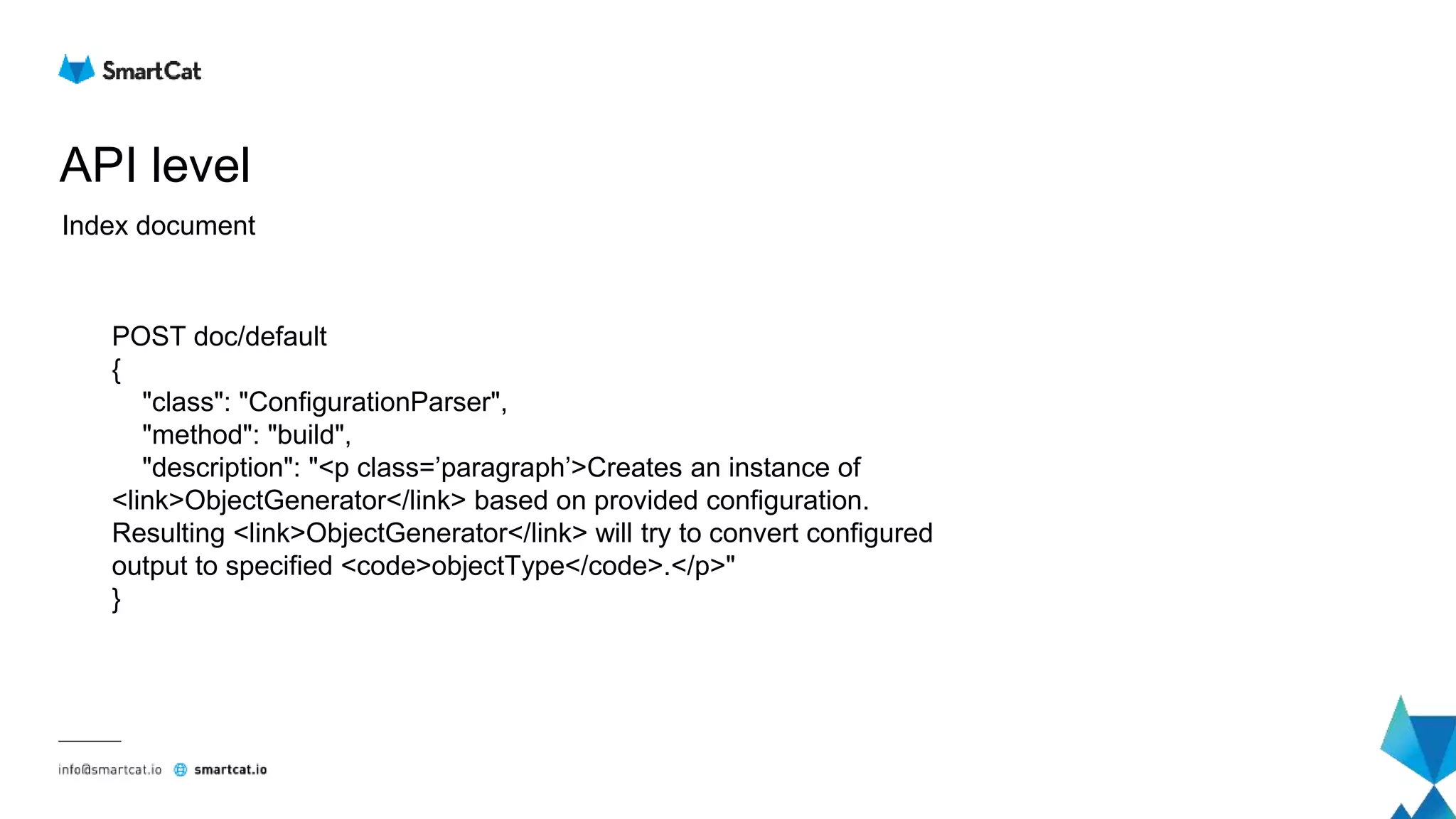
API level
Index document
POST doc/default
{
"class": "ConfigurationParser",
"method": "build",
"description": "<p class=’paragraph’>Creates an instance of
<link>ObjectGenerator</link> based on provided configuration.
Resulting <link>ObjectGenerator</link> will try to convert configured
output to specified <code>objectType</code>.</p>"
}
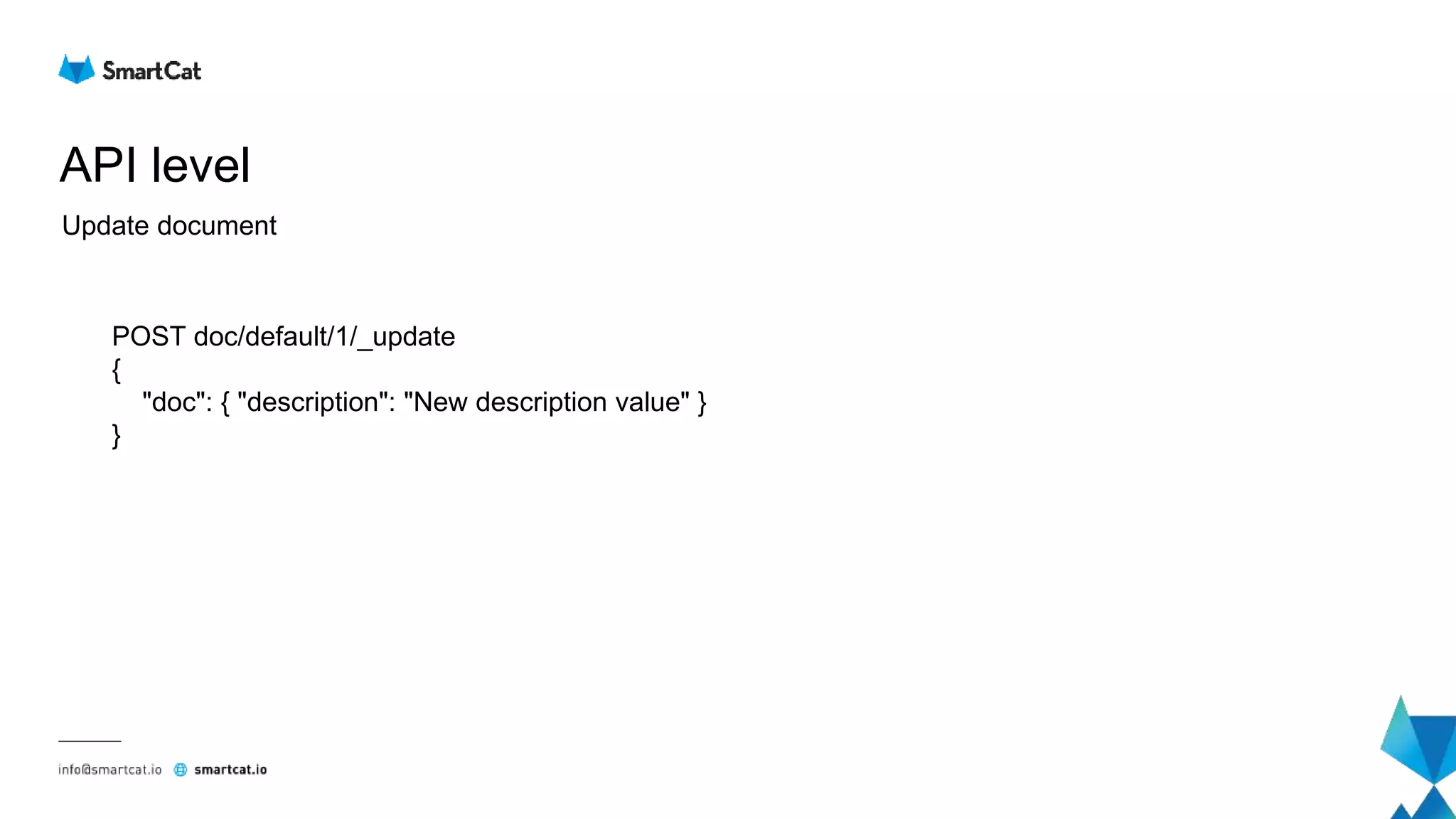
API level
Update document
POST doc/default/1/_update
{
"doc": { "description": "New description value" }
}
API level
Delete document
DELETE doc/default/1
API level
Search
GET doc/default/_search
{
"query": {
"match": {
"title": {
"query": "ObjectGenerator"
}
}
}
}
Cluster level
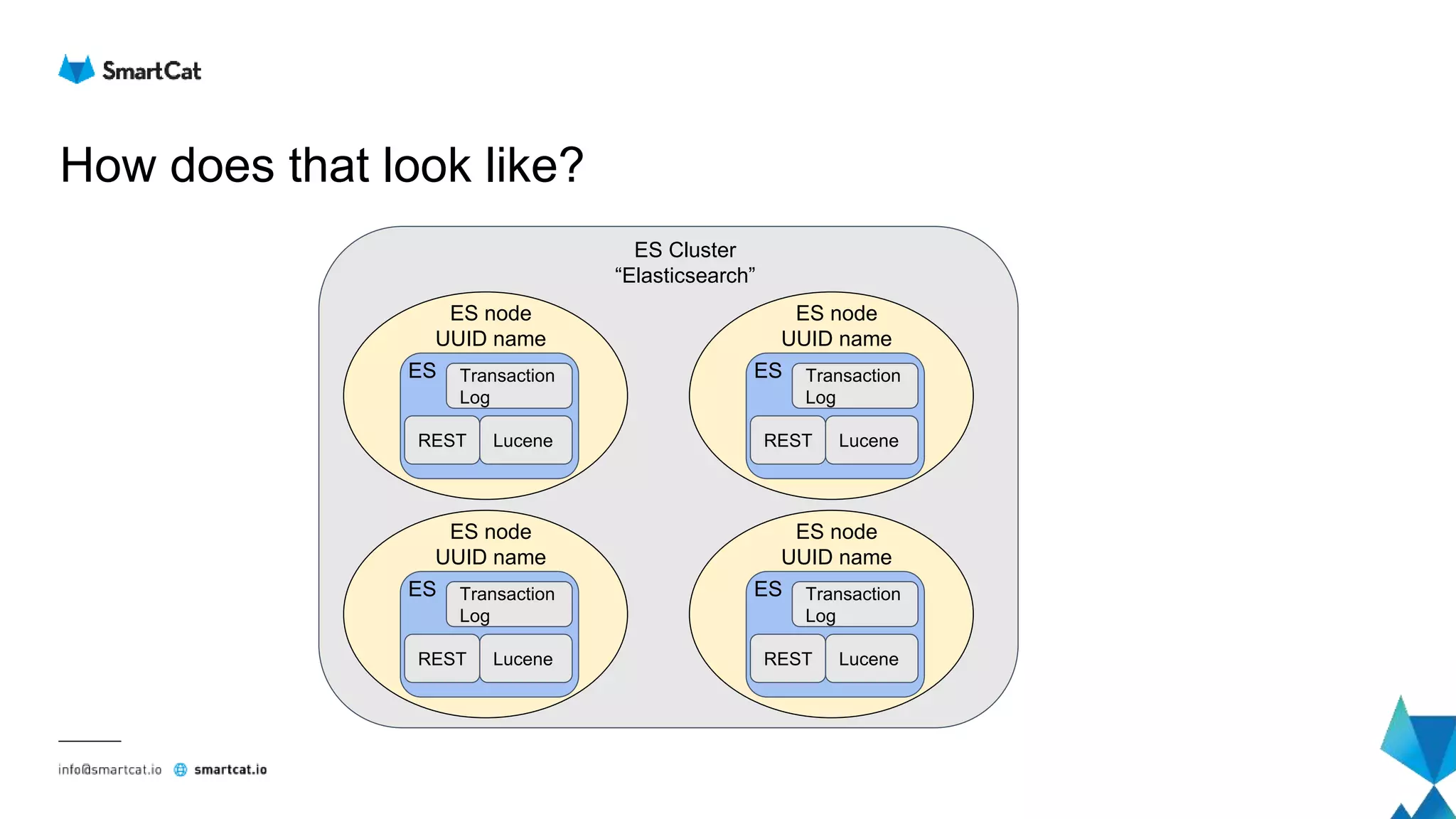
How does that look like?
Transaction
Log
LuceneREST
ES node
UUID name
ES
ES Cluster
“Elasticsearch”
Transaction
Log
LuceneREST
ES node
UUID name
ES Transaction
Log
LuceneREST
ES node
UUID name
ES
Transaction
Log
LuceneREST
ES node
UUID name
ES
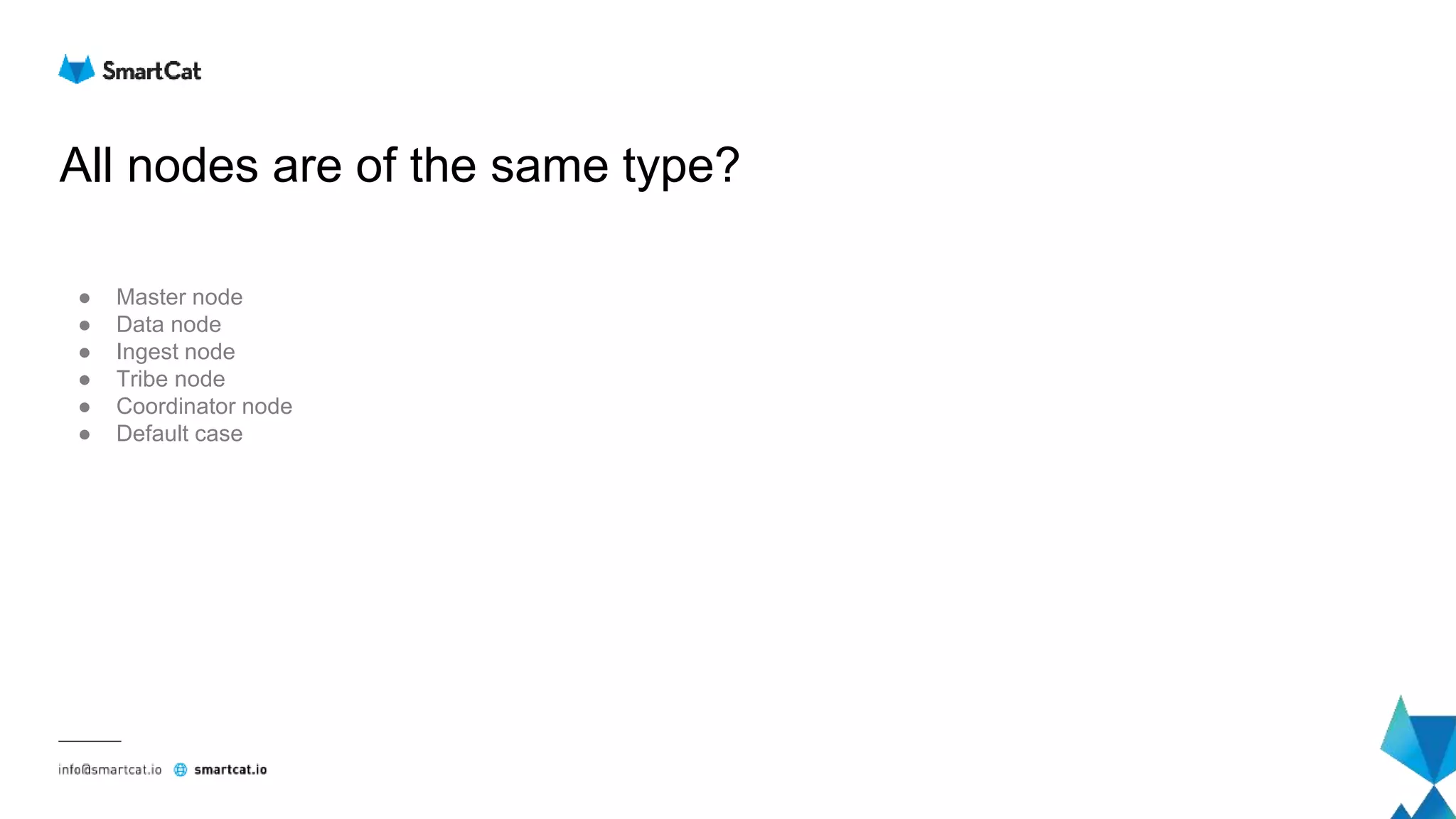
All nodes are of the same type?
● Master node
● Data node
● Ingest node
● Tribe node
● Coordinator node
● Default case
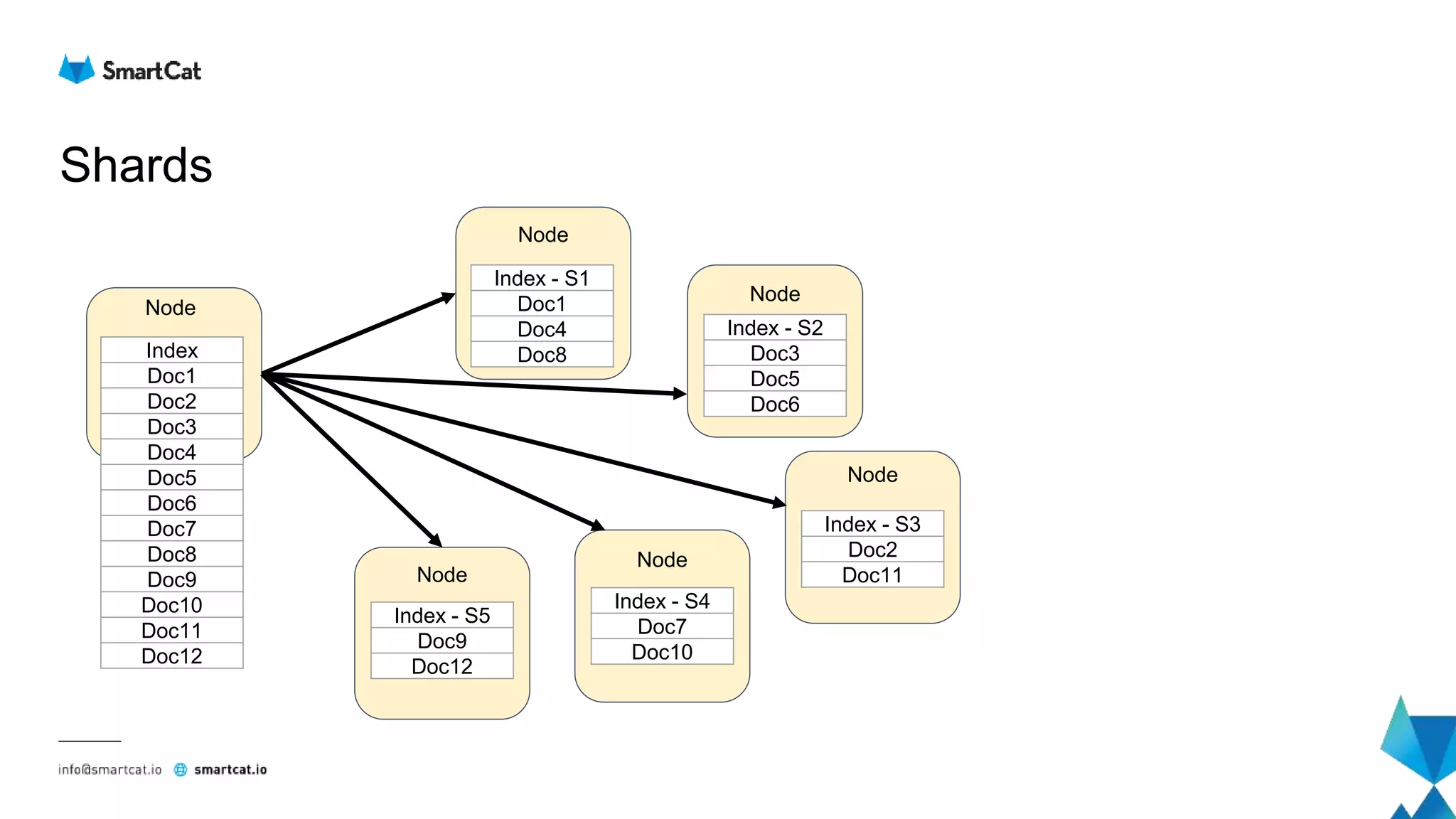
Shards
Index
Doc1
Doc2
Doc3
Doc4
Doc5
Doc6
Doc7
Doc8
Doc9
Doc10
Doc11
Doc12
Node
Node
Node
Node
Node
Node
Index - S1
Doc1
Doc4
Doc8
Index - S5
Doc9
Doc12
Index - S4
Doc7
Doc10
Index - S2
Doc3
Doc5
Doc6
Index - S3
Doc2
Doc11
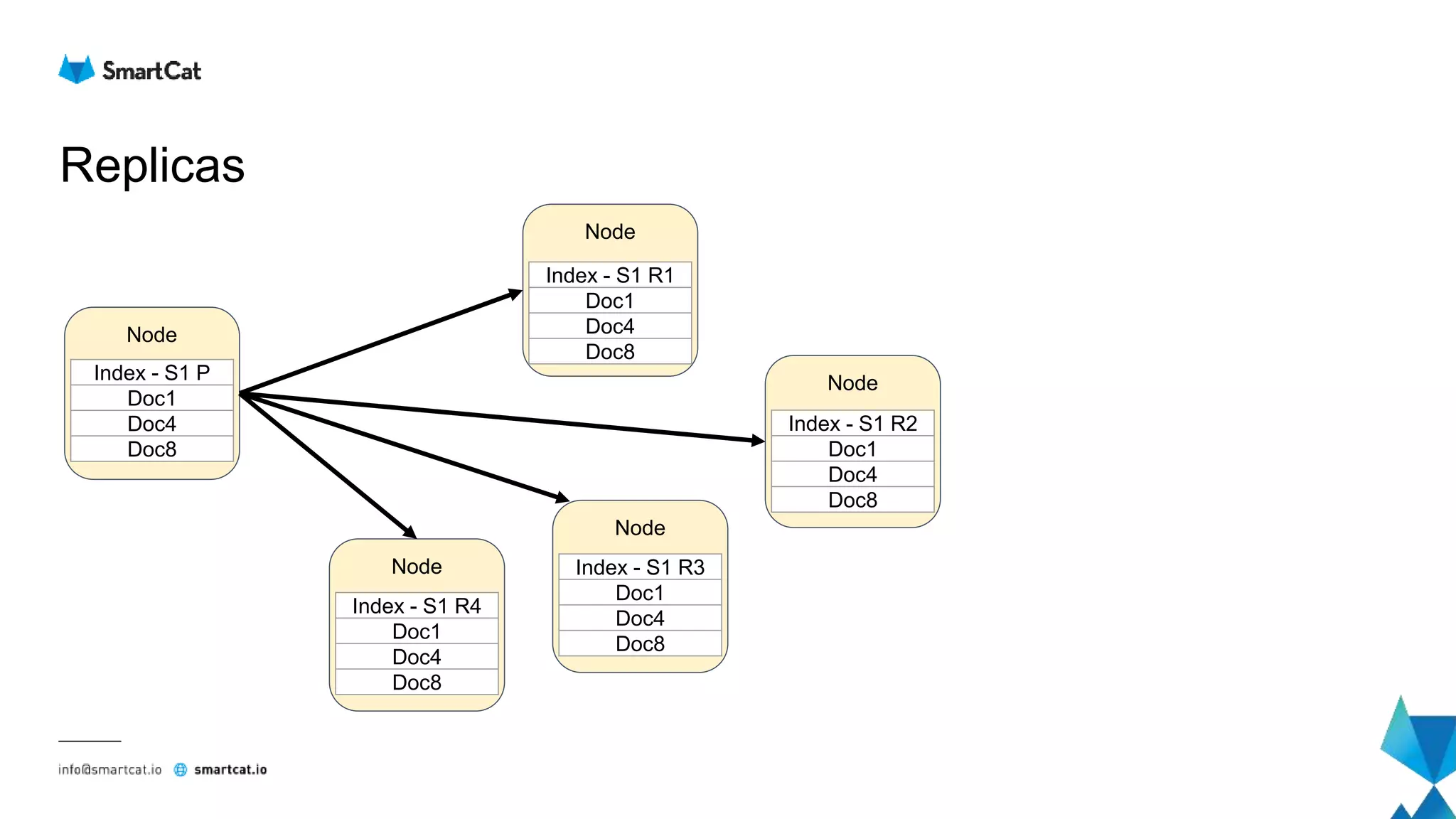
Replicas
Node
Node
Index - S1 R1
Doc1
Doc4
Doc8
Node
Node
Node
Index - S1 R2
Doc1
Doc4
Doc8
Index - S1 R3
Doc1
Doc4
Doc8
Index - S1 R4
Doc1
Doc4
Doc8
Index - S1 P
Doc1
Doc4
Doc8
Scaling
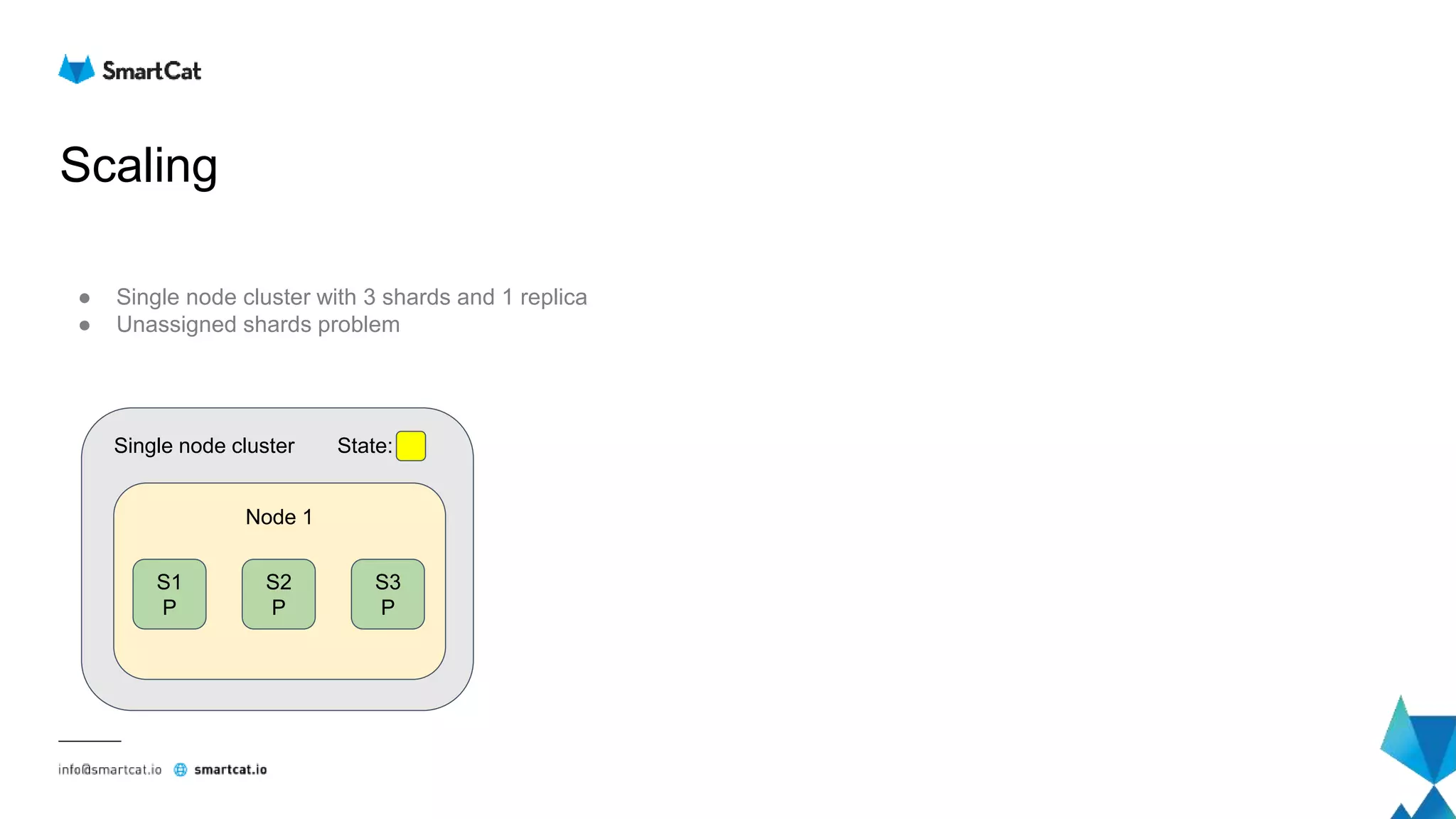
● Single node cluster with 3 shards and 1 replica
● Unassigned shards problem
Node 1
S1
P
S2
P
S3
P
Single node cluster State:
Scaling out
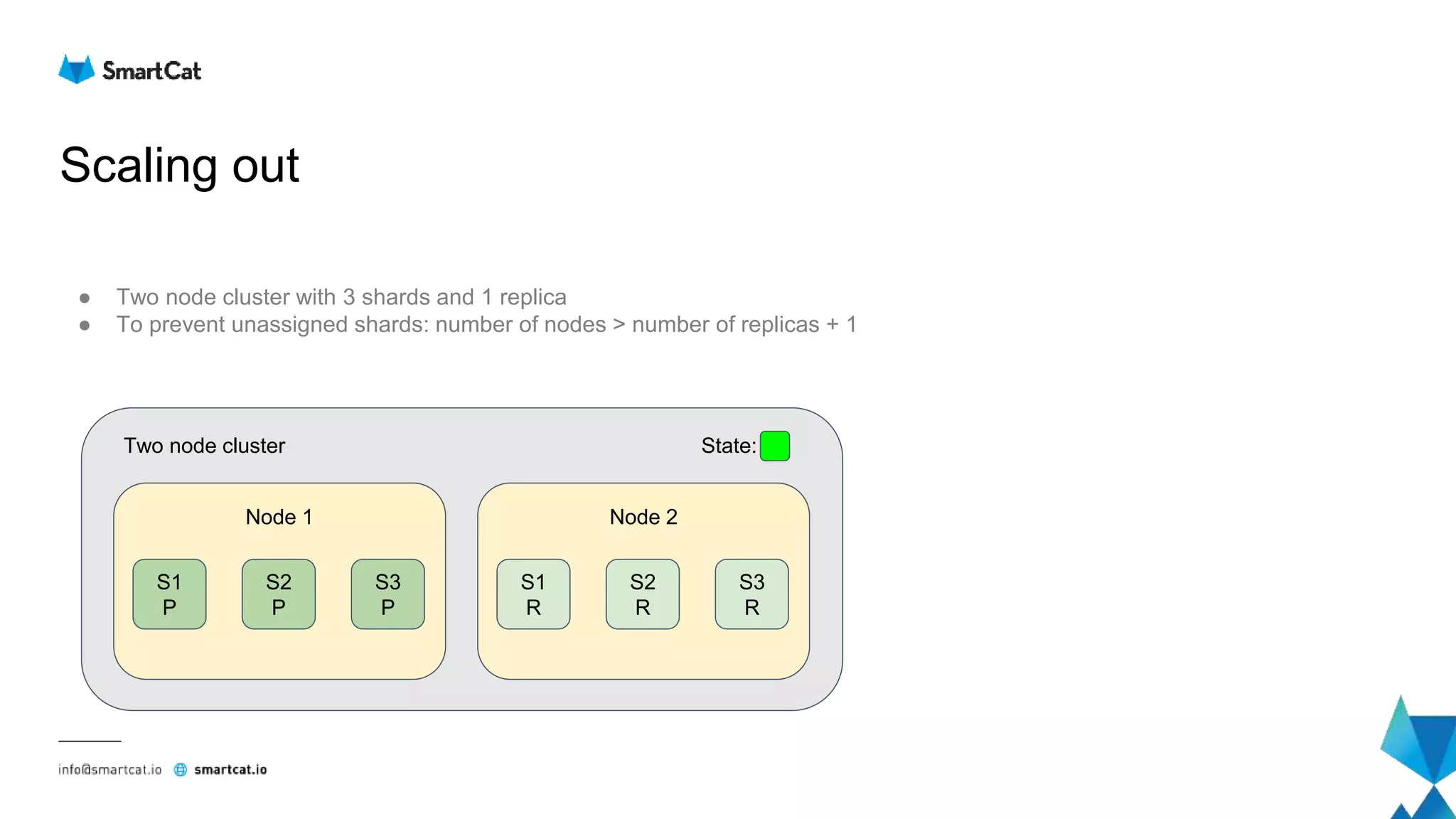
● Two node cluster with 3 shards and 1 replica
● To prevent unassigned shards: number of nodes > number of replicas + 1
Node 1
S1
P
S2
P
S3
P
Two node cluster State:
Node 2
S1
R
S2
R
S3
R
Scaling out
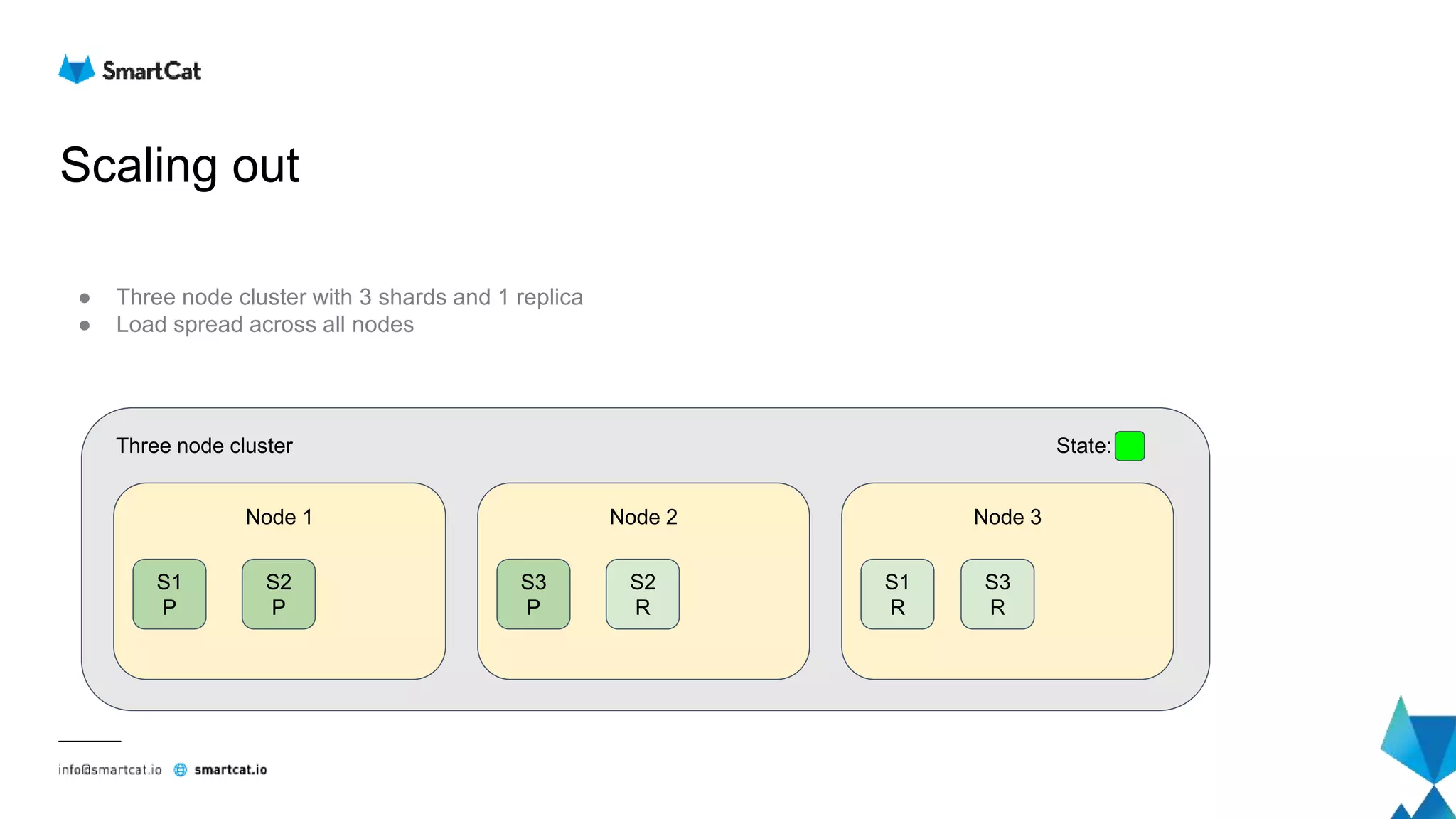
● Three node cluster with 3 shards and 1 replica
● Load spread across all nodes
Node 1
S1
P
S2
P
Three node cluster State:
Node 2
S2
R
Node 3
S1
R
S3
P
S3
R
Scaling out
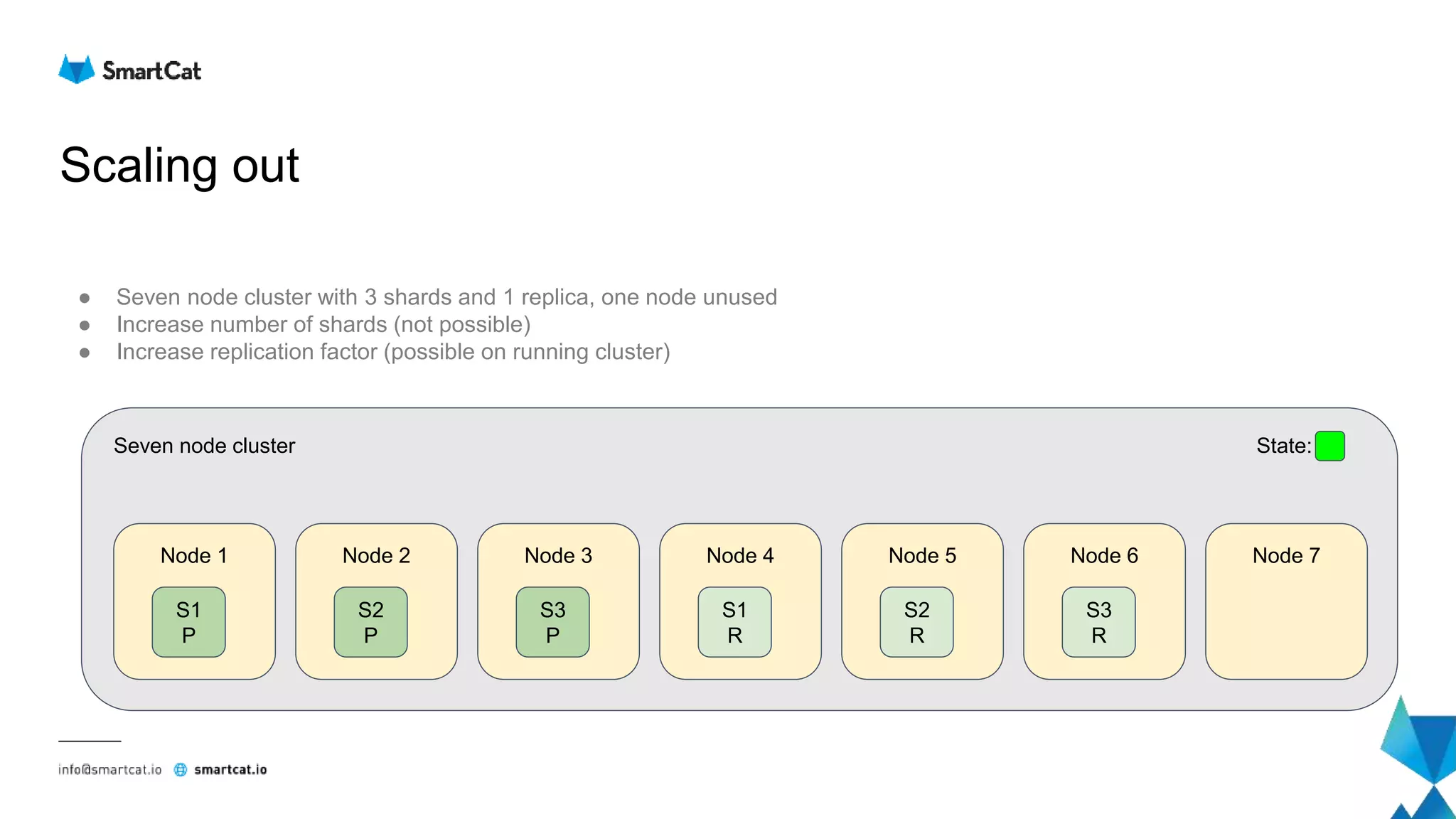
● Seven node cluster with 3 shards and 1 replica, one node unused
● Increase number of shards (not possible)
● Increase replication factor (possible on running cluster)
Node 1
S1
P
Seven node cluster State:
Node 2
S2
P
Node 3
S3
P
Node 4
S1
R
Node 5
S2
R
Node 6
S3
R
Node 7
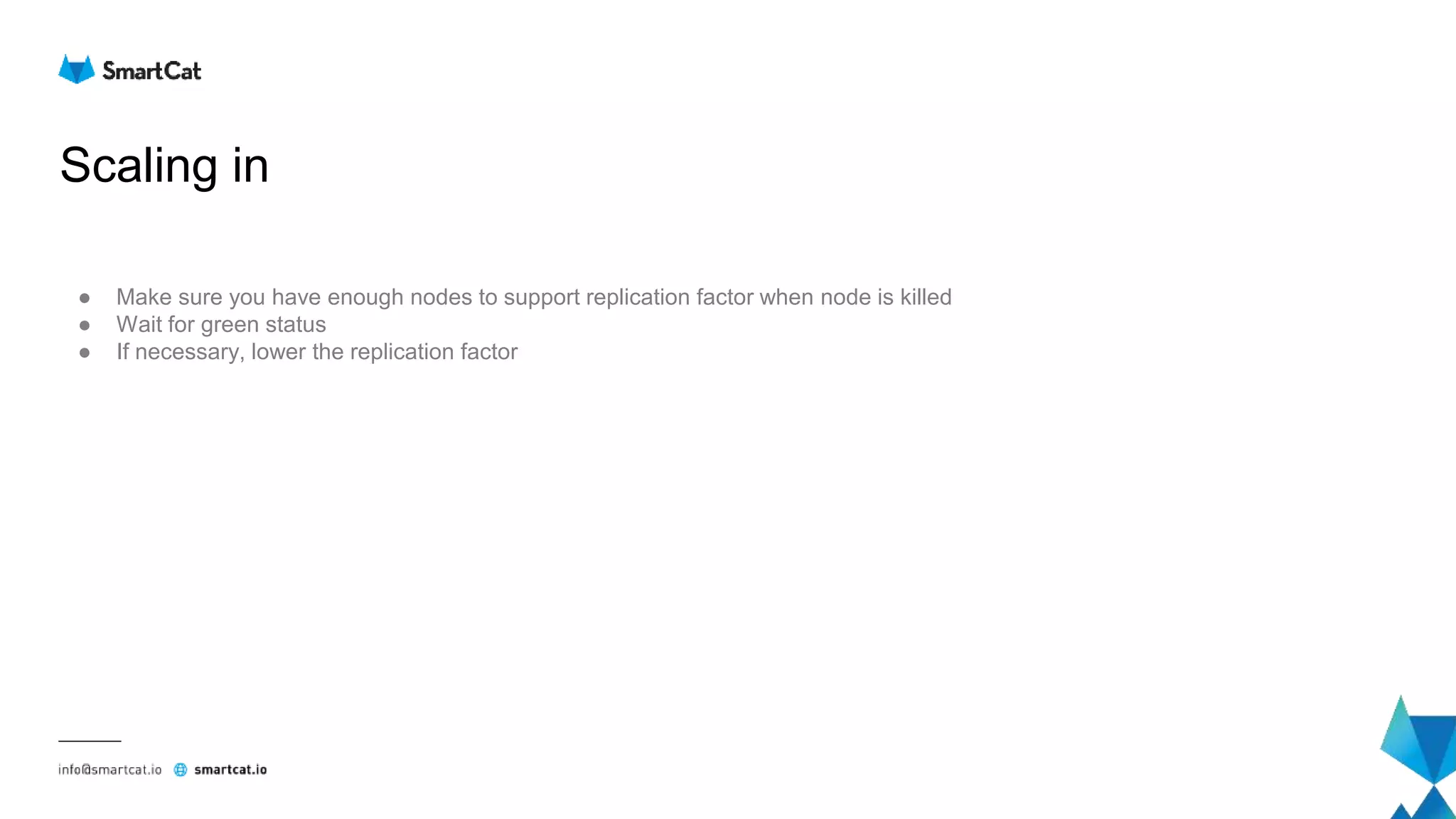
Scaling in
● Make sure you have enough nodes to support replication factor when node is killed
● Wait for green status
● If necessary, lower the replication factor
Replacing the node
● Same as scale out / scale in
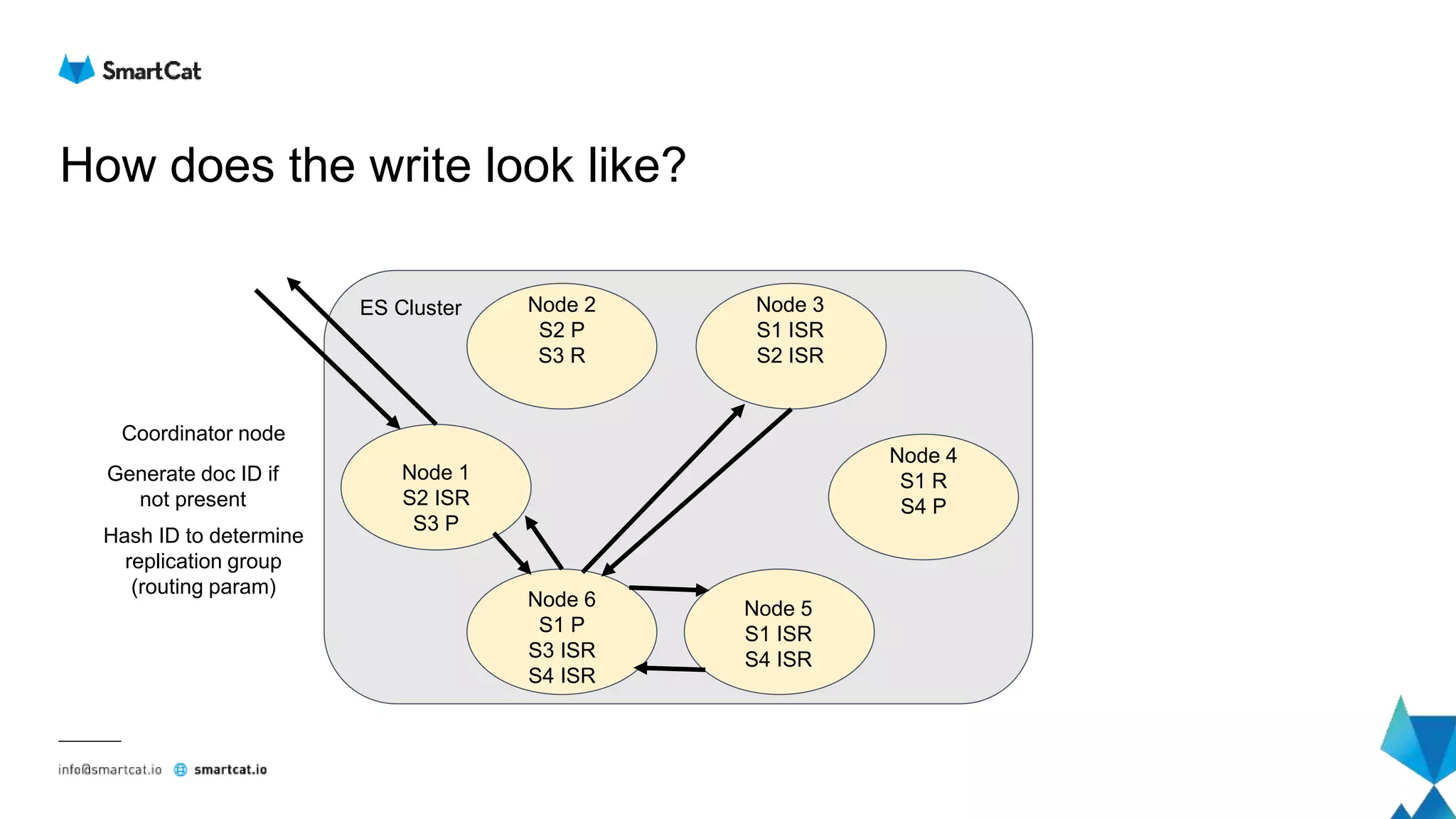
How does the write look like?
Node 2
S2 P
S3 R
Node 4
S1 R
S4 P
Node 3
S1 ISR
S2 ISR
Node 5
S1 ISR
S4 ISR
Node 6
S1 P
S3 ISR
S4 ISR
Node 1
S2 ISR
S3 P
ES Cluster
Generate doc ID if
not present
Hash ID to determine
replication group
(routing param)
Coordinator node
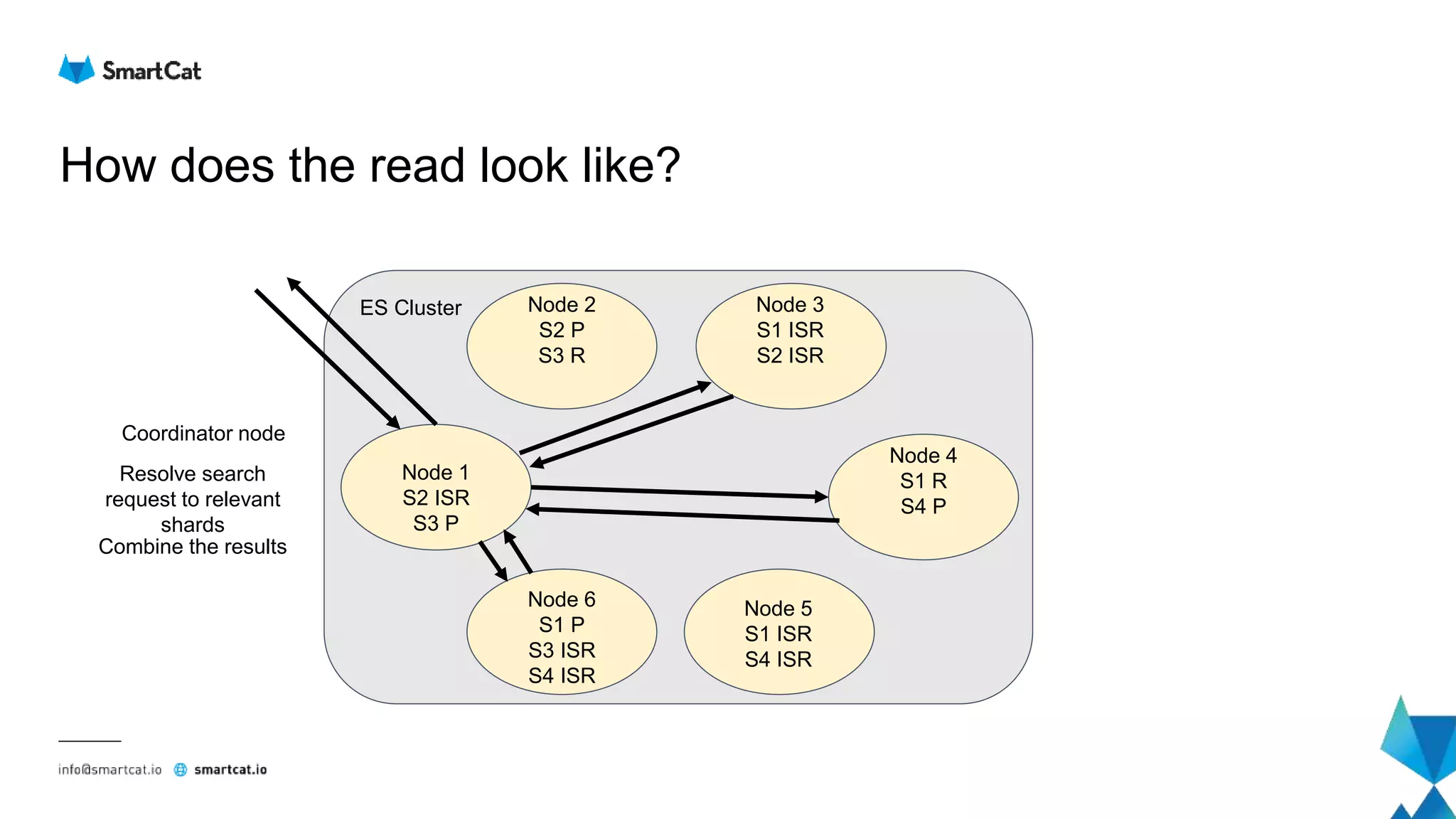
How does the read look like?
Node 2
S2 P
S3 R
Node 4
S1 R
S4 P
Node 3
S1 ISR
S2 ISR
Node 5
S1 ISR
S4 ISR
Node 6
S1 P
S3 ISR
S4 ISR
Node 1
S2 ISR
S3 P
ES Cluster
Coordinator node
Resolve search
request to relevant
shards
Combine the results
What if something goes wrong?
● Network partition (one master)
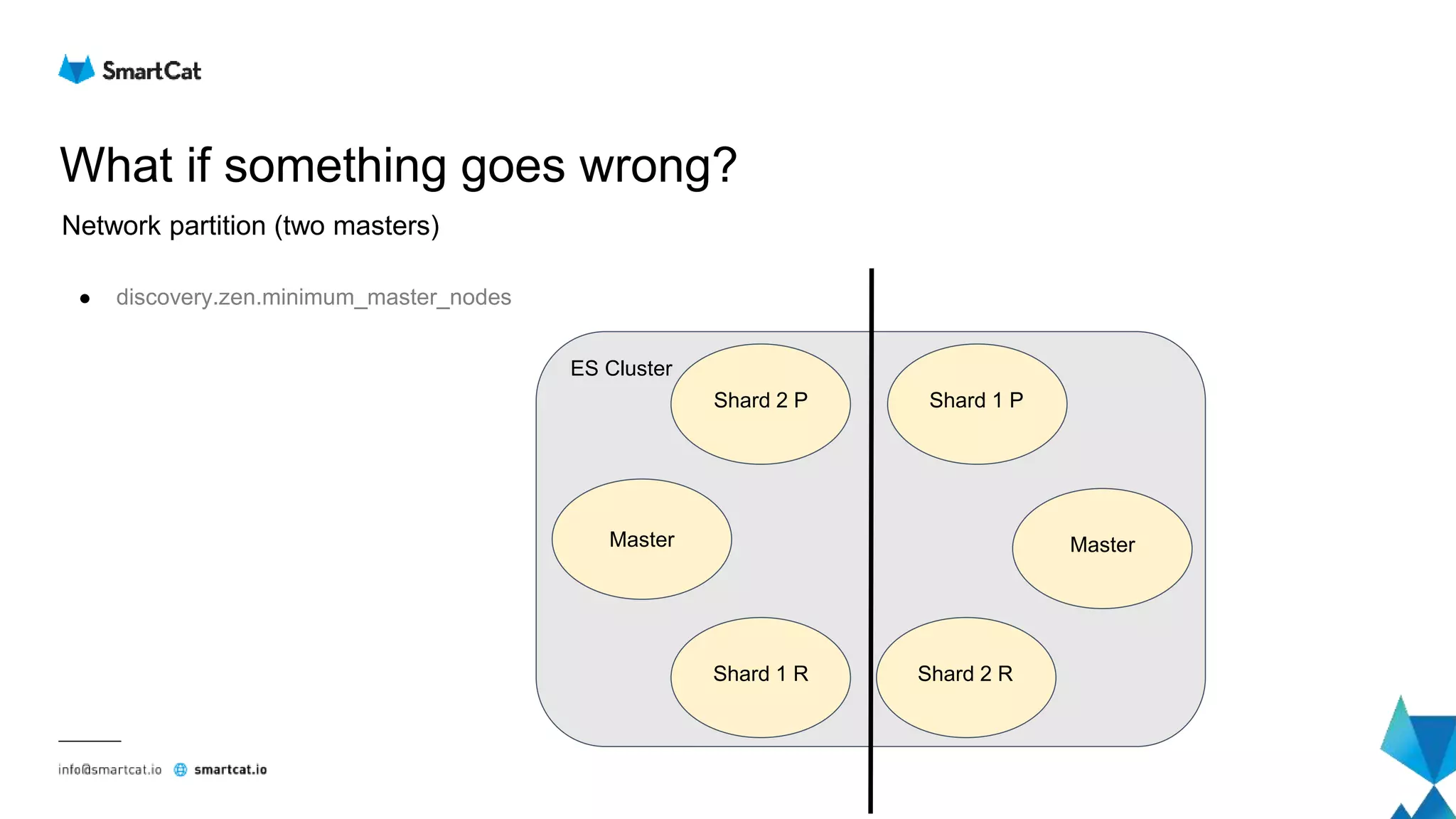
● Network partition (two masters)
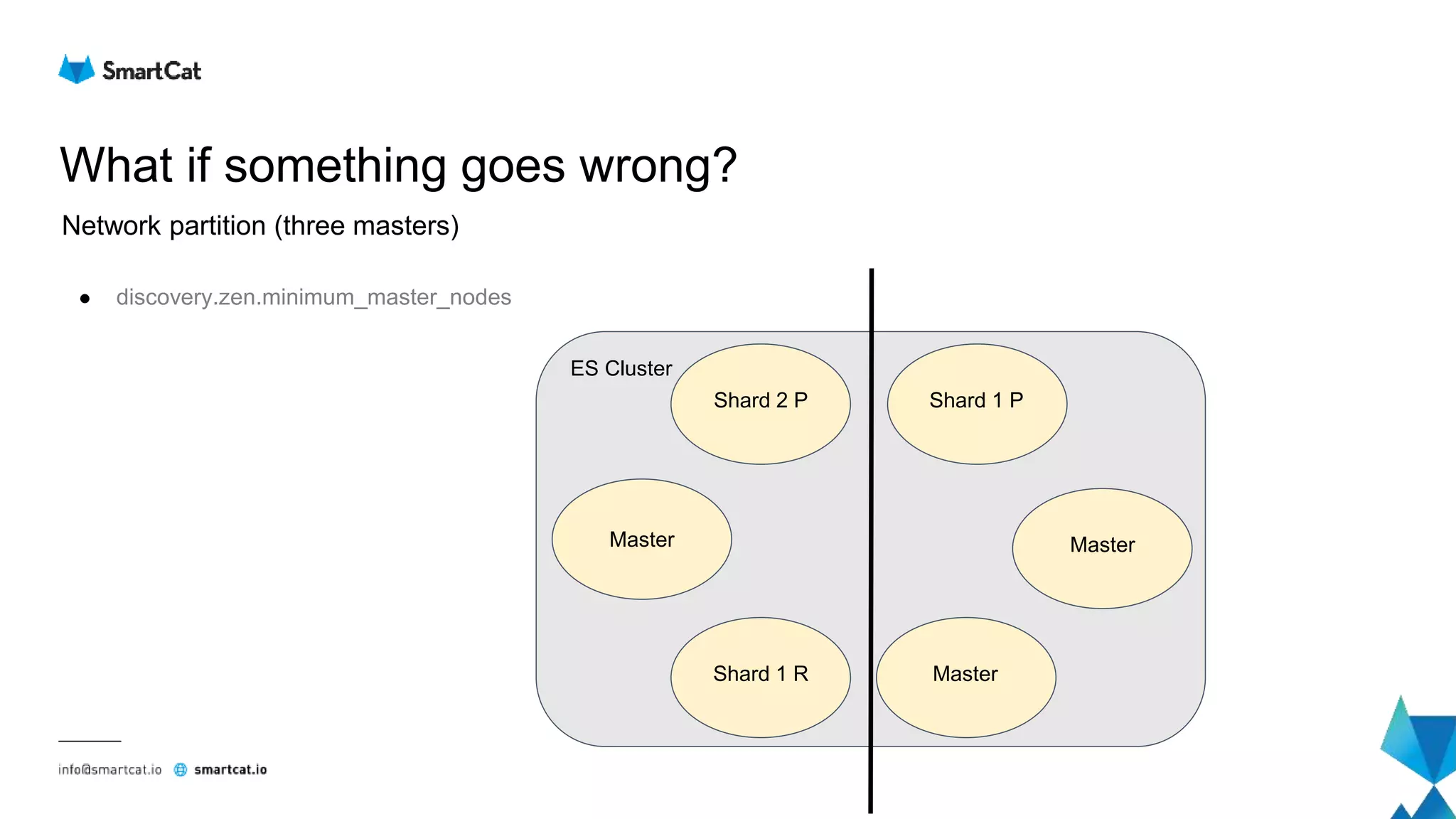
● Network partition (three masters)
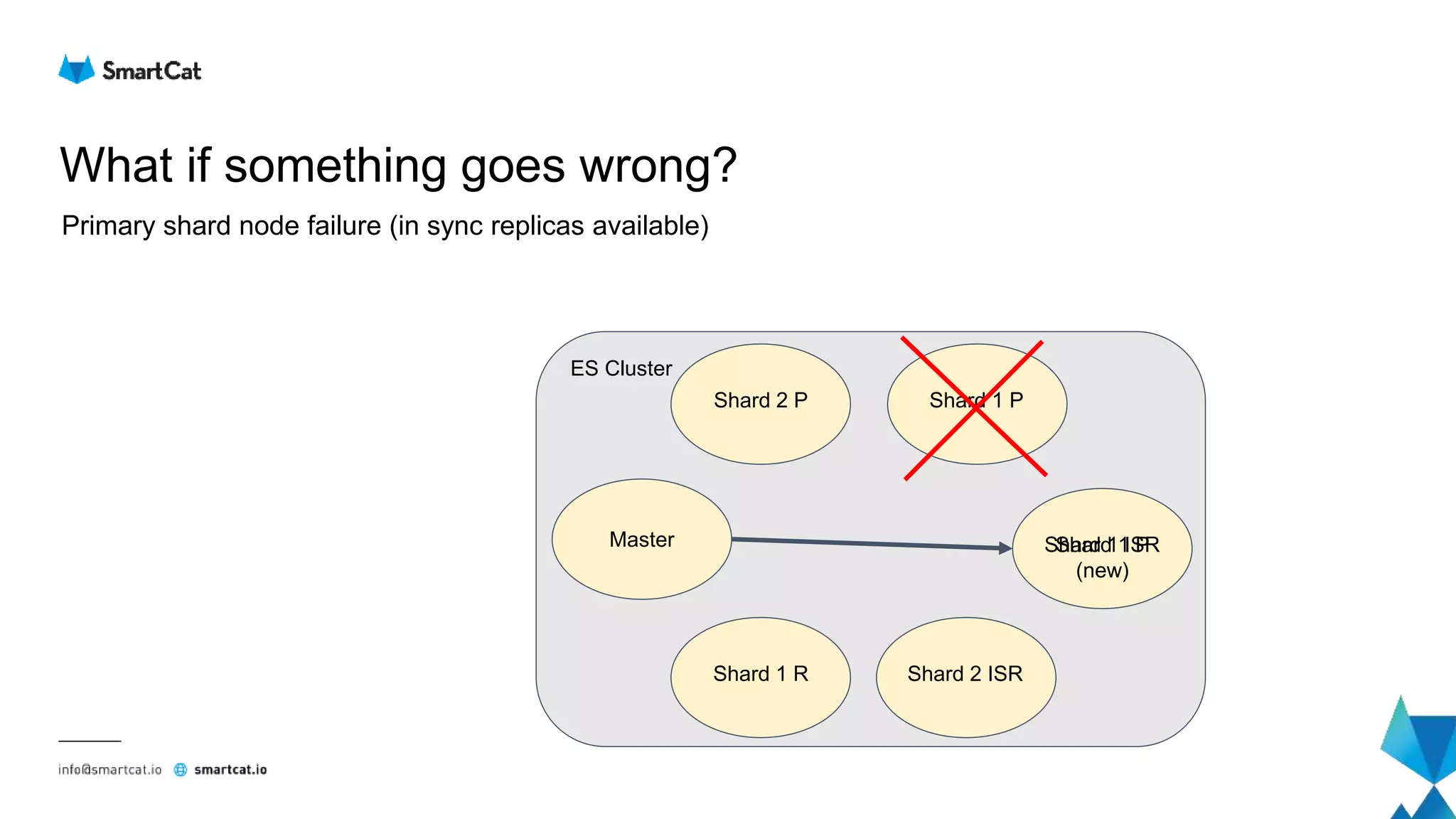
● Primary shard node failure (in sync replicas available)
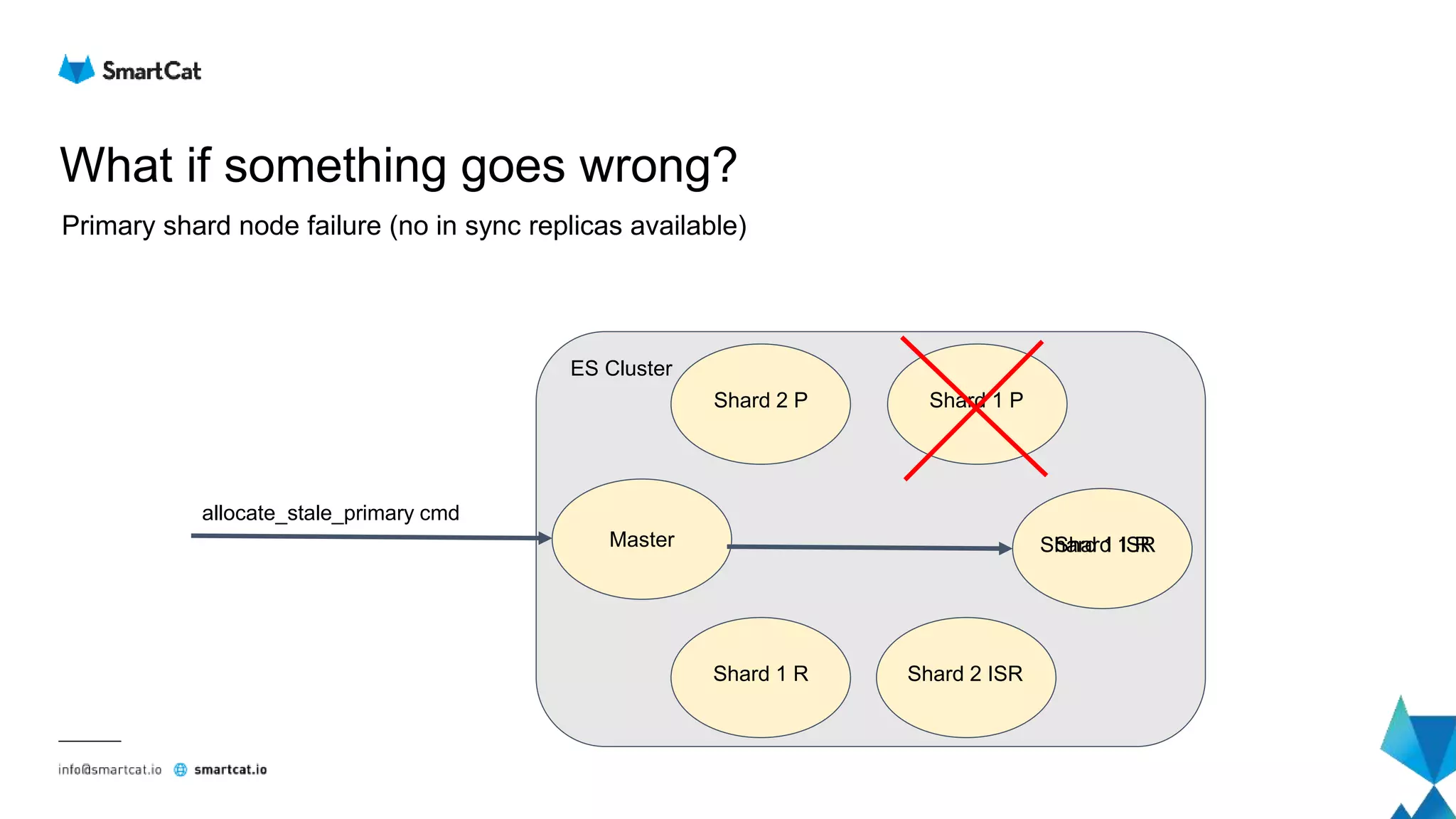
● Primary shard node failure (no in sync replicas available)
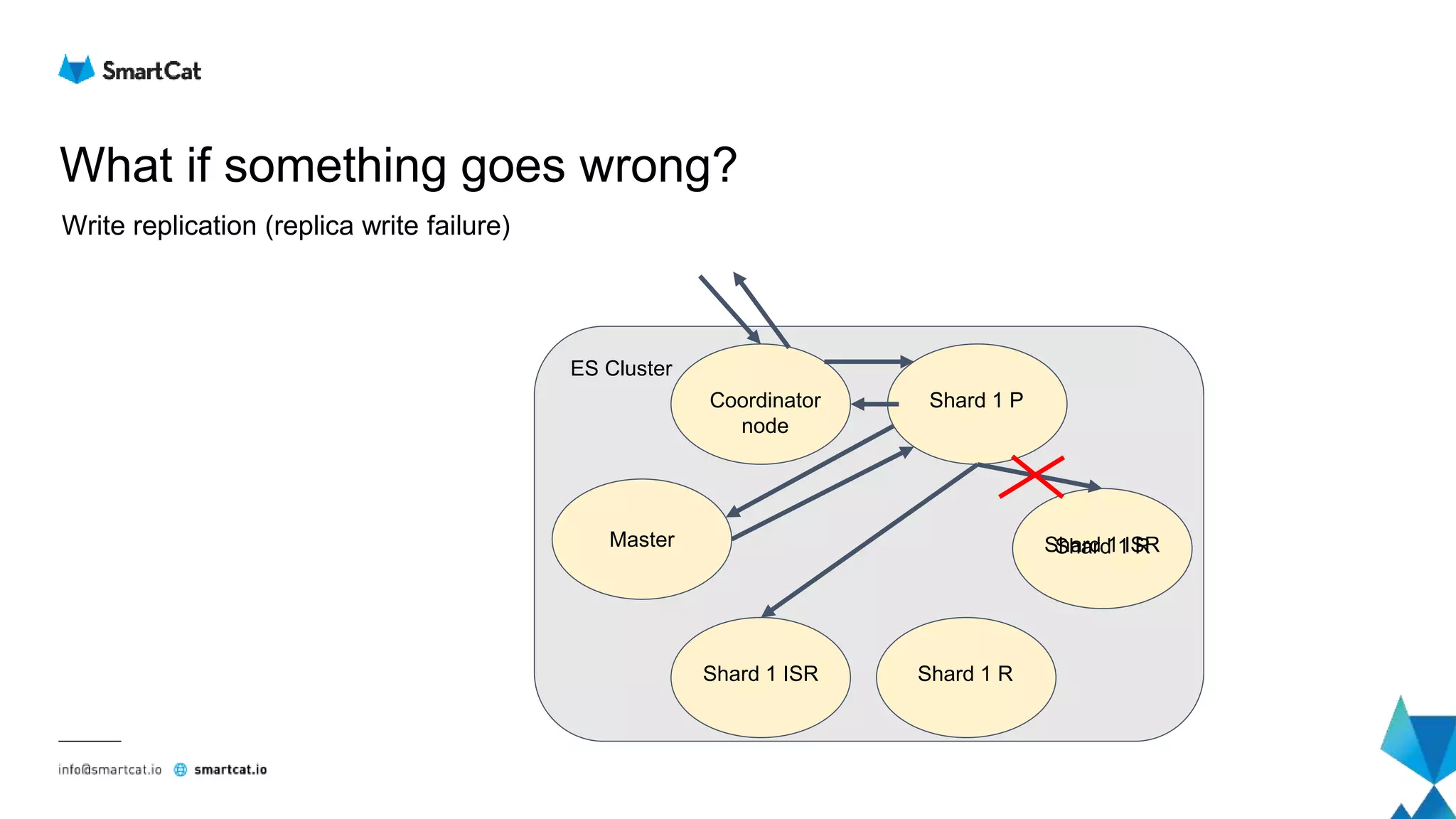
● Write replication (replica write failure)
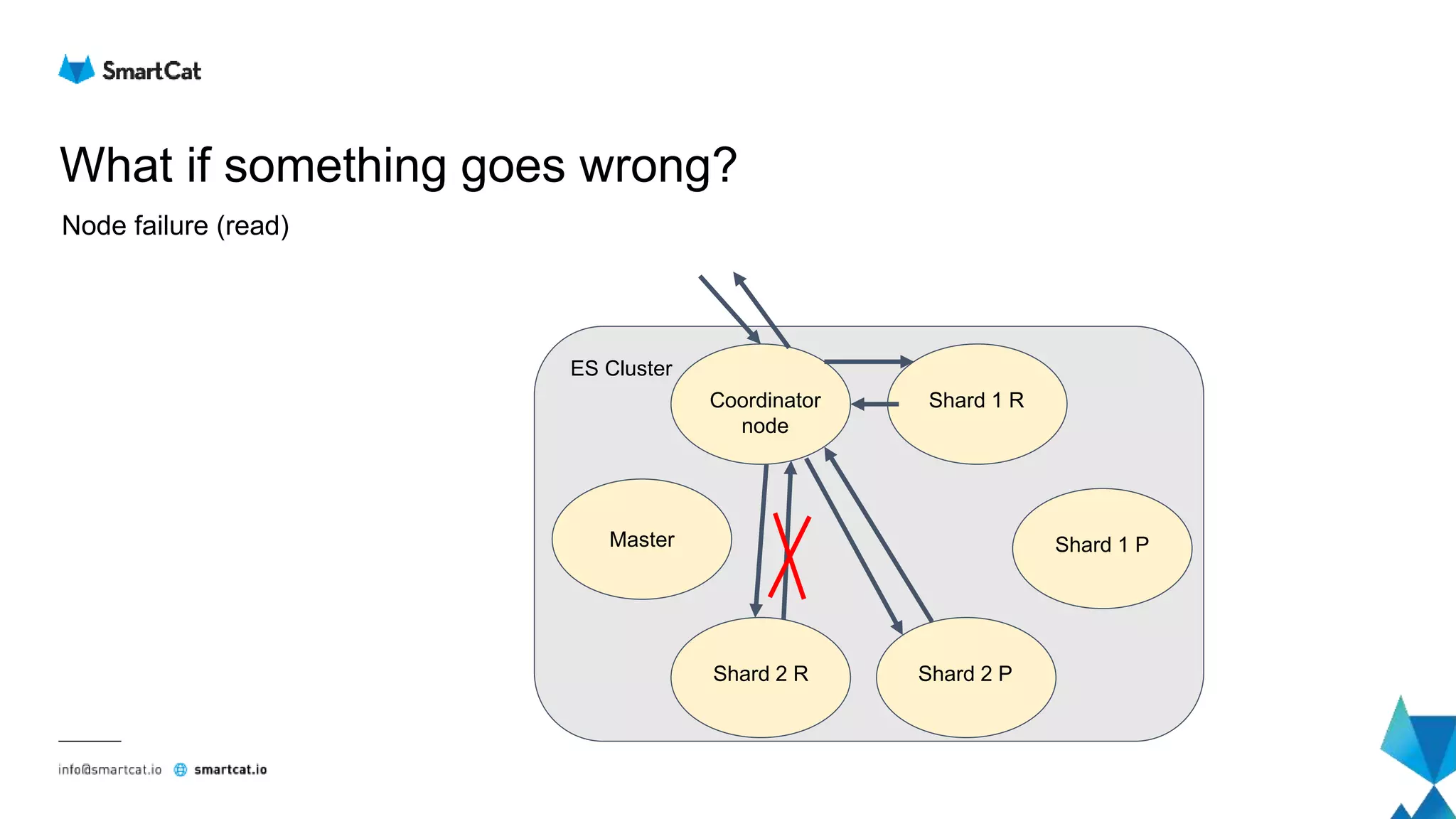
● Node failure (read)
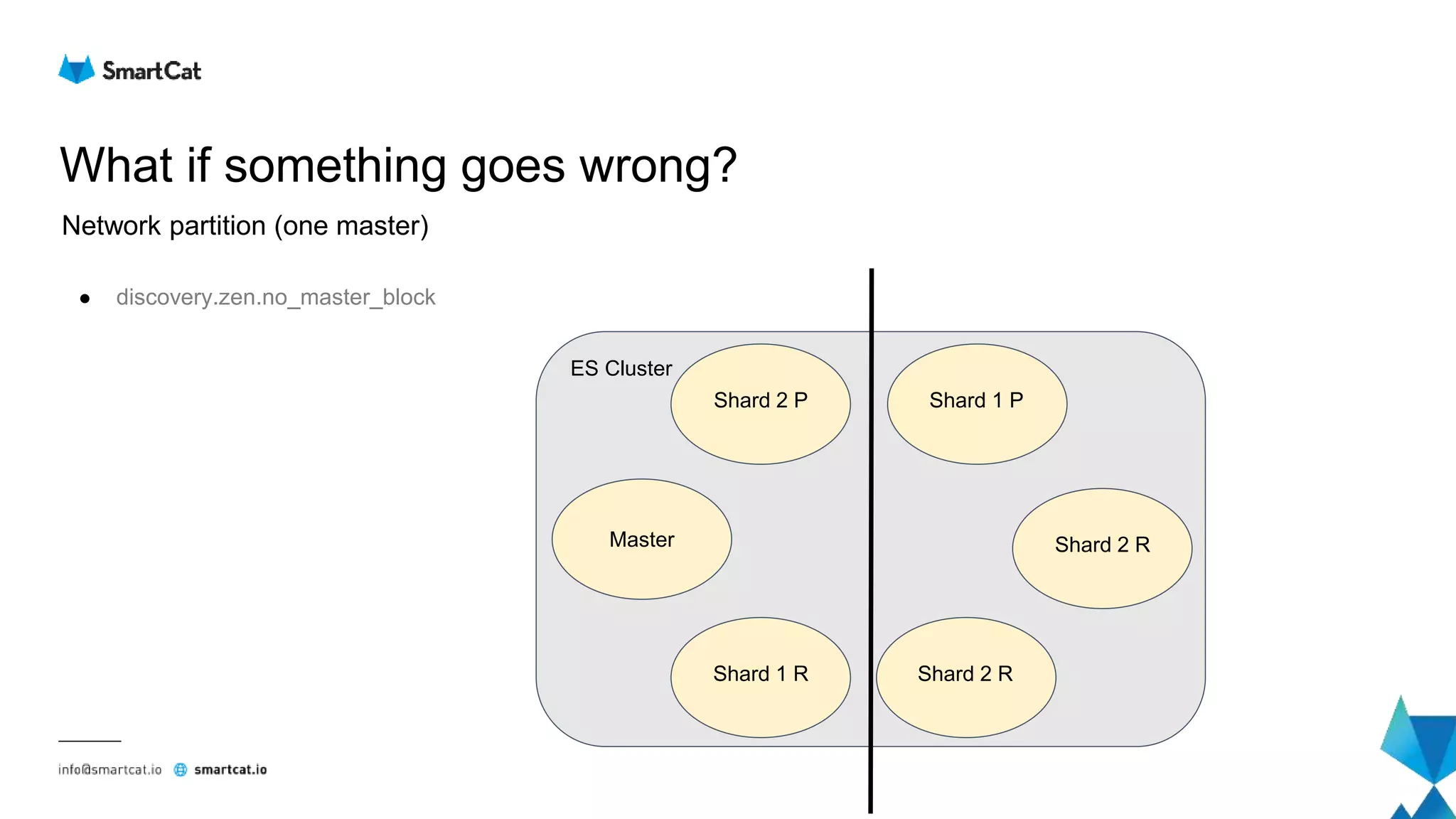
What if something goes wrong?
Network partition (one master)
● discovery.zen.no_master_block
Shard 2 P
Shard 2 R
Shard 1 P
Shard 2 RShard 1 R
Master
ES Cluster
What if something goes wrong?
Network partition (two masters)
● discovery.zen.minimum_master_nodes
Shard 2 P
Master
Shard 1 P
Shard 2 RShard 1 R
Master
ES Cluster
What if something goes wrong?
Network partition (three masters)
● discovery.zen.minimum_master_nodes
Shard 2 P
Master
Shard 1 P
MasterShard 1 R
Master
ES Cluster
What if something goes wrong?
Primary shard node failure (in sync replicas available)
Shard 2 P
Shard 1 ISR
Shard 1 P
Shard 2 ISRShard 1 R
Master
ES Cluster
Shard 1 P
(new)
What if something goes wrong?
Primary shard node failure (no in sync replicas available)
Shard 2 P
Shard 1 R
Shard 1 P
Shard 2 ISRShard 1 R
Master
ES Cluster
allocate_stale_primary cmd
Shard 1 ISR
What if something goes wrong?
Write replication (replica write failure)
Coordinator
node
Shard 1 ISR
Shard 1 P
Shard 1 RShard 1 ISR
Master
ES Cluster
Shard 1 R
What if something goes wrong?
Node failure (read)
Coordinator
node
Shard 1 P
Shard 1 R
Shard 2 PShard 2 R
Master
ES Cluster
Lucene level
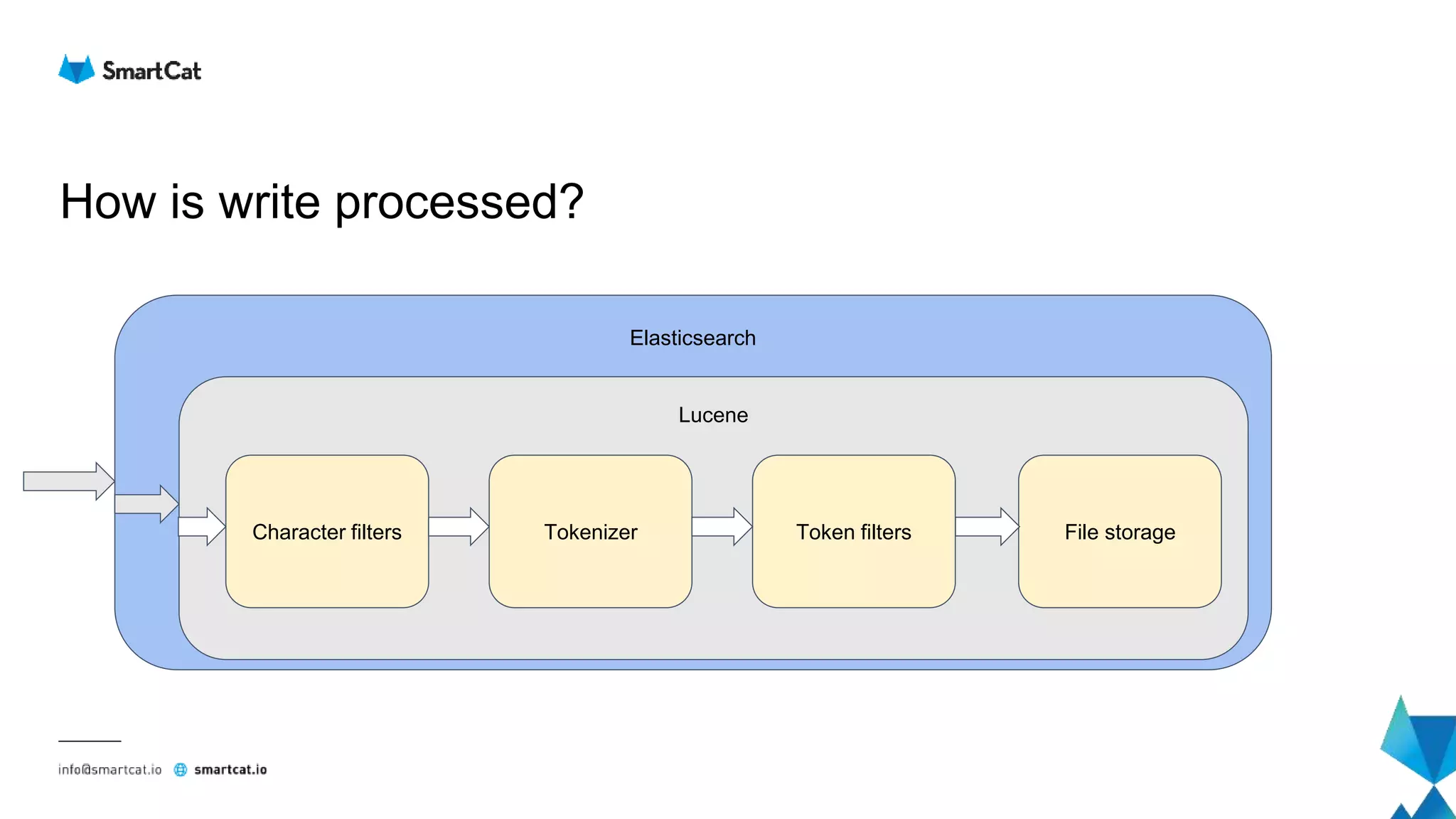
How is write processed?
Elasticsearch
Lucene
Character filters Tokenizer Token filters File storage
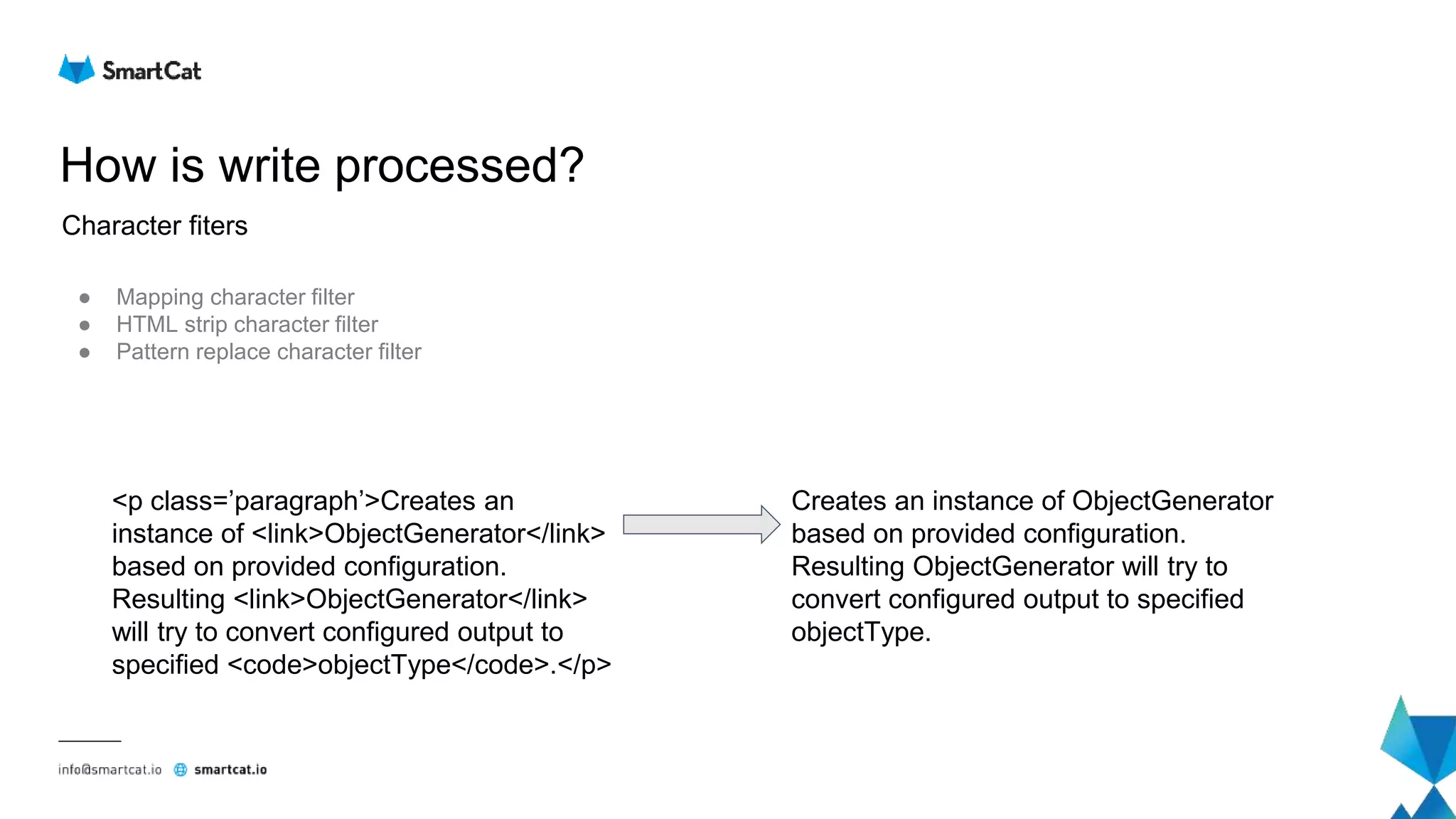
How is write processed?
● Mapping character filter
● HTML strip character filter
● Pattern replace character filter
Character fiters
<p class=’paragraph’>Creates an
instance of <link>ObjectGenerator</link>
based on provided configuration.
Resulting <link>ObjectGenerator</link>
will try to convert configured output to
specified <code>objectType</code>.</p>
Creates an instance of ObjectGenerator
based on provided configuration.
Resulting ObjectGenerator will try to
convert configured output to specified
objectType.
How is write processed?
● Standard tokenizer
● Keyword tokenizer
● Letter tokenizer
● Lowercase tokenizer
● N gram tokenizer
● Edge n gram tokenizer
● Regular expression pattern tokenizer
Tokenizer
Creates an instance of ObjectGenerator
based on provided configuration.
Resulting ObjectGenerator will try to
convert configured output to specified
objectType.
[Creates, an, instance, of, ObjectGenerator,
based, on, provided, configuration,
Resulting, ObjectGenerator, will, try, to,
convert, configured, output, to, specified,
objectType]
How is write processed?
● Lower case filter
● English possessive filter
● Stop filter
● Synonym filter
● Reversed wildcard filter
● English minimal stem filter
Token filters
[Creates, an, instance, of, ObjectGenerator,
based, on, provided, configuration,
Resulting, ObjectGenerator, will, try, to,
convert, configured, output, to, specified,
objectType]
[creates, instance, ObjectGenerator,
based, provided, configuration, resulting,
try, convert, configured, output,
specified, objectType]
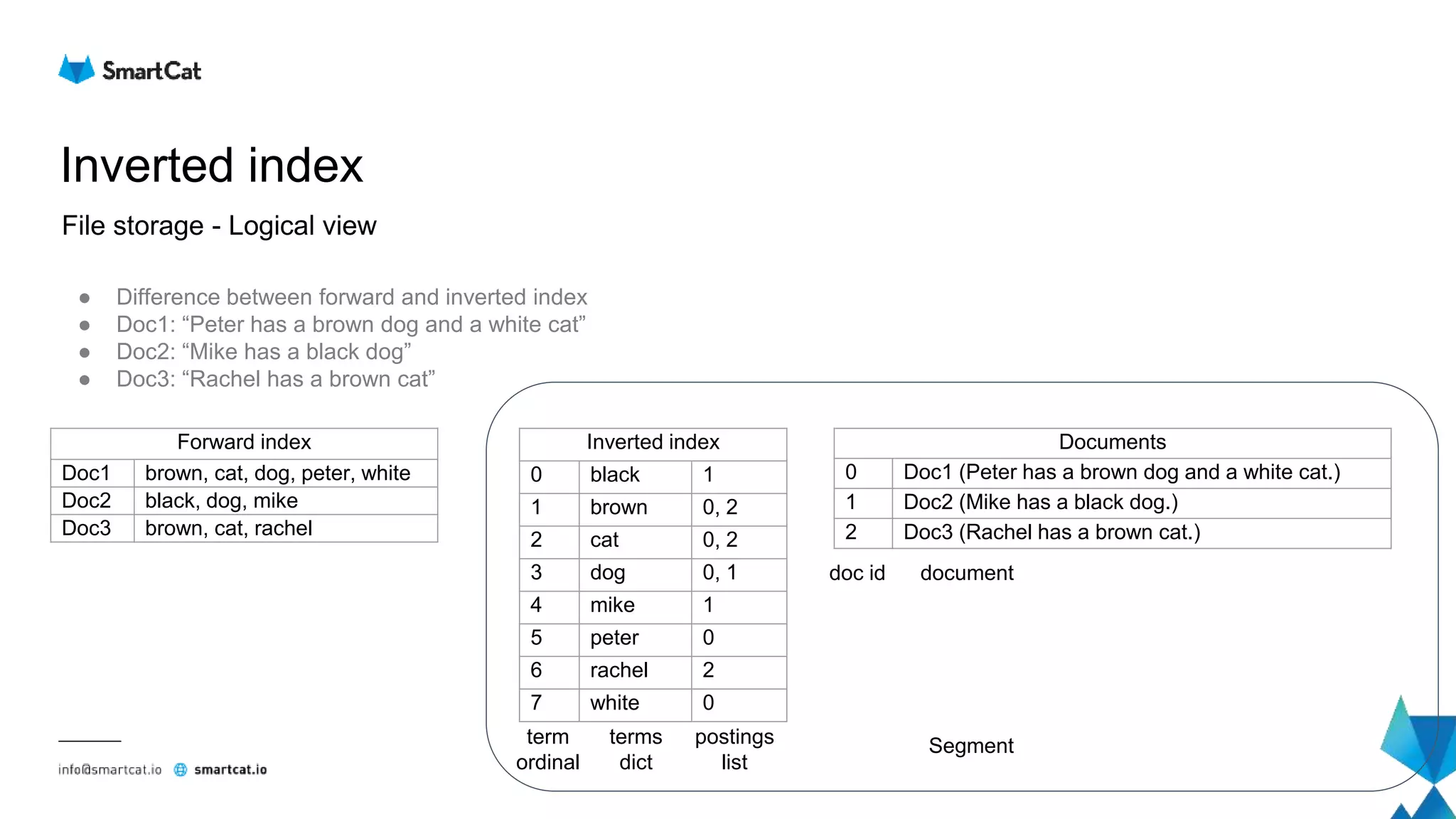
Inverted index
File storage - Logical view
● Difference between forward and inverted index
● Doc1: “Peter has a brown dog and a white cat”
● Doc2: “Mike has a black dog”
● Doc3: “Rachel has a brown cat”
Forward index
Doc1 brown, cat, dog, peter, white
Doc2 black, dog, mike
Doc3 brown, cat, rachel
Inverted index
0 black 1
1 brown 0, 2
2 cat 0, 2
3 dog 0, 1
4 mike 1
5 peter 0
6 rachel 2
7 white 0
Documents
0 Doc1 (Peter has a brown dog and a white cat.)
1 Doc2 (Mike has a black dog.)
2 Doc3 (Rachel has a brown cat.)
term
ordinal
terms
dict
postings
list
doc id document
Segment
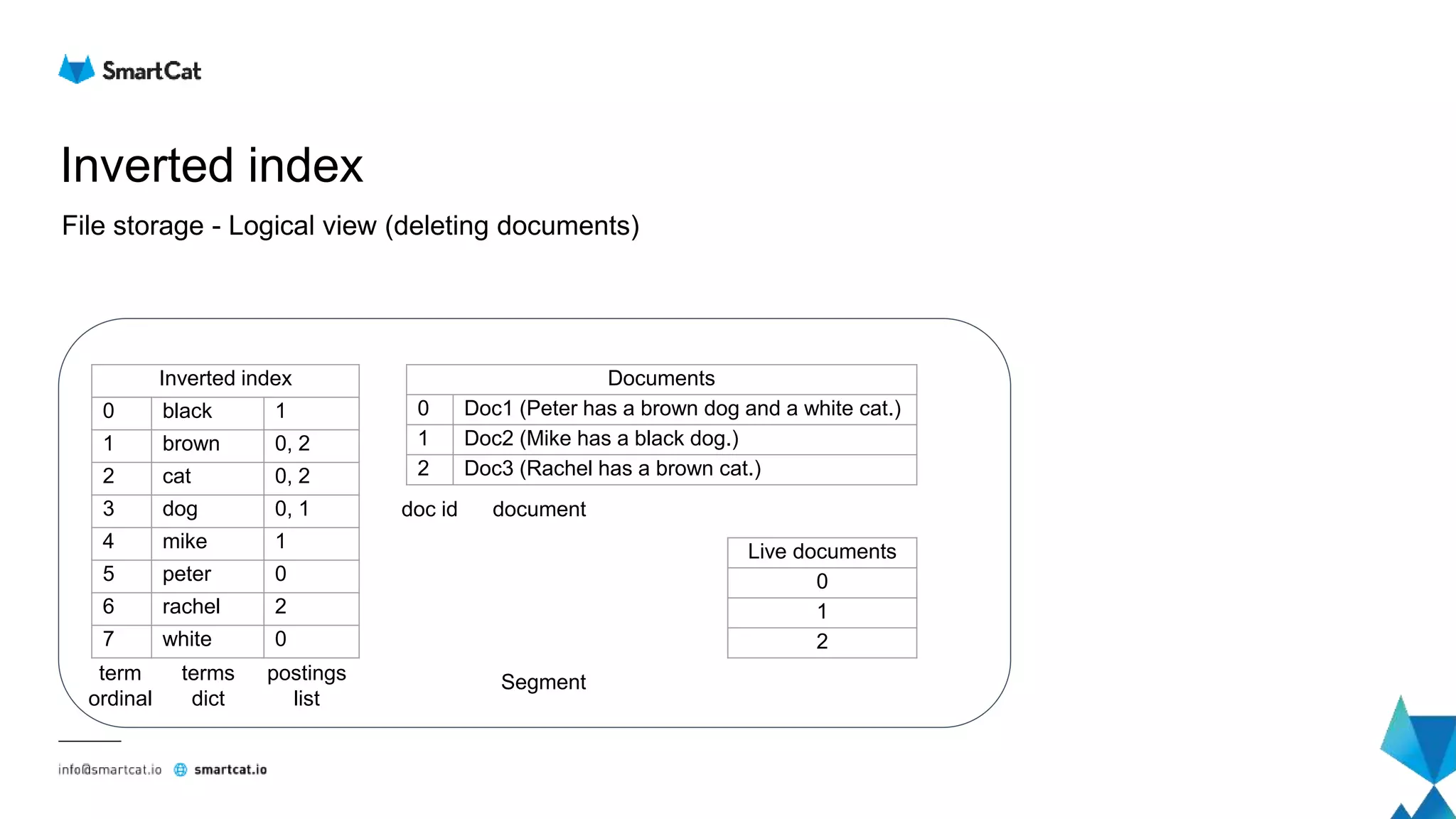
Inverted index
File storage - Logical view (deleting documents)
Inverted index
0 black 1
1 brown 0, 2
2 cat 0, 2
3 dog 0, 1
4 mike 1
5 peter 0
6 rachel 2
7 white 0
Documents
0 Doc1 (Peter has a brown dog and a white cat.)
1 Doc2 (Mike has a black dog.)
2 Doc3 (Rachel has a brown cat.)
term
ordinal
terms
dict
postings
list
doc id document
Segment
Live documents
0
1
2
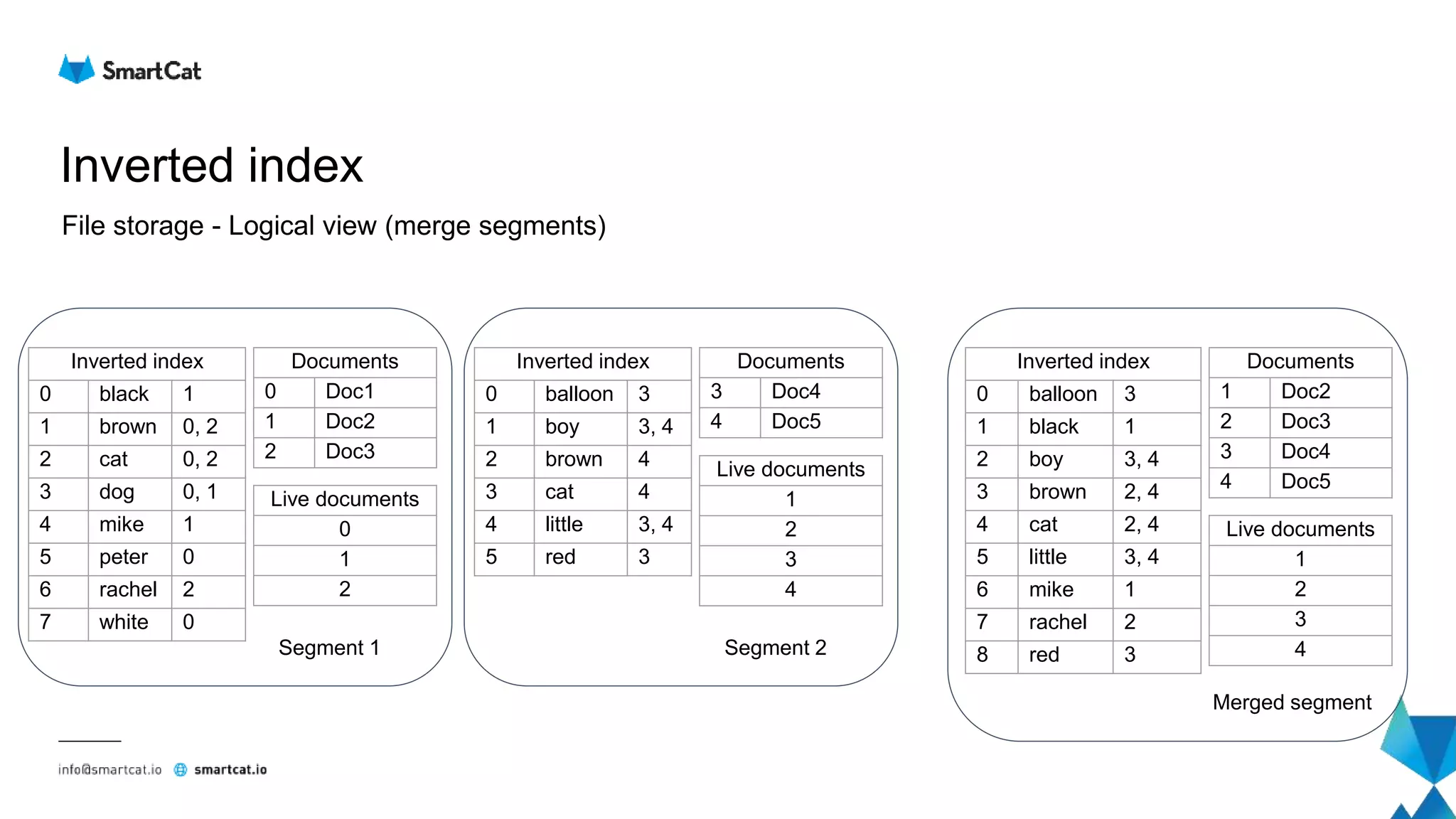
Inverted index
File storage - Logical view (merge segments)
Inverted index
0 black 1
1 brown 0, 2
2 cat 0, 2
3 dog 0, 1
4 mike 1
5 peter 0
6 rachel 2
7 white 0
Documents
0 Doc1
1 Doc2
2 Doc3
Segment 1
Inverted index
0 balloon 3
1 boy 3, 4
2 brown 4
3 cat 4
4 little 3, 4
5 red 3
Documents
3 Doc4
4 Doc5
Segment 2
Inverted index
0 balloon 3
1 black 1
2 boy 3, 4
3 brown 2, 4
4 cat 2, 4
5 little 3, 4
6 mike 1
7 rachel 2
8 red 3
Documents
1 Doc2
2 Doc3
3 Doc4
4 Doc5
Merged segment
Live documents
1
2
3
4
Live documents
0
1
2
Live documents
1
2
3
4
Elasticsearch
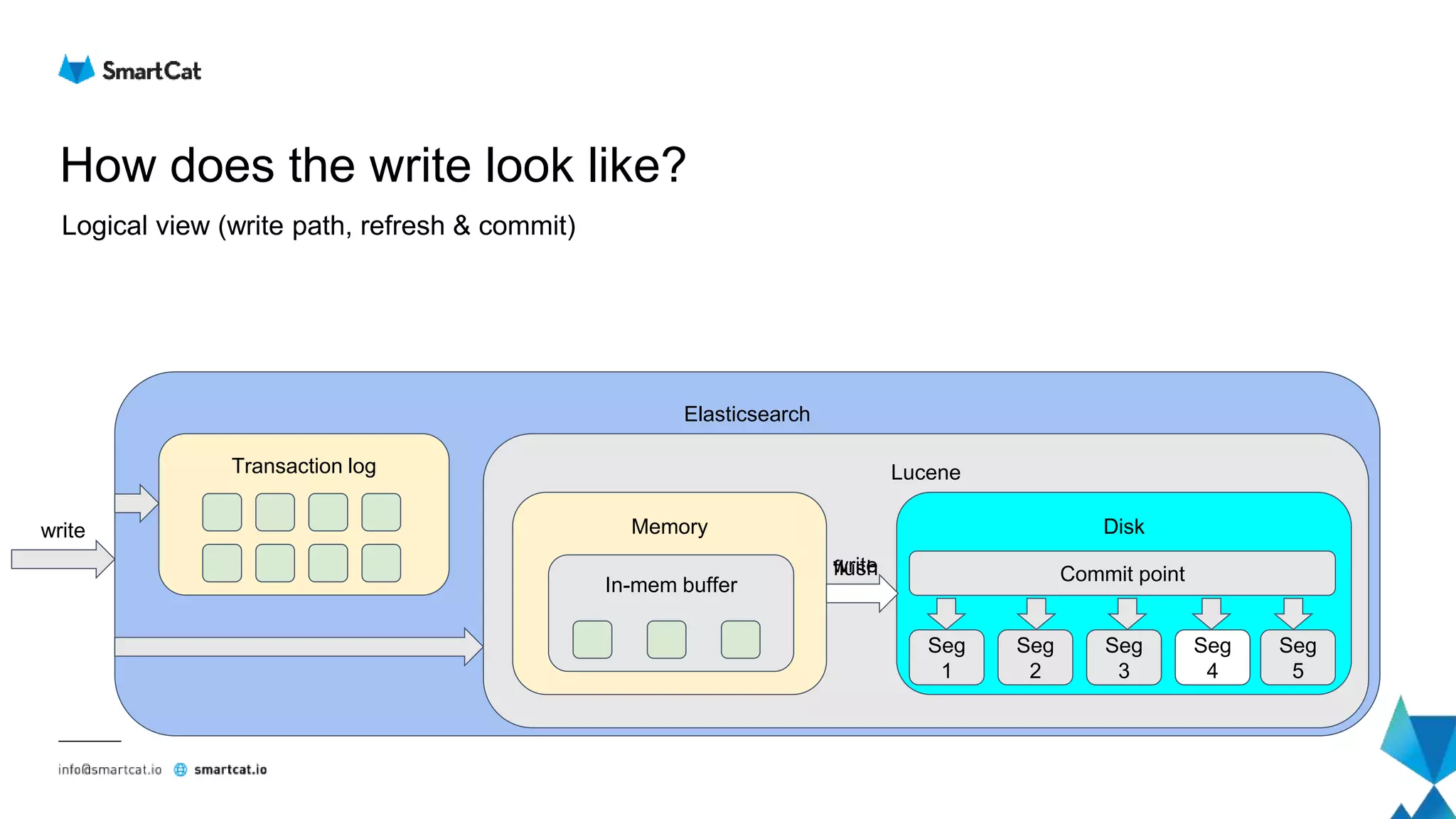
How does the write look like?
Logical view (write path, refresh & commit)
Lucene
write
Memory Disk
Seg
1
Seg
2
Seg
3
Seg
4
write
In-mem buffer
flush
Transaction log
Commit point
Seg
3
Seg
5
Seg
4
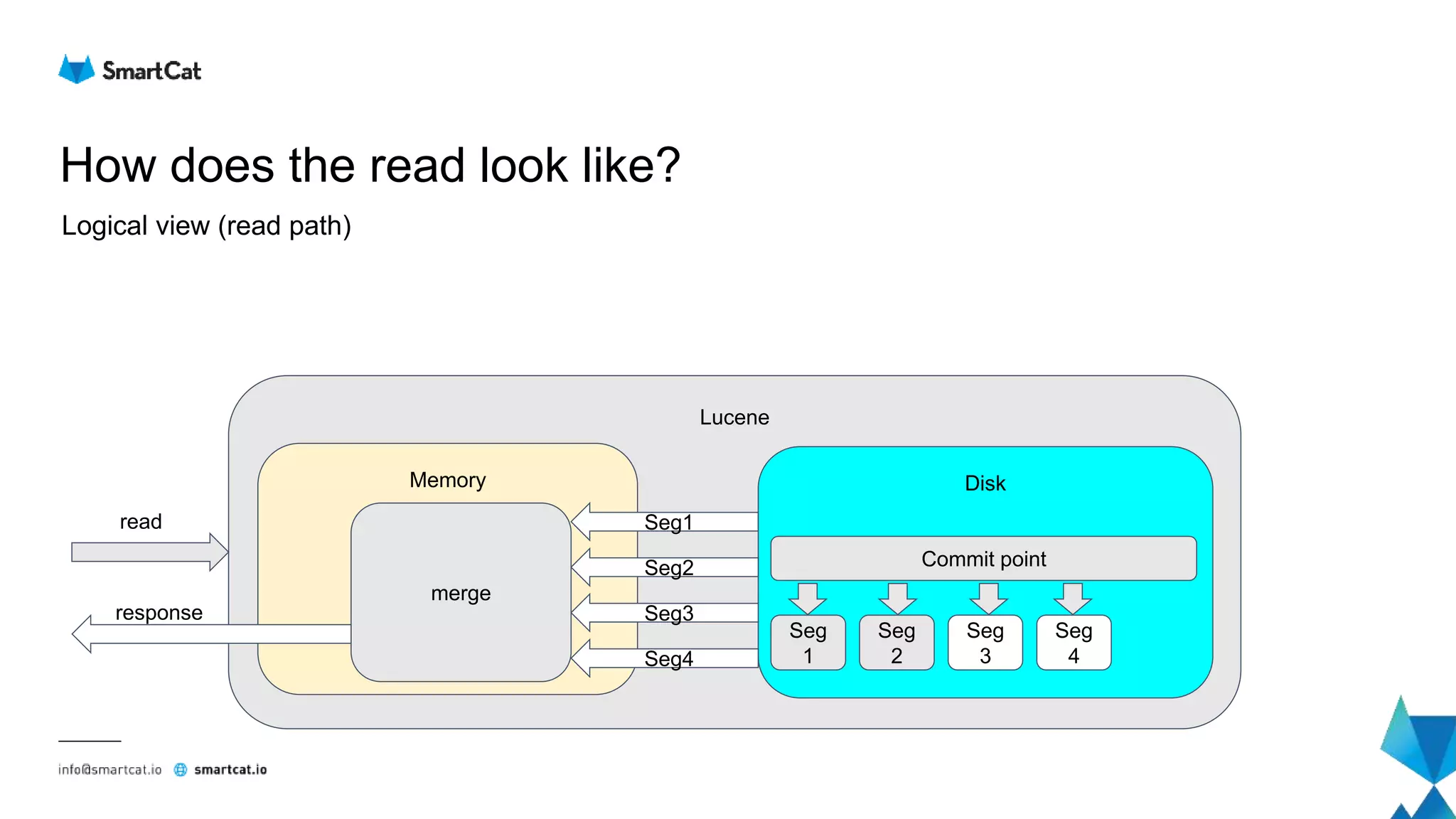
How does the read look like?
Lucene
Memory
read
merge
Seg1
Disk
Seg
1
Seg
2
Commit point
Seg
3
Seg
4
Seg2
Seg3
Seg4
response
Logical view (read path)
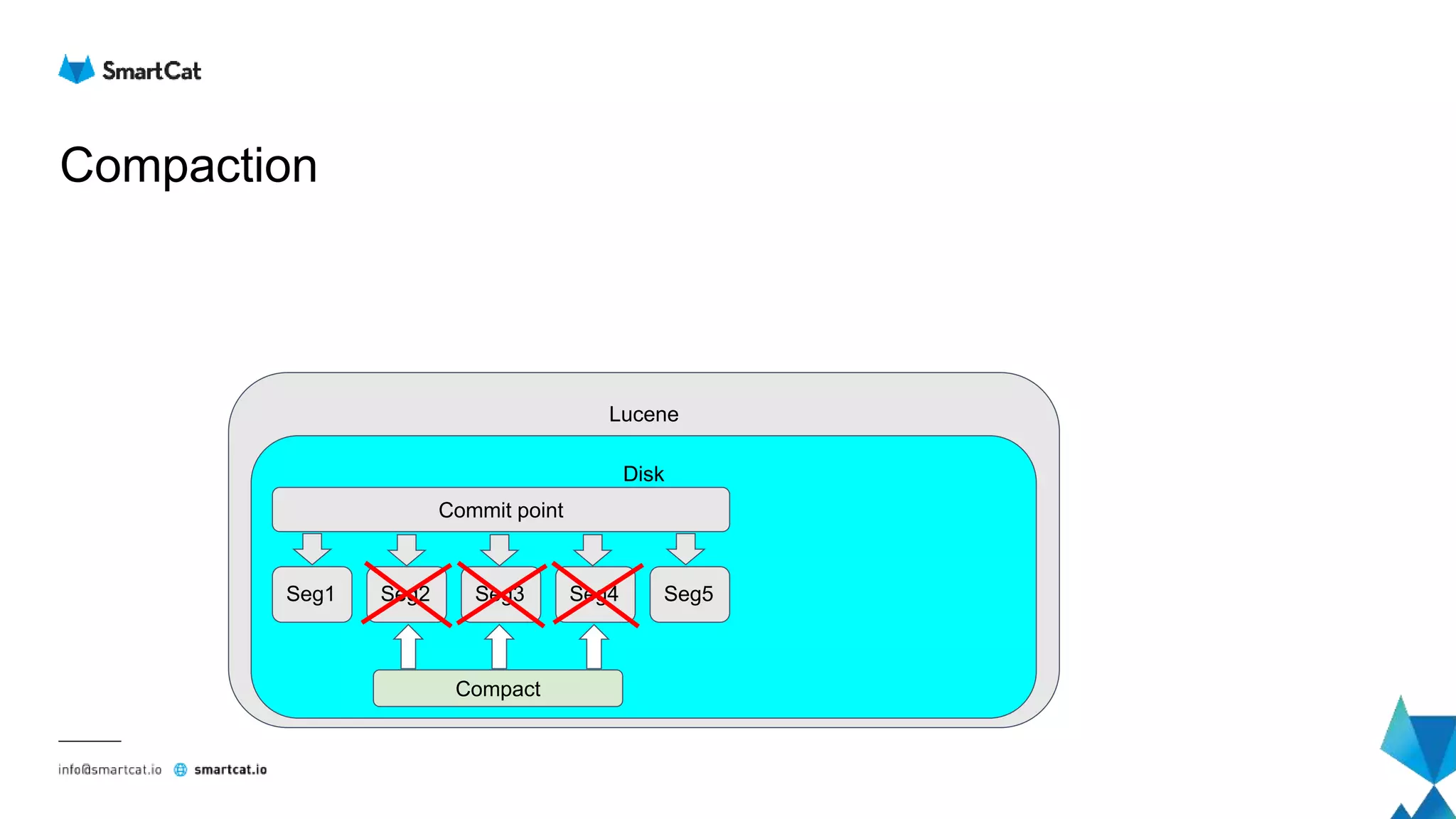
Compaction
Lucene
Disk
Seg1 Seg2 Seg3 Seg4
Compact
Seg5
Commit point
Lucene low level
Lucene codecs
● Abstraction over data format within files
● Keeps low level details away from Lucene
● File formats are codec-dependent
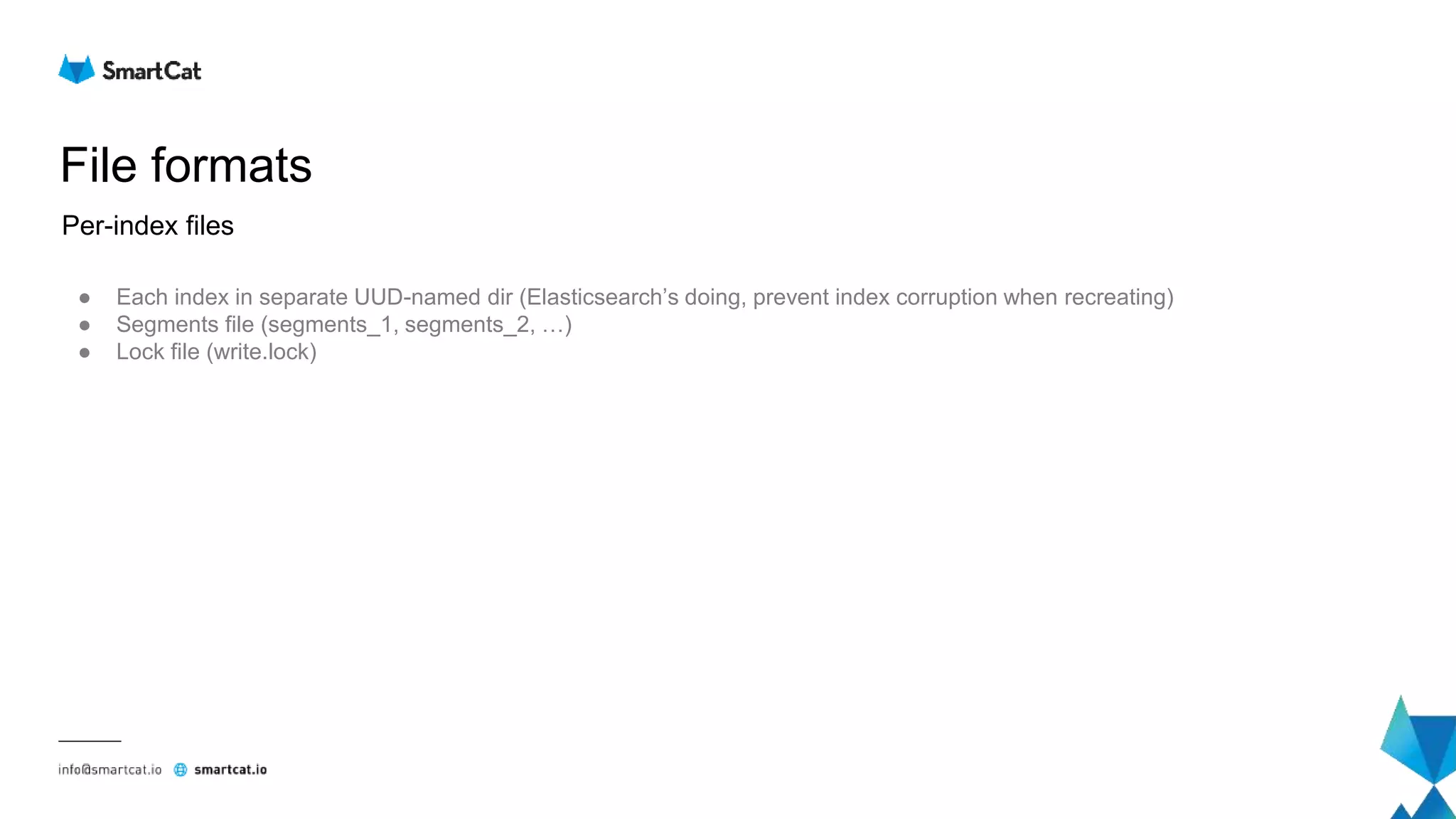
File formats
● Each index in separate UUD-named dir (Elasticsearch’s doing, prevent index corruption when recreating)
● Segments file (segments_1, segments_2, …)
● Lock file (write.lock)
Per-index files
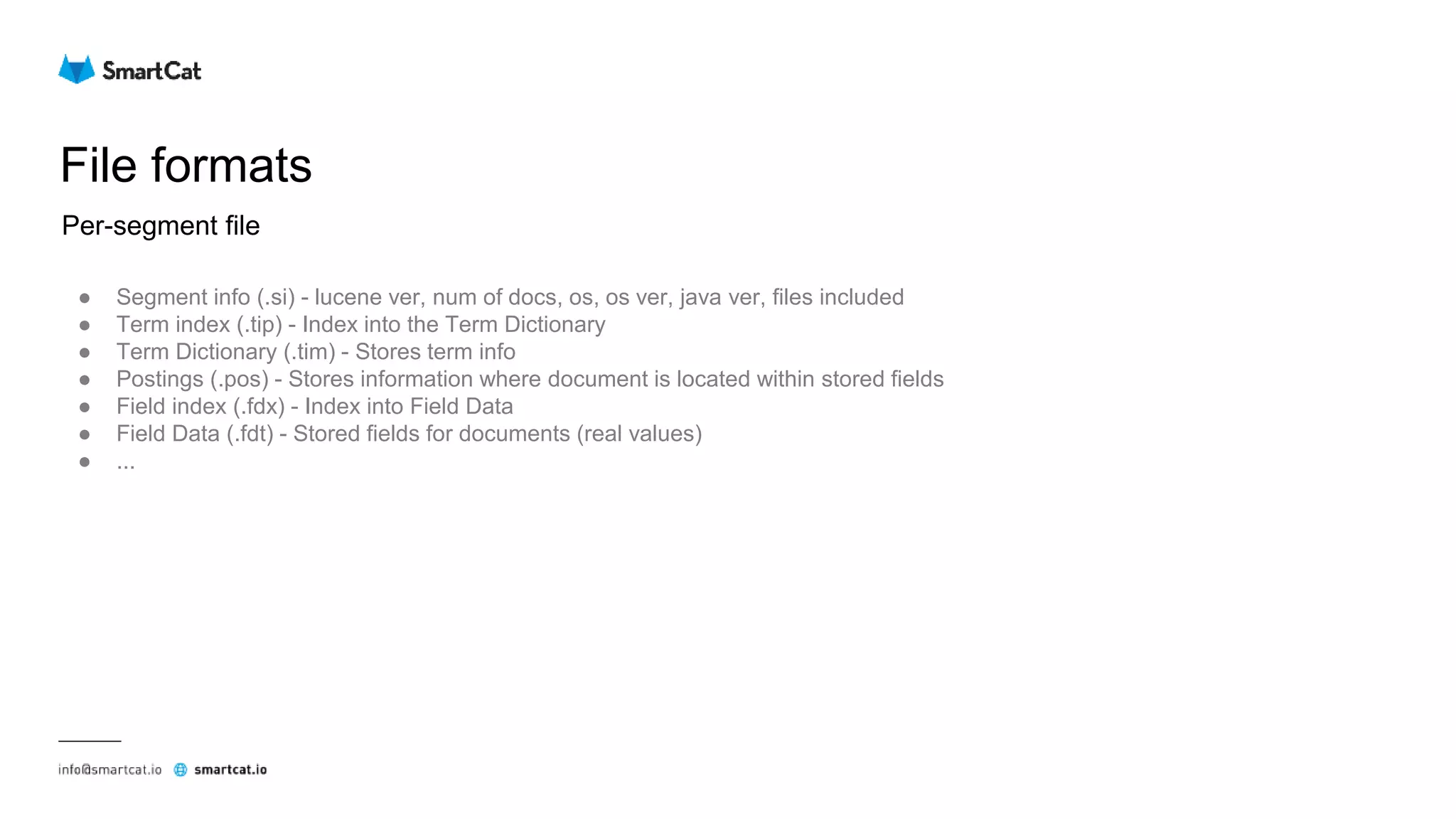
File formats
● Segment info (.si) - lucene ver, num of docs, os, os ver, java ver, files included
● Term index (.tip) - Index into the Term Dictionary
● Term Dictionary (.tim) - Stores term info
● Postings (.pos) - Stores information where document is located within stored fields
● Field index (.fdx) - Index into Field Data
● Field Data (.fdt) - Stored fields for documents (real values)
● ...
Per-segment file
How does the read look like?
Term query
Term = tomato
How does the read look like?
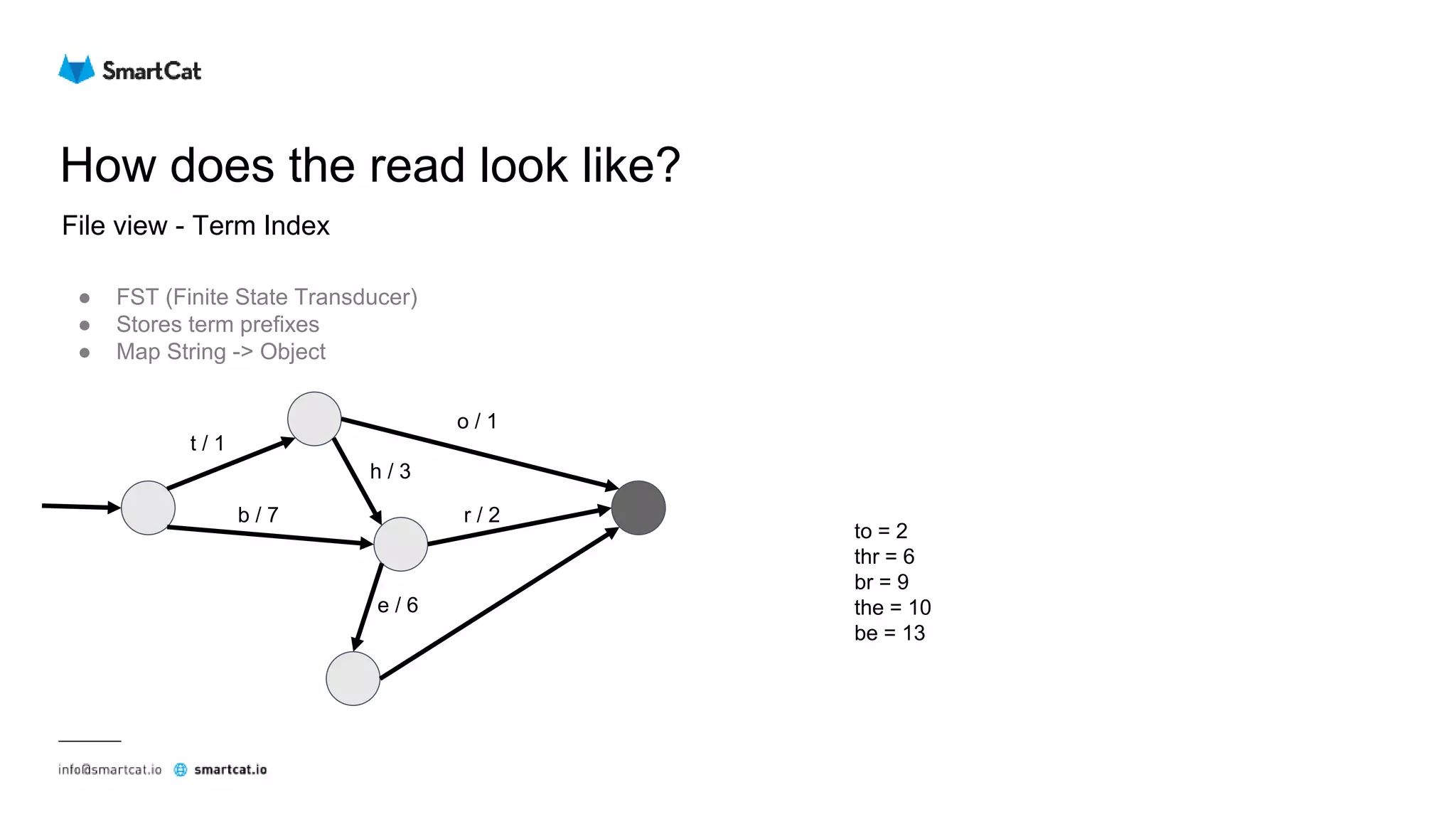
File view - Term Index
● FST (Finite State Transducer)
● Stores term prefixes
● Map String -> Object
t / 1
b / 7
o / 1
r / 2
h / 3
e / 6
to = 2
thr = 6
br = 9
the = 10
be = 13
How does the read look like?
File view - Term Dictionary
● Jump to the given block (offset)
● Number of items within the block (25 - 48)
... ... ...
[Prefix = to]
Suffix Frequency Offset
ad 1 102
ast 1 135
aster 2 167
day 7 211
e 2 233
ilette 3 251
mato 8 287
nic 5 309
oth 3 355
Jump here
Not found
Not found
Not found
Not found
Not found
Not found
Found
How does the read look like?
File view - Postings lists
● Jump to the given offset in the postings list
● Encoded using modified FOR (Frame of Reference) delta
○ delta-encode
○ split into blocks of N = 128 values
○ bit packing per block
○ if remaining, encode with vInt
Example with N = 4
Offset Document ids
... ...
287 1, 3, 4, 6, 8, 20, 22, 26, 30, 31
... ...
Delta encode: 1, 2, 1, 2, 2, 12, 2, 4, 4, 1
Split to blocks: [1, 2, 1, 2] [2, 12, 2, 4] 4, 1
2 bits per value
total: 1 byte
4 bits per value
total: 2 bytes
vInt encoded
1 byte per value
total: 2 bytes
Uncompressed: 40 (10 * 4) bytes
Compressed: 5 (1 + 2 + 2) bytes
How does the read look like?
File view - Field Index & Field Data
● Stored sequentially
● Compressed using LZ4 in 16+KB blocks
Starting Doc id Offset
0 33
4 188
5 312
7 423
12 605
13 811
20 934
25 1084
Field Index
Field Data
[Offset = 33]
Doc 0
Doc 1
Doc 2
Doc 3
[Offset = 188]
Doc 4
[Offset = 312]
Doc 5
Doc 6
[Offset = 423]
Doc 7
...
16KB
16KB
16KB
16KB
References
● https://www.elastic.co/guide/en/elasticsearch/reference/6.3/index.html
● https://lucene.apache.org/core/7_3_1/index.html
● https://www.elastic.co/blog/tracking-in-sync-shard-copies
● https://www.elastic.co/blog/found-elasticsearch-from-the-bottom-up
● https://www.youtube.com/watch?v=T5RmMNDR5XI
● https://www.youtube.com/watch?v=c9O5_a50aOQ
● https://www.elastic.co/guide/en/elasticsearch/guide/current/distributed-cluster.html
● http://blog.mikemccandless.com/2010/12/using-finite-state-transducers-in.html
Thank you

Elasticsearch - under the hood

  • 2.
  • 3.
  • 4.
    What is it?What is it good for? ● Full text search ● Scalable and robust full text search
  • 5.
    What is Lucene?What it has to do with Elasticsearch? ● Full text search library ● Elasticsearch is just a wrapper around it which provides scalability, durability and REST API
  • 6.
    API level Index document POSTdoc/default { "class": "ConfigurationParser", "method": "build", "description": "<p class=’paragraph’>Creates an instance of <link>ObjectGenerator</link> based on provided configuration. Resulting <link>ObjectGenerator</link> will try to convert configured output to specified <code>objectType</code>.</p>" }
  • 7.
    API level Update document POSTdoc/default/1/_update { "doc": { "description": "New description value" } }
  • 8.
  • 9.
    API level Search GET doc/default/_search { "query":{ "match": { "title": { "query": "ObjectGenerator" } } } }
  • 10.
  • 11.
    How does thatlook like? Transaction Log LuceneREST ES node UUID name ES ES Cluster “Elasticsearch” Transaction Log LuceneREST ES node UUID name ES Transaction Log LuceneREST ES node UUID name ES Transaction Log LuceneREST ES node UUID name ES
  • 12.
    All nodes areof the same type? ● Master node ● Data node ● Ingest node ● Tribe node ● Coordinator node ● Default case
  • 13.
  • 14.
    Replicas Node Node Index - S1R1 Doc1 Doc4 Doc8 Node Node Node Index - S1 R2 Doc1 Doc4 Doc8 Index - S1 R3 Doc1 Doc4 Doc8 Index - S1 R4 Doc1 Doc4 Doc8 Index - S1 P Doc1 Doc4 Doc8
  • 15.
    Scaling ● Single nodecluster with 3 shards and 1 replica ● Unassigned shards problem Node 1 S1 P S2 P S3 P Single node cluster State:
  • 16.
    Scaling out ● Twonode cluster with 3 shards and 1 replica ● To prevent unassigned shards: number of nodes > number of replicas + 1 Node 1 S1 P S2 P S3 P Two node cluster State: Node 2 S1 R S2 R S3 R
  • 17.
    Scaling out ● Threenode cluster with 3 shards and 1 replica ● Load spread across all nodes Node 1 S1 P S2 P Three node cluster State: Node 2 S2 R Node 3 S1 R S3 P S3 R
  • 18.
    Scaling out ● Sevennode cluster with 3 shards and 1 replica, one node unused ● Increase number of shards (not possible) ● Increase replication factor (possible on running cluster) Node 1 S1 P Seven node cluster State: Node 2 S2 P Node 3 S3 P Node 4 S1 R Node 5 S2 R Node 6 S3 R Node 7
  • 19.
    Scaling in ● Makesure you have enough nodes to support replication factor when node is killed ● Wait for green status ● If necessary, lower the replication factor
  • 20.
    Replacing the node ●Same as scale out / scale in
  • 21.
    How does thewrite look like? Node 2 S2 P S3 R Node 4 S1 R S4 P Node 3 S1 ISR S2 ISR Node 5 S1 ISR S4 ISR Node 6 S1 P S3 ISR S4 ISR Node 1 S2 ISR S3 P ES Cluster Generate doc ID if not present Hash ID to determine replication group (routing param) Coordinator node
  • 22.
    How does theread look like? Node 2 S2 P S3 R Node 4 S1 R S4 P Node 3 S1 ISR S2 ISR Node 5 S1 ISR S4 ISR Node 6 S1 P S3 ISR S4 ISR Node 1 S2 ISR S3 P ES Cluster Coordinator node Resolve search request to relevant shards Combine the results
  • 23.
    What if somethinggoes wrong? ● Network partition (one master) ● Network partition (two masters) ● Network partition (three masters) ● Primary shard node failure (in sync replicas available) ● Primary shard node failure (no in sync replicas available) ● Write replication (replica write failure) ● Node failure (read)
  • 24.
    What if somethinggoes wrong? Network partition (one master) ● discovery.zen.no_master_block Shard 2 P Shard 2 R Shard 1 P Shard 2 RShard 1 R Master ES Cluster
  • 25.
    What if somethinggoes wrong? Network partition (two masters) ● discovery.zen.minimum_master_nodes Shard 2 P Master Shard 1 P Shard 2 RShard 1 R Master ES Cluster
  • 26.
    What if somethinggoes wrong? Network partition (three masters) ● discovery.zen.minimum_master_nodes Shard 2 P Master Shard 1 P MasterShard 1 R Master ES Cluster
  • 27.
    What if somethinggoes wrong? Primary shard node failure (in sync replicas available) Shard 2 P Shard 1 ISR Shard 1 P Shard 2 ISRShard 1 R Master ES Cluster Shard 1 P (new)
  • 28.
    What if somethinggoes wrong? Primary shard node failure (no in sync replicas available) Shard 2 P Shard 1 R Shard 1 P Shard 2 ISRShard 1 R Master ES Cluster allocate_stale_primary cmd Shard 1 ISR
  • 29.
    What if somethinggoes wrong? Write replication (replica write failure) Coordinator node Shard 1 ISR Shard 1 P Shard 1 RShard 1 ISR Master ES Cluster Shard 1 R
  • 30.
    What if somethinggoes wrong? Node failure (read) Coordinator node Shard 1 P Shard 1 R Shard 2 PShard 2 R Master ES Cluster
  • 31.
  • 32.
    How is writeprocessed? Elasticsearch Lucene Character filters Tokenizer Token filters File storage
  • 33.
    How is writeprocessed? ● Mapping character filter ● HTML strip character filter ● Pattern replace character filter Character fiters <p class=’paragraph’>Creates an instance of <link>ObjectGenerator</link> based on provided configuration. Resulting <link>ObjectGenerator</link> will try to convert configured output to specified <code>objectType</code>.</p> Creates an instance of ObjectGenerator based on provided configuration. Resulting ObjectGenerator will try to convert configured output to specified objectType.
  • 34.
    How is writeprocessed? ● Standard tokenizer ● Keyword tokenizer ● Letter tokenizer ● Lowercase tokenizer ● N gram tokenizer ● Edge n gram tokenizer ● Regular expression pattern tokenizer Tokenizer Creates an instance of ObjectGenerator based on provided configuration. Resulting ObjectGenerator will try to convert configured output to specified objectType. [Creates, an, instance, of, ObjectGenerator, based, on, provided, configuration, Resulting, ObjectGenerator, will, try, to, convert, configured, output, to, specified, objectType]
  • 35.
    How is writeprocessed? ● Lower case filter ● English possessive filter ● Stop filter ● Synonym filter ● Reversed wildcard filter ● English minimal stem filter Token filters [Creates, an, instance, of, ObjectGenerator, based, on, provided, configuration, Resulting, ObjectGenerator, will, try, to, convert, configured, output, to, specified, objectType] [creates, instance, ObjectGenerator, based, provided, configuration, resulting, try, convert, configured, output, specified, objectType]
  • 36.
    Inverted index File storage- Logical view ● Difference between forward and inverted index ● Doc1: “Peter has a brown dog and a white cat” ● Doc2: “Mike has a black dog” ● Doc3: “Rachel has a brown cat” Forward index Doc1 brown, cat, dog, peter, white Doc2 black, dog, mike Doc3 brown, cat, rachel Inverted index 0 black 1 1 brown 0, 2 2 cat 0, 2 3 dog 0, 1 4 mike 1 5 peter 0 6 rachel 2 7 white 0 Documents 0 Doc1 (Peter has a brown dog and a white cat.) 1 Doc2 (Mike has a black dog.) 2 Doc3 (Rachel has a brown cat.) term ordinal terms dict postings list doc id document Segment
  • 37.
    Inverted index File storage- Logical view (deleting documents) Inverted index 0 black 1 1 brown 0, 2 2 cat 0, 2 3 dog 0, 1 4 mike 1 5 peter 0 6 rachel 2 7 white 0 Documents 0 Doc1 (Peter has a brown dog and a white cat.) 1 Doc2 (Mike has a black dog.) 2 Doc3 (Rachel has a brown cat.) term ordinal terms dict postings list doc id document Segment Live documents 0 1 2
  • 38.
    Inverted index File storage- Logical view (merge segments) Inverted index 0 black 1 1 brown 0, 2 2 cat 0, 2 3 dog 0, 1 4 mike 1 5 peter 0 6 rachel 2 7 white 0 Documents 0 Doc1 1 Doc2 2 Doc3 Segment 1 Inverted index 0 balloon 3 1 boy 3, 4 2 brown 4 3 cat 4 4 little 3, 4 5 red 3 Documents 3 Doc4 4 Doc5 Segment 2 Inverted index 0 balloon 3 1 black 1 2 boy 3, 4 3 brown 2, 4 4 cat 2, 4 5 little 3, 4 6 mike 1 7 rachel 2 8 red 3 Documents 1 Doc2 2 Doc3 3 Doc4 4 Doc5 Merged segment Live documents 1 2 3 4 Live documents 0 1 2 Live documents 1 2 3 4
  • 39.
    Elasticsearch How does thewrite look like? Logical view (write path, refresh & commit) Lucene write Memory Disk Seg 1 Seg 2 Seg 3 Seg 4 write In-mem buffer flush Transaction log Commit point Seg 3 Seg 5 Seg 4
  • 40.
    How does theread look like? Lucene Memory read merge Seg1 Disk Seg 1 Seg 2 Commit point Seg 3 Seg 4 Seg2 Seg3 Seg4 response Logical view (read path)
  • 41.
    Compaction Lucene Disk Seg1 Seg2 Seg3Seg4 Compact Seg5 Commit point
  • 42.
  • 43.
    Lucene codecs ● Abstractionover data format within files ● Keeps low level details away from Lucene ● File formats are codec-dependent
  • 44.
    File formats ● Eachindex in separate UUD-named dir (Elasticsearch’s doing, prevent index corruption when recreating) ● Segments file (segments_1, segments_2, …) ● Lock file (write.lock) Per-index files
  • 45.
    File formats ● Segmentinfo (.si) - lucene ver, num of docs, os, os ver, java ver, files included ● Term index (.tip) - Index into the Term Dictionary ● Term Dictionary (.tim) - Stores term info ● Postings (.pos) - Stores information where document is located within stored fields ● Field index (.fdx) - Index into Field Data ● Field Data (.fdt) - Stored fields for documents (real values) ● ... Per-segment file
  • 46.
    How does theread look like? Term query Term = tomato
  • 47.
    How does theread look like? File view - Term Index ● FST (Finite State Transducer) ● Stores term prefixes ● Map String -> Object t / 1 b / 7 o / 1 r / 2 h / 3 e / 6 to = 2 thr = 6 br = 9 the = 10 be = 13
  • 48.
    How does theread look like? File view - Term Dictionary ● Jump to the given block (offset) ● Number of items within the block (25 - 48) ... ... ... [Prefix = to] Suffix Frequency Offset ad 1 102 ast 1 135 aster 2 167 day 7 211 e 2 233 ilette 3 251 mato 8 287 nic 5 309 oth 3 355 Jump here Not found Not found Not found Not found Not found Not found Found
  • 49.
    How does theread look like? File view - Postings lists ● Jump to the given offset in the postings list ● Encoded using modified FOR (Frame of Reference) delta ○ delta-encode ○ split into blocks of N = 128 values ○ bit packing per block ○ if remaining, encode with vInt Example with N = 4 Offset Document ids ... ... 287 1, 3, 4, 6, 8, 20, 22, 26, 30, 31 ... ... Delta encode: 1, 2, 1, 2, 2, 12, 2, 4, 4, 1 Split to blocks: [1, 2, 1, 2] [2, 12, 2, 4] 4, 1 2 bits per value total: 1 byte 4 bits per value total: 2 bytes vInt encoded 1 byte per value total: 2 bytes Uncompressed: 40 (10 * 4) bytes Compressed: 5 (1 + 2 + 2) bytes
  • 50.
    How does theread look like? File view - Field Index & Field Data ● Stored sequentially ● Compressed using LZ4 in 16+KB blocks Starting Doc id Offset 0 33 4 188 5 312 7 423 12 605 13 811 20 934 25 1084 Field Index Field Data [Offset = 33] Doc 0 Doc 1 Doc 2 Doc 3 [Offset = 188] Doc 4 [Offset = 312] Doc 5 Doc 6 [Offset = 423] Doc 7 ... 16KB 16KB 16KB 16KB
  • 51.
    References ● https://www.elastic.co/guide/en/elasticsearch/reference/6.3/index.html ● https://lucene.apache.org/core/7_3_1/index.html ●https://www.elastic.co/blog/tracking-in-sync-shard-copies ● https://www.elastic.co/blog/found-elasticsearch-from-the-bottom-up ● https://www.youtube.com/watch?v=T5RmMNDR5XI ● https://www.youtube.com/watch?v=c9O5_a50aOQ ● https://www.elastic.co/guide/en/elasticsearch/guide/current/distributed-cluster.html ● http://blog.mikemccandless.com/2010/12/using-finite-state-transducers-in.html
  • 52.