Elastic-R
     A Virtual Collaborative
   Environment for Scientific
Computing and Data Analysis in the
             Cloud
              Karim Chine
          karim.chine@cloudera.co.uk
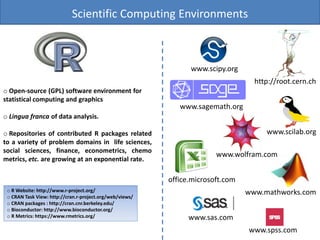
Scientific Computing Environments


                                                                www.scipy.org
                                                                                   http://root.cern.ch
o Open-source (GPL) software environment for
statistical computing and graphics
                                                             www.sagemath.org
o Lingua franca of data analysis.

o Repositories of contributed R packages related                                      www.scilab.org
to a variety of problem domains in life sciences,
social sciences, finance, econometrics, chemo
                                                                        www.wolfram.com
metrics, etc. are growing at an exponential rate.

                                                          office.microsoft.com
 o R Website: http://www.r-project.org/                                          www.mathworks.com
 o CRAN Task View: http://cran.r-project.org/web/views/
 o CRAN packages : http://cran.cnr.berkeley.edu/
 o Bioconductor: http://www.bioconductor.org/
 o R Metrics: https://www.rmetrics.org/                         www.sas.com
                                                                                 www.spss.com
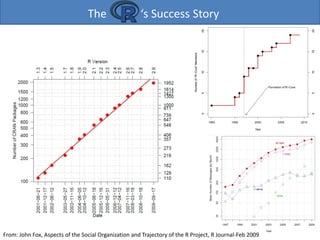
The                  ‘s Success Story


From: John Fox, Aspects of the Social Organization and Trajectory of the R Project, R Journal-Feb 2009
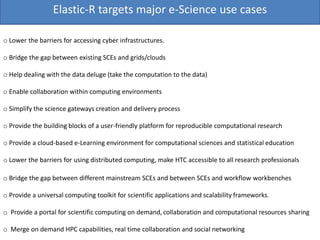
Scientific Computing Software, HPC and Usability


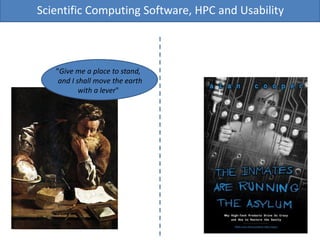
   "Give me a place to stand,
    and I shall move the earth
           with a lever"
Extract from the NetSolve/GridSolve Description Document

The emergence of Grid computing as the prototype of a next generation cyberinfrastructure for science
has excited high expectations for its potential as an accelerator of discovery, but it has also raised
questions about whether and how the broad population of research professionals, who must be the
foundation of such productivity, can be motivated to adopt this new and more complex way of working.
The rise of the new era of scientific modeling and simulation has, after all, been precipitous, and many
science and engineering professionals have only recently become comfortable with the relatively simple
world of the uniprocessor workstations and desktop scientific computing tools. In that world, software
packages such as Matlab and Mathematica represent general-purpose scientific computing
environments (SCEs) that enable users — totaling more than a million worldwide — to solve a wide
variety of problems through flexible user interfaces that can model in a natural way the mathematical
aspects of many different problem domains.
Moreover, the ongoing, exponential increase in the computing resources supplied by the typical
workstation makes these SCEs more and more powerful, and thereby tends to reduce the need for the
kind of resource sharing that represents a major strength of Grid computing [1]. Certainly there are
various forces now urging collaboration across disciplines and distances, and the burgeoning Grid
community, which aims to facilitate such collaboration, has made significant progress in mitigating the
well-known complexities of building, operating, and using distributed computing environments. But it is
unrealistic to expect the transition of research professionals to the Grid to be anything but halting and
slow if it means abandoning the SCEs that they rightfully view as a major source of their productivity.
We therefore believe that Grid computing’s prospects for success will tend to rise and fall according to
its ability to interface smoothly with the general purpose SCEs that are likely to continue to dominate
the toolbox of its targeted user base.

Arnold, D. and Agrawal, S. and Blackford, S. and Dongarra, J. and Miller, M. and Seymour, K. and Sagi, K. and Shi, Z. and Vadhiyar, S.
Elastic-R targets major e-Science use cases

o Lower the barriers for accessing cyber infrastructures.

o Bridge the gap between existing SCEs and grids/clouds

o Help dealing with the data deluge (take the computation to the data)

o Enable collaboration within computing environments

o Simplify the science gateways creation and delivery process

o Provide the building blocks of a user-friendly platform for reproducible computational research

o Provide a cloud-based e-Learning environment for computational sciences and statistical education

o Lower the barriers for using distributed computing, make HTC accessible to all research professionals

o Bridge the gap between different mainstream SCEs and between SCEs and workflow workbenches

o Provide a universal computing toolkit for scientific applications and scalability frameworks.

o Provide a portal for scientific computing on demand, collaboration and computational resources sharing

o Merge on demand HPC capabilities, real time collaboration and social networking
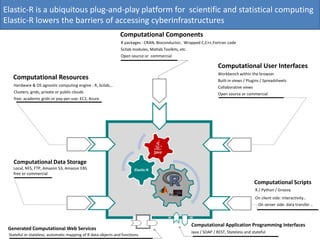
Elastic-R is a ubiquitous plug-and-play platform for scientific and statistical computing
Elastic-R lowers the barriers of accessing cyberinfrastructures
                                                              Computational Components
                                                               R packages : CRAN, Bioconductor, Wrapped C,C++,Fortran code
                                                               Scilab modules, Matlab Toolkits, etc.
                                                               Open source or commercial

                                                                                                                      Computational User Interfaces
                                                                                                                      Workbench within the browser
   Computational Resources                                                                                            Built-in views / Plugins / Spreadsheets
   Hardware & OS agnostic computing engine : R, Scilab,..                                                             Collaborative views
   Clusters, grids, private or public clouds                                                                          Open source or commercial
   free: academic grids or pay-per-use: EC2, Azure


   Computational Data Storage
   Local, NFS, FTP, Amazon S3, Amazon EBS                             Elastic-R
   free or commercial

                                                                                                                                            Computational Scripts
                                                                                                                                            R / Python / Groovy
                                                                                                                                            On client side: interactivity..
                                                                                                                                             On server side: data transfer ..


                                                                                                       Computational Application Programming Interfaces
 Generated Computational Web Services
                                                                                                       Java / SOAP / REST, Stateless and stateful
 Stateful or stateless, automatic mapping of R data objects and functions
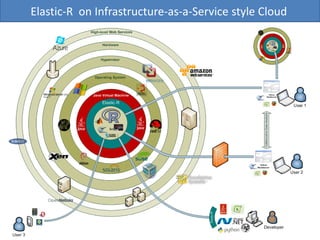
Elastic-R on Infrastructure-as-a-Service style Cloud
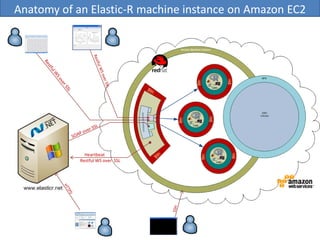
Anatomy of an Elastic-R machine instance on Amazon EC2


              Heartbeat
            Restful WS over SSL
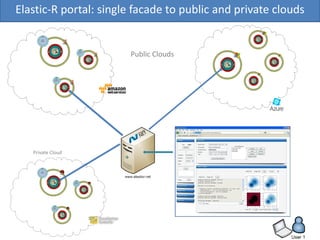
Elastic-R portal: single facade to public and private clouds


                       Public Clouds


   Private Cloud
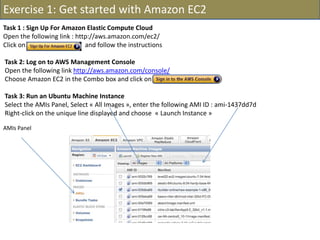
Exercise 1: Get started with Amazon EC2
Task 1 : Sign Up For Amazon Elastic Compute Cloud
Open the following link : http://aws.amazon.com/ec2/
Click on                     and follow the instructions

Task 2: Log on to AWS Management Console
Open the following link http://aws.amazon.com/console/
Choose Amazon EC2 in the Combo box and click on

Task 3: Run an Ubuntu Machine Instance
Select the AMIs Panel, Select « All Images », enter the following AMI ID : ami-1437dd7d
Right-click on the unique line displayed and choose « Launch Instance »

AMIs Panel
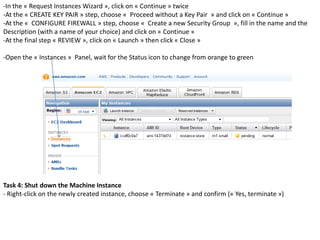
-In the « Request Instances Wizard », click on « Continue » twice
-At the « CREATE KEY PAIR » step, choose « Proceed without a Key Pair » and click on « Continue »
-At the « CONFIGURE FIREWALL » step, choose « Create a new Security Group », fill in the name and the
Description (with a name of your choice) and click on « Continue »
-At the final step « REVIEW », click on « Launch » then click « Close »

-Open the « Instances » Panel, wait for the Status icon to change from orange to green


Task 4: Shut down the Machine Instance
- Right-click on the newly created instance, choose « Terminate » and confirm (« Yes, terminate »)
Exercise 2: Get started with Elastic-R
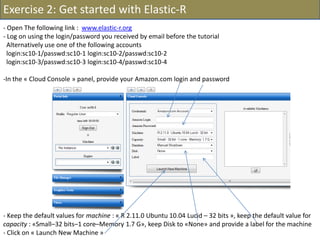
- Open The following link : www.elastic-r.org
- Log on using the login/password you received by email before the tutorial
  Alternatively use one of the following accounts
  login:sc10-1/passwd:sc10-1 login:sc10-2/passwd:sc10-2
  login:sc10-3/passwd:sc10-3 login:sc10-4/passwd:sc10-4

-In the « Cloud Console » panel, provide your Amazon.com login and password


- Keep the default values for machine : « R 2.11.0 Ubuntu 10.04 Lucid – 32 bits », keep the default value for
capacity : «Small–32 bits–1 core–Memory 1.7 G», keep Disk to «None» and provide a label for the machine
- Click on « Launch New Machine »
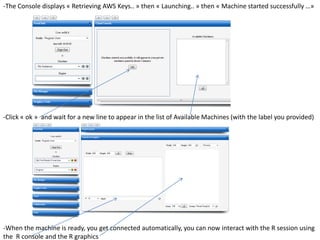
-The Console displays « Retrieving AWS Keys.. » then « Launching.. » then « Machine started successfully …»


-Click « ok » and wait for a new line to appear in the list of Available Machines (with the label you provided)


-When the machine is ready, you get connected automatically, you can now interact with the R session using
the R console and the R graphics
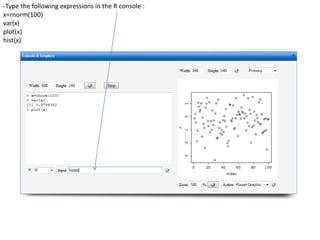
-Type the following expressions in the R console :
x=rnorm(100)
var(x)
plot(x)
hist(x)
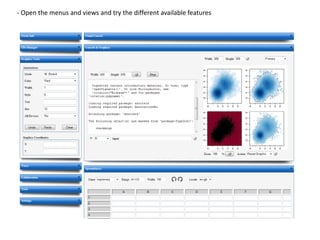
- Open the menus and views and try the different available features
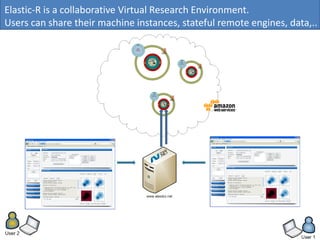
Elastic-R is a collaborative Virtual Research Environment.
Users can share their machine instances, stateful remote engines, data,..
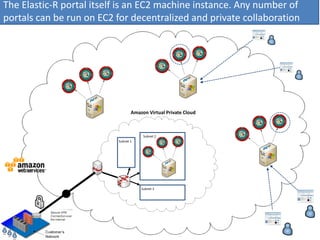
The Elastic-R portal itself is an EC2 machine instance. Any number of
portals can be run on EC2 for decentralized and private collaboration


                                 Amazon Virtual Private Cloud


                                      Subnet 2
                          Subnet 1


                                     Subnet 3
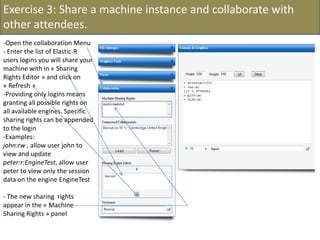
Exercise 3: Share a machine instance and collaborate with
other attendees.
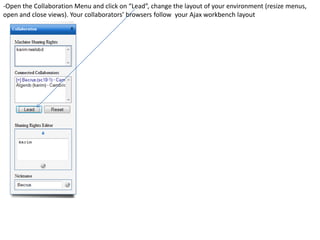
-Open the collaboration Menu
- Enter the list of Elastic-R
users logins you will share your
machine with in « Sharing
Rights Editor » and click on
« Refresh »
-Providing only logins means
granting all possible rights on
all available engines. Specific
sharing rights can be appended
to the login
-Examples:
john:rw , allow user john to
view and update
peter:r:EngineTest, allow user
peter to view only the session
data on the engine EngineTest

- The new sharing rights
appear in the « Machine
Sharing Rights » panel
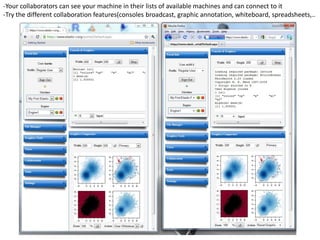
-Your collaborators can see your machine in their lists of available machines and can connect to it
-Try the different collaboration features(consoles broadcast, graphic annotation, whiteboard, spreadsheets,..
-Open the Collaboration Menu and click on “Lead”, change the layout of your environment (resize menus,
open and close views). Your collaborators’ browsers follow your Ajax workbench layout
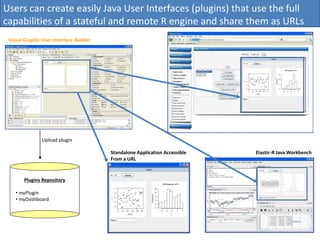
Users can create easily Java User Interfaces (plugins) that use the full
capabilities of a stateful and remote R engine and share them as URLs
                                                             Elastic-R AJAX Workbench


 Visual Graphic User Interface Builder


                Upload plugin

                                         Standalone Application Accessible   Elastic-R Java Workbench
                                         From a URL


        Plugins Repository

    • myPlugin
    • myDashboard
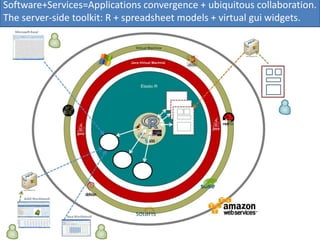
Software+Services=Applications convergence + ubiquitous collaboration.
The server-side toolkit: R + spreadsheet models + virtual gui widgets.
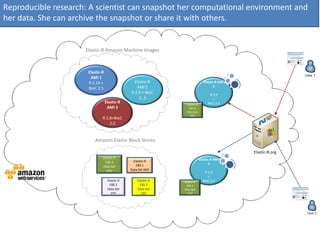
Reproducible research: A scientist can snapshot her computational environment and
her data. She can archive the snapshot or share it with others.


                     Elastic-R Amazon Machine Images


                      Elastic-R
                       AMI 1
                      R 2.10 +                   Elastic-R                      Elastic-R AMI
                                                  AMI 2                                2
                      BioC 2.5
                                               R 2.9 + BioC                        R 2.9
                                                   2..3                              +
                                  Elastic-R                      Elastic-R        BioC 2.3
                                   AMI 3                           EBS 4
                                                                 Data Set
                                                                   VVV
                              R 2.8+BioC
                                  2.0


                         Amazon Elastic Block Stores

                                                                                                Elastic-R.org
                              Elastic-R                                      Elastic-R AMI
                               EBS 4             Elastic-R
                                                   EBS 1                            2
                              Data Set
                                VVV            Data Set XXX
                                                                                R 2.9
                                                                                  +
                                   Elastic-R       Elastic-R   Elastic-R       BioC 2.3
                                     EBS 2           EBS 3       EBS 4
                                   Data Set        Data Set    Data Set
                                      YYY             ZZZ        VVV
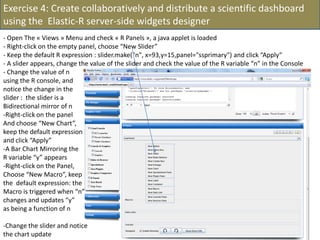
Exercise 4: Create collaboratively and distribute a scientific dashboard
using the Elastic-R server-side widgets designer
- Open The « Views » Menu and check « R Panels », a java applet is loaded
- Right-click on the empty panel, choose “New Slider”
- Keep the default R expression : slider.make("n", x=93,y=15,panel="ssprimary") and click “Apply”
- A slider appears, change the value of the slider and check the value of the R variable “n” in the Console
- Change the value of n
using the R console, and
notice the change in the
slider : the slider is a
Bidirectional mirror of n
-Right-click on the panel
And choose “New Chart”,
keep the default expression
and click “Apply”
-A Bar Chart Mirroring the
R variable “y” appears
-Right-click on the Panel,
Choose “New Macro”, keep
the default expression: the
Macro is triggered when “n”
changes and updates “y”
as being a function of n

-Change the slider and notice
the chart update
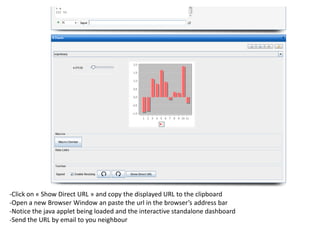
-Click on « Show Direct URL » and copy the displayed URL to the clipboard
-Open a new Browser Window an paste the url in the browser’s address bar
-Notice the java applet being loaded and the interactive standalone dashboard
-Send the URL by email to you neighbour
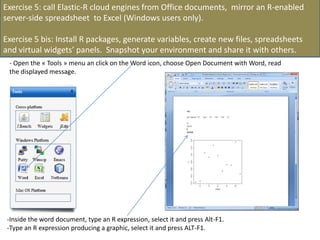
Exercise 5: call Elastic-R cloud engines from Office documents, mirror an R-enabled
server-side spreadsheet to Excel (Windows users only).

Exercise 5 bis: Install R packages, generate variables, create new files, spreadsheets
and virtual widgets’ panels. Snapshot your environment and share it with others.
 - Open the « Tools » menu an click on the Word icon, choose Open Document with Word, read
 the displayed message.


 -Inside the word document, type an R expression, select it and press Alt-F1.
 -Type an R expression producing a graphic, select it and press ALT-F1.
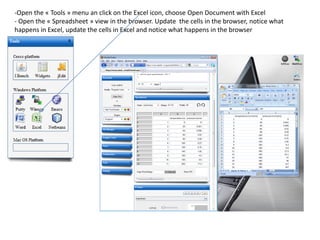
-Open the « Tools » menu an click on the Excel icon, choose Open Document with Excel
- Open the « Spreadsheet » view in the browser. Update the cells in the browser, notice what
happens in Excel, update the cells in Excel and notice what happens in the browser
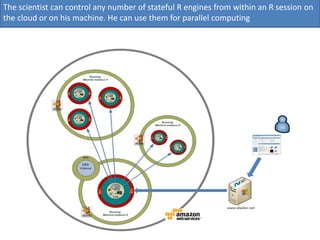
The scientist can control any number of stateful R engines from within an R session on
the cloud or on his machine. He can use them for parallel computing
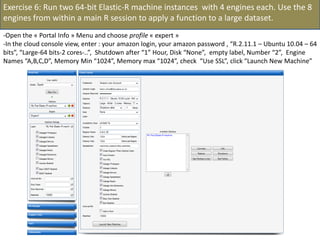
Exercise 6: Run two 64-bit Elastic-R machine instances with 4 engines each. Use the 8
engines from within a main R session to apply a function to a large dataset.
-Open the « Portal Info » Menu and choose profile « expert »
-In the cloud console view, enter : your amazon login, your amazon password , “R.2.11.1 – Ubuntu 10.04 – 64
bits”, “Large-64 bits-2 cores-..”, Shutdown after “1” Hour, Disk “None”, empty label, Number “2”, Engine
Names “A,B,C,D”, Memory Min “1024”, Memory max “1024”, check “Use SSL”, click “Launch New Machine”
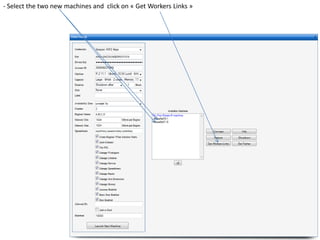
- Select the two new machines and click on « Get Workers Links »
- In the R console, notice the R expressions for the Rlinks creation and the Rlinks successful creation
notification
-Type the following R commands in the R console:
>R
To display the vector of Rlinks mapping all the engines in the two Large instances
>rlink.console(R[1], 'ls()')
To send the expression ‘ls() ’ to the R engine referenced by R*1+
>rlink.put(R[1],'n')
To send the variable n to the first engine
> cl<-cluster.make(R)
To create a logical cluster holding all the R engines in the two large instances
>cluster.console(cl, ‘ls()’)
To send the expression ‘ls()’ to the consoles of all the engines
>library(vsn)
>data(kidney)
>l=list()
>for (i in c(1:100)) l[[as.character(i)]]=kidney
To build a list of 100 item, each holding an
ExpressionSet.
>cluster.console(cl, 'library(vsn)')
To load the library vsn on all workers
>cluster.apply(cl, ‘l’, ‘justvsn’)
To normalize the 100 ExpressionSet in parallel
Using the 8 engines.
Links

Elastic-R Portal :
       www.elastic-r.org

Articles about the project:
      Chine K. (2010). Open Science in the Cloud: Towards a Universal Platform for Scientific and
      Statistical Computing. In Handbook of Cloud Computing. (Chapter 19). Springer US.

      Karim Chine, "Learning Math and Statistics on the Cloud, Towards an EC2-Based Google Docs-like
      Portal for Teaching / Learning Collaboratively with R and Scilab," icalt, pp.752-753, 2010 10th IEEE
      International Conference on Advanced Learning Technologies, 2010

      Karim Chine, "Scientific Computing Environments in the age of virtualization, toward a universal
      platform for the Cloud" pp. 44-48, 2009 IEEE International Workshop on Open Source Software for
      Scientific Computation (OSSC), 2009

      Karim Chine, "Biocep, Towards a Federative, Collaborative, User-Centric, Grid-Enabled and Cloud-
      Ready Computational Open Platform" escience,pp.321-322, 2008 Fourth IEEE International
      Conference on eScience, 2008

Linkedin Group:

       http://www.linkedin.com/groups?home=&gid=2345405
Acknowledgments
ACS: Madi Nassiri Amazon: Simone Brunozzi, Deepak Singh AT&T Research Labs: Simon Urbanek ATUGE: Imen Essafi, Béchir
Tourki, Ilyes Gouja, HatemHachicha, Amine Elleuch Auckland Centre for eResearch: Nick Jones Banca d'Italia: Giuseppe Bruno
Bio-IT World: Kevin Davies BNP Paribas: Ousseynou Nakoulima Cambridge Healthtech Institute: Cindy Crowninshield City
University of New York: Mario Morales, Makram Talih Columbia University: Omar Besbes Dassault Systèmes: Omri Ben Ayoun,
Patrick Johnson Dataspora: Michael E. Driscoll EDF: Alejandro Ribes EBI: Alvis Brazma, Wolfgang Huber, Kimmo Kallio, Misha
Kapushesky, Michael Kleen, Alberto Labarga, Philippe Rocca-Serra, Ugis Sarkans, Kirsten Williams, Eamonn Maguire EPFL:
Darlene Goldstein ESPRIT: Farouk Kammoun, Tahar. Benlakhdar e-Taalim: Nadhir Douma ETH Zürich: Yohan Chalabi, Diethelm
Würtz, Martin Mächler European Commission: Konstantinos Glinos, Enric Mitjana, Monika Kacik, Ioannis Sagias FHCRC: Martin
Morgan, Nianhua Li, Seth Falcon Google: Olivier Bosquet FVG LLC: Lisa Wood Harvard University: Tim Clark, Sudeshna Das,
Douglas Burke,Paolo Ciccarese IBM: Jean-Louis Bernaudin, Pascal Sempe, Loic Simon, Lea A Deleris, Alex Fleischer, Alain Chabrier
Imperial College London: Asif Akram, Vasa Curcin, John Darlington, Brian Fuchs Indiana University:Michael Grobe INRIA: David
Monteau, Christian Saguez, Claude Gomez, Sylvestre Ledru JISC: John Wood, David Flanders Johnson & Johnson - Janssen
Pharmaceutica: Patrick Marichal KXEN: Eric Marcade Lancaster University: Robert Crouchley, Daniel Grose Leibniz Universität
Hannover: Kornelius Rohmeier LIAMA: Baogang Hue, Kang Cai Limagrain: Zivan Karaman Mekentosj: Alexander Griekspoor,
Matt Wood Microsoft: Eric Le Marois, Tony Hey Mubadala: Ghazi Ben Amor Nature Publishing Group: Ian Mulvany, Steve Scott
NCeSS: Peter Halfpenny, Rob Procter, Marzieh Asgari-Targhi, Alex Voss, YuWei Lin, Mercedes Argüello Casteleiro, Wei Jie, Meik
Poschen, Katy Middlebrough, Pascal Ekin, June Finch, Farzana Latif, Elisa Pieri, Frank O'Donnell New York Java User Group:
Frank D Greco OeRC: Dimitrina Spencer, Matteo Turilli, David Wallom, Steven Young OMII-UK: Neil Chue Hong, Steve Brewer
OpenAnalytics: Tobias Verbeke Oracle: Dominique van Deth, Andrew Bond OSS Watch: Ross Gardler Platform Computing:
Christopher Smith Royal Society: James Wilsdon San Diego Supercomputer Center: Nancy R. Wilkins-Diehr Sanger Institute: Lars
Jorgensen, Phil Butcher Shell: Wayne.W.Jones, Nigel Smith Société Générale: Anis Maktouf Stanford University: John Chambers,
Balasubramanian Narasimhan, Gunter Walther SYSTEM@TIC: Karim Azoum Technische Universität Dortmund: Uwe Ligges,
Bernd Bischl Technoforge: Pierre-Antoine Durgeat Tekiano: Samy Ben Naceur Télécom-ParisTech: Isabelle Demeure, Georges
Hebrail, Nesrine Gabsi The Generations Network: Jim Porzak Total: Yannick Perigois Tunisian Ministry of Communication
Technologies: Naceur Ammar, Lamia Chaffai-Sghaier, Mohamed Saïd Ouerghi, Syrine Tlili Tunisian Ecole Polytechnique: Riadh
Robbana UC Berkeley: Noureddine El Karoui, Terry Speed UC Davis: Rudy Beran, Debashis Paul, Duncan Temple Lang UCL:
Daniel Jeffares UCLA: Ivo Dinov, Jeroen Ooms UC San Diego: Anthony Gamst UCSF: Tena Sakai Université Catholique de
Louvain: Christian Ritter University of Cambridge: Ian Roberts, Robert MacInnis Peter Murray-Rust, Jim Downing University of
Manchester: Carole Goble, Len Gill, Simon Peters, Richard D Pearson, Iain Buchan, John Ainsworth University of Plymouth: Paul
Hewson University of Split: Ivica Puljak UTK: Ajay Ohri World Bank Group-IFC: Oualid Ammar Yahoo: Laurent Mirguet, Rob
Weltman Independant:Charles Dallas, Romain François

Elastic r sc10-tutorial

  • 1.
    Elastic-R A Virtual Collaborative Environment for Scientific Computing and Data Analysis in the Cloud Karim Chine karim.chine@cloudera.co.uk
  • 2.
    Scientific Computing Environments www.scipy.org http://root.cern.ch o Open-source (GPL) software environment for statistical computing and graphics www.sagemath.org o Lingua franca of data analysis. o Repositories of contributed R packages related www.scilab.org to a variety of problem domains in life sciences, social sciences, finance, econometrics, chemo www.wolfram.com metrics, etc. are growing at an exponential rate. office.microsoft.com o R Website: http://www.r-project.org/ www.mathworks.com o CRAN Task View: http://cran.r-project.org/web/views/ o CRAN packages : http://cran.cnr.berkeley.edu/ o Bioconductor: http://www.bioconductor.org/ o R Metrics: https://www.rmetrics.org/ www.sas.com www.spss.com
  • 3.
    The ‘s Success Story From: John Fox, Aspects of the Social Organization and Trajectory of the R Project, R Journal-Feb 2009
  • 4.
    Scientific Computing Software,HPC and Usability "Give me a place to stand, and I shall move the earth with a lever"
  • 5.
    Extract from theNetSolve/GridSolve Description Document The emergence of Grid computing as the prototype of a next generation cyberinfrastructure for science has excited high expectations for its potential as an accelerator of discovery, but it has also raised questions about whether and how the broad population of research professionals, who must be the foundation of such productivity, can be motivated to adopt this new and more complex way of working. The rise of the new era of scientific modeling and simulation has, after all, been precipitous, and many science and engineering professionals have only recently become comfortable with the relatively simple world of the uniprocessor workstations and desktop scientific computing tools. In that world, software packages such as Matlab and Mathematica represent general-purpose scientific computing environments (SCEs) that enable users — totaling more than a million worldwide — to solve a wide variety of problems through flexible user interfaces that can model in a natural way the mathematical aspects of many different problem domains. Moreover, the ongoing, exponential increase in the computing resources supplied by the typical workstation makes these SCEs more and more powerful, and thereby tends to reduce the need for the kind of resource sharing that represents a major strength of Grid computing [1]. Certainly there are various forces now urging collaboration across disciplines and distances, and the burgeoning Grid community, which aims to facilitate such collaboration, has made significant progress in mitigating the well-known complexities of building, operating, and using distributed computing environments. But it is unrealistic to expect the transition of research professionals to the Grid to be anything but halting and slow if it means abandoning the SCEs that they rightfully view as a major source of their productivity. We therefore believe that Grid computing’s prospects for success will tend to rise and fall according to its ability to interface smoothly with the general purpose SCEs that are likely to continue to dominate the toolbox of its targeted user base. Arnold, D. and Agrawal, S. and Blackford, S. and Dongarra, J. and Miller, M. and Seymour, K. and Sagi, K. and Shi, Z. and Vadhiyar, S.
  • 6.
    Elastic-R targets majore-Science use cases o Lower the barriers for accessing cyber infrastructures. o Bridge the gap between existing SCEs and grids/clouds o Help dealing with the data deluge (take the computation to the data) o Enable collaboration within computing environments o Simplify the science gateways creation and delivery process o Provide the building blocks of a user-friendly platform for reproducible computational research o Provide a cloud-based e-Learning environment for computational sciences and statistical education o Lower the barriers for using distributed computing, make HTC accessible to all research professionals o Bridge the gap between different mainstream SCEs and between SCEs and workflow workbenches o Provide a universal computing toolkit for scientific applications and scalability frameworks. o Provide a portal for scientific computing on demand, collaboration and computational resources sharing o Merge on demand HPC capabilities, real time collaboration and social networking
  • 7.
    Elastic-R is aubiquitous plug-and-play platform for scientific and statistical computing Elastic-R lowers the barriers of accessing cyberinfrastructures Computational Components R packages : CRAN, Bioconductor, Wrapped C,C++,Fortran code Scilab modules, Matlab Toolkits, etc. Open source or commercial Computational User Interfaces Workbench within the browser Computational Resources Built-in views / Plugins / Spreadsheets Hardware & OS agnostic computing engine : R, Scilab,.. Collaborative views Clusters, grids, private or public clouds Open source or commercial free: academic grids or pay-per-use: EC2, Azure Computational Data Storage Local, NFS, FTP, Amazon S3, Amazon EBS Elastic-R free or commercial Computational Scripts R / Python / Groovy On client side: interactivity.. On server side: data transfer .. Computational Application Programming Interfaces Generated Computational Web Services Java / SOAP / REST, Stateless and stateful Stateful or stateless, automatic mapping of R data objects and functions
  • 8.
  • 9.
    Anatomy of anElastic-R machine instance on Amazon EC2 Heartbeat Restful WS over SSL
  • 10.
    Elastic-R portal: singlefacade to public and private clouds Public Clouds Private Cloud
  • 11.
    Exercise 1: Getstarted with Amazon EC2 Task 1 : Sign Up For Amazon Elastic Compute Cloud Open the following link : http://aws.amazon.com/ec2/ Click on and follow the instructions Task 2: Log on to AWS Management Console Open the following link http://aws.amazon.com/console/ Choose Amazon EC2 in the Combo box and click on Task 3: Run an Ubuntu Machine Instance Select the AMIs Panel, Select « All Images », enter the following AMI ID : ami-1437dd7d Right-click on the unique line displayed and choose « Launch Instance » AMIs Panel
  • 12.
    -In the «Request Instances Wizard », click on « Continue » twice -At the « CREATE KEY PAIR » step, choose « Proceed without a Key Pair » and click on « Continue » -At the « CONFIGURE FIREWALL » step, choose « Create a new Security Group », fill in the name and the Description (with a name of your choice) and click on « Continue » -At the final step « REVIEW », click on « Launch » then click « Close » -Open the « Instances » Panel, wait for the Status icon to change from orange to green Task 4: Shut down the Machine Instance - Right-click on the newly created instance, choose « Terminate » and confirm (« Yes, terminate »)
  • 13.
    Exercise 2: Getstarted with Elastic-R - Open The following link : www.elastic-r.org - Log on using the login/password you received by email before the tutorial Alternatively use one of the following accounts login:sc10-1/passwd:sc10-1 login:sc10-2/passwd:sc10-2 login:sc10-3/passwd:sc10-3 login:sc10-4/passwd:sc10-4 -In the « Cloud Console » panel, provide your Amazon.com login and password - Keep the default values for machine : « R 2.11.0 Ubuntu 10.04 Lucid – 32 bits », keep the default value for capacity : «Small–32 bits–1 core–Memory 1.7 G», keep Disk to «None» and provide a label for the machine - Click on « Launch New Machine »
  • 14.
    -The Console displays« Retrieving AWS Keys.. » then « Launching.. » then « Machine started successfully …» -Click « ok » and wait for a new line to appear in the list of Available Machines (with the label you provided) -When the machine is ready, you get connected automatically, you can now interact with the R session using the R console and the R graphics
  • 15.
    -Type the followingexpressions in the R console : x=rnorm(100) var(x) plot(x) hist(x)
  • 16.
    - Open themenus and views and try the different available features
  • 17.
    Elastic-R is acollaborative Virtual Research Environment. Users can share their machine instances, stateful remote engines, data,..
  • 18.
    The Elastic-R portalitself is an EC2 machine instance. Any number of portals can be run on EC2 for decentralized and private collaboration Amazon Virtual Private Cloud Subnet 2 Subnet 1 Subnet 3
  • 19.
    Exercise 3: Sharea machine instance and collaborate with other attendees. -Open the collaboration Menu - Enter the list of Elastic-R users logins you will share your machine with in « Sharing Rights Editor » and click on « Refresh » -Providing only logins means granting all possible rights on all available engines. Specific sharing rights can be appended to the login -Examples: john:rw , allow user john to view and update peter:r:EngineTest, allow user peter to view only the session data on the engine EngineTest - The new sharing rights appear in the « Machine Sharing Rights » panel
  • 20.
    -Your collaborators cansee your machine in their lists of available machines and can connect to it -Try the different collaboration features(consoles broadcast, graphic annotation, whiteboard, spreadsheets,..
  • 21.
    -Open the CollaborationMenu and click on “Lead”, change the layout of your environment (resize menus, open and close views). Your collaborators’ browsers follow your Ajax workbench layout
  • 22.
    Users can createeasily Java User Interfaces (plugins) that use the full capabilities of a stateful and remote R engine and share them as URLs Elastic-R AJAX Workbench Visual Graphic User Interface Builder Upload plugin Standalone Application Accessible Elastic-R Java Workbench From a URL Plugins Repository • myPlugin • myDashboard
  • 23.
    Software+Services=Applications convergence +ubiquitous collaboration. The server-side toolkit: R + spreadsheet models + virtual gui widgets.
  • 24.
    Reproducible research: Ascientist can snapshot her computational environment and her data. She can archive the snapshot or share it with others. Elastic-R Amazon Machine Images Elastic-R AMI 1 R 2.10 + Elastic-R Elastic-R AMI AMI 2 2 BioC 2.5 R 2.9 + BioC R 2.9 2..3 + Elastic-R Elastic-R BioC 2.3 AMI 3 EBS 4 Data Set VVV R 2.8+BioC 2.0 Amazon Elastic Block Stores Elastic-R.org Elastic-R Elastic-R AMI EBS 4 Elastic-R EBS 1 2 Data Set VVV Data Set XXX R 2.9 + Elastic-R Elastic-R Elastic-R BioC 2.3 EBS 2 EBS 3 EBS 4 Data Set Data Set Data Set YYY ZZZ VVV
  • 25.
    Exercise 4: Createcollaboratively and distribute a scientific dashboard using the Elastic-R server-side widgets designer - Open The « Views » Menu and check « R Panels », a java applet is loaded - Right-click on the empty panel, choose “New Slider” - Keep the default R expression : slider.make("n", x=93,y=15,panel="ssprimary") and click “Apply” - A slider appears, change the value of the slider and check the value of the R variable “n” in the Console - Change the value of n using the R console, and notice the change in the slider : the slider is a Bidirectional mirror of n -Right-click on the panel And choose “New Chart”, keep the default expression and click “Apply” -A Bar Chart Mirroring the R variable “y” appears -Right-click on the Panel, Choose “New Macro”, keep the default expression: the Macro is triggered when “n” changes and updates “y” as being a function of n -Change the slider and notice the chart update
  • 26.
    -Click on «Show Direct URL » and copy the displayed URL to the clipboard -Open a new Browser Window an paste the url in the browser’s address bar -Notice the java applet being loaded and the interactive standalone dashboard -Send the URL by email to you neighbour
  • 27.
    Exercise 5: callElastic-R cloud engines from Office documents, mirror an R-enabled server-side spreadsheet to Excel (Windows users only). Exercise 5 bis: Install R packages, generate variables, create new files, spreadsheets and virtual widgets’ panels. Snapshot your environment and share it with others. - Open the « Tools » menu an click on the Word icon, choose Open Document with Word, read the displayed message. -Inside the word document, type an R expression, select it and press Alt-F1. -Type an R expression producing a graphic, select it and press ALT-F1.
  • 28.
    -Open the «Tools » menu an click on the Excel icon, choose Open Document with Excel - Open the « Spreadsheet » view in the browser. Update the cells in the browser, notice what happens in Excel, update the cells in Excel and notice what happens in the browser
  • 29.
    The scientist cancontrol any number of stateful R engines from within an R session on the cloud or on his machine. He can use them for parallel computing
  • 30.
    Exercise 6: Runtwo 64-bit Elastic-R machine instances with 4 engines each. Use the 8 engines from within a main R session to apply a function to a large dataset. -Open the « Portal Info » Menu and choose profile « expert » -In the cloud console view, enter : your amazon login, your amazon password , “R.2.11.1 – Ubuntu 10.04 – 64 bits”, “Large-64 bits-2 cores-..”, Shutdown after “1” Hour, Disk “None”, empty label, Number “2”, Engine Names “A,B,C,D”, Memory Min “1024”, Memory max “1024”, check “Use SSL”, click “Launch New Machine”
  • 31.
    - Select thetwo new machines and click on « Get Workers Links »
  • 32.
    - In theR console, notice the R expressions for the Rlinks creation and the Rlinks successful creation notification -Type the following R commands in the R console: >R To display the vector of Rlinks mapping all the engines in the two Large instances >rlink.console(R[1], 'ls()') To send the expression ‘ls() ’ to the R engine referenced by R*1+ >rlink.put(R[1],'n') To send the variable n to the first engine > cl<-cluster.make(R) To create a logical cluster holding all the R engines in the two large instances >cluster.console(cl, ‘ls()’) To send the expression ‘ls()’ to the consoles of all the engines >library(vsn) >data(kidney) >l=list() >for (i in c(1:100)) l[[as.character(i)]]=kidney To build a list of 100 item, each holding an ExpressionSet. >cluster.console(cl, 'library(vsn)') To load the library vsn on all workers >cluster.apply(cl, ‘l’, ‘justvsn’) To normalize the 100 ExpressionSet in parallel Using the 8 engines.
  • 33.
    Links Elastic-R Portal : www.elastic-r.org Articles about the project: Chine K. (2010). Open Science in the Cloud: Towards a Universal Platform for Scientific and Statistical Computing. In Handbook of Cloud Computing. (Chapter 19). Springer US. Karim Chine, "Learning Math and Statistics on the Cloud, Towards an EC2-Based Google Docs-like Portal for Teaching / Learning Collaboratively with R and Scilab," icalt, pp.752-753, 2010 10th IEEE International Conference on Advanced Learning Technologies, 2010 Karim Chine, "Scientific Computing Environments in the age of virtualization, toward a universal platform for the Cloud" pp. 44-48, 2009 IEEE International Workshop on Open Source Software for Scientific Computation (OSSC), 2009 Karim Chine, "Biocep, Towards a Federative, Collaborative, User-Centric, Grid-Enabled and Cloud- Ready Computational Open Platform" escience,pp.321-322, 2008 Fourth IEEE International Conference on eScience, 2008 Linkedin Group: http://www.linkedin.com/groups?home=&gid=2345405
  • 34.
    Acknowledgments ACS: Madi NassiriAmazon: Simone Brunozzi, Deepak Singh AT&T Research Labs: Simon Urbanek ATUGE: Imen Essafi, Béchir Tourki, Ilyes Gouja, HatemHachicha, Amine Elleuch Auckland Centre for eResearch: Nick Jones Banca d'Italia: Giuseppe Bruno Bio-IT World: Kevin Davies BNP Paribas: Ousseynou Nakoulima Cambridge Healthtech Institute: Cindy Crowninshield City University of New York: Mario Morales, Makram Talih Columbia University: Omar Besbes Dassault Systèmes: Omri Ben Ayoun, Patrick Johnson Dataspora: Michael E. Driscoll EDF: Alejandro Ribes EBI: Alvis Brazma, Wolfgang Huber, Kimmo Kallio, Misha Kapushesky, Michael Kleen, Alberto Labarga, Philippe Rocca-Serra, Ugis Sarkans, Kirsten Williams, Eamonn Maguire EPFL: Darlene Goldstein ESPRIT: Farouk Kammoun, Tahar. Benlakhdar e-Taalim: Nadhir Douma ETH Zürich: Yohan Chalabi, Diethelm Würtz, Martin Mächler European Commission: Konstantinos Glinos, Enric Mitjana, Monika Kacik, Ioannis Sagias FHCRC: Martin Morgan, Nianhua Li, Seth Falcon Google: Olivier Bosquet FVG LLC: Lisa Wood Harvard University: Tim Clark, Sudeshna Das, Douglas Burke,Paolo Ciccarese IBM: Jean-Louis Bernaudin, Pascal Sempe, Loic Simon, Lea A Deleris, Alex Fleischer, Alain Chabrier Imperial College London: Asif Akram, Vasa Curcin, John Darlington, Brian Fuchs Indiana University:Michael Grobe INRIA: David Monteau, Christian Saguez, Claude Gomez, Sylvestre Ledru JISC: John Wood, David Flanders Johnson & Johnson - Janssen Pharmaceutica: Patrick Marichal KXEN: Eric Marcade Lancaster University: Robert Crouchley, Daniel Grose Leibniz Universität Hannover: Kornelius Rohmeier LIAMA: Baogang Hue, Kang Cai Limagrain: Zivan Karaman Mekentosj: Alexander Griekspoor, Matt Wood Microsoft: Eric Le Marois, Tony Hey Mubadala: Ghazi Ben Amor Nature Publishing Group: Ian Mulvany, Steve Scott NCeSS: Peter Halfpenny, Rob Procter, Marzieh Asgari-Targhi, Alex Voss, YuWei Lin, Mercedes Argüello Casteleiro, Wei Jie, Meik Poschen, Katy Middlebrough, Pascal Ekin, June Finch, Farzana Latif, Elisa Pieri, Frank O'Donnell New York Java User Group: Frank D Greco OeRC: Dimitrina Spencer, Matteo Turilli, David Wallom, Steven Young OMII-UK: Neil Chue Hong, Steve Brewer OpenAnalytics: Tobias Verbeke Oracle: Dominique van Deth, Andrew Bond OSS Watch: Ross Gardler Platform Computing: Christopher Smith Royal Society: James Wilsdon San Diego Supercomputer Center: Nancy R. Wilkins-Diehr Sanger Institute: Lars Jorgensen, Phil Butcher Shell: Wayne.W.Jones, Nigel Smith Société Générale: Anis Maktouf Stanford University: John Chambers, Balasubramanian Narasimhan, Gunter Walther SYSTEM@TIC: Karim Azoum Technische Universität Dortmund: Uwe Ligges, Bernd Bischl Technoforge: Pierre-Antoine Durgeat Tekiano: Samy Ben Naceur Télécom-ParisTech: Isabelle Demeure, Georges Hebrail, Nesrine Gabsi The Generations Network: Jim Porzak Total: Yannick Perigois Tunisian Ministry of Communication Technologies: Naceur Ammar, Lamia Chaffai-Sghaier, Mohamed Saïd Ouerghi, Syrine Tlili Tunisian Ecole Polytechnique: Riadh Robbana UC Berkeley: Noureddine El Karoui, Terry Speed UC Davis: Rudy Beran, Debashis Paul, Duncan Temple Lang UCL: Daniel Jeffares UCLA: Ivo Dinov, Jeroen Ooms UC San Diego: Anthony Gamst UCSF: Tena Sakai Université Catholique de Louvain: Christian Ritter University of Cambridge: Ian Roberts, Robert MacInnis Peter Murray-Rust, Jim Downing University of Manchester: Carole Goble, Len Gill, Simon Peters, Richard D Pearson, Iain Buchan, John Ainsworth University of Plymouth: Paul Hewson University of Split: Ivica Puljak UTK: Ajay Ohri World Bank Group-IFC: Oualid Ammar Yahoo: Laurent Mirguet, Rob Weltman Independant:Charles Dallas, Romain François