Open Science in the cloud,
towards a universal platform for
  mathematical and statistical
          computing

          Karim Chine
       karim.chine@m4x.org
www.biocep.net

LinkedIn Group : Elastic-R
Definitions
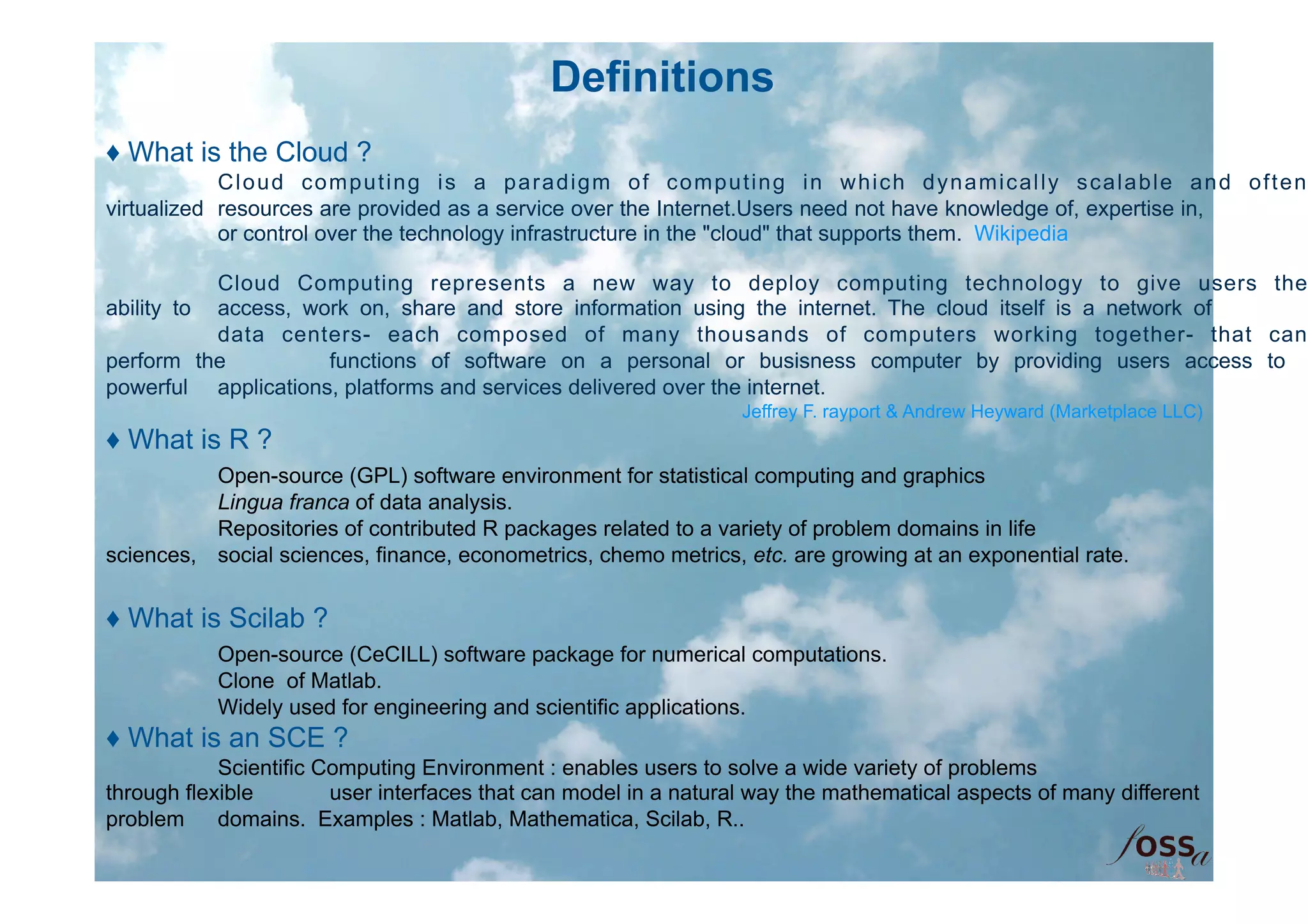
♦ What is the Cloud ?
            Cloud computing is a paradigm of computing in which dynamically scalable and often
virtualized resources are provided as a service over the Internet.Users need not have knowledge of, expertise in,
            or control over the technology infrastructure in the "cloud" that supports them. Wikipedia

           Cloud Computing represents a new way to deploy computing technology to give users the
ability to access, work on, share and store information using the internet. The cloud itself is a network of
           data centers- each composed of many thousands of computers working together- that can
perform the          functions of software on a personal or busisness computer by providing users access to
powerful applications, platforms and services delivered over the internet.
                                                                  Jeffrey F. rayport & Andrew Heyward (Marketplace LLC)
♦ What is R ?
          Open-source (GPL) software environment for statistical computing and graphics
          Lingua franca of data analysis.
          Repositories of contributed R packages related to a variety of problem domains in life
sciences, social sciences, finance, econometrics, chemo metrics, etc. are growing at an exponential rate.


♦ What is Scilab ?
           Open-source (CeCILL) software package for numerical computations.
           Clone of Matlab.
           Widely used for engineering and scientific applications.
♦ What is an SCE ?
            Scientific Computing Environment : enables users to solve a wide variety of problems
through flexible        user interfaces that can model in a natural way the mathematical aspects of many different
problem     domains. Examples : Matlab, Mathematica, Scilab, R..
e-Science perspective / Biocep-R use cases


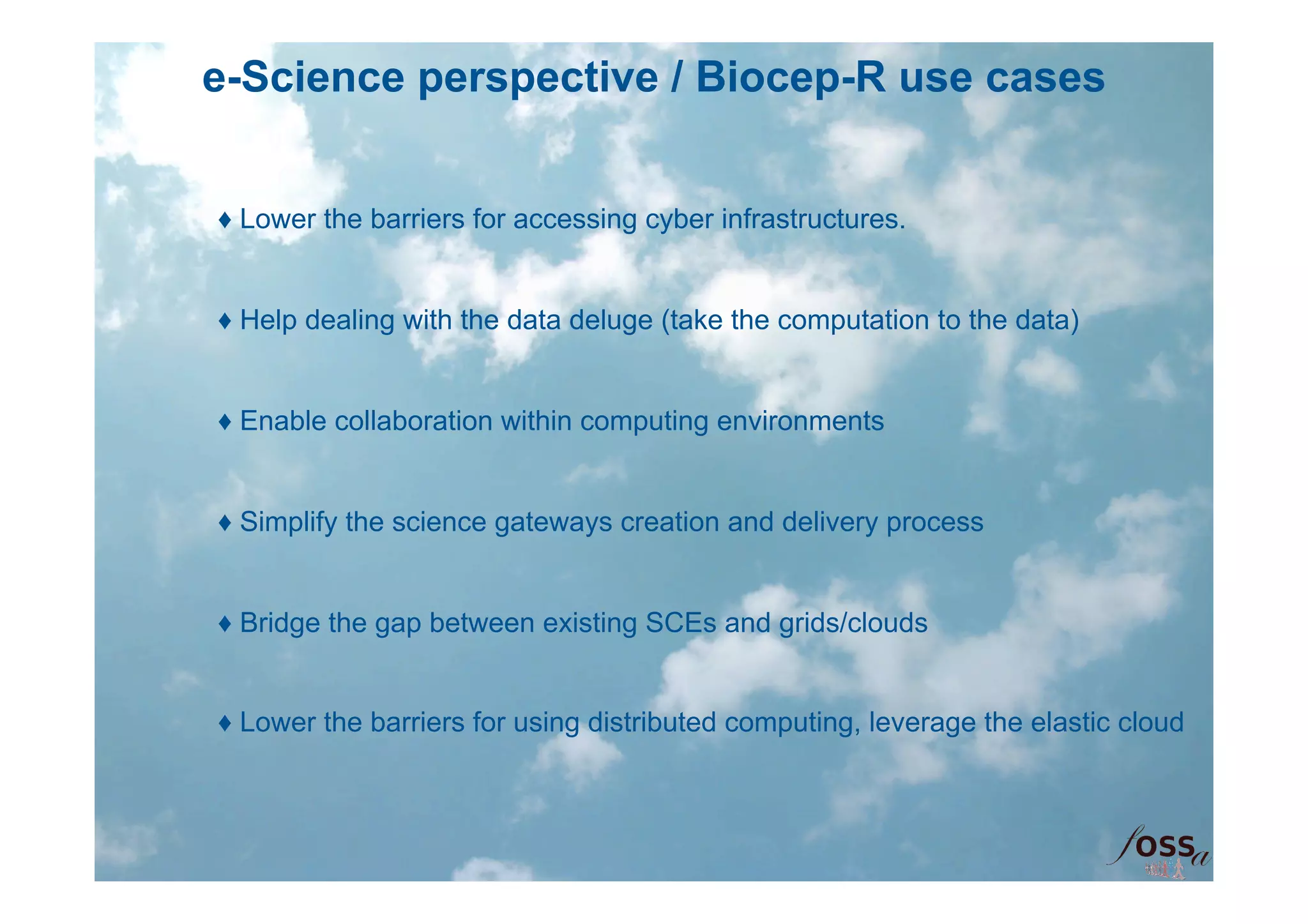
♦ Lower the barriers for accessing cyber infrastructures.


♦ Help dealing with the data deluge (take the computation to the data)


♦ Enable collaboration within computing environments


♦ Simplify the science gateways creation and delivery process


♦ Bridge the gap between existing SCEs and grids/clouds


♦ Lower the barriers for using distributed computing, leverage the elastic cloud
e-Science perspective / Biocep-R use cases
        ♦ Bridge the gap between mainstream SCEs


        ♦ Bridge the gap between mainstream SCEs and workflow workbenches


        ♦ Provide a universal computing toolkit for scientific applications


        ♦ Provide frameworks for computational back-ends scalability


        ♦ Provide the building blocks of a platform for computational education


        ♦ Provide the building blocks of a traceable and reproducible
computational    research platform

        ♦ Provide the building blocks of an international portal for scientific
computing on    demand, collaboration and computational artifacts/resources sharing
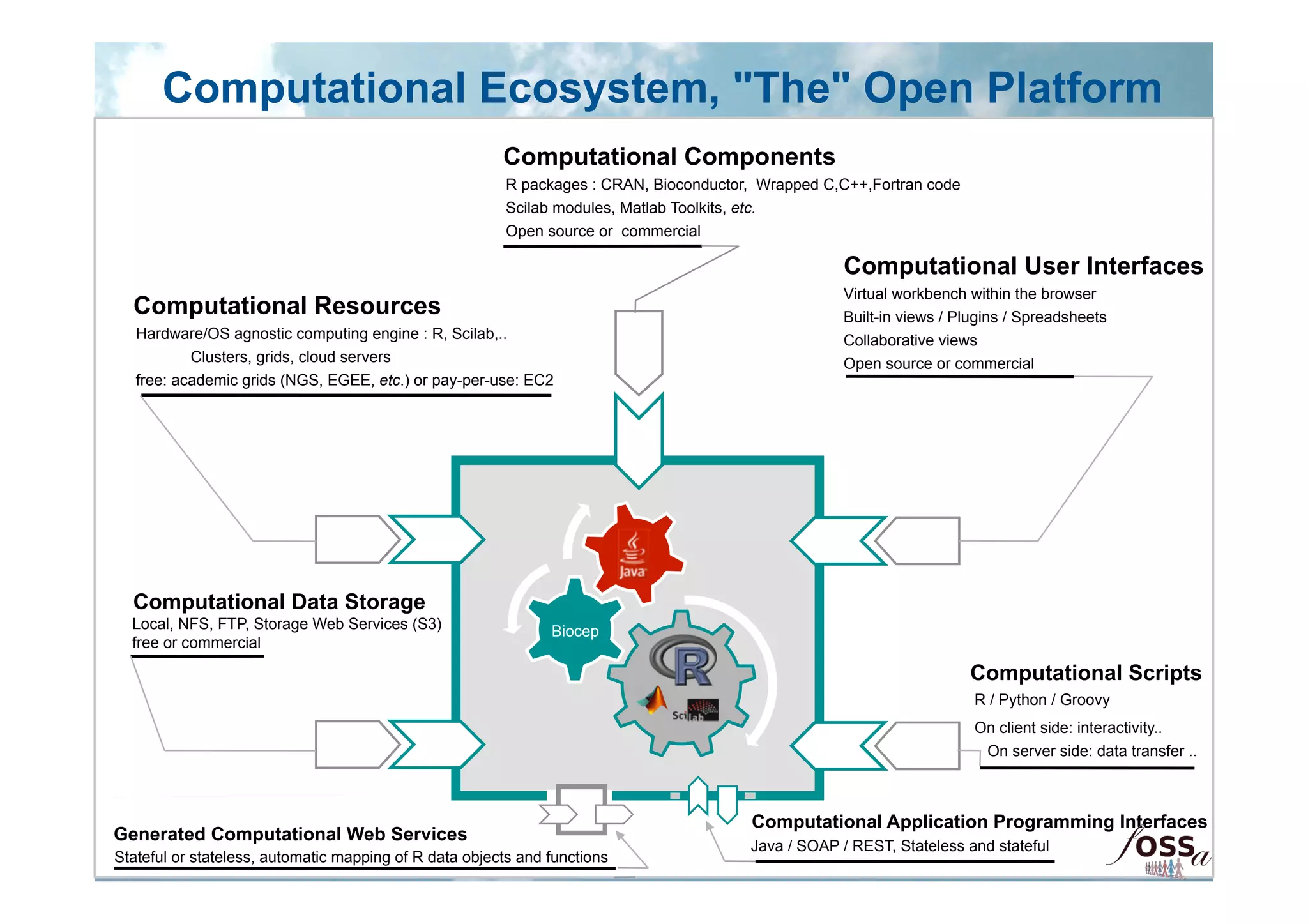
Computational Ecosystem, "The" Open Platform
                                                        Computational Components
                                                         R packages : CRAN, Bioconductor, Wrapped C,C++,Fortran code
                                                         Scilab modules, Matlab Toolkits, etc.
                                                         Open source or commercial

                                                                                                     Computational User Interfaces
                                                                                                     Virtual workbench within the browser
  Computational Resources                                                                            Built-in views / Plugins / Spreadsheets
   Hardware/OS agnostic computing engine : R, Scilab,..                                              Collaborative views
           Clusters, grids, cloud servers                                                            Open source or commercial
   free: academic grids (NGS, EGEE, etc.) or pay-per-use: EC2


  Computational Data Storage
  Local, NFS, FTP, Storage Web Services (S3)                   Biocep
  free or commercial

                                                                                                                       Computational Scripts
                                                                                                                        R / Python / Groovy
                                                                                                                        On client side: interactivity..
                                                                                                                         On server side: data transfer ..


                                                                                        Computational Application Programming Interfaces
Generated Computational Web Services
                                                                                        Java / SOAP / REST, Stateless and stateful
Stateful or stateless, automatic mapping of R data objects and functions
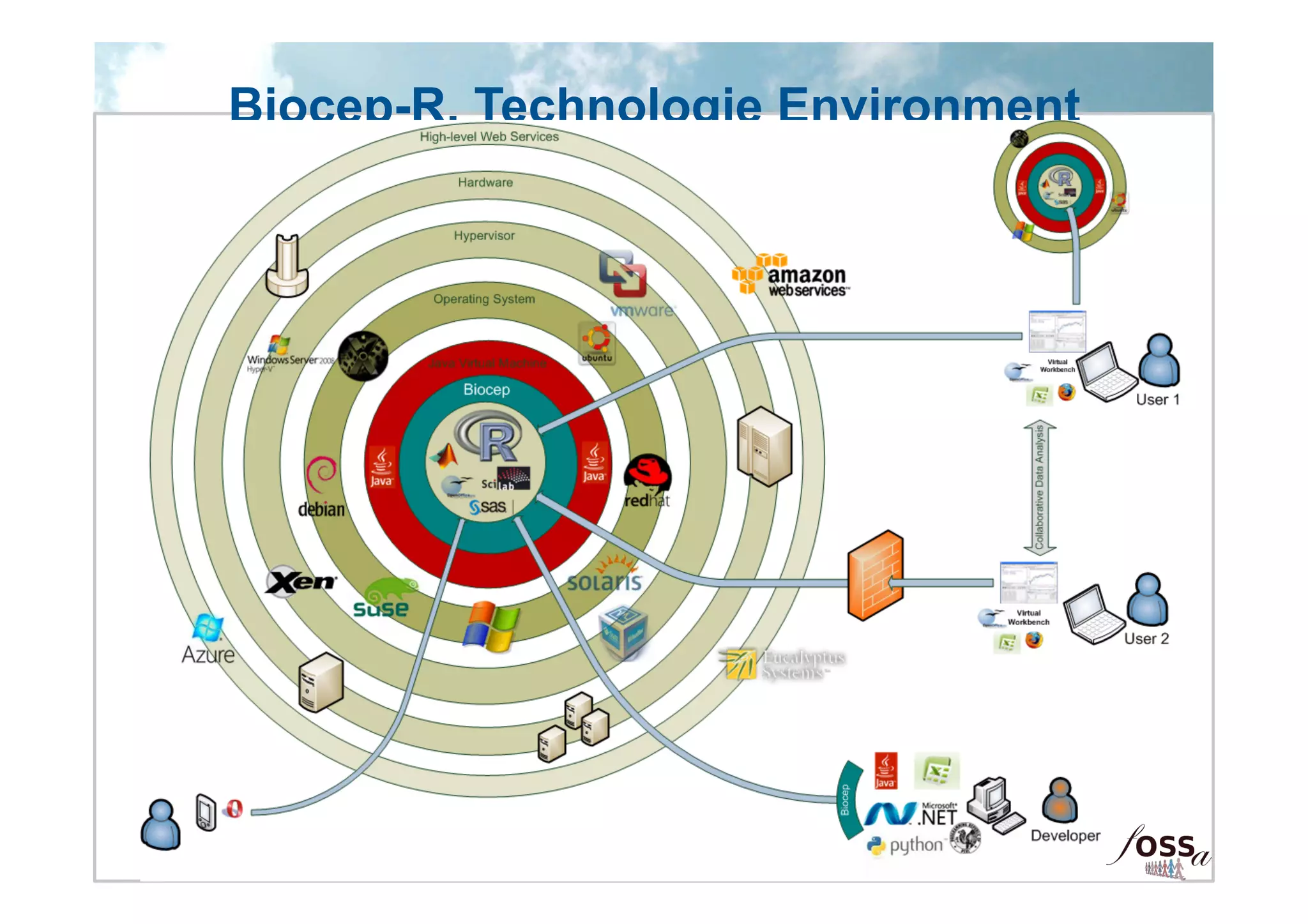
Biocep-R, Technologie Environment
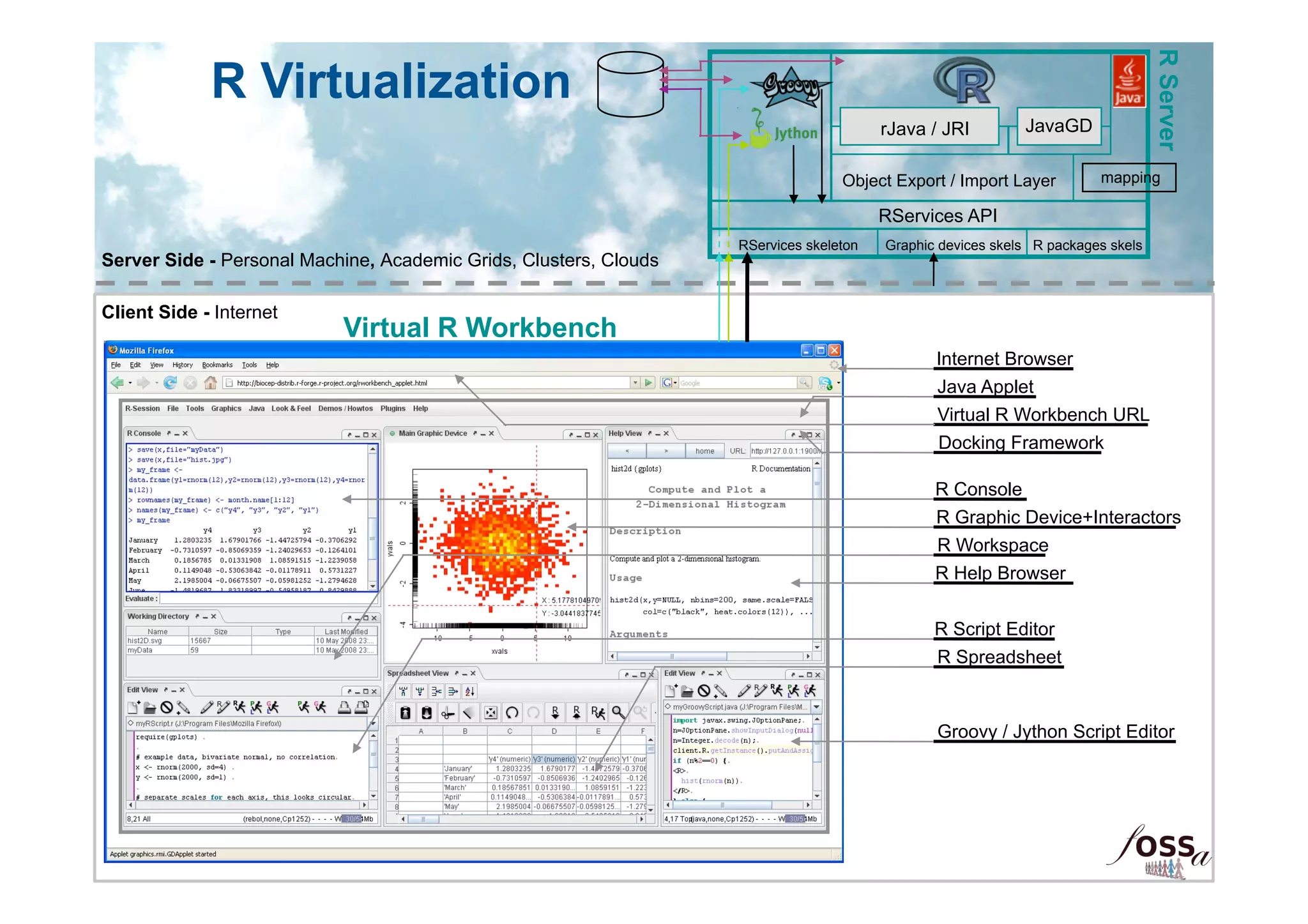
R Server
             R Virtualization
                                                                                        rJava / JRI         JavaGD

                                                                                  Object Export / Import Layer         mapping

                                                                                        RServices API
                                                                   RServices skeleton   Graphic devices skels R packages skels
Server Side - Personal Machine, Academic Grids, Clusters, Clouds

Client Side - Internet
                           Virtual R Workbench
                                                                                               Internet Browser
                                                                                               Java Applet
                                                                                               Virtual R Workbench URL
                                                                                               Docking Framework

                                                                                               R Console
                                                                                               R Graphic Device+Interactors
                                                                                               R Workspace
                                                                                               R Help Browser


                                                                                               R Script Editor
                                                                                               R Spreadsheet


                                                                                               Groovy / Jython Script Editor
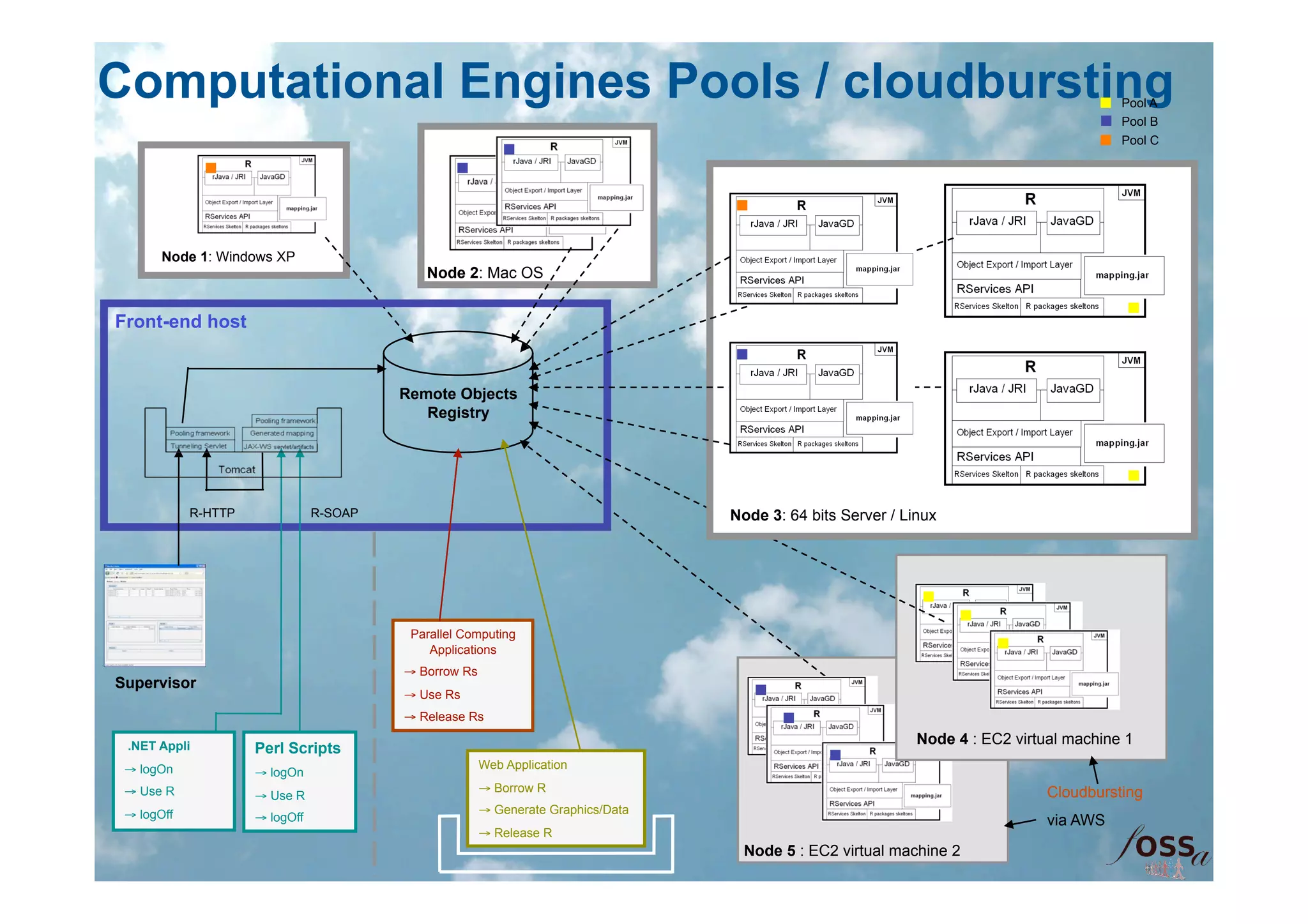
Computational Engines Pools / cloudbursting                                                                                              Pool A
                                                                                                                                         Pool B
                                                                                                                                         Pool C


       Node 1: Windows XP
                                            Node 2: Mac OS


Front-end host


                                         Remote Objects
                                            Registry


            R-HTTP              R-SOAP                                            Node 3: 64 bits Server / Linux


                                          Parallel Computing
                                             Applications
                                         → Borrow Rs
Supervisor
                                         → Use Rs
                                         → Release Rs

 .NET Appli                                                                                                  Node 4 : EC2 virtual machine 1
                     Perl Scripts                                                                             Node 4 : EC2 virtual machine 1
 → logOn                                               Web Application
                     → logOn
 → Use R                                               → Borrow R                                                             Cloudbursting
                     → Use R
 → logOff                                              → Generate Graphics/Data
                     → logOff                                                                                                 via AWS
                                                       → Release R
                                                                                   Node 5 : EC2 virtual machine 2
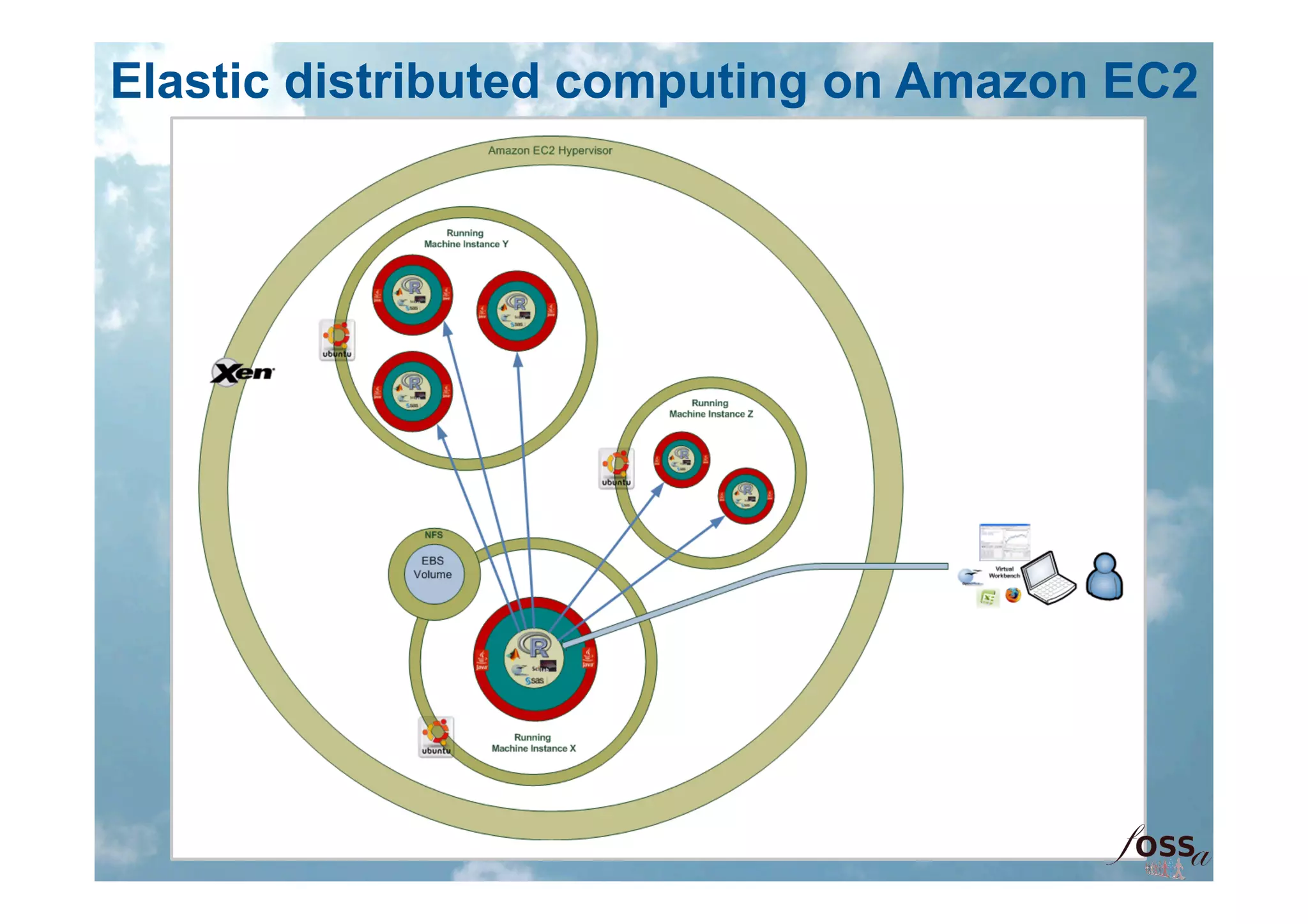
Elastic distributed computing on Amazon EC2
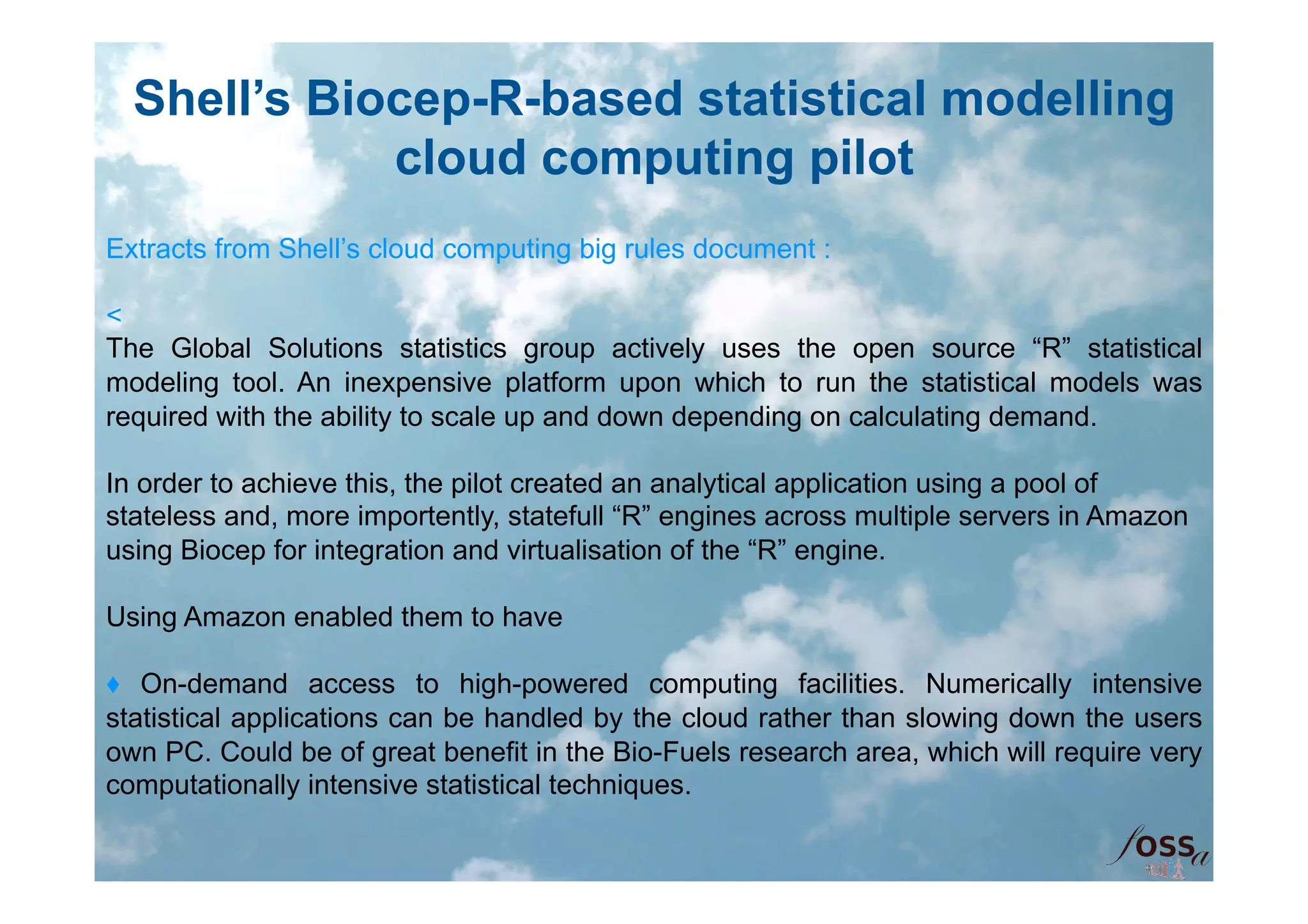
Shell’s Biocep-R-based statistical modelling
             cloud computing pilot
Extracts from Shell’s cloud computing big rules document :

<
The Global Solutions statistics group actively uses the open source “R” statistical
modeling tool. An inexpensive platform upon which to run the statistical models was
required with the ability to scale up and down depending on calculating demand.

In order to achieve this, the pilot created an analytical application using a pool of
stateless and, more importently, statefull “R” engines across multiple servers in Amazon
using Biocep for integration and virtualisation of the “R” engine.

Using Amazon enabled them to have

♦ On-demand access to high-powered computing facilities. Numerically intensive
statistical applications can be handled by the cloud rather than slowing down the users
own PC. Could be of great benefit in the Bio-Fuels research area, which will require very
computationally intensive statistical techniques.
♦ Disaster Recovery: By using virtual machine images on the cloud we can always
restore to the initial state. If something goes drastically wrong with the cloud machine
image we can simply scrap it and launch another instance. Safer to implement web apps
on a virtual machine using AWS rather than in-house server.

♦ The Cloud can be used as a real-time collaborative workspace. Co-workers can work
together and share statistical methodologies in a new and novel environment.

♦ The onset of Cloud Computing has greatly increased the availability of software for
delivering web-based statistical applications. The benefits of which include:
o     No special configuration or changes are needed on users PCs.
o     No need for scripting of applications.
o     Compatible with all operating systems.
o     Updates can be made quickly and easily in a centralized manner.
o     Everybody has a browser. Familiar interface encourages use.
o     Statistical web-based applications can either be hosted on the cloud or an in-
house Shell server: which may be more appropriate for most confidential data.
>
Contacts within Shell :

Edwin Vansteenis, Shell Global Functions, Senior IT Architect, edwin.vansteenis@shell.com
Wayne W. Johnes, Shell Global Services, Statistical Consultant, Wayne.W.Jones@shell.com
Cloud Biocep

Cloud Biocep

  • 1.
    Open Science inthe cloud, towards a universal platform for mathematical and statistical computing Karim Chine karim.chine@m4x.org
  • 2.
  • 3.
    Definitions ♦ What isthe Cloud ? Cloud computing is a paradigm of computing in which dynamically scalable and often virtualized resources are provided as a service over the Internet.Users need not have knowledge of, expertise in, or control over the technology infrastructure in the "cloud" that supports them. Wikipedia Cloud Computing represents a new way to deploy computing technology to give users the ability to access, work on, share and store information using the internet. The cloud itself is a network of data centers- each composed of many thousands of computers working together- that can perform the functions of software on a personal or busisness computer by providing users access to powerful applications, platforms and services delivered over the internet. Jeffrey F. rayport & Andrew Heyward (Marketplace LLC) ♦ What is R ? Open-source (GPL) software environment for statistical computing and graphics Lingua franca of data analysis. Repositories of contributed R packages related to a variety of problem domains in life sciences, social sciences, finance, econometrics, chemo metrics, etc. are growing at an exponential rate. ♦ What is Scilab ? Open-source (CeCILL) software package for numerical computations. Clone of Matlab. Widely used for engineering and scientific applications. ♦ What is an SCE ? Scientific Computing Environment : enables users to solve a wide variety of problems through flexible user interfaces that can model in a natural way the mathematical aspects of many different problem domains. Examples : Matlab, Mathematica, Scilab, R..
  • 4.
    e-Science perspective /Biocep-R use cases ♦ Lower the barriers for accessing cyber infrastructures. ♦ Help dealing with the data deluge (take the computation to the data) ♦ Enable collaboration within computing environments ♦ Simplify the science gateways creation and delivery process ♦ Bridge the gap between existing SCEs and grids/clouds ♦ Lower the barriers for using distributed computing, leverage the elastic cloud
  • 5.
    e-Science perspective /Biocep-R use cases ♦ Bridge the gap between mainstream SCEs ♦ Bridge the gap between mainstream SCEs and workflow workbenches ♦ Provide a universal computing toolkit for scientific applications ♦ Provide frameworks for computational back-ends scalability ♦ Provide the building blocks of a platform for computational education ♦ Provide the building blocks of a traceable and reproducible computational research platform ♦ Provide the building blocks of an international portal for scientific computing on demand, collaboration and computational artifacts/resources sharing
  • 6.
    Computational Ecosystem, "The"Open Platform Computational Components R packages : CRAN, Bioconductor, Wrapped C,C++,Fortran code Scilab modules, Matlab Toolkits, etc. Open source or commercial Computational User Interfaces Virtual workbench within the browser Computational Resources Built-in views / Plugins / Spreadsheets Hardware/OS agnostic computing engine : R, Scilab,.. Collaborative views Clusters, grids, cloud servers Open source or commercial free: academic grids (NGS, EGEE, etc.) or pay-per-use: EC2 Computational Data Storage Local, NFS, FTP, Storage Web Services (S3) Biocep free or commercial Computational Scripts R / Python / Groovy On client side: interactivity.. On server side: data transfer .. Computational Application Programming Interfaces Generated Computational Web Services Java / SOAP / REST, Stateless and stateful Stateful or stateless, automatic mapping of R data objects and functions
  • 7.
  • 8.
    R Server R Virtualization rJava / JRI JavaGD Object Export / Import Layer mapping RServices API RServices skeleton Graphic devices skels R packages skels Server Side - Personal Machine, Academic Grids, Clusters, Clouds Client Side - Internet Virtual R Workbench Internet Browser Java Applet Virtual R Workbench URL Docking Framework R Console R Graphic Device+Interactors R Workspace R Help Browser R Script Editor R Spreadsheet Groovy / Jython Script Editor
  • 9.
    Computational Engines Pools/ cloudbursting Pool A Pool B Pool C Node 1: Windows XP Node 2: Mac OS Front-end host Remote Objects Registry R-HTTP R-SOAP Node 3: 64 bits Server / Linux Parallel Computing Applications → Borrow Rs Supervisor → Use Rs → Release Rs .NET Appli Node 4 : EC2 virtual machine 1 Perl Scripts Node 4 : EC2 virtual machine 1 → logOn Web Application → logOn → Use R → Borrow R Cloudbursting → Use R → logOff → Generate Graphics/Data → logOff via AWS → Release R Node 5 : EC2 virtual machine 2
  • 10.
  • 11.
    Shell’s Biocep-R-based statisticalmodelling cloud computing pilot Extracts from Shell’s cloud computing big rules document : < The Global Solutions statistics group actively uses the open source “R” statistical modeling tool. An inexpensive platform upon which to run the statistical models was required with the ability to scale up and down depending on calculating demand. In order to achieve this, the pilot created an analytical application using a pool of stateless and, more importently, statefull “R” engines across multiple servers in Amazon using Biocep for integration and virtualisation of the “R” engine. Using Amazon enabled them to have ♦ On-demand access to high-powered computing facilities. Numerically intensive statistical applications can be handled by the cloud rather than slowing down the users own PC. Could be of great benefit in the Bio-Fuels research area, which will require very computationally intensive statistical techniques.
  • 12.
    ♦ Disaster Recovery:By using virtual machine images on the cloud we can always restore to the initial state. If something goes drastically wrong with the cloud machine image we can simply scrap it and launch another instance. Safer to implement web apps on a virtual machine using AWS rather than in-house server. ♦ The Cloud can be used as a real-time collaborative workspace. Co-workers can work together and share statistical methodologies in a new and novel environment. ♦ The onset of Cloud Computing has greatly increased the availability of software for delivering web-based statistical applications. The benefits of which include: o No special configuration or changes are needed on users PCs. o No need for scripting of applications. o Compatible with all operating systems. o Updates can be made quickly and easily in a centralized manner. o Everybody has a browser. Familiar interface encourages use. o Statistical web-based applications can either be hosted on the cloud or an in- house Shell server: which may be more appropriate for most confidential data. > Contacts within Shell : Edwin Vansteenis, Shell Global Functions, Senior IT Architect, edwin.vansteenis@shell.com Wayne W. Johnes, Shell Global Services, Statistical Consultant, Wayne.W.Jones@shell.com