Will the Revolution Have Wheelchair Ramps? Web 2.0 and the Illusion of Inclusion Eileen Boswell Community Transportation Association of America Transportation Research Board Annual Meeting January 13, 2009
Overview Definitions Challenges Solutions Recommendations Resources
Definitions Web 2.0 Disability Web Accessibility Perceivable Operable Understandable Robust Section 508 Inclusive Design
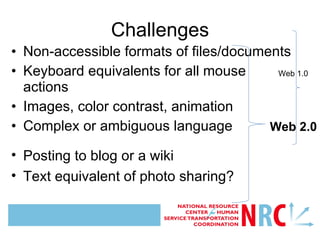
Challenges Non-accessible formats of files/documents Keyboard equivalents for all mouse actions Images, color contrast, animation Complex or ambiguous language Posting to blog or a wiki Text equivalent of photo sharing? Web 1.0 Web 2.0
Specific Accessibility Issues Wikis Photo sharing ( e.g.  Flickr) Video sharing ( e.g.  YouTube) Networking Sites ( e.g.  Facebook) Webconferencing Virtual Worlds ( e.g.  Second Life)
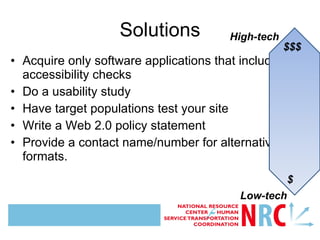
Acquire only software applications that include accessibility checks Do a usability study Have target populations test your site Write a Web 2.0 policy statement Provide a contact name/number for alternative formats. Solutions Image description:Double-headed arrow showing range of cost/ investment for accessible technology  High-tech Low-tech $$$ $
Recommendations Find your Section 508 officer (for Feds) Choose the simplest interface that meets your needs Provide alternative means/format where appropriate Solicit feedback from disability advocates and/or focus groups Prepare for ongoing maintenance/upgrades
Resources The Access Board  Section 508 buyaccessible.gov EPA Web 2.0 Working Group White Paper GSA draft principles for accessibility and Web 2.0 (forthcoming) World Wide Web Consortium Web Accessibility Initiative (W3C/WAI) Guidelines 2.0 (12/2008)
Questions and Discussion Thank you! Eileen Boswell Information Specialist Community Transportation Association of America [email_address] 202.415.9650

Eileen boswell01132009 trb

  • 1.
    Will the RevolutionHave Wheelchair Ramps? Web 2.0 and the Illusion of Inclusion Eileen Boswell Community Transportation Association of America Transportation Research Board Annual Meeting January 13, 2009
  • 2.
    Overview Definitions ChallengesSolutions Recommendations Resources
  • 3.
    Definitions Web 2.0Disability Web Accessibility Perceivable Operable Understandable Robust Section 508 Inclusive Design
  • 4.
    Challenges Non-accessible formatsof files/documents Keyboard equivalents for all mouse actions Images, color contrast, animation Complex or ambiguous language Posting to blog or a wiki Text equivalent of photo sharing? Web 1.0 Web 2.0
  • 5.
    Specific Accessibility IssuesWikis Photo sharing ( e.g. Flickr) Video sharing ( e.g. YouTube) Networking Sites ( e.g. Facebook) Webconferencing Virtual Worlds ( e.g. Second Life)
  • 6.
    Acquire only softwareapplications that include accessibility checks Do a usability study Have target populations test your site Write a Web 2.0 policy statement Provide a contact name/number for alternative formats. Solutions Image description:Double-headed arrow showing range of cost/ investment for accessible technology High-tech Low-tech $$$ $
  • 7.
    Recommendations Find yourSection 508 officer (for Feds) Choose the simplest interface that meets your needs Provide alternative means/format where appropriate Solicit feedback from disability advocates and/or focus groups Prepare for ongoing maintenance/upgrades
  • 8.
    Resources The AccessBoard Section 508 buyaccessible.gov EPA Web 2.0 Working Group White Paper GSA draft principles for accessibility and Web 2.0 (forthcoming) World Wide Web Consortium Web Accessibility Initiative (W3C/WAI) Guidelines 2.0 (12/2008)
  • 9.
    Questions and DiscussionThank you! Eileen Boswell Information Specialist Community Transportation Association of America [email_address] 202.415.9650

Editor's Notes

  • #2 Presentation title: Will the Revolution Have Wheelchair Ramps? Web 2.0 and the Illusion of Inclusion Presenter: Eileen Boswell of the Community Transportation Association of America Event: Transportation Research Board Annual Meeting, January 13, 2009, Washington, DC Script: Good morning, I am Eileen Boswell and I am here to discuss some of the possible accessibility concerns and opportunities of Web 2.0 tools. This is part of some research I am doing for school at the Catholic University of America, and also for a federal cooperative agreement that I work on, the National Resource Center for Human Service Transportation Coordination, so I would like to thank the National Resource Center for sponsoring my presentation. Footer image: National Resource Center for Human Service Transportation Coordination logo (red, white and blue with arrows pointing outward from “NRC”)
  • #3 Script: This is a work in progress. I don’t have a whole lot of answers yet; rather I am collecting questions about accessibility and Web 2.0. …questions such as, “What is the experience of a visually impaired person trying to contribute to a wiki or comment on a blog?” Web 2.0 offers enormous opportunities for inclusion, participation and collaboration among all our users, but the barriers to entry of the old web may persist, and the new web may come with some challenges of its own. So, this is a broad overview of what some of the issues might be so that before we get too caught up in the momentum of Web 2.0 we have a chance to think about who might be left behind as the digital revolution charges ahead. I will define the major terminology that is relevant to this discussion, and then outline what I see as some of the challenges and solutions, then I will offer some recommendations and some resources we can all use and add to. I also have a handout listing these resources (here in front) and it’s available on paper and on CD. Footer image: National Resource Center for Human Service Transportation Coordination logo (red, white and blue with arrows pointing outward from “NRC”)
  • #4 Script: For the purposes of this presentation I am defining web 2.0 as…“the social web,” a networked environment characterized by community, collaboration and participation, and one in which users add value to the web experience. My definition of the new web, in keeping with its very nature, is a folk definition, and I am not citing a specific source, rather this is a community-created, evolving definition, and in this spirit I encourage you all to question it, add to it, subtract, or contribute in some other way. The definition of “disability,” even in the eyes of the law, or especially in the eyes of the law, depends on the context in which it was used; the Social Security Act has one definition, Employment law another, and the one we are probably most interested in is that of majority of non-discrimination laws including the ADA, and that is, “a physical or mental impairment that substantially limits one or more "major life activities,"   But disabilities may be physical or cognitive, may be readily observed or may have no outward signs), and may result from a variety of causes.  According to the Access Board, One seventh of all Americans live and work with some form of physical or sensory impairment. Statistically that’s about (7) people in this room. It may be a motor impairment, a cognitive impairment, a visual impairment, a hearing impairment, or another kind of impairment. Disability should be thought of as one side of a continuum of ability. Most people fall somewhere on that spectrum. The World Wide Web Consortium (W3C), in its new web accessibility guidelines that were just released in December of last year, outlines four criteria for accessible technologies: the technology must be (1) perceivable [this would include having text alternatives for non-text content and asynchronous alternatives for time-based content], (2) operable [this includes making all functionality accessible from a keyboard and making all navigation simple and coded for ease of use on multiple devices], (3) understandable [this includes making the structure and formatting “transparent” in terms of code so that headings, emphasis and the like can be translated as necessary into simpler but equivalent formatting when necessary (such as for any content put into a hierarchy or outline) and making help features available in the most obvious ways, and (4) robust [this means to maximize compatibility with assistive technologies]. Accessibility can also be thought of in terms of conformance to standards or provision of equivalent facilitation through other methods. Section 508 is the 1998 amendment to the Rehabilitation Act (of 1973) that requires Federal agencies to make their electronic and information technology accessible to people with disabilities, and to eliminate barriers in information technology, and promote inclusion and opportunity among people with disabilities. The law applies to all Federal agencies when they develop, procure, maintain, or use electronic and information technology. Does Section 508 apply to Web 2.0? The answer is, absolutely yes. It applies to any technology procured, developed or used by a government agency. What about the rest of us? The library community has a good history of outreach to underrepresented groups and so building accessibility into our web 2.0 endeavors is a natural extension of this service ethic prized by librarians. Most of us are also operating on federal funds and as part of that we are obligated to follow the Spirit of the law. Much of what I have learned about this topic has come from the Section 508 community, who sponsor a conference on Section 508 every fall and this year they had a whole session devoted to Web 2.0. So the accessibility community is tackling Web 2.0 from one direction and I like to think of us as being the library community, a Web 2.0 community, just starting to draw on our long history of inclusion and outreach to people with disabilities and applying that to the world of Web 2.0. Hopefully these two dialogues will converge somewhere in the middle. Inclusive design is an approach to the design of products, services and environments to be as usable as possible by as many people as possible regardless of age, ability or situation. We can also think of it as appealing to people with a wide range of abilities throughout their life spans. So, as with any good design, begin with the end in mind, and with all users in mind, so that accessibility gets built into the development phase of all new technologies. Footer image: National Resource Center for Human Service Transportation Coordination logo (red, white and blue with arrows pointing outward from “NRC”)
  • #5 Script: Some of the issues I will mention are not unique to Web 2.0. A lot of this is general information about web accessibility. But if we haven’t gotten that right (with Web 1.0), then Web 2.0 is a chance to redouble our efforts so we can reap the benefits of the inclusion that the new web promises. Many of these issues have to do with simplicity of design. [After the first click, a bracket appears that labels the first four challenges “Web 1.0” challenges.] The accessible web has always faced the challenge of ensuring that all links lead to accessible content and that all file formats are accessible. Otherwise, some alternative format of the content must be provided. The accessible web also requires full keyboard support for any mouse clicks so that a screen reader can operate through keyed in commands by a visually-impaired user. A screen reader operates in a linear fashion so the layout and navigation of a page should be as simple as possible in order for the user not to be overwhelmed by the audio version of what appears on a web page. Images must have some text equivalent. Any ambiguous or complex language, or links captioned “click here,” should be clarified for users with cognitive impairments. These challenges and more await users of the new web. [After the second click, a larger bracket appears including the first group and adding the remaining three challenges. This group of six challenges is labeled “Web 2.0” challenges.] Web 2.0 tools present some unique challenges. Whereas the old web was generally one-directional, with static content that could be made accessible and left alone, the new web is characterized by automatic updates, and by invitations to contribute to content everywhere. Accessibility now applies not only to what is delivered to a user but also to the means by which a user produces and delivers new or enriched content. So, what is the experience of a visually impaired user posting to a blog or contributing to a wiki. What alternative means is provided to a hearing-impaired participant in a webinar? The World Wide Web Consortium (W3C) accessibility guidelines are clear that all technologies, including those of the social web, should be made perceivable, operable, understandable, and robust, to maximize participation among all users. Footer image: National Resource Center for Human Service Transportation Coordination logo (red, white and blue with arrows pointing outward from “NRC”)
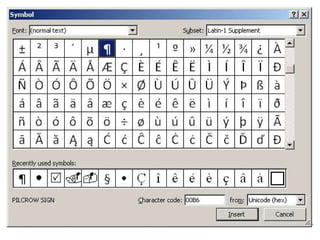
  • #6 Script: Here are some specific examples of some Web 2.0 tools. Wikis: Is a wiki accessible? Well, some say, it’s just a web page, right, so we know how to make it accessible, but if it were just a website then we wouldn’t be so excited about it. So the content delivered may be accessible, but what about the means of editing the content? Is it perceivable? Is it operable? Think about choosing the simplest interface that will still accomplish your goal. Sometimes less is more; the editing toolbar for wikis is made up of icons, as in most word processing programs. A screen reader will have to sound out all the available tools, so choosing a simple interface is key. Another common issue is that open fields for editing or searching are not always clearly labeled and while their purpose may be obvious to some, all users stand to gain by having each button, link, and open field clearly labeled in direct proximity to the object. Again, links should also be captioned with the specific resource they link to rather than something like “click here.” [A click reveals a common “Symbol” menu showing a 16-by-16 cell matrix of symbols choices, as well as “insert” and “cancel” buttons.] Screen readers read linearly, so something as simple for a sighted person as choosing a symbol from a 16x16 box of icons may be extraordinarily cumbersome for a blind user relying on software that reads through the entire set of available choices before arriving at the desired symbol. [A click now hides the image.] Photo sharing: do you have descriptive captions with the photos you are sharing or the images you are using (see example on next slide). Is the content perceivable? Is it understandable? Video sharing: there is tremendous value in linking to YouTube because your target users may not be looking on your site for information about your specialty, however, two caveats about linking to YouTube: (1) to be Section 508-compliant, you need captions and a transcript for photos and YouTube’s are in development but according to the Access Board this captioning feature is not up to code; (2) as recommended in the EPA’s white paper on web 2.0 use by the Agency, all content promoted by the Agency on YouTube must be simultaneously posted (AND CAPTIONED & TRANSCRIBED) on the EPA’s website. Not enough server space? No problem - USA.gov can host your videos as long as you provide a transcript and some attempt at captioning. Is the content perceivable? Is it understandable? Social networking: Facebook has, in addition to over 1,000 user groups representing people with disabilities, a lot of accessibility information and options – text only pages, asynchronous updates, and the people at Facebook also seem to be very open to changing the interface if they hear from enough people as to what the concern is. So, use makes better! Keep using these tools and demand that they works for your users with disabilities. Is it operable? Is it robust? Is it robust? (Does it work with mobile devices? This is often a good indication of the basic coded structure of the content and how it will be processed through assistive devices such as screen readers.) Facebook also works quite well on mobile devices although with fewer options. Webconferencing is also very visual and hard to approximate IN REAL TIME for users with a screen reader; think about what you can do before and after a web conference event to assist these users. The visual and audio are meant to be simultaneous; some platforms even encourage participation via mouse click (the Transportation Librarians Roundtable has used this). WebEx offers an ASL interpreter to show up in the lower-right corner for deaf participants. Ask your vendor! Is my webinar going to be perceivable, operable, understandable, and robust? Virtual worlds: Second Life is quite an amazing tool! You can go to the National Oceanic and Atmospheric Administration (NOAA)’s Island and experience a tsunami; the Department of Defense uses it for training and the State Department is using it for recruiting. But, Is it perceivable, operable, understandable, and robust? Evidently there is a presentation in Second Life featuring Judy Brewer of the World Wide Web Consortium (WC3) and Bruce Bailey of the Access Board explaining why Second Life is not accessible, but I haven’t been able to find it yet, as I am just getting familiar with how to navigate in SL. The main issue is how very visual the experience of a virtual world is, so this poses obvious difficulties for users with visual impairments, who need audio feedback from their computers. Footer image: National Resource Center for Human Service Transportation Coordination logo (red, white and blue with arrows pointing outward from “NRC”)
  • #7 Image description: Double-headed arrow showing range of cost/ investment for accessible technology. Script: Remember, Web 2.0 is full of opportunities for inclusion. It requires a new mindset, one of inclusion, and may involve a little extra work, but Increased access benefits everyone so we will probably see a t en-fold return on the investment we make toward accessibility. This image represents the range of solutions that we will all have to become familiar with. At the top you see solutions that are more expensive, and more staff- and time-intensive. Ask you software vendors what accessibility features are included and which ones are not. Think about doing a usability study for your Web 2.0 tools and have users who self-identify as having a disability test your tool. Have a policy. Convene a committee or focus group to take a look at your Web 2.0 policies with accessibility in mind. At the very least, make sure any content you are responsible for has a contact name, telephone number and email address for users who need an alternative format or who have questions or special needs. Footer image: National Resource Center for Human Service Transportation Coordination logo (red, white and blue with arrows pointing outward from “NRC”)
  • #8 Script: If you work for a federal agency you have a Section 508 officer. Find your Section 508 officer and get that person on board for all your Web 2.0 initiatives so you can include all users in collaborative projects. Remember to use the simplest interface possible and don’t use a Web 2.0 tool unless it’s the best tool for the job. Always try to provide alternative formats of your content and alternative means of participation. Ask your users! Include them in your plans. Find out what their needs are and get their feedback on what you are currently doing. It won’t happen all at once, but we need to keep all this in mind, develop sensitivities and strategies, and one day we will get this right. Think of it as a customer-service issue. Expand your perspective. You can start by simply trying to use only your keyboard on a wiki and not your mouse, and see what happens. On his web accessibility blog, Richard Hulse says, “Accessibility is not a box to tick, it is a call to action.” It is also an ongoing effort that requires the commitment of a few key people, and the ongoing participation of many. Footer image: National Resource Center for Human Service Transportation Coordination logo (red, white and blue with arrows pointing outward from “NRC”)
  • #9 Script: As good librarians, let’s locate the key resources on this topic, and let’s pool our resources so we can provide some leadership to the users we serve and to other professional communities. These resources are all opportunities for us to work more diligently toward inclusion. Let’s examine the literature, question it, think critically about it, discuss it in library forums and with users, and add to it. Many Federal resources exist to help us achieve web accessibility. The Access Board is an independent Federal agency devoted to accessibility for people with disabilities.  Created in 1973 to ensure access to federally funded facilities, the Board is now a leading source of information on accessible design.  The Board develops and maintains design criteria for the built environment, transit vehicles, telecommunications equipment, and for electronic and information technology.  It also provides technical assistance and training on these requirements and on accessible design and continues to enforce accessibility standards that cover federally funded facilities. The Board is structured to function as a coordinating body among Federal agencies and to directly represent the public, particularly people with disabilities.  Half of its members are representatives from most of the Federal departments.  The other half is comprised of members of the public appointed by the President, a majority of whom must have a disability. Section 508-dot-gov features a “Section 508 Universe” section which offers web accessibility training, also provides guidance on how to build an accessible conference, and sample language for Requests for Proposals (RFPs) that ensure Section 508 compliance by all contractors (you can also find this on Buyaccessible.gov), among many other great resources. Contractors are also eligible to enroll in your agency’s 508 training courses. The Environmental Protection Agency (EPA) Web 2.0 Working Group has released a White Paper outlining their policies for use of Web 2.0 tools at the Agency, including accessibility guidelines. The General Services Administration (GSA) which oversees all federal acquisitions has also been heavily involved in ensuring that any technology acquired or used by government agencies is Section 508-compliant. The GSA is currently drafting principles for accessibility and Web 2.0. The World Wide Web Consortium (or W3C) Web Content Accessibility Guidelines 2.0 (or WCAG 2.0 Guidelines), released 12-11-2008, are broader in scope and more general than the 1.0 guidelines, so they may offer some guidance and direction for accessibility in the social web. Footer image: National Resource Center for Human Service Transportation Coordination logo (red, white and blue with arrows pointing outward from “NRC”)
  • #10 Script: I have tried to make this presentation accessible and model best practices of accessible presentations, but I know it has not been perfect. I look forward to your feedback and to our dialogue on this and other accessibility issues. Increased access benefits everyone. It’s okay not to know all the answers (after all, we’re librarians), but it’s not okay to avoid asking the questions. So, ask the questions, make the effort, and share what you learn with the rest of us so we can do this together. Footer image: National Resource Center for Human Service Transportation Coordination logo (red, white and blue with arrows pointing outward from “NRC”)