Static Application Security Testing Tool (SAST): Full Beginner-Friendly Guide
1.
Home Tools
The 10Best Static Application Security
Testing Tools
Deep 29 Nov, 2025
Static Application Security Testing Tool (SAST): Full Beginner-Friendly Guide.
2.
What Is aStatic Application Security Testing Tool (SAST Tool)?
A Static Application Security Testing (SAST) tool scans your source code, bytecode,
or binaries without running the application to detect security vulnerabilities
early in development.
Think of it like a security X-ray machine that scans your code line by line for dangerous
patterns.
SAST tools can detect:
SQL Injection
Cross-Site Scripting (XSS)
Hardcoded passwords or secrets
Unsafe API calls
Insecure authentication logic
Unsafe dependency usage
Buffer overflows
File path traversal vulnerabilities
SAST is essential for developers, security teams, DevOps engineers, and software companies
who want to discover vulnerabilities before production.
Why SAST Tools Are Important (Beginner Explanation)
🔹 1. Fix problems early (cheap + fast)
Fixing a bug during development costs ~$50.
Fixing the same bug after production costs $5,000+.
SAST prevents this.
🔹 2. Protects your users & brand reputation
If your app gets hacked, you lose trust instantly.
SAST reduces that risk.
🔹 3. Required for compliance
Standards like:
SOC 2
GDPR
ISO 27001
3.
PCI-DSS
…require secure codingpractices.
SAST = instant compliance.
🔹 4. Helps junior developers write secure code
SAST tools explain vulnerabilities clearly, making them learning tools.
🔹 5. Works for any development stage
During coding
During testing
During CI/CD
Before deployment
How Static Application Security Testing Works (Simple Explanation)
SAST tools analyze your application using static code analysis.
Here’s what happens:
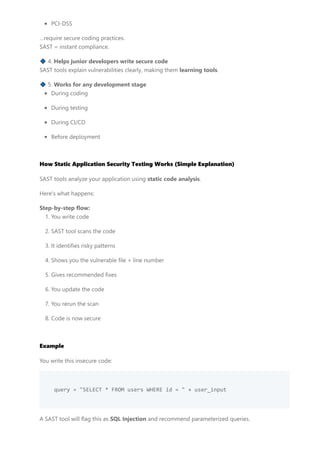
Step-by-step flow:
1. You write code
2. SAST tool scans the code
3. It identifies risky patterns
4. Shows you the vulnerable file + line number
5. Gives recommended fixes
6. You update the code
7. You rerun the scan
8. Code is now secure
Example
You write this insecure code:
query = "SELECT * FROM users WHERE id = " + user_input
A SAST tool will flag this as SQL Injection and recommend parameterized queries.
4.
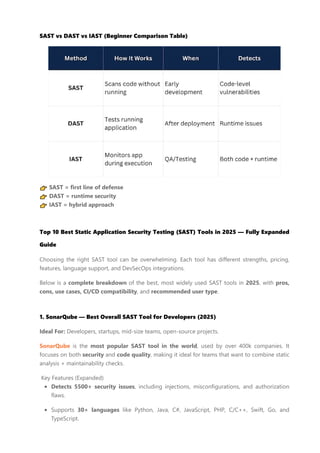
SAST vs DASTvs IAST (Beginner Comparison Table)
👉 SAST = first line of defense
👉 DAST = runtime security
👉 IAST = hybrid approach
Top 10 Best Static Application Security Testing (SAST) Tools in 2025 — Fully Expanded
Guide
Choosing the right SAST tool can be overwhelming. Each tool has different strengths, pricing,
features, language support, and DevSecOps integrations.
Below is a complete breakdown of the best, most widely used SAST tools in 2025, with pros,
cons, use cases, CI/CD compatibility, and recommended user type.
1. SonarQube — Best Overall SAST Tool for Developers (2025)
Ideal For: Developers, startups, mid-size teams, open-source projects.
SonarQube is the most popular SAST tool in the world, used by over 400k companies. It
focuses on both security and code quality, making it ideal for teams that want to combine static
analysis + maintainability checks.
Key Features (Expanded)
Detects 5500+ security issues, including injections, misconfigurations, and authorization
flaws.
Supports 30+ languages like Python, Java, C#, JavaScript, PHP, C/C++, Swift, Go, and
TypeScript.
5.
Pull Request decoration– shows security issues inside GitHub/GitLab/Bitbucket PRs.
Quality Gates – block merges if vulnerabilities exceed the threshold.
OWASP Top 10 & CWE compliance built in.
In-depth remediation guidance with examples.
Integrations
GitHub, GitLab, Bitbucket
Jenkins, Azure DevOps, CircleCI
Docker & Kubernetes pipelines
Pricing
Free (Community Edition)
Developer Edition: ~$150/year
Enterprise: $20k+/year depending on LOC
Pros
Best UX for developers
Strong community + plugin support
Great for code quality + security together
Cons
The community version lacks advanced security rules
Enterprise pricing is high
2. Checkmarx One — Best Enterprise-Grade SAST Platform
Ideal For: Banks, enterprise security teams, government organizations.
Checkmarx is one of the most advanced and accurate SAST platforms in the cybersecurity world,
trusted by Fortune 500 companies.
Features (Expanded)
Extremely deep scanning for enterprise-grade applications
Detects vulnerabilities unique to business logic
Hybrid analysis: SAST + SCA + IaC + API security
AI-powered scan tuning (reduces false positives)
Multi-branch analysis across huge codebases
Integrations
6.
GitHub, GitLab, AzureDevOps, Jenkins
Jira for ticketing
Slack/Teams security alerts
Pricing
Enterprise-level only → can reach $40k–$200k/year.
Pros
Industry-leading detection accuracy
Best for large monolithic codebases
Strong compliance reports
Cons
Very expensive
Requires onboarding + training
3. Snyk Code — Best AI-Powered Real-Time SAST Tool
Ideal For: Developers who want quick, AI-driven results.
Snyk Code uses machine learning + AI to detect vulnerabilities in real time as you type. Perfect
for fast-moving development teams.
Features (Expanded)
Instant scanning inside VS Code, JetBrains, or GitHub
AI-powered suggestions for fixes
Detects OWASP Top 10 issues
Integrates with Snyk Open Source for dependency scanning
Cloud-based, extremely fast
Integrations
GitHub, GitLab, Bitbucket
AWS, Azure, GCP
Docker Hub, Kubernetes
Pricing
Free tier
Pro: $25/month per developer
Enterprise: custom pricing
7.
Pros
Real-time vulnerability detection
Fastestscanning in the industry
Ideal for modern cloud apps
Cons
Internet required
AI-based scans may miss deep logic flaws
4. Veracode Static Analysis — Best for Compliance & Large Teams
Ideal For: Regulated industries like finance, healthcare, and SaaS.
Veracode is one of the most trusted tools in cybersecurity, specializing in compliance-friendly
static analysis.
Features (Expanded)
Enterprise-grade SAST in the cloud
Massive rule database for regulatory compliance
Auto-generated PDF reports for auditors
Perfect for SOC 2, HIPAA, PCI-DSS, GDPR
Flags insecure cryptography, flawed auth, and input validation errors
Integrations
Jenkins, GitHub, GitLab, Jira, Azure DevOps
Pricing
Starts around $12k+/year
Pros
Extremely accurate
Best reporting for compliance audits
Strong support + documentation
Cons
Expensive
Slower than Snyk / Sonar
5. GitLab SAST — Best Built-In Security for CI/CD Pipelines
Ideal For: DevOps teams using GitLab.
8.
GitLab SAST isbuilt directly into GitLab, making it perfect for teams who want “security without
extra setup.”
Features (Expanded)
Zero configuration (auto-scans code on every push)
Works with 20+ languages
Built-in dashboards for vulnerabilities
Automatically opens issues on GitLab
Integrations
Native GitLab CI/CD
Kubernetes deployments
Auto-remediation rules
Pricing
Free (Basic security)
Premium + Ultimate unlocks full features
Pros
No installation needed
Great for DevOps automation
Strong pipeline integration
Cons
Accuracy is not as high as Sonar/Checkmarx
Locked behind the GitLab ecosystem
6. Fortify Static Code Analyzer — Best for Legacy Systems
Ideal For: Large companies with old legacy codebases.
Fortify (by Micro Focus) is known for deep static analysis that supports very large enterprise
systems.
Features
Detects complex vulnerabilities in legacy code
Supports COBOL, PL/SQL, and old Java versions
Creates software security dashboards for management
On-premise installation available
Strong classification by CWE, OWASP, PCI
9.
Integrations
Jenkins, Bamboo, Azure,GitHub, GitLab
Pricing
Enterprise pricing can exceed $100k/year for large orgs.
Pros
Best tool for huge enterprise systems
Deep code scanning
Mature product with a long history
Cons
Very expensive
UI feels outdated compared to Snyk/Sonar
7. Brakeman — Best Free SAST Tool for Ruby on Rails
Ideal For: Rails developers, startups, indie makers.
Brakeman is the best SAST tool specifically built for Ruby on Rails.
Features (Expanded)
Lightning-fast (scans in seconds)
Finds Rails-specific vulnerabilities like:
mass assignment
unsafe redirects
SQL Injection
unsafe params
No configuration required
Integrations
GitHub Actions
GitLab CI
CircleCI
Pricing
100% Free (Open source)
Pros
Best accuracy for Rails
10.
Easy to use
Zerosetup
Cons
Only supports Rails
No cloud dashboard
8. Bandit — Best Python-Specific Static Analyzer
Ideal For: Python developers, ML engineers, API developers.
Bandit is a lightweight CLI tool built by the OpenStack security team.
Features (Expanded)
Detects Python-specific issues:
insecure cryptography
unsafe imports
eval misuse
hardcoded secrets
Perfect for fast CI/CD scanning
Easy to install: pip install bandit
Integrations
Pre-commit hooks
GitHub/GitLab pipelines
Jenkins
Pricing
Free (Open-source)
Pros
Very fast
Works great for microservices
No false positives like enterprise tools
Cons
Only Python
No GUI dashboard
11.
9. Semgrep —Best Lightweight, Rule-Based SAST Tool
Ideal For: Teams wanting fast, customizable scans.
Semgrep is one of the most developer-friendly SAST tools with customizable rules.
Features
Pattern-based scanning
Highly flexible rules
Supports 30+ languages
Creates custom security rules for your org
Great for AI apps, APIs, microservices
Integrations
GitHub Actions
GitLab CI
CircleCI
Docker
Pricing
Free tier
Paid team plans available
Pros
Fastest SAST tool after Snyk
Extremely configurable
Great for startups + enterprises
Cons
Requires rule-writing knowledge
Not ideal for beginners
10. CodeQL — Best Advanced SAST for GitHub Projects
Ideal For: Open-source contributors, GitHub users.
CodeQL, built by GitHub, lets you query your code like a database to detect vulnerabilities.
Features
Used by the GitHub security team
Extremely accurate for open-source repos
12.
Supports Java, Python,JS, Go, C++, C#
Free for public repositories
Ideal for crypto, wallet, Web3, APIs
Integrations
GitHub Actions
Security workflows
Dependabot
Pricing
Free for public repos
Paid for private repos (GitHub Advanced Security)
Pros
Best tool for GitHub projects
Highly customizable queries
Great for research + security analysis
Cons
Learning curve is steep
Query-based scanning takes time
How to Use a SAST Tool Effectively (Beginner Guide)
1. Add SAST to your code editor
Use plugins for:
VS Code
JetBrains
Eclipse
It gives instant alerts while coding.
2. Add SAST to your Git workflow
Enable SAST in:
GitHub Actions
GitLab CI
Bitbucket Pipelines
13.
Every push =auto scan.
3. Add SAST to your CI/CD pipeline
Fail the build if a critical vulnerability is found.
4. Train your team
Many vulnerabilities come from a lack of awareness.
5. Combine SAST + DAST + SCA
This gives full 360° protection.
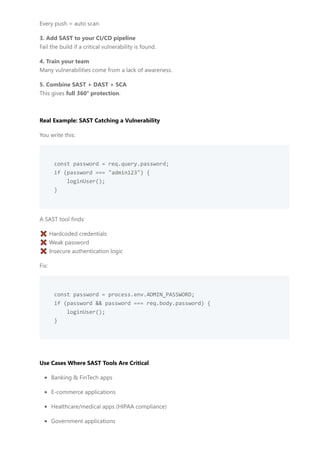
Real Example: SAST Catching a Vulnerability
You write this:
const password = req.query.password;
if (password === "admin123") {
loginUser();
}
A SAST tool finds:
❌ Hardcoded credentials
❌ Weak password
❌ Insecure authentication logic
Fix:
const password = process.env.ADMIN_PASSWORD;
if (password && password === req.body.password) {
loginUser();
}
Use Cases Where SAST Tools Are Critical
Banking & FinTech apps
E-commerce applications
Healthcare/medical apps (HIPAA compliance)
Government applications
14.
SaaS platforms
Any businesscollecting user data
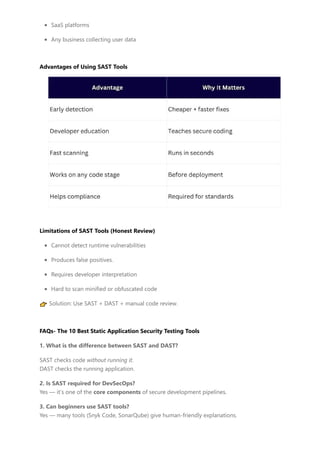
Advantages of Using SAST Tools
Limitations of SAST Tools (Honest Review)
Cannot detect runtime vulnerabilities
Produces false positives.
Requires developer interpretation
Hard to scan minified or obfuscated code
👉 Solution: Use SAST + DAST + manual code review.
FAQs- The 10 Best Static Application Security Testing Tools
1. What is the difference between SAST and DAST?
SAST checks code without running it.
DAST checks the running application.
2. Is SAST required for DevSecOps?
Yes — it’s one of the core components of secure development pipelines.
3. Can beginners use SAST tools?
Yes — many tools (Snyk Code, SonarQube) give human-friendly explanations.
15.
4. Which SASTtool is free?
SonarQube Community
Bandit
CodeQL
Semgrep
Brakeman
5. Does SAST fix vulnerabilities automatically?
Some tools (like Snyk) give fixes, but humans still write the final patch.
Conclusion
Static Application Security Testing (SAST) tools are non-negotiable for modern software
development. They help detect vulnerabilities early, save money, protect users, and ensure
compliance.
Whether you’re a beginner developer or running a full DevSecOps pipeline, SAST tools help you
build secure, stable, and future-proof applications.
Hardeep Singh
Hardeep Singh is a tech and money-blogging enthusiast, sharing guides on
earning apps, affiliate programs, online business tips, AI tools, SEO, and blogging
tutorials on Panstag.com.
Previous Post
16.
1 Blogging Tips, Latest
10 Free Blogger Templates for AdSense Approval
1 Jul, 2025
Best Free Blogger Templates for AdSense Approval Are you struggling to get AdSense approval on your Blogger blog?
You’re not alone. Many...
2 Online Money Making
15 Legit Games That Pay Real Money Instantly
1 Aug, 2025
Legit Games That Pay Real Money Instantly (Guide for USA Users) Tired of playing games that waste your time without
any rewards? In 2025, ...
3 Online Money Making
Top 15 New Cash Advance Apps
2 Sept, 2025
Top 15 New Cash Advance Apps: The Best Options to Get Money Fast in the USA Introduction When unexpected
expenses hit — car repairs, medic...
4 Online Money Making
Cash Advance Apps No Deposit Required
20 Aug, 2025
Cash Advance Apps No Direct Deposit Required (Guide for USA) Managing money isn’t easy. Sometimes bills are due
before payday, or an emerge...
POPULAR POSTS




![[OPD 2019] AST Platform and the importance of multi-layered application secu...](https://cdn.slidesharecdn.com/ss_thumbnails/uriaankorionastplatformandtheimportanceofmultilayeredapplicationsecuritytesting-191021171736-thumbnail.jpg?width=640&height=640&fit=bounds)


