ChrisTyson
5352 Instructional Leadership
        Action Plan

          3/20/11
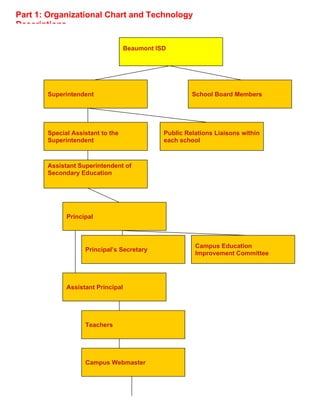
Part 1: Organizational Chart and Technology
Descriptions

                                   Beaumont ISD


       Superintendent                                  School Board Members


       Special Assistant to the               Public Relations Liaisons within
       Superintendent                         each school


       Assistant Superintendent of
       Secondary Education


             Principal


                                                        Campus Education
                   Principal’s Secretary
                                                        Improvement Committee


             Assistant Principal


                   Teachers


                   Campus Webmaster
Registrar


                                    Counselor


                                    Campus Technology Leader


                                                  Students


                                                  Parents/Guardians


        Key Stakeholders in Integrating Technology and Their Responsibilities in BISD

School Board Members                               To ensure that funds for equipment are allocated, that all state technology standards are
                                                   understood before voting on technology purchases, and that all district employees are
                                                   certified by the State of Texas before voting on their employment

Superintendent                                     To distribute technology expectations and the work required to meet expectations to
                                                   subodinates and monitor if the expectations have been met

Special Assistant to the Superintendent            To lead the Campus Public Relations Liaisons and hold meetings with them several
                                                   times a year to educate them on the different ways BISD uses technology to speak to
                                                   the community; to act as the spokesperson for the district who speaks to the media
                                                   concerning technology and other issues concerning the district

Public Relations Liaisons within each school       To monitor and update campus website with events taking place within their individual
                                                   schools; to create and send powerpoints that show positive events within their school to
                                                   be used on BISD news channel

Assistant Superintendent of Secondary Education    To monitor secondary schools and report findings to the superintendent in order to
                                                   ensure all education needs are being met for the students including technology use


Principal                                          To monitor his/her campus and to make sure technology is being used to supplement
                                                   the students’ education; to monitor the daily activities of the school and designate
                                                   responsiblities to subordinate administrators, teacher leaders, and others as needed

Principal’s Secretary                              To order supplies which include technology for educators to use in the classroom

Campus Education Improvement Committee             To discuss and vote on the different uses of technology within their school

Assistant Principal                                To implement the vision of the principal and do daily walk throughs of teachers to check
                                                   for implementation; to manage student behavior so others may learn

Teachers                                           To use technology within their lesson so students have an awareness of technology and
its uses

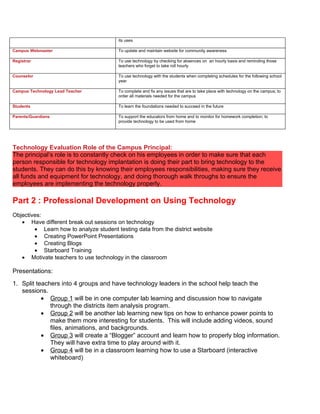
Campus Webmaster                        To update and maintain website for community awareness

Registrar                               To use technology by checking for absences on an hourly basis and reminding those
                                        teachers who forget to take roll hourly

Counselor                               To use technology with the students when completing schedules for the following school
                                        year

Campus Technology Lead Teacher          To complete and fix any issues that are to take place with technology on the campus; to
                                        order all materials needed for the campus

Students                                To learn the foundations needed to succeed in the future

Parents/Guardians                       To support the educators from home and to monitor for homework completion; to
                                        provide technology to be used from home


Technology Evaluation Role of the Campus Principal:
The principal’s role is to constantly check on his employees in order to make sure that each
person responsible for technology implantation is doing their part to bring technology to the
students. They can do this by knowing their employees responsibilities, making sure they receive
all funds and equipment for technology, and doing thorough walk throughs to ensure the
employees are implementing the technology properly.

Part 2 : Professional Development on Using Technology
Objectives:
   • Have different break out sessions on technology
        • Learn how to analyze student testing data from the district website
        • Creating PowerPoint Presentations
        • Creating Blogs
        • Starboard Training
   • Motivate teachers to use technology in the classroom

Presentations:
1. Split teachers into 4 groups and have technology leaders in the school help teach the
   sessions.
           • Group 1 will be in one computer lab learning and discussion how to navigate
              through the districts item analysis program.
           • Group 2 will be another lab learning new tips on how to enhance power points to
              make them more interesting for students. This will include adding videos, sound
              files, animations, and backgrounds.
           • Group 3 will create a “Blogger” account and learn how to properly blog information.
              They will have extra time to play around with it.
           • Group 4 will be in a classroom learning how to use a Starboard (interactive
              whiteboard)
2. During each breakout session the staff will go over different ways to incorporate technology in
   the classroom and how to properly use it.


3. At the end of the staff development we will gather in the Library to have a collaborative
   discussion on what we learned and how we can implement this knowledge into our everyday
   school lesson. We then will conduct an evaluation of the workshop through handouts. After
   all evaluations are collected we will have so last final thoughts before ending the session.


4. Scheduling:
8-12                             Breakout Sessions:               The Leaders will be four
                                 Groups 1-4 will rotate through   teachers that are experienced
                                 each session spending 1 hour     with technology use
                                 in each.
12-1:30                          Lunch
1:30-2:30                            1. Collaborate on what we    Lead by Chris Tyson and
                                        learned                   Campus Technology Leader
                                     2. Evaluation of workshop
                                     3. Final comments then
                                        end the workshop


Part 3: Evaluation Planning for Action Plan
Technology Evaluation Plan


                                    Student surveys can be conducted to see if
Teachers Evaluation
                                    and how teachers are using technology in the
                                    classroom


                                    Assistant Principals will conduct classroom
Campus Administrations              observations to see if teachers are using
Evaluation                          technology to implement classroom
                                    instruction


                                    District will have several technology staff
District Administrations            development days to insure that all staff will
Evaluation                          be educated on the use of technology in the
                                    classroom. Evaluations will be conducted
                                    after each staff development.


                                     District will conduct a district-wide annual
States Evaluation                    technology needs assessment (STaR Chart)
                                     to see where the district stands in
                                     comparison to other districts in the state.

Edld 5352 week4 action plan

  • 1.
  • 2.
    Part 1: OrganizationalChart and Technology Descriptions Beaumont ISD Superintendent School Board Members Special Assistant to the Public Relations Liaisons within Superintendent each school Assistant Superintendent of Secondary Education Principal Campus Education Principal’s Secretary Improvement Committee Assistant Principal Teachers Campus Webmaster
  • 3.
    Registrar Counselor Campus Technology Leader Students Parents/Guardians Key Stakeholders in Integrating Technology and Their Responsibilities in BISD School Board Members To ensure that funds for equipment are allocated, that all state technology standards are understood before voting on technology purchases, and that all district employees are certified by the State of Texas before voting on their employment Superintendent To distribute technology expectations and the work required to meet expectations to subodinates and monitor if the expectations have been met Special Assistant to the Superintendent To lead the Campus Public Relations Liaisons and hold meetings with them several times a year to educate them on the different ways BISD uses technology to speak to the community; to act as the spokesperson for the district who speaks to the media concerning technology and other issues concerning the district Public Relations Liaisons within each school To monitor and update campus website with events taking place within their individual schools; to create and send powerpoints that show positive events within their school to be used on BISD news channel Assistant Superintendent of Secondary Education To monitor secondary schools and report findings to the superintendent in order to ensure all education needs are being met for the students including technology use Principal To monitor his/her campus and to make sure technology is being used to supplement the students’ education; to monitor the daily activities of the school and designate responsiblities to subordinate administrators, teacher leaders, and others as needed Principal’s Secretary To order supplies which include technology for educators to use in the classroom Campus Education Improvement Committee To discuss and vote on the different uses of technology within their school Assistant Principal To implement the vision of the principal and do daily walk throughs of teachers to check for implementation; to manage student behavior so others may learn Teachers To use technology within their lesson so students have an awareness of technology and
  • 4.
    its uses Campus Webmaster To update and maintain website for community awareness Registrar To use technology by checking for absences on an hourly basis and reminding those teachers who forget to take roll hourly Counselor To use technology with the students when completing schedules for the following school year Campus Technology Lead Teacher To complete and fix any issues that are to take place with technology on the campus; to order all materials needed for the campus Students To learn the foundations needed to succeed in the future Parents/Guardians To support the educators from home and to monitor for homework completion; to provide technology to be used from home Technology Evaluation Role of the Campus Principal: The principal’s role is to constantly check on his employees in order to make sure that each person responsible for technology implantation is doing their part to bring technology to the students. They can do this by knowing their employees responsibilities, making sure they receive all funds and equipment for technology, and doing thorough walk throughs to ensure the employees are implementing the technology properly. Part 2 : Professional Development on Using Technology Objectives: • Have different break out sessions on technology • Learn how to analyze student testing data from the district website • Creating PowerPoint Presentations • Creating Blogs • Starboard Training • Motivate teachers to use technology in the classroom Presentations: 1. Split teachers into 4 groups and have technology leaders in the school help teach the sessions. • Group 1 will be in one computer lab learning and discussion how to navigate through the districts item analysis program. • Group 2 will be another lab learning new tips on how to enhance power points to make them more interesting for students. This will include adding videos, sound files, animations, and backgrounds. • Group 3 will create a “Blogger” account and learn how to properly blog information. They will have extra time to play around with it. • Group 4 will be in a classroom learning how to use a Starboard (interactive whiteboard)
  • 5.
    2. During eachbreakout session the staff will go over different ways to incorporate technology in the classroom and how to properly use it. 3. At the end of the staff development we will gather in the Library to have a collaborative discussion on what we learned and how we can implement this knowledge into our everyday school lesson. We then will conduct an evaluation of the workshop through handouts. After all evaluations are collected we will have so last final thoughts before ending the session. 4. Scheduling: 8-12 Breakout Sessions: The Leaders will be four Groups 1-4 will rotate through teachers that are experienced each session spending 1 hour with technology use in each. 12-1:30 Lunch 1:30-2:30 1. Collaborate on what we Lead by Chris Tyson and learned Campus Technology Leader 2. Evaluation of workshop 3. Final comments then end the workshop Part 3: Evaluation Planning for Action Plan
  • 6.
    Technology Evaluation Plan Student surveys can be conducted to see if Teachers Evaluation and how teachers are using technology in the classroom Assistant Principals will conduct classroom Campus Administrations observations to see if teachers are using Evaluation technology to implement classroom instruction District will have several technology staff District Administrations development days to insure that all staff will Evaluation be educated on the use of technology in the classroom. Evaluations will be conducted after each staff development. District will conduct a district-wide annual States Evaluation technology needs assessment (STaR Chart) to see where the district stands in comparison to other districts in the state.