Editing the documentary
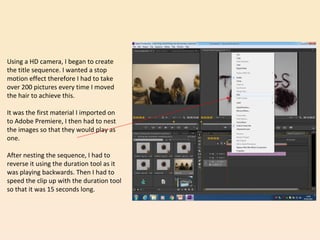
Using a HD camera, I began to create
the title sequence. I wanted a stop
motion effect therefore I had to take
over 200 pictures every time I moved
the hair to achieve this.
It was the first material I imported on
to Adobe Premiere, I then had to nest
the images so that they would play as
one.
After nesting the sequence, I had to
reverse it using the duration tool as it
was playing backwards. Then I had to
speed the clip up with the duration tool
so that it was 15 seconds long.
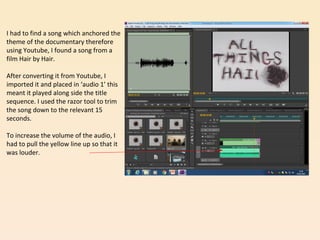
I had to find a song which anchored the
theme of the documentary therefore
using Youtube, I found a song from a
film Hair by Hair.
After converting it from Youtube, I
imported it and placed in ‘audio 1’ this
meant it played along side the title
sequence. I used the razor tool to trim
the song down to the relevant 15
seconds.
To increase the volume of the audio, I
had to pull the yellow line up so that it
was louder.
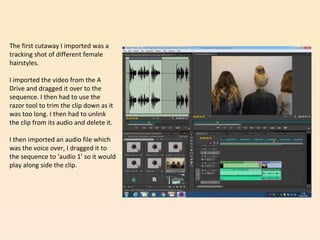
The first cutaway I imported was a
tracking shot of different female
hairstyles.
I imported the video from the A
Drive and dragged it over to the
sequence. I then had to use the
razor tool to trim the clip down as it
was too long. I then had to unlink
the clip from its audio and delete it.
I then imported an audio file which
was the voice over, I dragged it to
the sequence to ‘audio 1’ so it would
play along side the clip.
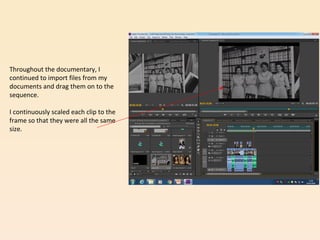
Throughout the documentary, I
continued to import files from my
documents and drag them on to the
sequence.
I continuously scaled each clip to the
frame so that they were all the same
size.
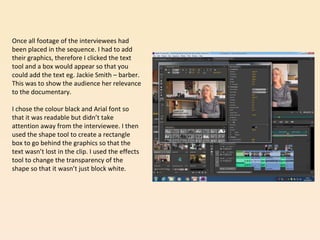
Once all footage of the interviewees had
been placed in the sequence. I had to add
their graphics, therefore I clicked the text
tool and a box would appear so that you
could add the text eg. Jackie Smith – barber.
This was to show the audience her relevance
to the documentary.
I chose the colour black and Arial font so
that it was readable but didn’t take
attention away from the interviewee. I then
used the shape tool to create a rectangle
box to go behind the graphics so that the
text wasn’t lost in the clip. I used the effects
tool to change the transparency of the
shape so that it wasn’t just block white.
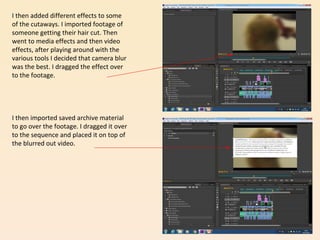
I then added different effects to some
of the cutaways. I imported footage of
someone getting their hair cut. Then
went to media effects and then video
effects, after playing around with the
various tools I decided that camera blur
was the best. I dragged the effect over
to the footage.
I then imported saved archive material
to go over the footage. I dragged it over
to the sequence and placed it on top of
the blurred out video.
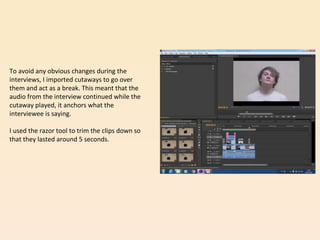
To avoid any obvious changes during the
interviews, I imported cutaways to go over
them and act as a break. This meant that the
audio from the interview continued while the
cutaway played, it anchors what the
interviewee is saying.
I used the razor tool to trim the clips down so
that they lasted around 5 seconds.
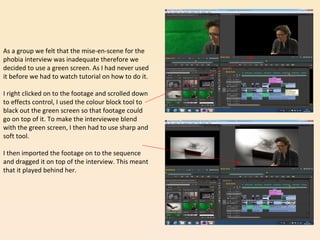
As a group we felt that the mise-en-scene for the
phobia interview was inadequate therefore we
decided to use a green screen. As I had never used
it before we had to watch tutorial on how to do it.
I right clicked on to the footage and scrolled down
to effects control, I used the colour block tool to
black out the green screen so that footage could
go on top of it. To make the interviewee blend
with the green screen, I then had to use sharp and
soft tool.
I then imported the footage on to the sequence
and dragged it on top of the interview. This meant
that it played behind her.
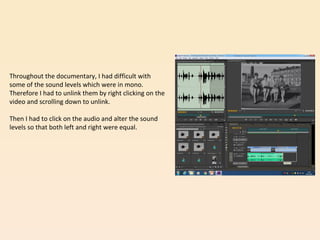
Throughout the documentary, I had difficult with
some of the sound levels which were in mono.
Therefore I had to unlink them by right clicking on the
video and scrolling down to unlink.
Then I had to click on the audio and alter the sound
levels so that both left and right were equal.

Editing the documentary (1)

  • 1.
  • 2.
    Using a HDcamera, I began to create the title sequence. I wanted a stop motion effect therefore I had to take over 200 pictures every time I moved the hair to achieve this. It was the first material I imported on to Adobe Premiere, I then had to nest the images so that they would play as one. After nesting the sequence, I had to reverse it using the duration tool as it was playing backwards. Then I had to speed the clip up with the duration tool so that it was 15 seconds long.
  • 3.
    I had tofind a song which anchored the theme of the documentary therefore using Youtube, I found a song from a film Hair by Hair. After converting it from Youtube, I imported it and placed in ‘audio 1’ this meant it played along side the title sequence. I used the razor tool to trim the song down to the relevant 15 seconds. To increase the volume of the audio, I had to pull the yellow line up so that it was louder.
  • 4.
    The first cutawayI imported was a tracking shot of different female hairstyles. I imported the video from the A Drive and dragged it over to the sequence. I then had to use the razor tool to trim the clip down as it was too long. I then had to unlink the clip from its audio and delete it. I then imported an audio file which was the voice over, I dragged it to the sequence to ‘audio 1’ so it would play along side the clip.
  • 5.
    Throughout the documentary,I continued to import files from my documents and drag them on to the sequence. I continuously scaled each clip to the frame so that they were all the same size.
  • 6.
    Once all footageof the interviewees had been placed in the sequence. I had to add their graphics, therefore I clicked the text tool and a box would appear so that you could add the text eg. Jackie Smith – barber. This was to show the audience her relevance to the documentary. I chose the colour black and Arial font so that it was readable but didn’t take attention away from the interviewee. I then used the shape tool to create a rectangle box to go behind the graphics so that the text wasn’t lost in the clip. I used the effects tool to change the transparency of the shape so that it wasn’t just block white.
  • 7.
    I then addeddifferent effects to some of the cutaways. I imported footage of someone getting their hair cut. Then went to media effects and then video effects, after playing around with the various tools I decided that camera blur was the best. I dragged the effect over to the footage. I then imported saved archive material to go over the footage. I dragged it over to the sequence and placed it on top of the blurred out video.
  • 8.
    To avoid anyobvious changes during the interviews, I imported cutaways to go over them and act as a break. This meant that the audio from the interview continued while the cutaway played, it anchors what the interviewee is saying. I used the razor tool to trim the clips down so that they lasted around 5 seconds.
  • 9.
    As a groupwe felt that the mise-en-scene for the phobia interview was inadequate therefore we decided to use a green screen. As I had never used it before we had to watch tutorial on how to do it. I right clicked on to the footage and scrolled down to effects control, I used the colour block tool to black out the green screen so that footage could go on top of it. To make the interviewee blend with the green screen, I then had to use sharp and soft tool. I then imported the footage on to the sequence and dragged it on top of the interview. This meant that it played behind her.
  • 10.
    Throughout the documentary,I had difficult with some of the sound levels which were in mono. Therefore I had to unlink them by right clicking on the video and scrolling down to unlink. Then I had to click on the audio and alter the sound levels so that both left and right were equal.