Editing
Review
• How many edits do you think were in this one
minute sequence?
• Write your number on your board
• Hold up your board!
UnderstandingKnowledge
Continuity Editing
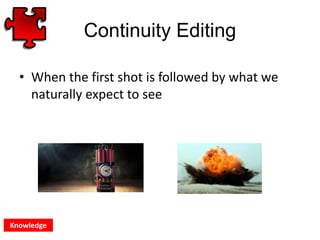
• When the first shot is followed by what we
naturally expect to see
Knowledge
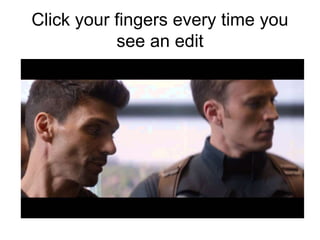
Click your fingers every time you
see an edit
Continuity Editing
• The reason you don’t know how many edits
there were is because they are designed not
to be noticed
• This is why it is called CONTINUITY EDITING
because it seems to be invisible to the
audience
Knowledge Understanding
Continuity Editing
• How many edits were there?
• What happened to the pace of editing?
• How does this impact the audience?
Knowledge Understanding
Today’s Objectives
• To know and understand what continuity
editing is
• To create a new scene using a range of
editing techniques to make meaning
Knowledge Understanding Applying Analysing CreatingEvaluating
Continuity Editing
• There are FIVE main types of continuity
editing to know for this unit.
• We must think about what the editing tells us
about the characters and the action.
Knowledge Understanding
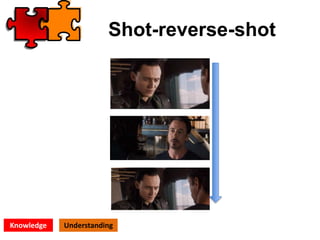
Shot-reverse-shot
Knowledge Understanding
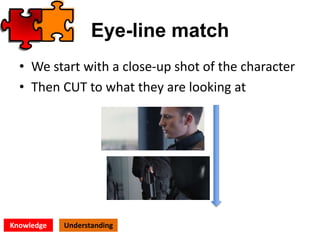
Eye-line match
• We start with a close-up shot of the character
• Then CUT to what they are looking at
Knowledge Understanding
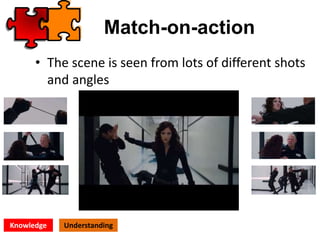
Match-on-action
• The scene is seen from lots of different shots
and angles
Knowledge Understanding
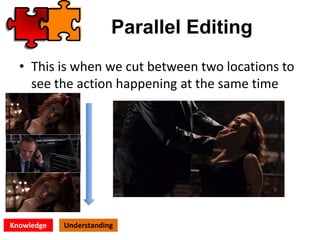
Parallel Editing
• This is when we cut between two locations to
see the action happening at the same time
Knowledge Understanding
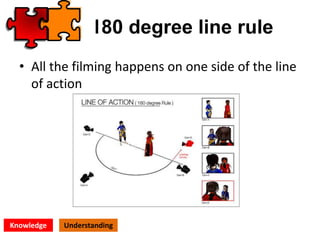
180 degree line rule
• All the filming happens on one side of the line
of action
Knowledge Understanding
Hinge Point 1
Q: When the scene is viewed continuously from
a range of different camera angles.
A: Shot-reverse-shot
B: Parallel editing
C: Match on action
Hinge Point 2
Q: This type of edit can be used to draw
attention and imply the importance of
something a character is looking at.
A: Parallel editing
B: Eye-line match
C: Shot-reverse-shot
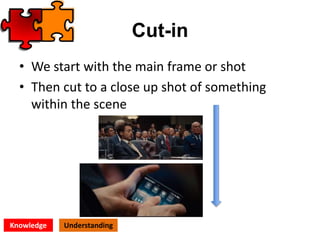
Cut-in
• We start with the main frame or shot
• Then cut to a close up shot of something
within the scene
Knowledge Understanding
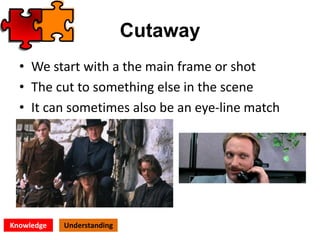
Cutaway
• We start with a the main frame or shot
• The cut to something else in the scene
• It can sometimes also be an eye-line match
Knowledge Understanding
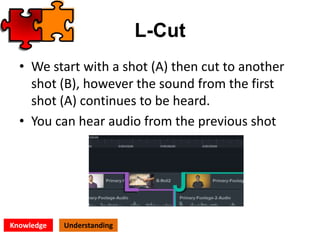
L-Cut
• We start with a shot (A) then cut to another
shot (B), however the sound from the first
shot (A) continues to be heard.
• You can hear audio from the previous shot
Knowledge Understanding
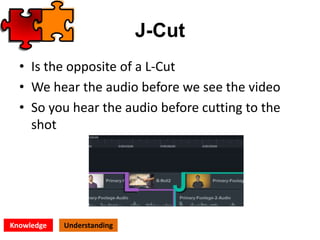
J-Cut
• Is the opposite of a L-Cut
• We hear the audio before we see the video
• So you hear the audio before cutting to the
shot
Knowledge Understanding
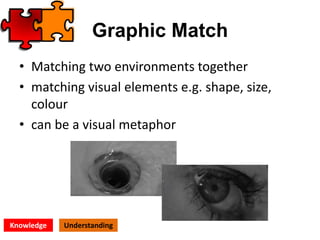
Graphic Match
• Matching two environments together
• matching visual elements e.g. shape, size,
colour
• can be a visual metaphor
Knowledge Understanding
Hinge Point 3
Q: When we can hear audio from the next shot
before cutting to the visual
A: Parallel editing
B: L Cut
C: J Cut
Hinge Point 4
Q: A cut that creates a visual metaphor between
the objects of the two shots
A: L Cut
B: Graphic match
C: Eye-line match
PRACTICAL 1: In-Camera Editing
• Your task is to create a one minute
short using in-camera editing
techniques to create continuity
• Include all the continuity techniques
learned today
• Include a range of shots where
possible
• Use the shooting script to plan your
shots

Editing - Continuity

  • 1.
  • 3.
    Review • How manyedits do you think were in this one minute sequence? • Write your number on your board • Hold up your board! UnderstandingKnowledge
  • 4.
    Continuity Editing • Whenthe first shot is followed by what we naturally expect to see Knowledge
  • 5.
    Click your fingersevery time you see an edit
  • 6.
    Continuity Editing • Thereason you don’t know how many edits there were is because they are designed not to be noticed • This is why it is called CONTINUITY EDITING because it seems to be invisible to the audience Knowledge Understanding
  • 7.
    Continuity Editing • Howmany edits were there? • What happened to the pace of editing? • How does this impact the audience? Knowledge Understanding
  • 8.
    Today’s Objectives • Toknow and understand what continuity editing is • To create a new scene using a range of editing techniques to make meaning Knowledge Understanding Applying Analysing CreatingEvaluating
  • 9.
    Continuity Editing • Thereare FIVE main types of continuity editing to know for this unit. • We must think about what the editing tells us about the characters and the action. Knowledge Understanding
  • 10.
  • 11.
    Eye-line match • Westart with a close-up shot of the character • Then CUT to what they are looking at Knowledge Understanding
  • 12.
    Match-on-action • The sceneis seen from lots of different shots and angles Knowledge Understanding
  • 13.
    Parallel Editing • Thisis when we cut between two locations to see the action happening at the same time Knowledge Understanding
  • 14.
    180 degree linerule • All the filming happens on one side of the line of action Knowledge Understanding
  • 15.
    Hinge Point 1 Q:When the scene is viewed continuously from a range of different camera angles. A: Shot-reverse-shot B: Parallel editing C: Match on action
  • 16.
    Hinge Point 2 Q:This type of edit can be used to draw attention and imply the importance of something a character is looking at. A: Parallel editing B: Eye-line match C: Shot-reverse-shot
  • 17.
    Cut-in • We startwith the main frame or shot • Then cut to a close up shot of something within the scene Knowledge Understanding
  • 18.
    Cutaway • We startwith a the main frame or shot • The cut to something else in the scene • It can sometimes also be an eye-line match Knowledge Understanding
  • 19.
    L-Cut • We startwith a shot (A) then cut to another shot (B), however the sound from the first shot (A) continues to be heard. • You can hear audio from the previous shot Knowledge Understanding
  • 20.
    J-Cut • Is theopposite of a L-Cut • We hear the audio before we see the video • So you hear the audio before cutting to the shot Knowledge Understanding
  • 21.
    Graphic Match • Matchingtwo environments together • matching visual elements e.g. shape, size, colour • can be a visual metaphor Knowledge Understanding
  • 22.
    Hinge Point 3 Q:When we can hear audio from the next shot before cutting to the visual A: Parallel editing B: L Cut C: J Cut
  • 23.
    Hinge Point 4 Q:A cut that creates a visual metaphor between the objects of the two shots A: L Cut B: Graphic match C: Eye-line match
  • 24.
    PRACTICAL 1: In-CameraEditing • Your task is to create a one minute short using in-camera editing techniques to create continuity • Include all the continuity techniques learned today • Include a range of shots where possible • Use the shooting script to plan your shots