



ECOMMERCE	
  LINK	
  BUILDING	
  
How	
  to	
  Turn	
  Free	
  Tools	
  Into	
  Search	
  
Rankings	
  
1	
  
About	
  Darren	
  DeMatas	
  
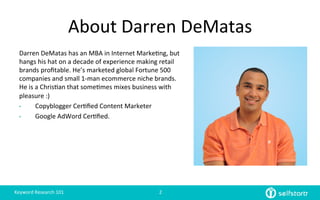
Darren	
  DeMatas	
  has	
  an	
  MBA	
  in	
  Internet	
  Marke=ng,	
  but	
  
hangs	
  his	
  hat	
  on	
  a	
  decade	
  of	
  experience	
  making	
  retail	
  
brands	
  profitable.	
  He’s	
  marketed	
  global	
  Fortune	
  500	
  
companies	
  and	
  small	
  1-­‐man	
  ecommerce	
  niche	
  brands.	
  
He	
  is	
  a	
  Chris=an	
  that	
  some=mes	
  mixes	
  business	
  with	
  
pleasure	
  :)	
  
•  Copyblogger	
  Cer=fied	
  Content	
  Marketer	
  	
  
•  Google	
  AdWord	
  Cer=fied.	
  	
  
Keyword	
  Research	
  101	
   2	
  
Now	
  That	
  You	
  Have	
  Your	
  	
  
Page	
  and	
  Keywords…	
  
Time	
  To	
  Get	
  Some	
  Quality	
  Links	
  
Link	
  Building	
  101	
   3	
  
Before	
  You	
  Build	
  A	
  Single	
  Link…	
  
You	
  need	
  to	
  know	
  the	
  absolute	
  
basics.	
  
4	
  
Link	
  Building	
  101	
  
①  Types	
  Of	
  Links	
  
②  Evalua=ng	
  A	
  Site	
  
③  Anchor	
  Text	
  
④  Ecommerce	
  Page	
  Types	
  
Link	
  Building	
  101	
   5	
  
Types	
  Of	
  Links	
  
①  Links	
  That	
  Drive	
  Traffic	
  
–  Ex)	
  Social	
  Shares,	
  Paid	
  Ads,	
  Sponsored	
  Posts	
  
②  Links	
  That	
  Boost	
  Rankings	
  
–  Ex)	
  Men=ons	
  On	
  A	
  Trusted	
  Web	
  Page	
  
③  Links	
  That	
  Do	
  Both	
  
–  Ex)	
  Men=ons	
  On	
  A	
  Popular	
  Web	
  Page	
  
④  Links	
  That	
  Do	
  Nothing	
  
–  Ex)	
  Spam	
  Comment	
  Or	
  Link	
  On	
  A	
  Crap	
  Site	
  
⑤  Links	
  That	
  Get	
  You	
  In	
  Trouble	
  
–  Ex)	
  Automa=on,	
  Directories,	
  Farms	
  
Link	
  Building	
  101	
   6	
  
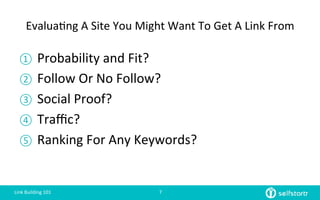
Evalua=ng	
  A	
  Site	
  You	
  Might	
  Want	
  To	
  Get	
  A	
  Link	
  From	
  
①  Probability	
  and	
  Fit?	
  
②  Follow	
  Or	
  No	
  Follow?	
  
③  Social	
  Proof?	
  
④  Traffic?	
  
⑤  Ranking	
  For	
  Any	
  Keywords?	
  
Link	
  Building	
  101	
   7	
  
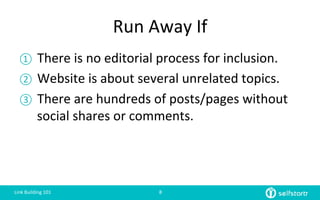
Run	
  Away	
  If	
  
①  There	
  is	
  no	
  editorial	
  process	
  for	
  inclusion.	
  
②  Website	
  is	
  about	
  several	
  unrelated	
  topics.	
  
③  There	
  are	
  hundreds	
  of	
  posts/pages	
  without	
  
social	
  shares	
  or	
  comments.	


Link	
  Building	
  101	
   8	
  
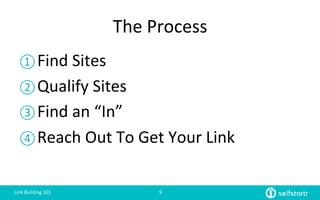
The	
  Process	
  
① Find	
  Sites	
  
② Qualify	
  Sites	
  
③ Find	
  an	
  “In”	
  
④ Reach	
  Out	
  To	
  Get	
  Your	
  Link	
  
Link	
  Building	
  101	
   9	
  
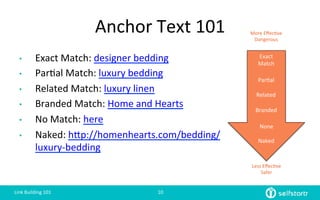
Anchor	
  Text	
  101	
  
•  Exact	
  Match:	
  designer	
  bedding	
  
•  Par=al	
  Match:	
  luxury	
  bedding	
  	
  
•  Related	
  Match:	
  luxury	
  linen	
  
•  Branded	
  Match:	
  Home	
  and	
  Hearts	
  
•  No	
  Match:	
  here	
  
•  Naked:	
  hlp://homenhearts.com/bedding/
luxury-­‐bedding	


Exact	
  
Match	
  
Naked	
  
Par=al	
  
Less	
  Effec=ve	
  
Safer	
  
More	
  Effec=ve	
  
Dangerous	
  
Related	
  
Branded	
  
None	
  
Link	
  Building	
  101	
   10	
  
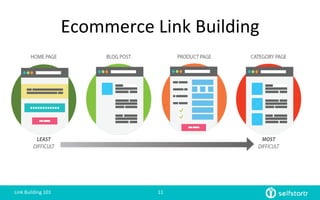
Ecommerce	
  Link	
  Building	
  
Exact	
  
Match	
  
Link	
  Building	
  101	
   11	
  
There	
  are	
  Hundreds	
  Of	
  White	
  Hat	
  
Backlink	
  Opportuni=es	
  	
  
But	
  Today,	
  I	
  Want	
  You	
  To	
  Focus	
  In	
  On	
  
Home	
  Page	
  And	
  Category	
  Page	
  Links	
  
Link	
  Building	
  101	
   12	
  
Where	
  To	
  Get	
  Links	
  From	
  Now..	
  
① Resource	
  Pages/Links	
  Page	
  
② Broken	
  Link	
  Building	
  
③ Fresh	
  Web	
  Men=ons	
  
④ Partners	
  and	
  Vendors	
  
Link	
  Building	
  101	
   13	
  
…The	
  Best	
  Place	
  To	
  Find	
  Links	
  is…	
  
Link	
  Building	
  101	
   14	
  
Google	
  
Link	
  Building	
  101	
   15	
  
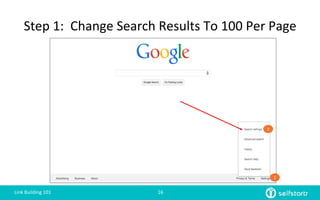
Step	
  1:	
  	
  Change	
  Search	
  Results	
  To	
  100	
  Per	
  Page	
  
1	
  
2	
  
Link	
  Building	
  101	
   16	
  
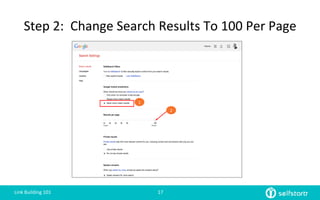
Step	
  2:	
  	
  Change	
  Search	
  Results	
  To	
  100	
  Per	
  Page	
  
1	
  
2	
  
Link	
  Building	
  101	
   17	
  
Mastering	
  Advanced	
  Search	
  
Operators	
  
Is	
  an	
  essen$al	
  SEO	
  skill	
  
Link	
  Building	
  101	
   18	
  
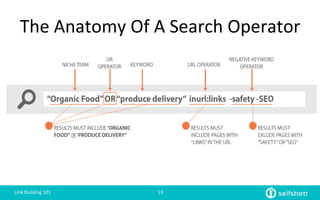
The	
  Anatomy	
  Of	
  A	
  Search	
  Operator	
  
Link	
  Building	
  101	
   19	
  
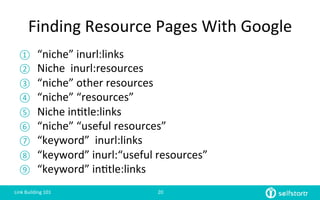
Finding	
  Resource	
  Pages	
  With	
  Google	
  
①  “niche”	
  inurl:links	
  
②  Niche	
  	
  inurl:resources	
  
③  “niche”	
  other	
  resources	
  
④  “niche”	
  “resources”	
  
⑤  Niche	
  in=tle:links	
  
⑥  “niche”	
  “useful	
  resources”	
  
⑦  “keyword”	
  	
  inurl:links	
  
⑧  “keyword”	
  inurl:“useful	
  resources”	
  
⑨  “keyword”	
  in=tle:links	
  
Link	
  Building	
  101	
   20	
  
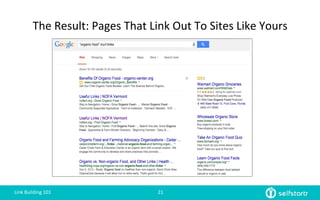
The	
  Result:	
  Pages	
  That	
  Link	
  Out	
  To	
  Sites	
  Like	
  Yours	
  
Link	
  Building	
  101	
   21	
  
How	
  to	
  Turn	
  Resource	
  Pages	
  Into	
  Links	
  
Qualifica=on	
  
Link	
  Building	
  101	
   22	
  
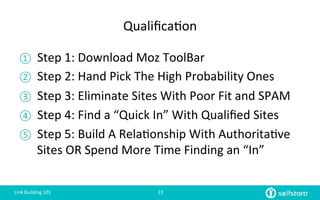
Qualifica=on	
  
①  Step	
  1:	
  Download	
  Moz	
  ToolBar	
  
②  Step	
  2:	
  Hand	
  Pick	
  The	
  High	
  Probability	
  Ones	
  
③  Step	
  3:	
  Eliminate	
  Sites	
  With	
  Poor	
  Fit	
  and	
  SPAM	
  
④  Step	
  4:	
  Find	
  a	
  “Quick	
  In”	
  With	
  Qualified	
  Sites	
  
⑤  Step	
  5:	
  Build	
  A	
  Rela=onship	
  With	
  Authorita=ve	
  
Sites	
  OR	
  Spend	
  More	
  Time	
  Finding	
  an	
  “In”	
  
Link	
  Building	
  101	
   23	
  
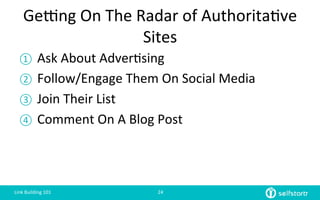
Getng	
  On	
  The	
  Radar	
  of	
  Authorita=ve	
  
Sites	
  
①  Ask	
  About	
  Adver=sing	
  	
  
②  Follow/Engage	
  Them	
  On	
  Social	
  Media	
  
③  Join	
  Their	
  List	
  
④  Comment	
  On	
  A	
  Blog	
  Post	
  
Link	
  Building	
  101	
   24	
  
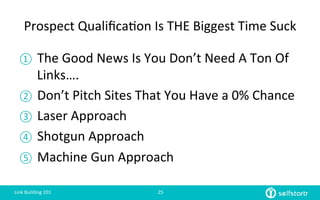
Prospect	
  Qualifica=on	
  Is	
  THE	
  Biggest	
  Time	
  Suck	
  
①  The	
  Good	
  News	
  Is	
  You	
  Don’t	
  Need	
  A	
  Ton	
  Of	
  
Links….	
  
②  Don’t	
  Pitch	
  Sites	
  That	
  You	
  Have	
  a	
  0%	
  Chance	
  
③  Laser	
  Approach	
  
④  Shotgun	
  Approach	
  
⑤  Machine	
  Gun	
  Approach	
  
Link	
  Building	
  101	
   25	
  
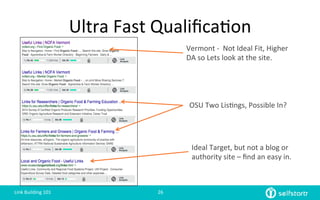
Ultra	
  Fast	
  Qualifica=on	
  
Vermont	
  -­‐	
  	
  Not	
  Ideal	
  Fit,	
  Higher	
  
DA	
  so	
  Lets	
  look	
  at	
  the	
  site.	
  
OSU	
  Two	
  Lis=ngs,	
  Possible	
  In?	
  
Ideal	
  Target,	
  but	
  not	
  a	
  blog	
  or	
  
authority	
  site	
  –	
  find	
  an	
  easy	
  in.	
  
Link	
  Building	
  101	
   26	
  
Tips	
  On	
  Finding	
  Email	
  Addresses	
  
①  Contact	
  Page,	
  About	
  Page,	
  Footer,	
  Sidebar	
  
②  Staff	
  or	
  Faculty	
  Page	
  
③  Google	
  Search	
  =	
  	
  First	
  Last	
  dot	
  com	
  at	
  email	
  
④  Use	
  A	
  Program	
  Like	
  BuzzStream	
  
Link	
  Building	
  101	
   27	
  
Laser	
  Approach	
  
Resource	
  Pages/Broken	
  Link	
  Building	
  
Link	
  Building	
  101	
   28	
  
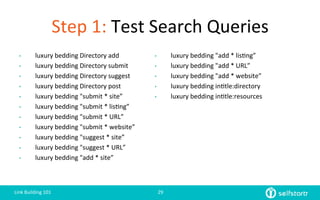
Step	
  1:	
  Test	
  Search	
  Queries
•  luxury	
  bedding	
  Directory	
  add	
  
•  luxury	
  bedding	
  Directory	
  submit	
  
•  luxury	
  bedding	
  Directory	
  suggest	
  
•  luxury	
  bedding	
  Directory	
  post	
  
•  luxury	
  bedding	
  "submit	
  *	
  site”	
  
•  luxury	
  bedding	
  "submit	
  *	
  lis=ng”	
  
•  luxury	
  bedding	
  "submit	
  *	
  URL”	
  
•  luxury	
  bedding	
  "submit	
  *	
  website”	
  
•  luxury	
  bedding	
  "suggest	
  *	
  site”	
  
•  luxury	
  bedding	
  "suggest	
  *	
  URL”	
  
•  luxury	
  bedding	
  "add	
  *	
  site”	
  
•  luxury	
  bedding	
  "add	
  *	
  lis=ng”	
  
•  luxury	
  bedding	
  "add	
  *	
  URL”	
  
•  luxury	
  bedding	
  "add	
  *	
  website”	
  
•  luxury	
  bedding	
  in=tle:directory	
  
•  luxury	
  bedding	
  in=tle:resources	
  
Link	
  Building	
  101	
   29	
  
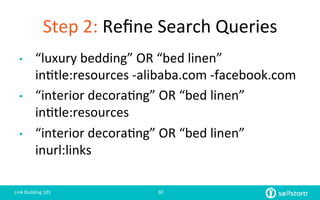
Step	
  2:	
  Refine	
  Search	
  Queries
•  “luxury	
  bedding”	
  OR	
  “bed	
  linen”	
  
in=tle:resources	
  -­‐alibaba.com	
  -­‐facebook.com	
  
•  “interior	
  decora=ng”	
  OR	
  “bed	
  linen”	
  	
  
in=tle:resources	
  
•  “interior	
  decora=ng”	
  OR	
  “bed	
  linen”	
  
inurl:links	
  
Link	
  Building	
  101	
   30	
  
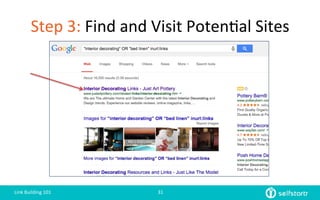
Step	
  3:	
  Find	
  and	
  Visit	
  Poten=al	
  Sites	
  
Link	
  Building	
  101	
   31	
  
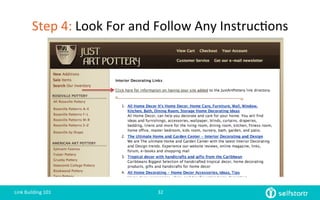
Step	
  4:	
  Look	
  For	
  and	
  Follow	
  Any	
  Instruc=ons	
  
Link	
  Building	
  101	
   32	
  
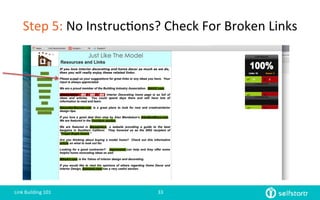
Step	
  5:	
  No	
  Instruc=ons?	
  Check	
  For	
  Broken	
  Links
Link	
  Building	
  101	
   33	
  
Broken	
  Link	
  Email	
  
Subject:	
  Broken	
  Links	
  On	
  [Website	
  Name]	


Hi	
  [First	
  Name]	


I	
  was	
  checking	
  out	
  your	
  website	
  and	
  came	
  across	
  some	
  broken	
  links	
  on	
  [Page	
  With	
  Broken	
  Link].	


[Broken	
  Link	
  #1]	
  -­‐	
  [Broken	
  Link	
  Replacement]	
  
[Broken	
  Link	
  #2]	
  -­‐	
  [Broken	
  Link	
  Replacement]	


Also,	
  if	
  you	
  have	
  a	
  chance	
  let	
  me	
  know	
  if	
  our	
  site,	
  [My	
  Page	
  URL]	
  will	
  be	
  a	
  good	
  fit.	


Thanks	
  for	
  your	
  considera=on.	


Thank	
  you!	
  
Darren	
  DeMatas	
  
352-­‐222-­‐9790	
  
Company	
  Address	
  
Link	
  Building	
  101	
   34	
  
Step	
  6:	
  No	
  Instruc=ons?	
  No	
  Broken	
  Links?	
  Find	
  Another	
  In	
  or	
  Ask	
  
Subject:	
  Ques=on	
  About	
  [Website	
  Name]	


Hi	
  Kim,	


My	
  name	
  is	
  Darren	
  DeMatas,	
  I	
  am	
  contac=ng	
  you	
  regarding	
  the	
  [Website	
  Name]	
  
website,	
  specifically	
  your	
  important	
  links	
  page,	
  [Your	
  Page	
  URL].	


I	
  wanted	
  to	
  introduce	
  my	
  website,	
  [My	
  Page	
  URL]	
  in	
  hopes	
  that	
  depending	
  upon	
  your	
  criteria,	
  I	
  can	
  learn	
  more	
  
about	
  what	
  is	
  required	
  for	
  considera=on	
  for	
  inclusion.	


I	
  would	
  also	
  like	
  to	
  learn	
  about	
  your	
  sponsorship	
  criteria.	
  We	
  can	
  offer	
  your	
  members	
  discounts	
  on	
  [Category].	


Thanks	
  for	
  your	
  =me,	


Darren	
  DeMatas	
  
352-­‐222-­‐979	
  
Link	
  Building	
  101	
   35	
  
Shotgun	
  Approach	
  
Broken	
  Link	
  Building	
  
Link	
  Building	
  101	
   36	
  
Step	
  1:	
  Find	
  Resource	
  Pages	
  
①  Use	
  search	
  queries	
  on	
  Google	
  
Link	
  Building	
  101	
   37	
  
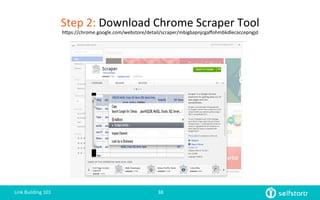
Step	
  2:	
  Download	
  Chrome	
  Scraper	
  Tool	
  
hlps://chrome.google.com/webstore/detail/scraper/mbigbapnjcgaffohmbkdlecaccepngjd	
  
Link	
  Building	
  101	
   38	
  
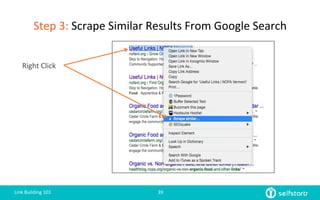
Step	
  3:	
  Scrape	
  Similar	
  Results	
  From	
  Google	
  Search	
  
Link	
  Building	
  101	
   39	
  
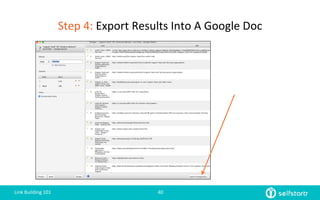
Right	
  Click	
  
Step	
  4:	
  Export	
  Results	
  Into	
  A	
  Google	
  Doc	
  
Link	
  Building	
  101	
   40	
  
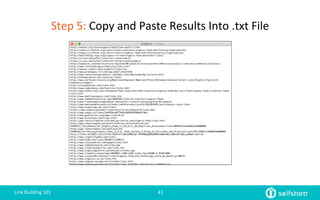
Step	
  5:	
  Copy	
  and	
  Paste	
  Results	
  Into	
  .txt	
  File	
  
Link	
  Building	
  101	
   41	
  
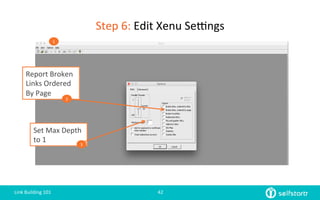
Set	
  Max	
  Depth	
  
to	
  1	
  
Report	
  Broken	
  
Links	
  Ordered	
  
By	
  Page	
  
Step	
  6:	
  Edit	
  Xenu	
  Setngs	
  
Link	
  Building	
  101	
   42	
  
1	
  
2	
  
3	
  
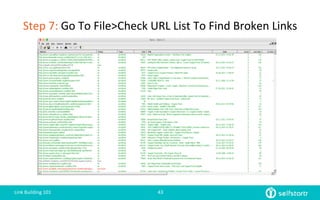
Step	
  7:	
  Go	
  To	
  File>Check	
  URL	
  List	
  To	
  Find	
  Broken	
  Links	
  
Link	
  Building	
  101	
   43	
  
Step	
  8:	
  Qualify	
  Sites	
  and	
  Find	
  Contact	
  Info	
  
Link	
  Building	
  101	
   44	
  
①  Eliminate	
  Spam	
  Sites	
  
②  Find	
  Contact	
  Informa=on	
  	
  
Step	
  9:	
  Send	
  Feeler	
  Email	
  
Link	
  Building	
  101	
   45	
  
Subject:	
  Problem	
  With	
  [Website	
  Name]	


Hey	
  [First	
  Name]	


I	
  was	
  searching	
  for	
  [RESEARCH	
  TOPIC]	
  and	
  came	
  across	
  your	
  list	
  of	
  [TOPIC]	
  resources:	
  [Your	
  Page	
  URL].	


Super	
  helpful!	


As	
  I	
  was	
  checking	
  out	
  the	
  resources	
  I	
  hit	
  some	
  broken	
  links.	
  Let	
  me	
  know	
  if	
  you	
  want	
  me	
  to	
  send	
  you	
  
the	
  short	
  list.	


Cheers,	
  
[YOUR	
  NAME]	
  
PHONE	
  NUMBER	
  
Bonus:	
  Machine	
  Gun	
  Approach	
  
A	
  Broken	
  Link	
  Building	
  Tac=c	
  
Link	
  Building	
  101	
   46	
  
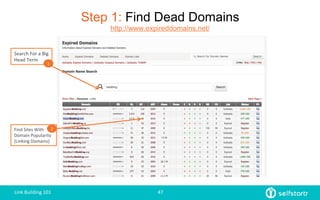
Step 1: Find Dead Domains
http://www.expireddomains.net/
Search	
  For	
  a	
  Big	
  
Head	
  Term	
  
1	
  
Find	
  Sites	
  With	
  
Domain	
  Popularity	
  
(Linking	
  Domains)	
  
2	
  
Link	
  Building	
  101	
   47	
  
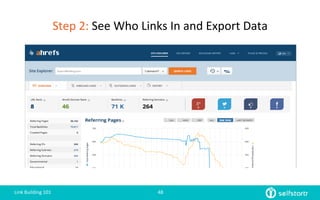
Step	
  2:	
  See	
  Who	
  Links	
  In	
  and	
  Export	
  Data	
  
Link	
  Building	
  101	
   48	
  
Step	
  3:	
  Filter	
  Out	
  the	
  Spam	
  Or	
  Non	
  Relevant	
  Site	
  Using	
  Metrics	
  
①  Look	
  At	
  Page	
  Title	
  –	
  Is	
  It	
  Relevant?	
  Your	
  
Language?	
  
②  Look	
  At	
  The	
  Anchor	
  Text	
  and	
  Text	
  Around	
  
Link	
  
③  Page	
  Type	
  of	
  URL	
  (Forum?	
  Blog	
  Post?)	
  
Link	
  Building	
  101	
   49	
  
Actual	
  Email	
  I	
  use	
  
Subject:	
  Problem	
  With	
  [Website	
  Name]	


Hi	
  [First	
  Name]	


Just	
  wanted	
  to	
  let	
  you	
  know	
  that	
  on,	
  [Page	
  With	
  Dead	
  Link]	
  there	
  is	
  a	
  broken	
  link	
  to	
  [Broken	
  Site].	
  That	
  site	
  is	
  
now	
  a	
  parked	
  domain.	


Not	
  sure	
  if	
  you	
  knew,	
  but	
  we	
  also	
  have	
  a	
  lot	
  of	
  the	
  same	
  [Category]	
  stuff	
  on	
  my	
  website,	
  [My	
  Site	
  URL].	
  It	
  might	
  
make	
  a	
  nice	
  addi=on	
  to	
  your	
  page.	


Either	
  way,	
  I	
  hope	
  this	
  helps	
  you	
  out.	
  
Darren	
  
352-­‐222-­‐9790	
  
Link	
  Building	
  101	
   50	
  
Google	
  Alerts	
  For	
  Links	
  
Turn	
  Men=ons	
  Into	
  Links	
  
Link	
  Building	
  101	
   51	
  
Step	
  1:	
  Set	
  Up	
  Google	
  Alerts	
  
①  Company	
  Name	
  
②  Brands	
  	
  
③  Products	
  	
  
④  Product	
  Categories	
  
Link	
  Building	
  101	
   52	
  
Opportunity	
  #1:	
  Unlinked	
  Brand	
  Men=on	
  
Subject:	
  Ques=on	
  about	
  [YOUR	
  ARTICLE	
  TITLE]	


Hi	
  [First	
  Name]	


I	
  really	
  appreciate	
  you	
  men=oning	
  [MY	
  BRAND/PRODUCT]	
  on	
  your	
  ar=cle,	
  [YOUR	
  ARTICLE	
  TITLE]	


I	
  really	
  like	
  how	
  you	
  went	
  into	
  depth	
  about	
  [SUBTOPIC]	


It	
  would	
  be	
  awesome	
  if	
  you	
  could	
  add	
  a	
  link	
  to	
  [MY	
  WEB	
  PAGE],	
  so	
  that	
  your	
  readers	
  who	
  want	
  to	
  learn	
  more	
  about	
  
[MY	
  BRAND/PRODUCT]	
  can	
  access	
  it	
  directly,	
  without	
  having	
  to	
  search	
  for	
  it	
  in	
  Google.	


Thanks	
  again	
  including	
  our	
  [MY	
  BRAND/PRODUCT].	


Cheers	
  
Darren	
  DeMatas	
  
352-­‐222-­‐9790	


Link	
  Building	
  101	
   53	
  
Opportunity	
  #2:	
  Supplier	
  Men=on	
  
Subject:	
  Ques=on	
  about	
  [YOUR	
  ARTICLE	
  TITLE]	


Hi	
  [First	
  Name]	


I	
  was	
  on	
  Twiler	
  this	
  morning	
  and	
  I	
  came	
  across	
  your	
  recent	
  ar=cle,	
  [YOUR	
  ARTICLE	
  TITLE].	


Awesome	
  work!	
  I	
  really	
  like	
  how	
  you	
  went	
  into	
  depth	
  about	
  [SUBTOPIC].	


I	
  no=ced	
  you	
  men=oned	
  [SUPPLIER]	
  in	
  your	
  post.	
  I’ve	
  been	
  a	
  huge	
  fan	
  of	
  them	
  for	
  a	
  while.	
  We	
  actually	
  stock	
  all	
  their	
  products	
  on	
  our	
  website,	
  [MY	
  
WEBSITE].	


[Since	
  we	
  are	
  an	
  authorized	
  distributor,	
  we	
  actually	
  sell	
  the	
  same	
  products	
  for	
  less.]	


It	
  might	
  be	
  helpful	
  for	
  your	
  readers	
  to	
  have	
  another	
  site	
  to	
  find	
  [SUPPLIER]	
  products.	


Either	
  way,	
  keep	
  up	
  the	
  awesome	
  work!	


Thanks	
  again,	
  
Darren	
  DeMatas	
  
352-­‐222-­‐9790	
  
Link	
  Building	
  101	
   54	
  
Partners	
  and	
  Vendors	
  
Cover	
  Your	
  Bases!	
  
Link	
  Building	
  101	
   55	
  
Step	
  1:	
  Find	
  Pages	
  On	
  Supplier	
  Sites	
  
①  “where	
  to	
  buy”	
  site:yoursupplier.com	
  
②  “partners”	
  site:yoursupplier.com	
  
③  “distributors”	
  site:yoursupplier.com	
  
④  “order	
  online”	
  site:yoursupplier.com	
  
Link	
  Building	
  101	
   56	
  
Step	
  2:	
  Contact	
  Your	
  Sales	
  Person	
  
Subject:	
  Sales	
  Promo=ons	
  For	
  [YOUR	
  PRODUCT/BRAND]	


Hi	
  [First	
  Name]	


We’re	
  launching	
  a	
  [YOUR	
  PRODUCT]	
  promo=on	
  and	
  I	
  need	
  a	
  lille	
  help	
  from	
  you.	


I	
  no=ced	
  that	
  you	
  have	
  a	
  page	
  where	
  you	
  list	
  places	
  to	
  buy	
  [YOUR	
  PRODUCT/BRAND].	


Is	
  it	
  possible	
  to	
  men=on	
  [MY	
  WEBSITE	
  URL/PRODUCT	
  PAGE	
  URL/CATEGORY	
  PAGE	
  URL]?	
  It	
  would	
  really	
  add	
  a	
  ton	
  of	
  
credibility	
  to	
  our	
  sales	
  promo=on.	


Either	
  way,	
  keep	
  up	
  the	
  awesome	
  work!	


Thanks	
  again,	
  
Darren	
  DeMatas	
  
352-­‐222-­‐9790	
  
Link	
  Building	
  101	
   57	
  
Over	
  To	
  You	
  
Download	
  The	
  Templates	
  
Link	
  Building	
  101	
   58	
  

Ecommerce link building 101

  • 1.
    ECOMMERCE  LINK  BUILDING   How  to  Turn  Free  Tools  Into  Search   Rankings   1  
  • 2.
    About  Darren  DeMatas   Darren  DeMatas  has  an  MBA  in  Internet  Marke=ng,  but   hangs  his  hat  on  a  decade  of  experience  making  retail   brands  profitable.  He’s  marketed  global  Fortune  500   companies  and  small  1-­‐man  ecommerce  niche  brands.   He  is  a  Chris=an  that  some=mes  mixes  business  with   pleasure  :)   •  Copyblogger  Cer=fied  Content  Marketer     •  Google  AdWord  Cer=fied.     Keyword  Research  101   2  
  • 3.
    Now  That  You  Have  Your     Page  and  Keywords…   Time  To  Get  Some  Quality  Links   Link  Building  101   3  
  • 4.
    Before  You  Build  A  Single  Link…   You  need  to  know  the  absolute   basics.   4  
  • 5.
    Link  Building  101   ①  Types  Of  Links   ②  Evalua=ng  A  Site   ③  Anchor  Text   ④  Ecommerce  Page  Types   Link  Building  101   5  
  • 6.
    Types  Of  Links   ①  Links  That  Drive  Traffic   –  Ex)  Social  Shares,  Paid  Ads,  Sponsored  Posts   ②  Links  That  Boost  Rankings   –  Ex)  Men=ons  On  A  Trusted  Web  Page   ③  Links  That  Do  Both   –  Ex)  Men=ons  On  A  Popular  Web  Page   ④  Links  That  Do  Nothing   –  Ex)  Spam  Comment  Or  Link  On  A  Crap  Site   ⑤  Links  That  Get  You  In  Trouble   –  Ex)  Automa=on,  Directories,  Farms   Link  Building  101   6  
  • 7.
    Evalua=ng  A  Site  You  Might  Want  To  Get  A  Link  From   ①  Probability  and  Fit?   ②  Follow  Or  No  Follow?   ③  Social  Proof?   ④  Traffic?   ⑤  Ranking  For  Any  Keywords?   Link  Building  101   7  
  • 8.
    Run  Away  If   ①  There  is  no  editorial  process  for  inclusion.   ②  Website  is  about  several  unrelated  topics.   ③  There  are  hundreds  of  posts/pages  without   social  shares  or  comments.     Link  Building  101   8  
  • 9.
    The  Process   ① Find  Sites   ② Qualify  Sites   ③ Find  an  “In”   ④ Reach  Out  To  Get  Your  Link   Link  Building  101   9  
  • 10.
    Anchor  Text  101   •  Exact  Match:  designer  bedding   •  Par=al  Match:  luxury  bedding     •  Related  Match:  luxury  linen   •  Branded  Match:  Home  and  Hearts   •  No  Match:  here   •  Naked:  hlp://homenhearts.com/bedding/ luxury-­‐bedding       Exact   Match   Naked   Par=al   Less  Effec=ve   Safer   More  Effec=ve   Dangerous   Related   Branded   None   Link  Building  101   10  
  • 11.
    Ecommerce  Link  Building   Exact   Match   Link  Building  101   11  
  • 12.
    There  are  Hundreds  Of  White  Hat   Backlink  Opportuni=es     But  Today,  I  Want  You  To  Focus  In  On   Home  Page  And  Category  Page  Links   Link  Building  101   12  
  • 13.
    Where  To  Get  Links  From  Now..   ① Resource  Pages/Links  Page   ② Broken  Link  Building   ③ Fresh  Web  Men=ons   ④ Partners  and  Vendors   Link  Building  101   13  
  • 14.
    …The  Best  Place  To  Find  Links  is…   Link  Building  101   14  
  • 15.
  • 16.
    Step  1:    Change  Search  Results  To  100  Per  Page   1   2   Link  Building  101   16  
  • 17.
    Step  2:    Change  Search  Results  To  100  Per  Page   1   2   Link  Building  101   17  
  • 18.
    Mastering  Advanced  Search   Operators   Is  an  essen$al  SEO  skill   Link  Building  101   18  
  • 19.
    The  Anatomy  Of  A  Search  Operator   Link  Building  101   19  
  • 20.
    Finding  Resource  Pages  With  Google   ①  “niche”  inurl:links   ②  Niche    inurl:resources   ③  “niche”  other  resources   ④  “niche”  “resources”   ⑤  Niche  in=tle:links   ⑥  “niche”  “useful  resources”   ⑦  “keyword”    inurl:links   ⑧  “keyword”  inurl:“useful  resources”   ⑨  “keyword”  in=tle:links   Link  Building  101   20  
  • 21.
    The  Result:  Pages  That  Link  Out  To  Sites  Like  Yours   Link  Building  101   21  
  • 22.
    How  to  Turn  Resource  Pages  Into  Links   Qualifica=on   Link  Building  101   22  
  • 23.
    Qualifica=on   ①  Step  1:  Download  Moz  ToolBar   ②  Step  2:  Hand  Pick  The  High  Probability  Ones   ③  Step  3:  Eliminate  Sites  With  Poor  Fit  and  SPAM   ④  Step  4:  Find  a  “Quick  In”  With  Qualified  Sites   ⑤  Step  5:  Build  A  Rela=onship  With  Authorita=ve   Sites  OR  Spend  More  Time  Finding  an  “In”   Link  Building  101   23  
  • 24.
    Getng  On  The  Radar  of  Authorita=ve   Sites   ①  Ask  About  Adver=sing     ②  Follow/Engage  Them  On  Social  Media   ③  Join  Their  List   ④  Comment  On  A  Blog  Post   Link  Building  101   24  
  • 25.
    Prospect  Qualifica=on  Is  THE  Biggest  Time  Suck   ①  The  Good  News  Is  You  Don’t  Need  A  Ton  Of   Links….   ②  Don’t  Pitch  Sites  That  You  Have  a  0%  Chance   ③  Laser  Approach   ④  Shotgun  Approach   ⑤  Machine  Gun  Approach   Link  Building  101   25  
  • 26.
    Ultra  Fast  Qualifica=on   Vermont  -­‐    Not  Ideal  Fit,  Higher   DA  so  Lets  look  at  the  site.   OSU  Two  Lis=ngs,  Possible  In?   Ideal  Target,  but  not  a  blog  or   authority  site  –  find  an  easy  in.   Link  Building  101   26  
  • 27.
    Tips  On  Finding  Email  Addresses   ①  Contact  Page,  About  Page,  Footer,  Sidebar   ②  Staff  or  Faculty  Page   ③  Google  Search  =    First  Last  dot  com  at  email   ④  Use  A  Program  Like  BuzzStream   Link  Building  101   27  
  • 28.
    Laser  Approach   Resource  Pages/Broken  Link  Building   Link  Building  101   28  
  • 29.
    Step  1:  Test  Search  Queries •  luxury  bedding  Directory  add   •  luxury  bedding  Directory  submit   •  luxury  bedding  Directory  suggest   •  luxury  bedding  Directory  post   •  luxury  bedding  "submit  *  site”   •  luxury  bedding  "submit  *  lis=ng”   •  luxury  bedding  "submit  *  URL”   •  luxury  bedding  "submit  *  website”   •  luxury  bedding  "suggest  *  site”   •  luxury  bedding  "suggest  *  URL”   •  luxury  bedding  "add  *  site”   •  luxury  bedding  "add  *  lis=ng”   •  luxury  bedding  "add  *  URL”   •  luxury  bedding  "add  *  website”   •  luxury  bedding  in=tle:directory   •  luxury  bedding  in=tle:resources   Link  Building  101   29  
  • 30.
    Step  2:  Refine  Search  Queries •  “luxury  bedding”  OR  “bed  linen”   in=tle:resources  -­‐alibaba.com  -­‐facebook.com   •  “interior  decora=ng”  OR  “bed  linen”     in=tle:resources   •  “interior  decora=ng”  OR  “bed  linen”   inurl:links   Link  Building  101   30  
  • 31.
    Step  3:  Find  and  Visit  Poten=al  Sites   Link  Building  101   31  
  • 32.
    Step  4:  Look  For  and  Follow  Any  Instruc=ons   Link  Building  101   32  
  • 33.
    Step  5:  No  Instruc=ons?  Check  For  Broken  Links Link  Building  101   33  
  • 34.
    Broken  Link  Email   Subject:  Broken  Links  On  [Website  Name]     Hi  [First  Name]     I  was  checking  out  your  website  and  came  across  some  broken  links  on  [Page  With  Broken  Link].       [Broken  Link  #1]  -­‐  [Broken  Link  Replacement]   [Broken  Link  #2]  -­‐  [Broken  Link  Replacement]     Also,  if  you  have  a  chance  let  me  know  if  our  site,  [My  Page  URL]  will  be  a  good  fit.     Thanks  for  your  considera=on.         Thank  you!   Darren  DeMatas   352-­‐222-­‐9790   Company  Address   Link  Building  101   34  
  • 35.
    Step  6:  No  Instruc=ons?  No  Broken  Links?  Find  Another  In  or  Ask   Subject:  Ques=on  About  [Website  Name]     Hi  Kim,     My  name  is  Darren  DeMatas,  I  am  contac=ng  you  regarding  the  [Website  Name]   website,  specifically  your  important  links  page,  [Your  Page  URL].     I  wanted  to  introduce  my  website,  [My  Page  URL]  in  hopes  that  depending  upon  your  criteria,  I  can  learn  more   about  what  is  required  for  considera=on  for  inclusion.     I  would  also  like  to  learn  about  your  sponsorship  criteria.  We  can  offer  your  members  discounts  on  [Category].       Thanks  for  your  =me,     Darren  DeMatas   352-­‐222-­‐979   Link  Building  101   35  
  • 36.
    Shotgun  Approach   Broken  Link  Building   Link  Building  101   36  
  • 37.
    Step  1:  Find  Resource  Pages   ①  Use  search  queries  on  Google   Link  Building  101   37  
  • 38.
    Step  2:  Download  Chrome  Scraper  Tool   hlps://chrome.google.com/webstore/detail/scraper/mbigbapnjcgaffohmbkdlecaccepngjd   Link  Building  101   38  
  • 39.
    Step  3:  Scrape  Similar  Results  From  Google  Search   Link  Building  101   39   Right  Click  
  • 40.
    Step  4:  Export  Results  Into  A  Google  Doc   Link  Building  101   40  
  • 41.
    Step  5:  Copy  and  Paste  Results  Into  .txt  File   Link  Building  101   41  
  • 42.
    Set  Max  Depth   to  1   Report  Broken   Links  Ordered   By  Page   Step  6:  Edit  Xenu  Setngs   Link  Building  101   42   1   2   3  
  • 43.
    Step  7:  Go  To  File>Check  URL  List  To  Find  Broken  Links   Link  Building  101   43  
  • 44.
    Step  8:  Qualify  Sites  and  Find  Contact  Info   Link  Building  101   44   ①  Eliminate  Spam  Sites   ②  Find  Contact  Informa=on    
  • 45.
    Step  9:  Send  Feeler  Email   Link  Building  101   45   Subject:  Problem  With  [Website  Name]     Hey  [First  Name]     I  was  searching  for  [RESEARCH  TOPIC]  and  came  across  your  list  of  [TOPIC]  resources:  [Your  Page  URL].     Super  helpful!     As  I  was  checking  out  the  resources  I  hit  some  broken  links.  Let  me  know  if  you  want  me  to  send  you   the  short  list.     Cheers,   [YOUR  NAME]   PHONE  NUMBER  
  • 46.
    Bonus:  Machine  Gun  Approach   A  Broken  Link  Building  Tac=c   Link  Building  101   46  
  • 47.
    Step 1: FindDead Domains http://www.expireddomains.net/ Search  For  a  Big   Head  Term   1   Find  Sites  With   Domain  Popularity   (Linking  Domains)   2   Link  Building  101   47  
  • 48.
    Step  2:  See  Who  Links  In  and  Export  Data   Link  Building  101   48  
  • 49.
    Step  3:  Filter  Out  the  Spam  Or  Non  Relevant  Site  Using  Metrics   ①  Look  At  Page  Title  –  Is  It  Relevant?  Your   Language?   ②  Look  At  The  Anchor  Text  and  Text  Around   Link   ③  Page  Type  of  URL  (Forum?  Blog  Post?)   Link  Building  101   49  
  • 50.
    Actual  Email  I  use   Subject:  Problem  With  [Website  Name]     Hi  [First  Name]     Just  wanted  to  let  you  know  that  on,  [Page  With  Dead  Link]  there  is  a  broken  link  to  [Broken  Site].  That  site  is   now  a  parked  domain.     Not  sure  if  you  knew,  but  we  also  have  a  lot  of  the  same  [Category]  stuff  on  my  website,  [My  Site  URL].  It  might   make  a  nice  addi=on  to  your  page.       Either  way,  I  hope  this  helps  you  out.   Darren   352-­‐222-­‐9790   Link  Building  101   50  
  • 51.
    Google  Alerts  For  Links   Turn  Men=ons  Into  Links   Link  Building  101   51  
  • 52.
    Step  1:  Set  Up  Google  Alerts   ①  Company  Name   ②  Brands     ③  Products     ④  Product  Categories   Link  Building  101   52  
  • 53.
    Opportunity  #1:  Unlinked  Brand  Men=on   Subject:  Ques=on  about  [YOUR  ARTICLE  TITLE]     Hi  [First  Name]     I  really  appreciate  you  men=oning  [MY  BRAND/PRODUCT]  on  your  ar=cle,  [YOUR  ARTICLE  TITLE]     I  really  like  how  you  went  into  depth  about  [SUBTOPIC]     It  would  be  awesome  if  you  could  add  a  link  to  [MY  WEB  PAGE],  so  that  your  readers  who  want  to  learn  more  about   [MY  BRAND/PRODUCT]  can  access  it  directly,  without  having  to  search  for  it  in  Google.     Thanks  again  including  our  [MY  BRAND/PRODUCT].     Cheers   Darren  DeMatas   352-­‐222-­‐9790     Link  Building  101   53  
  • 54.
    Opportunity  #2:  Supplier  Men=on   Subject:  Ques=on  about  [YOUR  ARTICLE  TITLE]     Hi  [First  Name]     I  was  on  Twiler  this  morning  and  I  came  across  your  recent  ar=cle,  [YOUR  ARTICLE  TITLE].     Awesome  work!  I  really  like  how  you  went  into  depth  about  [SUBTOPIC].     I  no=ced  you  men=oned  [SUPPLIER]  in  your  post.  I’ve  been  a  huge  fan  of  them  for  a  while.  We  actually  stock  all  their  products  on  our  website,  [MY   WEBSITE].     [Since  we  are  an  authorized  distributor,  we  actually  sell  the  same  products  for  less.]     It  might  be  helpful  for  your  readers  to  have  another  site  to  find  [SUPPLIER]  products.     Either  way,  keep  up  the  awesome  work!     Thanks  again,   Darren  DeMatas   352-­‐222-­‐9790   Link  Building  101   54  
  • 55.
    Partners  and  Vendors   Cover  Your  Bases!   Link  Building  101   55  
  • 56.
    Step  1:  Find  Pages  On  Supplier  Sites   ①  “where  to  buy”  site:yoursupplier.com   ②  “partners”  site:yoursupplier.com   ③  “distributors”  site:yoursupplier.com   ④  “order  online”  site:yoursupplier.com   Link  Building  101   56  
  • 57.
    Step  2:  Contact  Your  Sales  Person   Subject:  Sales  Promo=ons  For  [YOUR  PRODUCT/BRAND]     Hi  [First  Name]     We’re  launching  a  [YOUR  PRODUCT]  promo=on  and  I  need  a  lille  help  from  you.     I  no=ced  that  you  have  a  page  where  you  list  places  to  buy  [YOUR  PRODUCT/BRAND].     Is  it  possible  to  men=on  [MY  WEBSITE  URL/PRODUCT  PAGE  URL/CATEGORY  PAGE  URL]?  It  would  really  add  a  ton  of   credibility  to  our  sales  promo=on.     Either  way,  keep  up  the  awesome  work!     Thanks  again,   Darren  DeMatas   352-­‐222-­‐9790   Link  Building  101   57  
  • 58.
    Over  To  You   Download  The  Templates   Link  Building  101   58