WHO IS THIS GUY?
• @iztok
www.twitter.com/iztok
• Drupal site builder, themer
and developer
• Passion about UX and design
• Drupal consultant
www.iztoksmolic.com
• Manager at Agile Drop
www.agiledrop.com
• Drupal Slovenia Association
organizing meetups in Ljubljana
THE COMMON WRONG DISPOSITIONS
• I know MySQL/PHP, I know Drupal
• There is a module for anything like in Joomla/Wordpress
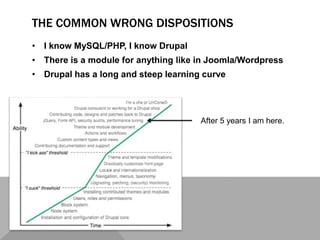
• Drupal has a long and steep learning curve
After 5 years I am here.
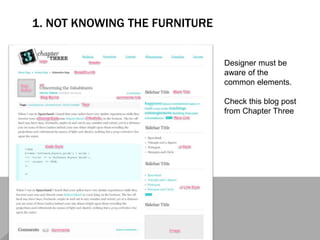
1. NOT KNOWING THE FURNITURE
Designer must be
aware of the
common elements.
Check this blog post
from Chapter Three
2. OVER-DESIGNING FORMS
• HTML markup is predefined for form
• altering markup requires development skills
Solution
• Style forms: http://drupal.org/project/uniform
• Group
fields: http://drupal.org/project/field_group
• Add element (and wrappers) with
hook_form_alter
3. BAD CONTENT ARCHITECTURE DECISIONS
• using too much content types
(e.g. is Article really so different from Public release? Maybe
we can use category to separate them)
• not using node types
(e.g. instead of listing staff as a table in the Page body,
maybe build the page with Views and content type Staff
member)
No real formula, just practice and experiences.
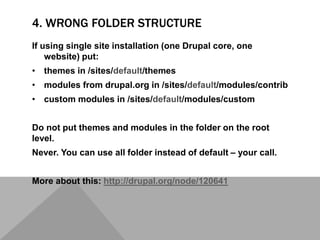
4. WRONG FOLDER STRUCTURE
If using single site installation (one Drupal core, one
website) put:
• themes in /sites/default/themes
• modules from drupal.org in /sites/default/modules/contrib
• custom modules in /sites/default/modules/custom
Do not put themes and modules in the folder on the root
level.
Never. You can use all folder instead of default – your call.
More about this: http://drupal.org/node/120641
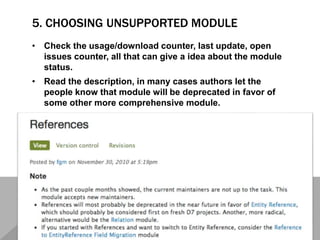
5. CHOOSING UNSUPPORTED MODULE
• Check the usage/download counter, last update, open
issues counter, all that can give a idea about the module
status.
• Read the description, in many cases authors let the
people know that module will be deprecated in favor of
some other more comprehensive module.
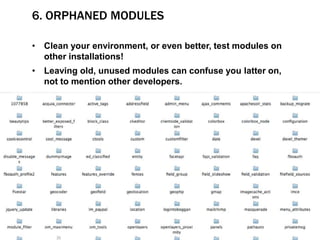
6. ORPHANED MODULES
• Clean your environment, or even better, test modules on
other installations!
• Leaving old, unused modules can confuse you latter on,
not to mention other developers.
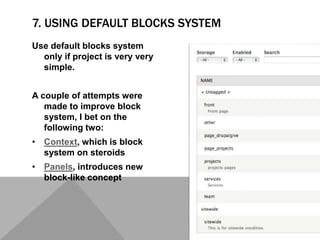
7. USING DEFAULT BLOCKS SYSTEM
Use default blocks system
only if project is very very
simple.
A couple of attempts were
made to improve block
system, I bet on the
following two:
• Context, which is block
system on steroids
• Panels, introduces new
block-like concept
8. PUTTING CONTENT/CODE IN BLOCKS
Default blocks allow user generated content, but you can't set permissions
for editing different blocks
• Bean, you can add fields to different blocks types, which have separate
permissions (like content types do)
• Boxes, blocks with a unique machine names
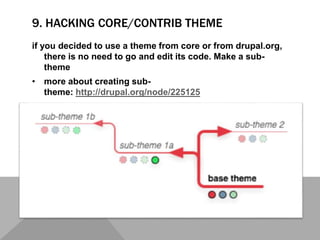
9. HACKING CORE/CONTRIB THEME
if you decided to use a theme from core or from drupal.org,
there is no need to go and edit its code. Make a sub-
theme
• more about creating sub-
theme: http://drupal.org/node/225125
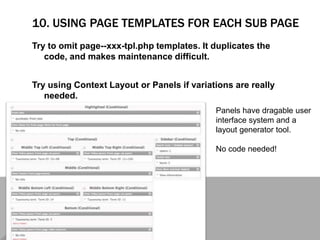
10. USING PAGE TEMPLATES FOR EACH SUB PAGE
Try to omit page--xxx-tpl.php templates. It duplicates the
code, and makes maintenance difficult.
Try using Context Layout or Panels if variations are really
needed.
Panels have dragable user
interface system and a
layout generator tool.
No code needed!
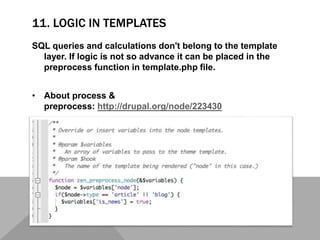
11. LOGIC IN TEMPLATES
SQL queries and calculations don't belong to the template
layer. If logic is not so advance it can be placed in the
preprocess function in template.php file.
• About process &
preprocess: http://drupal.org/node/223430
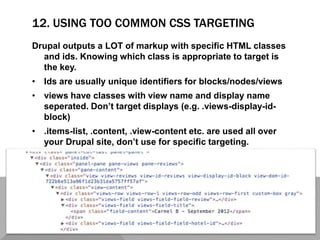
12. USING TOO COMMON CSS TARGETING
Drupal outputs a LOT of markup with specific HTML classes
and ids. Knowing which class is appropriate to target is
the key.
• Ids are usually unique identifiers for blocks/nodes/views
• views have classes with view name and display name
seperated. Don’t target displays (e.g. .views-display-id-
block)
• .items-list, .content, .view-content etc. are used all over
your Drupal site, don’t use for specific targeting.
13. NOT USING THE BASIC DRUPAL FUNCTIONS
Drupal comes with some very handy functions, we should
use them
- l() and url() - in contrast of hardcoded relative URL address
can outputs aliased URL path
- base_path(), returns base URL of the Drupal installation
- theme() functions like theme('image_style',array()) to out
put styled image
14. CODING
There is a 80% possibility that what you want to build can be
build with a combination of modules.
Usual suspects:
• Views (your UI for SQL queries)
• views_field_view, views_bulk_operations
• Rules (executing commands on events)
• Panels (overriding default paths like node/%nid)
• Filed collection (join fields into one field)
15. HACKING CORE AND CONTRIB MODULES
Fixing code directly in the module files makes the website
impossible to update. Instead Drupal provides hooks and
preprocess functions.
• More about hooks:
http://api.drupal.org/api/drupal/includes!module.inc/group
/hooks/7
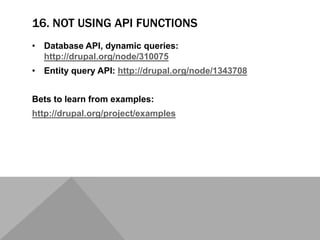
16. NOT USING API FUNCTIONS
• Database API, dynamic queries:
http://drupal.org/node/310075
• Entity query API: http://drupal.org/node/1343708
Bets to learn from examples:
http://drupal.org/project/examples
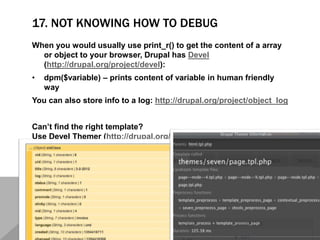
17. NOT KNOWING HOW TO DEBUG
When you would usually use print_r() to get the content of a array
or object to your browser, Drupal has Devel
(http://drupal.org/project/devel):
• dpm($variable) – prints content of variable in human friendly
way
You can also store info to a log: http://drupal.org/project/object_log
Can’t find the right template?
Use Devel Themer (http://drupal.org/project/devel_themer)
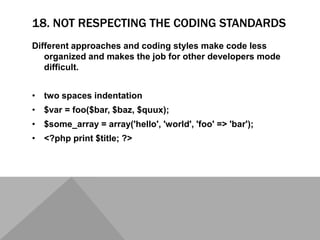
18. NOT RESPECTING THE CODING STANDARDS
Different approaches and coding styles make code less
organized and makes the job for other developers mode
difficult.
• two spaces indentation
• $var = foo($bar, $baz, $quux);
• $some_array = array('hello', 'world', 'foo' => 'bar');
• <?php print $title; ?>
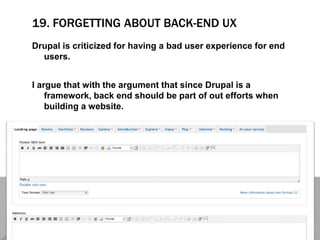
19. FORGETTING ABOUT BACK-END UX
Drupal is criticized for having a bad user experience for end
users.
I argue that with the argument that since Drupal is a
framework, back end should be part of out efforts when
building a website.
20. FORGETTING ABOUT YOU DRUPAL WEBSITE
Drupal needs love even after you have finished your website. Keeping core
and modules updates makes it easier to upgrade at some time and
keeps the system safe.
• Read books
• Get a mentor
• Fail & learn
from it

Top 20 mistakes you will make on your 1st Drupal project

  • 2.
    WHO IS THISGUY? • @iztok www.twitter.com/iztok • Drupal site builder, themer and developer • Passion about UX and design • Drupal consultant www.iztoksmolic.com • Manager at Agile Drop www.agiledrop.com • Drupal Slovenia Association organizing meetups in Ljubljana
  • 3.
    THE COMMON WRONGDISPOSITIONS • I know MySQL/PHP, I know Drupal • There is a module for anything like in Joomla/Wordpress • Drupal has a long and steep learning curve After 5 years I am here.
  • 5.
    1. NOT KNOWINGTHE FURNITURE Designer must be aware of the common elements. Check this blog post from Chapter Three
  • 6.
    2. OVER-DESIGNING FORMS •HTML markup is predefined for form • altering markup requires development skills Solution • Style forms: http://drupal.org/project/uniform • Group fields: http://drupal.org/project/field_group • Add element (and wrappers) with hook_form_alter
  • 7.
    3. BAD CONTENTARCHITECTURE DECISIONS • using too much content types (e.g. is Article really so different from Public release? Maybe we can use category to separate them) • not using node types (e.g. instead of listing staff as a table in the Page body, maybe build the page with Views and content type Staff member) No real formula, just practice and experiences.
  • 9.
    4. WRONG FOLDERSTRUCTURE If using single site installation (one Drupal core, one website) put: • themes in /sites/default/themes • modules from drupal.org in /sites/default/modules/contrib • custom modules in /sites/default/modules/custom Do not put themes and modules in the folder on the root level. Never. You can use all folder instead of default – your call. More about this: http://drupal.org/node/120641
  • 10.
    5. CHOOSING UNSUPPORTEDMODULE • Check the usage/download counter, last update, open issues counter, all that can give a idea about the module status. • Read the description, in many cases authors let the people know that module will be deprecated in favor of some other more comprehensive module.
  • 11.
    6. ORPHANED MODULES •Clean your environment, or even better, test modules on other installations! • Leaving old, unused modules can confuse you latter on, not to mention other developers.
  • 12.
    7. USING DEFAULTBLOCKS SYSTEM Use default blocks system only if project is very very simple. A couple of attempts were made to improve block system, I bet on the following two: • Context, which is block system on steroids • Panels, introduces new block-like concept
  • 13.
    8. PUTTING CONTENT/CODEIN BLOCKS Default blocks allow user generated content, but you can't set permissions for editing different blocks • Bean, you can add fields to different blocks types, which have separate permissions (like content types do) • Boxes, blocks with a unique machine names
  • 15.
    9. HACKING CORE/CONTRIBTHEME if you decided to use a theme from core or from drupal.org, there is no need to go and edit its code. Make a sub- theme • more about creating sub- theme: http://drupal.org/node/225125
  • 16.
    10. USING PAGETEMPLATES FOR EACH SUB PAGE Try to omit page--xxx-tpl.php templates. It duplicates the code, and makes maintenance difficult. Try using Context Layout or Panels if variations are really needed. Panels have dragable user interface system and a layout generator tool. No code needed!
  • 17.
    11. LOGIC INTEMPLATES SQL queries and calculations don't belong to the template layer. If logic is not so advance it can be placed in the preprocess function in template.php file. • About process & preprocess: http://drupal.org/node/223430
  • 18.
    12. USING TOOCOMMON CSS TARGETING Drupal outputs a LOT of markup with specific HTML classes and ids. Knowing which class is appropriate to target is the key. • Ids are usually unique identifiers for blocks/nodes/views • views have classes with view name and display name seperated. Don’t target displays (e.g. .views-display-id- block) • .items-list, .content, .view-content etc. are used all over your Drupal site, don’t use for specific targeting.
  • 19.
    13. NOT USINGTHE BASIC DRUPAL FUNCTIONS Drupal comes with some very handy functions, we should use them - l() and url() - in contrast of hardcoded relative URL address can outputs aliased URL path - base_path(), returns base URL of the Drupal installation - theme() functions like theme('image_style',array()) to out put styled image
  • 21.
    14. CODING There isa 80% possibility that what you want to build can be build with a combination of modules. Usual suspects: • Views (your UI for SQL queries) • views_field_view, views_bulk_operations • Rules (executing commands on events) • Panels (overriding default paths like node/%nid) • Filed collection (join fields into one field)
  • 22.
    15. HACKING COREAND CONTRIB MODULES Fixing code directly in the module files makes the website impossible to update. Instead Drupal provides hooks and preprocess functions. • More about hooks: http://api.drupal.org/api/drupal/includes!module.inc/group /hooks/7
  • 23.
    16. NOT USINGAPI FUNCTIONS • Database API, dynamic queries: http://drupal.org/node/310075 • Entity query API: http://drupal.org/node/1343708 Bets to learn from examples: http://drupal.org/project/examples
  • 24.
    17. NOT KNOWINGHOW TO DEBUG When you would usually use print_r() to get the content of a array or object to your browser, Drupal has Devel (http://drupal.org/project/devel): • dpm($variable) – prints content of variable in human friendly way You can also store info to a log: http://drupal.org/project/object_log Can’t find the right template? Use Devel Themer (http://drupal.org/project/devel_themer)
  • 25.
    18. NOT RESPECTINGTHE CODING STANDARDS Different approaches and coding styles make code less organized and makes the job for other developers mode difficult. • two spaces indentation • $var = foo($bar, $baz, $quux); • $some_array = array('hello', 'world', 'foo' => 'bar'); • <?php print $title; ?>
  • 27.
    19. FORGETTING ABOUTBACK-END UX Drupal is criticized for having a bad user experience for end users. I argue that with the argument that since Drupal is a framework, back end should be part of out efforts when building a website.
  • 28.
    20. FORGETTING ABOUTYOU DRUPAL WEBSITE Drupal needs love even after you have finished your website. Keeping core and modules updates makes it easier to upgrade at some time and keeps the system safe.
  • 29.
    • Read books •Get a mentor • Fail & learn from it

Editor's Notes

  • #4 I know MySQL/PHP, I know Drupal I confess that I still suck at PHP, but I can still build an advance Drupal project (even coding with Drupal “API”) There is a module for anything like in Joomla/Wordpress Drupal modules rarely bring full features like Image gallery or Slideshow, but together with Field UI, Views, Views Slideshow and Colorbox you can build a Slideshow video gallery. Drupal has a long and steep learning curve 5 years ago I was designing posters and now I help senior PHP developers understand Drupal.