DRAG & DROP FEATURE IN JOOML
Kowshar Ahmed
CEO & Founder, JoomShaper
WHAT IS JOOMLA?
Joomla is an award winning content management system.

WHAT IS JOOMLA?
Joomla is an award-winning content management system (CMS), which
enables you to build Web sites and powerful online applications.
Many aspects, including its ease-of-use and extensibility, have made
Joomla the most popular Web site software available.
WHO USES JOOMLA?
2.8% of entire internet runs Joomla!

of entire internet runs Joomla!
5
WHO USES JOOMLA?
Drag & Drop Feature in Joomla

1 2 3 4
Harvard University linux.com MTV Ebay
5 6 7 8
Heathrow Airport Leonardo Di Caprio BDOSN JoomShaper
WHY CHOOSE JOOMLA?
8 reasons for switching to Joomla!

asons for switching to Joomla!
7
WHY CHOOSE JOOMLA?
Drag & Drop Feature in Joomla

   
Highly Secured Multilingual Ready Front-end Editing ACL
   
Large Scalable Versioning JED Helix3 & Page Builder
LET’S GET STARTED
Getting started with Joomla drag & drop

Helix3 features at a glance
9
HELIX3 FRAMEWORK
Drag & Drop Feature in Joomla

Powerful Admin Layout Builder Fonts Option Bootstrap 3
Post Formats Megamenu Builder LESS
oring Helix3 incredible features
10
HELIX3 FRAMEWORK
Drag & Drop Feature in Joomla
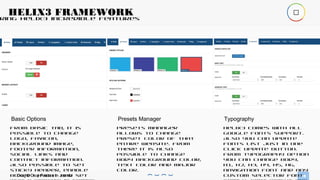
Basic Options
From basic tab, it is
possible to change
logo, favicon,
background image,
footer information,
social links and
contact information.
Also possible to set
sticky header, enable
boxed layout and set
Presets Manager
Presets manager
allows to change
preset color of that
entire website. From
there it is also
possible to change
body background color,
text color and major
color.
Typography
Helix3 comes with all
google fonts support.
Also you can update
fonts list just in one
click update button.
From typography option
you can change body,
h1, h2, h3, h4, h5, h6,
navigation font and any
custom selector font

oring Helix3 incredible features
11
HELIX3 FRAMEWORK
Drag & Drop Feature in Joomla
Post Formats
Helix3 comes with 7
post formats for
Joomla articles. Post
formats are standard,
gallery, video. audio.
link, quote and status.
Also comes with three
social commenting
system and option to
share Joomla articles
Custom Code
Now it is possible to
add and code just
before end of the
header and body tag
from template
settings. Also has the
option to add custom
css and javascript
code.
Advanced Settings
Helix3 has built-in css
and javascript
compression tool. By
enabling this option
will merge all css
files to one css file
and all javascript
files to one javascript
file which will reduce
http request and save

HELIX3 LAYOUT BUILDER?
Getting started with Helix3 layout builder

create and manage row and columns
13
HELIX3 LAYOUT BUILDER?
Drag & Drop Feature in Joomla

ew row by just clicking the “Add Row” button.
settings button you can change row id, background color, image
ny more.
uitable columns layout and arrange them just using mouse dr
ng column click on
nd select module position. You can apply various column settin
dding Module Positions
14
HELIX3 LAYOUT BUILDER?
Drag & Drop Feature in Joomla

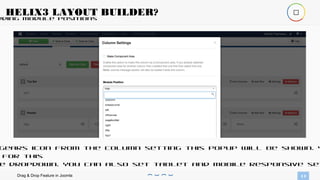
gears icon from the column setting this popup will be shown. Y
for this
e dropdown. You can also set tablet and mobile responsive set
SP PAGE BUILDER
Creating a complex page using SP Page Builder

g a complex page using SP Page Builder
16
SP PAGE BUILDER
Drag & Drop Feature in Joomla

e video you will learn how to create a complex page using SP P
ching a single line of
sing mouse drag and drop. Youtube link
w.youtube.com/watch?v=dqRzj05CySA
for Helix3 and SP Page Builder
17
LINKS
Drag & Drop Feature in Joomla

Helix3:
http://www.joomshaper.com/jo
omla-templates/helix3
SP Page Builder:
http://www.joomshaper.com/page-builder
THANK YOU FOR WATCHING!
HAVE A GREAT DAY

Drag & drop joomla2

  • 1.
    DRAG & DROPFEATURE IN JOOML Kowshar Ahmed CEO & Founder, JoomShaper
  • 2.
    WHAT IS JOOMLA? Joomlais an award winning content management system. 
  • 3.
    WHAT IS JOOMLA? Joomlais an award-winning content management system (CMS), which enables you to build Web sites and powerful online applications. Many aspects, including its ease-of-use and extensibility, have made Joomla the most popular Web site software available.
  • 4.
    WHO USES JOOMLA? 2.8%of entire internet runs Joomla! 
  • 5.
    of entire internetruns Joomla! 5 WHO USES JOOMLA? Drag & Drop Feature in Joomla  1 2 3 4 Harvard University linux.com MTV Ebay 5 6 7 8 Heathrow Airport Leonardo Di Caprio BDOSN JoomShaper
  • 6.
    WHY CHOOSE JOOMLA? 8reasons for switching to Joomla! 
  • 7.
    asons for switchingto Joomla! 7 WHY CHOOSE JOOMLA? Drag & Drop Feature in Joomla      Highly Secured Multilingual Ready Front-end Editing ACL     Large Scalable Versioning JED Helix3 & Page Builder
  • 8.
    LET’S GET STARTED Gettingstarted with Joomla drag & drop 
  • 9.
    Helix3 features ata glance 9 HELIX3 FRAMEWORK Drag & Drop Feature in Joomla  Powerful Admin Layout Builder Fonts Option Bootstrap 3 Post Formats Megamenu Builder LESS
  • 10.
    oring Helix3 incrediblefeatures 10 HELIX3 FRAMEWORK Drag & Drop Feature in Joomla Basic Options From basic tab, it is possible to change logo, favicon, background image, footer information, social links and contact information. Also possible to set sticky header, enable boxed layout and set Presets Manager Presets manager allows to change preset color of that entire website. From there it is also possible to change body background color, text color and major color. Typography Helix3 comes with all google fonts support. Also you can update fonts list just in one click update button. From typography option you can change body, h1, h2, h3, h4, h5, h6, navigation font and any custom selector font 
  • 11.
    oring Helix3 incrediblefeatures 11 HELIX3 FRAMEWORK Drag & Drop Feature in Joomla Post Formats Helix3 comes with 7 post formats for Joomla articles. Post formats are standard, gallery, video. audio. link, quote and status. Also comes with three social commenting system and option to share Joomla articles Custom Code Now it is possible to add and code just before end of the header and body tag from template settings. Also has the option to add custom css and javascript code. Advanced Settings Helix3 has built-in css and javascript compression tool. By enabling this option will merge all css files to one css file and all javascript files to one javascript file which will reduce http request and save 
  • 12.
    HELIX3 LAYOUT BUILDER? Gettingstarted with Helix3 layout builder 
  • 13.
    create and managerow and columns 13 HELIX3 LAYOUT BUILDER? Drag & Drop Feature in Joomla  ew row by just clicking the “Add Row” button. settings button you can change row id, background color, image ny more. uitable columns layout and arrange them just using mouse dr ng column click on nd select module position. You can apply various column settin
  • 14.
    dding Module Positions 14 HELIX3LAYOUT BUILDER? Drag & Drop Feature in Joomla  gears icon from the column setting this popup will be shown. Y for this e dropdown. You can also set tablet and mobile responsive set
  • 15.
    SP PAGE BUILDER Creatinga complex page using SP Page Builder 
  • 16.
    g a complexpage using SP Page Builder 16 SP PAGE BUILDER Drag & Drop Feature in Joomla  e video you will learn how to create a complex page using SP P ching a single line of sing mouse drag and drop. Youtube link w.youtube.com/watch?v=dqRzj05CySA
  • 17.
    for Helix3 andSP Page Builder 17 LINKS Drag & Drop Feature in Joomla  Helix3: http://www.joomshaper.com/jo omla-templates/helix3 SP Page Builder: http://www.joomshaper.com/page-builder
  • 18.
    THANK YOU FORWATCHING!
  • 19.

Editor's Notes

  • #2 Use this slide as an alternative for all your section breaks if you don’t want to work with MagicMove animations
  • #3 Grouping & ungrouping certain objects lets you control MagicMove transitions to a certain extent. Of course, you can also turn off MagicMove altogether if you feel it is too distracting :)
  • #4 To resize the coloured underlining: select all 4 arches, GROUP them, resize the group, then UNGROUP them (if you don’t ungroup them, they will not animate in a magic move animation)
  • #5 Grouping & ungrouping certain objects lets you control MagicMove transitions to a certain extent. Of course, you can also turn off MagicMove altogether if you feel it is too distracting :)
  • #7 Grouping & ungrouping certain objects lets you control MagicMove transitions to a certain extent. Of course, you can also turn off MagicMove altogether if you feel it is too distracting :)
  • #9 http://pixabay.com/en/coffee-cup-time-meditation-talk-14662/ Image is in Public Domain, so can be used commercially
  • #10 To control which of the arches or arrows animate with a Magic Move: simply select the ones you DON’T want to animate and group them. If they are already grouped and you DO want to animate them with a Magic Move: UNgroup them. For MagicMove animations: always make sure the arches on the NEXT slide are not grouped, and also don’t have a “Build In” effect assigned to them. (Check the Build Order for this)
  • #13 Grouping & ungrouping certain objects lets you control MagicMove transitions to a certain extent. Of course, you can also turn off MagicMove altogether if you feel it is too distracting :)
  • #16 Grouping & ungrouping certain objects lets you control MagicMove transitions to a certain extent. Of course, you can also turn off MagicMove altogether if you feel it is too distracting :)
  • #19 Image downloaded from http://www.unsplash.com Image is in Public Domain, so can be used for commercial purposes
  • #20 Image downloaded from http://www.unsplash.com Image is in Public Domain, so can be used for commercial purposes