Roger Loving
.NET Development
Introduction –
   The following slides review my most recent
    .NET development project.

   Technologies demonstrated are: WinForms,
    ADO.NET, ASP.NET, T-SQL, SQL Server
N-Tier Development

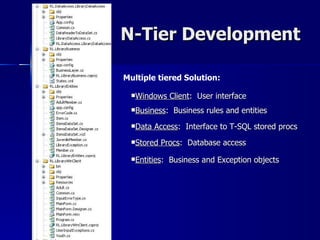
Multiple tiered Solution:

  Windows     Client: User interface
  Business:    Business rules and entities
  Data   Access: Interface to T-SQL stored procs
  Stored   Procs: Database access
  Entities:   Business and Exception objects
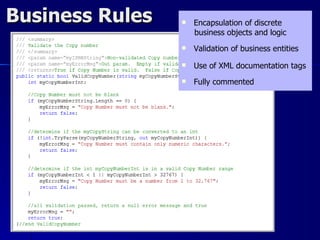
Business Rules      Encapsulation of discrete
                     business objects and logic
                    Validation of business entities
                    Use of XML documentation tags
                    Fully commented
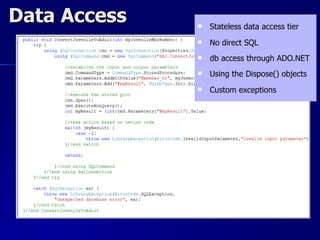
Data Access      Stateless data access tier
                 No direct SQL
                 db access through ADO.NET
                 Using the Dispose() objects
                 Custom exceptions
Transact-SQL
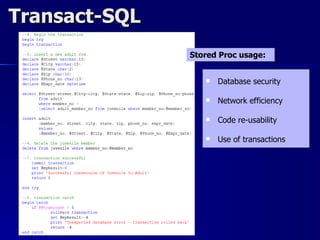
               Stored Proc usage:


                     Database security

                     Network efficiency

                     Code re-usability

                     Use of transactions
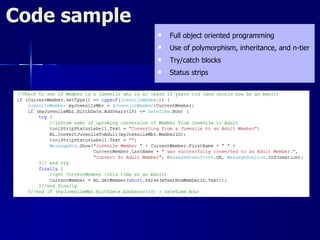
Code sample
                 Full object oriented programming
                 Use of polymorphism, inheritance, and n-tier
                 Try/catch blocks
                 Status strips
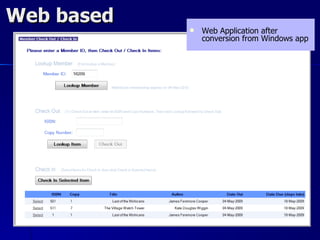
Web based
               Web Application after
                conversion from Windows app
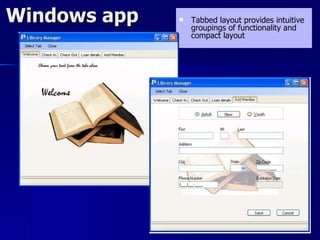
Windows app      Tabbed layout provides intuitive
                  groupings of functionality and
                  compact layout
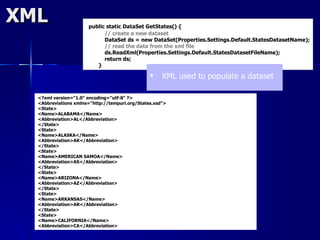
XML                   public static DataSet GetStates() {
                            // create a new dataset
                            DataSet ds = new DataSet(Properties.Settings.Default.StatesDatasetName);
                            // read the data from the xml file
                            ds.ReadXml(Properties.Settings.Default.StatesDatasetFileName);
                            return ds;
                         }

                                                    XML used to populate a dataset

  <?xml version="1.0" encoding="utf-8" ?>
  <Abbreviations xmlns="http://tempuri.org/States.xsd">
  <State>
  <Name>ALABAMA</Name>
  <Abbreviation>AL</Abbreviation>
  </State>
  <State>
  <Name>ALASKA</Name>
  <Abbreviation>AK</Abbreviation>
  </State>
  <State>
  <Name>AMERICAN SAMOA</Name>
  <Abbreviation>AS</Abbreviation>
  </State>
  <State>
  <Name>ARIZONA</Name>
  <Abbreviation>AZ</Abbreviation>
  </State>
  <State>
  <Name>ARKANSAS</Name>
  <Abbreviation>AR</Abbreviation>
  </State>
  <State>
  <Name>CALIFORNIA</Name>
  <Abbreviation>CA</Abbreviation>
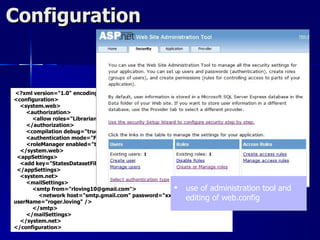
Configuration


<?xml version="1.0" encoding="utf-8"?>
<configuration>
  <system.web>
    <authorization>
      <allow roles="Librarian" />
    </authorization>
    <compilation debug="true" />
    <authentication mode="Forms" />
    <roleManager enabled="true" />
  </system.web>
 <appSettings>
  <add key="StatesDatasetFileName" value="~/XmlData/States.xml" />
 </appSettings>
  <system.net>
    <mailSettings>
      <smtp from="rloving10@gmail.com">              use of administration     tool and
        <network host="smtp.gmail.com" password="xxxxxxx"
userName="roger.loving" />
                                                        editing of web.config
      </smtp>
    </mailSettings>
  </system.net>
</configuration>
Javascript
  /* Find the nodes where class="tabbertab" */
   if(childNodes[i].className &&
     childNodes[i].className.match(this.REclassTab)) {

    /* Create a new object to save info about this tab */
    t = new Object();

    /* Save a pointer to the div for this tab */               Javascript is used to create a
    t.div = childNodes[i];
                                                                tabbed menu format
    /* Add the new object to the array of tabs */
    this.tabs[this.tabs.length] = t;

    /* If the class name contains classTabDefault,
                 then select this tab by default.
    */
    if (childNodes[i].className.match(this.REclassTabDefault)) {
                defaultTab = this.tabs.length-1;
    }
   }
  }

  /* Create a new UL list to hold the tab headings */
  DOM_ul = document.createElement("ul");
  DOM_ul.className = this.classNav;

  /* Loop through each tab we found */
  for (i=0; i < this.tabs.length; i++) {

   t = this.tabs[i];

   /* Get the label to use for this tab:
     From the title attribute on the DIV,
     Or from one of the this.titleElements[] elements,
     Or use an automatically generated number.
    */
   t.headingText = t.div.title;

.Net Project Portfolio for Roger Loving

  • 1.
  • 2.
    Introduction –  The following slides review my most recent .NET development project.  Technologies demonstrated are: WinForms, ADO.NET, ASP.NET, T-SQL, SQL Server
  • 3.
    N-Tier Development Multiple tieredSolution: Windows Client: User interface Business: Business rules and entities Data Access: Interface to T-SQL stored procs Stored Procs: Database access Entities: Business and Exception objects
  • 4.
    Business Rules  Encapsulation of discrete business objects and logic  Validation of business entities  Use of XML documentation tags  Fully commented
  • 5.
    Data Access  Stateless data access tier  No direct SQL  db access through ADO.NET  Using the Dispose() objects  Custom exceptions
  • 6.
    Transact-SQL Stored Proc usage:  Database security  Network efficiency  Code re-usability  Use of transactions
  • 7.
    Code sample  Full object oriented programming  Use of polymorphism, inheritance, and n-tier  Try/catch blocks  Status strips
  • 8.
    Web based  Web Application after conversion from Windows app
  • 9.
    Windows app  Tabbed layout provides intuitive groupings of functionality and compact layout
  • 10.
    XML public static DataSet GetStates() { // create a new dataset DataSet ds = new DataSet(Properties.Settings.Default.StatesDatasetName); // read the data from the xml file ds.ReadXml(Properties.Settings.Default.StatesDatasetFileName); return ds; }  XML used to populate a dataset <?xml version="1.0" encoding="utf-8" ?> <Abbreviations xmlns="http://tempuri.org/States.xsd"> <State> <Name>ALABAMA</Name> <Abbreviation>AL</Abbreviation> </State> <State> <Name>ALASKA</Name> <Abbreviation>AK</Abbreviation> </State> <State> <Name>AMERICAN SAMOA</Name> <Abbreviation>AS</Abbreviation> </State> <State> <Name>ARIZONA</Name> <Abbreviation>AZ</Abbreviation> </State> <State> <Name>ARKANSAS</Name> <Abbreviation>AR</Abbreviation> </State> <State> <Name>CALIFORNIA</Name> <Abbreviation>CA</Abbreviation>
  • 11.
    Configuration <?xml version="1.0" encoding="utf-8"?> <configuration> <system.web> <authorization> <allow roles="Librarian" /> </authorization> <compilation debug="true" /> <authentication mode="Forms" /> <roleManager enabled="true" /> </system.web> <appSettings> <add key="StatesDatasetFileName" value="~/XmlData/States.xml" /> </appSettings> <system.net> <mailSettings> <smtp from="rloving10@gmail.com">  use of administration tool and <network host="smtp.gmail.com" password="xxxxxxx" userName="roger.loving" /> editing of web.config </smtp> </mailSettings> </system.net> </configuration>
  • 12.
    Javascript /*Find the nodes where class="tabbertab" */ if(childNodes[i].className && childNodes[i].className.match(this.REclassTab)) { /* Create a new object to save info about this tab */ t = new Object(); /* Save a pointer to the div for this tab */  Javascript is used to create a t.div = childNodes[i]; tabbed menu format /* Add the new object to the array of tabs */ this.tabs[this.tabs.length] = t; /* If the class name contains classTabDefault, then select this tab by default. */ if (childNodes[i].className.match(this.REclassTabDefault)) { defaultTab = this.tabs.length-1; } } } /* Create a new UL list to hold the tab headings */ DOM_ul = document.createElement("ul"); DOM_ul.className = this.classNav; /* Loop through each tab we found */ for (i=0; i < this.tabs.length; i++) { t = this.tabs[i]; /* Get the label to use for this tab: From the title attribute on the DIV, Or from one of the this.titleElements[] elements, Or use an automatically generated number. */ t.headingText = t.div.title;