Name: Vinay. A. Kahar 
Guru Nanak College
Domain Name System (DNS) 
The DNS is a hierarchical distributed naming system for computers, 
services, or any resource connected to the Internet or a private network. 
It associates various information with domain names assigned to each of 
the participating entities. Most importantly, it translates domain names 
meaningful to humans into the numerical identifiers associated with 
networking equipment for the purpose of locating and addressing these 
devices worldwide. 
An often-used analogy to explain the Domain Name System is that it 
serves as the phone book for the Internet by translating human-friendly 
computer hostnames into IP addresses. For example, the domain name 
www.Google.com translates to the addresses 192.0.32.10 (IPv4) and 
2620:0:2d0:200::10 (IPv6).
NEED FOR DNS 
To identify an entity, TCP/IP protocols use the IP 
address, which uniquely identifies the connection of a 
host to the Internet. However, people prefer to use 
names instead of numeric addresses. Therefore, we 
need a system that can map a name to an address or 
an address to a name. 
3
4 
DNS Messages 
Messages 
Query Response 
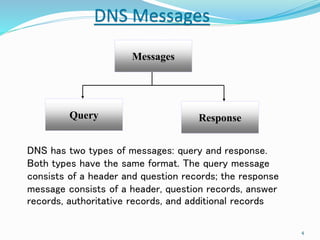
DNS has two types of messages: query and response. 
Both types have the same format. The query message 
consists of a header and question records; the response 
message consists of a header, question records, answer 
records, authoritative records, and additional records
5 
NAME SPACE 
To be unambiguous, the names assigned to machines 
must be carefully selected from a name space with 
complete control over the binding between the names 
and IP addresses. In other words, the names must be 
unique because the addresses are unique. A name 
space that maps each address to a unique name can be 
organized in two ways: flat or hierarchical.
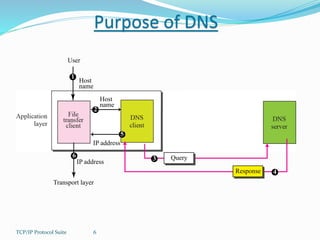
Purpose of DNS 
User 
Host 
name 
1 
IP address 
6 
TCP/IP Protocol Suite 6 
Host 
name 
2 
3 Query 
Response 4 
IP address 
5 
Transport layer
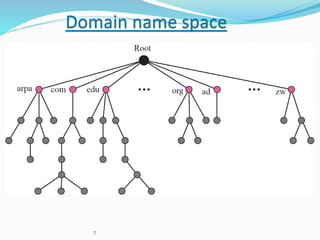
Domain name space 
7
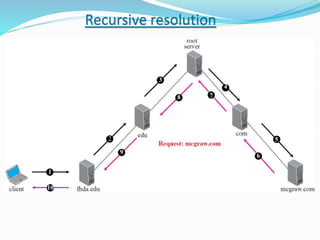
Recursive resolution 
6 
7 
4 
8 
3 
2 
9 
1 
10 
5
REGISTRARS 
How are new domains added to DNS? This is done 
through a registrar, a commercial entity accredited by 
Internet Corporation for Assigned Names and Numbers 
(ICANN). A registrar first verifies that the requested 
domain name is unique and then enters it into the DNS 
database. A fee is charged.

Domain Name System

  • 1.
    Name: Vinay. A.Kahar Guru Nanak College
  • 2.
    Domain Name System(DNS) The DNS is a hierarchical distributed naming system for computers, services, or any resource connected to the Internet or a private network. It associates various information with domain names assigned to each of the participating entities. Most importantly, it translates domain names meaningful to humans into the numerical identifiers associated with networking equipment for the purpose of locating and addressing these devices worldwide. An often-used analogy to explain the Domain Name System is that it serves as the phone book for the Internet by translating human-friendly computer hostnames into IP addresses. For example, the domain name www.Google.com translates to the addresses 192.0.32.10 (IPv4) and 2620:0:2d0:200::10 (IPv6).
  • 3.
    NEED FOR DNS To identify an entity, TCP/IP protocols use the IP address, which uniquely identifies the connection of a host to the Internet. However, people prefer to use names instead of numeric addresses. Therefore, we need a system that can map a name to an address or an address to a name. 3
  • 4.
    4 DNS Messages Messages Query Response DNS has two types of messages: query and response. Both types have the same format. The query message consists of a header and question records; the response message consists of a header, question records, answer records, authoritative records, and additional records
  • 5.
    5 NAME SPACE To be unambiguous, the names assigned to machines must be carefully selected from a name space with complete control over the binding between the names and IP addresses. In other words, the names must be unique because the addresses are unique. A name space that maps each address to a unique name can be organized in two ways: flat or hierarchical.
  • 6.
    Purpose of DNS User Host name 1 IP address 6 TCP/IP Protocol Suite 6 Host name 2 3 Query Response 4 IP address 5 Transport layer
  • 7.
  • 9.
    Recursive resolution 6 7 4 8 3 2 9 1 10 5
  • 10.
    REGISTRARS How arenew domains added to DNS? This is done through a registrar, a commercial entity accredited by Internet Corporation for Assigned Names and Numbers (ICANN). A registrar first verifies that the requested domain name is unique and then enters it into the DNS database. A fee is charged.