ptix                                                              Document Management
                                                                                                     Focus On:


Document Management and Workflow Systems


 G reat, you’ve finally managed to centralize all of
 your documents onto a file server. No more yelling
 over the top of the cube wall asking Joe to send you
 the Peabody file. No more worrying about whether
 everyone in the office has backed up their desktop
 system. Life is good.


 R ight?

 E xcept Bill names his files differently from everyone
 else, and Sue can’t figure out which folder to put hers
 in. Pretty soon you’re walking the hallways asking
 where the Peabody case file is stored on the file
 server. Aren’t you glad somebody printed it out?


 T hen there’s all the paper files that you exchange
 with other offices and customers. You’re still making
 visits to the file cabinets down the hall, just to find
 that the file is checked out, or even worse, just plain   "Optix is the first system I ever purchased
 gone.
                                                           that did everything it said it could - and more"
 D ocument Management.     Create a central repository
 of all your documents: word processing files,                       Joe St. Marie, Supervisor, Archives
 spreadsheets, and scanned paper documents all                      and Records Center, Bechtel Nevada
 centrally managed, consistently indexed and
 searchable, and secure so only those authorized can
 see the file.                                             W ith our text search modules you can search by
                                                           document content. Our Natural Language Search
 O ptix makes document management easy. We                 module allows you to search popular desktop files
 provide drag-and-drop tools that allow you to quickly     for any word in the document, plus sophisticated
 design your index and retrieval application. You can      language processing through a semantic network
 create multiple indexes so you can search for the         allows you to search for concepts by ranking
 documents in different ways. And we even create the       documents by both related terms and their
 database tables on the system for you - no need for a     proximity within the document. Our Boolean
 programmer or a database administrator.                   engine allows you to search ASCII text and
                                                           OCRed files.

 A s your needs grow, so does Optix.  Optix supports
 thousands of users, millions of documents, terabytes      O ur COLD module allows you to take information
 of storage.                                               from legacy mainframe systems and make it
                                                           available throughout your organization, even
                                                           make it available in a browser with Optix Web.
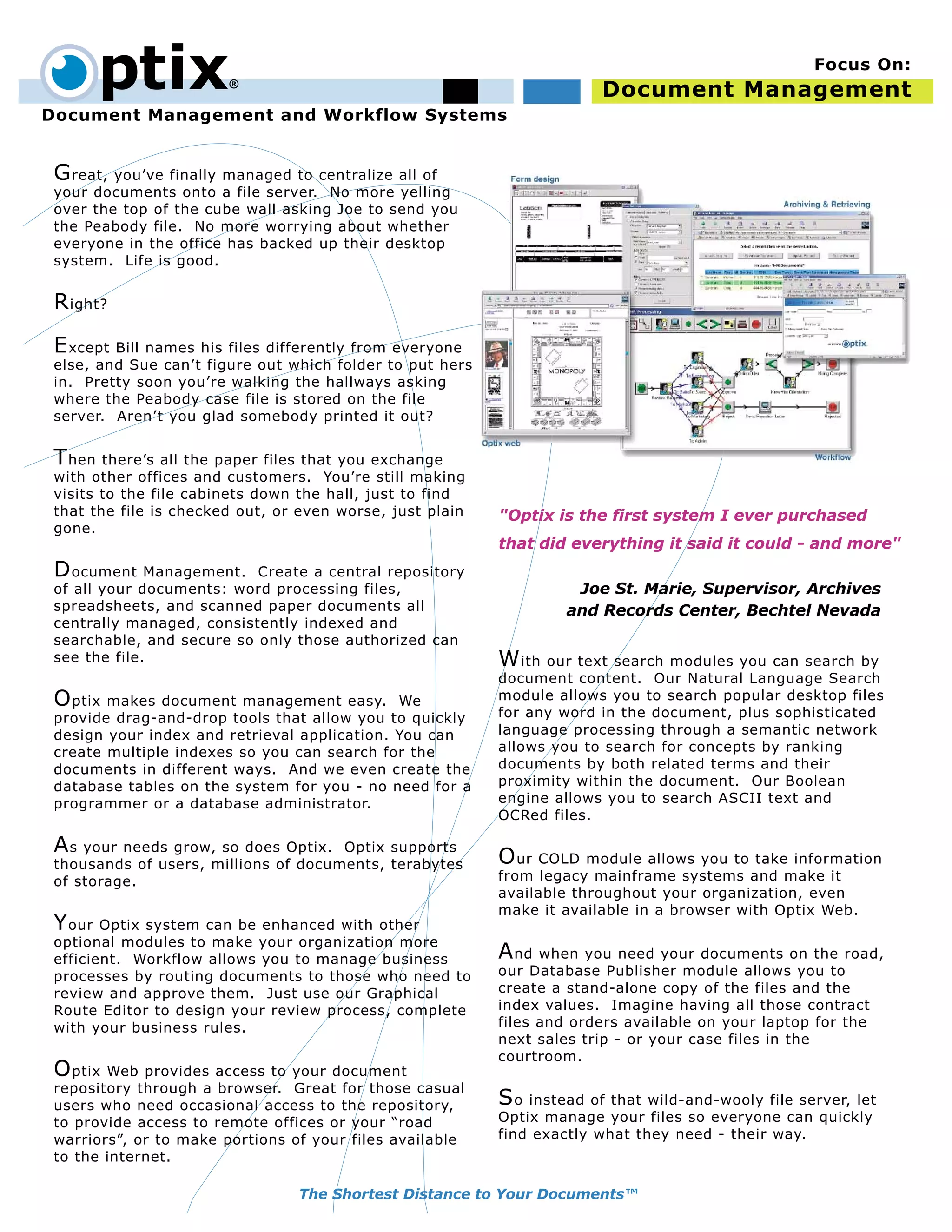
 Y our Optix system can be enhanced with other
 optional modules to make your organization more
 efficient. Workflow allows you to manage business         A nd when you need your documents on the road,
 processes by routing documents to those who need to       our Database Publisher module allows you to
 review and approve them. Just use our Graphical           create a stand-alone copy of the files and the
 Route Editor to design your review process, complete      index values. Imagine having all those contract
 with your business rules.                                 files and orders available on your laptop for the
                                                           next sales trip - or your case files in the
                                                           courtroom.
 O ptix Web provides access to your document
 repository through a browser. Great for those casual
 users who need occasional access to the repository,       S o instead of that wild-and-wooly file server, let
 to provide access to remote offices or your “road         Optix manage your files so everyone can quickly
 warriors”, or to make portions of your files available    find exactly what they need - their way.
 to the internet.

                                 The Shortest Distance to Your Documents™
Document Management - Technotes


Overview

   • Optix is a complete document management solution that supports native Macintosh and
     Windows clients, as well as access via a Browser.
   • A central repository of all your documents including desktop files and scanned paper
     documents.
   • Design multiple index and retrieval applications using the Optix Screen Generator which
     allows you to design the user interface via drag-and-drop, and will even automatically
     build the database table for you.
   • Store files securely on hard drives, RAIDs, NAS, HSMs, even optical disks and
     jukeboxes. Optix can use devices that are integrated into the operating system and
     appear as a file system.
   • Optional modules provide workflow services, web access, text search, COLD, and
     publishing.

Details

Document Management


   • High-speed scanning supported from both Macintosh and Windows clients. Capture
     your documents at pages per second speeds.
   • Batch processing supports form scanning, zoned OCR, patch cards, and index merging
     to quickly input scanned files.
   • Document check-in/check-out ensures that only one person changes a document at a
     time, preventing lost work.
   • Automatic revision control keeps all versions of the document so you can review its
     history, and go back to previous versions if necessary. Each revision is time stamped
     and the person who made the change is automatically recorded.
   • Supports multiple security models including three-level owner-group-world and
     sophisticated access control list (ACL) security to provide fine grained control over
     document access.
   • Thick clients support non-destructive image annotation that allows you to mark up
     documents and make notes, without affecting the legal authenticity of the original
     image.
   • Document hyperlinking allows you to quickly associate related documents.
   • Macintosh client supports AppleScript, Windows client supports OLE automation for
     integration with other desktop applications and custom processing.

Other Features

   • Process based workflow allows you to define your business process for document
     creation or review using our drag-and-drop Graphical Route Editor.
   • Optix Web provides thin client access via CGI or J2EE to your repository.
   • Boolean and Natural Language Search text search engines allow for full text search by
     document content. (Features vary depending on engine and platform)
   • COLD takes report output from legacy systems and makes it available online as either
     text over forms, or as images.
   • Database Publisher allows you to extract a subset of your repository, complete with
     index, and create a stand-alone database that you can take on the road.
   • Java and C API available for integration with ERP packages, legacy systems, and other
     applications for true enterprise integration and deployment.


                                                                  mindwrap inc.
                                                                  664H Zachary Taylor Highway
                                                                  PO Box 430
                                                mind wrap         Flint Hill, Virginia 22627 U.S.A.
                                                                  (540) 675-3015
                                                                  www.mindwrap.com
                                                                  info@mindwrap.com

DocMgmtMac

  • 1.
    ptix Document Management Focus On: Document Management and Workflow Systems G reat, you’ve finally managed to centralize all of your documents onto a file server. No more yelling over the top of the cube wall asking Joe to send you the Peabody file. No more worrying about whether everyone in the office has backed up their desktop system. Life is good. R ight? E xcept Bill names his files differently from everyone else, and Sue can’t figure out which folder to put hers in. Pretty soon you’re walking the hallways asking where the Peabody case file is stored on the file server. Aren’t you glad somebody printed it out? T hen there’s all the paper files that you exchange with other offices and customers. You’re still making visits to the file cabinets down the hall, just to find that the file is checked out, or even worse, just plain "Optix is the first system I ever purchased gone. that did everything it said it could - and more" D ocument Management. Create a central repository of all your documents: word processing files, Joe St. Marie, Supervisor, Archives spreadsheets, and scanned paper documents all and Records Center, Bechtel Nevada centrally managed, consistently indexed and searchable, and secure so only those authorized can see the file. W ith our text search modules you can search by document content. Our Natural Language Search O ptix makes document management easy. We module allows you to search popular desktop files provide drag-and-drop tools that allow you to quickly for any word in the document, plus sophisticated design your index and retrieval application. You can language processing through a semantic network create multiple indexes so you can search for the allows you to search for concepts by ranking documents in different ways. And we even create the documents by both related terms and their database tables on the system for you - no need for a proximity within the document. Our Boolean programmer or a database administrator. engine allows you to search ASCII text and OCRed files. A s your needs grow, so does Optix. Optix supports thousands of users, millions of documents, terabytes O ur COLD module allows you to take information of storage. from legacy mainframe systems and make it available throughout your organization, even make it available in a browser with Optix Web. Y our Optix system can be enhanced with other optional modules to make your organization more efficient. Workflow allows you to manage business A nd when you need your documents on the road, processes by routing documents to those who need to our Database Publisher module allows you to review and approve them. Just use our Graphical create a stand-alone copy of the files and the Route Editor to design your review process, complete index values. Imagine having all those contract with your business rules. files and orders available on your laptop for the next sales trip - or your case files in the courtroom. O ptix Web provides access to your document repository through a browser. Great for those casual users who need occasional access to the repository, S o instead of that wild-and-wooly file server, let to provide access to remote offices or your “road Optix manage your files so everyone can quickly warriors”, or to make portions of your files available find exactly what they need - their way. to the internet. The Shortest Distance to Your Documents™
  • 2.
    Document Management -Technotes Overview • Optix is a complete document management solution that supports native Macintosh and Windows clients, as well as access via a Browser. • A central repository of all your documents including desktop files and scanned paper documents. • Design multiple index and retrieval applications using the Optix Screen Generator which allows you to design the user interface via drag-and-drop, and will even automatically build the database table for you. • Store files securely on hard drives, RAIDs, NAS, HSMs, even optical disks and jukeboxes. Optix can use devices that are integrated into the operating system and appear as a file system. • Optional modules provide workflow services, web access, text search, COLD, and publishing. Details Document Management • High-speed scanning supported from both Macintosh and Windows clients. Capture your documents at pages per second speeds. • Batch processing supports form scanning, zoned OCR, patch cards, and index merging to quickly input scanned files. • Document check-in/check-out ensures that only one person changes a document at a time, preventing lost work. • Automatic revision control keeps all versions of the document so you can review its history, and go back to previous versions if necessary. Each revision is time stamped and the person who made the change is automatically recorded. • Supports multiple security models including three-level owner-group-world and sophisticated access control list (ACL) security to provide fine grained control over document access. • Thick clients support non-destructive image annotation that allows you to mark up documents and make notes, without affecting the legal authenticity of the original image. • Document hyperlinking allows you to quickly associate related documents. • Macintosh client supports AppleScript, Windows client supports OLE automation for integration with other desktop applications and custom processing. Other Features • Process based workflow allows you to define your business process for document creation or review using our drag-and-drop Graphical Route Editor. • Optix Web provides thin client access via CGI or J2EE to your repository. • Boolean and Natural Language Search text search engines allow for full text search by document content. (Features vary depending on engine and platform) • COLD takes report output from legacy systems and makes it available online as either text over forms, or as images. • Database Publisher allows you to extract a subset of your repository, complete with index, and create a stand-alone database that you can take on the road. • Java and C API available for integration with ERP packages, legacy systems, and other applications for true enterprise integration and deployment. mindwrap inc. 664H Zachary Taylor Highway PO Box 430 mind wrap Flint Hill, Virginia 22627 U.S.A. (540) 675-3015 www.mindwrap.com info@mindwrap.com