DOCKER TECHNOLOGY
IN
CLOUD
Submitted By,
Santanu Pattanayak
CONTENTS : -
 WHAT IS CLOUD?
 VIRTUALISATION & CONTAINERISATION,
 WHAT IS DOCKER?
 IT’S COMPONENTS,
 DOCKER_ARCHITECHTURE,
 FEATURES,
 VM V/S DOCKER
 APPLICATIONS IN CLOUD,
 IT’S PROS. & CONS. ,
 CONCLUSION,
 REFERENCES.
1Docker In Cloud
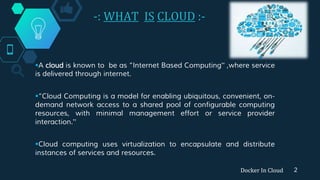
-: WHAT IS CLOUD :-
A cloud is known to be as “Internet Based Computing” ,where service
is delivered through internet.
“Cloud Computing is a model for enabling ubiquitous, convenient, on-
demand network access to a shared pool of configurable computing
resources, with minimal management effort or service provider
interaction.”
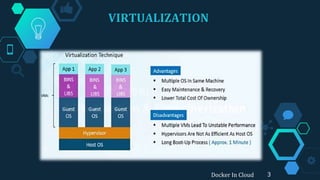
Cloud computing uses virtualization to encapsulate and distribute
instances of services and resources.
Docker In Cloud 2
VIRTUALIZATION
Docker In Cloud 3
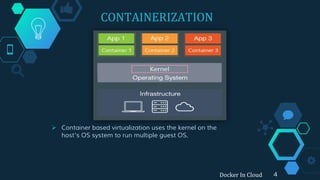
CONTAINERIZATION
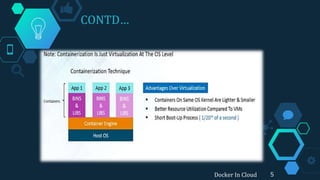
 Container based virtualization uses the kernel on the
host’s OS system to run multiple guest OS.
Docker In Cloud 4
CONTD…
Docker In Cloud 5
WHAT IS DOCKER?
Docker In Cloud 6
 Docker is an open-source project that automates the deployment of
applications.
 It is a platform for developing ,shipping& running application using
container based virtualization technology.
 It packages your application & all its dependencies together in form of
containers .
 They can be run on bare metal servers ,on virtual machines, or on a
service provider's infrastructure.
 Docker creates a common framework for developers and sys admins to
work together on distributed applications.
IT’S COMPONENTS : -
7Docker In Cloud
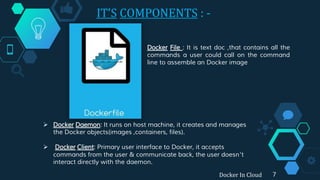
Docker File : It is text doc ,that contains all the
commands a user could call on the command
line to assemble an Docker image
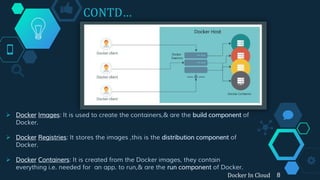
 Docker Daemon: It runs on host machine, it creates and manages
the Docker objects(images ,containers, files).
 Docker Client: Primary user interface to Docker, it accepts
commands from the user & communicate back, the user doesn’t
interact directly with the daemon.
CONTD…
 Docker Images: It is used to create the containers,& are the build component of
Docker.
 Docker Registries: It stores the images ,this is the distribution component of
Docker.
 Docker Containers: It is created from the Docker images, they contain
everything i.e. needed for an app. to run,& are the run component of Docker.
Docker In Cloud 8
-:DOCKER ENGINE:-
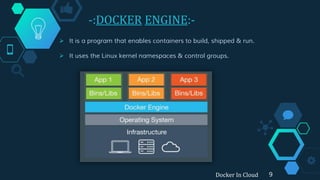
 It is a program that enables containers to build, shipped & run.
 It uses the Linux kernel namespaces & control groups.
Docker In Cloud 9
_DOCKER_
-: ARCHITECTURE :-
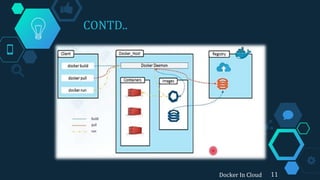
 Docker enables organizations to build, ship and run distributed
applications anywhere.
 The key elements to “run” include the ability to provision, scale and
manage infrastructure while monitoring, the application services.
 In Docker CaaS platform, Docker native cloud service that allows
developers and IT operations teams to deploy and manage their
Dockerized applications in production.
Docker In Cloud 10
CONTD..
11Docker In Cloud
FEATURES: -
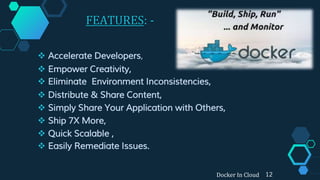
 Accelerate Developers,
 Empower Creativity,
 Eliminate Environment Inconsistencies,
 Distribute & Share Content,
 Simply Share Your Application with Others,
 Ship 7X More,
 Quick Scalable ,
 Easily Remediate Issues.
Docker In Cloud 12
“
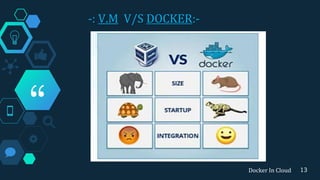
-: V.M V/S DOCKER:-
13Docker In Cloud
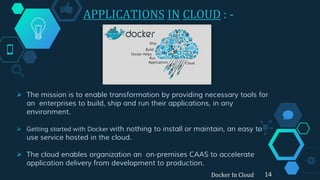
APPLICATIONS IN CLOUD : -
 The mission is to enable transformation by providing necessary tools for
an enterprises to build, ship and run their applications, in any
environment.
 Getting started with Docker with nothing to install or maintain, an easy to
use service hosted in the cloud.
 The cloud enables organization an on-premises CAAS to accelerate
application delivery from development to production.
14Docker In Cloud
CONTD…
Docker Cloud (Features):
 Provision Docker Installed Infrastructure,
 Create and manage node clusters,
 Native integration with Docker Hub for viewing and
pulling images,
 Deploy applications across Dockerized node clusters,
 Docker Security Scanning to ensure secure images.
Docker Hub:-
 It is the public registry that contains large amount of
images available for the customer use.
 It is Docker’s very own cloud repositories.
 Automated builds to speed the application delivery
pipeline,
Docker In Cloud 15
IT’S PROS. & CONS. : -
Pros:-
 Depends on the concern:
a) Developers focus on building
there apps,
b) System admins focus on
deployment.
 Fast Deployment Cycle,
 Application Portability
a) Build in one environment,
b) ship anywhere.
 Scalability,
 Run more apps on host OS.
Cons:-
 Managing a huge amount
of containers is challenging,
when it comes to clustering
containers.
 Containers are less isolated
than real VMs.
 A bug in the kernel affects
every containers.
 Untrusted Source apps
can’t be installed as far
security is concerned.
Docker In Cloud 16
CONCLUSION : -
 Cloud Computing provides computing as a service while allowing
proven experts to manage data-centers efficiently.
 Containers are not able to fully replace virtual
machines,
 In Large Companies, containers are indeed what could
dramatically improve performance and accessibility of their
clouds and started adopting them.
 Docker as a open source brings the containers closer to
developers and system administrators.
 As this tech is new being simple & fast ,large companies are
slowly attracted (entering) in the Docker bandwagon .
17Docker In Cloud
REFERENCE : -
BLOGS VIEWED
http://github-blog.blogspot.in/Docker
https://github.com/dotcloud/docker
http://doc.docker.com/terms/images/filesystems
http://hub.Docker.com/
www.slideshare.com
www.youtube/dockercloud.com
www.Docker.com
Docker In Cloud 18
THANKS
FOR GIVING
YOUR PRECIOUS
TIME
19Docker In Cloud
ANY
QUERIES..?
Docker In Cloud 20

Docker In Cloud

  • 1.
  • 2.
    CONTENTS : - WHAT IS CLOUD?  VIRTUALISATION & CONTAINERISATION,  WHAT IS DOCKER?  IT’S COMPONENTS,  DOCKER_ARCHITECHTURE,  FEATURES,  VM V/S DOCKER  APPLICATIONS IN CLOUD,  IT’S PROS. & CONS. ,  CONCLUSION,  REFERENCES. 1Docker In Cloud
  • 3.
    -: WHAT ISCLOUD :- A cloud is known to be as “Internet Based Computing” ,where service is delivered through internet. “Cloud Computing is a model for enabling ubiquitous, convenient, on- demand network access to a shared pool of configurable computing resources, with minimal management effort or service provider interaction.” Cloud computing uses virtualization to encapsulate and distribute instances of services and resources. Docker In Cloud 2
  • 4.
  • 5.
    CONTAINERIZATION  Container basedvirtualization uses the kernel on the host’s OS system to run multiple guest OS. Docker In Cloud 4
  • 6.
  • 7.
    WHAT IS DOCKER? DockerIn Cloud 6  Docker is an open-source project that automates the deployment of applications.  It is a platform for developing ,shipping& running application using container based virtualization technology.  It packages your application & all its dependencies together in form of containers .  They can be run on bare metal servers ,on virtual machines, or on a service provider's infrastructure.  Docker creates a common framework for developers and sys admins to work together on distributed applications.
  • 8.
    IT’S COMPONENTS :- 7Docker In Cloud Docker File : It is text doc ,that contains all the commands a user could call on the command line to assemble an Docker image  Docker Daemon: It runs on host machine, it creates and manages the Docker objects(images ,containers, files).  Docker Client: Primary user interface to Docker, it accepts commands from the user & communicate back, the user doesn’t interact directly with the daemon.
  • 9.
    CONTD…  Docker Images:It is used to create the containers,& are the build component of Docker.  Docker Registries: It stores the images ,this is the distribution component of Docker.  Docker Containers: It is created from the Docker images, they contain everything i.e. needed for an app. to run,& are the run component of Docker. Docker In Cloud 8
  • 10.
    -:DOCKER ENGINE:-  Itis a program that enables containers to build, shipped & run.  It uses the Linux kernel namespaces & control groups. Docker In Cloud 9
  • 11.
    _DOCKER_ -: ARCHITECTURE :- Docker enables organizations to build, ship and run distributed applications anywhere.  The key elements to “run” include the ability to provision, scale and manage infrastructure while monitoring, the application services.  In Docker CaaS platform, Docker native cloud service that allows developers and IT operations teams to deploy and manage their Dockerized applications in production. Docker In Cloud 10
  • 12.
  • 13.
    FEATURES: -  AccelerateDevelopers,  Empower Creativity,  Eliminate Environment Inconsistencies,  Distribute & Share Content,  Simply Share Your Application with Others,  Ship 7X More,  Quick Scalable ,  Easily Remediate Issues. Docker In Cloud 12
  • 14.
    “ -: V.M V/SDOCKER:- 13Docker In Cloud
  • 15.
    APPLICATIONS IN CLOUD: -  The mission is to enable transformation by providing necessary tools for an enterprises to build, ship and run their applications, in any environment.  Getting started with Docker with nothing to install or maintain, an easy to use service hosted in the cloud.  The cloud enables organization an on-premises CAAS to accelerate application delivery from development to production. 14Docker In Cloud
  • 16.
    CONTD… Docker Cloud (Features): Provision Docker Installed Infrastructure,  Create and manage node clusters,  Native integration with Docker Hub for viewing and pulling images,  Deploy applications across Dockerized node clusters,  Docker Security Scanning to ensure secure images. Docker Hub:-  It is the public registry that contains large amount of images available for the customer use.  It is Docker’s very own cloud repositories.  Automated builds to speed the application delivery pipeline, Docker In Cloud 15
  • 17.
    IT’S PROS. &CONS. : - Pros:-  Depends on the concern: a) Developers focus on building there apps, b) System admins focus on deployment.  Fast Deployment Cycle,  Application Portability a) Build in one environment, b) ship anywhere.  Scalability,  Run more apps on host OS. Cons:-  Managing a huge amount of containers is challenging, when it comes to clustering containers.  Containers are less isolated than real VMs.  A bug in the kernel affects every containers.  Untrusted Source apps can’t be installed as far security is concerned. Docker In Cloud 16
  • 18.
    CONCLUSION : - Cloud Computing provides computing as a service while allowing proven experts to manage data-centers efficiently.  Containers are not able to fully replace virtual machines,  In Large Companies, containers are indeed what could dramatically improve performance and accessibility of their clouds and started adopting them.  Docker as a open source brings the containers closer to developers and system administrators.  As this tech is new being simple & fast ,large companies are slowly attracted (entering) in the Docker bandwagon . 17Docker In Cloud
  • 19.
    REFERENCE : - BLOGSVIEWED http://github-blog.blogspot.in/Docker https://github.com/dotcloud/docker http://doc.docker.com/terms/images/filesystems http://hub.Docker.com/ www.slideshare.com www.youtube/dockercloud.com www.Docker.com Docker In Cloud 18
  • 20.
  • 21.