

Docker - Contain that wild application
Marvin Arcilla
10/06/2016
@DevConSummit
Problems with deploying
- Need to install Software, Tool, etc
- Different Operating System
- Code Architecture
- etc
“My code works on my machine”
What does Docker do anyway?
- Tool for running an application in an isolated environment
- Ensures that it always run in the same environment
- If you say it works on your PC then it will work in all machines!
- Makes collaboration between teams easier
- Quickly scale your application
- Sandboxes your application
WAIT…
is this guy talking about
Virtual Machines?
How does Docker differ anyway?
- Wraps a piece of software in a complete filesystem that contains
everything needed to run. ( code, libraries, system tools, dependencies, etc)
- Creates a CONTAINER
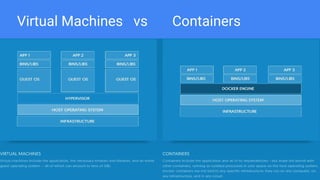
Virtual Machines vs Containers
Containers and Images
- Image
- Template for your created application with the environment you want
- Container
- Running Instance of an Image
How to create images
- By creating a Dockerfile
- Dockerfile
- Textfile with instructions to setup your application
https://docker.github.io/engine/reference/builder/
Inside the Dockerfile
INSTRUCTION arguments #FORMAT
Some Instructions:
FROM baseimage
RUN command
COPY source destinationInDocker
ENV variableName value
EXPOSE portNumber
ENTRYPOINT [“command”, “arg1”, “arg2”, ...]
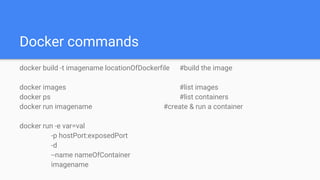
Docker commands
docker build -t imagename locationOfDockerfile #build the image
docker images #list images
docker ps #list containers
docker run imagename #create & run a container
docker run -e var=val
-p hostPort:exposedPort
-d
--name nameOfContainer
imagename
Let’s dive into Docker!
Thank you
Thank you

Docker - Contain that Wild Application by Marvin Arcilla

  • 1.
    Docker - Containthat wild application Marvin Arcilla 10/06/2016 @DevConSummit
  • 2.
    Problems with deploying -Need to install Software, Tool, etc - Different Operating System - Code Architecture - etc “My code works on my machine”
  • 3.
    What does Dockerdo anyway? - Tool for running an application in an isolated environment - Ensures that it always run in the same environment - If you say it works on your PC then it will work in all machines! - Makes collaboration between teams easier - Quickly scale your application - Sandboxes your application
  • 4.
    WAIT… is this guytalking about Virtual Machines?
  • 5.
    How does Dockerdiffer anyway? - Wraps a piece of software in a complete filesystem that contains everything needed to run. ( code, libraries, system tools, dependencies, etc) - Creates a CONTAINER
  • 6.
  • 7.
    Containers and Images -Image - Template for your created application with the environment you want - Container - Running Instance of an Image
  • 8.
    How to createimages - By creating a Dockerfile - Dockerfile - Textfile with instructions to setup your application https://docker.github.io/engine/reference/builder/
  • 9.
    Inside the Dockerfile INSTRUCTIONarguments #FORMAT Some Instructions: FROM baseimage RUN command COPY source destinationInDocker ENV variableName value EXPOSE portNumber ENTRYPOINT [“command”, “arg1”, “arg2”, ...]
  • 10.
    Docker commands docker build-t imagename locationOfDockerfile #build the image docker images #list images docker ps #list containers docker run imagename #create & run a container docker run -e var=val -p hostPort:exposedPort -d --name nameOfContainer imagename
  • 11.
  • 12.
  • 13.