Recommended
PPTX
Hello_World_Django_Step_By_Step learning Material
PPTX
Hello_World_Django_Step_By_Step_Teaching.pptx
PPTX
PDF
Virtual Environment and Web development using Django
PPTX
Django simplified : by weever mbakaya
PDF
PDF
Easy Step-by-Step Guide to Develop REST APIs with Django REST Framework
PPTX
PDF
Behind the curtain - How Django handles a request
PPT
PDF
Web development django.pdf
PPTX
Concepts and applications of Django.pptx
PDF
Django Workflow and Architecture
PPTX
ADF- Lect-3 Django Project Structure, Django Apps Structure.pptx
PDF
PDF
PDF
django_introduction20141030
PDF
PDF
Learn Django Tips, Tricks & Techniques for Developers
PPTX
Django Architecture Introduction
PDF
PPTX
DOCX
Akash rajguru project report sem v
PDF
PDF
Django is a high-level Python web framework that enables rapid development of...
PPT
PDF
Web application on menu card qrcode generator.pdf
PDF
PDF
Decision-Support-Systems-and-Decision-Making-Processes.pdf
PDF
AI-Driven Multi-Agent System for QOS Optimization in 6g Industrial Networks
More Related Content
PPTX
Hello_World_Django_Step_By_Step learning Material
PPTX
Hello_World_Django_Step_By_Step_Teaching.pptx
PPTX
PDF
Virtual Environment and Web development using Django
PPTX
Django simplified : by weever mbakaya
PDF
PDF
Easy Step-by-Step Guide to Develop REST APIs with Django REST Framework
PPTX
Similar to django ppt for which shows hello world in the server
PDF
Behind the curtain - How Django handles a request
PPT
PDF
Web development django.pdf
PPTX
Concepts and applications of Django.pptx
PDF
Django Workflow and Architecture
PPTX
ADF- Lect-3 Django Project Structure, Django Apps Structure.pptx
PDF
PDF
PDF
django_introduction20141030
PDF
PDF
Learn Django Tips, Tricks & Techniques for Developers
PPTX
Django Architecture Introduction
PDF
PPTX
DOCX
Akash rajguru project report sem v
PDF
PDF
Django is a high-level Python web framework that enables rapid development of...
PPT
PDF
Web application on menu card qrcode generator.pdf
PDF
Recently uploaded
PDF
Decision-Support-Systems-and-Decision-Making-Processes.pdf
PDF
AI-Driven Multi-Agent System for QOS Optimization in 6g Industrial Networks
PPTX
ISO 13485.2016 Awareness's Training material
PDF
Code-Compliant As-Built BIM Deliverables for California Public and Government...
PPTX
Unit-2: Network Models--OSI Reference Model, TCP/IP Reference Model
PDF
Fire fighting arrangement in public assembly buildings
PPTX
The Most Controversial TPM Debate in Maintenance Today Checklist TPM vs Outco...
PPTX
SketchUp Pro 2026 – Advanced 3D Modeling Software
PDF
Computer Graphics Fundamentals (v0p1) - DannyJiang
PDF
Manual de instalacion de notifire NFS320
PPTX
Electronics Device - EC25C01 - Semiconductor: Types, Conductivity,
PDF
Fluid Mechanics, Heat Transfer, and Mass Transfer_ Chemical Engineering Pract...
PDF
Chemical Hazards at Workplace – Types, Properties & Exposure Routes, CORE-EHS
PPTX
We-Optimized-Everything-Except-Decision-Quality-Maintenance-MaintWiz.pptx
PPTX
The #1 Reason Your MRO Budget Exploded — And How Predictive Maintenance Fixes It
PDF
comprehensive analysis of cross-chain bridges in the DeFi - Garima Singh
PDF
Chris Elwell Woburn - An Experienced IT Executive
PPTX
Theory to Practice of Unsaturated Soil Mechanics-1.pptx
PPTX
Unit 3_statistical methods in data science.pptx
PPTX
UNIT 2 - Electronics Device - EC25C01 - PN Junction Diodes
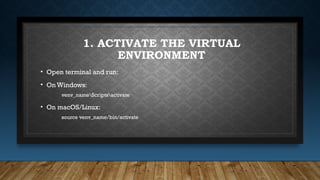
django ppt for which shows hello world in the server 1. 2. 1. ACTIVATE THE VIRTUAL
ENVIRONMENT
• Open terminal and run:
• On Windows:
venv_nameScriptsactivate
• On macOS/Linux:
source venv_name/bin/activate
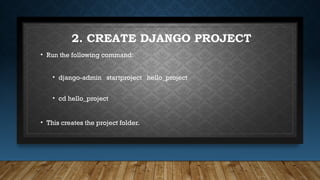
3. 2. CREATE DJANGO PROJECT
• Run the following command:
• django-admin startproject hello_project
• cd hello_project
• This creates the project folder.
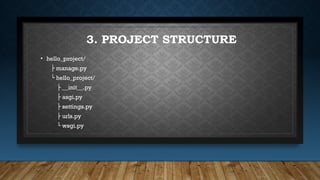
4. 3. PROJECT STRUCTURE
• hello_project/
├ manage.py
└ hello_project/
├ __init__.py
├ asgi.py
├ settings.py
├ urls.py
└ wsgi.py
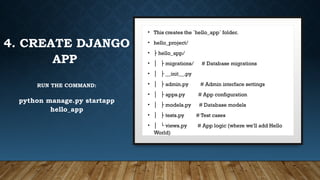
5. 4. CREATE DJANGO
APP
RUN THE COMMAND:
python manage.py startapp
hello_app
• This creates the `hello_app` folder.
• hello_project/
• ├ hello_app/
• │ ├ migrations/ # Database migrations
• │ ├ __init__.py
• │ ├ admin.py # Admin interface settings
• │ ├ apps.py # App configuration
• │ ├ models.py # Database models
• │ ├ tests.py # Test cases
• │ └ views.py # App logic (where we'll add Hello
World)
6. 3. PROJECT STRUCTURE
• hello_project/
├ manage.py
└ hello_project/
├ __init__.py
├ asgi.py
├ settings.py
├ urls.py
└ wsgi.py
5. UPDATE
SETTINGS.PY
In Hello_project/Settings.Py,
Add 'Hello_app' In
INSTALLED_APPS:
• INSTALLED_APPS = [
'django.contrib.admin',
'django.contrib.auth',
'django.contrib.contenttypes',
'django.contrib.sessions',
'django.contrib.messages',
'django.contrib.staticfiles',
'hello_app', # Add this line
]
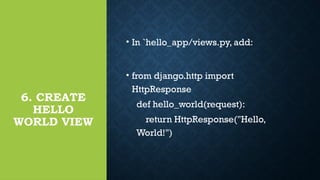
7. 6. CREATE
HELLO
WORLD VIEW
• In `hello_app/views.py, add:
• from django.http import
HttpResponse
def hello_world(request):
return HttpResponse("Hello,
World!")
8. 7. CONFIGURE URLS
Explanation
• admin: Imports the Django admin
site functionality.
• path: Used to define URL patterns.
• include: Allows including app-level
urls.py in the project’s urls.py
In `hello_project/urls.py` include the
app URLs:
from django.contrib import admin
from django.urls import path, include
urlpatterns = [
path('admin/', admin.site.urls),
path(‘ ', include('hello_app.urls')), #
Add this line
]
9. 7. CONFIGURE URLS
from django.contrib import admin
from django.urls import path, include
urlpatterns = [
path('admin/', admin.site.urls),
path(‘ ', include('hello_app.urls')), # Add this line
]
Explanation:
• path('admin/', admin.site.urls)
• Routes /admin/ to the Django admin panel.
• path(‘ ', include('hello_app.urls'))
• Routes the root URL (/) to the hello_app app.
• The include() function links to
hello_app/urls.py.
• Example: If you visit http://127.0.0.1:8000/,
Django will look for the URL patterns inside
hello_app/urls.py.
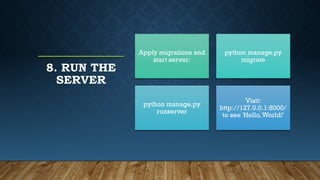
10. 8. RUN THE
SERVER
Apply migrations and
start server:
python manage.py
migrate
python manage.py
runserver
Visit:
http://127.0.0.1:8000/
to see 'Hello,World!'

![3. PROJECT STRUCTURE
• hello_project/
├ manage.py
└ hello_project/
├ __init__.py
├ asgi.py
├ settings.py
├ urls.py
└ wsgi.py
5. UPDATE
SETTINGS.PY
In Hello_project/Settings.Py,
Add 'Hello_app' In
INSTALLED_APPS:
• INSTALLED_APPS = [
'django.contrib.admin',
'django.contrib.auth',
'django.contrib.contenttypes',
'django.contrib.sessions',
'django.contrib.messages',
'django.contrib.staticfiles',
'hello_app', # Add this line
]](https://image.slidesharecdn.com/django-250420090829-e9bb5812/85/django-ppt-for-which-shows-hello-world-in-the-server-6-320.jpg)
![7. CONFIGURE URLS
Explanation
• admin: Imports the Django admin
site functionality.
• path: Used to define URL patterns.
• include: Allows including app-level
urls.py in the project’s urls.py
In `hello_project/urls.py` include the
app URLs:
from django.contrib import admin
from django.urls import path, include
urlpatterns = [
path('admin/', admin.site.urls),
path(‘ ', include('hello_app.urls')), #
Add this line
]](https://image.slidesharecdn.com/django-250420090829-e9bb5812/85/django-ppt-for-which-shows-hello-world-in-the-server-8-320.jpg)
![7. CONFIGURE URLS
from django.contrib import admin
from django.urls import path, include
urlpatterns = [
path('admin/', admin.site.urls),
path(‘ ', include('hello_app.urls')), # Add this line
]
Explanation:
• path('admin/', admin.site.urls)
• Routes /admin/ to the Django admin panel.
• path(‘ ', include('hello_app.urls'))
• Routes the root URL (/) to the hello_app app.
• The include() function links to
hello_app/urls.py.
• Example: If you visit http://127.0.0.1:8000/,
Django will look for the URL patterns inside
hello_app/urls.py.](https://image.slidesharecdn.com/django-250420090829-e9bb5812/85/django-ppt-for-which-shows-hello-world-in-the-server-9-320.jpg)