Download to read offline
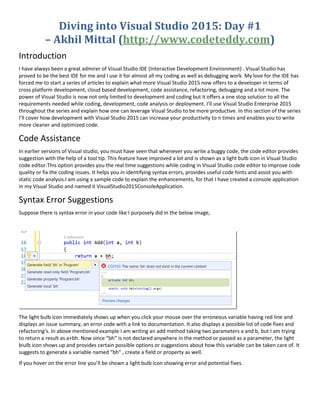
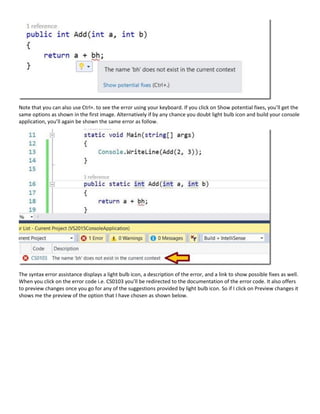


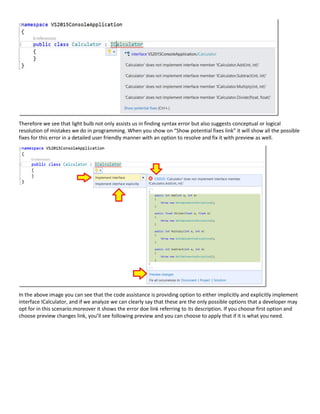
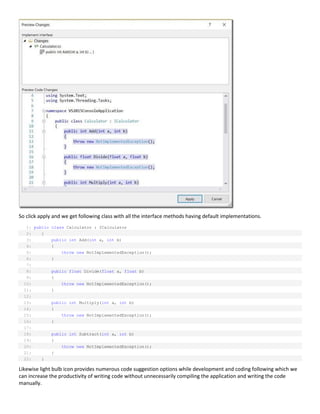


The document discusses the code assistance features of Visual Studio 2015. It provides examples of how the light bulb icon displays potential fixes for syntax errors and missing code. It also shows how refactoring suggestions are provided to optimize code, such as removing unused namespaces or changing a method to directly return a value rather than using a temporary variable. The light bulb icon assists with code completion, error fixing, and refactoring to improve code quality and developer productivity.


![[Td 2015] what is new in visual c++ 2015 and future directions(ulzii luvsanba...](https://cdn.slidesharecdn.com/ss_thumbnails/td2015whatisnewinvisualc2015andfuturedirectionsulziiluvsanbatandaymanshoukly-151104050956-lva1-app6891-thumbnail.jpg?width=640&height=640&fit=bounds)


