Learning MVC-Part 6
Generic Repository Pattern in MVC3 Application with Entity Framework
Introduction:
Creating a Generic Repository Pattern in MVC3 Application with Entity Framework is the last
topic that we are about to cover in our journey of Learning MVC.
The article will focus on Unit Of Work Pattern and Repository Pattern, and shows how to
performCRUD operations in an MVC application when there could be a possibility of creating
more than one repository class. To overcomethis possibility and overhead, we make a Generic
Repository class for all other repositories and implement a Unit of Work pattern to provide
abstraction.
Our roadmap towards Learning MVC:
Just to remind our full roadmap towards learning MVC,
Part1: Introduction to MVC architecture and Separation of Concerns.
Part 2: Creating MVC Application from scratch and connecting it with databaseusing LINQ to
SQL.
Part 3: Connecting the MVC Application with the help of EntityFramework DB-Firstapproach.
Part 4: Connecting the MVC Application with the help of EntityFramework Code-First
approach.
Part 5: Implementing Repository Pattern in MVC Application with EntityFramework.
Part 6: Implementing a Generic Repository PatternandUnit Of Work patterninMVC
ApplicationwithEntityFramework.
Pre-requisites:
There are few pre-requisites beforewe start with the article,
1. We haverunning sample application that we created in fifth part of the article series.
2. We haveEntityFramework 4.1 packageor dll on our local file system.
3. We understand how MVCapplication is created(Follow second partof the series).
Why Generic Repository:
We have already discussed whatRepository Pattern is and why do we need Repository Pattern
in our last article. We created a User Repository for performing CRUD operations, but think of
the scenario wherewe need 10 such repositories.
Are we going to create these classes?, notgood, it results in a lot of redundantcode. So to
overcomethis situation we’ll create a Generic Repository class that will be called by a property
to create a new repository thus wedo not result in lot of classes and also escaperedundant
code too. Moreover we savea lot of time that could be wasted creating those classes.
Unit of Work Pattern:
According to Martin Fowler Unit of Work Pattern “Maintains a list of objects affected by a
business transaction and coordinates the writing out of changes and the resolution of
concurrency problems.”
FromMSDN, The Unit of Work pattern isn't necessarily something that you will explicitly build
yourself, butthe pattern shows up in almost every persistencetool. The ITransaction interface
in NHibernate, the DataContext class in LINQ to SQL, and the ObjectContext class in the Entity
Framework areall examples of a Unit of Work. For that matter, the venerableDataSet can be
used as a Unit of Work.
Other times, you may want to write your own application-specific Unit of Work interface or
class that wraps the inner Unit of Work fromyour persistencetool. You may do this for a
number of reasons. You might want to add application-specific logging, tracing, or error
handling to transaction management. Perhaps you want to encapsulate the specifics of your
persistencetooling fromthe rest of the application. You might wantthis extra encapsulation
to make it easier to swap out persistencetechnologies later. Or you might want to promote
testability in your system. Many of the built-in Unit of Work implementations fromcommon
persistencetools are difficult to deal with in automated unit testing scenarios.”
The Unit of Work class can have methods to mark entities as modified, newly created, or
deleted. The Unit of Work will also have methods to commit or roll back all of the changes as
well.
The important responsibilities of Unit of Work are,
 To manage transactions.
 To order the databaseinserts, deletes, and updates.
 To prevent duplicate updates. Insidea single usage of a Unit of Work object, different
parts of the code may mark the sameInvoice object as changed, but the Unit of Work
class will only issuea single UPDATE command to the database.
The value of using a Unit of Work pattern is to free the rest of our code fromthese concerns
so that you can otherwiseconcentrate on business logic.
Why use Unit of Work?
Again Martin Fowler statements,”When you'repulling data in and out of a database, it's
important to keep track of what you'vechanged; otherwise, that data won't be written back
into the database. Similarly you have to insert new objects you create and remove any objects
you delete.
You can change the database with each change to your object model, but this can lead to lots
of very small databasecalls, which ends up being very slow. Furthermoreit requires you to
have a transaction open for the whole interaction, which is impractical if you havea business
transaction that spans multiple requests. The situation is even worseif you need to keep track
of the objects you've read so you can avoid inconsistentreads.
A Unit of Work keeps track and takes responsibility of everything you do during a business
transaction that can affect the database. When you'redone, it figures out everything that
needs to be done to alter the databaseas a result of your work.”
You see I don’t haveto concentrate much on theory, we already havegreat definitions
existing, all we needed is to stack them in a correct format.
Using the Unit of Work
One of the best ways to usethe Unit of Work pattern is to allow disparateclasses and services
to take partin a single logical transaction. The key point here is that you want the disparate
classes and services to remain ignorant of each other while being able to enlist in a single
transaction. Traditionally, you'vebeen able to do this by using transaction coordinators like
MTS/COM+ or the newer System.Transactions namespace. Personally, I prefer using the Unit
of Work pattern to allow unrelated classes and services to take part in a logical transaction
because I think it makes the code more explicit, easier to understand, and simpler to unit
test(FromMSDN).
Creating Generic Repository:
Cut the Redundancy…
Step1: Open up our existing MVC3 application created in Part5 in Visual Studio.
Step2: Right click Learning MVCproject folder and create a folder named GenericRepository
and add a class named GenericRepository.cs to that folder.
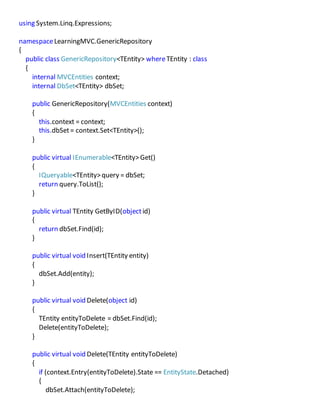
The code of the GenericRepository.cs class is as follows,
using System;
using System.Collections.Generic;
using System.Data;
using System.Data.Entity;
using System.Linq;
using System.Linq.Expressions;
namespaceLearningMVC.GenericRepository
{
public class GenericRepository<TEntity> whereTEntity : class
{
internal MVCEntities context;
internal DbSet<TEntity> dbSet;
public GenericRepository(MVCEntities context)
{
this.context = context;
this.dbSet= context.Set<TEntity>();
}
public virtual IEnumerable<TEntity>Get()
{
IQueryable<TEntity>query = dbSet;
return query.ToList();
}
public virtual TEntity GetByID(objectid)
{
return dbSet.Find(id);
}
public virtual void Insert(TEntity entity)
{
dbSet.Add(entity);
}
public virtual void Delete(object id)
{
TEntity entityToDelete = dbSet.Find(id);
Delete(entityToDelete);
}
public virtual void Delete(TEntity entityToDelete)
{
if (context.Entry(entityToDelete).State == EntityState.Detached)
{
dbSet.Attach(entityToDelete);
}
dbSet.Remove(entityToDelete);
}
public virtual void Update(TEntity entityToUpdate)
{
dbSet.Attach(entityToUpdate);
context.Entry(entityToUpdate).State= EntityState.Modified;
}
}
}
We can see, we havecreated the generic methods and the class as well is generic, when
instantiating this class we can pass any model on which the class will work as a repository and
servethe purpose.
TEntity is any model/domain/entity class
MVCEntities is our DBContext as discussed in earlier parts.
Step3:Implementing UnitOfWork : Create a folder named UnitOfWork under LearningMVC
project, and add a class UnitOfWork.cs to thatfolder.
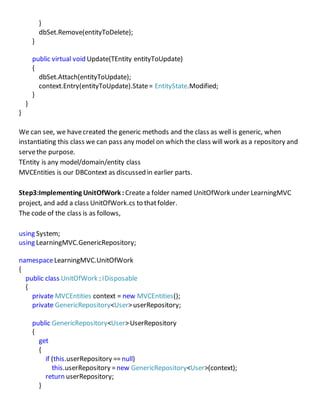
The code of the class is as follows,
using System;
using LearningMVC.GenericRepository;
namespaceLearningMVC.UnitOfWork
{
public class UnitOfWork : IDisposable
{
private MVCEntities context = new MVCEntities();
private GenericRepository<User>userRepository;
public GenericRepository<User>UserRepository
{
get
{
if (this.userRepository ==null)
this.userRepository =new GenericRepository<User>(context);
return userRepository;
}
}
public void Save()
{
context.SaveChanges();
}
private bool disposed = false;
protected virtual void Dispose(booldisposing)
{
if (!this.disposed)
{
if (disposing)
{
context.Dispose();
}
}
this.disposed =true;
}
public void Dispose()
{
Dispose(true);
GC.SuppressFinalize(this);
}
}
}
We see the class implements IDisposableinterfacefor objects of this class to be disposed.
We create objectof DBContext in this class,notethat earlier it was used to be passed in
Repository class froma controller.
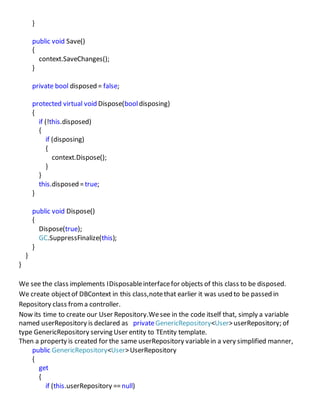
Now its time to create our User Repository.Wesee in the code itself that, simply a variable
named userRepository is declared as privateGenericRepository<User>userRepository; of
type GenericRepository serving User entity to TEntity template.
Then a property is created for the same userRepository variablein a very simplified manner,
public GenericRepository<User>UserRepository
{
get
{
if (this.userRepository ==null)
this.userRepository =new GenericRepository<User>(context);
return userRepository;
}
}
i.e. mere 6-7 lines of code.Guess what? Our UserRepository is created.
(taken fromgoogle)
You see it was as simple as that,you can create as many repositories you want by justcreating
simple properties,and no need to create separateclasses. And now you can complete the rest
of the story by yourself,Confused????,Yes its DBOperations , lets do it.
Step4:In MyController, declarea variableunitOfWork as,
private UnitOfWork.UnitOfWork unitOfWork =new UnitOfWork.UnitOfWork();
Now this unitOfWork instanceof UnitOfWork class holds all th repository properties,if we
press “.” After it, it will show the repositories.So wecan chooseany of the repositories created
and performCRUD operations on them.
e.g. our Indexaction,
public ActionResult Index()
{
var userList= from user in unitOfWork.UserRepository.Get() selectuser;
var users = new List<LearningMVC.Models.UserList>();
if (userList.Any())
{
foreach (var user in userList)
{
users.Add(new LearningMVC.Models.UserList() { UserId =user.UserId, Address =
user.Address, Company =user.Company, FirstName=user.FirstName, LastName=
user.LastName, Designation = user.Designation, EMail= user.EMail, PhoneNo = user.PhoneNo
});
}
}
ViewBag.FirstName= "My FirstName";
ViewData["FirstName"] ="My FirstName";
if(TempData.Any())
{
var tempData = TempData["TempData Name"];
}
return View(users);
}
Here,
unitOfWork.UserRepository Accessing UserRepository.
unitOfWork.UserRepository.Get()  Accessing Generic Get() method to get all users.
Earlier we use to have MyController constructor like ,
public MyController()
{
this.userRepository =new UserRepository(new MVCEntities());
}
Now, no need to write that constructor, infactyou can Remove the UserRepository class and
Interfacewecreated in 5th
Part of Learning MVC.
I hope you can write the Actions for rest of the CRUD operations as well.
Details:
public ActionResult Details(int id)
{
var userDetails = unitOfWork.UserRepository.GetByID(id);
var user = new LearningMVC.Models.UserList();
if (userDetails != null)
{
user.UserId =userDetails.UserId;
user.FirstName=userDetails.FirstName;
user.LastName= userDetails.LastName;
user.Address=userDetails.Address;
user.PhoneNo =userDetails.PhoneNo;
user.EMail= userDetails.EMail;
user.Company =userDetails.Company;
user.Designation =userDetails.Designation;
}
return View(user);
}
Create:
[HttpPost]
public ActionResult Create(LearningMVC.Models.UserListuserDetails)
{
try
{
var user = new User();
if (userDetails != null)
{
user.UserId =userDetails.UserId;
user.FirstName= userDetails.FirstName;
user.LastName= userDetails.LastName;
user.Address =userDetails.Address;
user.PhoneNo = userDetails.PhoneNo;
user.EMail = userDetails.EMail;
user.Company = userDetails.Company;
user.Designation = userDetails.Designation;
}
unitOfWork.UserRepository.Insert(user);
unitOfWork.Save();
return RedirectToAction("Index");
}
catch
{
return View();
}
}
Edit:
public ActionResult Edit(int id)
{
var userDetails = unitOfWork.UserRepository.GetByID(id);
var user = new LearningMVC.Models.UserList();
if (userDetails != null)
{
user.UserId =userDetails.UserId;
user.FirstName=userDetails.FirstName;
user.LastName= userDetails.LastName;
user.Address=userDetails.Address;
user.PhoneNo =userDetails.PhoneNo;
user.EMail= userDetails.EMail;
user.Company =userDetails.Company;
user.Designation =userDetails.Designation;
}
return View(user);
}
[HttpPost]
public ActionResult Edit(int id, User userDetails)
{
TempData["TempData Name"] = "Akhil";
try
{
var user = unitOfWork.UserRepository.GetByID(id);
user.FirstName=userDetails.FirstName;
user.LastName= userDetails.LastName;
user.Address=userDetails.Address;
user.PhoneNo =userDetails.PhoneNo;
user.EMail= userDetails.EMail;
user.Company =userDetails.Company;
user.Designation =userDetails.Designation;
unitOfWork.UserRepository.Update(user);
unitOfWork.Save();
return RedirectToAction("Index");
}
Delete:
public ActionResult Delete(int id)
{
var user = new LearningMVC.Models.UserList();
var userDetails = unitOfWork.UserRepository.GetByID(id);
if (userDetails != null)
{
user.FirstName=userDetails.FirstName;
user.LastName= userDetails.LastName;
user.Address=userDetails.Address;
user.PhoneNo =userDetails.PhoneNo;
user.EMail= userDetails.EMail;
user.Company =userDetails.Company;
user.Designation =userDetails.Designation;
}
return View(user);
}
[HttpPost]
public ActionResult Delete(int id, LearningMVC.Models.UserListuserDetails)
{
try
{
var user = unitOfWork.UserRepository.GetByID(id);
if (user != null)
{
unitOfWork.UserRepository.Delete(id);
unitOfWork.Save();
}
return RedirectToAction("Index");
}
catch
{
return View();
}
}
Note: Images are taken from google images.
Conclusion
We now know how to make generic repositories too, and performCRUD operations using it.
We have also learnt UnitOfWork pattern in detail. Now you are qualified and confident
enough to apply these concepts in your enterprise applications.This was lastpart of this MVC
series, let me know if you feel to discuss any topic in particular or we can also start any other
series as well .
Happy Coding :-).
Generic Repository Pattern in MVC3 Application with Entity Framework

Generic Repository Pattern in MVC3 Application with Entity Framework

  • 1.
    Learning MVC-Part 6 GenericRepository Pattern in MVC3 Application with Entity Framework Introduction: Creating a Generic Repository Pattern in MVC3 Application with Entity Framework is the last topic that we are about to cover in our journey of Learning MVC. The article will focus on Unit Of Work Pattern and Repository Pattern, and shows how to performCRUD operations in an MVC application when there could be a possibility of creating more than one repository class. To overcomethis possibility and overhead, we make a Generic Repository class for all other repositories and implement a Unit of Work pattern to provide abstraction. Our roadmap towards Learning MVC: Just to remind our full roadmap towards learning MVC, Part1: Introduction to MVC architecture and Separation of Concerns. Part 2: Creating MVC Application from scratch and connecting it with databaseusing LINQ to SQL. Part 3: Connecting the MVC Application with the help of EntityFramework DB-Firstapproach. Part 4: Connecting the MVC Application with the help of EntityFramework Code-First approach. Part 5: Implementing Repository Pattern in MVC Application with EntityFramework. Part 6: Implementing a Generic Repository PatternandUnit Of Work patterninMVC ApplicationwithEntityFramework. Pre-requisites: There are few pre-requisites beforewe start with the article, 1. We haverunning sample application that we created in fifth part of the article series. 2. We haveEntityFramework 4.1 packageor dll on our local file system. 3. We understand how MVCapplication is created(Follow second partof the series). Why Generic Repository:
  • 2.
    We have alreadydiscussed whatRepository Pattern is and why do we need Repository Pattern in our last article. We created a User Repository for performing CRUD operations, but think of the scenario wherewe need 10 such repositories. Are we going to create these classes?, notgood, it results in a lot of redundantcode. So to overcomethis situation we’ll create a Generic Repository class that will be called by a property to create a new repository thus wedo not result in lot of classes and also escaperedundant code too. Moreover we savea lot of time that could be wasted creating those classes. Unit of Work Pattern: According to Martin Fowler Unit of Work Pattern “Maintains a list of objects affected by a business transaction and coordinates the writing out of changes and the resolution of concurrency problems.” FromMSDN, The Unit of Work pattern isn't necessarily something that you will explicitly build yourself, butthe pattern shows up in almost every persistencetool. The ITransaction interface in NHibernate, the DataContext class in LINQ to SQL, and the ObjectContext class in the Entity Framework areall examples of a Unit of Work. For that matter, the venerableDataSet can be used as a Unit of Work. Other times, you may want to write your own application-specific Unit of Work interface or class that wraps the inner Unit of Work fromyour persistencetool. You may do this for a number of reasons. You might want to add application-specific logging, tracing, or error handling to transaction management. Perhaps you want to encapsulate the specifics of your persistencetooling fromthe rest of the application. You might wantthis extra encapsulation
  • 3.
    to make iteasier to swap out persistencetechnologies later. Or you might want to promote testability in your system. Many of the built-in Unit of Work implementations fromcommon persistencetools are difficult to deal with in automated unit testing scenarios.” The Unit of Work class can have methods to mark entities as modified, newly created, or deleted. The Unit of Work will also have methods to commit or roll back all of the changes as well. The important responsibilities of Unit of Work are,  To manage transactions.  To order the databaseinserts, deletes, and updates.  To prevent duplicate updates. Insidea single usage of a Unit of Work object, different parts of the code may mark the sameInvoice object as changed, but the Unit of Work class will only issuea single UPDATE command to the database. The value of using a Unit of Work pattern is to free the rest of our code fromthese concerns so that you can otherwiseconcentrate on business logic. Why use Unit of Work? Again Martin Fowler statements,”When you'repulling data in and out of a database, it's important to keep track of what you'vechanged; otherwise, that data won't be written back into the database. Similarly you have to insert new objects you create and remove any objects you delete. You can change the database with each change to your object model, but this can lead to lots of very small databasecalls, which ends up being very slow. Furthermoreit requires you to have a transaction open for the whole interaction, which is impractical if you havea business transaction that spans multiple requests. The situation is even worseif you need to keep track of the objects you've read so you can avoid inconsistentreads.
  • 4.
    A Unit ofWork keeps track and takes responsibility of everything you do during a business transaction that can affect the database. When you'redone, it figures out everything that needs to be done to alter the databaseas a result of your work.” You see I don’t haveto concentrate much on theory, we already havegreat definitions existing, all we needed is to stack them in a correct format. Using the Unit of Work One of the best ways to usethe Unit of Work pattern is to allow disparateclasses and services to take partin a single logical transaction. The key point here is that you want the disparate classes and services to remain ignorant of each other while being able to enlist in a single transaction. Traditionally, you'vebeen able to do this by using transaction coordinators like MTS/COM+ or the newer System.Transactions namespace. Personally, I prefer using the Unit of Work pattern to allow unrelated classes and services to take part in a logical transaction because I think it makes the code more explicit, easier to understand, and simpler to unit test(FromMSDN). Creating Generic Repository: Cut the Redundancy… Step1: Open up our existing MVC3 application created in Part5 in Visual Studio. Step2: Right click Learning MVCproject folder and create a folder named GenericRepository and add a class named GenericRepository.cs to that folder. The code of the GenericRepository.cs class is as follows, using System; using System.Collections.Generic; using System.Data; using System.Data.Entity; using System.Linq;
  • 5.
    using System.Linq.Expressions; namespaceLearningMVC.GenericRepository { public classGenericRepository<TEntity> whereTEntity : class { internal MVCEntities context; internal DbSet<TEntity> dbSet; public GenericRepository(MVCEntities context) { this.context = context; this.dbSet= context.Set<TEntity>(); } public virtual IEnumerable<TEntity>Get() { IQueryable<TEntity>query = dbSet; return query.ToList(); } public virtual TEntity GetByID(objectid) { return dbSet.Find(id); } public virtual void Insert(TEntity entity) { dbSet.Add(entity); } public virtual void Delete(object id) { TEntity entityToDelete = dbSet.Find(id); Delete(entityToDelete); } public virtual void Delete(TEntity entityToDelete) { if (context.Entry(entityToDelete).State == EntityState.Detached) { dbSet.Attach(entityToDelete);
  • 6.
    } dbSet.Remove(entityToDelete); } public virtual voidUpdate(TEntity entityToUpdate) { dbSet.Attach(entityToUpdate); context.Entry(entityToUpdate).State= EntityState.Modified; } } } We can see, we havecreated the generic methods and the class as well is generic, when instantiating this class we can pass any model on which the class will work as a repository and servethe purpose. TEntity is any model/domain/entity class MVCEntities is our DBContext as discussed in earlier parts. Step3:Implementing UnitOfWork : Create a folder named UnitOfWork under LearningMVC project, and add a class UnitOfWork.cs to thatfolder. The code of the class is as follows, using System; using LearningMVC.GenericRepository; namespaceLearningMVC.UnitOfWork { public class UnitOfWork : IDisposable { private MVCEntities context = new MVCEntities(); private GenericRepository<User>userRepository; public GenericRepository<User>UserRepository { get { if (this.userRepository ==null) this.userRepository =new GenericRepository<User>(context); return userRepository; }
  • 7.
    } public void Save() { context.SaveChanges(); } privatebool disposed = false; protected virtual void Dispose(booldisposing) { if (!this.disposed) { if (disposing) { context.Dispose(); } } this.disposed =true; } public void Dispose() { Dispose(true); GC.SuppressFinalize(this); } } } We see the class implements IDisposableinterfacefor objects of this class to be disposed. We create objectof DBContext in this class,notethat earlier it was used to be passed in Repository class froma controller. Now its time to create our User Repository.Wesee in the code itself that, simply a variable named userRepository is declared as privateGenericRepository<User>userRepository; of type GenericRepository serving User entity to TEntity template. Then a property is created for the same userRepository variablein a very simplified manner, public GenericRepository<User>UserRepository { get { if (this.userRepository ==null)
  • 8.
    this.userRepository =new GenericRepository<User>(context); returnuserRepository; } } i.e. mere 6-7 lines of code.Guess what? Our UserRepository is created. (taken fromgoogle) You see it was as simple as that,you can create as many repositories you want by justcreating simple properties,and no need to create separateclasses. And now you can complete the rest of the story by yourself,Confused????,Yes its DBOperations , lets do it. Step4:In MyController, declarea variableunitOfWork as, private UnitOfWork.UnitOfWork unitOfWork =new UnitOfWork.UnitOfWork(); Now this unitOfWork instanceof UnitOfWork class holds all th repository properties,if we press “.” After it, it will show the repositories.So wecan chooseany of the repositories created and performCRUD operations on them. e.g. our Indexaction, public ActionResult Index() { var userList= from user in unitOfWork.UserRepository.Get() selectuser; var users = new List<LearningMVC.Models.UserList>(); if (userList.Any()) { foreach (var user in userList) { users.Add(new LearningMVC.Models.UserList() { UserId =user.UserId, Address = user.Address, Company =user.Company, FirstName=user.FirstName, LastName= user.LastName, Designation = user.Designation, EMail= user.EMail, PhoneNo = user.PhoneNo }); } } ViewBag.FirstName= "My FirstName"; ViewData["FirstName"] ="My FirstName"; if(TempData.Any()) { var tempData = TempData["TempData Name"];
  • 9.
    } return View(users); } Here, unitOfWork.UserRepository AccessingUserRepository. unitOfWork.UserRepository.Get()  Accessing Generic Get() method to get all users. Earlier we use to have MyController constructor like , public MyController() { this.userRepository =new UserRepository(new MVCEntities()); } Now, no need to write that constructor, infactyou can Remove the UserRepository class and Interfacewecreated in 5th Part of Learning MVC. I hope you can write the Actions for rest of the CRUD operations as well. Details: public ActionResult Details(int id) { var userDetails = unitOfWork.UserRepository.GetByID(id); var user = new LearningMVC.Models.UserList(); if (userDetails != null) { user.UserId =userDetails.UserId; user.FirstName=userDetails.FirstName; user.LastName= userDetails.LastName; user.Address=userDetails.Address; user.PhoneNo =userDetails.PhoneNo; user.EMail= userDetails.EMail; user.Company =userDetails.Company; user.Designation =userDetails.Designation; } return View(user); } Create: [HttpPost] public ActionResult Create(LearningMVC.Models.UserListuserDetails)
  • 10.
    { try { var user =new User(); if (userDetails != null) { user.UserId =userDetails.UserId; user.FirstName= userDetails.FirstName; user.LastName= userDetails.LastName; user.Address =userDetails.Address; user.PhoneNo = userDetails.PhoneNo; user.EMail = userDetails.EMail; user.Company = userDetails.Company; user.Designation = userDetails.Designation; } unitOfWork.UserRepository.Insert(user); unitOfWork.Save(); return RedirectToAction("Index"); } catch { return View(); } } Edit: public ActionResult Edit(int id) { var userDetails = unitOfWork.UserRepository.GetByID(id); var user = new LearningMVC.Models.UserList(); if (userDetails != null) { user.UserId =userDetails.UserId; user.FirstName=userDetails.FirstName; user.LastName= userDetails.LastName; user.Address=userDetails.Address; user.PhoneNo =userDetails.PhoneNo; user.EMail= userDetails.EMail; user.Company =userDetails.Company; user.Designation =userDetails.Designation; }
  • 11.
    return View(user); } [HttpPost] public ActionResultEdit(int id, User userDetails) { TempData["TempData Name"] = "Akhil"; try { var user = unitOfWork.UserRepository.GetByID(id); user.FirstName=userDetails.FirstName; user.LastName= userDetails.LastName; user.Address=userDetails.Address; user.PhoneNo =userDetails.PhoneNo; user.EMail= userDetails.EMail; user.Company =userDetails.Company; user.Designation =userDetails.Designation; unitOfWork.UserRepository.Update(user); unitOfWork.Save(); return RedirectToAction("Index"); } Delete: public ActionResult Delete(int id) { var user = new LearningMVC.Models.UserList(); var userDetails = unitOfWork.UserRepository.GetByID(id); if (userDetails != null) { user.FirstName=userDetails.FirstName; user.LastName= userDetails.LastName; user.Address=userDetails.Address; user.PhoneNo =userDetails.PhoneNo; user.EMail= userDetails.EMail; user.Company =userDetails.Company; user.Designation =userDetails.Designation; } return View(user); }
  • 12.
    [HttpPost] public ActionResult Delete(intid, LearningMVC.Models.UserListuserDetails) { try { var user = unitOfWork.UserRepository.GetByID(id); if (user != null) { unitOfWork.UserRepository.Delete(id); unitOfWork.Save(); } return RedirectToAction("Index"); } catch { return View(); } } Note: Images are taken from google images. Conclusion We now know how to make generic repositories too, and performCRUD operations using it. We have also learnt UnitOfWork pattern in detail. Now you are qualified and confident enough to apply these concepts in your enterprise applications.This was lastpart of this MVC series, let me know if you feel to discuss any topic in particular or we can also start any other series as well . Happy Coding :-).