Install​ ​Hyperledger​ ​Composer
1. Start​ ​with​ ​the​ ​​Install​ ​Index​​ ​for​ ​Hyperledger​ ​Composer.
2. Ensure​ ​you​ ​have​ ​the​ ​​prerequisites​​ ​installed.
3. Install​ ​​playground​ ​locally​.
4. Install​ ​the​ ​​development​ ​environment​.
Creating​ ​the​ ​BNA​ ​File
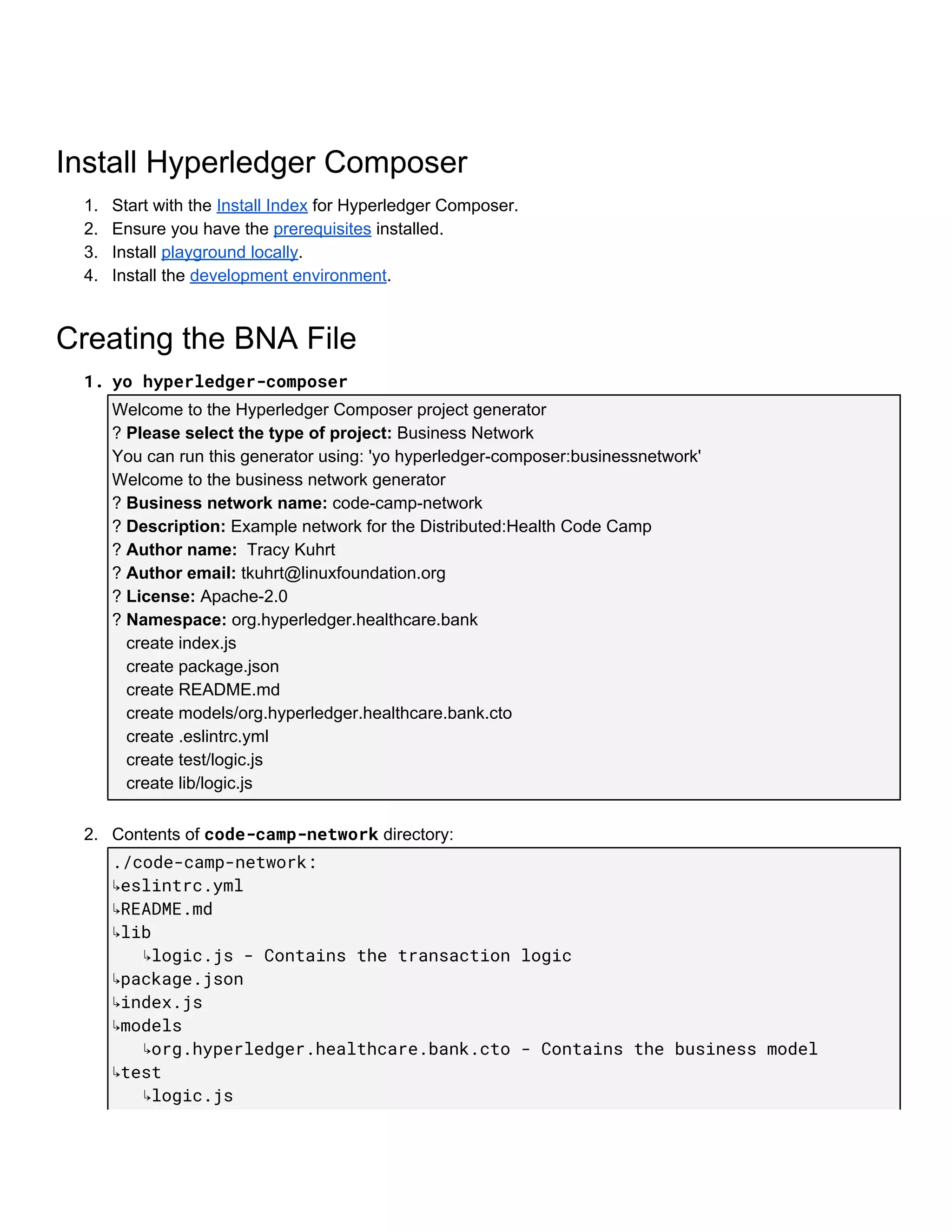
1. yo​​hyperledger-composer 
Welcome​ ​to​ ​the​ ​Hyperledger​ ​Composer​ ​project​ ​generator
?​ ​​Please​ ​select​ ​the​ ​type​ ​of​ ​project:​​ ​Business​ ​Network
You​ ​can​ ​run​ ​this​ ​generator​ ​using:​ ​'yo​ ​hyperledger-composer:businessnetwork'
Welcome​ ​to​ ​the​ ​business​ ​network​ ​generator
?​ ​​Business​ ​network​ ​name:​​ ​code-camp-network
?​ ​​Description:​​ ​Example​ ​network​ ​for​ ​the​ ​Distributed:Health​ ​Code​ ​Camp
?​ ​​Author​ ​name:​ ​​​ ​Tracy​ ​Kuhrt
?​ ​​Author​ ​email:​​ ​tkuhrt@linuxfoundation.org
?​ ​​License:​​ ​Apache-2.0
?​ ​​Namespace:​​ ​org.hyperledger.healthcare.bank
​ ​​ ​​ ​create​ ​index.js
​ ​​ ​​ ​create​ ​package.json
​ ​​ ​​ ​create​ ​README.md
​ ​​ ​​ ​create​ ​models/org.hyperledger.healthcare.bank.cto
​ ​​ ​​ ​create​ ​.eslintrc.yml
​ ​​ ​​ ​create​ ​test/logic.js
​ ​​ ​​ ​create​ ​lib/logic.js
2. Contents​ ​of​ ​​code-camp-network​​ ​directory:
./code-camp-network: 
↳eslintrc.yml 
↳README.md 
↳lib 
​​​​​​↳logic.js​​-​​Contains​​the​​transaction​​logic 
↳package.json 
↳index.js 
↳models  
​​​​​​↳org.hyperledger.healthcare.bank.cto​​-​​Contains​​the​​business​​model 
↳test 
​​​​​​↳logic.js 
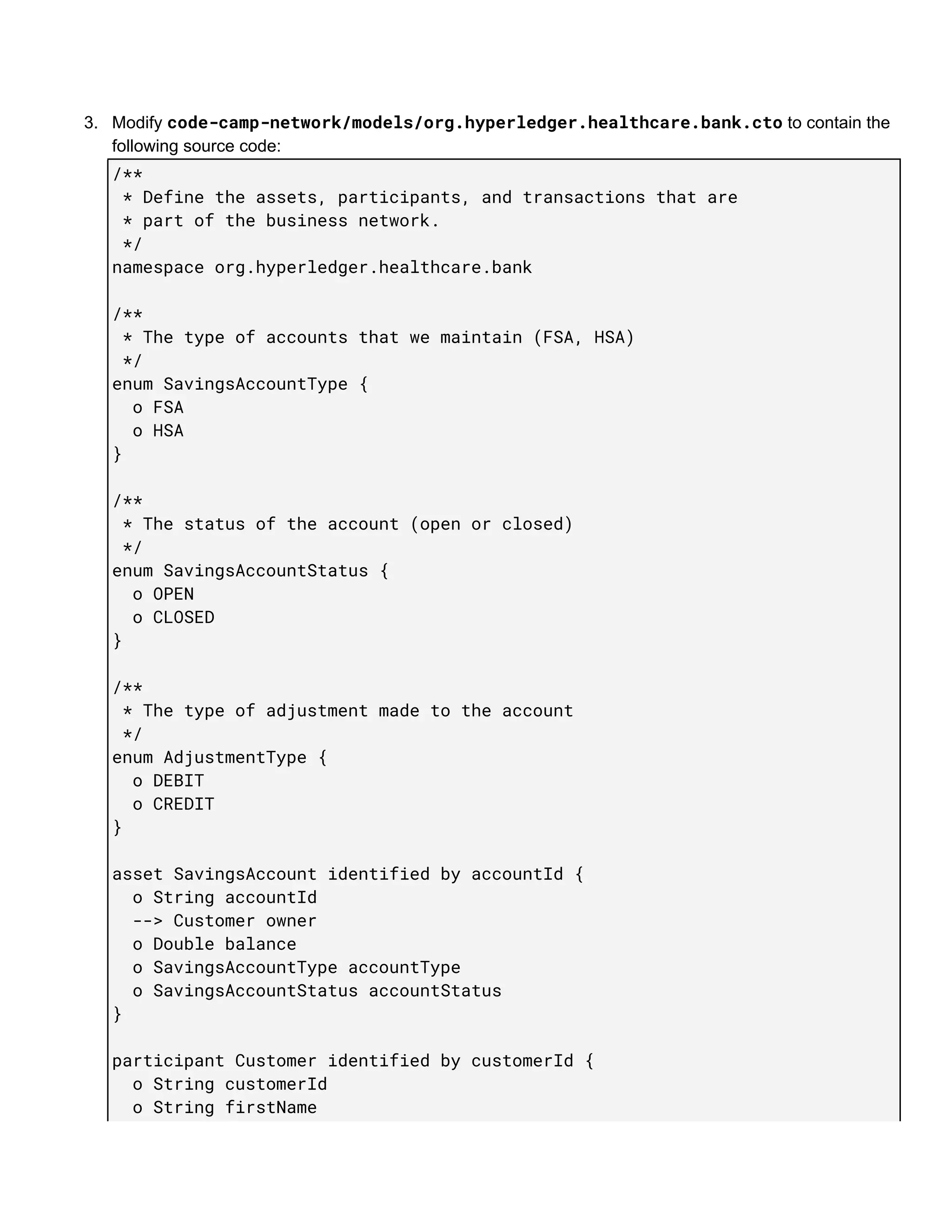
3. Modify​ ​​code-camp-network/models/org.hyperledger.healthcare.bank.cto​​ ​to​ ​contain​ ​the
following​ ​source​ ​code:
/** 
​​*​​Define​​the​​assets,​​participants,​​and​​transactions​​that​​are 
​​*​​part​​of​​the​​business​​network. 
​​*/ 
namespace​​org.hyperledger.healthcare.bank 
 
/** 
​​*​​The​​type​​of​​accounts​​that​​we​​maintain​​(FSA,​​HSA) 
​​*/ 
enum​​SavingsAccountType​​{ 
​​​​o​​FSA 
​​​​o​​HSA 
} 
 
/** 
​​*​​The​​status​​of​​the​​account​​(open​​or​​closed) 
​​*/ 
enum​​SavingsAccountStatus​​{ 
​​​​o​​OPEN 
​​​​o​​CLOSED 
} 
 
/** 
​​*​​The​​type​​of​​adjustment​​made​​to​​the​​account 
​​*/ 
enum​​AdjustmentType​​{ 
​​​​o​​DEBIT 
​​​​o​​CREDIT 
} 
 
asset​​SavingsAccount​​identified​​by​​accountId​​{ 
​​​​o​​String​​accountId 
​​​​-->​​Customer​​owner 
​​​​o​​Double​​balance 
​​​​o​​SavingsAccountType​​accountType 
​​​​o​​SavingsAccountStatus​​accountStatus 
} 
 
participant​​Customer​​identified​​by​​customerId​​{ 
​​​​o​​String​​customerId 
​​​​o​​String​​firstName 
​​​​o​​String​​lastName 
} 
 
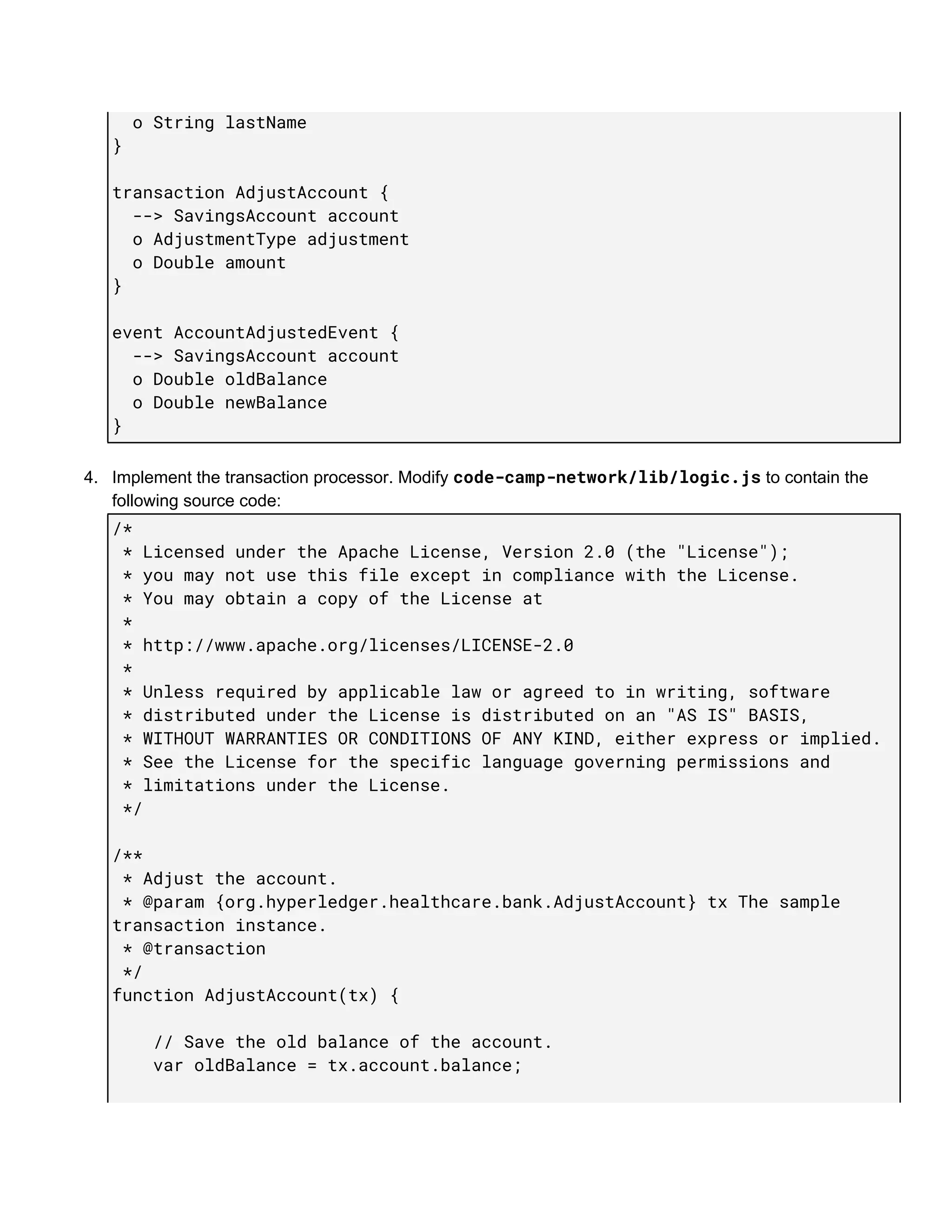
transaction​​AdjustAccount​​{ 
​​​​-->​​SavingsAccount​​account 
​​​​o​​AdjustmentType​​adjustment 
​​​​o​​Double​​amount 
} 
 
event​​AccountAdjustedEvent​​{ 
​​​​-->​​SavingsAccount​​account 
​​​​o​​Double​​oldBalance 
​​​​o​​Double​​newBalance 
} 
4. Implement​ ​the​ ​transaction​ ​processor.​ ​Modify​ ​​code-camp-network/lib/logic.js​​ ​to​ ​contain​ ​the
following​ ​source​ ​code:
/* 
​​*​​Licensed​​under​​the​​Apache​​License,​​Version​​2.0​​(the​​"License"); 
​​*​​you​​may​​not​​use​​this​​file​​except​​in​​compliance​​with​​the​​License. 
​​*​​You​​may​​obtain​​a​​copy​​of​​the​​License​​at 
​​* 
​​*​​http://www.apache.org/licenses/LICENSE-2.0 
​​* 
​​*​​Unless​​required​​by​​applicable​​law​​or​​agreed​​to​​in​​writing,​​software 
​​*​​distributed​​under​​the​​License​​is​​distributed​​on​​an​​"AS​​IS"​​BASIS, 
​​*​​WITHOUT​​WARRANTIES​​OR​​CONDITIONS​​OF​​ANY​​KIND,​​either​​express​​or​​implied. 
​​*​​See​​the​​License​​for​​the​​specific​​language​​governing​​permissions​​and 
​​*​​limitations​​under​​the​​License. 
​​*/ 
 
/** 
​​*​​Adjust​​the​​account. 
​​*​​@param​​{org.hyperledger.healthcare.bank.AdjustAccount}​​tx​​The​​sample 
transaction​​instance. 
​​*​​@transaction 
​​*/ 
function​​AdjustAccount(tx)​​{ 
 
​​​​​​​​//​​Save​​the​​old​​balance​​of​​the​​account. 
​​​​​​​​var​​oldBalance​​=​​tx.account.balance; 
 
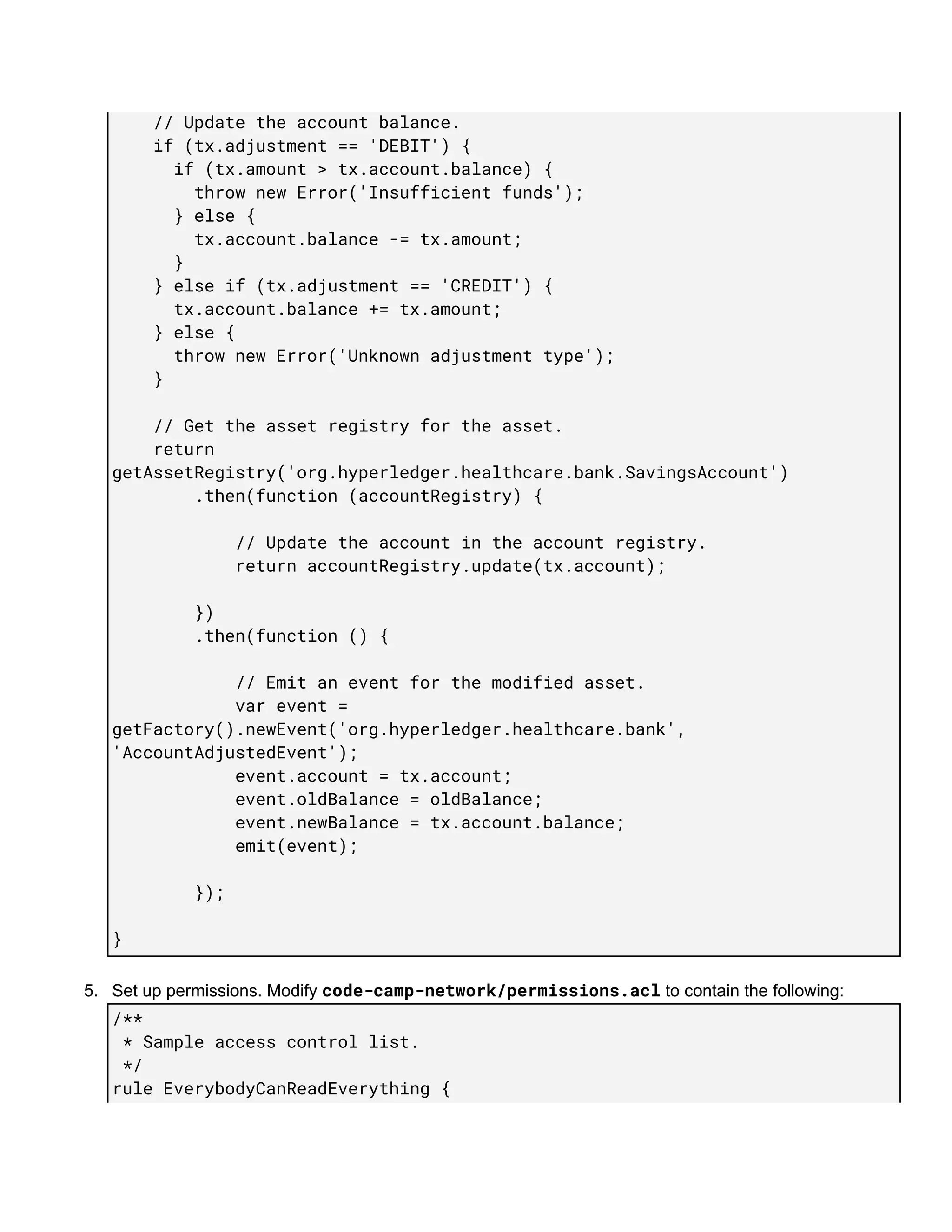
​​​​​​​​//​​Update​​the​​account​​balance. 
​​​​​​​​if​​(tx.adjustment​​==​​'DEBIT')​​{ 
​​​​​​​​​​​​if​​(tx.amount​​>​​tx.account.balance)​​{ 
​​​​​​​​​​​​​​​​throw​​new​​Error('Insufficient​​funds'); 
​​​​​​​​​​​​}​​else​​{ 
​​​​​​​​​​​​​​​​tx.account.balance​​-=​​tx.amount; 
​​​​​​​​​​​​} 
​​​​​​​​}​​else​​if​​(tx.adjustment​​==​​'CREDIT')​​{ 
​​​​​​​​​​​​tx.account.balance​​+=​​tx.amount; 
​​​​​​​​}​​else​​{ 
​​​​​​​​​​​​throw​​new​​Error('Unknown​​adjustment​​type'); 
​​​​​​​​} 
 
​​​​​​​​//​​Get​​the​​asset​​registry​​for​​the​​asset. 
​​​​​​​​return 
getAssetRegistry('org.hyperledger.healthcare.bank.SavingsAccount') 
​​​​​​​​​​​​​​​​.then(function​​(accountRegistry)​​{ 
 
​​​​​​​​​​​​​​​​​​​​​​​​//​​Update​​the​​account​​in​​the​​account​​registry. 
​​​​​​​​​​​​​​​​​​​​​​​​return​​accountRegistry.update(tx.account); 
 
​​​​​​​​​​​​​​​​}) 
​​​​​​​​​​​​​​​​.then(function​​()​​{ 
 
​​​​​​​​​​​​​​​​​​​​​​​​//​​Emit​​an​​event​​for​​the​​modified​​asset. 
​​​​​​​​​​​​​​​​​​​​​​​​var​​event​​= 
getFactory().newEvent('org.hyperledger.healthcare.bank', 
'AccountAdjustedEvent'); 
​​​​​​​​​​​​​​​​​​​​​​​​event.account​​=​​tx.account; 
​​​​​​​​​​​​​​​​​​​​​​​​event.oldBalance​​=​​oldBalance; 
​​​​​​​​​​​​​​​​​​​​​​​​event.newBalance​​=​​tx.account.balance; 
​​​​​​​​​​​​​​​​​​​​​​​​emit(event); 
 
​​​​​​​​​​​​​​​​}); 
 
} 
5. Set​ ​up​ ​permissions.​ ​Modify​ ​​code-camp-network/permissions.acl​​ ​to​ ​contain​ ​the​ ​following:
/** 
​​*​​Sample​​access​​control​​list. 
​​*/ 
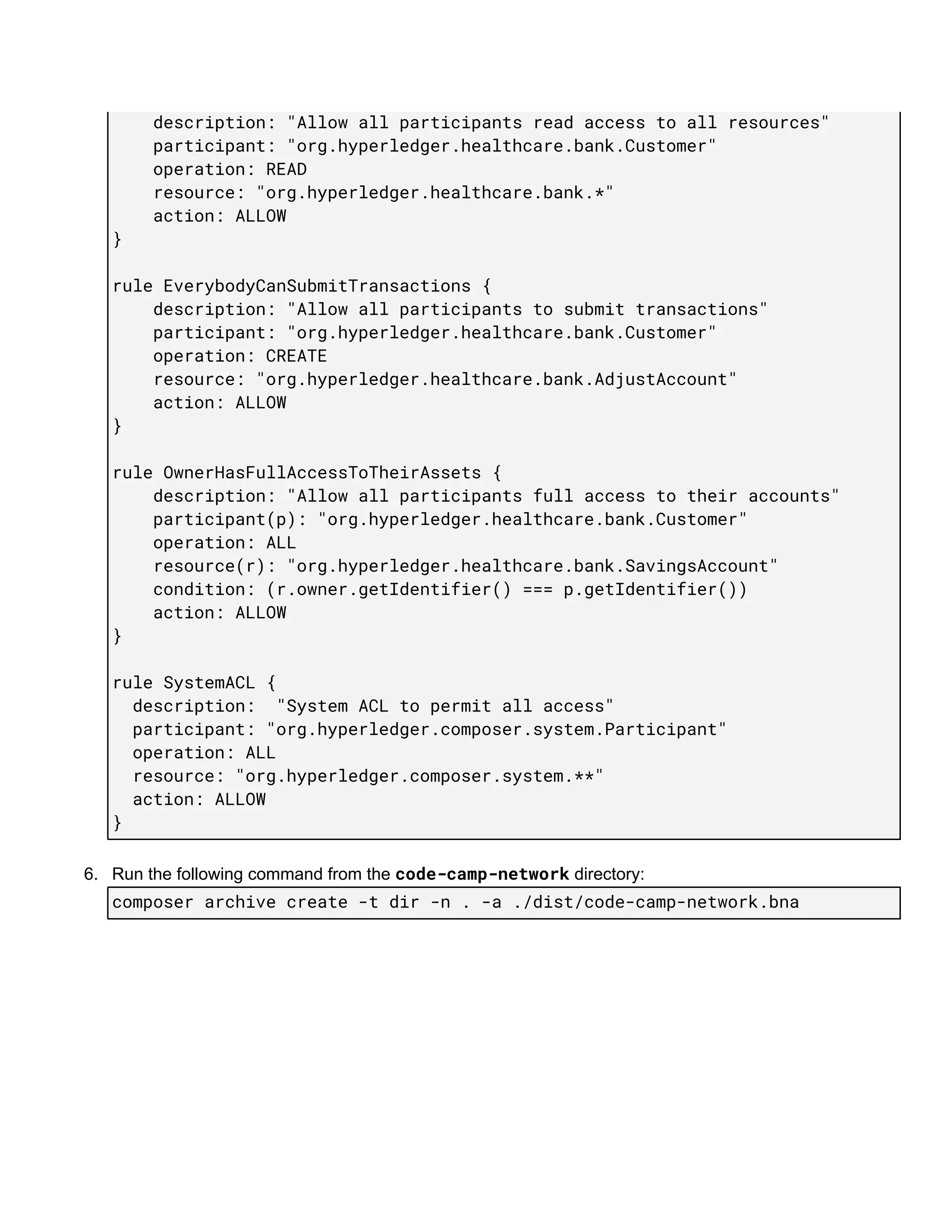
rule​​EverybodyCanReadEverything​​{ 
​​​​​​​​description:​​"Allow​​all​​participants​​read​​access​​to​​all​​resources" 
​​​​​​​​participant:​​"org.hyperledger.healthcare.bank.Customer" 
​​​​​​​​operation:​​READ 
​​​​​​​​resource:​​"org.hyperledger.healthcare.bank.*" 
​​​​​​​​action:​​ALLOW 
} 
 
rule​​EverybodyCanSubmitTransactions​​{ 
​​​​​​​​description:​​"Allow​​all​​participants​​to​​submit​​transactions" 
​​​​​​​​participant:​​"org.hyperledger.healthcare.bank.Customer" 
​​​​​​​​operation:​​CREATE 
​​​​​​​​resource:​​"org.hyperledger.healthcare.bank.AdjustAccount" 
​​​​​​​​action:​​ALLOW 
} 
 
rule​​OwnerHasFullAccessToTheirAssets​​{ 
​​​​​​​​description:​​"Allow​​all​​participants​​full​​access​​to​​their​​accounts" 
​​​​​​​​participant(p):​​"org.hyperledger.healthcare.bank.Customer" 
​​​​​​​​operation:​​ALL 
​​​​​​​​resource(r):​​"org.hyperledger.healthcare.bank.SavingsAccount" 
​​​​​​​​condition:​​(r.owner.getIdentifier()​​===​​p.getIdentifier()) 
​​​​​​​​action:​​ALLOW 
} 
 
rule​​SystemACL​​{ 
​​​​description:​​​​"System​​ACL​​to​​permit​​all​​access" 
​​​​participant:​​"org.hyperledger.composer.system.Participant" 
​​​​operation:​​ALL 
​​​​resource:​​"org.hyperledger.composer.system.**" 
​​​​action:​​ALLOW 
} 
6. Run​ ​the​ ​following​ ​command​ ​from​ ​the​ ​​code-camp-network​​ ​directory:
composer​​archive​​create​​-t​​dir​​-n​​.​​-a​​./dist/code-camp-network.bna 
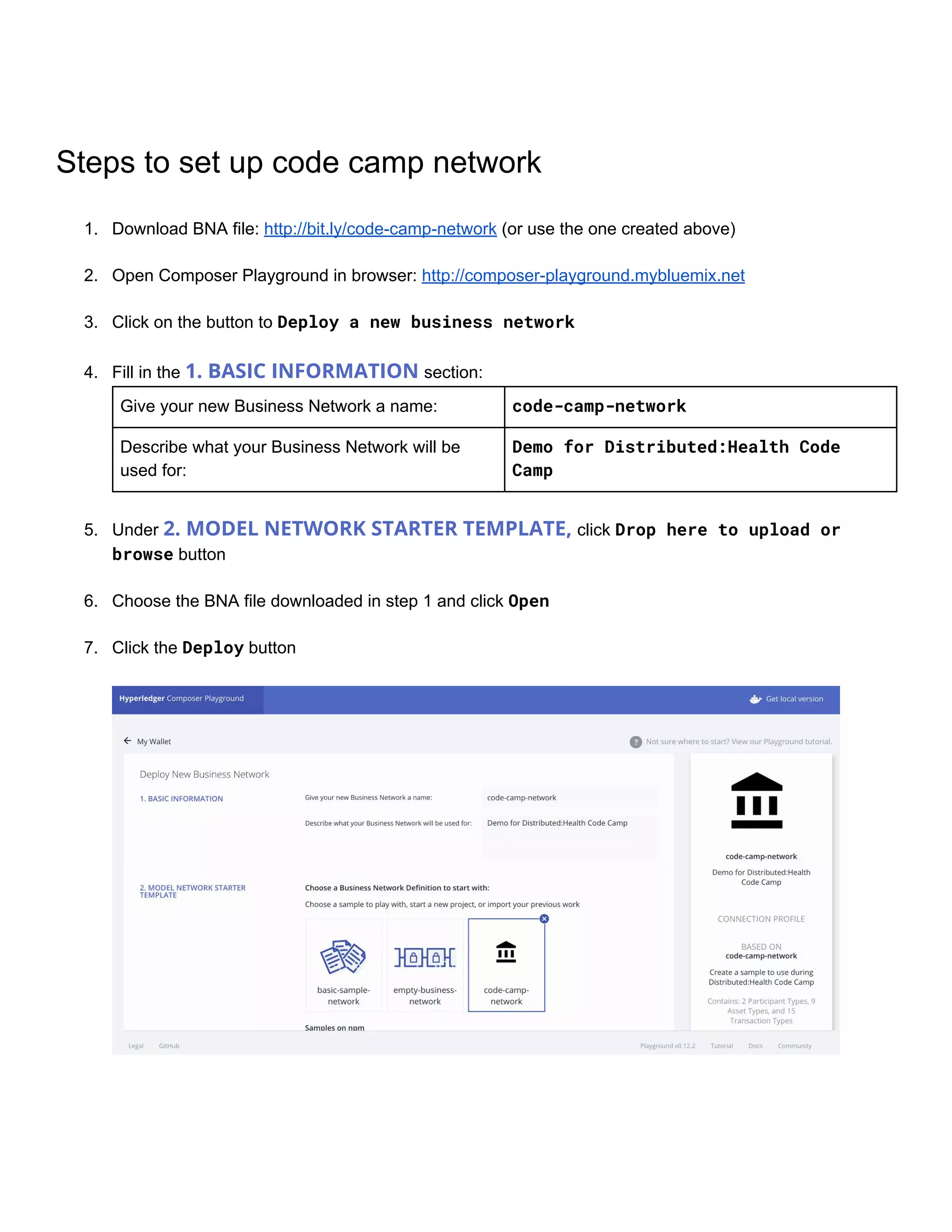
Steps​ ​to​ ​set​ ​up​ ​code​ ​camp​ ​network
1. Download​ ​BNA​ ​file:​ ​​http://bit.ly/code-camp-network​​ ​(or​ ​use​ ​the​ ​one​ ​created​ ​above)
2. Open​ ​Composer​ ​Playground​ ​in​ ​browser:​ ​​http://composer-playground.mybluemix.net
3. Click​ ​on​ ​the​ ​button​ ​to​ ​​Deploy​​a​​new​​business​​network 
4. Fill​ ​in​ ​the​ ​​1.​ ​BASIC​ ​INFORMATION​ ​​section:
Give​ ​your​ ​new​ ​Business​ ​Network​ ​a​ ​name: code-camp-network
Describe​ ​what​ ​your​ ​Business​ ​Network​ ​will​ ​be
used​ ​for:
Demo​​for​​Distributed:Health​​Code 
Camp
 
5. Under​ ​​2.​ ​MODEL​ ​NETWORK​ ​STARTER​ ​TEMPLATE,​ ​​click​ ​​Drop​​here​​to​​upload​​or 
browse​​ ​button 
6. Choose​ ​the​ ​BNA​ ​file​ ​downloaded​ ​in​ ​step​ ​1​ ​and​ ​click​ ​​Open 
7. Click​ ​the​ ​​Deploy​​ ​button
Test​ ​the​ ​Network
To​ ​test​ ​this​ ​Business​ ​Network​ ​Definition​ ​select​ ​​Test​​ ​at​ ​the​ ​top​ ​of​ ​the​ ​screen: 
Create​ ​a​ ​​Customer​​ ​participant
1. Select​ ​​Customer​​ ​on​ ​the​ ​left-hand​ ​side​ ​of​ ​the​ ​screen
2. Click​ ​the​ ​​Create​​Participant​​ ​button​ ​on​ ​the​ ​upper​ ​right-hand​ ​corner​ ​of​ ​the​ ​screen
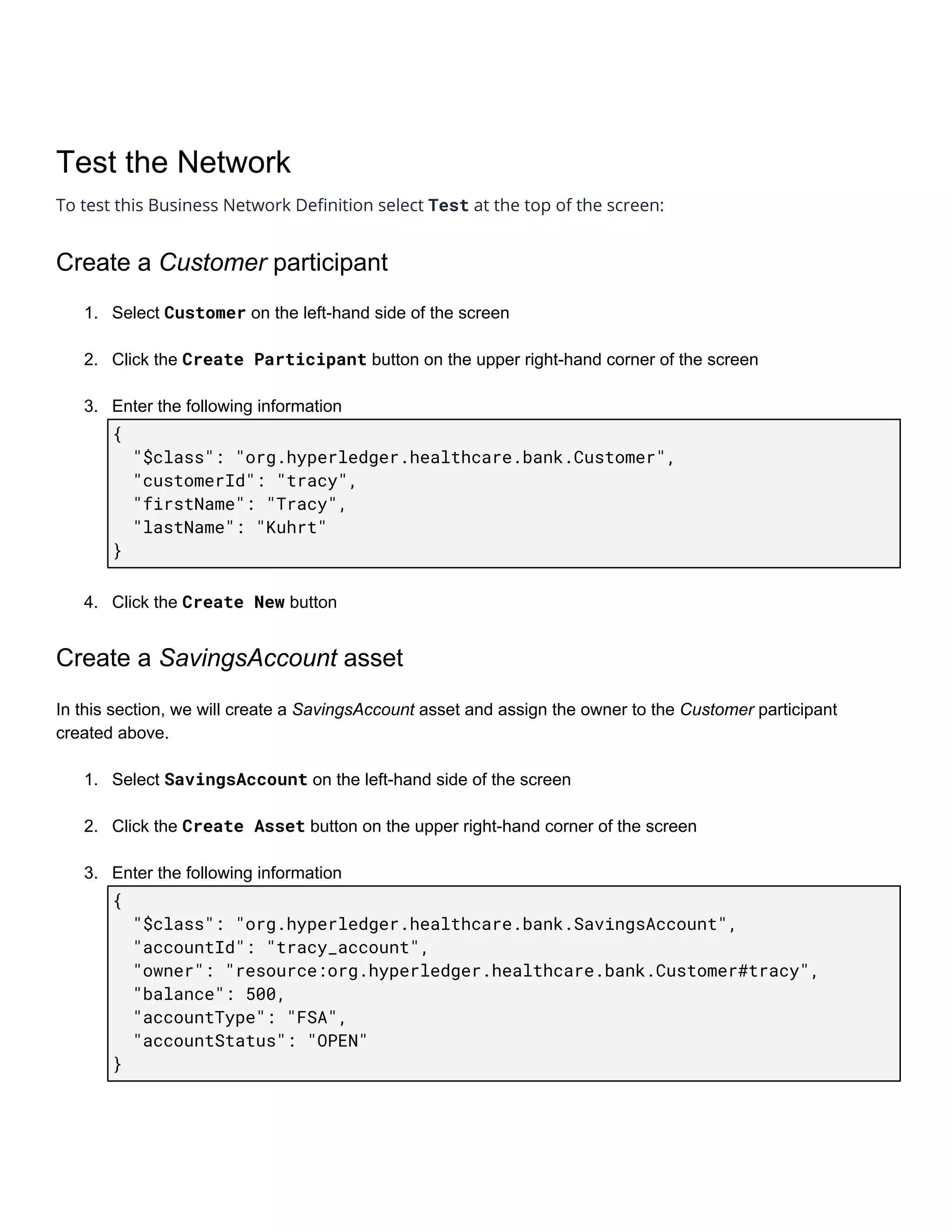
3. Enter​ ​the​ ​following​ ​information
{ 
​​​​"$class":​​"org.hyperledger.healthcare.bank.Customer", 
​​​​"customerId":​​"tracy", 
​​​​"firstName":​​"Tracy", 
​​​​"lastName":​​"Kuhrt" 
}
4. Click​ ​the​ ​​Create​​New​​ ​button 
Create​ ​a​ ​​SavingsAccount​​ ​asset
In​ ​this​ ​section,​ ​we​ ​will​ ​create​ ​a​ ​​SavingsAccount​​ ​asset​ ​and​ ​assign​ ​the​ ​owner​ ​to​ ​the​ ​​Customer​​ ​participant
created​ ​above.
1. Select​ ​​SavingsAccount​​ ​on​ ​the​ ​left-hand​ ​side​ ​of​ ​the​ ​screen
2. Click​ ​the​ ​​Create​​Asset​​ ​button​ ​on​ ​the​ ​upper​ ​right-hand​ ​corner​ ​of​ ​the​ ​screen
3. Enter​ ​the​ ​following​ ​information
{ 
​​​​"$class":​​"org.hyperledger.healthcare.bank.SavingsAccount", 
​​​​"accountId":​​"tracy_account", 
​​​​"owner":​​"resource:org.hyperledger.healthcare.bank.Customer#tracy", 
​​​​"balance":​​500, 
​​​​"accountType":​​"FSA", 
​​​​"accountStatus":​​"OPEN" 
}
4. Click​ ​the​ ​​Create​​New​​ ​button
Submit​ ​an​ ​​AdjustAccount​​ ​transaction
In​ ​this​ ​section,​ ​we​ ​will​ ​submit​ ​a​ ​transaction​ ​to​ ​debit​ ​the​ ​​SavingsAccount​​ ​asset​ ​created​ ​above
1. Click​ ​the​ ​​Submit​​Transaction​​ ​button​ ​in​ ​the​ ​lower​ ​left-hand​ ​corner
2. Ensure​ ​the​ ​​AdjustAccount​​ ​transaction​ ​is​ ​selected​ ​(NOTE:​ ​This​ ​is​ ​the​ ​only​ ​transaction​ ​in​ ​our​ ​sample
network)
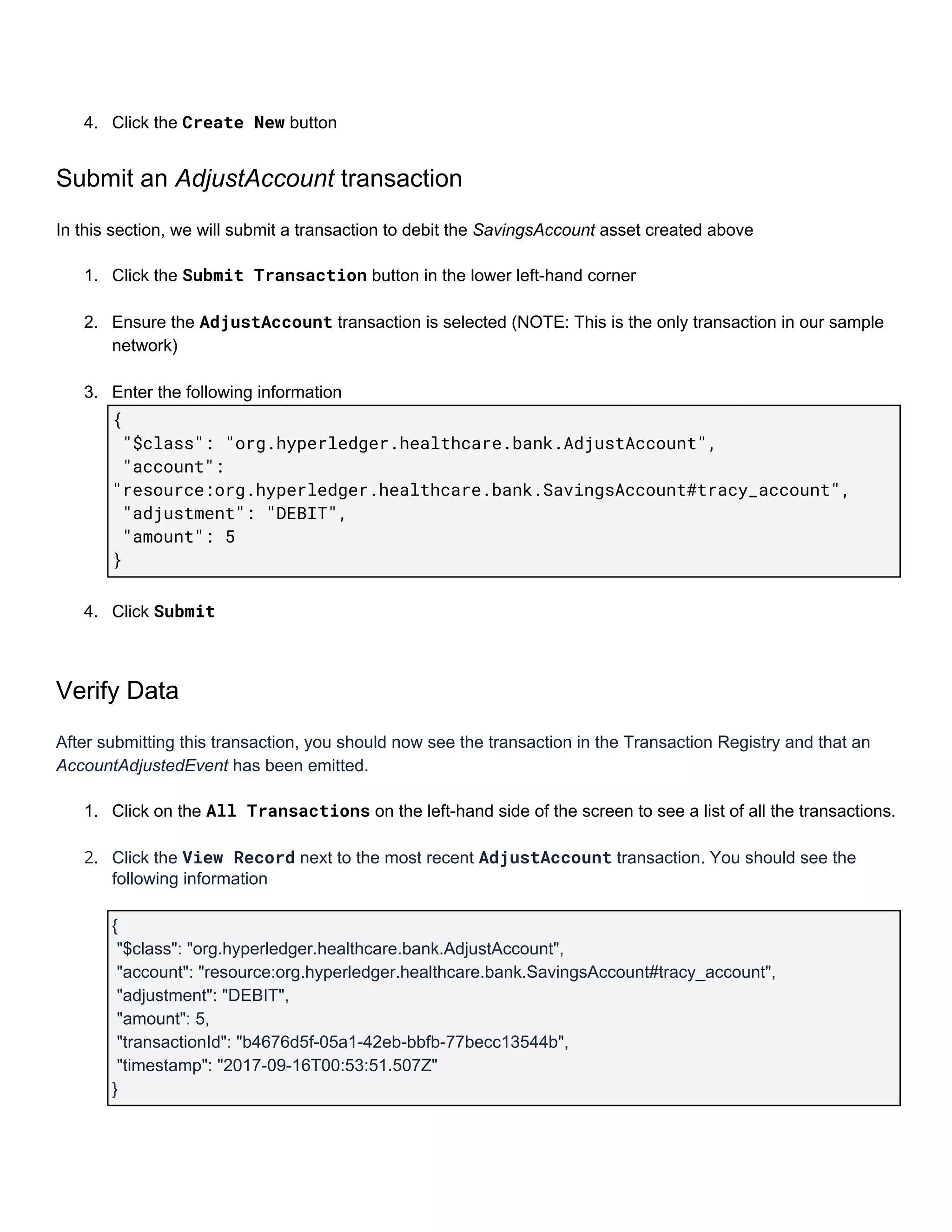
3. Enter​ ​the​ ​following​ ​information
{ 
​​"$class":​​"org.hyperledger.healthcare.bank.AdjustAccount", 
​​"account": 
"resource:org.hyperledger.healthcare.bank.SavingsAccount#tracy_account", 
​​"adjustment":​​"DEBIT", 
​​"amount":​​5 
} 
4. Click​ ​​Submit 
Verify​ ​Data
After​ ​submitting​ ​this​ ​transaction,​ ​you​ ​should​ ​now​ ​see​ ​the​ ​transaction​ ​in​ ​the​ ​Transaction​ ​Registry​ ​and​ ​that​ ​an
AccountAdjustedEvent​​ ​has​ ​been​ ​emitted.
1. Click​ ​on​ ​the​ ​​All​​Transactions​​ ​on​ ​the​ ​left-hand​ ​side​ ​of​ ​the​ ​screen​ ​to​ ​see​ ​a​ ​list​ ​of​ ​all​ ​the​ ​transactions.
2. Click​ ​the​ ​​View​​Record​​ ​next​ ​to​ ​the​ ​most​ ​recent​ ​​AdjustAccount​​ ​transaction.​ ​You​ ​should​ ​see​ ​the
following​ ​information
{
​ ​"$class":​ ​"org.hyperledger.healthcare.bank.AdjustAccount",
​ ​"account":​ ​"resource:org.hyperledger.healthcare.bank.SavingsAccount#tracy_account",
​ ​"adjustment":​ ​"DEBIT",
​ ​"amount":​ ​5,
​ ​"transactionId":​ ​"b4676d5f-05a1-42eb-bbfb-77becc13544b",
​ ​"timestamp":​ ​"2017-09-16T00:53:51.507Z"
}
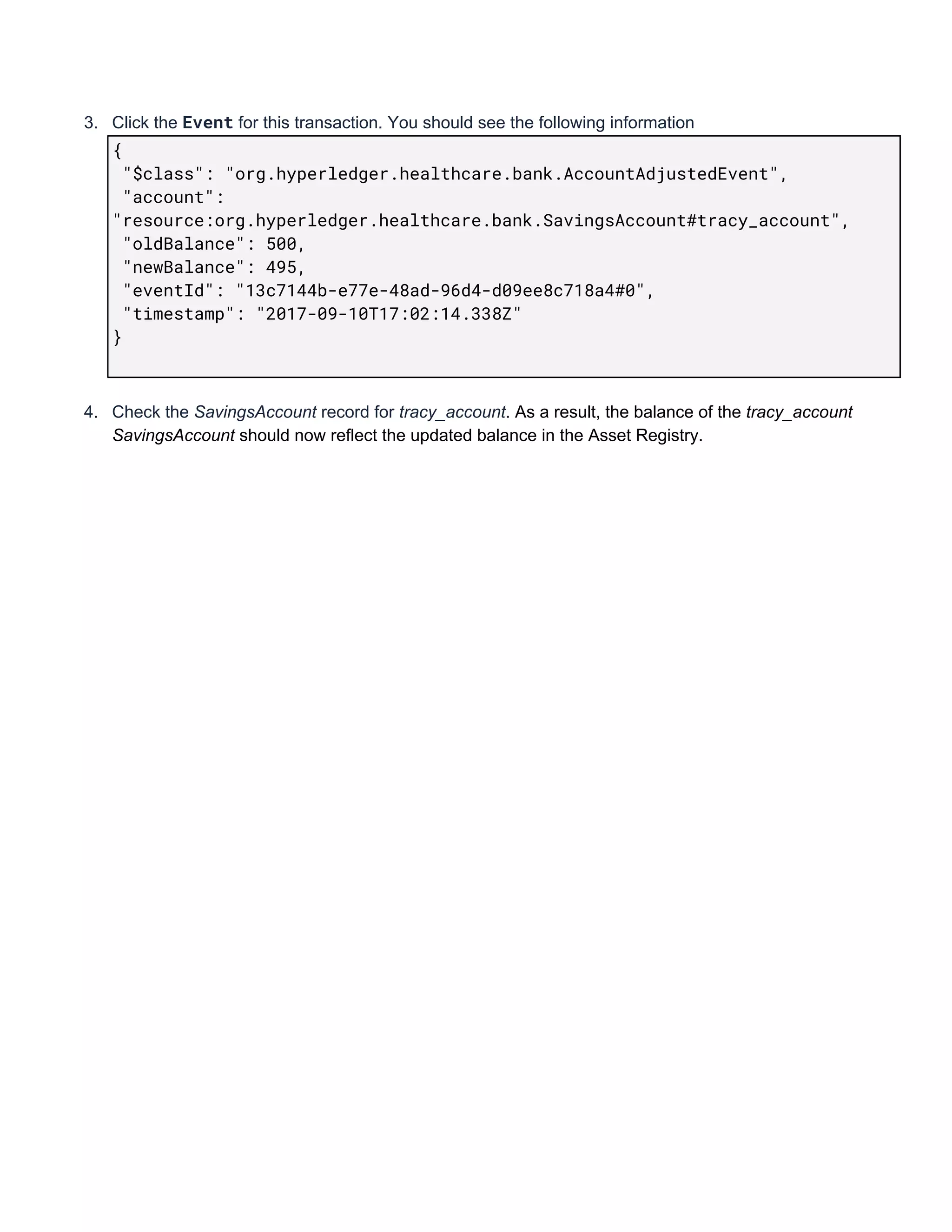
3. Click​ ​the​ ​​Event​​ ​for​ ​this​ ​transaction.​ ​You​ ​should​ ​see​ ​the​ ​following​ ​information
{ 
​​"$class":​​"org.hyperledger.healthcare.bank.AccountAdjustedEvent", 
​​"account": 
"resource:org.hyperledger.healthcare.bank.SavingsAccount#tracy_account", 
​​"oldBalance":​​500, 
​​"newBalance":​​495, 
​​"eventId":​​"13c7144b-e77e-48ad-96d4-d09ee8c718a4#0", 
​​"timestamp":​​"2017-09-10T17:02:14.338Z" 
} 
 
4. Check​ ​the​ ​​SavingsAccount​​ ​record​ ​for​ ​​tracy_account​.​ ​​As​ ​a​ ​result,​ ​the​ ​balance​ ​of​ ​the​ ​​tracy_account
SavingsAccount​​ ​should​ ​now​ ​reflect​ ​the​ ​updated​ ​balance​ ​in​ ​the​ ​Asset​ ​Registry.

Distributed:Health Code Camp Instructions