2
digital lounge
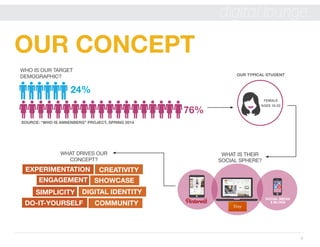
OUR CONCEPT
76%
24%
SOCIAL MEDIA
& BLOGS
OUR TYPICAL STUDENT
FEMALE
AGES 18-22
WHAT IS THEIR
SOCIAL SPHERE?
SOURCE: “WHO IS ANNENBERG” PROJECT, SPRING 2014
WHO IS OUR TARGET
DEMOGRAPHIC?
WHAT DRIVES OUR
CONCEPT?
DO-IT-YOURSELF
ENGAGEMENT
EXPERIMENTATION CREATIVITY
DIGITAL IDENTITYSIMPLICITY
COMMUNITY
SHOWCASE
3
digital lounge
CREATIVE
MEDIA TEAMWHO ARE WE?
MEET THE TEAM
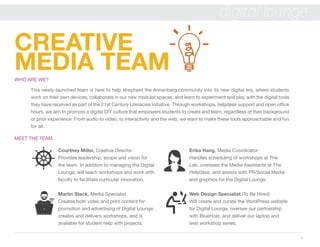
This newly-launched team is here to help shepherd the Annenberg community into its new digital era, where students
work on their own devices, collaborate in our new modular spaces, and learn to experiment and play with the digital tools
they have received as part of the 21st Century Literacies Initiative. Through workshops, helpdesk support and open office
hours, we aim to promote a digital DIY culture that empowers students to create and learn, regardless of their background
or prior experience. From audio to video, to interactivity and the web, we want to make these tools approachable and fun
for all.
Courtney Miller, Creative Director
Provides leadership, scope and vision for
the team. In addition to managing the Digital
Lounge, will teach workshops and work with
faculty to facilitate curricular innovation.
Martin Stack, Media Specialist
Creates both video and print content for
promotion and advertising of Digital Lounge,
creates and delivers workshops, and is
available for student help with projects.
Erika Hang, Media Coordinator
Handles scheduling of workshops at The
Lab, oversees the Media Assistants at The
Helpdesk, and assists with PR/Social Media
and graphics for the Digital Lounge.
Web Design Specialist (To Be Hired)
Will create and curate the WordPress website
for Digital Lounge, oversee our partnership
with BlueHost, and deliver our laptop and
web workshop series.
4
digital lounge
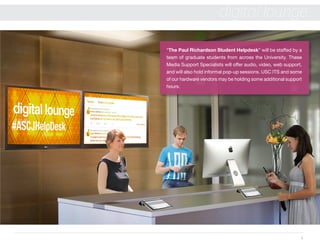
“The Paul Richardson Student Helpdesk” will be staffed by a
team of graduate students from across the University. These
Media Support Specialists will offer audio, video, web support,
and will also hold informal pop-up sessions. USC ITS and some
of our hardware vendors may be holding some additional support
hours.
5
digital lounge
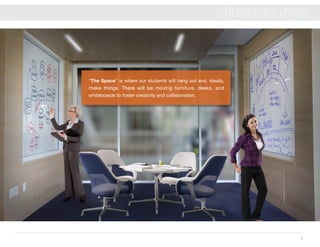
“The Space” is where our students will hang out and, ideally,
make things. There will be moving furniture, desks, and
whiteboards to foster creativity and collaboration.
6
digital lounge
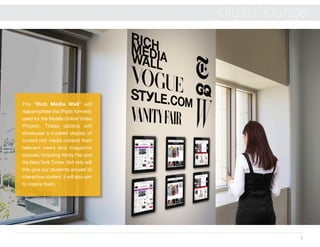
The “Rich Media Wall” will
reappropriate the iPads formerly
used for the Mobile Online Video
Project. These tablets will
showcase a curated display of
current rich media content from
relevant news and magazine
sources, including Vanity Fair and
the New York Times. Not only will
this give our students access to
interactive content, it will also aim
to inspire them.
7
digital lounge
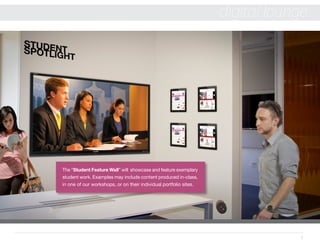
The “Student Feature Wall” will showcase and feature exemplary
student work. Examples may include content produced in-class,
in one of our workshops, or on their individual portfolio sites.
8
digital lounge
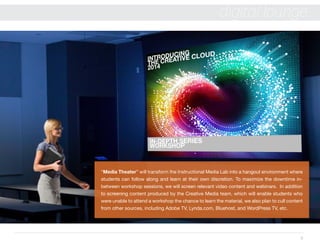
“Media Theater” will transform the Instructional Media Lab into a hangout environment where
students can follow along and learn at their own discretion. To maximize the downtime in-
between workshop sessions, we will screen relevant video content and webinars. In addition
to screening content produced by the Creative Media team, which will enable students who
were unable to attend a workshop the chance to learn the material, we also plan to cull content
from other sources, including Adobe TV, Lynda.com, Bluehost, and WordPress TV, etc.
9
digital lounge
WORKSHOPS
DIY SERIES
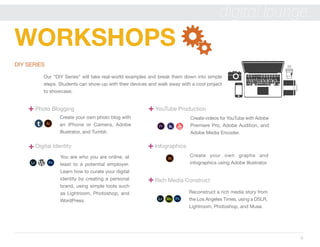
Our “DIY Series” will take real-world examples and break them down into simple
steps. Students can show-up with their devices and walk away with a cool project
to showcase.
Photo Blogging YouTube Production
Create your own photo blog with
an iPhone or Camera, Adobe
Illustrator, and Tumblr.
Create videos for YouTube with Adobe
Premiere Pro, Adobe Audition, and
Adobe Media Encoder.
Create your own graphs and
infographics using Adobe Illustrator.
Reconstruct a rich media story from
the Los Angeles Times, using a DSLR,
Lightroom, Photoshop, and Muse.
Digital Identity 						 Infographics
Rich Media Construct
You are who you are online, at
least to a potential employer.
Learn how to curate your digital
identity by creating a personal
brand, using simple tools such
as Lightroom, Photoshop, and
WordPress.
10
digital lounge
Creating Your Own Domain
LAPTOP SERIES
A brief series on owning a laptop and securing it, followed by hosting and domain information. BlueHost to assist with
domain and web hosting.
Laptops 101: How to use it and not lose it
Web Hosting 101
Qualtrics
WordPress
GETTING STARTED SERIES
Our “Getting Started” Series is software-focused and a throwback to the traditional hands-on workshop format. For the
Adobe software, this curriculum will be a stepping stone towards certification.
Adobe Creative Cloud
11
digital lounge
DIGITAL POP-UP SERIES
These 20 minute-ish informal pop-up sessions will take place at the Helpdesk. They may be taught by a faculty member,
one of our graduate students, or a guest.
Prezi
MapBox
Timeline Apps
Wearable Technology
Infogr.am
GUEST SPEAKER SERIES
Colleagues from throughout the University may be tapped to deliver additional content, as well as an intended slate of guest
speakers.
Blackboard
SPSS
Apple
Student Show & Tell
Google Apps
Analytics/SEO
Learn how to use your Mac &
Apple Software from our Apple
Representative: Kevin.
12
digital lounge
WEBSITE
We live at the intersection of media
and web, which is what separates us
from other programs and schools.
With the wide range of workshops,
events, and content being produced
by our team, it will be essential to have
our own website that we can curate
and promote as an effective example
of the tools we are teaching.
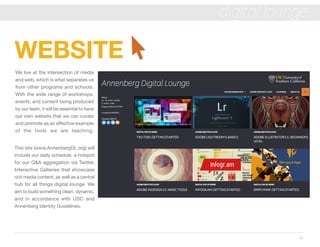
This site (www.AnnenbergDL.org) will
include our daily schedule, a hotspot
for our Q&A aggregation via Twitter,
Interactive Galleries that showcase
rich media content, as well as a central
hub for all things digital lounge. We
aim to build something clean, dynamic,
and in accordance with USC and
Annenberg Identity Guidelines.
13
digital lounge
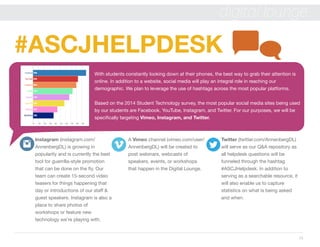
With students constantly looking down at their phones, the best way to grab their attention is
online. In addition to a website, social media will play an integral role in reaching our
demographic. We plan to leverage the use of hashtags across the most popular platforms.
Based on the 2014 Student Technology survey, the most popular social media sites being used
by our students are Facebook, YouTube, Instagram, and Twitter. For our purposes, we will be
specifically targeting Vimeo, Instagram, and Twitter.
#ASCJHELPDESK
Instagram (instagram.com/
AnnenbergDL) is growing in
popularity and is currently the best
tool for guerrilla-style promotion
that can be done on the fly. Our
team can create 15-second video
teasers for things happening that
day or introductions of our staff &
guest speakers. Instagram is also a
place to share photos of
workshops or feature new
technology we’re playing with.
A Vimeo channel (vimeo.com/user/
AnnenbergDL) will be created to
post webinars, webcasts of
speakers, events, or workshops
that happen in the Digital Lounge.
Twitter (twitter.com/AnnenbergDL)
will serve as our Q&A repository as
all helpdesk questions will be
funneled through the hashtag
#ASCJHelpdesk. In addition to
serving as a searchable resource, it
will also enable us to capture
statistics on what is being asked
and when.
14
digital lounge
OPERATIONS
& STAFFING
ANN 301
DIGITAL LOUNGE
OPENING
FALL 2014
 HOURS OF OPERATION:
MONDAY - THURSDAY, 10 AM - 10 PM
FRIDAY, 10 AM - 5 PM
PAUL RICHARDSON STUDENT HELPDESK
The helpdesk will be staffed with 2-3 Media Support Specialists during normal business hours (noted below). We
will be looking to hire graduate students from Viterbi, Cinematic Arts and Roski to offer a wide range of
support.
DROP-IN SESSIONS
Members of the Creative Media team will hold weekly drop-in sessions to assist students with their projects and
further serve as a resource for faculty. In an effort to support the 21st Century Literacy initiative, we will aim to stay
fluent in the core competencies, which include audio, video, web, and things not yet invented. We are also looking
to expand our support pallet by partnering with other constituents, which may include USC Information Technology
Services, BlueHost, our laptop vendors, and our Apple expert in residence.

Digital Lounge Concept Deck

  • 2.
    2 digital lounge OUR CONCEPT 76% 24% SOCIALMEDIA & BLOGS OUR TYPICAL STUDENT FEMALE AGES 18-22 WHAT IS THEIR SOCIAL SPHERE? SOURCE: “WHO IS ANNENBERG” PROJECT, SPRING 2014 WHO IS OUR TARGET DEMOGRAPHIC? WHAT DRIVES OUR CONCEPT? DO-IT-YOURSELF ENGAGEMENT EXPERIMENTATION CREATIVITY DIGITAL IDENTITYSIMPLICITY COMMUNITY SHOWCASE
  • 3.
    3 digital lounge CREATIVE MEDIA TEAMWHOARE WE? MEET THE TEAM This newly-launched team is here to help shepherd the Annenberg community into its new digital era, where students work on their own devices, collaborate in our new modular spaces, and learn to experiment and play with the digital tools they have received as part of the 21st Century Literacies Initiative. Through workshops, helpdesk support and open office hours, we aim to promote a digital DIY culture that empowers students to create and learn, regardless of their background or prior experience. From audio to video, to interactivity and the web, we want to make these tools approachable and fun for all. Courtney Miller, Creative Director Provides leadership, scope and vision for the team. In addition to managing the Digital Lounge, will teach workshops and work with faculty to facilitate curricular innovation. Martin Stack, Media Specialist Creates both video and print content for promotion and advertising of Digital Lounge, creates and delivers workshops, and is available for student help with projects. Erika Hang, Media Coordinator Handles scheduling of workshops at The Lab, oversees the Media Assistants at The Helpdesk, and assists with PR/Social Media and graphics for the Digital Lounge. Web Design Specialist (To Be Hired) Will create and curate the WordPress website for Digital Lounge, oversee our partnership with BlueHost, and deliver our laptop and web workshop series.
  • 4.
    4 digital lounge “The PaulRichardson Student Helpdesk” will be staffed by a team of graduate students from across the University. These Media Support Specialists will offer audio, video, web support, and will also hold informal pop-up sessions. USC ITS and some of our hardware vendors may be holding some additional support hours.
  • 5.
    5 digital lounge “The Space”is where our students will hang out and, ideally, make things. There will be moving furniture, desks, and whiteboards to foster creativity and collaboration.
  • 6.
    6 digital lounge The “RichMedia Wall” will reappropriate the iPads formerly used for the Mobile Online Video Project. These tablets will showcase a curated display of current rich media content from relevant news and magazine sources, including Vanity Fair and the New York Times. Not only will this give our students access to interactive content, it will also aim to inspire them.
  • 7.
    7 digital lounge The “StudentFeature Wall” will showcase and feature exemplary student work. Examples may include content produced in-class, in one of our workshops, or on their individual portfolio sites.
  • 8.
    8 digital lounge “Media Theater”will transform the Instructional Media Lab into a hangout environment where students can follow along and learn at their own discretion. To maximize the downtime in- between workshop sessions, we will screen relevant video content and webinars. In addition to screening content produced by the Creative Media team, which will enable students who were unable to attend a workshop the chance to learn the material, we also plan to cull content from other sources, including Adobe TV, Lynda.com, Bluehost, and WordPress TV, etc.
  • 9.
    9 digital lounge WORKSHOPS DIY SERIES Our“DIY Series” will take real-world examples and break them down into simple steps. Students can show-up with their devices and walk away with a cool project to showcase. Photo Blogging YouTube Production Create your own photo blog with an iPhone or Camera, Adobe Illustrator, and Tumblr. Create videos for YouTube with Adobe Premiere Pro, Adobe Audition, and Adobe Media Encoder. Create your own graphs and infographics using Adobe Illustrator. Reconstruct a rich media story from the Los Angeles Times, using a DSLR, Lightroom, Photoshop, and Muse. Digital Identity Infographics Rich Media Construct You are who you are online, at least to a potential employer. Learn how to curate your digital identity by creating a personal brand, using simple tools such as Lightroom, Photoshop, and WordPress.
  • 10.
    10 digital lounge Creating YourOwn Domain LAPTOP SERIES A brief series on owning a laptop and securing it, followed by hosting and domain information. BlueHost to assist with domain and web hosting. Laptops 101: How to use it and not lose it Web Hosting 101 Qualtrics WordPress GETTING STARTED SERIES Our “Getting Started” Series is software-focused and a throwback to the traditional hands-on workshop format. For the Adobe software, this curriculum will be a stepping stone towards certification. Adobe Creative Cloud
  • 11.
    11 digital lounge DIGITAL POP-UPSERIES These 20 minute-ish informal pop-up sessions will take place at the Helpdesk. They may be taught by a faculty member, one of our graduate students, or a guest. Prezi MapBox Timeline Apps Wearable Technology Infogr.am GUEST SPEAKER SERIES Colleagues from throughout the University may be tapped to deliver additional content, as well as an intended slate of guest speakers. Blackboard SPSS Apple Student Show & Tell Google Apps Analytics/SEO Learn how to use your Mac & Apple Software from our Apple Representative: Kevin.
  • 12.
    12 digital lounge WEBSITE We liveat the intersection of media and web, which is what separates us from other programs and schools. With the wide range of workshops, events, and content being produced by our team, it will be essential to have our own website that we can curate and promote as an effective example of the tools we are teaching. This site (www.AnnenbergDL.org) will include our daily schedule, a hotspot for our Q&A aggregation via Twitter, Interactive Galleries that showcase rich media content, as well as a central hub for all things digital lounge. We aim to build something clean, dynamic, and in accordance with USC and Annenberg Identity Guidelines.
  • 13.
    13 digital lounge With studentsconstantly looking down at their phones, the best way to grab their attention is online. In addition to a website, social media will play an integral role in reaching our demographic. We plan to leverage the use of hashtags across the most popular platforms. Based on the 2014 Student Technology survey, the most popular social media sites being used by our students are Facebook, YouTube, Instagram, and Twitter. For our purposes, we will be specifically targeting Vimeo, Instagram, and Twitter. #ASCJHELPDESK Instagram (instagram.com/ AnnenbergDL) is growing in popularity and is currently the best tool for guerrilla-style promotion that can be done on the fly. Our team can create 15-second video teasers for things happening that day or introductions of our staff & guest speakers. Instagram is also a place to share photos of workshops or feature new technology we’re playing with. A Vimeo channel (vimeo.com/user/ AnnenbergDL) will be created to post webinars, webcasts of speakers, events, or workshops that happen in the Digital Lounge. Twitter (twitter.com/AnnenbergDL) will serve as our Q&A repository as all helpdesk questions will be funneled through the hashtag #ASCJHelpdesk. In addition to serving as a searchable resource, it will also enable us to capture statistics on what is being asked and when.
  • 14.
    14 digital lounge OPERATIONS & STAFFING ANN301 DIGITAL LOUNGE OPENING FALL 2014 HOURS OF OPERATION: MONDAY - THURSDAY, 10 AM - 10 PM FRIDAY, 10 AM - 5 PM PAUL RICHARDSON STUDENT HELPDESK The helpdesk will be staffed with 2-3 Media Support Specialists during normal business hours (noted below). We will be looking to hire graduate students from Viterbi, Cinematic Arts and Roski to offer a wide range of support. DROP-IN SESSIONS Members of the Creative Media team will hold weekly drop-in sessions to assist students with their projects and further serve as a resource for faculty. In an effort to support the 21st Century Literacy initiative, we will aim to stay fluent in the core competencies, which include audio, video, web, and things not yet invented. We are also looking to expand our support pallet by partnering with other constituents, which may include USC Information Technology Services, BlueHost, our laptop vendors, and our Apple expert in residence.