Introduction
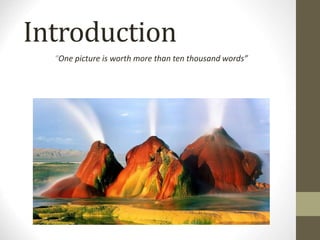
“One picture is worth more than ten thousand words”
Vision is really hard
• Vision is an amazing feat of natural
intelligence
– Visual cortex occupies about 50% of Macaque brain
– More human brain devoted to vision than anything else
Is that a
queen or a
bishop?
• “ Digital Image Processing”, Rafael C.
Gonzalez & Richard E. Woods,
Addison-Wesley, 2002
•
•
• “Machine Vision: Automated Visual
Inspection and Robot Vision”, David
Vernon, Prentice Hall, 1991
References
Contents
•Contents
• What is a digital image?
• What is digital image processing?
• History of digital image processing
• State of the art examples of digital image
processing
• Key stages in digital image processing
What is a Digital Image?
•A digital image is a representation of a two-dimensional image
as a finite set of digital values, called picture elements or pixels
Images
taken
from
Gonzalez
&
Woods,
Digital
Image
Processing
(2002)
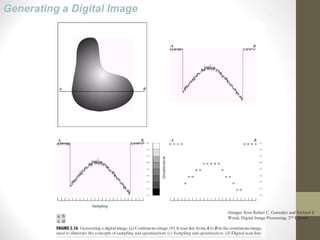
Generating a Digital Image
(Images from Rafael C. Gonzalez and Richard E.
Wood, Digital Image Processing, 2nd Edition.
Image Sampling and Quantization
Image sampling: discretize an image in the spatial domain
Spatial resolution / image resolution: pixel size or number
of pixels (Images from Rafael C. Gonzalez and Richard E.
Wood, Digital Image Processing, 2nd Edition.
What is a Digital Image?
(cont…)
•Pixel values typically represent gray levels, colours, heights,
opacities etc.
•Remember digitization implies that a digital image is an
approximation of a real scene
1 pixel
Images
taken
from
Gonzalez
&
Woods,
Digital
Image
Processing
(2002)
What is a Digital Image?
(cont…)
•Common image formats include:
• 1 sample per point (B&W or Grayscale)
• 3 samples per point (Red, Green, and Blue)
• 4 samples per point (Red, Green, Blue, and “Alpha”, a.k.a.
Opacity)
Effect of Spatial Resolution
256x256 pixels
64x64 pixels
128x128 pixels
32x32 pixels
Effect of Spatial Resolution
(Images from Rafael C. Gonzalez and Richard E.
Wood, Digital Image Processing, 2nd Edition.
Effect of Quantization Levels (cont.)
16 levels 8 levels
2 levels
4 levels
In this image,
it is easy to see
false contour.
What is Digital Image
Processing?
•Digital image processing focuses on two major tasks
• Improvement of pictorial information for human interpretation
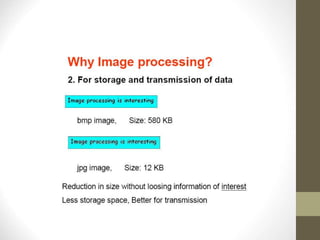
• Processing of image data for storage, transmission and
representation for autonomous machine perception
Digital Image Types : Intensity Image
Intensity image or monochrome image
each pixel corresponds to light intensity
normally represented in gray scale (gray
level).












39
87
15
32
22
13
25
15
37
26
6
9
28
16
10
10
Gray scale values












39
87
15
32
22
13
25
15
37
26
6
9
28
16
10
10












39
65
65
54
42
47
54
21
67
96
54
32
43
56
70
65












99
87
65
32
92
43
85
85
67
96
90
60
78
56
70
99
Digital Image Types : RGB Image
Color image or RGB image:
each pixel contains a vector
representing red, green and
blue components.
RGB components
Image Types : Binary Image
Binary image or black and white image
Each pixel contains one bit :
1 represent white
0 represents black












1
1
1
1
1
1
1
1
0
0
0
0
0
0
0
0
Binary data
Image Types : Index Image
Index image
Each pixel contains index number
pointing to a color in a color table










2
5
6
7
4
6
9
4
1
Index value
Index
No.
Red
component
Green
component
Blue
component
1 0.1 0.5 0.3
2 1.0 0.0 0.0
3 0.0 1.0 0.0
4 0.5 0.5 0.5
5 0.2 0.8 0.9
… … … …
Color Table
What is DIP? (cont…)
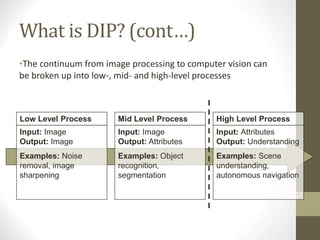
•The continuum from image processing to computer vision can
be broken up into low-, mid- and high-level processes
Low Level Process
Input: Image
Output: Image
Examples: Noise
removal, image
sharpening
Mid Level Process
Input: Image
Output: Attributes
Examples: Object
recognition,
segmentation
High Level Process
Input: Attributes
Output: Understanding
Examples: Scene
understanding,
autonomous navigation
History of Digital Image
Processing
•Early 1920s: One of the first applications of digital imaging was
in the news-
paper industry
• The Bartlane cable picture
transmission service
• Images were transferred by submarine cable between London
and New York
• Pictures were coded for cable transfer and reconstructed at the
receiving end on a telegraph printer
Early digital image
Images
taken
from
Gonzalez
&
Woods,
Digital
Image
Processing
(2002)
History of DIP (cont…)
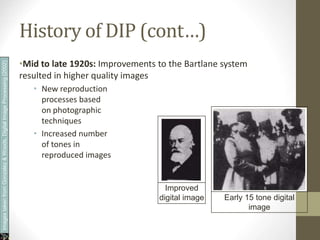
•Mid to late 1920s: Improvements to the Bartlane system
resulted in higher quality images
• New reproduction
processes based
on photographic
techniques
• Increased number
of tones in
reproduced images
Improved
digital image Early 15 tone digital
image
Images
taken
from
Gonzalez
&
Woods,
Digital
Image
Processing
(2002)
History of DIP (cont…)
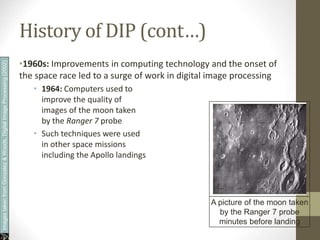
•1960s: Improvements in computing technology and the onset of
the space race led to a surge of work in digital image processing
• 1964: Computers used to
improve the quality of
images of the moon taken
by the Ranger 7 probe
• Such techniques were used
in other space missions
including the Apollo landings
A picture of the moon taken
by the Ranger 7 probe
minutes before landing
Images
taken
from
Gonzalez
&
Woods,
Digital
Image
Processing
(2002)
History of DIP (cont…)
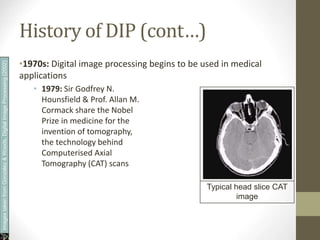
•1970s: Digital image processing begins to be used in medical
applications
• 1979: Sir Godfrey N.
Hounsfield & Prof. Allan M.
Cormack share the Nobel
Prize in medicine for the
invention of tomography,
the technology behind
Computerised Axial
Tomography (CAT) scans
Typical head slice CAT
image
Images
taken
from
Gonzalez
&
Woods,
Digital
Image
Processing
(2002)
History of DIP (cont…)
•1980s - Today: The use of digital image processing techniques
has exploded and they are now used for all kinds of tasks in all
kinds of areas
• Image enhancement/restoration
• Artistic effects
• Medical visualisation
• Industrial inspection
• Law enforcement
• Human computer interfaces
Examples: Image
Enhancement
•One of the most common uses of DIP techniques: improve
quality, remove noise etc
Images
taken
from
Gonzalez
&
Woods,
Digital
Image
Processing
(2002)
Examples: The Hubble
Telescope
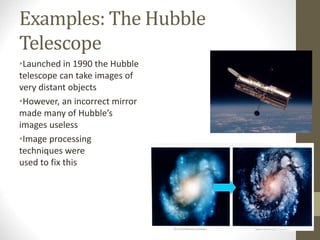
•Launched in 1990 the Hubble
telescope can take images of
very distant objects
•However, an incorrect mirror
made many of Hubble’s
images useless
•Image processing
techniques were
used to fix this
Examples: Artistic Effects
•Artistic effects are used to
make images more visually
appealing, to add special
effects and to make composite
images
Examples: Medicine
•Take slice from MRI scan of canine heart, and find boundaries
between types of tissue
• Image with gray levels representing tissue density
• Use a suitable filter to highlight edges
Original MRI Image of a Dog Heart Edge Detection Image
Images
taken
from
Gonzalez
&
Woods,
Digital
Image
Processing
(2002)
Examples: GIS
•Geographic Information Systems
• Digital image processing techniques are used extensively to
manipulate satellite imagery
• Terrain classification
• Meteorology
Images
taken
from
Gonzalez
&
Woods,
Digital
Image
Processing
(2002)
Examples: GIS (cont…)
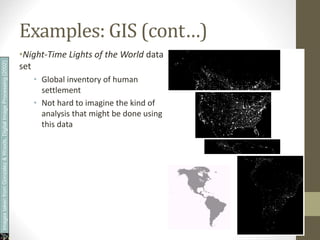
•Night-Time Lights of the World data
set
• Global inventory of human
settlement
• Not hard to imagine the kind of
analysis that might be done using
this data
Images
taken
from
Gonzalez
&
Woods,
Digital
Image
Processing
(2002)
Examples: Industrial
Inspection
•Human operators are expensive, slow
and
unreliable
•Make machines do the
job instead
•Industrial vision systems
are used in all kinds of industries
•Can we trust them?
Images
taken
from
Gonzalez
&
Woods,
Digital
Image
Processing
(2002)
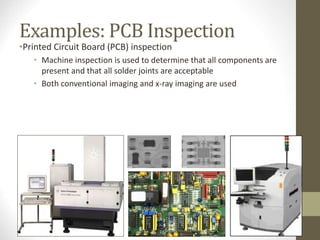
Examples: PCB Inspection
•Printed Circuit Board (PCB) inspection
• Machine inspection is used to determine that all components are
present and that all solder joints are acceptable
• Both conventional imaging and x-ray imaging are used
Examples: Law Enforcement
•Image processing techniques are used
extensively by law enforcers
• Number plate recognition for speed
cameras/automated toll systems
• Fingerprint recognition
• Enhancement of CCTV images
Images
taken
from
Gonzalez
&
Woods,
Digital
Image
Processing
(2002)
Examples: HCI
•Try to make human computer interfaces more
natural
• Face recognition
• Gesture recognition
•Does anyone remember the
user interface from “Minority Report”?
•These tasks can be extremely difficult
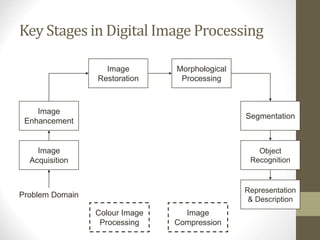
Key Stages in Digital Image Processing
Image
Acquisition
Image
Restoration
Morphological
Processing
Segmentation
Representation
& Description
Image
Enhancement
Object
Recognition
Problem Domain
Colour Image
Processing
Image
Compression
Key Stages in Digital ImageProcessing:
ImageAquisition
Image
Acquisition
Image
Restoration
Morphological
Processing
Segmentation
Representation
& Description
Image
Enhancement
Object
Recognition
Problem Domain
Colour Image
Processing
Image
Compression
Images
taken
from
Gonzalez
&
Woods,
Digital
Image
Processing
(2002)
Key Stages in Digital ImageProcessing:
ImageEnhancement
Image
Acquisition
Image
Restoration
Morphological
Processing
Segmentation
Representation
& Description
Image
Enhancement
Object
Recognition
Problem Domain
Colour Image
Processing
Image
Compression
Images
taken
from
Gonzalez
&
Woods,
Digital
Image
Processing
(2002)
Key Stages in Digital ImageProcessing:
ImageRestoration
Image
Acquisition
Image
Restoration
Morphological
Processing
Segmentation
Representation
& Description
Image
Enhancement
Object
Recognition
Problem Domain
Colour Image
Processing
Image
Compression
Images
taken
from
Gonzalez
&
Woods,
Digital
Image
Processing
(2002)
Key Stages in Digital ImageProcessing:
MorphologicalProcessing
Image
Acquisition
Image
Restoration
Morphological
Processing
Segmentation
Representation
& Description
Image
Enhancement
Object
Recognition
Problem Domain
Colour Image
Processing
Image
Compression
Images
taken
from
Gonzalez
&
Woods,
Digital
Image
Processing
(2002)
Key Stages in Digital ImageProcessing:
Segmentation
Image
Acquisition
Image
Restoration
Morphological
Processing
Segmentation
Representation
& Description
Image
Enhancement
Object
Recognition
Problem Domain
Colour Image
Processing
Image
Compression
Images
taken
from
Gonzalez
&
Woods,
Digital
Image
Processing
(2002)
Key Stages in Digital ImageProcessing:
ObjectRecognition
Image
Acquisition
Image
Restoration
Morphological
Processing
Segmentation
Representation
& Description
Image
Enhancement
Object
Recognition
Problem Domain
Colour Image
Processing
Image
Compression
Images
taken
from
Gonzalez
&
Woods,
Digital
Image
Processing
(2002)
Key Stages in Digital ImageProcessing:
Representation& Description
Image
Acquisition
Image
Restoration
Morphological
Processing
Segmentation
Representation
& Description
Image
Enhancement
Object
Recognition
Problem Domain
Colour Image
Processing
Image
Compression
Images
taken
from
Gonzalez
&
Woods,
Digital
Image
Processing
(2002)
Key Stages in Digital ImageProcessing:
ImageCompression
Image
Acquisition
Image
Restoration
Morphological
Processing
Segmentation
Representation
& Description
Image
Enhancement
Object
Recognition
Problem Domain
Colour Image
Processing
Image
Compression
Key Stages in Digital ImageProcessing:
Colour ImageProcessing
Image
Acquisition
Image
Restoration
Morphological
Processing
Segmentation
Representation
& Description
Image
Enhancement
Object
Recognition
Problem Domain
Colour Image
Processing
Image
Compression
• Computer Vision
• Computer Vision: Images to Models
Computer Vision
Make computers understand images and
video.
What kind
of scene?
Where are
the cars?
How far is
the
building?
Why computer vision matters
Safety Health Security
Comfort Access
Fun
Ridiculously brief history of computer vision
• 1966: Minsky assigns computer vision
as an UG summer project
• 1960’s: interpretation of synthetic
worlds
• 1970’s: some progress on interpreting
selected images
• 1980’s: ANNs come and go; shift toward
geometry and increased mathematical
rigor
• 1990’s: face recognition; statistical
analysis in vogue
• 2000’s: broader recognition; large
annotated datasets available; video
processing starts
Guzman ‘68
Ohta Kanade ‘78
Turk and Pentland ‘91
Optical character recognition (OCR)
Digit recognition, AT&T labs
Technology to convert scanned docs to text
• If you have a scanner, it probably came with OCR software
License plate readers
Face detection
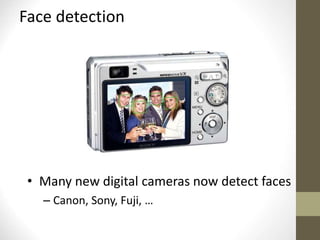
• Many new digital cameras now detect faces
– Canon, Sony, Fuji, …
Smile detection
Vision-based biometrics
“How the Afghan Girl was Identified by Her Iris Patterns”
Login without a password…
Fingerprint scanners on
many new laptops,
other devices
Face recognition systems now
beginning to appear more widely
Object recognition (in mobile phones)
Point & Find, Nokia
Google Goggles
The Matrix movies, ESC Entertainment, XYZRGB, NRC
Special effects: shape capture
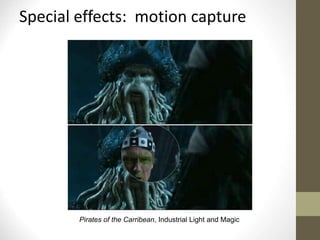
Pirates of the Carribean, Industrial Light and Magic
Special effects: motion capture
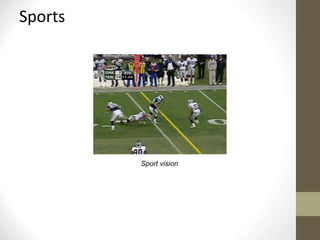
Sports
Sport vision
Smart cars
• Mobileye
– Vision systems currently in high-end BMW, Volvo
models
Interactive Games: Kinect
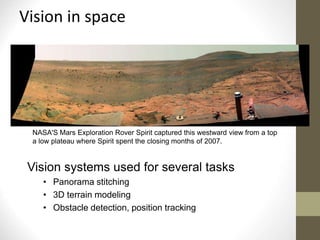
Vision in space
Vision systems used for several tasks
• Panorama stitching
• 3D terrain modeling
• Obstacle detection, position tracking
NASA'S Mars Exploration Rover Spirit captured this westward view from a top
a low plateau where Spirit spent the closing months of 2007.
Industrial robots
Vision-guided robots position nut runners on wheels
Mobile robots
NASA’s Mars Spirit Rover
Saxena et al. 2008
STAIR at Stanford
Medical imaging
Image guided surgery
Grimson et al., MIT
3D imaging
MRI, CT
Thank You

ImageProcessing1-Introduction.ppt

  • 1.
    Introduction “One picture isworth more than ten thousand words”
  • 2.
    Vision is reallyhard • Vision is an amazing feat of natural intelligence – Visual cortex occupies about 50% of Macaque brain – More human brain devoted to vision than anything else Is that a queen or a bishop?
  • 3.
    • “ DigitalImage Processing”, Rafael C. Gonzalez & Richard E. Woods, Addison-Wesley, 2002 • • • “Machine Vision: Automated Visual Inspection and Robot Vision”, David Vernon, Prentice Hall, 1991 References
  • 4.
    Contents •Contents • What isa digital image? • What is digital image processing? • History of digital image processing • State of the art examples of digital image processing • Key stages in digital image processing
  • 5.
    What is aDigital Image? •A digital image is a representation of a two-dimensional image as a finite set of digital values, called picture elements or pixels Images taken from Gonzalez & Woods, Digital Image Processing (2002)
  • 6.
    Generating a DigitalImage (Images from Rafael C. Gonzalez and Richard E. Wood, Digital Image Processing, 2nd Edition.
  • 7.
    Image Sampling andQuantization Image sampling: discretize an image in the spatial domain Spatial resolution / image resolution: pixel size or number of pixels (Images from Rafael C. Gonzalez and Richard E. Wood, Digital Image Processing, 2nd Edition.
  • 8.
    What is aDigital Image? (cont…) •Pixel values typically represent gray levels, colours, heights, opacities etc. •Remember digitization implies that a digital image is an approximation of a real scene 1 pixel Images taken from Gonzalez & Woods, Digital Image Processing (2002)
  • 9.
    What is aDigital Image? (cont…) •Common image formats include: • 1 sample per point (B&W or Grayscale) • 3 samples per point (Red, Green, and Blue) • 4 samples per point (Red, Green, Blue, and “Alpha”, a.k.a. Opacity)
  • 10.
    Effect of SpatialResolution 256x256 pixels 64x64 pixels 128x128 pixels 32x32 pixels
  • 11.
    Effect of SpatialResolution (Images from Rafael C. Gonzalez and Richard E. Wood, Digital Image Processing, 2nd Edition.
  • 12.
    Effect of QuantizationLevels (cont.) 16 levels 8 levels 2 levels 4 levels In this image, it is easy to see false contour.
  • 13.
    What is DigitalImage Processing? •Digital image processing focuses on two major tasks • Improvement of pictorial information for human interpretation • Processing of image data for storage, transmission and representation for autonomous machine perception
  • 17.
    Digital Image Types: Intensity Image Intensity image or monochrome image each pixel corresponds to light intensity normally represented in gray scale (gray level).             39 87 15 32 22 13 25 15 37 26 6 9 28 16 10 10 Gray scale values
  • 18.
  • 19.
    Image Types :Binary Image Binary image or black and white image Each pixel contains one bit : 1 represent white 0 represents black             1 1 1 1 1 1 1 1 0 0 0 0 0 0 0 0 Binary data
  • 20.
    Image Types :Index Image Index image Each pixel contains index number pointing to a color in a color table           2 5 6 7 4 6 9 4 1 Index value Index No. Red component Green component Blue component 1 0.1 0.5 0.3 2 1.0 0.0 0.0 3 0.0 1.0 0.0 4 0.5 0.5 0.5 5 0.2 0.8 0.9 … … … … Color Table
  • 21.
    What is DIP?(cont…) •The continuum from image processing to computer vision can be broken up into low-, mid- and high-level processes Low Level Process Input: Image Output: Image Examples: Noise removal, image sharpening Mid Level Process Input: Image Output: Attributes Examples: Object recognition, segmentation High Level Process Input: Attributes Output: Understanding Examples: Scene understanding, autonomous navigation
  • 22.
    History of DigitalImage Processing •Early 1920s: One of the first applications of digital imaging was in the news- paper industry • The Bartlane cable picture transmission service • Images were transferred by submarine cable between London and New York • Pictures were coded for cable transfer and reconstructed at the receiving end on a telegraph printer Early digital image Images taken from Gonzalez & Woods, Digital Image Processing (2002)
  • 23.
    History of DIP(cont…) •Mid to late 1920s: Improvements to the Bartlane system resulted in higher quality images • New reproduction processes based on photographic techniques • Increased number of tones in reproduced images Improved digital image Early 15 tone digital image Images taken from Gonzalez & Woods, Digital Image Processing (2002)
  • 24.
    History of DIP(cont…) •1960s: Improvements in computing technology and the onset of the space race led to a surge of work in digital image processing • 1964: Computers used to improve the quality of images of the moon taken by the Ranger 7 probe • Such techniques were used in other space missions including the Apollo landings A picture of the moon taken by the Ranger 7 probe minutes before landing Images taken from Gonzalez & Woods, Digital Image Processing (2002)
  • 25.
    History of DIP(cont…) •1970s: Digital image processing begins to be used in medical applications • 1979: Sir Godfrey N. Hounsfield & Prof. Allan M. Cormack share the Nobel Prize in medicine for the invention of tomography, the technology behind Computerised Axial Tomography (CAT) scans Typical head slice CAT image Images taken from Gonzalez & Woods, Digital Image Processing (2002)
  • 26.
    History of DIP(cont…) •1980s - Today: The use of digital image processing techniques has exploded and they are now used for all kinds of tasks in all kinds of areas • Image enhancement/restoration • Artistic effects • Medical visualisation • Industrial inspection • Law enforcement • Human computer interfaces
  • 27.
    Examples: Image Enhancement •One ofthe most common uses of DIP techniques: improve quality, remove noise etc Images taken from Gonzalez & Woods, Digital Image Processing (2002)
  • 28.
    Examples: The Hubble Telescope •Launchedin 1990 the Hubble telescope can take images of very distant objects •However, an incorrect mirror made many of Hubble’s images useless •Image processing techniques were used to fix this
  • 29.
    Examples: Artistic Effects •Artisticeffects are used to make images more visually appealing, to add special effects and to make composite images
  • 30.
    Examples: Medicine •Take slicefrom MRI scan of canine heart, and find boundaries between types of tissue • Image with gray levels representing tissue density • Use a suitable filter to highlight edges Original MRI Image of a Dog Heart Edge Detection Image Images taken from Gonzalez & Woods, Digital Image Processing (2002)
  • 31.
    Examples: GIS •Geographic InformationSystems • Digital image processing techniques are used extensively to manipulate satellite imagery • Terrain classification • Meteorology Images taken from Gonzalez & Woods, Digital Image Processing (2002)
  • 32.
    Examples: GIS (cont…) •Night-TimeLights of the World data set • Global inventory of human settlement • Not hard to imagine the kind of analysis that might be done using this data Images taken from Gonzalez & Woods, Digital Image Processing (2002)
  • 33.
    Examples: Industrial Inspection •Human operatorsare expensive, slow and unreliable •Make machines do the job instead •Industrial vision systems are used in all kinds of industries •Can we trust them? Images taken from Gonzalez & Woods, Digital Image Processing (2002)
  • 34.
    Examples: PCB Inspection •PrintedCircuit Board (PCB) inspection • Machine inspection is used to determine that all components are present and that all solder joints are acceptable • Both conventional imaging and x-ray imaging are used
  • 35.
    Examples: Law Enforcement •Imageprocessing techniques are used extensively by law enforcers • Number plate recognition for speed cameras/automated toll systems • Fingerprint recognition • Enhancement of CCTV images Images taken from Gonzalez & Woods, Digital Image Processing (2002)
  • 36.
    Examples: HCI •Try tomake human computer interfaces more natural • Face recognition • Gesture recognition •Does anyone remember the user interface from “Minority Report”? •These tasks can be extremely difficult
  • 37.
    Key Stages inDigital Image Processing Image Acquisition Image Restoration Morphological Processing Segmentation Representation & Description Image Enhancement Object Recognition Problem Domain Colour Image Processing Image Compression
  • 38.
    Key Stages inDigital ImageProcessing: ImageAquisition Image Acquisition Image Restoration Morphological Processing Segmentation Representation & Description Image Enhancement Object Recognition Problem Domain Colour Image Processing Image Compression Images taken from Gonzalez & Woods, Digital Image Processing (2002)
  • 39.
    Key Stages inDigital ImageProcessing: ImageEnhancement Image Acquisition Image Restoration Morphological Processing Segmentation Representation & Description Image Enhancement Object Recognition Problem Domain Colour Image Processing Image Compression Images taken from Gonzalez & Woods, Digital Image Processing (2002)
  • 40.
    Key Stages inDigital ImageProcessing: ImageRestoration Image Acquisition Image Restoration Morphological Processing Segmentation Representation & Description Image Enhancement Object Recognition Problem Domain Colour Image Processing Image Compression Images taken from Gonzalez & Woods, Digital Image Processing (2002)
  • 41.
    Key Stages inDigital ImageProcessing: MorphologicalProcessing Image Acquisition Image Restoration Morphological Processing Segmentation Representation & Description Image Enhancement Object Recognition Problem Domain Colour Image Processing Image Compression Images taken from Gonzalez & Woods, Digital Image Processing (2002)
  • 42.
    Key Stages inDigital ImageProcessing: Segmentation Image Acquisition Image Restoration Morphological Processing Segmentation Representation & Description Image Enhancement Object Recognition Problem Domain Colour Image Processing Image Compression Images taken from Gonzalez & Woods, Digital Image Processing (2002)
  • 43.
    Key Stages inDigital ImageProcessing: ObjectRecognition Image Acquisition Image Restoration Morphological Processing Segmentation Representation & Description Image Enhancement Object Recognition Problem Domain Colour Image Processing Image Compression Images taken from Gonzalez & Woods, Digital Image Processing (2002)
  • 44.
    Key Stages inDigital ImageProcessing: Representation& Description Image Acquisition Image Restoration Morphological Processing Segmentation Representation & Description Image Enhancement Object Recognition Problem Domain Colour Image Processing Image Compression Images taken from Gonzalez & Woods, Digital Image Processing (2002)
  • 45.
    Key Stages inDigital ImageProcessing: ImageCompression Image Acquisition Image Restoration Morphological Processing Segmentation Representation & Description Image Enhancement Object Recognition Problem Domain Colour Image Processing Image Compression
  • 46.
    Key Stages inDigital ImageProcessing: Colour ImageProcessing Image Acquisition Image Restoration Morphological Processing Segmentation Representation & Description Image Enhancement Object Recognition Problem Domain Colour Image Processing Image Compression
  • 47.
    • Computer Vision •Computer Vision: Images to Models
  • 48.
    Computer Vision Make computersunderstand images and video. What kind of scene? Where are the cars? How far is the building?
  • 49.
    Why computer visionmatters Safety Health Security Comfort Access Fun
  • 50.
    Ridiculously brief historyof computer vision • 1966: Minsky assigns computer vision as an UG summer project • 1960’s: interpretation of synthetic worlds • 1970’s: some progress on interpreting selected images • 1980’s: ANNs come and go; shift toward geometry and increased mathematical rigor • 1990’s: face recognition; statistical analysis in vogue • 2000’s: broader recognition; large annotated datasets available; video processing starts Guzman ‘68 Ohta Kanade ‘78 Turk and Pentland ‘91
  • 51.
    Optical character recognition(OCR) Digit recognition, AT&T labs Technology to convert scanned docs to text • If you have a scanner, it probably came with OCR software License plate readers
  • 52.
    Face detection • Manynew digital cameras now detect faces – Canon, Sony, Fuji, …
  • 53.
  • 54.
    Vision-based biometrics “How theAfghan Girl was Identified by Her Iris Patterns”
  • 55.
    Login without apassword… Fingerprint scanners on many new laptops, other devices Face recognition systems now beginning to appear more widely
  • 56.
    Object recognition (inmobile phones) Point & Find, Nokia Google Goggles
  • 57.
    The Matrix movies,ESC Entertainment, XYZRGB, NRC Special effects: shape capture
  • 58.
    Pirates of theCarribean, Industrial Light and Magic Special effects: motion capture
  • 59.
  • 60.
    Smart cars • Mobileye –Vision systems currently in high-end BMW, Volvo models
  • 61.
  • 62.
    Vision in space Visionsystems used for several tasks • Panorama stitching • 3D terrain modeling • Obstacle detection, position tracking NASA'S Mars Exploration Rover Spirit captured this westward view from a top a low plateau where Spirit spent the closing months of 2007.
  • 63.
    Industrial robots Vision-guided robotsposition nut runners on wheels
  • 64.
    Mobile robots NASA’s MarsSpirit Rover Saxena et al. 2008 STAIR at Stanford
  • 65.
    Medical imaging Image guidedsurgery Grimson et al., MIT 3D imaging MRI, CT
  • 66.